Bài Basics 35 tự ký token của mình: một login endpoint, một cặp RSA key, một NimbusJwtEncoder, và một resource server tin đúng một key đó. Bài 13 chuyển việc này sang Keycloak và đã giải thích bộ từ vựng OAuth2 và OpenID Connect, flow authorization code với PKCE, cách dựng realm và đăng nhập bằng Google, GitHub. Bài này tự dựng chính authorization server, dưới dạng một ứng dụng Spring Boot: registered client, các protocol endpoint, trang login và trang consent, signing key, và các bảng ghi nhớ những gì đã được cấp.
Các ví dụ dùng Spring Boot 4.1.1 và Java 21 với PostgreSQL 18, thêm Keycloak 26 cho phần so sánh ở cuối. Authorization server chạy ở port 8214, resource server ở 9214. Thời gian đo đi kèm load average một phút tại thời điểm đo và chỉ để tham khảo. Client secret, mật khẩu người dùng và RSA key đều được sinh riêng cho các ví dụ này bằng openssl và được hiển thị có chủ đích; không cái nào bảo vệ thứ gì thật.
Nửa đầu dựng và thăm dò một server chỉ gồm property và mặc định của Boot; nửa sau thay từng mặc định bằng một thành phần bạn tự sở hữu, và kết thúc bằng việc chọn giữa cách này và Keycloak.
Spring Authorization Server trong Spring Security 7
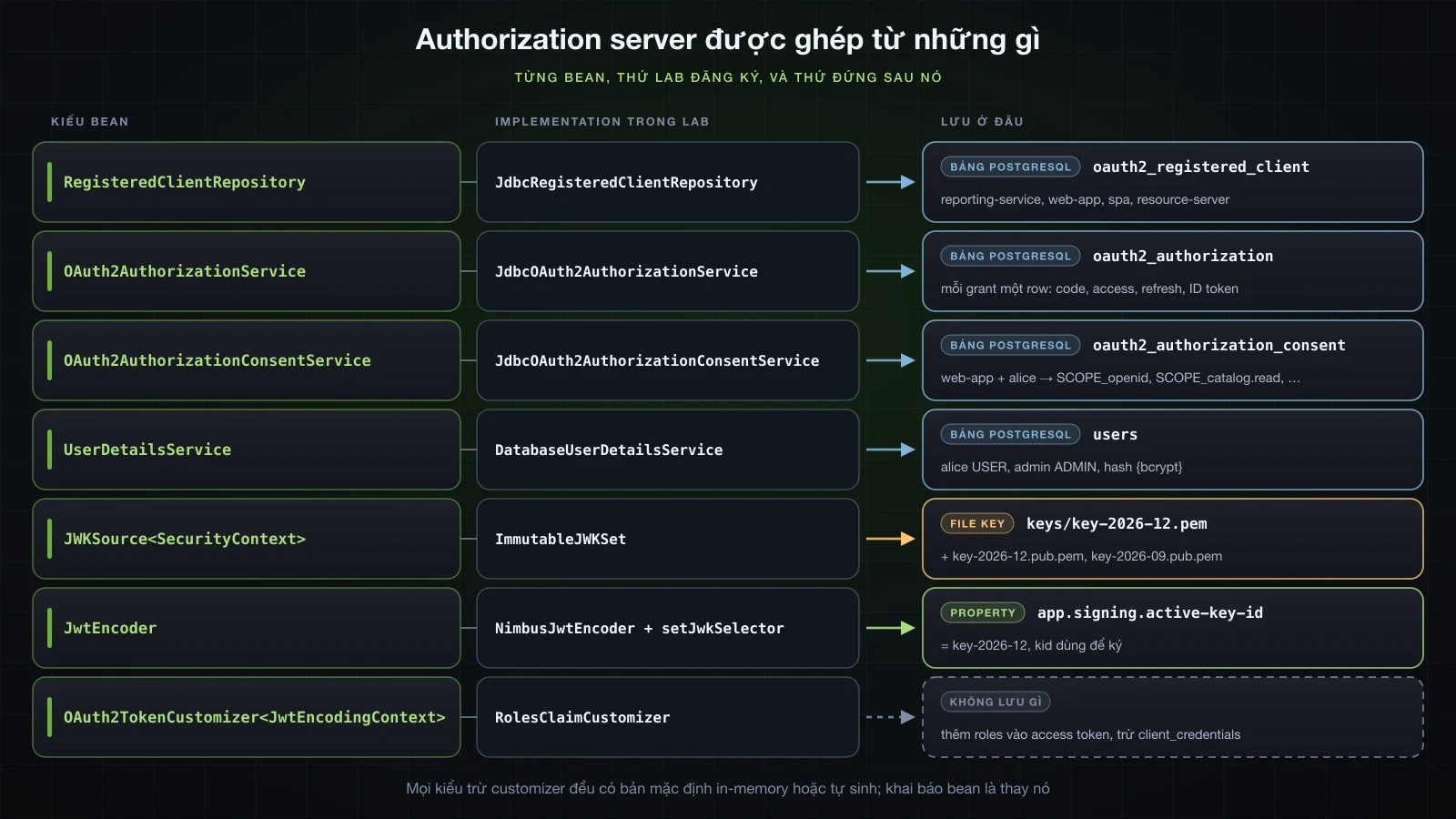
Spring Authorization Server từng là một project riêng với các phiên bản 1.x của nó. Trong BOM của Spring Boot 4.1.1 nó không còn version riêng: spring-security-oauth2-authorization-server là một trong 25 artifact mà spring-security-bom 7.1.1 quản lý, phát hành cùng phần còn lại của Spring Security. Java package không đổi, vẫn là org.springframework.security.oauth2.server.authorization, và jar vẫn mang theo ba schema script dùng ở phần sau. Thứ đã chuyển chỗ là DSL cấu hình: configurer giờ nằm trong spring-security-config với tên org.springframework.security.config.annotation.web.configurers.oauth2.server.authorization.OAuth2AuthorizationServerConfigurer, gọi qua HttpSecurity.oauth2AuthorizationServer(...), còn OAuth2AuthorizationServerConfiguration nằm ở org.springframework.security.config.annotation.web.configuration và không còn static method applyDefaultSecurity(http) mà các tutorial SAS 1.x hay gọi. Code chép từ những tutorial đó không compile được với 7.1.1.
Chọn starter nào: spring-boot-starter-security-oauth2-authorization-server
BOM của Boot 4.1.1 quản lý hai starter có tên gần như giống nhau:
| Artifact | Mô tả trong pom | Bên trong có gì |
|---|---|---|
spring-boot-starter-security-oauth2-authorization-server | Starter for using Spring Authorization Server features | các dependency bên dưới; đây là thứ Initializr sinh ra |
spring-boot-starter-oauth2-authorization-server | Starter for using Spring Authorization Server features (deprecated in favor of spring-boot-starter-security-oauth2-authorization-server) | đúng bốn dependency đó; jar chỉ chứa manifest, license và notice |
Project của lab được sinh từ Initializr với id oauth2-authorization-server, cùng những gì các phần sau cần:
curl -s "https://start.spring.io/starter.zip?type=gradle-project&language=java&bootVersion=4.1.1&javaVersion=21&groupId=com.example&artifactId=authserver&name=authserver&packageName=com.example.authserver&dependencies=web,security,oauth2-authorization-server,jdbc,postgresql,flyway" -o authserver.zipdependencies {
implementation 'org.springframework.boot:spring-boot-starter-flyway'
implementation 'org.springframework.boot:spring-boot-starter-jdbc'
implementation 'org.springframework.boot:spring-boot-starter-security'
implementation 'org.springframework.boot:spring-boot-starter-security-oauth2-authorization-server'
implementation 'org.springframework.boot:spring-boot-starter-webmvc'
implementation 'org.flywaydb:flyway-database-postgresql'
runtimeOnly 'org.postgresql:postgresql'
testImplementation 'org.springframework.boot:spring-boot-starter-flyway-test'
testImplementation 'org.springframework.boot:spring-boot-starter-jdbc-test'
testImplementation 'org.springframework.boot:spring-boot-starter-security-oauth2-authorization-server-test'
testImplementation 'org.springframework.boot:spring-boot-starter-security-test'
testImplementation 'org.springframework.boot:spring-boot-starter-webmvc-test'
testRuntimeOnly 'org.junit.platform:junit-platform-launcher'
}./gradlew dependencies --configuration runtimeClasspath+--- org.springframework.boot:spring-boot-starter-security-oauth2-authorization-server -> 4.1.1
| +--- org.springframework.boot:spring-boot-starter:4.1.1 (*)
| +--- org.springframework.boot:spring-boot-starter-security:4.1.1 (*)
| +--- org.springframework.boot:spring-boot-starter-webmvc:4.1.1
| \--- org.springframework.boot:spring-boot-security-oauth2-authorization-server:4.1.1
| +--- org.springframework.boot:spring-boot-security:4.1.1 (*)
| +--- org.springframework.boot:spring-boot:4.1.1 (*)
| \--- org.springframework.security:spring-security-oauth2-authorization-server:7.1.1
| +--- org.springframework.security:spring-security-web:7.1.1 (*)
| +--- org.springframework.security:spring-security-oauth2-core:7.1.1
| +--- org.springframework.security:spring-security-oauth2-jose:7.1.1
| | \--- com.nimbusds:nimbus-jose-jwt:10.9.1
| +--- org.springframework.security:spring-security-oauth2-resource-server:7.1.1
| +--- org.springframework:spring-core:7.0.9 (*)
| +--- com.nimbusds:nimbus-jose-jwt:10.9.1
| \--- tools.jackson.core:jackson-databind:3.2.1 -> 3.1.5 (*)spring-boot-security-oauth2-authorization-serverlà auto-configuration của Boot:OAuth2AuthorizationServerAutoConfigurationvàOAuth2AuthorizationServerJwtAutoConfiguration, cộng với các property bên dưới.spring-security-oauth2-resource-servercó mặt vì authorization server tự validate access token của chính nó ở/userinfo.jackson-databind:3.2.1 -> 3.1.5: module được build với Jackson 3.2.1, còn BOM của Boot ghim 3.1.5. Mọi thứ trong bài chạy trên 3.1.5, kể cả phần JSON mà các JDBC service lưu xuống.
Authorization server nhỏ nhất: registered client khai báo bằng property
Không cần dòng code nào, Boot dựng server từ spring.security.oauth2.authorizationserver.*. Ba client đủ cho các flow trong bài: một service gọi API với tư cách chính nó, một web application phía server cho người dùng đăng nhập, và một single-page application không có secret. Một người dùng đến từ các property spring.security.user.* quen thuộc.
server.port=8214

spring.security.user.name=alice
spring.security.user.password=Iua27v1PAG-AQ772BVq-TZts

spring.security.oauth2.authorizationserver.client.reporting-service.registration.client-id=reporting-service
spring.security.oauth2.authorizationserver.client.reporting-service.registration.client-secret={noop}YKEH82IfQ7fwVscNczMHPi-X
spring.security.oauth2.authorizationserver.client.reporting-service.registration.client-authentication-methods=client_secret_basic
spring.security.oauth2.authorizationserver.client.reporting-service.registration.authorization-grant-types=client_credentials
spring.security.oauth2.authorizationserver.client.reporting-service.registration.scopes=catalog.read

spring.security.oauth2.authorizationserver.client.web-app.registration.client-id=web-app
spring.security.oauth2.authorizationserver.client.web-app.registration.client-secret={noop}qPzyIVmf35_MSv6B67GLD6-i
spring.security.oauth2.authorizationserver.client.web-app.registration.client-authentication-methods=client_secret_basic
spring.security.oauth2.authorizationserver.client.web-app.registration.authorization-grant-types=authorization_code,refresh_token
spring.security.oauth2.authorizationserver.client.web-app.registration.redirect-uris=http://127.0.0.1:10214/login/oauth2/code/web-app
spring.security.oauth2.authorizationserver.client.web-app.registration.scopes=openid,profile,catalog.read,catalog.write
spring.security.oauth2.authorizationserver.client.web-app.require-authorization-consent=true

spring.security.oauth2.authorizationserver.client.spa.registration.client-id=spa
spring.security.oauth2.authorizationserver.client.spa.registration.client-authentication-methods=none
spring.security.oauth2.authorizationserver.client.spa.registration.authorization-grant-types=authorization_code
spring.security.oauth2.authorizationserver.client.spa.registration.redirect-uris=http://127.0.0.1:10214/spa/callback
spring.security.oauth2.authorizationserver.client.spa.registration.scopes=openid,catalog.readserver:
port: 8214
spring:
security:
user:
name: alice
password: Iua27v1PAG-AQ772BVq-TZts
oauth2:
authorizationserver:
client:
reporting-service:
registration:
client-id: reporting-service
client-secret: "{noop}YKEH82IfQ7fwVscNczMHPi-X"
client-authentication-methods: client_secret_basic
authorization-grant-types: client_credentials
scopes: catalog.read
web-app:
registration:
client-id: web-app
client-secret: "{noop}qPzyIVmf35_MSv6B67GLD6-i"
client-authentication-methods: client_secret_basic
authorization-grant-types: authorization_code,refresh_token
redirect-uris: http://127.0.0.1:10214/login/oauth2/code/web-app
scopes: openid,profile,catalog.read,catalog.write
require-authorization-consent: true
spa:
registration:
client-id: spa
client-authentication-methods: none
authorization-grant-types: authorization_code
redirect-uris: http://127.0.0.1:10214/spa/callback
scopes: openid,catalog.readCác dòng datasource cho PostgreSQL được lược bỏ; chưa có gì dùng database cho tới phần persistence. Redirect URI trỏ tới port 10214, nơi một client thật sẽ lắng nghe; curl chỉ đọc header Location và không bao giờ đi theo nó, nên ở đó không có gì chạy. {noop} báo cho DelegatingPasswordEncoder mặc định rằng secret được lưu dạng plain text, chấp nhận được cho một file lab và sẽ được thay bằng BCrypt hash ở phần sau.
Cây property, đọc từ metadata và bytecode của OAuth2AuthorizationServerProperties trong spring-boot-security-oauth2-authorization-server 4.1.1:
Property dưới spring.security.oauth2.authorizationserver. | Mặc định | Ghi chú |
|---|---|---|
issuer | không có | khi không đặt, được suy ra từ từng request; phần resource server cho thấy vì sao nên đặt |
client.<key>.registration.client-id, client-secret, client-name | không có | <key> chỉ là key của map |
client.<key>.registration.client-authentication-methods, authorization-grant-types, redirect-uris, post-logout-redirect-uris, scopes | không có | tập giá trị ngăn cách bằng dấu phẩy |
client.<key>.require-proof-key | true | PKCE cho mọi client, kể cả confidential client |
client.<key>.require-authorization-consent | false | true thì hiện trang consent |
client.<key>.jwk-set-uri, token-endpoint-authentication-signing-algorithm | không có | cho các client dùng private_key_jwt và client_secret_jwt |
client.<key>.token.access-token-time-to-live | 5 phút | authorization-code-time-to-live và device-code-time-to-live cũng là 5 phút |
client.<key>.token.access-token-format | self-contained | reference thì phát opaque token |
client.<key>.token.refresh-token-time-to-live, reuse-refresh-tokens | 60 phút, true | bài 15 |
client.<key>.token.id-token-signature-algorithm | RS256 | |
endpoint.* | /oauth2/authorize, /oauth2/token, … | mỗi đường dẫn endpoint một property |
multiple-issuers-allowed | không có | nhiều issuer trên cùng một host, phân biệt bằng path |
require-proof-key đáng xem kỹ hơn. Field này là một boolean thường, được constructor của OAuth2AuthorizationServerProperties$Client gán true, nên mọi client cấu hình theo cách này đều phải gửi PKCE. Một confidential client đăng ký mà không có property này, khi xin code mà không kèm code_challenge, bị trả về với error=invalid_request&error_description=OAuth%202.0%20Parameter%3A%20code_challenge. ClientSettings.builder() trong 7.1.1 cũng mặc định như vậy: settings của nó in ra settings.client.require-proof-key=true và settings.client.require-authorization-consent=false.
Server khởi động trong 1.5 giây. spring.security.user.* vẫn tạo người dùng in-memory, đúng như startup log báo (các đoạn log trong bài bỏ đi cột thời gian, level, process và thread):
r$InitializeUserDetailsManagerConfigurer : Global AuthenticationManager configured with UserDetailsService bean with name inMemoryUserDetailsManager
c.e.authserver.AuthserverApplication     : Started AuthserverApplication in 1.493 seconds (process running for 1.721)
Hai discovery document và các endpoint chúng công bố
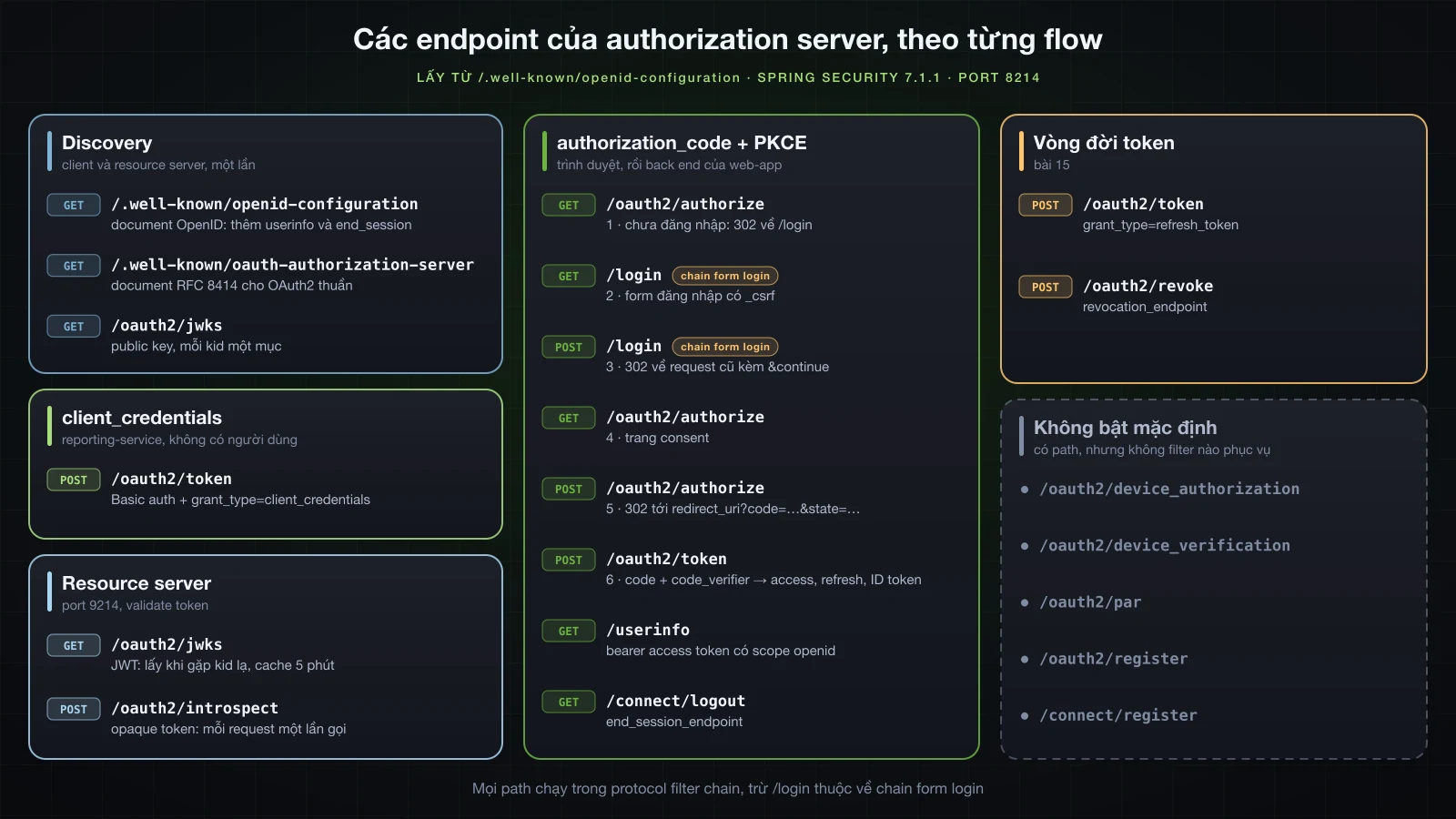
Server công bố hai metadata document, một cho OpenID Connect (OpenID Connect Discovery 1.0) và một cho OAuth2 thuần (RFC 8414):
curl -s http://localhost:8214/.well-known/openid-configuration | jq .{
"issuer": "http://localhost:8214",
"authorization_endpoint": "http://localhost:8214/oauth2/authorize",
"token_endpoint": "http://localhost:8214/oauth2/token",
"token_endpoint_auth_methods_supported": [
"client_secret_basic",
"client_secret_post",
"client_secret_jwt",
"private_key_jwt",
"tls_client_auth",
"self_signed_tls_client_auth"
],
"jwks_uri": "http://localhost:8214/oauth2/jwks",
"userinfo_endpoint": "http://localhost:8214/userinfo",
"end_session_endpoint": "http://localhost:8214/connect/logout",
"response_types_supported": [
"code"
],
"grant_types_supported": [
"authorization_code",
"client_credentials",
"refresh_token",
"urn:ietf:params:oauth:grant-type:token-exchange"
],
"revocation_endpoint": "http://localhost:8214/oauth2/revoke",
"revocation_endpoint_auth_methods_supported": [
"client_secret_basic",
"client_secret_post",
"client_secret_jwt",
"private_key_jwt",
"tls_client_auth",
"self_signed_tls_client_auth"
],
"introspection_endpoint": "http://localhost:8214/oauth2/introspect",
"introspection_endpoint_auth_methods_supported": [
"client_secret_basic",
"client_secret_post",
"client_secret_jwt",
"private_key_jwt",
"tls_client_auth",
"self_signed_tls_client_auth"
],
"code_challenge_methods_supported": [
"S256"
],
"tls_client_certificate_bound_access_tokens": true,
"dpop_signing_alg_values_supported": [
"RS256",
"RS384",
"RS512",
"PS256",
"PS384",
"PS512",
"ES256",
"ES384",
"ES512"
],
"subject_types_supported": [
"public"
],
"id_token_signing_alg_values_supported": [
"RS256"
],
"scopes_supported": [
"openid"
]
}/.well-known/oauth-authorization-server trả về đúng các member đó cho tới dpop_signing_alg_values_supported và không có member nào trong năm member của OpenID: userinfo_endpoint, end_session_endpoint, subject_types_supported, id_token_signing_alg_values_supported và scopes_supported. Resource server ở phần sau của bài, cấu hình bằng issuer-uri, lấy /.well-known/openid-configuration một lần rồi lấy JWKS.
| Endpoint | Được công bố dưới tên | Ai gọi nó |
|---|---|---|
/oauth2/authorize | authorization_endpoint | trình duyệt, trong flow authorization_code |
/oauth2/token | token_endpoint | mọi client, cho mọi grant |
/oauth2/jwks | jwks_uri | resource server verify JWT |
/oauth2/introspect | introspection_endpoint | resource server nhận opaque token |
/oauth2/revoke | revocation_endpoint | client (bài 15) |
/userinfo | userinfo_endpoint, chỉ có trong document OpenID | client đang giữ access token có openid |
/connect/logout | end_session_endpoint, chỉ có trong document OpenID | logout do client khởi xướng (RP-initiated logout) |
/oauth2/device_authorization, /oauth2/device_verification | không công bố | không bật |
/oauth2/par | không công bố | không bật |
/connect/register, /oauth2/register | không công bố | không bật |
Ba dòng cuối có đường dẫn trong AuthorizationServerSettings, nhưng không filter nào phục vụ chúng. Bytecode của OAuth2AuthorizationServerConfigurer.createConfigurers() trong spring-security-config 7.1.1 mặc định chỉ tạo sáu configurer: client authentication, metadata endpoint, và các endpoint authorization, token, introspection, revocation. Device flow, pushed authorization request và dynamic client registration mỗi thứ cần một lời gọi riêng trên configurer (deviceAuthorizationEndpoint(...), deviceVerificationEndpoint(...), pushedAuthorizationRequestEndpoint(...), clientRegistrationEndpoint(...)), và grant_types_supported không liệt kê device_code. Token exchange (RFC 8693) được công bố sẵn.
Hai filter chain Spring Boot dựng sẵn
Với logging.level.org.springframework.security.web.DefaultSecurityFilterChain=DEBUG, startup log liệt kê hai chain:
o.s.s.web.DefaultSecurityFilterChain     : Will secure org.springframework.security.config.annotation.web.configurers.oauth2.server.authorization.OAuth2AuthorizationServerConfigurer$$Lambda/0x0000007001567dc0@5df2023c with filters: DisableEncodeUrlFilter, WebAsyncManagerIntegrationFilter, SecurityContextHolderFilter, AuthorizationServerContextFilter, HeaderWriterFilter, CsrfFilter, OidcLogoutEndpointFilter, LogoutFilter, OAuth2AuthorizationServerMetadataEndpointFilter, OAuth2AuthorizationCodeRequestValidatingFilter, OidcProviderConfigurationEndpointFilter, NimbusJwkSetEndpointFilter, OAuth2ProtectedResourceMetadataFilter, OAuth2ClientAuthenticationFilter, BearerTokenAuthenticationFilter, RequestCacheAwareFilter, SecurityContextHolderAwareRequestFilter, AnonymousAuthenticationFilter, ExceptionTranslationFilter, AuthorizationFilter, OAuth2AuthorizationEndpointFilter, OAuth2TokenEndpointFilter, OAuth2TokenIntrospectionEndpointFilter, OAuth2TokenRevocationEndpointFilter, OidcUserInfoEndpointFilter
o.s.s.web.DefaultSecurityFilterChain     : Will secure any request with filters: DisableEncodeUrlFilter, WebAsyncManagerIntegrationFilter, SecurityContextHolderFilter, HeaderWriterFilter, CsrfFilter, LogoutFilter, UsernamePasswordAuthenticationFilter, DefaultResourcesFilter, DefaultLoginPageGeneratingFilter, DefaultLogoutPageGeneratingFilter, RequestCacheAwareFilter, SecurityContextHolderAwareRequestFilter, AnonymousAuthenticationFilter, ExceptionTranslationFilter, AuthorizationFilter
Cả hai đến từ OAuth2AuthorizationServerWebSecurityConfiguration trong module của Boot, chỉ có hiệu lực khi ứng dụng không tự khai báo SecurityFilterChain nào và đã có RegisteredClientRepository cùng AuthorizationServerSettings:
authorizationServerSecurityFilterChain,@Order(-2147483648)(Ordered.HIGHEST_PRECEDENCE), chỉ match các protocol endpoint quagetEndpointsMatcher(). Chain này bật OpenID Connect, đòi authentication cho mọi thứ không public, validate bearer token cho/userinfo, và đẩy các request HTML chưa đăng nhập về/login.defaultSecurityFilterChain,@Order(2147483642), match mọi thứ còn lại và cung cấp form login. Trang/loginvà session ghi nhớ người dùng giữa các bước của một flow thuộc về chain này.
Điều kiện HTML là chính xác. Cùng một authorization request, có và không có header Accept của trình duyệt:
curl -i -s "$AUTH_URL"
curl -i -s -H 'Accept: text/html' "$AUTH_URL"HTTP/1.1 401
Set-Cookie: JSESSIONID=CD47F99D93181EE8206D168853C54FC8; Path=/; HttpOnly
WWW-Authenticate: Bearer resource_metadata="http://localhost:8214/.well-known/oauth-protected-resource"
Content-Length: 0
HTTP/1.1 302
Set-Cookie: JSESSIONID=F62DAB9F49A1CCA1F1C9CC51051B16B4; Path=/; HttpOnly
Location: http://localhost:8214/login
Content-Length: 0Accept: */* mặc định của curl không được tính là HTML: matcher của Boot là một MediaTypeRequestMatcher cho text/html và bỏ qua MediaType.ALL. Vì vậy mọi lệnh curl đóng vai trình duyệt bên dưới đều gửi -H 'Accept: text/html'. Từ đây chỉ trích những header có ý nghĩa; các header còn lại là bộ quen thuộc X-Content-Type-Options, Cache-Control, X-Frame-Options và Date.
Tự khai báo các bean SecurityFilterChain
Ngay khi ứng dụng khai báo bất kỳ SecurityFilterChain nào, cả hai chain của Boot đều lùi lại, nên phải thay cả cặp. Đây là cấu hình của Boot viết ra bằng DSL của 7.1.1, thêm một dòng cho /error mà phần lỗi sẽ giải thích:
package com.example.authserver.security;

import java.util.Set;
import org.springframework.context.annotation.Bean;
import org.springframework.context.annotation.Configuration;
import org.springframework.core.annotation.Order;
import org.springframework.http.MediaType;
import org.springframework.security.config.Customizer;
import org.springframework.security.config.annotation.web.builders.HttpSecurity;
import org.springframework.security.web.SecurityFilterChain;
import org.springframework.security.web.authentication.LoginUrlAuthenticationEntryPoint;
import org.springframework.security.web.util.matcher.MediaTypeRequestMatcher;

@Configuration
public class SecurityConfig {

    @Bean
    @Order(1)
    SecurityFilterChain authorizationServerSecurityFilterChain(HttpSecurity http) {
        http
                .oauth2AuthorizationServer(authorizationServer -> {
                    http.securityMatcher(authorizationServer.getEndpointsMatcher());
                    authorizationServer.oidc(Customizer.withDefaults());
                })
                .authorizeHttpRequests(auth -> auth.anyRequest().authenticated())
                .oauth2ResourceServer(resourceServer -> resourceServer.jwt(Customizer.withDefaults()))
                .exceptionHandling(exceptions -> exceptions.defaultAuthenticationEntryPointFor(
                        new LoginUrlAuthenticationEntryPoint("/login"), htmlPages()));
        return http.build();
    }

    @Bean
    @Order(2)
    SecurityFilterChain defaultSecurityFilterChain(HttpSecurity http) {
        http
                .authorizeHttpRequests(auth -> auth
                        .requestMatchers("/error").permitAll()
                        .anyRequest().authenticated())
                .formLogin(Customizer.withDefaults());
        return http.build();
    }

    private static MediaTypeRequestMatcher htmlPages() {
        MediaTypeRequestMatcher matcher = new MediaTypeRequestMatcher(MediaType.TEXT_HTML);
        matcher.setIgnoredMediaTypes(Set.of(MediaType.ALL));
        return matcher;
    }
}
Danh sách filter in ra lúc khởi động giống hệt của Boot, từng filter một. Sau đó từng dòng lần lượt bị bỏ hoặc sửa, mỗi lần build lại ứng dụng:
| Thay đổi | Chuyện gì xảy ra |
|---|---|
đổi chỗ hai giá trị @Order | khởi động thất bại với UnreachableFilterChainException (trích bên dưới) |
bỏ cả hai annotation @Order | vẫn chạy, vì các bean giữ thứ tự khai báo; đừng dựa vào điều đó |
bỏ exceptionHandling(...) | request của trình duyệt tới /oauth2/authorize nhận 401 với body rỗng và không có WWW-Authenticate: một trang trắng thay vì form login |
bỏ authorizationServer.oidc(...) | OidcLogoutEndpointFilter, OidcProviderConfigurationEndpointFilter và OidcUserInfoEndpointFilter biến khỏi chain; /.well-known/openid-configuration trả 302 về /login; request có scope=openid bị redirect với error=invalid_scope&error_description=OpenID%20Connect%201.0%20authentication%20requests%20are%20restricted. |
bỏ oauth2ResourceServer(...) | không có gì thay đổi: danh sách filter vẫn có BearerTokenAuthenticationFilter và /userinfo trả 200 với {"sub":"alice"}. Trong 7.1.1, OIDC configurer tự bật bearer token cho endpoint của nó; Boot vẫn giữ dòng này, và cấu hình này cũng vậy |
Exception khi đổi chỗ hai order, với hai danh sách filter rút gọn thành […]:
Caused by: org.springframework.security.web.UnreachableFilterChainException: A filter chain that matches any request [DefaultSecurityFilterChain defined as 'defaultSecurityFilterChain' in [class path resource [com/example/authserver/security/SecurityConfig.class]] matching [any request] and having filters […]] has already been configured, which means that this filter chain [DefaultSecurityFilterChain defined as 'authorizationServerSecurityFilterChain' in [class path resource [com/example/authserver/security/SecurityConfig.class]] matching [org.springframework.security.config.annotation.web.configurers.oauth2.server.authorization.OAuth2AuthorizationServerConfigurer$$Lambda/0x0000008801440870@31aab981] and having filters […]] will never get invoked. Please use `HttpSecurity#securityMatcher` to ensure that there is only one filter chain configured for 'any request' and that the 'any requestChạy các flow bằng curl
client_credentials: token cho một service
curl -i -s -u reporting-service:YKEH82IfQ7fwVscNczMHPi-X -d grant_type=client_credentials -d scope=catalog.read http://localhost:8214/oauth2/tokenHTTP/1.1 200
Content-Type: application/json;charset=UTF-8
Content-Length: 777
{"access_token":"eyJraWQiOiIyNjczMTA3Zi1lNTI4LTRkNjEtOTIxNC1lNzQwMTY5ODRkOGIiLCJhbGciOiJSUzI1NiJ9.eyJzdWIiOiJyZXBvcnRpbmctc2VydmljZSIsImF1ZCI6InJlcG9ydGluZy1zZXJ2aWNlIiwibmJmIjoxNzg5NzE1NTE0LCJzY29wZSI6WyJjYXRhbG9nLnJlYWQiXSwiaXNzIjoiaHR0cDovL2xvY2FsaG9zdDo4MjE0IiwiZXhwIjoxNzg5NzE1ODE0LCJpYXQiOjE3ODk3MTU1MTQsImp0aSI6ImEyY2E3ZmQ4LTE2NmItNDY3Yi1hNGQ2LTM4MWU4NWM2YzI3NyJ9.ArjlsLCMyXdMLDyduV66Nk1bROJIfuYnm4Eac2wpgqq3bqb23cfvkxcHaiogRmv6wMzYkm2FQUB3ULrxkN7vl5BJE-V5lDWYTNqQGJP642RBjDhKC3b8__jwBpOiGxdtnqTfD2xw4Lq2OwArvmMLT8iPh5Q5Rz1rFFp8WLsx1kLTMWJLElH4eWkGvaery5nMyXxTtiOO31FmyvFT12-rIeCjF4sUOaG1SIxzVAjhysU_dtexBXQHy-87dKPExAB7NwA6gF3fbD0UStQcUNkFufFmVrFYr8kJxKnIC0is3ecTmjBX_-wN2UrPJnvNKgqvhr7tsg9cf78d8MQPxVboFA","scope":"catalog.read","token_type":"Bearer","expires_in":299}Giải mã bằng function b64url_decode của bài Basics 35:
{
  "kid": "2673107f-e528-4d61-9214-e74016984d8b",
  "alg": "RS256"
}{
"sub": "reporting-service",
"aud": "reporting-service",
"nbf": 1789715514,
"scope": [
"catalog.read"
],
"iss": "http://localhost:8214",
"exp": 1789715814,
"iat": 1789715514,
"jti": "a2ca7fd8-166b-467b-a4d6-381e85c6c277"
}kidlà một UUID ngẫu nhiên, không phải RFC 7638 thumbprint như bài Basics 35, và header không cótyp.subvàaudđều là client id: grant này không có người dùng.scopelà một JSON array trong token và là một chuỗi cách nhau bằng dấu cách trong response.JwtGrantedAuthoritiesConvertercủa bài Basics 35 đọc được cả hai dạng.exp−iat= 300: access token mặc định sống 5 phút;expires_inbáo 299 vì đã sang giây tiếp theo.jticho mỗi token một id riêng.
Key đứng sau kid, lấy từ jwks_uri:
curl -s http://localhost:8214/oauth2/jwks | jq .{
"keys": [
{
"kty": "RSA",
"e": "AQAB",
"kid": "2673107f-e528-4d61-9214-e74016984d8b",
"n": "u3CK1Dh65ee5jjU-WsN8YdTC-UKh6cwWhImm9j8KHFTq0blTB-0qtipDbHoWmiImekafNM130fClzDqEii6coBiWNXKN_nPCoD7naP_USiN264KDBOZ4R0HBa4ScwKHiua_TJDReFxxDq0h6BOxwdpODTuzNalRp2SDrzNb4gRdIeiajJYYC0V6wo4BYlxaKUQR0zhkH2F1l2Zn6wKFESeV2f3YcIPaSadJRcCNfm-0wi9ADTieirXkKGbfwg8448wO94xL4mWgHhFg0dYCsb6PbCeWxr3EJtIMlPIJLSVJNhrHTa9DunSZst5kvpgO0cxMaRVq6cwnoDDhP2sSYSQ"
}
]
}authorization_code với PKCE, từng bước một
Bài 13 đã giải thích mỗi bước của flow này để làm gì; ở đây mỗi bước là một lệnh curl chạy với server này, với một cookie jar đóng vai trình duyệt. Cặp giá trị PKCE:
VERIFIER=$(openssl rand 32 | b64url)
CHALLENGE=$(printf '%s' "$VERIFIER" | openssl dgst -sha256 -binary | b64url)
AUTH_URL="http://localhost:8214/oauth2/authorize?response_type=code&client_id=web-app&redirect_uri=http://127.0.0.1:10214/login/oauth2/code/web-app&scope=openid%20profile%20catalog.read&state=af0ifjsldkj&code_challenge=$CHALLENGE&code_challenge_method=S256"verifier=MomTxxPZjSh15C6IONsnNzDCk5eqo2gAGspUS95oKi8 challenge=If9Ga0pCXRVHixVYqJJHGCC6hsjkIEkQzwof5bIsZckBước 1, authorization request, trả 302 về /login, như đã thấy ở phần filter chain. Bước 2, form login: GET /login trả trang "Please sign in" mặc định với một field ẩn _csrf, vì chain form login vẫn giữ CSRF protection. Bước 3, đăng nhập:
curl -i -s -c cj.txt -b cj.txt -H 'Accept: text/html' --data-urlencode username=alice --data-urlencode password=Iua27v1PAG-AQ772BVq-TZts --data-urlencode "_csrf=$CSRF" http://localhost:8214/loginHTTP/1.1 302
Set-Cookie: JSESSIONID=225161ECABA7AF8C8927FEAB7CBE8C4F; Path=/; HttpOnly
Location: http://localhost:8214/oauth2/authorize?response_type=code&client_id=web-app&redirect_uri=http://127.0.0.1:10214/login/oauth2/code/web-app&scope=openid%20profile%20catalog.read&state=af0ifjsldkj&code_challenge=If9Ga0pCXRVHixVYqJJHGCC6hsjkIEkQzwof5bIsZck&code_challenge_method=S256&continueRequest cache phát lại authorization request ban đầu với &continue gắn thêm, và session id đổi khi đăng nhập. Bước 4, trang consent, trả 200 với 2660 byte HTML; form của nó, mỗi element một dòng:
<title>Consent required</title>
<span class="font-weight-bold text-primary">web-app</span> wants to access your account <span class="font-weight-bold">alice</span>
<form name="consent_form" method="post" action="/oauth2/authorize">
<input type="hidden" name="client_id" value="web-app">
<input type="hidden" name="state" value="xOh7ENUuYNFP8bvm0QgN1c8xL8nOiOc5mJl6rk2D0QY=">
<input class="form-check-input" type="checkbox" name="scope" value="profile" id="profile">
<input class="form-check-input" type="checkbox" name="scope" value="catalog.read" id="catalog.read">
<button class="btn btn-primary btn-lg" type="submit" id="submit-consent">Submit Consent</button>
<button class="btn btn-link regular" type="button" onclick="cancelConsent();" id="cancel-consent">Cancel</button>
openid không phải một checkbox: nó được cấp mà không cần hỏi. state trong form là consent state riêng của server, không phải af0ifjsldkj của client, và trang này tải Bootstrap từ stackpath.bootstrapcdn.com, nên server production thường cung cấp trang riêng qua authorizationEndpoint(endpoint -> endpoint.consentPage("/consent")). Bước 5, consent, không cần CSRF token vì chain protocol bỏ qua CSRF trên các endpoint của nó:
curl -i -s -c cj.txt -b cj.txt -H 'Accept: text/html' --data-urlencode client_id=web-app --data-urlencode "state=$CONSENT_STATE" --data-urlencode scope=profile --data-urlencode scope=catalog.read http://localhost:8214/oauth2/authorizeHTTP/1.1 302
Location: http://127.0.0.1:10214/login/oauth2/code/web-app?code=k2yC0IY8_3dDLktaDiSfe4FnkoCHgaXFB6aWKU-v5w7OKeU25PPVkpmsLuCrX6iFbIZBatgnF_M4fmsWfBwcnG9d9xtVcmW_5ey_tp_IgUxL1YqhkQjXhdygrNP6JmjB&state=af0ifjsldkjBước 6, đổi code lấy token, từ back end của client, kèm secret và verifier:
curl -i -s -u web-app:qPzyIVmf35_MSv6B67GLD6-i -d grant_type=authorization_code --data-urlencode "code=$CODE" --data-urlencode redirect_uri=http://127.0.0.1:10214/login/oauth2/code/web-app --data-urlencode "code_verifier=$VERIFIER" http://localhost:8214/oauth2/tokenHTTP/1.1 200
Content-Type: application/json;charset=UTF-8
Content-Length: 1681
{"access_token":"eyJraWQiOiIyNjczMTA3Zi1lNTI4LTRkNjEtOTIxNC1lNzQwMTY5ODRkOGIiLCJhbGciOiJSUzI1NiJ9.eyJzdWIiOiJhbGljZSIsImF1ZCI6IndlYi1hcHAiLCJuYmYiOjE3ODk3MTU1NjIsInNjb3BlIjpbIm9wZW5pZCIsInByb2ZpbGUiLCJjYXRhbG9nLnJlYWQiXSwiaXNzIjoiaHR0cDovL2xvY2FsaG9zdDo4MjE0IiwiZXhwIjoxNzg5NzE1ODYyLCJpYXQiOjE3ODk3MTU1NjIsImp0aSI6IjY0NjgzZTNkLWJmMGEtNGRlMi04NTlmLTM1OGRjZTg2ZTQ3NSJ9.fAbDNACG-2ZqVRJYNrf6TP3y6LA6AbB6MvpR8OMu6cyJxcJ_9R-0zDX2F5D5A5CCigPx4n2dXDDe8R_26mtBES6KN8qyyf7eaaQCuspomzYtZvOKpgYoZBdhHp52tZc95Y9pnNd1e55_k5FZBP3bSBqcpeK-1jr-f2MIMZl6Ppu12Jz8RSrO9O7sRB8R-brn1xd8jZXywg1dfOoWw6yAdmXGytljtaZvBQrzNQAov9MiYVEEBY6Mi-Xvjm1hDTeyd76OYkBwZxunXZSce_QcKbZU3KL3vQMGdrzyh9_COLHRtNQUcAFAnKO5PCnfIOg5pGoaGygFa9OhW_W5gecbJw","refresh_token":"1hd0aIfRyBexuv_NAz1Uj5dbvw6JMdPm6Bn14hZ8GkSjgTb4UwaXoI8eXSB6ONTcmNuByR14RhVnsnhuihrSHeJeJrwocboFsBwFOi67xx5TDd1_9Sv-6jBUSLTuwYBb","scope":"openid profile catalog.read","id_token":"eyJraWQiOiIyNjczMTA3Zi1lNTI4LTRkNjEtOTIxNC1lNzQwMTY5ODRkOGIiLCJhbGciOiJSUzI1NiJ9.eyJzdWIiOiJhbGljZSIsImF1ZCI6IndlYi1hcHAiLCJhenAiOiJ3ZWItYXBwIiwiYXV0aF90aW1lIjoxNzg5NzE1NTQzLCJpc3MiOiJodHRwOi8vbG9jYWxob3N0OjgyMTQiLCJleHAiOjE3ODk3MTczNjIsImlhdCI6MTc4OTcxNTU2MiwianRpIjoiNzg2ZmE3ZmYtZDMwNS00MjEyLWI5ODEtMTllNjZlMzNmYzYzIiwic2lkIjoibEluTXdqQTJOcFNweE1KMXRpaC1WM1V6cnNOOEktY3JsV0FxcEFtTVBTayJ9.kFkaqeeQBhDF1uTnZRWAW8ZNZ3qrJDq9EFxFYOcRPdBxq9v_5Am48WDsyvFnUiUIuK57QwuqEs-87OyygDeYdx5hr6qJVXki34W6Uo2zoDZEqM2aGYoPHRKrquUUfO1NVD2P3pDMXjUyRXwue6vJtPzEnK94rzl2mAQuKNt3WVPZAe0MnJV-Nt2c0a4SdxFLzMQSFxoDEMN4qjRiOlhW9vNQ__ULFkov3TjLdJNmLItRoBB5QjRaCGsM2wRkTbGBAT9KxnZxVIjVbI_zJj2fv7ZmwkfDlh5RbTk5kiBl4RmkaK3_h7QIN5-iqh9NJZt2iWraBmbGsMxN1oEuF_DE9Q","token_type":"Bearer","expires_in":299}Access token mang "sub":"alice", "aud":"web-app" và "scope":["openid","profile","catalog.read"]. ID token sau khi giải mã:
{
  "sub": "alice",
  "aud": "web-app",
  "azp": "web-app",
  "auth_time": 1789715543,
  "iss": "http://localhost:8214",
  "exp": 1789717362,
  "iat": 1789715562,
  "jti": "786fa7ff-d305-4212-b981-19e66e33fc63",
  "sid": "lInMwjA2NpSpxMJ1tih-V3UzrsN8I-crlWAqpAmMPSk"
}
ID token sống 30 phút (exp − iat = 1800), auth_time là thời điểm đăng nhập ở bước 3, và nó không có nonce vì request không gửi. Vì web-app có grant refresh_token, response còn chứa một refresh token opaque dài 128 ký tự; bài 15 nói về việc refresh, rotate và revoke nó.
Các lỗi, kèm body thật
Sai client secret, và một client không tồn tại, nhận cùng một câu trả lời:
HTTP/1.1 401
Content-Type: application/json;charset=UTF-8
Content-Length: 26

{"error":"invalid_client"}
Không có header WWW-Authenticate, dù client xác thực bằng HTTP Basic, và không có gì cho người gọi biết client id có tồn tại hay không. Một scope mà client không được đăng ký, -d scope=catalog.write cho reporting-service, nhận 400 với {"error":"invalid_scope"}.
Một redirect_uri chưa đăng ký không bao giờ được dẫn tới một redirect, vì cả ý nghĩa của việc đăng ký là server không gửi code cho người lạ. Với các chain mặc định của Boot, vốn không có rule nào cho /error, một trình duyệt chưa đăng nhập nhận được:
curl -i -s -H 'Accept: text/html' "http://localhost:8214/oauth2/authorize?response_type=code&client_id=web-app&redirect_uri=https://evil.example/callback&scope=openid&state=s1&code_challenge=$CHALLENGE&code_challenge_method=S256"HTTP/1.1 302
Set-Cookie: JSESSIONID=0D1C82FC1C1A6072CE68E5382738BA8D; Path=/; HttpOnly
Location: http://localhost:8214/login;jsessionid=0D1C82FC1C1A6072CE68E5382738BA8DLần chạy thứ hai với logging.level.org.springframework.security=DEBUG cho thấy lý do: request bị từ chối trước mọi bước đăng nhập, rồi error dispatch đi qua chain form login với tư cách anonymous user, chain này lưu /error vào request cache và đưa người dùng tới trang login.
o.s.security.web.FilterChainProxy        : Securing GET /oauth2/authorize?response_type=code&client_id=web-app&redirect_uri=https://evil.example/callback&scope=openid&state=s1&code_challenge=If9Ga0pCXRVHixVYqJJHGCC6hsjkIEkQzwof5bIsZck&code_challenge_method=S256
o.s.security.web.FilterChainProxy        : Securing GET /error?response_type=code&client_id=web-app&redirect_uri=https://evil.example/callback&scope=openid&state=s1&code_challenge=If9Ga0pCXRVHixVYqJJHGCC6hsjkIEkQzwof5bIsZck&code_challenge_method=S256
o.s.s.w.a.AnonymousAuthenticationFilter  : Set SecurityContextHolder to anonymous SecurityContext
o.s.s.w.s.HttpSessionRequestCache        : Saved request http://localhost:8214/error?response_type=code&client_id=web-app&redirect_uri=https://evil.example/callback&scope=openid&state=s1&code_challenge=If9Ga0pCXRVHixVYqJJHGCC6hsjkIEkQzwof5bIsZck&code_challenge_method=S256&continue to session
o.s.s.web.DefaultRedirectStrategy        : Redirecting to /login;jsessionid=D4373069EB50645E355F81CA69B3FB2E
Đây là cái bẫy bài Basics 33 đã gặp với HTTP Basic, và chain mặc định của Boot cũng dính. Với requestMatchers("/error").permitAll(), cùng request đó trả về đúng lỗi thật:
HTTP/1.1 400
Content-Type: text/html;charset=UTF-8
Content-Length: 277

<html><body><h1>Whitelabel Error Page</h1><p>This application has no explicit mapping for /error, so you are seeing this as a fallback.</p><div id='created'>Fri Sep 18 14:18:55 ICT 2026</div><div>There was an unexpected error (type=Bad Request, status=400).</div></body></html>
Với Accept: application/json, body là {"timestamp":"2026-09-18T07:19:01.511Z","status":400,"error":"Bad Request","path":"/oauth2/authorize"} của Boot. Cả hai đều không có mã lỗi OAuth2: server không đủ tin redirect URI để đặt mã lỗi vào đó, nên người dùng thấy trang lỗi của chính server.
Một public client không dùng PKCE được redirect về URI đã đăng ký của nó với lỗi nằm trong query string, vì URI đó đáng tin:
curl -i -s -H 'Accept: text/html' "http://localhost:8214/oauth2/authorize?response_type=code&client_id=spa&redirect_uri=http://127.0.0.1:10214/spa/callback&scope=openid%20catalog.read&state=s2"HTTP/1.1 302
Location: http://127.0.0.1:10214/spa/callback?error=invalid_request&error_description=OAuth%202.0%20Parameter%3A%20code_challenge&error_uri=https%3A%2F%2Fdatatracker.ietf.org%2Fdoc%2Fhtml%2Frfc7636%23section-4.4.1&state=s2code_challenge_method=plain nhận cùng kiểu redirect với OAuth%202.0%20Parameter%3A%20code_challenge_method: chỉ S256 được chấp nhận, đúng như discovery document nói. Một public client đăng ký mà không có require-proof-key cũng bị từ chối y như vậy; với client không có secret, PKCE không phải tuỳ chọn.
Dùng lại authorization code, gửi lần thứ hai y hệt bước 6:
HTTP/1.1 400
Content-Type: application/json;charset=UTF-8
Content-Length: 25
Connection: close

{"error":"invalid_grant"}
Server còn vô hiệu hoá những gì lần đổi đầu tiên đã phát, đúng như RFC 6749 mục 4.1.2 khuyến nghị: introspect access token đầu tiên giờ trả {"active":false}. Một resource server validate JWT tại chỗ sẽ không bao giờ biết điều này. Ở lần chạy sau trên PostgreSQL, cùng thí nghiệm cho 400 invalid_grant, {"active":false} từ introspection, và vẫn 200 từ resource server dùng JWT cho token đã bị vô hiệu hoá; bài 15 xử lý những token phải ngừng hoạt động trước khi hết hạn.
Resource server cho các token này
Resource server là cấu hình của bài Basics 35 trỏ sang issuer mới: một project từ Initializr với web,oauth2-resource-server, cùng mapping roles, và body ProblemDetail từ handler của bài Basics 35.
server.port=9214
spring.security.oauth2.resourceserver.jwt.issuer-uri=http://localhost:8214
spring.security.oauth2.resourceserver.jwt.authorities-claim-name=roles
spring.security.oauth2.resourceserver.jwt.authority-prefix=ROLE_server:
port: 9214
spring:
security:
oauth2:
resourceserver:
jwt:
issuer-uri: http://localhost:8214
authorities-claim-name: roles
authority-prefix: ROLE_package com.example.resourceserver.common;
import org.springframework.context.annotation.Bean;
import org.springframework.context.annotation.Configuration;
import org.springframework.security.config.Customizer;
import org.springframework.security.config.annotation.web.builders.HttpSecurity;
import org.springframework.security.config.http.SessionCreationPolicy;
import org.springframework.security.web.SecurityFilterChain;
@Configuration
public class SecurityConfig {
@Bean
SecurityFilterChain apiSecurityFilterChain(HttpSecurity http, ProblemDetailSecurityHandler problemHandler) {
http
.securityMatcher("/api/**")
.authorizeHttpRequests(auth -> auth
.requestMatchers("/api/admin/**").hasRole("ADMIN")
.anyRequest().authenticated())
.oauth2ResourceServer(oauth2 -> oauth2
.jwt(Customizer.withDefaults())
.authenticationEntryPoint(problemHandler)
.accessDeniedHandler(problemHandler))
.exceptionHandling(exceptions -> exceptions
.authenticationEntryPoint(problemHandler)
.accessDeniedHandler(problemHandler))
.csrf(csrf -> csrf.disable())
.sessionManagement(session -> session.sessionCreationPolicy(SessionCreationPolicy.STATELESS));
return http.build();
}
}Handler là của bài Basics 35, giờ nhánh 403 cũng uỷ quyền cho Bearer handler của Spring Security để nó ghi WWW-Authenticate với insufficient_scope:
package com.example.resourceserver.common;

import jakarta.servlet.http.HttpServletRequest;
import jakarta.servlet.http.HttpServletResponse;
import java.io.IOException;
import java.net.URI;
import org.springframework.http.HttpStatus;
import org.springframework.http.MediaType;
import org.springframework.http.ProblemDetail;
import org.springframework.security.access.AccessDeniedException;
import org.springframework.security.core.AuthenticationException;
import org.springframework.security.oauth2.server.resource.web.BearerTokenAuthenticationEntryPoint;
import org.springframework.security.oauth2.server.resource.web.access.BearerTokenAccessDeniedHandler;
import org.springframework.security.web.AuthenticationEntryPoint;
import org.springframework.security.web.access.AccessDeniedHandler;
import org.springframework.stereotype.Component;
import tools.jackson.databind.json.JsonMapper;

@Component
public class ProblemDetailSecurityHandler implements AuthenticationEntryPoint, AccessDeniedHandler {

    private final JsonMapper jsonMapper;
    private final BearerTokenAuthenticationEntryPoint bearerEntryPoint = new BearerTokenAuthenticationEntryPoint();
    private final BearerTokenAccessDeniedHandler bearerDeniedHandler = new BearerTokenAccessDeniedHandler();

    public ProblemDetailSecurityHandler(JsonMapper jsonMapper) {
        this.jsonMapper = jsonMapper;
        this.bearerEntryPoint.setRealmName("catalogue");
        this.bearerDeniedHandler.setRealmName("catalogue");
    }

    @Override
    public void commence(HttpServletRequest request, HttpServletResponse response,
                         AuthenticationException ex) throws IOException {
        bearerEntryPoint.commence(request, response, ex);
        write(request, response, "Valid credentials are required to access this resource.");
    }

    @Override
    public void handle(HttpServletRequest request, HttpServletResponse response,
                       AccessDeniedException ex) throws IOException {
        bearerDeniedHandler.handle(request, response, ex);
        write(request, response, "You are not allowed to perform this operation.");
    }

    private void write(HttpServletRequest request, HttpServletResponse response, String detail) throws IOException {
        ProblemDetail problem = ProblemDetail.forStatusAndDetail(HttpStatus.valueOf(response.getStatus()), detail);
        problem.setInstance(URI.create(request.getRequestURI()));
        response.setContentType(MediaType.APPLICATION_PROBLEM_JSON_VALUE);
        jsonMapper.writeValue(response.getOutputStream(), problem);
    }
}
Hai endpoint để gọi: GET /api/me trả tên và danh sách authority đã sắp xếp của Authentication, còn GET /api/admin/report trả một record cố định sau hasRole("ADMIN").
package com.example.resourceserver.account;

import java.util.List;
import org.springframework.security.core.Authentication;
import org.springframework.security.core.GrantedAuthority;
import org.springframework.web.bind.annotation.GetMapping;
import org.springframework.web.bind.annotation.RestController;

@RestController
public class MeController {

    public record MeResponse(String name, List<String> authorities) {
    }

    @GetMapping("/api/me")
    public MeResponse me(Authentication authentication) {
        List<String> authorities = authentication.getAuthorities().stream()
                .map(GrantedAuthority::getAuthority)
                .sorted()
                .toList();
        return new MeResponse(authentication.getName(), authorities);
    }
}package com.example.resourceserver.report;
import org.springframework.web.bind.annotation.GetMapping;
import org.springframework.web.bind.annotation.RestController;
@RestController
public class ReportController {
public record SalesReport(String period, long orders) {
}
@GetMapping("/api/admin/report")
public SalesReport report() {
return new SalesReport("2026-09", 42);
}
}Token client_credentials ở phần trước trả 200 với {"name":"reporting-service","authorities":["FACTOR_BEARER"]}. Thiếu SCOPE_catalog.read: với authorities-claim-name=roles, converter đọc roles thay cho scope, không phải đọc thêm. Thêm ba quan sát từ cặp ứng dụng này:
- Decoder được khởi tạo lười. Resource server khởi động trong 0.7 giây khi authorization server đang tắt, và request đầu tiên trả
500, log ghiJwtDecoderInitializationException: Failed to lazily resolve the supplied JwtDecoder instancevới nguyên nhânI/O error on GET request for "http://localhost:8214/.well-known/openid-configuration": Connection refused. Khi authorization server đã chạy, request kế tiếp lấy discovery document cùng JWKS và trả200. - Issuer phải được cố định. Không có
spring.security.oauth2.authorizationserver.issuer, server suy ra issuer từ từng request. Một token xin từhttp://127.0.0.1:8214mang"iss":"http://127.0.0.1:8214", và resource server từ chối nó vớierror_description="An error occurred while attempting to decode the Jwt: The iss claim is not valid". - Sau khi thêm property, token xin qua
127.0.0.1mang"iss":"http://localhost:8214"và trả200.
spring.security.oauth2.authorizationserver.issuer=http://localhost:8214 spring:
security:
oauth2:
authorizationserver:
issuer: http://localhost:8214Signing key: tự sinh, nạp từ file, xoay vòng
Key mặc định có đổi sau mỗi lần restart không?
Có. Khi không có bean JWKSource, OAuth2AuthorizationServerJwtAutoConfiguration sinh một cặp RSA key 2048 bit bằng KeyPairGenerator lúc khởi động và gán UUID.randomUUID() làm kid. Hậu quả phụ thuộc vào JWKS cache của resource server, nên lab đếm mọi request JWKS trong Tomcat access log của authorization server:
server.tomcat.accesslog.enabled=true
server.tomcat.accesslog.buffered=false
server.tomcat.accesslog.pattern=%t "%r" %s %{ms}Tmsserver:
tomcat:
accesslog:
enabled: true
buffered: false
pattern: '%t "%r" %s %{ms}Tms'Thí nghiệm, theo thứ tự:
| Bước | Token và kid | Resource server trả lời | Số lần lấy JWKS |
|---|---|---|---|
| phát T1, gửi tới resource server | T1, 674aeefd-bd82-42f6-b270-5da151a33349 | 200 | 1, kèm discovery document |
| restart authorization server, gửi lại T1 | T1 | 200 | 0 |
| server vừa restart phát T2, gửi đi | T2, f5b4b14a-fb75-41b0-8ea1-b8c83429922e | 200 | 1 |
| gửi lại T1 | T1 | 401 | 1 |
| gửi T1 thêm 5 lần, rồi 3 lần sau 31 giây | T1 | 401 mọi lần | 8 |
T1 sống sót qua lần restart chỉ vì resource server vẫn giữ public key cũ trong cache. Token đầu tiên mang kid mới khiến nó lấy lại JWKS, thay luôn cache, và từ đó T1 bị từ chối:
HTTP/1.1 401
WWW-Authenticate: Bearer realm="catalogue", error="invalid_token", error_description="An error occurred while attempting to decode the Jwt: Signed JWT rejected: Another algorithm expected, or no matching key(s) found", error_uri="https://tools.ietf.org/html/rfc6750#section-3.1", resource_metadata="http://localhost:9214/.well-known/oauth-protected-resource"
Content-Type: application/problem+json

{"detail":"Valid credentials are required to access this resource.","instance":"/api/me","status":401,"title":"Unauthorized"}
Dòng cuối cho thấy cách resource server chọn key. NimbusJwtDecoder.JwkSetUriJwtDecoderBuilder trong 7.1.1 bọc SpringJWKSource của nó trong JWKSourceBuilder của Nimbus với refreshAheadCache(false), rateLimited(false) và cache riêng của Nimbus, có DEFAULT_CACHE_TIME_TO_LIVE là 300000 ms. Key được tìm theo kid trong header của token; một kid không có trong cache sẽ kích hoạt một lần lấy JWKS, và vì rate limiting bị tắt, mỗi request mang kid lạ lại kích hoạt thêm một lần: 8 request, 8 lần lấy. Một client cứ gửi token cũ sau khi đổi key sẽ khiến authorization server tốn một request JWKS cho mỗi lần gọi.
Lần restart làm mất nhiều hơn cái key. /oauth2/introspect, được web-app gọi cho T2 trước khi restart, trả {"active": true, "sub": "reporting-service", …}; sau restart nó trả {"active":false}, trong khi resource server vẫn chấp nhận T2 nhờ cache. Authorization service in-memory quên sạch mọi token nó đã phát, điều mà phần persistence sẽ sửa.
Key cố định nạp từ file
Hai cặp key, sinh bằng openssl như bài Basics 35 và đặt tên theo tháng chúng bắt đầu ký:
mkdir -p keys
for k in key-2026-09 key-2026-12; do
  openssl genpkey -algorithm RSA -pkeyopt rsa_keygen_bits:2048 -out keys/$k.pem
  openssl pkey -in keys/$k.pem -pubout -out keys/$k.pub.pem
done
Các file nằm ngoài src/main/resources, nên private key không bao giờ lọt vào jar; production mount chúng từ một secret store. Một properties record liệt kê các key, và một bean JWKSource biến chúng thành các RSAKey của Nimbus nhờ RsaKeyConverters của Spring Security:
package com.example.authserver.key;

import java.util.List;
import org.springframework.boot.context.properties.ConfigurationProperties;
import org.springframework.core.io.Resource;

@ConfigurationProperties("app.signing")
public record SigningKeyProperties(List<Key> keys) {

    public record Key(String id, Resource publicKey, Resource privateKey) {
    }
}package com.example.authserver.key;
import com.nimbusds.jose.jwk.JWK;
import com.nimbusds.jose.jwk.JWKSet;
import com.nimbusds.jose.jwk.RSAKey;
import com.nimbusds.jose.jwk.source.ImmutableJWKSet;
import com.nimbusds.jose.jwk.source.JWKSource;
import com.nimbusds.jose.proc.SecurityContext;
import java.io.IOException;
import java.io.InputStream;
import java.io.UncheckedIOException;
import java.security.interfaces.RSAPrivateKey;
import java.security.interfaces.RSAPublicKey;
import java.util.List;
import org.springframework.boot.context.properties.EnableConfigurationProperties;
import org.springframework.context.annotation.Bean;
import org.springframework.context.annotation.Configuration;
import org.springframework.core.convert.converter.Converter;
import org.springframework.core.io.Resource;
import org.springframework.security.converter.RsaKeyConverters;
@Configuration
@EnableConfigurationProperties(SigningKeyProperties.class)
public class SigningKeyConfig {
@Bean
JWKSource<SecurityContext> jwkSource(SigningKeyProperties properties) {
List<JWK> keys = properties.keys().stream().map(SigningKeyConfig::toJwk).toList();
return new ImmutableJWKSet<>(new JWKSet(keys));
}
private static JWK toJwk(SigningKeyProperties.Key key) {
RSAKey.Builder builder = new RSAKey.Builder(read(key.publicKey(), RsaKeyConverters.x509()))
.keyID(key.id());
if (key.privateKey() != null) {
builder.privateKey(read(key.privateKey(), RsaKeyConverters.pkcs8()));
}
return builder.build();
}
private static <T> T read(Resource resource, Converter<InputStream, T> converter) {
try (InputStream in = resource.getInputStream()) {
return converter.convert(in);
} catch (IOException ex) {
throw new UncheckedIOException("Cannot read " + resource, ex);
}
}
}app.signing.keys[0].id=key-2026-09
app.signing.keys[0].public-key=file:keys/key-2026-09.pub.pem
app.signing.keys[0].private-key=file:keys/key-2026-09.pemapp:
signing:
keys:
- id: key-2026-09
public-key: file:keys/key-2026-09.pub.pem
private-key: file:keys/key-2026-09.pemĐường dẫn file: được tính từ working directory, ở lab này là thư mục gốc của project. Private key là tuỳ chọn trong record vì một key đã nghỉ hưu được công bố mà không có nó. JWKSource do Boot sinh ra lùi lại ngay khi có bean này; JWKS giờ liệt kê một key với "kid": "key-2026-09", và token mang {"kid":"key-2026-09","alg":"RS256"}. Một token T3 phát ra trước khi restart cả hai server vẫn trả 200 sau đó, dù resource server bắt đầu với cache rỗng: cùng một key đã quay lại.
Key rotation với hai key trong JWKS
Rotation nghĩa là công bố một key mới, ký bằng nó, và bỏ key cũ khi không còn token hợp lệ nào dùng key đó. Lần thử đầu đặt key-2026-12 trước key-2026-09 trong danh sách, cả hai đều có private key, rồi xin một token:
HTTP/1.1 500
{"timestamp":"2026-09-18T07:22:38.627Z","status":500,"error":"Internal Server Error","path":"/oauth2/token"}org.springframework.security.oauth2.jwt.JwtEncodingException: Failed to select a key since there are multiple for the signing algorithm [null]; please specify a selector in NimbusJwsEncoder#setJwkSelectorCùng exception đó quay lại khi key-2026-09 được liệt kê mà không có private key: trong 7.1.1, encoder vẫn tính các key chỉ có public vào danh sách ứng viên. Cách sửa mà thông báo đòi là một bean JwtEncoder có selector, mà authorization server dùng thay vì tự tạo NimbusJwtEncoder của nó:
@ConfigurationProperties("app.signing")
public record SigningKeyProperties(List<Key> keys) {
public record SigningKeyProperties(String activeKeyId, List<Key> keys) { import org.springframework.security.oauth2.jwt.JwtEncoder;
import org.springframework.security.oauth2.jwt.NimbusJwtEncoder;
@Bean
JwtEncoder jwtEncoder(JWKSource<SecurityContext> jwkSource, SigningKeyProperties properties) {
NimbusJwtEncoder encoder = new NimbusJwtEncoder(jwkSource);
encoder.setJwkSelector(candidates -> candidates.stream()
.filter(jwk -> jwk.getKeyID().equals(properties.activeKeyId()))
.findFirst()
.orElseThrow());
return encoder;
} app.signing.active-key-id=key-2026-12
app.signing.keys[0].id=key-2026-12
app.signing.keys[0].public-key=file:keys/key-2026-12.pub.pem
app.signing.keys[0].private-key=file:keys/key-2026-12.pem
app.signing.keys[1].id=key-2026-09
app.signing.keys[1].public-key=file:keys/key-2026-09.pub.pemapp:
signing:
active-key-id: key-2026-12
keys:
- id: key-2026-12
public-key: file:keys/key-2026-12.pub.pem
private-key: file:keys/key-2026-12.pem
- id: key-2026-09
public-key: file:keys/key-2026-09.pub.pemJWKS công bố cả hai key, không có phần private: jq -c '.keys[] | {kid, has_private: has("d")}' in ra {"kid":"key-2026-12","has_private":false} và {"kid":"key-2026-09","has_private":false}. Riêng cho thí nghiệm này, token của reporting-service được cho sống 15 phút bằng --spring.security.oauth2.authorizationserver.client.reporting-service.token.access-token-time-to-live=15m, để token cũ sống lâu hơn cache của resource server. Dòng thời gian, với resource server chạy suốt:
| Thời điểm | Authorization server | Resource server | Token A (key-2026-09) |
|---|---|---|---|
| 14:23:40 | ký bằng key-2026-09; phát A | lấy discovery và JWKS | 200 |
| 14:23:55 | restart: ký bằng key-2026-12, công bố cả hai; phát B | B có kid lạ: lấy JWKS một lần; B 200 | 200 |
| 14:24:08 | restart chỉ với key-2026-12 | không lấy | 200 |
| 14:28:48 | không lấy | 200 | |
| 14:29:09 | cache cũ hơn 5 phút: lấy lại, rồi lấy thêm một lần vì kid của A không còn | 401 |
Vòng lặp polling in hai dòng cuối như sau:
14:28:48 RS A: 200
14:29:09 RS A: 401
Bỏ một key khỏi authorization server chỉ có hiệu lực ở resource server khi cache của nó hết hạn, ở đây là tới 5 phút sau lần lấy gần nhất, hoặc khi có token nào đó buộc nó lấy lại. B trả 200 suốt quá trình. Quy trình rút ra từ các lần chạy này:
| Bước | Cấu hình | Vì sao |
|---|---|---|
| 1 | công bố key mới nhưng chưa ký bằng nó | resource server nào không lấy lại khi gặp kid lạ sẽ biết key trước khi token đầu tiên tới |
| 2 | đặt active-key-id sang key mới; giữ key cũ ở dạng chỉ có public | token ký bằng key cũ vẫn verify được |
| 3 | chờ bằng thời gian sống dài nhất của access token cộng thời gian cache của resource server | 5 phút cộng 5 phút với các mặc định ở trên |
| 4 | bỏ key cũ | không còn token hợp lệ nào trỏ tới nó |
Lưu client, authorization và consent vào PostgreSQL
Các schema script đi kèm trong jar
Module mang theo ba script:
unzip -l spring-security-oauth2-authorization-server-7.1.1.jar | grep '\.sql' 232 02-01-1980 00:00 org/springframework/security/oauth2/server/authorization/oauth2-authorization-consent-schema.sql
2169 02-01-1980 00:00 org/springframework/security/oauth2/server/authorization/oauth2-authorization-schema.sql
1122 02-01-1980 00:00 org/springframework/security/oauth2/server/authorization/client/oauth2-registered-client-schema.sqlNối nguyên văn vào một Flyway migration, chúng thất bại trên PostgreSQL 18.6:
o.f.core.internal.command.DbMigrate      : Migration of schema "public" to version "1 - oauth2 authorization server" failed! Changes successfully rolled back.
SQL State  : 42704
Error Code : 0
Message    : ERROR: type "blob" does not exist
  Position: 833
Location   : db/migration/V1__oauth2_authorization_server.sql (…)
Line       : 34
Chính các script đã nói phải sửa gì, trong comment phía trên hai bảng: cột blob đổi thành text, và cột timestamp đổi thành timestamptz để thời điểm được lưu kèm offset. Mười ba cột blob và mười bốn cột timestamp được đổi, phần comment bị bỏ, ngoài ra không có gì khác:
CREATE TABLE oauth2_registered_client (
    id varchar(100) NOT NULL,
    client_id varchar(100) NOT NULL,
    client_id_issued_at timestamptz DEFAULT CURRENT_TIMESTAMP NOT NULL,
    client_secret varchar(200) DEFAULT NULL,
    client_secret_expires_at timestamptz DEFAULT NULL,
    client_name varchar(200) NOT NULL,
    client_authentication_methods varchar(1000) NOT NULL,
    authorization_grant_types varchar(1000) NOT NULL,
    redirect_uris varchar(1000) DEFAULT NULL,
    post_logout_redirect_uris varchar(1000) DEFAULT NULL,
    scopes varchar(1000) NOT NULL,
    client_settings varchar(2000) NOT NULL,
    token_settings varchar(2000) NOT NULL,
    PRIMARY KEY (id)
);
CREATE TABLE oauth2_authorization (
    id varchar(100) NOT NULL,
    registered_client_id varchar(100) NOT NULL,
    principal_name varchar(200) NOT NULL,
    authorization_grant_type varchar(100) NOT NULL,
    authorized_scopes varchar(1000) DEFAULT NULL,
    attributes text DEFAULT NULL,
    state varchar(500) DEFAULT NULL,
    authorization_code_value text DEFAULT NULL,
    authorization_code_issued_at timestamptz DEFAULT NULL,
    authorization_code_expires_at timestamptz DEFAULT NULL,
    authorization_code_metadata text DEFAULT NULL,
    access_token_value text DEFAULT NULL,
    access_token_issued_at timestamptz DEFAULT NULL,
    access_token_expires_at timestamptz DEFAULT NULL,
    access_token_metadata text DEFAULT NULL,
    access_token_type varchar(100) DEFAULT NULL,
    access_token_scopes varchar(1000) DEFAULT NULL,
    oidc_id_token_value text DEFAULT NULL,
    oidc_id_token_issued_at timestamptz DEFAULT NULL,
    oidc_id_token_expires_at timestamptz DEFAULT NULL,
    oidc_id_token_metadata text DEFAULT NULL,
    refresh_token_value text DEFAULT NULL,
    refresh_token_issued_at timestamptz DEFAULT NULL,
    refresh_token_expires_at timestamptz DEFAULT NULL,
    refresh_token_metadata text DEFAULT NULL,
    user_code_value text DEFAULT NULL,
    user_code_issued_at timestamptz DEFAULT NULL,
    user_code_expires_at timestamptz DEFAULT NULL,
    user_code_metadata text DEFAULT NULL,
    device_code_value text DEFAULT NULL,
    device_code_issued_at timestamptz DEFAULT NULL,
    device_code_expires_at timestamptz DEFAULT NULL,
    device_code_metadata text DEFAULT NULL,
    PRIMARY KEY (id)
);
CREATE TABLE oauth2_authorization_consent (
    registered_client_id varchar(100) NOT NULL,
    principal_name varchar(200) NOT NULL,
    authorities varchar(1000) NOT NULL,
    PRIMARY KEY (registered_client_id, principal_name)
);
Người dùng có bảng riêng, rút gọn từ hình dạng của bài Basics 34 còn đúng những gì việc đăng nhập cần. Hai BCrypt hash được tạo bằng PasswordEncoderFactories.createDelegatingPasswordEncoder(); seed người dùng từ migration chỉ dành cho lab.
CREATE TABLE users (
    id bigint GENERATED ALWAYS AS IDENTITY PRIMARY KEY,
    username varchar(50) NOT NULL UNIQUE,
    password_hash varchar(100) NOT NULL,
    role varchar(20) NOT NULL,
    enabled boolean NOT NULL DEFAULT true
);

-- lab users: alice / Iua27v1PAG-AQ772BVq-TZts, admin / nCluGWX0moLiXhqciaN7dxit
INSERT INTO users (username, password_hash, role) VALUES
    ('alice', '{bcrypt}$2a$10$6W6XLlDl9PKCuXXsYJHhF.X8bha9O.LQ59z0k8oAp49IFp6VWWVlu', 'USER'),
('admin', '{bcrypt}$2a$10$Yd8AHFQiCn6rlM4UAwvMTeG8piD0fiziFRUdyAzQuE9ygX5YAVbpK', 'ADMIN');o.f.core.internal.command.DbMigrate : Migrating schema "public" to version "1 - oauth2 authorization server"
o.f.core.internal.command.DbMigrate : Migrating schema "public" to version "2 - users"
o.f.core.internal.command.DbMigrate : Successfully applied 2 migrations to schema "public", now at version v2 (execution time 00:00.040s)JdbcRegisteredClientRepository, JdbcOAuth2AuthorizationService, JdbcOAuth2AuthorizationConsentService
Ba bean thay cho các mặc định in-memory, và một bean PasswordEncoder hash rồi kiểm tra client secret:
package com.example.authserver.authorization;

import org.springframework.context.annotation.Bean;
import org.springframework.context.annotation.Configuration;
import org.springframework.jdbc.core.JdbcOperations;
import org.springframework.security.crypto.factory.PasswordEncoderFactories;
import org.springframework.security.crypto.password.PasswordEncoder;
import org.springframework.security.oauth2.server.authorization.JdbcOAuth2AuthorizationConsentService;
import org.springframework.security.oauth2.server.authorization.JdbcOAuth2AuthorizationService;
import org.springframework.security.oauth2.server.authorization.OAuth2AuthorizationConsentService;
import org.springframework.security.oauth2.server.authorization.OAuth2AuthorizationService;
import org.springframework.security.oauth2.server.authorization.client.JdbcRegisteredClientRepository;
import org.springframework.security.oauth2.server.authorization.client.RegisteredClientRepository;

@Configuration
public class AuthorizationPersistenceConfig {

    @Bean
    RegisteredClientRepository registeredClientRepository(JdbcOperations jdbcOperations) {
        return new JdbcRegisteredClientRepository(jdbcOperations);
    }

    @Bean
    OAuth2AuthorizationService authorizationService(JdbcOperations jdbcOperations,
                                                    RegisteredClientRepository registeredClientRepository) {
        return new JdbcOAuth2AuthorizationService(jdbcOperations, registeredClientRepository);
    }

    @Bean
    OAuth2AuthorizationConsentService authorizationConsentService(JdbcOperations jdbcOperations,
                                                                  RegisteredClientRepository registeredClientRepository) {
        return new JdbcOAuth2AuthorizationConsentService(jdbcOperations, registeredClientRepository);
    }

    @Bean
    PasswordEncoder passwordEncoder() {
        return PasswordEncoderFactories.createDelegatingPasswordEncoder();
    }
}
Khi context có một bean RegisteredClientRepository, các property client.* không còn được đọc, nên các client chuyển vào code. save trên JDBC repository cập nhật client có id đã tồn tại, khiến runner này thành một upsert ở mỗi lần khởi động; một server thật quản lý client qua một admin endpoint hoặc một migration.
package com.example.authserver.client;

import org.springframework.boot.ApplicationArguments;
import org.springframework.boot.ApplicationRunner;
import org.springframework.security.crypto.password.PasswordEncoder;
import org.springframework.security.oauth2.core.AuthorizationGrantType;
import org.springframework.security.oauth2.core.ClientAuthenticationMethod;
import org.springframework.security.oauth2.core.oidc.OidcScopes;
import org.springframework.security.oauth2.server.authorization.client.RegisteredClient;
import org.springframework.security.oauth2.server.authorization.client.RegisteredClientRepository;
import org.springframework.security.oauth2.server.authorization.settings.ClientSettings;
import org.springframework.stereotype.Component;

@Component
public class ClientRegistrations implements ApplicationRunner {

    private final RegisteredClientRepository clients;
    private final PasswordEncoder passwordEncoder;

    public ClientRegistrations(RegisteredClientRepository clients, PasswordEncoder passwordEncoder) {
        this.clients = clients;
        this.passwordEncoder = passwordEncoder;
    }

    @Override
    public void run(ApplicationArguments args) {
        // lab secrets, generated with openssl rand for this lab only
        clients.save(RegisteredClient.withId("reporting-service")
                .clientId("reporting-service")
                .clientSecret(passwordEncoder.encode("YKEH82IfQ7fwVscNczMHPi-X"))
                .clientAuthenticationMethod(ClientAuthenticationMethod.CLIENT_SECRET_BASIC)
                .authorizationGrantType(AuthorizationGrantType.CLIENT_CREDENTIALS)
                .scope("catalog.read")
                .build());
        clients.save(RegisteredClient.withId("web-app")
                .clientId("web-app")
                .clientSecret(passwordEncoder.encode("qPzyIVmf35_MSv6B67GLD6-i"))
                .clientAuthenticationMethod(ClientAuthenticationMethod.CLIENT_SECRET_BASIC)
                .authorizationGrantType(AuthorizationGrantType.AUTHORIZATION_CODE)
                .authorizationGrantType(AuthorizationGrantType.REFRESH_TOKEN)
                .redirectUri("http://127.0.0.1:10214/login/oauth2/code/web-app")
                .scope(OidcScopes.OPENID)
                .scope(OidcScopes.PROFILE)
                .scope("catalog.read")
                .scope("catalog.write")
                .clientSettings(ClientSettings.builder().requireAuthorizationConsent(true).build())
                .build());
        clients.save(RegisteredClient.withId("spa")
                .clientId("spa")
                .clientAuthenticationMethod(ClientAuthenticationMethod.NONE)
                .authorizationGrantType(AuthorizationGrantType.AUTHORIZATION_CODE)
                .redirectUri("http://127.0.0.1:10214/spa/callback")
                .scope(OidcScopes.OPENID)
                .scope("catalog.read")
                .build());
    }
}
Người dùng được đọc từ bảng qua một UserDetailsService, điều này cũng khiến Boot bỏ người dùng in-memory. Phần property mất cả hai khối, kể cả các dòng registration lồng bên trong của ba client, và giữ lại issuer:
spring.security.user.name=alice
spring.security.user.password=Iua27v1PAG-AQ772BVq-TZts
spring.security.oauth2.authorizationserver.client.reporting-service.registration.client-id=reporting-service
# … every other spring.security.oauth2.authorizationserver.client.* line goes too
spring.security.oauth2.authorizationserver.issuer=http://localhost:8214spring:
security:
user:
name: alice
password: Iua27v1PAG-AQ772BVq-TZts
oauth2:
authorizationserver:
issuer: http://localhost:8214
client:
reporting-service:
web-app:
spa: JdbcClient là đủ cho việc tra cứu, và bài Basics 34 đã nói phần còn lại của ý tưởng, kể cả BCrypt.
package com.example.authserver.user;

import org.springframework.jdbc.core.simple.JdbcClient;
import org.springframework.security.core.userdetails.User;
import org.springframework.security.core.userdetails.UserDetails;
import org.springframework.security.core.userdetails.UserDetailsService;
import org.springframework.security.core.userdetails.UsernameNotFoundException;
import org.springframework.stereotype.Service;

@Service
public class DatabaseUserDetailsService implements UserDetailsService {

    private final JdbcClient jdbcClient;

    public DatabaseUserDetailsService(JdbcClient jdbcClient) {
        this.jdbcClient = jdbcClient;
    }

    @Override
    public UserDetails loadUserByUsername(String username) {
        return jdbcClient.sql("select username, password_hash, role, enabled from users where username = ?")
                .param(username)
                .query((rs, rowNum) -> User.withUsername(rs.getString("username"))
                        .password(rs.getString("password_hash"))
                        .roles(rs.getString("role"))
                        .disabled(!rs.getBoolean("enabled"))
                        .build())
                .optional()
                .orElseThrow(() -> new UsernameNotFoundException(username));
    }
}
Sau một lần khởi động, một lời gọi client_credentials và flow authorization_code của alice, ba bảng trong PostgreSQL (container Docker sba-a14-pg) chứa:
docker exec sba-a14-pg psql -U demo -d demo -c "select id, client_id, left(client_secret, 20) as client_secret, authorization_grant_types from oauth2_registered_client order by id" id | client_id | client_secret | authorization_grant_types
-------------------+-------------------+----------------------+----------------------------------
reporting-service | reporting-service | {bcrypt}$2a$10$U30Ui | client_credentials
spa | spa | | authorization_code
web-app | web-app | {bcrypt}$2a$10$ZnQwD | refresh_token,authorization_code
(3 rows) registered_client_id | principal_name | authorization_grant_type | authorized_scopes | code | access_token_expires_at | refresh_token_expires_at | id_token
----------------------+-------------------+--------------------------+-----------------------------+------+-------------------------------+-------------------------------+----------
reporting-service | reporting-service | client_credentials | catalog.read | f | 2026-09-18 07:36:12.302952+00 | | f
reporting-service | reporting-service | client_credentials | catalog.read | f | 2026-09-18 07:36:24.624077+00 | | f
web-app | alice | authorization_code | openid,profile,catalog.read | t | 2026-09-18 07:36:32.760403+00 | 2026-09-18 08:31:32.765385+00 | t
(3 rows)
registered_client_id | principal_name | authorities
----------------------+----------------+-----------------------------------------------
web-app | alice | SCOPE_openid,SCOPE_catalog.read,SCOPE_profile
(1 row)- Mỗi token request ghi một row vào
oauth2_authorization, kể cả client_credentials: mỗi grant một row, chứa code, access token, refresh token và ID token của grant đó, với metadata dạng JSON trong các cộttext. - Không có gì xoá chúng. Các public method của
JdbcOAuth2AuthorizationServicelàsave,remove,findByIdvàfindByToken, và trong module không có gì lên lịch dọn dẹp. Tới cuối lab bảng có 1014 row, row nào cũng có access token đã hết hạn; 1000 row trong số đó đến từ bài load test ở phần so sánh. Một job xoá định kỳ các row có token đã hết hạn là việc của bạn. - Row consent lưu các scope đã cấp dưới dạng authority
SCOPE_cho từng cặp client và người dùng.
Consent và authorization có còn sau khi restart không?
Với các JDBC service thì có. Access token của alice từ trước khi restart, introspect sau khi restart:
{
  "active": true,
  "sub": "alice",
  "aud": [
    "web-app"
  ],
  "nbf": 1789716692,
  "scope": "openid profile catalog.read",
  "iss": "http://localhost:8214",
  "exp": 1789716992,
  "iat": 1789716692,
  "jti": "66e65286-fc71-4cc2-8447-e16f3e60d91e",
  "client_id": "web-app",
  "token_type": "Bearer"
}
Service in-memory đã trả {"active":false} trong cùng tình huống. Lần đăng nhập tiếp theo của alice sau restart bỏ qua trang consent: request được phát lại sau bước 3 trả 302 thẳng tới redirect URI kèm một code, vì row consent vẫn còn đó. Bản thân việc đăng nhập vẫn phải qua form, vì login session nằm trong HttpSession, không nằm trong các bảng này; nhiều instance của server sau một load balancer cần Spring Session hoặc sticky session cho phần đó.
Thêm claim roles bằng OAuth2TokenCustomizer
Resource server map claim roles thành authority ROLE_, như bài Basics 35, và token hiện chưa có claim đó. Một bean OAuth2TokenCustomizer<JwtEncodingContext> được gọi cho mọi JWT mà server encode, cả access token lẫn ID token:
package com.example.authserver.token;

import java.util.ArrayList;
import java.util.List;
import java.util.stream.Collectors;
import org.springframework.security.core.GrantedAuthority;
import org.springframework.security.oauth2.core.AuthorizationGrantType;
import org.springframework.security.oauth2.server.authorization.OAuth2TokenType;
import org.springframework.security.oauth2.server.authorization.token.JwtEncodingContext;
import org.springframework.security.oauth2.server.authorization.token.OAuth2TokenCustomizer;
import org.springframework.stereotype.Component;

@Component
public class RolesClaimCustomizer implements OAuth2TokenCustomizer<JwtEncodingContext> {

    @Override
    public void customize(JwtEncodingContext context) {
        if (!OAuth2TokenType.ACCESS_TOKEN.equals(context.getTokenType())
                || AuthorizationGrantType.CLIENT_CREDENTIALS.equals(context.getAuthorizationGrantType())) {
            return;
        }
        List<String> roles = context.getPrincipal().getAuthorities().stream()
                .map(GrantedAuthority::getAuthority)
                .filter(authority -> authority.startsWith("ROLE_"))
                .map(authority -> authority.substring("ROLE_".length()))
                .collect(Collectors.toCollection(ArrayList::new));
        context.getClaims().claim("roles", roles);
    }
}
Một dòng log tạm trong một phiên bản trước in ra getPrincipal() chứa gì ở mỗi grant:
LAB principal=OAuth2ClientAuthenticationToken authorities=[] grant=client_credentials
LAB principal=UsernamePasswordAuthenticationToken authorities=[ROLE_ADMIN, FactorGrantedAuthority [authority=FACTOR_PASSWORD, issuedAt=2026-09-18T07:32:14.259124Z]] grant=authorization_code- Với authorization_code, principal là lần đăng nhập của người dùng:
ROLE_ADMINcùngFACTOR_PASSWORDcủa Spring Security 7, thứ mà bộ lọcROLE_giữ lại ngoài claim. - Với client_credentials, principal là client, không có authority nào. Phiên bản trước đó, khi chưa kiểm tra grant, ghi
"roles":[]vào mọi token của service; khi có kiểm tra, token của service chỉ giữ các claim chuẩn. - ID token bị điều kiện đầu tiên bỏ qua, và ID token của admin ra đúng các claim như ID token của alice ở phần flow.
Access token của admin sau flow, giải mã:
{
  "kid": "key-2026-12",
  "alg": "RS256"
}{
"sub": "admin",
"aud": "web-app",
"nbf": 1789716758,
"scope": [
"openid",
"profile",
"catalog.read"
],
"roles": [
"ADMIN"
],
"iss": "http://localhost:8214",
"exp": 1789717058,
"iat": 1789716758,
"jti": "037dc0ef-f8c2-46aa-807c-767e486f3234"
}Phía resource server, với hai property của bài Basics 35 và không đổi dòng code nào:
== admin /api/me
{"name":"admin","authorities":["FACTOR_BEARER","ROLE_ADMIN"]}
== admin /api/admin/report
HTTP/1.1 200
{"period":"2026-09","orders":42}
== alice /api/me
{"name":"alice","authorities":["FACTOR_BEARER","ROLE_USER"]}
== alice /api/admin/report
HTTP/1.1 403
WWW-Authenticate: Bearer realm="catalogue", error="insufficient_scope", error_description="The request requires higher privileges than provided by the access token.", error_uri="https://tools.ietf.org/html/rfc6750#section-3.1"
Content-Type: application/problem+json
Content-Length: 123

{"detail":"You are not allowed to perform this operation.","instance":"/api/admin/report","status":403,"title":"Forbidden"}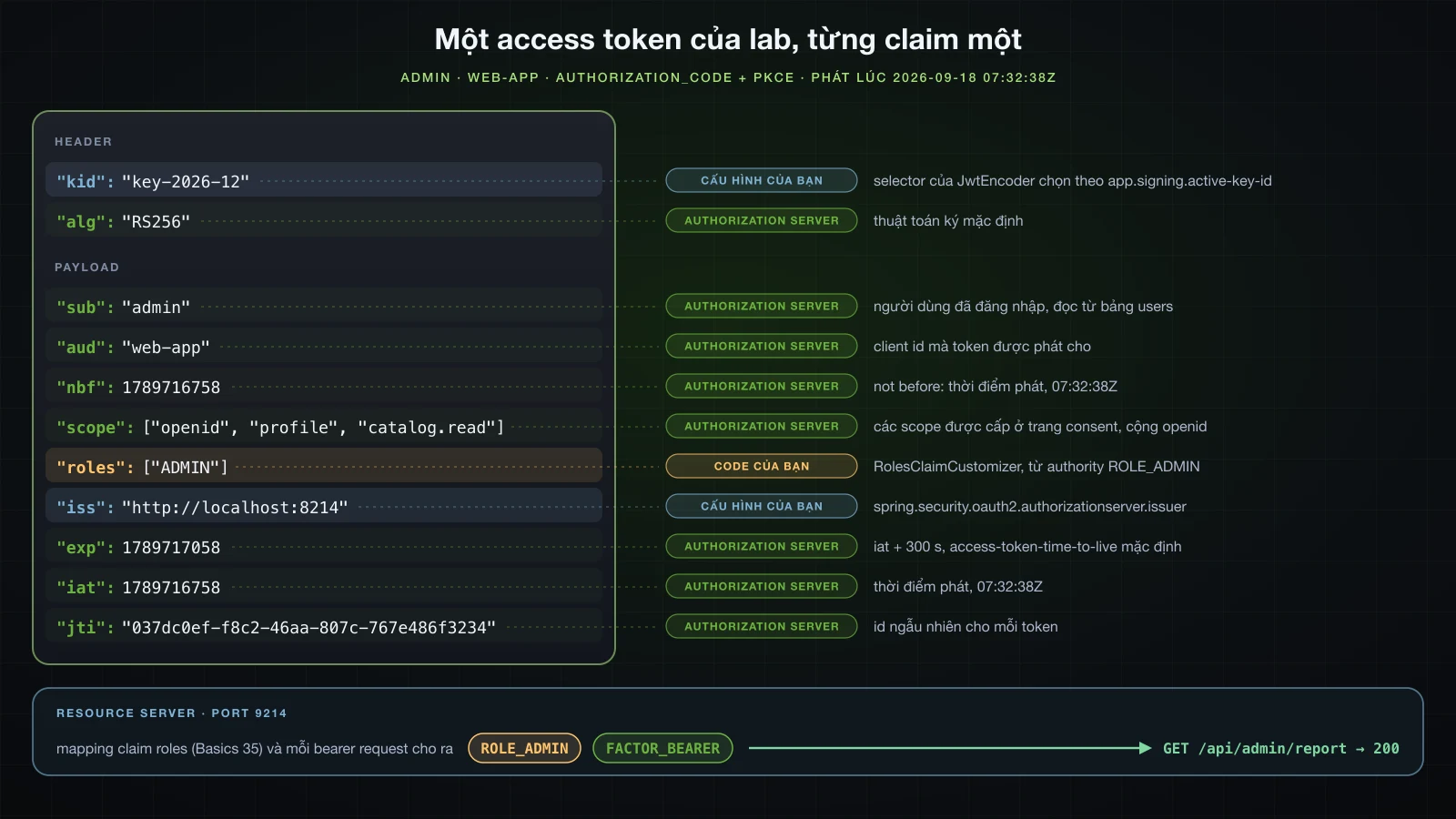
Vì sao .toList() làm hỏng authorization server dùng JDBC
⚠️ Phiên bản đầu của customizer kết thúc bằng .toList(). Token vẫn được phát và được chấp nhận, nhưng mọi lần đọc lại các row đó về sau đều hỏng: lần dùng lại code, và introspection của cả access token lẫn refresh token, đều trả 500:
java.lang.IllegalArgumentException: Could not resolve type id 'java.util.ImmutableCollections$ListN' as a subtype of `java.lang.Object`: Configured `PolymorphicTypeValidator` (of type `tools.jackson.databind.jsontype.BasicPolymorphicTypeValidator`) denied resolution
 at [Source: REDACTED (`StreamReadFeature.INCLUDE_SOURCE_IN_LOCATION` disabled); byte offset: #UNKNOWN] (through reference chain: java.util.LinkedHashMap["metadata.token.claims"]->java.util.LinkedHashMap["roles"])
	at org.springframework.security.oauth2.server.authorization.JdbcOAuth2AuthorizationService$AbstractOAuth2AuthorizationRowMapper.parseMap(JdbcOAuth2AuthorizationService.java:723)
JdbcOAuth2AuthorizationService lưu các claim của token dưới dạng JSON kèm Java type của từng giá trị, rồi đọc lại qua một allowlist. Metadata đã lưu cho thấy khác biệt giữa hai collection:
docker exec sba-a14-pg psql -U demo -d demo -At -c "select access_token_metadata from oauth2_authorization where principal_name='alice' order by access_token_issued_at desc limit 1" | jq -c '.["metadata.token.claims"].roles, .["metadata.token.claims"].scope'["java.util.ImmutableCollections$ListN",["USER"]]
["java.util.Collections$UnmodifiableSet",["openid","catalog.read"]]Stream.toList() trả về một class nội bộ của JDK không có trong danh sách. Cách sửa nằm ở dòng cuối của stream:
                .map(authority -> authority.substring("ROLE_".length()))
                .toList();
                .collect(Collectors.toCollection(ArrayList::new));
        context.getClaims().claim("roles", roles);
Với Collectors.toCollection(ArrayList::new), row lưu ["java.util.ArrayList",["USER"]], introspection trả {"active":true,"roles":["USER"]}, và lần dùng lại code nhận đúng 400 invalid_grant. Service in-memory không bao giờ serialize thứ gì, nên lỗi chỉ lộ ra khi đã có JDBC service, và chỉ sau khi token đã được phát.
Opaque token và introspection
Chuyển một client sang reference token
OAuth2TokenFormat.REFERENCE khiến server phát một chuỗi ngẫu nhiên và giữ các claim trong oauth2_authorization. Resource server phải hỏi chúng ở /oauth2/introspect, nên nó có một registered client của riêng mình:
import org.springframework.security.oauth2.server.authorization.settings.OAuth2TokenFormat;
import org.springframework.security.oauth2.server.authorization.settings.TokenSettings;

        clients.save(RegisteredClient.withId("reporting-service")
                .clientId("reporting-service")
                .clientSecret(passwordEncoder.encode("YKEH82IfQ7fwVscNczMHPi-X"))
                .clientAuthenticationMethod(ClientAuthenticationMethod.CLIENT_SECRET_BASIC)
                .authorizationGrantType(AuthorizationGrantType.CLIENT_CREDENTIALS)
                .scope("catalog.read")
                .tokenSettings(TokenSettings.builder().accessTokenFormat(OAuth2TokenFormat.REFERENCE).build())
                .build());

        clients.save(RegisteredClient.withId("resource-server")
                .clientId("resource-server")
                .clientSecret(passwordEncoder.encode("XYs4XlGxsLbXcZ99uD9CdCYa"))
                .clientAuthenticationMethod(ClientAuthenticationMethod.CLIENT_SECRET_BASIC)
                .authorizationGrantType(AuthorizationGrantType.CLIENT_CREDENTIALS)
.build()); {"access_token":"FAsDhjb1vJGSCrsCsDCcWZIYZH5Itn0UgcO94fg21Eqgu5YguvtfWdq-6pe_J2Yr5VDkOytxdg6RL_okoE_68XYGoYwZvGG4k25bLjYuT_WcHoI0GSzZ2P5jIGXdcxA6","scope":"catalog.read","token_type":"Bearer","expires_in":299}128 ký tự, không có gì để giải mã. Những gì resource server biết được về nó:
curl -s -u resource-server:XYs4XlGxsLbXcZ99uD9CdCYa --data-urlencode "token=$OPAQUE" http://localhost:8214/oauth2/introspect | jq .{
"active": true,
"sub": "reporting-service",
"aud": [
"reporting-service"
],
"nbf": 1789716917,
"scope": "catalog.read",
"iss": "http://localhost:8214",
"exp": 1789717217,
"iat": 1789716917,
"jti": "a0dfd384-8fb7-48a3-8264-c574a1afbe5d",
"client_id": "reporting-service",
"token_type": "Bearer"
}Bất kỳ registered client nào cũng introspect được bất kỳ token nào: web-app đã introspect token của reporting-service ở phần trước mà không gặp phản đối nào. RolesClaimCustomizer không được gọi cho reference token, vì claim của chúng đi qua một OAuth2TokenCustomizer<OAuth2TokenClaimsContext>; client này không có role, nên ở đây không mất gì.
Cấu hình resource server thứ hai trỏ tới /oauth2/introspect
Resource server có thêm một Spring profile opaque, với ba property introspection của Boot và một chain dùng opaqueToken thay cho jwt; chain JWT nhận @Profile("!opaque").
spring.security.oauth2.resourceserver.opaquetoken.introspection-uri=http://localhost:8214/oauth2/introspect
spring.security.oauth2.resourceserver.opaquetoken.client-id=resource-server
spring.security.oauth2.resourceserver.opaquetoken.client-secret=XYs4XlGxsLbXcZ99uD9CdCYaspring:
security:
oauth2:
resourceserver:
opaquetoken:
introspection-uri: http://localhost:8214/oauth2/introspect
client-id: resource-server
client-secret: XYs4XlGxsLbXcZ99uD9CdCYaimport org.springframework.context.annotation.Profile;
@Configuration
@Profile("!opaque")
public class SecurityConfig {package com.example.resourceserver.common;
import org.springframework.context.annotation.Bean;
import org.springframework.context.annotation.Configuration;
import org.springframework.context.annotation.Profile;
import org.springframework.security.config.Customizer;
import org.springframework.security.config.annotation.web.builders.HttpSecurity;
import org.springframework.security.config.http.SessionCreationPolicy;
import org.springframework.security.web.SecurityFilterChain;
@Configuration
@Profile("opaque")
public class OpaqueTokenSecurityConfig {
@Bean
SecurityFilterChain apiSecurityFilterChain(HttpSecurity http, ProblemDetailSecurityHandler problemHandler) {
http
.securityMatcher("/api/**")
.authorizeHttpRequests(auth -> auth
.requestMatchers("/api/admin/**").hasRole("ADMIN")
.anyRequest().authenticated())
.oauth2ResourceServer(oauth2 -> oauth2
.opaqueToken(Customizer.withDefaults())
.authenticationEntryPoint(problemHandler)
.accessDeniedHandler(problemHandler))
.exceptionHandling(exceptions -> exceptions
.authenticationEntryPoint(problemHandler)
.accessDeniedHandler(problemHandler))
.csrf(csrf -> csrf.disable())
.sessionManagement(session -> session.sessionCreationPolicy(SessionCreationPolicy.STATELESS));
return http.build();
}
}Khởi động với --spring.profiles.active=opaque, resource server trả {"name":"reporting-service","authorities":["FACTOR_BEARER","SCOPE_catalog.read"]} cho opaque token. Các property authorities-claim-name và authority-prefix thuộc về JWT converter; introspector mặc định map scope thành authority SCOPE_.
Introspection tốn bao nhiêu cho mỗi request?
Cùng một GET /api/me, 100 request khởi động rồi 500 request được đo bằng %{time_total} của curl, lần lượt từng cái, với access log của authorization server đếm những gì tới được nó; sau đó ab -k với 8 kết nối đồng thời để đo throughput:
| Resource server | Min | Trung vị | p90 | Max | Số lần gọi authorization server | ab -c 8 | Load (1 phút) |
|---|---|---|---|---|---|---|---|
| JWT, JWKS đã cache | 0.43 ms | 0.68 ms | 0.99 ms | 3.98 ms | 1 lần làm mới JWKS trong 600 request, 0 introspection | 22803 req/s | 6.06 → 5.97 |
| Opaque, introspection | 61.88 ms | 64.55 ms | 66.72 ms | 110.06 ms | 600 introspection cho 600 request | 99 req/s | 6.10 → 4.77 |
Access log trong lần chạy opaque có đúng 600 dòng, tất cả là POST /oauth2/introspect, với trung vị phía server 61 ms. Lời gọi duy nhất trong lần chạy JWT là JWKS cache của resource server hết hạn sau 5 phút. Gần như toàn bộ 61 ms đó là một lần kiểm tra secret của resource-server, được lưu dưới dạng BCrypt hash: một lần BCryptPasswordEncoder.matches với cost 10 trên máy này có trung vị 57.5 ms qua 30 lần gọi (load 4.01), và việc tra token trong database chỉ là phần nhỏ còn lại.
Thử chứng minh điều đó bằng cách lưu secret dạng {noop} thẳng vào bảng đã thất bại theo một cách đáng học: lần introspection kế tiếp xác thực thành công, và sau đó row lại chứa {bcrypt}$2a$10$…. ClientSecretAuthenticationProvider gọi PasswordEncoder.upgradeEncoding sau một lần kiểm tra thành công và lưu client với secret được encode lại, phiên bản phía client của việc nâng cấp mật khẩu mà bài Basics 34 đã cho thấy với UserDetailsPasswordService. Các lựa chọn, không cái nào miễn phí: cache kết quả introspection ở resource server vài giây (SpringOpaqueTokenIntrospector mặc định không cache gì, nên revoke có hiệu lực ngay), cho resource server xác thực bằng private_key_jwt thay vì một secret đã hash, hoặc chấp nhận JWT, thứ rẻ hơn hai bậc độ lớn ở đây nhưng không thu hồi được.
Spring Authorization Server hay Keycloak?
Thời gian khởi động và bộ nhớ, đo thật
Keycloak 26.7.4 chạy với start-dev trong một container giới hạn 1536 MiB (docker run --memory 1536m -p 8314:8080 … quay.io/keycloak/keycloak:26.7.4 start-dev), với bootstrap admin từ biến môi trường và không cấu hình gì thêm; bài 13 nói về cách dựng nó. Spring Authorization Server là ứng dụng cuối cùng của bài này, kể cả các JDBC service, chạy bằng java -Xmx512m -jar. Thời gian khởi động là thời gian thực tính từ lúc chạy process hoặc container tới khi discovery document trả 200 lần đầu, poll mỗi 50 ms với Spring và mỗi 100 ms với Keycloak. Bộ nhớ là resident set size của JVM (ps -o rss với Spring, VmRSS của Java process bên trong container với Keycloak) cộng docker stats cho container, đọc 3 giây sau khi khởi động và sau 1000 token request client_credentials bằng ab -c 8. Với Keycloak, client được tạo qua admin REST API của nó.
| Spring Authorization Server 7.1.1 | Keycloak 26.7.4 start-dev | |
|---|---|---|
Từ lúc khởi động tới 200 đầu tiên trên discovery | 1.55 s, 1.58 s, 1.76 s | 11.7 s và 12.7 s với container mới, 3.9 s khi restart |
| Dòng log khởi động của chính nó | Started AuthserverApplication in 1.246, 1.227, 1.412 giây | started in 6.771s và 7.344s, 3.499s khi restart |
| Bộ nhớ sau khởi động | RSS 205 tới 210 MiB | JVM 581 và 592 MiB; container 569 và 580 MiB |
| Sau 1000 token request | RSS 216 MiB | JVM 636 MiB; container 624 MiB |
Token request mỗi giây, -c 8 | 102 (mỗi request trả một lần BCrypt 57.5 ms) | 912 |
| Thiết lập heap | -Xmx512m | -XX:MaxRAMPercentage=70 của image, khoảng 1075 MiB trong giới hạn 1536 MiB |
| Load average (1 phút) | 3.66 tới 4.93 | 3.36 tới 5.13 |
Phép so sánh không đối xứng, và bảng đã nói rõ vì sao: số liệu của Keycloak gồm cả database dev nhúng và các cache của nó, còn server Spring giữ dữ liệu trong một container PostgreSQL riêng dùng 51 MiB. Một container Keycloak mới dành những giây đầu cho "Updating the configuration and installing your custom providers, if any", bước build mà một image production chạy trước bằng kc.sh build.
Có sẵn gì và phải tự làm gì
| Spring Authorization Server | Keycloak | |
|---|---|---|
| Hình dạng | một thư viện bên trong ứng dụng Spring Boot của bạn | một server riêng chạy cạnh các ứng dụng của bạn |
| Admin console | không có: client lúc đầu từ property, sau đó từ code | web admin console và admin REST API |
| Người dùng | bất cứ thứ gì UserDetailsService hay AuthenticationProvider của bạn đọc | kho người dùng riêng, đăng ký, đặt lại mật khẩu, account console |
| User federation | tự viết | LDAP và Active Directory, Kerberos, một User Storage SPI |
| Social login và brokering | tự nối oauth2Login vào chain login | Google, GitHub và các identity provider khác có sẵn (bài 13) |
| MFA | các khối dựng sẵn trong Spring Security 7 (@EnableMultiFactorAuthentication, các authority FACTOR_ đã thấy ở trên); màn hình và việc đăng ký là của bạn | OTP và WebAuthn có sẵn |
| Giao thức | OAuth 2.1 và OpenID Connect | OAuth 2.0, OpenID Connect và SAML 2.0 |
| Custom claim | một bean customizer, unit test được như mọi bean Spring | protocol mapper trong console, hoặc một provider SPI viết bằng Java |
| Trang login và consent | bản mặc định cho môi trường dev (trang consent tải Bootstrap từ CDN); bản thật do bạn viết | các trang đổi theme được với FreeMarker |
| Persistence | ba bảng từ jar, sửa tay cho PostgreSQL; row hết hạn không bao giờ bị xoá | schema riêng, tự migrate khi một version mới khởi động |
| Nâng cấp | cùng với Spring Boot và Spring Security, trong build của bạn | một image mới; database được migrate khi khởi động |
| Clustering | stateless trừ HttpSession lúc login: một database dùng chung cộng Spring Session hoặc sticky session | nhiều node dùng chung database, với Infinispan cache nhúng |
| Dấu chân đo ở đây | 1.6 s, 216 MiB | 11.7 s, 636 MiB |
Nên chọn cái nào
- Keycloak khi con người đăng nhập: tự đăng ký, đặt lại mật khẩu, admin console cho nhân viên hỗ trợ, LDAP hoặc Active Directory, social login, MFA, SAML cho các ứng dụng cũ. Trên Spring Authorization Server, mỗi thứ trong số đó là code bạn phải viết, test và bảo trì; Keycloak có sẵn cả.
- Spring Authorization Server khi server chủ yếu phục vụ máy móc, hoặc khi token phải được định hình bằng dữ liệu của chính bạn: client_credentials giữa các service, claim tính từ bảng của bạn, việc đăng nhập là một phần của một ứng dụng Spring có sẵn với bảng người dùng có sẵn, một deployment pipeline cho mọi thứ, và một team thích code Java cùng test hơn là cấu hình trên console.
- Cái nào cũng được với resource server: cả hai đều công bố discovery document và JWKS, nên resource server chuyển từ cái này sang cái kia bằng cách đổi
issuer-urivà claim mà converter đọc role. - Một identity provider dạng dịch vụ khi bạn không muốn cả phần code của lựa chọn đầu lẫn phần vận hành của lựa chọn thứ hai.
FAQ
Spring Authorization Server giờ đã là một phần của Spring Security?
Đúng vậy. Trong Spring Boot 4.1.1, spring-security-oauth2-authorization-server 7.1.1 đến từ spring-security-bom 7.1.1 và không có version riêng; các class vẫn ở org.springframework.security.oauth2.server.authorization, còn configurer chuyển sang spring-security-config dưới dạng HttpSecurity.oauth2AuthorizationServer(...). Hãy dùng spring-boot-starter-security-oauth2-authorization-server; spring-boot-starter-oauth2-authorization-server đã deprecated để nhường chỗ cho nó.
OAuth2AuthorizationServerConfiguration.applyDefaultSecurity đi đâu rồi?
Nó không còn trong 7.1.1. OAuth2AuthorizationServerConfiguration giờ nằm ở org.springframework.security.config.annotation.web.configuration và không có method đó. Hãy viết http.oauth2AuthorizationServer(as -> { http.securityMatcher(as.getEndpointsMatcher()); as.oidc(Customizer.withDefaults()); }), như chính OAuth2AuthorizationServerWebSecurityConfiguration của Boot, và đặt chain form login sau nó với giá trị @Order cao hơn.
Vì sao token của Spring Authorization Server bị từ chối sau khi restart?
Vì JWKSource mặc định sinh một RSA key mới với kid ngẫu nhiên ở mỗi lần khởi động. Token cũ chỉ còn dùng được khi resource server vẫn cache key cũ; token đầu tiên mang kid mới khiến resource server lấy lại JWKS, và token cũ sau đó nhận 401 với Signed JWT rejected: Another algorithm expected, or no matching key(s) found. Hãy nạp key từ file bằng một bean JWKSource.
Xoay vòng signing key trong Spring Authorization Server thế nào?
Công bố cả hai key trong JWKSource và thêm một bean JwtEncoder có setJwkSelector chọn kid đang hoạt động. Không có selector, hai key, kể cả khi key cũ chỉ có public, cho ra Failed to select a key since there are multiple for the signing algorithm [null]. Sau khi bỏ key cũ, resource server vẫn chấp nhận token của nó cho tới khi JWKS cache hết hạn, khoảng 5 phút sau lần lấy gần nhất.
PostgreSQL cần sửa gì trong schema của Spring Authorization Server?
blob thành text, bắt buộc (nếu không sẽ gặp ERROR: type "blob" does not exist), và timestamp thành timestamptz, điều các script khuyến nghị. Tổng cộng mười ba và mười bốn cột trên oauth2_authorization và oauth2_registered_client; bảng consent không cần sửa gì.
Vì sao introspection trả về 500 sau khi thêm custom claim?
Vì giá trị của claim có một type mà Jackson allowlist của JdbcOAuth2AuthorizationService từ chối đọc lại, chẳng hạn list mà Stream.toList() trả về (java.util.ImmutableCollections$ListN). Hãy dựng giá trị thành một ArrayList, hoặc một type khác allowlist chấp nhận, trước khi đưa vào claims.
Opaque token có chậm hơn JWT không?
Ở đây là chậm hơn hai bậc độ lớn: trung vị 64.55 ms mỗi request so với 0.68 ms, và 99 so với 22803 request mỗi giây với 8 kết nối, vì mỗi request gây một lời gọi introspection và mỗi lời gọi trả một lần kiểm tra BCrypt 57.5 ms cho secret của resource server. Đổi lại, opaque token ngừng hoạt động ngay khi authorization của nó bị vô hiệu hoá.
Kết luận
Một authorization server chạy được chỉ cần một file property: ba registered client, một người dùng, các discovery document, hai filter chain và các protocol endpoint đều đến từ mặc định của Boot trên Spring Security 7.1.1. Làm chủ nó cần nhiều code hơn, và mỗi mặc định bị thay đều cho thấy vì sao phải thay: RSA key đổi sau mỗi lần restart và token cũ khi đó chỉ sống nhờ cache của resource server, hai key cần một selector thì encoder mới ký được, schema script cần text và timestamptz trên PostgreSQL, row hết hạn nằm lại mãi mãi, và một custom claim dựng bằng .toList() làm hỏng mọi lần đọc lại row của nó. Các cái bẫy bên ngoài server là issuer không được đặt, error dispatch tới /error đẩy một redirect URI sai về trang login, và một resource server dùng JWT vẫn chấp nhận token mà authorization server đã vô hiệu hoá.
Keycloak khởi động chậm hơn, dùng khoảng ba lần bộ nhớ và trao cho bạn console, quản lý người dùng, federation và MFA; Spring Authorization Server khởi động dưới hai giây và trao cho bạn code Java. Bài tiếp theo vẫn ở chủ đề token và phân quyền: nâng cao về token và phân quyền — refresh token và việc rotate nó, thu hồi token, và permission-based authorization.
![[Advanced Spring Boot] Transaction chuyên sâu trong Spring: propagation, isolation level và rollback rules](/images/blog/sba-transactions-thumbnail.vi.webp)
![[Advanced Spring Boot] Tự viết auto-configuration và starter cho Spring Boot](/images/blog/sba-autoconfig-thumbnail.vi.webp)
![[Advanced Spring Boot] NoSQL với Spring Data: MongoDB và Redis](/images/blog/sba-nosql-thumbnail.vi.webp)
![[Advanced Spring Boot] OAuth2 và OpenID Connect trong Spring Boot: OAuth2 Login và resource server với JWT](/images/blog/sba-oauth2-oidc-thumbnail.vi.webp)