Article 26 mapped Product to the products table and replaced the in-memory repository with ProductRepository extends JpaRepository<Product, Long>, which brings save, findById, findAll and delete without a line of code. A catalogue needs more than lookups by id: the keyboards under a price, a search box, a low-stock report, a price increase for a whole category. This article covers the three ways to write those queries in a Spring Data repository, derived query methods, @Query with JPQL and native SQL, then bulk updates and deletes with @Modifying, and the details that are easy to get wrong: wildcard characters in user input, SQL injection, and entities that go stale after a bulk update.
The examples use Spring Boot 4.1.1 and Java 21, on an Initializr project with the web, validation and Spring Data JPA starters, H2 and the PostgreSQL driver. Most outputs come from the in-memory H2 database; native queries and anything dialect-specific ran on PostgreSQL 18 in Docker, and each output says which database produced it.
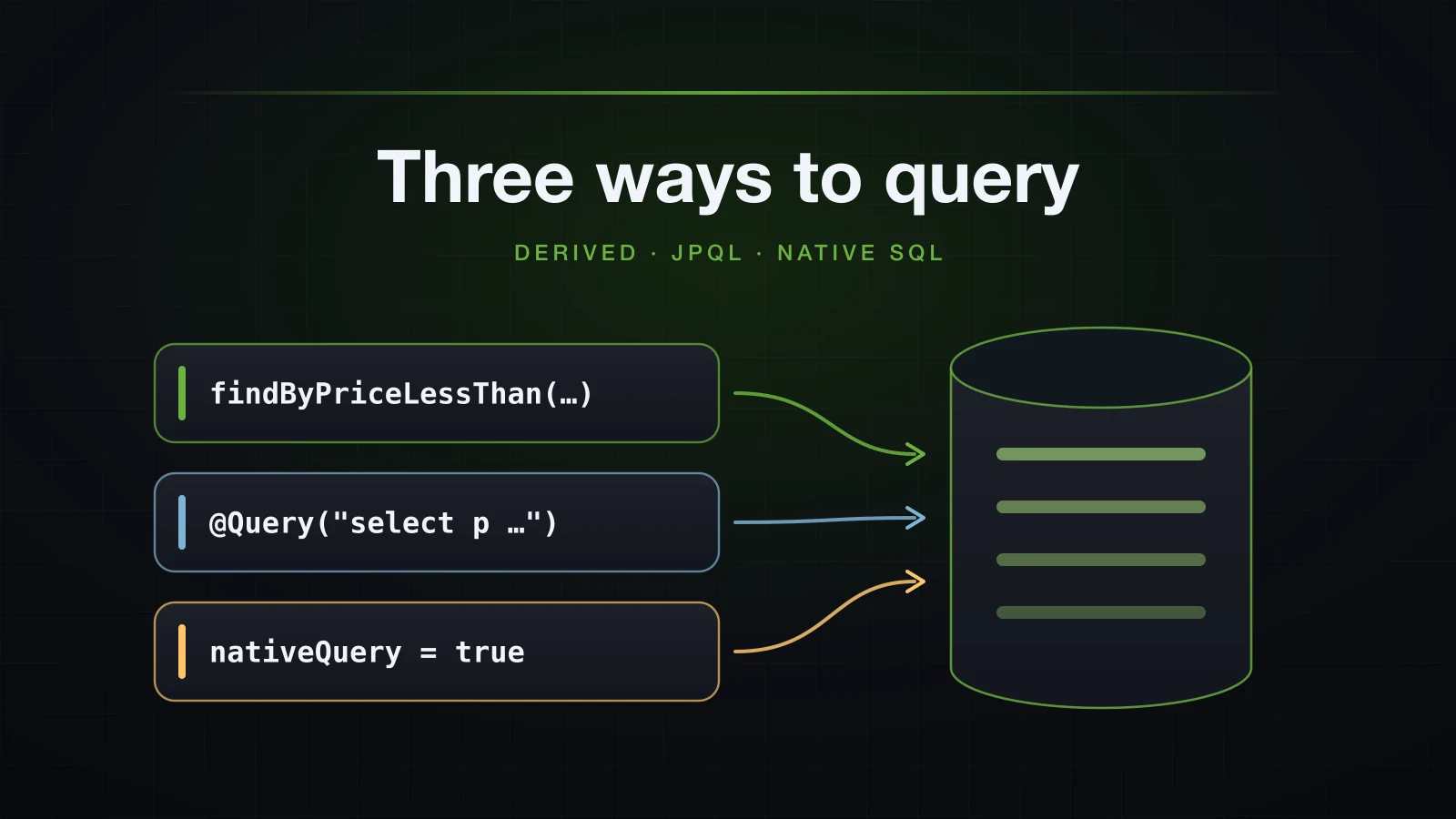
The article starts with the data it queries, then moves from the least code to the most control: method names, JPQL, native SQL, and finally statements that change data.
The catalogue and how the outputs were produced
The entity is article 26's Product: the products table, a ProductStatus enum (ACTIVE, OUT_OF_STOCK, DISCONTINUED) stored as a string, and a non-null category column that article 28 turns into an entity. This article adds one field. The True, False and IsNull keywords need a column that can be true, false or null, so featured is a nullable Boolean: true puts a product on the home page, false keeps it off on purpose, and null means nobody has decided yet.
package com.example.demo.product;

import java.math.BigDecimal;

import jakarta.persistence.Column;
import jakarta.persistence.Entity;
import jakarta.persistence.EnumType;
import jakarta.persistence.Enumerated;
import jakarta.persistence.GeneratedValue;
import jakarta.persistence.GenerationType;
import jakarta.persistence.Id;
import jakarta.persistence.Table;

@Entity
@Table(name = "products")
public class Product {

    @Id
    @GeneratedValue(strategy = GenerationType.IDENTITY)
    private Long id;

    @Column(nullable = false, length = 120)
    private String name;

    @Column(nullable = false, length = 40, unique = true)
    private String sku;

    @Column(nullable = false, precision = 10, scale = 2)
    private BigDecimal price;

    private int stock;

    @Column(nullable = false, length = 60)
    private String category;

    @Enumerated(EnumType.STRING)
    @Column(nullable = false, length = 20)
    private ProductStatus status = ProductStatus.ACTIVE;

    private Boolean featured;

    protected Product() {
    }

    public Product(String name, String sku, BigDecimal price, int stock, String category) {
        this.name = name;
        this.sku = sku;
        this.price = price;
        this.stock = stock;
        this.category = category;
    }

    public Boolean getFeatured() { return featured; }
    public void setFeatured(Boolean featured) { this.featured = featured; }

    // the other getters and setters, equals, hashCode and toString as in article 26
}
Nineteen products in five categories: three featured, three explicitly not featured and thirteen undecided, two discontinued and one out of stock, two at the same price, and one name with a % sign in it for the wildcard section:
package com.example.demo.product;

import static com.example.demo.product.ProductStatus.ACTIVE;
import static com.example.demo.product.ProductStatus.DISCONTINUED;
import static com.example.demo.product.ProductStatus.OUT_OF_STOCK;

import java.math.BigDecimal;
import java.util.List;

import org.springframework.boot.CommandLineRunner;
import org.springframework.core.annotation.Order;
import org.springframework.stereotype.Component;

@Component
@Order(1)
class CatalogSeeder implements CommandLineRunner {

    private final ProductRepository repository;

    CatalogSeeder(ProductRepository repository) {
        this.repository = repository;
    }

    @Override
    public void run(String... args) {
        if (repository.count() > 0) {
            return;
        }
        repository.saveAll(List.of(
                product("Mechanical keyboard", "KB-01", "89.90", 25, "keyboards", ACTIVE, true),
                product("Compact keyboard", "KB-02", "59.00", 12, "keyboards", ACTIVE, null),
                product("Wireless keyboard", "KB-03", "45.50", 0, "keyboards", DISCONTINUED, false),
                product("Ergonomic keyboard", "KB-04", "129.00", 7, "keyboards", ACTIVE, null),
                product("Wireless mouse", "MS-01", "24.50", 3, "mice", ACTIVE, null),
                product("Gaming mouse", "MS-02", "49.90", 18, "mice", ACTIVE, null),
                product("Vertical mouse", "MS-03", "39.00", 0, "mice", OUT_OF_STOCK, false),
                product("27-inch monitor", "MN-01", "279.00", 6, "monitors", ACTIVE, null),
                product("32-inch 4K monitor", "MN-02", "449.00", 2, "monitors", ACTIVE, true),
                product("Portable monitor", "MN-03", "189.00", 9, "monitors", ACTIVE, null),
                product("Noise-cancelling headphones", "AU-01", "199.00", 11, "audio", ACTIVE, true),
                product("USB microphone", "AU-02", "89.90", 4, "audio", ACTIVE, null),
                product("Desk speakers", "AU-03", "79.00", 0, "audio", DISCONTINUED, false),
                product("USB-C hub", "AC-01", "39.00", 40, "accessories", ACTIVE, null),
                product("Laptop stand", "AC-02", "34.90", 15, "accessories", ACTIVE, null),
                product("Mouse pad XL", "AC-03", "19.90", 60, "accessories", ACTIVE, null),
                product("Screen cleaner, 100% alcohol-free", "AC-04", "9.90", 80, "accessories", ACTIVE, null),
                product("Webcam 1080p", "AC-05", "64.00", 14, "accessories", ACTIVE, null),
                product("Cable organiser", "AC-06", "12.50", 33, "accessories", ACTIVE, null)));
    }

    private static Product product(String name, String sku, String price, int stock, String category,
                                   ProductStatus status, Boolean featured) {
        Product product = new Product(name, sku, new BigDecimal(price), stock, category);
        product.setStatus(status);
        product.setFeatured(featured);
        return product;
    }
}
Article 26's two SQL loggers stay on. This article depends on the second one: whether a % gets escaped is only visible in the value bound to the ?.
spring.application.name=demo
logging.level.org.hibernate.SQL=DEBUG
logging.level.org.hibernate.orm.jdbc.bind=TRACE
H2 is the default. The PostgreSQL runs use article 26's postgres profile, which points at a PostgreSQL 18 container, with one line added so that Hibernate creates the table there as well:
spring.jpa.hibernate.ddl-auto=create The queries are called from a CommandLineRunner that runs after the seeder. It prints the call, then Hibernate's log lines appear as the query runs, then one line per product: SKU, name, price, stock, category, status and the featured flag.
package com.example.demo.lab;

import java.util.List;
import java.util.function.Supplier;

import com.example.demo.product.Product;
import com.example.demo.product.ProductRepository;

import org.springframework.boot.CommandLineRunner;
import org.springframework.core.annotation.Order;
import org.springframework.stereotype.Component;

@Component
@Order(2)
class QueryLab implements CommandLineRunner {

    private final ProductRepository repository;

    QueryLab(ProductRepository repository) {
        this.repository = repository;
    }

    @Override
    public void run(String... args) {
        show("findByCategory(\"monitors\")", () -> repository.findByCategory("monitors"));
    }

    private void show(String call, Supplier<List<Product>> query) {
        System.out.println(">>> " + call);
        List<Product> products = query.get();
        for (Product p : products) {
            System.out.println(String.format("%-5s  %-33s %7s  %3d  %-11s %-12s %s",
                    p.getSku(), p.getName(), p.getPrice(), p.getStock(), p.getCategory(),
                    p.getStatus(), p.getFeatured()));
        }
        System.out.println("(" + products.size() + " rows)");
    }
}
The full version used for this article prints other results the same way: Optional as Optional present or Optional empty, a single value as result <value> (<type>), and an exception as a !!! line followed by one !!! caused by line per cause. In the outputs below, each log line is cut down to its message; the timestamp, level, process id, thread and logger name are removed.
./gradlew bootJar
java -jar build/libs/demo-0.0.1-SNAPSHOT.jar>>> findByCategory("monitors")
select p1_0.id,p1_0.category,p1_0.featured,p1_0.name,p1_0.price,p1_0.sku,p1_0.status,p1_0.stock from products p1_0 where p1_0.category=?
binding parameter (1:VARCHAR) <- [monitors]
MN-01 27-inch monitor 279.00 6 monitors ACTIVE null
MN-02 32-inch 4K monitor 449.00 2 monitors ACTIVE true
MN-03 Portable monitor 189.00 9 monitors ACTIVE null
(3 rows)That is the whole of the first derived query method: one abstract method, List<Product> findByCategory(String category), and no implementation anywhere.
How does Spring Data turn a method name into a query?
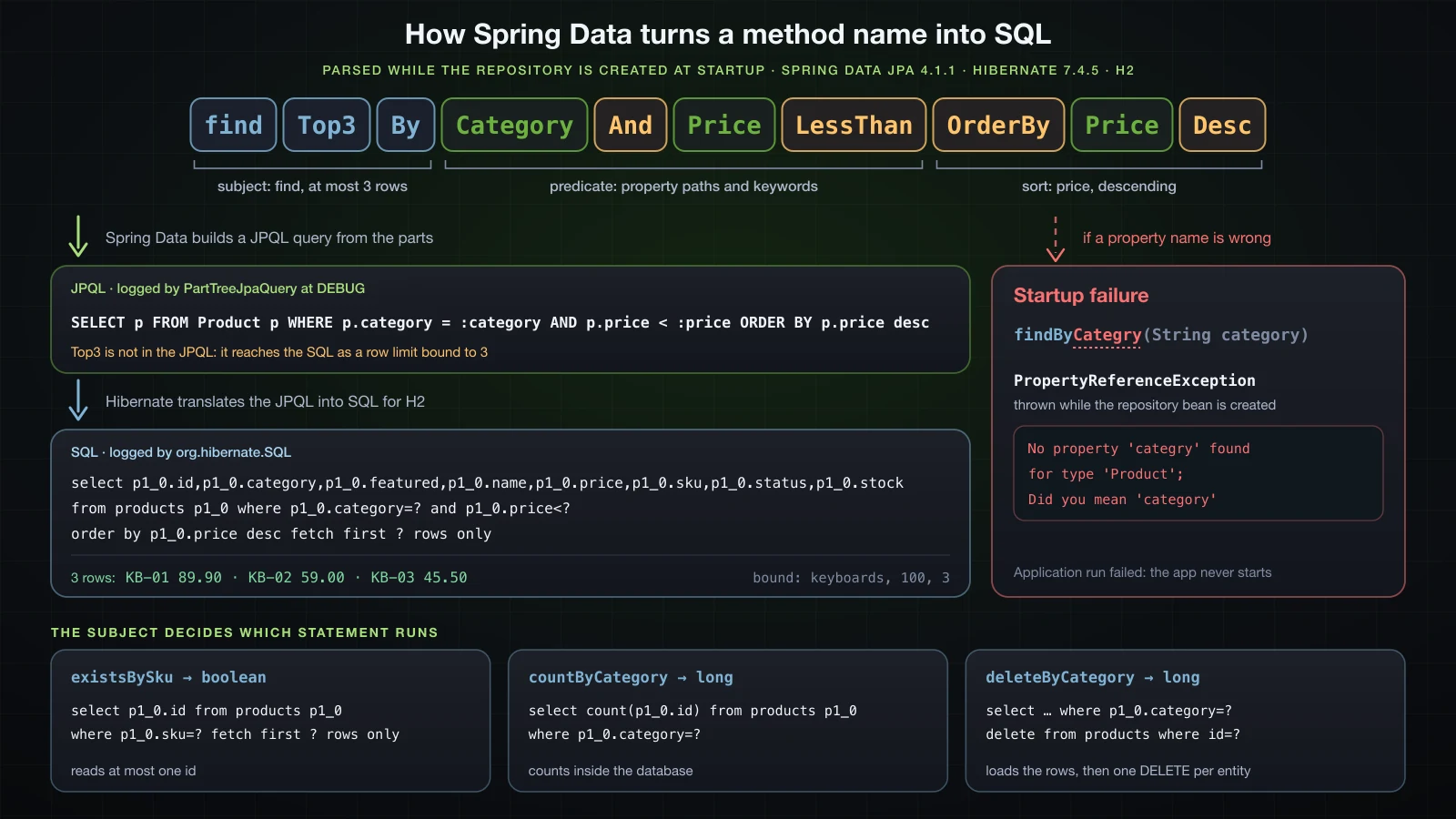
A derived query method is a method on the repository interface without an annotation. When Spring creates the repository bean at startup, Spring Data splits the method name at By:
- the subject, before
By, says what kind of query it is:findreturns entities,streamreturns aStream,existsreturns aboolean,counta number,deleteremoves.Distinct,FirstandTopNgo here too. - the predicate, after
By, is a list of property paths, the entity's field names with a capital letter, each followed by an optional keyword such asLessThanorContaining. Conditions are joined withAndandOr, andOrderBy<Property>AscorDesccan close the name.
Method arguments are consumed in order, one for each condition that needs a value. A method with every part in it:
package com.example.demo.product;

import java.math.BigDecimal;
import java.util.List;

import org.springframework.data.jpa.repository.JpaRepository;

public interface ProductRepository extends JpaRepository<Product, Long> {

    List<Product> findByCategory(String category);

    List<Product> findTop3ByCategoryAndPriceLessThanOrderByPriceDesc(String category, BigDecimal price);
}
Spring Data logs the JPQL it builds from the name when its query package is at DEBUG:
java -jar build/libs/demo-0.0.1-SNAPSHOT.jar --logging.level.org.springframework.data.jpa.repository.query=DEBUGCalling it with ("keyboards", new BigDecimal("100")) on H2:
>>> findTop3ByCategoryAndPriceLessThanOrderByPriceDesc("keyboards", 100)
QueryPreparer: Derived query for query method [public abstract java.util.List com.example.demo.product.ProductRepository.findTop3ByCategoryAndPriceLessThanOrderByPriceDesc(java.lang.String,java.math.BigDecimal)]: 'SELECT p FROM Product p WHERE p.category = :category AND p.price < :price ORDER BY p.price desc'
select p1_0.id,p1_0.category,p1_0.featured,p1_0.name,p1_0.price,p1_0.sku,p1_0.status,p1_0.stock from products p1_0 where p1_0.category=? and p1_0.price<? order by p1_0.price desc fetch first ? rows only
binding parameter (1:VARCHAR) <- [keyboards]
binding parameter (2:NUMERIC) <- [100]
binding parameter (3:INTEGER) <- [3]
KB-01  Mechanical keyboard                 89.90   25  keyboards   ACTIVE       true
KB-02  Compact keyboard                    59.00   12  keyboards   ACTIVE       null
KB-03  Wireless keyboard                   45.50    0  keyboards   DISCONTINUED false
(3 rows)
Two stages are visible. Spring Data turned the name into a JPQL query, naming the placeholders after the method's parameters, and Hibernate turned that JPQL into SQL for H2. Top3 is not part of the JPQL at all: it arrives in the SQL as fetch first ? rows only with 3 bound. The Ergonomic keyboard, at 129.00, is the one keyboard the price condition removed.
And binds tighter than Or, as it does in SQL, and a method name has no way to write parentheses:
public interface ProductRepository extends JpaRepository<Product, Long> {

    List<Product> findByCategoryAndStockGreaterThanOrStatus(String category, int stock, ProductStatus status);
}>>> findByCategoryAndStockGreaterThanOrStatus("keyboards", 10, DISCONTINUED)
select p1_0.id,p1_0.category,p1_0.featured,p1_0.name,p1_0.price,p1_0.sku,p1_0.status,p1_0.stock from products p1_0 where p1_0.category=? and p1_0.stock>? or p1_0.status=?
binding parameter (1:VARCHAR) <- [keyboards]
binding parameter (2:INTEGER) <- [10]
binding parameter (3:ENUM) <- [DISCONTINUED]
KB-01 Mechanical keyboard 89.90 25 keyboards ACTIVE true
KB-02 Compact keyboard 59.00 12 keyboards ACTIVE null
KB-03 Wireless keyboard 45.50 0 keyboards DISCONTINUED false
AU-03 Desk speakers 79.00 0 audio DISCONTINUED false
(4 rows)The condition reads as (category = 'keyboards' and stock > 10) or status = 'DISCONTINUED', so the discontinued desk speakers come back from what looks like a keyboard query. A condition that needs parentheses belongs in @Query. The enum went to H2 as its native ENUM type, which is the column type article 26 saw Hibernate create there.
Derived query keywords and the SQL they generate
Each row below is one method, called on H2. Every query selected the same columns, select p1_0.id,p1_0.category,p1_0.featured,p1_0.name,p1_0.price,p1_0.sku,p1_0.status,p1_0.stock from products p1_0, so the third column shows only what Hibernate appended to it. BigDecimal arguments are written as plain numbers.
| Keyword | Call | Generated SQL after the column list | Bound values | Rows |
|---|---|---|---|---|
And | findByCategoryAndPriceLessThan("keyboards", 60) | where p1_0.category=? and p1_0.price<? | keyboards, 60 | 2 |
Between | findByPriceBetween(40, 100) | where p1_0.price between ? and ? | 40, 100 | 7 |
LessThan | findByStockLessThan(5) | where p1_0.stock<? | 5 | 6 |
GreaterThanEqual | findByPriceGreaterThanEqual(199) | where p1_0.price>=? | 199 | 3 |
Containing | findByNameContaining("keyboard") | where p1_0.name like ? escape '\' | %keyboard% | 4 |
StartingWith | findBySkuStartingWith("MS") | where p1_0.sku like ? escape '\' | MS% | 3 |
Like | findByNameLike("%mouse%") | where p1_0.name like ? escape '\' | %mouse% | 3 |
Like | findByNameLike("mouse") | where p1_0.name like ? escape '\' | mouse | 0 |
ContainingIgnoreCase | findByNameContainingIgnoreCase("mouse") | where upper(p1_0.name) like upper(?) escape '\' | %mouse% | 4 |
In | findBySkuIn(List.of("KB-01", "MS-02", "XX-99")) | where p1_0.sku in (?,?,?) | KB-01, MS-02, XX-99 | 2 |
IsNull | findByFeaturedIsNull() | where p1_0.featured is null | none | 13 |
True | findByFeaturedTrue() | where p1_0.featured=true | none | 3 |
False | findByFeaturedFalse() | where p1_0.featured=false | none | 3 |
OrderBy…Desc | findByCategoryOrderByPriceDesc("monitors") | where p1_0.category=? order by p1_0.price desc | monitors | 3 |
Top3 | findTop3ByOrderByPriceDesc() | order by p1_0.price desc fetch first ? rows only | 3 | 3 |
First | findFirstByCategoryOrderByPriceAsc("keyboards") | where p1_0.category=? order by p1_0.price fetch first ? rows only | keyboards, 1 | 1 |
Distinct | findDistinctByStockLessThan(5) | select distinct instead of select, then where p1_0.stock<? | 5 | 6 |
What the table shows beyond the syntax:
ContainingandStartingWithadd the%themselves.Likeuses the argument as the whole pattern, sofindByNameLike("mouse")compared the entire name withmouseand found nothing.IgnoreCasewraps both sides inupper(). It foundMouse pad XL, which the case-sensitive%mouse%missed.Inexpanded the list into one placeholder per element.XX-99simply matched nothing.TrueandFalsefound three products each andIsNullthe other thirteen.featured=falsedoes not match a row wherefeaturedis null, because in SQL a comparison with null is never true: an undecided product is neither featured nor excluded.FirstisTop1, and withOptional<Product>as the return type it returned the cheapest keyboard, the discontinued KB-03.Distinctreturned exactly the six rows offindByStockLessThan(5). On a single table every row already has its own id;distinctmatters once joins can repeat rows, in article 28.OrderByfixes the order in the method name. Passing the order as an argument, withSortandPageable, is article 29.
Return types: List, Optional, a single entity, Stream, boolean and long
The subject decides what comes back, and so does the declared return type. Six more methods:
public interface ProductRepository extends JpaRepository<Product, Long> {

    Optional<Product> findBySku(String sku);

    Optional<Product> findByPrice(BigDecimal price);

    Product findByStock(int stock);

    Stream<Product> streamByCategory(String category);

    boolean existsBySku(String sku);

    long countByCategory(String category);
}| Return type | Call (H2) | Result |
|---|---|---|
List<Product> | findByNameLike("mouse") | An empty list |
Optional<Product> | findBySku("KB-01"), then findBySku("XX-99") | Optional present with KB-01, then Optional empty |
Optional<Product> | findByPrice(89.90) | IncorrectResultSizeDataAccessException: KB-01 and AU-02 both cost 89.90 |
Product | findByStock(99), then findByStock(0) | null, then IncorrectResultSizeDataAccessException with 3 results |
Stream<Product> | streamByCategory("keyboards") with no transaction | InvalidDataAccessApiUsageException, before any SQL is sent |
boolean | existsBySku("KB-01") | true, from select p1_0.id from products p1_0 where p1_0.sku=? fetch first ? rows only |
long | countByCategory("keyboards") | 4, from select count(p1_0.id) from products p1_0 where p1_0.category=? |
Optional means zero or one row, not "the first of several":
>>> findByPrice(89.90)
select p1_0.id,p1_0.category,p1_0.featured,p1_0.name,p1_0.price,p1_0.sku,p1_0.status,p1_0.stock from products p1_0 where p1_0.price=?
binding parameter (1:NUMERIC) <- [89.90]
!!! org.springframework.dao.IncorrectResultSizeDataAccessException: Query did not return a unique result: 2 results were returned
!!! caused by org.hibernate.NonUniqueResultException: Query did not return a unique result: 2 results were returned
Declare a single result only for something the database keeps unique, such as sku. For anything else, findFirstBy…OrderBy… states which row you want.
A Stream keeps the JDBC result set open while you consume it, so Spring Data refuses to start one outside a transaction:
>>> streamByCategory("keyboards") without a transaction
!!! org.springframework.dao.InvalidDataAccessApiUsageException: You're trying to execute a streaming query method without a surrounding transaction that keeps the connection open so that the Stream can actually be consumed; Make sure the code consuming the stream uses @Transactional or any other way of declaring a (read-only) transaction
In a read-only transaction, and closed with try-with-resources, the same method returned [KB-01, KB-02, KB-03, KB-04]:
@Transactional(readOnly = true)
public List<String> skusInCategory(String category) {
    try (Stream<Product> products = repository.streamByCategory(category)) {
        return products.map(Product::getSku).toList();
    }
}
@Transactional gets its own article, 30. Here it is only the thing a Stream and, later, a bulk update need.
A misspelled property fails at startup
A property path has to exist on the entity. One missing letter:
public interface ProductRepository extends JpaRepository<Product, Long> {

    List<Product> findByCategory(String category);

    List<Product> findByCategry(String category);
}
The application does not start. From the console, with the stack frames between the causes cut:
2026-09-13T16:55:07.431+07:00 ERROR 37010 --- [demo] [           main] o.s.boot.SpringApplication               : Application run failed
...
Caused by: org.springframework.beans.factory.BeanCreationException: Error creating bean with name 'productRepository' defined in com.example.demo.product.ProductRepository defined in @EnableJpaRepositories declared on DataJpaRepositoriesRegistrar.EnableJpaRepositoriesConfiguration: No property 'categry' found for type 'Product'; Did you mean 'category'
...
Caused by: org.springframework.data.repository.query.QueryCreationException: Cannot create query for method [ProductRepository.findByCategry(java.lang.String)]; No property 'categry' found for type 'Product'; Did you mean 'category'
	at org.springframework.data.repository.query.QueryCreationException.create(QueryCreationException.java:109) ~[spring-data-commons-4.1.1.jar!/:4.1.1]
...
Caused by: org.springframework.data.core.PropertyReferenceException: No property 'categry' found for type 'Product'; Did you mean 'category'
	at org.springframework.data.core.SimplePropertyPath.<init>(SimplePropertyPath.java:94) ~[spring-data-commons-4.1.1.jar!/:4.1.1]
Spring Data compares the unknown name with the entity's properties and suggests the closest one. The check runs while the repository bean is created, which the startup log announces earlier as Bootstrapping Spring Data JPA repositories in DEFAULT mode., the default value of spring.data.jpa.repositories.bootstrap-mode. The name that has to match is the Java field name, not the column name. Note the package too: in Spring Data 4 the exception is org.springframework.data.core.PropertyReferenceException.
That is the main strength of derived queries: a typo, a renamed field or a removed field stops the application at startup instead of failing a request in production.
@Query with JPQL
When a method name gets unreadable, or a condition needs parentheses, a function or an aggregate, write the query. @Query takes JPQL, a query language that looks like SQL but is written against entities and their fields; Hibernate translates it into SQL for the database in use.
Named parameters: is @Param still needed?
public interface ProductRepository extends JpaRepository<Product, Long> {

    @Query("select p from Product p where p.category = :category and p.price <= :maxPrice order by p.price")
    List<Product> findInCategoryUpTo(String category, BigDecimal maxPrice);
}>>> findInCategoryUpTo("keyboards", 90)
select p1_0.id,p1_0.category,p1_0.featured,p1_0.name,p1_0.price,p1_0.sku,p1_0.status,p1_0.stock from products p1_0 where p1_0.category=? and p1_0.price<=? order by p1_0.price
binding parameter (1:VARCHAR) <- [keyboards]
binding parameter (2:NUMERIC) <- [90]
KB-03 Wireless keyboard 45.50 0 keyboards DISCONTINUED false
KB-02 Compact keyboard 59.00 12 keyboards ACTIVE null
KB-01 Mechanical keyboard 89.90 25 keyboards ACTIVE true
(3 rows)There is no @Param("category"), and :category still found its value. Spring Data matched it to the method parameter by name, and the names exist at run time because Spring Boot's Gradle plugin compiles with -parameters. The compiled interface carries a MethodParameters attribute:
javap -v -cp build/classes/java/main com.example.demo.product.ProductRepository | grep -m1 -A2 'MethodParameters:' MethodParameters:
Name Flags
categoryTo see what happens without it, the flag can be removed from the build:
tasks.withType(JavaCompile).configureEach {
    options.compilerArgs.remove('-parameters')
}
With that build, javap finds no MethodParameters attribute at all. The application still starts, and each query with named parameters fails the first time it is called:
>>> searchByName("MOUSE")
!!! org.springframework.dao.InvalidDataAccessApiUsageException: For queries with named parameters you need to provide names for method parameters; Use @Param for query method parameters, or when on Java 8+ use the javac flag -parameters
!!! caused by java.lang.IllegalStateException: For queries with named parameters you need to provide names for method parameters; Use @Param for query method parameters, or when on Java 8+ use the javac flag -parameters
@Param names each parameter explicitly, and it does not depend on the flag:
    List<Product> findInCategoryUpTo(String category, BigDecimal maxPrice);
    List<Product> findInCategoryUpTo(@Param("category") String category, @Param("maxPrice") BigDecimal maxPrice);
In the build without -parameters, this version returned the same three keyboards, the query with positional parameters from the next section worked, and the named-parameter queries without @Param failed as above. So in a Spring Boot project built with its plugin, @Param is optional. It is still worth adding in a library or any code that may be compiled somewhere else, where nobody guarantees the flag.
Positional parameters
public interface ProductRepository extends JpaRepository<Product, Long> {

    @Query("select p from Product p where p.status = ?1 and p.stock < ?2 order by p.stock")
    List<Product> findRunningLow(ProductStatus status, int threshold);
}>>> findRunningLow(ACTIVE, 5)
select p1_0.id,p1_0.category,p1_0.featured,p1_0.name,p1_0.price,p1_0.sku,p1_0.status,p1_0.stock from products p1_0 where p1_0.status=? and p1_0.stock<? order by p1_0.stock
binding parameter (1:ENUM) <- [ACTIVE]
binding parameter (2:INTEGER) <- [5]
MN-02 32-inch 4K monitor 449.00 2 monitors ACTIVE true
MS-01 Wireless mouse 24.50 3 mice ACTIVE null
AU-02 USB microphone 89.90 4 audio ACTIVE null
(3 rows)?1 is the first method parameter and ?2 the second. Positions are tied to the order of the parameters, so reordering them changes what gets bound; with two parameters of the same type, nothing complains. Named parameters read better and survive that refactoring. On PostgreSQL the same call bound ACTIVE as VARCHAR, to match the varchar(20) column article 26 got there, where H2 used its ENUM type.
JPQL uses entity names, not table names
The table is products, from article 26's @Table, and the entity is Product. Writing the table name in JPQL:
    @Query("select p from Product p where p.category = :category and p.price <= :maxPrice order by p.price")
    @Query("select p from products p where p.category = :category and p.price <= :maxPrice order by p.price")
    List<Product> findInCategoryUpTo(String category, BigDecimal maxPrice);
The application stops at startup, like the misspelled property:
Caused by: org.springframework.beans.factory.BeanCreationException: Error creating bean with name 'productRepository' defined in com.example.demo.product.ProductRepository defined in @EnableJpaRepositories declared on DataJpaRepositoriesRegistrar.EnableJpaRepositoriesConfiguration: Query validation failed for 'select p from products p where p.category = :category and p.price <= :maxPrice order by p.price'
...
Caused by: org.springframework.data.repository.query.QueryCreationException: Cannot create query for method [ProductRepository.findInCategoryUpTo(java.lang.String,java.math.BigDecimal)]; Query validation failed for 'select p from products p where p.category = :category and p.price <= :maxPrice order by p.price'
...
Caused by: java.lang.IllegalArgumentException: org.hibernate.query.sqm.UnknownEntityException: Could not resolve root entity 'products'
...
Caused by: org.hibernate.query.sqm.UnknownEntityException: Could not resolve root entity 'products'
Writing plain SQL, select * from products where category = :category and price <= :maxPrice order by price, fails at startup too, one step earlier. Spring Data parses JPQL with its own grammar before Hibernate sees it, and rejects the *:
Caused by: org.springframework.data.jpa.repository.query.BadJpqlGrammarException: At 1:7 and token '*', extraneous input '*' expecting {'(', '[', ':', '{', '?', ID, VERSION, VERSIONED, NATURALID, FK, ABSENT, ALL, AND, ANY, ARRAY, AS, ASC, AVG, BETWEEN, BOTH, BREADTH, BY, CASE, CAST, COLLATE, COLUMN, COLUMNS, CONDITIONAL, CONFLICT, CONSTRAINT, ... HEX_LITERAL, BINARY_LITERAL, '{ts', '{d', '{t', '+', '-', IDENTIFIER, QUOTED_IDENTIFIER}; Bad HQL grammar [select * from products where category = :category and price <= :maxPrice order by price]The line is 2,240 characters long, and the middle of the list of expected tokens is cut here. In JPQL, Product is the entity name, which defaults to the class's simple name, and p.category is a field; the table and column names only ever appear in the SQL Hibernate generates.
Case-insensitive search with LOWER and CONCAT
public interface ProductRepository extends JpaRepository<Product, Long> {

    @Query("select p from Product p where lower(p.name) like lower(concat('%', :q, '%'))")
    List<Product> searchByName(String q);
}>>> searchByName("MOUSE")
select p1_0.id,p1_0.category,p1_0.featured,p1_0.name,p1_0.price,p1_0.sku,p1_0.status,p1_0.stock from products p1_0 where lower(p1_0.name) like lower(('%'||?||'%')) escape ''
binding parameter (1:VARCHAR) <- [MOUSE]
MS-01 Wireless mouse 24.50 3 mice ACTIVE null
MS-02 Gaming mouse 49.90 18 mice ACTIVE null
MS-03 Vertical mouse 39.00 0 mice OUT_OF_STOCK false
AC-03 Mouse pad XL 19.90 60 accessories ACTIVE null
(4 rows)Hibernate turned concat into ||, and it added escape '', an empty escape character. The value bound is the raw input. Both details matter for user input, which the wildcard section below comes back to.
IN with a collection parameter
public interface ProductRepository extends JpaRepository<Product, Long> {

    @Query("select p from Product p where p.sku in :skus")
    List<Product> findAllBySkus(Collection<String> skus);
}>>> findAllBySkus([KB-01, MS-02, XX-99])
select p1_0.id,p1_0.category,p1_0.featured,p1_0.name,p1_0.price,p1_0.sku,p1_0.status,p1_0.stock from products p1_0 where p1_0.sku in (?,?,?)
binding parameter (1:VARCHAR) <- [KB-01]
binding parameter (2:VARCHAR) <- [MS-02]
binding parameter (3:VARCHAR) <- [XX-99]
KB-01 Mechanical keyboard 89.90 25 keyboards ACTIVE true
MS-02 Gaming mouse 49.90 18 mice ACTIVE null
(2 rows)No parentheses around :skus in the JPQL: Hibernate expands the collection into one placeholder per element, exactly as the derived In keyword did.
Aggregates: a scalar or a list of Object arrays
A query does not have to return entities. A single aggregate maps to a scalar return type, and several selected values per row map to Object[]:
    @Query("select avg(p.price) from Product p where p.category = :category")
    Double averagePrice(String category);

    @Query("""
            select p.category, count(p), avg(p.price)
            from Product p
            group by p.category
            order by p.category
            """)
    List<Object[]> priceStatsByCategory();
On H2, with each Object[] printed through Arrays.toString and followed by the class of every element:
>>> averagePrice("keyboards")
select avg(p1_0.price) from products p1_0 where p1_0.category=?
binding parameter (1:VARCHAR) <- [keyboards]
result 80.85 (Double)
>>> priceStatsByCategory()
select p1_0.category,count(p1_0.id),avg(p1_0.price) from products p1_0 group by p1_0.category order by p1_0.category
[accessories, 6, 30.033333333333]  (String, Long, Double)
[audio, 3, 122.633333333333]  (String, Long, Double)
[keyboards, 4, 80.85]  (String, Long, Double)
[mice, 3, 37.8]  (String, Long, Double)
[monitors, 3, 305.666666666667]  (String, Long, Double)
(5 rows)
avg returns a Double even over a BigDecimal field, and count(p) a Long. The same query on PostgreSQL returned the same types with more digits: 30.033333333333335, 122.63333333333334 and 305.6666666666667. Reading row[2] by position ties the code to the order of the select list; returning a record or an interface with named fields instead, a projection, is covered in the Advanced course.
Does Spring Data JPA escape % and _ in user input?
A search box passes whatever the user typed. In LIKE, % matches any run of characters and _ any single character, so a user who types % should find products whose name contains a percent sign, not every product. The two search methods from above, on H2:
>>> findByNameContaining("%")
select p1_0.id,p1_0.category,p1_0.featured,p1_0.name,p1_0.price,p1_0.sku,p1_0.status,p1_0.stock from products p1_0 where p1_0.name like ? escape '\'
binding parameter (1:VARCHAR) <- [%\%%]
AC-04  Screen cleaner, 100% alcohol-free    9.90   80  accessories ACTIVE       null
(1 rows)
>>> findByNameContaining("_")
select p1_0.id,p1_0.category,p1_0.featured,p1_0.name,p1_0.price,p1_0.sku,p1_0.status,p1_0.stock from products p1_0 where p1_0.name like ? escape '\'
binding parameter (1:VARCHAR) <- [%\_%]
(0 rows)
>>> searchByName("%")  [JPQL concat]
select p1_0.id,p1_0.category,p1_0.featured,p1_0.name,p1_0.price,p1_0.sku,p1_0.status,p1_0.stock from products p1_0 where lower(p1_0.name) like lower(('%'||?||'%')) escape ''
binding parameter (1:VARCHAR) <- [%]
KB-01  Mechanical keyboard                 89.90   25  keyboards   ACTIVE       true
KB-02  Compact keyboard                    59.00   12  keyboards   ACTIVE       null
...
AC-06  Cable organiser                     12.50   33  accessories ACTIVE       null
(19 rows)| Method | Input | Bound value | Rows (H2 and PostgreSQL) |
|---|---|---|---|
findByNameContaining | % | %\%% | 1 |
findByNameContaining | _ | %\_% | 0 |
findByNameContainingIgnoreCase | 100% | %100\%% | 1 |
searchByName, JPQL with concat | % | % | 19 |
searchByName, JPQL with concat | _ | _ | 19 |
findByNameLike | % | % | 19 |
The derived Containing escapes the input: it puts a backslash before % and _, declares escape '\', and a % from the user only matches a literal percent sign. PostgreSQL returned the same counts. The JPQL query does not escape anything, so % and _ both match all 19 products: the search box returns the whole table. Like never escapes either, by design: its argument is meant to be a pattern your code builds.
For a JPQL query that takes user input, Spring Data can do the escaping in the query with SpEL:
public interface ProductRepository extends JpaRepository<Product, Long> {

    @Query("select p from Product p where p.name like %?#{escape([0])}% escape ?#{escapeCharacter()}")
    List<Product> searchByNameEscaped(String q);
}>>> searchByNameEscaped("%")
select p1_0.id,p1_0.category,p1_0.featured,p1_0.name,p1_0.price,p1_0.sku,p1_0.status,p1_0.stock from products p1_0 where p1_0.name like ? escape ?
binding parameter (1:VARCHAR) <- [%\%%]
binding parameter (2:CHAR) <- [\]
AC-04 Screen cleaner, 100% alcohol-free 9.90 80 accessories ACTIVE null
(1 rows)escape([0]) escapes the first argument, escapeCharacter() supplies the same backslash, and %…% around the expression adds the wildcards. With _ it returned 0 rows and with keyboard the four keyboards, the same as findByNameContaining.
Native queries with nativeQuery = true
JPQL covers what a query against entities usually needs, but not everything a database offers. PostgreSQL's full-text search matches words by their stem, so a search for "keyboards" finds "keyboard"; LIKE only compares characters. A native query is SQL that Spring Data passes on unchanged:
    @Query(value = """
            select * from products
            where to_tsvector('english', name) @@ websearch_to_tsquery('english', :terms)
            order by price
            """, nativeQuery = true)
    List<Product> fullTextSearch(String terms);
It is written against the table and its columns, products and name, and select * is mapped back to Product by column name. On PostgreSQL 18.6:
java -jar build/libs/demo-0.0.1-SNAPSHOT.jar --spring.profiles.active=postgres>>> fullTextSearch("keyboards")
select * from products
where to_tsvector('english', name) @@ websearch_to_tsquery('english', ?)
order by price
binding parameter (1:VARCHAR) <- [keyboards]
KB-03 Wireless keyboard 45.50 0 keyboards DISCONTINUED false
KB-02 Compact keyboard 59.00 12 keyboards ACTIVE null
KB-01 Mechanical keyboard 89.90 25 keyboards ACTIVE true
KB-04 Ergonomic keyboard 129.00 7 keyboards ACTIVE null
(4 rows)
>>> fullTextSearch("wireless keyboards")
select * from products
where to_tsvector('english', name) @@ websearch_to_tsquery('english', ?)
order by price
binding parameter (1:VARCHAR) <- [wireless keyboards]
KB-03 Wireless keyboard 45.50 0 keyboards DISCONTINUED false
(1 rows)
>>> fullTextSearch("mouse -gaming")
select * from products
where to_tsvector('english', name) @@ websearch_to_tsquery('english', ?)
order by price
binding parameter (1:VARCHAR) <- [mouse -gaming]
AC-03 Mouse pad XL 19.90 60 accessories ACTIVE null
MS-01 Wireless mouse 24.50 3 mice ACTIVE null
MS-03 Vertical mouse 39.00 0 mice OUT_OF_STOCK false
(3 rows)Hibernate logged the SQL string as it is, line breaks included, with :terms replaced by a placeholder. websearch_to_tsquery treats two words as "both" and -gaming as "without gaming". On the same database, findByNameContainingIgnoreCase("keyboards") returned 0 rows, because no name contains the plural. @NativeQuery from the same org.springframework.data.jpa.repository package is a shorter spelling of @Query(nativeQuery = true); with the same SQL it returned the same four keyboards.
The portability cost: the same query on H2
The H2 development database has no to_tsvector. The application started normally, with Started DemoApplication in the log, and the method failed the first time it was called:
>>> fullTextSearch("keyboards")
select * from products
where to_tsvector('english', name) @@ websearch_to_tsquery('english', ?)
order by price

HHH000247: ErrorCode: 90022, SQLState: 90022
Function "TO_TSVECTOR" not found; SQL statement:
select * from products
where to_tsvector('english', name) @@ websearch_to_tsquery('english', ?)
order by price
 [90022-240]
!!! org.springframework.dao.InvalidDataAccessResourceUsageException: Could not prepare statement [Function "TO_TSVECTOR" not found; SQL statement:
...
!!! caused by org.hibernate.exception.SQLGrammarException: Could not prepare statement [Function "TO_TSVECTOR" not found; SQL statement:
...
!!! caused by org.h2.jdbc.JdbcSQLSyntaxErrorException: Function "TO_TSVECTOR" not found; SQL statement:
Two costs in one output. A native query is not validated at startup, so a typo in a column name also waits for the first call. And it ties the method to one database: a test that runs against H2 cannot exercise it at all.
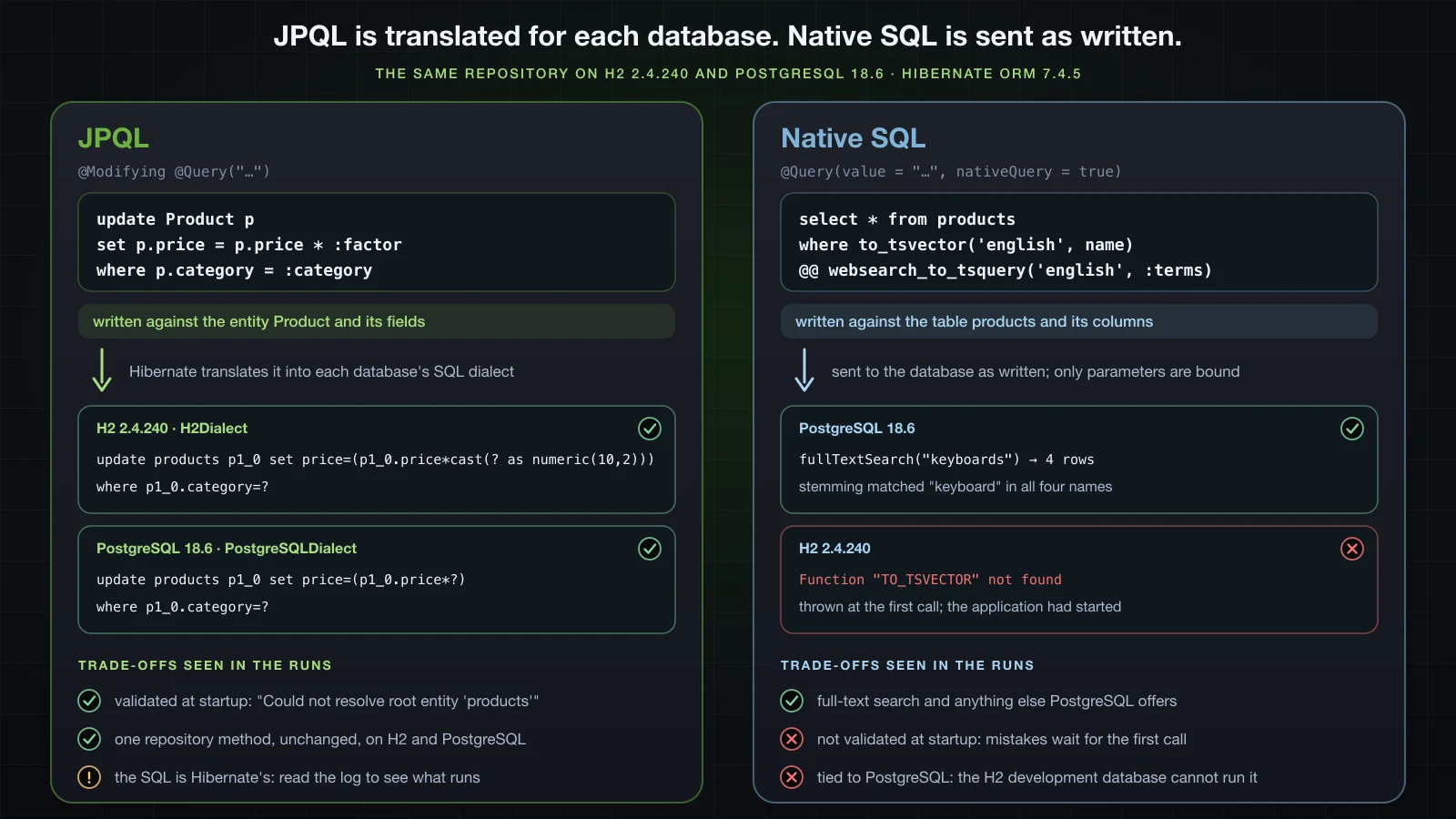
JPQL has the opposite trade. Most queries in this article were run on both databases, and the generated SQL was identical except in two places: the bulk update in the next section, where Hibernate added cast(? as numeric(10,2)) for H2 only, and the seeder's inserts, which ended in values (?,?,?,?,?,?,?,default) on H2 and left the id column out entirely on PostgreSQL. Hibernate chose each difference; the repository code did not change.
SQL injection: bound parameters versus string concatenation
⚠️ The class below is an example of what not to write. It exists to show what leaks.
Every Spring Data query in this article sends its values as bound parameters: the SQL has a ?, and the value travels separately. An @Query string is a compile-time constant, so it cannot contain user input. The risk is code that builds a query string at run time:
package com.example.demo.product;

import java.util.List;

import jakarta.persistence.EntityManager;

import org.springframework.stereotype.Component;

@Component
public class UnsafeProductSearch {

    private final EntityManager entityManager;

    public UnsafeProductSearch(EntityManager entityManager) {
        this.entityManager = entityManager;
    }

    // DO NOT DO THIS: user input concatenated into SQL
    @SuppressWarnings("unchecked")
    public List<Product> findByName(String name) {
        String sql = "select * from products where name = '" + name + "'";
        return entityManager.createNativeQuery(sql, Product.class).getResultList();
    }
}
The input is ' OR '1'='1, the kind of string that arrives in a search parameter. On H2:
>>> unsafe.findByName("' OR '1'='1")
select * from products where name = '' OR '1'='1'
KB-01  Mechanical keyboard                 89.90   25  keyboards   ACTIVE       true
KB-02  Compact keyboard                    59.00   12  keyboards   ACTIVE       null
...
AC-06  Cable organiser                     12.50   33  accessories ACTIVE       null
(19 rows)
The quote in the input closed the string literal, and OR '1'='1' became part of the condition: all 19 products, discontinued ones included. With the same SQL shape as a bound native query:
public interface ProductRepository extends JpaRepository<Product, Long> {

    @Query(value = "select * from products where name = :name", nativeQuery = true)
    List<Product> findByNameNative(String name);
}>>> repository.findByNameNative("' OR '1'='1")
select * from products where name = ?
binding parameter (1:VARCHAR) <- [' OR '1'='1]
(0 rows)
>>> repository.findByNameNative("USB-C hub")
select * from products where name = ?
binding parameter (1:VARCHAR) <- [USB-C hub]
AC-01 USB-C hub 39.00 40 accessories ACTIVE null
(1 rows)The whole input was compared as a name, and no product is called ' OR '1'='1. PostgreSQL gave the same 19 and 0. Bind values with :name or ?1, and when part of the query itself has to vary, such as a sort column, choose it from a fixed list in code rather than from the input.
Bulk updates and deletes with @Modifying
Raising the price of every keyboard by 10% with findByCategory and save loads four entities and writes four UPDATEs. A JPQL update does it in one statement:
public interface ProductRepository extends JpaRepository<Product, Long> {

    @Modifying
    @Query("update Product p set p.price = p.price * :factor where p.category = :category")
    int changePrices(String category, BigDecimal factor);
}
What happens without a transaction or without @Modifying?
Called straight from the runner, with no transaction around it, nothing reaches the database:
>>> repository.changePrices("keyboards", 1.10) without a transaction
!!! org.springframework.dao.InvalidDataAccessApiUsageException: No active transaction for update or delete query
!!! caused by jakarta.persistence.TransactionRequiredException: No active transaction for update or delete query
A query method you declare on the interface runs without a transaction of its own, and JPA refuses to execute an update or delete outside one.
@Modifying is what makes Spring Data call executeUpdate() instead of reading results. A copy of the method without it, changePricesWithoutModifying, called inside a transaction:
>>> service.changePricesWithoutModifying("keyboards", 1.10)
!!! org.springframework.dao.InvalidDataAccessApiUsageException: Query executed via 'getResultList()' or 'getSingleResult()' must be a 'select' query [update Product p set p.price = p.price * :factor where p.category = :category]
!!! caused by java.lang.IllegalStateException: Query executed via 'getResultList()' or 'getSingleResult()' must be a 'select' query [update Product p set p.price = p.price * :factor where p.category = :category]
!!! caused by org.hibernate.query.IllegalSelectQueryException: Expecting a SELECT Query [org.hibernate.query.sqm.tree.select.SqmSelectStatement], but found org.hibernate.query.sqm.tree.update.SqmUpdateStatement [update Product p set p.price = p.price * :factor where p.category = :category]
Both annotations are needed. The transaction goes on the service method that owns the use case, which is where article 21 said it would go:
package com.example.demo.product;

import java.math.BigDecimal;

import org.springframework.stereotype.Service;
import org.springframework.transaction.annotation.Transactional;

@Service
public class ProductService {

    private final ProductRepository repository;

    public ProductService(ProductRepository repository) {
        this.repository = repository;
    }

    @Transactional
    public int changePrices(String category, BigDecimal factor) {
        return repository.changePrices(category, factor);
    }
}>>> service.changePrices("keyboards", 1.10)
update products p1_0 set price=(p1_0.price*cast(? as numeric(10,2))) where p1_0.category=?
binding parameter (1:NUMERIC) <- [1.10]
binding parameter (2:VARCHAR) <- [keyboards]
result 4 (Integer)
>>> findByCategory("keyboards") after
select p1_0.id,p1_0.category,p1_0.featured,p1_0.name,p1_0.price,p1_0.sku,p1_0.status,p1_0.stock from products p1_0 where p1_0.category=?
binding parameter (1:VARCHAR) <- [keyboards]
KB-01 Mechanical keyboard 98.89 25 keyboards ACTIVE true
KB-02 Compact keyboard 64.90 12 keyboards ACTIVE null
KB-03 Wireless keyboard 50.05 0 keyboards DISCONTINUED false
KB-04 Ergonomic keyboard 141.90 7 keyboards ACTIVE null
(4 rows)
>>> service.changePrices("nothing", 1.10)
update products p1_0 set price=(p1_0.price*cast(? as numeric(10,2))) where p1_0.category=?
binding parameter (1:NUMERIC) <- [1.10]
binding parameter (2:VARCHAR) <- [nothing]
result 0 (Integer)The int is the number of rows the database changed, 4 for keyboards and 0 for a category that does not exist, which makes it the cheap way to tell "updated" from "matched nothing". On PostgreSQL the statement was update products p1_0 set price=(p1_0.price*?) where p1_0.category=? and the four new prices were the same.
The stale persistence context trap
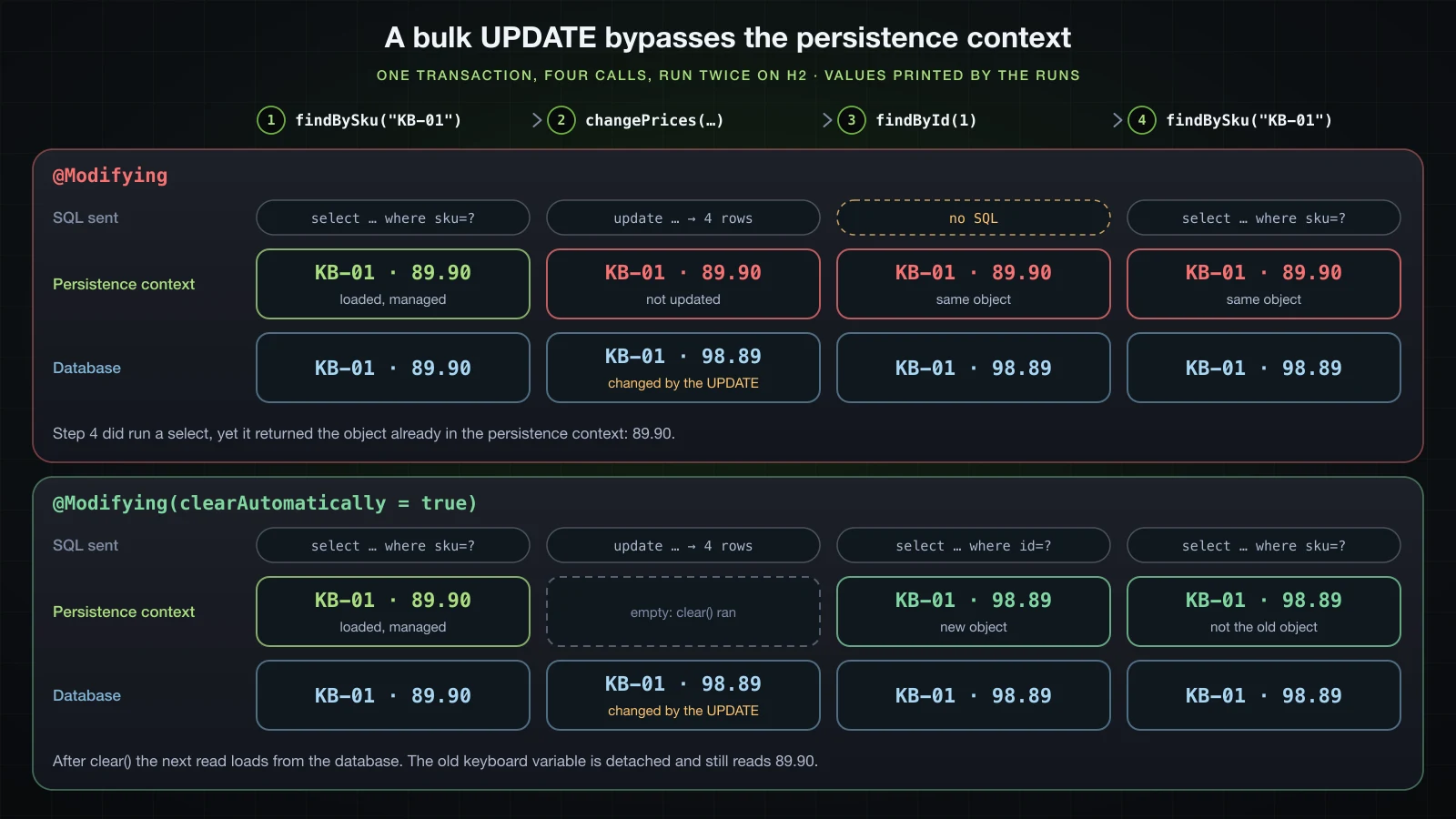
A bulk update goes straight to the database. It does not touch the entities the persistence context already holds, and within one transaction, those entities are what every later read returns. One service method, four calls:
@Transactional
public void priceChangeTrace() {
    Product keyboard = repository.findBySku("KB-01").orElseThrow();
    System.out.println("1. loaded       KB-01 price " + keyboard.getPrice());

    int rows = repository.changePrices("keyboards", new BigDecimal("1.10"));
    System.out.println("2. bulk update  " + rows + " rows");

    Product byId = repository.findById(keyboard.getId()).orElseThrow();
    System.out.println("3. findById     KB-01 price " + byId.getPrice() + ", same object: " + (byId == keyboard));

    Product bySku = repository.findBySku("KB-01").orElseThrow();
    System.out.println("4. findBySku    KB-01 price " + bySku.getPrice() + ", same object: " + (bySku == keyboard));
    System.out.println("5. old variable KB-01 price " + keyboard.getPrice());
}select p1_0.id,p1_0.category,p1_0.featured,p1_0.name,p1_0.price,p1_0.sku,p1_0.status,p1_0.stock from products p1_0 where p1_0.sku=?
binding parameter (1:VARCHAR) <- [KB-01]
1. loaded KB-01 price 89.90
update products p1_0 set price=(p1_0.price*cast(? as numeric(10,2))) where p1_0.category=?
binding parameter (1:NUMERIC) <- [1.10]
binding parameter (2:VARCHAR) <- [keyboards]
2. bulk update 4 rows
3. findById KB-01 price 89.90, same object: true
select p1_0.id,p1_0.category,p1_0.featured,p1_0.name,p1_0.price,p1_0.sku,p1_0.status,p1_0.stock from products p1_0 where p1_0.sku=?
binding parameter (1:VARCHAR) <- [KB-01]
4. findBySku KB-01 price 89.90, same object: true
5. old variable KB-01 price 89.90The row now says 98.89, and the transaction reads 89.90 three times. Step 3 sent no SQL at all: findById found KB-01 in the persistence context and returned it. Step 4 did send a select, and still returned the same object with the old price: when a row's id belongs to an entity the persistence context already manages, Hibernate hands back that entity and does not overwrite it with the row. Any total, discount or check computed later in this transaction uses a price that no longer exists.
It gets worse if the stale entity is modified. The transaction below changes the stock of the KB-01 it loaded before the bulk update:
@Transactional
public void staleEntityWrittenBack() {
    Product keyboard = repository.findBySku("KB-01").orElseThrow();
    int rows = repository.changePrices("keyboards", new BigDecimal("1.10"));
    System.out.println("1. bulk update  " + rows + " rows");
    keyboard.setStock(24);
    System.out.println("2. stock of the loaded KB-01 set to 24");
}select p1_0.id,p1_0.category,p1_0.featured,p1_0.name,p1_0.price,p1_0.sku,p1_0.status,p1_0.stock from products p1_0 where p1_0.sku=?
binding parameter (1:VARCHAR) <- [KB-01]
update products p1_0 set price=(p1_0.price*cast(? as numeric(10,2))) where p1_0.category=?
binding parameter (1:NUMERIC) <- [1.10]
binding parameter (2:VARCHAR) <- [keyboards]
1. bulk update 4 rows
2. stock of the loaded KB-01 set to 24
update products set category=?,featured=?,name=?,price=?,sku=?,status=?,stock=? where id=?
binding parameter (1:VARCHAR) <- [keyboards]
binding parameter (2:BOOLEAN) <- [true]
binding parameter (3:VARCHAR) <- [Mechanical keyboard]
binding parameter (4:NUMERIC) <- [89.90]
binding parameter (5:VARCHAR) <- [KB-01]
binding parameter (6:ENUM) <- [ACTIVE]
binding parameter (7:INTEGER) <- [24]
binding parameter (8:BIGINT) <- [1]
>>> findByCategory("keyboards") after the transaction
select p1_0.id,p1_0.category,p1_0.featured,p1_0.name,p1_0.price,p1_0.sku,p1_0.status,p1_0.stock from products p1_0 where p1_0.category=?
binding parameter (1:VARCHAR) <- [keyboards]
KB-01 Mechanical keyboard 89.90 24 keyboards ACTIVE true
KB-02 Compact keyboard 64.90 12 keyboards ACTIVE null
KB-03 Wireless keyboard 50.05 0 keyboards DISCONTINUED false
KB-04 Ergonomic keyboard 141.90 7 keyboards ACTIVE null
(4 rows)At commit, Hibernate flushed the changed entity with an UPDATE of every column, and price went back to 89.90. Three keyboards got the new price and one silently kept the old one.
clearAutomatically = true
clearAutomatically = true makes Spring Data clear the persistence context right after the bulk statement:
    @Modifying
    @Modifying(clearAutomatically = true)
    @Query("update Product p set p.price = p.price * :factor where p.category = :category")
    int changePrices(String category, BigDecimal factor);
The same priceChangeTrace():
select p1_0.id,p1_0.category,p1_0.featured,p1_0.name,p1_0.price,p1_0.sku,p1_0.status,p1_0.stock from products p1_0 where p1_0.sku=?
binding parameter (1:VARCHAR) <- [KB-01]
1. loaded       KB-01 price 89.90
update products p1_0 set price=(p1_0.price*cast(? as numeric(10,2))) where p1_0.category=?
binding parameter (1:NUMERIC) <- [1.10]
binding parameter (2:VARCHAR) <- [keyboards]
2. bulk update  4 rows
select p1_0.id,p1_0.category,p1_0.featured,p1_0.name,p1_0.price,p1_0.sku,p1_0.status,p1_0.stock from products p1_0 where p1_0.id=?
binding parameter (1:BIGINT) <- [1]
3. findById     KB-01 price 98.89, same object: false
select p1_0.id,p1_0.category,p1_0.featured,p1_0.name,p1_0.price,p1_0.sku,p1_0.status,p1_0.stock from products p1_0 where p1_0.sku=?
binding parameter (1:VARCHAR) <- [KB-01]
4. findBySku    KB-01 price 98.89, same object: false
5. old variable KB-01 price 89.90
findById now goes to the database, and both reads return a new object with 98.89. The keyboard variable still holds the old object, detached from the persistence context, still reading 89.90. Detached also means ignored: with clearAutomatically = true, staleEntityWrittenBack() sent no UPDATE after the bulk statement, and KB-01 ended the transaction at 98.89 with its stock still 25. The setStock(24) was lost without an error.
What about a change made before the bulk update and not flushed yet? A transaction that sets KB-01's stock to 0 and then calls changePrices:
1. loaded KB-01, stock set to 0 in memory
update products set category=?,featured=?,name=?,price=?,sku=?,status=?,stock=? where id=?
...
binding parameter (7:INTEGER) <- [0]
binding parameter (8:BIGINT) <- [1]
update products p1_0 set price=(p1_0.price*cast(? as numeric(10,2))) where p1_0.category=?
binding parameter (1:NUMERIC) <- [1.10]
binding parameter (2:VARCHAR) <- [keyboards]
2. bulk update  4 rows
select p1_0.id,p1_0.category,p1_0.featured,p1_0.name,p1_0.price,p1_0.sku,p1_0.status,p1_0.stock from products p1_0 where p1_0.sku=?
binding parameter (1:VARCHAR) <- [KB-01]
3. findBySku    KB-01 price 98.89, stock 0
Hibernate flushed the pending change before it ran the bulk UPDATE, so the clear did not lose it. @Modifying also has flushAutomatically = true, which makes Spring Data call EntityManager.flush() itself before executeUpdate(), for when you do not want to rely on that. The safe pattern is simpler than either flag: run the bulk statement first in the transaction, or last, and do not keep using entities loaded before it.
Derived deleteBy versus a bulk DELETE
Deleting a whole category can be a derived method or a JPQL delete:
public interface ProductRepository extends JpaRepository<Product, Long> {

    long deleteByCategory(String category);

    @Modifying
    @Query("delete from Product p where p.category = :category")
    int deleteAllInCategory(String category);
}
Both need a transaction, and they fail differently without one. The derived delete had already sent its SELECT when it failed:
>>> repository.deleteByCategory("audio") without a transaction
select p1_0.id,p1_0.category,p1_0.featured,p1_0.name,p1_0.price,p1_0.sku,p1_0.status,p1_0.stock from products p1_0 where p1_0.category=?
binding parameter (1:VARCHAR) <- [audio]
!!! org.springframework.dao.InvalidDataAccessApiUsageException: No EntityManager with actual transaction available for current thread - cannot reliably process 'remove' call
!!! caused by jakarta.persistence.TransactionRequiredException: No EntityManager with actual transaction available for current thread - cannot reliably process 'remove' call
>>> repository.deleteAllInCategory("audio") without a transaction
!!! org.springframework.dao.InvalidDataAccessApiUsageException: No active transaction for update or delete query
!!! caused by jakarta.persistence.TransactionRequiredException: No active transaction for update or delete query
Inside @Transactional service methods, with a temporary @PreRemove method on Product that prints the SKU of each entity being removed:
    @PreRemove
    void printRemoval() {
        System.out.println("@PreRemove " + sku);
} >>> service.deleteCategoryDerived("audio")
select p1_0.id,p1_0.category,p1_0.featured,p1_0.name,p1_0.price,p1_0.sku,p1_0.status,p1_0.stock from products p1_0 where p1_0.category=?
binding parameter (1:VARCHAR) <- [audio]
@PreRemove AU-01
@PreRemove AU-02
@PreRemove AU-03
delete from products where id=?
binding parameter (1:BIGINT) <- [11]
delete from products where id=?
binding parameter (1:BIGINT) <- [12]
delete from products where id=?
binding parameter (1:BIGINT) <- [13]
result 3 (Long)
>>> service.deleteCategoryInBulk("mice")
delete from products p1_0 where p1_0.category=?
binding parameter (1:VARCHAR) <- [mice]
result 3 (Integer)Derived deleteByCategory | @Modifying JPQL delete | |
|---|---|---|
| Statements for 3 rows | 1 SELECT, then 3 DELETEs by id | 1 DELETE |
| Entities loaded | Yes, each passed to EntityManager.remove | No |
@PreRemove ran | Yes, once per product | No |
| Persistence context | Knows the entities are removed | Not told; entities already loaded stay in it |
| Without a transaction | Fails after the SELECT | Fails before any SQL |
| Return value | long, number of entities removed | int, rows deleted |
The derived version sends one DELETE per row and is the one to use when entity callbacks, or the cascades article 28 adds, must run. The bulk version is the one to use for a large number of rows, with the same caution about entities already loaded as the bulk update.
Beyond this article: Query by Example, Specifications, Querydsl and projections
Four more ways to query exist in Spring Data JPA, and each gets its own treatment in the Advanced course:
- Query by Example: fill a
Productwith the values to match and passExample.of(probe)tofindAll, whichJpaRepositoryinherits fromQueryByExampleExecutor. - Specifications and the Criteria API: build predicates as objects and combine them at run time, for search forms where every filter is optional.
- Querydsl: type-safe queries written against classes generated from the entities.
- Projections: return records or interfaces holding only the selected columns, instead of whole entities or
Object[].
Derived query, JPQL or native query: which one to use?
| Derived query method | @Query with JPQL | Native query | |
|---|---|---|---|
| Written against | The method name: entity properties and keywords | Entity and field names | Table and column names |
| Checked | At startup: PropertyReferenceException | At startup: Query validation failed, BadJpqlGrammarException | At the first call |
| SQL | Generated per dialect by Hibernate | Generated per dialect by Hibernate | Sent as written |
% and _ in user input | Escaped by Containing and StartingWith | Not escaped, unless written with escape([0]) | Whatever the SQL does |
| Fits | One to three conditions, exists, count, Top/First, OrderBy | Parentheses, functions, aggregates, IN lists, bulk update and delete | Features JPQL lacks: full-text search, vendor functions, hand-tuned SQL |
| Starts to hurt | Names like findTop3ByCategoryAndPriceLessThanOrderByPriceDesc | Filters that are all optional, which suit Specifications | Every database it must run on, test databases included |
A practical order: start with a derived method, move to @Query as soon as the name stops being readable, and use a native query only for a feature the database has and JPQL does not, knowing that its tests need that database.
FAQ
Do I still need @Param in Spring Data JPA queries?
Not in a Spring Boot project built with Spring Boot's Gradle plugin, which compiles with -parameters, so :category matches the parameter named category. Compiled without that flag, the application still starts, and each query with named parameters fails at its first call with "For queries with named parameters you need to provide names for method parameters". @Param works either way, so libraries and code compiled elsewhere should keep it. Positional parameters such as ?1 never need names.
Why does my @Modifying query throw "No active transaction for update or delete query"?
Because query methods declared on the repository interface run without a transaction of their own, and JPA only executes update and delete statements inside one. Call the method from a @Transactional service method.
Why does findById return the old value after a bulk update?
A @Modifying query changes rows in the database but not the entities already in the persistence context, and findById returns the managed entity without querying. Even a query that does run a SELECT returns the managed object unchanged. Add clearAutomatically = true to the @Modifying annotation, or run the bulk statement before loading entities. Without either, a later flush of that stale entity writes its old values back over the bulk update.
Does Spring Data escape wildcards in LIKE queries?
Derived Containing and StartingWith do: the input % is bound as %\%% with escape '\', and matched one product instead of nineteen. Like and hand-written JPQL such as like concat('%', :q, '%') do not, so % or _ from a user matches every row. In @Query, like %?#{escape([0])}% escape ?#{escapeCharacter()} escapes the input the same way.
When does Spring Data validate a query method?
Derived queries and JPQL @Query methods are checked when the repository bean is created, which in the default bootstrap mode is during startup: a wrong property, an entity name spelled as the table name, or SQL written as JPQL all stop the application. Native queries are not checked; their errors appear at the first call.
Can a derived query method use parentheses between And and Or?
No. And binds tighter than Or, so findByCategoryAndStockGreaterThanOrStatus means (category and stock) or status, and there is no syntax to group differently. Write the condition in @Query with explicit parentheses.
Conclusion
A derived query method turns a name into JPQL at startup, and Hibernate turns the JPQL into SQL for each database. It is the least code and fails earliest: a misspelled property stops the application with a "Did you mean" hint. The return type sets the contract, so Optional throws on two rows, a Stream needs a transaction, and Containing escapes % and _ in user input where a hand-written LIKE does not; False never matches null. @Query with JPQL adds parentheses, functions, IN lists and aggregates, still validated at startup; with Boot's Gradle plugin, named parameters work without @Param. A native query reaches features like full-text search, costs startup validation and portability, and failed on H2 at the first call. Whatever the query style, bind values: a concatenated ' OR '1'='1 returned every product.
For writes, @Modifying needs a transaction and returns the row count. A bulk update bypasses the persistence context: a loaded entity kept reading 89.90 after the row became 98.89, and flushing it wrote 89.90 back. clearAutomatically = true fixes the reads but detaches the old objects, whose later changes are lost. A derived deleteBy loads and removes entities one by one with callbacks, and a bulk DELETE is one statement without them.
The next article maps relationships between entities: @OneToOne, @OneToMany, @ManyToOne and @ManyToMany, cascade, and FetchType.
![[Spring Boot Basics] Spring Data JPA and Hibernate in Spring Boot: Entities, @Id, @GeneratedValue and JpaRepository CRUD](/images/blog/sb-jpa-thumbnail.en.webp)
![[Spring Boot Basics] Spring Security Overview: Authentication vs Authorization, the Filter Chain and SecurityFilterChain](/images/blog/sb-security-thumbnail.en.webp)
![[Spring Boot Basics] Calling External APIs with RestClient in Spring Boot: GET, POST, Error Handling and Timeouts](/images/blog/sb-restclient-thumbnail.en.webp)
![[Spring Boot Basics] Spring Bean Scopes and the Bean Lifecycle: singleton, prototype, @PostConstruct and @PreDestroy](/images/blog/sb-bean-lifecycle-thumbnail.en.webp)