Article 33 put the catalogue API behind Spring Security: a SecurityFilterChain for /api/** with HTTP Basic, a stateless session policy and ProblemDetail bodies for 401 and 403, plus two users declared in code with an InMemoryUserDetailsManager and {noop} passwords. This article moves the accounts into a users table. A JPA entity holds the username, email, password hash, role and enabled flag; a UserDetailsService reads it for Spring Security; POST /api/auth/register creates accounts and POST /api/auth/login checks credentials and returns the user's profile.
The examples use Spring Boot 4.1.1, which brings Spring Security 7.1.1, and Java 21, on an Initializr project with the web, validation, security, Spring Data JPA, H2 and PostgreSQL dependencies. Most runs use the in-memory H2 database; the ones that look into the users table use PostgreSQL 18 in Docker. The app runs on port 8134 instead of the default 8080.
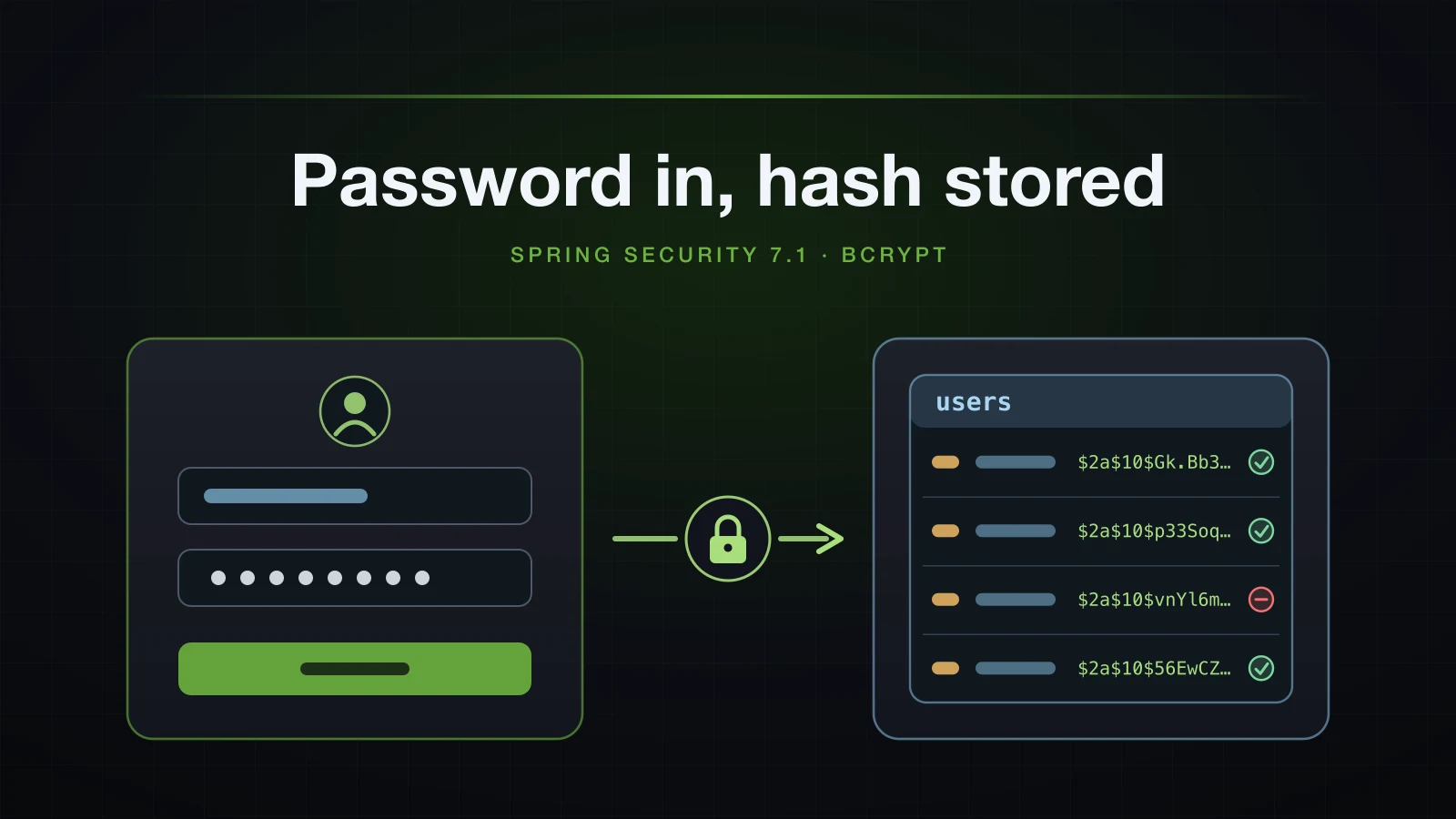
The design follows the plan for Chapter 5: the login endpoint verifies the credentials and returns a profile, but it creates no session and issues no token; API calls keep sending HTTP Basic and the API stays stateless. Log excerpts were captured with logging.pattern.console=%logger{0}: %msg%n unless they carry a timestamp.
The users table and the AppUser entity
The project needs the starters from Chapters 3 and 4 plus the security starter from article 33:
dependencies {
	implementation 'org.springframework.boot:spring-boot-h2console'
	implementation 'org.springframework.boot:spring-boot-starter-data-jpa'
	implementation 'org.springframework.boot:spring-boot-starter-security'
	implementation 'org.springframework.boot:spring-boot-starter-validation'
	implementation 'org.springframework.boot:spring-boot-starter-webmvc'
	runtimeOnly 'com.h2database:h2'
	runtimeOnly 'org.postgresql:postgresql'
	testImplementation 'org.springframework.boot:spring-boot-starter-data-jpa-test'
	testImplementation 'org.springframework.boot:spring-boot-starter-security-test'
	testImplementation 'org.springframework.boot:spring-boot-starter-validation-test'
	testImplementation 'org.springframework.boot:spring-boot-starter-webmvc-test'
	testRuntimeOnly 'org.junit.platform:junit-platform-launcher'
}<dependencies>
<dependency>
<groupId>org.springframework.boot</groupId>
<artifactId>spring-boot-h2console</artifactId>
</dependency>
<dependency>
<groupId>org.springframework.boot</groupId>
<artifactId>spring-boot-starter-data-jpa</artifactId>
</dependency>
<dependency>
<groupId>org.springframework.boot</groupId>
<artifactId>spring-boot-starter-security</artifactId>
</dependency>
<dependency>
<groupId>org.springframework.boot</groupId>
<artifactId>spring-boot-starter-validation</artifactId>
</dependency>
<dependency>
<groupId>org.springframework.boot</groupId>
<artifactId>spring-boot-starter-webmvc</artifactId>
</dependency>
<dependency>
<groupId>com.h2database</groupId>
<artifactId>h2</artifactId>
<scope>runtime</scope>
</dependency>
<dependency>
<groupId>org.postgresql</groupId>
<artifactId>postgresql</artifactId>
<scope>runtime</scope>
</dependency>
<dependency>
<groupId>org.springframework.boot</groupId>
<artifactId>spring-boot-starter-data-jpa-test</artifactId>
<scope>test</scope>
</dependency>
<dependency>
<groupId>org.springframework.boot</groupId>
<artifactId>spring-boot-starter-security-test</artifactId>
<scope>test</scope>
</dependency>
<dependency>
<groupId>org.springframework.boot</groupId>
<artifactId>spring-boot-starter-validation-test</artifactId>
<scope>test</scope>
</dependency>
<dependency>
<groupId>org.springframework.boot</groupId>
<artifactId>spring-boot-starter-webmvc-test</artifactId>
<scope>test</scope>
</dependency>
</dependencies>spring-boot-starter-security brought spring-security-core, -web, -config and -crypto, all 7.1.1. Accounts get their own feature package, com.example.demo.user, next to product, order and customer. The role is a plain enum column for now; roles and the rules that use them belong to article 36.
package com.example.demo.user;

public enum Role {
    USER, ADMIN
}package com.example.demo.user;
import jakarta.persistence.Column;
import jakarta.persistence.Entity;
import jakarta.persistence.EnumType;
import jakarta.persistence.Enumerated;
import jakarta.persistence.GeneratedValue;
import jakarta.persistence.GenerationType;
import jakarta.persistence.Id;
import jakarta.persistence.Table;
@Entity
@Table(name = "users")
public class AppUser {
@Id
@GeneratedValue(strategy = GenerationType.IDENTITY)
private Long id;
@Column(nullable = false, length = 50, unique = true)
private String username;
@Column(nullable = false, length = 254, unique = true)
private String email;
@Column(nullable = false, length = 100)
private String passwordHash;
@Enumerated(EnumType.STRING)
@Column(nullable = false, length = 20)
private Role role = Role.USER;
private boolean enabled = true;
protected AppUser() {
}
public AppUser(String username, String email, String passwordHash) {
this.username = username;
this.email = email;
this.passwordHash = passwordHash;
}
public Long getId() { return id; }
public String getUsername() { return username; }
public String getEmail() { return email; }
public String getPasswordHash() { return passwordHash; }
public void setPasswordHash(String passwordHash) { this.passwordHash = passwordHash; }
public Role getRole() { return role; }
public boolean isEnabled() { return enabled; }
public void setEnabled(boolean enabled) { this.enabled = enabled; }
@Override
public boolean equals(Object o) {
if (this == o) return true;
if (!(o instanceof AppUser other)) return false;
return id != null && id.equals(other.getId());
}
@Override
public int hashCode() {
return AppUser.class.hashCode();
}
}@Table(name = "users")keeps the plural table names of the series.usernameandemailareunique. Registration checks both first to answer with a precise 409; the constraints stay as the guarantee.passwordHashholds the encoded password, never the password.length = 100fits a 60-character BCrypt hash and the 68-character form with a{bcrypt}prefix shown later. Boot's naming strategy maps the field to apassword_hashcolumn.roleusesEnumType.STRING, for the reason article 26 gave.enabledstarts astrue; the section on disabled accounts shows what Spring Security does when it isfalse.
The entity has no setter for username or email, and equals and hashCode follow the id-based pattern from article 26.
package com.example.demo.user;

import java.util.Optional;

import org.springframework.data.jpa.repository.JpaRepository;

public interface AppUserRepository extends JpaRepository<AppUser, Long> {

    Optional<AppUser> findByUsername(String username);

    boolean existsByUsername(String username);

    boolean existsByEmail(String email);
}
findByUsername is for Spring Security; the two exists methods are for registration. Article 27 covered how Spring Data derives their queries.
The table Hibernate created on PostgreSQL
The container and the postgres profile for this article:
docker run -d --name sb-a34-pg -e POSTGRES_USER=demo -e POSTGRES_PASSWORD=secret -e POSTGRES_DB=demo -p 55434:5432 postgres:18spring.datasource.url=jdbc:postgresql://localhost:55434/demo
spring.datasource.username=demo
spring.datasource.password=secretspring.jpa.open-in-view=false stays in application.properties, as in Chapter 4. Started with the profile and ddl-auto=update, which Chapter 4 used for experiments on PostgreSQL:
java -jar build/libs/demo-0.0.1-SNAPSHOT.jar --server.port=8134 --spring.profiles.active=postgres --spring.jpa.hibernate.ddl-auto=updateHibernate logged:
SQL: create table users (id bigint generated by default as identity, email varchar(254) not null, enabled boolean not null, password_hash varchar(100) not null, role varchar(20) not null check ((role in ('USER','ADMIN'))), username varchar(50) not null, primary key (id))
SQL: alter table if exists users drop constraint if exists UK6dotkott2kjsp8vw4d0m25fb7
SQL: alter table if exists users add constraint UK6dotkott2kjsp8vw4d0m25fb7 unique (email)
SQL: alter table if exists users drop constraint if exists UKr43af9ap4edm43mmtq01oddj6
SQL: alter table if exists users add constraint UKr43af9ap4edm43mmtq01oddj6 unique (username)docker exec sb-a34-pg psql -U demo -d demo -c '\d users' Table "public.users"
Column | Type | Collation | Nullable | Default
---------------+------------------------+-----------+----------+----------------------------------
id | bigint | | not null | generated by default as identity
email | character varying(254) | | not null |
enabled | boolean | | not null |
password_hash | character varying(100) | | not null |
role | character varying(20) | | not null |
username | character varying(50) | | not null |
Indexes:
"users_pkey" PRIMARY KEY, btree (id)
"uk6dotkott2kjsp8vw4d0m25fb7" UNIQUE CONSTRAINT, btree (email)
"ukr43af9ap4edm43mmtq01oddj6" UNIQUE CONSTRAINT, btree (username)
Check constraints:
"users_role_check" CHECK (role::text = ANY (ARRAY['USER'::character varying, 'ADMIN'::character varying]::text[]))The unique constraints arrived as separate alter table statements with generated names. A production schema gets this table from a Flyway migration, as in article 31, with constraint names you choose.
Loading users with a UserDetailsService
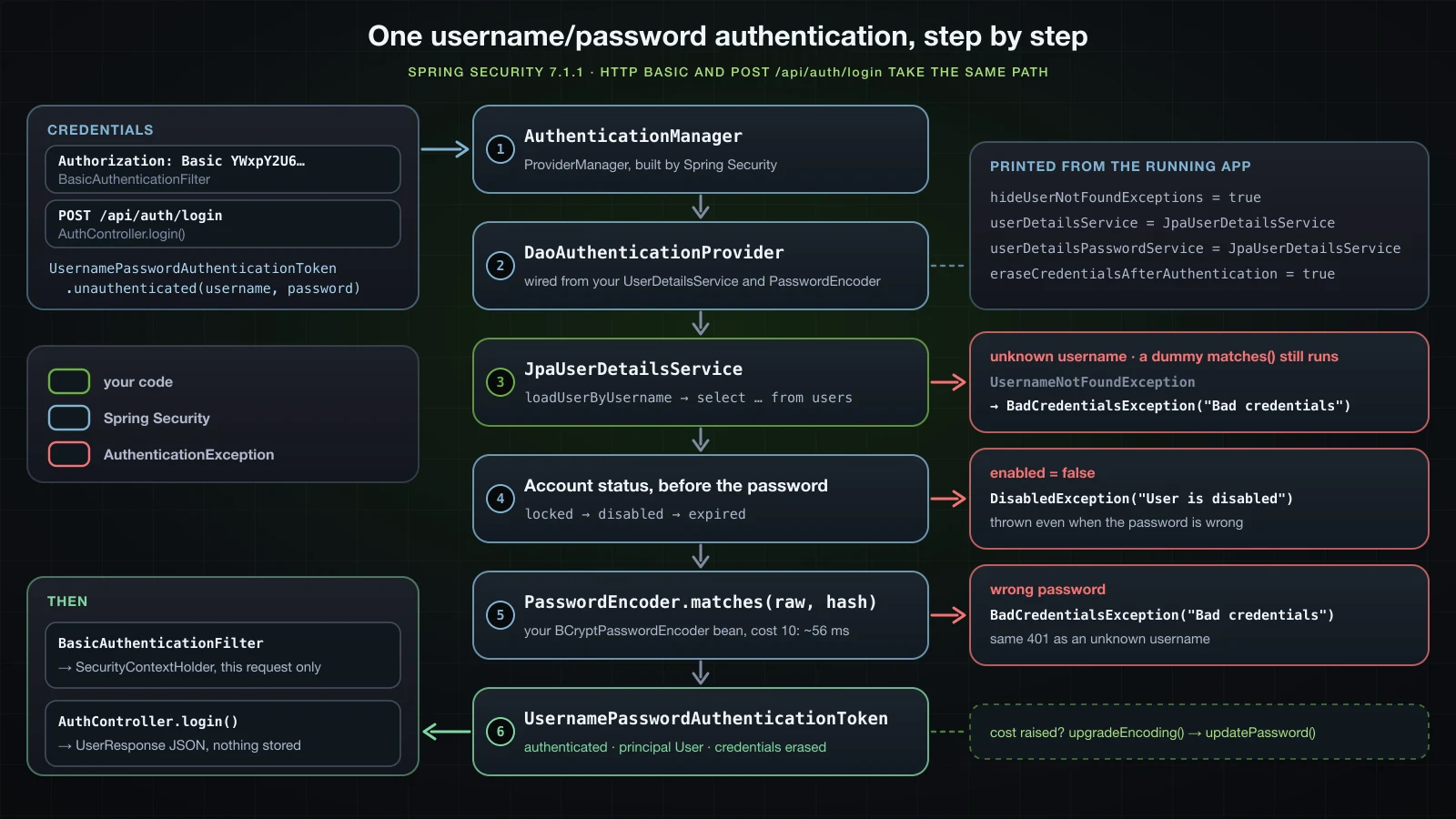
Spring Security never queries a table on its own. For username and password authentication it asks a UserDetailsService for a UserDetails by username, then compares the presented password with the one that object carries. This implementation reads AppUser:
package com.example.demo.user;

import org.springframework.security.core.userdetails.User;
import org.springframework.security.core.userdetails.UserDetails;
import org.springframework.security.core.userdetails.UserDetailsPasswordService;
import org.springframework.security.core.userdetails.UserDetailsService;
import org.springframework.security.core.userdetails.UsernameNotFoundException;
import org.springframework.stereotype.Service;
import org.springframework.transaction.annotation.Transactional;

@Service
public class JpaUserDetailsService implements UserDetailsService, UserDetailsPasswordService {

    private final AppUserRepository repository;

    public JpaUserDetailsService(AppUserRepository repository) {
        this.repository = repository;
    }

    @Override
    public UserDetails loadUserByUsername(String username) {
        AppUser user = repository.findByUsername(username)
                .orElseThrow(() -> new UsernameNotFoundException("No user named " + username));
        return User.withUsername(user.getUsername())
                .password(user.getPasswordHash())
                .roles(user.getRole().name())
                .disabled(!user.isEnabled())
                .build();
    }

    @Override
    @Transactional
    public UserDetails updatePassword(UserDetails user, String newPassword) {
        AppUser appUser = repository.findByUsername(user.getUsername()).orElseThrow();
        appUser.setPasswordHash(newPassword);
        return User.withUserDetails(user).password(newPassword).build();
    }
}User.withUsername(...)builds Spring Security's ownUserDetailsimplementation,org.springframework.security.core.userdetails.User. The entity does not leave theuserpackage..password(user.getPasswordHash())hands over the stored hash, which the provider compares against with thePasswordEncoder..roles(user.getRole().name())turnsUSERinto the authorityROLE_USER, as the log lines later show..disabled(!user.isEnabled())maps the column onto the account status Spring Security checks.UsernameNotFoundExceptionis the contract for an unknown username. Its message stays on the server.updatePassword, fromUserDetailsPasswordService, lets Spring Security store a new hash for an existing user. It does nothing until the last section raises the BCrypt cost;@Transactionalmakes the dirty entity flush as an UPDATE.
In article 33's SecurityConfig the in-memory users go and a PasswordEncoder bean takes their place. The two filter chains stay as they were:
import org.springframework.security.core.userdetails.User;
import org.springframework.security.core.userdetails.UserDetails;
import org.springframework.security.provisioning.InMemoryUserDetailsManager;
import org.springframework.security.crypto.bcrypt.BCryptPasswordEncoder;
import org.springframework.security.crypto.password.PasswordEncoder;

@Configuration
public class SecurityConfig {

    // apiSecurityFilterChain and webSecurityFilterChain are unchanged from article 33

    @Bean
    InMemoryUserDetailsManager userDetailsService() {
        UserDetails alice = User.withUsername("alice")
                .password("{noop}alice-secret")
                .roles("USER")
                .build();
        UserDetails bob = User.withUsername("bob")
                .password("{noop}bob-secret")
                .roles("USER", "ADMIN")
                .build();
        return new InMemoryUserDetailsManager(alice, bob);
    }
    @Bean
    PasswordEncoder passwordEncoder() {
        return new BCryptPasswordEncoder();
    }
}
No configuration class mentions JpaUserDetailsService. The next two subsections show how Spring Security and Spring Boot find it.
When does Spring Boot stop generating a password?
Article 33 showed Boot's generated password and saw it disappear once its InMemoryUserDetailsManager existed; the JPA service triggers the same back-off. For comparison, the fresh Initializr project, before any code of this chapter, printed:
2026-09-14T11:13:13.959+07:00  WARN 50769 --- [demo] [           main] .s.a.UserDetailsServiceAutoConfiguration :

Using generated security password: 6e956b91-b29d-43c4-addf-0ed8a2c4d1ef

This generated password is for development use only. Your security configuration must be updated before running your application in production.

2026-09-14T11:13:13.973+07:00  INFO 50769 --- [demo] [           main] r$InitializeUserDetailsManagerConfigurer : Global AuthenticationManager configured with UserDetailsService bean with name inMemoryUserDetailsManager
With JpaUserDetailsService in place there is no generated password, and the INFO line names the new bean:
2026-09-14T11:17:25.055+07:00 INFO 51765 --- [demo] [ main] r$InitializeUserDetailsManagerConfigurer : Global AuthenticationManager configured with UserDetailsService bean with name jpaUserDetailsServiceStarted with --debug, the condition evaluation report says why:
   UserDetailsServiceAutoConfiguration:
      Did not match:
         - @ConditionalOnMissingBean (types: org.springframework.security.authentication.AuthenticationManager,org.springframework.security.authentication.AuthenticationProvider,org.springframework.security.core.userdetails.UserDetailsService,org.springframework.security.authentication.AuthenticationManagerResolver,org.springframework.security.oauth2.jwt.JwtDecoder; SearchStrategy: all) found beans of type 'org.springframework.security.authentication.AuthenticationManager' authenticationManager and found beans of type 'org.springframework.security.core.userdetails.UserDetailsService' jpaUserDetailsService (OnBeanCondition)
UserDetailsServiceAutoConfiguration is the class that creates inMemoryUserDetailsManager with the generated password, and it backs off as soon as a bean of any of five types exists. This run had two of them: jpaUserDetailsService and the authenticationManager bean that the login section adds. A build without that AuthenticationManager bean reported found beans of type 'org.springframework.security.core.userdetails.UserDetailsService' jpaUserDetailsService alone, so the UserDetailsService is enough. Article 33's report named its userDetailsService bean in the same place.
How is DaoAuthenticationProvider wired from your beans?
The INFO line comes from InitializeUserDetailsManagerConfigurer in spring-security-config. Its bytecode in 7.1.1 does this: if an AuthenticationProvider bean exists, it logs a warning and leaves the UserDetailsService alone; if there is more than one UserDetailsService bean, it logs Found %s UserDetailsService beans and configures nothing; with exactly one, it creates a DaoAuthenticationProvider from it, looks up a PasswordEncoder bean and a UserDetailsPasswordService bean, sets them on the provider when present, and registers the provider with the global AuthenticationManager. A lab runner prints what that produced, reading private fields by reflection:
package com.example.demo.lab;

import java.lang.reflect.Field;

import org.springframework.boot.CommandLineRunner;
import org.springframework.context.annotation.Profile;
import org.springframework.security.authentication.AuthenticationManager;
import org.springframework.security.authentication.AuthenticationProvider;
import org.springframework.security.authentication.ProviderManager;
import org.springframework.security.web.FilterChainProxy;
import org.springframework.security.web.authentication.www.BasicAuthenticationFilter;
import org.springframework.stereotype.Component;

import jakarta.servlet.Filter;

@Component
@Profile("inspect")
class AuthManagerInspector implements CommandLineRunner {

    private final AuthenticationManager authenticationManager;
    private final FilterChainProxy filterChainProxy;
    private final org.springframework.security.crypto.password.PasswordEncoder passwordEncoder;

    AuthManagerInspector(AuthenticationManager authenticationManager, FilterChainProxy filterChainProxy,
            org.springframework.security.crypto.password.PasswordEncoder passwordEncoder) {
        this.authenticationManager = authenticationManager;
        this.filterChainProxy = filterChainProxy;
        this.passwordEncoder = passwordEncoder;
    }

    @Override
    public void run(String... args) throws Exception {
        System.out.println("PasswordEncoder bean: " + passwordEncoder.getClass().getName() + "@" + Integer.toHexString(System.identityHashCode(passwordEncoder)));
        System.out.println("AuthenticationManager bean: " + describe(authenticationManager, ""));
        for (var chain : filterChainProxy.getFilterChains()) {
            for (Filter filter : chain.getFilters()) {
                if (filter instanceof BasicAuthenticationFilter basic) {
                    Object manager = read(basic, BasicAuthenticationFilter.class, "authenticationManager");
                    System.out.println("BasicAuthenticationFilter uses: " + describe(manager, ""));
                    System.out.println("same instance as the bean: " + (manager == authenticationManager));
                }
            }
        }
    }

    private String describe(Object manager, String indent) throws Exception {
        StringBuilder sb = new StringBuilder(manager.getClass().getName() + "@" + Integer.toHexString(System.identityHashCode(manager)));
        if (manager instanceof ProviderManager pm) {
            for (AuthenticationProvider provider : pm.getProviders()) {
                sb.append("\n").append(indent).append("  provider: ").append(provider.getClass().getName());
                for (Class<?> c = provider.getClass(); c != Object.class; c = c.getSuperclass()) {
                    for (Field f : c.getDeclaredFields()) {
                        if (java.lang.reflect.Modifier.isStatic(f.getModifiers())) continue;
                        f.setAccessible(true);
                        Object v = f.get(provider);
                        String shown = v == null ? "null" : (v instanceof Boolean || v instanceof String) ? v.toString()
                                : (v instanceof java.util.function.Supplier<?> s) ? "Supplier of " + s.get().getClass().getName() + "@" + Integer.toHexString(System.identityHashCode(s.get()))
                                : v.getClass().getName();
                        sb.append("\n").append(indent).append("    ").append(c.getSimpleName()).append(".").append(f.getName()).append(" = ").append(shown);
                    }
                }
            }
            Object parent = read(pm, ProviderManager.class, "parent");
            sb.append("\n").append(indent).append("  eraseCredentialsAfterAuthentication = ").append(read(pm, ProviderManager.class, "eraseCredentialsAfterAuthentication"));
            sb.append("\n").append(indent).append("  parent: ").append(parent == null ? "null" : describe(parent, indent + "  "));
        }
        return sb.toString();
    }

    private static Object read(Object target, Class<?> type, String name) throws Exception {
        Field f = type.getDeclaredField(name);
        f.setAccessible(true);
        return f.get(target);
    }
}java -jar build/libs/demo-0.0.1-SNAPSHOT.jar --server.port=8134 --spring.profiles.active=postgres,inspect --spring.jpa.hibernate.ddl-auto=updateTrimmed to the fields that matter, with the parent's repeated listing left out:
PasswordEncoder bean: org.springframework.security.crypto.bcrypt.BCryptPasswordEncoder@2738a1fc
AuthenticationManager bean: org.springframework.security.authentication.ProviderManager@5e0602ff
  provider: org.springframework.security.authentication.dao.DaoAuthenticationProvider
    DaoAuthenticationProvider.passwordEncoder = Supplier of org.springframework.security.crypto.bcrypt.BCryptPasswordEncoder@2738a1fc
    DaoAuthenticationProvider.userNotFoundEncodedPassword = null
    DaoAuthenticationProvider.userDetailsService = com.example.demo.user.JpaUserDetailsService$$SpringCGLIB$$0
    DaoAuthenticationProvider.userDetailsPasswordService = com.example.demo.user.JpaUserDetailsService$$SpringCGLIB$$0
    DaoAuthenticationProvider.compromisedPasswordChecker = null
    AbstractUserDetailsAuthenticationProvider.hideUserNotFoundExceptions = true
    AbstractUserDetailsAuthenticationProvider.alwaysPerformAdditionalChecksOnUser = true
  eraseCredentialsAfterAuthentication = true
  parent: null
BasicAuthenticationFilter uses: org.springframework.security.authentication.ProviderManager@49dacc93
  provider: org.springframework.security.authentication.AnonymousAuthenticationProvider
  eraseCredentialsAfterAuthentication = true
  parent: org.springframework.security.authentication.ProviderManager@5e0602ff
same instance as the bean: false- The
AuthenticationManageris aProviderManagerwith a singleDaoAuthenticationProvider. - The provider's
PasswordEncoderis theBCryptPasswordEncoderbean: the identity hash2738a1fcis the same object. - Its
userDetailsServiceanduserDetailsPasswordServiceare bothJpaUserDetailsService, seen through a CGLIB proxy becauseupdatePasswordis@Transactional. hideUserNotFoundExceptions = trueandalwaysPerformAdditionalChecksOnUser = truedecide what the login and disabled-account sections observe.userNotFoundEncodedPasswordis stillnullbecause nobody has tried to log in yet.BasicAuthenticationFilterin article 33's API chain has its ownProviderManager, holding onlyAnonymousAuthenticationProvider, with the global manager5e0602ffas its parent. A username and password token goes on to the parent'sDaoAuthenticationProvider.
Tutorials written for Spring Security 5 build this provider by hand with a no-argument constructor and setUserDetailsService. In 7.1.1, javap lists a single constructor, DaoAuthenticationProvider(UserDetailsService), and no such setter; with the setup above there is nothing to build by hand.
PasswordEncoder and BCrypt
PasswordEncoder has three methods that matter here: encode turns a password into the string you store, matches checks a presented password against a stored string, and upgradeEncoding says whether a stored string should be encoded again. BCryptPasswordEncoder implements them with BCrypt, a deliberately slow hash with a random salt and an adjustable cost. A lab runner exercises it outside any request:
package com.example.demo.lab;

import java.nio.charset.StandardCharsets;

import org.springframework.boot.CommandLineRunner;
import org.springframework.context.annotation.Profile;
import org.springframework.security.crypto.bcrypt.BCryptPasswordEncoder;
import org.springframework.security.crypto.bcrypt.BCryptPasswordEncoder.BCryptVersion;
import org.springframework.security.crypto.factory.PasswordEncoderFactories;
import org.springframework.security.crypto.password.PasswordEncoder;
import org.springframework.stereotype.Component;

@Component
@Profile("bcrypt")
class BcryptTour implements CommandLineRunner {

    @Override
    public void run(String... args) {
        BCryptPasswordEncoder encoder = new BCryptPasswordEncoder();
        String password = "Wonderland-2026";

        System.out.println("-- two hashes of the same password");
        String first = encoder.encode(password);
        String second = encoder.encode(password);
        System.out.println(first + "  length=" + first.length());
        System.out.println(second + "  length=" + second.length());
        System.out.println("equal=" + first.equals(second));
        System.out.println("matches(first)=" + encoder.matches(password, first)
                + " matches(second)=" + encoder.matches(password, second)
                + " matches(wrong, first)=" + encoder.matches("wonderland-2026", first));
        String[] parts = first.split("\\$");
        System.out.println("parts: version=" + parts[1] + " cost=" + parts[2]
                + " salt=" + parts[3].substring(0, 22) + " (" + parts[3].substring(0, 22).length() + ")"
                + " hash=" + parts[3].substring(22) + " (" + parts[3].substring(22).length() + ")");

        System.out.println("-- $2b$");
        BCryptPasswordEncoder encoder2b = new BCryptPasswordEncoder(BCryptVersion.$2B, 10);
        String hash2b = encoder2b.encode(password);
        System.out.println(hash2b + " default encoder matches=" + encoder.matches(password, hash2b));

        System.out.println("-- cost timings, matches(), best of 5 after one warm-up");
        for (int cost : new int[] { 10, 12, 14 }) {
            BCryptPasswordEncoder costEncoder = new BCryptPasswordEncoder(cost);
            String hash = costEncoder.encode(password);
            costEncoder.matches(password, hash);
            long best = Long.MAX_VALUE;
            for (int i = 0; i < 5; i++) {
                long start = System.nanoTime();
                costEncoder.matches(password, hash);
                best = Math.min(best, System.nanoTime() - start);
            }
            System.out.printf("cost %d: %s  %.1f ms%n", cost, hash.substring(0, 7), best / 1_000_000.0);
        }

        System.out.println("-- DelegatingPasswordEncoder");
        PasswordEncoder delegating = PasswordEncoderFactories.createDelegatingPasswordEncoder();
        String prefixed = delegating.encode(password);
        System.out.println(prefixed + "  length=" + prefixed.length());
        System.out.println("matches(prefixed)=" + delegating.matches(password, prefixed));
        try {
            System.out.println("matches(no prefix)=" + delegating.matches(password, first));
        } catch (RuntimeException e) {
            System.out.println(e.getClass().getName() + ": " + e.getMessage());
        }
        System.out.println("upgradeEncoding(no prefix)=" + safeUpgrade(delegating, first));

        System.out.println("-- 72 bytes");
        tryEncode(encoder, "72 x 'a'", "a".repeat(72));
        tryEncode(encoder, "73 x 'a'", "a".repeat(73));
        String key = "🔑";
        tryEncode(encoder, "18 x key emoji", key.repeat(18));
        tryEncode(encoder, "19 x key emoji", key.repeat(19));
        String hash72 = encoder.encode("a".repeat(72));
        try {
            System.out.println("matches(72 a + 'XYZ', hash of 72 a)=" + encoder.matches("a".repeat(72) + "XYZ", hash72));
        } catch (RuntimeException e) {
            System.out.println("matches(73+) " + e.getClass().getName() + ": " + e.getMessage());
        }
        System.out.println("matches(72 a, hash of 72 a)=" + encoder.matches("a".repeat(72), hash72));
    }

    private static String safeUpgrade(PasswordEncoder encoder, String hash) {
        try {
            return String.valueOf(encoder.upgradeEncoding(hash));
        } catch (RuntimeException e) {
            return e.getClass().getName() + ": " + e.getMessage();
        }
    }

    private static void tryEncode(PasswordEncoder encoder, String label, String raw) {
        int bytes = raw.getBytes(StandardCharsets.UTF_8).length;
        try {
            String hash = encoder.encode(raw);
            System.out.println(label + ": length()=" + raw.length() + " bytes=" + bytes + " -> " + hash);
        } catch (RuntimeException e) {
            System.out.println(label + ": length()=" + raw.length() + " bytes=" + bytes + " -> "
                    + e.getClass().getName() + ": " + e.getMessage());
        }
    }
}java -jar build/libs/demo-0.0.1-SNAPSHOT.jar --server.port=8134 --spring.profiles.active=bcryptAnatomy of a BCrypt hash
The first part of the output:
-- two hashes of the same password
$2a$10$Gk.Bb3ZvkxLiBarPBMbXwOFUm/sAwD22K4g1Wcj9Fd/dKBE9C/3Qi  length=60
$2a$10$p33Soq0G0JiR8nzodYkOHeNdIuAvwLYal4DBe7QbZM2oopSEWBxBa  length=60
equal=false
matches(first)=true matches(second)=true matches(wrong, first)=false
parts: version=2a cost=10 salt=Gk.Bb3ZvkxLiBarPBMbXwO (22) hash=FUm/sAwD22K4g1Wcj9Fd/dKBE9C/3Qi (31)
-- $2b$
$2b$10$AETHl.GhH2mcfFGy0CNrA.rBwruB2cojSnMQhSXEEUZeHSpbpcdfu default encoder matches=true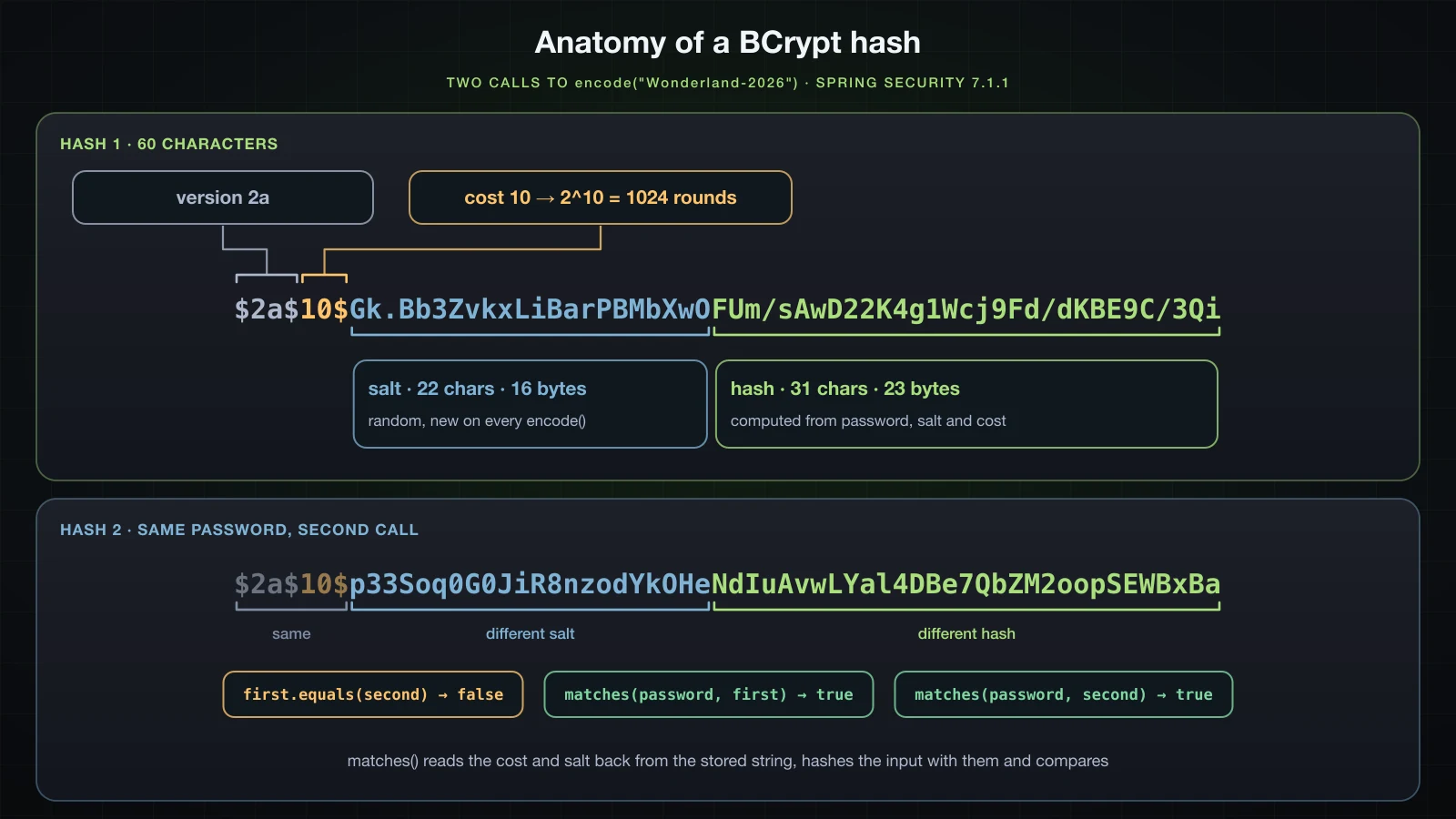
$2a$is the BCrypt variant.BCryptPasswordEncoderwrites$2a$by default;BCryptVersion.$2Bproduced$2b$, and the default encoder matched that hash too. Its validation pattern, read withjavap, is\A\$2(a|y|b)?\$(\d\d)\$[./0-9A-Za-z]{53}.10$is the cost, the base-2 logarithm of the number of key setup rounds: theBCryptclass computes1 << log_rounds, so 10 means 1024.new BCryptPasswordEncoder()usesGENSALT_DEFAULT_LOG2_ROUNDS = 10, and the class accepts 4 to 31.- The next 22 characters are the salt:
BCRYPT_SALT_LEN = 16random bytes in BCrypt's own Base64 alphabet,./0-9A-Za-z. - The last 31 characters are the hash, 23 bytes of output in the same alphabet.
The whole 60-character string is what goes into password_hash. It contains everything matches needs except the password.
The same password hashed twice
equal=false, yet matches accepted both strings and rejected wonderland-2026 with a lower-case w. BCrypt.checkpw reads the cost and salt back from the stored string, hashes the presented password with them, and compares the result with equalsNoEarlyReturn, a comparison that does not stop at the first differing character. Because each encode draws a new salt, two users with the same password get different hashes, and one precomputed table of hashes cannot cover every row.
BCrypt cost 10, 12 and 14
-- cost timings, matches(), best of 5 after one warm-up
cost 10: $2a$10$  55.6 ms
cost 12: $2a$12$  216.6 ms
cost 14: $2a$14$ 877.3 ms| Cost | Rounds | matches(), best of 5 | Relative to cost 10 |
|---|---|---|---|
| 10 | 1,024 | 55.6 ms | 1× |
| 12 | 4,096 | 216.6 ms | 3.9× |
| 14 | 16,384 | 877.3 ms | 15.8× |
Each step of the cost doubles the work, and the timings follow. They are indicative, from one machine. Every successful or failed login and every HTTP Basic request pays one matches, so the cost is a trade-off between that latency and how expensive each guess is for someone who has stolen the table. Measure it on the machines that will run the application.
DelegatingPasswordEncoder and password prefixes
-- DelegatingPasswordEncoder
{bcrypt}$2a$10$vnYl6mrumo/KC.4MsB7fluww6/wuJAENUy3Ro8y/e.wzizFZp1dB2  length=68
matches(prefixed)=true
java.lang.IllegalArgumentException: Given that there is no default password encoder configured, each password must have a password encoding prefix. Please either prefix this password with '{noop}' or set a default password encoder in `DelegatingPasswordEncoder`.
upgradeEncoding(no prefix)=true
PasswordEncoderFactories.createDelegatingPasswordEncoder() returns a DelegatingPasswordEncoder. Its encode uses BCrypt and writes the encoder id in braces in front of the hash; its matches chooses the encoder by that prefix. The prefix is what let article 33 store {noop} passwords, and what lets an application move to another algorithm later while old hashes keep working. A stored hash without a prefix is not matched against anything: matches threw the IllegalArgumentException above, the message article 33's probe printed too.
This series stores unprefixed BCrypt hashes with a BCryptPasswordEncoder bean, because every row comes from that one encoder. Declaring PasswordEncoderFactories.createDelegatingPasswordEncoder() as the bean instead is a valid choice; then every stored value needs its prefix, and the 100-character column has room for the 68 characters.
The 72-byte limit
-- 72 bytes
72 x 'a': length()=72 bytes=72 -> $2a$10$DGKVpx9On7A.LKbDXaxv5eezqouMgRwOoF12P8OxYEHJK04sz.mae
73 x 'a': length()=73 bytes=73 -> java.lang.IllegalArgumentException: password cannot be more than 72 bytes
18 x key emoji: length()=36 bytes=72 -> $2a$10$56EwCZBrC/hOZ1FlyE1j.uy5TWcC2ccmNmXSmTLtKFa1g8mtzat6C
19 x key emoji: length()=38 bytes=76 -> java.lang.IllegalArgumentException: password cannot be more than 72 bytes
matches(72 a + 'XYZ', hash of 72 a)=true
matches(72 a, hash of 72 a)=trueencoderejects more than 72 bytes withIllegalArgumentException: password cannot be more than 72 bytes. Spring Security 7.1.1 does not truncate the password silently while hashing it.- The limit counts UTF-8 bytes, not characters. The key emoji (U+1F511) is two
chars and four bytes, so 19 of them are 38 byString.length()and 76 bytes, and fail. matchesdoes not reject a long candidate. A 75-byte password matched the hash of its first 72 bytes. In the bytecode,hashpwskips the length check when it is called for a comparison. Sinceencodenever produces a hash from more than 72 bytes, the effect is that bytes after the 72nd are ignored at login.
The registration section turns the limit into a 422 before encode runs.
Registration with POST /api/auth/register
Registration is an ordinary Chapter 3 endpoint with one rule from security: the password is encoded before it is saved, and it is never returned.
package com.example.demo.user;

import jakarta.validation.constraints.Email;
import jakarta.validation.constraints.NotBlank;
import jakarta.validation.constraints.Pattern;
import jakarta.validation.constraints.Size;

public record RegisterRequest(
        @NotBlank @Size(min = 3, max = 50) @Pattern(regexp = "[a-z0-9._-]+") String username,
        @NotBlank @Email @Size(max = 254) String email,
        @NotBlank @Size(min = 8, max = 72) String password) {
}package com.example.demo.user;
public record UserResponse(Long id, String username, String email, Role role) {
static UserResponse from(AppUser user) {
return new UserResponse(user.getId(), user.getUsername(), user.getEmail(), user.getRole());
}
}package com.example.demo.user;
public class UserAlreadyExistsException extends RuntimeException {
public UserAlreadyExistsException(String message) {
super(message);
}
}package com.example.demo.user;
import org.springframework.security.core.userdetails.UsernameNotFoundException;
import org.springframework.security.crypto.password.PasswordEncoder;
import org.springframework.stereotype.Service;
import org.springframework.transaction.annotation.Transactional;
@Service
public class UserService {
private final AppUserRepository repository;
private final PasswordEncoder passwordEncoder;
public UserService(AppUserRepository repository, PasswordEncoder passwordEncoder) {
this.repository = repository;
this.passwordEncoder = passwordEncoder;
}
@Transactional
public AppUser register(RegisterRequest request) {
if (repository.existsByUsername(request.username())) {
throw new UserAlreadyExistsException("Username " + request.username() + " is already taken");
}
if (repository.existsByEmail(request.email())) {
throw new UserAlreadyExistsException("Email " + request.email() + " is already registered");
}
String hash = passwordEncoder.encode(request.password());
return repository.save(new AppUser(request.username(), request.email(), hash));
}
@Transactional(readOnly = true)
public AppUser findByUsername(String username) {
return repository.findByUsername(username)
.orElseThrow(() -> new UsernameNotFoundException("No user named " + username));
}
}package com.example.demo.user;
import jakarta.validation.Valid;
import org.springframework.http.HttpStatus;
import org.springframework.http.ResponseEntity;
import org.springframework.web.bind.annotation.PostMapping;
import org.springframework.web.bind.annotation.RequestBody;
import org.springframework.web.bind.annotation.RequestMapping;
import org.springframework.web.bind.annotation.RestController;
@RestController
@RequestMapping("/api/auth")
public class AuthController {
private final UserService userService;
public AuthController(UserService userService) {
this.userService = userService;
}
@PostMapping("/register")
public ResponseEntity<UserResponse> register(@Valid @RequestBody RegisterRequest request) {
AppUser user = userService.register(request);
return ResponseEntity.status(HttpStatus.CREATED).body(UserResponse.from(user));
}
}RegisterRequestlimits each field to its column. The@Patternallows lower-case letters, digits,.,_and-, soAlicecannot be registered next toalice.UserService.registerchecks the username, then the email, and throwsUserAlreadyExistsExceptionwith a precise message. Two concurrent requests can both pass the check; the unique constraints still stop the second INSERT, and article 26 mapped thatDataIntegrityViolationExceptionto 409.passwordEncoder.encoderuns beforesave, so the entity only ever holds the hash.UserResponsehas no password field, so no hash can reach the JSON.findByUsernameis used by the login andmeendpoints below.
Registration and login must be reachable without credentials, so both POST endpoints join the public rules of article 33's API chain:
                .authorizeHttpRequests(auth -> auth
                        .requestMatchers(HttpMethod.GET, "/api/products/**").permitAll()
                        .requestMatchers(HttpMethod.POST, "/api/auth/register", "/api/auth/login").permitAll()
                        .requestMatchers(HttpMethod.DELETE, "/api/products/**").hasRole("ADMIN")
                        .anyRequest().authenticated())
The rule names the two paths instead of /api/auth/**: GET /api/auth/me, added later, lives under the same prefix and must stay authenticated. The advice gains a 409 for the service's exception, next to the handlers it already has for DataIntegrityViolationException and for invalid bodies, shown in article 26:
import com.example.demo.user.UserAlreadyExistsException;

    @ExceptionHandler(UserAlreadyExistsException.class)
    public ProblemDetail userExists(UserAlreadyExistsException e) {
        return ProblemDetail.forStatusAndDetail(HttpStatus.CONFLICT, e.getMessage());
    }
Registering a user with curl
The H2 runs used this command, with SQL and the two authentication loggers at DEBUG:
java -jar build/libs/demo-0.0.1-SNAPSHOT.jar --server.port=8134 --logging.level.org.hibernate.SQL=DEBUG --logging.level.org.springframework.security.authentication=DEBUG --logging.level.org.springframework.security.web.authentication.www=DEBUG '--logging.pattern.console=%logger{0}: %msg%n'curl -i -s -H 'Content-Type: application/json' -d '{"username":"alice","email":"alice@example.com","password":"Wonderland-2026"}' http://localhost:8134/api/auth/registerHTTP/1.1 201
X-Content-Type-Options: nosniff
X-XSS-Protection: 0
Cache-Control: no-cache, no-store, max-age=0, must-revalidate
Pragma: no-cache
Expires: 0
X-Frame-Options: DENY
Content-Type: application/json
Transfer-Encoding: chunked
Date: Mon, 14 Sep 2026 04:42:02 GMT
{"id":1,"username":"alice","email":"alice@example.com","role":"USER"}The security headers come from article 33's chain. The log for the request:
SQL: select au1_0.id from users au1_0 where au1_0.username=? fetch first ? rows only
SQL: select au1_0.id from users au1_0 where au1_0.email=? fetch first ? rows only
SQL: insert into users (email,enabled,password_hash,role,username,id) values (?,?,?,?,?,default)
Two exists queries, then the INSERT. To see what was stored, the same request ran against PostgreSQL, followed by carol with the password Hatter-Tea-2026:
docker exec sb-a34-pg psql -U demo -d demo -c 'select id, username, password_hash, length(password_hash) as len, role, enabled from users order by id' id | username | password_hash | len | role | enabled
----+----------+--------------------------------------------------------------+-----+------+---------
1 | alice | $2a$10$NKoTpp5KtZNKpR2LmYE84.dz2I/JnOOHPt0hQmnC/jqzalEjtSzpi | 60 | USER | t
2 | carol | $2a$10$u/wmILXQJ9Eq24Px1/eWr.m38MW57mPoG//MlgprOIEPkMN7/I.qm | 60 | USER | t
(2 rows)Two 60-character $2a$10$ strings, and alice's is not the one BcryptTour printed for the same password: another salt, another hash.
Invalid input and duplicate usernames
curl -i -s -H 'Content-Type: application/json' -d '{"username":"Al","email":"not-an-email","password":"short"}' http://localhost:8134/api/auth/registerHTTP/1.1 422
X-Content-Type-Options: nosniff
X-XSS-Protection: 0
Cache-Control: no-cache, no-store, max-age=0, must-revalidate
Pragma: no-cache
Expires: 0
X-Frame-Options: DENY
Content-Type: application/problem+json
Transfer-Encoding: chunked
Date: Mon, 14 Sep 2026 04:42:02 GMT
{"detail":"email must be a well-formed email address, password size must be between 8 and 72, username must match \"[a-z0-9._-]+\", username size must be between 3 and 50","instance":"/api/auth/register","status":422,"title":"Unprocessable Content"}The 422 comes from the MethodArgumentNotValidException handler shown in article 26, and no SQL was sent. Registering alice again with another email:
curl -i -s -H 'Content-Type: application/json' -d '{"username":"alice","email":"alice2@example.com","password":"Another-pass-1"}' http://localhost:8134/api/auth/registerHTTP/1.1 409
X-Content-Type-Options: nosniff
X-XSS-Protection: 0
Cache-Control: no-cache, no-store, max-age=0, must-revalidate
Pragma: no-cache
Expires: 0
X-Frame-Options: DENY
Content-Type: application/problem+json
Transfer-Encoding: chunked
Date: Mon, 14 Sep 2026 04:42:03 GMT
{"detail":"Username alice is already taken","instance":"/api/auth/register","status":409,"title":"Conflict"}Only the existsByUsername query ran. A new username with alice@example.com answered:
{"detail":"Email alice@example.com is already registered","instance":"/api/auth/register","status":409,"title":"Conflict"}A 409 that names a taken username also confirms that the account exists. That is inherent to a registration form; what matters is that login, below, does not do the same.
A password longer than 72 bytes
@Size(max = 72) counts chars. Nineteen key emoji are 38 of them and 76 bytes:
PASSWORD=$(printf '\xF0\x9F\x94\x91%.0s' $(seq 1 19))
curl -i -s -H 'Content-Type: application/json' -d "{\"username\":\"keys\",\"email\":\"keys@example.com\",\"password\":\"$PASSWORD\"}" http://localhost:8134/api/auth/registerHTTP/1.1 302
X-Content-Type-Options: nosniff
X-XSS-Protection: 0
Cache-Control: no-cache, no-store, max-age=0, must-revalidate
Pragma: no-cache
Expires: 0
X-Frame-Options: DENY
Set-Cookie: JSESSIONID=70FAA83D52C674B9EBA7EC8C0D75EA40; Path=/; HttpOnly
Location: http://localhost:8134/login;jsessionid=70FAA83D52C674B9EBA7EC8C0D75EA40
Content-Length: 0
Date: Mon, 14 Sep 2026 04:42:04 GMTThe log, stack trace trimmed:
SQL: select au1_0.id from users au1_0 where au1_0.username=? fetch first ? rows only
SQL: select au1_0.id from users au1_0 where au1_0.email=? fetch first ? rows only
[dispatcherServlet]: Servlet.service() for servlet [dispatcherServlet] in context with path [] threw exception [Request processing failed: java.lang.IllegalArgumentException: password cannot be more than 72 bytes] with root cause
java.lang.IllegalArgumentException: password cannot be more than 72 bytes
	at org.springframework.security.crypto.bcrypt.BCrypt.hashpw(BCrypt.java:616)
	at org.springframework.security.crypto.bcrypt.BCrypt.hashpw(BCrypt.java:603)
	at org.springframework.security.crypto.bcrypt.BCrypt.hashpw(BCrypt.java:593)
	at org.springframework.security.crypto.bcrypt.BCryptPasswordEncoder.encodeNonNullPassword(BCryptPasswordEncoder.java:109)
	at org.springframework.security.crypto.password.AbstractValidatingPasswordEncoder.encode(AbstractValidatingPasswordEncoder.java:42)
	at com.example.demo.user.UserService.register(UserService.java:27)
Validation passed, encode threw, and no handler in the advice matched IllegalArgumentException, so the failed request went on to Spring Boot's /error page in an ERROR dispatch. Article 33 showed where that dispatch ends with two chains: /error is not under /api/**, so the form-login chain takes it as an anonymous request, redirects to /login and opens a session. The API client received a 302 and a JSESSIONID cookie instead of an error. The fix belongs before encode, in the request DTO:
package com.example.demo.user;

import java.nio.charset.StandardCharsets;

import jakarta.validation.constraints.AssertTrue;
import jakarta.validation.constraints.Email;
import jakarta.validation.constraints.NotBlank;
import jakarta.validation.constraints.Pattern;
import jakarta.validation.constraints.Size;

public record RegisterRequest(
        @NotBlank @Size(min = 3, max = 50) @Pattern(regexp = "[a-z0-9._-]+") String username,
        @NotBlank @Email @Size(max = 254) String email,
        @NotBlank @Size(min = 8, max = 72) String password) {

    @AssertTrue(message = "must be at most 72 bytes in UTF-8")
    public boolean isPasswordWithinBcryptLimit() {
        return password == null || password.getBytes(StandardCharsets.UTF_8).length <= 72;
    }
}
The same request after the change:
HTTP/1.1 422
X-Content-Type-Options: nosniff
X-XSS-Protection: 0
Cache-Control: no-cache, no-store, max-age=0, must-revalidate
Pragma: no-cache
Expires: 0
X-Frame-Options: DENY
Content-Type: application/problem+json
Transfer-Encoding: chunked
Date: Mon, 14 Sep 2026 04:42:29 GMT

{"detail":"passwordWithinBcryptLimit must be at most 72 bytes in UTF-8","instance":"/api/auth/register","status":422,"title":"Unprocessable Content"}
Hibernate Validator treats the is... method as a property named passwordWithinBcryptLimit and reports the violation under that name. A custom constraint from article 19 would put the message on password itself.
HTTP Basic against the users table
Article 33's API chain already turns an Authorization: Basic header into an authentication attempt, and the attempt now reaches JpaUserDetailsService. An endpoint that needs an authenticated user makes it visible:
package com.example.demo.user;

import jakarta.validation.Valid;

import org.springframework.http.HttpStatus;
import org.springframework.http.ResponseEntity;
import org.springframework.security.core.annotation.AuthenticationPrincipal;
import org.springframework.security.core.userdetails.UserDetails;
import org.springframework.web.bind.annotation.GetMapping;
import org.springframework.web.bind.annotation.PostMapping;
import org.springframework.web.bind.annotation.RequestBody;
import org.springframework.web.bind.annotation.RequestMapping;
import org.springframework.web.bind.annotation.RestController;

@RestController
@RequestMapping("/api/auth")
public class AuthController {

    private final UserService userService;

    public AuthController(UserService userService) {
        this.userService = userService;
    }

    @PostMapping("/register")
    public ResponseEntity<UserResponse> register(@Valid @RequestBody RegisterRequest request) {
        AppUser user = userService.register(request);
        return ResponseEntity.status(HttpStatus.CREATED).body(UserResponse.from(user));
    }

    @GetMapping("/me")
    public UserResponse me(@AuthenticationPrincipal UserDetails principal) {
        return UserResponse.from(userService.findByUsername(principal.getUsername()));
    }
}
GET /api/auth/me and the principal object
curl -i -s -u alice:Wonderland-2026 http://localhost:8134/api/auth/meHTTP/1.1 200
X-Content-Type-Options: nosniff
X-XSS-Protection: 0
Cache-Control: no-cache, no-store, max-age=0, must-revalidate
Pragma: no-cache
Expires: 0
X-Frame-Options: DENY
Content-Type: application/json
Content-Length: 69
Date: Mon, 14 Sep 2026 04:42:08 GMT
{"id":1,"username":"alice","email":"alice@example.com","role":"USER"}The log for that request:
SQL: select au1_0.id,au1_0.email,au1_0.enabled,au1_0.password_hash,au1_0.role,au1_0.username from users au1_0 where au1_0.username=?
DaoAuthenticationProvider: Authenticated user
BasicAuthenticationFilter: Set SecurityContextHolder to UsernamePasswordAuthenticationToken [Principal=org.springframework.security.core.userdetails.User [Username=alice, Password=[PROTECTED], Enabled=true, AccountNonExpired=true, CredentialsNonExpired=true, AccountNonLocked=true, Granted Authorities=[ROLE_USER]], Credentials=[PROTECTED], Authenticated=true, Details=WebAuthenticationDetails [RemoteIpAddress=0:0:0:0:0:0:0:1, SessionId=null], Granted Authorities=[ROLE_USER, FactorGrantedAuthority [authority=FACTOR_PASSWORD, issuedAt=2026-09-14T04:42:08.004130Z]]]
SQL: select au1_0.id,au1_0.email,au1_0.enabled,au1_0.password_hash,au1_0.role,au1_0.username from users au1_0 where au1_0.username=?
BasicAuthenticationFilter decoded the header, DaoAuthenticationProvider loaded alice through JpaUserDetailsService (the first SELECT) and matched the password, and the filter stored the result in the SecurityContextHolder for this request. The second SELECT is me loading the profile.
A temporary log statement in me printed the objects involved:
AuthController: me: principal=org.springframework.security.core.userdetails.User [Username=alice, Password=[PROTECTED], Enabled=true, AccountNonExpired=true, CredentialsNonExpired=true, AccountNonLocked=true, Granted Authorities=[ROLE_USER]] | class=org.springframework.security.core.userdetails.User password=null authorities=[ROLE_USER] | authentication=org.springframework.security.authentication.UsernamePasswordAuthenticationToken credentials=null@AuthenticationPrincipalresolvesAuthentication.getPrincipal(): theUserthatloadUserByUsernamebuilt, not the entity.- Its password is
null, and so are the token's credentials.ProviderManagerhaseraseCredentialsAfterAuthentication = true, and erases both once authentication succeeds, so neither the hash nor the presented password travels further into the application.toStringprints[PROTECTED]either way. - The authorities are
ROLE_USERfrom.roles(...). The token also lists theFACTOR_PASSWORDauthority that article 33 explained. Userholds no id and no email, which is whymeloads the entity again. A customUserDetailsclass carrying those fields would save that query; this article keeps Spring'sUser.
Wrong password and unknown username with HTTP Basic
curl -i -s -u alice:wrong-password http://localhost:8134/api/auth/me
curl -i -s -u mallory:wrong-password http://localhost:8134/api/auth/meHTTP/1.1 401
WWW-Authenticate: Basic realm="catalogue"
X-Content-Type-Options: nosniff
X-XSS-Protection: 0
Cache-Control: no-cache, no-store, max-age=0, must-revalidate
Pragma: no-cache
Expires: 0
X-Frame-Options: DENY
Content-Type: application/problem+json
Content-Length: 130
Date: Mon, 14 Sep 2026 04:42:09 GMT
{"detail":"Valid credentials are required to access this resource.","instance":"/api/auth/me","status":401,"title":"Unauthorized"}
HTTP/1.1 401
WWW-Authenticate: Basic realm="catalogue"
X-Content-Type-Options: nosniff
X-XSS-Protection: 0
Cache-Control: no-cache, no-store, max-age=0, must-revalidate
Pragma: no-cache
Expires: 0
X-Frame-Options: DENY
Content-Type: application/problem+json
Content-Length: 130
Date: Mon, 14 Sep 2026 04:42:09 GMT
{"detail":"Valid credentials are required to access this resource.","instance":"/api/auth/me","status":401,"title":"Unauthorized"}The same bytes from article 33's ProblemDetailSecurityHandler. The difference exists only in the server log, stack traces trimmed. For the wrong password:
SQL: select au1_0.id,au1_0.email,au1_0.enabled,au1_0.password_hash,au1_0.role,au1_0.username from users au1_0 where au1_0.username=?
DaoAuthenticationProvider: Failed to authenticate since password does not match stored value
ProviderManager: Authentication failed with provider DaoAuthenticationProvider since Bad credentials
ProviderManager: Denying authentication since all attempted providers failed
BasicAuthenticationFilter: Failed to process authentication request
org.springframework.security.authentication.BadCredentialsException: Bad credentials
For the unknown username:
SQL: select au1_0.id,au1_0.email,au1_0.enabled,au1_0.password_hash,au1_0.role,au1_0.username from users au1_0 where au1_0.username=?
DaoAuthenticationProvider: Failed to find user 'mallory'
ProviderManager: Authentication failed with provider DaoAuthenticationProvider since Bad credentials
ProviderManager: Denying authentication since all attempted providers failed
BasicAuthenticationFilter: Failed to process authentication request
org.springframework.security.authentication.BadCredentialsException: Bad credentials
Caused by: org.springframework.security.core.userdetails.UsernameNotFoundException: No user named mallory
The UsernameNotFoundException from JpaUserDetailsService ended up as the cause of a BadCredentialsException. The login endpoint section explains the conversion and measures what it costs.
A login endpoint: POST /api/auth/login
HTTP Basic has no endpoint of its own; a client learns that its credentials are wrong from whichever request fails first. A login endpoint gives the client one place to check credentials and fetch the profile, and article 35 turns this endpoint into the one that issues a token. It uses the same AuthenticationManager that BasicAuthenticationFilter reaches.
package com.example.demo.user;

import jakarta.validation.constraints.NotBlank;

public record LoginRequest(@NotBlank String username, @NotBlank String password) {
}
Exposing the AuthenticationManager in Spring Security 7
With AuthenticationManager added to the controller's constructor and no bean declared, the application did not start:
APPLICATION FAILED TO START
***************************

Description:

Parameter 1 of constructor in com.example.demo.user.AuthController required a bean of type 'org.springframework.security.authentication.AuthenticationManager' that could not be found.


Action:

Consider defining a bean of type 'org.springframework.security.authentication.AuthenticationManager' in your configuration.
Spring Security builds the global AuthenticationManager inside AuthenticationConfiguration, but neither it nor Spring Boot 4.1.1 publishes that manager as a bean. One bean method does:
import org.springframework.security.authentication.AuthenticationManager;
import org.springframework.security.config.annotation.authentication.configuration.AuthenticationConfiguration;

@Configuration
public class SecurityConfig {

    // apiSecurityFilterChain, webSecurityFilterChain and passwordEncoder are unchanged

    @Bean
    AuthenticationManager authenticationManager(AuthenticationConfiguration configuration) {
        return configuration.getAuthenticationManager();
    }
}
AuthenticationConfiguration.getAuthenticationManager() declares no checked exception in 7.1.1, so the method needs no throws clause. The inspector output earlier came from this bean: ProviderManager@5e0602ff with the DaoAuthenticationProvider, and also the parent of the manager inside BasicAuthenticationFilter, so both ways of logging in run the same provider. None of this needs WebSecurityConfigurerAdapter, which is gone, as article 33 showed.
Calling authenticate() from the controller
package com.example.demo.user;

import jakarta.validation.Valid;

import org.springframework.http.HttpStatus;
import org.springframework.http.ResponseEntity;
import org.springframework.security.authentication.AuthenticationManager;
import org.springframework.security.authentication.UsernamePasswordAuthenticationToken;
import org.springframework.security.core.Authentication;
import org.springframework.security.core.annotation.AuthenticationPrincipal;
import org.springframework.security.core.userdetails.UserDetails;
import org.springframework.web.bind.annotation.GetMapping;
import org.springframework.web.bind.annotation.PostMapping;
import org.springframework.web.bind.annotation.RequestBody;
import org.springframework.web.bind.annotation.RequestMapping;
import org.springframework.web.bind.annotation.RestController;

@RestController
@RequestMapping("/api/auth")
public class AuthController {

    private final UserService userService;
    private final AuthenticationManager authenticationManager;

    public AuthController(UserService userService) {
    public AuthController(UserService userService, AuthenticationManager authenticationManager) {
        this.userService = userService;
        this.authenticationManager = authenticationManager;
    }

    @PostMapping("/register")
    public ResponseEntity<UserResponse> register(@Valid @RequestBody RegisterRequest request) {
        AppUser user = userService.register(request);
        return ResponseEntity.status(HttpStatus.CREATED).body(UserResponse.from(user));
    }

    @PostMapping("/login")
    public UserResponse login(@Valid @RequestBody LoginRequest request) {
        Authentication authentication = authenticationManager.authenticate(
                UsernamePasswordAuthenticationToken.unauthenticated(request.username(), request.password()));
        return UserResponse.from(userService.findByUsername(authentication.getName()));
    }

    @GetMapping("/me")
    public UserResponse me(@AuthenticationPrincipal UserDetails principal) {
        return UserResponse.from(userService.findByUsername(principal.getUsername()));
    }
}import org.springframework.http.HttpHeaders;
import org.springframework.http.ResponseEntity;
import org.springframework.security.authentication.BadCredentialsException;
@ExceptionHandler(BadCredentialsException.class)
public ResponseEntity<ProblemDetail> badCredentials(BadCredentialsException e) {
ProblemDetail problem = ProblemDetail.forStatusAndDetail(HttpStatus.UNAUTHORIZED, "Invalid username or password");
return ResponseEntity.of(problem)
.header(HttpHeaders.WWW_AUTHENTICATE, "Basic realm=\"catalogue\"")
.build();
} UsernamePasswordAuthenticationToken.unauthenticated(username, password)is the request.authenticatereturns a new, authenticated token or throws anAuthenticationException.- The exception leaves the controller like any other, so the advice turns it into a
ProblemDetail. The 401 carriesWWW-Authenticateas article 15 requires, with the realm of article 33's entry point. authentication.getName()is the username; the profile comes from the service, as inme.
curl -i -s -H 'Content-Type: application/json' -d '{"username":"alice","password":"Wonderland-2026"}' http://localhost:8134/api/auth/loginHTTP/1.1 200
X-Content-Type-Options: nosniff
X-XSS-Protection: 0
Cache-Control: no-cache, no-store, max-age=0, must-revalidate
Pragma: no-cache
Expires: 0
X-Frame-Options: DENY
Content-Type: application/json
Content-Length: 69
Date: Mon, 14 Sep 2026 04:42:05 GMT
{"id":1,"username":"alice","email":"alice@example.com","role":"USER"}The log, where the third line is a temporary log statement placed after authenticate:
SQL: select au1_0.id,au1_0.email,au1_0.enabled,au1_0.password_hash,au1_0.role,au1_0.username from users au1_0 where au1_0.username=?
DaoAuthenticationProvider: Authenticated user
AuthController: login result: UsernamePasswordAuthenticationToken authenticated=true principal=org.springframework.security.core.userdetails.User credentials=null
SQL: select au1_0.id,au1_0.email,au1_0.enabled,au1_0.password_hash,au1_0.role,au1_0.username from users au1_0 where au1_0.username=?
A blank body is rejected by validation before any authentication:
curl -i -s -H 'Content-Type: application/json' -d '{"username":"","password":""}' http://localhost:8134/api/auth/loginHTTP/1.1 422
X-Content-Type-Options: nosniff
X-XSS-Protection: 0
Cache-Control: no-cache, no-store, max-age=0, must-revalidate
Pragma: no-cache
Expires: 0
X-Frame-Options: DENY
Content-Type: application/problem+json
Transfer-Encoding: chunked
Date: Mon, 14 Sep 2026 04:42:07 GMT
{"detail":"password must not be blank, username must not be blank","instance":"/api/auth/login","status":422,"title":"Unprocessable Content"}Does the login endpoint log the user in?
No. Right after the 200 above, the same client called me without credentials:
curl -i -s http://localhost:8134/api/auth/meHTTP/1.1 401
WWW-Authenticate: Basic realm="catalogue"
X-Content-Type-Options: nosniff
X-XSS-Protection: 0
Cache-Control: no-cache, no-store, max-age=0, must-revalidate
Pragma: no-cache
Expires: 0
X-Frame-Options: DENY
Content-Type: application/problem+json
Content-Length: 130
Date: Mon, 14 Sep 2026 04:42:06 GMT
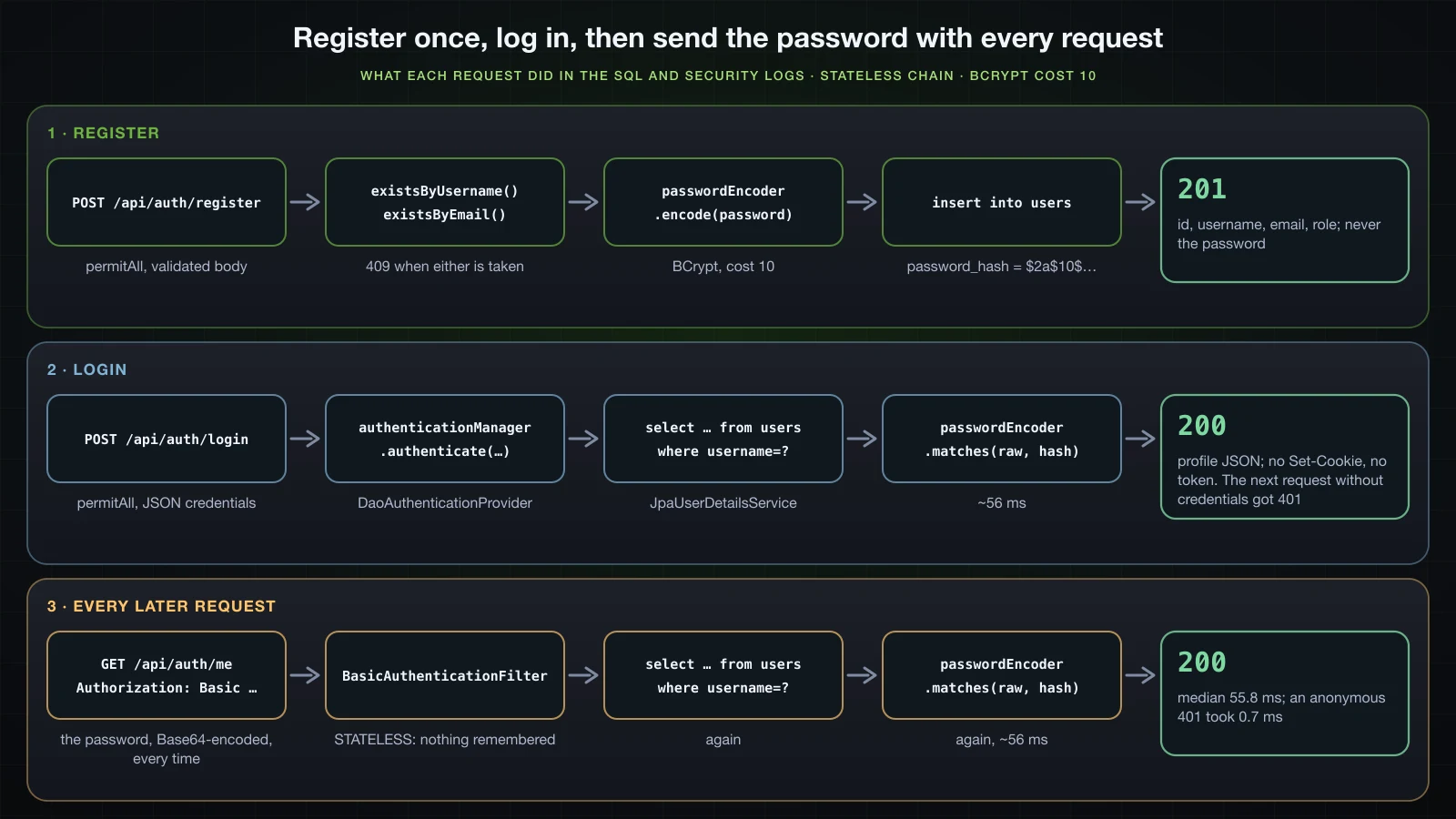
{"detail":"Valid credentials are required to access this resource.","instance":"/api/auth/me","status":401,"title":"Unauthorized"}The login response had no Set-Cookie and no token, the controller never put the result into a security context, and the API chain is STATELESS, so nothing survives the response. The endpoint answers two questions: are these credentials valid, and whose are they. Every later request authenticates on its own, with HTTP Basic for now.
Unknown username vs wrong password: status, body and timing
curl -i -s -H 'Content-Type: application/json' -d '{"username":"alice","password":"wrong-password"}' http://localhost:8134/api/auth/login
curl -i -s -H 'Content-Type: application/json' -d '{"username":"mallory","password":"wrong-password"}' http://localhost:8134/api/auth/loginHTTP/1.1 401
WWW-Authenticate: Basic realm="catalogue"
X-Content-Type-Options: nosniff
X-XSS-Protection: 0
Cache-Control: no-cache, no-store, max-age=0, must-revalidate
Pragma: no-cache
Expires: 0
X-Frame-Options: DENY
Content-Type: application/problem+json
Transfer-Encoding: chunked
Date: Mon, 14 Sep 2026 04:42:06 GMT
{"detail":"Invalid username or password","instance":"/api/auth/login","status":401,"title":"Unauthorized"}
HTTP/1.1 401
WWW-Authenticate: Basic realm="catalogue"
X-Content-Type-Options: nosniff
X-XSS-Protection: 0
Cache-Control: no-cache, no-store, max-age=0, must-revalidate
Pragma: no-cache
Expires: 0
X-Frame-Options: DENY
Content-Type: application/problem+json
Transfer-Encoding: chunked
Date: Mon, 14 Sep 2026 04:42:07 GMT
{"detail":"Invalid username or password","instance":"/api/auth/login","status":401,"title":"Unauthorized"}Same status, same headers apart from Date, same body. The server log still told them apart:
SQL: select au1_0.id,au1_0.email,au1_0.enabled,au1_0.password_hash,au1_0.role,au1_0.username from users au1_0 where au1_0.username=?
DaoAuthenticationProvider: Failed to authenticate since password does not match stored value
ProviderManager: Authentication failed with provider DaoAuthenticationProvider since Bad credentialsSQL: select au1_0.id,au1_0.email,au1_0.enabled,au1_0.password_hash,au1_0.role,au1_0.username from users au1_0 where au1_0.username=?
DaoAuthenticationProvider: Failed to find user 'mallory'
ProviderManager: Authentication failed with provider DaoAuthenticationProvider since Bad credentialsA response body that hides the difference is not enough if the response time reveals it. After three warm-up pairs, 30 requests of each kind ran interleaved, timed with curl's %{time_total}:
| Request | Status | Min | Median | Max |
|---|---|---|---|---|
| login, wrong password | 401 | 54.7 ms | 55.9 ms | 69.8 ms |
| login, unknown username | 401 | 54.5 ms | 55.9 ms | 61.7 ms |
| HTTP Basic, wrong password | 401 | 54.3 ms | 54.9 ms | 59.2 ms |
| HTTP Basic, unknown username | 401 | 54.4 ms | 55.1 ms | 70.8 ms |
The medians are within a fraction of a millisecond, and all of them sit at the cost of one BCrypt comparison. Two mechanisms in DaoAuthenticationProvider produce that. The first is hideUserNotFoundExceptions = true, which rethrows UsernameNotFoundException as BadCredentialsException("Bad credentials"), the conversion seen in the Basic log. The second is visible in the class itself:
javap -p -constants -classpath spring-security-core-7.1.1.jar:spring-security-crypto-7.1.1.jar org.springframework.security.authentication.dao.DaoAuthenticationProvider private static final java.lang.String USER_NOT_FOUND_PASSWORD = "userNotFoundPassword";
private volatile java.lang.String userNotFoundEncodedPassword;
public org.springframework.security.authentication.dao.DaoAuthenticationProvider(org.springframework.security.core.userdetails.UserDetailsService);
protected final org.springframework.security.core.userdetails.UserDetails retrieveUser(java.lang.String, org.springframework.security.authentication.UsernamePasswordAuthenticationToken) throws org.springframework.security.core.AuthenticationException;
private void prepareTimingAttackProtection();
private void mitigateAgainstTimingAttack(org.springframework.security.authentication.UsernamePasswordAuthenticationToken);retrieveUser first calls prepareTimingAttackProtection, which encodes the string userNotFoundPassword once with your PasswordEncoder and keeps the hash in userNotFoundEncodedPassword, the field the inspector showed as null before any login. When loadUserByUsername throws UsernameNotFoundException, mitigateAgainstTimingAttack calls matches with the presented password against that hash before the exception moves on. An unknown username therefore costs a SELECT and a BCrypt comparison, exactly like a wrong password.
Disabled accounts
An administrator disables carol in the PostgreSQL table:
docker exec sb-a34-pg psql -U demo -d demo -c "update users set enabled = false where username = 'carol'"UPDATE 1HTTP Basic with her correct password, then with a wrong one, against the application on the postgres profile:
curl -i -s -u carol:Hatter-Tea-2026 http://localhost:8134/api/auth/me
curl -i -s -u carol:wrong-password http://localhost:8134/api/auth/me
Both answered with the entry point's 401:
HTTP/1.1 401
WWW-Authenticate: Basic realm="catalogue"
X-Content-Type-Options: nosniff
X-XSS-Protection: 0
Cache-Control: no-cache, no-store, max-age=0, must-revalidate
Pragma: no-cache
Expires: 0
X-Frame-Options: DENY
Content-Type: application/problem+json
Content-Length: 130
Date: Mon, 14 Sep 2026 04:42:23 GMT

{"detail":"Valid credentials are required to access this resource.","instance":"/api/auth/me","status":401,"title":"Unauthorized"}
The log for the wrong password:
SQL: select au1_0.id,au1_0.email,au1_0.enabled,au1_0.password_hash,au1_0.role,au1_0.username from users au1_0 where au1_0.username=?
DaoAuthenticationProvider: Failed to authenticate since user account is disabled
DaoAuthenticationProvider: Failed to authenticate since password does not match stored value
ProviderManager: Authentication failed for user 'carol' since their account status is User is disabled
org.springframework.security.authentication.DisabledException: User is disabled
ProviderManager: Denying authentication since all attempted providers failed
BasicAuthenticationFilter: Failed to process authentication request
org.springframework.security.authentication.DisabledException: User is disabled
With the correct password the same lines appeared without the password does not match line. The exception is DisabledException: User is disabled in both cases. The provider checks the account status (locked, then disabled, then expired) before the password; when a check fails and alwaysPerformAdditionalChecksOnUser is true, it still runs the password comparison, then throws the account-status exception whatever the comparison said. For HTTP Basic the client cannot see any of this, because the entry point writes the same body for every failure.
The login endpoint with the handler from the previous section:
curl -i -s -H 'Content-Type: application/json' -d '{"username":"carol","password":"Hatter-Tea-2026"}' http://localhost:8134/api/auth/login
curl -i -s -H 'Content-Type: application/json' -d '{"username":"carol","password":"wrong-password"}' http://localhost:8134/api/auth/login
Both answered:
HTTP/1.1 401
WWW-Authenticate: Basic realm="catalogue"
X-Content-Type-Options: nosniff
X-XSS-Protection: 0
Cache-Control: no-cache, no-store, max-age=0, must-revalidate
Pragma: no-cache
Expires: 0
X-Frame-Options: DENY
Content-Type: application/problem+json
Content-Length: 133
Date: Mon, 14 Sep 2026 04:42:24 GMT

{"detail":"Valid credentials are required to access this resource.","instance":"/api/auth/login","status":401,"title":"Unauthorized"}
DisabledException is not a BadCredentialsException, so the advice did not handle it. It propagated out of the controller, and the filter chain passed it to article 33's entry point. The status is still 401, but the body is the entry point's, not Invalid username or password: a client comparing bodies learns that carol exists and is disabled, whichever password it sends. The handler should cover account-status failures too:
import org.springframework.security.authentication.AccountStatusException;
import org.springframework.security.authentication.BadCredentialsException;
import org.springframework.security.core.AuthenticationException;

    @ExceptionHandler(BadCredentialsException.class)
    public ResponseEntity<ProblemDetail> badCredentials(BadCredentialsException e) {
    @ExceptionHandler({ BadCredentialsException.class, AccountStatusException.class })
    public ResponseEntity<ProblemDetail> authenticationFailed(AuthenticationException e) {
        ProblemDetail problem = ProblemDetail.forStatusAndDetail(HttpStatus.UNAUTHORIZED, "Invalid username or password");
        return ResponseEntity.of(problem)
                .header(HttpHeaders.WWW_AUTHENTICATE, "Basic realm=\"catalogue\"")
                .build();
    }
AccountStatusException is the parent of DisabledException, LockedException, AccountExpiredException and CredentialsExpiredException. After the change, carol with either password and alice with a wrong one received the same response:
HTTP/1.1 401
WWW-Authenticate: Basic realm="catalogue"
X-Content-Type-Options: nosniff
X-XSS-Protection: 0
Cache-Control: no-cache, no-store, max-age=0, must-revalidate
Pragma: no-cache
Expires: 0
X-Frame-Options: DENY
Content-Type: application/problem+json
Transfer-Encoding: chunked
Date: Mon, 14 Sep 2026 04:42:30 GMT

{"detail":"Invalid username or password","instance":"/api/auth/login","status":401,"title":"Unauthorized"}
The log still records DisabledException: User is disabled, which is where an administrator needs it.
Stateless authentication and its cost per request
HTTP Basic sends the password itself with every request. The header curl -u sent for me:
> GET /api/auth/me HTTP/1.1
> Host: localhost:8134
> Authorization: Basic YWxpY2U6V29uZGVybGFuZC0yMDI2
> User-Agent: curl/8.7.1
> Accept: */*echo YWxpY2U6V29uZGVybGFuZC0yMDI2 | base64 -dalice:Wonderland-2026Base64 is an encoding, not encryption; anyone who sees the header has the password, so HTTP Basic belongs only on HTTPS. None of the responses from the API chain carried a Set-Cookie: the chain is STATELESS, and there is no JSESSIONID to remember the user between requests. The only session cookie in this article came from the form-login chain, in the 72-byte section. The server therefore repeats the whole authentication for each call, the SELECT on users and one BCrypt comparison. Requests to me, interleaved in the same run as the login timings:
| Request | Status | Requests | Median |
|---|---|---|---|
GET /api/auth/me with correct Basic credentials | 200 | 30 | 55.8 ms |
GET /api/auth/me without credentials | 401 | 30 | 0.7 ms |
GET /api/auth/me with correct credentials, after the cost was raised to 12 | 200 | 15 | 224.1 ms |
Nearly all of the 55 ms is the cost-10 BCrypt check from the lab table, and at cost 12 each request took 224.1 ms. A client that makes ten calls pays that ten times. A token lets the server verify a signature instead of a password hash on every request, which is what article 35 builds.
Upgrading hashes on login with UserDetailsPasswordService
The inspector showed JpaUserDetailsService wired in as the provider's userDetailsPasswordService. After a successful authentication, createSuccessAuthentication calls upgradeEncoding on the stored hash; when it returns true, the provider encodes the presented password again and passes the new hash to updatePassword. For BCryptPasswordEncoder, upgradeEncoding returns true when the stored cost is lower than the encoder's. Raising the cost:
    @Bean
    PasswordEncoder passwordEncoder() {
        return new BCryptPasswordEncoder();
        return new BCryptPasswordEncoder(12);
    }
The PostgreSQL table before, with alice and carol at cost 10:
docker exec sb-a34-pg psql -U demo -d demo -c "select username, password_hash from users order by id" username | password_hash
----------+--------------------------------------------------------------
alice | $2a$10$NKoTpp5KtZNKpR2LmYE84.dz2I/JnOOHPt0hQmnC/jqzalEjtSzpi
carol | $2a$10$u/wmILXQJ9Eq24Px1/eWr.m38MW57mPoG//MlgprOIEPkMN7/I.qm
(2 rows)Rebuilt and started against the same database, alice logged in once through POST /api/auth/login and got her 200 with the profile. The log:
SQL: select au1_0.id,au1_0.email,au1_0.enabled,au1_0.password_hash,au1_0.role,au1_0.username from users au1_0 where au1_0.username=?
SQL: select au1_0.id,au1_0.email,au1_0.enabled,au1_0.password_hash,au1_0.role,au1_0.username from users au1_0 where au1_0.username=?
SQL: update users set email=?,enabled=?,password_hash=?,role=?,username=? where id=?
DaoAuthenticationProvider: Authenticated user
AuthController: login result: UsernamePasswordAuthenticationToken authenticated=true principal=org.springframework.security.core.userdetails.User credentials=null
SQL: select au1_0.id,au1_0.email,au1_0.enabled,au1_0.password_hash,au1_0.role,au1_0.username from users au1_0 where au1_0.username=?
The first SELECT is loadUserByUsername, the second is updatePassword loading the entity, and the UPDATE is its dirty check at commit. The table after:
 username |                        password_hash
----------+--------------------------------------------------------------
 alice    | $2a$12$hzD5SxwZqzX9LUybKoUEU.cHTCKXGP0fexFM5F3kHqiM.vlYR3qxG
 carol    | $2a$10$u/wmILXQJ9Eq24Px1/eWr.m38MW57mPoG//MlgprOIEPkMN7/I.qm
(2 rows)
A second login by alice sent no UPDATE:
SQL: select au1_0.id,au1_0.email,au1_0.enabled,au1_0.password_hash,au1_0.role,au1_0.username from users au1_0 where au1_0.username=?
DaoAuthenticationProvider: Authenticated user
AuthController: login result: UsernamePasswordAuthenticationToken authenticated=true principal=org.springframework.security.core.userdetails.User credentials=null
SQL: select au1_0.id,au1_0.email,au1_0.enabled,au1_0.password_hash,au1_0.role,au1_0.username from users au1_0 where au1_0.username=?
A hash can only be upgraded at the moment the user presents the correct password, because that is the only time the application has it. carol, who did not log in, keeps her cost-10 hash until she does.
Components and responsibilities
| Component | Responsibility in this article | Your code or Spring's |
|---|---|---|
AppUser and the users table | username, email, password hash, role, enabled flag | yours |
AppUserRepository | findByUsername, existsByUsername, existsByEmail | your interface, Spring Data's implementation |
JpaUserDetailsService | maps AppUser to UserDetails; stores upgraded hashes in updatePassword | yours |
BCryptPasswordEncoder | encode at registration, matches at login, upgradeEncoding after success | Spring's class, your bean |
DaoAuthenticationProvider | calls the UserDetailsService, checks account status, compares the password, hides unknown usernames, triggers rehashing | Spring's, built from your beans |
ProviderManager | the AuthenticationManager: runs the provider and erases credentials after success | Spring's; your bean method exposes it |
BasicAuthenticationFilter | reads Authorization: Basic, stores the result in SecurityContextHolder for one request | Spring's, enabled by httpBasic in article 33 |
ProblemDetailSecurityHandler | 401 and 403 bodies when the filter chain rejects a request | yours, from article 33 |
UserService | uniqueness checks, encode, save, profile lookup | yours |
AuthController | register, login through authenticate, me through @AuthenticationPrincipal | yours |
GlobalExceptionHandler | 409 for taken usernames, 422 for invalid bodies, 401 for failures thrown by authenticate | yours |
FAQ
How do I get the AuthenticationManager bean in Spring Boot 4 and Spring Security 7?
Declare it: a @Bean method that takes AuthenticationConfiguration and returns configuration.getAuthenticationManager(). Without it, injecting AuthenticationManager failed at startup with required a bean of type 'org.springframework.security.authentication.AuthenticationManager' that could not be found. The returned ProviderManager holds the DaoAuthenticationProvider that Spring Security built from your UserDetailsService and PasswordEncoder, and it is also the parent of the manager used by BasicAuthenticationFilter.
Does BCryptPasswordEncoder truncate passwords longer than 72 bytes?
Not when hashing. In Spring Security 7.1.1, encode throws IllegalArgumentException: password cannot be more than 72 bytes, counting UTF-8 bytes, so 19 four-byte emoji failed although String.length() was 38. matches does not throw: a password of 72 bytes plus XYZ matched the hash of the 72 bytes. Validate the byte length before calling encode, or an unhandled exception reaches the error page.
Why does DelegatingPasswordEncoder say each password must have a password encoding prefix?
Because the stored hash has no {id} prefix. PasswordEncoderFactories.createDelegatingPasswordEncoder() picks the encoder from the prefix, and for a plain $2a$10$... hash matches threw IllegalArgumentException: Given that there is no default password encoder configured, each password must have a password encoding prefix. Store {bcrypt}$2a$10$... from its own encode, or use a BCryptPasswordEncoder bean for unprefixed hashes.
Does a login endpoint that calls AuthenticationManager.authenticate() create a session?
Not with a stateless chain. The 200 from POST /api/auth/login had no Set-Cookie, and the next request without credentials got 401. authenticate only returns an Authentication; the controller would have to store it somewhere, and article 35 hands the client a token instead.
Should a disabled account get a different error than a wrong password?
Not from the login endpoint. DaoAuthenticationProvider throws DisabledException before looking at the result of the password check, so a distinct response reveals that the account exists and is disabled even to someone with a wrong password. With only BadCredentialsException handled, the body did differ; handling AccountStatusException with the same 401 made the responses identical, and the log kept DisabledException: User is disabled.
How long does BCrypt take at cost 10, 12 and 14?
On one machine with Spring Security 7.1.1, the best of five matches calls took 55.6 ms at cost 10, 216.6 ms at cost 12 and 877.3 ms at cost 14. An HTTP Basic request to the API took a median of 55.8 ms at cost 10 and 224.1 ms at cost 12, against 0.7 ms for a request that was rejected without credentials. The numbers are indicative; measure on your own servers.
Why does an exception during registration return 302 to /login?
Because the exception reached Spring Boot's error page. IllegalArgumentException: password cannot be more than 72 bytes had no handler, the ERROR dispatch to /error fell outside /api/**, and the form-login chain answered that anonymous dispatch with 302 to /login and a JSESSIONID cookie. Reject what encode rejects, a password above 72 bytes in UTF-8, in the request DTO, and the client gets a 422 instead.
Conclusion
Accounts now live in a users table, and Spring Security reaches them through one JpaUserDetailsService. Spring Security built the DaoAuthenticationProvider from that bean and the BCryptPasswordEncoder bean on its own, and Spring Boot stopped offering a generated user once the service existed. BCrypt stores a 60-character string with its version, cost and salt inside, takes about 56 ms per check at cost 10, and in 7.1.1 refuses to hash more than 72 bytes while ignoring anything past them at login. Registration validates, encodes and answers 409 or 422, and a byte check in the DTO keeps a long password from ending as a redirect from the form-login chain.
The login endpoint calls the AuthenticationManager exposed from AuthenticationConfiguration, returns a profile and leaves no session behind. An unknown username and a wrong password produced the same 401 body and the same timing, thanks to hideUserNotFoundExceptions and the dummy BCrypt comparison; a disabled account needed AccountStatusException in the handler to look the same. @AuthenticationPrincipal delivers Spring's User with its password erased, raising the cost upgrades hashes as users log in, and HTTP Basic pays a SELECT and a BCrypt check on every request.
The next article removes that per-request password check: JWT for a REST API, with stateless authentication, creating a token at login and validating it on each request.
![[Spring Boot Basics] Authorization in Spring Security: Roles, @PreAuthorize, CORS and CSRF](/images/blog/sb-authorization-thumbnail.en.webp)
![[Spring Boot Basics] JSON with Jackson 3 and DTOs in Spring Boot: Serialization, Deserialization and MapStruct](/images/blog/sb-jackson-dto-thumbnail.en.webp)
![[Spring Boot Basics] @Configuration and @Bean in Spring: When to Use a Factory Method Instead of a Stereotype](/images/blog/sb-configuration-bean-thumbnail.en.webp)
![[Spring Boot Basics] JWT Authentication for a Spring Boot REST API: Stateless Login, Issuing and Validating Tokens](/images/blog/sb-jwt-thumbnail.en.webp)