Every program in this course so far has had exactly one path of execution. One statement finished before the next one started, and if you ran the same program twice you got the same output twice. This article opens Part 4 and ends both of those guarantees.
A thread is an independent path of execution inside one process. Starting a second one means two sequences of method calls are in flight at the same time, over the same objects, with an order nobody promised you. That is the source of everything useful about concurrency and everything hard about it, so the first thing to get right is what a thread actually is: what the JVM gives each one privately, what they all share, and what the three ways of creating one really cost.
The examples use Java 21, which virtual threads need. Threaded output changes from run to run, so where a result varies the article shows several runs and says so; treat those blocks as one sample of what can happen, never as the guaranteed output.
What a thread actually is
A Java program does not start with zero threads. It starts with one. main is not special machinery — it is a thread the JVM created before it called your main method, and Thread.currentThread() inside it hands you an ordinary Thread object with a name, an id and a priority.
A second thread is a second path through the same program. The split is precise: each thread gets its own stack — its frames, its parameters, its local variables — while every thread shares the heap, meaning every object the program has allocated. Two threads running the same method have two independent copies of that method's locals and exactly one copy of any object they were both handed.
class Shared {
    final String label = "one object on the heap";
}

public class ThreadMemory {

    static void work(Shared shared) {
        int local = 0;                      // one copy per thread
        for (int i = 0; i < 3; i++) {
            local++;
            System.out.println(Thread.currentThread().getName()
                    + "  local=" + local
                    + "  shared=@" + Integer.toHexString(System.identityHashCode(shared))
                    + "  frames=" + Thread.currentThread().getStackTrace().length);
        }
    }

    public static void main(String[] args) throws InterruptedException {
        Shared shared = new Shared();
        Thread a = new Thread(() -> work(shared), "worker-A");
        Thread b = new Thread(() -> work(shared), "worker-B");
        a.start();
        b.start();
        a.join();
        b.join();
        work(shared);
    }
}
Two runs of that program, in full:
worker-A  local=1  shared=@29bb2e0d  frames=4
worker-B  local=1  shared=@29bb2e0d  frames=4
worker-A  local=2  shared=@29bb2e0d  frames=4
worker-B  local=2  shared=@29bb2e0d  frames=4
worker-A  local=3  shared=@29bb2e0d  frames=4
worker-B  local=3  shared=@29bb2e0d  frames=4
main  local=1  shared=@29bb2e0d  frames=3
main  local=2  shared=@29bb2e0d  frames=3
main local=3 shared=@29bb2e0d frames=3worker-B local=1 shared=@66f775b8 frames=4
worker-A local=1 shared=@66f775b8 frames=4
worker-B local=2 shared=@66f775b8 frames=4
worker-A local=2 shared=@66f775b8 frames=4
worker-B local=3 shared=@66f775b8 frames=4
worker-A local=3 shared=@66f775b8 frames=4
main local=1 shared=@66f775b8 frames=3
main local=2 shared=@66f775b8 frames=3
main local=3 shared=@66f775b8 frames=3Three things are worth reading off that. local counts 1, 2, 3 in each thread separately, because each thread has its own frame holding its own copy — three threads ran the same method and no thread ever saw another one's local. The identity hash is the same in every line of a run, because there is one Shared object and all three threads hold a reference to that one object; it differs between runs because an identity hash is derived per JVM run, not per program. And frames is 4 in the workers against 3 in main, because a worker's stack is rooted in Thread.run while main's is rooted in main — different stacks, different depths.
Which thread printed first also changed between the two runs. That is the subject of a later section; for now, note that nothing in the program chose it.
If "its own stack" still sounds abstract, size one and hit the bottom of it. Thread has a four-argument constructor whose last parameter is a stack size in bytes — a hint the JVM is allowed to ignore, but one that HotSpot honours here:
public class StackProbe {

    static void recurse(int[] depth) {
        depth[0]++;
        recurse(depth);
    }

    static Thread probe(String name, long stackBytes) {
        return new Thread(null, () -> {
            int[] depth = new int[1];
            try {
                recurse(depth);
            } catch (StackOverflowError e) {
                System.out.println("  " + Thread.currentThread().getName()
                        + " reached depth " + depth[0]);
            }
        }, name, stackBytes);
    }

    public static void main(String[] args) throws InterruptedException {
        Thread small = probe("small-stack", 256 * 1024);
        Thread big = probe("big-stack", 8 * 1024 * 1024);
        small.start();
        big.start();
        small.join();
        big.join();
    }
}
Four consecutive runs, concatenated — each run prints two lines:
  small-stack reached depth 1262
  big-stack reached depth 240492
  small-stack reached depth 1555
  big-stack reached depth 145159
  small-stack reached depth 1262
  big-stack reached depth 145871
  small-stack reached depth 1488
  big-stack reached depth 146123
Two threads, one recursing 1262 frames deep and the other 240492, in the same JVM at the same time. They cannot be sharing a stack. The exact depths vary between runs — you will not reproduce these numbers — because the stack also holds whatever the JIT and the runtime need at that moment; the two orders of magnitude between them are the part that is structural.
The three ways to create a thread
There are three ways to write the code a thread runs, and only one of them is a good default. All three end at the same place: a Thread object with a run method, started with start.
Subclassing Thread
Extend Thread and override run. The object you create is both the task and the worker:
class Downloader extends Thread {
    @Override
    public void run() {
        System.out.println("subclass    running on " + Thread.currentThread().getName());
    }
}
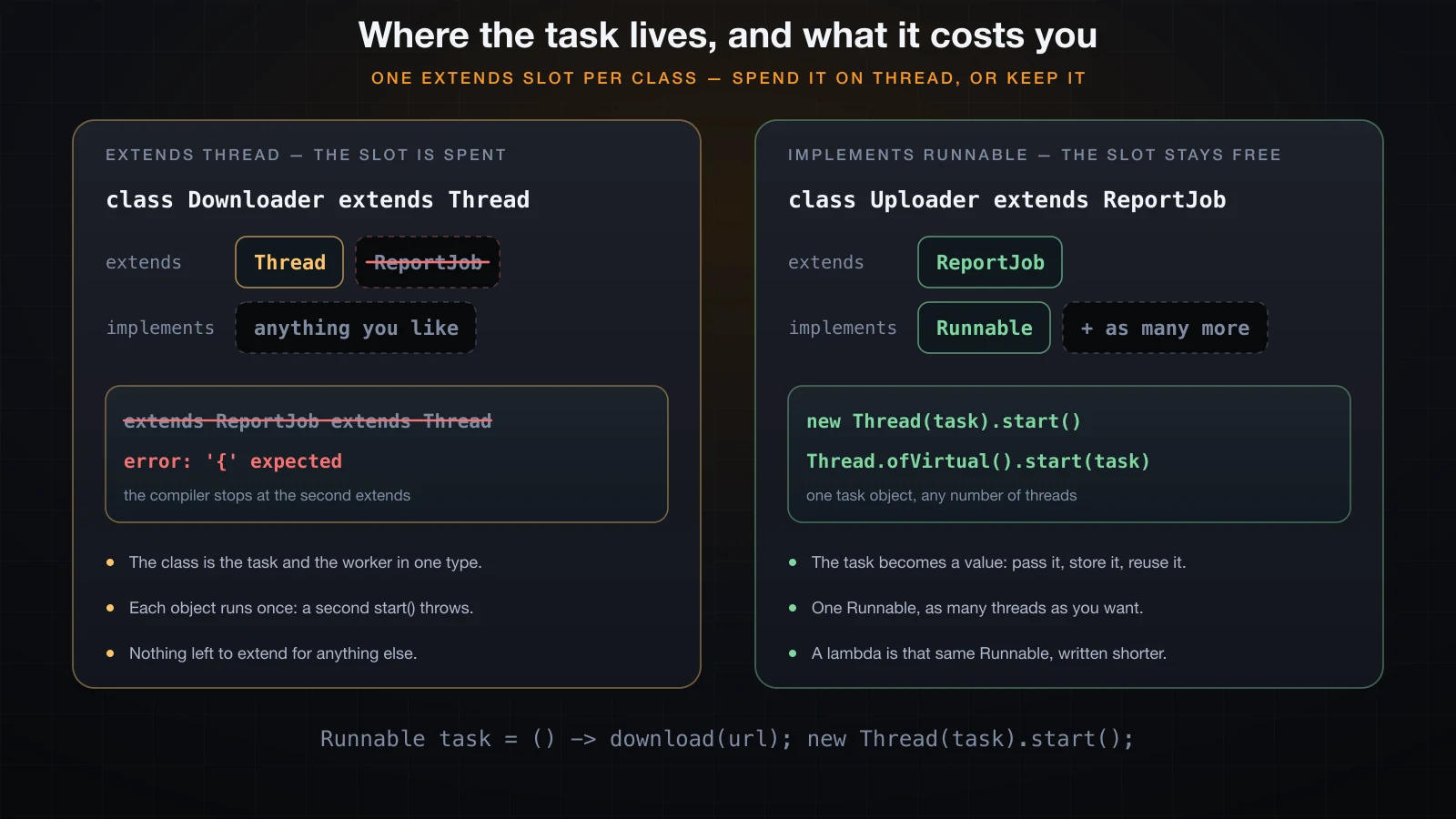
It works, and it costs you the one thing a Java class only has once. A class may extend exactly one class, and Downloader has now spent that slot on Thread. The day it also needs to extend a base class from your own code or a framework, there is no second extends to write, and the compiler says so before it says anything else:
class ReportJob { }

class NightlyReport extends ReportJob extends Thread {
    @Override public void run() { }
}Bad.java:3: error: '{' expected
class NightlyReport extends ReportJob extends Thread {
^
1 errorThe parser stops at the second extends — there is no syntax for what you are asking. It is also a modelling mistake independent of the syntax: a Downloader is not a kind of thread. It is a piece of work that some thread should run. And because the object is the thread, it is single-use: one Downloader can be started once, ever.
Implementing Runnable
Runnable is an interface with one method, void run(). A class implements it, keeps its extends slot, and hands an instance to a Thread:
class Uploader implements Runnable {
    @Override
    public void run() {
        System.out.println("Runnable    running on " + Thread.currentThread().getName());
    }
}Thread t = new Thread(new Uploader());
t.start();This is the right default, and the reason is not style. The task is now a value: an object you can store in a field, pass to a method, put in a list, hand to two different threads, or give to a thread pool later in this part of the course. The Thread is the machinery that runs it; the Runnable is the work. Separating them is what lets you change one without touching the other.
A lambda, which is the same Runnable
Runnable has exactly one abstract method, so it is a functional interface, and a lambda is a Runnable:
Thread t = new Thread(() -> System.out.println("lambda      running on "
        + Thread.currentThread().getName()));
t.start();
There is no third mechanism here. The lambda produces an object implementing Runnable, the constructor takes it, Thread.run calls it. Use the lambda for short bodies, a named class implementing Runnable when the task has state, a name worth having, or its own tests.
Put all three in one program and start them:
public class Creation {
    public static void main(String[] args) throws InterruptedException {
        Thread t1 = new Downloader();
        Thread t2 = new Thread(new Uploader());
        Thread t3 = new Thread(() -> System.out.println("lambda      running on "
                + Thread.currentThread().getName()));

        t1.start();
        t2.start();
        t3.start();

        t1.join();
        t2.join();
        t3.join();
        System.out.println("main        finished on " + Thread.currentThread().getName());
    }
}Runnable running on Thread-1
lambda running on Thread-2
subclass running on Thread-0
main finished on mainAnother run of the same binary put the lines in a different order:
Runnable    running on Thread-1
subclass    running on Thread-0
lambda      running on Thread-2
main finished on mainThread-0, Thread-1, Thread-2 are the default names, numbered in creation order, not start order — which is why the numbers stay attached to the same task while the lines move around.
start() versus run()
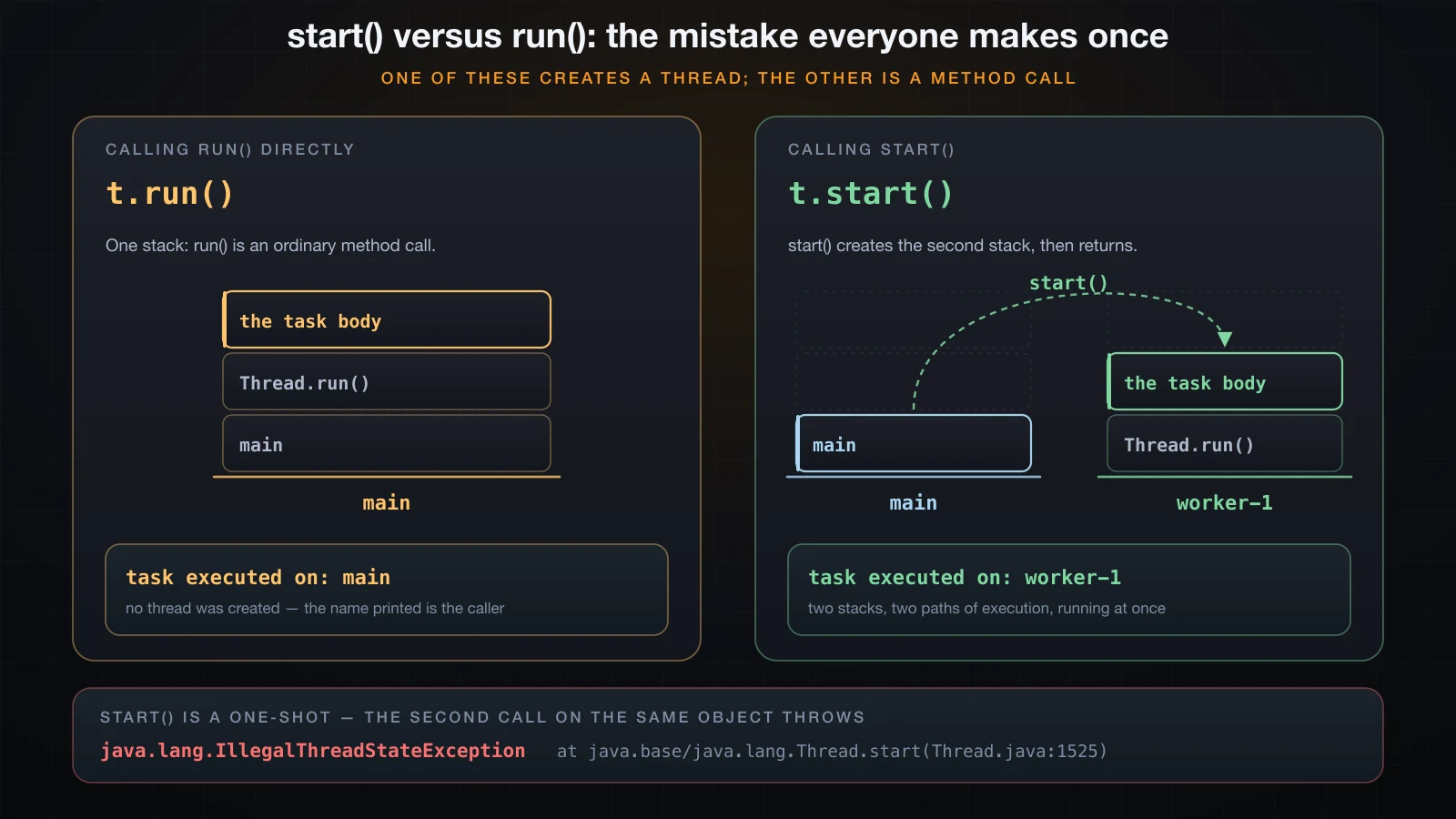
start and run are both public, both take no arguments, and only one of them creates a thread. Calling run directly is a plain method call: the body executes on the calling thread, start was never involved, and no thread was created. Print the current thread's name in both cases and the difference is not subtle.
public class StartVsRun {
    public static void main(String[] args) {
        Runnable task = () -> System.out.println("  task executed on: "
                + Thread.currentThread().getName());

        Thread t = new Thread(task, "worker-1");

        System.out.println("t.run()   ->");
        t.run();

        System.out.println("t.start() ->");
        t.start();
    }
}t.run() ->
task executed on: main
t.start() ->
task executed on: worker-1This output is stable across runs, because there is nothing concurrent about the first half: t.run() runs to completion on main before the next line executes. The Thread object t was constructed either way — it just sat there while main did its work for it.
What start does is different in kind. It asks the JVM for a new path of execution with its own stack, arranges for that new thread to call run, and returns to the caller immediately, without waiting. Two stacks now exist. main keeps going while worker-1 runs the task.
The mistake is easy to make and quiet when you make it: a program that calls run instead of start produces correct-looking output in the right order, uses one thread, and behaves exactly as if you had never written the threading code. The name in the output is the only tell.
Calling start() twice
A Thread object is single-use. Starting one that has already run does not restart it:
public class StartTwice {
    public static void main(String[] args) throws InterruptedException {
        Thread t = new Thread(() -> System.out.println("ran once"), "worker-1");
        t.start();
        t.join();
        t.start();          // the same Thread object, a second time
    }
}ran once
Exception in thread "main" java.lang.IllegalThreadStateException
at java.base/java.lang.Thread.start(Thread.java:1525)
at StartTwice.main(StartTwice.java:6)IllegalThreadStateException is unchecked, so nothing forces you to handle it, and it carries no message — the class name is the whole diagnosis. Note that it is thrown on the calling thread, main, not on the thread you tried to start. To run the same work twice, create a second Thread around the same Runnable; the task is reusable, the thread is not.
Why the output order changes between runs
Two threads printing five lines each produce ten lines. Nothing in the language or the JVM says which ten-line ordering you get. Here is the smallest program that shows it:
public class Interleave {
    public static void main(String[] args) {
        Runnable count = () -> {
            String name = Thread.currentThread().getName();
            for (int i = 1; i <= 5; i++) {
                System.out.println(name + " " + i);
            }
        };
        new Thread(count, "A").start();
        new Thread(count, "B").start();
    }
}
Six consecutive runs of that binary, unchanged, gave five different orderings. Run 1 and run 6 were the only pair that matched, and both were fully sequential:
A 1
A 2
A 3
A 4
A 5
B 1
B 2
B 3
B 4
B 5
Run 3 started with B, and the two threads swapped three times on the way through:
B 1
B 2
B 3
B 4
A 1
A 2
B 5
A 3
A 4
A 5
Run 5 was different again:
A 1
A 2
A 3
B 1
A 4
A 5
B 2
B 3
B 4
B 5
Your machine will produce something else. The reason is that start only makes a thread runnable — the operating system scheduler decides which runnable thread gets a core and for how long, and that decision depends on core count, current load, what the JIT has compiled so far, and timing you have no control over. Run the same binary on a busier machine and the numbers change again.
Two rules survive the noise, and they are the only ones you get for free. Within a single thread, statements run in the order you wrote them: A 3 always precedes A 4. Between threads, nothing is ordered unless you order it yourself. Everything printed above is consistent with both rules.
That second rule is where concurrency stops being a convenience and starts being a discipline. Interleaved output is harmless. Interleaved updates to the same field are not, and the next article is about exactly that.
join(): waiting for a thread to finish
start returns immediately, so by default the starting thread runs on and the results are not ready when it looks for them. join is the fix: it blocks the calling thread until the target thread has finished.
public class JoinDemo {
    public static void main(String[] args) throws InterruptedException {
        Thread loader = new Thread(() -> {
            try {
                Thread.sleep(200);
            } catch (InterruptedException e) {
                Thread.currentThread().interrupt();
                return;
            }
            System.out.println("loader: data ready");
        }, "loader");

        loader.start();
        System.out.println("main: started the loader");
        loader.join();                       // block until loader finishes
        System.out.println("main: loader is alive? " + loader.isAlive());
        System.out.println("main: continuing with the data");
    }
}main: started the loader
loader: data ready
main: loader is alive? false
main: continuing with the dataThat ordering held across every run, and it is the point: join is one of the few orderings you can rely on. After loader.join() returns normally, the loader has finished, so isAlive() is false and whatever it produced is ready. Delete the join line and the same program prints the loader's line last:
main: started the loader
main: continuing with the data
loader: data ready
Three details are worth knowing. join is declared throws InterruptedException, because a thread waiting on another can itself be interrupted — the last section of this article explains what to do with that. join(long millis) waits at most that long and then returns whether or not the thread finished, so you must check isAlive() to find out which happened. And joining a thread that has already terminated returns immediately, which makes join safe to call defensively.
The Thread.sleep(200) inside the loader is part of the program, standing in for work that takes time. It is not a measurement of anything.
Daemon threads and when the JVM exits
The JVM does not exit when main returns. It exits when the last non-daemon thread finishes. Every thread you create is a non-daemon thread by default and inherits that from its creator, so a background loop you forgot about keeps the whole process alive.
Marking a thread as a daemon says it is infrastructure, not work: the JVM will not wait for it, and will kill it wherever it happens to be when the last non-daemon thread finishes.
public class DaemonDemo {
    public static void main(String[] args) {
        Thread ticker = new Thread(() -> {
            int n = 0;
            while (true) {
                System.out.println("  tick " + (++n));
                try { Thread.sleep(100); } catch (InterruptedException e) { return; }
            }
        }, "ticker");

        ticker.setDaemon(true);              // must be set BEFORE start()
        System.out.println("ticker daemon? " + ticker.isDaemon());
        ticker.start();

        try { Thread.sleep(350); } catch (InterruptedException e) { }
        System.out.println("main: returning");
    }
}ticker daemon? true
tick 1
tick 2
tick 3
tick 4
main: returningThe ticker loops forever, and the program still terminates. When main returned, the only thread left was a daemon, so the JVM shut down and took the ticker with it mid-loop. The tick count is a function of the two sleeps and will move around under load — three runs here all showed four ticks, and a busier machine may show three or five.
Change one word and the behaviour inverts. With a non-daemon thread — the default — the JVM waits:
public class UserThreadDemo {
    public static void main(String[] args) {
        Thread ticker = new Thread(() -> {
            for (int n = 1; n <= 6; n++) {
                System.out.println("  tick " + n);
                try { Thread.sleep(100); } catch (InterruptedException e) { return; }
            }
        }, "ticker");

        ticker.setDaemon(false);             // the default
        ticker.start();

        try { Thread.sleep(350); } catch (InterruptedException e) { }
        System.out.println("main: returning");
    }
} tick 1
tick 2
tick 3
tick 4
main: returning
tick 5
tick 6main returned in the middle and the process stayed up until tick 6. That is the shape of a program that "hangs" after finishing: something non-daemon is still running.
setDaemon must be called before start, and the JVM enforces it with the same exception you saw earlier:
Thread t = new Thread(() -> { });
t.start();
t.setDaemon(true);Exception in thread "main" java.lang.IllegalThreadStateException
at java.base/java.lang.Thread.setDaemon(Thread.java:2240)
at DaemonLate.main(DaemonLate.java:5)The trade is simple. Daemon for a heartbeat, a metrics pusher, a cache refresher — anything whose sudden death mid-operation is acceptable. Non-daemon for anything that must complete, because a daemon thread gets no chance to finish writing a file or flushing a buffer.
Thread names, ids and priorities
Every thread carries a name, an id and a priority, and one of those three is worth much less than the other two.
public class Identity {
    public static void main(String[] args) throws InterruptedException {
        Thread main = Thread.currentThread();
        System.out.println("toString: " + main);
        System.out.println("name=" + main.getName()
                + " id=" + main.threadId()
                + " priority=" + main.getPriority()
                + " daemon=" + main.isDaemon());

        Thread anonymous = new Thread(() -> { });
        Thread named = new Thread(() -> { }, "report-writer");
        System.out.println("names: " + anonymous.getName() + " | " + named.getName());
        System.out.println("MIN=" + Thread.MIN_PRIORITY
                + " NORM=" + Thread.NORM_PRIORITY
                + " MAX=" + Thread.MAX_PRIORITY);

        named.setPriority(Thread.MAX_PRIORITY);
        named.start();
        named.join();
        System.out.println("named: id=" + named.threadId()
                + " priority=" + named.getPriority());

        try {
            named.setPriority(11);
        } catch (IllegalArgumentException e) {
            System.out.println("setPriority(11) -> " + e);
        }
    }
}toString: Thread[#1,main,5,main]
name=main id=1 priority=5 daemon=false
names: Thread-0 | report-writer
MIN=1 NORM=5 MAX=10
named: id=21 priority=10
setPriority(11) -> java.lang.IllegalArgumentException| Property | What it is | Notes |
|---|---|---|
getName() / setName(String) | A label, writable at any time | Defaults to Thread-0, Thread-1, … in creation order |
threadId() | A positive long, unique for the JVM's lifetime | Read-only; since Java 19 this replaces the deprecated getId() |
getPriority() / setPriority(int) | An int from 1 to 10, default 5 | A hint to the scheduler; may be ignored entirely |
isDaemon() / setDaemon(boolean) | Whether the JVM waits for it | Must be set before start() |
isAlive() | Started and not yet finished | Read-only |
toString gives you all of it at once — Thread[#1,main,5,main] is id, name, priority, thread group. The main thread has id 1; ids of threads you create depend on how many the JVM started internally first, so the 21 above is not a number to depend on.
Names are the part that pays for itself. Every stack trace, every thread dump and every profiler view shows names, and pool-1-thread-3 tells you nothing while invoice-export-3 tells you everything. Name your threads.
Priority is the one to be honest about. setPriority is documented as a hint, the mapping to native priorities is platform-dependent, and some platforms discard it. Two spinning threads, one at MIN_PRIORITY and one at MAX_PRIORITY, each summing to 300 million:
public class Priorities {
    static Thread spin(String name, int priority) {
        Thread t = new Thread(() -> {
            long sum = 0;
            for (long i = 0; i < 300_000_000L; i++) sum += i;
            System.out.println("  finished: " + Thread.currentThread().getName()
                    + " (checksum " + (sum & 0xFF) + ")");
        }, name);
        t.setPriority(priority);
        return t;
    }

    public static void main(String[] args) throws InterruptedException {
        Thread low  = spin("low-priority",  Thread.MIN_PRIORITY);
        Thread high = spin("high-priority", Thread.MAX_PRIORITY);
        low.start();
        high.start();
        low.join();
        high.join();
    }
}
Across six consecutive runs, the MAX_PRIORITY thread finished first three times and the MIN_PRIORITY thread finished first three times. Two of those runs:
  finished: high-priority (checksum 128)
finished: low-priority (checksum 128) finished: low-priority (checksum 128)
finished: high-priority (checksum 128)That is a completion order, not a speed measurement — and it is enough to make the point. On this machine, on this OS, a ten-to-one priority difference did not reliably decide which of two identical loops finished first. Write code whose correctness does not depend on priority, because on some platform it will be ignored.
Virtual threads in Java 21
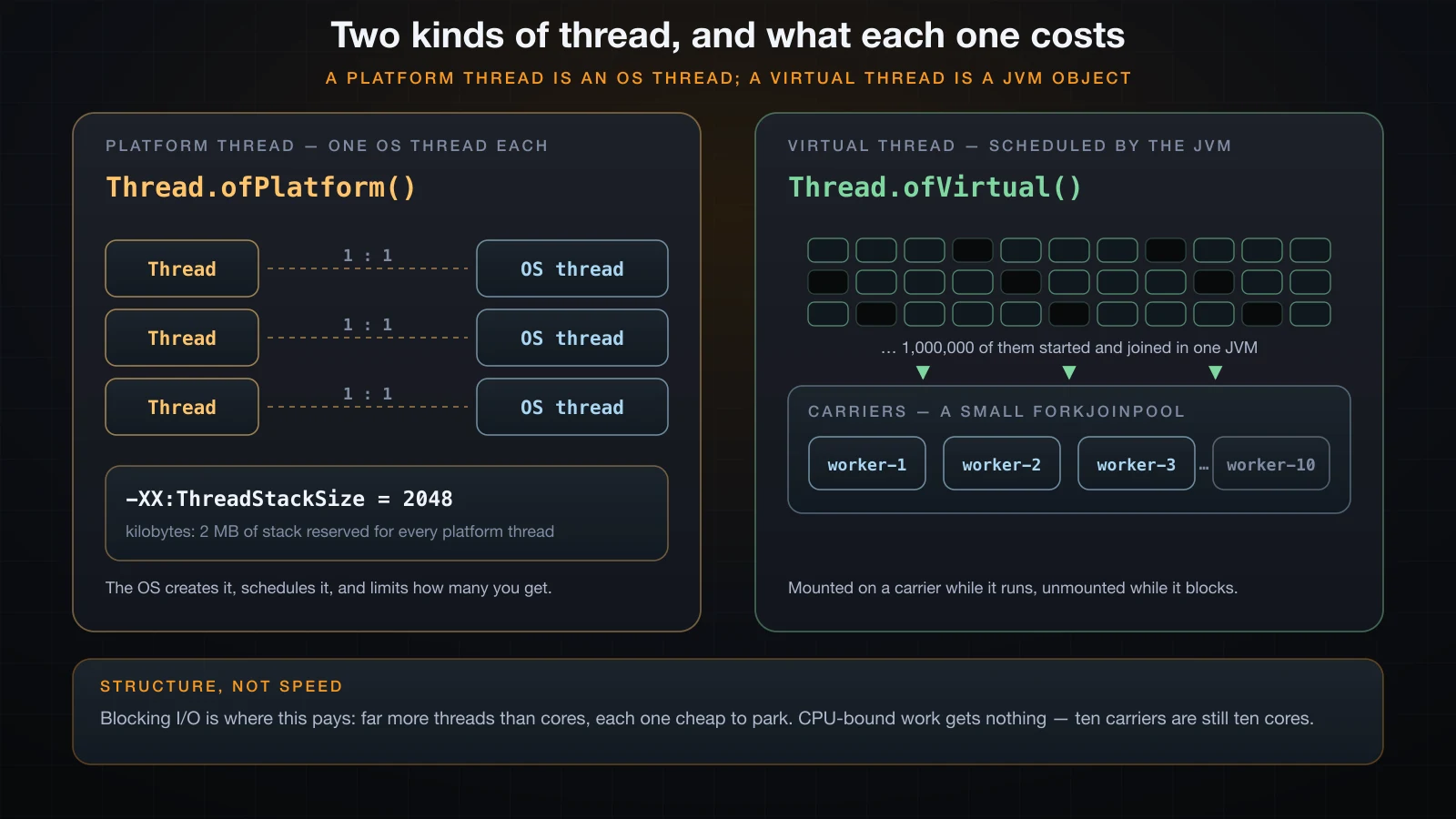
Everything above describes a platform thread: a thin Thread object wrapped around a thread the operating system creates and schedules. That is a real resource. This JVM reserves 2 MB of stack for each one, which it will tell you:
$ java -XX:+PrintFlagsFinal -version | grep -w ThreadStackSize
     intx ThreadStackSize                          = 2048                                   {pd product} {default}
The unit is kilobytes. Multiply by the number of threads a server wants when it is handling ten thousand concurrent requests, each of them mostly waiting on a database, and the arithmetic stops working. That is the problem virtual threads solve, and they were finalised in Java 21 by JEP 444 after two preview releases.
A virtual thread is still a Thread — same class, same start, same join, same Runnable. What changes is who schedules it. It is a JVM object with a small growable stack on the heap, and to run it the JVM mounts it onto a platform thread from a small internal pool. When it blocks, the JVM unmounts it, parks its stack on the heap, and gives the carrier to another virtual thread.
public class VirtualProps {
    public static void main(String[] args) throws InterruptedException {
        Thread platform = Thread.ofPlatform().name("platform-1").unstarted(
                () -> System.out.println("  " + Thread.currentThread()));
        Thread virtual = Thread.ofVirtual().name("importer-1").unstarted(
                () -> System.out.println("  " + Thread.currentThread()));

        platform.start();
        platform.join();
        virtual.start();
        virtual.join();

        System.out.println("platform.isVirtual() = " + platform.isVirtual());
        System.out.println("virtual.isVirtual()  = " + virtual.isVirtual());
        System.out.println("virtual: daemon=" + virtual.isDaemon()
                + " priority=" + virtual.getPriority());

        Thread another = Thread.ofVirtual().unstarted(() -> { });
        try {
            another.setDaemon(false);
        } catch (IllegalArgumentException e) {
            System.out.println("setDaemon(false) -> " + e);
        }
        another.setPriority(Thread.MAX_PRIORITY);
        System.out.println("after setPriority(MAX): " + another.getPriority());

        Thread direct = Thread.startVirtualThread(
                () -> System.out.println("  " + Thread.currentThread()));
        direct.join();
        System.out.println("default name is empty: " + direct.getName().isEmpty());
    }
} Thread[#20,platform-1,5,main]
VirtualThread[#21,importer-1]/runnable@ForkJoinPool-1-worker-1
platform.isVirtual() = false
virtual.isVirtual() = true
virtual: daemon=true priority=5
setDaemon(false) -> java.lang.IllegalArgumentException: 'false' not legal for virtual threads
after setPriority(MAX): 5
VirtualThread[#25]/runnable@ForkJoinPool-1-worker-1
default name is empty: trueThe toString is the whole story in one line. A platform thread prints Thread[#20,platform-1,5,main]. A virtual thread prints VirtualThread[#21,importer-1]/runnable@ForkJoinPool-1-worker-1: its own id and name, its state, and — after the @ — the carrier it is currently mounted on, a worker from the JVM's scheduler pool. An unnamed one prints VirtualThread[#25]/runnable@ForkJoinPool-1-worker-1, because virtual threads have no default name at all; getName() returns the empty string, which is one more reason to name them.
Three properties differ from a platform thread, and the output above shows all three. A virtual thread is always a daemon — setDaemon(false) throws IllegalArgumentException: 'false' not legal for virtual threads, so virtual threads never keep the JVM alive and you must join them or the JVM may exit before they finish. Its priority is fixed at 5 and setPriority is silently ignored. And it has no default name.
There are three ways to start one: Thread.ofVirtual().start(runnable) from the builder, Thread.startVirtualThread(runnable) as a one-line shortcut, and Executors.newVirtualThreadPerTaskExecutor(), which gives one virtual thread per submitted task:
import java.util.concurrent.ExecutorService;
import java.util.concurrent.Executors;

public class VExecutor {
    public static void main(String[] args) {
        try (ExecutorService exec = Executors.newVirtualThreadPerTaskExecutor()) {
            for (int i = 1; i <= 3; i++) {
                int id = i;
                exec.submit(() -> {
                    try { Thread.sleep(50); } catch (InterruptedException e) { }
                    System.out.println("task " + id + " on " + Thread.currentThread());
                });
            }
        }   // close() waits for every submitted task to finish
        System.out.println("all tasks done");
    }
}task 3 on VirtualThread[#23]/runnable@ForkJoinPool-1-worker-3
task 2 on VirtualThread[#22]/runnable@ForkJoinPool-1-worker-2
task 1 on VirtualThread[#20]/runnable@ForkJoinPool-1-worker-1
all tasks doneAnother run printed task 2, then task 3, then task 1 — three tasks sleeping the same 50 ms finish in whatever order the scheduler produces. ExecutorService and thread pools are the subject of the next-but-one article; this is one line of it, borrowed because it is how most real code creates virtual threads.
One million virtual threads
The structural claim about virtual threads is that they are cheap enough to create per task instead of per connection. That is not a benchmark, it is a count — so count.
public class Scale {
    public static void main(String[] args) throws InterruptedException {
        int n = 1_000_000;
        Thread[] all = new Thread[n];

        for (int i = 0; i < n; i++) {
            all[i] = Thread.startVirtualThread(() -> {
                try {
                    Thread.sleep(100);          // pretend this is a network call
                } catch (InterruptedException e) {
                    Thread.currentThread().interrupt();
                }
            });
        }
        for (Thread t : all) {
            t.join();
        }
        System.out.println(n + " virtual threads started and joined");
        System.out.println("carrier pool parallelism = " + Runtime.getRuntime().availableProcessors());
    }
}1000000 virtual threads started and joined
carrier pool parallelism = 10One million threads, each holding a live blocking sleep, in a JVM started with default options. The same program written with platform threads would ask the operating system for a million OS threads with a million 2 MB stack reservations; this article does not try it, because the realistic outcome is OutOfMemoryError: unable to create native thread long before the loop ends.
Where do they run? Read the carrier out of toString:
import java.util.Set;
import java.util.concurrent.ConcurrentSkipListSet;

public class Carriers {
    static String carrierOf(Thread t) {
        String s = t.toString();     // VirtualThread[#21]/runnable@ForkJoinPool-1-worker-3
        int at = s.lastIndexOf('@');
        return at < 0 ? "(none)" : s.substring(at + 1);
    }

    public static void main(String[] args) throws InterruptedException {
        Set<String> carriers = new ConcurrentSkipListSet<>();
        Thread[] all = new Thread[2000];
        for (int i = 0; i < all.length; i++) {
            all[i] = Thread.startVirtualThread(() -> {
                carriers.add(carrierOf(Thread.currentThread()));
                try { Thread.sleep(20); } catch (InterruptedException e) { }
                carriers.add(carrierOf(Thread.currentThread()));
            });
        }
        for (Thread t : all) t.join();
        System.out.println("2000 virtual threads ran on " + carriers.size() + " carrier(s):");
        System.out.println(carriers);
    }
}2000 virtual threads ran on 10 carrier(s):
[ForkJoinPool-1-worker-1, ForkJoinPool-1-worker-10, ForkJoinPool-1-worker-2, ForkJoinPool-1-worker-3, ForkJoinPool-1-worker-4, ForkJoinPool-1-worker-5, ForkJoinPool-1-worker-6, ForkJoinPool-1-worker-7, ForkJoinPool-1-worker-8, ForkJoinPool-1-worker-9]Two thousand threads, ten carriers — one per available processor on this machine, which is the default scheduler parallelism. A less loaded or smaller machine may show fewer carriers; the number that matters is that it is bounded by cores, not by the number of virtual threads.
What virtual threads do not do
They do not make code run faster. A virtual thread that never blocks holds its carrier for as long as it runs, so a thousand CPU-bound virtual threads on ten carriers execute ten at a time — exactly what a ten-thread pool would do, with extra bookkeeping. The win is availability under blocking I/O: a thread that parks on a socket read costs a heap object instead of an OS thread, so you can have a great many of them waiting at once.
They also do not remove any of the hazards in the rest of this part. Two virtual threads updating the same field race exactly like two platform threads. Everything the next article says about shared mutable state applies unchanged.
The practical rule for Java 21: virtual threads for tasks that block on I/O, platform threads for long-running CPU-bound work, and never pool virtual threads — create one per task and let it end.
Stopping a thread: what was removed, and what replaced it
Java once had methods to stop, suspend and resume a thread from the outside. They were deprecated in Java 1.2 because they are unsafe by construction: killing a thread at an arbitrary instruction leaves whatever it was updating half-updated, and suspending one while it holds a lock deadlocks everyone waiting for that lock.
They are still declared on Thread in Java 21, so the interesting question is what happens if you call them. Compiling produces removal warnings, and running produces this:
public class Removed {
    public static void main(String[] args) throws Exception {
        Thread t = new Thread(() -> {
            while (true) {
                try { Thread.sleep(50); } catch (InterruptedException e) { return; }
            }
        }, "victim");
        t.setDaemon(true);
        t.start();
        Thread.sleep(100);

        try { t.stop(); }    catch (Throwable e) { System.out.println("stop()    -> " + e); }
        try { t.suspend(); } catch (Throwable e) { System.out.println("suspend() -> " + e); }
        try { t.resume(); }  catch (Throwable e) { System.out.println("resume()  -> " + e); }
    }
}Removed.java:12: warning: [removal] stop() in Thread has been deprecated and marked for removal
try { t.stop(); } catch (Throwable e) { System.out.println("stop() -> " + e); }
^
Removed.java:13: warning: [removal] suspend() in Thread has been deprecated and marked for removal
try { t.suspend(); } catch (Throwable e) { System.out.println("suspend() -> " + e); }
^
Removed.java:14: warning: [removal] resume() in Thread has been deprecated and marked for removal
try { t.resume(); } catch (Throwable e) { System.out.println("resume() -> " + e); }
^
3 warningsstop() -> java.lang.UnsupportedOperationException
suspend() -> java.lang.UnsupportedOperationException
resume() -> java.lang.UnsupportedOperationExceptionAll three are inert on Java 21. They compile, and they throw UnsupportedOperationException at run time with no message. Uncaught, t.stop() fails at java.base/java.lang.Thread.stop(Thread.java:1667). The JDK's own source carries @Deprecated(since="1.2", forRemoval=true) on all three, which is what the [removal] in the warning means: they are on their way out of the class entirely. There is nothing to migrate to that behaves the same way, because nothing safe can.
What Java has instead is cooperative interruption. interrupt() does not stop anything. It sets a flag on the target thread, and if that thread is blocked in sleep, wait or join, it also wakes it with an InterruptedException. Whether the thread then stops is the thread's own decision.
public class Interrupt {
    public static void main(String[] args) throws InterruptedException {
        Thread worker = new Thread(() -> {
            try {
                System.out.println("worker: sleeping for 10 seconds");
                Thread.sleep(10_000);
                System.out.println("worker: woke up normally");
            } catch (InterruptedException e) {
                System.out.println("worker: caught " + e);
                System.out.println("worker: interrupted flag is now "
                        + Thread.currentThread().isInterrupted());
                Thread.currentThread().interrupt();      // restore it
                System.out.println("worker: flag restored to "
                        + Thread.currentThread().isInterrupted());
            }
            System.out.println("worker: returning");
        }, "worker");

        worker.start();
        Thread.sleep(200);
        System.out.println("main: calling worker.interrupt()");
        worker.interrupt();
        worker.join();
        System.out.println("main: worker finished");
    }
}worker: sleeping for 10 seconds
main: calling worker.interrupt()
worker: caught java.lang.InterruptedException: sleep interrupted
worker: interrupted flag is now false
worker: flag restored to true
worker: returningA ten-second sleep ended after 200 ms, and the exception message is sleep interrupted — the JVM tells you which blocking call was cut short. The line worth staring at is the next one: throwing InterruptedException clears the interrupted flag. The thread has been told to stop and, by the time you can look, the evidence is gone. That is why the handler calls Thread.currentThread().interrupt() to put it back, so code further up the stack can still see it.
Swallowing InterruptedException is the classic bug
Catch it, do nothing, keep looping, and you have written a thread that cannot be cancelled:
public class Swallow {
    public static void main(String[] args) throws InterruptedException {
        Thread bad = new Thread(() -> {
            int n = 0;
            while (true) {
                System.out.println("  bad worker: pass " + (++n));
                try {
                    Thread.sleep(100);
                } catch (InterruptedException e) {
                    // the classic bug: the request is caught and thrown away
                }
                if (n == 6) {
                    System.out.println("  bad worker: gave up on its own after 6 passes");
                    return;
                }
            }
        }, "bad");
        bad.setDaemon(true);
        bad.start();
        Thread.sleep(250);
        System.out.println("main: interrupting");
        bad.interrupt();
        bad.join();
        System.out.println("main: done");
    }
} bad worker: pass 1
bad worker: pass 2
bad worker: pass 3
main: interrupting
bad worker: pass 4
bad worker: pass 5
bad worker: pass 6
bad worker: gave up on its own after 6 passes
main: doneThe interrupt landed and changed nothing. Three runs printed three passes before the interrupt and three after; the split depends on the sleeps and will move, but the outcome does not — the loop ran to its own end. An empty catch (InterruptedException e) is not error handling, it is deleting a cancellation request, and it is one of the most common bugs in threaded Java.
The correct shape is to make the loop condition the interrupt flag, and to restore the flag whenever a blocking call clears it:
public class Cooperative {
    public static void main(String[] args) throws InterruptedException {
        Thread worker = new Thread(() -> {
            int n = 0;
            while (!Thread.currentThread().isInterrupted()) {
                System.out.println("  worker: pass " + (++n));
                try {
                    Thread.sleep(100);
                } catch (InterruptedException e) {
                    Thread.currentThread().interrupt();   // put the flag back
                }
            }
            System.out.println("  worker: interrupt seen, cleaning up and returning");
        }, "worker");

        worker.start();
        Thread.sleep(250);
        System.out.println("main: interrupting");
        worker.interrupt();
        worker.join();
        System.out.println("main: worker alive? " + worker.isAlive());
    }
} worker: pass 1
worker: pass 2
worker: pass 3
main: interrupting
worker: interrupt seen, cleaning up and returning
main: worker alive? falseThe pass count before the interrupt varies with the sleeps; the response to it does not. The thread noticed, printed its cleanup line, and returned — which is what "stopping a thread in Java" means. There are two acceptable responses to InterruptedException and no third: return from the task after cleaning up, or rethrow it. If your method cannot declare throws InterruptedException, restore the flag before returning.
FAQ
What is the difference between a thread and a process?
A process has its own address space; a thread does not. Two Java processes cannot see each other's objects at all, and communicating between them means sockets, files or pipes. Two threads in one JVM share the entire heap, so passing data between them is passing a reference — which is why threads are cheap to coordinate and dangerous to get wrong. Within a process each thread still has its own stack, program counter and thread-local state, which is exactly what the ThreadMemory output at the top of this article shows: independent local values, one shared object.
Should I extend Thread or implement Runnable?
Implement Runnable, or write a lambda, in essentially every case. A class may extend only one class, and extends Thread spends that budget on a superclass you did not want — the compiler will not let you write extends ReportJob extends Thread, and rejects it at the second extends with error: '{' expected. It is also the wrong model: your class is a piece of work, not a kind of thread. Runnable keeps the task separate from the machinery that runs it, so the same object can be given to a plain Thread, an executor, or a virtual thread without editing it.
Why does calling run() not start a thread?
Because run is an ordinary method. Thread implements Runnable, so t.run() is a normal virtual call that executes the body on whichever thread made the call and returns when it is done. start is the method with the native machinery behind it: it asks the JVM for a new thread with its own stack, arranges for that thread to call run, and returns immediately. In the demonstration above, t.run() printed task executed on: main and t.start() printed task executed on: worker-1 — same object, same task, one thread versus two.
What happens if I call start() twice on the same thread?
You get java.lang.IllegalThreadStateException from java.base/java.lang.Thread.start, thrown on the calling thread and carrying no message. A Thread object is single-use: once it has run and terminated, it cannot be restarted, and the same exception is thrown if you call start twice before the first has finished. To run the same work again, construct a new Thread around the same Runnable. The task is reusable; the thread is not.
What is a daemon thread used for?
For background machinery whose sudden death is acceptable, because the JVM exits as soon as the last non-daemon thread finishes and kills any daemons wherever they are. Heartbeats, metrics pushers, cache refreshers and idle-connection reapers are the usual examples. Anything that must finish — writing a file, flushing a buffer, completing a transaction — must not be a daemon, because it will not get the chance. setDaemon(true) must be called before start(); afterwards it throws IllegalThreadStateException. Virtual threads are always daemons, which is why you must join them.
Do thread priorities actually do anything?
Sometimes, and never enough to build on. setPriority takes 1 to 10 with a default of 5, throws IllegalArgumentException outside that range, and is documented as a hint: the JVM maps it onto native priorities in a platform-dependent way, and some platforms ignore it. Two identical spin loops, one at MIN_PRIORITY and one at MAX_PRIORITY, finished in a different order across six runs on this machine — three each way. Use priorities as a nudge at most; if correctness depends on which thread runs first, order it explicitly.
When should I use virtual threads instead of platform threads?
Use them for tasks that spend their time blocked on I/O — a request handler waiting on a database, an HTTP client waiting on a response — where you want thousands or millions of concurrent tasks. One million were started and joined on this machine in a default JVM. Use platform threads for long-running CPU-bound work, because a virtual thread that never blocks occupies its carrier the whole time and ten carriers on a ten-core machine give you exactly ten-way parallelism either way. Never pool virtual threads: create one per task, and let it terminate.
How do I stop a thread in Java 21?
You ask it to stop and it agrees. t.stop(), t.suspend() and t.resume() still compile on Java 21 with removal warnings, but all three throw UnsupportedOperationException at run time and are annotated forRemoval=true in the JDK source. The mechanism is t.interrupt(), which sets a flag and wakes the thread out of sleep, wait or join with an InterruptedException whose message names the call — sleep interrupted. The thread must cooperate: loop on while (!Thread.currentThread().isInterrupted()), and in the catch block either return after cleaning up or restore the flag with Thread.currentThread().interrupt(), because throwing the exception cleared it. An empty catch block is the bug that makes a thread uncancellable.
Conclusion
A thread is an independent path of execution with its own stack over a shared heap, and everything in this article follows from that sentence. Two threads recursed to depths of 1262 and 240492 in the same JVM because the stacks are private; three threads printed the same identity hash because the heap is not. extends Thread works and spends your one inheritance slot on the wrong superclass, so implement Runnable — or write the lambda, which is the same Runnable in fewer characters. start() creates a thread and returns; run() is a method call that creates nothing, and the printed thread name is how you tell. join is the ordering you can rely on, daemon status decides whether the JVM waits for you, names are worth setting and priorities are not worth trusting. Virtual threads make a thread cheap enough to create per task — a million of them started and joined here on ten carriers — as long as you remember that the win is blocking I/O and that nothing about correctness changed.
That last part is the catch. Six runs of a ten-line program produced five different orderings, and the only reason nothing broke is that printing is all those threads did. The moment two threads write the same field, the interleaving stops being a curiosity and becomes a lost update you cannot reproduce. The next article is about exactly that: the thread lifecycle and its states, what a race condition is and how to build one on purpose, and synchronized — the first tool for making one thread wait for another.
![[Advanced Java] Lambda Expressions in Java: Syntax, Target Typing and Method References](/images/blog/lambda-thumbnail.en.webp)
![[Advanced Java] Generics in Java: Type Parameters, Bounded Types, Wildcards and Type Erasure](/images/blog/generics-thumbnail.en.webp)
![[Advanced Java] SOLID Principles in Java: Five Rules and When to Break Them](/images/blog/solid-thumbnail.en.webp)
![[Advanced Java] Optional in Java: A Return Type, Not a Cure for NullPointerException](/images/blog/optional-thumbnail.en.webp)