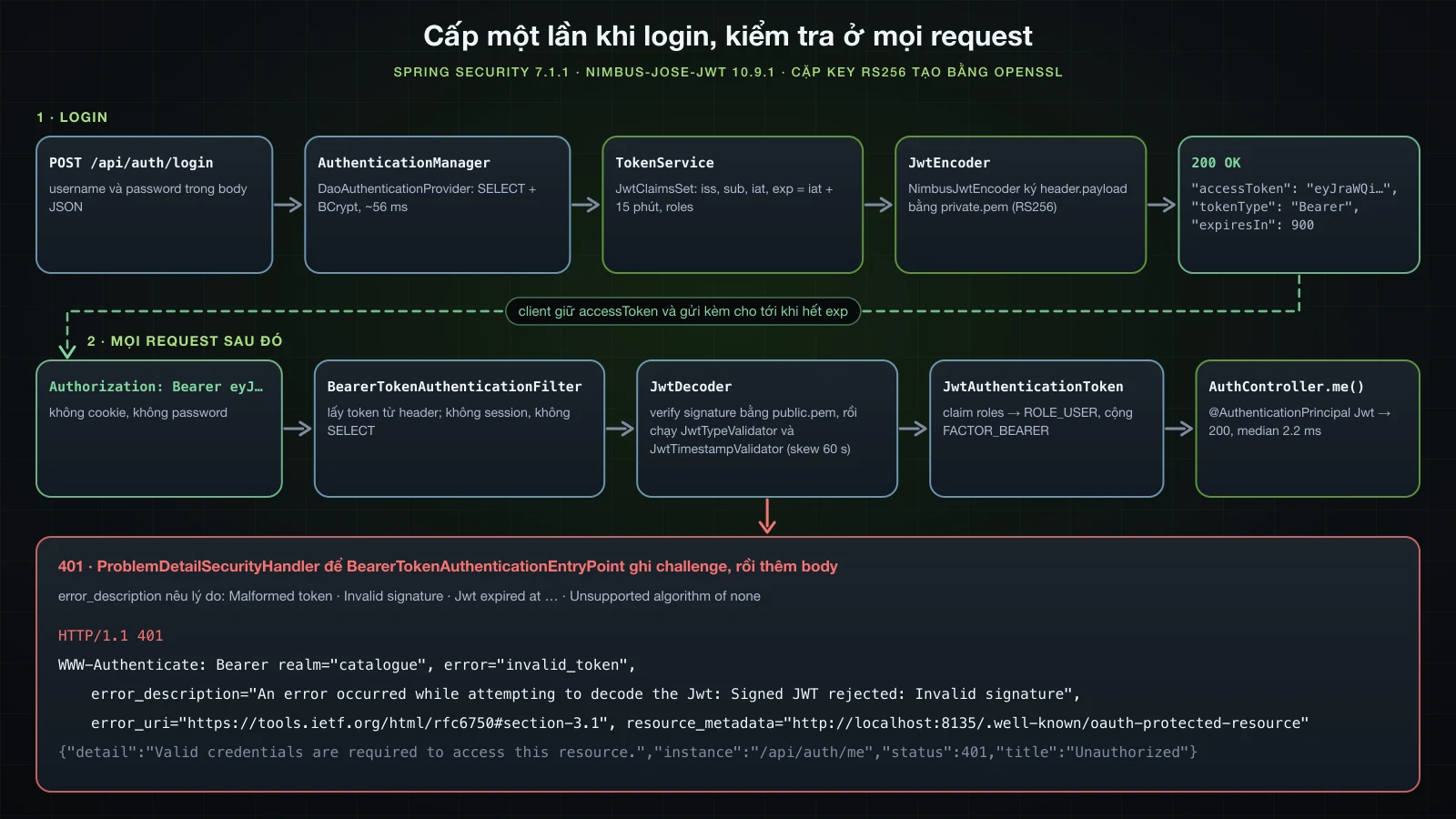
Bài 34 chuyển các account vào table users và thêm POST /api/auth/login, endpoint kiểm tra password qua AuthenticationManager rồi trả về profile, trong khi mọi lời gọi API vẫn gửi credentials HTTP Basic. Bài này biến endpoint đó thành nơi cấp token. Login thành công trả về một JSON Web Token được ký bằng RSA private key; các lời gọi sau gửi nó dưới dạng Authorization: Bearer …, và phần resource server của Spring Security kiểm tra signature bằng public key, kiểm tra hạn dùng rồi dựng authentication từ các claim, không cần session và không kiểm tra password.
Các ví dụ dùng Spring Boot 4.1.1, kéo theo Spring Security 7.1.1, và Java 21, trên một project Initializr có các dependency web, validation, security, oauth2-resource-server, data-jpa và h2, cùng code của bài 34 chép sang. Database là H2 in-memory, trừ một lần chạy trên H2 dạng file, và application chạy ở port 8135 thay vì 8080 mặc định. Các key được tạo bằng OpenSSL 3, còn request được gửi bằng curl và jq.
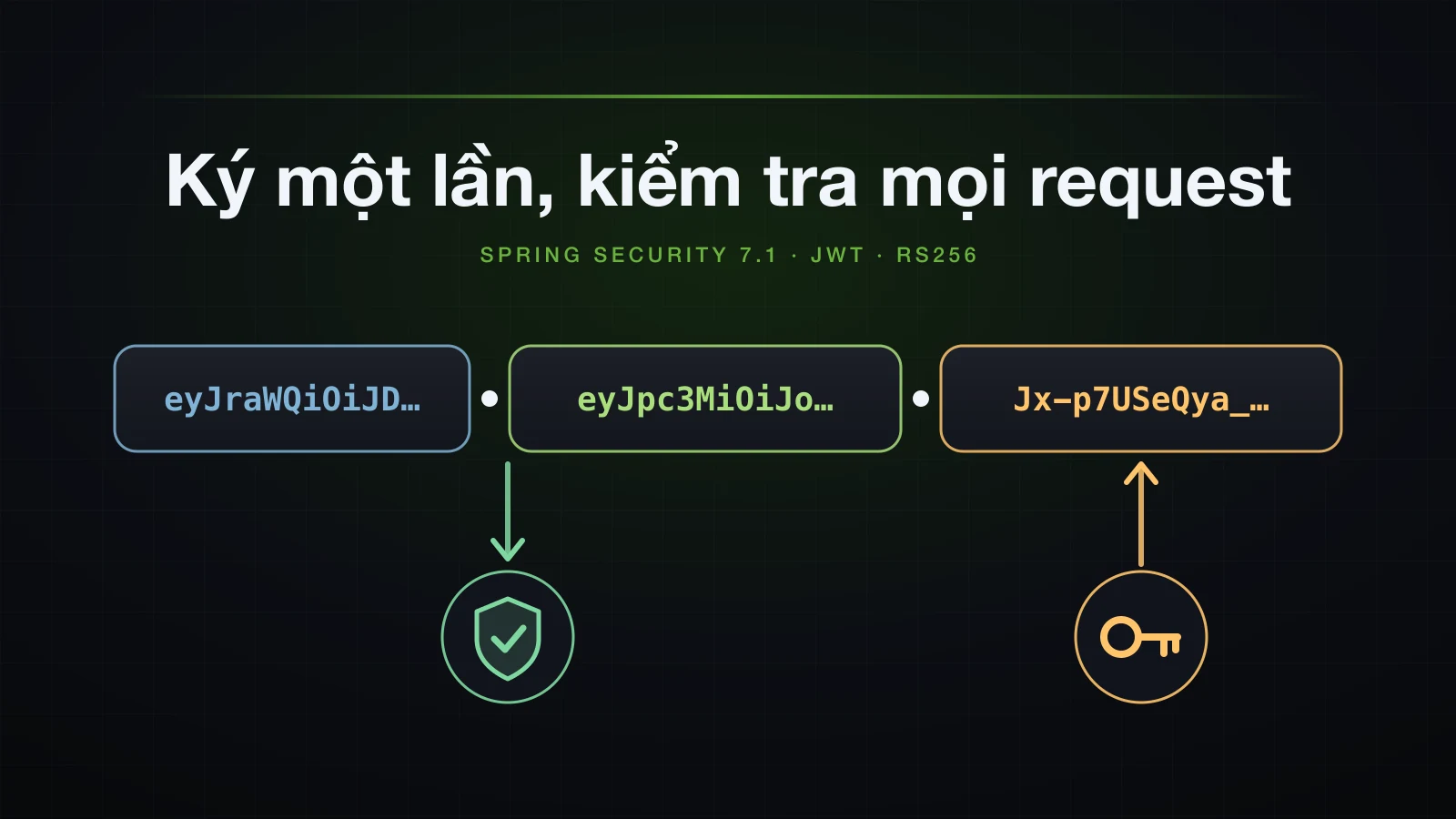
Thiết kế đi theo kế hoạch của Chương 5: RS256 với cặp key lưu dạng file PEM, decoder do Spring Boot cấu hình từ public key, encoder Nimbus dựng từ cùng cặp key, token sống 15 phút và claim roles trở thành authority ROLE_ cho bài 36. Log trích dẫn được ghi với logging.pattern.console=%logger{0}: %msg%n, và các lệnh shell chạy từ thư mục gốc của project.
Vì sao dùng token thay cho HTTP Basic ở mọi request?
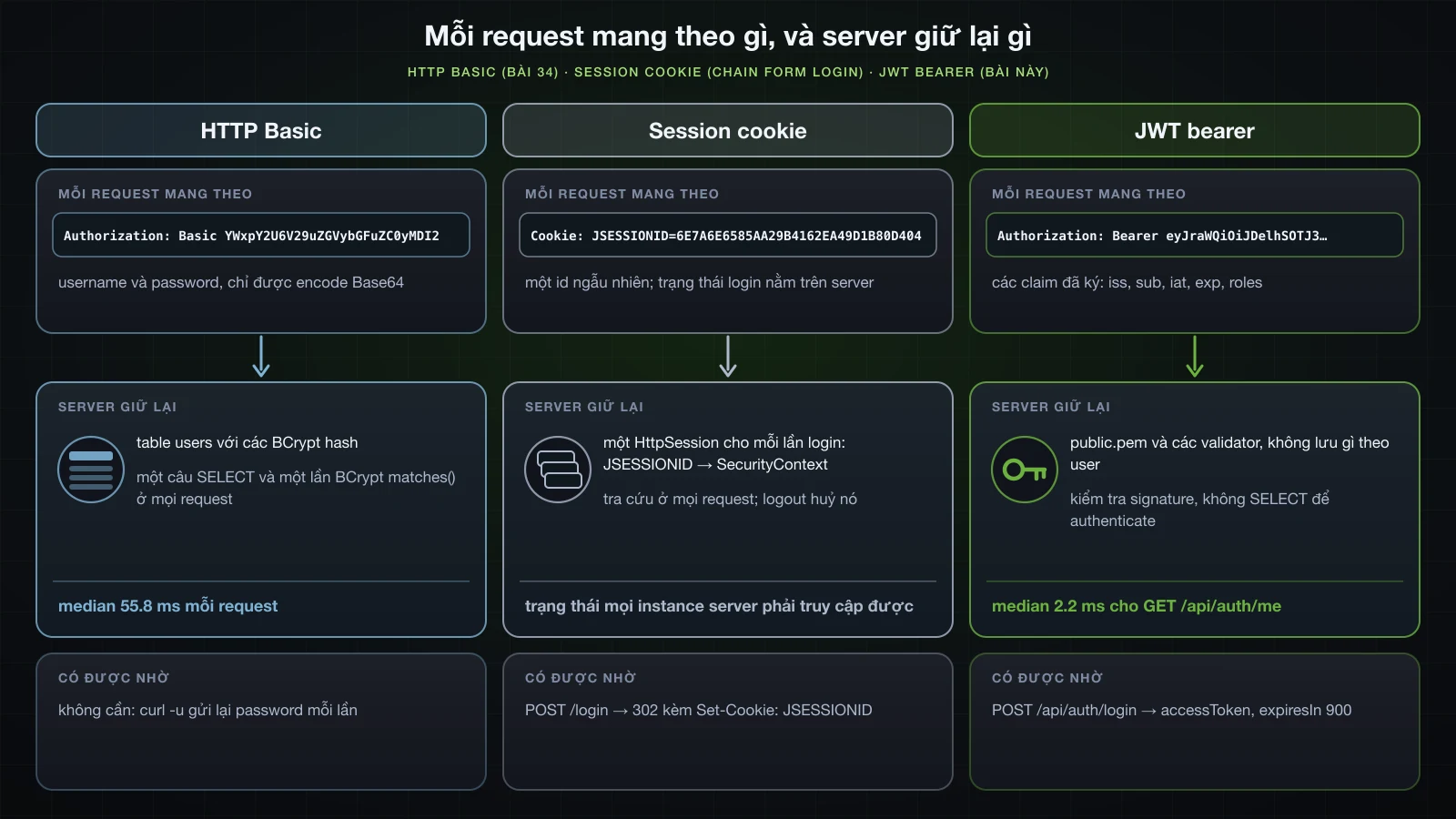
Bài 34 đã đo cái giá của HTTP Basic stateless: password đi kèm mọi request, và server trả lời mỗi request bằng một câu SELECT trên users cộng một lần so sánh BCrypt cost 10, median 55.8 ms so với 0.7 ms của một request bị từ chối vì không có credentials. Token dồn phần việc đó vào một request duy nhất. Login kiểm tra password một lần và ký một lời khẳng định, đây là alice, role USER, có hiệu lực tới 10:01:19; các request sau mang theo lời khẳng định đó, và server chỉ cần verify signature bằng public key rồi đọc các claim.
Application hoàn chỉnh của bài này, trên cùng máy, đo bằng %{time_total} của curl sau ba request khởi động:
| Request | Status | Số request | Min | Median | Max |
|---|---|---|---|---|---|
GET /api/auth/me với bearer token | 200 | 30 | 1.7 ms | 2.2 ms | 3.5 ms |
GET /api/auth/me không có token | 401 | 30 | 0.5 ms | 0.6 ms | 0.8 ms |
POST /api/auth/login | 200 | 15 | 55.4 ms | 55.9 ms | 58.4 ms |
2.2 ms đã gồm câu SELECT mà me chạy để lấy profile; authenticate token không thêm query nào. Login vẫn tốn một lần kiểm tra BCrypt, nhưng giờ là một lần cho mỗi token thay vì một lần cho mỗi lời gọi. Cũng như bài 34, các con số chỉ mang tính tham khảo và được đo khi đang bật log DEBUG.
Session cookie hay token: trạng thái login nằm ở đâu
Cách còn lại để khỏi gửi password là session phía server, thứ mà chain form login của bài 33 vẫn dùng cho mọi URL ngoài /api/**. Login với tư cách alice qua form login của chain đó bằng curl nhận về:
HTTP/1.1 302
Set-Cookie: JSESSIONID=6E7A6E6585AA29B4162EA49D1B80D404; Path=/; HttpOnly
X-Content-Type-Options: nosniff
X-XSS-Protection: 0
Cache-Control: no-cache, no-store, max-age=0, must-revalidate
Pragma: no-cache
Expires: 0
X-Frame-Options: DENY
Location: http://localhost:8135/
Content-Length: 0
Date: Mon, 14 Sep 2026 09:46:21 GMT
Request tiếp theo gửi Cookie: JSESSIONID=6E7A6E6585AA29B4162EA49D1B80D404 và nhận 200 kèm Catalogue home. Cookie chỉ là một id: SecurityContext đã authenticate nằm trong HttpSession trên server, request nào cũng phải tra cứu nó, và mọi instance sau load balancer phải truy cập được cùng các session; logout hoặc session hết hạn là login kết thúc ngay. Token đổi chác theo chiều ngược lại. Server không giữ gì theo từng user và instance nào có public key cũng verify được token, nhưng trên server cũng chẳng có gì để xoá, nên token còn hiệu lực cho tới exp. Phần nói về cái giá của stateless cho thấy điều đó với một user bị vô hiệu hoá.
JWT là gì? Tách một token ra từng phần
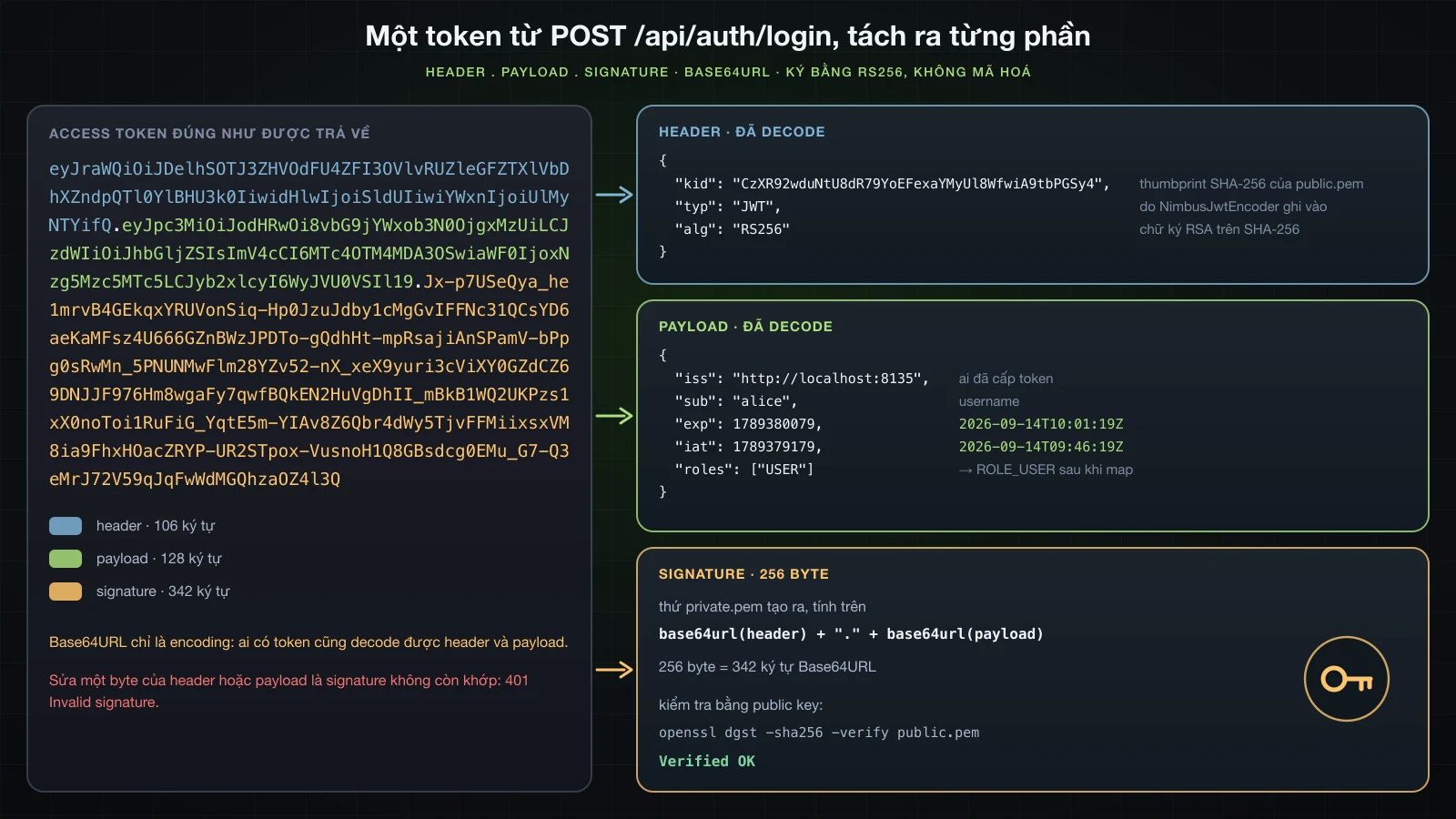
JWT (JSON Web Token, RFC 7519) ở dạng có ký được dùng ở đây là ba chuỗi Base64URL nối với nhau bằng dấu chấm: header, payload và signature. Đây là token mà endpoint login hoàn chỉnh trả cho alice; các phần sau sẽ xây endpoint đó.
TOKEN=$(curl -s -H 'Content-Type: application/json' -d '{"username":"alice","password":"Wonderland-2026"}' http://localhost:8135/api/auth/login | jq -r .accessToken)
tr '.' '\n' <<< "$TOKEN"eyJraWQiOiJDelhSOTJ3ZHVOdFU4ZFI3OVlvRUZleGFZTXlVbDhXZndpQTl0YlBHU3k0IiwidHlwIjoiSldUIiwiYWxnIjoiUlMyNTYifQ
eyJpc3MiOiJodHRwOi8vbG9jYWxob3N0OjgxMzUiLCJzdWIiOiJhbGljZSIsImV4cCI6MTc4OTM4MDA3OSwiaWF0IjoxNzg5Mzc5MTc5LCJyb2xlcyI6WyJVU0VSIl19
Jx-p7USeQya_he1mrvB4GEkqxYRUVonSiq-Hp0JzuJdby1cMgGvIFFNc31QCsYD6aeKaMFsz4U666GZnBWzJPDTo-gQdhHt-mpRsajiAnSPamV-bPpg0sRwMn_5PNUNMwFlm28YZv52-nX_xeX9yuri3cViXY0GZdCZ69DNJJF976Hm8wgaFy7qwfBQkEN2HuVgDhII_mBkB1WQ2UKPzs1xX0noToi1RuFiG_YqtE5m-YIAv8Z6Qbr4dWy5TjvFFMiixsxVM8ia9FhxHOacZRYP-UR2STpox-VusnoH1Q8GBsdcg0EMu_G7-Q3eMrJ72V59qJqFwWdMGQhzaOZ4l3QHeader, payload và signature
Base64URL thay + và / bằng - và _, đồng thời bỏ ký tự đệm =. Hai lối tắt quen thuộc hỏng vì điều đó: @base64d của jq 1.8 từ chối chuỗi Base64URL với is not valid base64 data, còn base64 -d của macOS lặng lẽ bỏ mất mấy byte cuối của input không có ký tự đệm. Hai function shell nhỏ xử lý cả hai chiều:
b64url() { openssl base64 -A | tr '+/' '-_' | tr -d '='; }
b64url_decode() { tr '_-' '/+' | awk '{ while (length($0) % 4) $0 = $0 "="; print }' | base64 -d; }
cut -d. -f1 <<< "$TOKEN" | b64url_decode | jq .
cut -d. -f2 <<< "$TOKEN" | b64url_decode | jq .{
"kid": "CzXR92wduNtU8dR79YoEFexaYMyUl8WfwiA9tbPGSy4",
"typ": "JWT",
"alg": "RS256"
}{
"iss": "http://localhost:8135",
"sub": "alice",
"exp": 1789380079,
"iat": 1789379179,
"roles": [
"USER"
]
}| Phần | Member | Giá trị trong token này | Ý nghĩa |
|---|---|---|---|
| header | alg | RS256 | signature RSASSA-PKCS1-v1_5 với SHA-256 |
| header | typ | JWT | media type, do NimbusJwtEncoder ghi vào |
| header | kid | CzXR92…GSy4 | key id: thumbprint RFC 7638 của public key |
| payload | iss | http://localhost:8135 | issuer, một giá trị cố định trong application này |
| payload | sub | alice | subject: username |
| payload | iat | 1789379179 | thời điểm cấp, tính bằng giây: 2026-09-14T09:46:19Z |
| payload | exp | 1789380079 | thời điểm hết hạn, iat + 900: 2026-09-14T10:01:19Z |
| payload | roles | ["USER"] | claim riêng của application, được các rule của bài 36 đọc |
kid không phải giá trị ngẫu nhiên. Thumbprint của public.pem, tính bằng openssl từ modulus và exponent của key:
N=$(openssl rsa -pubin -in src/main/resources/certs/public.pem -noout -modulus | cut -d= -f2 | xxd -r -p | b64url)
printf '{"e":"AQAB","kty":"RSA","n":"%s"}' "$N" | openssl dgst -sha256 -binary | b64urlCzXR92wduNtU8dR79YoEFexaYMyUl8WfwiA9tbPGSy4Signature là dữ liệu nhị phân. Nó được tính trên đoạn text ASCII header.payload đúng như trong token chứ không phải trên JSON, và openssl kiểm tra được nó chỉ với public key:
cut -d. -f3 <<< "$TOKEN" | b64url_decode > signature.bin
wc -c < signature.bin
printf '%s' "$(cut -d. -f1,2 <<< "$TOKEN")" | openssl dgst -sha256 -verify src/main/resources/certs/public.pem -signature signature.bin 256
Verified OK256 byte là kích thước signature của một RSA key 2048 bit, tương ứng 342 ký tự Base64URL trong token. Decoder của Spring Security thực hiện đúng phép verify này ở mọi request.
Được ký, không được mã hoá
Decode không cần key nào. Ai nhìn thấy token, trong log của proxy, trong developer tools của trình duyệt hay trong một support ticket được dán vào, đều đọc được sub, roles và hai mốc thời gian. Vì vậy payload chỉ mang định danh và không có gì bí mật: không password, không hash, không thứ gì mà chính client không được thấy. Signature bảo vệ tính toàn vẹn chứ không bảo vệ tính bí mật; một phần sau sửa một chữ trong payload và nhận về 401. JWT được mã hoá (JWE) là một định dạng riêng mà series này không dùng.
Cài đặt starter resource server và cặp RSA key
Thêm spring-boot-starter-security-oauth2-resource-server
dependencies {
	// the dependencies of article 34, plus:
	implementation 'org.springframework.boot:spring-boot-starter-security-oauth2-resource-server'
	testImplementation 'org.springframework.boot:spring-boot-starter-security-oauth2-resource-server-test'
}<dependencies>
<!-- the dependencies of article 34, plus: -->
<dependency>
<groupId>org.springframework.boot</groupId>
<artifactId>spring-boot-starter-security-oauth2-resource-server</artifactId>
</dependency>
<dependency>
<groupId>org.springframework.boot</groupId>
<artifactId>spring-boot-starter-security-oauth2-resource-server-test</artifactId>
<scope>test</scope>
</dependency>
</dependencies>Id oauth2-resource-server của Initializr ghi đúng hai dòng này. Starter chính kéo theo:
./gradlew dependencies --configuration runtimeClasspath+--- org.springframework.boot:spring-boot-starter-security-oauth2-resource-server -> 4.1.1
| +--- org.springframework.boot:spring-boot-starter:4.1.1 (*)
| +--- org.springframework.boot:spring-boot-starter-security:4.1.1 (*)
| \--- org.springframework.boot:spring-boot-security-oauth2-resource-server:4.1.1
| +--- org.springframework.boot:spring-boot-security:4.1.1 (*)
| +--- org.springframework.boot:spring-boot:4.1.1 (*)
| +--- org.springframework.security:spring-security-oauth2-jose:7.1.1
| | +--- org.springframework.security:spring-security-core:7.1.1 (*)
| | +--- org.springframework.security:spring-security-oauth2-core:7.1.1
| | | +--- org.springframework.security:spring-security-core:7.1.1 (*)
| | | +--- org.springframework:spring-core:7.0.9 (*)
| | | \--- org.springframework:spring-web:7.0.9 (*)
| | +--- org.springframework:spring-core:7.0.9 (*)
| | \--- com.nimbusds:nimbus-jose-jwt:10.9.1
| \--- org.springframework.security:spring-security-oauth2-resource-server:7.1.1
| +--- org.springframework.security:spring-security-core:7.1.1 (*)
| +--- org.springframework.security:spring-security-oauth2-core:7.1.1 (*)
| +--- org.springframework.security:spring-security-web:7.1.1 (*)
| \--- org.springframework:spring-core:7.0.9 (*)nimbus-jose-jwt10.9.1 parse, ký và verify token.spring-security-oauth2-josebọc nó trongJwtDecoder,JwtEncodervà các implementation Nimbus của chúng.spring-security-oauth2-resource-serverchứaBearerTokenAuthenticationFilter,JwtAuthenticationProvidervàJwtAuthenticationConverter.spring-boot-security-oauth2-resource-serverlà auto-configuration của Boot cho các thành phần trên.
Starter test dành cho Chương 6, chương test các endpoint này với token.
Tạo cặp key bằng openssl
mkdir -p src/main/resources/certs
openssl genpkey -algorithm RSA -pkeyopt rsa_keygen_bits:2048 -out src/main/resources/certs/private.pem
openssl pkey -in src/main/resources/certs/private.pem -pubout -out src/main/resources/certs/public.pem
genpkey in ra hai dòng tiến trình gồm dấu chấm và dấu cộng, rồi ghi private.pem với quyền -rw-------, 1704 byte; pkey -pubout không in gì và ghi public.pem, 451 byte.
head -1 src/main/resources/certs/private.pem
openssl pkey -in src/main/resources/certs/private.pem -noout -text | head -1
cat src/main/resources/certs/public.pem-----BEGIN PRIVATE KEY-----
Private-Key: (2048 bit, 2 primes)
-----BEGIN PUBLIC KEY-----
MIIBIjANBgkqhkiG9w0BAQEFAAOCAQ8AMIIBCgKCAQEAu12uaxagOp4pk8OVF0fl
7iu+l2DwPc59R0Dx83bTNe8hRqpncDo3eRvjs8O4IfqlGkbDeMgCvA4jtT0IrKch
uRZwOQTTkub6mm5He4a5QAuhkU7jk4jmXC00RF8WsXsyCH5eNlFgvwvdvX13E4Yb
nAHBJqbrc7sfxrDq72MCPhW33qguDkqm3e6SJyn0q9U9s8RDS4EnbWUnNGrefb/a
CmKSRNWe27mhTnb4peP9GSKi09FMMOVMU8luzgrMLseb+eLK8ntIcpEn5a10bqEG
fZBNfn0H/JfM5NCRNw54KHqm50PbDJDymWzXy5ZsxxhrXQfVxE+JlF9V79kTBNHW
6wIDAQAB
-----END PUBLIC KEY-----private.pemở định dạng PKCS#8 (BEGIN PRIVATE KEY). Ai giữ file này đều tạo được token mà API chấp nhận, như một phần sau làm ngay từ shell.public.pemlà một X.509SubjectPublicKeyInfo(BEGIN PUBLIC KEY). Nó chỉ dùng để verify nên công khai được; key ở trên là key của lab.
Để key trong src/main/resources giúp lab chạy lại được; private key thật không bao giờ được đưa vào repository mà phải đến với application lúc runtime từ một secret store hoặc một file được mount vào.
public-key-location và JwtDecoder mà Spring Boot tạo
spring.security.oauth2.resourceserver.jwt.public-key-location=classpath:certs/public.pem
app.jwt.private-key-location=classpath:certs/private.pem spring:
security:
oauth2:
resourceserver:
jwt:
public-key-location: classpath:certs/public.pem
app:
jwt:
private-key-location: classpath:certs/private.pemProperty đầu tiên là của Spring Boot; app.jwt.private-key-location là property riêng của application, được bean encoder ở phần sau đọc. Chạy với --debug, conditions report cho biết Boot đã tạo decoder nào:
   JwtDecoderConfiguration#jwtDecoderByPublicKeyValue matched:
      - Public Key Value Condition found public key location property (KeyValueCondition)

   JwtDecoderConfiguration#jwtDecoderByIssuerUri:
      Did not match:
         - OpenID Connect Issuer URI Condition did not find issuer-uri property (IssuerUriCondition)

   JwtDecoderConfiguration#jwtDecoderByJwkKeySetUri:
      Did not match:
         - JWK Set URI Condition did not find jwk-set-uri property (JwkSetUriCondition)
Bytecode của JwtDecoderConfiguration trong spring-boot-security-oauth2-resource-server 4.1.1 cho thấy phần còn lại. jwtDecoderByPublicKeyValue đọc file PEM, bỏ các dòng BEGIN và END, dựng RSAPublicKey từ một X509EncodedKeySpec và trả về NimbusJwtDecoder.withPublicKey(key).signatureAlgorithm(...) với thuật toán duy nhất lấy từ spring.security.oauth2.resourceserver.jwt.jws-algorithms, mặc định là RS256; property số ít jws-algorithm đã deprecated. KeyValueCondition trả về no match ngay khi jwk-set-uri hoặc issuer-uri cũng được đặt, nên thêm issuer-uri cạnh public key không bổ sung việc kiểm tra issuer cho decoder này: Boot chuyển sang decoder theo issuer-uri, decoder tải metadata của issuer qua HTTP bằng NimbusJwtDecoder.withIssuerLocation.
Một lab runner đọc các validator của decoder bằng reflection:
JwtDecoder bean: org.springframework.security.oauth2.jwt.NimbusJwtDecoder
  jwtValidator = org.springframework.security.oauth2.core.DelegatingOAuth2TokenValidator
    org.springframework.security.oauth2.jwt.JwtTypeValidator
      validTypes contains JWT
      allowEmpty = true
    org.springframework.security.oauth2.jwt.JwtTimestampValidator
      clockSkew = PT1M
      allowEmptyExpiryClaim = true
      allowEmptyNotBeforeClaim = true
    org.springframework.security.oauth2.jwt.X509CertificateThumbprintValidator
    failOnError = false
Nimbus kiểm tra thuật toán và signature trước; sau đó JwtTypeValidator chấp nhận typ là JWT hoặc không có typ, JwtTimestampValidator kiểm tra exp và nbf với clock skew 60 giây và cho token không có exp đi qua, còn X509CertificateThumbprintValidator dành cho token gắn với client certificate. Không validator nào trong danh sách đọc iss. Phần về token bị từ chối sẽ thử từng mặc định này.
Bean JwtEncoder từ cùng cặp key
Boot chỉ cấu hình phía decode; conditions report của application này không có encoder nào. Bean được đặt vào SecurityConfig của bài 33:
import java.security.interfaces.RSAPrivateKey;
import java.security.interfaces.RSAPublicKey;

import org.springframework.beans.factory.annotation.Value;
import org.springframework.security.oauth2.jwt.JwtEncoder;
import org.springframework.security.oauth2.jwt.NimbusJwtEncoder;

@Configuration
public class SecurityConfig {

    // apiSecurityFilterChain, webSecurityFilterChain, passwordEncoder and authenticationManager as in article 34

    @Bean
    JwtEncoder jwtEncoder(
            @Value("${spring.security.oauth2.resourceserver.jwt.public-key-location}") RSAPublicKey publicKey,
            @Value("${app.jwt.private-key-location}") RSAPrivateKey privateKey) {
        return NimbusJwtEncoder.withKeyPair(publicKey, privateKey).build();
    }
}@Valuechuyển một locationclasspath:thành key.WebSecurityConfigurationtrongspring-security-config7.1.1 khai báo một bean staticconversionServicePostProcessor(), là mộtRsaKeyConversionServicePostProcessor; nó thêm converter choRSAPublicKeytừ PEM X.509 vàRSAPrivateKeytừ PEM PKCS#8, và nạp giá trị như một resource khi đó là một location. Application khởi động và ký token với đúng đoạn code này.- Public key lấy từ property của Boot, nên encoder và decoder không thể trỏ tới hai file khác nhau.
NimbusJwtEncoder.withKeyPair(RSAPublicKey, RSAPrivateKey)có trong 7.1.1, bên cạnh một overload cho EC key vàwithSecretKey; builder của nó cóalgorithm(...)vàjwkPostProcessor(...). Các ví dụ cũ tự lắpRSAKey,JWKSetvàImmutableJWKSetcho constructorNimbusJwtEncoder(JWKSource), constructor này vẫn còn.kidtrong header chính là thumbprint đã tính ở trên, còntyp: JWTlà một hằng trong bytecode củaNimbusJwtEncoder.
Cấp token từ POST /api/auth/login
Response là một record nhỏ:
package com.example.demo.user;

public record TokenResponse(String accessToken, String tokenType, long expiresIn) {
}
Một service dựng các claim và ký chúng:
package com.example.demo.user;

import java.time.Duration;
import java.time.Instant;
import java.util.List;

import org.springframework.security.core.Authentication;
import org.springframework.security.core.GrantedAuthority;
import org.springframework.security.oauth2.jwt.JwtClaimsSet;
import org.springframework.security.oauth2.jwt.JwtEncoder;
import org.springframework.security.oauth2.jwt.JwtEncoderParameters;
import org.springframework.stereotype.Service;

@Service
public class TokenService {

    private static final String ISSUER = "http://localhost:8135";
    private static final Duration LIFETIME = Duration.ofMinutes(15);

    private final JwtEncoder jwtEncoder;

    public TokenService(JwtEncoder jwtEncoder) {
        this.jwtEncoder = jwtEncoder;
    }

    public TokenResponse issue(Authentication authentication) {
        Instant now = Instant.now();
        List<String> roles = authentication.getAuthorities().stream()
                .map(GrantedAuthority::getAuthority)
                .filter(authority -> authority.startsWith("ROLE_"))
                .map(authority -> authority.substring("ROLE_".length()))
                .toList();
        JwtClaimsSet claims = JwtClaimsSet.builder()
                .issuer(ISSUER)
                .subject(authentication.getName())
                .issuedAt(now)
                .expiresAt(now.plus(LIFETIME))
                .claim("roles", roles)
                .build();
        String token = jwtEncoder.encode(JwtEncoderParameters.from(claims)).getTokenValue();
        return new TokenResponse(token, "Bearer", LIFETIME.toSeconds());
    }
}
Login giữ lời gọi authenticate của bài 34 và chuyển kết quả cho service:
    private final UserService userService;
    private final AuthenticationManager authenticationManager;
    private final TokenService tokenService;

    public AuthController(UserService userService, AuthenticationManager authenticationManager) {
    public AuthController(UserService userService, AuthenticationManager authenticationManager, TokenService tokenService) {
        this.userService = userService;
        this.authenticationManager = authenticationManager;
        this.tokenService = tokenService;
    }

    @PostMapping("/login")
    public UserResponse login(@Valid @RequestBody LoginRequest request) {
    public TokenResponse login(@Valid @RequestBody LoginRequest request) {
        Authentication authentication = authenticationManager.authenticate(
                UsernamePasswordAuthenticationToken.unauthenticated(request.username(), request.password()));
        return UserResponse.from(userService.findByUsername(authentication.getName()));
        return tokenService.issue(authentication);
    }
Login thất bại vẫn đi tới handler của bài 34 cho BadCredentialsException và AccountStatusException. Challenge của handler đó nêu một scheme mà API sắp ngừng chấp nhận:
        return ResponseEntity.of(problem)
                .header(HttpHeaders.WWW_AUTHENTICATE, "Basic realm=\"catalogue\"")
                .header(HttpHeaders.WWW_AUTHENTICATE, "Bearer realm=\"catalogue\"")
.build();roleslấy từ các authority của token đã authenticate, bỏ tiền tốROLE_. Một câu log tạm đặt sauauthenticatein ralogin authorities: [ROLE_USER, FactorGrantedAuthority [authority=FACTOR_PASSWORD, issuedAt=2026-09-14T09:46:20.296141Z]]; không có bước lọc,FACTOR_PASSWORDsẽ lọt vào claim.issuerlà một giá trị cố định.JwtClaimAccessor.getIssuer()trả vềjava.net.URLtrong 7.1.1, nên giá trị được viết dưới dạng URL.JwtEncoderParameters.from(claims)không truyền header nào, và encoder đã sinh headerRS256kèmkidvàtypnhư ở trên.LIFETIME.toSeconds()làexpiresIn900 giây.
curl -i -s -H 'Content-Type: application/json' -d '{"username":"alice","password":"Wonderland-2026"}' http://localhost:8135/api/auth/loginHTTP/1.1 200
X-Content-Type-Options: nosniff
X-XSS-Protection: 0
Cache-Control: no-cache, no-store, max-age=0, must-revalidate
Pragma: no-cache
Expires: 0
X-Frame-Options: DENY
Content-Type: application/json
Content-Length: 633
Date: Mon, 14 Sep 2026 09:46:19 GMT
{"accessToken":"eyJraWQiOiJDelhSOTJ3ZHVOdFU4ZFI3OVlvRUZleGFZTXlVbDhXZndpQTl0YlBHU3k0IiwidHlwIjoiSldUIiwiYWxnIjoiUlMyNTYifQ.eyJpc3MiOiJodHRwOi8vbG9jYWxob3N0OjgxMzUiLCJzdWIiOiJhbGljZSIsImV4cCI6MTc4OTM4MDA3OSwiaWF0IjoxNzg5Mzc5MTc5LCJyb2xlcyI6WyJVU0VSIl19.Jx-p7USeQya_he1mrvB4GEkqxYRUVonSiq-Hp0JzuJdby1cMgGvIFFNc31QCsYD6aeKaMFsz4U666GZnBWzJPDTo-gQdhHt-mpRsajiAnSPamV-bPpg0sRwMn_5PNUNMwFlm28YZv52-nX_xeX9yuri3cViXY0GZdCZ69DNJJF976Hm8wgaFy7qwfBQkEN2HuVgDhII_mBkB1WQ2UKPzs1xX0noToi1RuFiG_YqtE5m-YIAv8Z6Qbr4dWy5TjvFFMiixsxVM8ia9FhxHOacZRYP-UR2STpox-VusnoH1Q8GBsdcg0EMu_G7-Q3eMrJ72V59qJqFwWdMGQhzaOZ4l3Q","tokenType":"Bearer","expiresIn":900}Body chính là token đã tách ở trên, và vẫn không có Set-Cookie. Response này là toàn bộ trạng thái mà client nhận được.
Kiểm tra bearer token với oauth2ResourceServer
Thay httpBasic trong API chain
Trong API chain của bài 33 và 34, chỉ một dòng thay đổi:
    @Bean
    @Order(1)
    SecurityFilterChain apiSecurityFilterChain(HttpSecurity http, ProblemDetailSecurityHandler problemHandler) {
        http
                .securityMatcher("/api/**")
                .authorizeHttpRequests(auth -> auth
                        .requestMatchers(HttpMethod.GET, "/api/products/**").permitAll()
                        .requestMatchers(HttpMethod.POST, "/api/auth/register", "/api/auth/login").permitAll()
                        .requestMatchers(HttpMethod.DELETE, "/api/products/**").hasRole("ADMIN")
                        .anyRequest().authenticated())
                .httpBasic(basic -> basic.authenticationEntryPoint(problemHandler))
                .oauth2ResourceServer(oauth2 -> oauth2.jwt(Customizer.withDefaults()))
                .exceptionHandling(exceptions -> exceptions
                        .authenticationEntryPoint(problemHandler)
                        .accessDeniedHandler(problemHandler))
                .csrf(csrf -> csrf.disable())
                .sessionManagement(session -> session.sessionCreationPolicy(SessionCreationPolicy.STATELESS));
        return http.build();
    }
Log lúc khởi động in ra API chain mới:
DefaultSecurityFilterChain: Will secure Or [PathPattern [/api/**]] with filters: DisableEncodeUrlFilter, WebAsyncManagerIntegrationFilter, SecurityContextHolderFilter, HeaderWriterFilter, LogoutFilter, OAuth2ProtectedResourceMetadataFilter, BearerTokenAuthenticationFilter, RequestCacheAwareFilter, SecurityContextHolderAwareRequestFilter, AnonymousAuthenticationFilter, SessionManagementFilter, ExceptionTranslationFilter, AuthorizationFilterBearerTokenAuthenticationFilterđứng ở chỗ củaBasicAuthenticationFilter. Nó đọcAuthorization: Bearer, chuyển token choJwtAuthenticationProvider, provider này gọiJwtDecoder, rồi lưu kết quả vàoSecurityContextHoldercho request hiện tại.OAuth2ProtectedResourceMetadataFiltermới xuất hiện trong danh sách. Nó phục vụ metadata theo RFC 9728 ở/.well-known/oauth-protected-resource, một path nằm ngoài/api/**; trong application này, mộtGETtới path đó được chain form login trả lời bằng302về/login.STATELESSgiữ nguyên: không có gì về login được lưu giữa các request.- CSRF protection vẫn tắt. Code phía client tự thêm header bearer vào từng lời gọi, và trình duyệt không bao giờ tự đính kèm nó vào một request do site khác kích hoạt, nên request giả mạo cross-site đến nơi mà không có credentials.
POST /api/productsvới token và không có CSRF token trả201kèm{"id":1,"sku":"HB-001","name":"USB-C hub","price":350000}. Bài 36 bàn khi nào cần bật lại CSRF protection, chẳng hạn khi token đi trong cookie.
Các rule public vẫn chỉ nêu hai path POST của bài 34. Cho phép cả /api/auth/** sẽ mở luôn me: trong một lần chạy với rule đó, GET /api/auth/me không có token đi tới controller với Jwt là null, NullPointerException rơi vào ERROR dispatch, và chain form login trả lời dispatch đó, đúng cái bẫy bài 33 đã mô tả:
HTTP/1.1 302
X-Content-Type-Options: nosniff
X-XSS-Protection: 0
Cache-Control: no-cache, no-store, max-age=0, must-revalidate
Pragma: no-cache
Expires: 0
X-Frame-Options: DENY
Set-Cookie: JSESSIONID=F208904C004135FD236C666867499482; Path=/; HttpOnly
Location: http://localhost:8135/login;jsessionid=F208904C004135FD236C666867499482
Content-Length: 0
Date: Mon, 14 Sep 2026 09:48:00 GMT
GET /api/auth/me với @AuthenticationPrincipal Jwt
Principal không còn là UserDetails:
import org.springframework.security.core.userdetails.UserDetails;
import org.springframework.security.oauth2.jwt.Jwt;

    @GetMapping("/me")
    public UserResponse me(@AuthenticationPrincipal UserDetails principal) {
        return UserResponse.from(userService.findByUsername(principal.getUsername()));
    public UserResponse me(@AuthenticationPrincipal Jwt jwt) {
        return UserResponse.from(userService.findByUsername(jwt.getSubject()));
}curl -i -s -H "Authorization: Bearer $TOKEN" http://localhost:8135/api/auth/meHTTP/1.1 200
X-Content-Type-Options: nosniff
X-XSS-Protection: 0
Cache-Control: no-cache, no-store, max-age=0, must-revalidate
Pragma: no-cache
Expires: 0
X-Frame-Options: DENY
Content-Type: application/json
Content-Length: 69
Date: Mon, 14 Sep 2026 09:46:19 GMT
{"id":1,"username":"alice","email":"alice@example.com","role":"USER"}Log của request đó, bỏ hai dòng của Spring MVC, gồm cả một câu log tạm trong me in ra class của principal, getSubject(), getIssuer(), getClaims(), getHeaders() và Authentication:
JwtAuthenticationProvider: Authenticated token
BearerTokenAuthenticationFilter: Set SecurityContextHolder to JwtAuthenticationToken [Principal=org.springframework.security.oauth2.server.resource.authentication.JwtAuthenticationConverter$JwtAuthenticatedPrincipal@3d978783, Credentials=[PROTECTED], Authenticated=true, Details=WebAuthenticationDetails [RemoteIpAddress=0:0:0:0:0:0:0:1, SessionId=null], Granted Authorities=[ROLE_USER, FactorGrantedAuthority [authority=FACTOR_BEARER, issuedAt=2026-09-14T09:46:19.475250Z]]]
AuthController: me: principal=org.springframework.security.oauth2.server.resource.authentication.JwtAuthenticationConverter$JwtAuthenticatedPrincipal subject=alice issuer=http://localhost:8135 claims={iss=http://localhost:8135, sub=alice, exp=2026-09-14T10:01:19Z, iat=2026-09-14T09:46:19Z, roles=[USER]} headers={kid=CzXR92wduNtU8dR79YoEFexaYMyUl8WfwiA9tbPGSy4, typ=JWT, alg=RS256} | authentication=org.springframework.security.oauth2.server.resource.authentication.JwtAuthenticationToken name=alice authorities=[ROLE_USER, FactorGrantedAuthority [authority=FACTOR_BEARER, issuedAt=2026-09-14T09:46:19.475250Z]]
SQL: select au1_0.id,au1_0.email,au1_0.enabled,au1_0.password_hash,au1_0.role,au1_0.username from users au1_0 where au1_0.username=?- Câu SQL duy nhất là
melấy profile. Authentication không đọc table nào: token được kiểm tra bằng public key và các claim. Authenticationlà mộtJwtAuthenticationToken, name của nó là claimsub, và credentials hiển thị[PROTECTED].- Principal là
JwtAuthenticationConverter$JwtAuthenticatedPrincipal.javapcho thấy class nàyextends org.springframework.security.oauth2.jwt.Jwt implements OAuth2AuthenticatedPrincipal, vì vậy@AuthenticationPrincipal Jwtnhận được nó. - Các claim đã được chuyển kiểu:
expvàiatin ra dưới dạngInstant, cònroleslà một list. Các authority trong log này đã có sẵn phần map ở mục tiếp theo.
Authority: mặc định SCOPE_, ROLE_ từ claim roles
Trước khi map, cùng request đó ghi log:
JwtAuthenticationProvider: Authenticated token
BearerTokenAuthenticationFilter: Set SecurityContextHolder to JwtAuthenticationToken [Principal=org.springframework.security.oauth2.server.resource.authentication.JwtAuthenticationConverter$JwtAuthenticatedPrincipal@1e5ee4d7, Credentials=[PROTECTED], Authenticated=true, Details=WebAuthenticationDetails [RemoteIpAddress=0:0:0:0:0:0:0:1, SessionId=null], Granted Authorities=[FactorGrantedAuthority [authority=FACTOR_BEARER, issuedAt=2026-09-14T07:05:27.203457Z]]]
Chỉ có FACTOR_BEARER: claim roles bị bỏ qua, và rule hasRole("ADMIN") của bài 33 không bao giờ khớp với ai. JwtAuthenticationConverter mặc định giao việc cho JwtGrantedAuthoritiesConverter, class có các hằng trong 7.1.1 gồm DEFAULT_AUTHORITY_PREFIX = "SCOPE_" và dấu cách làm ký tự phân tách; nó đọc OAuth2 scope, mà token này không có scope nào. Để thấy mặc định đó hoạt động, một token có claim scope được ký từ shell bằng chính private key đó. openssl dgst -sha256 -sign tạo ra một signature RS256:
sign() { local h p s; h=$(printf '%s' "$1" | b64url); p=$(printf '%s' "$2" | b64url); s=$(printf '%s.%s' "$h" "$p" | openssl dgst -sha256 -sign "$3" -binary | b64url); printf '%s.%s.%s' "$h" "$p" "$s"; }
NOW=$(date +%s)
SCOPED=$(sign '{"alg":"RS256","typ":"JWT"}' "$(printf '{"iss":"http://localhost:8135","sub":"alice","iat":%d,"exp":%d,"scope":"catalogue:read catalogue:write"}' $NOW $((NOW+900)))" src/main/resources/certs/private.pem)
curl -s -o /dev/null -w '%{http_code}\n' -H "Authorization: Bearer $SCOPED" http://localhost:8135/api/auth/me
Kết quả là 200, và log:
BearerTokenAuthenticationFilter: Set SecurityContextHolder to JwtAuthenticationToken [Principal=org.springframework.security.oauth2.server.resource.authentication.JwtAuthenticationConverter$JwtAuthenticatedPrincipal@42a66e50, Credentials=[PROTECTED], Authenticated=true, Details=WebAuthenticationDetails [RemoteIpAddress=0:0:0:0:0:0:0:1, SessionId=null], Granted Authorities=[SCOPE_catalogue:read, FactorGrantedAuthority [authority=FACTOR_BEARER, issuedAt=2026-09-14T07:06:19.424766Z], SCOPE_catalogue:write]]API chấp nhận một token mà endpoint login chưa từng cấp, chỉ vì nó mang signature hợp lệ: toàn bộ niềm tin của thiết kế này nằm ở private key. Để map roles thay cho scope chỉ cần hai property của Boot:
spring.security.oauth2.resourceserver.jwt.authorities-claim-name=roles
spring.security.oauth2.resourceserver.jwt.authority-prefix=ROLE_ spring:
security:
oauth2:
resourceserver:
jwt:
public-key-location: classpath:certs/public.pem
authorities-claim-name: roles
authority-prefix: ROLE_Khi đó Boot 4.1.1 tự tạo converter:
   JwtConverterConfiguration matched:
      - @ConditionalOnClass found required class 'org.springframework.security.oauth2.jwt.JwtDecoder' (OnClassCondition)
      - AnyNestedCondition 2 matched 2 did not; NestedCondition on JwtConverterConfiguration.PropertiesCondition.OnAuthoritiesExpressions Authorities claim expressions did not find property spring.security.oauth2.resourceserver.jwt.authorities-claim-expressions; NestedCondition on JwtConverterConfiguration.PropertiesCondition.OnAuthoritiesClaimName @ConditionalOnProperty (spring.security.oauth2.resourceserver.jwt.authorities-claim-name) matched; NestedCondition on JwtConverterConfiguration.PropertiesCondition.OnPrincipalClaimName @ConditionalOnProperty (spring.security.oauth2.resourceserver.jwt.principal-claim-name) did not find property 'spring.security.oauth2.resourceserver.jwt.principal-claim-name'; NestedCondition on JwtConverterConfiguration.PropertiesCondition.OnAuthorityPrefix @ConditionalOnProperty (spring.security.oauth2.resourceserver.jwt.authority-prefix) matched (JwtConverterConfiguration.PropertiesCondition)
      - @ConditionalOnMissingBean (types: org.springframework.security.oauth2.server.resource.authentication.JwtAuthenticationConverter; SearchStrategy: all) did not find any beans (OnBeanCondition)
oauth2.jwt(Customizer.withDefaults()) dùng bean JwtAuthenticationConverter đó mà chain không phải sửa gì, và request ghi log Granted Authorities=[ROLE_USER, FactorGrantedAuthority [authority=FACTOR_BEARER, …]], chính là dòng ở mục trước. Qua các request được đo thời gian, hai authority xuất hiện theo cả hai thứ tự. Không cần tự viết bean JwtAuthenticationConverter cho phép map này; chỉ cần tới nó khi có quy tắc mà các property không diễn đạt được.
ROLE_USERlà thứhasRole("USER")kiểm tra.DELETE /api/products/1của alice giờ đi tới rule của bài 33 và nhận403kèm{"detail":"You are not allowed to perform this operation.","instance":"/api/products/1","status":403,"title":"Forbidden"}. Bài 36 xây các rule phân quyền trên những role này.FACTOR_BEARERlàFactorGrantedAuthority.BEARER_AUTHORITYtrongspring-security-core7.1.1, được thêm vào mọi request authenticate bằng bearer token.FACTOR_PASSWORDcủa request login không nằm trong token và không quay lại.
Khi bearer token bị từ chối: 401 và WWW-Authenticate
Giữ body ProblemDetail cùng challenge Bearer
Với chain ở trên, một request không có token và một request có token hỏng nhận hai câu trả lời khác nhau:
curl -i -s http://localhost:8135/api/auth/me
curl -i -s -H 'Authorization: Bearer not-a-jwt' http://localhost:8135/api/auth/meHTTP/1.1 401
WWW-Authenticate: Basic realm="catalogue"
X-Content-Type-Options: nosniff
X-XSS-Protection: 0
Cache-Control: no-cache, no-store, max-age=0, must-revalidate
Pragma: no-cache
Expires: 0
X-Frame-Options: DENY
Content-Type: application/problem+json
Content-Length: 130
Date: Mon, 14 Sep 2026 07:05:27 GMT
{"detail":"Valid credentials are required to access this resource.","instance":"/api/auth/me","status":401,"title":"Unauthorized"}
HTTP/1.1 401
WWW-Authenticate: Bearer error="invalid_token", error_description="An error occurred while attempting to decode the Jwt: Malformed token", error_uri="https://tools.ietf.org/html/rfc6750#section-3.1", resource_metadata="http://localhost:8135/.well-known/oauth-protected-resource"
X-Content-Type-Options: nosniff
X-XSS-Protection: 0
Cache-Control: no-cache, no-store, max-age=0, must-revalidate
Pragma: no-cache
Expires: 0
X-Frame-Options: DENY
Content-Length: 0
Date: Mon, 14 Sep 2026 07:05:27 GMTMỗi câu trả lời sai theo một kiểu, vì cùng lý do bài 33 đã gặp với httpBasic. Request không có token đi qua các filter dưới dạng anonymous và bị AuthorizationFilter từ chối, nên ExceptionTranslationFilter gọi entry point cấu hình trong exceptionHandling: handler của bài 33, vẫn quảng bá Basic. Token hỏng bị từ chối ngay trong BearerTokenAuthenticationFilter, filter này gọi entry point cấu hình trên oauth2ResourceServer, mặc định là một BearerTokenAuthenticationEntryPoint: challenge đúng nhưng không có body. Lần này không có redirect. Bytecode của BearerTokenAuthenticationEntryPoint.commence trong 7.1.1 dựng header từ error, rồi gọi addHeader("WWW-Authenticate", ...) và setStatus(...), không bao giờ gọi sendError, nên không có ERROR dispatch nào đi tới chain form login.
Điều đó cũng có nghĩa entry point Bearer để trống phần body. Handler để nó ghi challenge và status, rồi tự ghi ProblemDetail:
import org.springframework.http.HttpHeaders;
import org.springframework.security.oauth2.server.resource.web.BearerTokenAuthenticationEntryPoint;

@Component
public class ProblemDetailSecurityHandler implements AuthenticationEntryPoint, AccessDeniedHandler {

    private final JsonMapper jsonMapper;
    private final BearerTokenAuthenticationEntryPoint bearerEntryPoint = new BearerTokenAuthenticationEntryPoint();

    public ProblemDetailSecurityHandler(JsonMapper jsonMapper) {
        this.jsonMapper = jsonMapper;
        this.bearerEntryPoint.setRealmName("catalogue");
    }

    @Override
    public void commence(HttpServletRequest request, HttpServletResponse response,
                         AuthenticationException ex) throws IOException {
        response.setHeader(HttpHeaders.WWW_AUTHENTICATE, "Basic realm=\"catalogue\"");
        write(request, response, HttpStatus.UNAUTHORIZED, "Valid credentials are required to access this resource.");
        bearerEntryPoint.commence(request, response, ex);
        write(request, response, HttpStatus.valueOf(response.getStatus()), "Valid credentials are required to access this resource.");
    }

    // handle and write are unchanged from article 33
} .oauth2ResourceServer(oauth2 -> oauth2.jwt(Customizer.withDefaults()))
.oauth2ResourceServer(oauth2 -> oauth2
.jwt(Customizer.withDefaults())
.authenticationEntryPoint(problemHandler)) bearerEntryPoint.commencethêmWWW-Authenticatevà đặt status theo error, cònwriteđọc lại status đó thay vì mặc định là 401.setRealmName("catalogue")giữ realm của bài 33 và 34.- Component được đặt ở hai chỗ, trên
exceptionHandlingcho request không có token và trênoauth2ResourceServercho token hỏng.
Request không có token sau khi khởi động lại:
HTTP/1.1 401
WWW-Authenticate: Bearer realm="catalogue", resource_metadata="http://localhost:8135/.well-known/oauth-protected-resource"
X-Content-Type-Options: nosniff
X-XSS-Protection: 0
Cache-Control: no-cache, no-store, max-age=0, must-revalidate
Pragma: no-cache
Expires: 0
X-Frame-Options: DENY
Content-Type: application/problem+json
Content-Length: 130
Date: Mon, 14 Sep 2026 09:46:19 GMT

{"detail":"Valid credentials are required to access this resource.","instance":"/api/auth/me","status":401,"title":"Unauthorized"}
Challenge và body cùng tồn tại. resource_metadata do entry point của 7.1.1 thêm vào và trỏ tới path metadata đã nhắc ở trên. curl -u alice:Wonderland-2026 tới cùng URL nhận đúng response này: HTTP Basic đã biến mất khỏi API chain, và header Basic bị bỏ qua. Mọi token bị từ chối bên dưới đều cho các header còn lại và body giống response này, nên chỉ trích dòng status và challenge.
Token sai định dạng
curl -i -s -H 'Authorization: Bearer not-a-jwt' http://localhost:8135/api/auth/me
curl -i -s -H 'Authorization: Bearer not a jwt' http://localhost:8135/api/auth/meHTTP/1.1 401
WWW-Authenticate: Bearer realm="catalogue", error="invalid_token", error_description="An error occurred while attempting to decode the Jwt: Malformed token", error_uri="https://tools.ietf.org/html/rfc6750#section-3.1", resource_metadata="http://localhost:8135/.well-known/oauth-protected-resource"
HTTP/1.1 401
WWW-Authenticate: Bearer realm="catalogue", error="invalid_token", error_description="Bearer token is malformed", error_uri="https://tools.ietf.org/html/rfc6750#section-3.1", resource_metadata="http://localhost:8135/.well-known/oauth-protected-resource"Chuỗi thứ nhất tới được Nimbus, và Nimbus không tách ra được ba phần từ nó. Chuỗi thứ hai không tới được: DefaultBearerTokenResolver so header với ^Bearer (?<token>[a-zA-Z0-9-._~+/]+=*)$ và tự từ chối vì có dấu cách. Log của chuỗi thứ nhất:
JwtAuthenticationProvider: Failed to authenticate since the JWT was invalid
ProviderManager: Authentication failed with provider JwtAuthenticationProvider since An error occurred while attempting to decode the Jwt: Malformed token
Payload bị sửa sau khi ký
Đây là kiểu tấn công mà signature sinh ra để chặn: lấy token thật của alice, đổi USER thành ADMIN trong payload, giữ nguyên header và signature gốc.
HEADER=$(cut -d. -f1 <<< "$TOKEN")
SIGNATURE=$(cut -d. -f3 <<< "$TOKEN")
EDITED=$(cut -d. -f2 <<< "$TOKEN" | b64url_decode | sed 's/"USER"/"ADMIN"/')
echo "$EDITED"
curl -i -s -H "Authorization: Bearer $HEADER.$(printf '%s' "$EDITED" | b64url).$SIGNATURE" http://localhost:8135/api/auth/me{"iss":"http://localhost:8135","sub":"alice","exp":1789380079,"iat":1789379179,"roles":["ADMIN"]}HTTP/1.1 401
WWW-Authenticate: Bearer realm="catalogue", error="invalid_token", error_description="An error occurred while attempting to decode the Jwt: Signed JWT rejected: Invalid signature", error_uri="https://tools.ietf.org/html/rfc6750#section-3.1", resource_metadata="http://localhost:8135/.well-known/oauth-protected-resource"Signature bao phủ đoạn text Base64URL của payload, và đổi một chữ trong JSON là đoạn text đó đổi theo.
Token ký bằng key khác
Một cặp key thứ hai ký lại đúng header và payload đó:
openssl genpkey -algorithm RSA -pkeyopt rsa_keygen_bits:2048 -out other-private.pem
FOREIGN=$(sign "$(cut -d. -f1 <<< "$TOKEN" | b64url_decode)" "$(cut -d. -f2 <<< "$TOKEN" | b64url_decode)" other-private.pem)
curl -i -s -H "Authorization: Bearer $FOREIGN" http://localhost:8135/api/auth/meHTTP/1.1 401
WWW-Authenticate: Bearer realm="catalogue", error="invalid_token", error_description="An error occurred while attempting to decode the Jwt: Signed JWT rejected: Invalid signature", error_uri="https://tools.ietf.org/html/rfc6750#section-3.1", resource_metadata="http://localhost:8135/.well-known/oauth-protected-resource"Một signature RS256 đúng định dạng, thậm chí giữ cả kid gốc, vẫn không đủ: decoder chỉ biết một public key, và signature không verify được với key đó.
Token không ký với alg none
JWT cho phép một dạng "unsecured" với "alg":"none" và signature rỗng. Các thư viện cũ tin vào alg trong header đã chấp nhận dạng này, nên các tutorial vẫn luôn cảnh báo về nó.
NOW=$(date +%s)
HEADER=$(printf '%s' '{"alg":"none"}' | b64url)
PAYLOAD=$(printf '{"iss":"http://localhost:8135","sub":"alice","exp":%d,"iat":%d,"roles":["ADMIN"]}' $((NOW+900)) $NOW | b64url)
curl -i -s -H "Authorization: Bearer $HEADER.$PAYLOAD." http://localhost:8135/api/auth/meHTTP/1.1 401
WWW-Authenticate: Bearer realm="catalogue", error="invalid_token", error_description="Unsupported algorithm of none", error_uri="https://tools.ietf.org/html/rfc6750#section-3.1", resource_metadata="http://localhost:8135/.well-known/oauth-protected-resource"Bị từ chối trước cả bước kiểm tra signature. Kiểu tấn công kinh điển còn lại, một header khai HS256 với HMAC tính bằng nội dung text của public.pem làm secret, nhận Signed JWT rejected: Another algorithm expected, or no matching key(s) found: decoder dựng từ một RSA key với RS256 không chấp nhận thuật toán nào khác.
Token hết hạn và clock skew 60 giây
Các token ký bằng sign, mỗi token có exp lùi về quá khứ một số giây, được gửi ngay khi vừa tạo:
for OFFSET in 5 30 59 61 90; do
  NOW=$(date +%s)
  EXPIRED=$(sign '{"alg":"RS256","typ":"JWT"}' "$(printf '{"iss":"http://localhost:8135","sub":"alice","exp":%d,"iat":%d,"roles":["USER"]}' $((NOW-OFFSET)) $((NOW-OFFSET-900)))" src/main/resources/certs/private.pem)
  echo "exp = now - ${OFFSET}s -> $(curl -s -o /dev/null -w '%{http_code}' -H "Authorization: Bearer $EXPIRED" http://localhost:8135/api/auth/me)"
doneexp = now - 5s -> 200
exp = now - 30s -> 200
exp = now - 59s -> 200
exp = now - 61s -> 401
exp = now - 90s -> 401Token đã hết hạn 59 giây trước vẫn dùng được. Token quá exp 90 giây, gửi lúc 2026-09-14T09:46:19Z:
HTTP/1.1 401
WWW-Authenticate: Bearer realm="catalogue", error="invalid_token", error_description="An error occurred while attempting to decode the Jwt: Jwt expired at 2026-09-14T09:44:49Z", error_uri="https://tools.ietf.org/html/rfc6750#section-3.1", resource_metadata="http://localhost:8135/.well-known/oauth-protected-resource"
Đó là clockSkew = PT1M của JwtTimestampValidator mặc định: token chỉ bị coi là hết hạn khi thời điểm hiện tại trừ 60 giây đã vượt qua exp. Khoảng dung sai này dành cho token do một server khác cấp, có thể lệch đồng hồ, và nó khiến một token 15 phút của application này được chấp nhận tới tận 16 phút.
Đổi clock skew và kiểm tra iss, exp
Cùng function sign còn lộ ra hai kẽ hở nữa. Token có "iss":"https://tokens.example.org" nhận 200, token hoàn toàn không có claim exp cũng vậy: các validator mặc định chấp nhận cả hai, đúng như kết quả reflection đã gợi ý. JwtDecoderConfiguration của Boot lấy mọi bean OAuth2TokenValidator<Jwt> trong context, và khi có ít nhất một bean, nó dựng validator của decoder bằng JwtValidators.createDefaultWithValidators(list) thay cho createDefault(). Hai bean trong SecurityConfig bịt cả ba chỗ:
import java.time.Duration;

import org.springframework.security.oauth2.jwt.JwtIssuerValidator;
import org.springframework.security.oauth2.jwt.JwtTimestampValidator;

    @Bean
    JwtTimestampValidator jwtTimestampValidator() {
        JwtTimestampValidator validator = new JwtTimestampValidator(Duration.ZERO);
        validator.setAllowEmptyExpiryClaim(false);
        return validator;
    }

    @Bean
    JwtIssuerValidator jwtIssuerValidator() {
        return new JwtIssuerValidator("http://localhost:8135");
    }
Lab runner reflection sau khi khởi động lại:
JwtDecoder bean: org.springframework.security.oauth2.jwt.NimbusJwtDecoder
  jwtValidator = org.springframework.security.oauth2.core.DelegatingOAuth2TokenValidator
    org.springframework.security.oauth2.jwt.JwtTypeValidator
      validTypes contains JWT
      allowEmpty = true
    org.springframework.security.oauth2.jwt.X509CertificateThumbprintValidator
    org.springframework.security.oauth2.jwt.JwtTimestampValidator
      clockSkew = PT0S
      allowEmptyExpiryClaim = false
      allowEmptyNotBeforeClaim = true
    org.springframework.security.oauth2.jwt.JwtIssuerValidator
      validator = org.springframework.security.oauth2.jwt.JwtClaimValidator
        claim = iss
    failOnError = false
Chỉ một JwtTimestampValidator, chính là bean: nó thay thế validator 60 giây mặc định chứ không chạy song song. Vòng lặp với độ lùi 1 và 5 giây, rồi một token lùi 5 giây, token không có exp và token từ https://tokens.example.org được gửi lại, mỗi response kèm dòng status và challenge:
exp = now - 1s -> 401
exp = now - 5s -> 401
HTTP/1.1 401
WWW-Authenticate: Bearer realm="catalogue", error="invalid_token", error_description="An error occurred while attempting to decode the Jwt: Jwt expired at 2026-09-14T09:47:55Z", error_uri="https://tools.ietf.org/html/rfc6750#section-3.1", resource_metadata="http://localhost:8135/.well-known/oauth-protected-resource"
HTTP/1.1 401
WWW-Authenticate: Bearer realm="catalogue", error="invalid_token", error_description="An error occurred while attempting to decode the Jwt: exp is required", error_uri="https://tools.ietf.org/html/rfc6750#section-3.1", resource_metadata="http://localhost:8135/.well-known/oauth-protected-resource"
HTTP/1.1 401
WWW-Authenticate: Bearer realm="catalogue", error="invalid_token", error_description="An error occurred while attempting to decode the Jwt: The iss claim is not valid", error_uri="https://tools.ietf.org/html/rfc6750#section-3.1", resource_metadata="http://localhost:8135/.well-known/oauth-protected-resource"
Token lùi 5 giây được gửi lúc 2026-09-14T09:48:00Z. Skew bằng 0 chỉ hợp lý ở đây vì cùng một application, với một đồng hồ, vừa cấp vừa kiểm tra token; resource server nhận token từ một authorization server riêng nên giữ một khoảng dung sai nhỏ. Chỉ người giữ private key mới tạo được các token này, nên hai bước kiểm tra thêm chống lại lỗi trong code cấp token hoặc key dùng chung cho nhiều issuer, chứ không chống người lạ.
Cái giá của stateless: token không thể thu hồi
Token của user bị vô hiệu hoá vẫn dùng được
Trong lần chạy này application dùng H2 dạng file với AUTO_SERVER=TRUE, để một process thứ hai sửa được dữ liệu khi application đang chạy:
java -jar build/libs/demo-0.0.1-SNAPSHOT.jar --server.port=8135 '--spring.datasource.url=jdbc:h2:file:./build/h2/demo;AUTO_SERVER=TRUE' --spring.datasource.username=sa --spring.jpa.hibernate.ddl-auto=createcarol đăng ký với Hatter-Tea-2026, login và nhận một token có "iat":1789379280 và "exp":1789380180, từ 09:48:00 tới 10:03:00 UTC. Token của carol gọi me:
HTTP/1.1 200
X-Content-Type-Options: nosniff
X-XSS-Protection: 0
Cache-Control: no-cache, no-store, max-age=0, must-revalidate
Pragma: no-cache
Expires: 0
X-Frame-Options: DENY
Content-Type: application/json
Content-Length: 69
Date: Mon, 14 Sep 2026 09:48:00 GMT

{"id":2,"username":"carol","email":"carol@example.com","role":"USER"}
Một quản trị viên vô hiệu hoá carol bằng shell của chính H2, dùng file jar H2 mà Gradle đã tải về:
H2_JAR=$(find ~/.gradle/caches -name h2-2.4.240.jar | head -1)
java -cp "$H2_JAR" org.h2.tools.Shell -url "jdbc:h2:file:./build/h2/demo;AUTO_SERVER=TRUE" -user sa -sql "update users set enabled = false where username = 'carol'"
java -cp "$H2_JAR" org.h2.tools.Shell -url "jdbc:h2:file:./build/h2/demo;AUTO_SERVER=TRUE" -user sa -sql "select username, enabled from users"(Update count: 1, 1 ms)
USERNAME | ENABLED
alice | TRUE
carol | FALSE
(2 rows, 2 ms)Vẫn token đó, bốn giây sau:
HTTP/1.1 200
X-Content-Type-Options: nosniff
X-XSS-Protection: 0
Cache-Control: no-cache, no-store, max-age=0, must-revalidate
Pragma: no-cache
Expires: 0
X-Frame-Options: DENY
Content-Type: application/json
Content-Length: 69
Date: Mon, 14 Sep 2026 09:48:04 GMT

{"id":2,"username":"carol","email":"carol@example.com","role":"USER"}
POST /api/products với token của carol cũng trả 201. Chỉ một lần login mới thấy được thay đổi:
HTTP/1.1 401
WWW-Authenticate: Bearer realm="catalogue"
X-Content-Type-Options: nosniff
X-XSS-Protection: 0
Cache-Control: no-cache, no-store, max-age=0, must-revalidate
Pragma: no-cache
Expires: 0
X-Frame-Options: DENY
Content-Type: application/problem+json
Transfer-Encoding: chunked
Date: Mon, 14 Sep 2026 09:48:04 GMT

{"detail":"Invalid username or password","instance":"/api/auth/login","status":401,"title":"Unauthorized"}
Đó là response của bài 34 cho account bị vô hiệu hoá, giờ kèm challenge Bearer. Decoder không bao giờ đọc users, và me lấy entity mà không nhìn tới enabled, nên carol giữ toàn quyền truy cập tới 10:03:00, cộng thêm skew nếu validator mặc định còn đó. Claim roles cũng vậy: nó ghi lại role tại thời điểm login, và một admin bị hạ quyền vẫn giữ ADMIN trong token đã cấp.
Lifetime ngắn, refresh token và danh sách thu hồi
Lifetime chính là độ trễ của việc thu hồi. Mười lăm phút giới hạn thời gian một token bị đánh cắp hoặc đã lỗi thời còn dùng được, đổi lại client chỉ có endpoint này phải login lại sau mỗi mười lăm phút. Hệ thống thực tế ghép một access token sống ngắn với một refresh token sống lâu hơn mà server lưu và thu hồi được, do một authorization server như Spring Authorization Server, Keycloak hoặc một identity provider bên ngoài cấp và đổi. Một số hệ thống còn giữ danh sách id của token đã bị thu hồi để mọi request kiểm tra, tức là mang lại một phần trạng thái phía server mà token đã bỏ đi. Refresh token, nơi lưu token bị thu hồi và authorization server là chủ đề của khoá Advanced.
Browser client nên giữ token ở đâu
Client native hoặc client chạy phía server lưu token ở chỗ nó lưu các bí mật khác. Ứng dụng chạy trong trình duyệt có ba lựa chọn. Trong bộ nhớ (một variable JavaScript) token mất sau khi reload, user phải login lại, nhưng không trang nào khác đọc được. localStorage sống qua reload và mọi script trên cùng origin đều đọc được, nên chỉ một lỗi cross-site scripting là token rơi vào tay kẻ tấn công. Cookie HttpOnly do server đặt thì JavaScript không nhìn thấy, nhưng trình duyệt tự đính kèm nó vào request, và chính đặc điểm đó làm cross-site request forgery khả thi: với cookie, CSRF protection phải quay lại, và server phải đọc token từ cookie thay vì từ header. Bài 36 bàn về CSRF cho trường hợp đó.
Vì sao không tự viết filter với JJWT?
Nhiều tutorial kiểm tra token bằng thư viện JJWT trong một OncePerRequestFilter: đọc header Authorization, parse token với một key, dựng UsernamePasswordAuthenticationToken, đặt vào SecurityContextHolder, bắt các exception. Cách đó chạy được, nhưng mọi thứ bài này quan sát được khi ấy trở thành code bạn phải tự giữ: quy tắc tách bearer token, danh sách thuật toán được phép đã chặn none và HS256, việc kiểm tra hạn dùng và not-before cùng skew, kiểm tra typ, header WWW-Authenticate theo RFC 6750 với invalid_token và mô tả lỗi, kết nối tới entry point ghi ProblemDetail, và việc map claim sang authority. Resource server của Spring Security có sẵn tất cả, được bảo trì cùng Spring Security, còn phần của application chỉ là một starter, một property, một bean encoder và một dòng trong chain. Series này dùng nó vì lý do đó và không trình bày phiên bản tự viết.
HTTP Basic, session cookie và JWT bearer
| HTTP Basic (bài 34) | Session cookie (form login) | JWT bearer (bài này) | |
|---|---|---|---|
| Mỗi request mang theo | Authorization: Basic chứa username và password, chỉ được encode Base64 | Cookie: JSESSIONID=…, một id ngẫu nhiên | Authorization: Bearer …, các claim đã ký mà ai cũng đọc được |
| Server giữ lại | table users; không lưu gì về lần login | một HttpSession chứa SecurityContext cho mỗi lần login | public key và các validator; không lưu gì theo user |
| Việc phải làm mỗi request | SELECT và BCrypt: median 55.8 ms ở cost 10 | tra cứu session | kiểm tra signature: me median 2.2 ms, đã gồm câu SELECT riêng của nó |
| Thu hồi | ngay lập tức: request kế tiếp của user bị vô hiệu hoá thất bại | ngay lập tức: huỷ session | không thể trước exp; token của user bị vô hiệu hoá vẫn trả 200 |
| Rủi ro CSRF | không có với curl hay code client tự đặt header; trình duyệt có thể gửi lại credentials Basic đã cache | có: trình duyệt tự đính kèm cookie, nên CSRF protection phải bật | không có khi token đi trong header; quay lại nếu token được chuyển vào cookie |
FAQ
Spring Boot có tự tạo JwtDecoder từ public-key-location không?
Có. Khi đặt spring.security.oauth2.resourceserver.jwt.public-key-location và không đặt issuer-uri hay jwk-set-uri, conditions report của Spring Boot 4.1.1 hiện JwtDecoderConfiguration#jwtDecoderByPublicKeyValue matched, và bean là một NimbusJwtDecoder cho RS256 với JwtTypeValidator, JwtTimestampValidator và X509CertificateThumbprintValidator. Đặt thêm issuer-uri không bổ sung kiểm tra issuer cho decoder này; khi đó KeyValueCondition không khớp và Boot dùng decoder theo issuer-uri. Hãy khai báo một bean JwtIssuerValidator để kiểm tra iss.
Vì sao JWT authentication không có authority ROLE_?
Vì JwtGrantedAuthoritiesConverter mặc định đọc scope và thêm tiền tố SCOPE_. Token chỉ có claim roles chỉ nhận FACTOR_BEARER, còn token có "scope":"catalogue:read catalogue:write" nhận SCOPE_catalogue:read và SCOPE_catalogue:write. Với authorities-claim-name=roles và authority-prefix=ROLE_, Boot 4.1.1 tạo một bean JwtAuthenticationConverter và cùng request đó có ROLE_USER cùng FACTOR_BEARER.
Clock skew mặc định khi kiểm tra hạn JWT trong Spring Security là bao nhiêu?
60 giây. Trong Spring Security 7.1.1, JwtTimestampValidator mặc định có clockSkew = PT1M: các token có exp lùi 5, 30 và 59 giây trả 200, còn lùi 61 và 90 giây trả 401 với Jwt expired at …. Một bean JwtTimestampValidator với Duration khác sẽ thay thế validator mặc định trong decoder của Boot; với Duration.ZERO, token hết hạn một giây trước đã bị từ chối.
Spring Security có chấp nhận JWT với alg none không?
Không. Token có header {"alg":"none"} và signature rỗng nhận 401 với error_description="Unsupported algorithm of none", còn token khai HS256 với nội dung text của public key làm HMAC secret nhận Signed JWT rejected: Another algorithm expected, or no matching key(s) found. Decoder mà Spring Boot dựng từ một RSA public key chỉ chấp nhận RS256, theo jws-algorithms.
Có thu hồi được JWT trước khi hết hạn không?
Không, với thiết kế này. Sau khi carol bị vô hiệu hoá trong database, token của carol vẫn trả 200 ở GET /api/auth/me và 201 ở POST /api/products, trong khi một lần login mới nhận 401. Decoder kiểm tra signature và các claim, không bao giờ đọc table users. Hãy giữ access token sống ngắn; refresh token, danh sách thu hồi và authorization server thuộc về khoá Advanced.
Vì sao 401 vẫn báo WWW-Authenticate Basic sau khi chuyển sang JWT?
Vì một entry point tự viết từ thời HTTP Basic vẫn đặt header đó. Request không có token đi tới entry point của exceptionHandling, còn token hỏng đi tới entry point trên oauth2ResourceServer, một cấu hình riêng. Uỷ quyền cho BearerTokenAuthenticationEntryPoint bên trong handler và đặt handler ở cả hai chỗ cho ra WWW-Authenticate: Bearer realm="catalogue", … cùng body ProblemDetail với cả hai loại lỗi.
Kết luận
Endpoint login giờ cấp một token RS256 sống 15 phút với iss, sub, iat, exp và roles, được ký bởi NimbusJwtEncoder dựng từ cặp key tạo bằng openssl, còn API chain kiểm tra token với oauth2ResourceServer và NimbusJwtDecoder mà Spring Boot tạo từ public-key-location. Mỗi request không còn tốn một câu SELECT và một lần BCrypt cho authentication: me có median 2.2 ms so với 55.8 ms ở bài 34. Token là Base64URL, ai cũng đọc được, và được bảo vệ bằng một signature mà openssl đã verify bằng public key; payload bị sửa, key lạ, alg: none và token hết hạn đều kết thúc bằng một 401 có header WWW-Authenticate nêu rõ lý do, đi cùng body ProblemDetail của bài 33 khi handler uỷ quyền cho BearerTokenAuthenticationEntryPoint.
Các giá trị mặc định đáng xem lại trước khi lên production: authority lấy từ scope với SCOPE_ cho tới khi hai property map roles sang ROLE_, hạn dùng có dung sai 60 giây, và cả iss lẫn việc thiếu exp đều không được kiểm tra cho tới khi có validator bean. Cái giá của stateless là việc thu hồi: token của một user bị vô hiệu hoá vẫn dùng được cho tới exp, và đó là lý do lifetime phải ngắn.
Bài tiếp theo xây trên các authority ROLE_: phân quyền theo role, @PreAuthorize, cùng cấu hình CORS và CSRF.
![[Spring Boot Basics] Spring Framework và Spring Boot khác nhau thế nào: Auto-Configuration, Starter và Embedded Server](/images/blog/sb-framework-vs-boot-thumbnail.vi.webp)
![[Spring Boot Basics] Unit test trong Spring Boot: JUnit 6, AssertJ và Mockito cho tầng Service](/images/blog/sb-unit-testing-thumbnail.vi.webp)
![[Spring Boot Basics] Tài liệu API trong Spring Boot với springdoc-openapi và Swagger UI](/images/blog/sb-springdoc-thumbnail.vi.webp)
![[Spring Boot Basics] Auto-configuration trong Spring Boot hoạt động ra sao: conditional, back-off và báo cáo --debug](/images/blog/sb-autoconfiguration-thumbnail.vi.webp)