Product catalogue xây dựng qua mấy bài gần đây trả POST /api/products về 201 kèm header Location, từ chối bằng 422 một SKU không đúng dạng ba chữ in hoa, một dấu gạch ngang và bốn chữ số, và trả 409 khi SKU đã có sản phẩm khác dùng. Developer gọi API không thấy được điều nào trong số đó nếu không đọc controller, các DTO record và exception handler. Tài liệu API chính là bản hợp đồng đó được viết ra cho họ — và nếu viết tay, nó lỗi thời ngay lần đầu có người thêm một field.
springdoc-openapi tạo ra bản hợp đồng đó từ chính application đang chạy. Nó đọc các request mapping mà Spring MVC vốn đã dùng để định tuyến, type của parameter và giá trị trả về, các DTO record cùng Bean Validation constraint của chúng, dựng thành một document OpenAPI rồi phục vụ Swagger UI bên trên. Bài này thêm springdoc vào catalogue, đọc những gì nó tự suy ra khi không được giúp gì — kể cả chỗ nó sai — rồi lấp các khoảng trống bằng annotation, cấu hình toàn cục và group, và tắt nó trên production.
Các ví dụ dùng Spring Boot 4.1.1, Java 21 và springdoc-openapi 3.1.1, trên một project Initializr có các dependency web, validation và springdoc-openapi. App chạy từ jar đã đóng gói ở port 8122 thay vì 8080 mặc định, nên bạn sẽ thấy port này trong các URL và các lệnh.
OpenAPI, Swagger và springdoc-openapi: ba cái tên, ba thứ khác nhau
Ba cái tên này hay bị dùng lẫn cho nhau, nhưng chúng không phải một:
| Tên | Là gì | Trong project này |
|---|---|---|
| OpenAPI Specification | Một format trung lập với nhà cung cấp, dạng JSON hoặc YAML, để mô tả một HTTP API: path, operation, parameter, request body, response và schema. Đến version 2.0 nó còn mang tên Swagger Specification | Document ở /v3/api-docs, khai báo "openapi": "3.1.0" |
| Swagger | Bộ công cụ của SmartBear quanh format đó — Swagger UI, Swagger Editor, Swagger Codegen — và swagger-core, thư viện Java chứa các annotation io.swagger.v3.oas.annotations cùng các model class | Webjar swagger-ui 5.32.14 và swagger-core 2.2.55 |
| springdoc-openapi | Thư viện dựng document OpenAPI từ một Spring application lúc runtime và phục vụ nó cùng Swagger UI | springdoc-openapi-starter-webmvc-ui 3.1.1 |
Dòng thứ ba quyết định mọi thứ còn lại. springdoc không quét source code lúc build và không đọc file viết tay nào. Khi document được yêu cầu, nó duyệt các handler method mà Spring MVC đã đăng ký — chính metadata @GetMapping và @PostMapping mà DispatcherServlet dùng để định tuyến request — suy ra path, parameter, request body và response từ signature của chúng, biến các DTO type thành schema thông qua swagger-core, rồi áp các annotation bạn thêm vào. Document mô tả code đang chạy, không phải code mà ai đó nhớ ra để mô tả.
springdoc-openapi phiên bản nào hỗ trợ Spring Boot 4.1?
Dòng 3.x của springdoc là dòng build cho Spring Boot 4; bảng tương thích trong FAQ của springdoc ghép Boot 4.0.x với springdoc 3.0.x. Với Boot 4.1 có hai bản phát hành:
| Bản | Phát hành | Build trên | Swagger UI | Trích release notes |
|---|---|---|---|---|
| 3.1.0 | 2026-08-01 | spring-boot-starter-parent 4.1.0 | 5.32.11 | "Upgrade Spring Boot to version 4.1.0" |
| 3.1.1 | 2026-09-06 | spring-boot-starter-parent 4.1.0 | 5.32.14 | swagger-core 2.2.55; tám security advisory, trong đó có CVE-2026-75838, lỗi cross-site scripting trong DOMPurify đi kèm swagger-ui; hỗ trợ MCP chuyển sang opt-in |
Mục springdoc-openapi của Spring Initializr, có cho Boot [4.0.0, 4.2.0-M1), vẫn ghi 3.1.0 vào build.gradle. Bảng trong FAQ cũng chưa cập nhật cho 4.1, nhưng lời khuyên thì rõ ràng: "you should only pick the last stable version as per today 3.1.1".
Bài này dùng 3.1.1. Bản này build trên cùng parent Spring Boot 4.1.0 như 3.1.0, nên không có gì thay đổi về tương thích với Boot, và nó mang Swagger UI đã vá DOMPurify. Hãy sửa version mà Initializr sinh ra.
Ứng dụng product catalogue được tài liệu hóa trong bài
Đây là ví dụ xuyên suốt Chương 3: các product dưới /api/products, giữ trong bộ nhớ vì database đến Chương 4 mới có. Các class của product nằm trong com.example.demo.product, còn exception handler nằm trong com.example.demo.common. Bài 16 đến 21 đã xây và giải thích từng phần, nên ở đây mỗi phần chỉ dài đúng mức document cần.
package com.example.demo.product;

public enum Category {
    BOOKS, ELECTRONICS, GROCERY
}package com.example.demo.product;
import jakarta.validation.constraints.Email;
import jakarta.validation.constraints.NotBlank;
import jakarta.validation.constraints.NotNull;
import jakarta.validation.constraints.Pattern;
import jakarta.validation.constraints.Positive;
import jakarta.validation.constraints.PositiveOrZero;
import jakarta.validation.constraints.Size;
import java.math.BigDecimal;
public record CreateProductRequest(
@NotBlank @Size(min = 3, max = 100) String name,
@NotBlank @Pattern(regexp = "^[A-Z]{3}-\\d{4}$") String sku,
@NotNull @Positive BigDecimal price,
@NotNull @PositiveOrZero Integer stock,
@NotNull Category category,
@Email String supplierEmail) {
}package com.example.demo.product;
import jakarta.validation.constraints.Email;
import jakarta.validation.constraints.NotBlank;
import jakarta.validation.constraints.NotNull;
import jakarta.validation.constraints.Positive;
import jakarta.validation.constraints.PositiveOrZero;
import jakarta.validation.constraints.Size;
import java.math.BigDecimal;
public record UpdateProductRequest(
@NotBlank @Size(min = 3, max = 100) String name,
@NotNull @Positive BigDecimal price,
@NotNull @PositiveOrZero Integer stock,
@NotNull Category category,
@Email String supplierEmail) {
}package com.example.demo.product;
import java.math.BigDecimal;
import java.time.Instant;
public record ProductResponse(
Long id,
String name,
String sku,
BigDecimal price,
int stock,
Category category,
String supplierEmail,
Instant createdAt) {
}package com.example.demo.product;
public class ProductNotFoundException extends RuntimeException {
private final long productId;
public ProductNotFoundException(long productId) {
super("Product " + productId + " not found");
this.productId = productId;
}
public long getProductId() {
return productId;
}
}package com.example.demo.product;
public class DuplicateSkuException extends RuntimeException {
private final String sku;
public DuplicateSkuException(String sku) {
super("A product with SKU " + sku + " already exists");
this.sku = sku;
}
public String getSku() {
return sku;
}
}Service throw hai exception đó; count() và deleteAll() phục vụ một admin controller xuất hiện ở phần sau:
package com.example.demo.product;

import org.springframework.stereotype.Service;

import java.time.Instant;
import java.util.Comparator;
import java.util.List;
import java.util.Map;
import java.util.concurrent.ConcurrentHashMap;
import java.util.concurrent.atomic.AtomicLong;

@Service
public class ProductService {

    private final Map<Long, ProductResponse> products = new ConcurrentHashMap<>();
    private final AtomicLong ids = new AtomicLong();

    public List<ProductResponse> findAll(Category category, int limit) {
        return products.values().stream()
                .filter(p -> category == null || p.category() == category)
                .sorted(Comparator.comparing(ProductResponse::id))
                .limit(limit)
                .toList();
    }

    public ProductResponse findById(Long id) {
        ProductResponse product = products.get(id);
        if (product == null) {
            throw new ProductNotFoundException(id);
        }
        return product;
    }

    public ProductResponse create(CreateProductRequest request) {
        boolean taken = products.values().stream().anyMatch(p -> p.sku().equals(request.sku()));
        if (taken) {
            throw new DuplicateSkuException(request.sku());
        }
        long id = ids.incrementAndGet();
        ProductResponse product = new ProductResponse(id, request.name(), request.sku(), request.price(),
                request.stock(), request.category(), request.supplierEmail(), Instant.now());
        products.put(id, product);
        return product;
    }

    public ProductResponse update(Long id, UpdateProductRequest request) {
        ProductResponse old = findById(id);
        ProductResponse product = new ProductResponse(id, request.name(), old.sku(), request.price(),
                request.stock(), request.category(), request.supplierEmail(), old.createdAt());
        products.put(id, product);
        return product;
    }

    public void delete(Long id) {
        if (products.remove(id) == null) {
            throw new ProductNotFoundException(id);
        }
    }

    public int count() {
        return products.size();
    }

    public void deleteAll() {
        products.clear();
    }
}package com.example.demo.product;
import jakarta.validation.Valid;
import jakarta.validation.constraints.Max;
import jakarta.validation.constraints.Min;
import org.springframework.http.ResponseEntity;
import org.springframework.web.bind.annotation.DeleteMapping;
import org.springframework.web.bind.annotation.GetMapping;
import org.springframework.web.bind.annotation.PathVariable;
import org.springframework.web.bind.annotation.PostMapping;
import org.springframework.web.bind.annotation.PutMapping;
import org.springframework.web.bind.annotation.RequestBody;
import org.springframework.web.bind.annotation.RequestMapping;
import org.springframework.web.bind.annotation.RequestParam;
import org.springframework.web.bind.annotation.RestController;
import java.net.URI;
import java.util.List;
@RestController
@RequestMapping("/api/products")
public class ProductController {
private final ProductService productService;
public ProductController(ProductService productService) {
this.productService = productService;
}
@GetMapping
public ResponseEntity<List<ProductResponse>> list(
@RequestParam(required = false) Category category,
@RequestParam(defaultValue = "20") @Min(1) @Max(100) int limit) {
return ResponseEntity.ok(productService.findAll(category, limit));
}
@GetMapping("/{id}")
public ResponseEntity<ProductResponse> get(@PathVariable Long id) {
return ResponseEntity.ok(productService.findById(id));
}
@PostMapping
public ResponseEntity<ProductResponse> create(@Valid @RequestBody CreateProductRequest request) {
ProductResponse created = productService.create(request);
return ResponseEntity.created(URI.create("/api/products/" + created.id())).body(created);
}
@PutMapping("/{id}")
public ResponseEntity<ProductResponse> update(@PathVariable Long id,
@Valid @RequestBody UpdateProductRequest request) {
return ResponseEntity.ok(productService.update(id, request));
}
@DeleteMapping("/{id}")
public ResponseEntity<Void> delete(@PathVariable Long id) {
productService.delete(id);
return ResponseEntity.noContent().build();
}
}Exception handler là của bài 20, chuyển vào com.example.demo.common theo cách bài 21 tổ chức. Hai exception nghiệp vụ thành 404 và 409 kèm type của problem và một property bổ sung; lỗi validation thành danh sách errors, với 422 cho request body và 400 cho parameter như limit. JSON hỏng (400) và Content-Type không được hỗ trợ (415) do chính ResponseEntityExceptionHandler trả lời.
package com.example.demo.common;

import com.example.demo.product.DuplicateSkuException;
import com.example.demo.product.ProductNotFoundException;
import java.net.URI;
import java.util.ArrayList;
import java.util.Comparator;
import java.util.List;
import org.springframework.context.MessageSourceResolvable;
import org.springframework.http.HttpHeaders;
import org.springframework.http.HttpStatus;
import org.springframework.http.HttpStatusCode;
import org.springframework.http.ProblemDetail;
import org.springframework.http.ResponseEntity;
import org.springframework.validation.FieldError;
import org.springframework.validation.method.ParameterErrors;
import org.springframework.validation.method.ParameterValidationResult;
import org.springframework.web.bind.MethodArgumentNotValidException;
import org.springframework.web.bind.annotation.ExceptionHandler;
import org.springframework.web.bind.annotation.RequestBody;
import org.springframework.web.bind.annotation.RestControllerAdvice;
import org.springframework.web.context.request.WebRequest;
import org.springframework.web.method.annotation.HandlerMethodValidationException;
import org.springframework.web.servlet.mvc.method.annotation.ResponseEntityExceptionHandler;

@RestControllerAdvice
public class GlobalExceptionHandler extends ResponseEntityExceptionHandler {

    record FieldViolation(String field, String message) {
    }

    @ExceptionHandler(ProductNotFoundException.class)
    public ProblemDetail handleNotFound(ProductNotFoundException ex) {
        ProblemDetail problem = ProblemDetail.forStatusAndDetail(HttpStatus.NOT_FOUND, ex.getMessage());
        problem.setType(URI.create("https://api.example.com/problems/product-not-found"));
        problem.setTitle("Product not found");
        problem.setProperty("productId", ex.getProductId());
        return problem;
    }

    @ExceptionHandler(DuplicateSkuException.class)
    public ProblemDetail handleDuplicateSku(DuplicateSkuException ex) {
        ProblemDetail problem = ProblemDetail.forStatusAndDetail(HttpStatus.CONFLICT, ex.getMessage());
        problem.setType(URI.create("https://api.example.com/problems/duplicate-sku"));
        problem.setTitle("Duplicate SKU");
        problem.setProperty("sku", ex.getSku());
        return problem;
    }

    @Override
    protected ResponseEntity<Object> handleMethodArgumentNotValid(
            MethodArgumentNotValidException ex, HttpHeaders headers, HttpStatusCode status, WebRequest request) {
        List<FieldViolation> errors = new ArrayList<>();
        for (FieldError error : ex.getBindingResult().getFieldErrors()) {
            errors.add(new FieldViolation(error.getField(), error.getDefaultMessage()));
        }
        HttpStatus responseStatus = HttpStatus.UNPROCESSABLE_CONTENT;
        return handleExceptionInternal(ex, validationProblem(responseStatus, errors), headers, responseStatus, request);
    }

    @Override
    protected ResponseEntity<Object> handleHandlerMethodValidationException(
            HandlerMethodValidationException ex, HttpHeaders headers, HttpStatusCode status, WebRequest request) {
        List<FieldViolation> errors = new ArrayList<>();
        boolean bodyInvalid = false;
        for (ParameterErrors result : ex.getBeanResults()) {
            if (result.getMethodParameter().hasParameterAnnotation(RequestBody.class)) {
                bodyInvalid = true;
            }
            for (FieldError error : result.getFieldErrors()) {
                errors.add(new FieldViolation(error.getField(), error.getDefaultMessage()));
            }
        }
        for (ParameterValidationResult result : ex.getValueResults()) {
            String name = result.getMethodParameter().getParameterName();
            for (MessageSourceResolvable error : result.getResolvableErrors()) {
                errors.add(new FieldViolation(name, error.getDefaultMessage()));
            }
        }
        HttpStatus responseStatus = bodyInvalid ? HttpStatus.UNPROCESSABLE_CONTENT : HttpStatus.BAD_REQUEST;
        return handleExceptionInternal(ex, validationProblem(responseStatus, errors), headers, responseStatus, request);
    }

    private ProblemDetail validationProblem(HttpStatus status, List<FieldViolation> errors) {
        errors.sort(Comparator.comparing(FieldViolation::field));
        ProblemDetail problem = ProblemDetail.forStatusAndDetail(
                status, "Request has " + errors.size() + " invalid value(s).");
        problem.setProperty("errors", errors);
        return problem;
    }
}
Thêm springdoc-openapi vào project Spring Boot 4
dependencies {
    implementation 'org.springframework.boot:spring-boot-starter-validation'
    implementation 'org.springframework.boot:spring-boot-starter-webmvc'
    implementation 'org.springdoc:springdoc-openapi-starter-webmvc-ui:3.1.1'
}<dependency>
<groupId>org.springdoc</groupId>
<artifactId>springdoc-openapi-starter-webmvc-ui</artifactId>
<version>3.1.1</version>
</dependency>Version phải ghi rõ: springdoc là thư viện bên thứ ba, và dependency management của Spring Boot không quản lý nó. Starter -ui kéo theo springdoc-openapi-starter-webmvc-api — document không kèm UI, có thể dùng riêng — cùng swagger-core 2.2.55 và webjar org.webjars:swagger-ui 5.32.14. Nó còn kéo theo Jackson 2: jar đã đóng gói chứa jackson-databind, jackson-dataformat-yaml và jackson-datatype-jsr310 2.21.5 bên cạnh Jackson 3.1.5 của Boot. swagger-core yêu cầu 2.22.1, và dependency management của Boot resolve thành 2.21.5.
Build jar rồi chạy:
./gradlew bootJarjava -jar build/libs/demo-0.0.1-SNAPSHOT.jar --server.port=8122Ngay sau Started DemoApplication, springdoc ghi hai cảnh báo:
2026-09-13T10:34:45.680+07:00  WARN 55639 --- [demo] [           main] o.s.core.events.SpringDocAppInitializer  : SpringDoc /v3/api-docs endpoint is enabled by default. To disable it in production, set the property 'springdoc.api-docs.enabled=false'
2026-09-13T10:34:45.680+07:00  WARN 55639 --- [demo] [           main] o.s.core.events.SpringDocAppInitializer  : SpringDoc /swagger-ui.html endpoint is enabled by default. To disable it in production, set the property 'springdoc.swagger-ui.enabled=false'
Cả hai endpoint đều bật mặc định, như cảnh báo nói và các request tiếp theo cho thấy. Configuration metadata bên trong jar springdoc ghi false là giá trị mặc định của springdoc.api-docs.enabled và springdoc.swagger-ui.enabled; hãy tin application đang chạy, đừng tin metadata.
/v3/api-docs, /v3/api-docs.yaml và /swagger-ui.html
Document là JSON ở /v3/api-docs. Nó trả về trên một dòng, nên dùng python3 -m json.tool để thụt lề:
curl -s http://localhost:8122/v3/api-docs | python3 -m json.toolPhần đầu, khi chưa có dòng cấu hình springdoc nào:
{
    "openapi": "3.1.0",
    "info": {
        "title": "OpenAPI definition",
        "version": "v0"
    },
    "servers": [
        {
            "url": "http://localhost:8122",
            "description": "Generated server url"
        }
    ]
}
Document khai báo OpenAPI 3.1.0. info chứa giá trị giữ chỗ, còn servers chứa một "Generated server url" tính từ request đã lấy document. Bên dưới, paths liệt kê năm operation và components.schemas chứa ba DTO record; các phần sau phần Swagger UI sẽ đọc chúng.
Cùng model đó dạng YAML nằm ở cùng path, thêm .yaml:
curl -si http://localhost:8122/v3/api-docs.yaml | head -16HTTP/1.1 200
Content-Type: application/vnd.oai.openapi
Content-Length: 4316
Date: Sun, 13 Sep 2026 03:34:46 GMT
openapi: 3.1.0
info:
title: OpenAPI definition
version: v0
servers:
- url: http://localhost:8122
description: Generated server url
paths:
/api/products/{id}:
get:
tags:Swagger UI bắt đầu ở /swagger-ui.html, vốn chỉ là một redirect:
curl -i http://localhost:8122/swagger-ui.htmlHTTP/1.1 302
Location: /swagger-ui/index.html
Content-Length: 0
Date: Sun, 13 Sep 2026 03:34:46 GMTTrang thật nằm ở /swagger-ui/index.html và được phục vụ từ webjar. Nó không biết gì về API của bạn: swagger-initializer.js, file mà springdoc viết lại khi phục vụ, đưa cho Swagger UI "configUrl" : "/v3/api-docs/swagger-config", và đoạn JSON nhỏ đó chỉ ra document cần tải:
{"configUrl":"/v3/api-docs/swagger-config","oauth2RedirectUrl":"http://localhost:8122/swagger-ui/oauth2-redirect.html","url":"/v3/api-docs","validatorUrl":""}springdoc dựng tài liệu OpenAPI vào lúc nào
Lúc startup chưa có gì được sinh ra: sau Started DemoApplication, log chỉ có hai cảnh báo. Ba request liên tiếp:
curl -s -o /dev/null -w "first  GET /v3/api-docs -> %{http_code} in %{time_total}s\n" http://localhost:8122/v3/api-docs
curl -s -o /dev/null -w "second GET /v3/api-docs -> %{http_code} in %{time_total}s\n" http://localhost:8122/v3/api-docs
curl -s -o /dev/null -w "third GET /v3/api-docs -> %{http_code} in %{time_total}s\n" http://localhost:8122/v3/api-docsfirst GET /v3/api-docs -> 200 in 0.197174s
second GET /v3/api-docs -> 200 in 0.004288s
third GET /v3/api-docs -> 200 in 0.002147sLog có thêm đúng một dòng, do một thread xử lý request của Tomcat ghi chứ không phải main:
2026-09-13T10:34:46.033+07:00 INFO 55639 --- [demo] [nio-8122-exec-1] o.springdoc.api.AbstractOpenApiResource : Init duration for springdoc-openapi is: 141 msRequest đầu tiên dựng model — duyệt handler method, resolve schema, chạy customizer — mất 141 ms rồi giữ lại; hai request sau được trả từ bộ nhớ trong vài mili giây. Mở Swagger UI chính là thứ thường gửi request đầu tiên đó. Khi bật access log của Tomcat (server.tomcat.accesslog.enabled=true) trong lúc Chrome headless tải trang, các request đến theo thứ tự: /swagger-ui/index.html, các file CSS và JavaScript kể cả swagger-initializer.js, rồi /v3/api-docs/swagger-config, rồi /v3/api-docs — và dòng Init duration, lần đó là 139 ms, xuất hiện cùng request cuối.
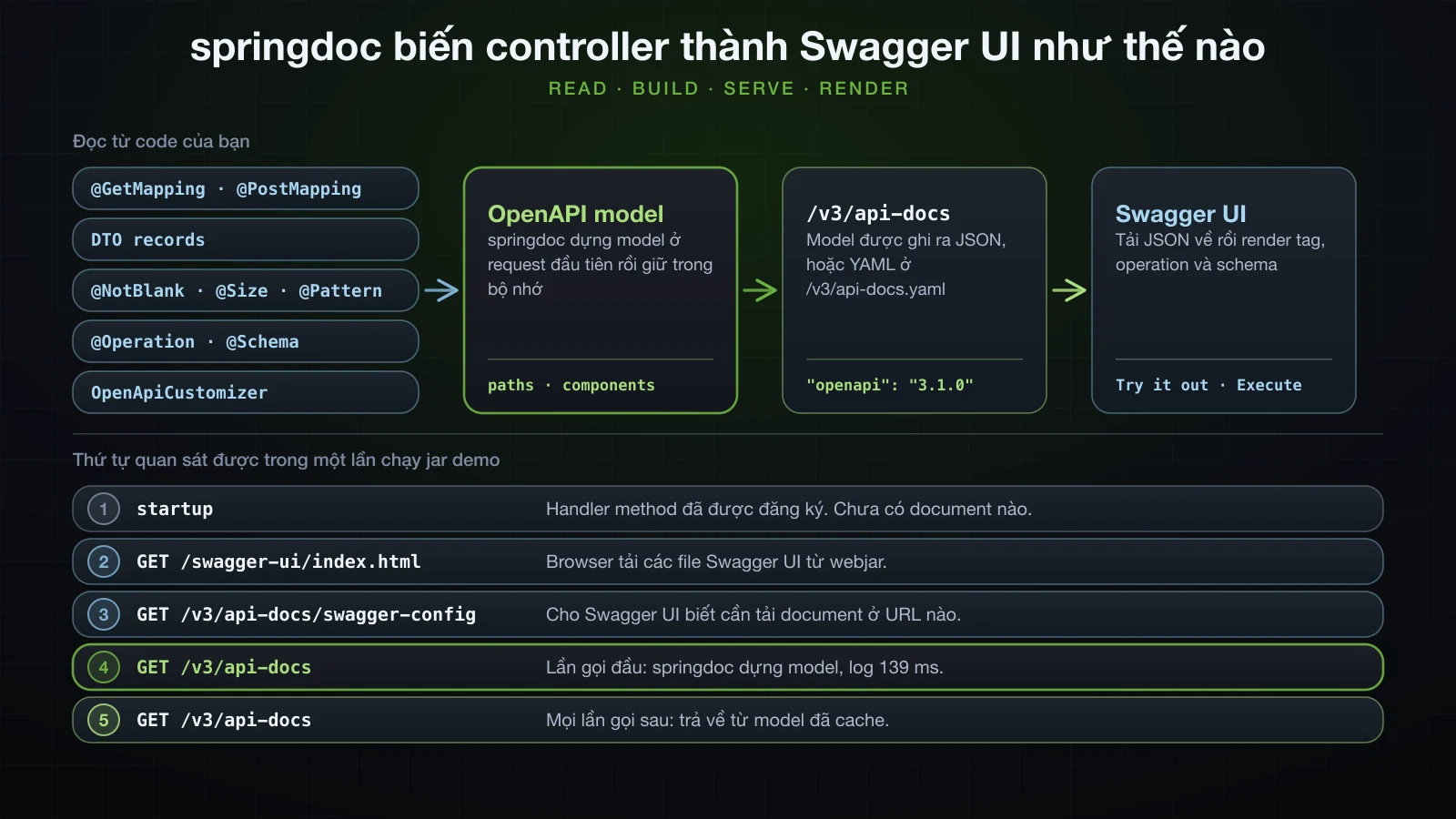
Muốn trả chi phí đó lúc startup thì đặt springdoc.pre-loading-enabled=true. Khi bật, model được dựng 125 ms sau startup trên một background thread, trước khi có request nào:
2026-09-13T10:09:50.133+07:00  INFO 40819 --- [demo] [           main] com.example.demo.DemoApplication         : Started DemoApplication in 0.98 seconds (process running for 1.184)
2026-09-13T10:09:50.258+07:00  INFO 40819 --- [demo] [pool-2-thread-1] o.springdoc.api.AbstractOpenApiResource  : Init duration for springdoc-openapi is: 162 ms
springdoc kéo theo Jackson 2: JSON của API có bị thay đổi không?
JSON thì không — nhưng API có thêm một format. Một runner in ra RequestMappingHandlerAdapter.getMessageConverters() và các mapper bean, chạy một lần có springdoc và một lần không, cho thấy:
- Converter ghi JSON là
JacksonJsonHttpMessageConverter, tức Jackson 3, ở cả hai lần. Mapper bean duy nhất làjacksonJsonMappercủa Boot, mộttools.jackson.databind.json.JsonMapper; không có beanObjectMappernào của Jackson 2. JSON của product có cùng field và format ở cả hai lần, kể cảcreatedAtlà chuỗi ISO-8601. - Khi có springdoc, danh sách converter có thêm hai phần tử,
MappingJackson2YamlHttpMessageConvertervàJaxb2RootElementHttpMessageConverter. Spring MVC thêm chúng khi tìm thấy module YAML của Jackson 2 và Jakarta XML Binding API trên classpath, và các dependency của springdoc mang theo cả hai.
YAML converter nhìn thấy được từ bên ngoài:
curl -i http://localhost:8122/api/products/1 -H 'Accept: application/yaml'HTTP/1.1 200
Content-Type: application/yaml
Transfer-Encoding: chunked
Date: Sun, 13 Sep 2026 03:34:46 GMT
---
id: 1
name: "Effective Java"
sku: "BOK-0042"
price: 45.90
stock: 25
category: "BOOKS"
supplierEmail: "orders@acme-books.example"
createdAt: 1789270486.454555000Không có springdoc, cùng request đó nhận 406 Not Acceptable với Accept: application/json, application/*+json. Có springdoc, API trả YAML do một mapper Jackson 2 ghi thay vì JsonMapper Jackson 3 của Boot, nên createdAt ra dạng epoch seconds; JSON response của cùng product có "createdAt":"2026-09-13T03:34:46.454555Z". Response 415 giờ cũng quảng bá Accept: application/json, application/yaml, application/*+json. Client dùng JSON không thấy khác biệt gì; client gửi Accept: application/yaml thì nhận một biểu diễn chẳng ai thiết kế.
Dùng Swagger UI và Try it out
Mở http://localhost:8122/swagger-ui.html trong browser. Swagger UI 5.32.14 bày document từ trên xuống:
- Phần đầu trang:
info.title, bên cạnh làinfo.versionvà badgeOAS 3.1, bên dưới là link tới document (/v3/api-docs); tiếp theo là description, contact và license khiinfocó chúng. - Servers: dropdown gồm các phần tử của
servers. Phần tử đang chọn là nơi Try it out gửi request tới. - Mỗi tag một section: mỗi operation là một thanh với method, path và summary. Khi chưa có annotation, tag duy nhất là
product-controllervà các thanh không có summary. - Schemas: mọi phần tử của
components.schemas, đang thu gọn.
Bấm vào một thanh để mở operation. Nó hiện bảng Parameters — tên, có dấu sao khi bắt buộc; type, như integer($int64); vị trí, như (path); description — rồi Request body với media type, và bảng Responses với code, description và media type cho từng response. Request body và response có hai tab: Example Value, mẫu sinh từ schema, và Schema, cấu trúc kèm constraint.
Try it out biến phần mô tả đó thành một form:
- Bấm Try it out. Các ô parameter và request body chỉnh sửa được, nút đổi thành Cancel, và nút Execute xuất hiện.
- Điền các ô —
1choidcủaGET /api/products/{id}— rồi bấm Execute. - Browser gửi một request thật, và operation hiện Curl, chính request đó dưới dạng lệnh; Request URL; và Server response với status code, Response body kèm nút Download, và Response headers. Clear xóa kết quả.
Với GET /api/products/{id} và id là 1, ô Curl ghi:
curl -X 'GET' \
  'http://localhost:8122/api/products/1' \
  -H 'accept: */*'
Header accept: */* đến từ response media type */* mà springdoc suy ra; Swagger UI đặt nhãn "Controls Accept header." cho dropdown media type đó. Execute không phải mô phỏng: với POST nó tạo product, với DELETE nó xóa product.
springdoc tự suy ra những gì khi chưa có annotation nào
Catalogue chưa có annotation springdoc nào, vậy mà document đã mô tả đủ năm operation. Đây là GET /api/products/{id}:
{
    "/api/products/{id}": {
        "get": {
            "tags": [
                "product-controller"
            ],
            "operationId": "get",
            "parameters": [
                {
                    "name": "id",
                    "in": "path",
                    "required": true,
                    "schema": {
                        "type": "integer",
                        "format": "int64"
                    }
                }
            ],
            "responses": {
                "200": {
                    "description": "OK",
                    "content": {
                        "*/*": {
                            "schema": {
                                "$ref": "#/components/schemas/ProductResponse"
                            }
                        }
                    }
                }
            }
        }
    }
}
Query parameter của GET /api/products:
{
    "parameters": [
        {
            "name": "category",
            "in": "query",
            "required": false,
            "schema": {
                "type": "string",
                "enum": [
                    "BOOKS",
                    "ELECTRONICS",
                    "GROCERY"
                ]
            }
        },
        {
            "name": "limit",
            "in": "query",
            "required": false,
            "schema": {
                "type": "integer",
                "format": "int32",
                "default": 20,
                "maximum": 100,
                "minimum": 1
            }
        }
    ]
}
POST /api/products và DELETE /api/products/{id}, bỏ bớt tags và parameter id:
{
    "post": {
        "operationId": "create",
        "requestBody": {
            "content": {
                "application/json": {
                    "schema": {
                        "$ref": "#/components/schemas/CreateProductRequest"
                    }
                }
            },
            "required": true
        },
        "responses": {
            "200": {
                "description": "OK",
                "content": {
                    "*/*": {
                        "schema": {
                            "$ref": "#/components/schemas/ProductResponse"
                        }
                    }
                }
            }
        }
    },
    "delete": {
        "operationId": "delete",
        "responses": {
            "200": {
                "description": "OK"
            }
        }
    }
}
Và response record trong components.schemas:
{
    "ProductResponse": {
        "type": "object",
        "properties": {
            "id": {
                "type": "integer",
                "format": "int64"
            },
            "name": {
                "type": "string"
            },
            "sku": {
                "type": "string"
            },
            "price": {
                "type": "number"
            },
            "stock": {
                "type": "integer",
                "format": "int32"
            },
            "category": {
                "type": "string",
                "enum": [
                    "BOOKS",
                    "ELECTRONICS",
                    "GROCERY"
                ]
            },
            "supplierEmail": {
                "type": "string"
            },
            "createdAt": {
                "type": "string",
                "format": "date-time"
            }
        }
    }
}
Mọi thứ trong các đoạn trích này đến từ một signature hoặc một type:
| Trong code | Trong document |
|---|---|
@RequestMapping("/api/products") trên class, @GetMapping("/{id}") trên method | Path /api/products/{id} với operation get |
Tên class ProductController | Tag product-controller |
Tên method get | "operationId": "get" |
@PathVariable Long id | "in": "path", "required": true, integer với format int64 |
@RequestParam(required = false) Category category | "in": "query", "required": false, string với ba giá trị enum |
@RequestParam(defaultValue = "20") @Min(1) @Max(100) int limit | "required": false, int32, "default": 20, "minimum": 1, "maximum": 100 |
@RequestBody CreateProductRequest | requestBody với application/json, "required": true và một $ref |
ResponseEntity<ProductResponse> | Response 200 OK với $ref dưới */* |
ResponseEntity<List<ProductResponse>> | "type": "array" có items trỏ tới ProductResponse |
ResponseEntity<Void> | Response 200 OK không có content |
Long, int, BigDecimal, Instant | integer/int64; integer/int32; number không có format; string/date-time |
Bốn điểm trong các đoạn trích là sai hoặc thiếu, và không điểm nào là lỗi của springdoc, vì thông tin không nằm trong signature nào:
POSTđược ghi là200 OK, nhưngResponseEntity.created(...)trả 201;DELETEđược ghi là200 OK, nhưng trả 204. Status được chọn bên trong thân method, nơi springdoc không bao giờ chạy — nó chỉ thấyResponseEntity<ProductResponse>vàResponseEntity<Void>.- Mọi response đều có media type
*/*, vì không mapping nào khai báoproduces. ProductResponsekhông có danh sáchrequired: không gì trên record nói rằngidluôn có mặt — kể cảint stock, một primitive không bao giờ null.- Không có error response nào: không 400, 404, 409, 415 hay 422.
Bean Validation constraint trong schema được sinh ra
springdoc dịch constraint trên request DTO thành keyword của JSON Schema. CreateProductRequest, từ record ở phần trước:
{
    "CreateProductRequest": {
        "type": "object",
        "properties": {
            "name": {
                "type": "string",
                "maxLength": 100,
                "minLength": 3
            },
            "sku": {
                "type": "string",
                "minLength": 1,
                "pattern": "^[A-Z]{3}-\\d{4}$"
            },
            "price": {
                "type": "number",
                "exclusiveMinimum": 0
            },
            "stock": {
                "type": "integer",
                "format": "int32",
                "minimum": 0
            },
            "category": {
                "type": "string",
                "enum": [
                    "BOOKS",
                    "ELECTRONICS",
                    "GROCERY"
                ]
            },
            "supplierEmail": {
                "type": "string",
                "format": "email"
            }
        },
        "required": [
            "category",
            "name",
            "price",
            "sku",
            "stock"
        ]
    }
}| Constraint | Keyword trong schema |
|---|---|
@NotBlank @Size(min = 3, max = 100) trên name | name nằm trong required, "minLength": 3, "maxLength": 100 |
@NotBlank trên sku | sku nằm trong required, "minLength": 1 |
@Pattern(regexp = "^[A-Z]{3}-\\d{4}$") trên sku | "pattern": "^[A-Z]{3}-\\d{4}$" |
@NotNull @Positive trên price | price nằm trong required, "exclusiveMinimum": 0 |
@NotNull @PositiveOrZero trên stock | stock nằm trong required, "minimum": 0 |
@NotNull trên category | category nằm trong required |
@Email trên supplierEmail | "format": "email", và không nằm trong required |
@Min(1) @Max(100) trên parameter limit | "minimum": 1, "maximum": 100 trong schema của parameter |
Ba chi tiết dễ đọc sai:
@NotBlankthànhminLength: 1cộng một chỗ trongrequired. Schema chấp nhận" "; validation từ chối nó với 422. Schema mô tả validation, không tái tạo nó.- Trên
name,@Size(min = 3)gặp@NotBlank, và schema giữ giá trị chặt hơn là"minLength": 3. @Positivethành"exclusiveMinimum": 0còn@PositiveOrZerothành"minimum": 0. Trong OpenAPI 3.1, vốn theo JSON Schema 2020-12, cận loại trừ là một keyword mang con số riêng chứ không phải cờ gắn vàominimum.
Những gì không vào schema: message của constraint như must match "^[A-Z]{3}-\d{4}$", và mọi quy tắc kiểm tra trong code, như SKU không được trùng. Trong Swagger UI, constraint hiện ở tab Schema của request body: name ghi string [3, 100] characters, sku ghi string ≥ 1 characters matches ^[A-Z]{3}-\d{4}$, price ghi number > 0, stock ghi integer ≥ 0 int32, và supplierEmail ghi string email.
Error response từ @RestControllerAdvice
Advice trả 400, 404, 409 và 422, vậy mà document ở trên không có response nào trong số đó, và components.schemas chỉ có ba record. handleNotFound và handleDuplicateSku trả ProblemDetail, có status được đặt khi handler chạy; springdoc không chạy handler, nên không có status nào để ghi. Hai method override và phần còn lại của ResponseEntityExceptionHandler, vốn trả ResponseEntity<Object>, cũng không đóng góp gì.
springdoc có đọc @ResponseStatus trên method @ExceptionHandler. Thêm nó, cùng import org.springframework.web.bind.annotation.ResponseStatus, vào hai handler nghiệp vụ:
    @ExceptionHandler(ProductNotFoundException.class)
    @ResponseStatus(HttpStatus.NOT_FOUND)
    public ProblemDetail handleNotFound(ProductNotFoundException ex) {
        // ...
    }

    @ExceptionHandler(DuplicateSkuException.class)
    @ResponseStatus(HttpStatus.CONFLICT)
    public ProblemDetail handleDuplicateSku(DuplicateSkuException ex) {
        // ...
    }
Giờ endpoint danh sách, vốn không thể throw exception nào trong hai cái đó, được ghi có cả hai:
curl -s http://localhost:8122/v3/api-docs | jq '.paths["/api/products"].get.responses'{
"409": {
"description": "Conflict",
"content": {
"application/problem+json": {
"schema": {
"$ref": "#/components/schemas/ProblemDetail"
}
}
}
},
"404": {
"description": "Not Found",
"content": {
"application/problem+json": {
"schema": {
"$ref": "#/components/schemas/ProblemDetail"
}
}
}
},
"200": {
"description": "OK",
"content": {
"*/*": {
"schema": {
"type": "array",
"items": {
"$ref": "#/components/schemas/ProductResponse"
}
}
}
}
}
}Cả năm operation đều nhận cùng 404 và 409. Quy tắc, nằm trong GenericResponseService của springdoc, dựa trên type của exception chứ không dựa trên việc method nào có thể throw gì. Response từ handler cho một unchecked exception được thêm vào mọi operation mà advice áp dụng. Response từ handler cho một checked exception chỉ được thêm vào các operation có Java method khai báo exception đó trong throws. Một lần chạy riêng đã xác nhận nửa sau: một handler cho checked exception MethodArgumentNotValidException, gắn @ResponseStatus(HttpStatus.BAD_REQUEST), chỉ xuất hiện ở đúng operation có method khai báo throws MethodArgumentNotValidException, và không ở đâu khác.
Vậy @ResponseStatus trên handler toàn cục ghi error vào sai chỗ. Phần còn lại của bài giữ nguyên advice như lúc đầu, khai báo response của từng operation ngay tại chỗ bằng @ApiResponse, và thêm các response mà nhiều operation dùng chung bằng một customizer.
Mô tả endpoint với @Tag, @Operation và @ApiResponse
Các annotation đến từ swagger-core, trong io.swagger.v3.oas.annotations, và đã có sẵn cùng starter. Controller, mọi dòng thêm vào đều được đánh dấu:
package com.example.demo.product;

import io.swagger.v3.oas.annotations.Operation;
import io.swagger.v3.oas.annotations.Parameter;
import io.swagger.v3.oas.annotations.media.Content;
import io.swagger.v3.oas.annotations.media.Schema;
import io.swagger.v3.oas.annotations.responses.ApiResponse;
import io.swagger.v3.oas.annotations.responses.ApiResponses;
import io.swagger.v3.oas.annotations.tags.Tag;
import jakarta.validation.Valid;
import jakarta.validation.constraints.Max;
import jakarta.validation.constraints.Min;
import org.springframework.http.ProblemDetail;
import org.springframework.http.ResponseEntity;
import org.springframework.web.bind.annotation.DeleteMapping;
import org.springframework.web.bind.annotation.GetMapping;
import org.springframework.web.bind.annotation.PathVariable;
import org.springframework.web.bind.annotation.PostMapping;
import org.springframework.web.bind.annotation.PutMapping;
import org.springframework.web.bind.annotation.RequestBody;
import org.springframework.web.bind.annotation.RequestMapping;
import org.springframework.web.bind.annotation.RequestParam;
import org.springframework.web.bind.annotation.RestController;

import java.net.URI;
import java.util.List;

@Tag(name = "Products", description = "Create, read, update and delete catalogue products")
@RestController
@RequestMapping("/api/products")
public class ProductController {

    private final ProductService productService;

    public ProductController(ProductService productService) {
        this.productService = productService;
    }

    @Operation(summary = "List products",
            description = "Returns products ordered by id, optionally filtered by category.")
    @ApiResponses({
            @ApiResponse(responseCode = "200", description = "Products in id order"),
            @ApiResponse(responseCode = "400", description = "limit is outside 1 to 100",
                    content = @Content(mediaType = "application/problem+json",
                            schema = @Schema(implementation = ProblemDetail.class)))
    })
    @GetMapping
    public ResponseEntity<List<ProductResponse>> list(
            @Parameter(description = "Only return products in this category")
            @RequestParam(required = false) Category category,
            @Parameter(description = "Maximum number of products to return")
            @RequestParam(defaultValue = "20") @Min(1) @Max(100) int limit) {
        return ResponseEntity.ok(productService.findAll(category, limit));
    }

    @Operation(summary = "Get a product by id")
    @ApiResponses({
            @ApiResponse(responseCode = "200", description = "The product"),
            @ApiResponse(responseCode = "404", description = "No product has this id",
                    content = @Content(mediaType = "application/problem+json",
                            schema = @Schema(implementation = ProblemDetail.class)))
    })
    @GetMapping("/{id}")
    public ResponseEntity<ProductResponse> get(
            @Parameter(description = "Product id", example = "42") @PathVariable Long id) {
        return ResponseEntity.ok(productService.findById(id));
    }

    @Operation(summary = "Create a product",
            description = "The SKU must be unique across the catalogue.")
    @ApiResponses({
            @ApiResponse(responseCode = "201", description = "Product created; Location points to it"),
            @ApiResponse(responseCode = "409", description = "Another product already uses this SKU",
                    content = @Content(mediaType = "application/problem+json",
                            schema = @Schema(implementation = ProblemDetail.class)))
    })
    @PostMapping
    public ResponseEntity<ProductResponse> create(@Valid @RequestBody CreateProductRequest request) {
        ProductResponse created = productService.create(request);
        return ResponseEntity.created(URI.create("/api/products/" + created.id())).body(created);
    }

    @Operation(summary = "Update a product")
    @ApiResponses({
            @ApiResponse(responseCode = "200", description = "The updated product"),
            @ApiResponse(responseCode = "404", description = "No product has this id",
                    content = @Content(mediaType = "application/problem+json",
                            schema = @Schema(implementation = ProblemDetail.class)))
    })
    @PutMapping("/{id}")
    public ResponseEntity<ProductResponse> update(
            @Parameter(description = "Product id", example = "42") @PathVariable Long id,
            @Valid @RequestBody UpdateProductRequest request) {
        return ResponseEntity.ok(productService.update(id, request));
    }

    @Operation(summary = "Delete a product")
    @ApiResponses({
            @ApiResponse(responseCode = "204", description = "Product deleted"),
            @ApiResponse(responseCode = "404", description = "No product has this id",
                    content = @Content(mediaType = "application/problem+json",
                            schema = @Schema(implementation = ProblemDetail.class)))
    })
    @DeleteMapping("/{id}")
    public ResponseEntity<Void> delete(
            @Parameter(description = "Product id", example = "42") @PathVariable Long id) {
        productService.delete(id);
        return ResponseEntity.noContent().build();
    }
}
Cùng operation GET /api/products/{id}, trước:
{
    "get": {
        "tags": [
            "product-controller"
        ],
        "operationId": "get",
        "parameters": [
            {
                "name": "id",
                "in": "path",
                "required": true,
                "schema": {
                    "type": "integer",
                    "format": "int64"
                }
            }
        ],
        "responses": {
            "200": {
                "description": "OK",
                "content": {
                    "*/*": {
                        "schema": {
                            "$ref": "#/components/schemas/ProductResponse"
                        }
                    }
                }
            }
        }
    }
}
Và sau, các dòng annotation làm thay đổi được tô sáng:
{
    "get": {
        "tags": [
            "Products"
        ],
        "summary": "Get a product by id",
        "operationId": "get",
        "parameters": [
            {
                "name": "id",
                "in": "path",
                "description": "Product id",
                "required": true,
                "schema": {
                    "type": "integer",
                    "format": "int64"
                },
                "example": 42
            }
        ],
        "responses": {
            "200": {
                "description": "The product",
                "content": {
                    "*/*": {
                        "schema": {
                            "$ref": "#/components/schemas/ProductResponse"
                        }
                    }
                }
            },
            "404": {
                "description": "No product has this id",
                "content": {
                    "application/problem+json": {
                        "schema": {
                            "$ref": "#/components/schemas/ProblemDetail"
                        }
                    }
                }
            }
        }
    }
}
@Tag thay product-controller và thêm một phần tử kèm description vào danh sách tags mới ở cấp cao nhất. @Operation thêm summary. @Parameter đặt description và example lên chính parameter, không phải bên trong schema của nó. Response 200 giữ schema và lấy description từ @ApiResponse, còn 404 là mới: media type application/problem+json, với $ref tới schema ProblemDetail mà @Schema(implementation = ProblemDetail.class) đã thêm vào components.schemas. Ở các operation khác, danh sách giờ ghi 200 và 400, POST ghi 201 và DELETE ghi 204, đúng như application trả về. Response 400 của danh sách chẳng hạn chính là validation parameter của bài 20:
curl -i "http://localhost:8122/api/products?limit=500"HTTP/1.1 400
Content-Type: application/problem+json
Transfer-Encoding: chunked
Date: Sun, 13 Sep 2026 03:34:11 GMT
Connection: close
{"detail":"Request has 1 invalid value(s).","instance":"/api/products","status":400,"title":"Bad Request","errors":[{"field":"limit","message":"must be less than or equal to 100"}]}Khai báo một response là mất response 200 được suy ra
Các dòng 200 trong controller đó không phải để trang trí. Một phiên bản trước của get chỉ khai báo 404:
    @Operation(summary = "Get a product by id")
    @ApiResponse(responseCode = "404", description = "No product has this id",
            content = @Content(mediaType = "application/problem+json",
                    schema = @Schema(implementation = ProblemDetail.class)))
    @GetMapping("/{id}")
    public ResponseEntity<ProductResponse> get(
            @Parameter(description = "Product id", example = "42") @PathVariable Long id) {
và response của operation trở thành:
{
    "responses": {
        "404": {
            "description": "No product has this id",
            "content": {
                "application/problem+json": {
                    "schema": {
                        "$ref": "#/components/schemas/ProblemDetail"
                    }
                }
            }
        }
    }
}
Không còn 200 nào. Hễ method có bất kỳ @ApiResponse nào, springdoc thôi thêm success response được suy ra. Hãy khai báo cả success code. Một response 2xx được khai báo mà không có content vẫn lấy schema từ return type: response 200 của get và update, 201 của create và 200 dạng array của list đều mang đúng schema dưới */*, dù annotation không hề nhắc tới.
@Parameter và @Schema trên record component
@Parameter đặt trên parameter của handler method, như trong controller. @Schema mô tả một model, và nó dùng được trên record component — swagger-core lấy nó từ component giống như cách lấy constraint:
package com.example.demo.product;

import io.swagger.v3.oas.annotations.media.Schema;
import jakarta.validation.constraints.Email;
import jakarta.validation.constraints.NotBlank;
import jakarta.validation.constraints.NotNull;
import jakarta.validation.constraints.Pattern;
import jakarta.validation.constraints.Positive;
import jakarta.validation.constraints.PositiveOrZero;
import jakarta.validation.constraints.Size;

import java.math.BigDecimal;

@Schema(description = "The fields a client sends to create a product")
public record CreateProductRequest(
        @Schema(description = "Name shown in the catalogue", example = "Effective Java")
        @NotBlank @Size(min = 3, max = 100) String name,

        @Schema(description = "Stock keeping unit: three capital letters, a dash, four digits",
                example = "BOK-0042")
        @NotBlank @Pattern(regexp = "^[A-Z]{3}-\\d{4}$") String sku,

        @Schema(description = "Unit price in USD", example = "45.90")
        @NotNull @Positive BigDecimal price,

        @Schema(description = "Units in the warehouse", example = "25")
        @NotNull @PositiveOrZero Integer stock,

        @Schema(description = "Catalogue section", example = "BOOKS")
        @NotNull Category category,

        @Schema(description = "Where purchase orders are sent", example = "orders@acme-books.example")
        @Email String supplierEmail) {
}
Ba property đầu của schema:
{
    "CreateProductRequest": {
        "type": "object",
        "description": "The fields a client sends to create a product",
        "properties": {
            "name": {
                "type": "string",
                "description": "Name shown in the catalogue",
                "example": "Effective Java",
                "maxLength": 100,
                "minLength": 3
            },
            "sku": {
                "type": "string",
                "description": "Stock keeping unit: three capital letters, a dash, four digits",
                "example": "BOK-0042",
                "minLength": 1,
                "pattern": "^[A-Z]{3}-\\d{4}$"
            },
            "price": {
                "type": "number",
                "description": "Unit price in USD",
                "example": 45.9,
                "exclusiveMinimum": 0
            }
        }
    }
}
@Schema đặt trên chính record thành description của schema, và các constraint vẫn còn đó. example = "45.90" ra thành số 45.9: với property number, chuỗi example được parse, và số 0 ở cuối biến mất. Swagger UI dùng example ở hai chỗ — Example Value của request body, và body mà Try it out điền sẵn. Với POST /api/products, body đó là:
{
  "name": "Effective Java",
  "sku": "BOK-0042",
  "price": 45.9,
  "stock": 25,
  "category": "BOOKS",
  "supplierEmail": "orders@acme-books.example"
}
và ô id của GET /api/products/{id} đã có sẵn 42 ngay khi bấm Try it out. Không có example, Swagger UI tự điền giá trị giữ chỗ: Example Value của response 201 hiện "sku": "string" và "price": 0 cho ProductResponse, vốn chưa có example nào.
@Schema cũng sửa được chuyện response record thiếu danh sách required. Đánh dấu component luôn có mặt:
package com.example.demo.product;

import io.swagger.v3.oas.annotations.media.Schema;

import java.math.BigDecimal;
import java.time.Instant;

public record ProductResponse(
        @Schema(description = "Id assigned by the server", example = "42",
                requiredMode = Schema.RequiredMode.REQUIRED)
        Long id,
        String name,
        String sku,
        BigDecimal price,
        int stock,
        Category category,
        String supplierEmail,
        Instant createdAt) {
}
và ProductResponse có thêm "required": ["id"], cùng description và example 42 mà Example Value của 201 sau đó hiển thị. stock vẫn nằm ngoài danh sách: là primitive thôi thì chưa đủ.
Ẩn endpoint với @Hidden
Một admin controller với một endpoint đáng ghi vào tài liệu và một endpoint chỉ tồn tại cho test script của team:
package com.example.demo.admin;

import com.example.demo.product.ProductService;
import io.swagger.v3.oas.annotations.Hidden;
import io.swagger.v3.oas.annotations.Operation;
import io.swagger.v3.oas.annotations.tags.Tag;
import org.springframework.http.ResponseEntity;
import org.springframework.web.bind.annotation.GetMapping;
import org.springframework.web.bind.annotation.PostMapping;
import org.springframework.web.bind.annotation.RequestMapping;
import org.springframework.web.bind.annotation.RestController;

import java.util.Map;

@Tag(name = "Admin", description = "Operational endpoints for the catalogue team")
@RestController
@RequestMapping("/admin")
public class AdminController {

    private final ProductService productService;

    public AdminController(ProductService productService) {
        this.productService = productService;
    }

    @Operation(summary = "Count the products in the catalogue")
    @GetMapping("/stats")
    public Map<String, Integer> stats() {
        return Map.of("products", productService.count());
    }

    @Hidden
    @PostMapping("/reset")
    public ResponseEntity<Void> reset() {
        productService.deleteAll();
        return ResponseEntity.noContent().build();
    }
}curl -s http://localhost:8122/v3/api-docs | jq -c '.paths | keys'["/admin/stats","/api/products","/api/products/{id}"]/admin/reset biến mất khỏi document, và vì thế khỏi Swagger UI. Nó không biến mất khỏi application:
curl -i -X POST http://localhost:8122/admin/resetHTTP/1.1 204
Date: Sun, 13 Sep 2026 03:18:08 GMT@Hidden ẩn tài liệu, không ẩn endpoint. Ai biết URL vẫn gọi được; bảo vệ nó là việc của Spring Security, ở Chương 5.
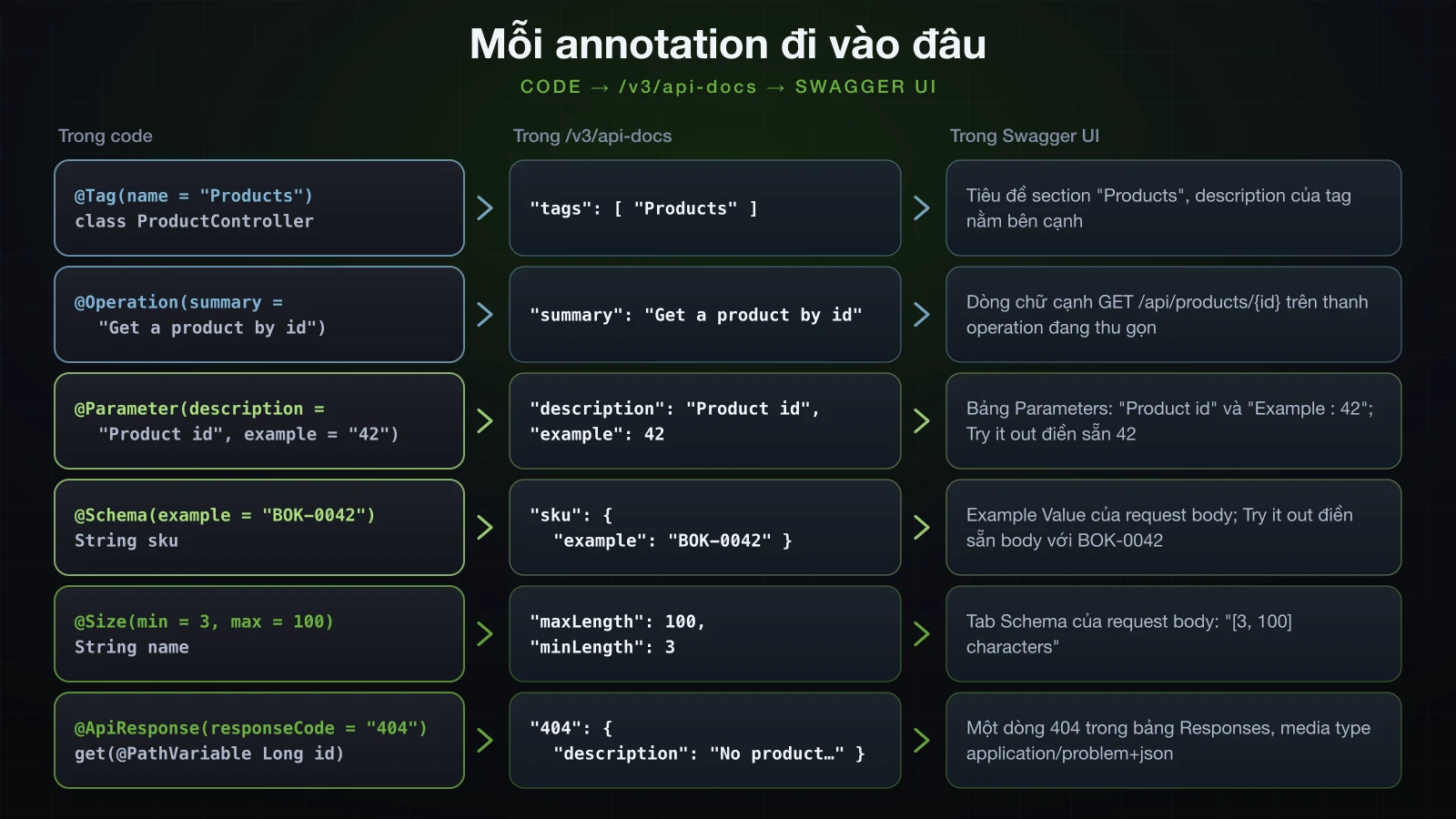
Các annotation của springdoc và thứ mỗi annotation thay đổi
| Annotation | Đặt ở đâu | Thay đổi gì trong document |
|---|---|---|
@Tag(name, description) | Controller class | Các operation của class được nhóm dưới name thay vì product-controller; name và description vào danh sách tags cấp cao nhất |
@Operation(summary, description) | Handler method | summary và description của operation |
@ApiResponse(responseCode, description, content) | Handler method, đứng riêng hoặc trong @ApiResponses | Một phần tử trong responses; hễ có một cái, success response được suy ra không còn được thêm |
@Content(mediaType, schema) | content của @ApiResponse | Key media type của response đó, như application/problem+json |
@Schema(implementation = ProblemDetail.class) | schema của @Content | Một $ref tới schema của class, schema này được thêm vào components.schemas |
@Parameter(description, example) | Parameter của handler method | description và example trên parameter; Try it out điền sẵn example |
@Schema(description, example) | Record component, hoặc chính record | description và example trên property hoặc schema; dùng cho Example Value và body điền sẵn |
@Schema(requiredMode = Schema.RequiredMode.REQUIRED) | Record component | Thêm property vào danh sách required của schema |
@Hidden | Handler method | Bỏ operation khỏi document và Swagger UI; endpoint vẫn hoạt động |
@NotBlank, @NotNull, @Size, @Positive, @PositiveOrZero, @Pattern, @Email, @Min, @Max | Record component, parameter của handler | required và minLength: 1, required, minLength/maxLength, exclusiveMinimum, minimum: 0, pattern, format, minimum, maximum |
Thông tin chung của API: bean OpenAPI và OpenApiCustomizer
info và servers mô tả cả API, nên chúng thuộc về cấu hình chứ không đặt trên controller. Khi có bean OpenAPI, springdoc bắt đầu từ bean đó. Cùng class này chứa một customizer, giải thích bên dưới:
package com.example.demo.config;

import io.swagger.v3.oas.models.OpenAPI;
import io.swagger.v3.oas.models.info.Contact;
import io.swagger.v3.oas.models.info.Info;
import io.swagger.v3.oas.models.info.License;
import io.swagger.v3.oas.models.media.Content;
import io.swagger.v3.oas.models.media.MediaType;
import io.swagger.v3.oas.models.media.Schema;
import io.swagger.v3.oas.models.responses.ApiResponse;
import io.swagger.v3.oas.models.servers.Server;
import org.springdoc.core.customizers.OpenApiCustomizer;
import org.springframework.context.annotation.Bean;
import org.springframework.context.annotation.Configuration;

import java.util.List;

@Configuration
public class OpenApiConfig {

    @Bean
    OpenAPI catalogueOpenApi() {
        return new OpenAPI()
                .info(new Info()
                        .title("Product Catalogue API")
                        .version("1.0.0")
                        .description("Create, search and maintain the products of the demo store.")
                        .contact(new Contact()
                                .name("Catalogue team")
                                .email("catalogue@example.com"))
                        .license(new License()
                                .name("Apache 2.0")
                                .url("https://www.apache.org/licenses/LICENSE-2.0")))
                .servers(List.of(
                        new Server().url("http://localhost:8080").description("Local development"),
                        new Server().url("https://api.example.com").description("Production")));
    }

    @Bean
    OpenApiCustomizer requestBodyErrorResponses() {
        return openApi -> openApi.getPaths().values().forEach(pathItem ->
                pathItem.readOperations().forEach(operation -> {
                    if (operation.getRequestBody() == null) {
                        return;
                    }
                    operation.getResponses()
                            .addApiResponse("400", problem("The body is not readable JSON"))
                            .addApiResponse("415", problem("The body is not sent as application/json"))
                            .addApiResponse("422", problem("The body breaks a validation rule"));
                }));
    }

    private static ApiResponse problem(String description) {
        return new ApiResponse()
                .description(description)
                .content(new Content().addMediaType("application/problem+json",
                        new MediaType().schema(new Schema<>().$ref("#/components/schemas/ProblemDetail"))));
    }
}
Phần đầu document bây giờ:
{
    "openapi": "3.1.0",
    "info": {
        "title": "Product Catalogue API",
        "description": "Create, search and maintain the products of the demo store.",
        "contact": {
            "name": "Catalogue team",
            "email": "catalogue@example.com"
        },
        "license": {
            "name": "Apache 2.0",
            "url": "https://www.apache.org/licenses/LICENSE-2.0"
        },
        "version": "1.0.0"
    },
    "servers": [
        {
            "url": "http://localhost:8080",
            "description": "Local development"
        },
        {
            "url": "https://api.example.com",
            "description": "Production"
        }
    ],
    "tags": [
        {
            "name": "Products",
            "description": "Create, read, update and delete catalogue products"
        },
        {
            "name": "Admin",
            "description": "Operational endpoints for the catalogue team"
        }
    ]
}
Phần đầu Swagger UI giờ ghi Product Catalogue API với badge 1.0.0 và OAS 3.1, rồi description, link "Contact Catalogue team" và link "Apache 2.0". Dropdown Servers có http://localhost:8080 - Local development và https://api.example.com - Production, phần tử đầu đang được chọn.
Khai báo servers sẽ thay server URL được sinh ra, và Try it out gửi mọi request tới phần tử đang chọn — nên với bean này nó nhắm port 8080, dù jar trong bài chạy ở 8122. Lần chạy Try it out ở trên dùng một phần tử cho http://localhost:8122, nên Request URL mới trỏ về đó. Hãy liệt kê những URL mà người đọc tài liệu thực sự truy cập được, hoặc bỏ servers đi để giữ URL được sinh ra.
Customizer chạy sau khi document đã dựng xong. OpenApiCustomizer có một method duy nhất, customise(OpenAPI) — viết với chữ s — thấy mọi path và thay đổi được mọi thứ. Customizer này thêm ba response mà mọi operation có request body dùng chung theo quy ước status code của chương: 400 cho body không phải JSON đọc được, 415 cho body gửi với Content-Type khác, và 422 cho body vi phạm quy tắc validation.
curl -s http://localhost:8122/v3/api-docs | jq -c '.paths["/api/products"].post.responses | keys'["201","400","409","415","422"]POST /api/products giờ ghi 201 và 409 từ annotation, cộng 400, 415 và 422 từ customizer; PUT có thêm đúng ba response đó, còn các operation không có body thì giữ nguyên. Mỗi description khớp với một response thật. Body bị cắt dở trả 400 với "detail":"Failed to read request"; Content-Type: text/plain trả 415 với "detail":"Content-Type 'text/plain;charset=UTF-8' is not supported."; và một body không hợp lệ trả về như sau:
curl -i -X POST http://localhost:8122/api/products -H 'Content-Type: application/json' -d '{"name":"E","sku":"bok-42","price":0,"stock":-1,"category":"BOOKS","supplierEmail":"orders"}'HTTP/1.1 422
Content-Type: application/problem+json
Transfer-Encoding: chunked
Date: Sun, 13 Sep 2026 03:34:11 GMT
{"detail":"Request has 5 invalid value(s).","instance":"/api/products","status":422,"title":"Unprocessable Content","errors":[{"field":"name","message":"size must be between 3 and 100"},{"field":"price","message":"must be greater than 0"},{"field":"sku","message":"must match \"^[A-Z]{3}-\\d{4}$\""},{"field":"stock","message":"must be greater than or equal to 0"},{"field":"supplierEmail","message":"must be a well-formed email address"}]}$ref tới #/components/schemas/ProblemDetail resolve được vì các annotation @ApiResponse đã đưa schema đó vào components; nếu customizer là nơi duy nhất trỏ tới một schema thì nó phải tự thêm schema đó. Và bản thân schema cũng đáng xem kỹ. Sinh ra từ class ProblemDetail, nó có type và instance là chuỗi uri, title, status, detail, và một object properties. Body thật không có key properties: response 422 ở trên mang errors ở cấp cao nhất, và response 404 cũng mang "productId":99 ở đó, vì Spring ghi các phần tử của properties thành member cấp cao nhất. Vì thế Example Value của Swagger UI cho các response này hiện một object properties chứa additionalProp1 đến additionalProp3. Nếu client sinh code từ document, hãy mô tả error body bằng một record của riêng bạn.
Khi quyết định cần đến Java method chứ không phải document đã xong, hãy implement OperationCustomizer: method customize(Operation, HandlerMethod) của nó nhận từng operation cùng handler method sinh ra operation đó.
Nhóm endpoint với GroupedOpenApi
Người dùng API product không cần các admin endpoint, còn team cũng không muốn chúng lẫn vào. GroupedOpenApi tách document ra:
package com.example.demo.config;

import org.springdoc.core.models.GroupedOpenApi;
import org.springframework.context.annotation.Bean;
import org.springframework.context.annotation.Configuration;

@Configuration
public class OpenApiGroupsConfig {

    @Bean
    GroupedOpenApi productsApi() {
        return GroupedOpenApi.builder()
                .group("products")
                .pathsToMatch("/api/**")
                .build();
    }

    @Bean
    GroupedOpenApi adminApi() {
        return GroupedOpenApi.builder()
                .group("admin")
                .pathsToMatch("/admin/**")
                .build();
    }
}
Mỗi group là một document riêng ở /v3/api-docs/ cộng tên group, và swagger-config giờ liệt kê các group thay vì một URL duy nhất:
{"configUrl":"/v3/api-docs/swagger-config","oauth2RedirectUrl":"http://localhost:8122/swagger-ui/oauth2-redirect.html","urls":[{"url":"/v3/api-docs/admin","name":"admin"},{"url":"/v3/api-docs/products","name":"products"}],"validatorUrl":""}Thanh trên cùng của Swagger UI có thêm dropdown Select a definition với admin và products, và trang mở ra ở admin, phần tử đầu trong danh sách đó chứ không phải bean khai báo đầu tiên: chỉ section Admin được hiện, và link document ghi /v3/api-docs/admin. Đặt springdoc.swagger-ui.urls-primary-name=products sẽ thêm "urls.primaryName":"products" vào swagger-config, và trang khi đó mở ở products. Bản thân /v3/api-docs vẫn trả 200 với mọi path; nó chỉ không còn được liệt kê trong UI. Với một bean GroupedOpenApi duy nhất, swagger-config chỉ liệt kê đúng group đó.
Document của các group còn làm lộ một cái bẫy trong customizer ở phần trước:
curl -s http://localhost:8122/v3/api-docs/products | jq -c '.paths["/api/products"].post.responses | keys'["201","409"]Document mặc định vẫn có đủ năm code. Bean OpenApiCustomizer được áp cho document mặc định, còn group được dựng với customizer của riêng nó, nên 400, 415 và 422 không bao giờ tới được products. Hãy khai báo bean là GlobalOpenApiCustomizer — một interface kế thừa OpenApiCustomizer và chỉ thêm ý nghĩa "mọi document, kể cả group":
import org.springdoc.core.customizers.OpenApiCustomizer;
import org.springdoc.core.customizers.GlobalOpenApiCustomizer;

// ...

    @Bean
    OpenApiCustomizer requestBodyErrorResponses() {
    GlobalOpenApiCustomizer requestBodyErrorResponses() {
        return openApi -> openApi.getPaths().values().forEach(pathItem ->
Cùng lệnh đó khi ấy trả ["201","400","409","415","422"] cho group products, và document mặc định không đổi. Để gắn customizer cho riêng một group, GroupedOpenApi.builder() có addOpenApiCustomizer(...).
Property của springdoc: đường dẫn, bộ lọc và sắp xếp
Đường dẫn, tập endpoint được ghi vào tài liệu và thứ tự hiển thị của Swagger UI đều là property:
springdoc.api-docs.path=/api-docs
springdoc.swagger-ui.path=/docs
springdoc.paths-to-match=/api/**
springdoc.swagger-ui.operations-sorter=method
springdoc.swagger-ui.tags-sorter=alphaspringdoc:
api-docs:
path: /api-docs
swagger-ui:
path: /docs
operations-sorter: method
tags-sorter: alpha
paths-to-match: /api/**Cả hai phiên bản được nạp vào cùng một jar, không có bean group, và cho kết quả giống hệt nhau:
| Property | Giá trị | Kết quả khi chạy |
|---|---|---|
springdoc.api-docs.path | /api-docs | /api-docs, /api-docs.yaml và /api-docs/swagger-config trả 200; /v3/api-docs trả 404 |
springdoc.swagger-ui.path | /docs | /docs redirect tới /swagger-ui/index.html; /swagger-ui.html trả 404 |
springdoc.paths-to-match | /api/** | /admin/stats rời khỏi document |
springdoc.packages-to-scan | com.example.demo.admin, trong một lần chạy riêng | Chỉ còn /admin/stats |
springdoc.swagger-ui.operations-sorter | method | swagger-config có thêm "operationsSorter":"method"; trong một tag, operation được xếp theo HTTP method |
springdoc.swagger-ui.tags-sorter | alpha | swagger-config có thêm "tagsSorter":"alpha"; trong lần chạy có cả hai tag, Admin lên trên Products |
Path tùy chỉnh của UI chỉ là tên mới cho redirect; các file vẫn nằm dưới /swagger-ui/:
curl -i http://localhost:8122/docsHTTP/1.1 302
Location: /swagger-ui/index.html
Content-Length: 0
Date: Sun, 13 Sep 2026 02:53:13 GMTswagger-config nhận path document mới và cả hai sorter:
{"configUrl":"/api-docs/swagger-config","oauth2RedirectUrl":"http://localhost:8122/swagger-ui/oauth2-redirect.html","operationsSorter":"method","tagsSorter":"alpha","url":"/api-docs","validatorUrl":""}Hai sorter là setting của Swagger UI mà springdoc chuyển tiếp. Không có chúng, trang liệt kê Products trước và các operation theo thứ tự trong document: GET, PUT và DELETE trên /api/products/{id}, rồi GET và POST trên /api/products. Khi chỉ đặt hai property sorter, Admin lên đầu và các operation của product thành DELETE, GET, GET, POST, PUT.
Tắt Swagger UI và /v3/api-docs trên production
Document liệt kê mọi endpoint, parameter và schema của API, còn Swagger UI trao cho bất kỳ ai mở được nó một form gửi request thật. Profile ở bài 13 là công tắc tự nhiên: tắt cả hai trong profile prod.
springdoc.api-docs.enabled=false
springdoc.swagger-ui.enabled=falsespringdoc:
api-docs:
enabled: false
swagger-ui:
enabled: falsejava -jar build/libs/demo-0.0.1-SNAPSHOT.jar --server.port=8122 --spring.profiles.active=prodHai cảnh báo lúc startup biến mất. Mọi URL tài liệu trả 404 trong khi API vẫn hoạt động:
for u in /v3/api-docs /v3/api-docs.yaml /v3/api-docs/swagger-config /swagger-ui.html /swagger-ui/index.html /api/products; do printf '%s %s\n' "$(curl -s -o /dev/null -w '%{http_code}' http://localhost:8122$u)" "$u"; done404 /v3/api-docs
404 /v3/api-docs.yaml
404 /v3/api-docs/swagger-config
404 /swagger-ui.html
404 /swagger-ui/index.html
200 /api/productscurl -i http://localhost:8122/v3/api-docsHTTP/1.1 404
Content-Type: application/problem+json
Transfer-Encoding: chunked
Date: Sun, 13 Sep 2026 02:59:59 GMT
{"detail":"No static resource v3/api-docs.","instance":"/v3/api-docs","status":404,"title":"Not Found"}Response 404 là một ProblemDetail vì ResponseEntityExceptionHandler xử lý NoResourceFoundException đứng sau nó. Project có advice không kế thừa class đó sẽ trả error body mặc định của Boot, trong cùng thử nghiệm là {"timestamp":"2026-09-13T02:53:18.680Z","status":404,"error":"Not Found","path":"/v3/api-docs"}.
⚠️ Try it out gửi request thật tới server đang chọn. Swagger UI để ngỏ trên production là một form tạo và xóa dữ liệu với bất kỳ quyền nào mà endpoint của bạn cho phép.
Nếu tài liệu vẫn phải truy cập được trên production, hãy đặt nó sau cơ chế xác thực; Spring Security nằm ở Chương 5.
Sử dụng tài liệu OpenAPI được sinh ra
Document là một file như mọi file khác. Tải về ở một trong hai format:
curl -o openapi.json http://localhost:8122/v3/api-docs
curl -o openapi.yaml http://localhost:8122/v3/api-docs.yaml
Link dưới tiêu đề trong Swagger UI mở chính JSON đó. Commit file, hoặc đính kèm nó vào một bản release, biến mỗi thay đổi của API thành một diff hiện ra lúc review.
Bài này theo hướng code-first: controller là nguồn sự thật và document được sinh từ đó, nên hai thứ không thể lệch nhau, nhưng ai viết Java thì người đó quyết định hình dạng API. Design-first đảo thứ tự: team viết và review file OpenAPI trước khi có dòng code nào, sinh server interface hoặc client stub từ file đó, rồi đối chiếu phần hiện thực với nó. Design-first hợp với API mà team hoặc công ty khác dùng, nơi hợp đồng được thống nhất trước khi xây; code-first hợp với API phát triển trong một codebase, như catalogue này.
Theo hướng nào thì file cũng là đầu vào cho công cụ. OpenAPI Generator biến nó thành client bằng một lệnh:
java -jar openapi-generator-cli-7.25.0.jar generate -i openapi.json -g java -o product-clientVới document của catalogue, OpenAPI Generator 7.25.0 viết ra một Java client có ProductsApi và AdminApi — mỗi tag một class — cùng các model gồm CreateProductRequest, ProductResponse và ProblemDetail. Nó cảnh báo "OpenAPI 3.1 support is still in beta" và ghi log list (reserved word) cannot be used as method name. Renamed to callList: tên Java method đã thành operationId, và operationId đã thành một phần của hợp đồng. Hãy đặt operationId trong @Operation khi tên method không phải cái tên client nên thấy.
FAQ
springdoc-openapi có phải là SpringFox không?
Không. SpringFox là một thư viện riêng, cũ hơn. Bản phát hành cuối, io.springfox:springfox-boot-starter 3.0.0, ra ngày 14 tháng 7 năm 2020, trước khi Spring Boot 3 chuyển từ javax.* sang jakarta.*, và nó không chạy được với Spring Boot 3 hay 4. Chuyển sang springdoc nghĩa là thay cấu hình Docket và các annotation của SpringFox bằng của springdoc.
Vì sao một endpoint không có trong /v3/api-docs?
Kiểm tra theo thứ tự: @Hidden trên method; springdoc.paths-to-match hoặc springdoc.packages-to-scan, vốn lọc document; và khi có bean GroupedOpenApi, group đang đọc có khớp path không và dropdown của Swagger UI đang chọn definition nào. /v3/api-docs không kèm tên group vẫn chứa mọi path được ghi vào tài liệu.
Vì sao Try it out gọi sang host hoặc port khác?
Swagger UI gửi request tới server đang chọn trong dropdown Servers, và phần tử đầu tiên của servers được chọn khi trang mở. Bean OpenAPI khai báo servers quyết định danh sách đó. Không có bean đó, springdoc sinh phần tử từ URL đã dùng để lấy document, tức nơi bạn mở Swagger UI.
Có thể sinh file OpenAPI trong lúc build không?
springdoc có Gradle plugin org.springdoc.openapi-gradle-plugin (1.9.0) và springdoc-openapi-maven-plugin (1.5). Chúng không thay đổi cách document được tạo: chúng chạy application trong lúc build, gọi URL của document rồi lưu response ra file. Document vẫn đến từ application đang chạy, nên bước build cần mọi thứ mà application cần để khởi động.
Làm sao thêm nút Authorize cho bearer token?
Bằng một security scheme trong document, thứ chỉ có nghĩa khi API đã có xác thực. Chương 5 nói về Spring Security, và security scheme thuộc về đó.
springdoc có làm startup chậm đi không?
Nó không sinh gì trong lúc startup. Model được dựng ở request đầu tiên tới /v3/api-docs — 141 ms ở một lần chạy, 139 ms khi Swagger UI gửi request đó — và các request sau được trả từ bộ nhớ trong vài mili giây. springdoc.pre-loading-enabled=true dời việc này sang một background thread ngay sau startup; ở đó nó mất 162 ms.
Kết luận
springdoc-openapi 3.1.1 biến một application Spring Boot 4.1 thành document OpenAPI 3.1 và Swagger UI chỉ với một dependency, và nó dựng document đó từ code đang chạy ở request đầu tiên. Không cần giúp gì, nó đọc path, parameter, request body và response type từ các handler method, và biến Bean Validation constraint thành required, minLength, maxLength, pattern, minimum, exclusiveMinimum và format. Nó không thấy được status chọn trong thân method hay trong exception handler, nên POST trông như trả 200 và không có error nào tồn tại; @ResponseStatus trên handler toàn cục không sửa được điều đó, mà chép error lên mọi operation.
@Tag, @Operation, @ApiResponse — luôn kèm success code — @Parameter và @Schema trên record component lấp những khoảng trống đó. Bean OpenAPI đặt info và servers, GlobalOpenApiCustomizer thêm response dùng chung vào mọi document kể cả group, GroupedOpenApi tách API cho những nhóm người đọc khác nhau, và hai property trong application-prod.properties đưa tất cả offline.
Bài tiếp theo chuyển từ mô tả API của mình sang gọi API của người khác: RestClient cho request GET và POST tới một API bên ngoài, xử lý lỗi mà nó trả về, và đặt timeout.
![[Spring Boot Basics] Validation trong Spring Boot: Bean Validation, @Valid và custom validator](/images/blog/sb-validation-thumbnail.vi.webp)
![[Spring Boot Basics] Logging trong Spring Boot: SLF4J, Logback, log level và ghi log ra file](/images/blog/sb-logging-thumbnail.vi.webp)
![[Spring Boot Basics] JSON với Jackson 3 và DTO trong Spring Boot: serialize, deserialize và MapStruct](/images/blog/sb-jackson-dto-thumbnail.vi.webp)
![[Spring Boot Basics] Database migration trong Spring Boot với Flyway: vì sao không dùng ddl-auto ở production](/images/blog/sb-flyway-thumbnail.vi.webp)