The product catalogue from the last few articles answers POST /api/products with 201 and a Location header, rejects a SKU that is not three capital letters, a dash and four digits with 422, and returns 409 when the SKU is already taken. A developer calling the API sees none of that unless they read the controller, the DTO records and the exception handler. API documentation is that contract written down for them — and written by hand, it goes stale the first time someone adds a field.
springdoc-openapi produces the contract from the running application. It reads the request mappings Spring MVC already routes with, the parameter and return types, the DTO records and their Bean Validation constraints, builds an OpenAPI document, and serves Swagger UI on top of it. This article adds it to the catalogue, reads what it infers with no help — including where it is wrong — then fills the gaps with annotations, global configuration and groups, and switches it off in production.
The examples use Spring Boot 4.1.1, Java 21 and springdoc-openapi 3.1.1, on an Initializr project with the web, validation and springdoc-openapi dependencies. The app runs as a packaged jar on port 8122 instead of the default 8080, so that is the port in the URLs and commands.
OpenAPI, Swagger and springdoc-openapi: three names, three things
The three names get used interchangeably, and they are not the same thing:
| Name | What it is | In this project |
|---|---|---|
| OpenAPI Specification | A vendor-neutral format, JSON or YAML, for describing an HTTP API: paths, operations, parameters, request bodies, responses and schemas. Up to version 2.0 it was called the Swagger Specification | The document at /v3/api-docs, which declares "openapi": "3.1.0" |
| Swagger | SmartBear's tools around the format — Swagger UI, Swagger Editor, Swagger Codegen — and swagger-core, the Java library that holds the io.swagger.v3.oas.annotations annotations and the model classes | The swagger-ui 5.32.14 webjar and swagger-core 2.2.55 |
| springdoc-openapi | A library that builds an OpenAPI document from a Spring application at runtime and serves it together with Swagger UI | springdoc-openapi-starter-webmvc-ui 3.1.1 |
The third row shapes everything else. springdoc does not scan source code at build time and does not read a hand-written file. When the document is requested, it walks the handler methods Spring MVC registered — the same @GetMapping and @PostMapping metadata the DispatcherServlet routes requests with — derives paths, parameters, request bodies and responses from their signatures, turns the DTO types into schemas through swagger-core, and applies any annotations you added. The document describes the code that is running, not the code someone remembered to describe.
Which springdoc-openapi version supports Spring Boot 4.1?
springdoc's 3.x line is the one built for Spring Boot 4; the compatibility table in the springdoc FAQ maps Boot 4.0.x to springdoc 3.0.x. For Boot 4.1 there are two releases:
| Release | Published | Built against | Swagger UI | From the release notes |
|---|---|---|---|---|
| 3.1.0 | 2026-08-01 | spring-boot-starter-parent 4.1.0 | 5.32.11 | "Upgrade Spring Boot to version 4.1.0" |
| 3.1.1 | 2026-09-06 | spring-boot-starter-parent 4.1.0 | 5.32.14 | swagger-core 2.2.55; eight security advisories, one of them CVE-2026-75838, a cross-site scripting bug in the DOMPurify bundled with swagger-ui; MCP support becomes opt-in |
Spring Initializr's springdoc-openapi entry, offered for Boot [4.0.0, 4.2.0-M1), still writes 3.1.0 into build.gradle. The FAQ's table has not caught up with 4.1 either, but its advice is explicit: "you should only pick the last stable version as per today 3.1.1".
This article uses 3.1.1. It is built against the same Spring Boot 4.1.0 parent as 3.1.0, so nothing about Boot compatibility changes, and it ships the Swagger UI with the DOMPurify fix. Change the version Initializr generated.
The product catalogue this article documents
This is Chapter 3's running example: products under /api/products, kept in memory because databases arrive in Chapter 4. Product classes live in com.example.demo.product and the exception handler in com.example.demo.common. Articles 16 to 21 built and explained each piece, so here each one is only as long as the document needs.
package com.example.demo.product;

public enum Category {
    BOOKS, ELECTRONICS, GROCERY
}package com.example.demo.product;
import jakarta.validation.constraints.Email;
import jakarta.validation.constraints.NotBlank;
import jakarta.validation.constraints.NotNull;
import jakarta.validation.constraints.Pattern;
import jakarta.validation.constraints.Positive;
import jakarta.validation.constraints.PositiveOrZero;
import jakarta.validation.constraints.Size;
import java.math.BigDecimal;
public record CreateProductRequest(
@NotBlank @Size(min = 3, max = 100) String name,
@NotBlank @Pattern(regexp = "^[A-Z]{3}-\\d{4}$") String sku,
@NotNull @Positive BigDecimal price,
@NotNull @PositiveOrZero Integer stock,
@NotNull Category category,
@Email String supplierEmail) {
}package com.example.demo.product;
import jakarta.validation.constraints.Email;
import jakarta.validation.constraints.NotBlank;
import jakarta.validation.constraints.NotNull;
import jakarta.validation.constraints.Positive;
import jakarta.validation.constraints.PositiveOrZero;
import jakarta.validation.constraints.Size;
import java.math.BigDecimal;
public record UpdateProductRequest(
@NotBlank @Size(min = 3, max = 100) String name,
@NotNull @Positive BigDecimal price,
@NotNull @PositiveOrZero Integer stock,
@NotNull Category category,
@Email String supplierEmail) {
}package com.example.demo.product;
import java.math.BigDecimal;
import java.time.Instant;
public record ProductResponse(
Long id,
String name,
String sku,
BigDecimal price,
int stock,
Category category,
String supplierEmail,
Instant createdAt) {
}package com.example.demo.product;
public class ProductNotFoundException extends RuntimeException {
private final long productId;
public ProductNotFoundException(long productId) {
super("Product " + productId + " not found");
this.productId = productId;
}
public long getProductId() {
return productId;
}
}package com.example.demo.product;
public class DuplicateSkuException extends RuntimeException {
private final String sku;
public DuplicateSkuException(String sku) {
super("A product with SKU " + sku + " already exists");
this.sku = sku;
}
public String getSku() {
return sku;
}
}The service throws those two exceptions; count() and deleteAll() serve an admin controller that appears later:
package com.example.demo.product;

import org.springframework.stereotype.Service;

import java.time.Instant;
import java.util.Comparator;
import java.util.List;
import java.util.Map;
import java.util.concurrent.ConcurrentHashMap;
import java.util.concurrent.atomic.AtomicLong;

@Service
public class ProductService {

    private final Map<Long, ProductResponse> products = new ConcurrentHashMap<>();
    private final AtomicLong ids = new AtomicLong();

    public List<ProductResponse> findAll(Category category, int limit) {
        return products.values().stream()
                .filter(p -> category == null || p.category() == category)
                .sorted(Comparator.comparing(ProductResponse::id))
                .limit(limit)
                .toList();
    }

    public ProductResponse findById(Long id) {
        ProductResponse product = products.get(id);
        if (product == null) {
            throw new ProductNotFoundException(id);
        }
        return product;
    }

    public ProductResponse create(CreateProductRequest request) {
        boolean taken = products.values().stream().anyMatch(p -> p.sku().equals(request.sku()));
        if (taken) {
            throw new DuplicateSkuException(request.sku());
        }
        long id = ids.incrementAndGet();
        ProductResponse product = new ProductResponse(id, request.name(), request.sku(), request.price(),
                request.stock(), request.category(), request.supplierEmail(), Instant.now());
        products.put(id, product);
        return product;
    }

    public ProductResponse update(Long id, UpdateProductRequest request) {
        ProductResponse old = findById(id);
        ProductResponse product = new ProductResponse(id, request.name(), old.sku(), request.price(),
                request.stock(), request.category(), request.supplierEmail(), old.createdAt());
        products.put(id, product);
        return product;
    }

    public void delete(Long id) {
        if (products.remove(id) == null) {
            throw new ProductNotFoundException(id);
        }
    }

    public int count() {
        return products.size();
    }

    public void deleteAll() {
        products.clear();
    }
}package com.example.demo.product;
import jakarta.validation.Valid;
import jakarta.validation.constraints.Max;
import jakarta.validation.constraints.Min;
import org.springframework.http.ResponseEntity;
import org.springframework.web.bind.annotation.DeleteMapping;
import org.springframework.web.bind.annotation.GetMapping;
import org.springframework.web.bind.annotation.PathVariable;
import org.springframework.web.bind.annotation.PostMapping;
import org.springframework.web.bind.annotation.PutMapping;
import org.springframework.web.bind.annotation.RequestBody;
import org.springframework.web.bind.annotation.RequestMapping;
import org.springframework.web.bind.annotation.RequestParam;
import org.springframework.web.bind.annotation.RestController;
import java.net.URI;
import java.util.List;
@RestController
@RequestMapping("/api/products")
public class ProductController {
private final ProductService productService;
public ProductController(ProductService productService) {
this.productService = productService;
}
@GetMapping
public ResponseEntity<List<ProductResponse>> list(
@RequestParam(required = false) Category category,
@RequestParam(defaultValue = "20") @Min(1) @Max(100) int limit) {
return ResponseEntity.ok(productService.findAll(category, limit));
}
@GetMapping("/{id}")
public ResponseEntity<ProductResponse> get(@PathVariable Long id) {
return ResponseEntity.ok(productService.findById(id));
}
@PostMapping
public ResponseEntity<ProductResponse> create(@Valid @RequestBody CreateProductRequest request) {
ProductResponse created = productService.create(request);
return ResponseEntity.created(URI.create("/api/products/" + created.id())).body(created);
}
@PutMapping("/{id}")
public ResponseEntity<ProductResponse> update(@PathVariable Long id,
@Valid @RequestBody UpdateProductRequest request) {
return ResponseEntity.ok(productService.update(id, request));
}
@DeleteMapping("/{id}")
public ResponseEntity<Void> delete(@PathVariable Long id) {
productService.delete(id);
return ResponseEntity.noContent().build();
}
}The exception handler is article 20's, moved into com.example.demo.common the way article 21 organised it. The two domain exceptions become 404 and 409 with a problem type and an extra property; validation failures become an errors list, with 422 for a request body and 400 for a parameter such as limit. Malformed JSON (400) and an unsupported Content-Type (415) are answered by ResponseEntityExceptionHandler itself.
package com.example.demo.common;

import com.example.demo.product.DuplicateSkuException;
import com.example.demo.product.ProductNotFoundException;
import java.net.URI;
import java.util.ArrayList;
import java.util.Comparator;
import java.util.List;
import org.springframework.context.MessageSourceResolvable;
import org.springframework.http.HttpHeaders;
import org.springframework.http.HttpStatus;
import org.springframework.http.HttpStatusCode;
import org.springframework.http.ProblemDetail;
import org.springframework.http.ResponseEntity;
import org.springframework.validation.FieldError;
import org.springframework.validation.method.ParameterErrors;
import org.springframework.validation.method.ParameterValidationResult;
import org.springframework.web.bind.MethodArgumentNotValidException;
import org.springframework.web.bind.annotation.ExceptionHandler;
import org.springframework.web.bind.annotation.RequestBody;
import org.springframework.web.bind.annotation.RestControllerAdvice;
import org.springframework.web.context.request.WebRequest;
import org.springframework.web.method.annotation.HandlerMethodValidationException;
import org.springframework.web.servlet.mvc.method.annotation.ResponseEntityExceptionHandler;

@RestControllerAdvice
public class GlobalExceptionHandler extends ResponseEntityExceptionHandler {

    record FieldViolation(String field, String message) {
    }

    @ExceptionHandler(ProductNotFoundException.class)
    public ProblemDetail handleNotFound(ProductNotFoundException ex) {
        ProblemDetail problem = ProblemDetail.forStatusAndDetail(HttpStatus.NOT_FOUND, ex.getMessage());
        problem.setType(URI.create("https://api.example.com/problems/product-not-found"));
        problem.setTitle("Product not found");
        problem.setProperty("productId", ex.getProductId());
        return problem;
    }

    @ExceptionHandler(DuplicateSkuException.class)
    public ProblemDetail handleDuplicateSku(DuplicateSkuException ex) {
        ProblemDetail problem = ProblemDetail.forStatusAndDetail(HttpStatus.CONFLICT, ex.getMessage());
        problem.setType(URI.create("https://api.example.com/problems/duplicate-sku"));
        problem.setTitle("Duplicate SKU");
        problem.setProperty("sku", ex.getSku());
        return problem;
    }

    @Override
    protected ResponseEntity<Object> handleMethodArgumentNotValid(
            MethodArgumentNotValidException ex, HttpHeaders headers, HttpStatusCode status, WebRequest request) {
        List<FieldViolation> errors = new ArrayList<>();
        for (FieldError error : ex.getBindingResult().getFieldErrors()) {
            errors.add(new FieldViolation(error.getField(), error.getDefaultMessage()));
        }
        HttpStatus responseStatus = HttpStatus.UNPROCESSABLE_CONTENT;
        return handleExceptionInternal(ex, validationProblem(responseStatus, errors), headers, responseStatus, request);
    }

    @Override
    protected ResponseEntity<Object> handleHandlerMethodValidationException(
            HandlerMethodValidationException ex, HttpHeaders headers, HttpStatusCode status, WebRequest request) {
        List<FieldViolation> errors = new ArrayList<>();
        boolean bodyInvalid = false;
        for (ParameterErrors result : ex.getBeanResults()) {
            if (result.getMethodParameter().hasParameterAnnotation(RequestBody.class)) {
                bodyInvalid = true;
            }
            for (FieldError error : result.getFieldErrors()) {
                errors.add(new FieldViolation(error.getField(), error.getDefaultMessage()));
            }
        }
        for (ParameterValidationResult result : ex.getValueResults()) {
            String name = result.getMethodParameter().getParameterName();
            for (MessageSourceResolvable error : result.getResolvableErrors()) {
                errors.add(new FieldViolation(name, error.getDefaultMessage()));
            }
        }
        HttpStatus responseStatus = bodyInvalid ? HttpStatus.UNPROCESSABLE_CONTENT : HttpStatus.BAD_REQUEST;
        return handleExceptionInternal(ex, validationProblem(responseStatus, errors), headers, responseStatus, request);
    }

    private ProblemDetail validationProblem(HttpStatus status, List<FieldViolation> errors) {
        errors.sort(Comparator.comparing(FieldViolation::field));
        ProblemDetail problem = ProblemDetail.forStatusAndDetail(
                status, "Request has " + errors.size() + " invalid value(s).");
        problem.setProperty("errors", errors);
        return problem;
    }
}
Adding springdoc-openapi to a Spring Boot 4 project
dependencies {
    implementation 'org.springframework.boot:spring-boot-starter-validation'
    implementation 'org.springframework.boot:spring-boot-starter-webmvc'
    implementation 'org.springdoc:springdoc-openapi-starter-webmvc-ui:3.1.1'
}<dependency>
<groupId>org.springdoc</groupId>
<artifactId>springdoc-openapi-starter-webmvc-ui</artifactId>
<version>3.1.1</version>
</dependency>The version has to be written out: springdoc is a third-party library, and Spring Boot's dependency management does not manage it. The -ui starter brings springdoc-openapi-starter-webmvc-api — the document without the UI, which you can depend on alone — plus swagger-core 2.2.55 and the org.webjars:swagger-ui 5.32.14 webjar. It also brings Jackson 2: the packaged jar contains jackson-databind, jackson-dataformat-yaml and jackson-datatype-jsr310 2.21.5 next to Boot's Jackson 3.1.5. swagger-core asks for 2.22.1, and Boot's dependency management resolves it to 2.21.5.
Build the jar and start it:
./gradlew bootJarjava -jar build/libs/demo-0.0.1-SNAPSHOT.jar --server.port=8122Right after Started DemoApplication, springdoc logs two warnings:
2026-09-13T10:34:45.680+07:00  WARN 55639 --- [demo] [           main] o.s.core.events.SpringDocAppInitializer  : SpringDoc /v3/api-docs endpoint is enabled by default. To disable it in production, set the property 'springdoc.api-docs.enabled=false'
2026-09-13T10:34:45.680+07:00  WARN 55639 --- [demo] [           main] o.s.core.events.SpringDocAppInitializer  : SpringDoc /swagger-ui.html endpoint is enabled by default. To disable it in production, set the property 'springdoc.swagger-ui.enabled=false'
Both endpoints are on by default, as the warnings say and the next requests show. The configuration metadata inside the springdoc jar lists false as the default of springdoc.api-docs.enabled and springdoc.swagger-ui.enabled; believe the running application, not the metadata.
/v3/api-docs, /v3/api-docs.yaml and /swagger-ui.html
The document is JSON at /v3/api-docs. It comes back on one line, so python3 -m json.tool indents it:
curl -s http://localhost:8122/v3/api-docs | python3 -m json.toolThe top of it, before a single line of springdoc configuration:
{
    "openapi": "3.1.0",
    "info": {
        "title": "OpenAPI definition",
        "version": "v0"
    },
    "servers": [
        {
            "url": "http://localhost:8122",
            "description": "Generated server url"
        }
    ]
}
The document declares OpenAPI 3.1.0. info holds placeholders, and servers holds a "Generated server url" computed from the request that fetched the document. Below that, paths lists the five operations and components.schemas the three DTO records; the sections after Swagger UI read them.
The same model as YAML sits at the same path plus .yaml:
curl -si http://localhost:8122/v3/api-docs.yaml | head -16HTTP/1.1 200
Content-Type: application/vnd.oai.openapi
Content-Length: 4316
Date: Sun, 13 Sep 2026 03:34:46 GMT
openapi: 3.1.0
info:
title: OpenAPI definition
version: v0
servers:
- url: http://localhost:8122
description: Generated server url
paths:
/api/products/{id}:
get:
tags:Swagger UI starts at /swagger-ui.html, which is only a redirect:
curl -i http://localhost:8122/swagger-ui.htmlHTTP/1.1 302
Location: /swagger-ui/index.html
Content-Length: 0
Date: Sun, 13 Sep 2026 03:34:46 GMTThe page lives at /swagger-ui/index.html and is served from the webjar. It knows nothing about your API: swagger-initializer.js, which springdoc rewrites when it serves the file, hands Swagger UI "configUrl" : "/v3/api-docs/swagger-config", and that small JSON names the document to load:
{"configUrl":"/v3/api-docs/swagger-config","oauth2RedirectUrl":"http://localhost:8122/swagger-ui/oauth2-redirect.html","url":"/v3/api-docs","validatorUrl":""}When springdoc builds the OpenAPI document
Nothing is generated at startup: after Started DemoApplication the log holds only the two warnings. Three requests in a row:
curl -s -o /dev/null -w "first  GET /v3/api-docs -> %{http_code} in %{time_total}s\n" http://localhost:8122/v3/api-docs
curl -s -o /dev/null -w "second GET /v3/api-docs -> %{http_code} in %{time_total}s\n" http://localhost:8122/v3/api-docs
curl -s -o /dev/null -w "third GET /v3/api-docs -> %{http_code} in %{time_total}s\n" http://localhost:8122/v3/api-docsfirst GET /v3/api-docs -> 200 in 0.197174s
second GET /v3/api-docs -> 200 in 0.004288s
third GET /v3/api-docs -> 200 in 0.002147sThe log gained exactly one line, written by a Tomcat request thread rather than main:
2026-09-13T10:34:46.033+07:00 INFO 55639 --- [demo] [nio-8122-exec-1] o.springdoc.api.AbstractOpenApiResource : Init duration for springdoc-openapi is: 141 msThe first request built the model — walked the handler methods, resolved the schemas, ran the customizers — in 141 ms and kept it; the next two were answered from memory in a few milliseconds. Opening Swagger UI is what normally sends that first request. With Tomcat's access log switched on (server.tomcat.accesslog.enabled=true) while headless Chrome loaded the page, the requests arrived in this order: /swagger-ui/index.html, the CSS and JavaScript files including swagger-initializer.js, then /v3/api-docs/swagger-config, then /v3/api-docs — and the Init duration line, 139 ms that time, appeared with that last request.
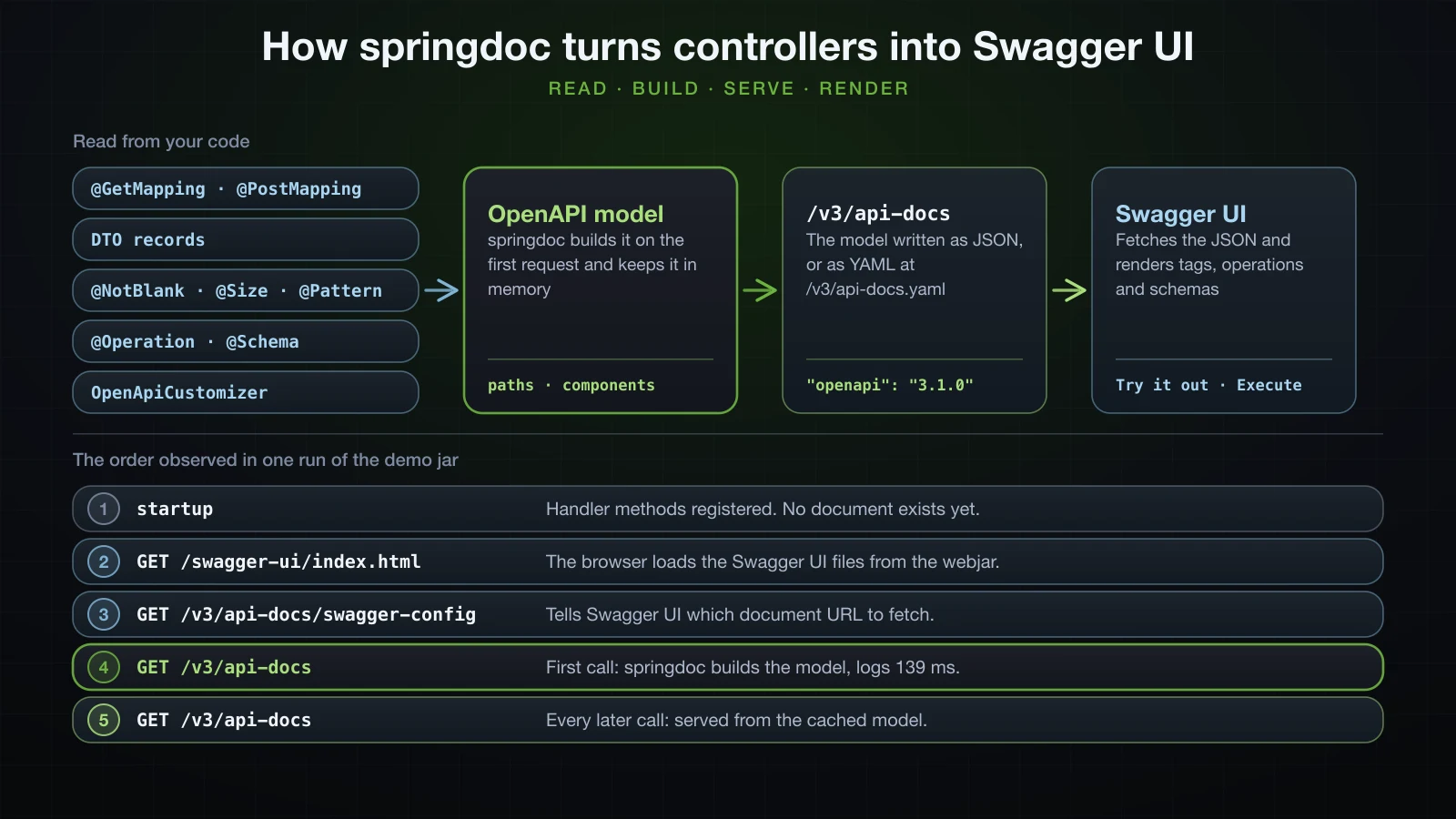
To pay that cost at startup instead, set springdoc.pre-loading-enabled=true. With it, the model was built 125 ms after startup on a background thread, before any request arrived:
2026-09-13T10:09:50.133+07:00  INFO 40819 --- [demo] [           main] com.example.demo.DemoApplication         : Started DemoApplication in 0.98 seconds (process running for 1.184)
2026-09-13T10:09:50.258+07:00  INFO 40819 --- [demo] [pool-2-thread-1] o.springdoc.api.AbstractOpenApiResource  : Init duration for springdoc-openapi is: 162 ms
springdoc brings Jackson 2: does it change your API's JSON?
Not the JSON — but the API gains a format. A runner that printed RequestMappingHandlerAdapter.getMessageConverters() and the mapper beans, run once with springdoc and once without, showed:
- The converter that writes JSON is
JacksonJsonHttpMessageConverter, which is Jackson 3, in both runs. The only mapper bean is Boot'sjacksonJsonMapper, atools.jackson.databind.json.JsonMapper; there is no Jackson 2ObjectMapperbean. The product JSON had the same fields and formats in both runs,createdAtincluded as an ISO-8601 string. - With springdoc the converter list gains two entries,
MappingJackson2YamlHttpMessageConverterandJaxb2RootElementHttpMessageConverter. Spring MVC adds them when it finds Jackson 2's YAML module and the Jakarta XML Binding API on the classpath, and springdoc's dependencies bring both.
The YAML converter is visible from outside:
curl -i http://localhost:8122/api/products/1 -H 'Accept: application/yaml'HTTP/1.1 200
Content-Type: application/yaml
Transfer-Encoding: chunked
Date: Sun, 13 Sep 2026 03:34:46 GMT
---
id: 1
name: "Effective Java"
sku: "BOK-0042"
price: 45.90
stock: 25
category: "BOOKS"
supplierEmail: "orders@acme-books.example"
createdAt: 1789270486.454555000Without springdoc the same request got 406 Not Acceptable with Accept: application/json, application/*+json. With it, the API answers in YAML written by a Jackson 2 mapper instead of Boot's Jackson 3 JsonMapper, so createdAt comes out as epoch seconds; the JSON response for the same product had "createdAt":"2026-09-13T03:34:46.454555Z". A 415 response now advertises Accept: application/json, application/yaml, application/*+json as well. JSON clients see no difference; a client that sends Accept: application/yaml gets a representation nobody designed.
Using Swagger UI and Try it out
Open http://localhost:8122/swagger-ui.html in a browser. Swagger UI 5.32.14 lays the document out from top to bottom:
- The header:
info.title, withinfo.versionand anOAS 3.1badge beside it and a link to the document (/v3/api-docs) below; then the description, contact and license onceinfohas them. - Servers: a dropdown of the
serversentries. The selected entry is where Try it out sends requests. - One section per tag: each operation is a bar with its method, path and summary. Without annotations the only tag is
product-controllerand the bars have no summary. - Schemas: every entry of
components.schemas, collapsed.
Click a bar to expand the operation. It shows a Parameters table — the name, marked with an asterisk when required; the type, such as integer($int64); the location, such as (path); the description — then the Request body with its media type, and a Responses table with a code, a description and a media type per response. Request bodies and responses have two tabs: Example Value, a sample generated from the schema, and Schema, the structure with its constraints.
Try it out turns that description into a form:
- Press Try it out. The parameter fields and the request body become editable, the button turns into Cancel, and an Execute button appears.
- Fill in the fields —
1for theidofGET /api/products/{id}— and press Execute. - The browser sends a real request, and the operation shows Curl, the same request as a command; Request URL; and Server response with the status code, the Response body with a Download button, and the Response headers. Clear removes the result.
For GET /api/products/{id} with id 1, the Curl box read:
curl -X 'GET' \
  'http://localhost:8122/api/products/1' \
  -H 'accept: */*'
The accept: */* header comes from the */* response media type springdoc inferred; Swagger UI labels that media type dropdown "Controls Accept header." Execute is not a simulation: on POST it creates a product, on DELETE it deletes one.
What springdoc infers without any annotations
The catalogue has no springdoc annotation yet, and the document already describes all five operations. This is GET /api/products/{id}:
{
    "/api/products/{id}": {
        "get": {
            "tags": [
                "product-controller"
            ],
            "operationId": "get",
            "parameters": [
                {
                    "name": "id",
                    "in": "path",
                    "required": true,
                    "schema": {
                        "type": "integer",
                        "format": "int64"
                    }
                }
            ],
            "responses": {
                "200": {
                    "description": "OK",
                    "content": {
                        "*/*": {
                            "schema": {
                                "$ref": "#/components/schemas/ProductResponse"
                            }
                        }
                    }
                }
            }
        }
    }
}
The query parameters of GET /api/products:
{
    "parameters": [
        {
            "name": "category",
            "in": "query",
            "required": false,
            "schema": {
                "type": "string",
                "enum": [
                    "BOOKS",
                    "ELECTRONICS",
                    "GROCERY"
                ]
            }
        },
        {
            "name": "limit",
            "in": "query",
            "required": false,
            "schema": {
                "type": "integer",
                "format": "int32",
                "default": 20,
                "maximum": 100,
                "minimum": 1
            }
        }
    ]
}
POST /api/products and DELETE /api/products/{id}, with tags and the id parameter left out:
{
    "post": {
        "operationId": "create",
        "requestBody": {
            "content": {
                "application/json": {
                    "schema": {
                        "$ref": "#/components/schemas/CreateProductRequest"
                    }
                }
            },
            "required": true
        },
        "responses": {
            "200": {
                "description": "OK",
                "content": {
                    "*/*": {
                        "schema": {
                            "$ref": "#/components/schemas/ProductResponse"
                        }
                    }
                }
            }
        }
    },
    "delete": {
        "operationId": "delete",
        "responses": {
            "200": {
                "description": "OK"
            }
        }
    }
}
And the response record from components.schemas:
{
    "ProductResponse": {
        "type": "object",
        "properties": {
            "id": {
                "type": "integer",
                "format": "int64"
            },
            "name": {
                "type": "string"
            },
            "sku": {
                "type": "string"
            },
            "price": {
                "type": "number"
            },
            "stock": {
                "type": "integer",
                "format": "int32"
            },
            "category": {
                "type": "string",
                "enum": [
                    "BOOKS",
                    "ELECTRONICS",
                    "GROCERY"
                ]
            },
            "supplierEmail": {
                "type": "string"
            },
            "createdAt": {
                "type": "string",
                "format": "date-time"
            }
        }
    }
}
Everything in these excerpts came from a signature or a type:
| In the code | In the document |
|---|---|
@RequestMapping("/api/products") on the class, @GetMapping("/{id}") on the method | Path /api/products/{id} with a get operation |
Class name ProductController | Tag product-controller |
Method name get | "operationId": "get" |
@PathVariable Long id | "in": "path", "required": true, integer with format int64 |
@RequestParam(required = false) Category category | "in": "query", "required": false, string with the three enum values |
@RequestParam(defaultValue = "20") @Min(1) @Max(100) int limit | "required": false, int32, "default": 20, "minimum": 1, "maximum": 100 |
@RequestBody CreateProductRequest | requestBody with application/json, "required": true and a $ref |
ResponseEntity<ProductResponse> | Response 200 OK with a $ref under */* |
ResponseEntity<List<ProductResponse>> | "type": "array" whose items refer to ProductResponse |
ResponseEntity<Void> | Response 200 OK with no content |
Long, int, BigDecimal, Instant | integer/int64; integer/int32; number with no format; string/date-time |
Four things in those excerpts are wrong or missing, and none of them is springdoc's fault, because the information is in no signature:
POSTis documented as200 OK, butResponseEntity.created(...)returns 201;DELETEis documented as200 OK, but returns 204. The status is chosen inside the method body, which springdoc never runs — it only seesResponseEntity<ProductResponse>andResponseEntity<Void>.- Every response has the media type
*/*, because no mapping declaresproduces. ProductResponsehas norequiredlist: nothing on the record says thatidis always present — not even for the primitiveint stock, which can never be null.- No error response exists anywhere: no 400, 404, 409, 415 or 422.
Bean Validation constraints in the generated schema
springdoc translates the constraints on request DTOs into JSON Schema keywords. CreateProductRequest, from the record shown earlier:
{
    "CreateProductRequest": {
        "type": "object",
        "properties": {
            "name": {
                "type": "string",
                "maxLength": 100,
                "minLength": 3
            },
            "sku": {
                "type": "string",
                "minLength": 1,
                "pattern": "^[A-Z]{3}-\\d{4}$"
            },
            "price": {
                "type": "number",
                "exclusiveMinimum": 0
            },
            "stock": {
                "type": "integer",
                "format": "int32",
                "minimum": 0
            },
            "category": {
                "type": "string",
                "enum": [
                    "BOOKS",
                    "ELECTRONICS",
                    "GROCERY"
                ]
            },
            "supplierEmail": {
                "type": "string",
                "format": "email"
            }
        },
        "required": [
            "category",
            "name",
            "price",
            "sku",
            "stock"
        ]
    }
}| Constraint | Keywords in the schema |
|---|---|
@NotBlank @Size(min = 3, max = 100) on name | name in required, "minLength": 3, "maxLength": 100 |
@NotBlank on sku | sku in required, "minLength": 1 |
@Pattern(regexp = "^[A-Z]{3}-\\d{4}$") on sku | "pattern": "^[A-Z]{3}-\\d{4}$" |
@NotNull @Positive on price | price in required, "exclusiveMinimum": 0 |
@NotNull @PositiveOrZero on stock | stock in required, "minimum": 0 |
@NotNull on category | category in required |
@Email on supplierEmail | "format": "email", and not in required |
@Min(1) @Max(100) on the limit parameter | "minimum": 1, "maximum": 100 in the parameter's schema |
Three details are easy to misread:
@NotBlankbecomesminLength: 1plus a place inrequired. The schema accepts" "; validation rejects it with 422. The schema describes the validation, it does not reproduce it.- On
name,@Size(min = 3)and@NotBlankmeet, and the schema keeps the stricter"minLength": 3. @Positivebecomes"exclusiveMinimum": 0while@PositiveOrZerobecomes"minimum": 0. In OpenAPI 3.1, which follows JSON Schema 2020-12, an exclusive bound is a keyword with a number of its own rather than a flag onminimum.
What does not reach the schema: constraint messages such as must match "^[A-Z]{3}-\d{4}$", and any rule enforced in code, such as SKU uniqueness. In Swagger UI the constraints appear in the Schema tab of the request body: name reads string [3, 100] characters, sku reads string ≥ 1 characters matches ^[A-Z]{3}-\d{4}$, price reads number > 0, stock reads integer ≥ 0 int32, and supplierEmail reads string email.
Error responses from @RestControllerAdvice
The advice returns 400, 404, 409 and 422, yet the document above has none of them, and components.schemas holds only the three records. handleNotFound and handleDuplicateSku return ProblemDetail, whose status is set when the handler runs; springdoc does not run handlers, so it has no status to document. The two overrides and the rest of ResponseEntityExceptionHandler, which return ResponseEntity<Object>, contributed nothing either.
springdoc does read @ResponseStatus on an @ExceptionHandler method. Add it, with its import org.springframework.web.bind.annotation.ResponseStatus, to the two domain handlers:
    @ExceptionHandler(ProductNotFoundException.class)
    @ResponseStatus(HttpStatus.NOT_FOUND)
    public ProblemDetail handleNotFound(ProductNotFoundException ex) {
        // ...
    }

    @ExceptionHandler(DuplicateSkuException.class)
    @ResponseStatus(HttpStatus.CONFLICT)
    public ProblemDetail handleDuplicateSku(DuplicateSkuException ex) {
        // ...
    }
Now the list endpoint, which can throw neither exception, is documented with both:
curl -s http://localhost:8122/v3/api-docs | jq '.paths["/api/products"].get.responses'{
"409": {
"description": "Conflict",
"content": {
"application/problem+json": {
"schema": {
"$ref": "#/components/schemas/ProblemDetail"
}
}
}
},
"404": {
"description": "Not Found",
"content": {
"application/problem+json": {
"schema": {
"$ref": "#/components/schemas/ProblemDetail"
}
}
}
},
"200": {
"description": "OK",
"content": {
"*/*": {
"schema": {
"type": "array",
"items": {
"$ref": "#/components/schemas/ProductResponse"
}
}
}
}
}
}All five operations received the same 404 and 409. The rule, in springdoc's GenericResponseService, is about exception types, not about which method can throw what. A response from a handler for an unchecked exception is added to every operation the advice applies to. A response from a handler for a checked exception is added only to operations whose Java method declares that exception in throws. A separate run confirmed the second half: a handler for the checked MethodArgumentNotValidException, annotated @ResponseStatus(HttpStatus.BAD_REQUEST), showed up on the one operation whose method declared throws MethodArgumentNotValidException, and nowhere else.
So @ResponseStatus on global handlers documents errors in the wrong places. The rest of this article leaves the advice as it was shown first, declares each operation's responses where they happen with @ApiResponse, and adds the responses many operations share with a customizer.
Describing endpoints with @Tag, @Operation and @ApiResponse
The annotations come from swagger-core, in io.swagger.v3.oas.annotations, and arrived with the starter. The controller, with every added line marked:
package com.example.demo.product;

import io.swagger.v3.oas.annotations.Operation;
import io.swagger.v3.oas.annotations.Parameter;
import io.swagger.v3.oas.annotations.media.Content;
import io.swagger.v3.oas.annotations.media.Schema;
import io.swagger.v3.oas.annotations.responses.ApiResponse;
import io.swagger.v3.oas.annotations.responses.ApiResponses;
import io.swagger.v3.oas.annotations.tags.Tag;
import jakarta.validation.Valid;
import jakarta.validation.constraints.Max;
import jakarta.validation.constraints.Min;
import org.springframework.http.ProblemDetail;
import org.springframework.http.ResponseEntity;
import org.springframework.web.bind.annotation.DeleteMapping;
import org.springframework.web.bind.annotation.GetMapping;
import org.springframework.web.bind.annotation.PathVariable;
import org.springframework.web.bind.annotation.PostMapping;
import org.springframework.web.bind.annotation.PutMapping;
import org.springframework.web.bind.annotation.RequestBody;
import org.springframework.web.bind.annotation.RequestMapping;
import org.springframework.web.bind.annotation.RequestParam;
import org.springframework.web.bind.annotation.RestController;

import java.net.URI;
import java.util.List;

@Tag(name = "Products", description = "Create, read, update and delete catalogue products")
@RestController
@RequestMapping("/api/products")
public class ProductController {

    private final ProductService productService;

    public ProductController(ProductService productService) {
        this.productService = productService;
    }

    @Operation(summary = "List products",
            description = "Returns products ordered by id, optionally filtered by category.")
    @ApiResponses({
            @ApiResponse(responseCode = "200", description = "Products in id order"),
            @ApiResponse(responseCode = "400", description = "limit is outside 1 to 100",
                    content = @Content(mediaType = "application/problem+json",
                            schema = @Schema(implementation = ProblemDetail.class)))
    })
    @GetMapping
    public ResponseEntity<List<ProductResponse>> list(
            @Parameter(description = "Only return products in this category")
            @RequestParam(required = false) Category category,
            @Parameter(description = "Maximum number of products to return")
            @RequestParam(defaultValue = "20") @Min(1) @Max(100) int limit) {
        return ResponseEntity.ok(productService.findAll(category, limit));
    }

    @Operation(summary = "Get a product by id")
    @ApiResponses({
            @ApiResponse(responseCode = "200", description = "The product"),
            @ApiResponse(responseCode = "404", description = "No product has this id",
                    content = @Content(mediaType = "application/problem+json",
                            schema = @Schema(implementation = ProblemDetail.class)))
    })
    @GetMapping("/{id}")
    public ResponseEntity<ProductResponse> get(
            @Parameter(description = "Product id", example = "42") @PathVariable Long id) {
        return ResponseEntity.ok(productService.findById(id));
    }

    @Operation(summary = "Create a product",
            description = "The SKU must be unique across the catalogue.")
    @ApiResponses({
            @ApiResponse(responseCode = "201", description = "Product created; Location points to it"),
            @ApiResponse(responseCode = "409", description = "Another product already uses this SKU",
                    content = @Content(mediaType = "application/problem+json",
                            schema = @Schema(implementation = ProblemDetail.class)))
    })
    @PostMapping
    public ResponseEntity<ProductResponse> create(@Valid @RequestBody CreateProductRequest request) {
        ProductResponse created = productService.create(request);
        return ResponseEntity.created(URI.create("/api/products/" + created.id())).body(created);
    }

    @Operation(summary = "Update a product")
    @ApiResponses({
            @ApiResponse(responseCode = "200", description = "The updated product"),
            @ApiResponse(responseCode = "404", description = "No product has this id",
                    content = @Content(mediaType = "application/problem+json",
                            schema = @Schema(implementation = ProblemDetail.class)))
    })
    @PutMapping("/{id}")
    public ResponseEntity<ProductResponse> update(
            @Parameter(description = "Product id", example = "42") @PathVariable Long id,
            @Valid @RequestBody UpdateProductRequest request) {
        return ResponseEntity.ok(productService.update(id, request));
    }

    @Operation(summary = "Delete a product")
    @ApiResponses({
            @ApiResponse(responseCode = "204", description = "Product deleted"),
            @ApiResponse(responseCode = "404", description = "No product has this id",
                    content = @Content(mediaType = "application/problem+json",
                            schema = @Schema(implementation = ProblemDetail.class)))
    })
    @DeleteMapping("/{id}")
    public ResponseEntity<Void> delete(
            @Parameter(description = "Product id", example = "42") @PathVariable Long id) {
        productService.delete(id);
        return ResponseEntity.noContent().build();
    }
}
The same GET /api/products/{id} operation, before:
{
    "get": {
        "tags": [
            "product-controller"
        ],
        "operationId": "get",
        "parameters": [
            {
                "name": "id",
                "in": "path",
                "required": true,
                "schema": {
                    "type": "integer",
                    "format": "int64"
                }
            }
        ],
        "responses": {
            "200": {
                "description": "OK",
                "content": {
                    "*/*": {
                        "schema": {
                            "$ref": "#/components/schemas/ProductResponse"
                        }
                    }
                }
            }
        }
    }
}
And after, with the lines the annotations changed highlighted:
{
    "get": {
        "tags": [
            "Products"
        ],
        "summary": "Get a product by id",
        "operationId": "get",
        "parameters": [
            {
                "name": "id",
                "in": "path",
                "description": "Product id",
                "required": true,
                "schema": {
                    "type": "integer",
                    "format": "int64"
                },
                "example": 42
            }
        ],
        "responses": {
            "200": {
                "description": "The product",
                "content": {
                    "*/*": {
                        "schema": {
                            "$ref": "#/components/schemas/ProductResponse"
                        }
                    }
                }
            },
            "404": {
                "description": "No product has this id",
                "content": {
                    "application/problem+json": {
                        "schema": {
                            "$ref": "#/components/schemas/ProblemDetail"
                        }
                    }
                }
            }
        }
    }
}
@Tag replaced product-controller and added an entry with its description to a new top-level tags list. @Operation added summary. @Parameter put description and example on the parameter itself, not inside its schema. The 200 kept its schema and took the description from @ApiResponse, and the 404 is new: typed application/problem+json, with a $ref to a ProblemDetail schema that @Schema(implementation = ProblemDetail.class) added to components.schemas. On the other operations, the list now documents 200 and 400, POST 201 and DELETE 204, which is what the application returns. The list's 400, for instance, is article 20's parameter validation at work:
curl -i "http://localhost:8122/api/products?limit=500"HTTP/1.1 400
Content-Type: application/problem+json
Transfer-Encoding: chunked
Date: Sun, 13 Sep 2026 03:34:11 GMT
Connection: close
{"detail":"Request has 1 invalid value(s).","instance":"/api/products","status":400,"title":"Bad Request","errors":[{"field":"limit","message":"must be less than or equal to 100"}]}Declaring one response removes the inferred 200
The 200 lines in that controller are not decoration. An earlier version of get declared only the 404:
    @Operation(summary = "Get a product by id")
    @ApiResponse(responseCode = "404", description = "No product has this id",
            content = @Content(mediaType = "application/problem+json",
                    schema = @Schema(implementation = ProblemDetail.class)))
    @GetMapping("/{id}")
    public ResponseEntity<ProductResponse> get(
            @Parameter(description = "Product id", example = "42") @PathVariable Long id) {
and the operation's responses became:
{
    "responses": {
        "404": {
            "description": "No product has this id",
            "content": {
                "application/problem+json": {
                    "schema": {
                        "$ref": "#/components/schemas/ProblemDetail"
                    }
                }
            }
        }
    }
}
No 200 at all. Once a method carries any @ApiResponse, springdoc stops adding the inferred success response. Declare the success code as well. A declared 2xx response without content still gets its schema from the return type: the 200 of get and update, the 201 of create and the array 200 of list all carry the right schema under */*, although the annotations never mention it.
@Parameter and @Schema on record components
@Parameter goes on a handler method parameter, as in the controller. @Schema describes a model, and it works on record components — swagger-core picks it up from the component the same way it picks up the constraints:
package com.example.demo.product;

import io.swagger.v3.oas.annotations.media.Schema;
import jakarta.validation.constraints.Email;
import jakarta.validation.constraints.NotBlank;
import jakarta.validation.constraints.NotNull;
import jakarta.validation.constraints.Pattern;
import jakarta.validation.constraints.Positive;
import jakarta.validation.constraints.PositiveOrZero;
import jakarta.validation.constraints.Size;

import java.math.BigDecimal;

@Schema(description = "The fields a client sends to create a product")
public record CreateProductRequest(
        @Schema(description = "Name shown in the catalogue", example = "Effective Java")
        @NotBlank @Size(min = 3, max = 100) String name,

        @Schema(description = "Stock keeping unit: three capital letters, a dash, four digits",
                example = "BOK-0042")
        @NotBlank @Pattern(regexp = "^[A-Z]{3}-\\d{4}$") String sku,

        @Schema(description = "Unit price in USD", example = "45.90")
        @NotNull @Positive BigDecimal price,

        @Schema(description = "Units in the warehouse", example = "25")
        @NotNull @PositiveOrZero Integer stock,

        @Schema(description = "Catalogue section", example = "BOOKS")
        @NotNull Category category,

        @Schema(description = "Where purchase orders are sent", example = "orders@acme-books.example")
        @Email String supplierEmail) {
}
The first three properties of the schema:
{
    "CreateProductRequest": {
        "type": "object",
        "description": "The fields a client sends to create a product",
        "properties": {
            "name": {
                "type": "string",
                "description": "Name shown in the catalogue",
                "example": "Effective Java",
                "maxLength": 100,
                "minLength": 3
            },
            "sku": {
                "type": "string",
                "description": "Stock keeping unit: three capital letters, a dash, four digits",
                "example": "BOK-0042",
                "minLength": 1,
                "pattern": "^[A-Z]{3}-\\d{4}$"
            },
            "price": {
                "type": "number",
                "description": "Unit price in USD",
                "example": 45.9,
                "exclusiveMinimum": 0
            }
        }
    }
}
The type-level @Schema became the schema's description, and the constraints are still there. example = "45.90" came out as the number 45.9: for a number property the example string is parsed, and the trailing zero is gone. Swagger UI uses examples in two places — the Example Value of the request body, and the body Try it out fills in. For POST /api/products that body was:
{
  "name": "Effective Java",
  "sku": "BOK-0042",
  "price": 45.9,
  "stock": 25,
  "category": "BOOKS",
  "supplierEmail": "orders@acme-books.example"
}
and the id field of GET /api/products/{id} already held 42 when Try it out was pressed. Without examples, Swagger UI invents placeholders: the Example Value of the 201 response showed "sku": "string" and "price": 0 for ProductResponse, which has no examples.
@Schema also fixes the missing required list of the response record. Mark the component that is always present:
package com.example.demo.product;

import io.swagger.v3.oas.annotations.media.Schema;

import java.math.BigDecimal;
import java.time.Instant;

public record ProductResponse(
        @Schema(description = "Id assigned by the server", example = "42",
                requiredMode = Schema.RequiredMode.REQUIRED)
        Long id,
        String name,
        String sku,
        BigDecimal price,
        int stock,
        Category category,
        String supplierEmail,
        Instant createdAt) {
}
and ProductResponse gains "required": ["id"], along with the description and the example 42 that the 201 Example Value then shows. stock stays out of the list: being a primitive is not enough.
Hiding an endpoint with @Hidden
An admin controller with one endpoint worth documenting and one that exists only for the team's test scripts:
package com.example.demo.admin;

import com.example.demo.product.ProductService;
import io.swagger.v3.oas.annotations.Hidden;
import io.swagger.v3.oas.annotations.Operation;
import io.swagger.v3.oas.annotations.tags.Tag;
import org.springframework.http.ResponseEntity;
import org.springframework.web.bind.annotation.GetMapping;
import org.springframework.web.bind.annotation.PostMapping;
import org.springframework.web.bind.annotation.RequestMapping;
import org.springframework.web.bind.annotation.RestController;

import java.util.Map;

@Tag(name = "Admin", description = "Operational endpoints for the catalogue team")
@RestController
@RequestMapping("/admin")
public class AdminController {

    private final ProductService productService;

    public AdminController(ProductService productService) {
        this.productService = productService;
    }

    @Operation(summary = "Count the products in the catalogue")
    @GetMapping("/stats")
    public Map<String, Integer> stats() {
        return Map.of("products", productService.count());
    }

    @Hidden
    @PostMapping("/reset")
    public ResponseEntity<Void> reset() {
        productService.deleteAll();
        return ResponseEntity.noContent().build();
    }
}curl -s http://localhost:8122/v3/api-docs | jq -c '.paths | keys'["/admin/stats","/api/products","/api/products/{id}"]/admin/reset is gone from the document, and therefore from Swagger UI. It is not gone from the application:
curl -i -X POST http://localhost:8122/admin/resetHTTP/1.1 204
Date: Sun, 13 Sep 2026 03:18:08 GMT@Hidden hides documentation, not the endpoint. Anyone who knows the URL can still call it; protecting it is Spring Security's job, in Chapter 5.
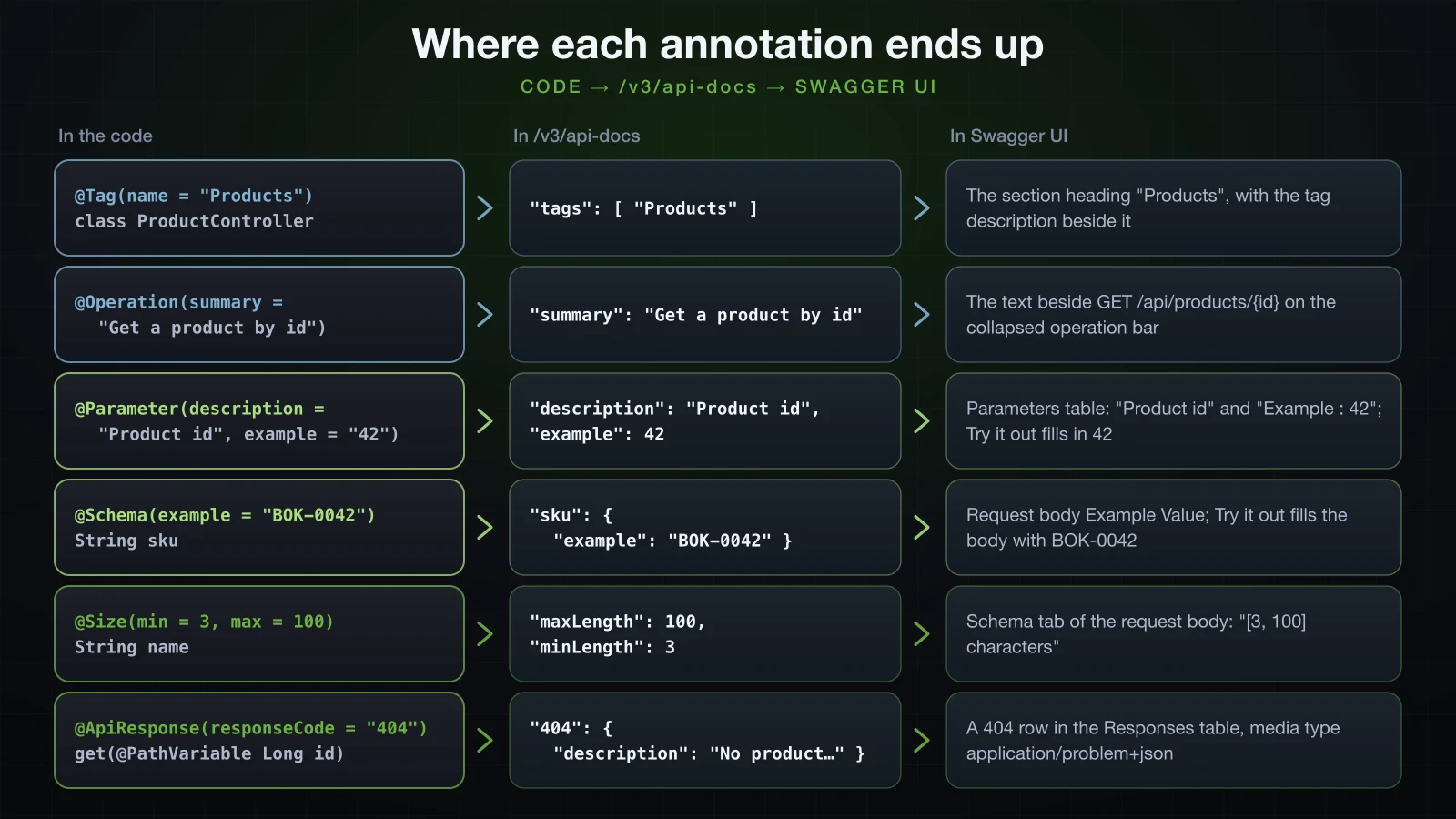
springdoc annotations and what each one changes
| Annotation | Where it goes | What it changes in the document |
|---|---|---|
@Tag(name, description) | Controller class | The class's operations are grouped under name instead of product-controller; name and description enter the top-level tags list |
@Operation(summary, description) | Handler method | summary and description of the operation |
@ApiResponse(responseCode, description, content) | Handler method, alone or inside @ApiResponses | One entry in responses; as soon as one is present, the inferred success response is no longer added |
@Content(mediaType, schema) | content of @ApiResponse | The media type key of that response, such as application/problem+json |
@Schema(implementation = ProblemDetail.class) | schema of @Content | A $ref to the class's schema, which is added to components.schemas |
@Parameter(description, example) | Handler method parameter | description and example on the parameter; Try it out fills in the example |
@Schema(description, example) | Record component, or the record itself | description and example on the property or the schema; used by Example Value and the pre-filled body |
@Schema(requiredMode = Schema.RequiredMode.REQUIRED) | Record component | Adds the property to the schema's required list |
@Hidden | Handler method | Removes the operation from the document and from Swagger UI; the endpoint keeps working |
@NotBlank, @NotNull, @Size, @Positive, @PositiveOrZero, @Pattern, @Email, @Min, @Max | Record components, handler parameters | required and minLength: 1, required, minLength/maxLength, exclusiveMinimum, minimum: 0, pattern, format, minimum, maximum |
Global API information: the OpenAPI bean and OpenApiCustomizer
info and servers describe the whole API, so they belong in configuration rather than on a controller. When an OpenAPI bean exists, springdoc starts from it. The same class holds a customizer, explained below:
package com.example.demo.config;

import io.swagger.v3.oas.models.OpenAPI;
import io.swagger.v3.oas.models.info.Contact;
import io.swagger.v3.oas.models.info.Info;
import io.swagger.v3.oas.models.info.License;
import io.swagger.v3.oas.models.media.Content;
import io.swagger.v3.oas.models.media.MediaType;
import io.swagger.v3.oas.models.media.Schema;
import io.swagger.v3.oas.models.responses.ApiResponse;
import io.swagger.v3.oas.models.servers.Server;
import org.springdoc.core.customizers.OpenApiCustomizer;
import org.springframework.context.annotation.Bean;
import org.springframework.context.annotation.Configuration;

import java.util.List;

@Configuration
public class OpenApiConfig {

    @Bean
    OpenAPI catalogueOpenApi() {
        return new OpenAPI()
                .info(new Info()
                        .title("Product Catalogue API")
                        .version("1.0.0")
                        .description("Create, search and maintain the products of the demo store.")
                        .contact(new Contact()
                                .name("Catalogue team")
                                .email("catalogue@example.com"))
                        .license(new License()
                                .name("Apache 2.0")
                                .url("https://www.apache.org/licenses/LICENSE-2.0")))
                .servers(List.of(
                        new Server().url("http://localhost:8080").description("Local development"),
                        new Server().url("https://api.example.com").description("Production")));
    }

    @Bean
    OpenApiCustomizer requestBodyErrorResponses() {
        return openApi -> openApi.getPaths().values().forEach(pathItem ->
                pathItem.readOperations().forEach(operation -> {
                    if (operation.getRequestBody() == null) {
                        return;
                    }
                    operation.getResponses()
                            .addApiResponse("400", problem("The body is not readable JSON"))
                            .addApiResponse("415", problem("The body is not sent as application/json"))
                            .addApiResponse("422", problem("The body breaks a validation rule"));
                }));
    }

    private static ApiResponse problem(String description) {
        return new ApiResponse()
                .description(description)
                .content(new Content().addMediaType("application/problem+json",
                        new MediaType().schema(new Schema<>().$ref("#/components/schemas/ProblemDetail"))));
    }
}
The top of the document now:
{
    "openapi": "3.1.0",
    "info": {
        "title": "Product Catalogue API",
        "description": "Create, search and maintain the products of the demo store.",
        "contact": {
            "name": "Catalogue team",
            "email": "catalogue@example.com"
        },
        "license": {
            "name": "Apache 2.0",
            "url": "https://www.apache.org/licenses/LICENSE-2.0"
        },
        "version": "1.0.0"
    },
    "servers": [
        {
            "url": "http://localhost:8080",
            "description": "Local development"
        },
        {
            "url": "https://api.example.com",
            "description": "Production"
        }
    ],
    "tags": [
        {
            "name": "Products",
            "description": "Create, read, update and delete catalogue products"
        },
        {
            "name": "Admin",
            "description": "Operational endpoints for the catalogue team"
        }
    ]
}
Swagger UI's header now reads Product Catalogue API with the badges 1.0.0 and OAS 3.1, then the description, a "Contact Catalogue team" link and an "Apache 2.0" link. The Servers dropdown offers http://localhost:8080 - Local development and https://api.example.com - Production, with the first one selected.
Declaring servers replaces the generated server URL, and Try it out sends every request to the selected entry — so with this bean it targets port 8080, even though this article's jar runs on 8122. The Try it out run earlier used an entry for http://localhost:8122, which is why its Request URL pointed there. List the URLs your readers can actually reach, or leave servers out and keep the generated one.
The customizer runs once the document is built. OpenApiCustomizer has a single method, customise(OpenAPI) — spelled with an s — which sees every path and can change anything. This one adds the three responses every operation with a request body shares under the chapter's status codes: 400 for a body that is not readable JSON, 415 for a body sent with another Content-Type, and 422 for a body that breaks a validation rule.
curl -s http://localhost:8122/v3/api-docs | jq -c '.paths["/api/products"].post.responses | keys'["201","400","409","415","422"]POST /api/products now documents 201 and 409 from its annotations and 400, 415 and 422 from the customizer; PUT gains the same three, and the operations without a body are untouched. Each description matches a real response. A truncated body returned 400 with "detail":"Failed to read request"; Content-Type: text/plain returned 415 with "detail":"Content-Type 'text/plain;charset=UTF-8' is not supported."; and an invalid body returned this:
curl -i -X POST http://localhost:8122/api/products -H 'Content-Type: application/json' -d '{"name":"E","sku":"bok-42","price":0,"stock":-1,"category":"BOOKS","supplierEmail":"orders"}'HTTP/1.1 422
Content-Type: application/problem+json
Transfer-Encoding: chunked
Date: Sun, 13 Sep 2026 03:34:11 GMT
{"detail":"Request has 5 invalid value(s).","instance":"/api/products","status":422,"title":"Unprocessable Content","errors":[{"field":"name","message":"size must be between 3 and 100"},{"field":"price","message":"must be greater than 0"},{"field":"sku","message":"must match \"^[A-Z]{3}-\\d{4}$\""},{"field":"stock","message":"must be greater than or equal to 0"},{"field":"supplierEmail","message":"must be a well-formed email address"}]}The $ref to #/components/schemas/ProblemDetail resolves because the @ApiResponse annotations already put that schema into components; a customizer that is the only thing referring to a schema has to add the schema too. And the schema itself deserves a critical look. Generated from the ProblemDetail class, it has type and instance as uri strings, title, status, detail, and a properties object. The real bodies have no properties key: the 422 above carries errors at the top level, and a 404 carries "productId":99 there too, because Spring writes the entries of properties as top-level members. Swagger UI's Example Value for these responses accordingly shows a properties object filled with additionalProp1 to additionalProp3. If clients generate code from the document, describe error bodies with a record of your own.
When a decision needs the Java method rather than the finished document, implement OperationCustomizer instead: its customize(Operation, HandlerMethod) receives each operation together with the handler method it came from.
Grouping endpoints with GroupedOpenApi
A consumer of the product API does not need the admin endpoints, and the team does not need them mixed in. GroupedOpenApi splits the document:
package com.example.demo.config;

import org.springdoc.core.models.GroupedOpenApi;
import org.springframework.context.annotation.Bean;
import org.springframework.context.annotation.Configuration;

@Configuration
public class OpenApiGroupsConfig {

    @Bean
    GroupedOpenApi productsApi() {
        return GroupedOpenApi.builder()
                .group("products")
                .pathsToMatch("/api/**")
                .build();
    }

    @Bean
    GroupedOpenApi adminApi() {
        return GroupedOpenApi.builder()
                .group("admin")
                .pathsToMatch("/admin/**")
                .build();
    }
}
Each group is a document of its own at /v3/api-docs/ plus the group name, and swagger-config now lists the groups instead of a single URL:
{"configUrl":"/v3/api-docs/swagger-config","oauth2RedirectUrl":"http://localhost:8122/swagger-ui/oauth2-redirect.html","urls":[{"url":"/v3/api-docs/admin","name":"admin"},{"url":"/v3/api-docs/products","name":"products"}],"validatorUrl":""}Swagger UI's top bar gains a Select a definition dropdown with admin and products, and the page opens on admin, the first entry in that list rather than the first bean declared: only the Admin section is shown, and the document link reads /v3/api-docs/admin. Setting springdoc.swagger-ui.urls-primary-name=products adds "urls.primaryName":"products" to swagger-config, and the page then opened on products. /v3/api-docs itself still answers 200 with every path; it is just no longer listed in the UI. With a single GroupedOpenApi bean, swagger-config lists that one group only.
The group documents also expose a trap in the customizer from the previous section:
curl -s http://localhost:8122/v3/api-docs/products | jq -c '.paths["/api/products"].post.responses | keys'["201","409"]The default document still had all five codes. An OpenApiCustomizer bean is applied to the default document, but a group is built with its own customizers, so the 400, 415 and 422 never reached products. Declare the bean as a GlobalOpenApiCustomizer — an interface that extends OpenApiCustomizer and adds only the meaning "every document, groups included":
import org.springdoc.core.customizers.OpenApiCustomizer;
import org.springdoc.core.customizers.GlobalOpenApiCustomizer;

// ...

    @Bean
    OpenApiCustomizer requestBodyErrorResponses() {
    GlobalOpenApiCustomizer requestBodyErrorResponses() {
        return openApi -> openApi.getPaths().values().forEach(pathItem ->
The same command then returns ["201","400","409","415","422"] for the products group, and the default document is unchanged. To attach a customizer to a single group, GroupedOpenApi.builder() has addOpenApiCustomizer(...).
springdoc properties: paths, filters and sorting
Paths, the set of documented endpoints and Swagger UI's ordering are all properties:
springdoc.api-docs.path=/api-docs
springdoc.swagger-ui.path=/docs
springdoc.paths-to-match=/api/**
springdoc.swagger-ui.operations-sorter=method
springdoc.swagger-ui.tags-sorter=alphaspringdoc:
api-docs:
path: /api-docs
swagger-ui:
path: /docs
operations-sorter: method
tags-sorter: alpha
paths-to-match: /api/**Both versions were loaded into the same jar, without the group beans, and gave identical results:
| Property | Value | What the run showed |
|---|---|---|
springdoc.api-docs.path | /api-docs | /api-docs, /api-docs.yaml and /api-docs/swagger-config answered 200; /v3/api-docs returned 404 |
springdoc.swagger-ui.path | /docs | /docs redirected to /swagger-ui/index.html; /swagger-ui.html returned 404 |
springdoc.paths-to-match | /api/** | /admin/stats left the document |
springdoc.packages-to-scan | com.example.demo.admin, in a run of its own | Only /admin/stats was left |
springdoc.swagger-ui.operations-sorter | method | swagger-config gained "operationsSorter":"method"; within a tag, operations were ordered by HTTP method |
springdoc.swagger-ui.tags-sorter | alpha | swagger-config gained "tagsSorter":"alpha"; in a run with both tags, Admin moved above Products |
The custom UI path is only a new name for the redirect; the files stay under /swagger-ui/:
curl -i http://localhost:8122/docsHTTP/1.1 302
Location: /swagger-ui/index.html
Content-Length: 0
Date: Sun, 13 Sep 2026 02:53:13 GMTswagger-config picks up the new document path and both sorters:
{"configUrl":"/api-docs/swagger-config","oauth2RedirectUrl":"http://localhost:8122/swagger-ui/oauth2-redirect.html","operationsSorter":"method","tagsSorter":"alpha","url":"/api-docs","validatorUrl":""}The two sorters are Swagger UI settings that springdoc passes through. Without them, the page listed Products first and its operations in document order: GET, PUT and DELETE on /api/products/{id}, then GET and POST on /api/products. With only the two sorter properties set, Admin came first and the product operations read DELETE, GET, GET, POST, PUT.
Disabling Swagger UI and /v3/api-docs in production
The document lists every endpoint, parameter and schema of the API, and Swagger UI gives anyone who can open it a form that sends real requests. Article 13's profiles are the natural switch: turn both off in the prod profile.
springdoc.api-docs.enabled=false
springdoc.swagger-ui.enabled=falsespringdoc:
api-docs:
enabled: false
swagger-ui:
enabled: falsejava -jar build/libs/demo-0.0.1-SNAPSHOT.jar --server.port=8122 --spring.profiles.active=prodThe two startup warnings are gone. Every documentation URL returns 404 while the API keeps working:
for u in /v3/api-docs /v3/api-docs.yaml /v3/api-docs/swagger-config /swagger-ui.html /swagger-ui/index.html /api/products; do printf '%s %s\n' "$(curl -s -o /dev/null -w '%{http_code}' http://localhost:8122$u)" "$u"; done404 /v3/api-docs
404 /v3/api-docs.yaml
404 /v3/api-docs/swagger-config
404 /swagger-ui.html
404 /swagger-ui/index.html
200 /api/productscurl -i http://localhost:8122/v3/api-docsHTTP/1.1 404
Content-Type: application/problem+json
Transfer-Encoding: chunked
Date: Sun, 13 Sep 2026 02:59:59 GMT
{"detail":"No static resource v3/api-docs.","instance":"/v3/api-docs","status":404,"title":"Not Found"}The 404 is a ProblemDetail because ResponseEntityExceptionHandler handles the NoResourceFoundException behind it. A project whose advice does not extend it returns Boot's default error body instead, which in the same test read {"timestamp":"2026-09-13T02:53:18.680Z","status":404,"error":"Not Found","path":"/v3/api-docs"}.
⚠️ Try it out sends real requests to the selected server. A Swagger UI left open in production is a form that creates and deletes data with whatever access your endpoints allow.
If the documentation has to stay reachable in production, put it behind authentication; Spring Security is Chapter 5.
Using the generated OpenAPI document
The document is a file like any other. Download it in either format:
curl -o openapi.json http://localhost:8122/v3/api-docs
curl -o openapi.yaml http://localhost:8122/v3/api-docs.yaml
The link under the title in Swagger UI opens the same JSON. Committing the file, or attaching it to a release, turns an API change into a diff that shows up in review.
This article works code-first: the controllers are the source of truth and the document is generated from them, so the two cannot drift apart, but whoever writes the Java decides the API's shape. Design-first reverses the order: the team writes and reviews the OpenAPI file before any code exists, generates server interfaces or client stubs from it, and checks the implementation against it. Design-first suits an API consumed by other teams or companies, where the contract is agreed before it is built; code-first suits an API that evolves inside one codebase, like this catalogue.
Either way, the file feeds tools. OpenAPI Generator turns it into a client in one command:
java -jar openapi-generator-cli-7.25.0.jar generate -i openapi.json -g java -o product-clientWith the catalogue's document, OpenAPI Generator 7.25.0 wrote a Java client with ProductsApi and AdminApi — one class per tag — and models including CreateProductRequest, ProductResponse and ProblemDetail. It warned that "OpenAPI 3.1 support is still in beta" and logged list (reserved word) cannot be used as method name. Renamed to callList: the Java method name became the operationId, and the operationId became part of the contract. Set operationId on @Operation when the method name is not the name clients should see.
FAQ
Is springdoc-openapi the same as SpringFox?
No. SpringFox is a separate, older library. Its last release, io.springfox:springfox-boot-starter 3.0.0, was published on 14 July 2020, before Spring Boot 3 moved from javax.* to jakarta.*, and it does not work with Spring Boot 3 or 4. Migrating means replacing its Docket configuration and its annotations with springdoc's.
Why is an endpoint missing from /v3/api-docs?
Check, in this order: @Hidden on the method; springdoc.paths-to-match or springdoc.packages-to-scan, which filter the document; and with GroupedOpenApi beans, whether the group you are reading matches the path and which definition the Swagger UI dropdown has selected. /v3/api-docs without a group name still contains every documented path.
Why does Try it out call a different host or port?
Swagger UI sends the request to the server selected in the Servers dropdown, and the first entry of servers is selected when the page opens. An OpenAPI bean that declares servers decides that list. Without one, springdoc generates the entry from the URL the document was fetched from, which is where you opened Swagger UI.
Can the OpenAPI file be generated during the build?
springdoc publishes a Gradle plugin, org.springdoc.openapi-gradle-plugin (1.9.0), and springdoc-openapi-maven-plugin (1.5). They do not change how the document is made: they start the application during the build, fetch the document URL and save the response to a file. The document still comes from the running application, so the build needs everything the application needs to start.
How do I add an Authorize button for a bearer token?
With a security scheme in the document, which only makes sense once the API has authentication. Chapter 5 covers Spring Security, and the scheme belongs with it.
Does springdoc slow down startup?
It does no generation during startup. The model is built on the first request to /v3/api-docs — 141 ms in one run, 139 ms when Swagger UI sent that request — and later requests are answered from memory in a few milliseconds. springdoc.pre-loading-enabled=true moves the work to a background thread right after startup; it took 162 ms there.
Conclusion
springdoc-openapi 3.1.1 turns a Spring Boot 4.1 application into an OpenAPI 3.1 document and a Swagger UI with one dependency, and it builds that document from the running code on the first request. With no help it reads paths, parameters, request bodies and response types from the handler methods, and turns Bean Validation constraints into required, minLength, maxLength, pattern, minimum, exclusiveMinimum and format. It cannot see statuses chosen in a method body or in an exception handler, so POST looks like 200 and no error exists; @ResponseStatus on global handlers does not fix that, it copies errors onto every operation.
@Tag, @Operation, @ApiResponse — always including the success code — @Parameter and @Schema on record components fill those gaps. An OpenAPI bean sets info and servers, a GlobalOpenApiCustomizer adds shared responses to every document including groups, GroupedOpenApi splits the API for different readers, and two properties in application-prod.properties take all of it offline.
The next article turns from describing your own API to calling someone else's: RestClient for GET and POST requests to an external API, handling the errors it returns, and setting timeouts.
![[Spring Boot Basics] Database Migrations in Spring Boot with Flyway: Why ddl-auto Does Not Belong in Production](/images/blog/sb-flyway-thumbnail.en.webp)
![[Spring Boot Basics] JSON with Jackson 3 and DTOs in Spring Boot: Serialization, Deserialization and MapStruct](/images/blog/sb-jackson-dto-thumbnail.en.webp)
![[Spring Boot Basics] Productivity Tools in Spring Boot: DevTools, Lombok and Actuator Basics](/images/blog/sb-productivity-tools-thumbnail.en.webp)
![[Spring Boot Basics] Spring Data JPA and Hibernate in Spring Boot: Entities, @Id, @GeneratedValue and JpaRepository CRUD](/images/blog/sb-jpa-thumbnail.en.webp)