The product API from the previous articles reads a JSON body into a CreateProductRequest record and stores it. Nothing on that path checks the data. A client can send a blank name, a price of 0, a stock of -3 or a SKU in the wrong format; Jackson builds the record anyway, the controller saves it, and the API answers 201 Created. The bad data turns up later, in a report that does not add up or an order that cannot be shipped.
Bean Validation, the Jakarta Validation standard implemented by Hibernate Validator, puts those rules on the DTO as annotations, and Spring MVC enforces them before the controller method runs. This article adds it to the product API and spends most of its time on the parts that are usually skipped: which values each built-in constraint really accepts, what the default 400 contains and where the details went, when nested objects are silently not validated, why a constraint on a @PathVariable can end in a 500, and how groups, messages, custom constraints and validation outside the web layer behave.
The examples use Spring Boot 4.1.1 and Java 21, on an Initializr project with the web and validation dependencies. The app runs with --server.port=8119 instead of the default 8080, so the requests below use that port.
Adding spring-boot-starter-validation
Validation is not part of the web starter. It comes from spring-boot-starter-validation, the dependency Spring Initializr calls validation, and a project generated with it also gets a matching test starter:
dependencies {
	implementation 'org.springframework.boot:spring-boot-starter-validation'
	implementation 'org.springframework.boot:spring-boot-starter-webmvc'
	testImplementation 'org.springframework.boot:spring-boot-starter-validation-test'
	testImplementation 'org.springframework.boot:spring-boot-starter-webmvc-test'
	testRuntimeOnly 'org.junit.platform:junit-platform-launcher'
}<dependencies>
<dependency>
<groupId>org.springframework.boot</groupId>
<artifactId>spring-boot-starter-validation</artifactId>
</dependency>
<dependency>
<groupId>org.springframework.boot</groupId>
<artifactId>spring-boot-starter-webmvc</artifactId>
</dependency>
<dependency>
<groupId>org.springframework.boot</groupId>
<artifactId>spring-boot-starter-validation-test</artifactId>
<scope>test</scope>
</dependency>
<dependency>
<groupId>org.springframework.boot</groupId>
<artifactId>spring-boot-starter-webmvc-test</artifactId>
<scope>test</scope>
</dependency>
</dependencies>Running ./gradlew dependencies --configuration runtimeClasspath and keeping only the starter's own subtree:
+--- org.springframework.boot:spring-boot-starter-validation -> 4.1.1
|    +--- org.springframework.boot:spring-boot-starter:4.1.1
|    \--- org.springframework.boot:spring-boot-validation:4.1.1
|         +--- org.springframework.boot:spring-boot:4.1.1 (*)
|         +--- org.apache.tomcat.embed:tomcat-embed-el:11.0.24
|         \--- org.hibernate.validator:hibernate-validator:9.1.3.Final
|              +--- jakarta.validation:jakarta.validation-api:3.1.1
|              +--- org.jboss.logging:jboss-logging:3.6.3.Final
| \--- com.fasterxml:classmate:1.7.1 -> 1.7.3| Jar | What it provides |
|---|---|
jakarta.validation-api 3.1.1 | the standard API: @NotNull, @Valid, ConstraintValidator, Validator |
hibernate-validator 9.1.3.Final | the implementation that actually evaluates constraints |
tomcat-embed-el 11.0.24 | a Jakarta Expression Language implementation, used for ${…} expressions in messages |
spring-boot-validation 4.1.1 | ValidationAutoConfiguration, which defines the defaultValidator and methodValidationPostProcessor beans |
defaultValidator is a LocalValidatorFactoryBean wrapping Hibernate Validator, and in this application it is the only jakarta.validation.Validator bean. methodValidationPostProcessor matters once @Validated appears on a class, later in the article.
Validating a request body with @Valid
Constraints are annotations on the components of the request record. The first version of CreateProductRequest has four rules:
package com.example.demo.product;

import java.math.BigDecimal;

import jakarta.validation.constraints.DecimalMin;
import jakarta.validation.constraints.NotBlank;
import jakarta.validation.constraints.NotNull;
import jakarta.validation.constraints.Pattern;
import jakarta.validation.constraints.PositiveOrZero;

public record CreateProductRequest(
        @NotBlank String name,
        @NotNull @Pattern(regexp = "^[A-Z]{3}-\\d{4}$") String sku,
        @NotNull @DecimalMin("0.01") BigDecimal price,
        @NotNull @PositiveOrZero Integer stock) {
}
@NotBlank rejects a missing or whitespace-only name. @NotNull makes sku, price and stock required, @Pattern fixes the SKU format, @DecimalMin sets a floor for the price and @PositiveOrZero rules out negative stock. The next section goes through each of them.
The rest of the API is a domain record, a response record and an in-memory store, since databases arrive in Chapter 4:
package com.example.demo.product;

import java.math.BigDecimal;

public record Product(Long id, String name, String sku, BigDecimal price, Integer stock) {
}package com.example.demo.product;
import java.math.BigDecimal;
public record ProductResponse(Long id, String name, String sku, BigDecimal price, Integer stock) {
static ProductResponse from(Product product) {
return new ProductResponse(product.id(), product.name(), product.sku(), product.price(), product.stock());
}
}package com.example.demo.product;
import java.util.List;
import java.util.Map;
import java.util.Optional;
import java.util.concurrent.ConcurrentHashMap;
import java.util.concurrent.atomic.AtomicLong;
import org.springframework.stereotype.Component;
@Component
public class ProductStore {
private final Map<Long, Product> products = new ConcurrentHashMap<>();
private final AtomicLong nextId = new AtomicLong(1);
public Product save(CreateProductRequest request) {
long id = nextId.getAndIncrement();
Product product = new Product(id, request.name(), request.sku(), request.price(), request.stock());
products.put(id, product);
return product;
}
public Optional<Product> findById(Long id) {
return Optional.ofNullable(products.get(id));
}
public List<Product> findAll(int page, int size) {
return products.values().stream().skip((long) page * size).limit(size).toList();
}
}The annotations on their own change nothing. They take effect when a controller parameter asks for validation with @Valid, from jakarta.validation:
package com.example.demo.product;

import jakarta.validation.Valid;

import org.springframework.http.HttpStatus;
import org.springframework.http.ResponseEntity;
import org.springframework.web.bind.annotation.PostMapping;
import org.springframework.web.bind.annotation.RequestBody;
import org.springframework.web.bind.annotation.RequestMapping;
import org.springframework.web.bind.annotation.RestController;

@RestController
@RequestMapping("/api/products")
public class ProductController {

    private final ProductStore store;

    public ProductController(ProductStore store) {
        this.store = store;
    }

    @PostMapping
    public ResponseEntity<ProductResponse> create(@Valid @RequestBody CreateProductRequest request) {
        Product product = store.save(request);
        return ResponseEntity.status(HttpStatus.CREATED).body(ProductResponse.from(product));
    }
}
A valid product first:
curl -i -X POST localhost:8119/api/products -H 'Content-Type: application/json' -d '{"name":"Mechanical keyboard","sku":"KBD-1001","price":1290000,"stock":25}'HTTP/1.1 201
Content-Type: application/json
Transfer-Encoding: chunked
Date: Sat, 12 Sep 2026 06:59:17 GMT
{"id":1,"name":"Mechanical keyboard","sku":"KBD-1001","price":1290000,"stock":25}Then a body that breaks all four rules:
curl -i -X POST localhost:8119/api/products -H 'Content-Type: application/json' -d '{"name":" ","sku":"kbd-1001","price":0,"stock":-3}'HTTP/1.1 400
Content-Type: application/json
Transfer-Encoding: chunked
Date: Sat, 12 Sep 2026 06:59:17 GMT
Connection: close
{"timestamp":"2026-09-12T06:59:17.579Z","status":400,"error":"Bad Request","path":"/api/products"}Three things happened, and the client sees only one of them.
- The request was rejected with 400 before the controller method ran.
RequestResponseBodyMethodProcessor, the Spring MVC component that resolves@RequestBodyarguments, has Jackson build the record, validates it because the parameter carries@Valid, and throwsMethodArgumentNotValidExceptionwhile it is still resolving the argument.store.saveis never called. - The body is Spring Boot's generic error response.
DefaultHandlerExceptionResolvermaps the exception to 400, and Boot's error handling writestimestamp,status,errorandpath. Nothing in it says which field failed. - The details went to the log. The resolver writes one WARN line:
WARN 34552 --- [demo] [nio-8119-exec-2] .w.s.m.s.DefaultHandlerExceptionResolver : Resolved [org.springframework.web.bind.MethodArgumentNotValidException: Validation failed for argument [0] in public org.springframework.http.ResponseEntity<com.example.demo.product.ProductResponse> com.example.demo.product.ProductController.create(com.example.demo.product.CreateProductRequest) with 4 errors: [Field error in object 'createProductRequest' on field 'name': rejected value [ ]; codes [NotBlank.createProductRequest.name,NotBlank.name,NotBlank.java.lang.String,NotBlank]; arguments [org.springframework.context.support.DefaultMessageSourceResolvable: codes [createProductRequest.name,name]; arguments []; default message [name]]; default message [must not be blank]] [Field error in object 'createProductRequest' on field 'price': rejected value [0]; codes [DecimalMin.createProductRequest.price,DecimalMin.price,DecimalMin.java.math.BigDecimal,DecimalMin]; arguments [org.springframework.context.support.DefaultMessageSourceResolvable: codes [createProductRequest.price,price]; arguments []; default message [price],true,0.01]; default message [must be greater than or equal to 0.01]] [Field error in object 'createProductRequest' on field 'stock': rejected value [-3]; codes [PositiveOrZero.createProductRequest.stock,PositiveOrZero.stock,PositiveOrZero.java.lang.Integer,PositiveOrZero]; arguments [org.springframework.context.support.DefaultMessageSourceResolvable: codes [createProductRequest.stock,stock]; arguments []; default message [stock]]; default message [must be greater than or equal to 0]] [Field error in object 'createProductRequest' on field 'sku': rejected value [kbd-1001]; codes [Pattern.createProductRequest.sku,Pattern.sku,Pattern.java.lang.String,Pattern]; arguments [org.springframework.context.support.DefaultMessageSourceResolvable: codes [createProductRequest.sku,sku]; arguments []; default message [sku],[Ljakarta.validation.constraints.Pattern$Flag;@53c55407,^[A-Z]{3}-\d{4}$]; default message [must match "^[A-Z]{3}-\d{4}$"]] ]It logs even though spring.mvc.log-resolved-exception defaults to false: the property's description in the 4.1.1 metadata says it covers every resolver except DefaultHandlerExceptionResolver. What the line contains:
with 4 errors: every constraint was evaluated. Validation does not stop at the first failure.Field error in object 'createProductRequest' on field 'name': the object name is the parameter type with a lower-case first letter, and each error names its field.rejected value [ ]anddefault message [must not be blank]: the value that was sent and the constraint's message.codes [NotBlank.createProductRequest.name,NotBlank.name,NotBlank.java.lang.String,NotBlank]: message codes, from most to least specific, that a SpringMessageSourcecan use to look up a message.- The order:
name,price,stock,sku. Errors do not come in declaration order.
Turning these field errors into a response body the client can read is the job of the next article, which also answers a body that fails validation with 422 instead of 400, following the status-code design from the HTTP and REST fundamentals article. Until then, lines this long are hard to follow, so from here on each WARN line is shortened to the field, the rejected value and the message of every error. An empty JSON object, for example:
curl -s -X POST localhost:8119/api/products -H 'Content-Type: application/json' -d '{}'{"timestamp":"2026-09-12T06:59:17.590Z","status":400,"error":"Bad Request","path":"/api/products"}MethodArgumentNotValidException, 4 errors
stock [null] must not be null
name [null] must not be blank
sku [null] must not be null
price [null] must not be nullsku carries both @NotNull and @Pattern, yet only @NotNull reported. The section on null below explains why.
What happens without the validation starter?
It depends on what is left on the classpath.
With only spring-boot-starter-webmvc, the project does not compile, because the web starter does not bring the Jakarta Validation API at all (path shortened):
src/main/java/com/example/demo/product/ProductController.java:3: error: package jakarta.validation does not exist
import jakarta.validation.Valid;
                         ^
The same error follows for every jakarta.validation.constraints import in CreateProductRequest.
The dangerous case is the API without an implementation: jakarta.validation:jakarta.validation-api declared on its own, or pulled in by a library. Everything compiles and starts, and the invalid request from above is stored:
HTTP/1.1 201
Content-Type: application/json
Transfer-Encoding: chunked
Date: Sat, 12 Sep 2026 07:00:34 GMT

{"id":2,"name":"  ","sku":"kbd-1001","price":0,"stock":-3}
The only trace is an INFO line at startup:
INFO 34909 --- [demo] [ main] o.s.v.b.OptionalValidatorFactoryBean : Failed to set up a Bean Validation provider: jakarta.validation.NoProviderFoundException: Unable to create a Configuration, because no Jakarta Validation provider could be found. Add a provider like Hibernate Validator (RI) to your classpath.Without a provider, @Valid is silently ignored. @ConfigurationProperties is stricter: the same classpath stops a @Validated properties class at startup, as the article on configuration properties showed. When @Valid seems to do nothing, search the startup log for Failed to set up a Bean Validation provider.
Built-in constraint annotations
The standard constraints live in jakarta.validation.constraints. To cover each kind, the request record gains three components and two more constraints (imports for the new annotations and java.time.LocalDate omitted):
public record CreateProductRequest(
        @NotBlank String name,
        @NotBlank @Size(min = 3, max = 100) String name,
        @NotNull @Pattern(regexp = "^[A-Z]{3}-\\d{4}$") String sku,
        @NotNull @DecimalMin("0.01") BigDecimal price,
        @NotNull @DecimalMin("0.01") @Digits(integer = 9, fraction = 2) BigDecimal price,
        @NotNull @PositiveOrZero Integer stock) {
        @NotNull @PositiveOrZero Integer stock,
        @Min(1) @Max(10) Integer maxPerOrder,
        @PastOrPresent LocalDate releasedOn,
        @Future LocalDate saleEndsOn) {
}
Every result in the tables of this section came from the application's Validator bean, checking one value at a time with validateValue, which runs the constraints of a single property without building an object:
Set<ConstraintViolation<CreateProductRequest>> violations =
        validator.validateValue(CreateProductRequest.class, "sku", "kbd-1001");
Rows whose constraint is not on CreateProductRequest came from small probe records declared the same way. Injecting the Validator into your own code is covered near the end of the article.
@NotNull vs @NotEmpty vs @NotBlank
Three constraints mean "required" in different ways. A probe record puts one on each component:
record Blank(@NotNull String notNull, @NotEmpty String notEmpty, @NotBlank String notBlank) {}| Value | @NotNull | @NotEmpty | @NotBlank |
|---|---|---|---|
null | must not be null | must not be empty | must not be blank |
"" | valid | must not be empty | must not be blank |
" " | valid | valid | must not be blank |
| a tab and a newline | valid | valid | must not be blank |
"a" | valid | valid | valid |
@NotNullonly rejectsnull. An empty string and a string of spaces both pass, so on aStringit rarely says what you mean.@NotEmptyalso rejects"", but a string of spaces passes.@NotBlankneeds at least one non-whitespace character; tabs and newlines count as whitespace. It is the right choice for text a person types: names, titles, codes.
Use @NotBlank for strings and @NotNull for everything else that is required: BigDecimal price, Integer stock, a nested object.
Size and number constraints
price carries three constraints, @NotNull @DecimalMin("0.01") @Digits(integer = 9, fraction = 2):
price | Result |
|---|---|
1290000 | valid |
0.01 | valid |
0.00 | must be greater than or equal to 0.01 |
-5 | must be greater than or equal to 0.01 |
0.009 | must be greater than or equal to 0.01 and numeric value out of bounds (<9 digits>.<2 digits> expected) |
1290000.50 | valid |
1290000.505 | numeric value out of bounds (<9 digits>.<2 digits> expected) |
1290000.500 | numeric value out of bounds (<9 digits>.<2 digits> expected) |
1234567890 | numeric value out of bounds (<9 digits>.<2 digits> expected) |
null | must not be null |
The other size and number constraints:
| Constraint | Value | Result |
|---|---|---|
@PositiveOrZero Integer stock | 0 | valid |
-1 | must be greater than or equal to 0 | |
@Positive BigDecimal | 0 | must be greater than 0 |
0.001 | valid | |
@Min(1) @Max(10) Integer maxPerOrder | 0 | must be greater than or equal to 1 |
1 and 10 | valid | |
11 | must be less than or equal to 10 | |
@Min(1) BigDecimal | 0.99 | must be greater than or equal to 1 |
@DecimalMin(value = "0.00", inclusive = false) BigDecimal | 0.00 | must be greater than 0.00 |
0.01 | valid | |
@Size(min = 3, max = 100) String name | "ab" | size must be between 3 and 100 |
" x " | valid | |
@Size(max = 2) List<String> | three elements | size must be between 0 and 2 |
What the tables show:
@Sizecounts characters and does not trim." x "has four characters and passesmin = 3. Pair it with@NotBlankwhen whitespace should not count.@DecimalMinand@DecimalMaxtake the bound as a string and are inclusive by default.inclusive = falsechanges both the check and the message.@Minand@Maxtake along, so they cannot express0.01, though@Min(1)does work on aBigDecimal.@Digitscounts the digits of theBigDecimalas written, trailing zeros included.1290000.500has three fraction digits, and JSON keeps them:"price":1290000.500in a request body returned 400, while"price":1290000.50returned 201.- One value can break several constraints at once.
0.009produced two violations, one from each annotation. - Required numbers need a wrapper type.
Integer stockcan benull, so@NotNullhas something to catch; anintnever is.
Which addresses does @Email accept?
| Value | @Email |
|---|---|
user@example.com | valid |
a@b | valid |
user@localhost | valid |
user@example.c | valid |
user@127.0.0.1 | valid |
user@[127.0.0.1] | valid |
nguyễn@example.vn | valid |
a.@b.com | must be a well-formed email address |
user@@example.com | must be a well-formed email address |
user@example..com | must be a well-formed email address |
user name@example.com | must be a well-formed email address |
user@-example.com | must be a well-formed email address |
"" | valid |
null | valid |
Hibernate Validator checks the syntax of an address, not whether it could receive mail. A domain without a dot, a one-letter top-level domain, an IP address and non-ASCII letters in the local part are all well-formed. What fails is broken syntax: a dot at the end of the local part, a second @, two dots in a row, a space, a domain label starting with -.
Two consequences follow. @Email accepts both null and "", so a required address needs @NotBlank @Email. And if every address must have a dot in its domain, the constraint's own regexp attribute adds that rule:
@NotBlank @Email(regexp = ".+@.+\\..+") String contactEmailWith that attribute, a@b and user@localhost were rejected with the same must be a well-formed email address, while user@example.com still passed.
@Pattern and regex escaping in Java
sku uses @Pattern(regexp = "^[A-Z]{3}-\\d{4}$"). The backslash is doubled because the regex sits inside a Java string literal: \\d in the source is \d in the pattern, and that is what the message prints.
sku | Result |
|---|---|
KBD-1001 | valid |
kbd-1001 | must match "^[A-Z]{3}-\d{4}$" |
KBD-100 | must match "^[A-Z]{3}-\d{4}$" |
KBD1001 | must match "^[A-Z]{3}-\d{4}$" |
" KBD-1001" | must match "^[A-Z]{3}-\d{4}$" |
KBD-1001 followed by a newline | must match "^[A-Z]{3}-\d{4}$" |
"" | must match "^[A-Z]{3}-\d{4}$" |
null | must not be null, from @NotNull |
- The whole value has to match. A leading space fails, and so does a trailing newline. Nothing is trimmed and a partial match is not enough, so the
^and$anchors are optional:@Pattern(regexp = "[A-Z]{3}-\\d{4}")rejectedxKBD-1001andKBD-1001xjust the same. - An empty string is checked and rejected,
nullis not checked at all. That is whyskualso needs@NotNull. - The default message prints the raw regex, which means nothing to an API client. The messages section replaces it.
Date constraints: @Past, @PastOrPresent and @Future
Checked on 2026-09-12:
LocalDate | @Past | @PastOrPresent | @Future |
|---|---|---|---|
2026-09-11 | valid | valid | must be a future date |
2026-09-12, today | must be a past date | valid | must be a future date |
2026-09-13 | must be a past date | must be a date in the past or in the present | valid |
For a LocalDate, "present" is today's date: @Past rejects today and @PastOrPresent accepts it. releasedOn uses @PastOrPresent, so a product released today is valid, and saleEndsOn uses @Future, so a sale ending today is not.
Over HTTP, with Jackson parsing the dates, the new constraints report together:
curl -s -X POST localhost:8119/api/products -H 'Content-Type: application/json' -d '{"name":"ab","sku":"KBD-1002","price":1290000.505,"stock":10,"maxPerOrder":0,"releasedOn":"2027-01-01","saleEndsOn":"2026-01-01"}'{"timestamp":"2026-09-12T07:02:09.436Z","status":400,"error":"Bad Request","path":"/api/products"}MethodArgumentNotValidException, 5 errors
price [1290000.505] numeric value out of bounds (<9 digits>.<2 digits> expected)
name [ab] size must be between 3 and 100
releasedOn [2027-01-01] must be a date in the past or in the present
saleEndsOn [2026-01-01] must be a future date
maxPerOrder [0] must be greater than or equal to 1Does null pass validation?
Yes, for every built-in constraint except @NotNull, @NotEmpty and @NotBlank. This probe record puts fifteen constraints on fifteen components, and validates an instance where all of them are null:
record AllNull(@Size(min = 3) String size, @Min(1) Integer min, @Max(10) Integer max,
               @Positive Integer positive, @PositiveOrZero Integer positiveOrZero,
               @DecimalMin("0.01") BigDecimal decimalMin, @Digits(integer = 9, fraction = 2) BigDecimal digits,
               @Email String email, @Pattern(regexp = "^[A-Z]{3}-\\d{4}$") String pattern,
               @Past LocalDate past, @PastOrPresent LocalDate pastOrPresent, @Future LocalDate future,
@NotNull String notNull, @NotEmpty String notEmpty, @NotBlank String notBlank) {}notBlank: must not be blank
notEmpty: must not be empty
notNull: must not be nullTwelve of fifteen constraints passed. Each built-in constraint checks one property of a value, and whether a value must be present is a separate decision. A required field therefore always carries two annotations: @NotNull @Pattern(...), @NotBlank @Email, @NotNull @DecimalMin(...). The custom constraint later in the article follows the same convention.
Validating nested objects and lists
A catalogue product also has tags, a supplier with a contact address, and variants with their own stock. Two new records hold the nested data:
package com.example.demo.product;

import jakarta.validation.constraints.Email;
import jakarta.validation.constraints.NotBlank;
import jakarta.validation.constraints.NotNull;

public record SupplierRequest(
        @NotBlank String name,
        @NotNull @Email String contactEmail) {
}package com.example.demo.product;
import jakarta.validation.constraints.NotBlank;
import jakarta.validation.constraints.NotNull;
import jakarta.validation.constraints.PositiveOrZero;
public record VariantRequest(
@NotBlank String label,
@NotNull @PositiveOrZero Integer stock) {
}CreateProductRequest gets three components, deliberately without @Valid for now:
public record CreateProductRequest(
        @NotBlank @Size(min = 3, max = 100) String name,
        @NotNull @Pattern(regexp = "^[A-Z]{3}-\\d{4}$") String sku,
        @NotNull @DecimalMin("0.01") @Digits(integer = 9, fraction = 2) BigDecimal price,
        @NotNull @PositiveOrZero Integer stock,
        @Min(1) @Max(10) Integer maxPerOrder,
        @PastOrPresent LocalDate releasedOn,
        @Future LocalDate saleEndsOn) {
        @Future LocalDate saleEndsOn,
        @Size(max = 5) List<@NotBlank String> tags,
        SupplierRequest supplier,
        List<VariantRequest> variants) {
}
This request has valid tags, a supplier with a blank name and a broken address, and a second variant with a blank label and negative stock. -w prints the status after the body:
curl -s -w ' %{http_code}\n' -X POST localhost:8119/api/products -H 'Content-Type: application/json' -d '{"name":"Mechanical keyboard","sku":"KBD-1001","price":1290000,"stock":25,"tags":["keyboard","wireless"],"supplier":{"name":"","contactEmail":"sales@@keychron.example"},"variants":[{"label":"Black","stock":10},{"label":"","stock":-2}]}'{"id":1,"name":"Mechanical keyboard","sku":"KBD-1001","price":1290000,"stock":25} 201Created, with no log line. SupplierRequest and VariantRequest have constraints, but Hibernate Validator never evaluated them: it validates the object it is given and follows a reference into another object only when that reference is marked @Valid. Mark both:
        @Size(max = 5) List<@NotBlank String> tags,
        SupplierRequest supplier,
        @Valid SupplierRequest supplier,
        List<VariantRequest> variants) {
        List<@Valid VariantRequest> variants) {
}
The same request now fails:
{"timestamp":"2026-09-12T07:06:16.736Z","status":400,"error":"Bad Request","path":"/api/products"} 400MethodArgumentNotValidException, 4 errors
variants[1].stock [-2] must be greater than or equal to 0
supplier.name [] must not be blank
variants[1].label [] must not be blank
supplier.contactEmail [sales@@keychron.example] must be a well-formed email addressThe field names are now property paths: supplier.contactEmail for a component of the nested object, variants[1].label for a component of the list element at index 1.
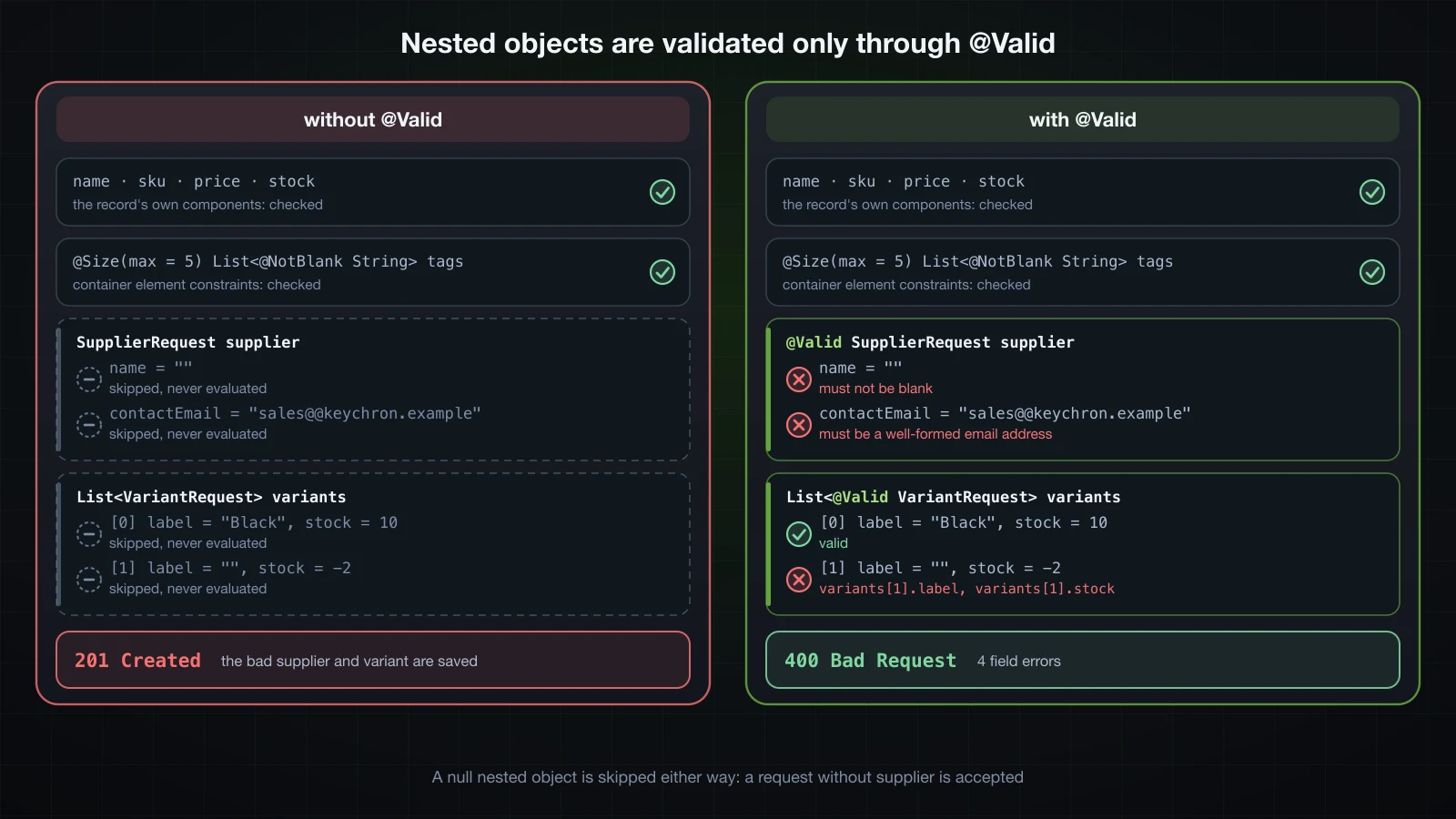
@Valid only validates a nested object that exists. A request with no supplier and no variants returned 201, because a null reference has nothing to cascade into. When the nested object is required, put @NotNull next to @Valid.
Constraints on the elements of a list
tags behaved the same in both versions. @Size(max = 5) applies to the list itself, and @NotBlank inside the type argument, List<@NotBlank String>, is a container element constraint: it applies to every element. Both constrain the component's own value, so neither needs @Valid. Six tags, one of them blank:
curl -s -w ' %{http_code}\n' -X POST localhost:8119/api/products -H 'Content-Type: application/json' -d '{"name":"Mechanical keyboard","sku":"KBD-1001","price":1290000,"stock":25,"tags":["keyboard"," ","wireless","rgb","mechanical","usb-c"]}'{"timestamp":"2026-09-12T07:06:16.712Z","status":400,"error":"Bad Request","path":"/api/products"} 400MethodArgumentNotValidException, 2 errors
tags[1] [ ] must not be blank
tags [[keyboard, , wireless, rgb, mechanical, usb-c]] size must be between 0 and 5A null element is caught as well: "tags":["keyboard",null] produced the single error tags[1] [null] must not be blank.
Validating a list of objects
For a list of objects, @Valid goes on the type argument, as in List<@Valid VariantRequest>. The older form, @Valid List<VariantRequest>, still cascades in Hibernate Validator 9.1.3: a probe record declaring one list each way reported [0].label and [0].stock errors for both. But the older form logs a deprecation warning when the class is first validated, ending with the name of the affected element:
HV000271: Using `@Valid` on a container (java.util.List) is deprecated. You should apply the annotation on the type argument(s).Validating @PathVariable and @RequestParam
A path variable or a query parameter is a single value, not an object with constraints of its own, so the constraints go directly on the method parameters. Two read endpoints for the controller (the new imports are jakarta.validation.constraints.Max, Positive and PositiveOrZero):
    @GetMapping("/{id}")
    public ResponseEntity<ProductResponse> get(@PathVariable @Positive Long id) {
        return store.findById(id)
                .map(ProductResponse::from)
                .map(ResponseEntity::ok)
                .orElse(ResponseEntity.notFound().build());
    }

    @GetMapping
    public List<ProductResponse> list(@RequestParam(defaultValue = "0") @PositiveOrZero int page,
                                      @RequestParam(defaultValue = "20") @Max(100) int size) {
        return store.findAll(page, size).stream().map(ProductResponse::from).toList();
    }
The class still has no @Validated. An invalid id:
curl -i localhost:8119/api/products/-1HTTP/1.1 400
Content-Type: application/json
Transfer-Encoding: chunked
Date: Sat, 12 Sep 2026 07:02:09 GMT
Connection: close
{"timestamp":"2026-09-12T07:02:09.323Z","status":400,"error":"Bad Request","path":"/api/products/-1"}Two invalid query parameters, then a valid page after one product has been created:
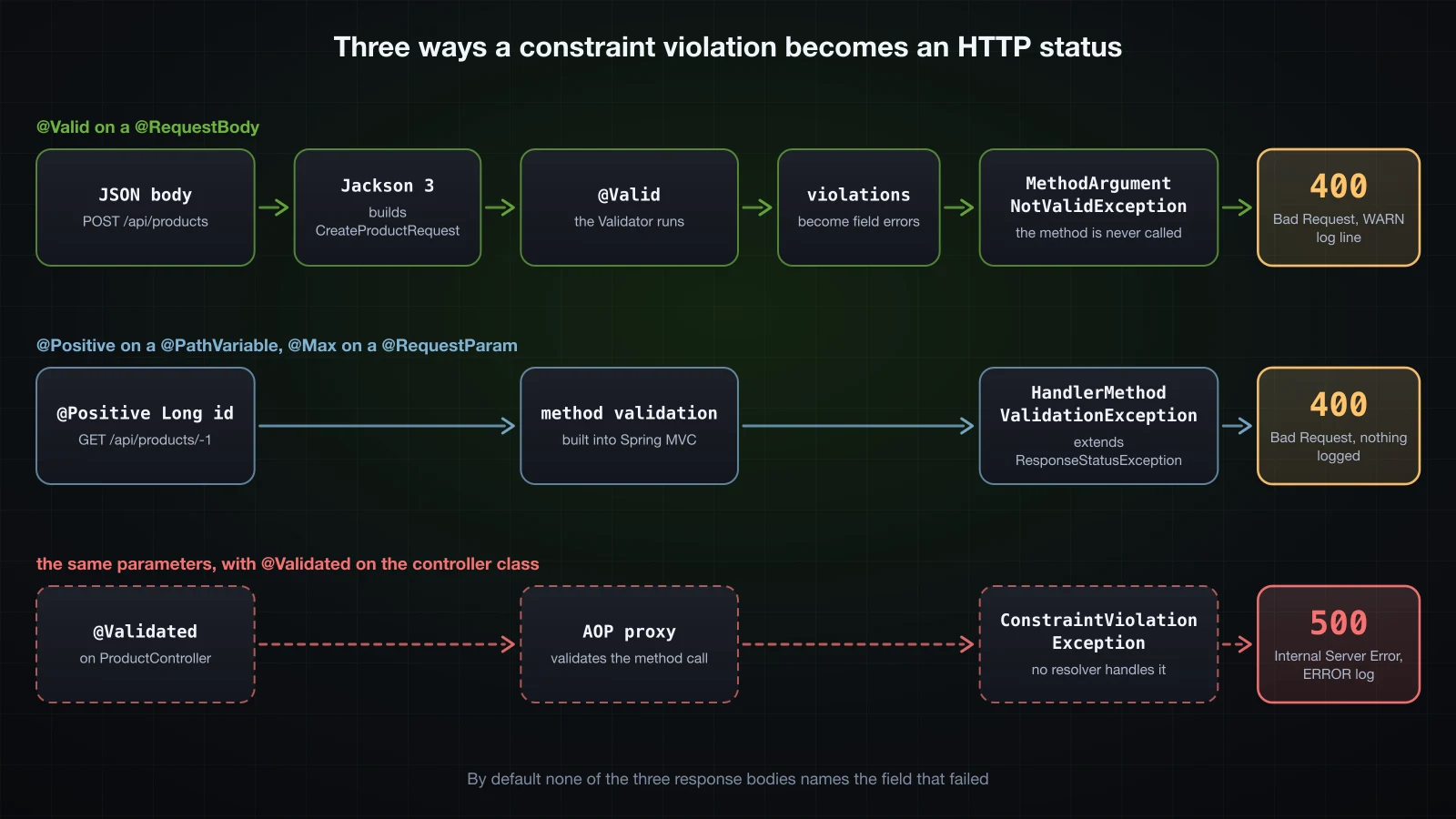
curl -s -w ' %{http_code}\n' 'localhost:8119/api/products?page=-1&size=500'{"timestamp":"2026-09-12T07:02:09.361Z","status":400,"error":"Bad Request","path":"/api/products"} 400curl -s -w ' %{http_code}\n' 'localhost:8119/api/products?size=100'[{"id":1,"name":"Mechanical keyboard","sku":"KBD-1001","price":1290000,"stock":25}] 200This is the method validation built into Spring MVC since Spring Framework 6.1. When a parameter of a controller method carries a constraint annotation, Spring MVC validates the arguments itself before invoking the method and reports a failure as HandlerMethodValidationException. The response looks exactly like the @RequestBody case.
The log does not. It stays empty, because HandlerMethodValidationException extends ResponseStatusException, so it is resolved by ResponseStatusExceptionResolver, and that resolver logs only when spring.mvc.log-resolved-exception is enabled. Running with --spring.mvc.log-resolved-exception=true shows the line for the invalid id:
WARN 38131 --- [demo] [nio-8119-exec-1] .w.s.m.a.ResponseStatusExceptionResolver : Resolved [org.springframework.web.method.annotation.HandlerMethodValidationException: 400 BAD_REQUEST "Validation failure"]Even then the line does not say which parameter failed or why. That information is inside the exception object, which is where an exception handler reads it.
What changes with @Validated on the controller?
Many examples put @Validated on the controller class, because before Spring Framework 6.1 that was the way to validate @PathVariable and @RequestParam. Adding it to the same controller:
@Validated
@RestController
@RequestMapping("/api/products")
public class ProductController {
The same invalid id:
curl -i localhost:8119/api/products/-1HTTP/1.1 500
Content-Type: application/json
Transfer-Encoding: chunked
Date: Sat, 12 Sep 2026 07:06:18 GMT
Connection: close
{"timestamp":"2026-09-12T07:06:18.913Z","status":500,"error":"Internal Server Error","path":"/api/products/-1"}and an ERROR in the log, followed by a full stack trace:
ERROR 38245 --- [demo] [nio-8119-exec-1] o.a.c.c.C.[.[.[/].[dispatcherServlet]    : Servlet.service() for servlet [dispatcherServlet] in context with path [] threw exception [Request processing failed: jakarta.validation.ConstraintViolationException: get.id: must be greater than 0] with root cause

jakarta.validation.ConstraintViolationException: get.id: must be greater than 0
?size=500 failed the same way, with list.size: must be less than or equal to 100.
The status changed because the validation moved. Boot's methodValidationPostProcessor wraps every bean annotated @Validated in a proxy that validates method arguments before each call; the service layer section shows that proxy class. For a controller with @Validated, Spring MVC leaves parameter validation to that proxy instead of doing it itself. The proxy throws jakarta.validation.ConstraintViolationException, none of Spring MVC's default exception resolvers handles it, and the servlet container reports it as a server error. The message format is method.parameter: message, as in get.id: must be greater than 0.
The request body is not affected, because the argument resolver validates it before the proxy is ever called:
| Request | No @Validated on the class | @Validated on the class |
|---|---|---|
GET /api/products/-1 | 400, HandlerMethodValidationException, nothing logged | 500, ConstraintViolationException: get.id: must be greater than 0, ERROR log |
GET /api/products?size=500 | 400, HandlerMethodValidationException, nothing logged | 500, ConstraintViolationException: list.size: must be less than or equal to 100, ERROR log |
POST /api/products with an invalid body | 400, MethodArgumentNotValidException, WARN log | 400, MethodArgumentNotValidException, WARN log |
⚠️ With Spring Boot 4, do not put
@Validatedon a@RestController. It turns every invalid path variable and query parameter from a 400 into a 500 with a stack trace in the log. Constraint annotations on the parameters are enough on their own.
A constrained @PathVariable next to @Valid @RequestBody
Method validation has one more effect. PUT /api/products/{id} replaces a product, and its path variable has a constraint as well as its body. The store gets a matching replace method:
    @PutMapping("/{id}")
    public ResponseEntity<ProductResponse> replace(@PathVariable @Positive Long id,
                                                   @Valid @RequestBody CreateProductRequest request) {
        return store.replace(id, request)
                .map(ProductResponse::from)
                .map(ResponseEntity::ok)
                .orElse(ResponseEntity.notFound().build());
} public Optional<Product> replace(Long id, CreateProductRequest request) {
if (!products.containsKey(id)) {
return Optional.empty();
}
Product product = new Product(id, request.name(), request.sku(), request.price(), request.stock());
products.put(id, product);
return Optional.of(product);
}A valid id with an invalid body, on the controller without @Validated:
curl -s -w ' %{http_code}\n' -X PUT localhost:8119/api/products/1 -H 'Content-Type: application/json' -d '{"name":" ","sku":"KBD-1001","price":0,"stock":25}'{"timestamp":"2026-09-12T07:02:09.459Z","status":400,"error":"Bad Request","path":"/api/products/1"} 400No WARN line appeared, although the body was invalid. With --spring.mvc.log-resolved-exception=true, the log shows why:
WARN 38131 --- [demo] [nio-8119-exec-3] .w.s.m.a.ResponseStatusExceptionResolver : Resolved [org.springframework.web.method.annotation.HandlerMethodValidationException: 400 BAD_REQUEST "Validation failure"]Once any parameter of a method has a constraint, Spring MVC validates all arguments of that method in one pass, the @Valid @RequestBody included, and reports the result as a single HandlerMethodValidationException. The status is still 400, but the exception type differs from POST /api/products, and body errors vanish from the default log. An exception handler for validation errors has to cover both types.
For completeness, with @Validated on the class the same PUT with an invalid body went back to MethodArgumentNotValidException (Validation failed for argument [1]), and PUT /api/products/-1 with a valid body became a 500 with replace.id: must be greater than 0.
@Valid vs @Validated and validation groups
Both annotations trigger validation, but they come from different places and do different jobs:
@Valid | @Validated | |
|---|---|---|
| Package | jakarta.validation | org.springframework.validation.annotation |
| Defined by | the Jakarta Validation specification | Spring |
On a @RequestBody parameter | validates the Default group, MethodArgumentNotValidException | the same without attributes, or only the listed groups |
| Groups | not supported | @Validated(OnCreate.class) |
| Cascading into a nested field or a type argument | yes; its targets are methods, fields, constructors, parameters and type uses | no; its targets are types, methods and parameters only |
| On a class | not allowed | turns on proxy-based method validation for that bean |
A plain @Validated @RequestBody CreateProductRequest request produced the same MethodArgumentNotValidException as @Valid. The difference is the value attribute, which selects validation groups.
Validation groups with @Validated(OnCreate.class)
Creating a product needs a name, a SKU and a price. A partial update with PATCH accepts any subset of fields, but whatever it does send must still be valid. Groups let one record express both. A group is just a marker interface:
package com.example.demo.product;

public interface OnCreate {
}package com.example.demo.product;
public interface OnUpdate {
}Each constraint lists the groups it belongs to:
package com.example.demo.product;

import java.math.BigDecimal;

import jakarta.validation.constraints.DecimalMin;
import jakarta.validation.constraints.NotBlank;
import jakarta.validation.constraints.NotNull;
import jakarta.validation.constraints.Pattern;
import jakarta.validation.constraints.PositiveOrZero;
import jakarta.validation.constraints.Size;

public record ProductRequest(
        @NotBlank(groups = OnCreate.class)
        @Size(min = 3, max = 100, groups = {OnCreate.class, OnUpdate.class})
        String name,

        @NotNull(groups = OnCreate.class)
        @Pattern(regexp = "^[A-Z]{3}-\\d{4}$", groups = {OnCreate.class, OnUpdate.class})
        String sku,

        @NotNull(groups = OnCreate.class)
        @DecimalMin(value = "0.01", groups = {OnCreate.class, OnUpdate.class})
        BigDecimal price,

        @PositiveOrZero
        Integer stock) {
}
and each endpoint picks a group with @Validated:
    @PostMapping
    public ResponseEntity<ProductResponse> create(@Validated(OnCreate.class) @RequestBody ProductRequest request) {
        Product product = store.save(request);
        return ResponseEntity.status(HttpStatus.CREATED).body(ProductResponse.from(product));
    }

    @PatchMapping("/{id}")
    public ResponseEntity<ProductResponse> update(@PathVariable Long id,
                                                  @Validated(OnUpdate.class) @RequestBody ProductRequest request) {
        return store.update(id, request)
                .map(ProductResponse::from)
                .map(ResponseEntity::ok)
                .orElse(ResponseEntity.notFound().build());
    }
store.save and store.update are overloads for ProductRequest; update copies the non-null fields onto the stored product. The results, request by request:
| Request | Body | Result |
|---|---|---|
POST /api/products | {"name":" ","price":0,"stock":-5} | 400: name size must be between 3 and 100, sku must not be null, name must not be blank, price must be greater than or equal to 0.01 |
PATCH /api/products/1 | {"price":0} | 400: price must be greater than or equal to 0.01 |
PATCH /api/products/1 | {"sku":"KBD-2002"} | 200 |
PATCH /api/products/1 | {"name":" "} | 400: name size must be between 3 and 100 only |
That is exactly what groups are for. @NotBlank(groups = OnCreate.class) runs on create only, so the update accepts a request without a name, while @Size(..., groups = {OnCreate.class, OnUpdate.class}) checks a name on both.
Now look at stock. Its @PositiveOrZero has no groups, so it belongs to the Default group, and @Validated(OnCreate.class) validates OnCreate and nothing else. The first POST above sent "stock":-5 and no error mentioned it. Sent with otherwise valid fields, it is simply stored:
curl -s -w ' %{http_code}\n' -X POST localhost:8119/api/products -H 'Content-Type: application/json' -d '{"name":"Mechanical keyboard","sku":"KBD-1001","price":1290000,"stock":-5}'{"id":1,"name":"Mechanical keyboard","sku":"KBD-1001","price":1290000,"stock":-5} 201PATCH /api/products/1 with {"stock":-7} returned 200 and stored -7 as well. A constraint without groups is silently dropped as soon as an endpoint names a group. The fix is to make each group include Default:
package com.example.demo.product;

import jakarta.validation.groups.Default;

public interface OnCreate {
public interface OnCreate extends Default {
}
With OnUpdate changed the same way, the POST with "stock":-5 returned 400 with stock [-5] must be greater than or equal to 0, and the PATCH with "stock":-7 returned 400 with the same message.
When is a separate DTO simpler than groups?
Most of the time. Groups tie two operations to one class, every constraint must repeat its groups, a constraint that forgets them disappears without warning, and a reader has to work out which rules apply to which endpoint by reading every attribute. Two records, CreateProductRequest with @NotBlank and @NotNull where creation needs them and UpdateProductRequest with only the format constraints, say the same thing with no attributes at all, and each can gain fields the other does not have.
Groups earn their place when the shapes really are identical and only requiredness differs, or when one class is validated in several distinct steps, such as a multi-page form validated page by page. For a create and an update endpoint in a REST API, start with two DTOs.
Customising validation messages
The default messages are written for developers: must match "^[A-Z]{3}-\d{4}$" is accurate and useless to an API client. Every constraint has a message attribute, and it accepts three kinds of content. Back on CreateProductRequest:
public record CreateProductRequest(
        @NotBlank @Size(min = 3, max = 100) String name,
        @NotBlank(message = "name is required")
        @Size(min = 3, max = 100, message = "name must be between {min} and {max} characters")
        String name,

        @NotNull @Pattern(regexp = "^[A-Z]{3}-\\d{4}$") String sku,
        @NotNull
        @Pattern(regexp = "^[A-Z]{3}-\\d{4}$", message = "'${validatedValue}' is not a SKU like ABC-1234")
        String sku,

        @NotNull @DecimalMin("0.01") @Digits(integer = 9, fraction = 2) BigDecimal price,
        @NotNull
        @DecimalMin(value = "0.01", message = "{product.price.min}")
        @Digits(integer = 9, fraction = 2)
        BigDecimal price,

        @NotNull @PositiveOrZero Integer stock,
        // maxPerOrder, releasedOn, saleEndsOn, tags, supplier and variants are unchanged
{product.price.min} is a key, so it needs a file at the root of the classpath, plus a Vietnamese version next to it:
product.price.min=price must be at least {value}product.price.min=giá phải từ {value} trở lênA request that breaks four rules, without an Accept-Language header:
curl -s -X POST localhost:8119/api/products -H 'Content-Type: application/json' -d '{"name":"ab","sku":"kbd-1","price":0,"stock":-1}'MethodArgumentNotValidException, 4 errors
name [ab] name must be between 3 and 100 characters
sku [kbd-1] 'kbd-1' is not a SKU like ABC-1234
stock [-1] must be greater than or equal to 0
price [0] price must be at least 0.01- Literal text, as in
name is required, is used as written. {min}and{max}are attributes of the annotation, replaced with3and100.{value}inside the properties file works the same way: it is@DecimalMin'svalue.{product.price.min}is not an attribute, so it is resolved as a key fromValidationMessages.properties. The default messages are keys too:@PositiveOrZero's message is{jakarta.validation.constraints.PositiveOrZero.message}, which is how the table in the next section translates one.${validatedValue}is an Expression Language expression, evaluated with the EL implementation the starter brings. It inserts the rejected value into the message. Use it only in messages you write; never build a message template out of user input, because the template itself is evaluated.
Does Accept-Language change the messages?
The same request, sent with four different Accept-Language values:
curl -s -o /dev/null -w '%{http_code}\n' -X POST localhost:8119/api/products -H 'Content-Type: application/json' -H 'Accept-Language: de' -d '{"name":"ab","sku":"kbd-1","price":0,"stock":-1}'400Accept-Language | stock, default message | price, {product.price.min} |
|---|---|---|
| none | must be greater than or equal to 0 | price must be at least 0.01 |
vi | must be greater than or equal to 0 | giá phải từ 0.01 trở lên |
de | muss größer-gleich 0 sein | price must be at least 0.01 |
fr | doit être supérieur ou égal à 0 | price must be at least 0.01 |
The name and sku messages were identical in all four runs, because a literal message and an EL expression have nothing to translate.
Messages follow the request's locale. Spring's LocalValidatorFactoryBean wraps the message interpolator in a LocaleContextMessageInterpolator, which uses the locale Spring MVC resolved for the current request, and Boot's default spring.web.locale-resolver is accept-header. For each message, Hibernate Validator looks for the key in your ValidationMessages files for that locale first, then in its own bundles.
Those bundles cover 27 locales in Hibernate Validator 9.1.3, including de and fr, but not Vietnamese. A request with Accept-Language: vi therefore got the Vietnamese message you wrote and English for every default. To translate a default message, add its key to your own file:
jakarta.validation.constraints.PositiveOrZero.message=phải lớn hơn hoặc bằng 0With that line, the vi request reported stock [-1] phải lớn hơn hoặc bằng 0.
A request without Accept-Language does not necessarily get English. It gets the JVM's default locale: the same jar, started with JAVA_TOOL_OPTIONS="-Duser.language=de -Duser.country=DE", answered that request with muss größer-gleich 0 sein. An application whose messages must not depend on the machine it runs on should set its locale explicitly.
How is ValidationMessages.properties encoded?
As UTF-8. The Vietnamese text in ValidationMessages_vi.properties above was saved as plain UTF-8, without \u escapes, and came out intact in the log. Putting the same line in the base ValidationMessages.properties, with no _vi file at all, gave giá phải từ 0.01 trở lên just as correctly, for every Accept-Language.
That is the opposite of application.properties, which Spring Boot decodes as ISO-8859-1 by default and where the same characters come out mangled. The difference is the loader: Hibernate Validator reads its message files through java.util.ResourceBundle, which has read properties files as UTF-8 since Java 9.
Writing a custom constraint
@Pattern checks the shape of a SKU. The catalogue needs one more rule: the three letters must be a category that exists. The categories are application data, so the rule belongs in a Spring bean, which in Chapter 4 would be a repository:
package com.example.demo.product;

import java.util.Set;

import org.springframework.stereotype.Component;

@Component
public class CategoryRegistry {

    private final Set<String> codes = Set.of("KBD", "MSE", "MON");

    public boolean exists(String code) {
        return codes.contains(code);
    }
}
A custom constraint has two parts. The annotation:
package com.example.demo.product;

import java.lang.annotation.Documented;
import java.lang.annotation.ElementType;
import java.lang.annotation.Retention;
import java.lang.annotation.RetentionPolicy;
import java.lang.annotation.Target;

import jakarta.validation.Constraint;
import jakarta.validation.Payload;

@Documented
@Constraint(validatedBy = SkuValidator.class)
@Target({ElementType.FIELD, ElementType.PARAMETER, ElementType.TYPE_USE})
@Retention(RetentionPolicy.RUNTIME)
public @interface ValidSku {

    String message() default "{com.example.demo.product.ValidSku.message}";

    Class<?>[] groups() default {};

    Class<? extends Payload>[] payload() default {};
}
and the validator:
package com.example.demo.product;

import java.util.regex.Pattern;

import jakarta.validation.ConstraintValidator;
import jakarta.validation.ConstraintValidatorContext;

public class SkuValidator implements ConstraintValidator<ValidSku, String> {

    private static final Pattern FORMAT = Pattern.compile("^[A-Z]{3}-\\d{4}$");

    private final CategoryRegistry categories;

    public SkuValidator(CategoryRegistry categories) {
        this.categories = categories;
    }

    @Override
    public boolean isValid(String sku, ConstraintValidatorContext context) {
        if (sku == null) {
            return true;
        }
        return FORMAT.matcher(sku).matches() && categories.exists(sku.substring(0, 3));
    }
}
Each piece has a job:
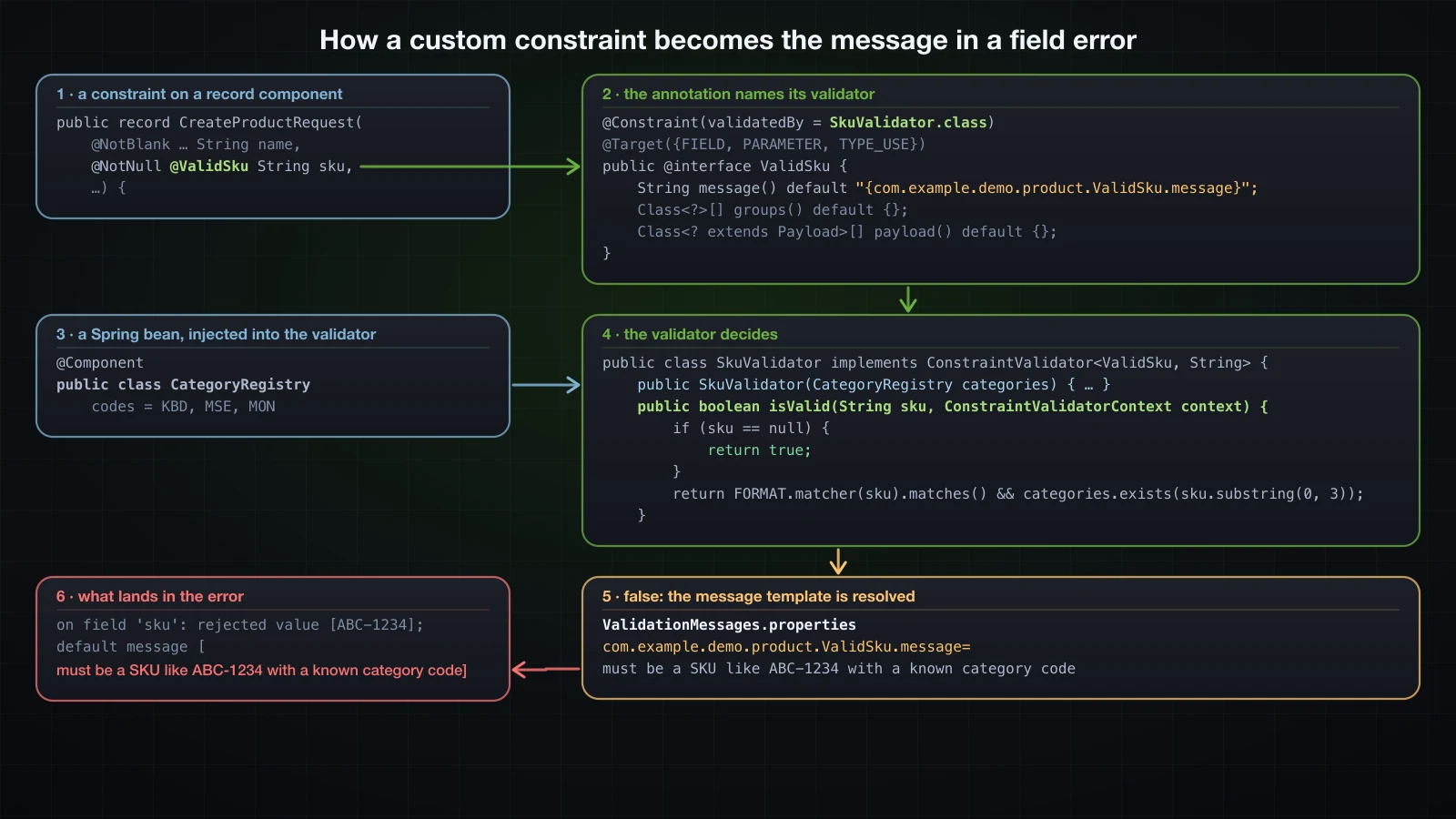
@Constraint(validatedBy = SkuValidator.class)makes@ValidSkua constraint and names the class that checks it.message,groupsandpayloadare required on every constraint annotation. An annotation that left outpayloadfailed as soon as it was used, withjakarta.validation.ConstraintDefinitionException: HV000074: com.example.demo.probe.NoPayload contains Constraint annotation, but does not contain a payload parameter.Themessagedefault is a key, in the same format as the built-in messages.@Targetsays where the annotation may appear:FIELDcovers record components,PARAMETERa controller or service parameter,TYPE_USEa type argument such asList<@ValidSku String>.ConstraintValidator<ValidSku, String>ties the validator to the annotation and to the type it validates.return truefornullfollows the convention of the built-in constraints. Requiredness stays with@NotNull.- The constructor takes a Spring bean. Spring's
LocalValidatorFactoryBeancreates validators through aSpringConstraintValidatorFactory, which builds them with the application context's bean factory, so constructor injection works like in any other component.
The annotation replaces @Pattern on sku, and the message key goes into both properties files:
        @NotNull
        @Pattern(regexp = "^[A-Z]{3}-\\d{4}$", message = "'${validatedValue}' is not a SKU like ABC-1234")
        String sku,
@NotNull @ValidSku String sku, com.example.demo.product.ValidSku.message=must be a SKU like ABC-1234 with a known category codecom.example.demo.product.ValidSku.message=phải là SKU dạng ABC-1234 với mã danh mục đã đăng kýOne product at a time, with everything but sku valid:
curl -s -w ' %{http_code}\n' -X POST localhost:8119/api/products -H 'Content-Type: application/json' -d '{"name":"Mechanical keyboard","sku":"ABC-1234","price":1290000,"stock":25}'{"timestamp":"2026-09-12T07:23:40.727Z","status":400,"error":"Bad Request","path":"/api/products"} 400sku sent | Result |
|---|---|
KBD-1001 | 201 |
ABC-1234 | 400: must be a SKU like ABC-1234 with a known category code |
kbd-1001 | 400: must be a SKU like ABC-1234 with a known category code |
no sku | 400: must not be null, from @NotNull alone |
ABC-1234 with Accept-Language: vi | 400: phải là SKU dạng ABC-1234 với mã danh mục đã đăng ký |
ABC-1234 has the right shape and an unknown category, so the injected CategoryRegistry did its work. In the WARN line, the first message code of that error is ValidSku.createProductRequest.sku: the annotation's simple name takes the place of NotBlank or Pattern.
A class-level constraint for minPrice and maxPrice
Some rules involve two fields. A product search takes a price range, and minPrice must not be greater than maxPrice. A field constraint only sees its own value, so this one goes on the class:
package com.example.demo.product;

import java.lang.annotation.Documented;
import java.lang.annotation.ElementType;
import java.lang.annotation.Retention;
import java.lang.annotation.RetentionPolicy;
import java.lang.annotation.Target;

import jakarta.validation.Constraint;
import jakarta.validation.Payload;

@Documented
@Constraint(validatedBy = PriceRangeValidator.class)
@Target(ElementType.TYPE)
@Retention(RetentionPolicy.RUNTIME)
public @interface PriceRange {

    String message() default "must be greater than or equal to minPrice";

    Class<?>[] groups() default {};

    Class<? extends Payload>[] payload() default {};
}package com.example.demo.product;
import java.math.BigDecimal;
import jakarta.validation.constraints.PositiveOrZero;
@PriceRange
public record ProductSearchRequest(
String query,
@PositiveOrZero BigDecimal minPrice,
@PositiveOrZero BigDecimal maxPrice) {
}The validator receives the whole record. When the range is inverted, it replaces the default violation with one attached to maxPrice:
package com.example.demo.product;

import jakarta.validation.ConstraintValidator;
import jakarta.validation.ConstraintValidatorContext;

public class PriceRangeValidator implements ConstraintValidator<PriceRange, ProductSearchRequest> {

    @Override
    public boolean isValid(ProductSearchRequest request, ConstraintValidatorContext context) {
        if (request.minPrice() == null || request.maxPrice() == null
                || request.minPrice().compareTo(request.maxPrice()) <= 0) {
            return true;
        }
        context.disableDefaultConstraintViolation();
        context.buildConstraintViolationWithTemplate(context.getDefaultConstraintMessageTemplate())
                .addPropertyNode("maxPrice")
                .addConstraintViolation();
        return false;
    }
}
A search endpoint and store method to use it:
    @PostMapping("/search")
    public List<ProductResponse> search(@Valid @RequestBody ProductSearchRequest request) {
        return store.search(request).stream().map(ProductResponse::from).toList();
} public List<Product> search(ProductSearchRequest request) {
return products.values().stream()
.filter(p -> request.query() == null || p.name().toLowerCase().contains(request.query().toLowerCase()))
.filter(p -> request.minPrice() == null || p.price().compareTo(request.minPrice()) >= 0)
.filter(p -> request.maxPrice() == null || p.price().compareTo(request.maxPrice()) <= 0)
.toList();
}An inverted range:
curl -s -w ' %{http_code}\n' -X POST localhost:8119/api/products/search -H 'Content-Type: application/json' -d '{"minPrice":2000000,"maxPrice":1000000}'{"timestamp":"2026-09-12T07:23:40.775Z","status":400,"error":"Bad Request","path":"/api/products/search"} 400The error inside the WARN line, unshortened this time because its shape is the point:
Field error in object 'productSearchRequest' on field 'maxPrice': rejected value [1000000]; codes [PriceRange.productSearchRequest.maxPrice,PriceRange.maxPrice,PriceRange.java.math.BigDecimal,PriceRange]; arguments [org.springframework.context.support.DefaultMessageSourceResolvable: codes [productSearchRequest.maxPrice,maxPrice]; arguments []; default message [maxPrice]]; default message [must be greater than or equal to minPrice]]A class-level constraint, reported as a field error on maxPrice with the rejected value of that field. With {"minPrice":2000000,"maxPrice":-1}, both rules reported on the same field: must be greater than or equal to minPrice and must be greater than or equal to 0.
Both calls before return false matter:
- Without
addPropertyNode, a validator that simply returnedfalseproduced a global error instead:Error in object 'productSearchRequest': codes [PriceRange.productSearchRequest,PriceRange]; arguments [org.springframework.context.support.DefaultMessageSourceResolvable: codes [productSearchRequest]; arguments []; default message []]; default message [must be greater than or equal to minPrice]]. There is no field and no rejected value, so a client cannot tell which input to highlight. - Without
disableDefaultConstraintViolation(), the default violation is reported alongside the custom one. A copy of the validator that only omitted that call returned two violations for the same inverted range, one with an empty property path and one onmaxPrice.
Validation outside the web layer
The controller is not the only entry point. A product can also arrive from a CSV import, a message queue or a scheduled job, and those paths never pass through @Valid @RequestBody. @Validated on a service class applies the same constraints to its method calls:
package com.example.demo.product;

import jakarta.validation.Valid;

import org.springframework.stereotype.Service;
import org.springframework.validation.annotation.Validated;

@Service
@Validated
public class ProductService {

    private final ProductStore store;

    public ProductService(ProductStore store) {
        this.store = store;
    }

    public Product create(@Valid CreateProductRequest request) {
        return store.save(request);
    }
}
Calling it from an ApplicationRunner with an invalid row:
CreateProductRequest row = new CreateProductRequest(null, "ABC-1234", new BigDecimal("0"), 5,
        null, null, null, null, null, null);
try {
    productService.create(row);
} catch (ConstraintViolationException e) {
    System.out.println(e.getClass().getName());
    System.out.println(e.getMessage());
}jakarta.validation.ConstraintViolationException
create.request.price: price must be at least 0.01, create.request.sku: must be a SKU like ABC-1234 with a known category code, create.request.name: name is requiredThe call never reached store.save. The bean that was injected is not a plain ProductService: productService.getClass().getName() printed com.example.demo.product.ProductService$$SpringCGLIB$$0. Boot's methodValidationPostProcessor, a FilteredMethodValidationPostProcessor, created that proxy because of @Validated, and the proxy validates the arguments before delegating. The path in each message is method.parameter.property, and @Valid on the parameter is what makes it cascade into the record's components.
If the exception escapes a controller, the result is the same 500 as with a @Validated controller. A controller method that passed an unvalidated body to productService.create produced:
ERROR 44585 --- [demo] [nio-8119-exec-1] o.a.c.c.C.[.[.[/].[dispatcherServlet] : Servlet.service() for servlet [dispatcherServlet] in context with path [] threw exception [Request processing failed: jakarta.validation.ConstraintViolationException: create.request.sku: must be a SKU like ABC-1234 with a known category code, create.request.name: name is required, create.request.price: price must be at least 0.01] with root causeValidate at the edge of the application, where you can return a 400, and treat service-level validation as a safety net for the other entry points.
Calling the Validator programmatically
An import should not stop at the first bad row; it should skip the row and report it. For that, inject jakarta.validation.Validator, Boot's defaultValidator bean, and call it yourself:
package com.example.demo.product;

import java.util.Set;

import jakarta.validation.ConstraintViolation;
import jakarta.validation.Validator;

import org.slf4j.Logger;
import org.slf4j.LoggerFactory;
import org.springframework.stereotype.Component;

@Component
public class ProductImporter {

    private static final Logger log = LoggerFactory.getLogger(ProductImporter.class);

    private final Validator validator;
    private final ProductService productService;

    public ProductImporter(Validator validator, ProductService productService) {
        this.validator = validator;
        this.productService = productService;
    }

    public boolean importRow(int line, CreateProductRequest row) {
        Set<ConstraintViolation<CreateProductRequest>> violations = validator.validate(row);
        if (!violations.isEmpty()) {
            violations.forEach(v -> log.warn("line {}, {}: {}", line, v.getPropertyPath(), v.getMessage()));
            return false;
        }
        productService.create(row);
        return true;
    }
}
Importing a valid row and then the invalid row from above:
System.out.println("import line 1 -> " + importer.importRow(1, validRow));
System.out.println("import line 2 -> " + importer.importRow(2, row));import line 1 -> true
WARN 44585 --- [demo] [ main] c.example.demo.product.ProductImporter : line 2, price: price must be at least 0.01
WARN 44585 --- [demo] [ main] c.example.demo.product.ProductImporter : line 2, sku: must be a SKU like ABC-1234 with a known category code
WARN 44585 --- [demo] [ main] c.example.demo.product.ProductImporter : line 2, name: name is required
import line 2 -> falsevalidate throws nothing; it returns a Set<ConstraintViolation>, and each violation carries its property path, message and rejected value. This is the same Validator Boot configured, with the same message files and the same Spring-aware validator factory, which matters for @ValidSku: a validator built outside Spring with Validation.buildDefaultValidatorFactory() could not create SkuValidator at all and failed with jakarta.validation.ValidationException: HV000064: Unable to instantiate ConstraintValidator: com.example.demo.product.SkuValidator., caused by java.lang.NoSuchMethodException: com.example.demo.product.SkuValidator.<init>().
Where validation runs and what it throws
Every row comes from the runs in this article:
| Where the constraint sits | What triggers validation | Exception | Default result |
|---|---|---|---|
@Valid or @Validated on a @RequestBody parameter | Spring MVC, while resolving the argument | MethodArgumentNotValidException | 400, WARN log line with every field error |
a constraint on a @PathVariable or @RequestParam, no @Validated on the class | Spring MVC's built-in method validation | HandlerMethodValidationException | 400, nothing logged |
@Valid @RequestBody on a method that also has a constrained parameter | the same built-in method validation, for all arguments | HandlerMethodValidationException | 400, nothing logged |
a constraint on a @PathVariable or @RequestParam, @Validated on the controller | the AOP proxy from methodValidationPostProcessor | ConstraintViolationException | 500, ERROR log with stack trace |
a @Valid parameter of a @Validated service | the same AOP proxy, on every call | ConstraintViolationException | the caller handles it; 500 if it escapes a controller |
any object passed to validator.validate(…) | your own code | none, a Set<ConstraintViolation> is returned | whatever your code does |
a @Validated @ConfigurationProperties class | binding at startup | ConfigurationPropertiesBindException | the application fails to start |
| a JSON body that Jackson cannot read | nothing: validation never runs | HttpMessageNotReadableException | 400, WARN log line |
The last row is the boundary of @Valid. A body with "price":"abc" produced this line and no validation error at all, because there was no object to validate:
WARN 44585 --- [demo] [nio-8119-exec-4] .w.s.m.s.DefaultHandlerExceptionResolver : Resolved [org.springframework.http.converter.HttpMessageNotReadableException: JSON parse error: Cannot deserialize value of type `java.math.BigDecimal` from String "abc": not a valid representation]FAQ
Why is @Valid ignored in my Spring Boot controller?
The runs above found four causes. There is no Bean Validation provider on the classpath, which leaves a Failed to set up a Bean Validation provider INFO line at startup; add spring-boot-starter-validation. The constraints are on a nested object whose component lacks @Valid. The endpoint uses @Validated(SomeGroup.class) and the constraint has no groups, so it sits in the Default group. Or the value is null, which every constraint except @NotNull, @NotEmpty and @NotBlank accepts.
What is the difference between @Valid and @Validated?
@Valid is the Jakarta standard: it triggers validation of a parameter and cascades into nested objects and type arguments. @Validated is Spring's: on a parameter it does the same and can select validation groups, and on a class it turns on proxy-based method validation. Use @Valid for request bodies and nested fields, @Validated(Group.class) when you need groups, and @Validated on a class for services.
Why does validating a @PathVariable return 500 instead of 400?
Because the controller class is annotated @Validated. That makes Spring validate through an AOP proxy, which throws ConstraintViolationException, and Spring MVC maps that to 500. Remove @Validated from the controller and keep the constraints on the parameters: Spring MVC's built-in method validation then answers 400 with HandlerMethodValidationException.
Should I use @NotNull, @NotEmpty or @NotBlank for a String?
Almost always @NotBlank. @NotNull accepts "" and " ", and @NotEmpty accepts " ". Keep @NotNull for non-text types such as BigDecimal, Integer and nested objects.
Can a ConstraintValidator use Spring beans?
Yes, through its constructor, when the validator is created by Spring Boot's Validator: @Valid in a controller, @Validated on a bean, or an injected jakarta.validation.Validator. SkuValidator above receives CategoryRegistry that way. A factory built with Validation.buildDefaultValidatorFactory() knows nothing about Spring and fails with HV000064: Unable to instantiate ConstraintValidator.
How do I return the validation errors in the response body?
By default the 400 body has only timestamp, status, error and path, and the field errors stay inside the exception. Handling MethodArgumentNotValidException and HandlerMethodValidationException in one place and turning them into a structured body is the subject of the next article, which maps body validation failures to 422.
Conclusion
Bean Validation in Spring Boot 4.1.1 starts with spring-boot-starter-validation, which brings Hibernate Validator 9.1.3; with only the API on the classpath, @Valid is silently ignored. Constraints on a request record plus @Valid on the @RequestBody give a 400 through MethodArgumentNotValidException, with the field errors in a WARN log line rather than in the response. The built-in constraints are narrower than their names suggest: null passes all of them except the @NotNull family, @NotBlank is the only one that rejects whitespace, @Email accepts a@b, and @Digits counts trailing zeros. Nested objects and list elements are validated only through @Valid, while container element constraints such as List<@NotBlank String> need nothing extra.
Constraints on @PathVariable and @RequestParam work without any class annotation and raise HandlerMethodValidationException, which is resolved silently; putting @Validated on the controller turns the same failures into 500s. Groups work, but a constraint without groups disappears as soon as an endpoint names one. Messages accept attributes, keys and EL, their files are UTF-8, and their language follows Accept-Language, falling back to the JVM locale. A custom constraint is an annotation plus a ConstraintValidator that can take Spring beans in its constructor, and a class-level constraint should attach its error to a field with addPropertyNode. Outside the web layer, @Validated services and the injected Validator apply the same rules.
What is still missing is a response the client can use: every failure in this article came back as the same four-field body. The next article centralises that: exception handling with @RestControllerAdvice and @ExceptionHandler, error responses in the ProblemDetail standard, and 422 for a body that fails validation, following the status-code design from the HTTP and REST fundamentals article.
![[Spring Boot Basics] @Transactional in Spring Boot: What a Transaction Is, Where to Put It and When It Rolls Back](/images/blog/sb-transactional-thumbnail.en.webp)
![[Spring Boot Basics] Logging in Spring Boot: SLF4J, Logback, Log Levels and Log Files](/images/blog/sb-logging-thumbnail.en.webp)
![[Spring Boot Basics] JPA Auditing in Spring Boot: @CreatedDate, @LastModifiedDate and @CreatedBy](/images/blog/sb-auditing-thumbnail.en.webp)
![[Spring Boot Basics] Productivity Tools in Spring Boot: DevTools, Lombok and Actuator Basics](/images/blog/sb-productivity-tools-thumbnail.en.webp)