Mọi controller trong Chương 3 từ đầu tới giờ đều là @RestController: nó trả về object, Jackson ghi thành JSON, còn phía gọi endpoint tự quyết định hiển thị gì. Bài này khép lại chương bằng nửa còn lại của Spring MVC — các method trong @Controller trả về view name, và Thymeleaf biến cái tên đó cùng model thành một trang HTML hoàn chỉnh. Ví dụ xuyên suốt vẫn là danh mục sản phẩm, lần này dưới dạng các trang dưới /products: trang danh sách, trang chi tiết và form tạo mới có validation.
Bài này là tùy chọn: nếu bạn chỉ làm REST API, có thể nhảy thẳng sang Chương 4 mà không bỏ lỡ thứ gì các bài sau cần đến. Nếu bạn làm trang admin, tool nội bộ hay application nhiều form, bài này gom đủ những gì cần — template, expression, form, redirect, layout, cache và trang lỗi.
Các ví dụ dùng Spring Boot 4.1.1 và Java 21, trên một project Initializr có các dependency web, thymeleaf và validation.
Server-side rendering hay JSON API: ai dựng HTML?
Cả hai cách đều bắt đầu bằng một request và kết thúc bằng HTML trên màn hình. Khác biệt nằm ở chỗ HTML được tạo ra ở đâu. Với JSON API, server gửi dữ liệu và JavaScript trong browser dựng trang từ dữ liệu đó. Với server-side rendering (SSR), controller đưa dữ liệu vào Model, template engine trộn nó vào HTML template, và browser nhận về một trang chỉ việc hiển thị.
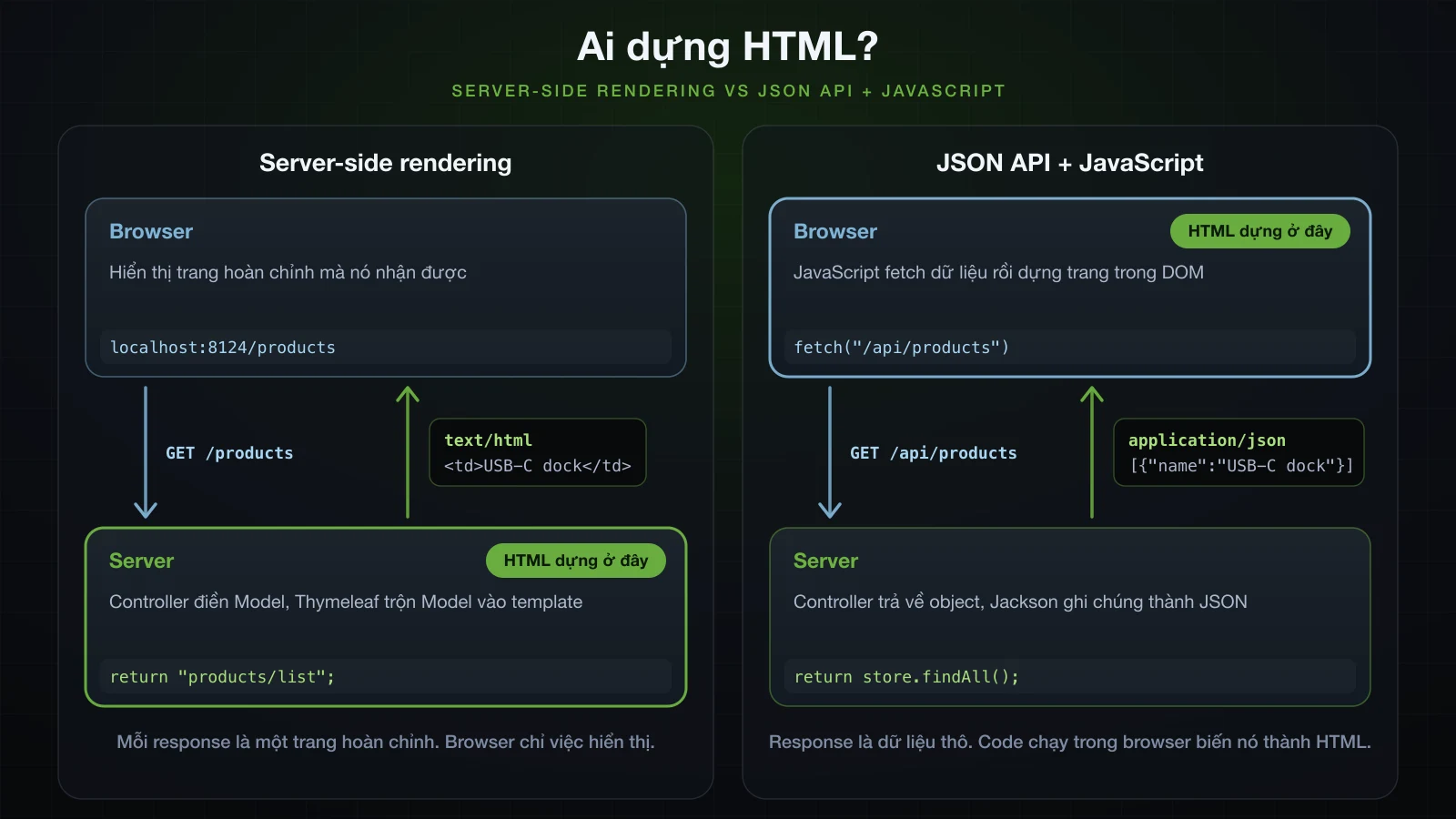
| Server-side rendering | JSON API + JavaScript | |
|---|---|---|
| Ai dựng HTML | server, ở mỗi request | JavaScript trong browser |
| Response chứa gì | một trang hoàn chỉnh, text/html | dữ liệu, application/json |
| Controller | @Controller trả về view name | @RestController trả về object |
| Chuyển trang và submit form | server trả về một trang mới | trang tự cập nhật tại chỗ |
| Thứ phải build và deploy | một application Spring Boot | một API cộng một front end riêng |
| Mobile app và các client khác | cần một API riêng | dùng lại chính các endpoint đó |
| Hợp với | trang admin, tool nội bộ, app nhiều form, site nội dung | UI tương tác cao, nhiều loại client |
SSR là lựa chọn đúng khi màn hình chủ yếu là bảng và form, người dùng là một nhóm xác định, và một team sở hữu toàn bộ application: trang admin, back-office và tool nội bộ, application CRUD nhiều form, và các site nội dung đơn giản mà mỗi URL là một trang. JSON API kèm front end JavaScript chỉ đáng thêm những phần việc đó khi giao diện thay đổi liên tục mà không tải lại trang, hoặc khi mobile app và các service khác cùng dùng một nguồn dữ liệu. Hai cách trộn được với nhau: một application Boot có thể phục vụ trang @Controller dưới /admin và endpoint @RestController dưới /api.
Thymeleaf không phải template engine duy nhất Boot hỗ trợ. Dependency management của 4.1.1 còn có starter cho FreeMarker, Mustache và Groovy Templates, còn JSP thì có từ trước tất cả. Thymeleaf là engine mà template vẫn là file HTML hợp lệ, điều mà phần natural template bên dưới tận dụng. Các thư viện như HTMX nằm giữa hai cách bằng việc chèn fragment render từ server vào trang; bài này không đi vào chúng.
Thêm Thymeleaf vào project Spring Boot
Bài này cần ba starter: web starter mà Boot 4 đặt tên là spring-boot-starter-webmvc, starter Thymeleaf và starter validation. Trên Spring Initializr, id của chúng là web, thymeleaf và validation:
curl -s "https://start.spring.io/starter.zip?type=gradle-project&language=java&bootVersion=4.1.1&javaVersion=21&groupId=com.example&artifactId=demo&name=demo&packageName=com.example.demo&dependencies=web,thymeleaf,validation" -o demo.zipFile build sinh ra liệt kê chúng như sau; Initializr còn thêm một starter -test tương ứng cho mỗi cái, ở đây lược bỏ:
dependencies {
	implementation 'org.springframework.boot:spring-boot-starter-thymeleaf'
	implementation 'org.springframework.boot:spring-boot-starter-validation'
	implementation 'org.springframework.boot:spring-boot-starter-webmvc'
}<dependency>
<groupId>org.springframework.boot</groupId>
<artifactId>spring-boot-starter-thymeleaf</artifactId>
</dependency>
<dependency>
<groupId>org.springframework.boot</groupId>
<artifactId>spring-boot-starter-validation</artifactId>
</dependency>
<dependency>
<groupId>org.springframework.boot</groupId>
<artifactId>spring-boot-starter-webmvc</artifactId>
</dependency>spring-boot-starter-thymeleaf resolve thành spring-boot-thymeleaf:4.1.1, kéo theo thymeleaf:3.1.5.RELEASE, thymeleaf-spring6:3.1.5.RELEASE, attoparser:2.0.7.RELEASE và unbescape:1.1.6.RELEASE. Artifact tích hợp vẫn giữ chữ spring6 trong tên dù đang chạy trên Spring Framework 7.0.9. Đó chính là module Boot 4.1.1 đặt lên classpath, không phải chỗ lệch version cần sửa.
Các giá trị mặc định của Boot, đọc từ property metadata trong các jar 4.1.1:
| Property | Mặc định | Điều khiển |
|---|---|---|
spring.thymeleaf.prefix | classpath:/templates/ | nối vào trước mọi view name |
spring.thymeleaf.suffix | .html | nối vào sau mọi view name |
spring.thymeleaf.mode | HTML | template mode |
spring.thymeleaf.encoding | UTF-8 | cách decode file template |
spring.thymeleaf.cache | true | có cache template đã parse hay không |
spring.thymeleaf.check-template-location | true | có kiểm tra thư mục templates tồn tại hay không |
Project hoàn chỉnh của bài này:
src/main
├── java/com/example/demo
│   ├── DemoApplication.java
│   └── product
│       ├── Product.java
│       ├── ProductController.java
│       ├── ProductForm.java
│       └── ProductStore.java
└── resources
    ├── application.properties
    ├── messages.properties
    ├── static
    │   └── css
    │       └── app.css
    └── templates
        ├── error.html
        ├── error
        │   └── 404.html
        ├── fragments
        │   └── layout.html
        └── products
            ├── detail.html
            ├── form.html
            └── list.html
Trang đầu tiên: @Controller trả về view name
Danh mục giữ dữ liệu trong bộ nhớ, bằng một ConcurrentHashMap và một AtomicLong để sinh id, vì database tới Chương 4 mới xuất hiện. Sản phẩm là một record:
package com.example.demo.product;

import java.math.BigDecimal;
import java.time.LocalDateTime;

public record Product(Long id, String name, BigDecimal price, int stock, LocalDateTime createdAt) {
}package com.example.demo.product;
import java.math.BigDecimal;
import java.time.LocalDateTime;
import java.util.Comparator;
import java.util.List;
import java.util.Optional;
import java.util.concurrent.ConcurrentHashMap;
import java.util.concurrent.atomic.AtomicLong;
import org.springframework.stereotype.Repository;
@Repository
public class ProductStore {
private final ConcurrentHashMap<Long, Product> products = new ConcurrentHashMap<>();
private final AtomicLong nextId = new AtomicLong();
public ProductStore() {
save("Mechanical keyboard", new BigDecimal("89.90"), 12);
save("USB-C dock", new BigDecimal("1299.00"), 3);
save("Laptop stand", new BigDecimal("34.50"), 0);
}
public List<Product> findAll() {
return products.values().stream()
.sorted(Comparator.comparing(Product::id))
.toList();
}
public Optional<Product> findById(long id) {
return Optional.ofNullable(products.get(id));
}
public Product save(String name, BigDecimal price, int stock) {
long id = nextId.incrementAndGet();
Product product = new Product(id, name, price, stock, LocalDateTime.now());
products.put(id, product);
return product;
}
}Controller là một @Controller bình thường. Bài 16 đã cho thấy khi không có @ResponseBody, giá trị String trả về là view name, và khi không có template engine thì cái tên đó kết thúc bằng 404. Khi Thymeleaf có trên classpath, cùng cái tên đó giờ resolve tới một template:
package com.example.demo.product;

import org.springframework.http.HttpStatus;
import org.springframework.stereotype.Controller;
import org.springframework.ui.Model;
import org.springframework.web.bind.annotation.GetMapping;
import org.springframework.web.bind.annotation.PathVariable;
import org.springframework.web.bind.annotation.RequestMapping;
import org.springframework.web.server.ResponseStatusException;

@Controller
@RequestMapping("/products")
public class ProductController {

    private final ProductStore store;

    public ProductController(ProductStore store) {
        this.store = store;
    }

    @GetMapping
    public String list(Model model) {
        model.addAttribute("products", store.findAll());
        return "products/list";
    }

    @GetMapping("/{id}")
    public String detail(@PathVariable long id, Model model) {
        Product product = store.findById(id)
                .orElseThrow(() -> new ResponseStatusException(HttpStatus.NOT_FOUND));
        model.addAttribute("product", product);
        return "products/detail";
    }
}
Model là map mà template đọc: list đặt danh sách sản phẩm dưới tên products, còn detail đặt một sản phẩm dưới tên product. ResponseStatusException với NOT_FOUND biến một id không tồn tại thành 404, và phần cuối bài render nó thành trang HTML.
Template cho products/list:
<!DOCTYPE html>
<html xmlns:th="http://www.thymeleaf.org" lang="en">
<head>
  <meta charset="UTF-8">
  <title th:text="#{products.title}">Products</title>
  <link rel="stylesheet" href="../../static/css/app.css" th:href="@{/css/app.css}">
</head>
<body>
<header th:replace="~{fragments/layout :: header}">Header placeholder</header>

<main>
  <h1 th:text="#{products.title}">Products</h1>

  <p class="flash" th:if="${message}" th:text="${message}">Created product #4</p>

  <p th:if="${#lists.isEmpty(products)}">No products yet.</p>

  <table th:unless="${#lists.isEmpty(products)}">
    <thead>
      <tr><th>#</th><th>Name</th><th>Price</th><th>Stock</th><th>Added</th></tr>
    </thead>
    <tbody>
      <tr th:each="p, stat : ${products}" th:classappend="${stat.odd} ? 'odd'">
        <td th:text="${stat.count}">1</td>
        <td><a th:href="@{/products/{id}(id=${p.id})}" th:text="${p.name}">Mechanical keyboard</a></td>
        <td th:text="${#numbers.formatDecimal(p.price, 1, 'COMMA', 2, 'POINT')}">89.90</td>
        <td class="stock" th:classappend="${p.stock < 5} ? 'low'">
          <span th:if="${p.stock > 0}" th:text="${p.stock}">12</span>
          <span th:unless="${p.stock > 0}">Out of stock</span>
        </td>
        <td th:text="${#temporals.format(p.createdAt, 'yyyy-MM-dd HH:mm')}">2026-10-23 09:30</td>
      </tr>
    </tbody>
  </table>

  <p><a th:href="@{/products/new}">Add a product</a></p>
</main>

<div th:insert="~{fragments/layout :: footer}">Footer placeholder</div>
</body>
</html>
Nó lấy header và footer từ một template thứ hai, và hai đoạn chữ từ file message. Cả hai được giải thích ở dưới; hãy tạo chúng ngay để trang render được:
<!DOCTYPE html>
<html xmlns:th="http://www.thymeleaf.org" lang="en">
<body>

<header th:fragment="header" class="site-header">
  <a th:href="@{/products}" th:text="#{app.name}">Product catalogue</a>
</header>

<footer th:fragment="footer" class="site-footer">
  <small>Rendered on the server by Thymeleaf</small>
</footer>

</body>
</html>app.name=Phụ kiện Hà Nội
products.title=ProductsBuild jar rồi khởi động. Port ở đây là 8124; bỏ flag đi thì port là 8080:
./gradlew bootJar
java -jar build/libs/demo-0.0.1-SNAPSHOT.jar --server.port=8124Rồi gọi trang:
curl -i http://localhost:8124/productsHTTP/1.1 200
Content-Type: text/html;charset=UTF-8
Content-Language: en-VN
Transfer-Encoding: chunked
Date: Sun, 13 Sep 2026 03:01:17 GMTPhần body bắt đầu như sau:
<!DOCTYPE html>
<html lang="en">
<head>
<meta charset="UTF-8">
<title>Products</title>
<link rel="stylesheet" href="/css/app.css">
</head>
<body>
<header class="site-header">
<a href="/products">Phụ kiện Hà Nội</a>
</header>
<main>
<h1>Products</h1>Mọi attribute th:* đều biến mất khỏi output. th:text thay chữ placeholder, th:href thay href tĩnh, #{app.name} thành tên cửa hàng tiếng Việt lấy từ messages.properties, và placeholder <header> bị thay bằng fragment. Xuống dưới trang, các dòng trống là chỗ th:if đã gỡ một element.
View name trở thành file template như thế nào
Thêm starter là đăng ký các bean thymeleafViewResolver, templateEngine và defaultTemplateResolver (bài 10 đã đếm chúng). Khi list trả về "products/list", ThymeleafViewResolver biến cái tên thành một ThymeleafView, và việc render view đó chuyển cái tên cho SpringTemplateEngine. SpringResourceTemplateResolver của engine dựng vị trí file bằng phép nối chuỗi — spring.thymeleaf.prefix, rồi view name, rồi spring.thymeleaf.suffix — và auto-configuration của Boot truyền thẳng hai property đó vào setPrefix và setSuffix của nó.
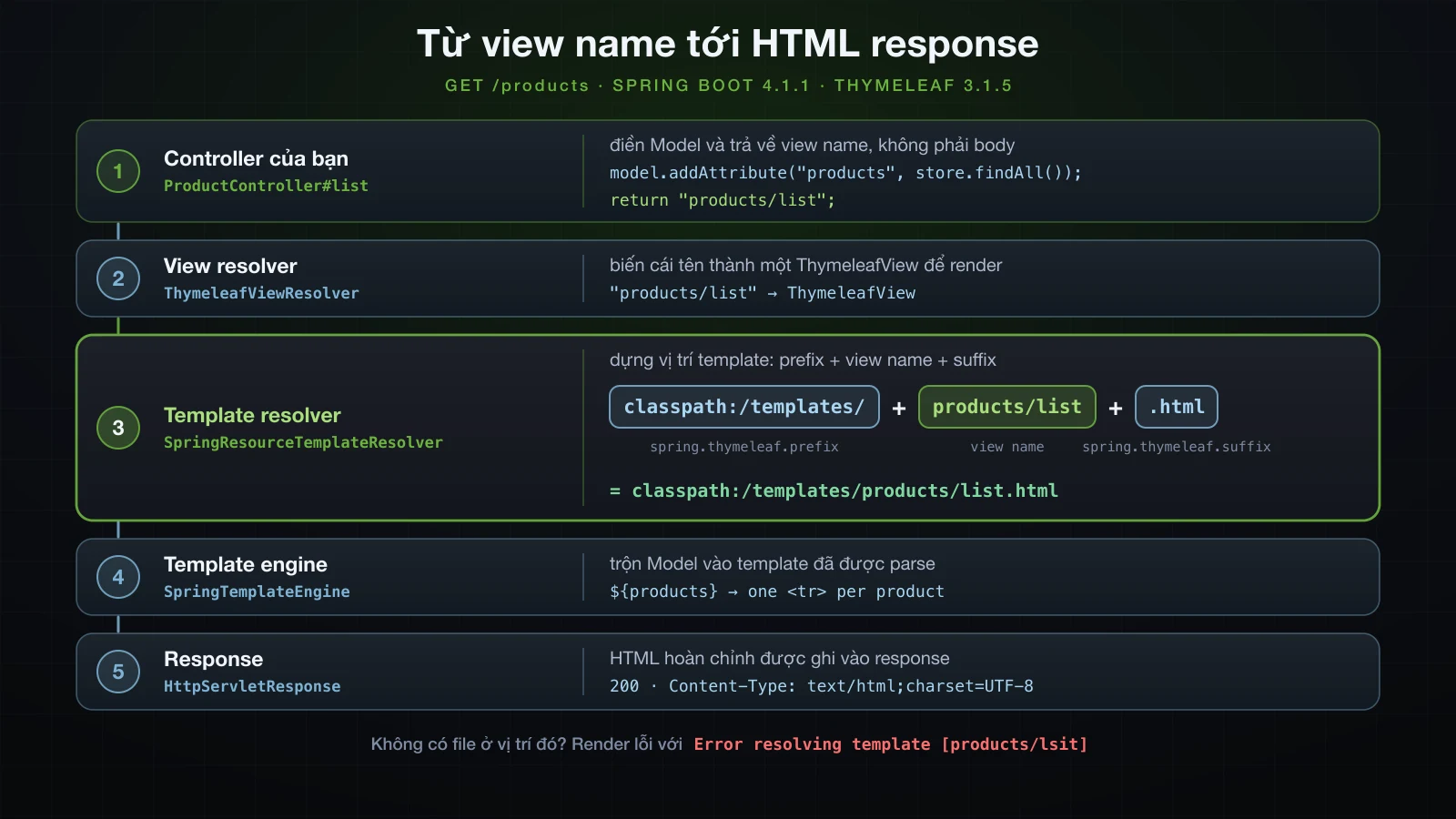
classpath:/templates/products/list.html là src/main/resources/templates/products/list.html trong source và BOOT-INF/classes/templates/products/list.html bên trong jar đã đóng gói. Dấu gạch chéo trong products/list chỉ là một phần của chuỗi, nên các thư mục con dưới templates/ không cần cấu hình gì.
View name không có template tương ứng
Gõ sai view name không làm application ngừng khởi động. Nó chỉ hỏng ở request đầu tiên, lúc resolver đi tìm file. Một handler trả về "products/lsit" nhận 500, và log nêu đúng thứ đã được tìm:
org.thymeleaf.exceptions.TemplateInputException: Error resolving template [products/lsit], template might not exist or might not be accessible by any of the configured Template ResolversNatural template mở thẳng được trên browser
Template Thymeleaf là file HTML có thêm attribute, không phải file viết bằng một cú pháp khác. Browser bỏ qua các attribute nó không biết, nên mở thẳng src/main/resources/templates/products/list.html từ ổ đĩa sẽ thấy một bản prototype tĩnh: chữ placeholder, dòng dữ liệu mẫu, mọi element có điều kiện cùng lúc — và cả stylesheet, vì href thường trỏ tới nó bằng đường dẫn tương đối:
<link rel="stylesheet" href="../../static/css/app.css" th:href="@{/css/app.css}">Tính từ templates/products/, ../../static/css/app.css chính là src/main/resources/static/css/app.css. Lúc chạy, th:href thay attribute đó bằng /css/app.css, như output render ở trên. Designer có thể chỉnh prototype ngay trên browser, và cùng file đó được ship làm template thật.
Các standard expression của Thymeleaf
Giá trị attribute trong Thymeleaf được viết bằng năm loại expression:
| Cú pháp | Tên | Tính ra | Dùng ở đây |
|---|---|---|---|
${…} | variable expression | một SpEL expression trên model | ${products} |
*{…} | selection expression | như trên, nhưng trên object mà th:object chọn | *{name} |
@{…} | link expression | URL kèm path variable, query parameter và context path | @{/products/{id}(id=${p.id})} |
#{…} | message expression | một đoạn chữ trong messages.properties | #{app.name} |
~{…} | fragment expression | một phần của template khác | ~{fragments/layout :: header} |
Variable expression và selection expression với th:object
${…} evaluate một Spring Expression Language (SpEL) expression trên model, nên ${products} là danh sách controller đã thêm vào và ${p.name} đọc một property của variable vòng lặp. Product là record, và p.name chạy được nhờ accessor name() của nó. Cùng cú pháp đó với tới các utility object có tên bắt đầu bằng #: #lists, #numbers, #temporals và, trong form, #fields. Một attribute không tồn tại evaluate ra null, và th:if coi đó là false. Đó là cách th:if="${message}" ẩn đoạn flash khi không có message.
*{…} là cùng phép evaluate đó nhưng trên object mà th:object gần nhất chọn, đỡ phải lặp lại tên variable. Trang chi tiết chọn product ngay trên <main>:
<!DOCTYPE html>
<html xmlns:th="http://www.thymeleaf.org" lang="en">
<head>
<meta charset="UTF-8">
<title th:text="${product.name}">Product</title>
<link rel="stylesheet" href="../../static/css/app.css" th:href="@{/css/app.css}">
</head>
<body>
<header th:replace="~{fragments/layout :: header}">Header placeholder</header>
<main th:object="${product}">
<h1 th:text="*{name}">Mechanical keyboard</h1>
<dl>
<dt>Price</dt>
<dd th:text="*{#numbers.formatDecimal(price, 1, 'COMMA', 2, 'POINT')}">89.90</dd>
<dt>Stock</dt>
<dd th:text="*{stock}">12</dd>
<dt>Added</dt>
<dd th:text="*{#temporals.format(createdAt, 'dd/MM/yyyy HH:mm')}">23/10/2026 09:30</dd>
</dl>
<p><a th:href="@{/products}">Back to the list</a></p>
</main>
<footer th:replace="~{fragments/layout :: footer}">Footer placeholder</footer>
</body>
</html>curl -s http://localhost:8124/products/2<main>
<h1>USB-C dock</h1>
<dl>
<dt>Price</dt>
<dd>1,299.00</dd>
<dt>Stock</dt>
<dd>3</dd>
<dt>Added</dt>
<dd>13/09/2026 10:01</dd>
</dl>
<p><a href="/products">Back to the list</a></p>
</main>Bản thân th:object cũng biến mất khỏi output. Lời gọi utility vẫn chạy trong selection: *{#numbers.formatDecimal(price, …)} đọc price từ product đang được chọn.
Link expression và context path
@{…} dựng URL. Nó điền path variable, biến các parameter còn lại thành query string, encode giá trị, và — lý do nên dùng nó thay cho href viết cứng — thêm context path của application. Các link sau được render với id là 2 và q là "tai nghe & loa" trong model:
<a th:href="@{/products}">list</a>
<a th:href="@{/products/{id}(id=${id})}">detail</a>
<a th:href="@{/products/{id}(id=${id}, tab='reviews')}">detail with query</a>
<a th:href="@{/products(sort='price', dir='desc')}">sorted</a>
<a th:href="@{/products(q=${q})}">search</a>
<a th:href="@{css/app.css}">relative</a><a href="/products">list</a>
<a href="/products/2">detail</a>
<a href="/products/2?tab=reviews">detail with query</a>
<a href="/products?sort=price&dir=desc">sorted</a>
<a href="/products?q=tai%20nghe%20%26%20loa">search</a>
<a href="css/app.css">relative</a>Parameter nào có tên xuất hiện trong path, như {id}, sẽ được thay vào; phần còn lại thành query string. Giá trị có dấu cách và & được percent-encode, còn dấu & giữa hai parameter được viết là & — đúng dạng bên trong attribute HTML, browser sẽ tự decode. Chạy cùng jar đó dưới một context path thì mọi link bắt đầu bằng / đều đổi:
java -jar build/libs/demo-0.0.1-SNAPSHOT.jar --server.port=8124 --server.servlet.context-path=/shop<a href="/shop/products">list</a>
<a href="/shop/products/2">detail</a>
<a href="/shop/products/2?tab=reviews">detail with query</a>
<a href="/shop/products?sort=price&dir=desc">sorted</a>
<a href="/shop/products?q=tai%20nghe%20%26%20loa">search</a>
<a href="css/app.css">relative</a>Một href="/products" viết cứng vẫn trỏ về /products và hỏng. Link cuối cho thấy dạng còn lại: không có dấu / ở đầu, @{css/app.css} là đường dẫn tương đối theo trang hiện tại và không được thêm context path.
Message expression và encoding của messages.properties
#{app.name} tra key trong messages.properties ở gốc classpath, tức file mà giá trị mặc định messages của spring.messages.basename trỏ tới. Boot chỉ tạo MessageSource khi file đó tồn tại. Nếu không có file, hoặc basename không khớp file nào, Thymeleaf in ra key cùng locale của request, kẹp giữa các dấu hỏi. Đây là header khi chạy với --spring.messages.basename=nope:
<header class="site-header">
<a href="/products">??app.name_en_VN??</a>
</header>en_VN là locale mà request resolve ra trên máy này; các response mang nó trong header Content-Language: en-VN.
Encoding là chỗ file message khác application.properties. Bài 11 đã thấy Boot đọc application.properties bằng ISO-8859-1. Còn message bundle được đọc theo spring.messages.encoding, mặc định là UTF-8 trong metadata của 4.1.1, nên tên cửa hàng tiếng Việt render đúng mà không cần escape gì. Chạy jar với --spring.messages.encoding=ISO-8859-1 sẽ thấy charset sai gây ra gì: Phụ thành Phụ, còn ệ và ộ mỗi chữ biến thành á» kèm một ký tự điều khiển vô hình, lần lượt là U+0087 và U+0099.
Fragment expression
~{fragments/layout :: header} gồm tên một template, được resolve với cùng prefix và suffix thành templates/fragments/layout.html, và một selector, ở đây là fragment tên header. Fragment expression là thứ mà th:replace và th:insert nhận vào; phần layout sẽ so sánh hai attribute này. Hãy luôn bọc chúng trong ~{…}. Dạng cũ không bọc vẫn render được ở 3.1.5, nhưng một template thử nghiệm dùng nó:
<div th:replace="fragments/layout :: footer">unwrapped</div>đã log ra cảnh báo này:
2026-09-13T10:01:17.431+07:00 WARN 22609 --- [demo] [nio-8124-exec-6] actStandardFragmentInsertionTagProcessor : [THYMELEAF][http-nio-8124-exec-6][lab/status] Deprecated unwrapped fragment expression "fragments/layout :: footer" found in template lab/status, line 10, col 6. Please use the complete syntax of fragment expressions instead ("~{fragments/layout :: footer}"). The old, unwrapped syntax for fragment expressions will be removed in future versions of Thymeleaf.th:text và th:utext: escape và XSS
th:text ghi giá trị dưới dạng chữ và escape các ký tự đặc biệt của HTML. th:utext ghi giá trị nguyên văn, như markup. Khác biệt này quan trọng ngay khi giá trị đến từ người dùng. Ở đây một model attribute name chứa <script>alert(1)</script> được render theo cả hai cách:
<p th:text="${name}">placeholder</p>
<p th:utext="${name}">placeholder</p><p><script>alert(1)</script></p>
<p><script>alert(1)</script></p>Dòng đầu là chữ để browser hiển thị. Dòng thứ hai là script để browser chạy, và đó là lỗ hổng cross-site scripting (XSS): ai lưu được tên sản phẩm là chạy được JavaScript trong browser của mọi người mở trang. Danh mục dùng th:text ở mọi chỗ, nên một sản phẩm tạo qua form với cái tên đó là vô hại:
curl -s -X POST http://localhost:8124/products --data-urlencode 'name=<script>alert(1)</script>' -d 'price=1.00&stock=1'Dòng của nó trong danh sách sau đó:
<td><a href="/products/5"><script>alert(1)</script></a></td>Giá trị attribute cũng được escape, đó là lý do dấu & trong link lúc nãy ra thành &. Chỉ dùng th:utext cho HTML do chính code của bạn tạo ra hoặc đã sanitize, không bao giờ cho input thô của người dùng.
Vòng lặp, điều kiện và định dạng trong Thymeleaf
th:each và iteration status variable
Phần thân bảng của list.html làm mọi việc bằng attribute:
<tr th:each="p, stat : ${products}" th:classappend="${stat.odd} ? 'odd'">
<td th:text="${stat.count}">1</td>
<td><a th:href="@{/products/{id}(id=${p.id})}" th:text="${p.name}">Mechanical keyboard</a></td>
<td th:text="${#numbers.formatDecimal(p.price, 1, 'COMMA', 2, 'POINT')}">89.90</td>
<td class="stock" th:classappend="${p.stock < 5} ? 'low'">
<span th:if="${p.stock > 0}" th:text="${p.stock}">12</span>
<span th:unless="${p.stock > 0}">Out of stock</span>
</td>
<td th:text="${#temporals.format(p.createdAt, 'yyyy-MM-dd HH:mm')}">2026-10-23 09:30</td>
</tr>Dòng thứ hai và thứ ba nó tạo ra:
<tr>
<td>2</td>
<td><a href="/products/2">USB-C dock</a></td>
<td>1,299.00</td>
<td class="stock low">
<span>3</span>
</td>
<td>2026-09-13 10:01</td>
</tr>
<tr class="odd">
<td>3</td>
<td><a href="/products/3">Laptop stand</a></td>
<td>34.50</td>
<td class="stock low">
<span>Out of stock</span>
</td>
<td>2026-09-13 10:01</td>
</tr>th:each="p, stat : ${products}" lặp <tr> một lần cho mỗi sản phẩm, với p là phần tử hiện tại và stat là iteration status. Một template thử nghiệm in ra mọi property của status cho một danh sách ba phần tử:
| Property | Ý nghĩa | Giá trị với các phần tử a, b, c |
|---|---|---|
index | vị trí, đếm từ 0 | 0, 1, 2 |
count | vị trí, đếm từ 1 | 1, 2, 3 |
size | số phần tử | 3, 3, 3 |
odd / even | chẵn lẻ theo count, nên phần tử đầu là lẻ | odd: true, false, true |
first / last | có phải phần tử đầu hoặc cuối không | first: true, false, false; last: false, false, true |
current | chính phần tử đó | a, b, c |
Khai báo status variable là không bắt buộc. Nếu bỏ đi, Thymeleaf tự tạo một cái mang tên phần tử kèm hậu tố Stat: th:each="item : ${items}" với ${itemStat.count} render ra 1, 2 và 3.
th:if, th:unless và th:classappend
th:if giữ element khi expression đúng và gỡ nó, cả phần con, khi sai; th:unless thì ngược lại. Ô tồn kho dùng cặp này để hiện hoặc con số hoặc Out of stock, và trong các dòng đã render, <span> bị gỡ để lại một dòng trống. Cặp đó đặt trên bảng và trên đoạn "No products yet." nghĩa là đúng một trong hai xuất hiện.
th:classappend thêm class vào class sẵn có của element. class="stock" cộng ${p.stock < 5} ? 'low' render thành class="stock low" cho USB-C dock và Laptop stand, và class="stock" trơn cho Mechanical keyboard. Trên <tr>, vốn không có class, ${stat.odd} ? 'odd' tạo attribute ở dòng 1 và 3 và để dòng 2 trống: điều kiện không có vế else thì không sinh ra gì khi sai.
Định dạng BigDecimal và LocalDateTime bằng #numbers và #temporals
#numbers.formatDecimal(p.price, 1, 'COMMA', 2, 'POINT') nhận số chữ số phần nguyên tối thiểu, dấu phân cách hàng nghìn, số chữ số thập phân và dấu thập phân. Cả hai dấu phân cách được chỉ định rõ, nên output không đổi theo locale của request: giá 1299.00 render thành 1,299.00, còn 89.90 vẫn là 89.90.
#temporals.format(p.createdAt, 'yyyy-MM-dd HH:mm') định dạng một LocalDateTime theo pattern và render ra 2026-09-13 10:01; pattern 'dd/MM/yyyy HH:mm' ở trang chi tiết cho 13/09/2026 10:01. #temporals không cần thêm dependency nào ở 3.1.5, vì org/thymeleaf/expression/Temporals.class nằm ngay trong thymeleaf-3.1.5.RELEASE.jar. Các bài hướng dẫn viết cho Thymeleaf 3.0 thêm thymeleaf-extras-java8time để có nó; ở version này dependency đó là thừa.
Form tạo mới có validation
Form cần một object để bind vào. ProductForm giữ những gì người dùng gõ, cùng các constraint mà bài 19 đã trình bày. Nó là class thường có getter và setter, thứ mà th:field đọc lại khi điền giá trị vào input, và các field dùng wrapper type để một input rỗng bind thành null:
package com.example.demo.product;
import java.math.BigDecimal;
import jakarta.validation.constraints.DecimalMin;
import jakarta.validation.constraints.NotBlank;
import jakarta.validation.constraints.NotNull;
import jakarta.validation.constraints.PositiveOrZero;
import jakarta.validation.constraints.Size;
public class ProductForm {
@NotBlank
@Size(max = 80)
private String name;
@NotNull
@DecimalMin("0.01")
private BigDecimal price;
@NotNull
@PositiveOrZero
private Integer stock;
public String getName() { return name; }
public void setName(String name) { this.name = name; }
public BigDecimal getPrice() { return price; }
public void setPrice(BigDecimal price) { this.price = price; }
public Integer getStock() { return stock; }
public void setStock(Integer stock) { this.stock = stock; }
}Controller có thêm hai method. GET /products/new đặt một ProductForm rỗng vào model dưới tên product. POST /products validate nó rồi hoặc hiện lại form, hoặc lưu sản phẩm và redirect:
package com.example.demo.product;
import org.springframework.http.HttpStatus;
import org.springframework.stereotype.Controller;
import org.springframework.ui.Model;
import org.springframework.validation.BindingResult;
import org.springframework.web.bind.annotation.GetMapping;
import org.springframework.web.bind.annotation.ModelAttribute;
import org.springframework.web.bind.annotation.PathVariable;
import org.springframework.web.bind.annotation.PostMapping;
import org.springframework.web.bind.annotation.RequestMapping;
import org.springframework.web.server.ResponseStatusException;
import org.springframework.web.servlet.mvc.support.RedirectAttributes;
import jakarta.validation.Valid;
@Controller
@RequestMapping("/products")
public class ProductController {
private final ProductStore store;
public ProductController(ProductStore store) {
this.store = store;
}
@GetMapping
public String list(Model model) {
model.addAttribute("products", store.findAll());
return "products/list";
}
@GetMapping("/{id}")
public String detail(@PathVariable long id, Model model) {
Product product = store.findById(id)
.orElseThrow(() -> new ResponseStatusException(HttpStatus.NOT_FOUND));
model.addAttribute("product", product);
return "products/detail";
}
@GetMapping("/new")
public String newForm(Model model) {
model.addAttribute("product", new ProductForm());
return "products/form";
}
@PostMapping
public String create(@Valid @ModelAttribute("product") ProductForm form,
BindingResult result,
RedirectAttributes redirectAttributes) {
if (result.hasErrors()) {
return "products/form";
}
Product saved = store.save(form.getName(), form.getPrice(), form.getStock());
redirectAttributes.addFlashAttribute("message", "Created product #" + saved.id());
return "redirect:/products";
}
}Template bind form vào object đó:
<!DOCTYPE html>
<html xmlns:th="http://www.thymeleaf.org" lang="en">
<head>
<meta charset="UTF-8">
<title>New product</title>
<link rel="stylesheet" href="../../static/css/app.css" th:href="@{/css/app.css}">
</head>
<body>
<header th:replace="~{fragments/layout :: header}">Header placeholder</header>
<main>
<h1>New product</h1>
<form th:action="@{/products}" th:object="${product}" method="post">
<p class="error-summary" th:if="${#fields.hasAnyErrors()}">Please fix the fields marked below.</p>
<label for="name">Name</label>
<input type="text" th:field="*{name}" th:classappend="${#fields.hasErrors('name')} ? 'invalid'">
<p class="error" th:if="${#fields.hasErrors('name')}" th:errors="*{name}">Name error</p>
<label for="price">Price</label>
<input type="text" th:field="*{price}" th:classappend="${#fields.hasErrors('price')} ? 'invalid'">
<p class="error" th:if="${#fields.hasErrors('price')}" th:errors="*{price}">Price error</p>
<label for="stock">Stock</label>
<input type="number" th:field="*{stock}" th:classappend="${#fields.hasErrors('stock')} ? 'invalid'">
<p class="error" th:if="${#fields.hasErrors('stock')}" th:errors="*{stock}">Stock error</p>
<button type="submit">Save</button>
</form>
</main>
<footer th:replace="~{fragments/layout :: footer}">Footer placeholder</footer>
</body>
</html>th:object="${product}" trên <form> chọn form object, và mỗi th:field="*{name}" bind một input với một property. Form rỗng:
curl -s http://localhost:8124/products/new <form action="/products" method="post">
<label for="name">Name</label>
<input type="text" id="name" name="name" value="">
<label for="price">Price</label>
<input type="text" id="price" name="price" value="">
<label for="stock">Stock</label>
<input type="number" id="stock" name="stock" value="">
<button type="submit">Save</button>
</form>th:field ghi id, name và value chỉ từ một attribute, còn th:action="@{/products}" sinh ra action="/products", kèm context path nếu có. Khi thêm Spring Security ở Chương 5, các form render bằng th:action sẽ có CSRF token.
Hiển thị lỗi field bằng th:field và th:errors
Submit ba giá trị sai — tên rỗng, giá không phải số và tồn kho âm:
curl -s -X POST http://localhost:8124/products -d 'name=&price=abc&stock=-1' <form action="/products" method="post">
<p class="error-summary">Please fix the fields marked below.</p>
<label for="name">Name</label>
<input type="text" class="invalid" id="name" name="name" value="">
<p class="error">must not be blank</p>
<label for="price">Price</label>
<input type="text" class="invalid" id="price" name="price" value="abc">
<p class="error">Failed to convert property value of type 'java.lang.String' to required type 'java.math.BigDecimal' for property 'price'; Character a is neither a decimal digit number, decimal point, nor "e" notation exponential mark.</p>
<label for="stock">Stock</label>
<input type="number" class="invalid" id="stock" name="stock" value="-1">
<p class="error">must be greater than or equal to 0</p>
<button type="submit">Save</button>
</form>Response là một trang 200 bình thường chứ không phải lỗi. #fields.hasErrors('name') hỏi BindingResult xem field có lỗi không, th:errors="*{name}" in các message lỗi, và th:classappend đánh dấu mỗi input là invalid. Mọi giá trị người dùng đã gõ đều được giữ lại, kể cả abc, thứ không bao giờ lưu được vào BigDecimal: th:field hiển thị lại giá trị bị từ chối mà BindingResult giữ, chứ không phải property của object.
Message của ô giá là câu mặc định của Spring khi chuyển type thất bại, không phải thứ nên cho người dùng xem. Spring tra message cho lỗi chuyển type theo code typeMismatch, và một key typeMismatch.price trong messages.properties sẽ thay nó:
app.name=Phụ kiện Hà Nội
products.title=Products
typeMismatch.price=Enter a number, for example 19.90 <input type="text" class="invalid" id="price" name="price" value="abc">
<p class="error">Enter a number, for example 19.90</p>BindingResult phải đặt ở đâu trong method signature
BindingResult result nằm ngay sau argument có @Valid, và vị trí đó mang tính quyết định. Đây là cùng method nhưng RedirectAttributes bị chuyển vào giữa:
@PostMapping
public String create(@Valid @ModelAttribute("product") ProductForm form,
                     RedirectAttributes redirectAttributes,
                     BindingResult result) {
Submit form rỗng thì nó trả 400 thay vì hiện form, và Spring log:
2026-09-13T10:07:35.390+07:00 WARN 40204 --- [demo] [nio-8124-exec-6] .w.s.m.s.DefaultHandlerExceptionResolver : Resolved [org.springframework.web.bind.MethodArgumentNotValidException: Validation failed for argument [0] in public java.lang.String com.example.demo.product.ProductController.create(com.example.demo.product.ProductForm,org.springframework.web.servlet.mvc.support.RedirectAttributes,org.springframework.validation.BindingResult) with 3 errors: [Field error in object 'product' on field 'price': rejected value [null]; codes [NotNull.product.price,NotNull.price,NotNull.java.math.BigDecimal,NotNull]; arguments [org.springframework.context.support.DefaultMessageSourceResolvable: codes [product.price,price]; arguments []; default message [price]]; default message [must not be null]] [Field error in object 'product' on field 'stock': rejected value [null]; codes [NotNull.product.stock,NotNull.stock,NotNull.java.lang.Integer,NotNull]; arguments [org.springframework.context.support.DefaultMessageSourceResolvable: codes [product.stock,stock]; arguments []; default message [stock]]; default message [must not be null]] [Field error in object 'product' on field 'name': rejected value []; codes [NotBlank.product.name,NotBlank.name,NotBlank.java.lang.String,NotBlank]; arguments [org.springframework.context.support.DefaultMessageSourceResolvable: codes [product.name,name]; arguments []; default message [name]]; default message [must not be blank]] ]Có hai lần kiểm tra riêng biệt, cả hai đều thấy được trong bytecode của Spring Web 7.0.9. Khi validation thất bại, ModelAttributeMethodProcessor.isBindExceptionRequired nhìn vào parameter ngay sau form object — index cộng một — và throw trừ khi type của parameter đó là Errors. Ở đây nó là RedirectAttributes, nên lỗi validation thành MethodArgumentNotValidException và Spring trả 400 mà không gọi method, y như khi hoàn toàn không có parameter BindingResult. Khi validation thành công, không có gì bị throw, và ErrorsMethodArgumentResolver lấy BindingResult từ attribute cuối cùng trong model, vẫn là binding result của form. Vì vậy một submission hợp lệ qua đúng signature đó vẫn trả 302 và lưu sản phẩm. Test với dữ liệu tốt thì pass; người dùng đầu tiên để trống một field sẽ gặp trang lỗi.
Khai báo trước form object thì BindingResult hỏng ở mọi request, hợp lệ hay không, với 500. Một method thử nghiệm before(BindingResult result, @Valid @ModelAttribute("product") ProductForm form) log ra:
java.lang.IllegalStateException: An Errors/BindingResult argument is expected to be declared immediately after the model attribute, the @RequestBody or the @RequestPart arguments to which they apply: public java.lang.String com.example.demo.lab.LabController.before(org.springframework.validation.BindingResult,com.example.demo.product.ProductForm)Quy tắc rất ngắn: argument @Valid @ModelAttribute đứng trước, BindingResult của nó ngay sau, mọi thứ khác đặt sau cùng.
Tên model attribute phải khớp với th:object
@ModelAttribute("product") không phải để trang trí. Không có tên, Spring tự suy ra tên từ type là productForm, và lưu object cùng BindingResult của nó dưới tên đó. Template lại hỏi product, nên việc render lại form sau khi validation thất bại sẽ hỏng. Một handler khai báo (@Valid ProductForm form, BindingResult result) trả "products/form" khi có lỗi đã nhận 500, với TemplateProcessingException tại #fields.hasAnyErrors() ở dòng 15 của form.html và nguyên nhân này:
Caused by: java.lang.IllegalStateException: Neither BindingResult nor plain target object for bean name 'product' available as request attributeTên trong @ModelAttribute, attribute mà handler GET thêm vào, và expression của th:object phải là cùng một chuỗi.
Post/Redirect/Get với flash attribute
Khi form hợp lệ, create không render trang nào. Nó lưu sản phẩm, cất một message bằng addFlashAttribute và trả về redirect:/products. Quan sát bằng curl, lưu cookie vào một file:
curl -i -c cookies.txt -X POST http://localhost:8124/products --data-urlencode 'name=Wireless mouse' -d 'price=25.00&stock=40'HTTP/1.1 302
Set-Cookie: JSESSIONID=00C398D4E3039C59BDC4E43E2B3EE1B0; Path=/; HttpOnly
Location: http://localhost:8124/products;jsessionid=00C398D4E3039C59BDC4E43E2B3EE1B0
Content-Language: en-VN
Content-Length: 0
Date: Sun, 13 Sep 2026 03:01:17 GMTMột 302 có header Location, body rỗng, và một session mới. Chính flash attribute đã tạo ra session: Spring MVC giữ flash attribute trong HTTP session cho tới khi request kế tiếp lấy nó ra. Đi theo redirect với cùng cookie thì thấy message:
curl -s -b cookies.txt http://localhost:8124/products | grep flash <p class="flash">Created product #4</p>Chạy lại y hệt lệnh đó lần thứ hai thì không in ra gì, vì GET đầu tiên đã dùng hết flash attribute. Flash attribute sống qua đúng một lần redirect.
Vì sao redirect mang theo ;jsessionid
Location ở trên kết thúc bằng ;jsessionid=…. Session được tạo ra bởi chính response này, nên Tomcat chưa thể biết client có nhận cookie hay không, và nó encode luôn session id vào URL redirect. Browser sau đó hiện chuỗi này trên thanh địa chỉ, trong bookmark và trong mọi link được copy. Giới hạn session tracking chỉ dùng cookie là hết:
spring.application.name=demo
server.servlet.session.tracking-modes=cookie HTTP/1.1 302
Set-Cookie: JSESSIONID=BDA445A969CA403FCEE69671698D13D9; Path=/; HttpOnly
Location: http://localhost:8124/products
Content-Language: en-VN
Content-Length: 0
Date: Sun, 13 Sep 2026 03:01:18 GMTRefresh trên browser lặp lại request nào
Ý nghĩa của redirect nằm ở thứ browser giữ lại sau đó. Điều khiển form thật trong headless Chrome qua DevTools protocol, rồi nhấn reload, ghi lại các request cấp trang sau:
1. open the form
  -> GET http://localhost:8124/products/new
  <- 200
2. fill in and submit
  -> POST http://localhost:8124/products
  <- 302 Location: http://localhost:8124/products
  -> GET http://localhost:8124/products
  <- 200
  page: {"url":"http://localhost:8124/products","flash":"Created product #5"}
3. press refresh
  -> GET http://localhost:8124/products
  <- 200
  page: {"url":"http://localhost:8124/products","flash":null}
POST và 302 của nó chỉ xảy ra một lần. Trang đang hiển thị đến từ GET đi theo sau redirect, nên reload lặp lại chính GET đó — và flash message, đã bị dùng, không còn nữa. Để so sánh, đây là cùng trace đó với một handler thử nghiệm render kết quả thẳng từ POST, không redirect, và hiện số POST mà server đã đếm được:
1. open the form
  -> GET http://localhost:8124/lab/echo-form
  <- 200
  (load)
2. fill in and submit (the POST renders the page, no redirect)
  -> POST http://localhost:8124/lab/echo
  <- 200
  (load)
  page: {"url":"http://localhost:8124/lab/echo","name":"Webcam","postsSeenByServer":"1"}
3. press refresh
  -> POST http://localhost:8124/lab/echo
  <- 200
  (load)
  page: {"url":"http://localhost:8124/lab/echo","name":"Webcam","postsSeenByServer":"2"}
Reload gửi lại POST, và server đếm thêm một lần submit. Với form tạo mới, đó là một sản phẩm bị trùng.
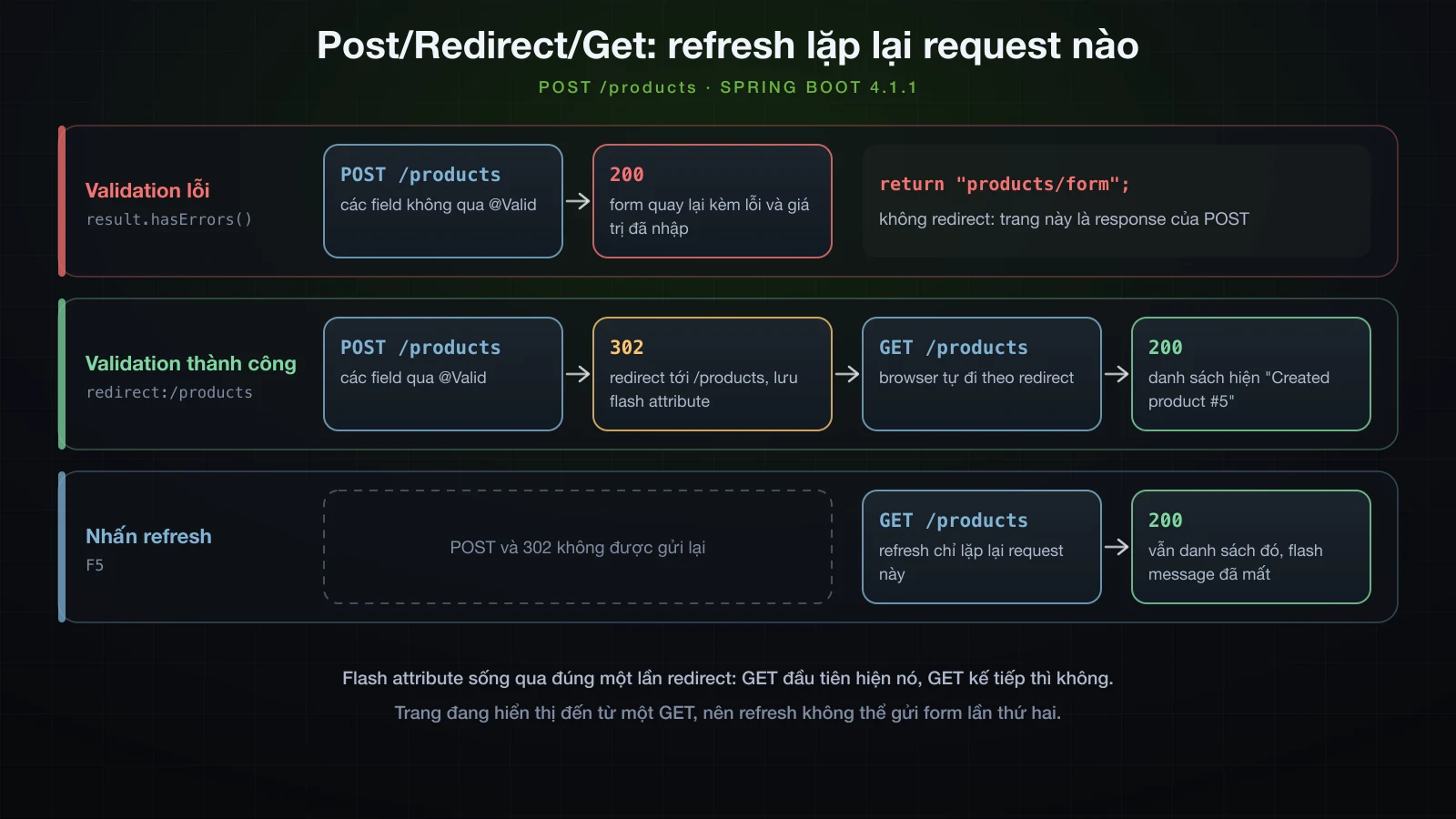
Nhánh lỗi cố ý không redirect. Render form thẳng từ POST là cách giữ được BindingResult, các message lỗi và giá trị đã gõ trong response.
Tái sử dụng layout với th:fragment, th:replace và th:insert
fragments/layout.html khai báo hai fragment, th:fragment="header" và th:fragment="footer"; phần còn lại của file chỉ là khung để nó tự là một trang HTML hợp lệ. Trang danh sách dùng chúng theo hai cách khác nhau, <header th:replace="~{fragments/layout :: header}"> và <div th:insert="~{fragments/layout :: footer}">. th:replace thay element chủ bằng fragment:
<header class="site-header">
  <a href="/products">Phụ kiện Hà Nội</a>
</header>
th:insert giữ element chủ và đặt fragment vào bên trong:
<div><footer class="site-footer">
  <small>Rendered on the server by Thymeleaf</small>
</footer></div>
Placeholder <header> đã biến mất và <header class="site-header"> của chính fragment đứng vào chỗ đó, còn footer thì bị bọc trong <div> chủ. Dùng th:replace khi fragment là toàn bộ element, trường hợp thường gặp, và th:insert khi element chủ phải được giữ lại; trang chi tiết và trang form dùng th:replace cho cả hai.
Với một layout trang đầy đủ mà mọi trang đều khoác lên, lựa chọn phổ biến là Thymeleaf Layout Dialect của bên thứ ba, nz.net.ultraq.thymeleaf:thymeleaf-layout-dialect: Boot 4.1.1 quản lý nó ở version 4.0.1 và tự đăng ký dialect ngay khi jar có trên classpath.
Phục vụ CSS từ src/main/resources/static
Boot phục vụ các file dưới src/main/resources/static từ gốc của application, nên static/css/app.css là /css/app.css:
body { font-family: system-ui, sans-serif; margin: 2rem auto; max-width: 48rem; }
table { border-collapse: collapse; width: 100%; }
td, th { padding: .4rem .6rem; text-align: left; }
tr.odd { background: #f4f6f8; }
.low { color: #b45309; font-weight: 600; }
.flash { background: #dcfce7; padding: .5rem .75rem; }
.invalid { border-color: #dc2626; }
.error { color: #dc2626; margin: .25rem 0 1rem; }curl -I http://localhost:8124/css/app.cssHTTP/1.1 200
Last-Modified: Sun, 13 Sep 2026 03:01:15 GMT
Accept-Ranges: bytes
Content-Type: text/css
Content-Length: 399
Date: Sun, 13 Sep 2026 03:01:17 GMTCác template link tới nó bằng th:href="@{/css/app.css}", thứ sẽ thêm context path: dưới /shop, link render ra là href="/shop/css/app.css".
spring.thymeleaf.cache thực sự thay đổi điều gì
spring.thymeleaf.cache mặc định là true, và Boot truyền nó vào hai chỗ: SpringResourceTemplateResolver.setCacheable, cho phép engine giữ template đã parse, và ThymeleafViewResolver.setCache, cache các view object đã resolve của Spring MVC. Thymeleaf log template cache của nó ở mức TRACE, nhờ vậy thấy được tác dụng thứ nhất:
java -jar build/libs/demo-0.0.1-SNAPSHOT.jar --server.port=8124 --logging.level.org.thymeleaf.TemplateEngine.cache.TEMPLATE_CACHE=TRACEHai request tới /products:
2026-09-13T10:07:35.257+07:00 TRACE 40204 --- [demo] [nio-8124-exec-2] o.t.TemplateEngine.cache.TEMPLATE_CACHE  : [THYMELEAF][CACHE_INITIALIZE] Initializing cache TEMPLATE_CACHE. Max size: 200. Soft references are used.
2026-09-13T10:07:35.263+07:00 TRACE 40204 --- [demo] [nio-8124-exec-2] o.t.TemplateEngine.cache.TEMPLATE_CACHE  : [THYMELEAF][http-nio-8124-exec-2][TEMPLATE_CACHE][CACHE_MISS] Cache miss in cache "TEMPLATE_CACHE" for key "products/list".
2026-09-13T10:07:35.280+07:00 TRACE 40204 --- [demo] [nio-8124-exec-2] o.t.TemplateEngine.cache.TEMPLATE_CACHE  : [THYMELEAF][http-nio-8124-exec-2][TEMPLATE_CACHE][CACHE_ADD][1] Adding cache entry in cache "TEMPLATE_CACHE" for key "products/list". New size is 1.
2026-09-13T10:07:35.321+07:00 TRACE 40204 --- [demo] [nio-8124-exec-2] o.t.TemplateEngine.cache.TEMPLATE_CACHE  : [THYMELEAF][http-nio-8124-exec-2][TEMPLATE_CACHE][CACHE_MISS] Cache miss in cache "TEMPLATE_CACHE" for key "fragments/layout@(products/list;0,0)::[header]".
2026-09-13T10:07:35.324+07:00 TRACE 40204 --- [demo] [nio-8124-exec-2] o.t.TemplateEngine.cache.TEMPLATE_CACHE  : [THYMELEAF][http-nio-8124-exec-2][TEMPLATE_CACHE][CACHE_ADD][2] Adding cache entry in cache "TEMPLATE_CACHE" for key "fragments/layout@(products/list;0,0)::[header]". New size is 2.
2026-09-13T10:07:35.345+07:00 TRACE 40204 --- [demo] [nio-8124-exec-2] o.t.TemplateEngine.cache.TEMPLATE_CACHE  : [THYMELEAF][http-nio-8124-exec-2][TEMPLATE_CACHE][CACHE_MISS] Cache miss in cache "TEMPLATE_CACHE" for key "fragments/layout@(products/list;0,0)::[footer]".
2026-09-13T10:07:35.346+07:00 TRACE 40204 --- [demo] [nio-8124-exec-2] o.t.TemplateEngine.cache.TEMPLATE_CACHE  : [THYMELEAF][http-nio-8124-exec-2][TEMPLATE_CACHE][CACHE_ADD][3] Adding cache entry in cache "TEMPLATE_CACHE" for key "fragments/layout@(products/list;0,0)::[footer]". New size is 3.
2026-09-13T10:07:35.354+07:00 TRACE 40204 --- [demo] [nio-8124-exec-4] o.t.TemplateEngine.cache.TEMPLATE_CACHE  : [THYMELEAF][http-nio-8124-exec-4][TEMPLATE_CACHE][CACHE_HIT] Cache hit in cache "TEMPLATE_CACHE" for key "products/list".
2026-09-13T10:07:35.354+07:00 TRACE 40204 --- [demo] [nio-8124-exec-4] o.t.TemplateEngine.cache.TEMPLATE_CACHE  : [THYMELEAF][http-nio-8124-exec-4][TEMPLATE_CACHE][CACHE_HIT] Cache hit in cache "TEMPLATE_CACHE" for key "fragments/layout@(products/list;0,0)::[header]".
2026-09-13T10:07:35.357+07:00 TRACE 40204 --- [demo] [nio-8124-exec-4] o.t.TemplateEngine.cache.TEMPLATE_CACHE  : [THYMELEAF][http-nio-8124-exec-4][TEMPLATE_CACHE][CACHE_HIT] Cache hit in cache "TEMPLATE_CACHE" for key "fragments/layout@(products/list;0,0)::[footer]".
Request đầu parse products/list cùng hai fragment của nó rồi cất vào cache; request thứ hai tìm thấy cả ba trong cache. Thêm --spring.thymeleaf.cache=false, cùng hai request đó chỉ log ra cache miss:
2026-09-13T10:07:36.591+07:00 TRACE 40238 --- [demo] [nio-8124-exec-2] o.t.TemplateEngine.cache.TEMPLATE_CACHE  : [THYMELEAF][CACHE_INITIALIZE] Initializing cache TEMPLATE_CACHE. Max size: 200. Soft references are used.
2026-09-13T10:07:36.597+07:00 TRACE 40238 --- [demo] [nio-8124-exec-2] o.t.TemplateEngine.cache.TEMPLATE_CACHE  : [THYMELEAF][http-nio-8124-exec-2][TEMPLATE_CACHE][CACHE_MISS] Cache miss in cache "TEMPLATE_CACHE" for key "products/list".
2026-09-13T10:07:36.656+07:00 TRACE 40238 --- [demo] [nio-8124-exec-2] o.t.TemplateEngine.cache.TEMPLATE_CACHE  : [THYMELEAF][http-nio-8124-exec-2][TEMPLATE_CACHE][CACHE_MISS] Cache miss in cache "TEMPLATE_CACHE" for key "fragments/layout@(products/list;0,0)::[header]".
2026-09-13T10:07:36.683+07:00 TRACE 40238 --- [demo] [nio-8124-exec-2] o.t.TemplateEngine.cache.TEMPLATE_CACHE  : [THYMELEAF][http-nio-8124-exec-2][TEMPLATE_CACHE][CACHE_MISS] Cache miss in cache "TEMPLATE_CACHE" for key "fragments/layout@(products/list;0,0)::[footer]".
2026-09-13T10:07:36.694+07:00 TRACE 40238 --- [demo] [nio-8124-exec-4] o.t.TemplateEngine.cache.TEMPLATE_CACHE  : [THYMELEAF][http-nio-8124-exec-4][TEMPLATE_CACHE][CACHE_MISS] Cache miss in cache "TEMPLATE_CACHE" for key "products/list".
2026-09-13T10:07:36.695+07:00 TRACE 40238 --- [demo] [nio-8124-exec-4] o.t.TemplateEngine.cache.TEMPLATE_CACHE  : [THYMELEAF][http-nio-8124-exec-4][TEMPLATE_CACHE][CACHE_MISS] Cache miss in cache "TEMPLATE_CACHE" for key "fragments/layout@(products/list;0,0)::[header]".
2026-09-13T10:07:36.698+07:00 TRACE 40238 --- [demo] [nio-8124-exec-4] o.t.TemplateEngine.cache.TEMPLATE_CACHE  : [THYMELEAF][http-nio-8124-exec-4][TEMPLATE_CACHE][CACHE_MISS] Cache miss in cache "TEMPLATE_CACHE" for key "fragments/layout@(products/list;0,0)::[footer]".
Vậy false khiến mỗi lần render đều đọc và parse lại template. Điều nó không làm được là khiến thay đổi hiện ra trong application đã đóng gói. Trong jar, template nằm ở BOOT-INF/classes/templates/ bên trong file nén: khi tắt cache, jar đang chạy vẫn render Add a product sau khi chữ đó đã được sửa trong src/main/resources/templates/products/list.html, và cứ parse lại đúng những byte không đổi đó ở mỗi request. Trên production, cứ để mặc định.
Thấy thay đổi template mà không cần restart
Muốn thấy thay đổi trong lúc phát triển, application phải đọc template từ thư mục source và không được cache chúng; cần cả hai. Với prefix trỏ vào thư mục source nhưng vẫn bật cache, thay đổi không hiện ra vì lần render đầu đã được cache. Tắt luôn cache thì request kế tiếp render ngay đoạn chữ đã sửa:
| Khởi động với | Đọc template từ | spring.thymeleaf.cache | Thay đổi hiện ra ở request kế tiếp |
|---|---|---|---|
java -jar | bên trong jar | false | không |
--spring.thymeleaf.prefix=file:src/main/resources/templates/ | thư mục source | true | không |
--spring.thymeleaf.prefix=file:src/main/resources/templates/ | thư mục source | false | có |
Đường dẫn file: tính tương đối theo working directory, nên hãy khởi động application từ thư mục gốc của project. Một profile dành cho dev (bài 13) giữ hai setting này tránh xa production:
spring.thymeleaf.prefix=file:src/main/resources/templates/
spring.thymeleaf.cache=false
Spring Boot DevTools tự động hóa việc này khi phát triển; Chương 7 sẽ nói về nó.
Trang lỗi HTML tùy chỉnh cho 404 và 500
Bài 20 đã lần theo một lỗi không được xử lý tới /error, nơi BasicErrorController có hai mapping: JSON cho API client, và Whitelabel Error Page cho request chấp nhận text/html. Khi đã có template tương ứng, mapping HTML đó render chúng thay vào — template mang tên theo status, như error/404, còn không thì view chung error. Với Thymeleaf, đó là hai file:
<!DOCTYPE html>
<html xmlns:th="http://www.thymeleaf.org" lang="en">
<head>
  <meta charset="UTF-8">
  <title>Not found</title>
</head>
<body>
  <h1>We could not find that page</h1>
  <p>Nothing lives at <code th:text="${path}">/products/999</code>.</p>
  <p><a th:href="@{/products}">Back to the catalogue</a></p>
</body>
</html><!DOCTYPE html>
<html xmlns:th="http://www.thymeleaf.org" lang="en">
<head>
<meta charset="UTF-8">
<title>Error</title>
</head>
<body>
<h1 th:text="${status} + ' ' + ${error}">500 Internal Server Error</h1>
<p>Something went wrong while handling <code th:text="${path}">/products</code>.</p>
</body>
</html>Một request tới sản phẩm không tồn tại, gửi theo cách browser gửi:
curl -i -H 'Accept: text/html' http://localhost:8124/products/999HTTP/1.1 404
Content-Type: text/html;charset=UTF-8
Content-Language: en-VN
Transfer-Encoding: chunked
Date: Sun, 13 Sep 2026 03:01:17 GMT
<!DOCTYPE html>
<html lang="en">
<head>
<meta charset="UTF-8">
<title>Not found</title>
</head>
<body>
<h1>We could not find that page</h1>
<p>Nothing lives at <code>/products/999</code>.</p>
<p><a href="/products">Back to the catalogue</a></p>
</body>
</html>Cùng URL đó nhưng không có header này:
curl -i http://localhost:8124/products/999HTTP/1.1 404
Content-Type: application/json
Transfer-Encoding: chunked
Date: Sun, 13 Sep 2026 03:01:17 GMT
{"timestamp":"2026-09-13T03:01:17.481Z","status":404,"error":"Not Found","path":"/products/999"}Header Accept quyết định: curl mặc định gửi */* và nhận JSON, còn browser xin text/html và nhận trang HTML. Template đọc các error attribute mà Boot đặt vào model, như status, error và path. Một URL không được map như /nope cũng render đúng trang 404 đó, và mọi lỗi không phải 404 rơi xuống error.html — một exception throw trong handler cho ra:
  <h1>500 Internal Server Error</h1>
  <p>Something went wrong while handling <code>/lab/boom</code>.</p>
còn 400 do BindingResult đặt sai chỗ render thành <h1>400 Bad Request</h1> qua cùng template đó.
FAQ
Vì sao Spring Boot 4 vẫn dùng thymeleaf-spring6?
Vì đó là tên của artifact. Starter Thymeleaf trong Boot 4.1.1 resolve ra thymeleaf-spring6:3.1.5.RELEASE, và mọi ví dụ trong bài này đều chạy trên nó với Spring Framework 7.0.9. Không có gì phải thay: thêm spring-boot-starter-thymeleaf và để Boot quản lý version.
Vì sao trang Thymeleaf hiện message key kẹp trong dấu hỏi?
Output như ??app.name_en_VN?? nghĩa là không tìm thấy message. Thường là messages.properties không nằm ở gốc classpath, hoặc spring.messages.basename trỏ tới file không tồn tại, và khi đó Boot không tạo MessageSource nào; phần sau key là locale của request. Nếu chữ hiện ra nhưng dấu bị vỡ, hãy kiểm tra spring.messages.encoding có bị đổi khỏi giá trị mặc định UTF-8 không.
Vì sao sửa template mà phải restart mới thấy?
Hoặc application đọc template từ classpath — từ trong jar, hoặc từ bản copy trong thư mục build — hoặc nó cache template. Chỉ tắt spring.thymeleaf.cache là chưa đủ: jar đang chạy vẫn phục vụ chữ cũ. Hãy trỏ spring.thymeleaf.prefix tới file:src/main/resources/templates/ và đặt cache là false, cả hai trong profile dev, hoặc dùng DevTools.
th:replace và th:insert khác nhau thế nào?
th:replace bỏ element chủ và đặt fragment vào chỗ của nó. th:insert giữ element chủ và đặt fragment vào bên trong. Với element chủ là <div> và fragment là <footer>, th:replace chỉ render ra <footer>, còn th:insert render ra <div><footer>…</footer></div>.
Vì sao form trả về 400 thay vì hiện lỗi validation?
Parameter BindingResult bị thiếu hoặc không đứng ngay sau argument @Valid @ModelAttribute. Khi đó Spring biến lỗi validation thành MethodArgumentNotValidException và trả 400 trước khi method của bạn chạy, trong khi submission hợp lệ vẫn đi qua bình thường — nên lỗi này sống sót qua các bài test dùng dữ liệu tốt. Chuyển BindingResult về vị trí ngay sau form object.
Khi nào dùng th:utext là an toàn?
Chỉ khi giá trị là HTML do chính code của bạn tạo ra hoặc đã sanitize, như markup từ một nguồn tin cậy. Mọi thứ người dùng gõ vào phải đi qua th:text, thứ sẽ escape nó; th:utext với <script>alert(1)</script> đã render ra một thẻ script chạy được.
Kết luận
Method trong @Controller điền Model và trả về view name; ThymeleafViewResolver và template resolver biến "products/list" thành classpath:/templates/products/list.html bằng spring.thymeleaf.prefix và spring.thymeleaf.suffix, rồi engine trộn model thành HTML. Template là file HTML hợp lệ, và năm loại expression gánh phần việc: ${…} và *{…} cho dữ liệu, @{…} cho link đi theo context path, #{…} cho message đọc bằng UTF-8, và ~{…} cho fragment. th:text escape còn th:utext thì không, và đó là khác biệt giữa một tên sản phẩm và một lỗ hổng XSS. Form bind vào object bằng th:object và th:field, hiện lỗi bằng th:errors, và cần BindingResult đứng ngay sau argument @Valid, nếu không lỗi validation sẽ thành 400. Thành công thì redirect kèm flash attribute, nên refresh lặp lại một GET vô hại thay vì POST. spring.thymeleaf.cache=false parse lại template nhưng không làm thay đổi hiện ra khi chạy từ jar; muốn vậy thì prefix cũng phải trỏ vào thư mục source. Còn templates/error/404.html và templates/error.html cho browser các trang lỗi HTML trong khi API client vẫn nhận JSON.
Vậy là khép lại Chương 3, chương đã xây danh mục sản phẩm thành một HTTP API và kết thúc bằng việc render chính dữ liệu đó thành các trang. Tới giờ danh mục vẫn nằm trong một ConcurrentHashMap bị xóa sạch mỗi lần restart. Chương 4 thay nó bằng database thật, bắt đầu với bài 25: kết nối Spring Boot với database — DataSource, HikariCP làm connection pool, H2 cho môi trường dev và MySQL hoặc PostgreSQL cho phần còn lại, cùng những điều cơ bản về JdbcClient.
![[Spring Boot Basics] Gọi API bên ngoài với RestClient trong Spring Boot: GET, POST, xử lý lỗi và timeout](/images/blog/sb-restclient-thumbnail.vi.webp)
![[Spring Boot Basics] @ConfigurationProperties trong Spring Boot: cấu hình type-safe kết hợp validation](/images/blog/sb-configprops-thumbnail.vi.webp)
![[Spring Boot Basics] Công cụ tăng năng suất trong Spring Boot: DevTools, Lombok và Actuator cơ bản](/images/blog/sb-productivity-tools-thumbnail.vi.webp)
![[Spring Boot Basics] JSON với Jackson 3 và DTO trong Spring Boot: serialize, deserialize và MapStruct](/images/blog/sb-jackson-dto-thumbnail.vi.webp)