Every controller in Chapter 3 so far has been a @RestController: it returns objects, Jackson writes them as JSON, and whatever called the endpoint decides what to show. This article closes the chapter with the other half of Spring MVC — @Controller methods that return a view name, and Thymeleaf turning that name and a model into a finished HTML page. The running example is the same product catalogue, this time as pages under /products: a list, a detail page and a create form with validation.
This article is optional: if you only build REST APIs, you can skip to Chapter 4 without missing anything later articles depend on. If you build admin panels, internal tools or form-heavy applications, it covers what you need — templates, expressions, forms, redirects, layouts, caching and error pages.
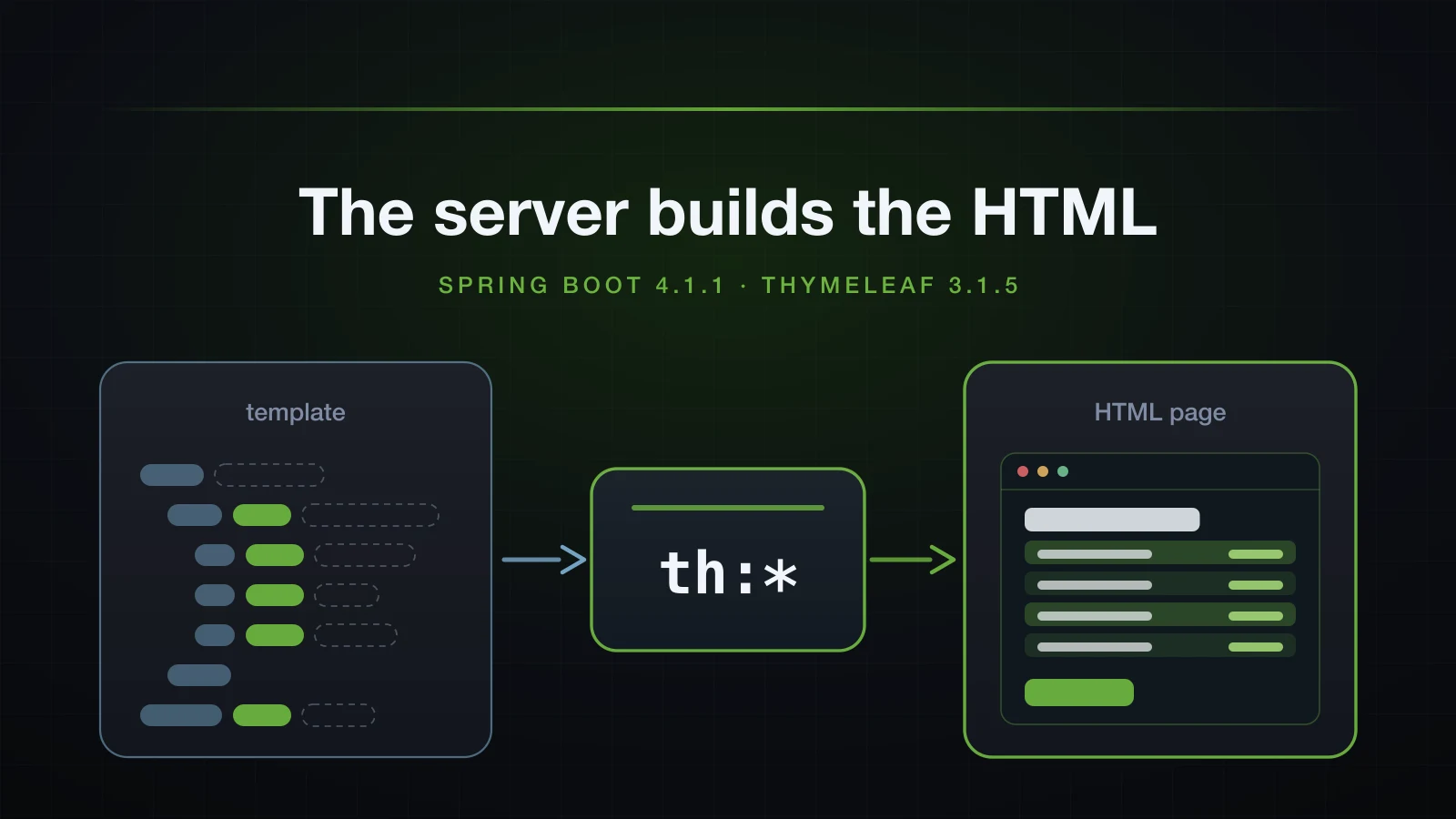
The examples use Spring Boot 4.1.1 and Java 21, on an Initializr project with the web, thymeleaf and validation dependencies.
Server-side rendering or a JSON API: who builds the HTML?
Both designs start with a request and end with HTML on the screen. The difference is where that HTML is produced. With a JSON API, the server sends data and JavaScript in the browser builds the page from it. With server-side rendering (SSR), the controller puts data into a Model, a template engine merges it into an HTML template, and the browser receives a page it only has to display.
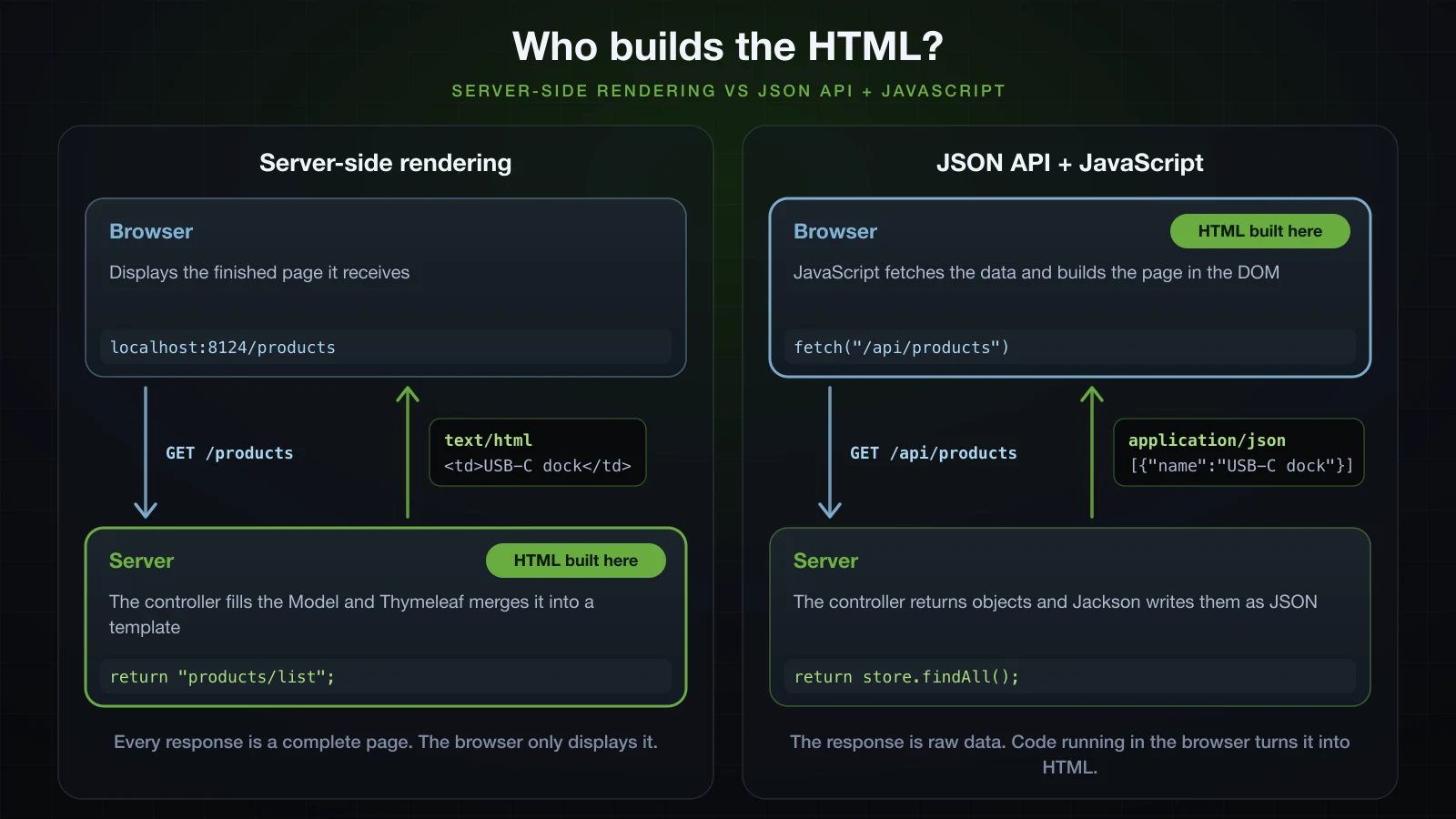
| Server-side rendering | JSON API + JavaScript | |
|---|---|---|
| Who builds the HTML | the server, on every request | JavaScript in the browser |
| What the response carries | a complete page, text/html | data, application/json |
| Controller | @Controller returning a view name | @RestController returning objects |
| Navigation and form posts | a new page from the server | the page updates in place |
| What you build and deploy | one Spring Boot application | an API plus a separate front end |
| Mobile apps and other clients | need an API of their own | reuse the same endpoints |
| Typical fit | admin panels, internal tools, form-heavy apps, content sites | highly interactive UIs, several kinds of client |
Server-side rendering is the right call when the screens are mostly tables and forms, the users are a known group, and one team owns the whole application: admin panels, back-office and internal tools, form-heavy CRUD applications, and simple content sites where every URL is a page. A JSON API with a JavaScript front end earns its extra moving parts when the interface changes constantly without page loads, or when mobile apps and other services consume the same data. The two mix freely: one Boot application can serve @Controller pages under /admin and @RestController endpoints under /api.
Thymeleaf is not the only engine Boot supports. The 4.1.1 dependency management also has starters for FreeMarker, Mustache and Groovy Templates, and JSP predates all of them. Thymeleaf is the one whose templates stay valid HTML files, which the section on natural templates puts to use. Libraries such as HTMX sit between the two approaches by swapping server-rendered fragments into a page; they are outside this article.
Adding Thymeleaf to a Spring Boot project
Three starters cover this article: the web starter, which Boot 4 names spring-boot-starter-webmvc, the Thymeleaf starter and the validation starter. In Spring Initializr their ids are web, thymeleaf and validation:
curl -s "https://start.spring.io/starter.zip?type=gradle-project&language=java&bootVersion=4.1.1&javaVersion=21&groupId=com.example&artifactId=demo&name=demo&packageName=com.example.demo&dependencies=web,thymeleaf,validation" -o demo.zipThe generated build lists them like this; Initializr also adds a matching -test starter for each, left out here:
dependencies {
	implementation 'org.springframework.boot:spring-boot-starter-thymeleaf'
	implementation 'org.springframework.boot:spring-boot-starter-validation'
	implementation 'org.springframework.boot:spring-boot-starter-webmvc'
}<dependency>
<groupId>org.springframework.boot</groupId>
<artifactId>spring-boot-starter-thymeleaf</artifactId>
</dependency>
<dependency>
<groupId>org.springframework.boot</groupId>
<artifactId>spring-boot-starter-validation</artifactId>
</dependency>
<dependency>
<groupId>org.springframework.boot</groupId>
<artifactId>spring-boot-starter-webmvc</artifactId>
</dependency>spring-boot-starter-thymeleaf resolves to spring-boot-thymeleaf:4.1.1, which brings thymeleaf:3.1.5.RELEASE, thymeleaf-spring6:3.1.5.RELEASE, attoparser:2.0.7.RELEASE and unbescape:1.1.6.RELEASE. The integration artifact keeps its spring6 name while running on Spring Framework 7.0.9. That is the module Boot 4.1.1 puts on the classpath, not a mismatch to fix.
Boot's defaults, read from the property metadata inside the 4.1.1 jars:
| Property | Default | What it controls |
|---|---|---|
spring.thymeleaf.prefix | classpath:/templates/ | prepended to every view name |
spring.thymeleaf.suffix | .html | appended to every view name |
spring.thymeleaf.mode | HTML | the template mode |
spring.thymeleaf.encoding | UTF-8 | how template files are decoded |
spring.thymeleaf.cache | true | whether parsed templates are cached |
spring.thymeleaf.check-template-location | true | whether to check that the templates folder exists |
The finished project for this article:
src/main
├── java/com/example/demo
│   ├── DemoApplication.java
│   └── product
│       ├── Product.java
│       ├── ProductController.java
│       ├── ProductForm.java
│       └── ProductStore.java
└── resources
    ├── application.properties
    ├── messages.properties
    ├── static
    │   └── css
    │       └── app.css
    └── templates
        ├── error.html
        ├── error
        │   └── 404.html
        ├── fragments
        │   └── layout.html
        └── products
            ├── detail.html
            ├── form.html
            └── list.html
Your first page: a @Controller that returns a view name
The catalogue keeps its data in memory, in a ConcurrentHashMap with an AtomicLong for ids, because databases arrive in Chapter 4. A product is a record:
package com.example.demo.product;

import java.math.BigDecimal;
import java.time.LocalDateTime;

public record Product(Long id, String name, BigDecimal price, int stock, LocalDateTime createdAt) {
}package com.example.demo.product;
import java.math.BigDecimal;
import java.time.LocalDateTime;
import java.util.Comparator;
import java.util.List;
import java.util.Optional;
import java.util.concurrent.ConcurrentHashMap;
import java.util.concurrent.atomic.AtomicLong;
import org.springframework.stereotype.Repository;
@Repository
public class ProductStore {
private final ConcurrentHashMap<Long, Product> products = new ConcurrentHashMap<>();
private final AtomicLong nextId = new AtomicLong();
public ProductStore() {
save("Mechanical keyboard", new BigDecimal("89.90"), 12);
save("USB-C dock", new BigDecimal("1299.00"), 3);
save("Laptop stand", new BigDecimal("34.50"), 0);
}
public List<Product> findAll() {
return products.values().stream()
.sorted(Comparator.comparing(Product::id))
.toList();
}
public Optional<Product> findById(long id) {
return Optional.ofNullable(products.get(id));
}
public Product save(String name, BigDecimal price, int stock) {
long id = nextId.incrementAndGet();
Product product = new Product(id, name, price, stock, LocalDateTime.now());
products.put(id, product);
return product;
}
}The controller is a plain @Controller. Article 16 showed that without @ResponseBody a String return value is a view name, and that with no template engine the name ended in a 404. With Thymeleaf on the classpath, the same name now resolves to a template:
package com.example.demo.product;

import org.springframework.http.HttpStatus;
import org.springframework.stereotype.Controller;
import org.springframework.ui.Model;
import org.springframework.web.bind.annotation.GetMapping;
import org.springframework.web.bind.annotation.PathVariable;
import org.springframework.web.bind.annotation.RequestMapping;
import org.springframework.web.server.ResponseStatusException;

@Controller
@RequestMapping("/products")
public class ProductController {

    private final ProductStore store;

    public ProductController(ProductStore store) {
        this.store = store;
    }

    @GetMapping
    public String list(Model model) {
        model.addAttribute("products", store.findAll());
        return "products/list";
    }

    @GetMapping("/{id}")
    public String detail(@PathVariable long id, Model model) {
        Product product = store.findById(id)
                .orElseThrow(() -> new ResponseStatusException(HttpStatus.NOT_FOUND));
        model.addAttribute("product", product);
        return "products/detail";
    }
}
Model is the map the template reads from: list puts the products under the name products, and detail puts one product under product. ResponseStatusException with NOT_FOUND turns an unknown id into a 404, which the last section renders as an HTML page.
The template for products/list:
<!DOCTYPE html>
<html xmlns:th="http://www.thymeleaf.org" lang="en">
<head>
  <meta charset="UTF-8">
  <title th:text="#{products.title}">Products</title>
  <link rel="stylesheet" href="../../static/css/app.css" th:href="@{/css/app.css}">
</head>
<body>
<header th:replace="~{fragments/layout :: header}">Header placeholder</header>

<main>
  <h1 th:text="#{products.title}">Products</h1>

  <p class="flash" th:if="${message}" th:text="${message}">Created product #4</p>

  <p th:if="${#lists.isEmpty(products)}">No products yet.</p>

  <table th:unless="${#lists.isEmpty(products)}">
    <thead>
      <tr><th>#</th><th>Name</th><th>Price</th><th>Stock</th><th>Added</th></tr>
    </thead>
    <tbody>
      <tr th:each="p, stat : ${products}" th:classappend="${stat.odd} ? 'odd'">
        <td th:text="${stat.count}">1</td>
        <td><a th:href="@{/products/{id}(id=${p.id})}" th:text="${p.name}">Mechanical keyboard</a></td>
        <td th:text="${#numbers.formatDecimal(p.price, 1, 'COMMA', 2, 'POINT')}">89.90</td>
        <td class="stock" th:classappend="${p.stock < 5} ? 'low'">
          <span th:if="${p.stock > 0}" th:text="${p.stock}">12</span>
          <span th:unless="${p.stock > 0}">Out of stock</span>
        </td>
        <td th:text="${#temporals.format(p.createdAt, 'yyyy-MM-dd HH:mm')}">2026-10-23 09:30</td>
      </tr>
    </tbody>
  </table>

  <p><a th:href="@{/products/new}">Add a product</a></p>
</main>

<div th:insert="~{fragments/layout :: footer}">Footer placeholder</div>
</body>
</html>
It takes its header and footer from a second template and two texts from a message file. Both are explained further down; create them now so the page renders:
<!DOCTYPE html>
<html xmlns:th="http://www.thymeleaf.org" lang="en">
<body>

<header th:fragment="header" class="site-header">
  <a th:href="@{/products}" th:text="#{app.name}">Product catalogue</a>
</header>

<footer th:fragment="footer" class="site-footer">
  <small>Rendered on the server by Thymeleaf</small>
</footer>

</body>
</html>app.name=Phụ kiện Hà Nội
products.title=ProductsBuild the jar and start it. The port is 8124 here; without the flag it is 8080:
./gradlew bootJar
java -jar build/libs/demo-0.0.1-SNAPSHOT.jar --server.port=8124Then request the page:
curl -i http://localhost:8124/productsHTTP/1.1 200
Content-Type: text/html;charset=UTF-8
Content-Language: en-VN
Transfer-Encoding: chunked
Date: Sun, 13 Sep 2026 03:01:17 GMTThe body starts like this:
<!DOCTYPE html>
<html lang="en">
<head>
<meta charset="UTF-8">
<title>Products</title>
<link rel="stylesheet" href="/css/app.css">
</head>
<body>
<header class="site-header">
<a href="/products">Phụ kiện Hà Nội</a>
</header>
<main>
<h1>Products</h1>Every th:* attribute is gone from the output. th:text replaced the placeholder texts, th:href replaced the static href, #{app.name} became the Vietnamese shop name from messages.properties, and the <header> placeholder was swapped for the fragment. Further down the page, the blank lines are where th:if removed an element.
How the view name becomes a template file
Adding the starter registered the beans thymeleafViewResolver, templateEngine and defaultTemplateResolver (article 10 counted them). When list returns "products/list", ThymeleafViewResolver turns the name into a ThymeleafView, and rendering that view hands the name to SpringTemplateEngine. The engine's SpringResourceTemplateResolver builds the location by string concatenation — spring.thymeleaf.prefix, then the view name, then spring.thymeleaf.suffix — and Boot's auto-configuration passes both properties straight to its setPrefix and setSuffix.
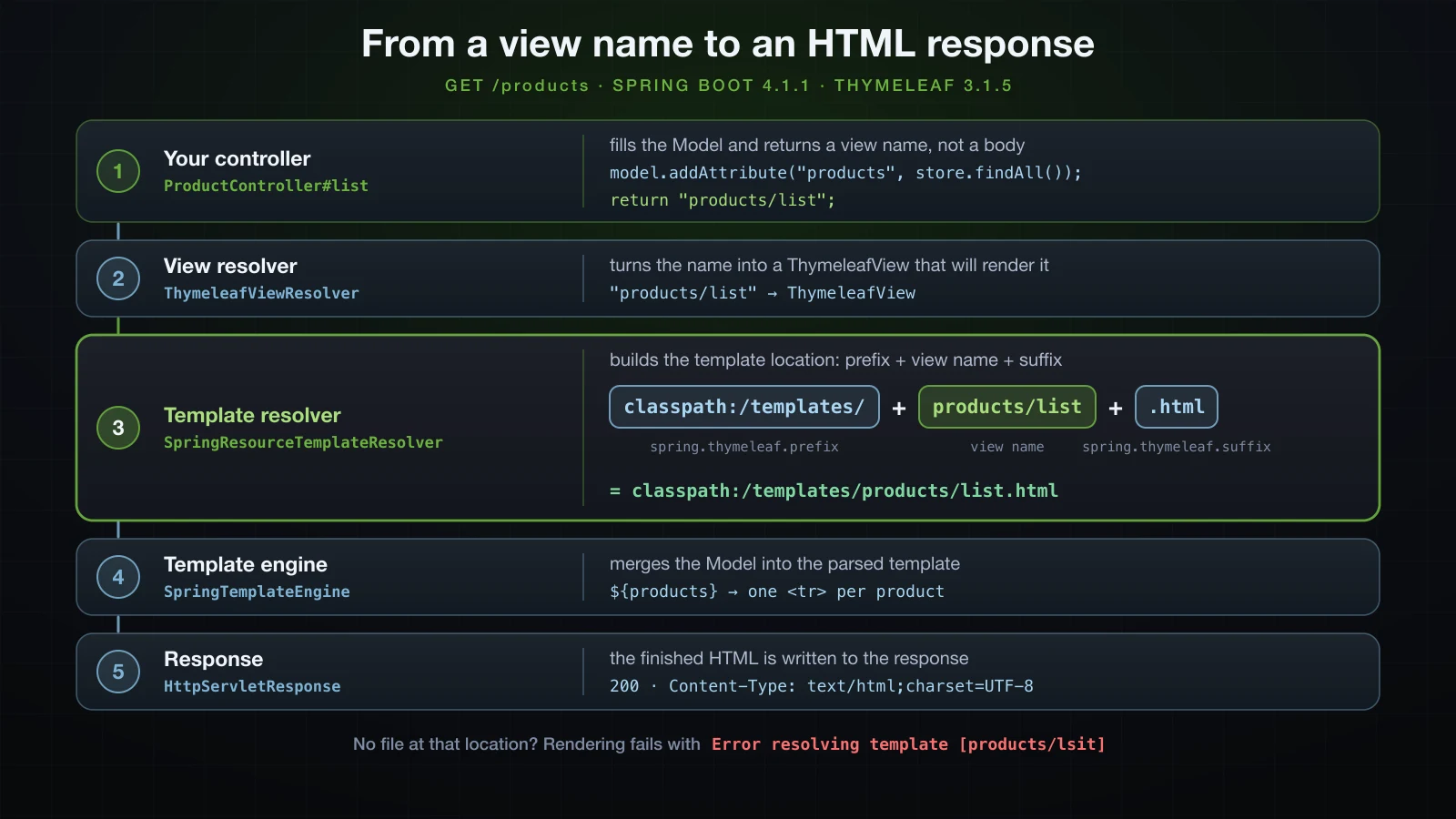
classpath:/templates/products/list.html is src/main/resources/templates/products/list.html in the source tree and BOOT-INF/classes/templates/products/list.html inside the packaged jar. The slash in products/list is simply part of the string, so subfolders under templates/ need no configuration.
A view name with no template behind it
A typo in a view name does not stop the application from starting. It fails on the first request, when the resolver looks for the file. A handler that returned "products/lsit" answered 500, and the log names exactly what was looked for:
org.thymeleaf.exceptions.TemplateInputException: Error resolving template [products/lsit], template might not exist or might not be accessible by any of the configured Template ResolversNatural templates open in a browser as they are
A Thymeleaf template is an HTML file with extra attributes, not a file in another syntax. Browsers ignore attributes they do not know, so opening src/main/resources/templates/products/list.html straight from disk shows a static prototype: the placeholder texts, the sample row, every conditional element at once — and the stylesheet, because the plain href points at it with a relative path:
<link rel="stylesheet" href="../../static/css/app.css" th:href="@{/css/app.css}">From templates/products/, ../../static/css/app.css is exactly src/main/resources/static/css/app.css. At run time th:href replaces the attribute with /css/app.css, as the rendered output above shows. A designer can work on the prototype in a browser, and the same file ships as the real template.
Thymeleaf standard expressions
Attribute values in Thymeleaf are written with five kinds of expression:
| Syntax | Name | Evaluates to | Used here as |
|---|---|---|---|
${…} | variable expression | a SpEL expression against the model | ${products} |
*{…} | selection expression | the same, against the object selected by th:object | *{name} |
@{…} | link expression | a URL with path variables, query parameters and the context path | @{/products/{id}(id=${p.id})} |
#{…} | message expression | a text from messages.properties | #{app.name} |
~{…} | fragment expression | a piece of another template | ~{fragments/layout :: header} |
Variable and selection expressions with th:object
${…} evaluates a Spring Expression Language (SpEL) expression against the model, so ${products} is the list the controller added and ${p.name} reads a property of the loop variable. Product is a record, and p.name works through its name() accessor. The same syntax reaches the utility objects whose names start with #: #lists, #numbers, #temporals and, in forms, #fields. A missing attribute evaluates to null, which th:if treats as false. That is how th:if="${message}" hides the flash paragraph when there is no message.
*{…} is the same evaluation against the object selected by the nearest th:object, which saves repeating a variable name. The detail page selects the product on <main>:
<!DOCTYPE html>
<html xmlns:th="http://www.thymeleaf.org" lang="en">
<head>
<meta charset="UTF-8">
<title th:text="${product.name}">Product</title>
<link rel="stylesheet" href="../../static/css/app.css" th:href="@{/css/app.css}">
</head>
<body>
<header th:replace="~{fragments/layout :: header}">Header placeholder</header>
<main th:object="${product}">
<h1 th:text="*{name}">Mechanical keyboard</h1>
<dl>
<dt>Price</dt>
<dd th:text="*{#numbers.formatDecimal(price, 1, 'COMMA', 2, 'POINT')}">89.90</dd>
<dt>Stock</dt>
<dd th:text="*{stock}">12</dd>
<dt>Added</dt>
<dd th:text="*{#temporals.format(createdAt, 'dd/MM/yyyy HH:mm')}">23/10/2026 09:30</dd>
</dl>
<p><a th:href="@{/products}">Back to the list</a></p>
</main>
<footer th:replace="~{fragments/layout :: footer}">Footer placeholder</footer>
</body>
</html>curl -s http://localhost:8124/products/2<main>
<h1>USB-C dock</h1>
<dl>
<dt>Price</dt>
<dd>1,299.00</dd>
<dt>Stock</dt>
<dd>3</dd>
<dt>Added</dt>
<dd>13/09/2026 10:01</dd>
</dl>
<p><a href="/products">Back to the list</a></p>
</main>th:object itself disappears from the output. Utility calls work inside a selection too: *{#numbers.formatDecimal(price, …)} reads price from the selected product.
Link expressions and the context path
@{…} builds URLs. It fills path variables, turns the remaining parameters into a query string, encodes the values, and — the reason to use it instead of a literal href — adds the application's context path. These links were rendered with id set to 2 and q set to "tai nghe & loa" in the model:
<a th:href="@{/products}">list</a>
<a th:href="@{/products/{id}(id=${id})}">detail</a>
<a th:href="@{/products/{id}(id=${id}, tab='reviews')}">detail with query</a>
<a th:href="@{/products(sort='price', dir='desc')}">sorted</a>
<a th:href="@{/products(q=${q})}">search</a>
<a th:href="@{css/app.css}">relative</a><a href="/products">list</a>
<a href="/products/2">detail</a>
<a href="/products/2?tab=reviews">detail with query</a>
<a href="/products?sort=price&dir=desc">sorted</a>
<a href="/products?q=tai%20nghe%20%26%20loa">search</a>
<a href="css/app.css">relative</a>A parameter whose name appears in the path, like {id}, is substituted; the others become the query string. The value with spaces and & is percent-encoded, and the & between two parameters is written &, which is the correct form inside an HTML attribute — the browser decodes it. Starting the same jar under a context path changes every link that begins with /:
java -jar build/libs/demo-0.0.1-SNAPSHOT.jar --server.port=8124 --server.servlet.context-path=/shop<a href="/shop/products">list</a>
<a href="/shop/products/2">detail</a>
<a href="/shop/products/2?tab=reviews">detail with query</a>
<a href="/shop/products?sort=price&dir=desc">sorted</a>
<a href="/shop/products?q=tai%20nghe%20%26%20loa">search</a>
<a href="css/app.css">relative</a>A literal href="/products" would still point at /products and break. The last link shows the other form: without a leading slash, @{css/app.css} is relative to the current page and gets no context path.
Message expressions and messages.properties encoding
#{app.name} looks the key up in messages.properties at the root of the classpath, the file that the default spring.messages.basename of messages names. Boot creates its MessageSource only when that file exists. Without it, or with a basename that matches no file, Thymeleaf prints the key and the request locale wrapped in question marks. This is the header with --spring.messages.basename=nope:
<header class="site-header">
<a href="/products">??app.name_en_VN??</a>
</header>en_VN is the locale the request resolved to on this machine; the responses carry it as Content-Language: en-VN.
Encoding is where message files differ from application.properties. Article 11 found that Boot reads application.properties as ISO-8859-1. Message bundles are read with spring.messages.encoding, which defaults to UTF-8 in the 4.1.1 metadata, so the Vietnamese shop name rendered correctly with no escaping. Starting the jar with --spring.messages.encoding=ISO-8859-1 shows what the wrong charset does: Phụ came out as Phụ, and ệ and ộ each turned into á» followed by an invisible control character, U+0087 and U+0099.
Fragment expressions
~{fragments/layout :: header} names a template, resolved with the same prefix and suffix to templates/fragments/layout.html, and a selector, here the fragment called header. Fragment expressions are what th:replace and th:insert take; the layout section compares the two. Write them wrapped in ~{…}. The older unwrapped form still renders in 3.1.5, but a scratch template using it:
<div th:replace="fragments/layout :: footer">unwrapped</div>logged this warning:
2026-09-13T10:01:17.431+07:00 WARN 22609 --- [demo] [nio-8124-exec-6] actStandardFragmentInsertionTagProcessor : [THYMELEAF][http-nio-8124-exec-6][lab/status] Deprecated unwrapped fragment expression "fragments/layout :: footer" found in template lab/status, line 10, col 6. Please use the complete syntax of fragment expressions instead ("~{fragments/layout :: footer}"). The old, unwrapped syntax for fragment expressions will be removed in future versions of Thymeleaf.th:text vs th:utext: escaping and XSS
th:text writes a value as text and escapes the HTML special characters in it. th:utext writes the value unescaped, as markup. The difference matters as soon as a value comes from a user. Here a model attribute name holding <script>alert(1)</script> is rendered both ways:
<p th:text="${name}">placeholder</p>
<p th:utext="${name}">placeholder</p><p><script>alert(1)</script></p>
<p><script>alert(1)</script></p>The first line is text the browser displays. The second is a script the browser runs, and that is a cross-site scripting (XSS) hole: anyone who can save a product name can run JavaScript in the browser of everyone who opens the page. The catalogue uses th:text everywhere, so a product created with that name through the form is harmless:
curl -s -X POST http://localhost:8124/products --data-urlencode 'name=<script>alert(1)</script>' -d 'price=1.00&stock=1'Its row in the list afterwards:
<td><a href="/products/5"><script>alert(1)</script></a></td>Attribute values are escaped too, which is why the & in the earlier link came out as &. Keep th:utext for HTML that your own code produced or sanitised, never for raw user input.
Loops, conditions and formatting in Thymeleaf
th:each and the iteration status variable
The table body of list.html does all its work in attributes:
<tr th:each="p, stat : ${products}" th:classappend="${stat.odd} ? 'odd'">
<td th:text="${stat.count}">1</td>
<td><a th:href="@{/products/{id}(id=${p.id})}" th:text="${p.name}">Mechanical keyboard</a></td>
<td th:text="${#numbers.formatDecimal(p.price, 1, 'COMMA', 2, 'POINT')}">89.90</td>
<td class="stock" th:classappend="${p.stock < 5} ? 'low'">
<span th:if="${p.stock > 0}" th:text="${p.stock}">12</span>
<span th:unless="${p.stock > 0}">Out of stock</span>
</td>
<td th:text="${#temporals.format(p.createdAt, 'yyyy-MM-dd HH:mm')}">2026-10-23 09:30</td>
</tr>The second and third rows it produced:
<tr>
<td>2</td>
<td><a href="/products/2">USB-C dock</a></td>
<td>1,299.00</td>
<td class="stock low">
<span>3</span>
</td>
<td>2026-09-13 10:01</td>
</tr>
<tr class="odd">
<td>3</td>
<td><a href="/products/3">Laptop stand</a></td>
<td>34.50</td>
<td class="stock low">
<span>Out of stock</span>
</td>
<td>2026-09-13 10:01</td>
</tr>th:each="p, stat : ${products}" repeats the <tr> once per product, with p as the current element and stat as the iteration status. A scratch template printed every status property for a three-element list:
| Property | Meaning | Values for elements a, b, c |
|---|---|---|
index | position counted from 0 | 0, 1, 2 |
count | position counted from 1 | 1, 2, 3 |
size | number of elements | 3, 3, 3 |
odd / even | parity of count, so the first element is odd | odd: true, false, true |
first / last | whether this is the first or last element | first: true, false, false; last: false, false, true |
current | the element itself | a, b, c |
Declaring the status variable is optional. Without it Thymeleaf creates one named after the element with Stat appended: th:each="item : ${items}" with ${itemStat.count} rendered 1, 2 and 3.
th:if, th:unless and th:classappend
th:if keeps an element when its expression is true and removes it, children included, when it is false; th:unless is the inverse. The stock cell uses the pair to show either the number or Out of stock, and in the rendered rows the removed <span> left a blank line. The same pair on the table and on the "No products yet." paragraph means exactly one of the two appears.
th:classappend adds a class to whatever class the element already has. class="stock" plus ${p.stock < 5} ? 'low' rendered class="stock low" for the dock and the stand, and plain class="stock" for the keyboard. On the <tr>, which has no class of its own, ${stat.odd} ? 'odd' created the attribute on rows 1 and 3 and left row 2 bare: a condition with no else part produces nothing when it is false.
Formatting BigDecimal and LocalDateTime with #numbers and #temporals
#numbers.formatDecimal(p.price, 1, 'COMMA', 2, 'POINT') takes the minimum number of integer digits, the thousands separator, the number of decimals and the decimal separator. Both separators are named explicitly, so the output does not depend on the request locale: the 1299.00 price rendered as 1,299.00, and 89.90 as 89.90.
#temporals.format(p.createdAt, 'yyyy-MM-dd HH:mm') formats a LocalDateTime with a pattern and rendered 2026-09-13 10:01; the detail page's 'dd/MM/yyyy HH:mm' gave 13/09/2026 10:01. #temporals needs no extra dependency in 3.1.5, because org/thymeleaf/expression/Temporals.class is inside thymeleaf-3.1.5.RELEASE.jar itself. Tutorials written for Thymeleaf 3.0 add thymeleaf-extras-java8time to get it; on this version that dependency is unnecessary.
A create form with validation
A form needs an object to bind to. ProductForm holds what the user typed, with the constraints that article 19 covered. It is a plain class with getters and setters, which is what th:field reads when it puts values back into the inputs, and its fields use wrapper types so that an empty input binds as null:
package com.example.demo.product;
import java.math.BigDecimal;
import jakarta.validation.constraints.DecimalMin;
import jakarta.validation.constraints.NotBlank;
import jakarta.validation.constraints.NotNull;
import jakarta.validation.constraints.PositiveOrZero;
import jakarta.validation.constraints.Size;
public class ProductForm {
@NotBlank
@Size(max = 80)
private String name;
@NotNull
@DecimalMin("0.01")
private BigDecimal price;
@NotNull
@PositiveOrZero
private Integer stock;
public String getName() { return name; }
public void setName(String name) { this.name = name; }
public BigDecimal getPrice() { return price; }
public void setPrice(BigDecimal price) { this.price = price; }
public Integer getStock() { return stock; }
public void setStock(Integer stock) { this.stock = stock; }
}The controller gains two methods. GET /products/new puts an empty ProductForm into the model under the name product. POST /products validates it and either shows the form again or saves the product and redirects:
package com.example.demo.product;
import org.springframework.http.HttpStatus;
import org.springframework.stereotype.Controller;
import org.springframework.ui.Model;
import org.springframework.validation.BindingResult;
import org.springframework.web.bind.annotation.GetMapping;
import org.springframework.web.bind.annotation.ModelAttribute;
import org.springframework.web.bind.annotation.PathVariable;
import org.springframework.web.bind.annotation.PostMapping;
import org.springframework.web.bind.annotation.RequestMapping;
import org.springframework.web.server.ResponseStatusException;
import org.springframework.web.servlet.mvc.support.RedirectAttributes;
import jakarta.validation.Valid;
@Controller
@RequestMapping("/products")
public class ProductController {
private final ProductStore store;
public ProductController(ProductStore store) {
this.store = store;
}
@GetMapping
public String list(Model model) {
model.addAttribute("products", store.findAll());
return "products/list";
}
@GetMapping("/{id}")
public String detail(@PathVariable long id, Model model) {
Product product = store.findById(id)
.orElseThrow(() -> new ResponseStatusException(HttpStatus.NOT_FOUND));
model.addAttribute("product", product);
return "products/detail";
}
@GetMapping("/new")
public String newForm(Model model) {
model.addAttribute("product", new ProductForm());
return "products/form";
}
@PostMapping
public String create(@Valid @ModelAttribute("product") ProductForm form,
BindingResult result,
RedirectAttributes redirectAttributes) {
if (result.hasErrors()) {
return "products/form";
}
Product saved = store.save(form.getName(), form.getPrice(), form.getStock());
redirectAttributes.addFlashAttribute("message", "Created product #" + saved.id());
return "redirect:/products";
}
}The template binds the form to that object:
<!DOCTYPE html>
<html xmlns:th="http://www.thymeleaf.org" lang="en">
<head>
<meta charset="UTF-8">
<title>New product</title>
<link rel="stylesheet" href="../../static/css/app.css" th:href="@{/css/app.css}">
</head>
<body>
<header th:replace="~{fragments/layout :: header}">Header placeholder</header>
<main>
<h1>New product</h1>
<form th:action="@{/products}" th:object="${product}" method="post">
<p class="error-summary" th:if="${#fields.hasAnyErrors()}">Please fix the fields marked below.</p>
<label for="name">Name</label>
<input type="text" th:field="*{name}" th:classappend="${#fields.hasErrors('name')} ? 'invalid'">
<p class="error" th:if="${#fields.hasErrors('name')}" th:errors="*{name}">Name error</p>
<label for="price">Price</label>
<input type="text" th:field="*{price}" th:classappend="${#fields.hasErrors('price')} ? 'invalid'">
<p class="error" th:if="${#fields.hasErrors('price')}" th:errors="*{price}">Price error</p>
<label for="stock">Stock</label>
<input type="number" th:field="*{stock}" th:classappend="${#fields.hasErrors('stock')} ? 'invalid'">
<p class="error" th:if="${#fields.hasErrors('stock')}" th:errors="*{stock}">Stock error</p>
<button type="submit">Save</button>
</form>
</main>
<footer th:replace="~{fragments/layout :: footer}">Footer placeholder</footer>
</body>
</html>th:object="${product}" on the <form> selects the form object, and each th:field="*{name}" binds one input to one property. The empty form:
curl -s http://localhost:8124/products/new <form action="/products" method="post">
<label for="name">Name</label>
<input type="text" id="name" name="name" value="">
<label for="price">Price</label>
<input type="text" id="price" name="price" value="">
<label for="stock">Stock</label>
<input type="number" id="stock" name="stock" value="">
<button type="submit">Save</button>
</form>th:field wrote id, name and value from one attribute, and th:action="@{/products}" produced action="/products", with the context path when there is one. When Spring Security is added in Chapter 5, forms rendered with th:action get a CSRF token.
Showing field errors with th:field and th:errors
Submitting three bad values — an empty name, a price that is not a number and a negative stock:
curl -s -X POST http://localhost:8124/products -d 'name=&price=abc&stock=-1' <form action="/products" method="post">
<p class="error-summary">Please fix the fields marked below.</p>
<label for="name">Name</label>
<input type="text" class="invalid" id="name" name="name" value="">
<p class="error">must not be blank</p>
<label for="price">Price</label>
<input type="text" class="invalid" id="price" name="price" value="abc">
<p class="error">Failed to convert property value of type 'java.lang.String' to required type 'java.math.BigDecimal' for property 'price'; Character a is neither a decimal digit number, decimal point, nor "e" notation exponential mark.</p>
<label for="stock">Stock</label>
<input type="number" class="invalid" id="stock" name="stock" value="-1">
<p class="error">must be greater than or equal to 0</p>
<button type="submit">Save</button>
</form>The response was an ordinary 200 page, not an error. #fields.hasErrors('name') asks the BindingResult whether a field has errors, th:errors="*{name}" prints its messages, and th:classappend marked each input invalid. Every value the user typed survived, including abc, which could never have been stored in a BigDecimal: th:field redisplays the rejected value held by the BindingResult, not the property of the object.
The price message is Spring's default text for a failed type conversion, and nothing to show a user. Spring looks conversion messages up by the code typeMismatch, and a typeMismatch.price key in messages.properties replaces it:
app.name=Phụ kiện Hà Nội
products.title=Products
typeMismatch.price=Enter a number, for example 19.90 <input type="text" class="invalid" id="price" name="price" value="abc">
<p class="error">Enter a number, for example 19.90</p>Where BindingResult goes in the method signature
BindingResult result sits immediately after the @Valid argument, and that position is load-bearing. Here is the same method with RedirectAttributes moved in between:
@PostMapping
public String create(@Valid @ModelAttribute("product") ProductForm form,
                     RedirectAttributes redirectAttributes,
                     BindingResult result) {
Submitted with an empty form, it answered 400 instead of showing the form, and Spring logged:
2026-09-13T10:07:35.390+07:00 WARN 40204 --- [demo] [nio-8124-exec-6] .w.s.m.s.DefaultHandlerExceptionResolver : Resolved [org.springframework.web.bind.MethodArgumentNotValidException: Validation failed for argument [0] in public java.lang.String com.example.demo.product.ProductController.create(com.example.demo.product.ProductForm,org.springframework.web.servlet.mvc.support.RedirectAttributes,org.springframework.validation.BindingResult) with 3 errors: [Field error in object 'product' on field 'price': rejected value [null]; codes [NotNull.product.price,NotNull.price,NotNull.java.math.BigDecimal,NotNull]; arguments [org.springframework.context.support.DefaultMessageSourceResolvable: codes [product.price,price]; arguments []; default message [price]]; default message [must not be null]] [Field error in object 'product' on field 'stock': rejected value [null]; codes [NotNull.product.stock,NotNull.stock,NotNull.java.lang.Integer,NotNull]; arguments [org.springframework.context.support.DefaultMessageSourceResolvable: codes [product.stock,stock]; arguments []; default message [stock]]; default message [must not be null]] [Field error in object 'product' on field 'name': rejected value []; codes [NotBlank.product.name,NotBlank.name,NotBlank.java.lang.String,NotBlank]; arguments [org.springframework.context.support.DefaultMessageSourceResolvable: codes [product.name,name]; arguments []; default message [name]]; default message [must not be blank]] ]Two separate checks explain it, both visible in the Spring Web 7.0.9 bytecode. When validation fails, ModelAttributeMethodProcessor.isBindExceptionRequired looks at the parameter right after the form object — its index plus one — and throws unless that parameter's type is an Errors. Here it is RedirectAttributes, so the failure became a MethodArgumentNotValidException and Spring answered 400 without calling the method, which is also what happens when there is no BindingResult parameter at all. When validation passes, nothing is thrown, and ErrorsMethodArgumentResolver fills the BindingResult parameter from the last attribute in the model, which is still the form's binding result. So a valid submission through the same signature returned 302 and saved the product. Tests with good data pass; the first user who leaves a field empty gets an error page.
Declared before the form object, BindingResult fails on every request, valid or not, with a 500. A scratch method before(BindingResult result, @Valid @ModelAttribute("product") ProductForm form) logged:
java.lang.IllegalStateException: An Errors/BindingResult argument is expected to be declared immediately after the model attribute, the @RequestBody or the @RequestPart arguments to which they apply: public java.lang.String com.example.demo.lab.LabController.before(org.springframework.validation.BindingResult,com.example.demo.product.ProductForm)The rule is short: the @Valid @ModelAttribute argument first, its BindingResult directly after it, everything else afterwards.
The model attribute name must match th:object
@ModelAttribute("product") is not decoration. Without a name, Spring derives one from the type, productForm, and stores the object and its BindingResult under that name. The template asks for product, so re-rendering the form after a failed validation breaks. A handler declared as (@Valid ProductForm form, BindingResult result) that returned "products/form" on errors answered 500, with a TemplateProcessingException at #fields.hasAnyErrors() on line 15 of form.html and this cause:
Caused by: java.lang.IllegalStateException: Neither BindingResult nor plain target object for bean name 'product' available as request attributeThe name in @ModelAttribute, the attribute that the GET handler adds, and the th:object expression must be the same string.
Post/Redirect/Get with flash attributes
When the form is valid, create does not render a page. It saves the product, stores a message with addFlashAttribute and returns redirect:/products. Watching that with curl, keeping cookies in a file:
curl -i -c cookies.txt -X POST http://localhost:8124/products --data-urlencode 'name=Wireless mouse' -d 'price=25.00&stock=40'HTTP/1.1 302
Set-Cookie: JSESSIONID=00C398D4E3039C59BDC4E43E2B3EE1B0; Path=/; HttpOnly
Location: http://localhost:8124/products;jsessionid=00C398D4E3039C59BDC4E43E2B3EE1B0
Content-Language: en-VN
Content-Length: 0
Date: Sun, 13 Sep 2026 03:01:17 GMTA 302 with a Location header, an empty body, and a new session. The flash attribute is what created the session: Spring MVC keeps flash attributes in the HTTP session until the next request picks them up. Following the redirect with the same cookie shows the message:
curl -s -b cookies.txt http://localhost:8124/products | grep flash <p class="flash">Created product #4</p>Running the identical command a second time prints nothing, because the first GET consumed the flash attribute. A flash attribute survives exactly one redirect.
Why the redirect carries ;jsessionid
The Location above ends in ;jsessionid=…. The session was created by this very response, so Tomcat cannot yet know whether the client accepts cookies, and it also encodes the session id into the redirect URL. A browser then shows it in the address bar, in bookmarks and in every copied link. Restricting session tracking to cookies removes it:
spring.application.name=demo
server.servlet.session.tracking-modes=cookie HTTP/1.1 302
Set-Cookie: JSESSIONID=BDA445A969CA403FCEE69671698D13D9; Path=/; HttpOnly
Location: http://localhost:8124/products
Content-Language: en-VN
Content-Length: 0
Date: Sun, 13 Sep 2026 03:01:18 GMTWhat a browser refresh repeats
The point of the redirect is what the browser holds afterwards. Driving the real form in headless Chrome over the DevTools protocol, then pressing reload, recorded these top-level requests:
1. open the form
  -> GET http://localhost:8124/products/new
  <- 200
2. fill in and submit
  -> POST http://localhost:8124/products
  <- 302 Location: http://localhost:8124/products
  -> GET http://localhost:8124/products
  <- 200
  page: {"url":"http://localhost:8124/products","flash":"Created product #5"}
3. press refresh
  -> GET http://localhost:8124/products
  <- 200
  page: {"url":"http://localhost:8124/products","flash":null}
The POST and its 302 happened once. The page on screen came from the GET that followed the redirect, so reload repeated that GET — and the flash message, already consumed, was gone. For comparison, the same trace against a scratch handler that renders its result straight from the POST, with no redirect, and shows how many POSTs the server has counted:
1. open the form
  -> GET http://localhost:8124/lab/echo-form
  <- 200
  (load)
2. fill in and submit (the POST renders the page, no redirect)
  -> POST http://localhost:8124/lab/echo
  <- 200
  (load)
  page: {"url":"http://localhost:8124/lab/echo","name":"Webcam","postsSeenByServer":"1"}
3. press refresh
  -> POST http://localhost:8124/lab/echo
  <- 200
  (load)
  page: {"url":"http://localhost:8124/lab/echo","name":"Webcam","postsSeenByServer":"2"}
Reload sent the POST again, and the server counted a second submission. For a create form, that is a duplicate product.
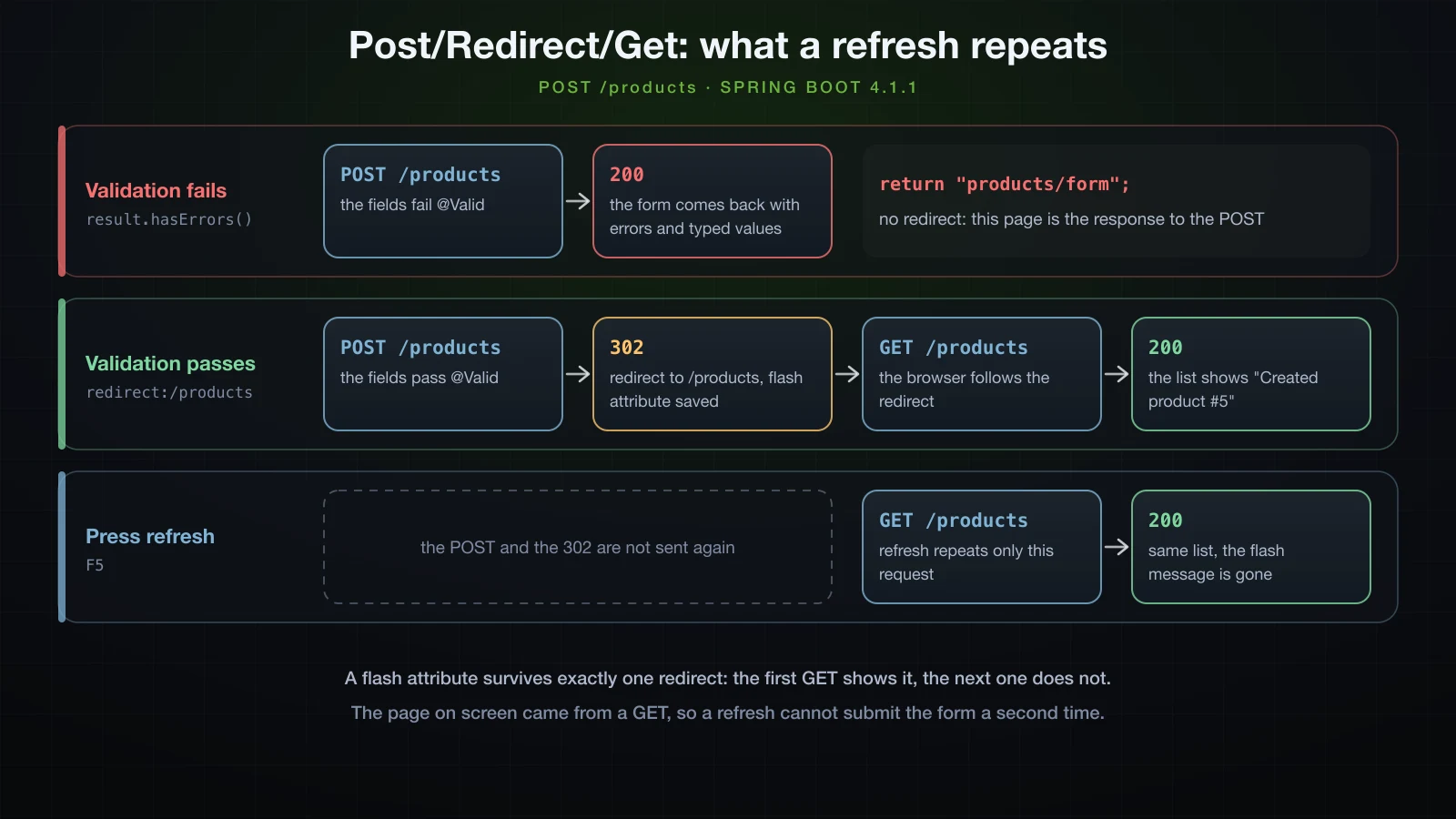
The failure path deliberately does not redirect. Rendering the form straight from the POST is what keeps the BindingResult, its messages and the typed values in the response.
Reusing layout with th:fragment, th:replace and th:insert
fragments/layout.html declares two fragments, th:fragment="header" and th:fragment="footer"; the rest of the file is scaffolding that keeps it a valid HTML page on its own. The list page uses them in two different ways, <header th:replace="~{fragments/layout :: header}"> and <div th:insert="~{fragments/layout :: footer}">. th:replace swaps the host element for the fragment:
<header class="site-header">
  <a href="/products">Phụ kiện Hà Nội</a>
</header>
th:insert keeps the host element and puts the fragment inside it:
<div><footer class="site-footer">
  <small>Rendered on the server by Thymeleaf</small>
</footer></div>
The <header> placeholder is gone and the fragment's own <header class="site-header"> stands in its place, while the footer ended up wrapped in the host <div>. Use th:replace when the fragment is the whole element, which is the usual case, and th:insert when the host element has to stay; the detail and form pages use th:replace for both.
For a full page layout that every page decorates, the usual choice is the third-party Thymeleaf Layout Dialect, nz.net.ultraq.thymeleaf:thymeleaf-layout-dialect: Boot 4.1.1 manages it at version 4.0.1 and registers the dialect by itself once the jar is on the classpath.
Serving CSS from src/main/resources/static
Boot serves the files under src/main/resources/static from the root of the application, so static/css/app.css is /css/app.css:
body { font-family: system-ui, sans-serif; margin: 2rem auto; max-width: 48rem; }
table { border-collapse: collapse; width: 100%; }
td, th { padding: .4rem .6rem; text-align: left; }
tr.odd { background: #f4f6f8; }
.low { color: #b45309; font-weight: 600; }
.flash { background: #dcfce7; padding: .5rem .75rem; }
.invalid { border-color: #dc2626; }
.error { color: #dc2626; margin: .25rem 0 1rem; }curl -I http://localhost:8124/css/app.cssHTTP/1.1 200
Last-Modified: Sun, 13 Sep 2026 03:01:15 GMT
Accept-Ranges: bytes
Content-Type: text/css
Content-Length: 399
Date: Sun, 13 Sep 2026 03:01:17 GMTThe templates link it with th:href="@{/css/app.css}", which adds the context path: under /shop the rendered link was href="/shop/css/app.css".
What spring.thymeleaf.cache actually changes
spring.thymeleaf.cache defaults to true, and Boot passes it to two places: SpringResourceTemplateResolver.setCacheable, which lets the engine keep parsed templates, and ThymeleafViewResolver.setCache, Spring MVC's cache of resolved view objects. Thymeleaf logs its template cache at TRACE level, which makes the first of those visible:
java -jar build/libs/demo-0.0.1-SNAPSHOT.jar --server.port=8124 --logging.level.org.thymeleaf.TemplateEngine.cache.TEMPLATE_CACHE=TRACETwo requests to /products:
2026-09-13T10:07:35.257+07:00 TRACE 40204 --- [demo] [nio-8124-exec-2] o.t.TemplateEngine.cache.TEMPLATE_CACHE  : [THYMELEAF][CACHE_INITIALIZE] Initializing cache TEMPLATE_CACHE. Max size: 200. Soft references are used.
2026-09-13T10:07:35.263+07:00 TRACE 40204 --- [demo] [nio-8124-exec-2] o.t.TemplateEngine.cache.TEMPLATE_CACHE  : [THYMELEAF][http-nio-8124-exec-2][TEMPLATE_CACHE][CACHE_MISS] Cache miss in cache "TEMPLATE_CACHE" for key "products/list".
2026-09-13T10:07:35.280+07:00 TRACE 40204 --- [demo] [nio-8124-exec-2] o.t.TemplateEngine.cache.TEMPLATE_CACHE  : [THYMELEAF][http-nio-8124-exec-2][TEMPLATE_CACHE][CACHE_ADD][1] Adding cache entry in cache "TEMPLATE_CACHE" for key "products/list". New size is 1.
2026-09-13T10:07:35.321+07:00 TRACE 40204 --- [demo] [nio-8124-exec-2] o.t.TemplateEngine.cache.TEMPLATE_CACHE  : [THYMELEAF][http-nio-8124-exec-2][TEMPLATE_CACHE][CACHE_MISS] Cache miss in cache "TEMPLATE_CACHE" for key "fragments/layout@(products/list;0,0)::[header]".
2026-09-13T10:07:35.324+07:00 TRACE 40204 --- [demo] [nio-8124-exec-2] o.t.TemplateEngine.cache.TEMPLATE_CACHE  : [THYMELEAF][http-nio-8124-exec-2][TEMPLATE_CACHE][CACHE_ADD][2] Adding cache entry in cache "TEMPLATE_CACHE" for key "fragments/layout@(products/list;0,0)::[header]". New size is 2.
2026-09-13T10:07:35.345+07:00 TRACE 40204 --- [demo] [nio-8124-exec-2] o.t.TemplateEngine.cache.TEMPLATE_CACHE  : [THYMELEAF][http-nio-8124-exec-2][TEMPLATE_CACHE][CACHE_MISS] Cache miss in cache "TEMPLATE_CACHE" for key "fragments/layout@(products/list;0,0)::[footer]".
2026-09-13T10:07:35.346+07:00 TRACE 40204 --- [demo] [nio-8124-exec-2] o.t.TemplateEngine.cache.TEMPLATE_CACHE  : [THYMELEAF][http-nio-8124-exec-2][TEMPLATE_CACHE][CACHE_ADD][3] Adding cache entry in cache "TEMPLATE_CACHE" for key "fragments/layout@(products/list;0,0)::[footer]". New size is 3.
2026-09-13T10:07:35.354+07:00 TRACE 40204 --- [demo] [nio-8124-exec-4] o.t.TemplateEngine.cache.TEMPLATE_CACHE  : [THYMELEAF][http-nio-8124-exec-4][TEMPLATE_CACHE][CACHE_HIT] Cache hit in cache "TEMPLATE_CACHE" for key "products/list".
2026-09-13T10:07:35.354+07:00 TRACE 40204 --- [demo] [nio-8124-exec-4] o.t.TemplateEngine.cache.TEMPLATE_CACHE  : [THYMELEAF][http-nio-8124-exec-4][TEMPLATE_CACHE][CACHE_HIT] Cache hit in cache "TEMPLATE_CACHE" for key "fragments/layout@(products/list;0,0)::[header]".
2026-09-13T10:07:35.357+07:00 TRACE 40204 --- [demo] [nio-8124-exec-4] o.t.TemplateEngine.cache.TEMPLATE_CACHE  : [THYMELEAF][http-nio-8124-exec-4][TEMPLATE_CACHE][CACHE_HIT] Cache hit in cache "TEMPLATE_CACHE" for key "fragments/layout@(products/list;0,0)::[footer]".
The first request parsed products/list and its two fragments and stored them; the second found all three in the cache. With --spring.thymeleaf.cache=false added, the same two requests logged only misses:
2026-09-13T10:07:36.591+07:00 TRACE 40238 --- [demo] [nio-8124-exec-2] o.t.TemplateEngine.cache.TEMPLATE_CACHE  : [THYMELEAF][CACHE_INITIALIZE] Initializing cache TEMPLATE_CACHE. Max size: 200. Soft references are used.
2026-09-13T10:07:36.597+07:00 TRACE 40238 --- [demo] [nio-8124-exec-2] o.t.TemplateEngine.cache.TEMPLATE_CACHE  : [THYMELEAF][http-nio-8124-exec-2][TEMPLATE_CACHE][CACHE_MISS] Cache miss in cache "TEMPLATE_CACHE" for key "products/list".
2026-09-13T10:07:36.656+07:00 TRACE 40238 --- [demo] [nio-8124-exec-2] o.t.TemplateEngine.cache.TEMPLATE_CACHE  : [THYMELEAF][http-nio-8124-exec-2][TEMPLATE_CACHE][CACHE_MISS] Cache miss in cache "TEMPLATE_CACHE" for key "fragments/layout@(products/list;0,0)::[header]".
2026-09-13T10:07:36.683+07:00 TRACE 40238 --- [demo] [nio-8124-exec-2] o.t.TemplateEngine.cache.TEMPLATE_CACHE  : [THYMELEAF][http-nio-8124-exec-2][TEMPLATE_CACHE][CACHE_MISS] Cache miss in cache "TEMPLATE_CACHE" for key "fragments/layout@(products/list;0,0)::[footer]".
2026-09-13T10:07:36.694+07:00 TRACE 40238 --- [demo] [nio-8124-exec-4] o.t.TemplateEngine.cache.TEMPLATE_CACHE  : [THYMELEAF][http-nio-8124-exec-4][TEMPLATE_CACHE][CACHE_MISS] Cache miss in cache "TEMPLATE_CACHE" for key "products/list".
2026-09-13T10:07:36.695+07:00 TRACE 40238 --- [demo] [nio-8124-exec-4] o.t.TemplateEngine.cache.TEMPLATE_CACHE  : [THYMELEAF][http-nio-8124-exec-4][TEMPLATE_CACHE][CACHE_MISS] Cache miss in cache "TEMPLATE_CACHE" for key "fragments/layout@(products/list;0,0)::[header]".
2026-09-13T10:07:36.698+07:00 TRACE 40238 --- [demo] [nio-8124-exec-4] o.t.TemplateEngine.cache.TEMPLATE_CACHE  : [THYMELEAF][http-nio-8124-exec-4][TEMPLATE_CACHE][CACHE_MISS] Cache miss in cache "TEMPLATE_CACHE" for key "fragments/layout@(products/list;0,0)::[footer]".
So false makes every render read and parse the template again. What it does not do is make edits appear in a packaged application. In the jar the templates live at BOOT-INF/classes/templates/ inside the archive: with caching off, the running jar kept rendering Add a product after that text was changed in src/main/resources/templates/products/list.html, re-parsing the same unchanged bytes on every request. In production, leave the default.
Seeing template edits without a restart
To see edits while developing, the application has to read templates from the source folder and must not cache them; it takes both. With the prefix pointing at the folder but caching left on, an edit did not show up, because the first render was cached. With caching off as well, the next request rendered the edited text:
| Started with | Templates read from | spring.thymeleaf.cache | Edit visible on the next request |
|---|---|---|---|
java -jar | inside the jar | false | no |
--spring.thymeleaf.prefix=file:src/main/resources/templates/ | the source folder | true | no |
--spring.thymeleaf.prefix=file:src/main/resources/templates/ | the source folder | false | yes |
The file: path is relative to the working directory, so start the application from the project root. A development profile (article 13) keeps both settings out of production:
spring.thymeleaf.prefix=file:src/main/resources/templates/
spring.thymeleaf.cache=false
Spring Boot DevTools automates this during development; Chapter 7 covers it.
Custom HTML error pages for 404 and 500
Article 20 followed an unhandled error to /error, where BasicErrorController has two mappings: JSON for API clients, and the Whitelabel Error Page for requests that accept text/html. Once matching templates exist, the HTML mapping renders them instead — a template named after the status, such as error/404, and otherwise the generic error. With Thymeleaf those are two files:
<!DOCTYPE html>
<html xmlns:th="http://www.thymeleaf.org" lang="en">
<head>
  <meta charset="UTF-8">
  <title>Not found</title>
</head>
<body>
  <h1>We could not find that page</h1>
  <p>Nothing lives at <code th:text="${path}">/products/999</code>.</p>
  <p><a th:href="@{/products}">Back to the catalogue</a></p>
</body>
</html><!DOCTYPE html>
<html xmlns:th="http://www.thymeleaf.org" lang="en">
<head>
<meta charset="UTF-8">
<title>Error</title>
</head>
<body>
<h1 th:text="${status} + ' ' + ${error}">500 Internal Server Error</h1>
<p>Something went wrong while handling <code th:text="${path}">/products</code>.</p>
</body>
</html>A request for a product that does not exist, sent the way a browser sends it:
curl -i -H 'Accept: text/html' http://localhost:8124/products/999HTTP/1.1 404
Content-Type: text/html;charset=UTF-8
Content-Language: en-VN
Transfer-Encoding: chunked
Date: Sun, 13 Sep 2026 03:01:17 GMT
<!DOCTYPE html>
<html lang="en">
<head>
<meta charset="UTF-8">
<title>Not found</title>
</head>
<body>
<h1>We could not find that page</h1>
<p>Nothing lives at <code>/products/999</code>.</p>
<p><a href="/products">Back to the catalogue</a></p>
</body>
</html>The same URL without that header:
curl -i http://localhost:8124/products/999HTTP/1.1 404
Content-Type: application/json
Transfer-Encoding: chunked
Date: Sun, 13 Sep 2026 03:01:17 GMT
{"timestamp":"2026-09-13T03:01:17.481Z","status":404,"error":"Not Found","path":"/products/999"}The Accept header decides: curl sends */* by default and got JSON, while a browser asks for text/html and gets the page. The templates read the error attributes that Boot puts in the model, such as status, error and path. An unmapped URL such as /nope rendered the same 404 page, and everything that is not a 404 fell through to error.html — an exception thrown in a handler produced:
  <h1>500 Internal Server Error</h1>
  <p>Something went wrong while handling <code>/lab/boom</code>.</p>
and the 400 from the misplaced BindingResult rendered <h1>400 Bad Request</h1> through the same template.
FAQ
Why does Spring Boot 4 still use thymeleaf-spring6?
Because that is the artifact's name. The Thymeleaf starter in Boot 4.1.1 resolves thymeleaf-spring6:3.1.5.RELEASE, and every example in this article ran on it with Spring Framework 7.0.9. There is nothing to replace: add spring-boot-starter-thymeleaf and let Boot manage the version.
Why does my Thymeleaf page show the message key in question marks?
Output such as ??app.name_en_VN?? means no message was found. Usually messages.properties is not at the root of the classpath or spring.messages.basename names a file that does not exist, in which case Boot creates no MessageSource at all; the suffix after the key is the request locale. If the text appears but its accents are garbled, check that spring.messages.encoding has not been changed from its UTF-8 default.
Why do my template changes not show up until I restart?
Either the application reads templates from the classpath — from inside the jar, or from a copy in the build output — or it caches them. Turning off spring.thymeleaf.cache alone is not enough: the running jar kept serving the old text. Point spring.thymeleaf.prefix at file:src/main/resources/templates/ and set the cache to false, both in a development profile, or use DevTools.
What is the difference between th:replace and th:insert?
th:replace removes the host element and puts the fragment in its place. th:insert keeps the host element and puts the fragment inside it. With a <div> host and a <footer> fragment, th:replace renders just the <footer>, and th:insert renders <div><footer>…</footer></div>.
Why does my form return 400 instead of showing validation errors?
The BindingResult parameter is missing or is not directly after the @Valid @ModelAttribute argument. Spring then turns a validation failure into MethodArgumentNotValidException and answers 400 before your method runs, while valid submissions still go through, which is why the mistake survives testing with good data. Move BindingResult to the position right after the form object.
When is th:utext safe to use?
Only when the value is HTML that your own code produced or sanitised, such as markup from a trusted source. Anything a user typed must go through th:text, which escapes it; th:utext with <script>alert(1)</script> rendered a live script tag.
Conclusion
A @Controller method fills a Model and returns a view name; ThymeleafViewResolver and the template resolver turn "products/list" into classpath:/templates/products/list.html with spring.thymeleaf.prefix and spring.thymeleaf.suffix, and the engine merges the model into HTML. Templates are valid HTML files, and five expressions do the work: ${…} and *{…} for data, @{…} for links that follow the context path, #{…} for messages read as UTF-8, and ~{…} for fragments. th:text escapes and th:utext does not, which is the difference between a product name and an XSS hole. A form binds to an object with th:object and th:field, shows errors with th:errors, and needs its BindingResult directly after the @Valid argument, or a failed validation becomes a 400. Success redirects with a flash attribute, so a refresh repeats a harmless GET instead of the POST. spring.thymeleaf.cache=false re-parses templates but shows no edits from inside a jar; for that, the prefix has to point at the source folder too. And templates/error/404.html and templates/error.html give browsers HTML error pages while API clients keep getting JSON.
That closes Chapter 3, which built the product catalogue as an HTTP API and finished by rendering the same data as pages. So far the catalogue has lived in a ConcurrentHashMap that empties on every restart. Chapter 4 replaces it with a real database, starting with article 25: connecting Spring Boot to a database — the DataSource, HikariCP as the connection pool, H2 for development and MySQL or PostgreSQL beyond it, and the basics of JdbcClient.
![[Spring Boot Basics] Calling External APIs with RestClient in Spring Boot: GET, POST, Error Handling and Timeouts](/images/blog/sb-restclient-thumbnail.en.webp)
![[Spring Boot Basics] Productivity Tools in Spring Boot: DevTools, Lombok and Actuator Basics](/images/blog/sb-productivity-tools-thumbnail.en.webp)
![[Spring Boot Basics] @ConfigurationProperties in Spring Boot: Type-Safe Configuration with Validation](/images/blog/sb-configprops-thumbnail.en.webp)
![[Spring Boot Basics] Pagination and Sorting in Spring Boot: Pageable, Sort and Paged API Responses](/images/blog/sb-pagination-thumbnail.en.webp)