@Value works for one value in one class. It stops working once a group of related keys is read from several places: the key strings get copied into every class that needs them, a misspelled key still compiles and starts, and nothing checks that the number you configured as a port is actually a valid port.
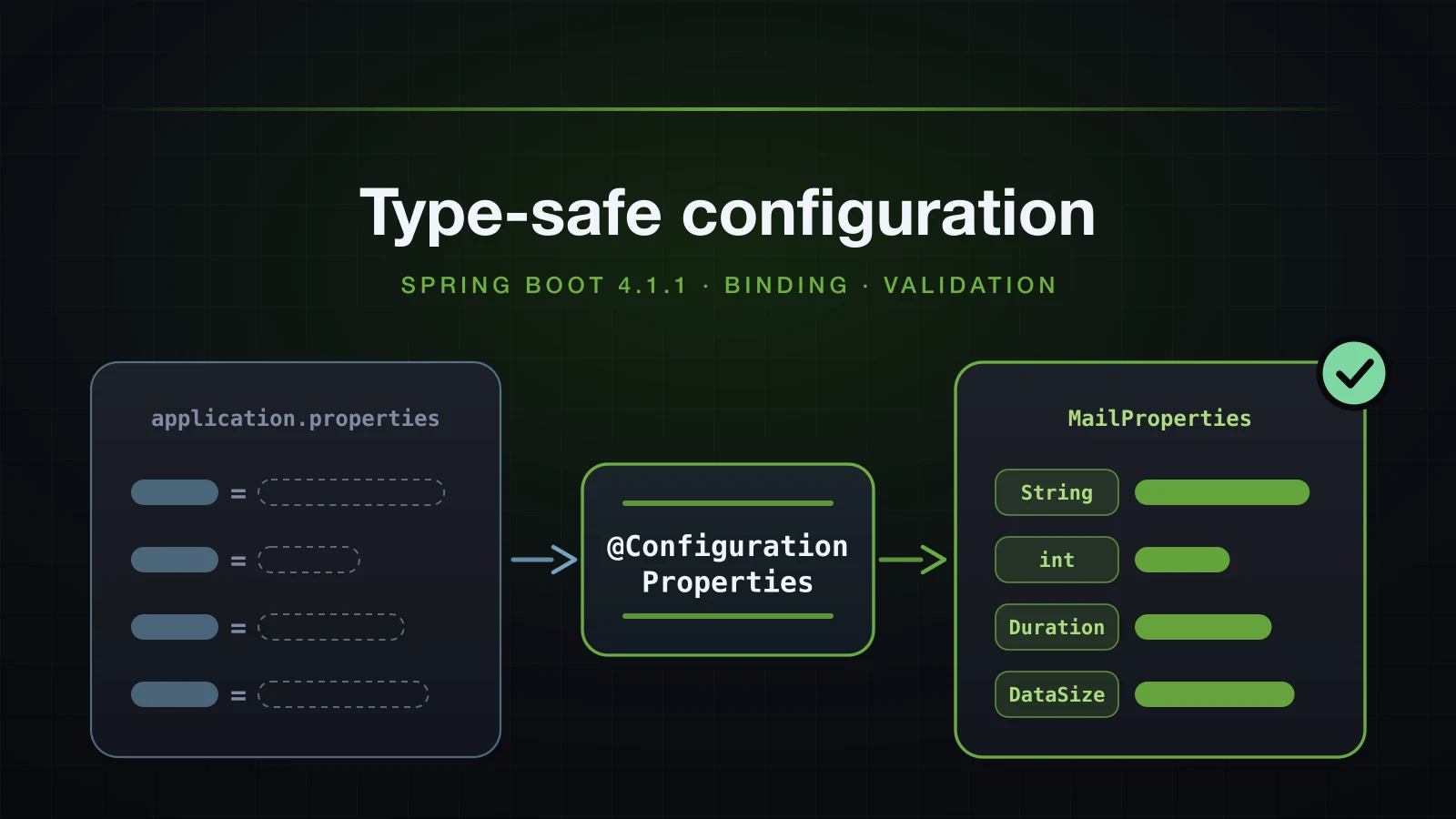
@ConfigurationProperties is how Spring Boot fixes that. You describe a prefix as a Java type, usually a record, and Boot binds every key under that prefix into it once. On the way in it converts strings into int, Duration, DataSize, enums, lists, maps and nested objects, accepts several spellings of each key, and, if you ask, validates the result before the application is allowed to start. This article goes through all of it, including the places where it quietly does something other than what you meant.
The examples use Spring Boot 4.1.1 and Java 21, on an Initializr project with the web, validation and configuration processor dependencies.
Why @Value stops scaling
The previous article closed on the limits of @Value. Here they are in one small application. The mail settings live in application.properties, and one of them is wrong:
app.mail.host=smtp.example.com
app.mail.port=70000
Three classes read those keys:
@Service
public class MailSender {

    private final String host;
    private final int port;

    public MailSender(@Value("${app.mail.host}") String host, @Value("${app.mail.port}") int port) {
        this.host = host;
        this.port = port;
    }

    public String send(String to) {
        InetSocketAddress address = new InetSocketAddress(host, port);
        return "sending to " + to + " via " + address;
    }
}@Component
public class MailHealthCheck {
@Value("${app.mail.host}")
private String host;
@Value("${app.mail.port}")
private int port;
}@Component
public class BounceProcessor {
@Value("${app.mail.hots:localhost}")
private String host;
@Value("${app.mail.port:25}")
private int port;
}Printing what each class ended up with, right after startup:
Started DemoApplication in 0.508 seconds (process running for 0.624)
MailSender      -> smtp.example.com:70000
MailHealthCheck -> smtp.example.com:70000
BounceProcessor -> localhost:70000
The application started in half a second. It breaks on the first request that actually sends mail, which returns HTTP 500:
Servlet.service() for servlet [dispatcherServlet] in context with path [] threw exception [Request processing failed: java.lang.IllegalArgumentException: port out of range:70000] with root cause

java.lang.IllegalArgumentException: port out of range:70000
Those twenty lines contain three separate problems:
- The keys are strings repeated in every class.
app.mail.hostappears three times; renaming the group means finding every copy. - A typo is silent.
BounceProcessorasks forapp.mail.hots, which does not exist, so the defaultlocalhostis used and nothing is logged. - Nothing checks the value.
70000is a validintand an invalid TCP port. The type system accepts it, and the failure arrives later, at the first call that uses it.
@ConfigurationProperties addresses all three by describing app.mail once, as a type.
Binding configuration to a record
The generated project already has everything this article needs. @ConfigurationProperties itself lives in the core spring-boot jar; spring-boot-starter-validation adds Hibernate Validator, and the annotationProcessor line adds the metadata generator used later:
dependencies {
	implementation 'org.springframework.boot:spring-boot-starter-validation'
	implementation 'org.springframework.boot:spring-boot-starter-webmvc'
	annotationProcessor 'org.springframework.boot:spring-boot-configuration-processor'
	testImplementation 'org.springframework.boot:spring-boot-starter-validation-test'
	testImplementation 'org.springframework.boot:spring-boot-starter-webmvc-test'
	testRuntimeOnly 'org.junit.platform:junit-platform-launcher'
}
A properties class is a record annotated with the prefix. Each component is one key under it:
@ConfigurationProperties("app.mail")
public record MailProperties(String host, int port, String from, boolean tls, List<String> recipients) {
}app.mail.host=smtp.example.com
app.mail.port=587
app.mail.from=noreply@example.com
app.mail.tls=true
app.mail.recipients=ops@example.com,dev@example.comThe class still has to be registered. Adding @ConfigurationPropertiesScan to the application class is one of three ways, compared in their own section below:
@SpringBootApplication
@ConfigurationPropertiesScan
public class DemoApplication {

    public static void main(String[] args) {
        SpringApplication.run(DemoApplication.class, args);
    }
}
After that, MailProperties is an ordinary bean you inject through a constructor. Printing its bean name and the bean itself:
[app.mail-com.example.demo.MailProperties]
  MailProperties[host=smtp.example.com, port=587, from=noreply@example.com, tls=true, recipients=[ops@example.com, dev@example.com]]
The bean name is the prefix, a dash, and the fully-qualified class name. You rarely need it, but that is the string you will see in bean listings and error messages.
A missing key is not an error. This record, bound under a prefix that has no keys at all:
@ConfigurationProperties("app.empty")
public record EmptyProps(String host, int port, boolean tls, Integer retries, List<String> recipients, Duration timeout) {
}
comes out as:
EmptyProps[host=null, port=0, tls=false, retries=null, recipients=null, timeout=null]References get null and primitives get their zero value — including port=0, which is rarely what you want. Defaults and validation, both covered below, are the two ways to stop that from reaching production unnoticed.
When is @ConstructorBinding needed?
Not for the record above, and not for an ordinary class with a single constructor either; a final class with one two-argument constructor and no annotation bound the same way.
The ordinary class has one precondition: its constructor's parameter names must be in the class file. Boot's Gradle plugin compiles with -parameters, so the generated project has them. With that flag removed from compileJava, the same class stopped startup with Unable to create instance for com.example.demo.SingleCtorProps and the hint Ensure that your compiler is configured to use the '-parameters' flag. A record kept binding without the flag, because its component names are always recorded in the class file.
The rule, as implemented in Boot 4.1.1's DefaultBindConstructorProvider, is short:
- A constructor annotated
@ConstructorBindingis always used. - Otherwise, if the class has exactly one constructor and it takes parameters, Boot binds through it. Records and ordinary classes are treated the same.
- Otherwise, if exactly one constructor is non-private and it takes parameters, Boot binds through that one.
- Otherwise there is no binding constructor, and Boot falls back to JavaBean binding through setters. An
@Autowiredconstructor also opts the class out.
The trap is rule 4. Add a convenience constructor to a record and it now has two public constructors, so Boot stops using constructor binding without saying so:
@ConfigurationProperties("app.mail")
public record MailProperties(String host, int port) {

    public MailProperties(String host) {
        this(host, 25);
    }
}org.springframework.beans.factory.BeanCreationException: Error creating bean with name 'app.mail-com.example.demo.MailProperties': Failed to instantiate [com.example.demo.MailProperties]: No default constructor foundA record has no no-argument constructor for JavaBean binding to call, so the context fails. The fix is to say which constructor to bind through. On a record, that means declaring the compact canonical constructor so there is something to annotate:
@ConfigurationProperties("app.mail")
public record MailProperties(String host, int port) {

    @ConstructorBinding
    public MailProperties {
    }

    public MailProperties(String host) {
        this(host, 25);
    }
}MailProperties[host=smtp.example.com, port=587]An ordinary class with both a no-argument constructor and an all-arguments constructor, but no setters, fails differently. Boot picks JavaBean binding and then has nowhere to put the values:
Failed to bind properties under 'app.two' to com.example.demo.TwoCtorProps:

    Property: app.two.host
    Value: "two.example.com"
    Origin: class path resource [application.properties] - 8:14
    Reason: java.lang.IllegalStateException: No setter found for property: host
How immutable is a record-backed properties class?
The record has no setters, so no bean can reassign host after binding; the compiler rejects the attempt. Collections are a different matter. The binder fills a List component with a plain ArrayList, and any bean holding the properties can change it:
recipients class = java.util.ArrayList
after add: [ops@example.com, dev@example.com, intruder@example.com]
Every other bean that injected MailProperties now sees the extra recipient. A compact constructor inside the record closes the gap with a defensive copy:
public MailProperties {
    recipients = (recipients == null) ? List.of() : List.copyOf(recipients);
}recipients().add -> java.lang.UnsupportedOperationExceptionA compact constructor is the canonical constructor, not a second one, so constructor binding is still deduced and no @ConstructorBinding is needed.
JavaBean binding with getters and setters
Before records, a properties class had a no-argument constructor and a setter for each property. Boot still supports that shape, and uses it whenever none of the constructor rules above applies.
@ConfigurationProperties("app.mail")
public class MailProperties {

    private String host = "localhost";
    private int port = 25;
    private Duration timeout = Duration.ofSeconds(10);
    private List<String> recipients = new ArrayList<>(List.of("ops@example.com"));
    private final Smtp smtp = new Smtp();

    public String getHost() { return host; }
    public void setHost(String host) { this.host = host; }
    public int getPort() { return port; }
    public void setPort(int port) { this.port = port; }
    public Duration getTimeout() { return timeout; }
    public void setTimeout(Duration timeout) { this.timeout = timeout; }
    public List<String> getRecipients() { return recipients; }
    public void setRecipients(List<String> recipients) { this.recipients = recipients; }
    public Smtp getSmtp() { return smtp; }

    public static class Smtp {

        private boolean auth;
        private String username;

        public boolean isAuth() { return auth; }
        public void setAuth(boolean auth) { this.auth = auth; }
        public String getUsername() { return username; }
        public void setUsername(String username) { this.username = username; }
    }
}
With only two keys set:
app.mail.host=smtp.example.com
app.mail.smtp.auth=truehost=smtp.example.com port=25 timeout=PT10S recipients=[ops@example.com] smtp.auth=true smtp.username=nullTwo details are worth noticing. Every field without a key kept its initialiser. And smtp has a getter but no setter: the binder calls getSmtp() and binds auth into the instance that already exists instead of replacing it.
JavaBean binding is still the right choice in a few situations:
- Defaults that are easier to write as code, such as a pre-filled mutable list or a nested object that must never be
null, initialised in the field declaration. - A class you do not own that only exposes setters. Binding on a
@Beanmethod, covered below, relies on exactly this. - A class with more than one constructor that you do not want to annotate.
The cost is mutability: any bean holding MailProperties can call setPort(1) at run time.
Default values: field initialisers vs @DefaultValue
A constructor has no field initialiser to fall back on, so constructor binding carries its defaults in an annotation. @DefaultValue takes a string, which is converted exactly like a value from a properties file:
@ConfigurationProperties("app.mail")
public record MailProperties(
        @DefaultValue("localhost") String host,
        @DefaultValue("25") int port,
        @DefaultValue("10s") Duration timeout,
        @DefaultValue("ops@example.com") List<String> recipients,
        @DefaultValue Smtp smtp,
        Tls tls) {

    public record Smtp(boolean auth, String username) {
    }

    public record Tls(boolean enabled, String protocol) {
    }
}
With only app.mail.host=smtp.example.com set:
MailProperties[host=smtp.example.com, port=25, timeout=PT10S, recipients=[ops@example.com], smtp=Smtp[auth=false, username=null], tls=null]smtp and tls are both nested records with no keys. The empty @DefaultValue on smtp tells Boot to construct it anyway; tls has no annotation and stays null.
| JavaBean binding | Constructor binding | |
|---|---|---|
| Where a default lives | the field initialiser | @DefaultValue("…") on the parameter |
| How a default is written | any Java expression | a string, converted like a property ("10s", "25") |
| Nested object with no keys | whatever the field was initialised to | null, unless the parameter has an empty @DefaultValue |
| Scalar with no key and no default | keeps its initial value | null, 0 or false |
Registering a @ConfigurationProperties class
The annotation describes how to bind; it does not create a bean. There are three ways to register the class, and they are not interchangeable.
@EnableConfigurationProperties on any @Configuration class lists the types explicitly. This is what Boot's own auto-configurations use: HttpEncodingAutoConfiguration from the previous chapter registers ServletEncodingProperties this way.
@Configuration
@EnableConfigurationProperties(MailProperties.class)
public class MailConfig {
}
@ConfigurationPropertiesScan on the application class finds every @ConfigurationProperties type in that package and its subpackages, so a new properties class needs no extra line anywhere. Both annotations produce the same bean:
[app.mail-com.example.demo.MailProperties] -> MailProperties[host=smtp.example.com, port=587]@Component on the properties class makes it an ordinary scanned component. That works for a JavaBean, whose bean is then simply named mailProperties. It does not work for a record, because component scanning creates the bean itself and tries to inject String host as a dependency:
***************************
APPLICATION FAILED TO START
***************************

Description:

MailProperties is annotated with @ConstructorBinding but it is defined as a regular bean which caused dependency injection to fail.

Action:

Update your configuration so that MailProperties is defined via @ConfigurationPropertiesScan or @EnableConfigurationProperties.
The record carries no @ConstructorBinding; the message refers to the constructor binding Boot deduced. The underlying exception is No qualifying bean of type 'java.lang.String' available.
| Registration | Bean name | Records and constructor binding | Use it for |
|---|---|---|---|
@EnableConfigurationProperties(MailProperties.class) | app.mail-com.example.demo.MailProperties | yes | libraries and auto-configurations, where the list should be explicit |
@ConfigurationPropertiesScan | app.mail-com.example.demo.MailProperties | yes | applications with several properties classes |
@Component | mailProperties | no, startup fails | existing JavaBean properties classes |
What happens if you forget to register it?
It depends on whether anything asks for it. If a bean injects the unregistered class, startup fails with the generic missing-bean analysis, which says nothing about configuration properties:
***************************
APPLICATION FAILED TO START
***************************

Description:

Parameter 0 of constructor in com.example.demo.MailService required a bean of type 'com.example.demo.MailProperties' that could not be found.


Action:

Consider defining a bean of type 'com.example.demo.MailProperties' in your configuration.
If nothing injects it, nothing fails. Asking the context for beans of that type after a clean start:
MailProperties beans: []@ConfigurationProperties on an unregistered class simply does nothing. When the message above names a class you know carries the annotation, the fix is registration, not a new @Bean method.
Binding nested objects, lists, maps and enums
The binder walks the key tree under the prefix and builds whatever object graph the type describes. One record covers every shape worth knowing:
@ConfigurationProperties("app.mail")
public record MailProperties(
        String host,
        Smtp smtp,
        List<String> recipients,
        List<Server> servers,
        Map<String, String> headers,
        Map<String, Object> extra,
        Mode mode,
        Duration timeout,
        @DurationUnit(ChronoUnit.SECONDS) Duration retryDelay,
        DataSize maxAttachmentSize,
        @DataSizeUnit(DataUnit.MEGABYTES) DataSize mailboxQuota,
        Period retention) {

    public record Smtp(boolean auth, boolean starttls, String username) {
    }

    public record Server(String host, int port) {
    }

    public enum Mode {
        SMTP, SMTPS, LOG_ONLY
    }
}app.mail.host=smtp.example.com
app.mail.smtp.auth=true
app.mail.smtp.starttls=true
app.mail.smtp.username=mailer
app.mail.recipients=ops@example.com,dev@example.com
app.mail.servers[0].host=mx1.example.com
app.mail.servers[0].port=25
app.mail.servers[1].host=mx2.example.com
app.mail.servers[1].port=2525
app.mail.headers.reply-to=support@example.com
app.mail.headers.x-priority=1
app.mail.extra.dkim.selector=mail2026
app.mail.extra.dkim.enabled=true
app.mail.extra.tracking=off
app.mail.mode=log-only
app.mail.timeout=30s
app.mail.retry-delay=5
app.mail.max-attachment-size=10MB
app.mail.mailbox-quota=512
app.mail.retention=90dhost = smtp.example.com
smtp = Smtp[auth=true, starttls=true, username=mailer]
recipients = [ops@example.com, dev@example.com]
servers = [Server[host=mx1.example.com, port=25], Server[host=mx2.example.com, port=2525]]
headers = {reply-to=support@example.com, x-priority=1}
extra = {dkim={selector=mail2026, enabled=true}, tracking=off}
mode = LOG_ONLY
timeout = PT30S
retryDelay = PT5S
maxAttachmentSize = 10485760B
mailboxQuota = 536870912B
retention = P90D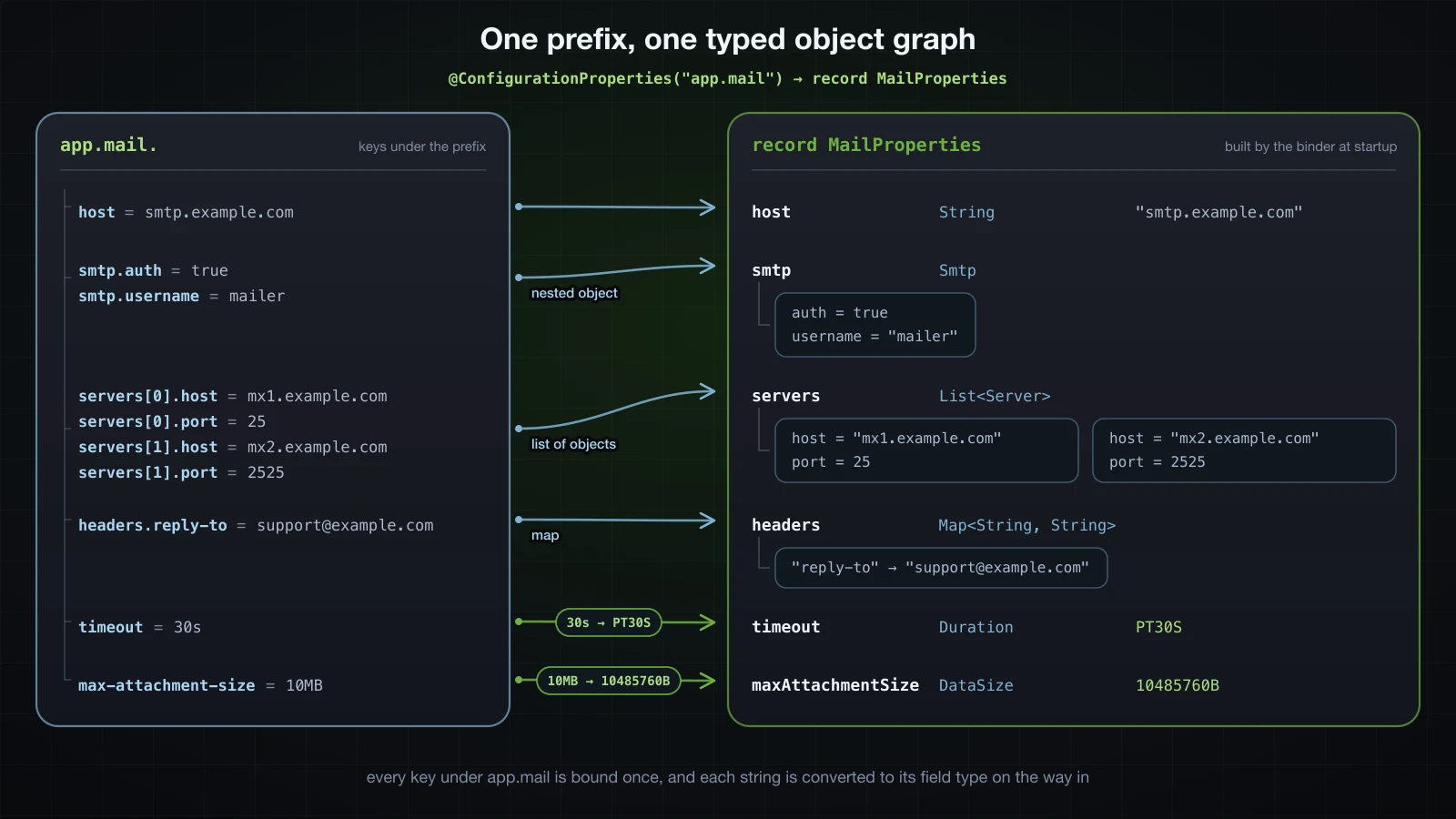
What each shape does:
- Nested object.
app.mail.smtp.*becomes theSmtprecord. Nesting goes as deep as the types do. List<String>. A comma-separated value splits into elements. The indexed form,app.mail.recipients[0]=…andapp.mail.recipients[1]=…, binds the same list.List<Server>. Objects in a list need the index:servers[0].host,servers[0].port.Map<String, String>. Everything afterheaders.is the key.Map<String, Object>. Dots in the rest of the key create nested maps, soextra.dkim.selectorbecomes{dkim={selector=…}}. The values stay strings:extra.dkim.enabledis ajava.lang.String, not aBoolean, because a declared value type ofObjectgives the binder nothing to convert to.
Enums are matched leniently. The converter first tries the exact constant name; failing that, it lower-cases both sides and drops everything that is not a letter or digit before comparing. log-only, log_only, logOnly, LogOnly, logonly and even log only all bind to LOG_ONLY, and an empty value binds to null. A value that matches nothing stops the application, and the analysis lists the valid constants:
Description:

Failed to bind properties under 'app.mail.mode' to com.example.demo.MailProperties$Mode:

    Property: app.mail.mode
    Value: "nope"
    Origin: class path resource [application.properties] - 15:15
    Reason: failed to convert java.lang.String to com.example.demo.MailProperties$Mode (caused by java.lang.IllegalArgumentException: No enum constant com.example.demo.MailProperties.Mode.nope)

Action:

Update your application's configuration. The following values are valid:

    LOG_ONLY
    SMTP
    SMTPS
Duration, DataSize and Period conversion
java.time.Duration, Spring's DataSize and java.time.Period each accept a short suffix form, plus a default unit for bare numbers. The defaults differ per type, and one letter means different things in different types, so this table is worth keeping. Every row was bound through Boot 4.1.1's converters:
| Type | Value | Binds to | Rule |
|---|---|---|---|
Duration | 30s | PT30S | suffixes ns, us, ms, s, m, h, d; case-insensitive, so 30S works |
Duration | PT30S | PT30S | ISO-8601, in either case (pt30s works) |
Duration | 30 | PT0.03S | a bare number is milliseconds |
Duration + @DurationUnit(SECONDS) | 30 | PT30S | the unit applies to bare numbers only; 500ms is still 500 ms |
Duration | 1.5s, 1h30m, 30 s, 1w | fails | no decimals, no combined units, no space, no weeks |
DataSize | 10MB | 10485760B | suffixes B, KB, MB, GB, TB; binary, so 1 KB = 1024 B |
DataSize | 10 | 10B | a bare number is bytes |
DataSize + @DataSizeUnit(MEGABYTES) | 512 | 536870912B | the unit applies to bare numbers only |
DataSize | 10 MB | 10485760B | whitespace is ignored |
DataSize | 10mb, 10M, 10MiB, 1.5MB | fails | suffixes are upper case only: Unknown data unit suffix 'mb' |
Period | 90d | P90D | suffixes y, m, w, d, case-insensitive, in that order |
Period | 6m | P6M | m means months here and minutes in a Duration |
Period | 1y2m3w4d | P1Y2M25D | weeks are folded into days |
Period | 90 | P90D | a bare number is days; @PeriodUnit changes that |
Period | P1Y2M3D | P1Y2M3D | ISO-8601 |
Period | 2d1y, 6mo | fails | units out of order, unknown suffix |
A value that does not parse stops the application with the same analysis format as the enum above:
Failed to bind properties under 'app.mail.timeout' to java.time.Duration:

    Property: app.mail.timeout
    Value: "1.5s"
    Origin: class path resource [application.properties] - 16:18
    Reason: failed to convert java.lang.String to java.time.Duration (caused by java.lang.IllegalArgumentException: '1.5s' is not a valid duration)
Prefer Duration and DataSize over a long timeoutMillis or an int maxSizeMb. The unit then lives in the value, 30s cannot be mistaken for thirty milliseconds, and the field name no longer has to carry the unit.
Relaxed binding
The key in the file does not have to be spelled like the Java component. Binding one field, smtpHost, in four separate runs with one spelling per run:
@ConfigurationProperties("app.mail")
public record MailProperties(String smtpHost) {
}| Run | Source | Key as written | smtpHost |
|---|---|---|---|
| 1 | application.properties | app.mail.smtp-host=kebab.example.com | kebab.example.com |
| 2 | application.properties | app.mail.smtpHost=camel.example.com | camel.example.com |
| 3 | application.properties | app.mail.smtp_host=underscore.example.com | underscore.example.com |
| 4 | environment variable | APP_MAIL_SMTPHOST=env.example.com | env.example.com |
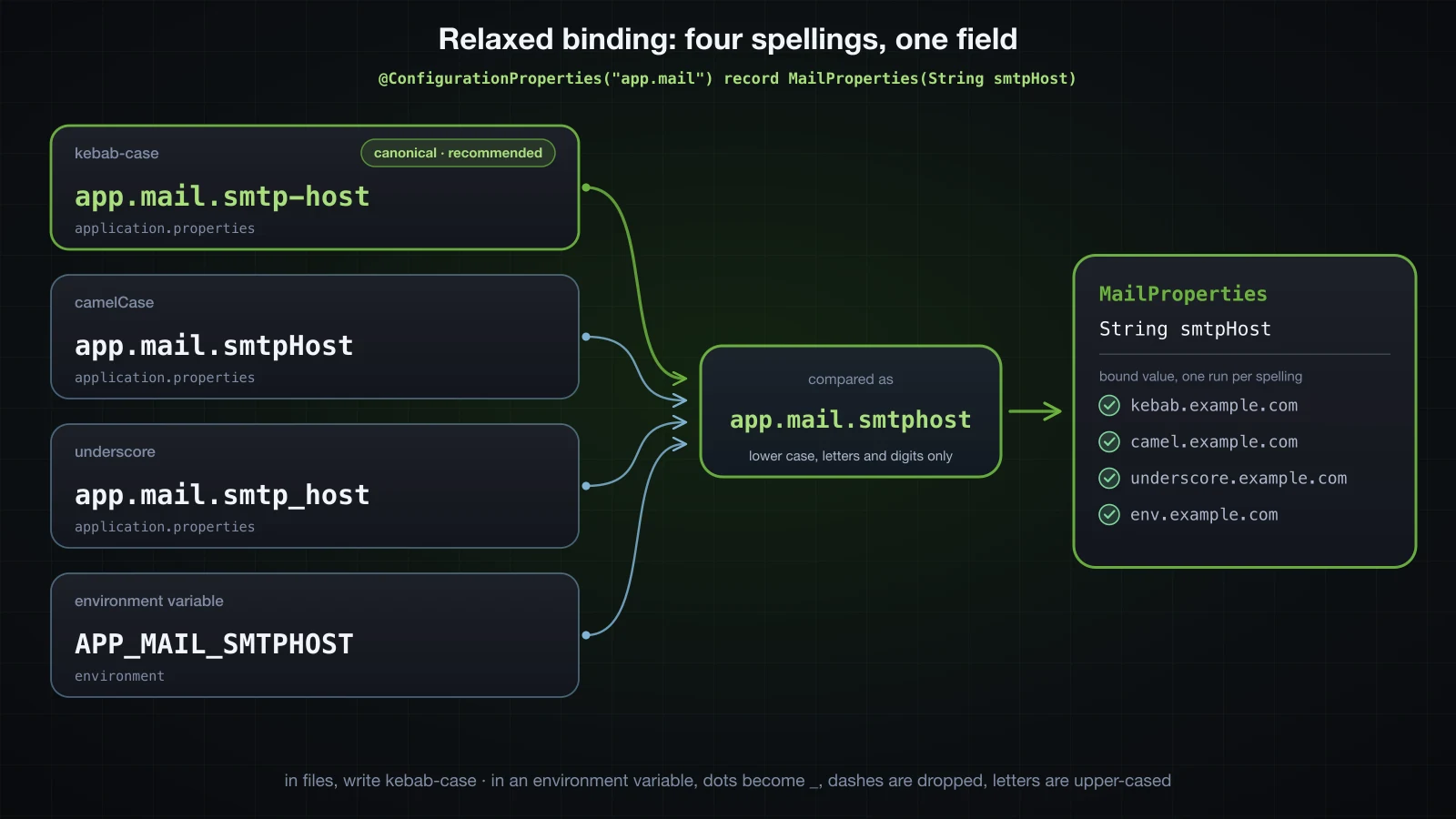
All four work because Boot does not compare names as written. ConfigurationPropertyName compares each element in a uniform form, lower-cased with every character that is not a letter or digit removed, so smtp-host, smtpHost, smtp_host and SMTPHOST all reduce to smtphost.
That flexibility is for reading whatever spelling you are given. For your own files, Boot has one canonical form: kebab-case, lower case, - between words, as in app.mail.smtp-host. The prefix inside the annotation must be canonical, and Boot checks it before binding anything:
***************************
APPLICATION FAILED TO START
***************************

Description:

Configuration property name 'app.mailService' is not valid:

    Invalid characters: 'S'
    Bean: app.mailService-com.example.demo.MailProperties
    Reason: Canonical names should be kebab-case ('-' separated), lowercase alpha-numeric characters and must start with a letter

Action:

Modify 'app.mailService' so that it conforms to the canonical names requirements.
For an environment variable, the rule is: replace the dots with underscores, remove the dashes, and upper-case the rest. app.mail.smtp-host becomes APP_MAIL_SMTPHOST. Boot 4.1.1 also still accepts an older form in which the dash becomes an underscore too — a run with APP_MAIL_SMTP_HOST=legacy.example.com bound smtpHost = legacy.example.com — but because _ also separates levels, the documented form is the unambiguous one. How environment variables rank against your files is the next article's subject; here only their naming rule matters.
Environment variable names for lists and maps
An index in an environment variable is written between underscores. Setting these variables and no properties at all:
APP_MAIL_RECIPIENTS_0_=a@example.com
APP_MAIL_RECIPIENTS_1_=b@example.com
APP_MAIL_SERVERS_0_HOST=mx1.example.com
APP_MAIL_SERVERS_0_PORT=25
APP_MAIL_SERVERS_1_HOST=mx2.example.com
APP_MAIL_SERVERS_1_PORT=2525
APP_MAIL_HEADERS_XPRIORITY=1
APP_MAIL_HEADERS_REPLY_TO=support@example.com
binds the following, with map keys printed in angle brackets so their exact spelling is visible:
recipients = [a@example.com, b@example.com]
servers    = [Server[host=mx1.example.com, port=25], Server[host=mx2.example.com, port=2525]]
headers    = {<reply.to>=support@example.com, <xpriority>=1}
Lists behave as you would hope. Maps do not, and that is the part to remember:
| Target | Environment variable | Result |
|---|---|---|
recipients[0] | APP_MAIL_RECIPIENTS_0_ or APP_MAIL_RECIPIENTS_0 | first element; the trailing underscore is optional |
recipients | APP_MAIL_RECIPIENTS=a@example.com,b@example.com | two elements |
servers[1].port | APP_MAIL_SERVERS_1_PORT | port of the second Server |
a headers key | APP_MAIL_HEADERS_XPRIORITY | key xpriority |
a headers key | APP_MAIL_HEADERS_REPLY_TO | key reply.to, because every _ becomes a . |
an extra key in a Map<String, Object> | APP_MAIL_EXTRA_DKIM_SELECTOR | nested map {dkim={selector=mail2026}} |
Map keys from environment variables are always lower-cased, and an underscore can never come through as a dash. Even a variable set with env as APP_MAIL_HEADERS_X-Priority=1 (a shell cannot export a name containing -) arrived as the key x-priority. A map key that needs capitals or punctuation belongs in a file.
Map keys and the bracket notation
In a file, map keys keep their case, but relaxed binding still strips some characters out of them. The bracket notation [...] turns that off for one key:
app.mail.headers.X-Mailer=demo
app.mail.headers.X_Campaign=spring
app.mail.headers.Reply@To=support@example.com
app.mail.headers.[Reply@To]=support@example.com
app.mail.headers./unsubscribe=unsub@example.com
app.mail.headers.[/bounce]=bounces@example.com
app.mail.headers.reply.to=help@example.com
app.mail.extra.dkim.domain=example.com
app.mail.extra.[dkim.selector]=mail2026headers = {<X-Mailer>=demo, <X_Campaign>=spring, <ReplyTo>=support@example.com, <Reply@To>=support@example.com, <unsubscribe>=unsub@example.com, </bounce>=bounces@example.com, <reply.to>=help@example.com}
extra = {dkim={domain=example.com}, dkim.selector=mail2026}| Key as written | Map key bound |
|---|---|
X-Mailer | X-Mailer: case and - kept |
X_Campaign | X_Campaign: _ kept |
Reply@To | ReplyTo: @ removed |
[Reply@To] | Reply@To |
/unsubscribe | unsubscribe: / removed |
[/bounce] | /bounce |
reply.to in a Map<String, String> | reply.to |
dkim.domain in a Map<String, Object> | nested: dkim={domain=…} |
[dkim.selector] in a Map<String, Object> | one flat key, dkim.selector |
Without brackets, a map key keeps letters in their original case, digits, - and _, and loses every other character. Inside brackets the key is used exactly as written, and in a Map<String, Object> the brackets also stop dots from creating a nested map. In YAML the brackets must be quoted: "[/bounce]": bounces@example.com bound the key /bounce, while an unquoted [X-Priority]: 1 produced the key [X-Priority], brackets included.
Validating configuration at startup with @Validated
Constraints go on the components, and @Validated on the class turns them on:
@Validated
@ConfigurationProperties("app.mail")
public record MailProperties(
        @NotBlank String host,
        @Min(1) @Max(65535) int port,
        @NotBlank @Email String from,
        @Pattern(regexp = "[A-Z]{2,10}") String subjectTag,
        @Valid Smtp smtp) {

    public record Smtp(@NotBlank String username, @Min(1) @Max(20) int maxConnections) {
    }
}
The constraints come from jakarta.validation.constraints, @Valid from jakarta.validation, and @Validated from org.springframework.validation.annotation. Validation runs right after binding, while the bean is being created, so a violation stops the context. Here is the same app.mail.port=70000 that @Value accepted, with every other key valid:
app.mail.host=smtp.example.com
app.mail.port=70000
app.mail.from=noreply@example.com
app.mail.subject-tag=SHOP
app.mail.smtp.username=mailer
app.mail.smtp.max-connections=5***************************
APPLICATION FAILED TO START
***************************
Description:
Binding to target com.example.demo.MailProperties failed:
Property: app.mail.port
Value: "70000"
Origin: class path resource [application.properties] - 2:15
Reason: must be less than or equal to 65535
Action:
Update your application's configuration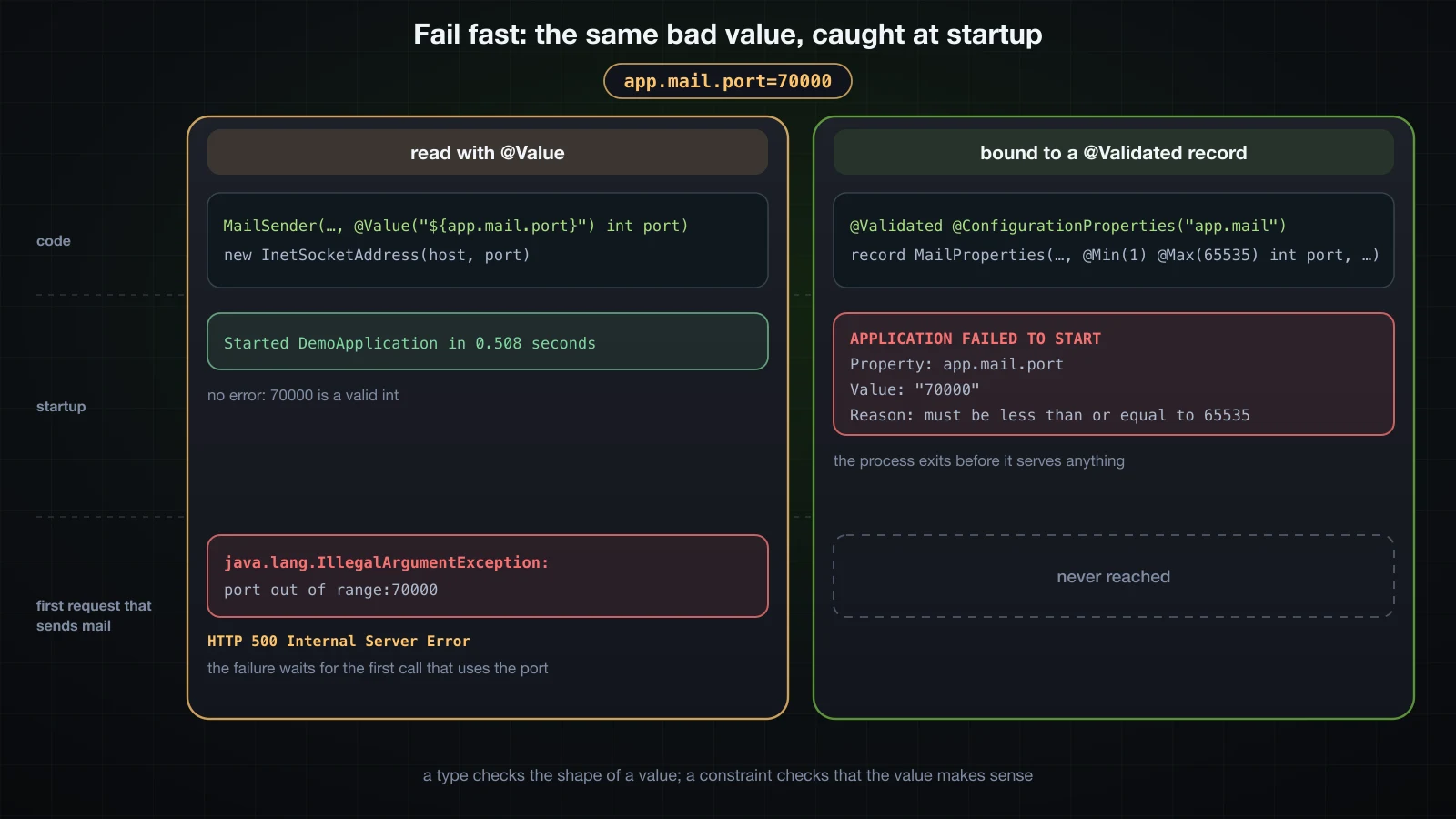
This is fail-fast. The process exits before it serves a single request, and the report names the key, the value, the file with line and column, and the rule the value broke. A deployment with broken configuration fails when it is deployed, not on the first real request that happens to need the value.
Boot reports every violation at once, not just the first. Breaking six values:
app.mail.host=
app.mail.port=70000
app.mail.from=noreply-at-example.com
app.mail.subject-tag=shop
app.mail.smtp.username=
app.mail.smtp.max-connections=50Description:
Binding to target com.example.demo.MailProperties failed:
Property: app.mail.host
Value: ""
Origin: class path resource [application.properties] - 2:0
Reason: must not be blank
Property: app.mail.subjectTag
Value: "shop"
Origin: class path resource [application.properties] - 4:22
Reason: must match "[A-Z]{2,10}"
Property: app.mail.port
Value: "70000"
Origin: class path resource [application.properties] - 2:15
Reason: must be less than or equal to 65535
Property: app.mail.from
Value: "noreply-at-example.com"
Origin: class path resource [application.properties] - 3:15
Reason: must be a well-formed email address
Property: app.mail.smtp.maxConnections
Value: "50"
Reason: must be less than or equal to 20
Property: app.mail.smtp.username
Value: ""
Reason: must not be blankA few details in this report are worth knowing before you meet them in a real log. The violations are not in file order. Those on nested properties come without an Origin line. Properties are reported under their Java names (subjectTag, maxConnections) rather than the kebab-case keys you wrote. And the empty host on line 1 is located at 2:0, the start of the next line.
⚠️ Constraints do nothing without
@Validatedon the class. The same broken file, bound to the same record with only that annotation removed, starts cleanly and hands every beanMailProperties[host=, port=70000, from=noreply-at-example.com, subjectTag=shop, smtp=Smtp[username=, maxConnections=50]].
Nested objects are validated only with @Valid
@Validated validates the properties object itself. It does not descend into a nested object unless that component is marked @Valid. Take a file whose top-level keys are valid and whose smtp group is not:
app.mail.host=smtp.example.com
app.mail.port=587
app.mail.from=noreply@example.com
app.mail.subject-tag=SHOP
app.mail.smtp.username=
app.mail.smtp.max-connections=50
Remove @Valid from the smtp component and change nothing else:
        @Valid Smtp smtp) {
        Smtp smtp) {
The application starts:
MailProperties[host=smtp.example.com, port=587, from=noreply@example.com, subjectTag=SHOP, smtp=Smtp[username=, maxConnections=50]]The @NotBlank and @Max(20) on Smtp were never evaluated. Put @Valid back, and the same file stops the application:
Binding to target com.example.demo.MailProperties failed:

    Property: app.mail.smtp.username
    Value: ""
    Reason: must not be blank

    Property: app.mail.smtp.maxConnections
    Value: "50"
    Reason: must be less than or equal to 20
@Valid has one more gap: it validates a nested object only if the object exists. Remove every app.mail.smtp.* key and the record binds smtp=null, which @Valid skips, so the application starts. Each of these two declarations closes the gap:
| Component declaration | Result with no app.mail.smtp.* keys |
|---|---|
@Valid Smtp smtp | starts with smtp=null |
@Valid @NotNull Smtp smtp | fails: app.mail.smtp, must not be null |
@Valid @DefaultValue Smtp smtp | fails: app.mail.smtp.username, must not be blank; app.mail.smtp.maxConnections, must be greater than or equal to 1 |
@NotNull says the whole group is required. An empty @DefaultValue builds an empty Smtp and lets its own constraints decide, which fits better when some of its fields have sensible defaults.
IDE metadata with spring-boot-configuration-processor
One problem from the first section is still open: a misspelled key. @ConfigurationProperties ignores keys under its prefix that match no property, so this file:
app.mail.hots=smtp.example.com
app.mail.port=587
binds MailProperties[host=null, port=587], and the application starts. There are two defences, one at startup and one in the editor.
At startup, ignoreUnknownFields = false turns an unknown key into a binding failure:
@ConfigurationProperties(prefix = "app.mail", ignoreUnknownFields = false)
public record MailProperties(String host, int port) {
} Property: app.mail.hots
Value: "smtp.example.com"
Origin: class path resource [application.properties] - 1:15
Reason: The elements [app.mail.hots] were left unbound.That setting cuts both ways, though: a key left over from an old version of the class breaks startup too. The more common defence comes earlier, in the editor.
The generated build already has annotationProcessor 'org.springframework.boot:spring-boot-configuration-processor'. At compile time the processor reads every @ConfigurationProperties type and writes a JSON description of its keys. Here is a documented version of the properties record:
/**
 * Settings for the outgoing mail client.
 *
 * @param host host name of the SMTP server
 * @param port port the SMTP server listens on
 * @param from address placed in the From header of every message
 * @param timeout how long to wait for the server before giving up
 * @param maxAttachmentSize largest attachment accepted before a message is rejected
 * @param recipients addresses that receive operational alerts
 * @param smtp authentication settings for the SMTP connection
 */
@Validated
@ConfigurationProperties("app.mail")
public record MailProperties(
        @NotBlank String host,
        @DefaultValue("587") @Min(1) @Max(65535) int port,
        @NotBlank @Email String from,
        @DefaultValue("30s") Duration timeout,
        @DefaultValue("10MB") DataSize maxAttachmentSize,
        List<String> recipients,
        @Valid @DefaultValue Smtp smtp) {

    public MailProperties {
        recipients = (recipients == null) ? List.of() : List.copyOf(recipients);
    }

    /**
     * SMTP authentication settings.
     *
     * @param username account used to authenticate against the SMTP server
     * @param maxConnections upper bound on concurrent SMTP connections
     */
    public record Smtp(String username, @DefaultValue("5") @Min(1) @Max(20) int maxConnections) {
    }
}
./gradlew compileJava writes build/classes/java/main/META-INF/spring-configuration-metadata.json, and from there it is packaged into the jar as META-INF/spring-configuration-metadata.json:
{
  "groups": [
    {
      "name": "app.mail",
      "type": "com.example.demo.MailProperties",
      "sourceType": "com.example.demo.MailProperties"
    },
    {
      "name": "app.mail.smtp",
      "type": "com.example.demo.MailProperties$Smtp",
      "sourceType": "com.example.demo.MailProperties",
      "sourceMethod": "smtp()"
    }
  ],
  "properties": [
    {
      "name": "app.mail.from",
      "type": "java.lang.String",
      "description": "address placed in the From header of every message",
      "sourceType": "com.example.demo.MailProperties"
    },
    {
      "name": "app.mail.host",
      "type": "java.lang.String",
      "description": "host name of the SMTP server",
      "sourceType": "com.example.demo.MailProperties"
    },
    {
      "name": "app.mail.max-attachment-size",
      "type": "org.springframework.util.unit.DataSize",
      "description": "largest attachment accepted before a message is rejected",
      "sourceType": "com.example.demo.MailProperties",
      "defaultValue": "10MB"
    },
    {
      "name": "app.mail.port",
      "type": "java.lang.Integer",
      "description": "port the SMTP server listens on",
      "sourceType": "com.example.demo.MailProperties",
      "defaultValue": 587
    },
    {
      "name": "app.mail.recipients",
      "type": "java.util.List<java.lang.String>",
      "description": "addresses that receive operational alerts",
      "sourceType": "com.example.demo.MailProperties"
    },
    {
      "name": "app.mail.smtp.max-connections",
      "type": "java.lang.Integer",
      "description": "upper bound on concurrent SMTP connections",
      "sourceType": "com.example.demo.MailProperties$Smtp",
      "defaultValue": 5
    },
    {
      "name": "app.mail.smtp.username",
      "type": "java.lang.String",
      "description": "account used to authenticate against the SMTP server",
      "sourceType": "com.example.demo.MailProperties$Smtp"
    },
    {
      "name": "app.mail.timeout",
      "type": "java.time.Duration",
      "description": "how long to wait for the server before giving up",
      "sourceType": "com.example.demo.MailProperties",
      "defaultValue": "30s"
    }
  ],
  "hints": [],
  "ignored": {
    "properties": []
  }
}
Reading it:
descriptioncomes from Javadoc: the@paramtags of a record, or the Javadoc comment on each field of a JavaBean. A JavaBean compiled in the same project with/** Directory that receives archived messages. */on a field got exactly that sentence.defaultValuecomes from@DefaultValue, or from a field initialiser the processor can read. For the JavaBean fieldDuration retention = Duration.ofDays(30)it recorded"30d".- Names are canonical. The
maxAttachmentSizecomponent is listed asapp.mail.max-attachment-size. - Constraints are not included. The metadata describes keys, not the rules on their values.
Editors with Spring Boot support, such as IntelliJ IDEA and the Spring Boot extensions for VS Code and Eclipse, read this file from the classpath to autocomplete keys in application.properties and application.yml, show each description on hover, and flag keys that no properties class declares — which is how app.mail.hots gets caught before anything runs. The processor also covers @Bean methods annotated with @ConfigurationProperties (next section), but not @Value: a class with @Value("${app.alerts.webhook-url}") produced no entry for that key. For keys like that, a hand-written src/main/resources/META-INF/additional-spring-configuration-metadata.json is merged into the generated file at compile time.
Binding third-party classes with @Bean
@ConfigurationProperties also works on a @Bean method. Boot binds the keys under the prefix onto the object the method returns, through its setters, which is how you configure a class you cannot annotate. Spring's ThreadPoolTaskExecutor is a plain JavaBean:
@Configuration
public class MailExecutorConfig {

    @Bean
    @ConfigurationProperties("app.pool")
    public ThreadPoolTaskExecutor mailExecutor() {
        return new ThreadPoolTaskExecutor();
    }
}app.pool.core-pool-size=4
app.pool.max-pool-size=16
app.pool.queue-capacity=500
app.pool.keep-alive-seconds=120
app.pool.thread-name-prefix=mail-corePoolSize = 4
maxPoolSize = 16
queueCapacity = 500
keepAliveSeconds = 120
threadNamePrefix = mail-
underlying core = 4
queue remaining = 500
queue class = java.util.concurrent.LinkedBlockingQueue
task ran on mail-1
Executor beans = [mailExecutor]queue remaining = 500 shows the ordering. The executor creates its LinkedBlockingQueue once, when the bean is initialised, and the queue has room for exactly 500 tasks, so the binding happened after the @Bean method returned and before initialisation. Relaxed binding applies here too — core-pool-size reached setCorePoolSize — and the configuration processor generated an app.pool group with nine keys from the setters, without descriptions because there is no source Javadoc to read.
The last line is back-off from the previous chapter. Boot's applicationTaskExecutor is only created when there is no Executor bean, and mailExecutor is one, so Boot's default disappeared. Adding spring.task.execution.mode=force brings it back alongside yours: Executor beans = [mailExecutor, applicationTaskExecutor].
A typo is just as silent here: app.pool.core-pool-sise=4 left corePoolSize = 1, the class's own default.
@Value vs @ConfigurationProperties
Every row below comes from runs described in this article:
@Value | @ConfigurationProperties | |
|---|---|---|
| Relaxed binding | only when the placeholder is written in kebab-case: ${app.mail.smtp-host} matched smtpHost, smtp_host and APP_MAIL_SMTPHOST, while ${app.mail.smtpHost} missed smtp-host and smtp_host | every spelling in the relaxed binding table |
| IDE metadata | none: the processor ignores @Value | generated at compile time, with descriptions and defaults |
| Validation | none | Jakarta constraints with @Validated, checked at startup |
| SpEL | yes: #{'${app.mail.host}'.toUpperCase()} gave SMTP.EXAMPLE.COM | no: #{'hello'.toUpperCase()} was bound as that literal string |
| Grouping | one key per injection point, repeated in every class | one type per prefix, injected wherever it is needed |
| Structured values | one placeholder per leaf value | nested objects, lists of objects and maps |
| Misspelled keys | a placeholder with a default hides the typo | ignored by default; flagged by the IDE, or rejected with ignoreUnknownFields = false |
| Immutability | final fields when injected through a constructor | records, plus List.copyOf for collections |
| Testability | field injection needs reflection or a Spring context | new MailProperties(...) in a plain unit test |
Use @ConfigurationProperties for anything that is a group of related keys, is read from more than one class, or needs validation, which covers almost all application configuration. Keep @Value for a single value used in a single place, or where you genuinely need a SpEL expression. When you do use @Value, write the key in kebab-case, because that is the only spelling that gets relaxed matching.
Testing a properties class without Spring
A record is tested by calling its constructor. Once bound, nothing about it depends on Spring:
package com.example.demo;

import java.time.Duration;
import java.util.ArrayList;
import java.util.List;

import jakarta.validation.Validation;
import jakarta.validation.Validator;
import jakarta.validation.ValidatorFactory;
import org.junit.jupiter.api.Test;

import org.springframework.util.unit.DataSize;

import static org.assertj.core.api.Assertions.assertThat;
import static org.assertj.core.api.Assertions.assertThatThrownBy;

class MailPropertiesTests {

    private static MailProperties mail(int port, List<String> recipients) {
        return new MailProperties("smtp.example.com", port, "noreply@example.com", Duration.ofSeconds(30),
                DataSize.ofMegabytes(10), recipients, new MailProperties.Smtp("mailer", 5));
    }

    @Test
    void recipientsAreCopiedAndReadOnly() {
        List<String> source = new ArrayList<>(List.of("ops@example.com"));
        MailProperties properties = mail(587, source);

        source.add("intruder@example.com");

        assertThat(properties.recipients()).containsExactly("ops@example.com");
        assertThatThrownBy(() -> properties.recipients().add("dev@example.com"))
                .isInstanceOf(UnsupportedOperationException.class);
    }

    @Test
    void portOutOfRangeIsReported() {
        try (ValidatorFactory factory = Validation.buildDefaultValidatorFactory()) {
            Validator validator = factory.getValidator();

            assertThat(validator.validate(mail(70000, List.of())))
                    .extracting(violation -> violation.getPropertyPath() + " " + violation.getMessage())
                    .containsExactly("port must be less than or equal to 65535");
        }
    }
}
It tests the documented record from the metadata section. Running ./gradlew test, with testLogging { events 'passed', 'failed' } added to the test task so each result is printed:
MailPropertiesTests > recipientsAreCopiedAndReadOnly() PASSED
MailPropertiesTests > portOutOfRangeIsReported() PASSED
Validation.buildDefaultValidatorFactory() finds Hibernate Validator on the classpath through the validation starter, so the constraints can be checked in a plain unit test with no application context. What this does not test is the binding itself: the key names, relaxed spellings, conversions and the startup failure. For that, spring-boot-test ships ApplicationContextRunner (in org.springframework.boot.test.context.runner), which starts a minimal context with the properties you give it; the testing chapter covers it.
FAQ
Do I need @ConstructorBinding on a record in Spring Boot 4?
No. A record with only its canonical constructor is bound through that constructor automatically, and so is any class with a single parameterised constructor. You need @ConstructorBinding only when the type declares more than one constructor; on a record, put it on an explicit compact canonical constructor. Without it, a second constructor makes Boot fall back to JavaBean binding, and a record then fails with No default constructor found.
Why is my @ConfigurationProperties class not injected?
Because it is not registered. The annotation alone creates no bean: add @ConfigurationPropertiesScan to the application class, or @EnableConfigurationProperties(YourProperties.class) to a configuration class. The symptom is the ordinary required a bean of type ... that could not be found failure, or nothing at all if no bean injects the class. Do not put @Component on a record; that fails with a message pointing to those two annotations.
Why are my validation constraints not applied?
There are three causes, all shown above: the class is missing @Validated, a nested object is missing @Valid, or the nested object is null because none of its keys exist, in which case add @NotNull or an empty @DefaultValue. A missing validator implementation is not silent: with jakarta.validation-api on the classpath but no Hibernate Validator, startup stops with The Bean Validation API is on the classpath but no implementation could be found. The validation starter brings both.
Does @ConfigurationProperties fail on unknown keys?
Not by default. A key under the prefix that matches no property is ignored, so a typo binds nothing and the field keeps its default or null. Set ignoreUnknownFields = false to turn unknown keys into a startup failure, and rely on the configuration processor's metadata for the IDE to flag them while you type.
What unit does a Duration use when there is no suffix?
Milliseconds: timeout=30 binds PT0.03S. DataSize defaults to bytes and Period to days. Annotate the component with @DurationUnit, @DataSizeUnit or @PeriodUnit to change the unit for bare numbers, or simply always write the suffix.
Should I use @Value or @ConfigurationProperties?
@ConfigurationProperties for any group of related keys, anything read in more than one class, and anything that needs validation. @Value for a single isolated value or a SpEL expression. The comparison table above has the details.
Conclusion
@ConfigurationProperties turns a prefix into a type. A record gets constructor binding with no extra annotation as long as it keeps a single constructor, and @ConfigurationPropertiesScan or @EnableConfigurationProperties makes it a bean. The binder builds nested objects, lists, maps and enums, and converts Duration, DataSize and Period from short suffix forms whose default units you now know. Relaxed binding accepts kebab-case, camelCase, underscores and upper-case environment variables for the same field, with kebab-case as the canonical spelling. @Validated with Jakarta constraints makes broken configuration stop the application at startup with a precise report instead of failing on first use, provided you remember @Valid for nested groups. And the configuration processor turns the same class into IDE metadata, which is what finally catches the misspelled key.
Everything here was bound from a single application.properties file and, briefly, a few environment variables. Real deployments have several of both, plus command-line arguments, and need different values for development, test and production. That is the next article: profiles and configuration precedence — dev/test/prod, environment variables, command-line arguments, and which value wins when the same key is set in more than one place.
![[Spring Boot Basics] Pagination and Sorting in Spring Boot: Pageable, Sort and Paged API Responses](/images/blog/sb-pagination-thumbnail.en.webp)
![[Spring Boot Basics] @Configuration and @Bean in Spring: When to Use a Factory Method Instead of a Stereotype](/images/blog/sb-configuration-bean-thumbnail.en.webp)
![[Spring Boot Basics] Server-Side Rendering with Thymeleaf in Spring Boot: Templates, Forms and Validation](/images/blog/sb-thymeleaf-thumbnail.en.webp)
![[Spring Boot Basics] Productivity Tools in Spring Boot: DevTools, Lombok and Actuator Basics](/images/blog/sb-productivity-tools-thumbnail.en.webp)