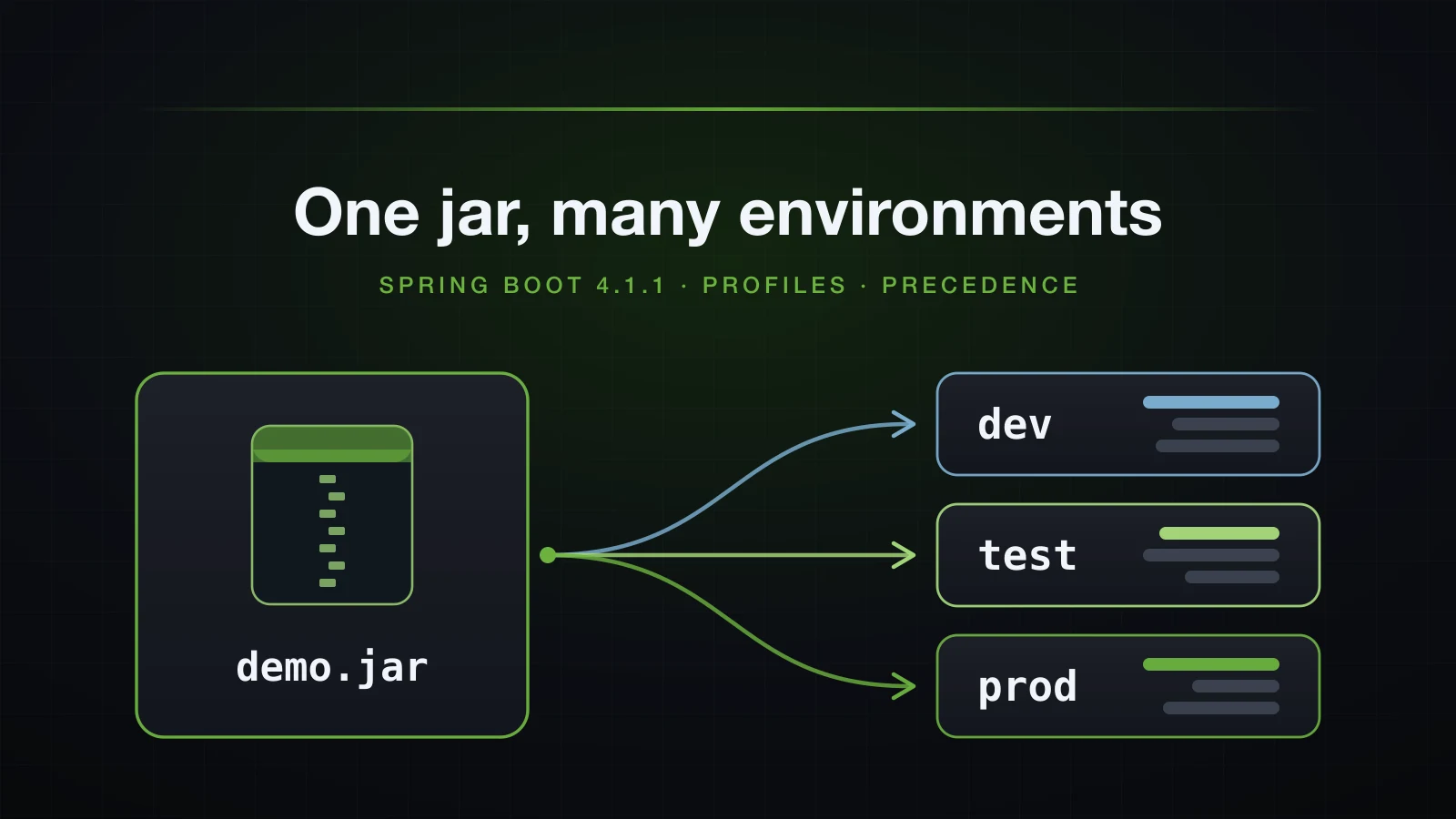
Every application you deploy runs in more than one place. On a laptop it talks to a local PostgreSQL and logs its SQL; in CI it gets a throwaway database; in production it needs a real host, real credentials and a bigger connection pool. The tempting fix is a separate build per environment, and it is the wrong one: the jar you tested has to be the jar you deploy. What differs between environments is configuration, and it has to reach that one artifact from the outside.
Spring Boot gives you two mechanisms for this. Profiles are named switches — dev, prod, anything — that load extra config files and register extra beans. Property source precedence is the fixed order that decides which value wins when the same key is set in a file inside the jar, a file next to it, an environment variable and a command-line argument at the same time. The second one is where tutorials most often print a list copied from an old version of the docs, so this article measures it.
The examples use Spring Boot 4.1.1 and Java 21, on an Initializr project with only the web dependency. Everything runs from the packaged jar — ./gradlew bootJar, then java -jar — because file locations only start to matter once the application is a jar. In the commands, demo.jar stands for build/libs/demo-0.0.1-SNAPSHOT.jar.
What a Spring Boot profile is, and why one jar is enough
A profile is a name that is either active or not for one run of the application. Two things react to it:
- Config files named after it. With
devactive, Boot loadsapplication-dev.yml(orapplication-dev.properties) on top ofapplication.yml. - Beans marked with it. A class annotated
@Profile("dev")is registered only whendevis active.
Nothing else about a profile is special. There is no list of allowed names and no required file: activating prod in the demo project, which has no application-prod.yml, starts normally and uses the base values.
What profiles support is a discipline: build once, configure per environment. The artifact that passed your tests is promoted unchanged from CI to staging to production. The database URL, credentials, pool sizes, hostnames and feature flags reach it from outside — a profile name, environment variables, command-line arguments, a file in the working directory. The moment you rebuild the jar to change a URL, what runs in production is no longer what you tested.
When nothing is activated, Boot falls back to a profile named default and says so right after the Starting DemoApplication line of the startup log:
2026-09-11T14:48:45.804+07:00 INFO 49469 --- [demo] [ main] com.example.demo.DemoApplication : No active profile set, falling back to 1 default profile: "default"That line is the first thing to read whenever configuration looks wrong.
The examples use the generated project with four app.* keys and a runner that prints them through @Value. Article 11 covered the file syntax and @Value itself; here the runner is only a way to see which value won:
@Component
class ConfigReport implements ApplicationRunner {

    private final String supportEmail;
    private final String dbUrl;
    private final int pageSize;
    private final boolean debugSql;

    ConfigReport(@Value("${app.support-email}") String supportEmail,
                 @Value("${app.db-url}") String dbUrl,
                 @Value("${app.page-size}") int pageSize,
                 @Value("${app.debug-sql}") boolean debugSql) {
        this.supportEmail = supportEmail;
        this.dbUrl = dbUrl;
        this.pageSize = pageSize;
        this.debugSql = debugSql;
    }

    @Override
    public void run(ApplicationArguments args) {
        System.out.println("app.support-email = " + supportEmail);
        System.out.println("app.db-url        = " + dbUrl);
        System.out.println("app.page-size     = " + pageSize);
        System.out.println("app.debug-sql     = " + debugSql);
    }
}
Profile-specific files: application-dev.yml on top of application.yml
The base file, src/main/resources/application.yml, holds every key:
spring:
  application:
    name: demo

app:
  support-email: support@example.com
  db-url: jdbc:postgresql://localhost:5432/sales
  page-size: 20
  debug-sql: false
src/main/resources/application-dev.yml declares only what is different for dev:
app:
  db-url: jdbc:postgresql://localhost:5432/sales_dev
  debug-sql: true
Without a profile, the base values come out:
java -jar demo.jar --server.port=8093app.support-email = support@example.com
app.db-url = jdbc:postgresql://localhost:5432/sales
app.page-size = 20
app.debug-sql = falseWith dev active:
java -jar demo.jar --server.port=8093 --spring.profiles.active=dev2026-09-11T14:48:48.310+07:00 INFO 49502 --- [demo] [ main] com.example.demo.DemoApplication : The following 1 profile is active: "dev"
...
app.support-email = support@example.com
app.db-url = jdbc:postgresql://localhost:5432/sales_dev
app.page-size = 20
app.debug-sql = trueapplication-dev.yml never mentions support-email or page-size, and both kept their base values. A profile-specific file is merged over the base file key by key; it does not replace it. The keys it declares win, and every other key falls through from application.yml.
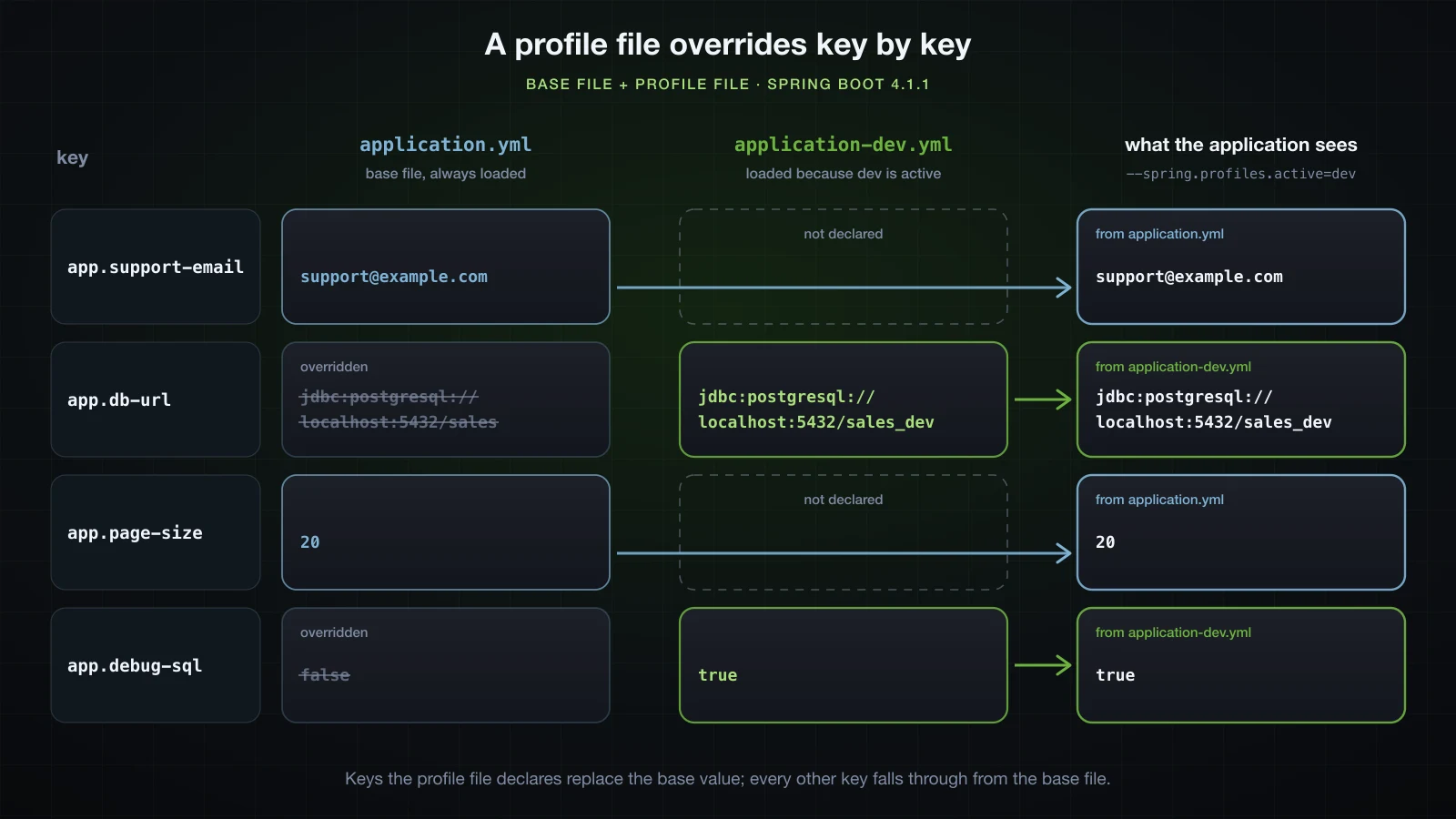
That merge is what keeps profile files short. Put every key in the base file and give each profile only its differences. A profile file that repeats the whole base file turns every later change into several edits that drift apart.
The naming rule is the same in both formats — application-prod.properties works exactly like application-prod.yml — and profile-specific files are looked up in every location the base file is. Article 11 covered which format wins when both exist in the same place.
How to activate a profile in Spring Boot
spring.profiles.active is an ordinary property, so anything that can set a property can activate a profile. All four of these printed the same The following 1 profile is active: "dev" line on the demo jar:
| Where | How | Where that source ranks |
|---|---|---|
| Base config file | spring.profiles.active: dev in application.yml | config files, the lowest of the four |
| Environment variable | SPRING_PROFILES_ACTIVE=dev java -jar demo.jar | above every config file |
| JVM system property | java -Dspring.profiles.active=dev -jar demo.jar | above environment variables |
| Command-line argument | java -jar demo.jar --spring.profiles.active=dev | above all of them |
Because it is a property, the precedence order applies to it, and a higher source replaces a lower one instead of adding to it. With spring.profiles.active: dev in application.yml and --spring.profiles.active=local on the command line:
2026-09-11T14:49:34.431+07:00 INFO 50167 --- [demo] [ main] com.example.demo.DemoApplication : The following 1 profile is active: "local"Only local. SPRING_PROFILES_ACTIVE=dev combined with --spring.profiles.active=local gives the same single "local". A value in the base file is therefore only a default for people who set nothing; each deployment overrides it from its own environment.
Put -D before -jar, not after it
java -jar demo.jar --server.port=8093 -Dspring.profiles.active=dev2026-09-11T14:48:55.812+07:00 INFO 49611 --- [demo] [ main] com.example.demo.DemoApplication : No active profile set, falling back to 1 default profile: "default"No error, no warning, no profile. Everything after the jar name is a program argument passed to main, not an option for the JVM, so no system property is created — and Spring Boot only turns arguments that start with -- into properties. JVM options go before -jar; Spring arguments go after the jar name. The log line is how you catch it.
Which profile wins when two active profiles set the same key?
Add a second profile file, application-local.yml, that disagrees with dev about db-url:
app:
  db-url: jdbc:postgresql://127.0.0.1:15432/sales_local
  page-size: 5
Activate both, in both orders:
java -jar demo.jar --server.port=8093 --spring.profiles.active=dev,local2026-09-11T14:48:58.272+07:00 INFO 49644 --- [demo] [ main] com.example.demo.DemoApplication : The following 2 profiles are active: "dev", "local"
...
app.support-email = support@example.com
app.db-url = jdbc:postgresql://127.0.0.1:15432/sales_local
app.page-size = 5
app.debug-sql = truejava -jar demo.jar --server.port=8093 --spring.profiles.active=local,dev2026-09-11T14:49:00.977+07:00 INFO 49660 --- [demo] [ main] com.example.demo.DemoApplication : The following 2 profiles are active: "local", "dev"
...
app.support-email = support@example.com
app.db-url = jdbc:postgresql://localhost:5432/sales_dev
app.page-size = 5
app.debug-sql = trueThe last profile in the list wins for keys that both files set. db-url follows the order; page-size, which only local sets, and debug-sql, which only dev sets, come out the same either way. This is the reference documentation's last-wins strategy — its example is prod,live, where application-live.properties overrides application-prod.properties — and it describes separate files. Inside a single multi-document file the rule is different, as a later section shows.
spring.profiles.include adds, spring.profiles.active replaces
When a profile should be on regardless of what else is chosen, spring.profiles.include adds it instead of competing for spring.profiles.active. With spring.profiles.include: local in application.yml and --spring.profiles.active=dev:
2026-09-11T14:49:42.791+07:00  INFO 50305 --- [demo] [           main] com.example.demo.DemoApplication         : The following 2 profiles are active: "local", "dev"
...
app.db-url        = jdbc:postgresql://localhost:5432/sales_dev
app.page-size     = 5
Included profiles are placed before the active ones, so under last-wins the profile you activated explicitly beats the one that was included: db-url comes from dev, while page-size, which only local sets, still comes from local.
spring.profiles.default and where spring.profiles.active is not allowed
spring.profiles.default changes the name Boot falls back to when nothing is activated. With spring.profiles.default: dev in application.yml and no profile on the command line:
2026-09-11T14:49:37.472+07:00  INFO 50217 --- [demo] [           main] com.example.demo.DemoApplication         : No active profile set, falling back to 1 default profile: "dev"
...
app.db-url        = jdbc:postgresql://localhost:5432/sales_dev
app.debug-sql     = true
The fallback profile behaves like an active one — application-dev.yml was loaded — until anything activates a profile explicitly. Adding --spring.profiles.active=local printed The following 1 profile is active: "local" with no trace of dev.
That is convenient on a developer machine and dangerous everywhere else: a production deployment that forgets to set its profile silently starts with development settings. If you use it, make the fallback the safe profile, not the permissive one.
spring.profiles.active in a profile-specific file fails at startup
It is tempting to let one profile switch on another from inside its own file. This is application-dev.yml:
spring:
  profiles:
    active: local

app:
  db-url: jdbc:postgresql://localhost:5432/sales_dev
  debug-sql: true
Started with --spring.profiles.active=dev, Boot refuses before the application context exists:
14:49:48.176 [main] ERROR org.springframework.boot.SpringApplication -- Application run failed
org.springframework.boot.context.config.InvalidConfigDataPropertyException: Property 'spring.profiles.active' imported from location 'class path resource [application-dev.yml]' is invalid in a profile specific resource [origin: class path resource [application-dev.yml] from demo-0.0.1-SNAPSHOT.jar - 3:13]
Three details in that output are worth knowing:
- The message names the file and the position,
3:13— line 3, column 13, where the valuelocalstarts. - The line has a different format from the rest of the startup log. The failure happens while Boot is still reading configuration, before the logging system has been configured from it.
- It only fails when the file is loaded. The same jar with no profile active started normally, which is how this mistake passes on a laptop and breaks in the one environment that activates
dev.
The reason is ordering. Boot decides the active profiles first and then loads the files for those profiles, so a profile file cannot take part in the decision that loaded it. The 4.1.1 check rejects spring.profiles.include and spring.profiles.default in a profile-specific file for the same reason, and the .properties form fails the same way (application-dev.properties from demo-0.0.1-SNAPSHOT.jar - 1:24). To combine profiles, use spring.profiles.include or a group in the base file.
Inside an on-profile document, Boot 4.1.1 does not stop you
The reference documentation says spring.profiles.active "can only be used in non-profile-specific documents", which also excludes documents activated by spring.config.activate.on-profile (the next section covers those), and shows this as an invalid example:
spring.profiles.active=prod
#---
spring.config.activate.on-profile=prod
spring.profiles.active=metrics
Running that file — with the four app.* keys added to the first document, and app.page-size=99 added to the second to see whether the second document applies — does not fail on 4.1.1:
2026-09-11T15:07:08.138+07:00  INFO 69045 --- [demo] [           main] com.example.demo.DemoApplication         : The following 1 profile is active: "metrics"
...
app.page-size     = 20
No exception, and the result is the worst of both worlds. The application runs with metrics, which nobody asked for on the command line, and without prod, which the file clearly wanted. Because prod is no longer active, the second document is then skipped — page-size stayed 20 — so its only lasting effect is the profile swap. The YAML version of the example also ends with only metrics active, and so does Spring Boot 3.5.6, which I ran for comparison, so this is not new in Boot 4.
The 4.1.1 source shows why. While Boot works out the profiles, its binder carries a handler that is meant to throw when a document that is not active yet contains the property being read. The call that reads spring.profiles.active passes its own profile-name validator as the handler, and a handler passed explicitly replaces the default one, so that check never runs for this property. When a higher source also sets the profiles, the stray value is simply never reached: with --spring.profiles.active=dev and spring.profiles.active: local inside the dev document, the run reported "dev" and nothing else.
Treat the documented rule as the rule. Keep spring.profiles.active, include and default in documents without on-profile, and do not read a clean startup as permission.
Multi-document files: --- in YAML and #--- in .properties
Instead of one file per profile, you can keep everything in one application.yml and split it into documents with ---. A document that declares spring.config.activate.on-profile only applies when that profile is active:
spring:
  application:
    name: demo

app:
  support-email: support@example.com
  db-url: jdbc:postgresql://localhost:5432/sales
  page-size: 20
  debug-sql: false
---
spring:
  config:
    activate:
      on-profile: dev

app:
  db-url: jdbc:postgresql://localhost:5432/sales_dev
  debug-sql: true
---
spring:
  config:
    activate:
      on-profile: local

app:
  db-url: jdbc:postgresql://127.0.0.1:15432/sales_local
  page-size: 5
With no separate profile files in the project, --spring.profiles.active=dev printed exactly what the two-file version printed — sales_dev, page-size 20, debug-sql true. The key-by-key merge is the same.
A .properties file has no document marker of its own, so Boot treats a special comment, #---, as the separator. It works on 4.1.1:
spring.application.name=demo
app.support-email=support@example.com
app.db-url=jdbc:postgresql://localhost:5432/sales
app.page-size=20
app.debug-sql=false
#---
spring.config.activate.on-profile=dev
app.db-url=jdbc:postgresql://localhost:5432/sales_dev
app.debug-sql=true
#---
spring.config.activate.on-profile=local
app.db-url=jdbc:postgresql://127.0.0.1:15432/sales_local
app.page-size=5
With no profile it prints the base values, and with dev it prints the dev values. One difference from separate files matters: inside one file, document order decides, not the order in spring.profiles.active. Both formats, run with --spring.profiles.active=local,dev:
2026-09-11T14:50:05.944+07:00  INFO 50522 --- [demo] [           main] com.example.demo.DemoApplication         : The following 2 profiles are active: "local", "dev"
...
app.support-email = support@example.com
app.db-url        = jdbc:postgresql://127.0.0.1:15432/sales_local
app.page-size     = 5
app.debug-sql     = true
With separate files the same command produced sales_dev, because dev came last. Here the local document sits below the dev document, and the reference is explicit that documents "are processed in order, from top to bottom" with later ones overriding earlier ones. If two profiles in one file can set the same key, order the documents the way you want them to win.
The #--- separator has to be exact
The reference requires the separator to have no leading whitespace and exactly three hyphens. Written as # --- — with one space — it is an ordinary comment, and in this application — which reads app.support-email through a placeholder with no default — the result is not a slightly wrong configuration but an application that does not start:
2026-09-11T14:50:08.862+07:00  INFO 50534 --- [           main] com.example.demo.DemoApplication         : No active profile set, falling back to 1 default profile: "default"
...
Caused by: org.springframework.util.PlaceholderResolutionException: Could not resolve placeholder 'app.support-email' in value "${app.support-email}"
Without separators the file is a single document, and the last spring.config.activate.on-profile in it says local — so the whole file applies only when local is active. With no profile, nothing in it was loaded. The log line gives it away before the stack trace does: [demo] is missing, because spring.application.name was in the skipped file too. An application that did not require any of those keys would start cleanly and run without every value in the file, which is harder to notice.
Profile groups: one name for several profiles
Production configuration is often several concerns at once — database, messaging, monitoring. A profile group gives them one name. In application.properties:
spring.application.name=demo
spring.profiles.group.prod=proddb,prodmq

app.support-email=support@example.com
app.db-url=jdbc:postgresql://localhost:5432/sales
app.page-size=20
app.debug-sql=false
app.mq-host=localhost
application-proddb.properties contains app.db-url=jdbc:postgresql://db.internal:5432/sales, application-prodmq.properties contains app.mq-host=mq.internal, and the runner prints app.mq-host as well. Activating only the group name:
java -jar demo.jar --server.port=8093 --spring.profiles.active=prod2026-09-11T14:50:15.495+07:00 INFO 50618 --- [demo] [ main] com.example.demo.DemoApplication : The following 3 profiles are active: "prod", "proddb", "prodmq"
...
app.support-email = support@example.com
app.db-url = jdbc:postgresql://db.internal:5432/sales
app.page-size = 20
app.debug-sql = false
app.mq-host = mq.internalThe log line shows the expansion: the group name first, then its members in the order they were declared. Each member is a real active profile, so its file was loaded, and there is no application-prod.properties in this project at all, which is fine. The point of a group is recombination: the member profiles stay small and single-purpose, and a different group can reuse any of them without copying a file.
The reference says a group, like spring.profiles.active, can only be defined in a non-profile-specific document. Boot 4.1.1 does not enforce that one either: spring.profiles.group.dev=devdb inside application-dev.yml produced no error and no devdb — the active list stayed "dev". A group in the wrong file is silently useless.
@Profile: beans that exist only in some profiles
Configuration values are half of what profiles switch; the other half is which beans exist. The classic case is a real integration you do not want to call from a laptop:
public interface NotificationSender {

    void send(String to, String message);
}@Component
@Profile("dev")
class ConsoleNotificationSender implements NotificationSender {
@Override
public void send(String to, String message) {
System.out.println("[console] to=" + to + " " + message);
}
}@Component
@Profile("!dev")
class SmtpNotificationSender implements NotificationSender {
@Override
public void send(String to, String message) {
// a real implementation talks to an SMTP server here
}
}!dev matches any set of active profiles that does not contain dev, including the fallback default. The pair is complementary on purpose: whatever is active, exactly one implementation is registered. Two more beans use compound expressions:
@Configuration
class ProfileExpressionConfig {

    @Bean
    @Profile("dev & local")
    String localSeedData() {
        return "seed data for a laptop database";
    }

    @Bean
    @Profile("prod | staging")
    String auditTrail() {
        return "audit trail enabled";
    }
}
A runner asks the context what it ended up with:
@Component
class BeanReport implements ApplicationRunner {

    private final ApplicationContext context;

    BeanReport(ApplicationContext context) {
        this.context = context;
    }

    @Override
    public void run(ApplicationArguments args) {
        System.out.println("NotificationSender -> "
                + context.getBean(NotificationSender.class).getClass().getSimpleName());
        System.out.println("localSeedData bean -> " + context.containsBean("localSeedData"));
        System.out.println("auditTrail bean    -> " + context.containsBean("auditTrail"));
    }
}
Six runs of the same jar:
| Active profiles | NotificationSender | localSeedData | auditTrail |
|---|---|---|---|
none (default) | SmtpNotificationSender | false | false |
dev | ConsoleNotificationSender | false | false |
local | SmtpNotificationSender | false | false |
dev,local | ConsoleNotificationSender | true | false |
prod | SmtpNotificationSender | false | true |
staging | SmtpNotificationSender | false | true |
The !dev bean earns its place when you take it away. Change SmtpNotificationSender to @Profile("prod"), add a SignupService that takes a NotificationSender in its constructor, and run with no profile:
***************************
APPLICATION FAILED TO START
***************************

Description:

Parameter 0 of constructor in com.example.demo.SignupService required a bean of type 'com.example.demo.NotificationSender' that could not be found.


Action:

Consider defining a bean of type 'com.example.demo.NotificationSender' in your configuration.
Nothing in that message mentions profiles, which is what makes it confusing the first time: both classes exist and compile, neither was registered. When a bean "could not be found" and you know you wrote it, compare its @Profile with the active-profile line.
@Profile also goes on a @Configuration class, where it switches every @Bean method inside at once. A ProdOnlyConfig class annotated @Profile("prod") registered its prodCacheWarmer bean under prod, and not under dev, dev,local or no profile.
Profile expressions: !, & and |
| Expression | The bean is registered when |
|---|---|
"dev" | dev is active |
"!dev" | dev is not active, including when only default is |
"dev & local" | both dev and local are active |
"prod | staging" | at least one of prod and staging is active |
"(dev & local) | prod" | both dev and local are active, or prod is |
Mixing & and | without parentheses is rejected at startup rather than given an implicit precedence:
java.lang.IllegalArgumentException: Malformed profile expression [dev & local | prod]With parentheses, "(dev & local) | prod" registered its bean under prod and under dev,local, and not under dev alone or with no profile.
Spring Boot property source order, measured on a packaged jar
Profiles decide which files take part. Precedence decides what happens when several sources — files, the environment, the command line — define the same key. This is the part to measure rather than remember.
The experiment: one key in sixteen places
The key is app.source, and every place that defines it sets the value to its own description, so the printed value names the winner. The application code contributes the two lowest sources:
@SpringBootApplication
public class DemoApplication {

    public static void main(String[] args) {
        SpringApplication app = new SpringApplication(DemoApplication.class);
        app.setDefaultProperties(Map.of("app.source", "SpringApplication.setDefaultProperties"));
        app.run(args);
    }
}@Configuration
@PropertySource("classpath:extra.properties")
public class ExtraConfig {
}Four config files are packaged into the jar next to extra.properties, and six more sit in the working directory. Each holds one line such as app.source=file: ./config/application.properties, and the prod profile is active so the profile-specific files count:
src/main/resources/                    packaged into the jar
├── application.properties
├── application-prod.properties
├── extra.properties                   read by @PropertySource
└── config/
    ├── application.properties
    └── application-prod.properties

working directory                      outside the jar
├── application.properties
├── application-prod.properties
└── config/
    ├── application.properties
    ├── application-prod.properties
    └── override/
        ├── application.properties
        └── application-prod.properties
The last four sources come from the command that starts the jar:
APP_SOURCE='OS environment variable APP_SOURCE' \
SPRING_APPLICATION_JSON='{"app":{"source":"SPRING_APPLICATION_JSON"}}' \
java -Dapp.source='JVM system property -Dapp.source' \
     -jar demo.jar \
     --server.port=8093 --spring.profiles.active=prod \
     --app.source='command-line argument --app.source'
A runner prints the resolved value, then walks the property sources of the Environment in order and lists the ones that contain the key. The Environment is only used here to print names:
@Component
class SourceReport implements ApplicationRunner {

    private final ConfigurableEnvironment environment;
    private final String source;

    SourceReport(ConfigurableEnvironment environment,
                 @Value("${app.source:<not set anywhere>}") String source) {
        this.environment = environment;
        this.source = source;
    }

    @Override
    public void run(ApplicationArguments args) {
        System.out.println("app.source = " + source);
        System.out.println("sources that define app.source, highest priority first:");
        for (PropertySource<?> ps : environment.getPropertySources()) {
            if (!ps.getName().equals("configurationProperties") && ps.containsProperty("app.source")) {
                System.out.println("  " + ps.getName());
            }
        }
        System.out.println("all property sources, highest priority first:");
        for (PropertySource<?> ps : environment.getPropertySources()) {
            System.out.println("  - " + ps.getName());
        }
    }
}
The first run, with all sixteen defined:
app.source = command-line argument --app.source
sources that define app.source, highest priority first:
  commandLineArgs
  spring.application.json
  systemProperties
  systemEnvironment
  Config resource 'file [config/override/application-prod.properties]' via location 'optional:file:./config/*/'
  Config resource 'file [config/application-prod.properties]' via location 'optional:file:./config/'
  Config resource 'file [application-prod.properties]' via location 'optional:file:./'
  Config resource 'file [config/override/application.properties]' via location 'optional:file:./config/*/'
  Config resource 'file [config/application.properties]' via location 'optional:file:./config/'
  Config resource 'file [application.properties]' via location 'optional:file:./'
  Config resource 'class path resource [config/application-prod.properties]' via location 'optional:classpath:/config/'
  Config resource 'class path resource [application-prod.properties]' via location 'optional:classpath:/'
  Config resource 'class path resource [config/application.properties]' via location 'optional:classpath:/config/'
  Config resource 'class path resource [application.properties]' via location 'optional:classpath:/'
  class path resource [extra.properties]
  defaultProperties
all property sources, highest priority first:
  - server.ports
  - configurationProperties
  - commandLineArgs
  - spring.application.json
  - servletConfigInitParams
  - servletContextInitParams
  - systemProperties
  - systemEnvironment
  - random
  - Config resource 'file [config/override/application-prod.properties]' via location 'optional:file:./config/*/'
  - Config resource 'file [config/application-prod.properties]' via location 'optional:file:./config/'
  - Config resource 'file [application-prod.properties]' via location 'optional:file:./'
  - Config resource 'file [config/override/application.properties]' via location 'optional:file:./config/*/'
  - Config resource 'file [config/application.properties]' via location 'optional:file:./config/'
  - Config resource 'file [application.properties]' via location 'optional:file:./'
  - Config resource 'class path resource [config/application-prod.properties]' via location 'optional:classpath:/config/'
  - Config resource 'class path resource [application-prod.properties]' via location 'optional:classpath:/'
  - Config resource 'class path resource [config/application.properties]' via location 'optional:classpath:/config/'
  - Config resource 'class path resource [application.properties]' via location 'optional:classpath:/'
  - applicationInfo
  - class path resource [extra.properties]
  - defaultProperties
That list is already the answer, because the Environment resolves a key by asking its sources in exactly this order and stopping at the first one that has it. To prove it by behaviour and not only by a printed list, a script then repeated one step: read the winner, remove that source — delete its line and rebuild the jar if the file was packaged, delete its line if the file was external, unset the variable or drop the flag otherwise — and run the jar again. The seventeenth run found the key nowhere and printed app.source = <not set anywhere>.
The measured order, highest priority first
Each row won one run; the row below it won the run after it was removed. The right-hand column is the matching item in the Spring Boot 4.1.1 reference, which numbers its list from the lowest priority:
| Rank | Where app.source was set | Reference documentation |
|---|---|---|
| 1 | --app.source=… command-line argument | 11. Command line arguments |
| 2 | SPRING_APPLICATION_JSON environment variable | 10. SPRING_APPLICATION_JSON |
| 3 | -Dapp.source=… JVM system property | 6. Java System properties |
| 4 | APP_SOURCE OS environment variable | 5. OS environment variables |
| 5 | ./config/override/application-prod.properties | 3. Config data: profile-specific, outside the jar |
| 6 | ./config/application-prod.properties | same |
| 7 | ./application-prod.properties | same |
| 8 | ./config/override/application.properties | 3. Config data: outside the jar |
| 9 | ./config/application.properties | same |
| 10 | ./application.properties | same |
| 11 | config/application-prod.properties in the jar | 3. Config data: profile-specific, packaged |
| 12 | application-prod.properties in the jar | same |
| 13 | config/application.properties in the jar | 3. Config data: packaged |
| 14 | application.properties in the jar | same |
| 15 | @PropertySource("classpath:extra.properties") | 2. @PropertySource annotations |
| 16 | SpringApplication.setDefaultProperties | 1. Default properties |
The same order holds for a real key. In a second run, server.port was set to 8096 in the packaged application.yml and to 8097 in ./config/application.yml, with nothing on the command line:
java -jar demo.jar                     # started where no ./config/application.yml exists
java -jar demo.jar                     # started where ./config/application.yml exists
SERVER_PORT=8093 java -jar demo.jar # the same directory, plus an environment variableo.s.boot.tomcat.TomcatWebServer : Tomcat started on port 8096 (http) with context path '/'
o.s.boot.tomcat.TomcatWebServer : Tomcat started on port 8097 (http) with context path '/'
o.s.boot.tomcat.TomcatWebServer : Tomcat started on port 8093 (http) with context path '/'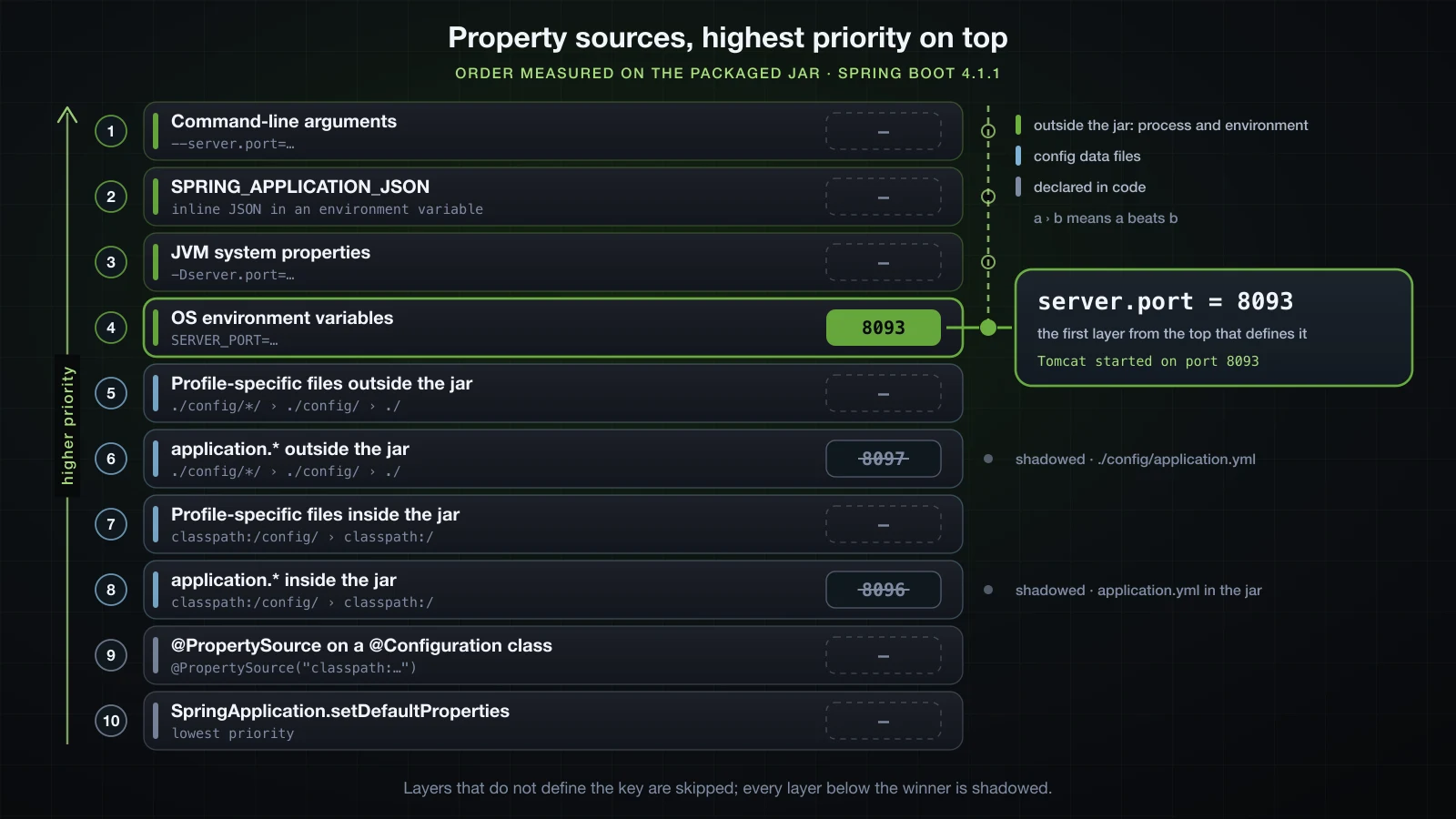
Checking the result against the reference documentation
The Spring Boot 4.1.1 reference lists fifteen sources, lowest priority first: default properties, @PropertySource, config data, RandomValuePropertySource, OS environment variables, Java system properties, JNDI attributes, ServletContext init parameters, ServletConfig init parameters, SPRING_APPLICATION_JSON, command-line arguments, and four test and devtools sources on top. For config data it gives a separate file order — packaged application.properties, packaged profile-specific files, external application.properties, external profile-specific files — and ranks the search locations so that the classpath root is overridden by classpath /config, which is overridden by the current directory, then config/, then the immediate children of config/.
The measured order agrees with every one of those statements. Three consequences surprise people:
- Outside the jar beats profile-specific.
./application.properties(rank 10) wins overapplication-prod.propertiesinside the jar (rank 11). Where a file lives matters more than whether it names a profile. - Inside the jar, every profile-specific file beats every plain file, across directories:
application-prod.propertiesat the classpath root (rank 12) wins overconfig/application.properties(rank 13), althoughconfig/beats the root when both files are plain. Boot's default locations form two location groups — the 4.1.1 source declares them asoptional:classpath:/;optional:classpath:/config/andoptional:file:./;optional:file:./config/;optional:file:./config/*/— and profile-specific files override plain ones across a whole group. The external group follows the same rule (ranks 5–10). SPRING_APPLICATION_JSONoutranks system properties, even when it arrives as an environment variable, which on its own ranks below them.
The sources this experiment could not exercise appear in the printed list exactly where the documentation places them: servletConfigInitParams and servletContextInitParams between spring.application.json and systemProperties, and random, which only answers random.* keys, directly above the config files. There is no JNDI source because nothing in this application provides JNDI. The three test sources rank above the command line and belong to Chapter 6.
The printed list also contains three names that the documented list does not. configurationProperties is a view over all the other sources that Boot uses for binding, not a source of its own, which is why the runner skips it. applicationInfo holds only spring.application.version and spring.application.pid. server.ports is where Boot records the port the embedded server bound after it started. None of them holds your keys.
@PropertySource came 15th and lost to every file. The reference gives a second reason not to rely on it: those sources are only added to the Environment when the application context is refreshed, which is too late for properties such as logging.* and spring.main.*.
Where Spring Boot looks for application.properties
Boot searches five locations for application.properties and application.yml. Each row overrides the rows above it, and the profile-specific variants are looked up in the same five places:
| Location | In the experiment | Group |
|---|---|---|
classpath:/ | src/main/resources/application.properties | packaged |
classpath:/config/ | src/main/resources/config/application.properties | packaged |
file:./ | application.properties in the working directory | external |
file:./config/ | config/application.properties in the working directory | external |
file:./config/*/ | config/override/application.properties; subdirectories are sorted alphabetically | external |
The experiment above measured all five, and every external location beat every packaged one (ranks 5–10 against 11–14). That is what lets an operator change a packaged default by dropping a file into the application's working directory, without touching the jar.
The important words are working directory. file:./ means the directory the java process was started in, not the directory that contains the jar. Here is the same jar with an application.properties beside it:
deploy/
├── demo.jar
└── application.properties     app.db-url=jdbc:postgresql://db.internal:5432/sales
Started from inside deploy/:
cd deploy && java -jar demo.jar --server.port=8093app.db-url = jdbc:postgresql://db.internal:5432/salesStarted from the parent directory:
java -jar deploy/demo.jar --server.port=8093app.db-url = jdbc:postgresql://localhost:5432/salesSame jar, same file on disk, different result. A service manager, a scheduler or a script that starts java from another directory will never see a file placed next to the jar. Set the working directory explicitly — WorkingDirectory= in a systemd unit, for example — and confirm it in the Starting DemoApplication … started by <user> in <directory> line at the top of the startup log.
Environment variables as a configuration source
The naming rule, in one sentence: upper-case the property name, replace the dots with underscores and drop the dashes — server.port becomes SERVER_PORT and app.db-url becomes APP_DBURL. Article 12 covers the binding rules in full.
Environment variables are the standard way to configure an application that runs in a container, for three reasons. The platform sets them per deployment without rebuilding or even opening the image. They need no file to be written or mounted. And at rank 4 they outrank every config file, including the ones baked into the jar — one image for every environment, which is the rule this article started with.
SERVER_PORT=8095 APP_DBURL=jdbc:postgresql://db.prod.internal:5432/sales java -jar demo.jaro.s.boot.tomcat.TomcatWebServer : Tomcat started on port 8095 (http) with context path '/'
...
app.support-email = support@example.com
app.db-url = jdbc:postgresql://db.prod.internal:5432/sales
app.page-size = 20
app.debug-sql = falseThey also beat profile-specific files, which is what makes a useful split possible: the profile sets the shape of an environment, and environment variables fill in the values that are specific to one deployment.
APP_DBURL=jdbc:postgresql://db.prod.internal:5432/sales java -jar demo.jar --server.port=8093 --spring.profiles.active=dev2026-09-11T14:49:21.273+07:00 INFO 50004 --- [demo] [ main] com.example.demo.DemoApplication : The following 1 profile is active: "dev"
...
app.support-email = support@example.com
app.db-url = jdbc:postgresql://db.prod.internal:5432/sales
app.page-size = 20
app.debug-sql = truedb-url came from the environment and debug-sql still came from application-dev.yml.
Command-line arguments override almost everything
Every argument of the form --key=value after the jar name becomes a property in the commandLineArgs source, which ranked first in the measured order. It beats an environment variable that sets the same key:
SERVER_PORT=8095 java -jar demo.jar --server.port=8093o.s.boot.tomcat.TomcatWebServer : Tomcat started on port 8093 (http) with context path '/'Only the test sources and devtools global settings rank above it. That makes the command line the right tool for a one-off override — a second local instance on another port, --debug for one investigation — and the wrong place for anything that should survive a restart, because the value lives only in whatever script or shell history started the process.
If an application must not be reconfigured through its arguments — a command-line tool whose arguments mean something else, for example — turn the conversion off:
@SpringBootApplication
public class DemoApplication {

    public static void main(String[] args) {
        SpringApplication app = new SpringApplication(DemoApplication.class);
        app.setAddCommandLineProperties(false);
        app.run(args);
    }
}
With server.port: 8093 in application.yml:
java -jar demo.jar --server.port=8094 --spring.profiles.active=dev --app.page-size=992026-09-11T14:50:28.461+07:00 INFO 50687 --- [demo] [ main] com.example.demo.DemoApplication : No active profile set, falling back to 1 default profile: "default"
2026-09-11T14:50:28.924+07:00 INFO 50687 --- [demo] [ main] o.s.boot.tomcat.TomcatWebServer : Tomcat started on port 8093 (http) with context path '/'
...
app.page-size = 20All three arguments were ignored: the port came from the file, no profile was activated, and page-size kept its base value.
Importing an extra file with spring.config.import
spring.config.import pulls another file into the configuration from inside a config file:
spring:
  application:
    name: demo
  config:
    import: file:./extra-config.yml
Starting the jar in a directory that has no extra-config.yml stops the application before the context exists:
14:50:22.240 [main] ERROR org.springframework.boot.diagnostics.LoggingFailureAnalysisReporter --

***************************
APPLICATION FAILED TO START
***************************

Description:

Config data resource 'file [extra-config.yml]' via location 'file:./extra-config.yml' does not exist

Action:

Check that the value 'file:./extra-config.yml' at class path resource [application.yml] from demo-0.0.1-SNAPSHOT.jar - 5:13 is correct, or prefix it with 'optional:'
The action line names the fix. With optional: the missing file is not an error:
spring:
  config:
    import: file:./extra-config.yml
    import: optional:file:./extra-config.yml
Started in the same empty directory, the application came up with the base db-url. Then an extra-config.yml was placed in that directory:
app:
db-url: jdbc:postgresql://db.internal:5432/salesapp.db-url = jdbc:postgresql://db.internal:5432/salesThe imported value replaced the one in application.yml. That matches the reference: values from an imported file "take precedence over the file that triggered the import". Use a required import when the application genuinely cannot run without the file, and optional: when the file is an override that some environments provide and others do not.
Keep secrets out of application-prod.yml
⚠️ Do not commit passwords, API keys or tokens to
application-prod.yml, or to any other file undersrc/main/resources.
Everything in that directory is copied into the jar and kept in version control history, so a database password in a profile file is readable by anyone who can read the repository or download the artifact — and deleting it later does not remove it from the history. Profile files are for per-environment settings that are safe to share: hosts, pool sizes, timeouts, feature flags.
Secrets reach the application the way every other environment-specific value does, from outside the jar: an environment variable injected by the deployment platform, which outranks every file, or an external secret store such as HashiCorp Vault or a cloud provider's secrets manager, which the Advanced course covers. Either way the repository holds the name of the key and never its value.
FAQ
How do I check which profile is active in Spring Boot?
Read the startup log. Right after the Starting line Boot prints either The following N profiles are active: … with the names in order, or No active profile set, falling back to 1 default profile: "default". The order in that line is the order last-wins uses for separate profile files, and a group appears already expanded into its members.
Why is my application-prod.yml not loaded?
Read the active-profile line first. If prod is not in it, the profile was never activated: a typo, -Dspring.profiles.active placed after -jar, or a higher-priority source that replaced the value. If prod is active, check that the file is named exactly application- plus the profile name and, for a file outside the jar, that the process was started in the directory that contains it. If the file is loaded but some values still look wrong, a higher source — an environment variable, an external file, a command-line argument — is setting the same keys.
Do environment variables override application.properties?
Yes, all of them. OS environment variables came fourth in the measured order, above every config file, packaged or external, plain or profile-specific. The sources above them are JVM system properties, SPRING_APPLICATION_JSON and command-line arguments — plus JNDI attributes, servlet init parameters, the test sources and devtools settings where an application has those.
Can one profile activate another from its own file?
Not from application-dev.yml: Boot 4.1.1 stops with InvalidConfigDataPropertyException and "is invalid in a profile specific resource". Declare the combination in the base file instead, as a group such as spring.profiles.group.dev=devdb,devmq, or add a profile unconditionally with spring.profiles.include. Inside an on-profile document the setting is not rejected, but it can silently replace your active profiles, so do not put it there either.
Does the order of profiles in spring.profiles.active matter?
For separate files, yes: the last profile listed wins keys that several profiles set, so dev,local and local,dev produced different db-url values. Inside one multi-document file, no: the document further down wins, whatever the order on the command line. Keys that only one profile sets are unaffected either way.
How do I activate a profile in a Spring Boot test?
Put @ActiveProfiles("test") on the test class. It activates the profile for that test's application context without touching spring.profiles.active anywhere else. Chapter 6 covers testing.
Conclusion
A profile is a name. Activating it loads application-{profile} files over the base file key by key and registers the @Profile beans that match. You can activate it from a config file, an environment variable, a -D system property placed before -jar, or a -- argument, and because spring.profiles.active is an ordinary property, the highest of those replaces the rest. Two active profiles resolve last-wins across separate files and by document position inside one file; groups expand one name into several; @Profile expressions need parentheses to mix & and |. And spring.profiles.active belongs only in documents without a profile: Boot 4.1.1 rejects it in a profile-specific file and silently misbehaves with it in an on-profile document.
The order behind all of it was measured on the packaged 4.1.1 jar and matches the reference documentation exactly: command-line arguments, SPRING_APPLICATION_JSON, system properties, environment variables, then the files — external before packaged, profile-specific before plain within each group, ./config/*/ before ./config/ before ./ — with @PropertySource and default properties at the bottom. Keep the jar identical in every environment, put the differences in the environment, and keep secrets out of the repository.
The next article turns to something every environment also configures differently: logging with SLF4J and Logback — log levels, the log format, and writing logs to a file.
![[Spring Boot Basics] Spring Beans and the ApplicationContext: @Component, Stereotypes and Component Scanning](/images/blog/sb-beans-thumbnail.en.webp)
![[Spring Boot Basics] How Spring Boot Auto-Configuration Works: Conditions, Back-Off and the --debug Report](/images/blog/sb-autoconfiguration-thumbnail.en.webp)
![[Spring Boot Basics] Spring Boot Project Structure: Gradle vs Maven, @SpringBootApplication and the Executable JAR](/images/blog/sb-project-structure-thumbnail.en.webp)
![[Spring Boot Basics] Spring Bean Scopes and the Bean Lifecycle: singleton, prototype, @PostConstruct and @PreDestroy](/images/blog/sb-bean-lifecycle-thumbnail.en.webp)