Auto-configuration is the part of Spring Boot that still feels like magic after you have understood everything else. You add one starter, a DispatcherServlet appears, a JSON mapper appears, a Tomcat appears, and nothing in your own source directory asked for any of it.
There is no magic in it. An auto-configuration is a @Configuration class full of @Bean methods — exactly the kind of class you have been writing for the last five articles — with annotations on it that say when it applies. This article opens the box: where Boot gets the list, what one of those classes actually looks like, how the conditions are evaluated, and how to read the report that tells you every decision it made.
The examples use Spring Boot 4.1.1 and Java 21, on an Initializr project with only the web dependency. The counts below are for that project; every starter you add changes them.
An auto-configuration is a @Configuration class that can decline
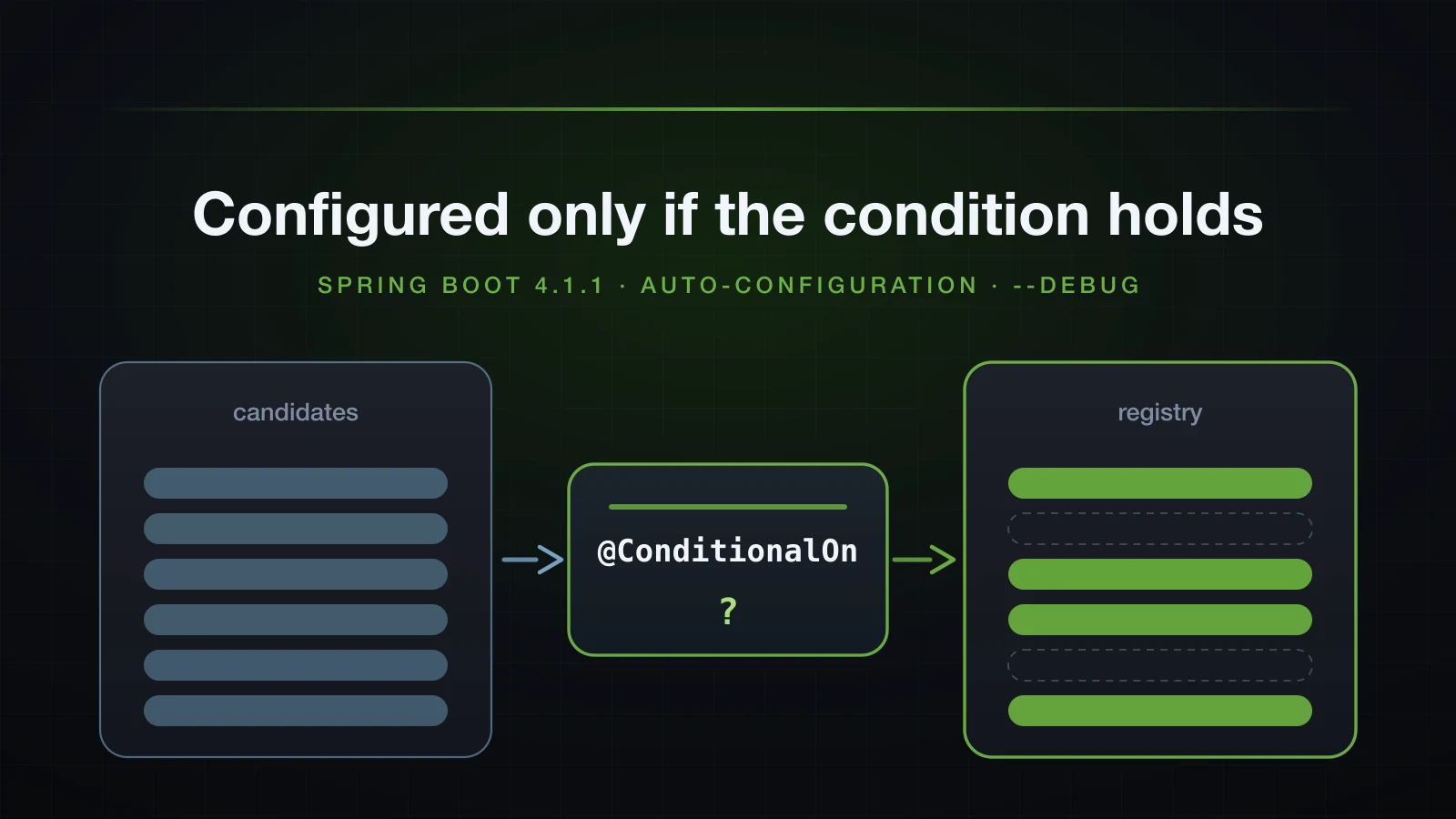
You already know what a bean is, how the registry holds it, and what a @Bean method in a @Configuration class does. An auto-configuration adds exactly one idea on top: the class and each of its @Bean methods carry conditions, and they are skipped when those conditions do not hold.
That is the whole mechanism. Boot ships these classes across its modules, hands the container the ones whose conditions match, and drops the rest. The classes are ordinary Spring configuration — no special container support, no separate lifecycle, nothing the framework treats differently from a @Configuration class you write yourself.
The interesting engineering is in three questions, and the rest of this article answers them in order: how Boot builds the list of candidates, how the conditions are evaluated, and how you find out what happened.
How Spring Boot finds its auto-configurations
@SpringBootApplication is a composed annotation, and one of its three parts is @EnableAutoConfiguration. That annotation does nothing on its own; it is an @Import:
@Target(ElementType.TYPE)
@Retention(RetentionPolicy.RUNTIME)
@Documented
@Inherited
@AutoConfigurationPackage
@Import(AutoConfigurationImportSelector.class)
public @interface EnableAutoConfiguration {
AutoConfigurationImportSelector is where the list comes from. Its core method reads, verbatim from the 4.1.1 sources:
List<String> configurations = getCandidateConfigurations(annotationMetadata, attributes);
configurations = removeDuplicates(configurations);
Set<String> exclusions = getExclusions(annotationMetadata, attributes);
checkExcludedClasses(configurations, exclusions);
configurations.removeAll(exclusions);
configurations = getConfigurationClassFilter().filter(configurations);
fireAutoConfigurationImportEvents(configurations, exclusions);
Five steps you can read straight down: get the candidates, drop duplicates, remove what you excluded, filter cheaply, publish the result. getCandidateConfigurations delegates to ImportCandidates.load, and that is the part worth knowing by heart:
private static final String LOCATION = "META-INF/spring/%s.imports";
...
String location = String.format(LOCATION, annotation.getName());
Enumeration<URL> urls = findUrlsInClasspath(classLoaderToUse, location);
List<String> importCandidates = new ArrayList<>();
while (urls.hasMoreElements()) {
    URL url = urls.nextElement();
    importCandidates.addAll(readCandidateConfigurations(url));
}
findUrlsInClasspath is classLoader.getResources(location). It returns every matching file on the classpath, and the candidate list is the union of all of them. So the file to look for in any jar is:
META-INF/spring/org.springframework.boot.autoconfigure.AutoConfiguration.imports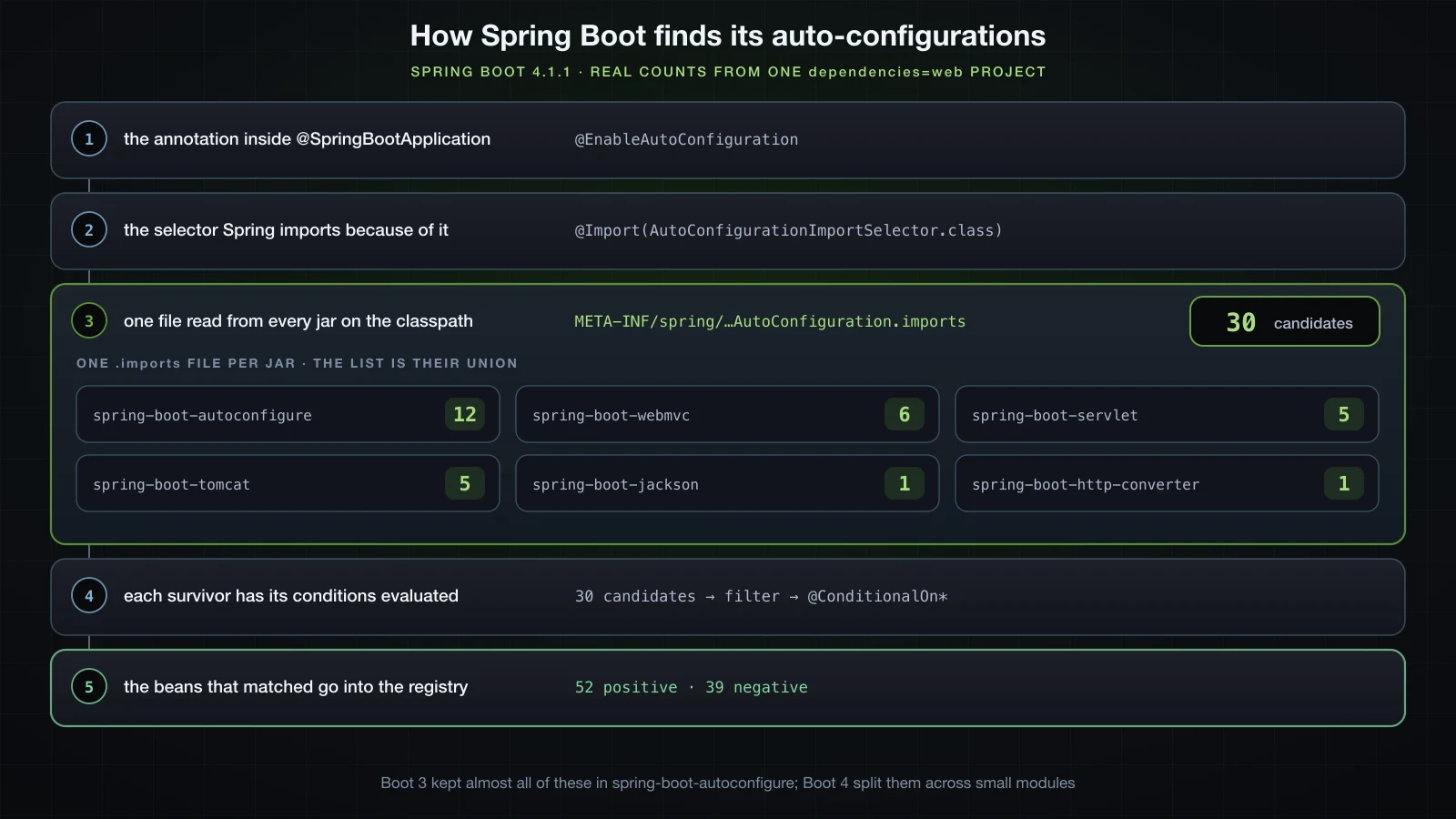
It is a plain text file, one fully-qualified class name per line. Here is the complete contents of the one inside spring-boot-autoconfigure-4.1.1.jar, read by unzipping the jar out of the Gradle cache:
org.springframework.boot.autoconfigure.admin.SpringApplicationAdminJmxAutoConfiguration
org.springframework.boot.autoconfigure.aop.AopAutoConfiguration
org.springframework.boot.autoconfigure.availability.ApplicationAvailabilityAutoConfiguration
org.springframework.boot.autoconfigure.context.ConfigurationPropertiesAutoConfiguration
org.springframework.boot.autoconfigure.context.LifecycleAutoConfiguration
org.springframework.boot.autoconfigure.context.MessageSourceAutoConfiguration
org.springframework.boot.autoconfigure.context.PropertyPlaceholderAutoConfiguration
org.springframework.boot.autoconfigure.info.ProjectInfoAutoConfiguration
org.springframework.boot.autoconfigure.jmx.JmxAutoConfiguration
org.springframework.boot.autoconfigure.ssl.SslAutoConfiguration
org.springframework.boot.autoconfigure.task.TaskExecutionAutoConfiguration
org.springframework.boot.autoconfigure.task.TaskSchedulingAutoConfiguration
Twelve lines. That is a surprise if you have read any tutorial written before 2025, because on Spring Boot 3 this single file held nearly all of them — the same file in spring-boot-autoconfigure-3.5.6.jar lists 156 classes. Boot 4 split the auto-configurations out of spring-boot-autoconfigure into many small spring-boot-* modules, each shipping its own .imports file. Scanning all 39 jars on this project's runtime classpath finds six files:
| Jar | Candidates it contributes |
|---|---|
spring-boot-autoconfigure-4.1.1.jar | 12 |
spring-boot-webmvc-4.1.1.jar | 6 |
spring-boot-servlet-4.1.1.jar | 5 |
spring-boot-tomcat-4.1.1.jar | 5 |
spring-boot-jackson-4.1.1.jar | 1 |
spring-boot-http-converter-4.1.1.jar | 1 |
| Total | 30 |
So the candidate list for a minimal web application on Boot 4.1.1 is 30 classes, not the twelve in the jar whose name suggests it owns them all. Quoting the twelve on their own would be the single easiest way to mislead yourself about how this works.
One correction to the older material while we are here. The legacy mechanism was a key named EnableAutoConfiguration inside META-INF/spring.factories; no jar on this classpath still carries it, and Boot 4 reads only the .imports files. spring.factories has not disappeared — spring-boot-autoconfigure still ships one — but what is left in it are listeners, failure analyzers and import filters, not the candidate list.
The filter that runs before any condition is evaluated
getConfigurationClassFilter().filter(configurations) in the code above runs before Spring loads any of the candidate classes. Its job is to throw away candidates cheaply, because loading 30 classes (or several hundred, on a large application) purely to discover that most of them cannot apply would be a real startup cost.
The filters are registered in spring.factories:
org.springframework.boot.autoconfigure.AutoConfigurationImportFilter=\
org.springframework.boot.autoconfigure.condition.OnBeanCondition,\
org.springframework.boot.autoconfigure.condition.OnClassCondition,\
org.springframework.boot.autoconfigure.condition.OnWebApplicationCondition
They answer using a second generated file, META-INF/spring-autoconfigure-metadata.properties, which Boot's annotation processor writes at build time. It is a flat index of the conditions each class declares:
org.springframework.boot.autoconfigure.aop.AopAutoConfiguration=
org.springframework.boot.autoconfigure.aop.AopAutoConfiguration$AspectJAutoProxyingConfiguration=
org.springframework.boot.autoconfigure.aop.AopAutoConfiguration$AspectJAutoProxyingConfiguration.ConditionalOnClass=org.aspectj.weaver.Advice
org.springframework.boot.autoconfigure.jmx.JmxAutoConfiguration=
org.springframework.boot.autoconfigure.jmx.JmxAutoConfiguration.ConditionalOnClass=org.springframework.jmx.export.MBeanExporter
A filter can now decide "org.aspectj.weaver.Advice is not on the classpath, so AspectJAutoProxyingConfiguration is out" by checking one string, without reading a single class file. Only the survivors are loaded and have their full @ConditionalOn* set evaluated.
What one real auto-configuration looks like
Take a small one out of spring-boot-servlet-4.1.1.jar. HttpEncodingAutoConfiguration is the whole pattern in forty lines, licence header removed:
package org.springframework.boot.servlet.autoconfigure;

import org.springframework.boot.autoconfigure.AutoConfiguration;
import org.springframework.boot.autoconfigure.condition.ConditionalOnBooleanProperty;
import org.springframework.boot.autoconfigure.condition.ConditionalOnClass;
import org.springframework.boot.autoconfigure.condition.ConditionalOnMissingBean;
import org.springframework.boot.autoconfigure.condition.ConditionalOnWebApplication;
import org.springframework.boot.autoconfigure.condition.ConditionalOnWebApplication.Type;
import org.springframework.boot.context.properties.EnableConfigurationProperties;
import org.springframework.boot.servlet.filter.OrderedCharacterEncodingFilter;
import org.springframework.context.annotation.Bean;
import org.springframework.web.filter.CharacterEncodingFilter;

@AutoConfiguration
@EnableConfigurationProperties(ServletEncodingProperties.class)
@ConditionalOnWebApplication(type = Type.SERVLET)
@ConditionalOnClass(CharacterEncodingFilter.class)
@ConditionalOnBooleanProperty(name = "spring.servlet.encoding.enabled", matchIfMissing = true)
public final class HttpEncodingAutoConfiguration {

    @Bean
    @ConditionalOnMissingBean
    CharacterEncodingFilter characterEncodingFilter(ServletEncodingProperties properties) {
        CharacterEncodingFilter filter = new OrderedCharacterEncodingFilter();
        filter.setEncoding(properties.getCharset().name());
        filter.setForceRequestEncoding(properties.shouldForce(ServletEncodingProperties.HttpMessageType.REQUEST));
        filter.setForceResponseEncoding(properties.shouldForce(ServletEncodingProperties.HttpMessageType.RESPONSE));
        return filter;
    }

}
Read the annotations in order and the design is obvious:
| Annotation | What it decides |
|---|---|
@AutoConfiguration | this is an auto-configuration; it is meta-annotated @Configuration(proxyBeanMethods = false) and carries the ordering attributes |
@EnableConfigurationProperties | bind spring.servlet.encoding.* into a properties object and register it as a bean |
@ConditionalOnWebApplication(type = SERVLET) | skip the whole class unless this is a servlet web application |
@ConditionalOnClass(CharacterEncodingFilter.class) | skip it unless that class is on the classpath |
@ConditionalOnBooleanProperty(...) | skip it if someone set the property to false; matchIfMissing = true means the default is on |
@ConditionalOnMissingBean | on the @Bean method: skip this bean if the registry already has a CharacterEncodingFilter |
The three class-level conditions are all-or-nothing for the class. The method-level one is per bean, which is what makes a class with ten @Bean methods able to contribute nine of them and let you supply the tenth.
The @Bean method itself is nothing special: construct an object, set some fields from bound properties, return it. If you had written it by hand in your own @Configuration class, it would look identical.
The @ConditionalOn* family
There are two layers here and it is worth keeping them apart.
@Conditional and the Condition interface are Spring Framework features. They have nothing to do with Boot: any @Configuration class, any @Bean method, any @Component can carry @Conditional(SomeCondition.class), and Spring will ask that condition before registering the bean definition.
The @ConditionalOn* annotations are Spring Boot's. Each one is a @Conditional with a ready-made Condition implementation behind it, packaged so you write an annotation instead of a class. Boot 4.1.1 ships 21 of them in org.springframework.boot.autoconfigure.condition. These seven cover nearly everything you will read in a report:
| Annotation | Matches when |
|---|---|
@ConditionalOnClass | every named class is present on the classpath |
@ConditionalOnMissingClass | none of the named classes is on the classpath |
@ConditionalOnBean | a bean of the given type or name is already in the registry |
@ConditionalOnMissingBean | no bean of the given type or name is in the registry |
@ConditionalOnProperty | the property is set and matches havingValue (with matchIfMissing for the default) |
@ConditionalOnResource | the named resource exists, for example classpath:schema.sql |
@ConditionalOnWebApplication | the application is a web application of the given Type — SERVLET, REACTIVE or ANY |
The other fourteen are narrower: @ConditionalOnBooleanProperty and @ConditionalOnProperties are specialisations of the property one, @ConditionalOnSingleCandidate matches when exactly one candidate bean of a type exists, @ConditionalOnExpression takes a SpEL expression, and there are checks for the Java version, threading model, JNDI, WAR deployment and cloud platform.
Here they are on a configuration class of my own, in the demo project, so the behaviour is observable rather than described:
@Configuration
public class ConditionsDemo {

    @Bean
    @ConditionalOnClass(name = "org.apache.catalina.startup.Tomcat")
    String onClass() { return "onClass"; }

    @Bean
    @ConditionalOnMissingClass("com.google.gson.Gson")
    String onMissingClass() { return "onMissingClass"; }

    @Bean
    @ConditionalOnBean(DispatcherServlet.class)
    String onBean() { return "onBean"; }

    @Bean
    @ConditionalOnProperty(name = "demo.audit", havingValue = "on")
    String onProperty() { return "onProperty"; }

    @Bean
    @ConditionalOnResource(resources = "classpath:application.properties")
    String onResource() { return "onResource"; }

    @Bean
    @ConditionalOnWebApplication(type = ConditionalOnWebApplication.Type.SERVLET)
    String onWebApplication() { return "onWebApplication"; }
}
Running the application and asking the context which of those beans exist:
  onClass = true
  onMissingClass = true
  onBean = false
  onProperty = false
  onResource = true
  onWebApplication = true
Five of the six are exactly what you would predict: Tomcat is on the classpath, Gson is not, application.properties exists, this is a servlet application, and demo.audit was not set. Adding --demo.audit=on to the command line flips the fourth to true. The fifth result is the interesting one.
The trap: @ConditionalOnBean on your own configuration
onBean is false, and there is definitely a dispatcherServlet bean in the finished context — the application serves HTTP requests. The condition was evaluated at a moment when that bean did not exist yet.
User @Configuration classes are parsed first, during component scanning. Auto-configuration is imported by a DeferredImportSelector, which by design runs last, after everything you wrote is known. So when ConditionsDemo is parsed, DispatcherServletAutoConfiguration has not run and dispatcherServlet is not registered.
That asymmetry is the reason @ConditionalOnBean and @ConditionalOnMissingBean are documented as usable only inside auto-configuration classes. In an auto-configuration they are reliable, because every user bean is already registered by then. In your own configuration they depend on parse order, which you do not control. Use @ConditionalOnClass or @ConditionalOnProperty in your own code, and leave the bean-presence conditions to auto-configuration.
Writing your own Condition
When none of the 21 annotations fits, you drop to the interface underneath. Condition has one method:
boolean matches(ConditionContext context, AnnotatedTypeMetadata metadata);ConditionContext gives you the Environment, the BeanDefinitionRegistry, the ConfigurableListableBeanFactory, the ResourceLoader and the ClassLoader — everything you need to inspect the application as it is being built. AnnotatedTypeMetadata describes the thing being evaluated: a class, or a @Bean method, with its annotations. Here is one that matches on the CPU architecture, which no built-in annotation covers:
public class OnArm64Condition implements Condition {

    @Override
    public boolean matches(ConditionContext context, AnnotatedTypeMetadata metadata) {
        String arch = context.getEnvironment().getProperty("os.arch", "unknown");
        boolean match = arch.contains("aarch64") || arch.contains("arm64");
        String target = (metadata instanceof MethodMetadata m)
                ? m.getDeclaringClassName() + "#" + m.getMethodName()
                : metadata.toString();
        System.out.println("[OnArm64Condition] " + target + " os.arch=" + arch + " -> " + match);
        return match;
    }
}@Configuration
public class ConditionDemoConfig {
@Bean
@Conditional(OnArm64Condition.class)
String cpuNote() { return "running on arm64"; }
}On this machine, an Apple Silicon Mac:
[OnArm64Condition] com.example.demo.ConditionDemoConfig#cpuNote os.arch=aarch64 -> true
...
cpuNote bean present: true
Overriding the property on the command line with --os.arch=x86_64 proves it is the condition doing the work and not the bean being unconditionally registered:
[OnArm64Condition] com.example.demo.ConditionDemoConfig#cpuNote os.arch=x86_64 -> false
...
cpuNote bean present: false
One thing to know before you go looking for it: a plain Condition does not appear in the --debug report. Boot's report is populated by SpringBootCondition, the base class all the @ConditionalOn* implementations extend. My OnArm64Condition implements Condition directly, so it decides correctly and reports nothing — which is exactly why it prints its own line above.
Back-off: Boot configures only what you have not
@ConditionalOnMissingBean is the annotation that makes the entire design work. It is what lets Boot ship hundreds of opinionated beans without ever fighting you: the moment you declare a bean of the same type, Boot's stops being created. There is nothing to disable, no property to set and no priority to win. Declaring the bean is the override.
Here it is for real. The application is the generated project with one ApplicationRunner that prints what is in the registry. First, untouched:
CharacterEncodingFilter beans: [characterEncodingFilter]
  characterEncodingFilter -> org.springframework.boot.servlet.filter.OrderedCharacterEncodingFilter
total beans: 146
Boot's bean is there, and it is OrderedCharacterEncodingFilter — Boot's own subclass that carries a filter order. The --debug report lists it under Positive matches:
   HttpEncodingAutoConfiguration matched:
      - @ConditionalOnClass found required class 'org.springframework.web.filter.CharacterEncodingFilter' (OnClassCondition)
      - found 'session' scope (OnWebApplicationCondition)
      - @ConditionalOnBooleanProperty (spring.servlet.encoding.enabled=true) matched (OnPropertyCondition)

   HttpEncodingAutoConfiguration#characterEncodingFilter matched:
      - @ConditionalOnMissingBean (types: org.springframework.web.filter.CharacterEncodingFilter; SearchStrategy: all) did not find any beans (OnBeanCondition)
Now add one configuration class of my own and change nothing else:
@Configuration
public class AppConfig {

    @Bean
    CharacterEncodingFilter characterEncodingFilter() {
        CharacterEncodingFilter filter = new CharacterEncodingFilter();
        filter.setEncoding(StandardCharsets.UTF_8.name());
        filter.setForceResponseEncoding(true);
        return filter;
    }
}
The same run now reports:
CharacterEncodingFilter beans: [characterEncodingFilter]
  characterEncodingFilter -> org.springframework.web.filter.CharacterEncodingFilter
total beans: 147
Still one filter bean, still the same bean name, but it is mine. And the report entry has moved from Positive matches to Negative matches:
   HttpEncodingAutoConfiguration#characterEncodingFilter:
      Did not match:
         - @ConditionalOnMissingBean (types: org.springframework.web.filter.CharacterEncodingFilter; SearchStrategy: all) found beans of type 'org.springframework.web.filter.CharacterEncodingFilter' characterEncodingFilter (OnBeanCondition)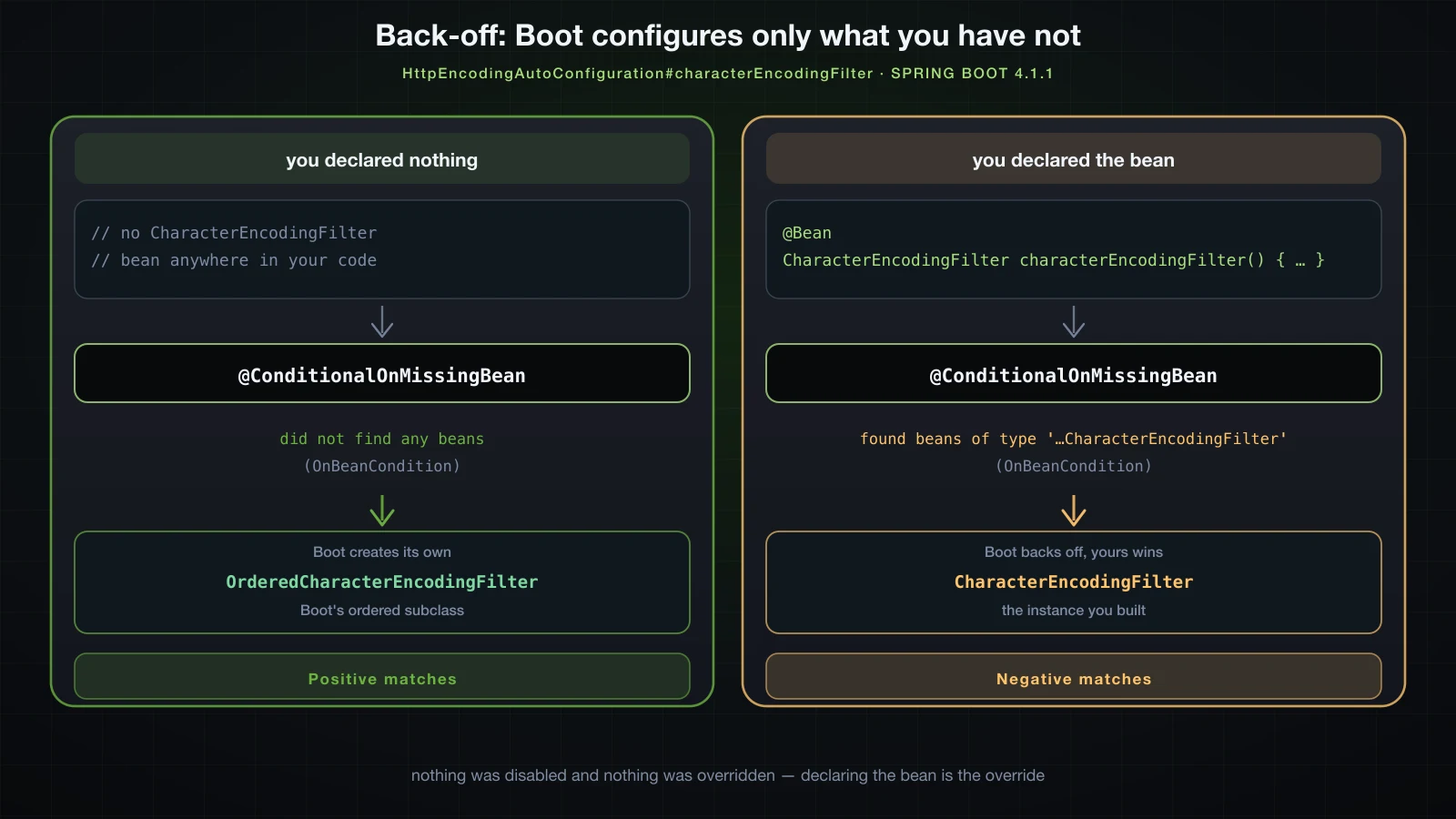
The headline counts change accordingly: 52 positive and 39 negative matches become 51 positive and 40 negative. Exactly one decision flipped, and HttpEncodingAutoConfiguration itself is still a positive match — only its @Bean method backed off. That granularity matters: an auto-configuration with several beans keeps contributing the ones you did not replace.
⚠️ Back-off is by type (or by bean name, when the annotation names one), not by bean name alone, and it only works if your bean is registered before the auto-configuration is evaluated — which is automatic for anything in your own component scan or
@Configurationclasses. A bean you register from aBeanFactoryPostProcessorat the wrong moment can miss the window.
The classpath decides what gets configured
The single clearest demonstration of the whole mechanism costs one line in build.gradle. Take the same application — not one character of src/ changes — and add a dependency:
dependencies {
    implementation 'org.springframework.boot:spring-boot-starter-webmvc'
    implementation 'org.springframework.boot:spring-boot-starter-thymeleaf'
}
Six jars arrive: spring-boot-starter-thymeleaf, spring-boot-thymeleaf, thymeleaf, thymeleaf-spring6, attoparser and unbescape. One of them, spring-boot-thymeleaf-4.1.1.jar, carries an .imports file with exactly one line in it:
org.springframework.boot.thymeleaf.autoconfigure.ThymeleafAutoConfigurationThat is the only change to the candidate list — 30 becomes 31 — and here is what it does:
spring-boot-starter-webmvc | + spring-boot-starter-thymeleaf | |
|---|---|---|
| Jars on the runtime classpath | 39 | 45 |
| Auto-configuration candidates | 30 | 31 |
| Positive matches | 52 | 58 |
| Negative matches | 39 | 45 |
| Bean definitions in the context | 146 | 155 |
| New beans you can inject | — | defaultTemplateResolver, templateEngine, thymeleafViewResolver |
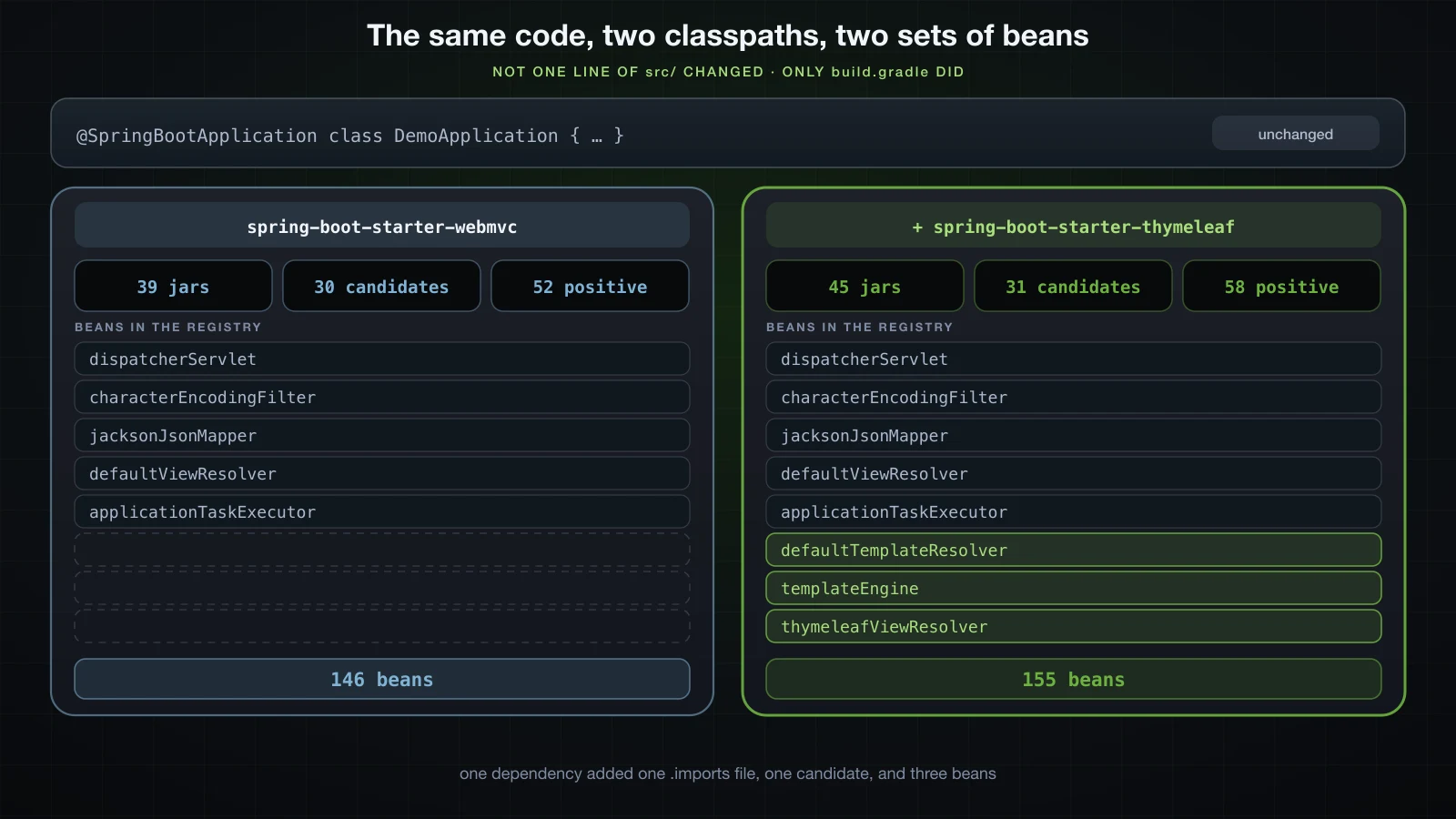
One candidate produced six new positive entries and six new negative ones, because ThymeleafAutoConfiguration is a class with nested configuration classes inside it, each conditional in its own right:
   ThymeleafAutoConfiguration matched:
      - @ConditionalOnClass found required classes 'org.thymeleaf.templatemode.TemplateMode', 'org.thymeleaf.spring6.SpringTemplateEngine' (OnClassCondition)

   ThymeleafAutoConfiguration.DefaultTemplateResolverConfiguration matched:
      - @ConditionalOnMissingBean (names: defaultTemplateResolver; SearchStrategy: all) did not find any beans (OnBeanCondition)

   ThymeleafAutoConfiguration.ThymeleafWebMvcConfiguration matched:
      - found 'session' scope (OnWebApplicationCondition)
And the negative half of the same class shows what Thymeleaf would have configured had more been present:
   ThymeleafAutoConfiguration.ThymeleafSecurityDialectConfiguration:
      Did not match:
         - @ConditionalOnClass did not find required classes 'org.thymeleaf.extras.springsecurity6.dialect.SpringSecurityDialect', 'org.springframework.security.web.server.csrf.CsrfToken' (OnClassCondition)

   ThymeleafAutoConfiguration.ThymeleafWebFluxConfiguration:
      Did not match:
         - did not find reactive web application classes (OnWebApplicationCondition)
Add Spring Security and the first of those flips to a positive match without you writing a line. That is the whole model: the classpath is the configuration.
Reading the CONDITIONS EVALUATION REPORT
Start the application with --debug on the command line (or debug=true in application.properties) and Boot prints the report once the context is ready:
java -jar build/libs/demo-0.0.1-SNAPSHOT.jar --server.port=8090 --debug============================
CONDITIONS EVALUATION REPORT
============================
Positive matches:
-----------------
AopAutoConfiguration matched:
- @ConditionalOnBooleanProperty (spring.aop.auto=true) matched (OnPropertyCondition)
AopAutoConfiguration.ClassProxyingConfiguration matched:
- @ConditionalOnMissingClass did not find unwanted class 'org.aspectj.weaver.Advice' (OnClassCondition)
- @ConditionalOnBooleanProperty (spring.aop.proxy-target-class=true) matched (OnPropertyCondition)It has four sections, always in this order. For the bare web-only project the report is just over 360 lines and breaks down like this:
| Section | What is in it | Count here |
|---|---|---|
| Positive matches | every class, nested class and @Bean method whose conditions all held | 52 |
| Negative matches | every one that was rejected, with the condition that rejected it | 39 |
| Exclusions | classes you removed by hand with exclude or spring.autoconfigure.exclude | 0 |
| Unconditional classes | auto-configurations with no conditions at all, so they always apply | 6 |
Three details make the report readable rather than intimidating.
An entry is not the same thing as a candidate. Thirty candidates produced 91 entries, because a nested @Configuration class gets its own line and so does every conditional @Bean method. A # in the name means a bean method: HttpEncodingAutoConfiguration#characterEncodingFilter is the method, HttpEncodingAutoConfiguration is the class.
Every line names the condition that decided it, in brackets at the end — (OnClassCondition), (OnBeanCondition), (OnPropertyCondition). That is the implementation class, so when a line puzzles you the source is one search away.
A negative entry can list what matched too. When several conditions are declared and one fails, the report shows both halves. Running the same project with --spring.servlet.encoding.enabled=false:
   HttpEncodingAutoConfiguration:
      Did not match:
         - @ConditionalOnBooleanProperty (spring.servlet.encoding.enabled=true) found different value in property 'spring.servlet.encoding.enabled' (OnPropertyCondition)
      Matched:
         - @ConditionalOnClass found required class 'org.springframework.web.filter.CharacterEncodingFilter' (OnClassCondition)
         - found 'session' scope (OnWebApplicationCondition)
Two conditions passed, one failed, and the class was skipped — along with its @Bean method, which is not evaluated at all once the class is out. The counts for that run: 50 positive, 40 negative, and CharacterEncodingFilter beans: [] in the registry.
The last two sections are short but worth knowing. Exclusions is empty unless you excluded something yourself, which makes it the fastest way to confirm an exclusion actually took effect. Unconditional classes are the handful that have no conditions and therefore always apply; on this project they are:
Unconditional classes:
----------------------

    org.springframework.boot.autoconfigure.context.ConfigurationPropertiesAutoConfiguration

    org.springframework.boot.autoconfigure.ssl.SslAutoConfiguration

    org.springframework.boot.autoconfigure.context.LifecycleAutoConfiguration

    org.springframework.boot.autoconfigure.context.PropertyPlaceholderAutoConfiguration

    org.springframework.boot.autoconfigure.availability.ApplicationAvailabilityAutoConfiguration

    org.springframework.boot.autoconfigure.info.ProjectInfoAutoConfiguration
Finding out why a bean is or is not there
This is the part most developers never learn, and it turns "Spring Boot is not configuring my thing" from a guessing game into a two-minute lookup.
- Run with
--debugand redirect to a file. The report is hundreds of lines and you want to search it, not scroll it. - Search for the auto-configuration by name. If you do not know the name, search for the bean type instead —
grep -i thymeleaf,grep -i datasource. Report entries name the classes they guard. - Decide which section the hit is in. If it is under Positive matches, the configuration ran and your problem is elsewhere — a property value, a bean you overrode, a URL mapping. If it is under Negative matches, read the
Did not match:line; it tells you exactly what was missing. - If the name does not appear at all, the class is not a candidate on this classpath. The dependency that ships it is missing, so no
.importsfile named it. That is a build file problem, not a configuration problem. - Check Exclusions if a configuration you expect is absent and the classpath looks right.
The four failure shapes map onto four fixes: @ConditionalOnClass failed means add a dependency; @ConditionalOnMissingBean failed means you (or another library) already declared that bean; @ConditionalOnProperty failed means set the property; and a name that does not appear means the jar is not there.
One more line to recognise. When startup fails before the context is ready, Boot cannot print the report and tells you so:
Error starting ApplicationContext. To display the condition evaluation report re-run your application with 'debug' enabled.That message means the report exists and you are one flag away from it.
Ordering, and why your beans are known first
Auto-configurations sometimes depend on each other, so @AutoConfiguration carries ordering attributes. It is meta-annotated with @Configuration(proxyBeanMethods = false), @AutoConfigureBefore and @AutoConfigureAfter, and aliases them as before, beforeName, after and afterName. WebMvcAutoConfiguration uses both mechanisms:
@AutoConfiguration(after = { DispatcherServletAutoConfiguration.class, TaskExecutionAutoConfiguration.class },
        afterName = "org.springframework.boot.validation.autoconfigure.ValidationAutoConfiguration")
@ConditionalOnWebApplication(type = Type.SERVLET)
@ConditionalOnClass({ Servlet.class, DispatcherServlet.class, WebMvcConfigurer.class })
@ConditionalOnMissingBean(WebMvcConfigurationSupport.class)
@AutoConfigureOrder(Ordered.HIGHEST_PRECEDENCE + 10)
@ImportRuntimeHints(WebResourcesRuntimeHints.class)
public final class WebMvcAutoConfiguration {
afterName takes a string because that class lives in a module that may not be on the classpath — a Class literal would fail to load. The ordering ends up in the generated metadata file alongside the conditions:
org.springframework.boot.webmvc.autoconfigure.WebMvcAutoConfiguration.AutoConfigureAfter=org.springframework.boot.webmvc.autoconfigure.DispatcherServletAutoConfiguration,org.springframework.boot.autoconfigure.task.TaskExecutionAutoConfiguration,org.springframework.boot.validation.autoconfigure.ValidationAutoConfiguration
org.springframework.boot.webmvc.autoconfigure.WebMvcAutoConfiguration.AutoConfigureOrder=-2147483638
The ordering that matters most, though, is not between auto-configurations — it is between them and you. AutoConfigurationImportSelector is a DeferredImportSelector, and Spring processes deferred imports after every other @Configuration class has been parsed. Your components, your @Bean methods and your @Imports are all known before the first auto-configuration condition is evaluated.
That single fact is what makes @ConditionalOnMissingBean a promise rather than a race. Boot can honestly say "only if you have not" because by the time it asks, the answer is already settled.
Turning auto-configuration off
Sometimes you want a specific auto-configuration gone rather than overridden. There are two spellings of the same operation.
On the annotation, if the class is on your compile classpath:
@SpringBootApplication(exclude = HttpEncodingAutoConfiguration.class)
public class DemoApplication {

    public static void main(String[] args) {
        SpringApplication.run(DemoApplication.class, args);
    }
}
Or as a property, which takes fully-qualified names and therefore works for anything:
spring.autoconfigure.exclude=org.springframework.boot.servlet.autoconfigure.HttpEncodingAutoConfigurationBoth produce the same result, and the report proves it — the Exclusions section stops being empty:
Exclusions:
-----------

    org.springframework.boot.servlet.autoconfigure.HttpEncodingAutoConfiguration
With that exclusion in place the run reports 50 positive matches and CharacterEncodingFilter beans: []. @SpringBootApplication also accepts excludeName for the string form.
Two failure modes are worth meeting on purpose. Excluding something that is not an auto-configuration is rejected outright rather than ignored:
java.lang.IllegalStateException: The following classes could not be excluded because they are not auto-configuration classes:
	- com.example.demo.ConditionsDemo
And excluding something a starter genuinely needs takes the application down at startup. Removing the Tomcat servlet auto-configuration from a web application:
***************************
APPLICATION FAILED TO START
***************************

Description:

Web application could not be started as there was no org.springframework.boot.web.server.servlet.ServletWebServerFactory bean defined in the context.

Action:

Check your application's dependencies for a supported servlet web server.
Check the configured web application type.
The same message appears if you turn the whole mechanism off with spring.boot.enableautoconfiguration=false, which is the nuclear option and almost never what you want. Excluding is a scalpel; use it when a library's auto-configuration is actively wrong for you, and prefer declaring your own bean when you just want different behaviour.
FAQ
Where is the list of auto-configurations in Spring Boot 4?
In META-INF/spring/org.springframework.boot.autoconfigure.AutoConfiguration.imports, one class per line, and there is one such file in every jar that contributes auto-configurations. META-INF/spring.factories with an EnableAutoConfiguration key is the Boot 2 mechanism; it was deprecated in 2.7, removed in 3.0, and no jar on a Boot 4.1.1 classpath still uses it for this purpose.
Why is my auto-configuration not applying?
Run with --debug and find the class in the CONDITIONS EVALUATION REPORT. Under Negative matches the Did not match: line names the condition that failed, which is almost always a missing class (add the dependency), a bean you already declared (that is back-off working), or a property that is unset or set to the wrong value. If the class does not appear in the report at all, the jar that ships it is not on your classpath.
Is it safe to run with --debug in production?
The report itself is harmless — it is printed once at startup and costs nothing afterwards. The problem is that --debug also raises a core set of loggers to DEBUG, which makes the application far noisier at runtime. For a one-off investigation on a running service that is usually acceptable; as a permanent setting it is not. If you only want the report, debug=true behaves the same way, so plan to turn it back off.
What is the difference between @Conditional and @ConditionalOn*?
@Conditional is a Spring Framework annotation that takes a Condition implementation you supply. The @ConditionalOn* family is Spring Boot's: 21 annotations, each of which is a @Conditional with a condition already written for a common question. Use the Boot annotations when one fits, and implement Condition yourself when none does.
Can I use @ConditionalOnMissingBean in my own @Configuration class?
You can, but the result depends on parse order, so it is not reliable. Auto-configuration is imported last, which is why bean-presence conditions work there. In your own configuration, prefer @ConditionalOnClass, @ConditionalOnProperty or a custom Condition, all of which answer questions that do not depend on when the class happens to be parsed.
How do I stop one auto-configuration without touching the classpath?
@SpringBootApplication(exclude = TheAutoConfiguration.class), or spring.autoconfigure.exclude with the fully-qualified name. Check the Exclusions section of the --debug report to confirm it took effect, and be aware that excluding a configuration another one depends on can prevent the application from starting.
Conclusion
Auto-configuration is beans, conditions and a registry, which is everything this chapter has been about. @EnableAutoConfiguration imports a selector; the selector unions the .imports files from every jar on the classpath into a candidate list — 30 for a minimal Boot 4.1.1 web app, spread across six jars rather than concentrated in one; a cheap metadata filter throws out what obviously cannot apply; and the survivors are ordinary @Configuration classes whose @ConditionalOn* annotations decide, one by one, whether their @Bean methods run. @ConditionalOnMissingBean is the piece that makes it livable: Boot configures what you have not, and declaring a bean is how you override it. When any of that surprises you, --debug prints the entire decision log with the reason for every line.
That closes Chapter 1. You now know what the container is, how beans get into it, how they are wired, how long they live, and where the ones you never wrote came from. The next chapter is about telling the application what to do at run time, and it starts with the two files every Spring Boot project has: application.properties and application.yml — their syntax, how they differ, and reading values out of them with @Value.
![[Spring Boot Basics] Spring Boot Profiles and Configuration Precedence: Environment Variables and Command-Line Arguments](/images/blog/sb-profiles-thumbnail.en.webp)
![[Spring Boot Basics] Spring Framework vs Spring Boot: What Auto-Configuration, Starters and the Embedded Server Actually Do](/images/blog/sb-framework-vs-boot-thumbnail.en.webp)
![[Spring Boot Basics] Validation in Spring Boot: Bean Validation Annotations, @Valid and Custom Validators](/images/blog/sb-validation-thumbnail.en.webp)
![[Spring Boot Basics] Spring Boot Project Structure: Gradle vs Maven, @SpringBootApplication and the Executable JAR](/images/blog/sb-project-structure-thumbnail.en.webp)