You have a project that starts and answers a request. This article is about the rest of it: the twelve files the generator wrote, what each one is for, and what the build turns them into. That knowledge is what separates "it worked when I pressed the green triangle" from being able to fix a build that does not.
The same project is generated twice below, once as a Gradle project and once as a Maven project, so you can read the two build files side by side.
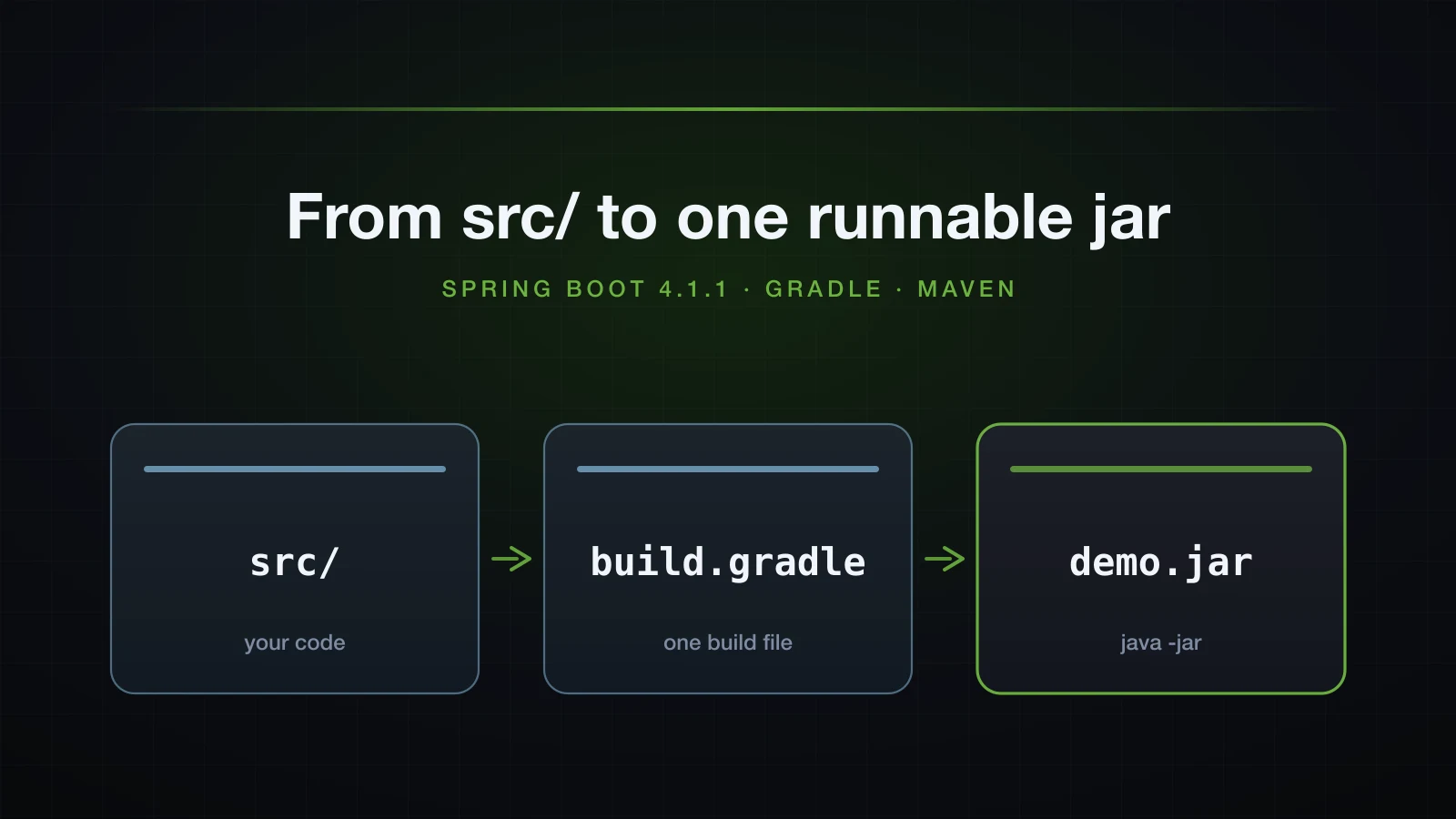
The examples use Spring Boot 4.1.1 and Java 21, and both builds run through the wrappers the project ships, so neither Gradle nor Maven has to be installed. Gradle is this series' primary build tool; Maven appears here so you can read a pom.xml when you meet one, which you will.
What the generated project actually contains
Generating the two flavours is one curl each. The only difference in the query string is type:
curl -s "https://start.spring.io/starter.zip?type=gradle-project&language=java&bootVersion=4.1.1&javaVersion=21&groupId=com.example&artifactId=demo&name=demo&packageName=com.example.demo&dependencies=web" -o g.zip

curl -s "https://start.spring.io/starter.zip?type=maven-project&language=java&bootVersion=4.1.1&javaVersion=21&groupId=com.example&artifactId=demo&name=demo&packageName=com.example.demo&dependencies=web" -o m.zip
The Gradle archive unpacks to exactly this — the real tree -a --dirsfirst output, with nothing trimmed:
.
├── gradle
│   └── wrapper
│       ├── gradle-wrapper.jar
│       └── gradle-wrapper.properties
├── src
│   ├── main
│   │   ├── java
│   │   │   └── com
│   │   │       └── example
│   │   │           └── demo
│   │   │               └── DemoApplication.java
│   │   └── resources
│   │       ├── static
│   │       ├── templates
│   │       └── application.properties
│   └── test
│       └── java
│           └── com
│               └── example
│                   └── demo
│                       └── DemoApplicationTests.java
├── .gitattributes
├── .gitignore
├── HELP.md
├── build.gradle
├── gradlew
├── gradlew.bat
└── settings.gradle

17 directories, 12 files
The Maven archive is the same tree with four files swapped: build.gradle and settings.gradle become pom.xml, and gradle/wrapper/ plus gradlew/gradlew.bat become .mvn/wrapper/maven-wrapper.properties plus mvnw/mvnw.cmd. Everything under src/ is byte-for-byte identical. That is the useful headline: the build tool changes four files and nothing else.
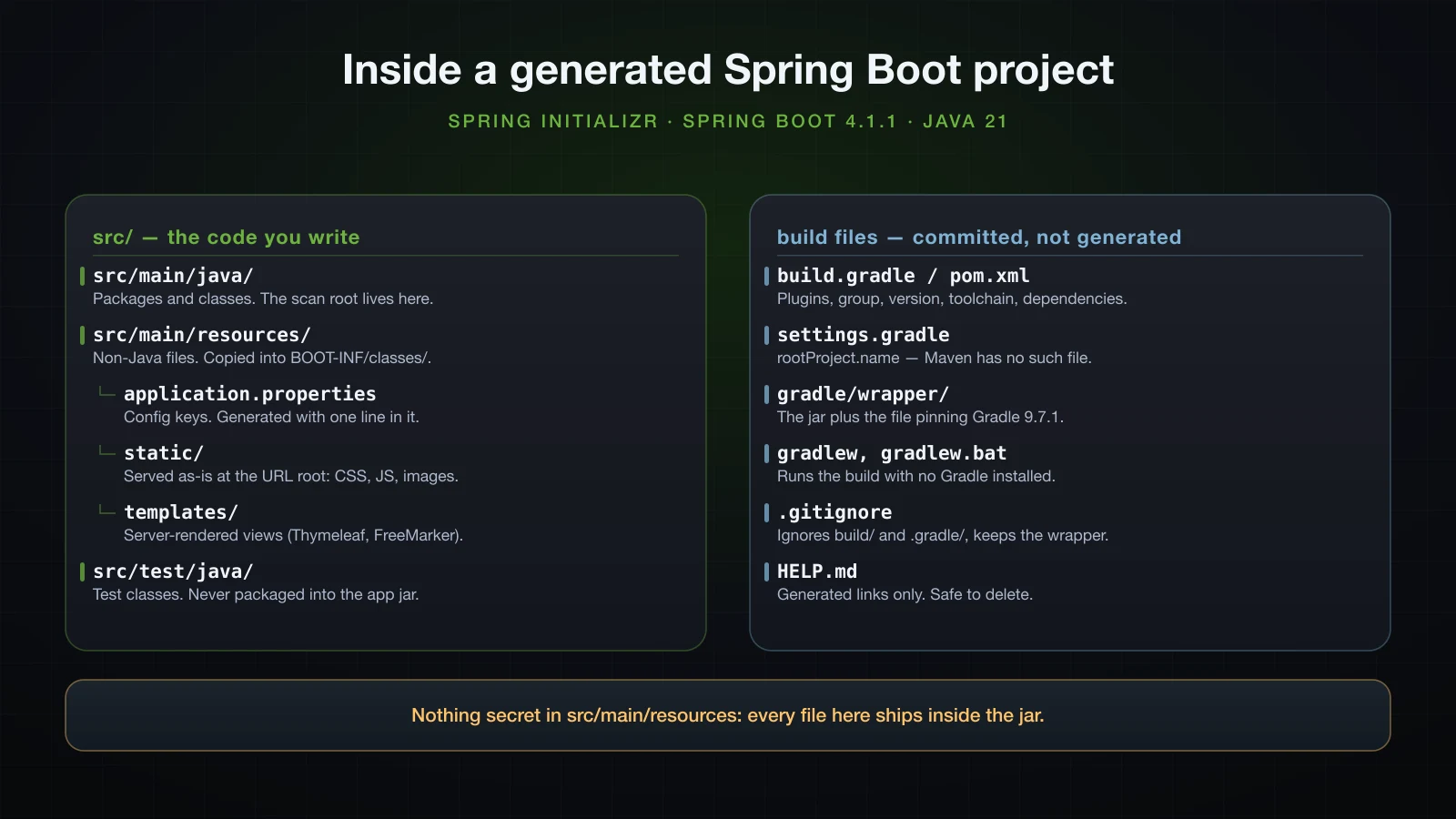
| Path | What belongs there |
|---|---|
src/main/java/ | All production Java. The package of the class carrying @SpringBootApplication becomes the component-scan root — see below, it matters more than it looks. |
src/main/resources/ | Everything that is not Java but ships with the application: application.properties, SQL scripts, message bundles. Copied verbatim into the jar. |
src/main/resources/static/ | Files served as-is at the URL root. A file static/app.css is reachable at /app.css. |
src/main/resources/templates/ | Server-rendered views for a template engine (Thymeleaf, FreeMarker). Empty and useless until you add one. |
src/test/java/ | Test classes. Compiled against a separate classpath and never packaged into the application jar. |
src/test/resources/ | Not generated, but create it the moment a test needs its own application.properties. |
build.gradle / pom.xml | Plugins, coordinates, the Java toolchain, dependencies, packaging. |
settings.gradle | One line, rootProject.name = 'demo', which decides the jar's file name. Maven has no equivalent file; the artifactId does that job. |
gradle/wrapper/ | gradle-wrapper.jar plus the .properties that pins the Gradle version. Commit both. |
gradlew, gradlew.bat | The wrapper scripts. Commit both; the .bat is what Windows colleagues run. |
.gitattributes | Three lines that force LF on gradlew, CRLF on *.bat and binary on *.jar. Deleting it breaks the wrapper on Windows checkouts. |
.gitignore | Ignores build/, .gradle/, target/ and the IDE folders. Note the negation !gradle/wrapper/gradle-wrapper.jar — the wrapper jar is deliberately not ignored. |
HELP.md | Generated documentation links. It is listed in .gitignore, so it is safe to delete. |
What never belongs in src/main/resources
Everything under src/main/resources is copied into the jar, and a jar is a zip anyone who has the file can open. That is not a theoretical risk — it is one command:
unzip -p build/libs/demo-0.0.1-SNAPSHOT.jar BOOT-INF/classes/application.propertiesspring.application.name=demoSo: no database passwords, no API keys, no private certificates, no .env file copied in "just for now". Those come from environment variables or a secret store at run time. Also keep out build output, anything generated (it will go stale and be committed by accident), large binaries that inflate every deployment, and test fixtures — those belong in src/test/resources, which is not packaged.
Why gradlew and mvnw are committed
The wrapper is the single most under-appreciated file in the project. It is a small script plus a properties file that names an exact build-tool version; on first run it downloads that version and caches it, then runs the build with it. Every developer and every CI machine therefore builds with the same Gradle, regardless of what is installed locally.
The proof is this machine. Neither build tool is installed:
command -v gradle || echo "no gradle on PATH"
command -v mvn || echo "no mvn on PATH"no gradle on PATH
no mvn on PATHAnd yet:
./gradlew --version------------------------------------------------------------
Gradle 9.7.1
------------------------------------------------------------
Build time: 2026-08-19 14:16:09 UTC
Revision: 92f0512e7f06d84621afba191f75e265363890cf
Kotlin: 2.4.0
Groovy: 4.0.32
Ant: Apache Ant(TM) version 1.10.17 compiled on April 6 2026
Launcher JVM: 21.0.6 (Homebrew 21.0.6)
Daemon JVM: /opt/homebrew/Cellar/openjdk@21/21.0.6/libexec/openjdk.jdk/Contents/Home
OS: Mac OS X 26.4.1 aarch64That version comes from one line in gradle/wrapper/gradle-wrapper.properties:
distributionUrl=https\://services.gradle.org/distributions/gradle-9.7.1-bin.zipMaven's wrapper works the same way, from .mvn/wrapper/maven-wrapper.properties:
wrapperVersion=3.3.4
distributionType=only-script
distributionUrl=https://repo.maven.apache.org/maven2/org/apache/maven/apache-maven/3.9.16/apache-maven-3.9.16-bin.zip./mvnw --versionApache Maven 3.9.16 (2bdd9fddda4b155ebf8000e807eb73fd829a51d5)
Maven home: /Users/hoangth/.m2/wrapper/dists/apache-maven-3.9.16/56ba1f9f
Java version: 21.0.6, vendor: Homebrew, runtime: /opt/homebrew/Cellar/openjdk@21/21.0.6/libexec/openjdk.jdk/Contents/HomeThree rules follow. Always invoke ./gradlew or ./mvnw, never a global gradle/mvn, or you lose the guarantee. Commit the wrapper directory including gradle-wrapper.jar, which is why .gitignore carries that explicit negation. And to upgrade, run ./gradlew wrapper --gradle-version 9.8 rather than hand-editing the URL, so the scripts and the checksum line are regenerated together.
build.gradle line by line
Here is the whole generated file. Twenty-eight lines, and every one of them earns its place:
plugins {
	id 'java'
	id 'org.springframework.boot' version '4.1.1'
	id 'io.spring.dependency-management' version '1.1.7'
}

group = 'com.example'
version = '0.0.1-SNAPSHOT'

java {
	toolchain {
		languageVersion = JavaLanguageVersion.of(21)
	}
}

repositories {
	mavenCentral()
}

dependencies {
	implementation 'org.springframework.boot:spring-boot-starter-webmvc'
	testImplementation 'org.springframework.boot:spring-boot-starter-webmvc-test'
	testRuntimeOnly 'org.junit.platform:junit-platform-launcher'
}

tasks.named('test') {
	useJUnitPlatform()
}
id 'java' is the Gradle Java plugin. It creates the main and test source sets — which is why the compiler looks in src/main/java and nowhere else — along with the compileJava, processResources, classes, test, jar, assemble and build tasks, and the java { } extension used two blocks later.
id 'org.springframework.boot' version '4.1.1' adds the Boot-specific tasks. ./gradlew tasks lists them:
bootBuildImage - Builds an OCI image of the application using the output of the bootJar task
bootJar - Assembles an executable jar archive containing the main classes and their dependencies.
bootRun - Runs this project as a Spring Boot application.
resolveMainClassName - Resolves the name of the application's main class.
resolveMainClassName is the one people do not expect: the plugin scans the compiled classes for a public static void main and writes the result into the jar manifest, which is why you never configure a main class by hand.
id 'io.spring.dependency-management' version '1.1.7' is what lets the dependencies block omit versions. It imports the spring-boot-dependencies BOM and applies the versions in it to every declared dependency. Remove this plugin and the build fails on the first versionless coordinate.
group and version become the Maven coordinates and, with rootProject.name, the artifact file name: demo-0.0.1-SNAPSHOT.jar.
The toolchain block is not the same thing as "the JDK I am running". Gradle itself runs on whatever JVM launched it; the toolchain declares that this project is compiled and tested with Java 21, and Gradle locates — or downloads — a matching JDK. It is what makes the build reproducible on a machine whose default java is 17 or 25.
repositories { mavenCentral() } is where artifacts are resolved from. Note it does not apply to the plugins block, which resolves from the Gradle Plugin Portal via settings.gradle.
implementation, runtimeOnly, compileOnly and the rest
A dependency is declared against a configuration, and the configuration decides which classpath it lands on. The one-dependency project only shows two of them, so here is a richer generated file — the same Initializr request with JPA, PostgreSQL, Lombok, DevTools and the configuration processor added:
dependencies {
	implementation 'org.springframework.boot:spring-boot-starter-data-jpa'
	implementation 'org.springframework.boot:spring-boot-starter-webmvc'
	compileOnly 'org.projectlombok:lombok'
	developmentOnly 'org.springframework.boot:spring-boot-devtools'
	runtimeOnly 'org.postgresql:postgresql'
	annotationProcessor 'org.projectlombok:lombok'
	annotationProcessor 'org.springframework.boot:spring-boot-configuration-processor'
	testImplementation 'org.springframework.boot:spring-boot-starter-data-jpa-test'
	testImplementation 'org.springframework.boot:spring-boot-starter-webmvc-test'
	testCompileOnly 'org.projectlombok:lombok'
	testRuntimeOnly 'org.junit.platform:junit-platform-launcher'
	testAnnotationProcessor 'org.projectlombok:lombok'
}| Configuration | On the compile classpath | On the runtime classpath | In the jar | Typical use |
|---|---|---|---|---|
implementation | yes | yes | yes | Ordinary libraries. The default choice. |
runtimeOnly | no | yes | yes | JDBC drivers, logging backends — needed at run time, never imported. |
compileOnly | yes | no | no | Annotations processed away at compile time, like Lombok. |
annotationProcessor | no (processor path) | no | no | Code generators run by javac. |
developmentOnly | no | yes locally | no | DevTools. Excluded from bootJar, so it cannot reach production. |
testImplementation | test only | test only | no | JUnit, AssertJ, the Boot test starter. |
testRuntimeOnly | no | test only | no | junit-platform-launcher. |
Two of these repay attention. runtimeOnly for a JDBC driver is correct and deliberate: your code should talk to java.sql, never to org.postgresql, and runtimeOnly makes the compiler enforce it. And developmentOnly is a genuine safety feature — DevTools restarts the application on every class change, which is wonderful locally and catastrophic in production, so the Boot plugin drops it from the packaged jar.
Why useJUnitPlatform() is there
Gradle's test task still defaults to JUnit 4. JUnit 5 tests run on the JUnit Platform, and without that one line Gradle compiles your tests, finds no JUnit 4 tests, and fails. Deleting the block and running ./gradlew test gives exactly this:
> Task :compileTestJava
> Task :test FAILED
> There are test sources present and no filters are applied, but the test task did not
  discover any tests to execute. This is likely due to a misconfiguration. Please check
  your test configuration.
A compiling test class and zero discovered tests is almost always this, or a missing junit-platform-launcher on testRuntimeOnly.
The same project as a pom.xml
The Maven flavour of the identical project. The generated file also contains empty licenses, developers and scm placeholder blocks, which do nothing and can be deleted; the rest is below verbatim:
<parent>
    <groupId>org.springframework.boot</groupId>
    <artifactId>spring-boot-starter-parent</artifactId>
    <version>4.1.1</version>
    <relativePath/> <!-- lookup parent from repository -->
</parent>
<groupId>com.example</groupId>
<artifactId>demo</artifactId>
<version>0.0.1-SNAPSHOT</version>
<name>demo</name>

<properties>
    <java.version>21</java.version>
</properties>

<dependencies>
    <dependency>
        <groupId>org.springframework.boot</groupId>
        <artifactId>spring-boot-starter-webmvc</artifactId>
    </dependency>
    <dependency>
        <groupId>org.springframework.boot</groupId>
        <artifactId>spring-boot-starter-webmvc-test</artifactId>
        <scope>test</scope>
    </dependency>
</dependencies>

<build>
    <plugins>
        <plugin>
            <groupId>org.springframework.boot</groupId>
            <artifactId>spring-boot-maven-plugin</artifactId>
        </plugin>
    </plugins>
</build>
spring-boot-starter-parent does three jobs at once, and the way to confirm that is to open it in the local repository. It inherits from spring-boot-dependencies, which is the BOM — that is where the missing version numbers come from. It sets defaults:
<properties>
    <java.version>17</java.version>
    <resource.delimiter>@</resource.delimiter>
    <maven.compiler.release>${java.version}</maven.compiler.release>
    <project.build.sourceEncoding>UTF-8</project.build.sourceEncoding>
</properties>
So <java.version>21</java.version> in your own properties is not a magic Spring key — it overrides the parent's default of 17 and flows into maven.compiler.release. And it pins the versions and sensible configuration of the common plugins, so maven-compiler-plugin and maven-surefire-plugin need no <version> either.
spring-boot-maven-plugin contributes the repackage goal, which binds to the package phase. That is the step that turns the ordinary jar Maven just built into an executable one — and the reason ./mvnw package leaves two files in target/, covered in the packaging section.
There is no equivalent of settings.gradle: the jar name comes from artifactId and version.
Gradle configurations and Maven scopes side by side
The two models are not one-to-one, and the mismatch is where translations between the two build files go wrong:
| Gradle configuration | Maven equivalent | Note |
|---|---|---|
implementation | <scope>compile</scope> (the default) | Maven leaks the dependency to downstream modules; Gradle's implementation does not. api is the Gradle configuration that does. |
runtimeOnly | <scope>runtime</scope> | Direct match. |
compileOnly | <scope>provided</scope> or <optional>true</optional> | Initializr uses <optional>true</optional> for Lombok. |
annotationProcessor | annotationProcessorPaths on maven-compiler-plugin | Maven has no scope for this; it is plugin configuration. |
developmentOnly | <scope>runtime</scope> + <optional>true</optional> | Same effect for DevTools: present locally, excluded from the repackaged jar. |
testImplementation | <scope>test</scope> | Direct match. |
testRuntimeOnly | <scope>test</scope> | Maven does not separate the two. |
Maven or Gradle for a Spring Boot project?
Both are first-class in Spring Boot: the Initializr, the reference documentation and the plugin ecosystem all cover both, and no Spring feature is unavailable in either. So the choice is about how you want to work, not about what you can build.
| Maven | Gradle | |
|---|---|---|
| Build file | XML, declarative, 54 generated lines for a small app | Groovy or Kotlin DSL, 28 generated lines for the same app |
| Model | A fixed lifecycle (validate → compile → test → package → install → deploy). Every project builds the same way | A task graph you can extend. Every project can build its own way |
| Incremental builds | Re-runs the phases; maven-compiler-plugin skips unchanged classes, most other plugins do not | Per-task up-to-date checks based on content hashes of inputs and outputs |
| Measured here (no-op re-build) | 1.45–1.65 s | 0.32–0.35 s, 7 actionable tasks: 7 up-to-date |
| Build cache | None built in | org.gradle.caching=true reuses task outputs across clean builds and across machines |
| Warm JVM | New JVM per invocation (mvnd exists as a separate daemon project) | A daemon stays warm between builds by default |
| IDE support | Excellent and effectively universal; the POM is trivial for tools to parse | Excellent in IntelliJ; the Kotlin DSL gets completion, the Groovy DSL less so |
| Learning curve | Low. Everything is an element in a schema | Higher. A build script is a program, and it can be written badly |
| Ecosystem | The larger plugin catalogue and far more copy-pasteable answers | Smaller, but every mainstream plugin exists |
| Where it wins | Single modules, teams that want builds to be boring and identical | Multi-module builds, large codebases, anything where build time is a daily cost |
Honest summary: on a one-module service that builds in two seconds, the difference is a rounding error and Maven's rigidity is a genuine advantage — nobody can invent a bespoke build. The numbers above are from this machine, on a project with one dependency; treat them as indicative of the shape of the difference, not as benchmarks. Gradle's advantage grows with the size of the codebase, because up-to-date checks and the build cache scale with the amount of work they let you skip. Gradle's risk also grows with the size of the team, because a build script is code and undisciplined build code rots like any other. This series uses Gradle, and one caching result is worth seeing: with org.gradle.caching=true, a second clean build reports 7 actionable tasks: 4 executed, 3 from cache.
Why do dependencies have no version number?
Because a BOM — a "bill of materials" — declares them. spring-boot-dependencies lists a tested version for 652 artifacts in Boot 4.1.1 — every library Spring Boot integrates with, and both build tools pull it in: Maven through spring-boot-starter-parent, Gradle through io.spring.dependency-management. You write the coordinate; the BOM supplies the version; and every library in the set is one that the Boot release was actually tested against.
To see what was resolved, ask the build tool. Gradle:
./gradlew dependencies --configuration compileClasspathcompileClasspath - Compile classpath for source set 'main'.
\--- org.springframework.boot:spring-boot-starter-webmvc -> 4.1.1
+--- org.springframework.boot:spring-boot-starter:4.1.1
| +--- org.springframework.boot:spring-boot-starter-logging:4.1.1
| | +--- ch.qos.logback:logback-classic:1.5.38
| | | +--- ch.qos.logback:logback-core:1.5.38
| | | \--- org.slf4j:slf4j-api:2.0.17 -> 2.0.18
| +--- org.springframework.boot:spring-boot-autoconfigure:4.1.1
| | \--- org.springframework.boot:spring-boot:4.1.1
| | +--- org.springframework:spring-core:7.0.9Two arrows to read here. spring-boot-starter-webmvc -> 4.1.1 is the BOM filling in the version you omitted. slf4j-api:2.0.17 -> 2.0.18 is conflict resolution: two paths in the graph asked for different versions and Gradle took the newer one.
Maven prints the same graph with scopes attached:
./mvnw dependency:tree[INFO] com.example:demo:jar:0.0.1-SNAPSHOT
[INFO] +- org.springframework.boot:spring-boot-starter-webmvc:jar:4.1.1:compile
[INFO] | +- org.springframework.boot:spring-boot-starter:jar:4.1.1:compile
[INFO] | +- org.springframework.boot:spring-boot-starter-jackson:jar:4.1.1:compile
[INFO] | | \- org.springframework.boot:spring-boot-jackson:jar:4.1.1:compile
[INFO] | | \- tools.jackson.core:jackson-databind:jar:3.1.5:compile
[INFO] | +- org.springframework.boot:spring-boot-starter-tomcat:jar:4.1.1:compile
[INFO] | | +- org.springframework.boot:spring-boot-starter-tomcat-runtime:jar:4.1.1:compile
[INFO] | | | +- org.apache.tomcat.embed:tomcat-embed-core:jar:11.0.24:compile
[INFO] | \- org.springframework.boot:spring-boot-webmvc:jar:4.1.1:compile
[INFO] | \- org.springframework:spring-webmvc:jar:7.0.9:compile
[INFO] \- org.springframework.boot:spring-boot-starter-webmvc-test:jar:4.1.1:testThis is also the first place to look when a security scanner flags a transitive library: the tree tells you which of your direct dependencies dragged it in.
Overriding a managed version
Sometimes you need a version the BOM does not pick — a CVE fix that landed after the Boot release, usually. Both tools override by property name, using the same property the BOM declares.
Gradle, before the group line:
ext['snakeyaml.version'] = '2.4'\--- org.yaml:snakeyaml:2.6 -> 2.4Maven, in properties:
<properties>
    <java.version>21</java.version>
    <snakeyaml.version>2.4</snakeyaml.version>
</properties>[INFO] | | \- org.yaml:snakeyaml:jar:2.4:compile⚠️ Overriding one library out of a set that was tested together is how you get a
NoSuchMethodErrorat run time rather than at compile time. Do it for a specific reason, write the reason in a comment next to the property, and remove the override at the next Boot upgrade.
@SpringBootApplication decomposed
It is not a special annotation the framework treats magically. It is a composed annotation, and javap -v on the class file inside spring-boot-autoconfigure-4.1.1.jar prints exactly what it is made of:
RuntimeVisibleAnnotations:
  4: org.springframework.boot.SpringBootConfiguration
  5: org.springframework.boot.autoconfigure.EnableAutoConfiguration
  6: org.springframework.context.annotation.ComponentScan(
      excludeFilters=[TypeExcludeFilter, AutoConfigurationExcludeFilter]
     )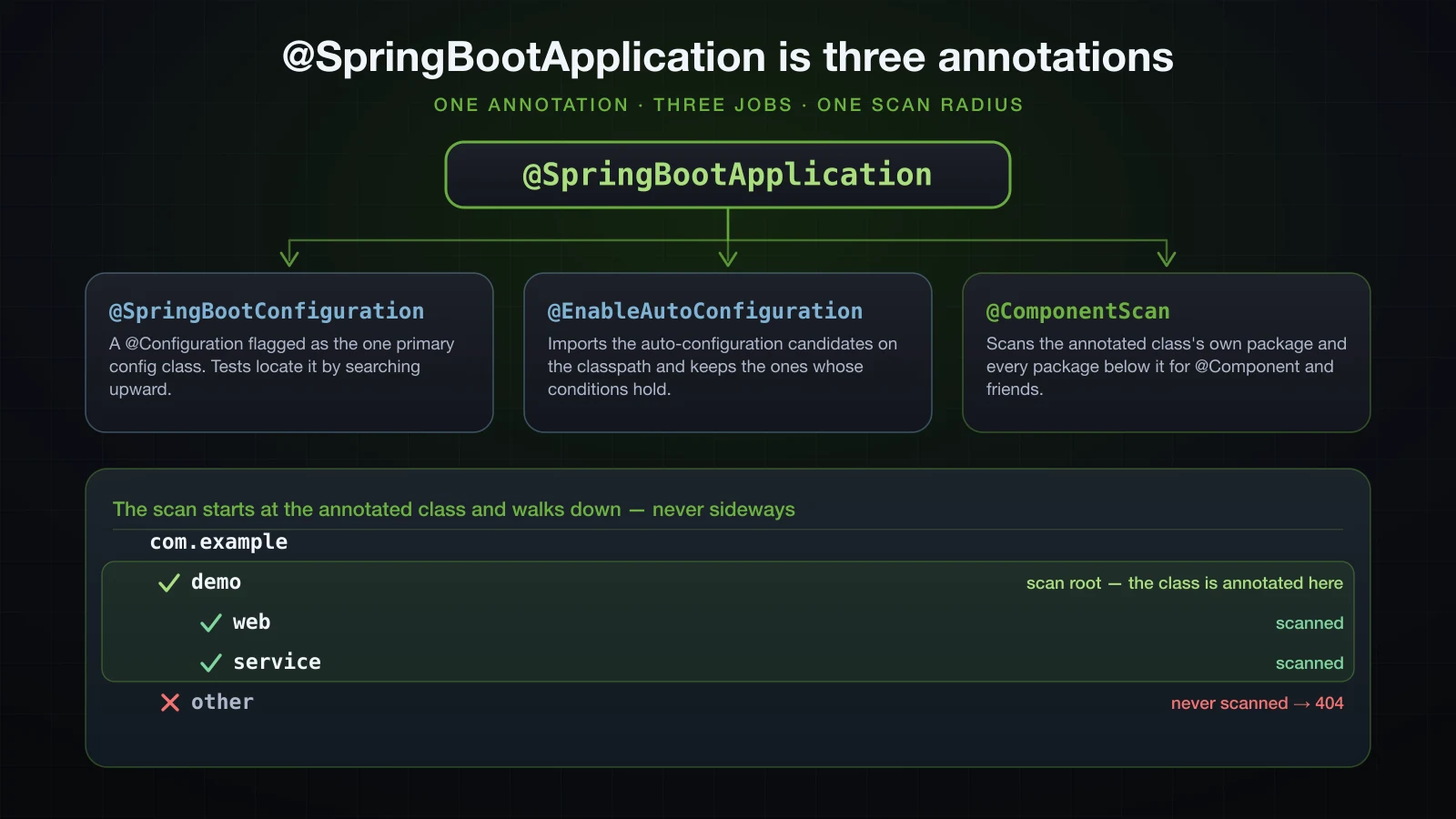
@SpringBootConfiguration is itself @Configuration plus @Indexed — the same javap trick confirms it. It marks the class as the primary configuration class of the application, and the significance is in testing: @SpringBootTest finds the configuration by walking up the package hierarchy from the test class until it hits a @SpringBootConfiguration. The Maven build log states it outright:
Found @SpringBootConfiguration com.example.demo.DemoApplication for test class com.example.demo.DemoApplicationTestsThat is also why a test in a package above the main class fails with "Unable to find a @SpringBootConfiguration": there is nothing to walk up to.
@EnableAutoConfiguration is the switch for auto-configuration: it imports the candidate configuration classes registered by every jar on the classpath and keeps the ones whose conditions hold. This article does not go further than that; the conditions report is its own subject.
@ComponentScan is the one that will bite you. It scans for classes annotated as components and registers what it finds — and the two exclude filters shown above are what stop it from eagerly picking up test configuration and auto-configuration classes. What it scans is the important part, and it gets its own section.
The base package rule, proved with a 404
@ComponentScan with no arguments scans the package of the annotated class and every package beneath it. Not the parent, not siblings. So put a controller in a sibling package and it is simply never registered.
Here is the setup. DemoApplication sits in com.example.demo as generated, and a controller goes next to it rather than under it:
src/main/java
└── com
    └── example
        ├── demo
        │   └── DemoApplication.java
        └── other
└── HelloController.javapackage com.example.other;
import org.springframework.web.bind.annotation.GetMapping;
import org.springframework.web.bind.annotation.RestController;
@RestController
public class HelloController {
@GetMapping("/hello")
public String hello() {
return "Hello from com.example.other";
}
}The application starts perfectly. There is no error, no warning, nothing in the log to suggest a problem:
o.s.boot.tomcat.TomcatWebServer : Tomcat started on port 8080 (http) with context path '/'
com.example.demo.DemoApplication : Started DemoApplication in 0.429 seconds
And then:
curl -i http://localhost:8080/helloHTTP/1.1 404
Content-Type: application/json
{"timestamp":"2026-09-11T03:10:19.532Z","status":404,"error":"Not Found","path":"/hello"}This is the single most common "Spring Boot ignores my controller" question, and the silence is what makes it hard: a class that is never scanned is not an error, it is just an ordinary class nobody asked for.
The fix is to move the controller under the main class's package — com.example.demo.web — and change nothing else:
src/main/java
└── com
    └── example
        └── demo
            ├── DemoApplication.java
            └── web
└── HelloController.javacurl -i http://localhost:8080/helloHTTP/1.1 200
Content-Type: text/plain;charset=UTF-8
Content-Length: 31
Hello from com.example.demo.webIf you genuinely cannot move the class — a shared library with its own package root, typically — scanBasePackages is the escape hatch, and it replaces the default rather than adding to it, so list your own package too:
@SpringBootApplication(scanBasePackages = { "com.example.demo", "com.example.other" })
public class DemoApplication { /* ... */ }HTTP/1.1 200
Content-Length: 28
Hello from com.example.otherUse it sparingly. Ninety per cent of the time the right answer is that the main class belongs at the root of your package tree and everything else belongs below it — which is precisely the layout Initializr hands you.
Why the main class must not sit in the default package
The same rule has a pathological case. If DemoApplication.java has no package declaration, it lives in the default package, its "package and everything below" is the entire classpath, and Spring starts scanning every class in every jar. Boot sees this coming and warns:
WARN ionWarningsApplicationContextInitializer :

** WARNING ** : Your ApplicationContext is unlikely to start due to a @ComponentScan of the default package.
The warning is accurate. Half a second later, on Boot 4.1.1, the scan picks up framework classes that are also registered as @Bean methods and the context refuses to start:
***************************
APPLICATION FAILED TO START
***************************

Description:

The bean 'errorPageRegistrarBeanPostProcessor', defined in class path resource
[org/springframework/boot/web/servlet/support/ErrorPageFilterConfiguration.class], could not
be registered. A bean with that name has already been defined and overriding is disabled.
Do not "fix" this with spring.main.allow-bean-definition-overriding=true, which papers over a scan of the entire classpath. Give the class a package.
What SpringApplication.run returns
SpringApplication.run is not void. javap on the class confirms the signature:
public static org.springframework.context.ConfigurableApplicationContext run(java.lang.Class<?>, java.lang.String...);The returned context is the running application, and keeping the reference is the quickest way to ask what actually got registered:
package com.example.demo;

import org.springframework.boot.SpringApplication;
import org.springframework.boot.autoconfigure.SpringBootApplication;
import org.springframework.context.ConfigurableApplicationContext;

@SpringBootApplication
public class DemoApplication {

    public static void main(String[] args) {
        ConfigurableApplicationContext context = SpringApplication.run(DemoApplication.class, args);
        System.out.println("beans      = " + context.getBeanDefinitionCount());
        System.out.println("controller = " + context.containsBean("helloController"));
        context.close();
    }
}beans = 146
controller = true146 bean definitions from one annotation and one dependency — that is auto-configuration, and containsBean is the fastest possible check on whether the class you are hunting for was scanned. Note context.close() at the end: without it the embedded server keeps running, which is exactly what you want in a real application and not what you want in a diagnostic like this.
Packaging: what ./gradlew build produces
./gradlew build
ls -la build/libs/-rw-r--r-- 1 hoangth wheel 1474 Sep 11 10:08 demo-0.0.1-SNAPSHOT-plain.jar
-rw-r--r-- 1 hoangth wheel 19902861 Sep 11 10:08 demo-0.0.1-SNAPSHOT.jarTwo jars, and the size difference tells you which is which. The plain jar is what the Java plugin's ordinary jar task produces: your classes and your resources, nothing else, 1,474 bytes. The executable jar is what bootJar produces: your classes plus every dependency, 19 MB.
The plain jar is not runnable, and the manifest is the reason — it is 25 bytes long and contains only a version:
unzip -p build/libs/demo-0.0.1-SNAPSHOT-plain.jar META-INF/MANIFEST.MF
java -jar build/libs/demo-0.0.1-SNAPSHOT-plain.jarManifest-Version: 1.0
no main manifest attribute, in build/libs/demo-0.0.1-SNAPSHOT-plain.jarNor does naming the class help, because none of Spring is on the classpath:
Exception in thread "main" java.lang.NoClassDefFoundError: org/springframework/boot/SpringApplication
	at com.example.demo.DemoApplication.main(DemoApplication.java:10)
Deploy the one without -plain. The plain jar exists for the case where this project is a library consumed by another project, and if that is not your case it is just a file people deploy by accident. Turn it off:
tasks.named('jar') {
	enabled = false
}build/libs/
└── demo-0.0.1-SNAPSHOT.jarMaven does the same thing with different names. ./mvnw package leaves target/demo-0.0.1-SNAPSHOT.jar (executable, repackaged by spring-boot-maven-plugin) and target/demo-0.0.1-SNAPSHOT.jar.original (the plain one, renamed out of the way). There is nothing to disable — the .original suffix already makes it undeployable by accident.
Inside the executable JAR
unzip -l build/libs/demo-0.0.1-SNAPSHOT.jar166 entries, in four groups:
  Length      Date    Time    Name
---------  ---------- -----   ----
      424  02-01-1980 00:00   META-INF/MANIFEST.MF
      855  02-01-1980 00:00   org/springframework/boot/loader/launch/JarLauncher.class
    15710  02-01-1980 00:00   org/springframework/boot/loader/jar/NestedJarFile.class
     1446  02-01-1980 00:00   BOOT-INF/classpath.idx
      212  02-01-1980 00:00   BOOT-INF/layers.idx
      733  02-01-1980 00:00   BOOT-INF/classes/com/example/demo/DemoApplication.class
       29  02-01-1980 00:00   BOOT-INF/classes/application.properties
   175435  02-01-1980 00:00   BOOT-INF/lib/spring-boot-webmvc-4.1.1.jar
  1107415  02-01-1980 00:00   BOOT-INF/lib/spring-webmvc-7.0.9.jar
   340068  02-01-1980 00:00   BOOT-INF/lib/snakeyaml-2.6.jar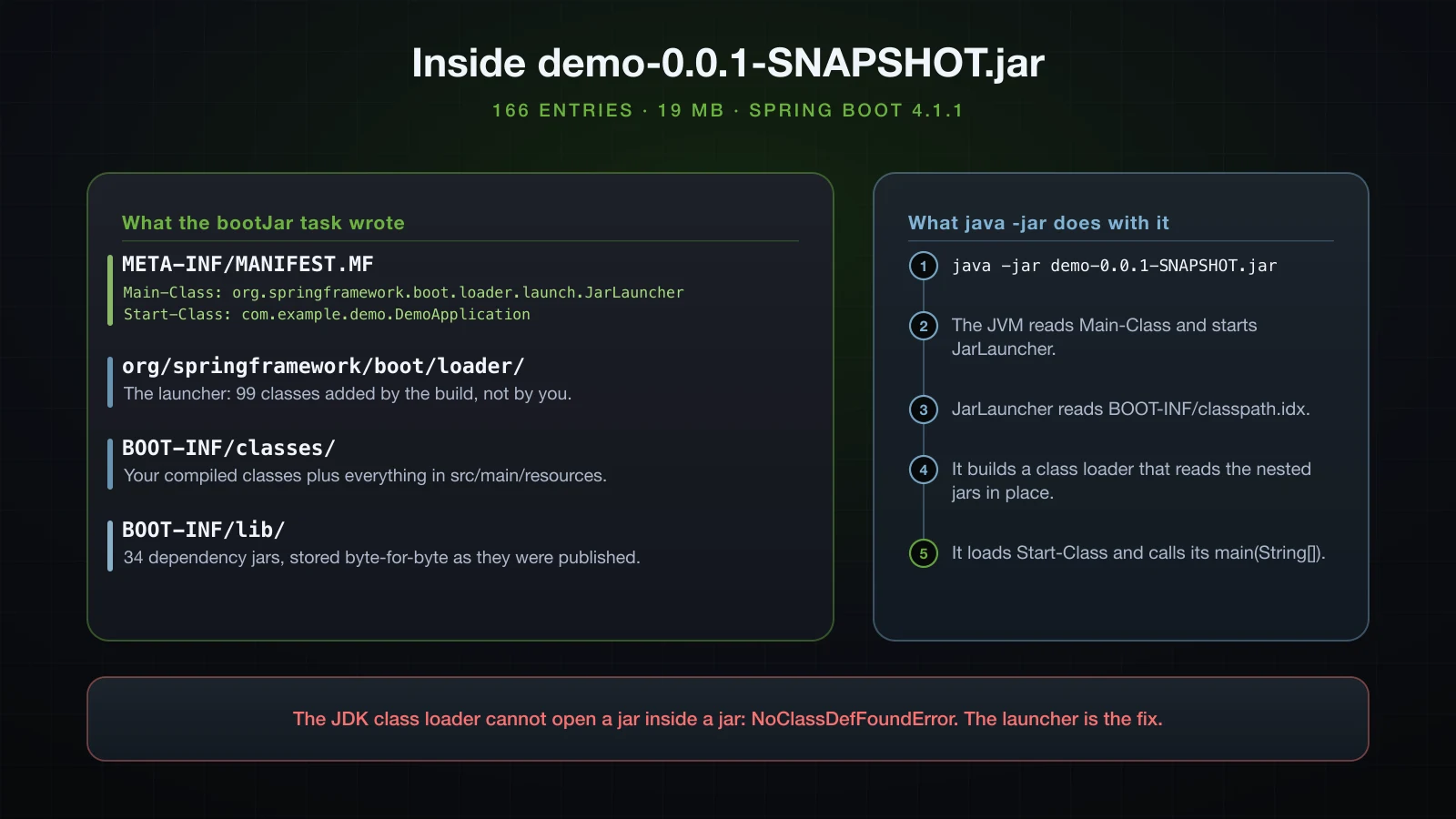
The manifest is where the launch starts:
Manifest-Version: 1.0
Main-Class: org.springframework.boot.loader.launch.JarLauncher
Start-Class: com.example.demo.DemoApplication
Spring-Boot-Version: 4.1.1
Spring-Boot-Classes: BOOT-INF/classes/
Spring-Boot-Lib: BOOT-INF/lib/
Spring-Boot-Classpath-Index: BOOT-INF/classpath.idx
Spring-Boot-Layers-Index: BOOT-INF/layers.idx
Build-Jdk-Spec: 21
Implementation-Title: demo
Implementation-Version: 0.0.1-SNAPSHOT
Main-Class is what the JVM runs, and it is not your class — it is Spring Boot's JarLauncher. Start-Class is your class, read by the launcher afterwards.
The four groups, then:
META-INF/MANIFEST.MF— the manifest above.org/springframework/boot/loader/— 99 class files, the launcher machinery, copied into the jar by the build. Nothing of yours is here.BOOT-INF/classes/— your compiled classes and everything fromsrc/main/resources, including thatapplication.properties.BOOT-INF/lib/— 34 dependency jars, whole and unmodified.
Two index files support the launcher. BOOT-INF/classpath.idx lists 33 of the 34 jars in classpath order — spring-boot-jarmode-tools is deliberately absent because it is a tool, not a dependency. BOOT-INF/layers.idx groups entries for Docker layering:
- "dependencies":
  - "BOOT-INF/lib/"
- "spring-boot-loader":
  - "org/"
- "snapshot-dependencies":
- "application":
  - "BOOT-INF/classes/"
One detail worth noticing in unzip -v: the nested jars are stored, not compressed, while your own classes are deflated:
  175435  Stored   175435   0%   BOOT-INF/lib/spring-boot-webmvc-4.1.1.jar
     733  Defl:N      420  43%   BOOT-INF/classes/com/example/demo/DemoApplication.class
That is deliberate. Because each nested jar sits in the archive as an uncompressed byte range, the launcher can read entries out of it directly, without extracting it to a temporary directory first.
Why a plain java -jar cannot load a jar inside a jar
This is the constraint the whole design exists to solve, and it is worth seeing fail. Build two tiny jars — inner.jar with a class in it, outer.jar containing inner.jar at lib/inner.jar plus a class that calls into it:
jar --create --file lib/inner.jar -C out-inner .
jar --create --file outer.jar --main-class outer.Outer -C out-outer . -C . lib/inner.jar
unzip -l outer.jar 81 META-INF/MANIFEST.MF
463 outer/Outer.class
754 lib/inner.jarjava -jar outer.jarException in thread "main" java.lang.NoClassDefFoundError: inner/Inner
at outer.Outer.main(Outer.java:7)
Caused by: java.lang.ClassNotFoundException: inner.Inner
at java.base/jdk.internal.loader.BuiltinClassLoader.loadClass(BuiltinClassLoader.java:641)
at java.base/jdk.internal.loader.ClassLoaders$AppClassLoader.loadClass(ClassLoaders.java:188)The JDK's application class loader reads entries from the jar you pass to -jar. It does not descend into an entry that happens to itself be a zip. The manifest's Class-Path attribute does not help either: its entries are resolved against the filesystem location of the jar, not against the jar's contents.
Historically there were two workarounds, and Spring Boot rejected both. You can unpack every dependency and merge all the class files into one flat archive — the "shaded jar" approach — which loses the identity of each library and breaks any two jars that ship the same resource path, META-INF/services entries being the classic casualty. Or you can extract to a temp directory at startup, which is slow and needs somewhere writable.
Spring Boot's answer is the third option: keep the jars intact and supply a class loader that understands the layout. JarLauncher runs first, reads classpath.idx, opens each nested jar in place through NestedJarFile — which is why they are stored uncompressed — and builds a class loader over the result. Only then does it load Start-Class and call its main. The consequence for you: the class actually running main is loaded by Spring Boot's class loader, not the system one, which is why code that assumes ClassLoader.getSystemClassLoader() or a file: protocol for its own resources behaves oddly inside a fat jar. Use getClass().getResourceAsStream(...) and it works in both.
And confirming that your class is genuinely not reachable the ordinary way:
java -cp build/libs/demo-0.0.1-SNAPSHOT.jar com.example.demo.DemoApplicationError: Could not find or load main class com.example.demo.DemoApplication
Caused by: java.lang.ClassNotFoundException: com.example.demo.DemoApplicationIt is at BOOT-INF/classes/com/example/demo/DemoApplication.class, and only JarLauncher knows to look there.
Running the jar and passing arguments
java -jar build/libs/demo-0.0.1-SNAPSHOT.jarEverything after the jar name is passed to main(String[] args) and straight into SpringApplication, which reads --key=value arguments as the highest-priority property source. Two you will use constantly:
java -jar build/libs/demo-0.0.1-SNAPSHOT.jar --server.port=8081 --spring.profiles.active=prodcom.example.demo.DemoApplication : Starting DemoApplication v0.0.1-SNAPSHOT using Java 21.0.6
com.example.demo.DemoApplication : The following 1 profile is active: "prod"
o.s.boot.tomcat.TomcatWebServer : Tomcat initialized with port 8081 (http)
o.s.boot.tomcat.TomcatWebServer : Tomcat started on port 8081 (http) with context path '/'
com.example.demo.DemoApplication : Started DemoApplication in 0.521 secondsNote the distinction that trips people: --server.port=8081 after the jar is an application argument; -Dserver.port=8081 before -jar is a JVM system property. Both work here, but they are different mechanisms with different precedence, and only the JVM form works for things like -Xmx512m. Configuration and precedence get a chapter of their own later in this series.
FAQ
Should I commit gradle-wrapper.jar to Git?
Yes. Without it ./gradlew cannot bootstrap, and CI would need Gradle pre-installed — which defeats the point. The generated .gitignore contains the negation !gradle/wrapper/gradle-wrapper.jar precisely so a broad *.jar rule cannot exclude it. Upgrade it with ./gradlew wrapper --gradle-version X rather than by hand.
Can I switch from Maven to Gradle later?
Yes, and it is a small job for a single-module Spring Boot service, because src/ does not change at all. You translate the dependency list using the scope table above, restate the Java version as a toolchain, and add the two plugins. The awkward parts are custom plugin executions bound to Maven phases, which have no direct Gradle equivalent and have to be rewritten as tasks.
Why is my @RestController returning 404?
In order of likelihood: the class is in a package that is not under the package of your @SpringBootApplication class, so it is never scanned; the class is missing @RestController or @Controller entirely; the path does not match, including a missing or extra leading slash; or the application never restarted after the change. The base-package case is by far the most common and produces no warning at all.
What is demo-0.0.1-SNAPSHOT-plain.jar and can I delete it?
It is the ordinary jar with only your classes in it, useful when the project is consumed as a library. For a deployable application it is dead weight and a deployment hazard. Disable it with tasks.named('jar') { enabled = false }. Maven's equivalent artefact is target/*.jar.original.
Do I need Tomcat installed to run the jar?
No. spring-boot-starter-webmvc brings embedded Tomcat in — tomcat-embed-core-11.0.24.jar is one of the 34 jars in BOOT-INF/lib/. A JRE 21 or newer is the only requirement on the target machine. This is why the deployment artefact is a jar and not a WAR.
How do I change the name of the generated jar?
In Gradle, rootProject.name in settings.gradle gives the base name and version gives the suffix; set archiveFileName on the bootJar task to control it completely. In Maven, it is artifactId plus version, or <finalName> in the build element. Keeping the version in the file name is worth doing — it is often the only way to tell what is running on a server.
Conclusion
A generated Spring Boot project is twelve files and none of them are decorative. src/main/java is the scan root, src/main/resources ships inside the jar so nothing secret goes there, the wrapper is what makes a build reproducible on a machine with no build tool installed, and the BOM is why your dependency list has no version numbers. @SpringBootApplication is three annotations in a trench coat, and one of them — @ComponentScan — silently decides which of your classes exist, which is why a controller one package to the side returns 404 with no error anywhere in the log. ./gradlew build writes two jars; deploy the one without -plain, because it carries a manifest pointing at JarLauncher and 34 uncompressed nested jars that the JDK's own class loader could never have read.
The next article opens Chapter 1 with the idea the whole framework is built on: IoC and Dependency Injection — why the container exists at all, and what it gives you that calling new yourself does not.
![[Spring Boot Basics] Spring Boot Profiles and Configuration Precedence: Environment Variables and Command-Line Arguments](/images/blog/sb-profiles-thumbnail.en.webp)
![[Spring Boot Basics] How Spring Boot Auto-Configuration Works: Conditions, Back-Off and the --debug Report](/images/blog/sb-autoconfiguration-thumbnail.en.webp)
![[Spring Boot Basics] application.properties vs application.yml in Spring Boot: Syntax and @Value](/images/blog/sb-properties-yaml-thumbnail.en.webp)
![[Spring Boot Basics] Setting Up Spring Boot: JDK, IDE, Spring Initializr and Your First Application](/images/blog/sb-setup-thumbnail.en.webp)