Every project Spring Initializr generates ships with src/main/resources/application.properties holding exactly one line, spring.application.name=demo. This series has already written into that file three times — a port, lazy initialization, an auto-configuration exclusion — without saying anything about the file itself. This article is about the file: what the two formats Spring Boot reads actually accept, where each one quietly does something you did not ask for, and how a value travels from a line of text into a constructor parameter.
The syntax looks too simple to need an article, and that is exactly the problem. A .properties file is decoded as ISO-8859-1, so Xin chào arrives as Xin chà o. YAML turns 0123 into 83 and on into true without a warning. One @Value without a default keeps the application from starting.
The examples use Spring Boot 4.1.1 and Java 21, on an Initializr project with only the web dependency.
Where Spring Boot reads application.properties and application.yml from
Everything in src/main/resources is copied to the root of the classpath: build/resources/main while you develop, BOOT-INF/classes/ inside the jar. At startup Boot looks there for application.properties, application.yml and application.yaml, parses every one it finds into a property source, and adds those property sources to the Environment. @Value, Environment.getProperty() and everything else that reads configuration read from there.
A property source is a flat map with String keys, and that is the most useful fact in this article: whatever the file looked like, the application sees a list of dotted keys. The quickest way to see it is to print the map. This runner walks the Environment and dumps every property source that was loaded from a configuration file:
@Component
public class ConfigFileDump implements ApplicationRunner {

    private final ConfigurableEnvironment environment;

    public ConfigFileDump(ConfigurableEnvironment environment) {
        this.environment = environment;
    }

    @Override
    public void run(ApplicationArguments args) {
        for (PropertySource<?> source : environment.getPropertySources()) {
            if (source instanceof OriginTrackedMapPropertySource file) {
                System.out.println(file.getName());
                for (String key : file.getPropertyNames()) {
                    Object value = file.getProperty(key);
                    System.out.println("  " + key + " = " + value + " (" + value.getClass().getSimpleName() + ")");
                }
            }
        }
    }
}
Boot uses the same class, OriginTrackedMapPropertySource, for both formats. Every dump in the rest of this article comes from this runner, or from reading single keys with Environment.getProperty().
application.properties syntax
For .properties files Boot does not use java.util.Properties: PropertiesPropertySourceLoader hands the file to Boot's own OriginTrackedPropertiesLoader. The rules below were therefore checked against Boot itself — each line was written into application.properties and read back — rather than copied from the Properties Javadoc.
Separators: =, : and whitespace
app.eq=equals sign
app.colon: colon separator
app.space whitespace separator
app.spaced   =   around the separator
    app.indented=leading spaces before the key
With three spaces added after around the separator, this is what Boot stored:
| Line | Key | Value |
|---|---|---|
app.eq=equals sign | app.eq | equals sign |
app.colon: colon separator | app.colon | colon separator |
app.space whitespace separator | app.space | whitespace separator |
app.spaced = around the separator | app.spaced | around the separator plus the three trailing spaces — 23 characters |
app.indented=leading spaces before the key | app.indented | leading spaces before the key |
The key ends at the first unescaped =, : or whitespace character. Whitespace before the key and on both sides of the separator is dropped; whitespace at the end of the value is kept. A stray space after a password or a URL becomes part of it, and nothing warns you.
Comments, line continuation and duplicate keys
# a comment starting with a hash
! a comment starting with an exclamation mark
app.hash=value # not a comment
app.continued=first,\
              second,\
              third
app.empty=
app.dup=first
app.dup=second- A line whose first non-blank character is
#or!is a comment and produces no key. app.hashisvalue # not a comment. A#in the middle of a line is part of the value — YAML does the opposite, as you will see below.app.continuedisfirst,second,third. A backslash at the end of a line joins the next line, and the leading whitespace of that line is dropped, so continuation lines can be indented freely.app.emptyexists and holds an empty string. It is not a missing key, which matters once defaults come into play.app.dupissecond. The last definition wins, silently.
Escapes, backslashes and Windows paths
app.tab=a\tb
app.newline=line1\nline2
app.unicode=Xin ch\u00e0o
app.backslash=C:\\temp\\new
app.single-backslash=C:\temp\new
app.key\ with\ spaces=ok
app.equals\=in\:key=ok
app.value-with-equals=a=b
app.value-with-colon=http://localhost:8080| Line | What Boot stored |
|---|---|
app.tab=a\tb | a, a TAB character, b |
app.newline=line1\nline2 | line1, a newline, line2 |
app.unicode=Xin ch\u00e0o | Xin chào |
app.backslash=C:\\temp\\new | C:\temp\new |
app.single-backslash=C:\temp\new | C:, TAB, emp, newline, ew — 9 characters |
app.key\ with\ spaces=ok | the key app.key with spaces |
app.equals\=in\:key=ok | the key app.equals=in:key |
app.value-with-equals=a=b | the value a=b |
app.value-with-colon=http://localhost:8080 | the value http://localhost:8080 |
The Windows path is the one that hurts in practice: \t and \n are escapes, so C:\temp\new is loaded as a tab and a newline without any error. Double every backslash. Only a separator character inside the key needs escaping; = and : inside a value are taken literally.
Lists: comma-separated values and indexed keys
app.names=alice,bob,carol
app.servers[0]=alpha
app.servers[1]=beta
These are two different things. app.names is one key holding one string; it becomes a list only when something converts it, and @Value into a List<String> does, as shown further down. app.servers[0] and app.servers[1] are two separate keys, and there is no key named app.servers: getProperty("app.servers") returns null. Indexed keys matter because they are exactly what YAML lists turn into.
Vietnamese text and the ISO-8859-1 default
Put a Vietnamese value into the generated file. Any modern editor saves it as UTF-8, and file agrees:
app.greeting=Xin chàoapplication.properties: Unicode text, UTF-8 textRead it back and print the string, its length and its code points:
String greeting = environment.getProperty("app.greeting");
System.out.println(greeting + " | length " + greeting.length());
greeting.chars().forEach(c -> System.out.printf("U+%04X ", c));Xin chà o | length 9
U+0058 U+0069 U+006E U+0020 U+0063 U+0068 U+00C3 U+00A0 U+006Fà is two bytes in UTF-8, C3 A0. Boot's properties loader decodes the file as ISO-8859-1 unless it is given another charset — the reader inside OriginTrackedPropertiesLoader falls back to StandardCharsets.ISO_8859_1 when no charset is passed — so the two bytes become two characters: Ã and a non-breaking space. @Value("${app.greeting}") injects the same nine characters.
Nothing else in the chain causes it, and nothing hides it. Gradle's processResources copies the file byte for byte — cmp reports the source file, build/resources/main/application.properties and the entry inside the jar as identical — java -jar prints the same mangled string, and the console is not at fault either: stdout.encoding is UTF-8 in this run. The file looks correct in the editor because its bytes are correct; only the decoding is wrong.
The same three lines of code, run against each fix:
| What is in the file | Printed |
|---|---|
app.greeting=Xin chào in application.properties | Xin chà o | length 9 |
app.greeting=Xin ch\u00e0o in application.properties | Xin chào | length 8 |
greeting: Xin chào under app: in application.yml | Xin chào | length 8 |
spring.config.import=classpath:greeting.properties[encoding=utf-8], with the value in greeting.properties | Xin chào | length 8 |
the same import without [encoding=utf-8] | Xin chà o | length 9 |
Unicode escapes work, but nobody can read or review them. YAML is read as UTF-8, which makes it the simplest choice for configuration that carries Vietnamese text. The [encoding=utf-8] hint applies to a file you import; config imports themselves are covered later in the series.
application.yml syntax
YAML writes the same key-value pairs as a tree. Indentation — spaces only — decides what belongs to what. A key followed by a colon and a space holds a value; a key followed by a colon and nothing else is the parent of the indented lines below it.
Nesting, lists and maps
# the same configuration, written as YAML
app:
  name: Demo Shop
  owner:
    name: Hoang
    email: hoang@example.com
  servers:
    - alpha
    - beta
  regions: [eu-west, ap-southeast]
  limits: {requests: 100, burst: 20}
Four shapes are in that file. app and owner are maps written as indented blocks; servers is a block list, one - item per line; regions is a flow list in square brackets; limits is a flow map in braces. Block and flow forms produce exactly the same kind of keys, as the dump below shows. The line starting with # is a comment.
Multi-line strings, quoting and comments
app:
  banner: |
    Welcome to Demo Shop
    Have a nice day
  description: >
    A folded string
    joins lines with spaces
  literal-strip: |-
    no trailing
    newline
  single: 'it''s ${app.name}'
  double: "tab\there, accent \u00e0"
  plain-hash: value # a comment
What Boot stored, written as Java string literals so the newlines are visible:
| Key | Stored value | Rule |
|---|---|---|
app.banner | "Welcome to Demo Shop\nHave a nice day\n" | | keeps every line break, including the last one |
app.description | "A folded string joins lines with spaces\n" | > folds line breaks into spaces and keeps the last one |
app.literal-strip | "no trailing\nnewline" | |- keeps the breaks and strips the final newline |
app.single | "it's ${app.name}" | single quotes: no escapes, '' is one quote |
app.double | "tab\there, accent à" | double quotes process \t, \u00e0 and the other escapes |
app.plain-hash | "value" | a # after a space starts a comment |
The trailing newline of | is a real character; if the value is a token or anything that gets compared, use |-. And quoting does not stop Spring's placeholder resolution: getProperty("app.single") returns it's Demo Shop. Quotes are a YAML concern, while ${...} is resolved later by Spring, on the already-parsed string.
YAML is flattened into exactly the same keys
The dumper, run against the YAML file from the nesting example — the first seven entries:
Config resource 'class path resource [application.yml]' via location 'optional:classpath:/'
  app.name = Demo Shop (String)
  app.owner.name = Hoang (String)
  app.owner.email = hoang@example.com (String)
  app.servers[0] = alpha (String)
  app.servers[1] = beta (String)
  app.regions[0] = eu-west (String)
  app.regions[1] = ap-southeast (String)
Now delete application.yml and write the same data as .properties:
app.name=Demo Shop
app.owner.name=Hoang
app.owner.email=hoang@example.com
app.servers[0]=alpha
app.servers[1]=beta
app.regions[0]=eu-west
app.regions[1]=ap-southeast
app.limits.requests=100
app.limits.burst=20Config resource 'class path resource [application.properties]' via location 'optional:classpath:/'
app.name = Demo Shop (String)
app.owner.name = Hoang (String)
app.owner.email = hoang@example.com (String)
app.servers[0] = alpha (String)
app.servers[1] = beta (String)
app.regions[0] = eu-west (String)
app.regions[1] = ap-southeast (String)The same keys, in the same order. getProperty("app.owner.email") returns hoang@example.com from either file, getProperty("app.limits.burst") returns 20 from either, and getProperty("app.servers") returns null from both — a list is never a key of its own; only its elements are. Past the seven lines shown, the full dumps differ in one detail: YAML's 100 is stored as an Integer, the .properties 100 as a String, and the difference is gone as soon as the value is read as a string.
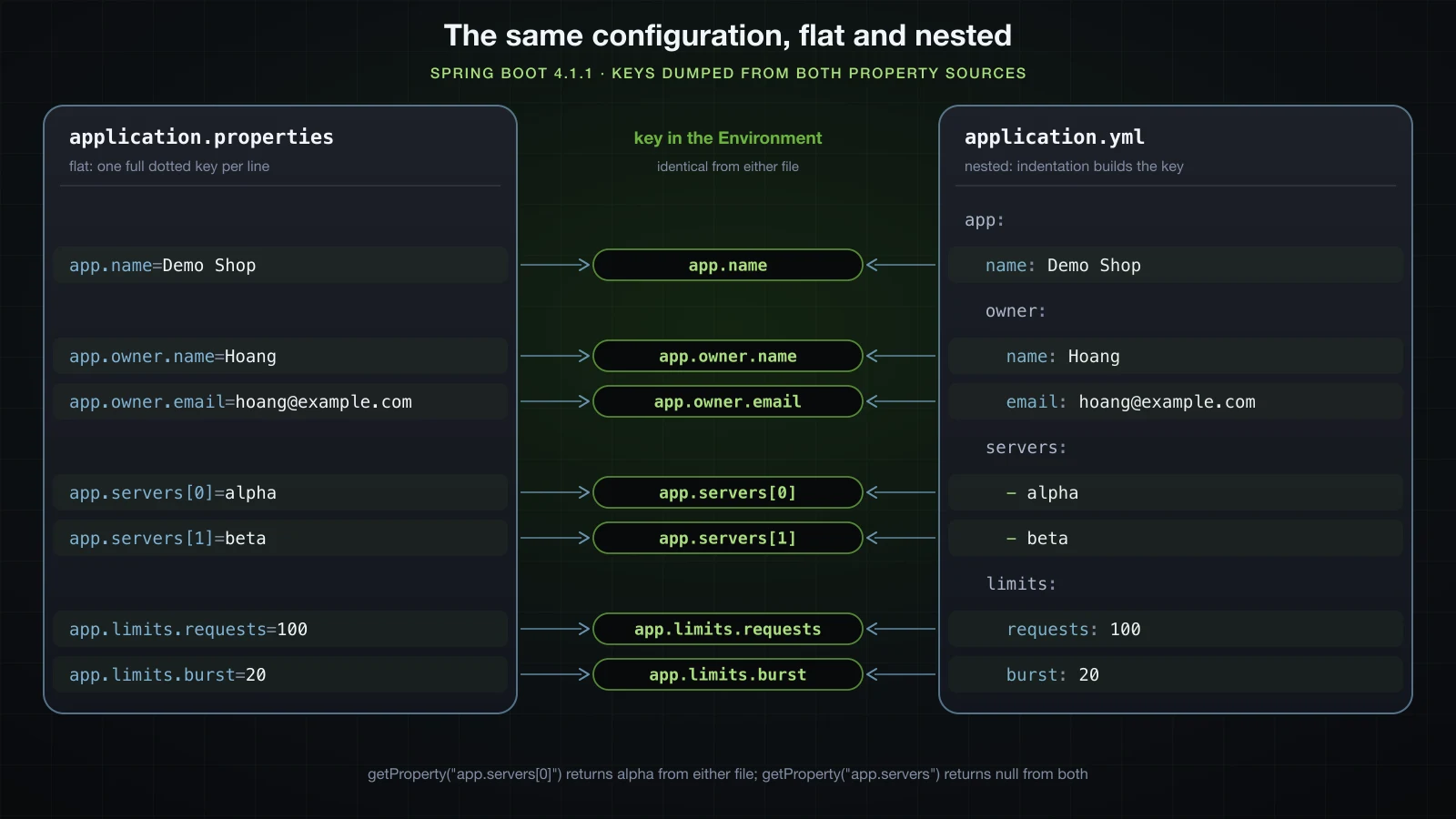
YAML traps that stop startup or silently change values
YAML's mistakes come in two kinds. The loud kind stops the application at startup with a SnakeYAML message. The quiet kind parses fine and hands you a different value from the one you wrote.
Tabs, unquoted colons and duplicate keys stop the application
Indent one line with a tab:
14:44:47.209 [main] ERROR org.springframework.boot.SpringApplication -- Application run failed
while scanning for the next token
found character '\t(TAB)' that cannot start any token. (Do not use \t(TAB) for indentation)
 in 'reader', line 2, column 1:
    	name: Demo Shop
    ^
Write a colon followed by a space inside an unquoted value:
app:
message: Note: read this first14:44:48.005 [main] ERROR org.springframework.boot.SpringApplication -- Application run failed
mapping values are not allowed here
in 'reader', line 2, column 16:
message: Note: read this first
^A colon with no space after it is harmless, which is why url: http://localhost:8080 works without quotes. Quote the value — message: "Note: read this first" loads as Note: read this first — whenever it contains : or #.
Define the same key twice in one map:
app:
  name: Demo Shop
name: Another Shopwhile constructing a mapping
in 'reader', line 2, column 3:
name: Demo Shop
^
found duplicate key name
in 'reader', line 3, column 3:
name: Another Shop
^Boot configures SnakeYAML to reject duplicate keys. Plain SnakeYAML 2.6 with default options only logs WARNING: duplicate keys found and carries on, and a .properties file keeps the last value without a word. The same error appears when two keys are different in the file but equal after type resolution: on: and yes: in one map both become the boolean key true and fail with found duplicate key true.
Values that silently change type
This file parses without an error:
app:
  feature-enabled: on
  legacy-mode: off
  confirm-orders: yes
  country: NO
  pin: 0123
  release: 1.10
  backup-time: 12:30
  launch-date: 2026-10-10
  theme-color: #fff
  owner: ~
  pin-quoted: "0123"
release-quoted: "1.10"Config resource 'class path resource [application.yml]' via location 'optional:classpath:/'
app.feature-enabled = true (Boolean)
app.legacy-mode = false (Boolean)
app.confirm-orders = true (Boolean)
app.country = false (Boolean)
app.pin = 83 (Integer)
app.release = 1.1 (Double)
app.backup-time = 750 (Integer)
app.launch-date = 2026-10-10 (String)
app.theme-color = (String)
app.owner = (String)
app.pin-quoted = 0123 (String)
app.release-quoted = 1.10 (String)Four booleans nobody asked for, a PIN that lost its leading zero and became 83, a release that is now 1.1, a backup time that is now the integer 750 and a colour that is now an empty string. Only the quoted values survived as written.
Here is every value tested, with the type SnakeYAML 2.6 produced and what Environment.getProperty returns in Boot 4.1.1. The last column is the same value parsed by a YAML 1.2 parser — the JavaScript yaml 2.8.3 package in its default YAML 1.2 core schema — because much of the advice about these traps is written against one version of the spec and applied to the other:
| Unquoted value | SnakeYAML 2.6 type | Boot getProperty | YAML 1.2 core schema |
|---|---|---|---|
on | Boolean | true | string on |
off | Boolean | false | string off |
yes | Boolean | true | string yes |
no, NO | Boolean | false | string no, NO |
True | Boolean | true | boolean true |
y | String | y | string y |
0123 | Integer, read as octal | 83 | number 123 |
0189 | String, not valid octal | 0189 | number 189 |
0o14 | String | 0o14 | number 12 |
0x1F | Integer | 31 | number 31 |
1_000 | Integer | 1000 | string 1_000 |
1.10 | Double | 1.1 | number 1.1 |
1.2.3 | String | 1.2.3 | string 1.2.3 |
1e3 | Double | 1000.0 | number 1000 |
12:30 | Integer, base 60 | 750 | string 12:30 |
1:30:00 | Integer, base 60 | 5400 | string 1:30:00 |
2026-10-10 | Date in plain SnakeYAML, String in Boot | 2026-10-10 | string 2026-10-10 |
null, ~ or nothing | null | empty string | null |
#fff | a comment, so null | empty string | null |
"0123", "on" | String | 0123, on | string |
Three conclusions from that table:
- SnakeYAML 2.6 is a YAML 1.1 parser, and so every Spring Boot application that reads
application.ymlfollows YAML 1.1 rules. The YAML 1.2 changes —on,yesandnoas plain strings, no base-60 numbers — do not apply. Boot adds two changes of its own: dates stay strings, because its loader removes SnakeYAML's timestamp resolver (OriginTrackedYamlLoader.NoTimestampResolver), andnullbecomes an empty string. - Some of the folklore is wrong in the other direction.
ybelongs to the YAML 1.1 boolean type, andyaml2.8.3 in 1.1 mode does turn it intotrue, but SnakeYAML 2.6 leavesya string. And YAML 1.2 would not save you from everything:0123still loses its zero there, and1.10is still1.1. - The damage lands on strings, not on booleans. Read
oninto abooleanand either format givestrue—app.flag=onin.propertiesconverts totrueas well. Read the same key into aStringand YAML gives"true"while.propertiesgives"on". A country code, a PIN, a version and a time of day are all strings, and those are the values that get mangled.
Keys are resolved too. In the test file, on: and 0123: under a map named trap.keys were stored as the keys trap.keys[true] and trap.keys[83].
⚠️ Quote every YAML value that is meant as text and could pass for a boolean, a number, a time or a null:
"NO","0123","1.10","12:30","#fff". Quoting a value that really is a number costs nothing, because@Valueconverts the string"8091"into anintjust the same.
What happens when both application.properties and application.yml exist?
Both files are loaded, and for a key defined in both, application.properties wins. With the two files side by side in src/main/resources:
| Key | In .properties | In .yml | getProperty returns |
|---|---|---|---|
app.source | from application.properties | from application.yml | from application.properties |
app.only-in-properties | p | — | p |
app.only-in-yaml | — | y | y |
The files are merged key by key rather than chosen as a whole: a key that exists in only one of them is still read from it. Where else configuration can come from, and the full order between all of those places, is a later article's subject; for two files in the same directory, this is the only rule you need.
Placeholders inside configuration files
A value can refer to other keys with ${...}. The property source stores the text exactly as written, and the reference is resolved each time the value is read.
app.host=localhost
app.port=8091
app.url=http://${app.host}:${app.port}
app.timeout=${app.connect-timeout:30s}
app.instance-id=${random.uuid}
app.shard=${random.int(1,10)}| Key | Stored in the property source | getProperty returns |
|---|---|---|
app.url | http://${app.host}:${app.port} | http://localhost:8091 |
app.timeout | ${app.connect-timeout:30s} | 30s — there is no app.connect-timeout, so the text after the first : is used |
app.instance-id | ${random.uuid} | ca97c7cf-f034-4bde-8066-ac2bba99a24a, then d39d8360-189f-4186-a351-02cd34018e29 on the next call |
app.shard | ${random.int(1,10)} | 6, 7 and 3 on three calls |
Three details are easy to get wrong:
${random.*}is evaluated again on every read. TwogetProperty("app.instance-id")calls return two different UUIDs, and two fields annotated@Value("${app.instance-id}")receive two different UUIDs as well. If an instance id must stay the same for the life of the process, read it once and keep it in a bean.random.int(1,10)excludes the upper bound. 100,000 reads produced exactly the values 1 through 9.- A missing key inside a value fails when the value is read, not at startup. With
app.broken-url=http://${app.nope}/xthe application starts normally, and the firstgetProperty("app.broken-url")throws:
org.springframework.util.PlaceholderResolutionException: Could not resolve placeholder 'app.nope' in value "http://${app.nope}/x"Placeholders behave the same in YAML, where url: http://${app.host}:${app.port} needs no quotes. To keep a literal ${ in a value, put a backslash in front of the dollar sign — Spring's placeholder syntax uses \ as its escape character. The .properties parser consumes one backslash of its own before Spring sees the value, so there it takes two:
| File | Written | getProperty returns |
|---|---|---|
.properties | app.dollar=\${literal} | throws Could not resolve placeholder 'literal' in value "${literal}" |
.properties | app.escaped-placeholder=\\${literal} | ${literal} |
.yml, plain or single-quoted | plain: \${not.a.placeholder} | ${not.a.placeholder} |
.yml, double-quoted | double: "\\${not.a.placeholder}" | ${not.a.placeholder} |
How to read a property with @Value
@Value injects a resolved configuration value into a bean while the bean is being created. It goes on a field, a setter or a constructor parameter:
@Component
public class FieldStyle {

    @Value("${app.name}")
    private String name;
}@Component
public class SetterStyle {
private String name;
@Value("${app.name}")
public void setName(String name) {
this.name = name;
}
}Both print Demo Shop. Prefer the constructor, for the same reason as with any other dependency: the field can be final, and a test can pass the value straight in. Here is a constructor that takes one value of each common type, against this configuration:
app.name=Demo Shop
app.host=localhost
app.port=8091
app.url=http://${app.host}:${app.port}
app.secure=true
app.names=alice,bob,carol@Component
public class AppSettings {
private final String url;
private final int port;
private final boolean secure;
private final Duration timeout;
private final List<String> names;
private final String[] nameArray;
private final int[] retryDelays;
public AppSettings(@Value("${app.url}") String url,
@Value("${app.port}") int port,
@Value("${app.secure:false}") boolean secure,
@Value("${app.timeout:30s}") Duration timeout,
@Value("${app.names}") List<String> names,
@Value("${app.names}") String[] nameArray,
@Value("${app.retry-delays:100,200,400}") int[] retryDelays) {
this.url = url;
this.port = port;
this.secure = secure;
this.timeout = timeout;
this.names = names;
this.nameArray = nameArray;
this.retryDelays = retryDelays;
}
}Printed from the bean once the application has started:
url         = http://localhost:8091
port        = 8091 (int)
secure      = true (boolean)
timeout     = PT30S (Duration)
names       = [alice, bob, carol] (ArrayList, size 3)
nameArray   = [alice, bob, carol] (length 3)
retryDelays = [100, 200, 400] (int[])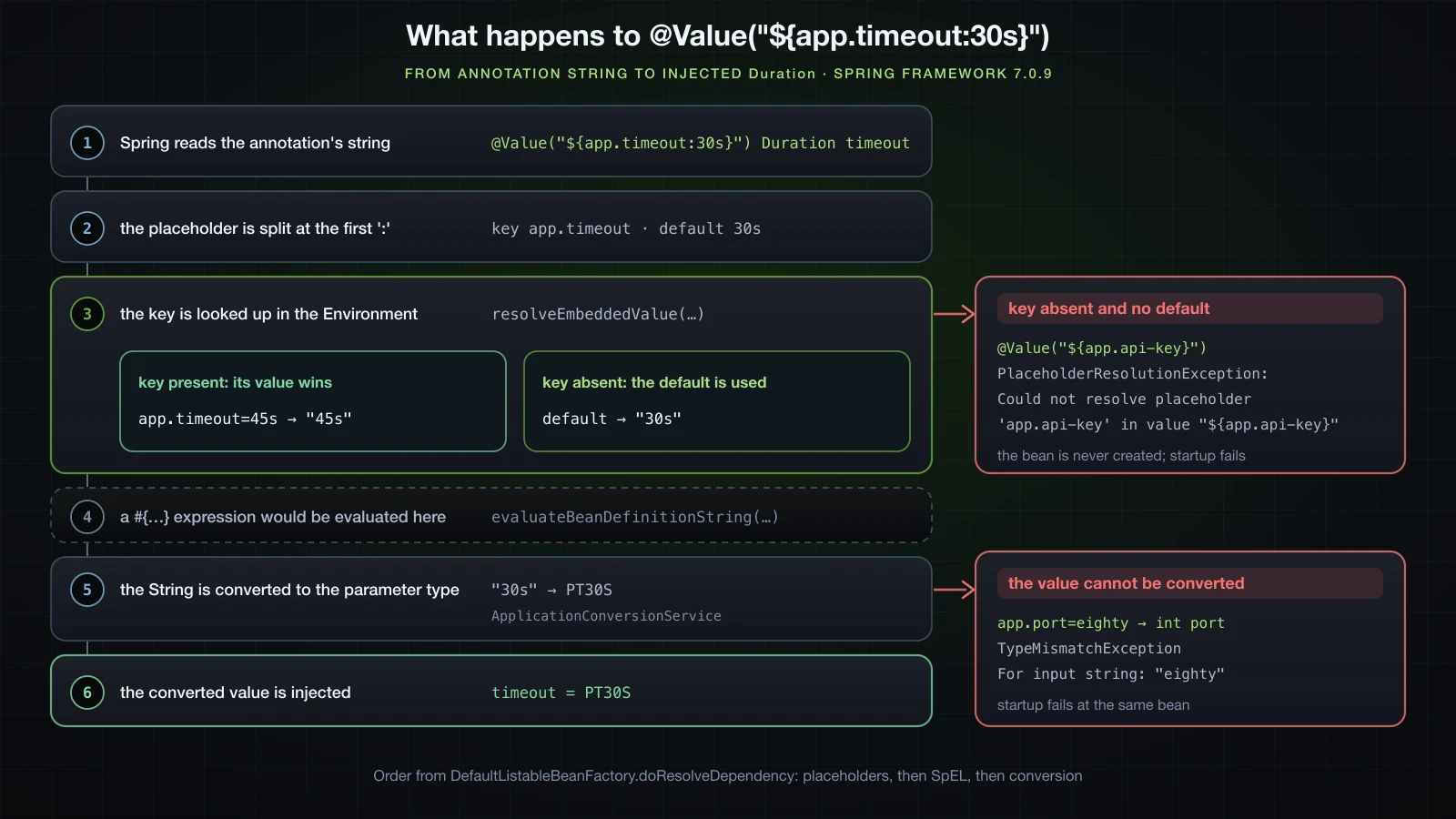
Every @Value goes through the same steps, in the order DefaultListableBeanFactory.doResolveDependency runs them in Spring Framework 7.0.9. The annotation's string is read; placeholders are resolved against the Environment, falling back to the default after the first : when a key is absent; any #{...} expression is evaluated; and the resulting string is converted to the parameter's type. The next sections take those steps one at a time.
Default values with ${key:default}
The default is everything after the first colon inside the braces, and it is used only when the key is absent. @Value("${app.timeout:30s}") Duration timeout injects PT30S with no app.timeout in the file, and PT45S after adding app.timeout=45s.
Because only the first colon separates the key from the default, a default can contain colons of its own, and it can be another placeholder:
@Value(...) | Injected |
|---|---|
"${app.fallback-url:http://localhost:8080/api}" | http://localhost:8080/api |
"${app.primary:${app.secondary:nested-default}}" | nested-default |
"app.name" | app.name — without ${} it is a literal string, not a lookup |
The last row compiles, starts and injects the key's own name. It is the easiest @Value mistake to make and the hardest to notice.
What happens when a key is missing and there is no default?
@Component
public class ApiClient {

    private final String apiKey;

    public ApiClient(@Value("${app.api-key}") String apiKey) {
        this.apiKey = apiKey;
    }
}
With no app.api-key anywhere, the application does not start:
2026-09-11T14:45:08.369+07:00  WARN 47311 --- [demo] [           main] ConfigServletWebServerApplicationContext : Exception encountered during context initialization - cancelling refresh attempt: org.springframework.beans.factory.BeanCreationException: Error creating bean with name 'apiClient' defined in file [/…/demo/build/classes/java/main/com/example/demo/ApiClient.class]: Unexpected exception during bean creation
2026-09-11T14:45:08.370+07:00  INFO 47311 --- [demo] [           main] o.apache.catalina.core.StandardService   : Stopping service [Tomcat]
2026-09-11T14:45:08.374+07:00  INFO 47311 --- [demo] [           main] .s.b.a.l.ConditionEvaluationReportLogger :

Error starting ApplicationContext. To display the condition evaluation report re-run your application with 'debug' enabled.
2026-09-11T14:45:08.378+07:00 ERROR 47311 --- [demo] [           main] o.s.boot.SpringApplication               : Application run failed

org.springframework.beans.factory.BeanCreationException: Error creating bean with name 'apiClient' defined in file [/…/demo/build/classes/java/main/com/example/demo/ApiClient.class]: Unexpected exception during bean creation
	at org.springframework.beans.factory.support.AbstractAutowireCapableBeanFactory.createBean(AbstractAutowireCapableBeanFactory.java:538) ~[spring-beans-7.0.9.jar:7.0.9]
	...
Caused by: org.springframework.util.PlaceholderResolutionException: Could not resolve placeholder 'app.api-key' in value "${app.api-key}"
	at org.springframework.util.PlaceholderResolutionException.withValue(PlaceholderResolutionException.java:81) ~[spring-core-7.0.9.jar:7.0.9]
	at org.springframework.util.PlaceholderParser$ParsedValue.resolve(PlaceholderParser.java:296) ~[spring-core-7.0.9.jar:7.0.9]
	at org.springframework.util.PlaceholderParser.replacePlaceholders(PlaceholderParser.java:129) ~[spring-core-7.0.9.jar:7.0.9]
	at org.springframework.util.PropertyPlaceholderHelper.replacePlaceholders(PropertyPlaceholderHelper.java:96) ~[spring-core-7.0.9.jar:7.0.9]
	at org.springframework.core.env.AbstractPropertyResolver.doResolvePlaceholders(AbstractPropertyResolver.java:286) ~[spring-core-7.0.9.jar:7.0.9]
	at org.springframework.core.env.AbstractPropertyResolver.resolveRequiredPlaceholders(AbstractPropertyResolver.java:257) ~[spring-core-7.0.9.jar:7.0.9]
	at org.springframework.context.support.PropertySourcesPlaceholderConfigurer.lambda$processProperties$0(PropertySourcesPlaceholderConfigurer.java:184) ~[spring-context-7.0.9.jar:7.0.9]
	at org.springframework.beans.factory.support.AbstractBeanFactory.resolveEmbeddedValue(AbstractBeanFactory.java:959) ~[spring-beans-7.0.9.jar:7.0.9]
	at org.springframework.beans.factory.support.DefaultListableBeanFactory.doResolveDependency(DefaultListableBeanFactory.java:1679) ~[spring-beans-7.0.9.jar:7.0.9]
	...
No failure analyzer handles this exception, so there is no "APPLICATION FAILED TO START" box with a description and an action — read the last Caused by: line instead. The frames under it are the lookup step from the diagram: doResolveDependency calls resolveEmbeddedValue, which goes through PropertySourcesPlaceholderConfigurer into resolveRequiredPlaceholders, finds no value and has no default to fall back on. Tomcat is stopped and the process exits.
The same exception is what @Value("${app.servers}") List<String> produces when app.servers is a YAML list — Could not resolve placeholder 'app.servers' in value "${app.servers}" — because only app.servers[0] and app.servers[1] exist. @Value("${app.servers[0]}") works.
The empty default ${key:}
A colon with nothing after it makes a value optional, with a result that depends on the target type:
| Target type | @Value("${missing.key:}") injects |
|---|---|
String | an empty string |
List<String> | an empty ArrayList |
String[] | an empty array |
Integer, Boolean, Duration | null |
int | nothing — startup fails with Failed to convert value of type 'java.lang.String' to required type 'int'; For input string: "" |
An empty default on a primitive is a startup failure dressed up as an optional value. Use the wrapper type, or a real default.
Type conversion: int, boolean, Duration, List and arrays
Every string @Value produces is converted by the bean factory's conversion service, and in a Boot application that is org.springframework.boot.convert.ApplicationConversionService. Each of these was injected into a constructor parameter or a field:
| Value in the file | Target type | Injected |
|---|---|---|
8091 | int | 8091 |
true | boolean | true |
on | boolean | true; into a String it stays on |
30s | Duration | PT30S |
30 | Duration | PT0.03S — a bare number means milliseconds |
alice,bob,carol | List<String> | [alice, bob, carol], an ArrayList of size 3 |
alice, bob , carol | List<String> | [alice, bob, carol] — every element is trimmed |
alice,bob,carol | String[] | [alice, bob, carol], length 3 |
100,200,400 | int[] | [100, 200, 400] |
-5 | int | -5 |
eighty | int | startup failure, below |
A value that cannot be converted fails the startup at the bean that asked for it. Here is app.port=eighty against AppSettings:
org.springframework.beans.factory.UnsatisfiedDependencyException: Error creating bean with name 'appSettings' defined in file [/…/demo/build/classes/java/main/com/example/demo/AppSettings.class]: Unsatisfied dependency expressed through constructor parameter 1: Failed to convert value of type 'java.lang.String' to required type 'int'; For input string: "eighty"
	...
Caused by: org.springframework.beans.TypeMismatchException: Failed to convert value of type 'java.lang.String' to required type 'int'; For input string: "eighty"
	...
Caused by: java.lang.NumberFormatException: For input string: "eighty"
constructor parameter 1 counts from zero: it is port, the second parameter.
${...} vs #{...}: property placeholders and SpEL
${...} is a property placeholder. The text inside is a key, with an optional default, looked up in the Environment, and the placeholder is replaced by the value it finds. It is text substitution and nothing more. #{...} is a SpEL expression — Spring Expression Language. The text inside is parsed as code and evaluated: operators, method calls, T(...) type references, the systemProperties and environment variables.
Against app.port=8091, app.host=localhost and app.names=alice,bob,carol:
@Value(...) | Injected |
|---|---|
"${app.port} + 1" | 8091 + 1, a String |
"#{${app.port} + 1}" | 8092 |
"#{'${app.host}'.toUpperCase()}" | LOCALHOST |
"#{systemProperties['java.version']}" | 21.0.6 |
"#{environment['app.host']}" | localhost |
"#{environment['app.missing'] ?: 'elvis-default'}" | elvis-default |
"#{T(java.lang.Math).max(${app.min-workers:2}, 4)}" | 4 |
"#{'${app.names}'.split(',')}" into a List<String> | [alice, bob, carol] |
"#{'${app.names}'.split(',').length}" into an int | 3 |
The first row is the one to remember: ${app.port} + 1 does no arithmetic; it produces the string 8091 + 1. Arithmetic, method calls and values computed from other values need #{...}, usually with a ${...} inside it.
Which one runs first?
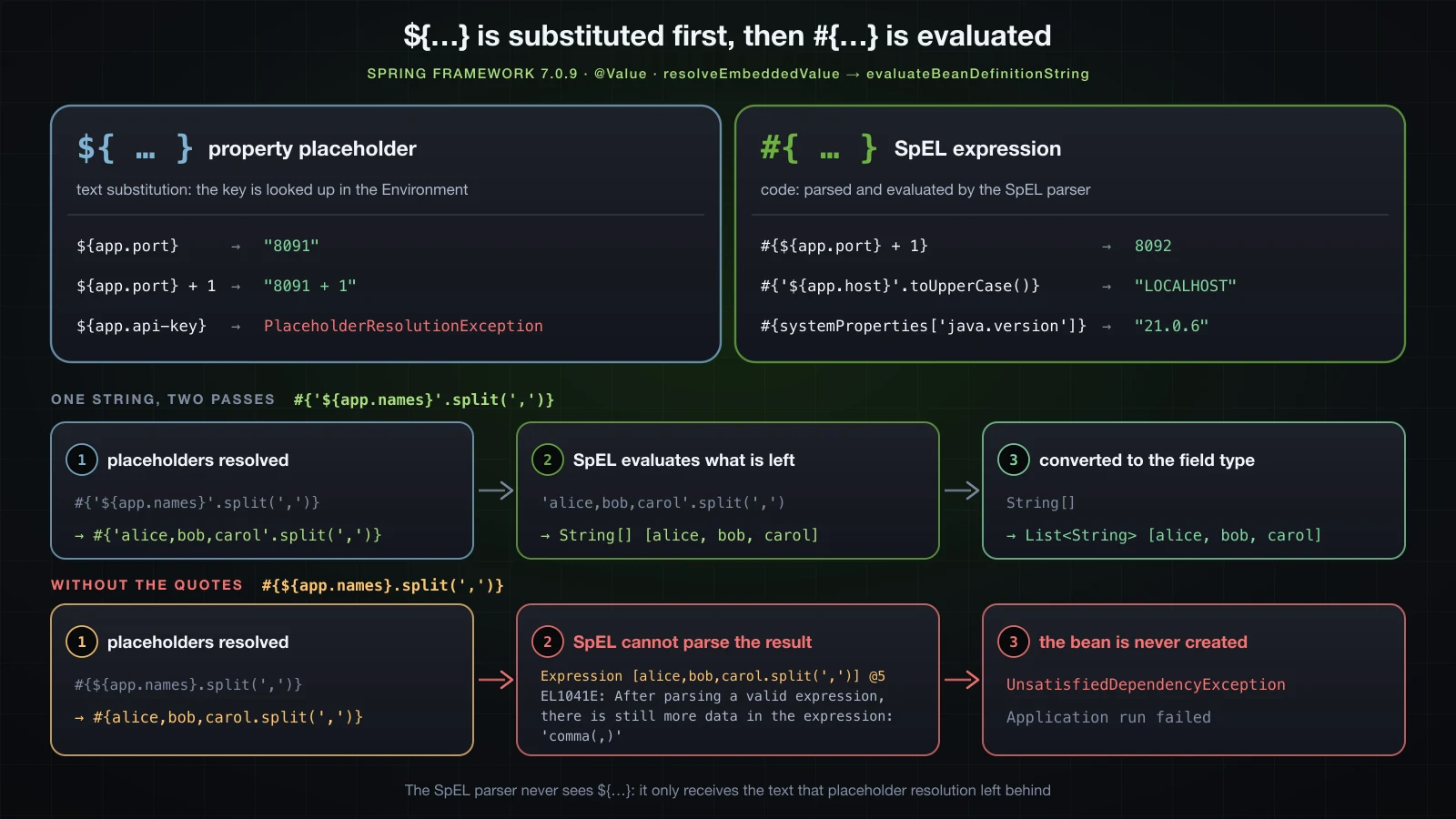
Placeholders, always. In DefaultListableBeanFactory.doResolveDependency the call to resolveEmbeddedValue comes before evaluateBeanDefinitionString, and three runs show the consequences without reading any bytecode.
The placeholder writes the expression. With app.expr=6*7, @Value("#{${app.expr}}") int injects 42. The placeholder put 6*7 into the expression before SpEL parsed it; @Value("${app.expr}") String on its own is just 6*7.
SpEL only sees the substituted text. Leave out the quotes around the placeholder:
public SpelBroken(@Value("#{${app.names}.split(',')}") List<String> names) {Caused by: org.springframework.expression.spel.SpelParseException: Expression [alice,bob,carol.split(',')] @5: EL1041E: After parsing a valid expression, there is still more data in the expression: 'comma(,)'The expression in the error is alice,bob,carol.split(',') — ${app.names} had already been replaced. SpEL parsed alice as a complete expression and then ran into a comma. The single quotes in #{'${app.names}'.split(',')} are what turn the substituted text into a SpEL string literal.
A value from the file is evaluated too. With app.computed=#{2*21}, @Value("${app.computed}") int injects 42: the placeholder resolved to #{2*21}, and the expression step then evaluated it. environment.getProperty("app.computed") returns the text #{2*21} untouched. Anything that reaches @Value through a placeholder can therefore run as an expression, which is a reason to care where configuration values come from.
One behavioural difference follows from all of this. app.names-spaced=alice, bob , carol injected with @Value("${app.names-spaced}") List<String> gives [alice, bob, carol], because the conversion service trims each element. Through #{'${app.names-spaced}'.split(',')} it gives [alice, bob , carol], and the second element is bob with both spaces — String.split trims nothing.
Reading properties through the Environment
@Value fixes the key at compile time. When the key is only known at run time, or the code needs to branch on whether a key exists, inject the Environment and ask it directly. In a Boot application the injected object is an org.springframework.boot.ApplicationEnvironment.
@Component
public class EnvironmentDemo implements ApplicationRunner {

    private final Environment environment;

    public EnvironmentDemo(Environment environment) {
        this.environment = environment;
    }

    @Override
    public void run(ApplicationArguments args) {
        System.out.println(environment.getProperty("app.host"));
        System.out.println(environment.getProperty("app.api-key"));
        System.out.println(environment.getProperty("app.api-key", "not-set"));
        System.out.println(environment.getProperty("app.port", Integer.class));
        System.out.println(environment.getProperty("app.max-connections", Integer.class, 0));
        System.out.println(environment.getProperty("app.timeout", Duration.class, Duration.ofSeconds(30)));
        System.out.println(environment.getProperty("app.url"));
        System.out.println(environment.containsProperty("app.host"));
        System.out.println(environment.getRequiredProperty("app.api-key"));
    }
}localhost
null
not-set
8091
0
PT30S
http://localhost:8091
true
2026-09-11T15:06:33.604+07:00 INFO 68821 --- [demo] [ main] .s.b.a.l.ConditionEvaluationReportLogger :
Error starting ApplicationContext. To display the condition evaluation report re-run your application with 'debug' enabled.
2026-09-11T15:06:33.607+07:00 ERROR 68821 --- [demo] [ main] o.s.boot.SpringApplication : Application run failed
java.lang.IllegalStateException: Required key 'app.api-key' not found| Call | Returns |
|---|---|
getProperty("app.host") | the resolved value as a String |
getProperty("app.api-key") | null for a missing key — it never throws because a key is absent |
getProperty("app.api-key", "not-set") | the default for a missing key |
getProperty("app.port", Integer.class) | the value converted to the requested type |
getProperty("app.max-connections", Integer.class, 0) | the typed default for a missing key |
getProperty("app.timeout", Duration.class, Duration.ofSeconds(30)) | a Duration; the same conversions as @Value are available |
getProperty("app.url") | http://localhost:8091 — placeholders are resolved |
containsProperty("app.host") | true when any property source has the key |
getRequiredProperty("app.api-key") | throws IllegalStateException: Required key 'app.api-key' not found |
Three edges worth knowing:
- A key that exists but cannot be converted throws.
getProperty("app.bad-port", Integer.class)withapp.bad-port=eightygivesConversionFailedException: Failed to convert from type [java.lang.String] to type [java.lang.Integer] for value [eighty]. - The
Environmentresolves${...}but never evaluates#{...}:getProperty("app.computed")returns#{2*21}. resolvePlaceholders("${app.host}:${app.port} ${app.api-key}")returnslocalhost:8091 ${app.api-key}, leaving the unknown placeholder alone;resolveRequiredPlaceholdersthrowsPlaceholderResolutionExceptionfor it instead.
The limits of @Value
@Value is the right tool for one or two values. AppSettings above shows where it stops scaling:
- No validation.
app.port=-5injects-5without complaint, andapp.urlhappily becomeshttp://localhost:-5. Every range check is code you write yourself. - No grouping. Seven related settings mean seven annotations and a seven-parameter constructor, and every other class that needs them repeats all seven.
- Keys are strings scattered across classes. Rename
app.timeoutin the file and the compiler has nothing to say. A typo is worse when there is a default:${app.timout:30s}starts cleanly and uses30sforever. - No IDE metadata. Nothing describes the
app.*keys, so an IDE cannot complete them inapplication.propertiesor flag one that no code reads. - No structured values. A YAML list under
app.serverscannot be injected as a whole, as shown above.
@ConfigurationProperties solves all five, and it is the subject of the next article.
.properties vs .yml: which one should you use?
application.properties | application.yml | |
|---|---|---|
| Structure | one full dotted key per line | nesting by indentation, spaces only |
| Separator | =, : or whitespace | a colon followed by a space |
| Comments | # or ! at the start of a line; a # mid-line is part of the value | # after whitespace, anywhere on a line |
| Lists | a,b,c in one key, or key[0]= and key[1]= | - item blocks or [a, b] |
| Multi-line strings | \n escapes and \ line continuation | |, > and |- |
| Types | every value is a String until converted | YAML 1.1 typing: on → true, 0123 → 83, 12:30 → 750 unless quoted |
| Non-ASCII text | decoded as ISO-8859-1, so Xin chào → Xin chà o unless escaped | read as UTF-8 |
| Duplicate keys | the last one wins silently | startup fails with found duplicate key |
| Typos | a wrong line is usually still a valid line | a tab or a stray : stops startup |
| Search | grep app.owner.email finds the key | the key is split across lines, so the same grep finds nothing |
| Same key in both files | wins | loses |
Pick .properties for small, flat configuration, for files that scripts edit, and whenever every key should be greppable. Pick .yml for deep hierarchies and lists, and for any configuration that carries Vietnamese text. Either way, pick one per project: the two files work together, but a key defined in both with a silent winner is hard to trace.
FAQ
Does Spring Boot read application.properties as UTF-8?
No. In Spring Boot 4.1.1 a .properties configuration file is decoded as ISO-8859-1 unless an encoding is specified, so UTF-8 Vietnamese text such as Xin chào is read as Xin chà o. Use \u00e0-style escapes, move the values to application.yml, which is read as UTF-8, or import a separate file with [encoding=utf-8].
Can I use application.properties and application.yml together?
Yes. Both are loaded and merged key by key. When the same key is in both files in the same location, the value from application.properties is used.
Why is my @Value field null?
Two causes account for almost every case. The field is static: Spring skips it and logs one INFO line.
2026-09-11T14:47:25.774+07:00 INFO 48742 --- [demo] [ main] f.a.AutowiredAnnotationBeanPostProcessor : Autowired annotation is not supported on static fields: private static java.lang.String com.example.demo.StaticProbe.nameOr the object was created with new instead of being taken from the container: new FieldStyle().name() returns null, because nothing ever processed its annotations. A missing key is not a cause — that fails at startup instead.
How do I inject a list from application.yml with @Value?
A YAML list is stored as indexed keys, so @Value("${app.servers}") fails with Could not resolve placeholder 'app.servers', while @Value("${app.servers[0]}") works. To inject a whole list with @Value, write it as one comma-separated string — names: alice,bob,carol — and inject a List<String>, which gives [alice, bob, carol]. Binding a real YAML list to a List is a job for @ConfigurationProperties.
Why did 0123 turn into 83 in application.yml?
SnakeYAML 2.6 follows YAML 1.1, where an unquoted number with a leading zero is octal, so 0123 is 83. Boot stores the Integer, and reading it as a string gives 83. Write "0123". The same rules turn on into true, 1.10 into 1.1 and 12:30 into 750.
What is the difference between ${} and #{} in @Value?
${key} looks a key up in the Environment and substitutes its value as text. #{expression} evaluates a SpEL expression. They combine, as in #{'${app.names}'.split(',')}, and placeholders are always resolved before the expression is evaluated.
How do I write a literal ${ in a property value?
Escape the dollar sign with a backslash. In .properties the file parser removes one backslash first, so write \\${literal}; in YAML a plain or single-quoted \${literal} is enough. Both read back as ${literal}.
Conclusion
Both files end up in the same place: a flat map of dotted String keys in the Environment, with application.properties winning when a key appears in both. Where they differ is what they do to your text on the way in. .properties decodes as ISO-8859-1, keeps trailing spaces and treats a backslash as an escape; YAML reads UTF-8 but applies YAML 1.1 typing, so NO, 0123, 1.10 and 12:30 need quotes. Placeholders are resolved on every read, ${random.*} included. @Value reads a key, resolves placeholders, evaluates SpEL, converts the result, and fails the startup when a key has neither a value nor a default.
That is enough to read a handful of values. It is not enough for a group of related settings that must be validated, and that is where the next article picks up: @ConfigurationProperties — type-safe configuration combined with validation.
![[Spring Boot Basics] IoC and Dependency Injection in Spring: Why You Stop Calling new](/images/blog/sb-ioc-thumbnail.en.webp)
![[Spring Boot Basics] API Documentation in Spring Boot with springdoc-openapi and Swagger UI](/images/blog/sb-springdoc-thumbnail.en.webp)
![[Spring Boot Basics] @ConfigurationProperties in Spring Boot: Type-Safe Configuration with Validation](/images/blog/sb-configprops-thumbnail.en.webp)
![[Spring Boot Basics] Server-Side Rendering with Thymeleaf in Spring Boot: Templates, Forms and Validation](/images/blog/sb-thymeleaf-thumbnail.en.webp)