Application nào deploy ra cũng chạy ở nhiều hơn một nơi. Trên laptop nó nói chuyện với PostgreSQL local và in SQL ra log; trên CI nó dùng một database dùng xong là bỏ; trên production nó cần host thật, credential thật và connection pool lớn hơn. Cách sửa dễ nghĩ tới nhất là build riêng cho từng môi trường, và đó là cách sai: jar bạn đã test phải chính là jar bạn deploy. Thứ khác nhau giữa các môi trường là config, và config phải đi vào đúng artifact đó từ bên ngoài.
Spring Boot cho bạn hai cơ chế để làm việc này. Profile là các công tắc có tên — dev, prod, tên gì cũng được — dùng để load thêm file config và đăng ký thêm bean. Thứ tự ưu tiên property source là thứ tự cố định quyết định giá trị nào thắng khi cùng một key được set đồng thời trong file nằm trong jar, file nằm cạnh jar, một environment variable và một command-line argument. Phần thứ hai là chỗ các bài hướng dẫn hay in lại danh sách chép từ tài liệu của phiên bản cũ nhất, nên bài này đo nó.
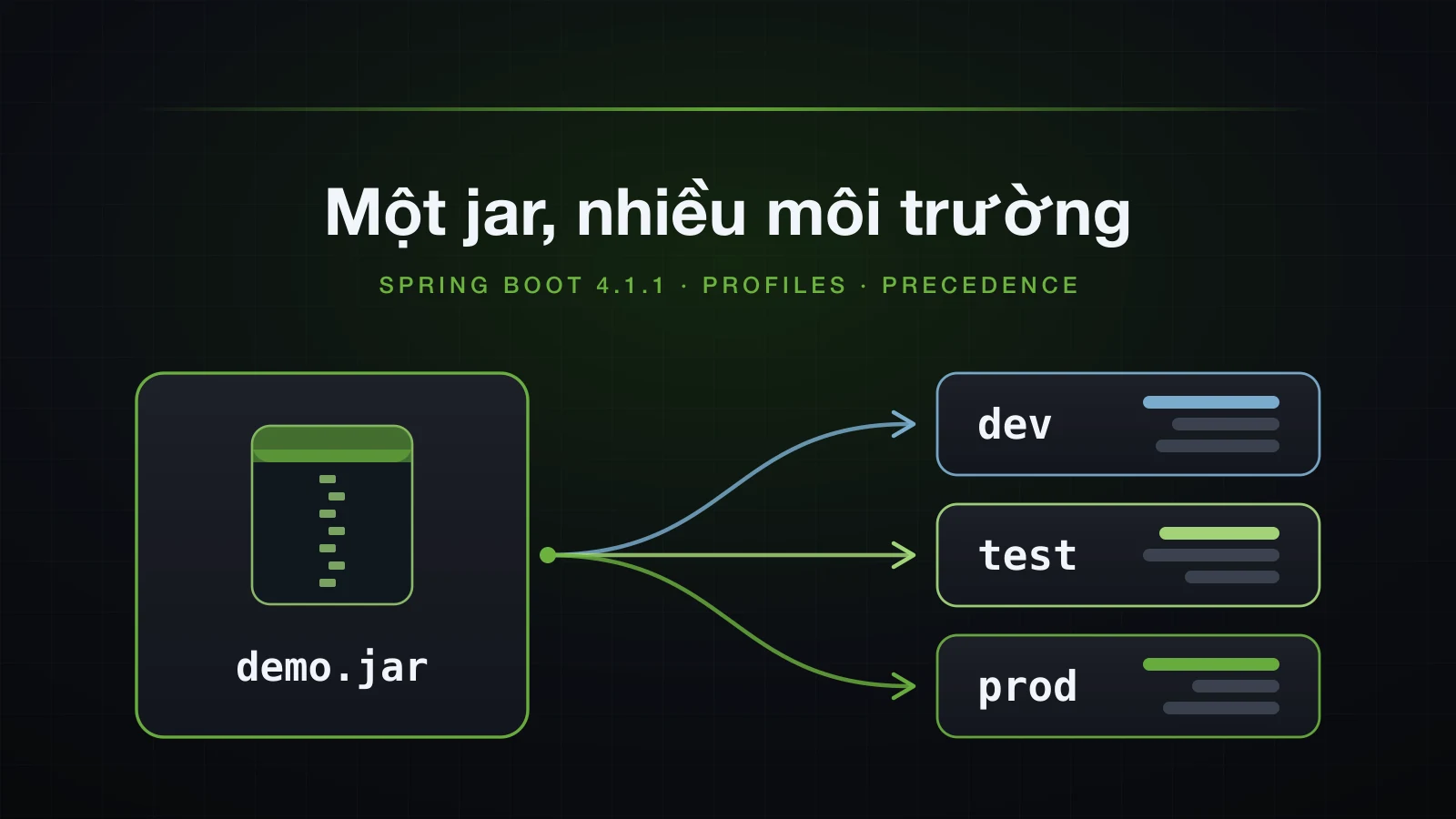
Các ví dụ dùng Spring Boot 4.1.1 và Java 21, trên một project Initializr chỉ có dependency web. Mọi thứ đều chạy từ jar đã đóng gói — ./gradlew bootJar rồi java -jar — vì vị trí file chỉ bắt đầu quan trọng khi application đã là một jar. Trong các lệnh, demo.jar là viết tắt của build/libs/demo-0.0.1-SNAPSHOT.jar.
Profile trong Spring Boot là gì, và vì sao một jar là đủ
Profile là một cái tên; trong một lần chạy application, nó hoặc active hoặc không. Có hai thứ phản ứng với nó:
- File config mang tên nó. Khi
devactive, Boot loadapplication-dev.yml(hoặcapplication-dev.properties) đè lênapplication.yml. - Bean được đánh dấu bằng nó. Class có
@Profile("dev")chỉ được đăng ký khidevactive.
Ngoài hai điều đó, profile không có gì đặc biệt. Không có danh sách tên hợp lệ, cũng không có file bắt buộc: kích hoạt prod trong project demo, vốn không có application-prod.yml, vẫn khởi động bình thường và dùng giá trị gốc.
Thứ profile hỗ trợ là một kỷ luật: build một lần, cấu hình theo từng môi trường. Artifact đã qua test được đưa nguyên vẹn từ CI sang staging rồi production. URL database, credential, kích thước pool, hostname và feature flag đi vào nó từ bên ngoài — tên profile, environment variable, command-line argument, một file trong working directory. Ngay khi bạn build lại jar chỉ để đổi một URL, thứ đang chạy trên production không còn là thứ bạn đã test.
Khi không kích hoạt gì, Boot quay về profile tên default và báo điều đó ngay sau dòng Starting DemoApplication trong log khởi động:
2026-09-11T14:48:45.804+07:00 INFO 49469 --- [demo] [ main] com.example.demo.DemoApplication : No active profile set, falling back to 1 default profile: "default"Đó là dòng đầu tiên cần đọc mỗi khi config có vẻ sai.
Các ví dụ dùng project được sinh ra, thêm bốn key app.* và một runner in chúng ra qua @Value. Bài 11 đã nói về cú pháp file và bản thân @Value; ở đây runner chỉ là cách để thấy giá trị nào thắng:
@Component
class ConfigReport implements ApplicationRunner {

    private final String supportEmail;
    private final String dbUrl;
    private final int pageSize;
    private final boolean debugSql;

    ConfigReport(@Value("${app.support-email}") String supportEmail,
                 @Value("${app.db-url}") String dbUrl,
                 @Value("${app.page-size}") int pageSize,
                 @Value("${app.debug-sql}") boolean debugSql) {
        this.supportEmail = supportEmail;
        this.dbUrl = dbUrl;
        this.pageSize = pageSize;
        this.debugSql = debugSql;
    }

    @Override
    public void run(ApplicationArguments args) {
        System.out.println("app.support-email = " + supportEmail);
        System.out.println("app.db-url        = " + dbUrl);
        System.out.println("app.page-size     = " + pageSize);
        System.out.println("app.debug-sql     = " + debugSql);
    }
}
File profile-specific: application-dev.yml đè lên application.yml
File gốc, src/main/resources/application.yml, chứa mọi key:
spring:
  application:
    name: demo

app:
  support-email: support@example.com
  db-url: jdbc:postgresql://localhost:5432/sales
  page-size: 20
  debug-sql: false
src/main/resources/application-dev.yml chỉ khai báo những gì khác đi với dev:
app:
  db-url: jdbc:postgresql://localhost:5432/sales_dev
  debug-sql: true
Không có profile, giá trị gốc được in ra:
java -jar demo.jar --server.port=8093app.support-email = support@example.com
app.db-url = jdbc:postgresql://localhost:5432/sales
app.page-size = 20
app.debug-sql = falseKhi dev active:
java -jar demo.jar --server.port=8093 --spring.profiles.active=dev2026-09-11T14:48:48.310+07:00 INFO 49502 --- [demo] [ main] com.example.demo.DemoApplication : The following 1 profile is active: "dev"
...
app.support-email = support@example.com
app.db-url = jdbc:postgresql://localhost:5432/sales_dev
app.page-size = 20
app.debug-sql = trueapplication-dev.yml không hề nhắc tới support-email hay page-size, và cả hai vẫn giữ giá trị gốc. File profile-specific được merge lên file gốc theo từng key; nó không thay thế file gốc. Key nào nó khai báo thì thắng, mọi key còn lại rơi xuống lấy từ application.yml.
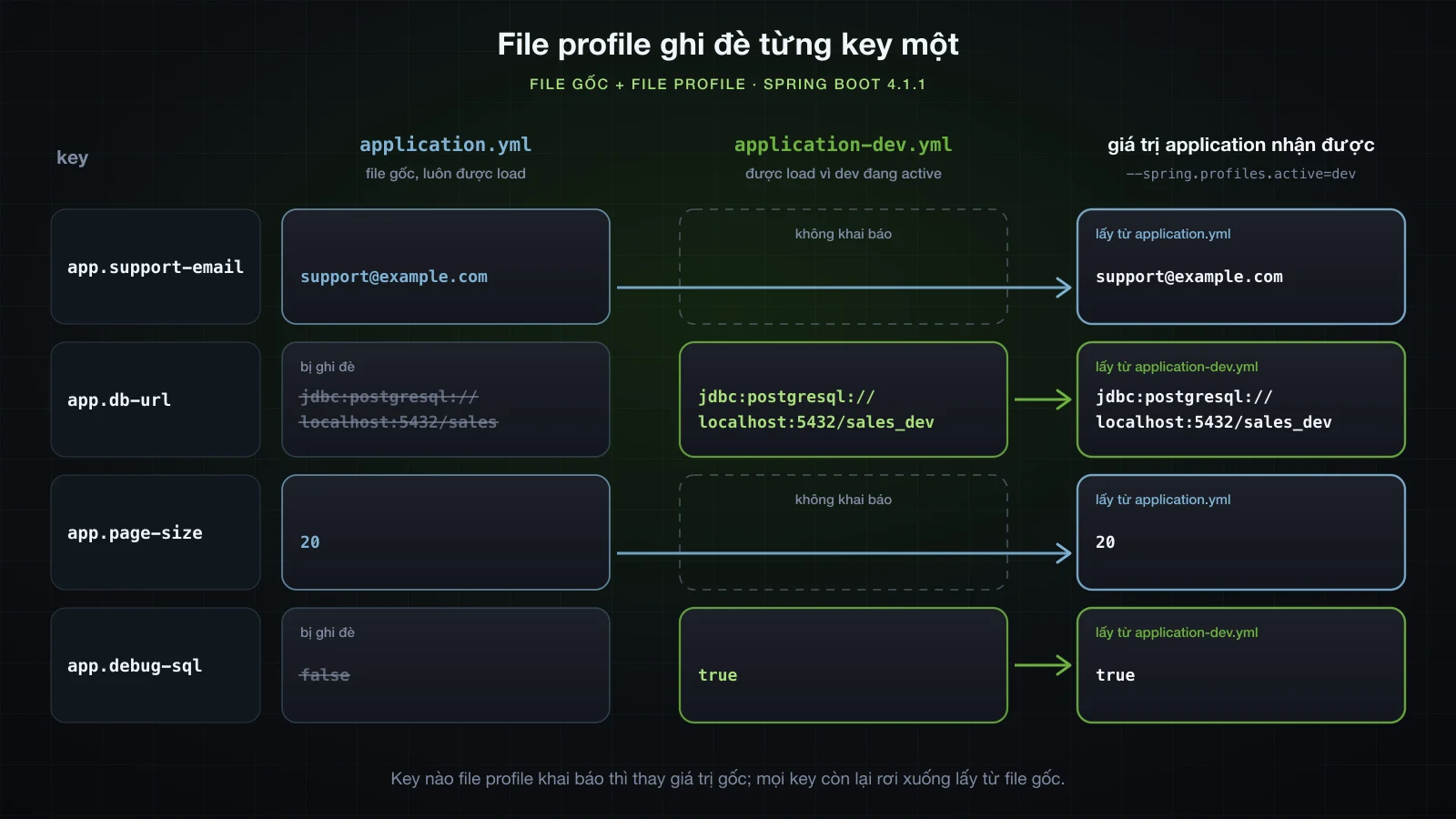
Cơ chế merge này là thứ giữ cho file profile ngắn gọn. Đặt mọi key vào file gốc và cho mỗi profile chỉ phần khác biệt. Một file profile chép lại toàn bộ file gốc sẽ khiến mỗi thay đổi sau này phải sửa ở nhiều chỗ, rồi các chỗ đó lệch nhau dần.
Quy tắc đặt tên giống nhau ở cả hai định dạng — application-prod.properties hoạt động y hệt application-prod.yml — và file profile-specific được tìm ở mọi vị trí mà file gốc được tìm. Bài 11 đã nói định dạng nào thắng khi cả hai cùng nằm một chỗ.
Cách kích hoạt profile trong Spring Boot
spring.profiles.active là một property bình thường, nên thứ gì set được property thì cũng kích hoạt được profile. Cả bốn cách dưới đây đều in cùng một dòng The following 1 profile is active: "dev" trên jar demo:
| Ở đâu | Cách làm | Source đó xếp hạng thế nào |
|---|---|---|
| File config gốc | spring.profiles.active: dev trong application.yml | các file config, thấp nhất trong bốn cách |
| Environment variable | SPRING_PROFILES_ACTIVE=dev java -jar demo.jar | trên mọi file config |
| JVM system property | java -Dspring.profiles.active=dev -jar demo.jar | trên environment variable |
| Command-line argument | java -jar demo.jar --spring.profiles.active=dev | trên tất cả |
Vì nó là property, thứ tự ưu tiên áp dụng cho nó, và source cao hơn thay thế source thấp hơn chứ không cộng thêm vào. Với spring.profiles.active: dev trong application.yml và --spring.profiles.active=local trên command line:
2026-09-11T14:49:34.431+07:00 INFO 50167 --- [demo] [ main] com.example.demo.DemoApplication : The following 1 profile is active: "local"Chỉ có local. SPRING_PROFILES_ACTIVE=dev đi cùng --spring.profiles.active=local cũng cho đúng một "local". Giá trị trong file gốc vì vậy chỉ là mặc định cho người không set gì; mỗi lần deploy sẽ ghi đè nó từ môi trường riêng của mình.
Đặt -D trước -jar, đừng đặt sau
java -jar demo.jar --server.port=8093 -Dspring.profiles.active=dev2026-09-11T14:48:55.812+07:00 INFO 49611 --- [demo] [ main] com.example.demo.DemoApplication : No active profile set, falling back to 1 default profile: "default"Không lỗi, không cảnh báo, không profile. Mọi thứ sau tên jar là argument truyền vào main, không phải option của JVM, nên không có system property nào được tạo — và Spring Boot chỉ chuyển những argument bắt đầu bằng -- thành property. Option của JVM đặt trước -jar; argument cho Spring đặt sau tên jar. Dòng log là cách bạn bắt được lỗi này.
Khi hai profile active cùng set một key, profile nào thắng?
Thêm file profile thứ hai, application-local.yml, bất đồng với dev về db-url:
app:
  db-url: jdbc:postgresql://127.0.0.1:15432/sales_local
  page-size: 5
Kích hoạt cả hai, theo cả hai thứ tự:
java -jar demo.jar --server.port=8093 --spring.profiles.active=dev,local2026-09-11T14:48:58.272+07:00 INFO 49644 --- [demo] [ main] com.example.demo.DemoApplication : The following 2 profiles are active: "dev", "local"
...
app.support-email = support@example.com
app.db-url = jdbc:postgresql://127.0.0.1:15432/sales_local
app.page-size = 5
app.debug-sql = truejava -jar demo.jar --server.port=8093 --spring.profiles.active=local,dev2026-09-11T14:49:00.977+07:00 INFO 49660 --- [demo] [ main] com.example.demo.DemoApplication : The following 2 profiles are active: "local", "dev"
...
app.support-email = support@example.com
app.db-url = jdbc:postgresql://localhost:5432/sales_dev
app.page-size = 5
app.debug-sql = trueProfile đứng cuối danh sách thắng với những key mà cả hai file cùng set. db-url đổi theo thứ tự; page-size, chỉ local set, và debug-sql, chỉ dev set, thì ra giống nhau ở cả hai lần. Đây là chiến lược last-wins trong tài liệu tham khảo — ví dụ của tài liệu là prod,live, trong đó application-live.properties ghi đè application-prod.properties — và nó mô tả các file riêng biệt. Trong một file nhiều document, quy tắc lại khác, như một phần phía sau sẽ cho thấy.
spring.profiles.include để thêm, spring.profiles.active để thay
Khi một profile cần bật bất kể người ta chọn gì khác, spring.profiles.include thêm nó vào thay vì tranh chỗ với spring.profiles.active. Với spring.profiles.include: local trong application.yml và --spring.profiles.active=dev:
2026-09-11T14:49:42.791+07:00  INFO 50305 --- [demo] [           main] com.example.demo.DemoApplication         : The following 2 profiles are active: "local", "dev"
...
app.db-url        = jdbc:postgresql://localhost:5432/sales_dev
app.page-size     = 5
Profile được include nằm trước các profile active, nên theo last-wins, profile bạn kích hoạt tường minh thắng profile được include: db-url lấy từ dev, còn page-size, chỉ local set, vẫn lấy từ local.
spring.profiles.default và nơi không được đặt spring.profiles.active
spring.profiles.default đổi tên profile mà Boot quay về khi không có gì được kích hoạt. Với spring.profiles.default: dev trong application.yml và không có profile trên command line:
2026-09-11T14:49:37.472+07:00  INFO 50217 --- [demo] [           main] com.example.demo.DemoApplication         : No active profile set, falling back to 1 default profile: "dev"
...
app.db-url        = jdbc:postgresql://localhost:5432/sales_dev
app.debug-sql     = true
Profile dự phòng hoạt động như một profile active — application-dev.yml đã được load — cho tới khi có thứ gì đó kích hoạt profile tường minh. Thêm --spring.profiles.active=local thì log in The following 1 profile is active: "local" và không còn dấu vết nào của dev.
Điều đó tiện trên máy developer và nguy hiểm ở mọi nơi khác: một lần deploy production quên set profile sẽ lặng lẽ khởi động với cấu hình development. Nếu dùng, hãy để profile dự phòng là profile an toàn, không phải profile dễ dãi.
spring.profiles.active trong file profile-specific làm app lỗi ngay khi khởi động
Rất dễ nảy ra ý để một profile tự bật profile khác từ trong file của chính nó. Đây là application-dev.yml:
spring:
  profiles:
    active: local

app:
  db-url: jdbc:postgresql://localhost:5432/sales_dev
  debug-sql: true
Khởi động với --spring.profiles.active=dev, Boot từ chối trước khi application context kịp tồn tại:
14:49:48.176 [main] ERROR org.springframework.boot.SpringApplication -- Application run failed
org.springframework.boot.context.config.InvalidConfigDataPropertyException: Property 'spring.profiles.active' imported from location 'class path resource [application-dev.yml]' is invalid in a profile specific resource [origin: class path resource [application-dev.yml] from demo-0.0.1-SNAPSHOT.jar - 3:13]
Có ba chi tiết đáng biết trong output đó:
- Thông báo nêu tên file và vị trí,
3:13— dòng 3, cột 13, chỗ giá trịlocalbắt đầu. - Dòng log có định dạng khác phần còn lại của log khởi động. Lỗi xảy ra khi Boot còn đang đọc config, trước khi hệ thống logging được cấu hình từ chính config đó.
- Nó chỉ lỗi khi file thực sự được load. Cùng jar đó, không có profile nào active, khởi động bình thường — đó là lý do sai lầm này lọt qua trên laptop rồi vỡ ở đúng môi trường kích hoạt
dev.
Lý do nằm ở thứ tự. Boot quyết định các profile active trước, rồi mới load file cho các profile đó, nên một file profile không thể tham gia vào quyết định đã load chính nó. Check của 4.1.1 cũng từ chối spring.profiles.include và spring.profiles.default trong file profile-specific vì cùng lý do, và dạng .properties cũng lỗi y như vậy (application-dev.properties from demo-0.0.1-SNAPSHOT.jar - 1:24). Muốn gộp profile, hãy dùng spring.profiles.include hoặc một group trong file gốc.
Trong document on-profile, Boot 4.1.1 không chặn bạn
Tài liệu tham khảo nói spring.profiles.active "can only be used in non-profile-specific documents", tức cũng loại trừ các document được kích hoạt bằng spring.config.activate.on-profile (phần kế tiếp nói về chúng), và đưa ra ví dụ không hợp lệ này:
spring.profiles.active=prod
#---
spring.config.activate.on-profile=prod
spring.profiles.active=metrics
Chạy đúng file đó — thêm bốn key app.* vào document đầu, và thêm app.page-size=99 vào document thứ hai để xem document thứ hai có được áp dụng không — không hề lỗi trên 4.1.1:
2026-09-11T15:07:08.138+07:00  INFO 69045 --- [demo] [           main] com.example.demo.DemoApplication         : The following 1 profile is active: "metrics"
...
app.page-size     = 20
Không exception, và kết quả tệ theo cả hai hướng. Application chạy với metrics, thứ không ai yêu cầu trên command line, và thiếu prod, thứ file rõ ràng muốn có. Vì prod không còn active, document thứ hai sau đó bị bỏ qua — page-size vẫn là 20 — nên tác dụng duy nhất còn lại của nó là đánh tráo profile. Bản YAML của ví dụ cũng kết thúc với chỉ metrics active, và Spring Boot 3.5.6, bản tôi chạy để so sánh, cũng vậy, nên đây không phải điều mới ở Boot 4.
Source của 4.1.1 cho thấy lý do. Trong lúc Boot xác định profile, binder của nó mang một handler có nhiệm vụ throw khi một document chưa active lại chứa property đang được đọc. Nhưng lời gọi đọc spring.profiles.active truyền vào validator tên profile của riêng nó làm handler, và handler được truyền tường minh sẽ thay thế handler mặc định, nên check kia không bao giờ chạy cho property này. Khi một source cao hơn cũng set profile, giá trị lạc chỗ đó đơn giản là không bao giờ được đọc tới: với --spring.profiles.active=dev và spring.profiles.active: local nằm trong document dev, lần chạy báo "dev" và không có gì khác.
Hãy coi quy tắc trong tài liệu là quy tắc. Giữ spring.profiles.active, include và default trong các document không có on-profile, và đừng xem việc khởi động êm là được phép.
File nhiều document: --- trong YAML và #--- trong .properties
Thay vì mỗi profile một file, bạn có thể giữ mọi thứ trong một application.yml và chia nó thành các document bằng ---. Document nào khai báo spring.config.activate.on-profile thì chỉ áp dụng khi profile đó active:
spring:
  application:
    name: demo

app:
  support-email: support@example.com
  db-url: jdbc:postgresql://localhost:5432/sales
  page-size: 20
  debug-sql: false
---
spring:
  config:
    activate:
      on-profile: dev

app:
  db-url: jdbc:postgresql://localhost:5432/sales_dev
  debug-sql: true
---
spring:
  config:
    activate:
      on-profile: local

app:
  db-url: jdbc:postgresql://127.0.0.1:15432/sales_local
  page-size: 5
Khi project không có file profile riêng nào, --spring.profiles.active=dev in ra đúng những gì bản hai file đã in — sales_dev, page-size 20, debug-sql true. Cơ chế merge theo từng key vẫn như cũ.
File .properties không có ký hiệu document riêng, nên Boot coi một comment đặc biệt, #---, là dấu phân cách. Nó chạy được trên 4.1.1:
spring.application.name=demo
app.support-email=support@example.com
app.db-url=jdbc:postgresql://localhost:5432/sales
app.page-size=20
app.debug-sql=false
#---
spring.config.activate.on-profile=dev
app.db-url=jdbc:postgresql://localhost:5432/sales_dev
app.debug-sql=true
#---
spring.config.activate.on-profile=local
app.db-url=jdbc:postgresql://127.0.0.1:15432/sales_local
app.page-size=5
Không có profile thì in giá trị gốc, có dev thì in giá trị của dev. Có một điểm khác với file riêng biệt cần để ý: trong một file, thứ tự document quyết định, không phải thứ tự trong spring.profiles.active. Cả hai định dạng, chạy với --spring.profiles.active=local,dev:
2026-09-11T14:50:05.944+07:00  INFO 50522 --- [demo] [           main] com.example.demo.DemoApplication         : The following 2 profiles are active: "local", "dev"
...
app.support-email = support@example.com
app.db-url        = jdbc:postgresql://127.0.0.1:15432/sales_local
app.page-size     = 5
app.debug-sql     = true
Với file riêng biệt, cùng lệnh này cho ra sales_dev, vì dev đứng cuối. Ở đây document local nằm dưới document dev, và tài liệu tham khảo nói rõ các document "are processed in order, from top to bottom", document sau ghi đè document trước. Nếu hai profile trong một file có thể cùng set một key, hãy sắp document theo thứ tự bạn muốn chúng thắng.
Dấu phân cách #--- phải viết chính xác
Tài liệu tham khảo yêu cầu dấu phân cách không có khoảng trắng ở đầu và có đúng ba dấu gạch. Viết thành # --- — thêm một dấu cách — nó chỉ còn là comment bình thường, và với application này — vốn đọc app.support-email qua một placeholder không có giá trị mặc định — kết quả không phải là config hơi sai mà là application không khởi động được:
2026-09-11T14:50:08.862+07:00  INFO 50534 --- [           main] com.example.demo.DemoApplication         : No active profile set, falling back to 1 default profile: "default"
...
Caused by: org.springframework.util.PlaceholderResolutionException: Could not resolve placeholder 'app.support-email' in value "${app.support-email}"
Mất dấu phân cách, file chỉ còn một document, và spring.config.activate.on-profile cuối cùng trong đó là local — nên cả file chỉ áp dụng khi local active. Không có profile, không dòng nào trong file được load. Dòng log để lộ điều này trước cả stack trace: [demo] biến mất, vì spring.application.name cũng nằm trong file bị bỏ qua. Một application không bắt buộc key nào trong số đó thì vẫn khởi động bình thường và chạy mà thiếu toàn bộ giá trị trong file — còn khó phát hiện hơn.
Profile group: một tên cho nhiều profile
Config production thường gồm nhiều mối quan tâm cùng lúc — database, messaging, monitoring. Profile group đặt cho chúng một cái tên chung. Trong application.properties:
spring.application.name=demo
spring.profiles.group.prod=proddb,prodmq

app.support-email=support@example.com
app.db-url=jdbc:postgresql://localhost:5432/sales
app.page-size=20
app.debug-sql=false
app.mq-host=localhost
application-proddb.properties chứa app.db-url=jdbc:postgresql://db.internal:5432/sales, application-prodmq.properties chứa app.mq-host=mq.internal, và runner in thêm app.mq-host. Chỉ kích hoạt tên group:
java -jar demo.jar --server.port=8093 --spring.profiles.active=prod2026-09-11T14:50:15.495+07:00 INFO 50618 --- [demo] [ main] com.example.demo.DemoApplication : The following 3 profiles are active: "prod", "proddb", "prodmq"
...
app.support-email = support@example.com
app.db-url = jdbc:postgresql://db.internal:5432/sales
app.page-size = 20
app.debug-sql = false
app.mq-host = mq.internalDòng log cho thấy việc mở rộng: tên group đứng đầu, sau đó là các thành viên theo thứ tự khai báo. Mỗi thành viên là một profile active thật nên file của nó được load, và project này hoàn toàn không có application-prod.properties, điều đó không sao cả. Giá trị của group nằm ở việc tổ hợp lại: các profile thành viên giữ nhỏ và đơn mục đích, và một group khác có thể dùng lại bất kỳ profile nào trong số đó mà không phải chép file.
Tài liệu tham khảo nói group, cũng như spring.profiles.active, chỉ được định nghĩa trong document không profile-specific. Boot 4.1.1 cũng không ép quy tắc này: spring.profiles.group.dev=devdb nằm trong application-dev.yml không gây lỗi và cũng không có devdb — danh sách active vẫn là "dev". Group đặt sai file thì vô dụng mà không một lời báo.
@Profile: bean chỉ tồn tại ở một số profile
Giá trị config là một nửa những gì profile bật tắt; nửa còn lại là bean nào tồn tại. Trường hợp kinh điển là một tích hợp thật mà bạn không muốn gọi từ laptop:
public interface NotificationSender {

    void send(String to, String message);
}@Component
@Profile("dev")
class ConsoleNotificationSender implements NotificationSender {
@Override
public void send(String to, String message) {
System.out.println("[console] to=" + to + " " + message);
}
}@Component
@Profile("!dev")
class SmtpNotificationSender implements NotificationSender {
@Override
public void send(String to, String message) {
// a real implementation talks to an SMTP server here
}
}!dev khớp với mọi tập profile active không chứa dev, kể cả profile dự phòng default. Cặp này bổ sung cho nhau có chủ đích: dù profile nào active, cũng có đúng một implementation được đăng ký. Hai bean nữa dùng expression ghép:
@Configuration
class ProfileExpressionConfig {

    @Bean
    @Profile("dev & local")
    String localSeedData() {
        return "seed data for a laptop database";
    }

    @Bean
    @Profile("prod | staging")
    String auditTrail() {
        return "audit trail enabled";
    }
}
Một runner hỏi context xem cuối cùng nó có những gì:
@Component
class BeanReport implements ApplicationRunner {

    private final ApplicationContext context;

    BeanReport(ApplicationContext context) {
        this.context = context;
    }

    @Override
    public void run(ApplicationArguments args) {
        System.out.println("NotificationSender -> "
                + context.getBean(NotificationSender.class).getClass().getSimpleName());
        System.out.println("localSeedData bean -> " + context.containsBean("localSeedData"));
        System.out.println("auditTrail bean    -> " + context.containsBean("auditTrail"));
    }
}
Sáu lần chạy cùng một jar:
| Profile active | NotificationSender | localSeedData | auditTrail |
|---|---|---|---|
không có (default) | SmtpNotificationSender | false | false |
dev | ConsoleNotificationSender | false | false |
local | SmtpNotificationSender | false | false |
dev,local | ConsoleNotificationSender | true | false |
prod | SmtpNotificationSender | false | true |
staging | SmtpNotificationSender | false | true |
Bean !dev chứng minh giá trị của nó khi bạn bỏ nó đi. Đổi SmtpNotificationSender thành @Profile("prod"), thêm một SignupService nhận NotificationSender qua constructor, rồi chạy không có profile:
***************************
APPLICATION FAILED TO START
***************************

Description:

Parameter 0 of constructor in com.example.demo.SignupService required a bean of type 'com.example.demo.NotificationSender' that could not be found.


Action:

Consider defining a bean of type 'com.example.demo.NotificationSender' in your configuration.
Không chỗ nào trong thông báo đó nhắc tới profile, và đó là điều khiến nó khó hiểu lần đầu gặp: cả hai class đều tồn tại và compile được, chỉ là không cái nào được đăng ký. Khi một bean "could not be found" mà bạn biết chắc mình đã viết nó, hãy so @Profile của nó với dòng log profile active.
@Profile cũng đặt được trên @Configuration class, khi đó nó bật tắt mọi @Bean method bên trong cùng lúc. Class ProdOnlyConfig có @Profile("prod") đăng ký bean prodCacheWarmer khi prod active, và không đăng ký khi chạy với dev, dev,local hay không có profile.
Profile expression: !, & và |
| Expression | Bean được đăng ký khi |
|---|---|
"dev" | dev active |
"!dev" | dev không active, kể cả khi chỉ có default |
"dev & local" | cả dev và local cùng active |
"prod | staging" | ít nhất một trong prod và staging active |
"(dev & local) | prod" | cả dev và local cùng active, hoặc prod active |
Trộn & và | mà không có ngoặc sẽ bị từ chối ngay khi khởi động, chứ không được gán một thứ tự ưu tiên ngầm:
java.lang.IllegalArgumentException: Malformed profile expression [dev & local | prod]Có ngoặc, "(dev & local) | prod" đăng ký bean khi prod active và khi dev,local active, còn với riêng dev hoặc không có profile thì không.
Thứ tự ưu tiên property source trong Spring Boot, đo trên jar đã đóng gói
Profile quyết định file nào tham gia. Thứ tự ưu tiên quyết định chuyện gì xảy ra khi nhiều source — file, môi trường, command line — cùng định nghĩa một key. Đây là phần nên đo thay vì học thuộc.
Thí nghiệm: một key ở mười sáu nơi
Key là app.source, và mỗi nơi định nghĩa nó set giá trị bằng chính mô tả của nơi đó, nên giá trị in ra cho biết ai thắng. Code của application đóng góp hai source thấp nhất:
@SpringBootApplication
public class DemoApplication {

    public static void main(String[] args) {
        SpringApplication app = new SpringApplication(DemoApplication.class);
        app.setDefaultProperties(Map.of("app.source", "SpringApplication.setDefaultProperties"));
        app.run(args);
    }
}@Configuration
@PropertySource("classpath:extra.properties")
public class ExtraConfig {
}Bốn file config được đóng gói vào jar cạnh extra.properties, và sáu file nữa nằm trong working directory. Mỗi file có một dòng như app.source=file: ./config/application.properties, và profile prod đang active nên các file profile-specific cũng được tính:
src/main/resources/                    packaged into the jar
├── application.properties
├── application-prod.properties
├── extra.properties                   read by @PropertySource
└── config/
    ├── application.properties
    └── application-prod.properties

working directory                      outside the jar
├── application.properties
├── application-prod.properties
└── config/
    ├── application.properties
    ├── application-prod.properties
    └── override/
        ├── application.properties
        └── application-prod.properties
Bốn source cuối đến từ lệnh khởi động jar:
APP_SOURCE='OS environment variable APP_SOURCE' \
SPRING_APPLICATION_JSON='{"app":{"source":"SPRING_APPLICATION_JSON"}}' \
java -Dapp.source='JVM system property -Dapp.source' \
     -jar demo.jar \
     --server.port=8093 --spring.profiles.active=prod \
     --app.source='command-line argument --app.source'
Một runner in giá trị đã resolve, rồi duyệt các property source của Environment theo thứ tự và liệt kê những source chứa key. Environment ở đây chỉ được dùng để in tên:
@Component
class SourceReport implements ApplicationRunner {

    private final ConfigurableEnvironment environment;
    private final String source;

    SourceReport(ConfigurableEnvironment environment,
                 @Value("${app.source:<not set anywhere>}") String source) {
        this.environment = environment;
        this.source = source;
    }

    @Override
    public void run(ApplicationArguments args) {
        System.out.println("app.source = " + source);
        System.out.println("sources that define app.source, highest priority first:");
        for (PropertySource<?> ps : environment.getPropertySources()) {
            if (!ps.getName().equals("configurationProperties") && ps.containsProperty("app.source")) {
                System.out.println("  " + ps.getName());
            }
        }
        System.out.println("all property sources, highest priority first:");
        for (PropertySource<?> ps : environment.getPropertySources()) {
            System.out.println("  - " + ps.getName());
        }
    }
}
Lần chạy đầu tiên, khi cả mười sáu nơi đều định nghĩa key:
app.source = command-line argument --app.source
sources that define app.source, highest priority first:
  commandLineArgs
  spring.application.json
  systemProperties
  systemEnvironment
  Config resource 'file [config/override/application-prod.properties]' via location 'optional:file:./config/*/'
  Config resource 'file [config/application-prod.properties]' via location 'optional:file:./config/'
  Config resource 'file [application-prod.properties]' via location 'optional:file:./'
  Config resource 'file [config/override/application.properties]' via location 'optional:file:./config/*/'
  Config resource 'file [config/application.properties]' via location 'optional:file:./config/'
  Config resource 'file [application.properties]' via location 'optional:file:./'
  Config resource 'class path resource [config/application-prod.properties]' via location 'optional:classpath:/config/'
  Config resource 'class path resource [application-prod.properties]' via location 'optional:classpath:/'
  Config resource 'class path resource [config/application.properties]' via location 'optional:classpath:/config/'
  Config resource 'class path resource [application.properties]' via location 'optional:classpath:/'
  class path resource [extra.properties]
  defaultProperties
all property sources, highest priority first:
  - server.ports
  - configurationProperties
  - commandLineArgs
  - spring.application.json
  - servletConfigInitParams
  - servletContextInitParams
  - systemProperties
  - systemEnvironment
  - random
  - Config resource 'file [config/override/application-prod.properties]' via location 'optional:file:./config/*/'
  - Config resource 'file [config/application-prod.properties]' via location 'optional:file:./config/'
  - Config resource 'file [application-prod.properties]' via location 'optional:file:./'
  - Config resource 'file [config/override/application.properties]' via location 'optional:file:./config/*/'
  - Config resource 'file [config/application.properties]' via location 'optional:file:./config/'
  - Config resource 'file [application.properties]' via location 'optional:file:./'
  - Config resource 'class path resource [config/application-prod.properties]' via location 'optional:classpath:/config/'
  - Config resource 'class path resource [application-prod.properties]' via location 'optional:classpath:/'
  - Config resource 'class path resource [config/application.properties]' via location 'optional:classpath:/config/'
  - Config resource 'class path resource [application.properties]' via location 'optional:classpath:/'
  - applicationInfo
  - class path resource [extra.properties]
  - defaultProperties
Danh sách đó đã là câu trả lời, vì Environment resolve một key bằng cách hỏi các source theo đúng thứ tự này và dừng ở source đầu tiên có key. Để chứng minh bằng hành vi chứ không chỉ bằng một danh sách in ra, một script lặp lại một bước: đọc source thắng, bỏ source đó đi — xóa dòng của nó và build lại jar nếu file được đóng gói, xóa dòng nếu file nằm ngoài, unset environment variable hoặc bỏ flag với các trường hợp còn lại — rồi chạy lại jar. Lần chạy thứ mười bảy không tìm thấy key ở đâu và in app.source = <not set anywhere>.
Thứ tự đo được, ưu tiên cao nhất trước
Mỗi dòng thắng một lần chạy; dòng bên dưới thắng lần chạy ngay sau khi dòng trên bị bỏ. Cột bên phải là mục tương ứng trong tài liệu tham khảo Spring Boot 4.1.1, vốn đánh số từ mức ưu tiên thấp nhất:
| Hạng | Nơi set app.source | Tài liệu tham khảo |
|---|---|---|
| 1 | --app.source=… command-line argument | 11. Command line arguments |
| 2 | SPRING_APPLICATION_JSON environment variable | 10. SPRING_APPLICATION_JSON |
| 3 | -Dapp.source=… JVM system property | 6. Java System properties |
| 4 | APP_SOURCE OS environment variable | 5. OS environment variables |
| 5 | ./config/override/application-prod.properties | 3. Config data: profile-specific, ngoài jar |
| 6 | ./config/application-prod.properties | như trên |
| 7 | ./application-prod.properties | như trên |
| 8 | ./config/override/application.properties | 3. Config data: ngoài jar |
| 9 | ./config/application.properties | như trên |
| 10 | ./application.properties | như trên |
| 11 | config/application-prod.properties trong jar | 3. Config data: profile-specific, đóng gói |
| 12 | application-prod.properties trong jar | như trên |
| 13 | config/application.properties trong jar | 3. Config data: đóng gói |
| 14 | application.properties trong jar | như trên |
| 15 | @PropertySource("classpath:extra.properties") | 2. @PropertySource annotations |
| 16 | SpringApplication.setDefaultProperties | 1. Default properties |
Cùng thứ tự đó đúng với một key thật. Ở một lần chạy khác, server.port được set là 8096 trong application.yml đóng gói và 8097 trong ./config/application.yml, không có gì trên command line:
java -jar demo.jar                     # started where no ./config/application.yml exists
java -jar demo.jar                     # started where ./config/application.yml exists
SERVER_PORT=8093 java -jar demo.jar # the same directory, plus an environment variableo.s.boot.tomcat.TomcatWebServer : Tomcat started on port 8096 (http) with context path '/'
o.s.boot.tomcat.TomcatWebServer : Tomcat started on port 8097 (http) with context path '/'
o.s.boot.tomcat.TomcatWebServer : Tomcat started on port 8093 (http) with context path '/'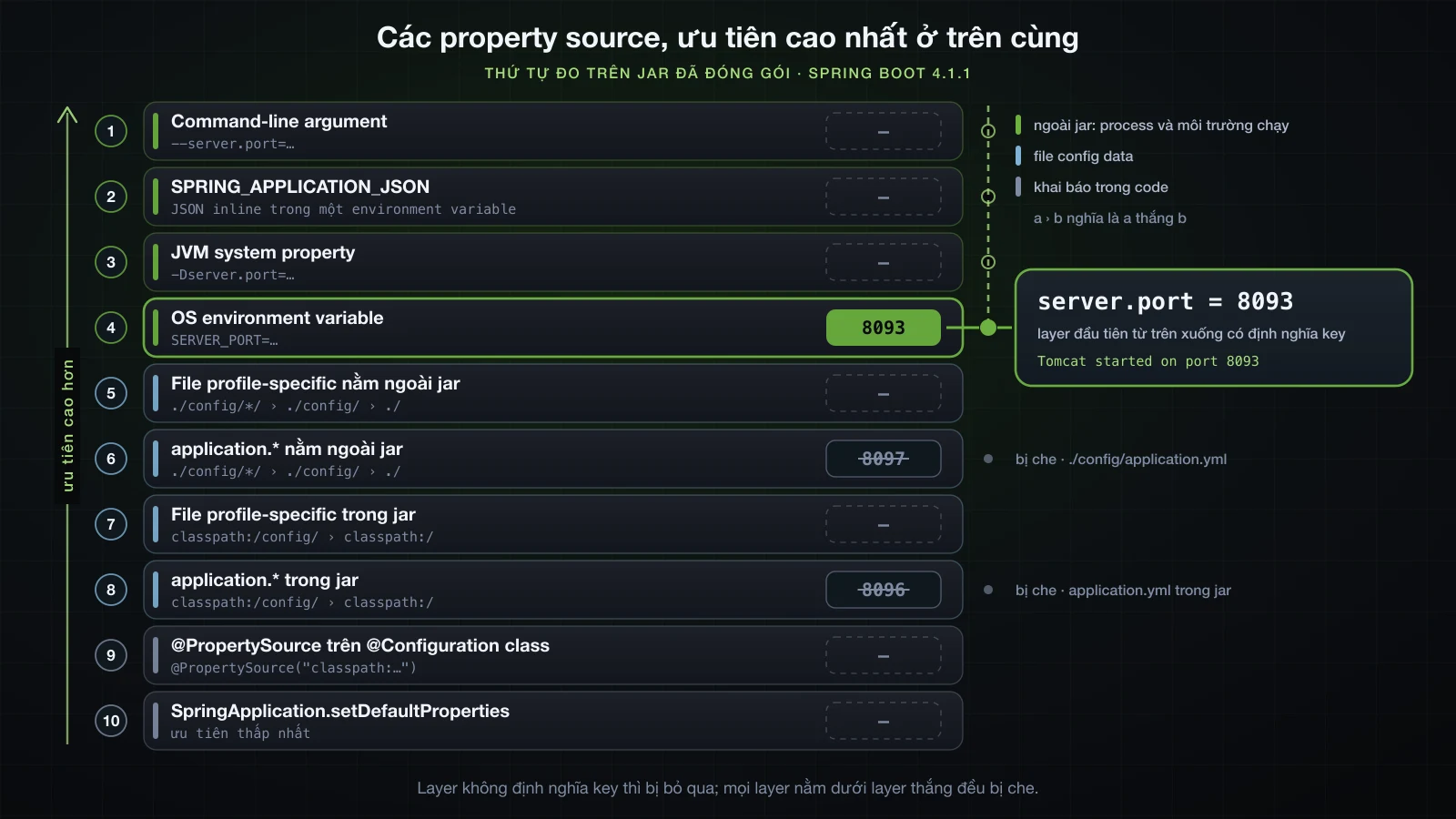
Đối chiếu với tài liệu tham khảo chính thức
Tài liệu tham khảo của Spring Boot 4.1.1 liệt kê mười lăm source, ưu tiên thấp nhất trước: default properties, @PropertySource, config data, RandomValuePropertySource, OS environment variables, Java system properties, JNDI attributes, ServletContext init parameters, ServletConfig init parameters, SPRING_APPLICATION_JSON, command-line arguments, và bốn source dành cho test và devtools ở trên cùng. Với config data, tài liệu đưa ra thứ tự file riêng — application.properties đóng gói, file profile-specific đóng gói, application.properties bên ngoài, file profile-specific bên ngoài — và xếp hạng các vị trí tìm kiếm sao cho classpath root bị classpath /config ghi đè, classpath /config bị thư mục hiện tại ghi đè, rồi tới config/, rồi tới các thư mục con trực tiếp của config/.
Thứ tự đo được khớp với từng điều trong đó. Có ba hệ quả hay khiến người ta bất ngờ:
- Nằm ngoài jar thắng profile-specific.
./application.properties(hạng 10) thắngapplication-prod.propertiestrong jar (hạng 11). File nằm ở đâu quan trọng hơn việc nó có mang tên profile hay không. - Trong jar, mọi file profile-specific thắng mọi file thường, bất kể thư mục:
application-prod.propertiesở classpath root (hạng 12) thắngconfig/application.properties(hạng 13), dùconfig/thắng root khi cả hai đều là file thường. Các vị trí mặc định của Boot tạo thành hai location group — source 4.1.1 khai báo chúng làoptional:classpath:/;optional:classpath:/config/vàoptional:file:./;optional:file:./config/;optional:file:./config/*/— và file profile-specific ghi đè file thường trên toàn bộ một group. Group bên ngoài theo đúng quy tắc đó (hạng 5–10). SPRING_APPLICATION_JSONxếp trên system property, kể cả khi nó đến dưới dạng environment variable, thứ mà tự nó xếp dưới system property.
Các source mà thí nghiệm này không thử được xuất hiện trong danh sách in ra đúng chỗ tài liệu đặt chúng: servletConfigInitParams và servletContextInitParams nằm giữa spring.application.json và systemProperties, còn random, chỉ trả lời các key random.*, nằm ngay trên các file config. Không có source JNDI vì application này không có gì cung cấp JNDI. Ba source dành cho test xếp trên command line và thuộc về Chương 6.
Danh sách in ra còn có ba tên mà danh sách trong tài liệu không có. configurationProperties là một view phủ lên mọi source khác mà Boot dùng để binding, không phải source thật, nên runner bỏ qua nó. applicationInfo chỉ chứa spring.application.version và spring.application.pid. server.ports là nơi Boot ghi lại port mà embedded server đã bind sau khi khởi động. Không cái nào chứa key của bạn.
@PropertySource xếp thứ 15 và thua mọi file. Tài liệu tham khảo còn nêu thêm một lý do để đừng dựa vào nó: các source này chỉ được thêm vào Environment khi application context refresh, quá muộn cho những property như logging.* và spring.main.*.
Spring Boot tìm application.properties ở đâu
Boot tìm application.properties và application.yml ở năm vị trí. Mỗi dòng ghi đè các dòng phía trên, và các file profile-specific tương ứng được tìm ở cùng năm chỗ đó:
| Vị trí | Trong thí nghiệm | Group |
|---|---|---|
classpath:/ | src/main/resources/application.properties | đóng gói |
classpath:/config/ | src/main/resources/config/application.properties | đóng gói |
file:./ | application.properties trong working directory | bên ngoài |
file:./config/ | config/application.properties trong working directory | bên ngoài |
file:./config/*/ | config/override/application.properties; các thư mục con được sắp theo thứ tự chữ cái | bên ngoài |
Thí nghiệm ở trên đã đo cả năm, và mọi vị trí bên ngoài đều thắng mọi vị trí đóng gói (hạng 5–10 so với 11–14). Đó là thứ cho phép người vận hành đổi một giá trị mặc định đã đóng gói bằng cách đặt một file vào working directory của application, không cần đụng vào jar.
Từ quan trọng là working directory. file:./ là thư mục mà process java được khởi động trong đó, không phải thư mục chứa jar. Đây là cùng một jar với application.properties đặt ngay cạnh:
deploy/
├── demo.jar
└── application.properties     app.db-url=jdbc:postgresql://db.internal:5432/sales
Khởi động từ bên trong deploy/:
cd deploy && java -jar demo.jar --server.port=8093app.db-url = jdbc:postgresql://db.internal:5432/salesKhởi động từ thư mục cha:
java -jar deploy/demo.jar --server.port=8093app.db-url = jdbc:postgresql://localhost:5432/salesCùng jar, cùng file trên đĩa, kết quả khác nhau. Một service manager, một scheduler hay một script khởi động java từ thư mục khác sẽ không bao giờ thấy file đặt cạnh jar. Hãy set working directory tường minh — ví dụ WorkingDirectory= trong systemd unit — và kiểm tra lại ở dòng Starting DemoApplication … started by <user> in <directory> ở đầu log khởi động.
Biến môi trường làm nguồn cấu hình
Quy tắc đặt tên, gói trong một câu: viết hoa tên property, đổi dấu chấm thành dấu gạch dưới và bỏ dấu gạch ngang — server.port thành SERVER_PORT, app.db-url thành APP_DBURL. Bài 12 nói đầy đủ các quy tắc binding.
Environment variable là cách chuẩn để cấu hình application chạy trong container, vì ba lý do. Platform set chúng cho từng lần deploy mà không cần build lại, thậm chí không cần mở image. Chúng không cần ghi hay mount file nào. Và ở hạng 4, chúng xếp trên mọi file config, kể cả những file nằm sẵn trong jar — một image cho mọi môi trường, đúng quy tắc mà bài này mở đầu.
SERVER_PORT=8095 APP_DBURL=jdbc:postgresql://db.prod.internal:5432/sales java -jar demo.jaro.s.boot.tomcat.TomcatWebServer : Tomcat started on port 8095 (http) with context path '/'
...
app.support-email = support@example.com
app.db-url = jdbc:postgresql://db.prod.internal:5432/sales
app.page-size = 20
app.debug-sql = falseChúng cũng thắng file profile-specific, và đó là điều cho phép một cách chia việc hữu ích: profile định hình một môi trường, còn environment variable điền những giá trị riêng của từng lần deploy.
APP_DBURL=jdbc:postgresql://db.prod.internal:5432/sales java -jar demo.jar --server.port=8093 --spring.profiles.active=dev2026-09-11T14:49:21.273+07:00 INFO 50004 --- [demo] [ main] com.example.demo.DemoApplication : The following 1 profile is active: "dev"
...
app.support-email = support@example.com
app.db-url = jdbc:postgresql://db.prod.internal:5432/sales
app.page-size = 20
app.debug-sql = truedb-url lấy từ môi trường, còn debug-sql vẫn lấy từ application-dev.yml.
Tham số dòng lệnh ghi đè gần như mọi thứ
Mọi argument dạng --key=value sau tên jar trở thành property trong source commandLineArgs, source đứng đầu thứ tự đo được. Nó thắng một environment variable set cùng key:
SERVER_PORT=8095 java -jar demo.jar --server.port=8093o.s.boot.tomcat.TomcatWebServer : Tomcat started on port 8093 (http) with context path '/'Chỉ các source dành cho test và devtools global settings xếp trên nó. Điều đó khiến command line là công cụ đúng cho một lần ghi đè tạm thời — chạy instance local thứ hai ở port khác, --debug cho một lần điều tra — và là chỗ sai cho bất cứ thứ gì cần tồn tại qua lần restart, vì giá trị chỉ sống trong script hoặc lịch sử shell đã khởi động process.
Nếu application không được phép bị cấu hình lại qua argument — ví dụ một công cụ command line mà argument mang ý nghĩa khác — hãy tắt việc chuyển đổi này:
@SpringBootApplication
public class DemoApplication {

    public static void main(String[] args) {
        SpringApplication app = new SpringApplication(DemoApplication.class);
        app.setAddCommandLineProperties(false);
        app.run(args);
    }
}
Với server.port: 8093 trong application.yml:
java -jar demo.jar --server.port=8094 --spring.profiles.active=dev --app.page-size=992026-09-11T14:50:28.461+07:00 INFO 50687 --- [demo] [ main] com.example.demo.DemoApplication : No active profile set, falling back to 1 default profile: "default"
2026-09-11T14:50:28.924+07:00 INFO 50687 --- [demo] [ main] o.s.boot.tomcat.TomcatWebServer : Tomcat started on port 8093 (http) with context path '/'
...
app.page-size = 20Cả ba argument đều bị bỏ qua: port lấy từ file, không profile nào được kích hoạt, và page-size giữ giá trị gốc.
Import thêm file bằng spring.config.import
spring.config.import kéo thêm một file vào config, được khai báo ngay trong một file config:
spring:
  application:
    name: demo
  config:
    import: file:./extra-config.yml
Khởi động jar trong một thư mục không có extra-config.yml sẽ chặn application trước khi context tồn tại:
14:50:22.240 [main] ERROR org.springframework.boot.diagnostics.LoggingFailureAnalysisReporter --

***************************
APPLICATION FAILED TO START
***************************

Description:

Config data resource 'file [extra-config.yml]' via location 'file:./extra-config.yml' does not exist

Action:

Check that the value 'file:./extra-config.yml' at class path resource [application.yml] from demo-0.0.1-SNAPSHOT.jar - 5:13 is correct, or prefix it with 'optional:'
Dòng Action nêu luôn cách sửa. Với optional:, thiếu file không còn là lỗi:
spring:
  config:
    import: file:./extra-config.yml
    import: optional:file:./extra-config.yml
Khởi động trong cùng thư mục trống đó, application chạy lên với db-url gốc. Sau đó đặt một file extra-config.yml vào thư mục ấy:
app:
db-url: jdbc:postgresql://db.internal:5432/salesapp.db-url = jdbc:postgresql://db.internal:5432/salesGiá trị được import đã thay giá trị trong application.yml. Điều này khớp với tài liệu tham khảo: giá trị từ file được import "take precedence over the file that triggered the import". Dùng import bắt buộc khi application thật sự không chạy được nếu thiếu file, và optional: khi file đó là phần ghi đè mà môi trường này có, môi trường kia không.
Đừng để secret trong application-prod.yml
⚠️ Đừng commit password, API key hay token vào
application-prod.yml, hay bất kỳ file nào khác trongsrc/main/resources.
Mọi thứ trong thư mục đó được copy vào jar và nằm lại trong lịch sử version control, nên một password database trong file profile là thứ ai đọc được repository hoặc tải được artifact đều đọc được — và xóa đi sau đó cũng không xóa được nó khỏi lịch sử. File profile dành cho các cấu hình theo môi trường có thể chia sẻ an toàn: host, kích thước pool, timeout, feature flag.
Secret đi vào application theo đúng cách mọi giá trị riêng của môi trường đi vào, từ bên ngoài jar: một environment variable do platform deploy inject vào, thứ xếp trên mọi file, hoặc một secret store bên ngoài như HashiCorp Vault hay secrets manager của cloud provider, được đề cập trong khóa Advanced. Dù cách nào, repository chỉ giữ tên key và không bao giờ giữ giá trị.
FAQ
Làm sao biết profile nào đang active trong Spring Boot?
Đọc log khởi động. Ngay sau dòng Starting, Boot in hoặc The following N profiles are active: … kèm tên theo thứ tự, hoặc No active profile set, falling back to 1 default profile: "default". Thứ tự trong dòng đó chính là thứ tự mà last-wins dùng cho các file profile riêng biệt, và group xuất hiện ở dạng đã mở rộng thành các thành viên.
Vì sao application-prod.yml không được load?
Đọc dòng profile active trước. Nếu prod không có trong đó, profile chưa bao giờ được kích hoạt: gõ sai, -Dspring.profiles.active đặt sau -jar, hoặc một source ưu tiên cao hơn đã thay giá trị. Nếu prod đang active, kiểm tra file có tên chính xác là application- cộng tên profile không, và với file nằm ngoài jar, kiểm tra process có được khởi động trong thư mục chứa file không. Nếu file đã được load mà vài giá trị vẫn sai, một source cao hơn — environment variable, file bên ngoài, command-line argument — đang set cùng key.
Biến môi trường có ghi đè application.properties không?
Có, ghi đè tất cả. OS environment variable xếp thứ tư trong thứ tự đo được, trên mọi file config, dù đóng gói hay bên ngoài, file thường hay profile-specific. Các source xếp trên chúng là JVM system property, SPRING_APPLICATION_JSON và command-line argument — cộng thêm JNDI attribute, servlet init parameter, các source dành cho test và devtools setting nếu application có những thứ đó.
Một profile có kích hoạt profile khác từ chính file của nó được không?
Từ application-dev.yml thì không: Boot 4.1.1 dừng lại với InvalidConfigDataPropertyException và "is invalid in a profile specific resource". Hãy khai báo tổ hợp đó trong file gốc, dưới dạng group như spring.profiles.group.dev=devdb,devmq, hoặc thêm profile vô điều kiện bằng spring.profiles.include. Trong document on-profile, setting này không bị từ chối nhưng có thể lặng lẽ thay các profile active của bạn, nên cũng đừng đặt nó ở đó.
Thứ tự profile trong spring.profiles.active có quan trọng không?
Với các file riêng biệt thì có: profile đứng cuối danh sách thắng những key mà nhiều profile cùng set, nên dev,local và local,dev cho ra hai giá trị db-url khác nhau. Trong một file nhiều document thì không: document nằm dưới thắng, bất kể thứ tự trên command line. Key chỉ một profile set thì không bị ảnh hưởng trong cả hai trường hợp.
Làm sao kích hoạt profile trong test Spring Boot?
Đặt @ActiveProfiles("test") lên test class. Nó kích hoạt profile cho application context của test đó mà không đụng tới spring.profiles.active ở chỗ nào khác. Chương 6 nói về testing.
Kết luận
Profile là một cái tên. Kích hoạt nó thì các file application-{profile} được load đè lên file gốc theo từng key, và các bean @Profile khớp được đăng ký. Bạn kích hoạt được nó từ file config, environment variable, system property -D đặt trước -jar, hoặc argument --, và vì spring.profiles.active là một property bình thường, source cao nhất trong số đó thay thế phần còn lại. Hai profile active được resolve theo last-wins giữa các file riêng biệt và theo vị trí document trong cùng một file; group mở rộng một tên thành nhiều profile; @Profile expression cần ngoặc để trộn & và |. Và spring.profiles.active chỉ thuộc về các document không gắn profile: Boot 4.1.1 từ chối nó trong file profile-specific và lặng lẽ cư xử sai với nó trong document on-profile.
Thứ tự đứng sau tất cả những điều đó đã được đo trên jar 4.1.1 đóng gói và khớp chính xác với tài liệu tham khảo: command-line argument, SPRING_APPLICATION_JSON, system property, environment variable, rồi tới các file — bên ngoài trước đóng gói, profile-specific trước file thường trong mỗi group, ./config/*/ trước ./config/ trước ./ — với @PropertySource và default properties ở đáy. Giữ jar giống hệt nhau ở mọi môi trường, đặt phần khác biệt vào môi trường, và giữ secret ngoài repository.
Bài tiếp theo chuyển sang một thứ mà môi trường nào cũng cấu hình khác nhau: logging với SLF4J và Logback — log level, định dạng log, và ghi log ra file.
![[Spring Boot Basics] Công cụ tăng năng suất trong Spring Boot: DevTools, Lombok và Actuator cơ bản](/images/blog/sb-productivity-tools-thumbnail.vi.webp)
![[Spring Boot Basics] Gọi API bên ngoài với RestClient trong Spring Boot: GET, POST, xử lý lỗi và timeout](/images/blog/sb-restclient-thumbnail.vi.webp)
![[Spring Boot Basics] IoC và Dependency Injection trong Spring: vì sao không còn tự new object](/images/blog/sb-ioc-thumbnail.vi.webp)
![[Spring Boot Basics] JSON với Jackson 3 và DTO trong Spring Boot: serialize, deserialize và MapStruct](/images/blog/sb-jackson-dto-thumbnail.vi.webp)