Sớm hay muộn, hầu hết ứng dụng đều cần những việc không phải là một endpoint CRUD: nhận một file, trả file đó lại, gửi email, chạy job theo lịch, và chuyển công việc chậm ra khỏi thread xử lý request. Spring Boot biến mỗi việc thành vài dòng code, và mỗi việc có một cách hỏng mà vài dòng đó không cho thấy: một tên file ghi ra ngoài thư mục upload, một response 413 với body rỗng, một tên file download mất dấu, một lần gọi SMTP không bao giờ trả về, một job phải chờ thread của job khác, một method @Async chạy đồng bộ.
Các ví dụ dùng Spring Boot 4.1.1 và Java 21, với Mailpit chạy trong Docker làm mail server, còn curl và Chrome headless làm client. Ứng dụng chạy ở port 8140 thay vì 8080 mặc định; Spring Boot cắt tên thread còn 15 ký tự, nên [nio-8140-exec-4] trong log là http-nio-8140-exec-4. Các số đo thời gian chỉ mang tính tham khảo, và mỗi số đều ghi kèm load average một phút đo ngay trước đó. Đường dẫn tuyệt đối được rút gọn thành /….
Bài viết dùng catalogue sản phẩm làm bối cảnh: ảnh sản phẩm cho upload và download, báo cáo tồn kho thấp và email xác nhận đơn hàng cho phần email, và cũng hai việc đó cho @Scheduled và @Async.
Project: web, JPA và mail từ Spring Initializr
curl -s "https://start.spring.io/starter.zip?type=gradle-project&language=java&bootVersion=4.1.1&javaVersion=21&groupId=com.example&artifactId=demo&name=demo&packageName=com.example.demo&dependencies=web,validation,data-jpa,h2,mail" -o demo.zipdependencies {
implementation 'org.springframework.boot:spring-boot-h2console'
implementation 'org.springframework.boot:spring-boot-starter-data-jpa'
implementation 'org.springframework.boot:spring-boot-starter-mail'
implementation 'org.springframework.boot:spring-boot-starter-validation'
implementation 'org.springframework.boot:spring-boot-starter-webmvc'
runtimeOnly 'com.h2database:h2'
testImplementation 'org.springframework.boot:spring-boot-starter-data-jpa-test'
testImplementation 'org.springframework.boot:spring-boot-starter-mail-test'
testImplementation 'org.springframework.boot:spring-boot-starter-validation-test'
testImplementation 'org.springframework.boot:spring-boot-starter-webmvc-test'
testRuntimeOnly 'org.junit.platform:junit-platform-launcher'
}Upload multipart, @Scheduled và @Async không cần thêm dependency nào: hỗ trợ multipart đi kèm web starter, còn scheduling và thực thi bất đồng bộ nằm sẵn trong spring-context. Chỉ email cần một starter. ./gradlew dependencies cho thấy spring-boot-starter-mail kéo theo module spring-boot-mail, spring-context-support 7.0.9 (nơi chứa JavaMailSender), jakarta.mail-api 2.1.5 và org.eclipse.angus:angus-mail 2.0.5, phần hiện thực giao tiếp bằng SMTP.
Entity Product của các chương trước có thêm hai cột cho ảnh: tên file đã lưu trên đĩa và tên sẽ đưa ra khi download.
@Entity
@Table(name = "products")
public class Product {

    @Id
    @GeneratedValue(strategy = GenerationType.IDENTITY)
    private Long id;

    @Column(nullable = false, unique = true, length = 32)
    private String sku;

    @Column(nullable = false)
    private String name;

    @Column(nullable = false, precision = 10, scale = 2)
    private BigDecimal price;

    @Column(nullable = false)
    private int stock;

    private String imageFile;

    private String imageName;

    protected Product() {
    }

    public Product(String sku, String name, BigDecimal price, int stock) {
        this.sku = sku;
        this.name = name;
        this.price = price;
        this.stock = stock;
    }

    public void attachImage(String imageFile, String imageName) {
        this.imageFile = imageFile;
        this.imageName = imageName;
    }

    public void removeStock(int quantity) {
        this.stock -= quantity;
    }

    // getters for every field
}
Một seeder thêm KB-001 Mechanical keyboard (89.90, tồn kho 12) và MS-002 Wireless mouse (24.50, tồn kho 3). Config ban đầu:
spring.application.name=demo
server.port=8140
spring.datasource.url=jdbc:h2:mem:catalog
spring.jpa.open-in-view=false
Upload file với MultipartFile
@RequestParam MultipartFile và curl -F
Một form HTML có enctype="multipart/form-data", hoặc curl -F, gửi một request có body chia thành nhiều part, mỗi part có header riêng. Spring MVC phân tích các part trước khi controller chạy và đưa part chứa file vào method dưới dạng MultipartFile:
@RestController
@RequestMapping("/api/products")
public class ProductController {

    private static final Logger log = LoggerFactory.getLogger(ProductController.class);

    private final ProductService service;

    public ProductController(ProductService service) {
        this.service = service;
    }

    @PostMapping(path = "/{id}/image", consumes = MediaType.MULTIPART_FORM_DATA_VALUE)
    public ProductResponse uploadImage(@PathVariable long id, @RequestParam("file") MultipartFile file) {
        log.info("part={}, originalFilename={}, contentType={}, size={}",
                file.getName(), file.getOriginalFilename(), file.getContentType(), file.getSize());
        return service.attachImage(id, file);
    }
}@Service
public class ProductService {
private final ProductRepository products;
private final FileStorage storage;
public ProductService(ProductRepository products, FileStorage storage) {
this.products = products;
this.storage = storage;
}
@Transactional
public ProductResponse attachImage(long id, MultipartFile file) {
Product product = products.findById(id).orElseThrow(() -> new ProductNotFoundException(id));
String storedName = storage.store(file);
product.attachImage(storedName, StringUtils.getFilename(file.getOriginalFilename()));
return ProductResponse.from(product);
}
}FileStorage ghi dữ liệu xuống đĩa và là chủ đề của phần sau. -F "file=@path" khiến curl gửi file thành một part tên file:
curl -i -F "file=@Bàn phím cơ.png" http://localhost:8140/api/products/1/imageHTTP/1.1 200
Content-Type: application/json
Content-Length: 110{"id":1,"sku":"KB-001","name":"Mechanical keyboard","price":89.90,"stock":12,"imageName":"Bàn phím cơ.png"}15:54:44.485 INFO [nio-8140-exec-1] c.e.demo.product.ProductController : part=file, originalFilename=Bàn phím cơ.png, contentType=image/png, size=316Method của MultipartFile | Giá trị | Lấy từ đâu |
|---|---|---|
getName() | file | name của part |
getOriginalFilename() | Bàn phím cơ.png | filename của part, đúng như client viết |
getContentType() | image/png | Content-Type của part, curl tự đoán từ đuôi .png |
getSize() | 316 | số byte nhận được |
getInputStream(), getBytes(), transferTo(…) | nội dung | body của part |
Ba thứ trong bảng là dữ liệu client gửi lên: tên file, content type và nội dung. Phần còn lại của code upload tồn tại vì chúng. Một request không có part tên file nhận 400, "detail":"Required part 'file' is not present.", còn một body JSON gửi tới cùng URL nhận 415, "detail":"Content-Type 'application/json' is not supported.", cả hai là ProblemDetail từ advice của series.
Một part JSON và một part file với @RequestPart
Tạo sản phẩm cùng ảnh trong một request cần hai part: sản phẩm dạng JSON và ảnh dạng file. @RequestPart đọc một part qua cùng các message converter như @RequestBody, nên dùng được record và @Valid có tác dụng:
    @PostMapping(consumes = MediaType.MULTIPART_FORM_DATA_VALUE)
    public ResponseEntity<ProductResponse> create(@RequestPart("product") @Valid CreateProductRequest request,
                                                  @RequestPart("image") MultipartFile image) {
        ProductResponse created = service.create(request, image);
        return ResponseEntity.created(URI.create("/api/products/" + created.id())).body(created);
}public record CreateProductRequest(
@NotBlank String sku,
@NotBlank String name,
@NotNull @Positive BigDecimal price,
@PositiveOrZero int stock) {
}Part JSON cần Content-Type riêng, curl thêm bằng ;type=:
curl -i -F 'product={"sku":"HS-003","name":"Gaming headset","price":59.00,"stock":4};type=application/json' \
-F "image=@keyboard.png" http://localhost:8140/api/productsHTTP/1.1 201
Location: /api/products/3
Content-Type: application/json{"id":3,"sku":"HS-003","name":"Gaming headset","price":59.00,"stock":4,"imageName":"keyboard.png"}Không có ;type=application/json, curl gửi part văn bản mà không có header Content-Type nào, --trace-ascii chỉ cho thấy Content-Disposition: form-data; name="product", và request thất bại:
HTTP/1.1 415
Accept: application/json, application/*+json
Content-Type: application/problem+json{"detail":"Content-Type 'application/octet-stream' is not supported.","instance":"/api/products","status":415,"title":"Unsupported Media Type"}Part không có Content-Type được coi là application/octet-stream, và không converter JSON nào đọc được type đó. Gửi JSON từ file bằng -F 'product=@product.json' cũng hỏng y như vậy, vì curl gán nhãn application/octet-stream cho file .json. Trong trình duyệt, hãy append JSON vào FormData dưới dạng new Blob([json], { type: 'application/json' }) vì cùng lý do. Một part là JSON hợp lệ nhưng vi phạm constraint thì tới handler 422 của series dưới dạng MethodArgumentNotValidException:
{"detail":"Request has 2 invalid value(s).","instance":"/api/products","status":422,"title":"Unprocessable Content","errors":[{"field":"price","message":"must be greater than 0"},{"field":"sku","message":"must not be blank"}]}Với các quy tắc security của bài 36, cả hai endpoint upload sẽ chỉ dành cho ADMIN, còn endpoint download ảnh ở phần sau có thể để công khai.
Lưu file upload an toàn
Thư mục lưu trữ cấu hình được với @ConfigurationProperties
Nơi lưu file upload là config, được bind vào một record như bài 12:
@ConfigurationProperties("app.storage")
public record StorageProperties(Path location, Set<String> allowedContentTypes) {
}app.storage.location=uploads/images
app.storage.allowed-content-types=image/png,image/jpegDemoApplication có @ConfigurationPropertiesScan. Spring Boot chuyển chuỗi thành Path; đường dẫn tương đối được tính từ thư mục làm việc, nên production nên đặt một đường dẫn tuyệt đối nằm ngoài thư mục ứng dụng. Trong container, hãy trỏ nó tới một volume được mount, nếu không file sẽ bị xóa cùng container; bài 41 dùng named volume theo đúng cách đó cho dữ liệu của PostgreSQL.
Path traversal: vì sao không thể tin getOriginalFilename()
Code lưu trữ ngắn nhất giữ nguyên tên file của client:
@Service
public class FileStorage {
private static final Logger log = LoggerFactory.getLogger(FileStorage.class);
private final Path root;
public FileStorage(StorageProperties properties) throws IOException {
this.root = properties.location().toAbsolutePath().normalize();
Files.createDirectories(root);
}
public String store(MultipartFile file) {
Path target = root.resolve(file.getOriginalFilename());
log.info("Writing {}", target);
try (InputStream in = file.getInputStream()) {
Files.copy(in, target, StandardCopyOption.REPLACE_EXISTING);
} catch (IOException ex) {
throw new UncheckedIOException(ex);
}
return file.getOriginalFilename();
}
public Resource load(String storedName) {
Path path = root.resolve(storedName);
if (!Files.isReadable(path)) {
throw new StoredFileNotFoundException("File " + storedName + " does not exist.");
}
return new FileSystemResource(path);
}
}Tên file là bất cứ thứ gì client đặt vào header của part, và curl cho phép viết tên tùy ý bằng ;filename=:
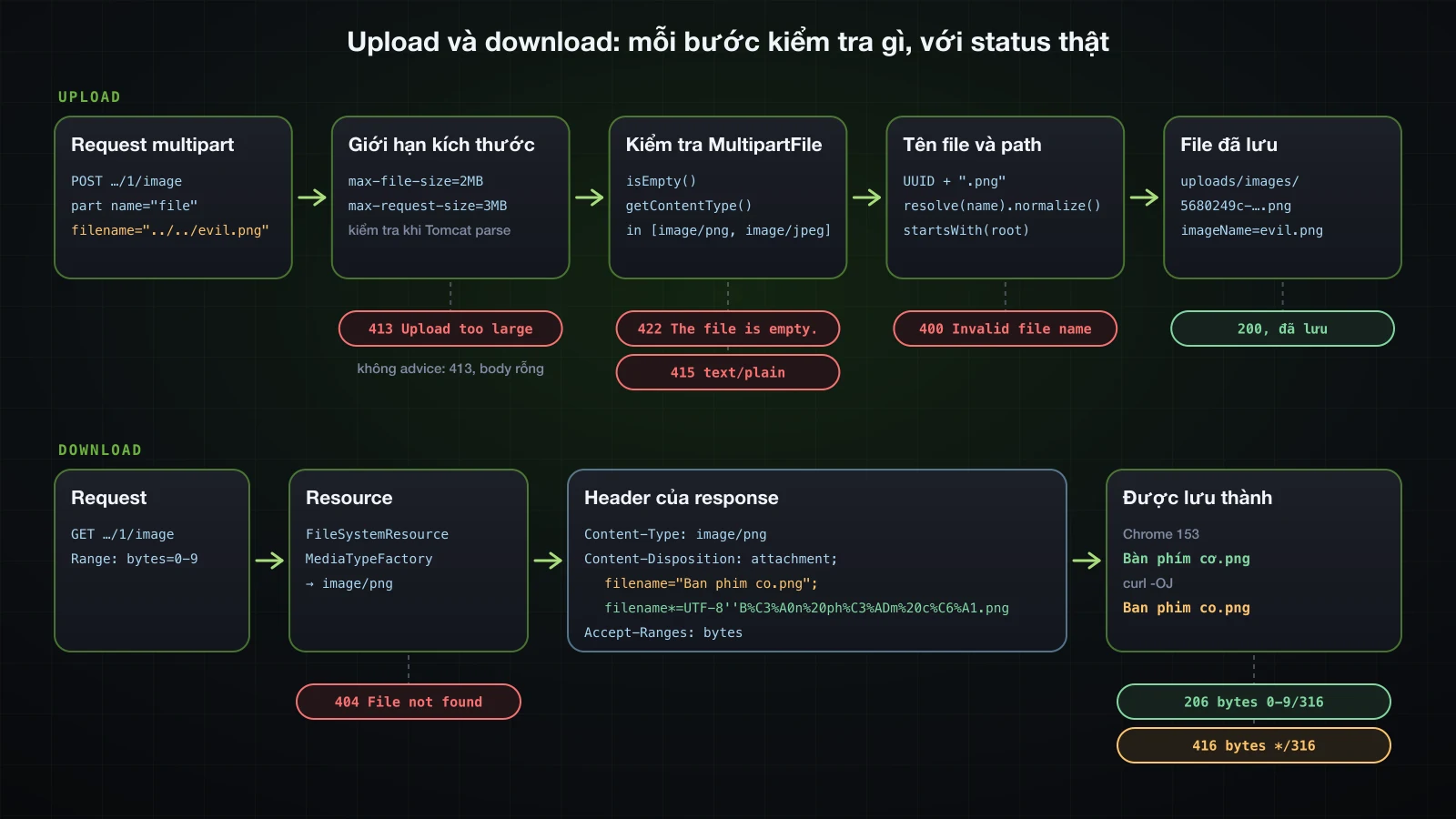
curl -F "file=@notes.txt;filename=../../evil.txt" http://localhost:8140/api/products/2/imageHeader của part gửi đi là Content-Disposition: form-data; name="file"; filename="../../evil.txt". Cả Tomcat lẫn Spring đều không đổi nó:
15:54:44.543 INFO [nio-8140-exec-2] c.e.demo.product.ProductController : part=file, originalFilename=../../evil.txt, contentType=text/plain, size=16
15:54:44.544 INFO [nio-8140-exec-2] com.example.demo.storage.FileStorage : Writing /…/demo/uploads/images/../../evil.txtRequest trả 200, và ls tìm thấy evil.txt, nội dung just some notes, trong thư mục project cạnh build.gradle, cao hơn uploads/images hai cấp. REPLACE_EXISTING nghĩa là cùng request đó có thể ghi đè bất kỳ file nào ứng dụng có quyền ghi. Tên tuyệt đối còn tệ hơn: filename=/…/abs-evil.txt được ghi đúng vào đường dẫn đó, vì Path.resolve trả nguyên argument khi argument là đường dẫn tuyệt đối. ..\..\win-evil.txt vẫn nằm trong thư mục trên macOS, thành một file có dấu gạch ngược trong tên; trên Windows, nơi gạch ngược là dấu phân cách, nó sẽ leo ra ngoài theo cùng cách (không kiểm tra ở đây).
normalize() và startsWith: phép kiểm tra chặn được nó
Mọi đường dẫn mà phần lưu trữ tạo ra nên đi qua một method duy nhất: resolve tên, bỏ các đoạn .., rồi kiểm tra kết quả vẫn nằm dưới thư mục gốc:
public String store(MultipartFile file) {
Path target = root.resolve(file.getOriginalFilename());
Path target = resolve(file.getOriginalFilename());
log.info("Writing {}", target);
// copy as before
}
public Resource load(String storedName) {
Path path = root.resolve(storedName);
Path path = resolve(storedName);
// as before
}
private Path resolve(String name) {
Path target = root.resolve(name).normalize();
if (!target.startsWith(root)) {
throw new InvalidFileException(HttpStatus.BAD_REQUEST, "Invalid file name: " + name);
}
return target;
} public class InvalidFileException extends ErrorResponseException {
public InvalidFileException(HttpStatus status, String detail) {
super(status, ProblemDetail.forStatusAndDetail(status, detail), null);
}
}InvalidFileException kế thừa ErrorResponseException, loại exception mà ResponseEntityExceptionHandler đã tự chuyển thành ProblemDetail của nó như bài 20 cho thấy, nên advice không cần thêm handler. Hai request cũ giờ nhận:
{"detail":"Invalid file name: ../../evil.txt","instance":"/api/products/2/image","status":400,"title":"Bad Request"}{"detail":"Invalid file name: /…/abs-evil.txt","instance":"/api/products/2/image","status":400,"title":"Bad Request"}Không file nào được ghi. sub/../ok.txt được chuẩn hóa thành đường dẫn bên trong thư mục gốc và được chấp nhận. Phép kiểm tra cần java.nio.file.Path.startsWith, method so sánh từng thành phần đường dẫn. So sánh chuỗi là lỗi kinh điển, và một chương trình Java một file với root = /srv/app/uploads cho thấy vì sao:
../../evil.txt resolve=/srv/app/uploads/../../evil.txt normalize=/srv/evil.txt Path.startsWith=false String.startsWith=false
/etc/passwd resolve=/etc/passwd normalize=/etc/passwd Path.startsWith=false String.startsWith=false
../uploads-old/x.png resolve=/srv/app/uploads/../uploads-old/x.png normalize=/srv/app/uploads-old/x.png Path.startsWith=false String.startsWith=true
a/../b.png resolve=/srv/app/uploads/a/../b.png normalize=/srv/app/uploads/b.png Path.startsWith=true String.startsWith=true/srv/app/uploads-old/x.png bắt đầu bằng chuỗi /srv/app/uploads nhưng không nằm trong thư mục đó. Cũng để ý rằng riêng normalize() không làm gì được với /etc/passwd: chính phép kiểm tra mới từ chối nó.
Tên file sinh ngẫu nhiên, file rỗng và content type
Phép kiểm tra là lưới an toàn. Cách sửa thật là không dùng tên của client làm đường dẫn: lưu dưới một tên sinh ngẫu nhiên, và chỉ giữ tên gốc làm nhãn khi download. Cùng method đó cũng từ chối file rỗng và content type nằm ngoài danh sách cho phép:
@Service
public class FileStorage {
private static final Logger log = LoggerFactory.getLogger(FileStorage.class);
private final Path root;
private final Set<String> allowedContentTypes;
public FileStorage(StorageProperties properties) throws IOException {
this.root = properties.location().toAbsolutePath().normalize();
this.allowedContentTypes = properties.allowedContentTypes();
Files.createDirectories(root);
}
public String store(MultipartFile file) {
if (file.isEmpty()) {
throw new InvalidFileException(HttpStatus.UNPROCESSABLE_CONTENT, "The file is empty.");
}
String contentType = file.getContentType();
if (contentType == null || !allowedContentTypes.contains(contentType)) {
throw new InvalidFileException(HttpStatus.UNSUPPORTED_MEDIA_TYPE,
"Content type " + contentType + " is not accepted, use one of " + allowedContentTypes + ".");
}
String storedName = UUID.randomUUID() + "." + MediaType.parseMediaType(contentType).getSubtype();
Path target = resolve(file.getOriginalFilename());
log.info("Writing {}", target);
Path target = resolve(storedName);
try (InputStream in = file.getInputStream()) {
Files.copy(in, target, StandardCopyOption.REPLACE_EXISTING);
Files.copy(in, target);
} catch (IOException ex) {
throw new UncheckedIOException(ex);
}
return file.getOriginalFilename();
return storedName;
}
// load(…) and resolve(…) unchanged
}ProductService đã lưu StringUtils.getFilename(file.getOriginalFilename()) làm nhãn, method chỉ giữ phần sau dấu / cuối cùng: evil.txt cho ../../evil.txt, passwd cho /etc/passwd. Nó không tách theo dấu gạch ngược, điều không sao với một nhãn không bao giờ trở thành đường dẫn. Không có REPLACE_EXISTING, Files.copy từ chối ghi đè file đã có. Kết quả:
| Request | Status | Kết quả |
|---|---|---|
-F "file=@Bàn phím cơ.png" | 200 | lưu thành d3b0a875-e5f8-4672-a8b7-cc8438622c6f.png, imageName Bàn phím cơ.png |
-F "file=@keyboard.png;filename=../../evil.png" | 200 | lưu thành 5680249c-bf06-4ada-a8d3-d7054abb31af.png trong uploads/images, imageName evil.png |
-F "file=@empty.png", 0 byte | 422 | The file is empty. |
-F "file=@notes.txt" | 415 | Content type text/plain is not accepted, use one of [image/png, image/jpeg]. |
-F "file=@notes.txt;type=image/png" | 200 | lưu thành một file .png |
Dòng cuối là giới hạn của phép kiểm tra này. getContentType() là header của part, và client tự chọn nó: một file văn bản khai báo là image/png vẫn được nhận. Kiểm tra content type chặn được sai sót vô tình, không chặn được kẻ tấn công. Kiểm tra byte thật của file và quét mã độc nằm ngoài khóa học này. Cũng lưu ý -F "file=@keyboard.png;filename=../../evil.txt" nhận 415 chứ không phải 200: curl chọn text/plain từ đuôi .txt trong cái tên nó được bảo gửi đi.
Giới hạn kích thước upload: max-file-size và max-request-size
Spring Boot cấu hình hai giới hạn multipart, đọc từ metadata của 4.1.1: spring.servlet.multipart.max-file-size, mặc định 1MB, cho mỗi file, và spring.servlet.multipart.max-request-size, mặc định 10MB, cho cả request. Tomcat áp các giới hạn này trong lúc phân tích các part, trước khi controller được gọi.
Client nhận được gì khi file quá lớn
Một file 2 MB với giới hạn mặc định, trước tiên khi ứng dụng không có @RestControllerAdvice nào:
curl -i -F "file=@big-2mb.png" http://localhost:8140/api/products/1/imageHTTP/1.1 100
HTTP/1.1 413
Content-Length: 0
Date: Wed, 16 Sep 2026 08:55:21 GMT
Connection: closeStatus 413 Content Too Large và body rỗng, không phải JSON lỗi quen thuộc của Spring Boot. Dòng 100 đứng trước vì curl gửi Expect: 100-continue với body lớn. Log có hai dòng WARN … DefaultHandlerExceptionResolver : Resolved [org.springframework.web.multipart.MaxUploadSizeExceededException: Maximum upload size exceeded] giống hệt nhau, và với logging.level.org.springframework.web=DEBUG thì thấy được vì sao là hai:
15:55:35.513 DEBUG [nio-8140-exec-1] o.s.web.servlet.DispatcherServlet : POST "/api/products/1/image", parameters={multipart}
15:55:35.530 DEBUG [nio-8140-exec-1] o.a.c.c.C.[Tomcat].[localhost].[/] : Exception [org.apache.tomcat.util.http.fileupload.impl.FileSizeLimitExceededException: The field file exceeds its maximum permitted size of 1048576 bytes.] occurred parsing parts and will be thrown
15:55:35.532 WARN [nio-8140-exec-1] .w.s.m.s.DefaultHandlerExceptionResolver : Resolved [org.springframework.web.multipart.MaxUploadSizeExceededException: Maximum upload size exceeded]
15:55:35.532 DEBUG [nio-8140-exec-1] o.s.web.servlet.DispatcherServlet : Completed 413 CONTENT_TOO_LARGE
15:55:35.534 DEBUG [nio-8140-exec-1] o.s.web.servlet.DispatcherServlet : "ERROR" dispatch for GET "/error", parameters={multipart}
15:55:35.534 DEBUG [nio-8140-exec-1] o.a.c.c.C.[Tomcat].[localhost].[/] : Exception [org.apache.tomcat.util.http.fileupload.impl.FileSizeLimitExceededException: The field file exceeds its maximum permitted size of 1048576 bytes.] occurred parsing parts and will be thrown
15:55:35.534 WARN [nio-8140-exec-1] .w.s.m.s.DefaultHandlerExceptionResolver : Resolved [org.springframework.web.multipart.MaxUploadSizeExceededException: Maximum upload size exceeded]
15:55:35.534 DEBUG [nio-8140-exec-1] o.s.web.servlet.DispatcherServlet : Exiting from "ERROR" dispatch, status 413DispatcherServlet phân tích các part trước khi tìm handler. FileSizeLimitExceededException của Tomcat trở thành MaxUploadSizeExceededException của Spring, và DefaultHandlerExceptionResolver trả lời nó bằng sendError(413). Việc đó khởi động lượt error dispatch thường lệ tới /error, nhưng error dispatch vẫn là chính request multipart ấy: các part lại được phân tích, lại hỏng, và lượt dispatch kết thúc với status 413 trước khi BasicErrorController kịp ghi gì.
Với GlobalExceptionHandler của series từ bài 20, class kế thừa ResponseEntityExceptionHandler, cùng request đó đã có body, vì class cha có sẵn handler cho exception này:
HTTP/1.1 413
Content-Type: application/problem+json
Connection: close{"detail":"Maximum upload size exceeded","instance":"/api/products/1/image","status":413,"title":"Content Too Large"}max-request-size sinh ra cùng exception. Mười hai part 900 KB, tổng 11.061.067 byte, lọt qua giới hạn từng file và nhận body 413 y hệt; chỉ dòng DEBUG của Tomcat khác: SizeLimitExceededException: the request was rejected because its size (11061067) exceeds the configured maximum (10485760).
413 ProblemDetail nêu rõ giới hạn
"Maximum upload size exceeded" không cho client biết giới hạn là bao nhiêu. Override method của class cha, và đọc các giới hạn đã cấu hình từ bean MultipartProperties của Spring Boot:
@RestControllerAdvice
public class GlobalExceptionHandler extends ResponseEntityExceptionHandler {
private final MultipartProperties multipart;
public GlobalExceptionHandler(MultipartProperties multipart) {
this.multipart = multipart;
}
@Override
protected ResponseEntity<Object> handleMaxUploadSizeExceededException(MaxUploadSizeExceededException ex,
HttpHeaders headers, HttpStatusCode status, WebRequest request) {
ProblemDetail problem = ProblemDetail.forStatusAndDetail(HttpStatus.CONTENT_TOO_LARGE,
"A file may be at most " + multipart.getMaxFileSize().toMegabytes() + " MB and a request at most "
+ multipart.getMaxRequestSize().toMegabytes() + " MB.");
problem.setTitle("Upload too large");
return handleExceptionInternal(ex, problem, headers, HttpStatus.CONTENT_TOO_LARGE, request);
}
// handlers for ProductNotFoundException (404), StoredFileNotFoundException (404),
// the 422 override and the catch-all, as in article 20
}Trong 4.1.1, MultipartProperties nằm ở org.springframework.boot.servlet.autoconfigure. Ảnh sản phẩm lớn hơn 1 MB, nên giới hạn được nâng lên:
spring.servlet.multipart.max-file-size=2MB
spring.servlet.multipart.max-request-size=3MBspring:
servlet:
multipart:
max-file-size: 2MB
max-request-size: 3MB| Request | Status | Body |
|---|---|---|
một file 1.9 MB gửi với image/png | 200 | sản phẩm |
| một file 5 MB | 413 | {"detail":"A file may be at most 2 MB and a request at most 3 MB.","instance":"/api/products/2/image","status":413,"title":"Upload too large"} |
| hai file 1.9 MB trong một request | 413 | giống trên |
Mọi response 413 đều có Connection: close, nên connection không được dùng lại sau một lần upload bị từ chối. Tomcat nuốt bao nhiêu phần body chưa đọc trước khi đóng connection là một setting riêng của nó, server.tomcat.max-swallow-size, mặc định 2MB. Setting này không ngăn response tới nơi: với file 50 MB, curl nhận được 413 cùng body cả khi có lẫn không có Expect: 100-continue, và trong lần không có thì mới gửi được 686.496 byte của file khi câu trả lời tới.
Download file với ResponseEntity và body Resource
Content-Type và Content-Disposition với tên file tiếng Việt
Download trả về một Resource, Spring MVC stream nó ra response mà không nạp cả file vào bộ nhớ. Method load của phần lưu trữ đã trả FileSystemResource; controller thêm hai header quan trọng:
@GetMapping("/{id}/image")
public ResponseEntity<Resource> downloadImage(@PathVariable long id) {
ProductImage image = service.loadImage(id);
MediaType contentType = MediaTypeFactory.getMediaType(image.resource())
.orElse(MediaType.APPLICATION_OCTET_STREAM);
ContentDisposition disposition = ContentDisposition.attachment()
.filename(image.fileName(), StandardCharsets.UTF_8)
.build();
return ResponseEntity.ok()
.contentType(contentType)
.header(HttpHeaders.CONTENT_DISPOSITION, disposition.toString())
.body(image.resource());
} @Transactional(readOnly = true)
public ProductImage loadImage(long id) {
Product product = products.findById(id).orElseThrow(() -> new ProductNotFoundException(id));
if (product.getImageFile() == null) {
throw new StoredFileNotFoundException("Product " + id + " has no image.");
}
return new ProductImage(storage.load(product.getImageFile()), product.getImageName());
}ProductImage là record gồm Resource và nhãn. MediaTypeFactory ánh xạ đuôi file sang media type, ở đây từ tên sinh ngẫu nhiên ….png. new UrlResource(path.toUri()) là cách phổ biến khác để bọc một file; FileSystemResource nhận thẳng Path.
curl -s -D - -o /dev/null http://localhost:8140/api/products/1/imageHTTP/1.1 200
Content-Disposition: attachment; filename="Ban phim co.png"; filename*=UTF-8''B%C3%A0n%20ph%C3%ADm%20c%C6%A1.png
Accept-Ranges: bytes
Content-Type: image/png
Content-Length: 316ContentDisposition ghi tên hai lần, vì header HTTP là ASCII:
filename*=UTF-8''…là dạng của RFC 6266 và RFC 8187: charset, rồi các byte UTF-8 được percent-encode. Nó mang tên thật.filename="Ban phim co.png"là bản dự phòng cho client không hiểufilename*. Spring Framework 7.0.9 tạo nó bằng cách bỏ dấu. Những chữ không phải dấu đặt trên một chữ ASCII thì thành gạch dưới: một tên bắt đầu bằngĐơn hàng đầu tiêncho rafilename="_on hang _au tien.png". Gọi không kèm charset,filename("Bàn phím cơ.png")cho raattachment; filename="Bàn phím cơ.png"với các ký tự không được mã hóa, đúng điều mà biến thể có charset tránh được.
Client dùng giá trị nào quyết định tên file được lưu:
| Client | Bàn phím cơ.png được lưu thành | Đơn hàng đầu tiên.png được lưu thành |
|---|---|---|
| Chrome 153 headless, download qua DevTools protocol | Bàn phím cơ.png | Đơn hàng đầu tiên.png |
curl -OJ, curl 8.7.1 | Ban phim co.png | _on hang _au tien.png |
Chrome dùng filename*; curl -J chỉ dùng filename, nên curl lưu bản dự phòng, và script nào cần tên thật phải tự giải mã filename*. attachment bảo trình duyệt lưu response thành file. ContentDisposition.inline() cho ra cùng header nhưng bắt đầu bằng inline, cho phép trình duyệt hiển thị ảnh hay PDF ngay trong tab, vẫn với tên đó khi "Save as".
404 khi file không tồn tại
Có hai thứ có thể không tồn tại: sản phẩm, và file trên đĩa, chẳng hạn sau khi ai đó dọn thư mục. Advice ánh xạ cả hai sang 404:
@ExceptionHandler(StoredFileNotFoundException.class)
public ProblemDetail handleFileNotFound(StoredFileNotFoundException ex) {
ProblemDetail problem = ProblemDetail.forStatusAndDetail(HttpStatus.NOT_FOUND, ex.getMessage());
problem.setTitle("File not found");
return problem;
}HTTP/1.1 404
Content-Type: application/problem+json{"detail":"File 5680249c-bf06-4ada-a8d3-d7054abb31af.png does not exist.","instance":"/api/products/2/image","status":404,"title":"File not found"}GET /api/products/99/image nhận 404 với "title":"Product not found". Tên sinh ngẫu nhiên trong detail vô hại; một đường dẫn thật thì không.
Range request: 206 Partial Content
Header Accept-Ranges: bytes ở trên không do controller ghi. Với body là Resource, Spring MVC tự xử lý Range:
curl -s -D - -o part.bin -H "Range: bytes=0-9" http://localhost:8140/api/products/1/imageHTTP/1.1 206
Content-Disposition: attachment; filename="Ban phim co.png"; filename*=UTF-8''B%C3%A0n%20ph%C3%ADm%20c%C6%A1.png
Accept-Ranges: bytes
Content-Range: bytes 0-9/316
Content-Type: image/png
Content-Length: 10part.bin chứa mười byte đầu của file, 89 50 4E 47 0D 0A 1A 0A 00 00, chữ ký PNG. Range: bytes=-5, năm byte cuối, cũng nhận 206. Một Range: bytes=5000-6000 không thể đáp ứng nhận 416 với Content-Range: bytes */316, dù response vẫn mang đủ 316 byte. Đó là thứ cho phép trình duyệt tải tiếp một file đang dở hay trình phát video tua, mà bạn không phải viết code nào.
Gửi email với JavaMailSender
Property spring.mail và Mailpit
Máy phát triển không nên gửi email thật. Mailpit là một SMTP server nhận mọi thứ, giữ lại, và hiển thị chúng qua giao diện web và một API JSON:
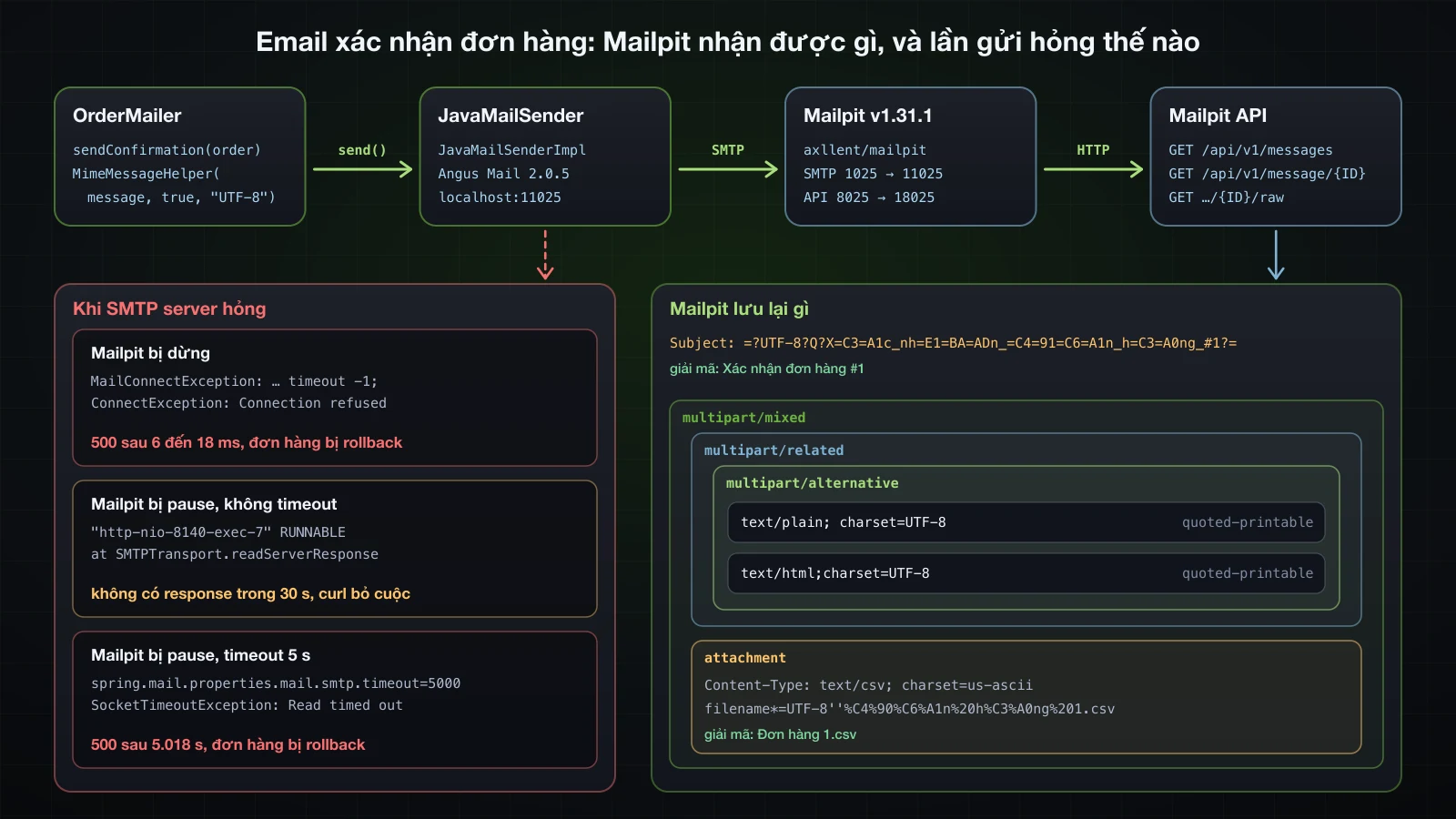
docker run -d --name mailpit -p 11025:1025 -p 18025:8025 axllent/mailpit:v1.31.1SMTP ở port 11025, giao diện và API ở port 18025 của máy host. spring-boot-starter-mail chỉ tạo bean JavaMailSender khi spring.mail.host được đặt, và host lẫn port đều không có giá trị mặc định trong metadata của 4.1.1. Thiếu host, ứng dụng khởi động thất bại với Parameter 0 of constructor in com.example.demo.order.OrderMailer required a bean of type 'org.springframework.mail.javamail.JavaMailSender' that could not be found.
spring.mail.host=localhost
spring.mail.port=11025spring:
mail:
host: localhost
port: 11025spring.mail.default-encoding mặc định là UTF-8 và spring.mail.protocol là smtp.
Email văn bản thuần với SimpleMailMessage
Báo cáo tồn kho thấp gửi nhóm vận hành chỉ cần văn bản. Dòng @Scheduled được giải thích ở phần scheduling; trong lần thử này biểu thức cron được đặt là */30 * * * * *, cứ 30 giây một lần:
@Component
public class LowStockJob {
private static final Logger log = LoggerFactory.getLogger(LowStockJob.class);
private final ProductRepository products;
private final JavaMailSender mailSender;
public LowStockJob(ProductRepository products, JavaMailSender mailSender) {
this.products = products;
this.mailSender = mailSender;
}
@Scheduled(cron = "${app.jobs.low-stock.cron}", zone = "Asia/Ho_Chi_Minh")
public void reportLowStock() {
List<Product> lowStock = products.findByStockLessThanOrderBySku(5);
log.info("Low-stock check: {} product(s) below 5", lowStock.size());
if (lowStock.isEmpty()) {
return;
}
SimpleMailMessage message = new SimpleMailMessage();
message.setFrom("catalogue@example.com");
message.setTo("ops@example.com");
message.setSubject("Low stock: " + lowStock.size() + " product(s)");
message.setText(lowStock.stream()
.map(p -> p.getSku() + " " + p.getName() + ": " + p.getStock() + " left")
.collect(Collectors.joining("\n")));
mailSender.send(message);
}
}API của Mailpit liệt kê các message và trả mã nguồn của từng message:
curl -s http://localhost:18025/api/v1/messages
curl -s http://localhost:18025/api/v1/message/4kbQLSc06KEf7nNWVykDGR/rawReturn-Path: <catalogue@example.com>
Received: from localhost (unknown [192.168.65.1])
by d7e2d646a04e (Mailpit) with SMTP
for <ops@example.com>; Wed, 16 Sep 2026 08:59:00 +0000 (UTC)
Date: Wed, 16 Sep 2026 15:59:00 +0700 (ICT)
From: catalogue@example.com
To: ops@example.com
Message-ID: <380803817.1.1789549140036@localhost>
Subject: Low stock: 2 product(s)
MIME-Version: 1.0
Content-Type: text/plain; charset=UTF-8
Content-Transfer-Encoding: 7bit
HS-003 Gaming headset: 4 left
MS-002 Wireless mouse: 3 leftMailpit thêm Return-Path và Received; phần còn lại là những gì Angus Mail gửi. SimpleMailMessage là một part text/plain duy nhất, và với nội dung ASCII nó không cần mã hóa gì.
HTML, bản plain-text thay thế và attachment với MimeMessageHelper
Email xác nhận đơn hàng gửi khách viết bằng tiếng Việt, có bản HTML và một attachment CSV. Việc đó cần một MIME message, dựng bằng MimeMessageHelper:
@Service
public class OrderMailer {
private static final Logger log = LoggerFactory.getLogger(OrderMailer.class);
private final JavaMailSender mailSender;
public OrderMailer(JavaMailSender mailSender) {
this.mailSender = mailSender;
}
public void sendConfirmation(OrderConfirmation order) {
log.info("Sending confirmation for order {}", order.orderId());
mailSender.send(message -> {
MimeMessageHelper helper = new MimeMessageHelper(message, true, "UTF-8");
helper.setFrom("shop@example.com");
helper.setTo(order.customerEmail());
helper.setSubject("Xác nhận đơn hàng #" + order.orderId());
helper.setText(plainText(order), html(order));
String csv = "order,product,quantity,total\n" + order.orderId() + "," + order.productName()
+ "," + order.quantity() + "," + order.total() + "\n";
helper.addAttachment("Đơn hàng " + order.orderId() + ".csv",
new ByteArrayResource(csv.getBytes(StandardCharsets.UTF_8)), "text/csv");
});
log.info("Confirmation for order {} sent", order.orderId());
}
private static String plainText(OrderConfirmation order) {
return "Cảm ơn bạn đã đặt hàng.\nĐơn hàng #%d: %d x %s\nTổng cộng: %s USD\n"
.formatted(order.orderId(), order.quantity(), order.productName(), order.total());
}
private static String html(OrderConfirmation order) {
return "<h1>Cảm ơn bạn đã đặt hàng</h1><p>Đơn hàng <b>#%d</b>: %d x %s</p><p>Tổng cộng: <b>%s USD</b></p>"
.formatted(order.orderId(), order.quantity(), HtmlUtils.htmlEscape(order.productName()), order.total());
}
}send(message -> { … })nhận mộtMimeMessagePreparator.MimeMessageHelpernémMessagingExceptionlà checked exception, và bên trong preparator Spring chuyển nó thành hệ exception uncheckedMailExceptioncủa Spring.new MimeMessageHelper(message, true, "UTF-8"):trueyêu cầu message multipart, bắt buộc khi có attachment;"UTF-8"là encoding của subject và nội dung.setText(plain, html)gửi cả hai bản; chương trình đọc mail hiển thị bản nó hỗ trợ.HtmlUtils.htmlEscapengăn tên sản phẩm chèn markup vào HTML.
Mailer nhận record OrderConfirmation, không nhận entity Order, điều quan trọng khi nó chạy trên thread khác. OrderService.place lưu đơn hàng rồi gọi nó:
@Transactional
public OrderResponse place(PlaceOrderRequest request) {
Product product = products.findById(request.productId())
.orElseThrow(() -> new ProductNotFoundException(request.productId()));
product.removeStock(request.quantity());
BigDecimal total = product.getPrice().multiply(BigDecimal.valueOf(request.quantity()));
Order order = orders.save(new Order(request.customerEmail(), product, request.quantity(), total));
mailer.sendConfirmation(new OrderConfirmation(order.getId(), order.getCustomerEmail(),
product.getName(), order.getQuantity(), total));
return OrderResponse.from(order);
}Đơn hàng được rút gọn còn một sản phẩm và email của khách, và OrderController ánh xạ POST /api/orders tới nó với 201 và header Location. Sau POST /api/orders với {"customerEmail":"lan@example.com","productId":1,"quantity":2}, mã nguồn Mailpit lưu lại, bỏ hai dòng Return-Path và Received:
Date: Wed, 16 Sep 2026 15:59:28 +0700 (ICT)
From: shop@example.com
To: lan@example.com
Message-ID: <1610773479.5.1789549168187@localhost>
Subject: =?UTF-8?Q?X=C3=A1c_nh=E1=BA=ADn_=C4=91=C6=A1n_h=C3=A0ng_#1?=
MIME-Version: 1.0
Content-Type: multipart/mixed;
boundary="----=_Part_2_394136627.1789549168128"
------=_Part_2_394136627.1789549168128
Content-Type: multipart/related;
boundary="----=_Part_3_1015054981.1789549168129"
------=_Part_3_1015054981.1789549168129
Content-Type: multipart/alternative;
boundary="----=_Part_4_1919655689.1789549168136"
------=_Part_4_1919655689.1789549168136
Content-Type: text/plain; charset=UTF-8
Content-Transfer-Encoding: quoted-printable
C=E1=BA=A3m =C6=A1n b=E1=BA=A1n =C4=91=C3=A3 =C4=91=E1=BA=B7t h=C3=A0ng.
=C4=90=C6=A1n h=C3=A0ng #1: 2 x Mechanical keyboard
T=E1=BB=95ng c=E1=BB=99ng: 179.80 USD
------=_Part_4_1919655689.1789549168136
Content-Type: text/html;charset=UTF-8
Content-Transfer-Encoding: quoted-printable
<h1>C=E1=BA=A3m =C6=A1n b=E1=BA=A1n =C4=91=C3=A3 =C4=91=E1=BA=B7t h=C3=A0ng=
</h1><p>=C4=90=C6=A1n h=C3=A0ng <b>#1</b>: 2 x Mechanical keyboard</p><p>T=
=E1=BB=95ng c=E1=BB=99ng: <b>179.80 USD</b></p>
------=_Part_4_1919655689.1789549168136--
------=_Part_3_1015054981.1789549168129--
------=_Part_2_394136627.1789549168128
Content-Type: text/csv; charset=us-ascii;
name*=UTF-8''%C4%90%C6%A1n%20h%C3%A0ng%201.csv
Content-Transfer-Encoding: 7bit
Content-Disposition: attachment;
filename*=UTF-8''%C4%90%C6%A1n%20h%C3%A0ng%201.csv
order,product,quantity,total
1,Mechanical keyboard,2,179.80
------=_Part_2_394136627.1789549168128--Subjectlà một encoded word theo RFC 2047:=?UTF-8?Q?…?=, các byte UTF-8 ở dạng quoted-printable,_thay cho dấu cách.- Cấu trúc là
multipart/mixedchứa mộtmultipart/related(chỗ dành cho ảnh inline), bên trong làmultipart/alternativegồmtext/plainvàtext/html, và cạnh đó là attachment. Chế độ multipart củaMimeMessageHelperdựng ra cách lồng này. - Cả hai part văn bản dùng
quoted-printable, vì tiếng Việt không phải ASCII 7-bit. - Tên attachment dùng dạng
filename*=UTF-8''…của RFC 2231, bản tương ứng trong email của thứ mà header download đã dùng. Bản thân nội dung CSV là ASCII, nên Angus Mail gắn nhãncharset=us-asciivà7bit.
GET /api/v1/message/{ID} trả về dạng đã giải mã: "Subject": "Xác nhận đơn hàng #1", văn bản thuần và HTML, và "Attachments": [{"PartID": "2", "FileName": "Đơn hàng 1.csv", "ContentType": "text/csv", "Size": 62, …}].
Khi SMTP server tắt hoặc không trả lời
mailSender.send là một lần gọi mạng nằm bên trong transaction của request. Khi container Mailpit bị dừng (docker stop mailpit):
{"detail":"An unexpected error occurred.","instance":"/api/orders","status":500,"title":"Internal Server Error"}15:59:46.219 ERROR [io-8140-exec-10] c.e.demo.common.GlobalExceptionHandler : Unhandled exception on POST /api/orders
org.springframework.mail.MailSendException: Mail server connection failed. Failed messages: org.eclipse.angus.mail.util.MailConnectException: Couldn't connect to host, port: localhost, 11025; timeout -1;
nested exception is:
java.net.ConnectException: Connection refused; message exceptions (1) are:
Failed message 1: org.eclipse.angus.mail.util.MailConnectException: Couldn't connect to host, port: localhost, 11025; timeout -1;
nested exception is:
java.net.ConnectException: Connection refusedConnection bị từ chối thì hỏng nhanh: năm request như vậy mất từ 6 đến 18 ms ở load average 4.0. MailSendException là một RuntimeException, nên @Transactional rollback đơn hàng. Tồn kho của sản phẩm 1 vẫn là 6 sau ba đơn thất bại như thế, tức là khách nhận 500 cho một đơn hàng lẽ ra đã thành công nếu bỏ qua email.
Một server nhận connection rồi không bao giờ trả lời còn tệ hơn. docker pause mailpit đóng băng container trong khi port vẫn mở:
curl -s --max-time 30 -H "Content-Type: application/json" \
-d '{"customerEmail":"lan@example.com","productId":2,"quantity":1}' http://localhost:8140/api/orderscurl bỏ cuộc sau 30.0 giây với exit code 28 và không có response, ở load average khoảng 11. timeout -1 trong message ở trên là lý do: Spring Boot không đặt SMTP timeout nào, và mặc định của JavaMail là chờ mãi mãi. jstack cho thấy thread của request đang ở đâu:
"http-nio-8140-exec-7" #46 [37635] daemon prio=5 os_prio=31 cpu=91.80ms elapsed=139.42s tid=0x0000000813d21c00 nid=37635 runnable [0x0000000172e3b000]
java.lang.Thread.State: RUNNABLE
…
at org.eclipse.angus.mail.smtp.SMTPTransport.readServerResponse(SMTPTransport.java:2500)
at org.eclipse.angus.mail.smtp.SMTPTransport.openServer(SMTPTransport.java:2205)
at org.eclipse.angus.mail.smtp.SMTPTransport.protocolConnect(SMTPTransport.java:729)
…
at org.springframework.mail.javamail.JavaMailSenderImpl.connectTransport(JavaMailSenderImpl.java:467)
at org.springframework.mail.javamail.JavaMailSenderImpl.doSend(JavaMailSenderImpl.java:386)
…
at com.example.demo.order.OrderMailer.sendConfirmation(OrderMailer.java:26)Nó đang chờ lời chào của SMTP server. Job tồn kho thấp, đến hạn lúc 16:00:30 khi Mailpit đang bị pause, kẹt ở đúng frame đó trên thread scheduling-1 suốt 17 giây. Sau docker unpause mailpit, 39 giây sau request, log ghi Confirmation for order 7 sent: đơn hàng được commit dù client đã bỏ cuộc từ lâu, và mail tồn kho thấp tới sớm hơn nó năm mili giây. Hãy đặt timeout, tính bằng mili giây, qua spring.mail.properties, nơi các key được chuyển thẳng vào JavaMail session:
spring.mail.host=localhost
spring.mail.port=11025
spring.mail.properties.mail.smtp.connectiontimeout=5000
spring.mail.properties.mail.smtp.timeout=5000
spring.mail.properties.mail.smtp.writetimeout=5000 spring:
mail:
host: localhost
port: 11025
properties:
mail.smtp.connectiontimeout: 5000
mail.smtp.timeout: 5000
mail.smtp.writetimeout: 5000connectiontimeout giới hạn việc kết nối TCP, timeout giới hạn mỗi lần đọc, writetimeout mỗi lần ghi. Mailpit lại bị pause, load average 4.0, hai đơn hàng đều nhận 500 sau 5.018 s:
org.springframework.mail.MailSendException: Mail server connection failed. Failed messages: jakarta.mail.MessagingException: Exception reading response;
nested exception is:
java.net.SocketTimeoutException: Read timed out; message exceptions (1) are:Timeout chặn được thiệt hại, nhưng mọi đơn hàng vẫn phải chờ SMTP và vẫn hỏng theo nó:
| Mailpit | Response | Thời gian | Load average |
|---|---|---|---|
| đang chạy | 201 | 10.9 đến 24.3 ms qua 5 request | 4.2 |
| đã dừng | 500, đơn hàng bị rollback | 6.2 đến 18.2 ms qua 5 request | 4.0 |
| bị pause, không timeout | không có | curl bỏ cuộc sau 30.0 s | khoảng 11 |
| bị pause, timeout 5 s | 500, đơn hàng bị rollback | 5.018 s, hai lần | 4.0 |
Đó là lý do cần @Async, ở cuối bài.
SMTP provider thật, template và testing
- SMTP provider thật cần
spring.mail.host,port587,username,passwordlấy từ environment variable thay vì ghi trong file,spring.mail.properties.mail.smtp.auth=truevàspring.mail.properties.mail.smtp.starttls.enable=true; với port 465 thì đặtspring.mail.ssl.enabled=true. Gmail chẳng hạn yêu cầu app password hoặc OAuth2 thay vì mật khẩu tài khoản. Phần này không được chạy ở đây. - Template: chuỗi định dạng không đi xa được quá một đoạn văn; hãy render HTML bằng
TemplateEnginecủa Thymeleaf từ bài 24 và truyền kết quả vàosetText. Không trình bày ở đây. - Testing: trong 4.1.1,
spring-boot-starter-mail-testchỉ gộpspring-boot-starter-mailvớispring-boot-starter-test; nó không có SMTP server giả nào. Hãy mockJavaMailSenderbằng@MockitoBeantrong unit test và slice test, và gửi tới Mailpit khi cần xem message thật, đừng bao giờ gửi vào hộp thư thật.
Lên lịch job với @Scheduled
@EnableScheduling, fixedRate, fixedDelay và cron
Method @Scheduled chỉ chạy sau khi scheduling được bật một lần, trong một configuration class bất kỳ:
@Configuration
@EnableScheduling
public class TaskConfig {
}Ba cách nói "khi nào", trong một class job thử nghiệm chỉ bật với profile schedule-lab:
@Component
@Profile("schedule-lab")
public class ScheduleLab {
private static final Logger log = LoggerFactory.getLogger(ScheduleLab.class);
@Scheduled(fixedRate = 5, timeUnit = TimeUnit.SECONDS)
public void publishStats() {
log.info("publishStats (fixedRate 5 s)");
}
@Scheduled(fixedDelay = 5000, initialDelay = 2000)
public void cleanUpOrphanImages() {
log.info("cleanUpOrphanImages (fixedDelay 5 s, initialDelay 2 s)");
}
@Scheduled(cron = "*/10 * * * * *", zone = "Asia/Ho_Chi_Minh")
public void everyTenSeconds() {
log.info("everyTenSeconds (cron */10)");
}
}17 giây đầu tiên, load average 7.1; job ErrorLab của một phần sau chạy trong cùng ứng dụng và được lược khỏi đoạn trích này:
16:07:24.219 INFO [ scheduling-1] com.example.demo.lab.ScheduleLab : publishStats (fixedRate 5 s)
16:07:24.224 INFO [ main] com.example.demo.DemoApplication : Started DemoApplication in 2.08 seconds (process running for 2.382)
16:07:26.222 INFO [ scheduling-1] com.example.demo.lab.ScheduleLab : cleanUpOrphanImages (fixedDelay 5 s, initialDelay 2 s)
16:07:29.219 INFO [ scheduling-1] com.example.demo.lab.ScheduleLab : publishStats (fixedRate 5 s)
16:07:30.006 INFO [ scheduling-1] com.example.demo.lab.ScheduleLab : everyTenSeconds (cron */10)
16:07:31.222 INFO [ scheduling-1] com.example.demo.lab.ScheduleLab : cleanUpOrphanImages (fixedDelay 5 s, initialDelay 2 s)
16:07:34.222 INFO [ scheduling-1] com.example.demo.lab.ScheduleLab : publishStats (fixedRate 5 s)
16:07:36.223 INFO [ scheduling-1] com.example.demo.lab.ScheduleLab : cleanUpOrphanImages (fixedDelay 5 s, initialDelay 2 s)
16:07:39.220 INFO [ scheduling-1] com.example.demo.lab.ScheduleLab : publishStats (fixedRate 5 s)
16:07:40.004 INFO [ scheduling-1] com.example.demo.lab.ScheduleLab : everyTenSeconds (cron */10)
16:07:41.228 INFO [ scheduling-1] com.example.demo.lab.ScheduleLab : cleanUpOrphanImages (fixedDelay 5 s, initialDelay 2 s)| Thuộc tính | Ý nghĩa | Trong log |
|---|---|---|
fixedRate | bắt đầu theo chu kỳ, tính từ lúc lần trước bắt đầu | lần đầu chạy ngay lúc khởi động, trước Started DemoApplication, rồi cứ 5 s |
fixedDelay | chờ đủ chu kỳ sau khi lần trước kết thúc | cứ 5 s sau lần chạy trước |
initialDelay | chờ trước lần chạy đầu tiên | cleanUpOrphanImages chạy lần đầu 2 s sau khi khởi động |
timeUnit | đơn vị của các con số, mặc định là mili giây | fixedRate = 5, timeUnit = SECONDS |
cron | lịch theo lịch biểu | vào :30 và :40, bất kể lúc khởi động |
zone | múi giờ dùng để đọc biểu thức cron | múi giờ của server nếu bỏ trống |
Cron của Spring có sáu trường, giây đứng đầu: second minute hour day-of-month month day-of-week. 0 0 7 * * * là 07:00:00 mỗi ngày. Biểu thức năm trường theo cú pháp Unix hỏng ngay lúc khởi động: --app.jobs.low-stock.cron="0 7 * * *" làm ứng dụng dừng với Encountered invalid @Scheduled method 'reportLowStock': Cron expression must consist of 6 fields (found 5 in "0 7 * * *"). Job tồn kho thấp đọc biểu thức từ một property placeholder, nên mỗi môi trường tự đặt giá trị riêng:
app.jobs.low-stock.cron=0 0 7 * * *Với zone = "Asia/Ho_Chi_Minh", đó là 7 giờ sáng giờ Việt Nam, kể cả khi server chạy theo UTC. Mọi lần chạy trong log trên đều ở scheduling-1.
Một thread scheduler: job chậm làm trễ các job khác
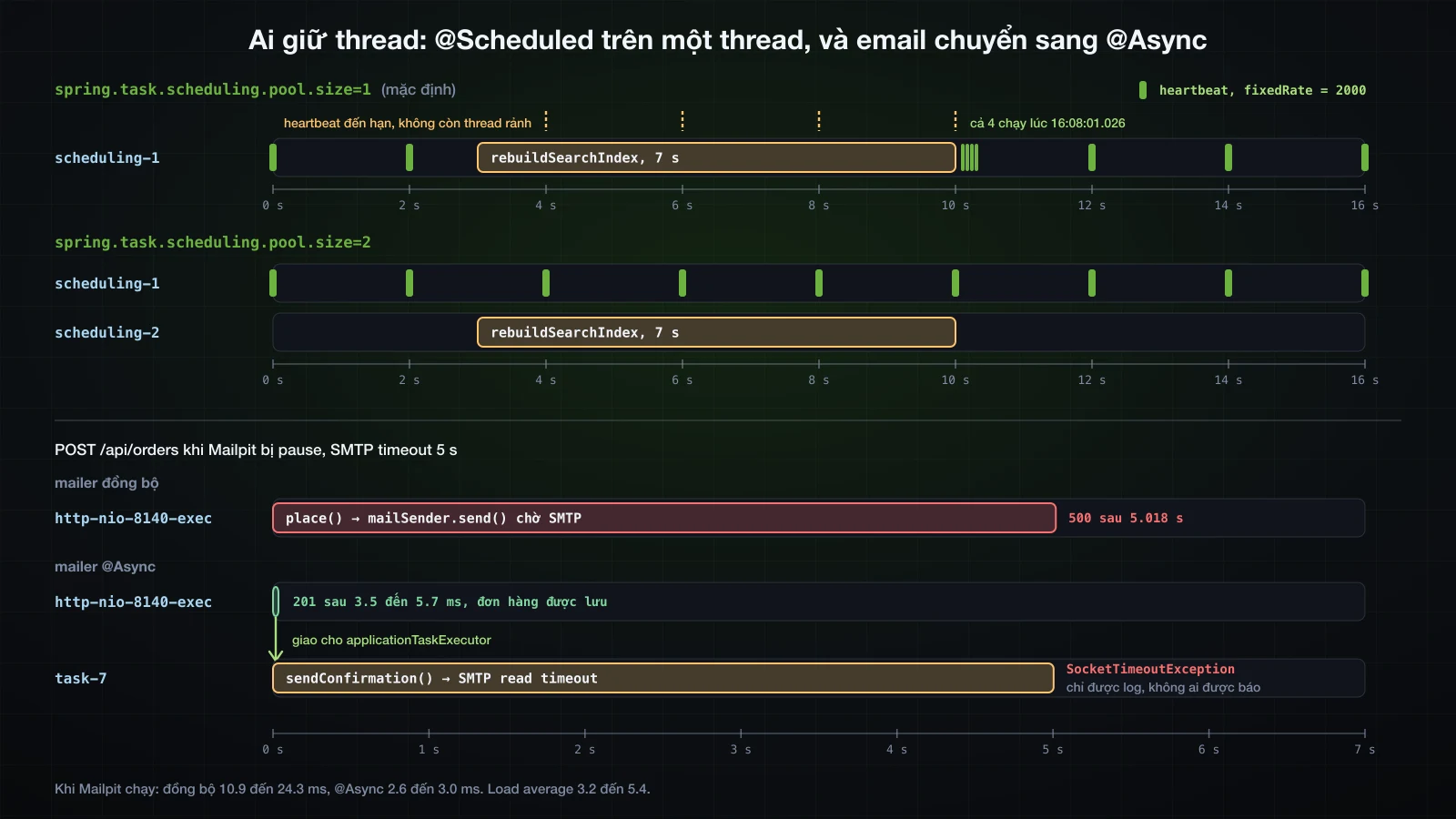
spring.task.scheduling.pool.size mặc định là 1: taskScheduler của Spring Boot là một ThreadPoolTaskScheduler với một thread, và mọi method @Scheduled trong ứng dụng dùng chung nó. Một heartbeat mỗi 2 giây và một lần dựng lại search index mất 7 giây:
@Component
@Profile("slow-lab")
public class SlowLab {
private static final Logger log = LoggerFactory.getLogger(SlowLab.class);
@Scheduled(fixedRate = 2000)
public void heartbeat() {
log.info("heartbeat");
}
@Scheduled(fixedDelay = 60000, initialDelay = 3000)
public void rebuildSearchIndex() throws InterruptedException {
log.info("rebuildSearchIndex started");
Thread.sleep(7000);
log.info("rebuildSearchIndex finished");
}
}Load average 5.4:
16:07:51.025 INFO [ scheduling-1] com.example.demo.lab.SlowLab : heartbeat
16:07:53.028 INFO [ scheduling-1] com.example.demo.lab.SlowLab : heartbeat
16:07:54.025 INFO [ scheduling-1] com.example.demo.lab.SlowLab : rebuildSearchIndex started
16:08:01.026 INFO [ scheduling-1] com.example.demo.lab.SlowLab : rebuildSearchIndex finished
16:08:01.026 INFO [ scheduling-1] com.example.demo.lab.SlowLab : heartbeat
16:08:01.026 INFO [ scheduling-1] com.example.demo.lab.SlowLab : heartbeat
16:08:01.026 INFO [ scheduling-1] com.example.demo.lab.SlowLab : heartbeat
16:08:01.026 INFO [ scheduling-1] com.example.demo.lab.SlowLab : heartbeat
16:08:03.024 INFO [ scheduling-1] com.example.demo.lab.SlowLab : heartbeatCác heartbeat đến hạn lúc :55, :57, :59 và :01 không có thread để chạy. Chúng chạy khi việc dựng index trả scheduling-1 lại, cả bốn trong cùng một mili giây, rồi heartbeat trở lại nhịp 2 giây. Một heartbeat mà hệ thống giám sát theo dõi sẽ trông như đã chết trong 8 giây; phần SMTP đã cho thấy chính thread này kẹt 17 giây trong một lần gửi mail thật. Thêm một thread:
spring.task.scheduling.pool.size=2spring:
task:
scheduling:
pool:
size: 216:08:14.071 INFO [ scheduling-1] com.example.demo.lab.SlowLab : heartbeat
16:08:15.069 INFO [ scheduling-2] com.example.demo.lab.SlowLab : rebuildSearchIndex started
16:08:16.071 INFO [ scheduling-1] com.example.demo.lab.SlowLab : heartbeat
16:08:18.072 INFO [ scheduling-1] com.example.demo.lab.SlowLab : heartbeat
16:08:20.071 INFO [ scheduling-1] com.example.demo.lab.SlowLab : heartbeat
16:08:22.072 INFO [ scheduling-1] com.example.demo.lab.SlowLab : heartbeat
16:08:22.074 INFO [ scheduling-2] com.example.demo.lab.SlowLab : rebuildSearchIndex finished
16:08:24.073 INFO [ scheduling-1] com.example.demo.lab.SlowLab : heartbeatLoad average 4.9. Việc dựng index lấy scheduling-2, và heartbeat giữ nhịp 2 giây trên scheduling-1. Hãy đặt kích thước pool theo số job có thể chạy cùng lúc, và giữ việc chậm, như một lần gọi SMTP chậm, ra khỏi method được lên lịch hoặc đặt sau một timeout.
fixedRate làm gì khi một lần chạy lâu hơn chu kỳ
Một job fixedRate = 1000 mà công việc mất 2.5 giây, với hai thread scheduler sẵn sàng:
@Component
@Profile("overrun-lab")
public class OverrunLab {
private static final Logger log = LoggerFactory.getLogger(OverrunLab.class);
private int run;
@Scheduled(fixedRate = 1000)
public void syncPrices() throws InterruptedException {
int current = ++run;
log.info("syncPrices run {} started", current);
Thread.sleep(2500);
log.info("syncPrices run {} finished", current);
}
}Load average 4.8:
16:08:32.343 INFO [ scheduling-1] com.example.demo.lab.OverrunLab : syncPrices run 1 started
16:08:34.848 INFO [ scheduling-1] com.example.demo.lab.OverrunLab : syncPrices run 1 finished
16:08:34.849 INFO [ scheduling-2] com.example.demo.lab.OverrunLab : syncPrices run 2 started
16:08:37.352 INFO [ scheduling-2] com.example.demo.lab.OverrunLab : syncPrices run 2 finished
16:08:37.353 INFO [ scheduling-2] com.example.demo.lab.OverrunLab : syncPrices run 3 started
16:08:39.857 INFO [ scheduling-2] com.example.demo.lab.OverrunLab : syncPrices run 3 finished
16:08:39.858 INFO [ scheduling-2] com.example.demo.lab.OverrunLab : syncPrices run 4 startedCác lần chạy không chồng lên nhau, dù còn thread rảnh: mỗi lần bắt đầu một mili giây sau khi lần trước kết thúc. Thay vì mỗi giây, job chạy mỗi 2.5 giây, nối đuôi nhau, và lúc nào cũng chiếm một thread scheduler. ThreadPoolTaskScheduler dùng ScheduledThreadPoolExecutor của JDK, thứ không bao giờ chạy cùng một task định kỳ hai lần cùng lúc. Job không được phép dồn lại như vậy thì nên dùng fixedDelay.
Exception trong method được lên lịch
@Component
@Profile("error-lab")
public class ErrorLab {
private static final Logger log = LoggerFactory.getLogger(ErrorLab.class);
private int run;
@Scheduled(fixedRate = 3000)
public void importSupplierFeed() {
run++;
log.info("importSupplierFeed run {}", run);
if (run == 2) {
throw new IllegalStateException("Supplier feed returned 503");
}
}
}16:07:24.219 INFO [ scheduling-1] com.example.demo.lab.ErrorLab : importSupplierFeed run 1
16:07:27.219 INFO [ scheduling-1] com.example.demo.lab.ErrorLab : importSupplierFeed run 2
16:07:27.219 ERROR [ scheduling-1] o.s.s.s.TaskUtils$LoggingErrorHandler : Unexpected error occurred in scheduled task
java.lang.IllegalStateException: Supplier feed returned 503
at com.example.demo.lab.ErrorLab.importSupplierFeed(ErrorLab.java:22) ~[!/:0.0.1-SNAPSHOT]
at java.base/jdk.internal.reflect.DirectMethodHandleAccessor.invoke(DirectMethodHandleAccessor.java:103) ~[na:na]
at java.base/java.lang.reflect.Method.invoke(Method.java:580) ~[na:na]
at org.springframework.scheduling.support.ScheduledMethodRunnable.runInternal(ScheduledMethodRunnable.java:128) ~[spring-context-7.0.9.jar!/:7.0.9]
16:07:30.219 INFO [ scheduling-1] com.example.demo.lab.ErrorLab : importSupplierFeed run 3
16:07:33.217 INFO [ scheduling-1] com.example.demo.lab.ErrorLab : importSupplierFeed run 4TaskUtils$LoggingErrorHandler của Spring log exception ở mức ERROR kèm stack trace, và lần chạy kế tiếp vẫn đến đúng lịch. Cũng handler này đã log MailSendException của job tồn kho thấp khi Mailpit bị dừng. Không có gì chạy lại lần thất bại và không ai được báo ngoài dòng log đó; một job không được phép lặng lẽ bỏ sót việc cần tự xử lý lỗi.
Nhiều instance và chữ ký method
- Mọi instance đang chạy đều chạy mọi job. Scheduler nằm bên trong JVM, nên hai bản của ứng dụng sau một load balancer sẽ gửi email tồn kho thấp hai lần. Khóa một job vào một instance, bằng ShedLock hay Quartz, thuộc khóa Advanced.
- Method
@Scheduledkhông nhận argument. MethodreportFor(String sku)làm ứng dụng dừng ngay lúc khởi động vớiCould not create recurring task for @Scheduled method 'reportFor': Only no-arg methods may be annotated with @Scheduled.
Chạy công việc nền với @Async
@EnableAsync và applicationTaskExecutor của Spring Boot
@Async trên một method public của bean khiến lời gọi trả về ngay trong khi thân method chạy trên một thread của executor. Giống scheduling, nó tắt cho tới khi được bật:
@Configuration
@EnableScheduling
@EnableAsync
public class TaskConfig {
}Executor do Spring Boot cung cấp. Một runner in ra những gì context của 4.1.1 chứa:
>>> applicationTaskExecutor: org.springframework.scheduling.concurrent.ThreadPoolTaskExecutor, aliases [bootstrapExecutor], TaskExecutor beans [applicationTaskExecutor, taskScheduler]
>>> core=8 max=2147483647 queueCapacity=2147483647 keepAlive=60s prefix=task- queue=LinkedBlockingQueueapplicationTaskExecutorlà mộtThreadPoolTaskExecutorvới 8 core thread (spring.task.execution.pool.core-size), max và queue capacity đều làInteger.MAX_VALUE, mộtLinkedBlockingQueue, keep-alive 60 s, và thread têntask-1,task-2… Một thread pool chỉ tăng quá core size khi queue đầy, và queue này không bao giờ đầy: trên thực tế nó có 8 thread, việc thêm vào thì chờ trong một queue không giới hạn.spring.task.execution.pool.queue-capacityvàmax-sizethay đổi điều đó.- Cách
@Asynctìm ra nó: context có hai beanTaskExecutor, vìtaskSchedulercũng là một, và không có bean nào têntaskExecutor. Spring Boot 4.1.1 đăng ký mộtAsyncConfigurercógetAsyncExecutor()trả về beanapplicationTaskExecutor. AliasbootstrapExecutordành cho việc khởi tạo bean chạy nền của Spring, không dành cho@Async.
Method void và method trả về CompletableFuture
@Service
public class CatalogueExporter {
private static final Logger log = LoggerFactory.getLogger(CatalogueExporter.class);
private final ProductRepository products;
public CatalogueExporter(ProductRepository products) {
this.products = products;
}
@Async
public void exportCatalogue() {
log.info("Exporting {} products", products.count());
}
@Async
public CompletableFuture<BigDecimal> stockValue() {
BigDecimal value = products.findAll().stream()
.map(p -> p.getPrice().multiply(BigDecimal.valueOf(p.getStock())))
.reduce(BigDecimal.ZERO, BigDecimal::add);
log.info("Stock value computed");
return CompletableFuture.completedFuture(value);
}
}Một CommandLineRunner với profile async-lab gọi cả hai trên thread main:
log.info("calling exportCatalogue()");
exporter.exportCatalogue();
log.info("exportCatalogue() returned");
CompletableFuture<BigDecimal> value = exporter.stockValue();
log.info("stockValue() returned {}", value);
log.info("stock value = {}", value.join());16:10:05.031 INFO [ main] com.example.demo.lab.AsyncLab : calling exportCatalogue()
16:10:05.031 INFO [ main] com.example.demo.lab.AsyncLab : exportCatalogue() returned
16:10:05.032 INFO [ main] com.example.demo.lab.AsyncLab : stockValue() returned java.util.concurrent.CompletableFuture@758e6acd[Not completed]
16:10:05.091 INFO [ task-2] c.e.demo.product.CatalogueExporter : Stock value computed
16:10:05.091 INFO [ main] com.example.demo.lab.AsyncLab : stock value = 1152.30
16:10:05.146 INFO [ task-1] c.e.demo.product.CatalogueExporter : Exporting 2 productsexportCatalogue() trả về trong cùng mili giây, và dòng log của nó đến từ task-1 115 ms sau, khi task-2 đã xong lời gọi thứ hai: một khi lời gọi đã trả về, caller không kiểm soát được việc chạy lúc nào hay theo thứ tự nào. stockValue() trả về một CompletableFuture ở trạng thái Not completed; join() chờ task-2 và lấy giá trị. CompletableFuture.completedFuture(value) trong method chỉ là cái vỏ: proxy trả future của chính nó cho caller và hoàn tất future đó bằng giá trị này.
Self-invocation chạy trên thread của caller
@Async, giống @Transactional ở bài 30, được hiện thực bằng một proxy bọc quanh bean, nên chỉ có tác dụng với lời gọi đi qua proxy. Một method trong cùng class gọi exportCatalogue():
public void nightlyExport() {
log.info("nightlyExport calls exportCatalogue()");
exportCatalogue();
}16:10:05.397 INFO [ main] c.e.demo.product.CatalogueExporter : nightlyExport calls exportCatalogue()
16:10:05.401 INFO [ main] c.e.demo.product.CatalogueExporter : Exporting 2 productsExporting 2 products chạy trên main: exportCatalogue() được gọi trên this, object thuần, và chạy đồng bộ mà không có cảnh báo nào. Cách sửa giống những gì bài 30 đưa ra cho @Transactional; cách thường dùng là đặt method @Async trong một bean khác, và đó là lý do OrderMailer là class tách khỏi OrderService. Một method private chỉ gọi được từ bên trong class của nó, nên @Async trên đó cũng không bao giờ có tác dụng.
Exception từ method @Async
Method void không có chỗ nào để trả exception về, còn method trả về future thì có:
@Async
public void exportToFtp() {
log.info("Uploading the export to FTP");
throw new IllegalStateException("FTP server refused the upload");
}
@Async
public CompletableFuture<BigDecimal> stockValueFromWarehouse() {
log.info("Asking the warehouse for the stock value");
throw new IllegalStateException("Warehouse API timed out");
} exporter.exportToFtp();
Thread.sleep(300);
BigDecimal fallback = exporter.stockValueFromWarehouse()
.exceptionally(ex -> {
log.warn("exceptionally received {}", ex.toString());
return BigDecimal.ZERO;
})
.join();
log.info("fallback = {}", fallback);
try {
exporter.stockValueFromWarehouse().join();
} catch (CompletionException ex) {
log.warn("join() threw {}", ex.toString());
}16:10:05.707 INFO [ task-3] c.e.demo.product.CatalogueExporter : Uploading the export to FTP
16:10:05.709 ERROR [ task-3] .a.i.SimpleAsyncUncaughtExceptionHandler : Unexpected exception occurred invoking async method: public void com.example.demo.product.CatalogueExporter.exportToFtp()
java.lang.IllegalStateException: FTP server refused the upload
at com.example.demo.product.CatalogueExporter.exportToFtp(CatalogueExporter.java:44) ~[!/:0.0.1-SNAPSHOT]
16:10:06.010 INFO [ task-4] c.e.demo.product.CatalogueExporter : Asking the warehouse for the stock value
16:10:06.011 WARN [ main] com.example.demo.lab.AsyncLab : exceptionally received java.util.concurrent.CompletionException: java.lang.IllegalStateException: Warehouse API timed out
16:10:06.011 INFO [ main] com.example.demo.lab.AsyncLab : fallback = 0
16:10:06.011 INFO [ task-5] c.e.demo.product.CatalogueExporter : Asking the warehouse for the stock value
16:10:06.012 WARN [ main] com.example.demo.lab.AsyncLab : join() threw java.util.concurrent.CompletionException: java.lang.IllegalStateException: Warehouse API timed out| Return type | Exception đi đâu |
|---|---|
void | được SimpleAsyncUncaughtExceptionHandler log ở mức ERROR trên thread task-; caller không bao giờ biết |
CompletableFuture<T> | vào trong future, bọc trong CompletionException: exceptionally nhận được nó, join() ném nó ra |
Một AsyncUncaughtExceptionHandler tự viết, qua AsyncConfigurer của bạn, có thể đếm hoặc cảnh báo các lỗi của method void; truyền SecurityContext hay transaction vào code bất đồng bộ thuộc khóa Advanced.
Virtual thread
Với spring.threads.virtual.enabled=true (mặc định false), cùng runner và các job đó log ra applicationTaskExecutor: org.springframework.core.task.SimpleAsyncTaskExecutor và một SimpleAsyncTaskScheduler. Việc bất đồng bộ vẫn chạy trên thread tên task-1, task-2…, việc xử lý request chuyển sang tomcat-handler-0 (log ghi omcat-handler-0), còn mỗi lần chạy theo lịch nhận một virtual thread mới, scheduling-3, scheduling-4, scheduling-6 cho fixedRate, trong khi job fixedDelay ở lại trên scheduling-2. Các property về kích thước pool khi đó không còn tác dụng, đúng như metadata của chúng ghi.
Gửi email xác nhận đơn hàng bất đồng bộ
OrderMailer đã là một bean riêng, nên chỉ một annotation là đủ chuyển email ra khỏi thread của request:
@Async
public void sendConfirmation(OrderConfirmation order) {
log.info("Sending confirmation for order {}", order.orderId());Trước đây lần gửi chạy trên thread của request; giờ nó chạy trên executor:
15:59:28.119 INFO [nio-8140-exec-4] com.example.demo.order.OrderMailer : Sending confirmation for order 1
16:10:45.549 INFO [ task-7] com.example.demo.order.OrderMailer : Sending confirmation for order 9POST /api/orders được đo bằng curl -w "%{time_total}", sau ba request khởi động, với SMTP timeout 5 giây đã cấu hình:
| Mailer | Mailpit | Response | Thời gian | Load average |
|---|---|---|---|---|
| đồng bộ | đang chạy | 201 | 10.9 đến 24.3 ms (5 request) | 4.2 |
| đồng bộ | bị pause | 500, đơn hàng bị rollback | 5.018 s (2 request) | 4.0 |
@Async | đang chạy | 201 | 2.6 đến 3.0 ms (5 request) | 3.2 |
@Async | bị pause | 201, đơn hàng được lưu | 3.5 đến 5.7 ms (3 request) | 3.2 |
Với @Async, response không còn phải chờ mail server. Lỗi không biến mất; nó chuyển vào log, 5 giây sau, trên thread của executor:
16:10:45.549 INFO [ task-7] com.example.demo.order.OrderMailer : Sending confirmation for order 9
16:10:50.553 ERROR [ task-7] .a.i.SimpleAsyncUncaughtExceptionHandler : Unexpected exception occurred invoking async method: public void com.example.demo.order.OrderMailer.sendConfirmation(com.example.demo.order.OrderConfirmation)
org.springframework.mail.MailSendException: Mail server connection failed. Failed messages: jakarta.mail.MessagingException: Exception reading response;
nested exception is:
java.net.SocketTimeoutException: Read timed out; message exceptions (1) are:Ba đơn hàng đã được lưu, và khách của chúng sẽ không bao giờ nhận được email xác nhận trừ khi có người đọc dòng log đó. Còn một lỗ hổng thứ hai: task gửi email được submit bên trong transaction của place, nên không gì ngăn nó gửi đi trước khi commit, hoặc gửi cho một đơn hàng mà lần commit sau đó thất bại. Chỉ gửi sau khi commit thành công và thử lại cho tới khi mail được giao là bài toán mà @TransactionalEventListener và pattern transactional outbox giải quyết, trong khóa Advanced. Timeout cũng vẫn quan trọng: không có chúng, mỗi lần gửi bị treo sẽ giữ vĩnh viễn một trong tám thread task-, và phần còn lại xếp hàng phía sau.
Config mà bài viết kết thúc với:
app.storage.location=uploads/images
app.storage.allowed-content-types=image/png,image/jpeg
spring.servlet.multipart.max-file-size=2MB
spring.servlet.multipart.max-request-size=3MB
spring.mail.host=localhost
spring.mail.port=11025
spring.mail.properties.mail.smtp.connectiontimeout=5000
spring.mail.properties.mail.smtp.timeout=5000
spring.mail.properties.mail.smtp.writetimeout=5000
spring.task.scheduling.pool.size=2
app.jobs.low-stock.cron=0 0 7 * * *app:
storage:
location: uploads/images
allowed-content-types: image/png,image/jpeg
jobs:
low-stock:
cron: "0 0 7 * * *"
spring:
  servlet:
    multipart:
      max-file-size: 2MB
      max-request-size: 3MB
mail:
host: localhost
port: 11025
properties:
mail.smtp.connectiontimeout: 5000
mail.smtp.timeout: 5000
mail.smtp.writetimeout: 5000
task:
scheduling:
pool:
size: 2Chạy với file YAML thay cho file properties, Environment.getProperty trả về đúng mười một giá trị như trên.
FAQ
Làm sao upload file kèm dữ liệu JSON trong Spring Boot?
Dùng hai part trong một request multipart/form-data và đọc chúng bằng @RequestPart("product") @Valid CreateProductRequest request và @RequestPart("image") MultipartFile image. Part JSON phải mang Content-Type: application/json, với curl là -F 'product={…};type=application/json', trong trình duyệt là một Blob với type đó. Thiếu nó, Spring MVC 7.0.9 trả 415 với Content-Type 'application/octet-stream' is not supported.
Dùng MultipartFile.getOriginalFilename() làm tên file có an toàn không?
Không. Nó chính xác là filename mà client đặt trong header của part. filename=../../evil.txt được ghi cao hơn thư mục upload hai cấp, và một tên tuyệt đối được ghi vào đúng đường dẫn tuyệt đối đó. Hãy lưu dưới tên sinh ngẫu nhiên, chỉ giữ tên gốc làm nhãn, và cho mọi đường dẫn đi qua root.resolve(name).normalize() rồi Path.startsWith(root); so sánh chuỗi sẽ chấp nhận uploads-old.
Vì sao Spring Boot trả 413 với body rỗng khi upload file lớn?
Tomcat từ chối part trong lúc phân tích request multipart, và DefaultHandlerExceptionResolver gọi sendError(413). Lượt error dispatch tới /error phân tích lại cùng body multipart đó, lại hỏng, và kết thúc trước khi BasicErrorController ghi được gì. Một @RestControllerAdvice kế thừa ResponseEntityExceptionHandler trả ProblemDetail thay vào đó; override handleMaxUploadSizeExceededException để nêu rõ các giới hạn đã cấu hình.
Làm sao gửi tên file download có ký tự tiếng Việt?
Dựng header bằng ContentDisposition.attachment().filename(name, StandardCharsets.UTF_8). Spring Framework 7.0.9 ghi filename="Ban phim co.png"; filename*=UTF-8''B%C3%A0n%20ph%C3%ADm%20c%C6%A1.png. Chrome lưu file thành Bàn phím cơ.png nhờ filename*; curl -OJ lưu Ban phim co.png từ filename, và Đ, đ thành _ trong bản dự phòng đó.
Vì sao job @Scheduled chạy trễ?
Vì mặc định mọi method @Scheduled dùng chung một thread (spring.task.scheduling.pool.size=1). Trong lúc một job 7 giây chạy, bốn heartbeat 2 giây phải chờ rồi chạy trong cùng một mili giây. Một lần gọi SMTP bị treo giữ chính thread đó 17 giây. Hãy tăng pool size và giới hạn các lời gọi chậm bằng timeout. Job fixedRate chậm hơn chu kỳ của nó không chạy chồng: lần sau bắt đầu ngay khi lần trước kết thúc.
Vì sao method @Async không chạy bất đồng bộ?
Kiểm tra hai điều. Phải có @EnableAsync. Lời gọi phải đến từ một bean khác: lời gọi từ cùng class đi tới this, không qua proxy, và đã chạy trên thread main của caller; điều này cũng loại trừ method private. Khi hoạt động đúng, log cho thấy method chạy trên một thread task-N của applicationTaskExecutor trong Spring Boot.
JavaMailSender có timeout khi SMTP server treo không?
Mặc định là không. Message của exception ghi timeout -1, và với Mailpit bị pause, request không trả về trong 30 giây. Hãy đặt spring.mail.properties.mail.smtp.connectiontimeout, timeout và writetimeout tính bằng mili giây; với 5000 cho mỗi cái, lần gửi hỏng sau 5.018 s với SocketTimeoutException: Read timed out.
Kết luận
Mỗi tác vụ ở đây chỉ là vài dòng Spring Boot cộng một quyết định mà vài dòng đó không làm thay bạn. Tên, content type và nội dung của file upload đến từ client, nên file được lưu dưới tên sinh ngẫu nhiên, sau một phép kiểm tra normalize() và Path.startsWith, và các giới hạn kích thước cần một handler, vì không có nó client nhận một response 413 rỗng. Download trả Resource với filename* cho tên thật, và Spring MVC tự trả lời range request. JavaMailSender dựng MIME message đúng cho văn bản tiếng Việt và attachment, nhưng chờ mãi một server im lặng nếu bạn không đặt timeout. Các job @Scheduled dùng chung một thread cho tới khi bạn cấp thêm, còn @Async chuyển việc chậm sang applicationTaskExecutor chỉ với các lời gọi đi qua proxy, biến một email gửi hỏng từ response 500 thành một dòng trong log.
Bài 41 khép lại phần build của khóa học: đóng gói và chạy ứng dụng, build file JAR thực thi được, chạy theo profile, và viết một Dockerfile đơn giản.
![[Spring Boot Basics] Validation trong Spring Boot: Bean Validation, @Valid và custom validator](/images/blog/sb-validation-thumbnail.vi.webp)
![[Spring Boot Basics] Logging trong Spring Boot: SLF4J, Logback, log level và ghi log ra file](/images/blog/sb-logging-thumbnail.vi.webp)
![[Spring Boot Basics] Transaction trong Spring Boot: @Transactional là gì, đặt ở đâu và khi nào rollback](/images/blog/sb-transactional-thumbnail.vi.webp)
![[Spring Boot Basics] Xử lý exception tập trung trong Spring Boot: @RestControllerAdvice, @ExceptionHandler và ProblemDetail](/images/blog/sb-exception-handling-thumbnail.vi.webp)