Most applications sooner or later need work that is not a CRUD endpoint: accepting a file, handing it back, sending an email, running a job on a timer, and moving slow work off the request thread. Spring Boot turns each into a few lines of code, and each has a failure those few lines do not show: a file name that writes outside the upload directory, a 413 with an empty body, a download name that loses its accents, an SMTP call that never returns, a job that waits for another job's thread, an @Async method that runs synchronously.
The examples use Spring Boot 4.1.1 and Java 21, with Mailpit running in Docker as the mail server and curl and headless Chrome as clients. The app runs on port 8140 instead of the default 8080; Spring Boot cuts thread names to 15 characters, so [nio-8140-exec-4] in the logs is http-nio-8140-exec-4. Timings are indicative, and each carries the one-minute load average measured just before it. Absolute paths are shortened to /….
The article works through the catalogue: product images for upload and download, a low-stock report and an order confirmation for email, and the same two for @Scheduled and @Async.
The project: web, JPA and mail from Spring Initializr
curl -s "https://start.spring.io/starter.zip?type=gradle-project&language=java&bootVersion=4.1.1&javaVersion=21&groupId=com.example&artifactId=demo&name=demo&packageName=com.example.demo&dependencies=web,validation,data-jpa,h2,mail" -o demo.zipdependencies {
implementation 'org.springframework.boot:spring-boot-h2console'
implementation 'org.springframework.boot:spring-boot-starter-data-jpa'
implementation 'org.springframework.boot:spring-boot-starter-mail'
implementation 'org.springframework.boot:spring-boot-starter-validation'
implementation 'org.springframework.boot:spring-boot-starter-webmvc'
runtimeOnly 'com.h2database:h2'
testImplementation 'org.springframework.boot:spring-boot-starter-data-jpa-test'
testImplementation 'org.springframework.boot:spring-boot-starter-mail-test'
testImplementation 'org.springframework.boot:spring-boot-starter-validation-test'
testImplementation 'org.springframework.boot:spring-boot-starter-webmvc-test'
testRuntimeOnly 'org.junit.platform:junit-platform-launcher'
}Multipart uploads, @Scheduled and @Async need no extra dependency: multipart support comes with the web starter, and scheduling and async execution are part of spring-context. Only email needs a starter. ./gradlew dependencies showed spring-boot-starter-mail bringing the spring-boot-mail module, spring-context-support 7.0.9 (where JavaMailSender lives), jakarta.mail-api 2.1.5 and org.eclipse.angus:angus-mail 2.0.5, the implementation that speaks SMTP.
The Product entity of the earlier chapters gets two columns for its image: the name the file was stored under and the name to offer on download.
@Entity
@Table(name = "products")
public class Product {

    @Id
    @GeneratedValue(strategy = GenerationType.IDENTITY)
    private Long id;

    @Column(nullable = false, unique = true, length = 32)
    private String sku;

    @Column(nullable = false)
    private String name;

    @Column(nullable = false, precision = 10, scale = 2)
    private BigDecimal price;

    @Column(nullable = false)
    private int stock;

    private String imageFile;

    private String imageName;

    protected Product() {
    }

    public Product(String sku, String name, BigDecimal price, int stock) {
        this.sku = sku;
        this.name = name;
        this.price = price;
        this.stock = stock;
    }

    public void attachImage(String imageFile, String imageName) {
        this.imageFile = imageFile;
        this.imageName = imageName;
    }

    public void removeStock(int quantity) {
        this.stock -= quantity;
    }

    // getters for every field
}
A seeder inserts KB-001 Mechanical keyboard (89.90, stock 12) and MS-002 Wireless mouse (24.50, stock 3). The starting configuration:
spring.application.name=demo
server.port=8140
spring.datasource.url=jdbc:h2:mem:catalog
spring.jpa.open-in-view=false
Uploading a file with MultipartFile
@RequestParam MultipartFile and curl -F
A browser form with enctype="multipart/form-data", or curl -F, sends one request whose body is split into parts, each with its own headers. Spring MVC parses the parts before the controller runs and hands a file part to the method as a MultipartFile:
@RestController
@RequestMapping("/api/products")
public class ProductController {

    private static final Logger log = LoggerFactory.getLogger(ProductController.class);

    private final ProductService service;

    public ProductController(ProductService service) {
        this.service = service;
    }

    @PostMapping(path = "/{id}/image", consumes = MediaType.MULTIPART_FORM_DATA_VALUE)
    public ProductResponse uploadImage(@PathVariable long id, @RequestParam("file") MultipartFile file) {
        log.info("part={}, originalFilename={}, contentType={}, size={}",
                file.getName(), file.getOriginalFilename(), file.getContentType(), file.getSize());
        return service.attachImage(id, file);
    }
}@Service
public class ProductService {
private final ProductRepository products;
private final FileStorage storage;
public ProductService(ProductRepository products, FileStorage storage) {
this.products = products;
this.storage = storage;
}
@Transactional
public ProductResponse attachImage(long id, MultipartFile file) {
Product product = products.findById(id).orElseThrow(() -> new ProductNotFoundException(id));
String storedName = storage.store(file);
product.attachImage(storedName, StringUtils.getFilename(file.getOriginalFilename()));
return ProductResponse.from(product);
}
}FileStorage writes the bytes to disk and is the subject of the next section. -F "file=@path" makes curl send the file as a part named file:
curl -i -F "file=@Bàn phím cơ.png" http://localhost:8140/api/products/1/imageHTTP/1.1 200
Content-Type: application/json
Content-Length: 110{"id":1,"sku":"KB-001","name":"Mechanical keyboard","price":89.90,"stock":12,"imageName":"Bàn phím cơ.png"}15:54:44.485 INFO [nio-8140-exec-1] c.e.demo.product.ProductController : part=file, originalFilename=Bàn phím cơ.png, contentType=image/png, size=316MultipartFile method | Value | Where it comes from |
|---|---|---|
getName() | file | the part's name |
getOriginalFilename() | Bàn phím cơ.png | the part's filename, as the client wrote it |
getContentType() | image/png | the part's Content-Type, which curl guessed from the .png extension |
getSize() | 316 | bytes received |
getInputStream(), getBytes(), transferTo(…) | the content | the part's body |
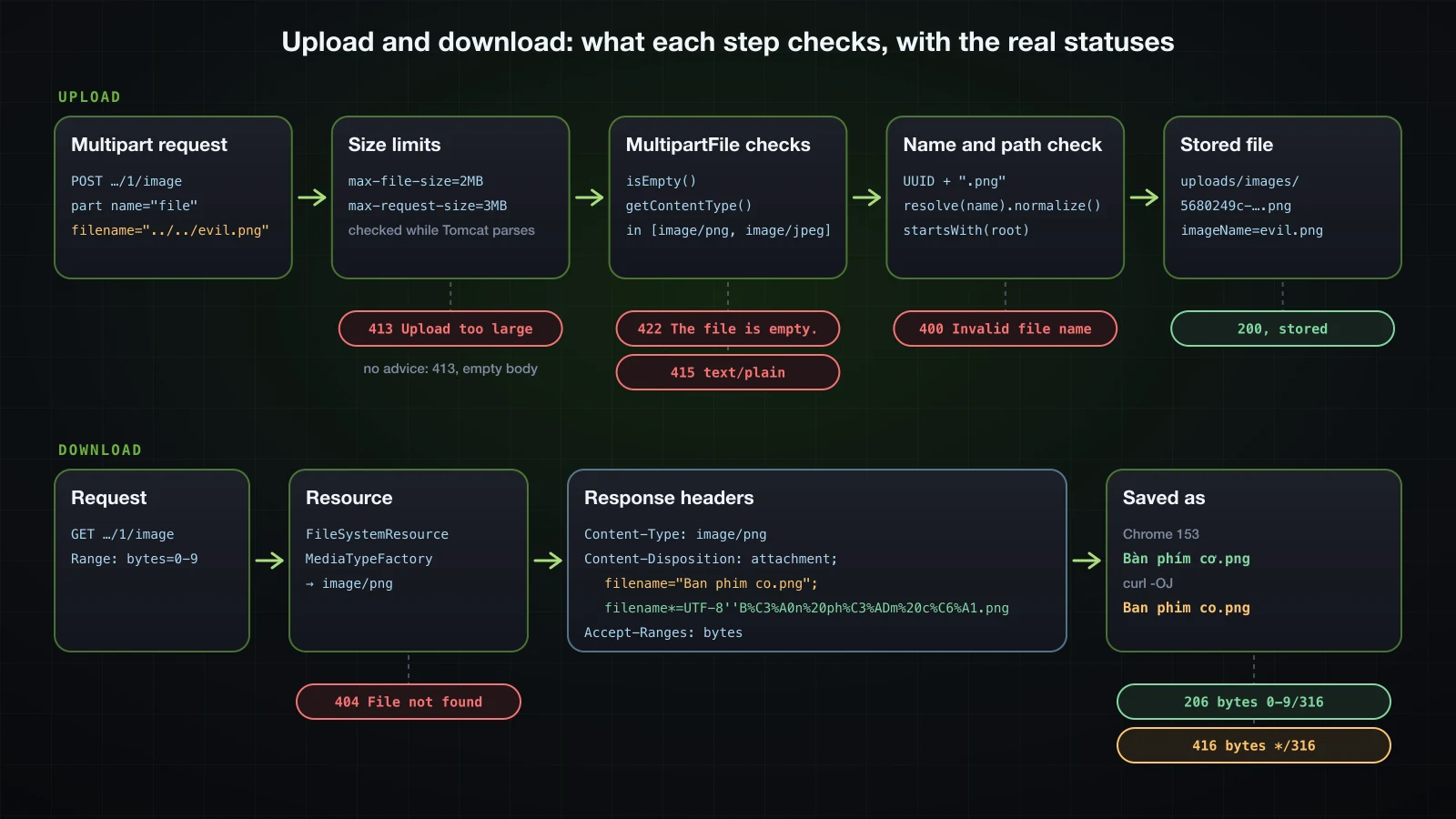
Three things in that table are client input: the file name, the content type and the content. The rest of the upload code exists because of them. A request without a part named file answered 400, "detail":"Required part 'file' is not present.", and a JSON body sent to the same URL answered 415, "detail":"Content-Type 'application/json' is not supported.", both as ProblemDetails from the series' advice.
A JSON part and a file part with @RequestPart
Creating a product and its image in one request takes two parts: the product as JSON and the image as a file. @RequestPart reads a part through the same message converters as @RequestBody, so a record works and @Valid applies:
    @PostMapping(consumes = MediaType.MULTIPART_FORM_DATA_VALUE)
    public ResponseEntity<ProductResponse> create(@RequestPart("product") @Valid CreateProductRequest request,
                                                  @RequestPart("image") MultipartFile image) {
        ProductResponse created = service.create(request, image);
        return ResponseEntity.created(URI.create("/api/products/" + created.id())).body(created);
}public record CreateProductRequest(
@NotBlank String sku,
@NotBlank String name,
@NotNull @Positive BigDecimal price,
@PositiveOrZero int stock) {
}The JSON part needs its own Content-Type, which curl adds with ;type=:
curl -i -F 'product={"sku":"HS-003","name":"Gaming headset","price":59.00,"stock":4};type=application/json' \
-F "image=@keyboard.png" http://localhost:8140/api/productsHTTP/1.1 201
Location: /api/products/3
Content-Type: application/json{"id":3,"sku":"HS-003","name":"Gaming headset","price":59.00,"stock":4,"imageName":"keyboard.png"}Without ;type=application/json curl sends the text part with no Content-Type header at all, --trace-ascii showed only Content-Disposition: form-data; name="product", and the request failed:
HTTP/1.1 415
Accept: application/json, application/*+json
Content-Type: application/problem+json{"detail":"Content-Type 'application/octet-stream' is not supported.","instance":"/api/products","status":415,"title":"Unsupported Media Type"}A part without a Content-Type is treated as application/octet-stream, and no JSON converter reads that. Sending the JSON from a file with -F 'product=@product.json' failed the same way, because curl labelled the .json file application/octet-stream. In a browser, append the JSON to FormData as new Blob([json], { type: 'application/json' }) for the same reason. A part that is valid JSON but breaks a constraint reached the series' 422 handler as MethodArgumentNotValidException:
{"detail":"Request has 2 invalid value(s).","instance":"/api/products","status":422,"title":"Unprocessable Content","errors":[{"field":"price","message":"must be greater than 0"},{"field":"sku","message":"must not be blank"}]}Under the security rules of article 36, both upload endpoints would be restricted to ADMIN, while the image download in a later section could stay public.
Storing uploaded files safely
A configurable storage directory with @ConfigurationProperties
Where uploads go is configuration, bound to a record as in article 12:
@ConfigurationProperties("app.storage")
public record StorageProperties(Path location, Set<String> allowedContentTypes) {
}app.storage.location=uploads/images
app.storage.allowed-content-types=image/png,image/jpegDemoApplication carries @ConfigurationPropertiesScan. Spring Boot converts the string to a Path; a relative path resolves against the working directory, so production should set an absolute one outside the application directory. In a container, point it at a mounted volume, or the files are removed together with the container; article 41 uses a named volume the same way for PostgreSQL's data.
Path traversal: why getOriginalFilename() cannot be trusted
The shortest storage code keeps the client's file name:
@Service
public class FileStorage {
private static final Logger log = LoggerFactory.getLogger(FileStorage.class);
private final Path root;
public FileStorage(StorageProperties properties) throws IOException {
this.root = properties.location().toAbsolutePath().normalize();
Files.createDirectories(root);
}
public String store(MultipartFile file) {
Path target = root.resolve(file.getOriginalFilename());
log.info("Writing {}", target);
try (InputStream in = file.getInputStream()) {
Files.copy(in, target, StandardCopyOption.REPLACE_EXISTING);
} catch (IOException ex) {
throw new UncheckedIOException(ex);
}
return file.getOriginalFilename();
}
public Resource load(String storedName) {
Path path = root.resolve(storedName);
if (!Files.isReadable(path)) {
throw new StoredFileNotFoundException("File " + storedName + " does not exist.");
}
return new FileSystemResource(path);
}
}The file name is whatever the client puts in the part header, and curl lets you write any name with ;filename=:
curl -F "file=@notes.txt;filename=../../evil.txt" http://localhost:8140/api/products/2/imageThe part header on the wire was Content-Disposition: form-data; name="file"; filename="../../evil.txt". Neither Tomcat nor Spring changed it:
15:54:44.543 INFO [nio-8140-exec-2] c.e.demo.product.ProductController : part=file, originalFilename=../../evil.txt, contentType=text/plain, size=16
15:54:44.544 INFO [nio-8140-exec-2] com.example.demo.storage.FileStorage : Writing /…/demo/uploads/images/../../evil.txtThe request answered 200, and ls found evil.txt, containing just some notes, in the project directory next to build.gradle, two levels above uploads/images. REPLACE_EXISTING means the same request can overwrite any file the application may write. An absolute name is worse: filename=/…/abs-evil.txt was written to exactly that path, because Path.resolve returns its argument unchanged when the argument is absolute. ..\..\win-evil.txt stayed inside the directory on macOS, as a file with backslashes in its name; on Windows, where the backslash is a separator, it would climb out the same way (not tested here).
normalize() and startsWith: the check that stops it
Every path the storage builds should pass through one method that resolves the name, removes the .. segments and checks that the result is still under the root:
public String store(MultipartFile file) {
Path target = root.resolve(file.getOriginalFilename());
Path target = resolve(file.getOriginalFilename());
log.info("Writing {}", target);
// copy as before
}
public Resource load(String storedName) {
Path path = root.resolve(storedName);
Path path = resolve(storedName);
// as before
}
private Path resolve(String name) {
Path target = root.resolve(name).normalize();
if (!target.startsWith(root)) {
throw new InvalidFileException(HttpStatus.BAD_REQUEST, "Invalid file name: " + name);
}
return target;
} public class InvalidFileException extends ErrorResponseException {
public InvalidFileException(HttpStatus status, String detail) {
super(status, ProblemDetail.forStatusAndDetail(status, detail), null);
}
}InvalidFileException extends ErrorResponseException, which ResponseEntityExceptionHandler already turns into its ProblemDetail, as article 20 showed, so the advice needs no new handler. The same two requests now:
{"detail":"Invalid file name: ../../evil.txt","instance":"/api/products/2/image","status":400,"title":"Bad Request"}{"detail":"Invalid file name: /…/abs-evil.txt","instance":"/api/products/2/image","status":400,"title":"Bad Request"}No file was written. sub/../ok.txt normalized to a path inside the root and was accepted. The check needs java.nio.file.Path.startsWith, which compares whole path elements. Comparing strings is a classic mistake, and a single-file Java program with root = /srv/app/uploads shows why:
../../evil.txt resolve=/srv/app/uploads/../../evil.txt normalize=/srv/evil.txt Path.startsWith=false String.startsWith=false
/etc/passwd resolve=/etc/passwd normalize=/etc/passwd Path.startsWith=false String.startsWith=false
../uploads-old/x.png resolve=/srv/app/uploads/../uploads-old/x.png normalize=/srv/app/uploads-old/x.png Path.startsWith=false String.startsWith=true
a/../b.png resolve=/srv/app/uploads/a/../b.png normalize=/srv/app/uploads/b.png Path.startsWith=true String.startsWith=true/srv/app/uploads-old/x.png starts with the string /srv/app/uploads but is not inside that directory. Also note that normalize() alone does nothing against /etc/passwd: the check is what rejects it.
Generated file names, emptiness and content type
The check is a safety net. The real fix is not to use the client's name as a path at all: store under a generated name, and keep the original only as a label for downloads. The same method also rejects an empty file and a type outside the allowed list:
@Service
public class FileStorage {
private static final Logger log = LoggerFactory.getLogger(FileStorage.class);
private final Path root;
private final Set<String> allowedContentTypes;
public FileStorage(StorageProperties properties) throws IOException {
this.root = properties.location().toAbsolutePath().normalize();
this.allowedContentTypes = properties.allowedContentTypes();
Files.createDirectories(root);
}
public String store(MultipartFile file) {
if (file.isEmpty()) {
throw new InvalidFileException(HttpStatus.UNPROCESSABLE_CONTENT, "The file is empty.");
}
String contentType = file.getContentType();
if (contentType == null || !allowedContentTypes.contains(contentType)) {
throw new InvalidFileException(HttpStatus.UNSUPPORTED_MEDIA_TYPE,
"Content type " + contentType + " is not accepted, use one of " + allowedContentTypes + ".");
}
String storedName = UUID.randomUUID() + "." + MediaType.parseMediaType(contentType).getSubtype();
Path target = resolve(file.getOriginalFilename());
log.info("Writing {}", target);
Path target = resolve(storedName);
try (InputStream in = file.getInputStream()) {
Files.copy(in, target, StandardCopyOption.REPLACE_EXISTING);
Files.copy(in, target);
} catch (IOException ex) {
throw new UncheckedIOException(ex);
}
return file.getOriginalFilename();
return storedName;
}
// load(…) and resolve(…) unchanged
}ProductService already stored StringUtils.getFilename(file.getOriginalFilename()) as the label, which keeps only what follows the last /: evil.txt for ../../evil.txt, passwd for /etc/passwd. It does not split on a backslash, which is fine for a label that never becomes a path. Without REPLACE_EXISTING, Files.copy refuses to overwrite a file. The results:
| Request | Status | Result |
|---|---|---|
-F "file=@Bàn phím cơ.png" | 200 | stored as d3b0a875-e5f8-4672-a8b7-cc8438622c6f.png, imageName Bàn phím cơ.png |
-F "file=@keyboard.png;filename=../../evil.png" | 200 | stored as 5680249c-bf06-4ada-a8d3-d7054abb31af.png in uploads/images, imageName evil.png |
-F "file=@empty.png", 0 bytes | 422 | The file is empty. |
-F "file=@notes.txt" | 415 | Content type text/plain is not accepted, use one of [image/png, image/jpeg]. |
-F "file=@notes.txt;type=image/png" | 200 | stored as a .png |
The last row is the limit of this check. getContentType() is the part header, and the client chooses it: a text file declared as image/png was accepted. The content type check stops honest mistakes, not an attacker. Checking the file's actual bytes and scanning for malware are beyond this course. Note also that -F "file=@keyboard.png;filename=../../evil.txt" answered 415, not 200: curl chose text/plain from the .txt in the name it was told to send.
Upload size limits: max-file-size and max-request-size
Spring Boot configures two multipart limits, read from the 4.1.1 metadata: spring.servlet.multipart.max-file-size, default 1MB, for each file, and spring.servlet.multipart.max-request-size, default 10MB, for the whole request. Tomcat enforces them while it parses the parts, before the controller is called.
What the client gets when a file is too large
A 2 MB file against the defaults, first with no @RestControllerAdvice in the application at all:
curl -i -F "file=@big-2mb.png" http://localhost:8140/api/products/1/imageHTTP/1.1 100
HTTP/1.1 413
Content-Length: 0
Date: Wed, 16 Sep 2026 08:55:21 GMT
Connection: closeStatus 413 Content Too Large and an empty body, not Spring Boot's usual error JSON. The 100 comes first because curl sends Expect: 100-continue for a large body. The log had two identical WARN … DefaultHandlerExceptionResolver : Resolved [org.springframework.web.multipart.MaxUploadSizeExceededException: Maximum upload size exceeded] lines, and with logging.level.org.springframework.web=DEBUG the reason for two was visible:
15:55:35.513 DEBUG [nio-8140-exec-1] o.s.web.servlet.DispatcherServlet : POST "/api/products/1/image", parameters={multipart}
15:55:35.530 DEBUG [nio-8140-exec-1] o.a.c.c.C.[Tomcat].[localhost].[/] : Exception [org.apache.tomcat.util.http.fileupload.impl.FileSizeLimitExceededException: The field file exceeds its maximum permitted size of 1048576 bytes.] occurred parsing parts and will be thrown
15:55:35.532 WARN [nio-8140-exec-1] .w.s.m.s.DefaultHandlerExceptionResolver : Resolved [org.springframework.web.multipart.MaxUploadSizeExceededException: Maximum upload size exceeded]
15:55:35.532 DEBUG [nio-8140-exec-1] o.s.web.servlet.DispatcherServlet : Completed 413 CONTENT_TOO_LARGE
15:55:35.534 DEBUG [nio-8140-exec-1] o.s.web.servlet.DispatcherServlet : "ERROR" dispatch for GET "/error", parameters={multipart}
15:55:35.534 DEBUG [nio-8140-exec-1] o.a.c.c.C.[Tomcat].[localhost].[/] : Exception [org.apache.tomcat.util.http.fileupload.impl.FileSizeLimitExceededException: The field file exceeds its maximum permitted size of 1048576 bytes.] occurred parsing parts and will be thrown
15:55:35.534 WARN [nio-8140-exec-1] .w.s.m.s.DefaultHandlerExceptionResolver : Resolved [org.springframework.web.multipart.MaxUploadSizeExceededException: Maximum upload size exceeded]
15:55:35.534 DEBUG [nio-8140-exec-1] o.s.web.servlet.DispatcherServlet : Exiting from "ERROR" dispatch, status 413DispatcherServlet parses the parts before it looks for a handler. Tomcat's FileSizeLimitExceededException becomes Spring's MaxUploadSizeExceededException, and DefaultHandlerExceptionResolver answers it with sendError(413). That starts the usual error dispatch to /error, but the error dispatch is still the same multipart request: its parts are parsed again, fail again, and the dispatch ends with status 413 before BasicErrorController can write anything.
With the series' GlobalExceptionHandler from article 20, which extends ResponseEntityExceptionHandler, the same request already answered with a body, because the base class has a handler for this exception:
HTTP/1.1 413
Content-Type: application/problem+json
Connection: close{"detail":"Maximum upload size exceeded","instance":"/api/products/1/image","status":413,"title":"Content Too Large"}max-request-size produces the same exception. Twelve parts of 900 KB each, 11,061,067 bytes in total, passed the per-file limit and got the identical 413 body; only Tomcat's DEBUG line differed: SizeLimitExceededException: the request was rejected because its size (11061067) exceeds the configured maximum (10485760).
A 413 ProblemDetail that names the limits
"Maximum upload size exceeded" does not tell the client what the maximum is. Override the base class method, and read the configured limits from Spring Boot's MultipartProperties bean:
@RestControllerAdvice
public class GlobalExceptionHandler extends ResponseEntityExceptionHandler {
private final MultipartProperties multipart;
public GlobalExceptionHandler(MultipartProperties multipart) {
this.multipart = multipart;
}
@Override
protected ResponseEntity<Object> handleMaxUploadSizeExceededException(MaxUploadSizeExceededException ex,
HttpHeaders headers, HttpStatusCode status, WebRequest request) {
ProblemDetail problem = ProblemDetail.forStatusAndDetail(HttpStatus.CONTENT_TOO_LARGE,
"A file may be at most " + multipart.getMaxFileSize().toMegabytes() + " MB and a request at most "
+ multipart.getMaxRequestSize().toMegabytes() + " MB.");
problem.setTitle("Upload too large");
return handleExceptionInternal(ex, problem, headers, HttpStatus.CONTENT_TOO_LARGE, request);
}
// handlers for ProductNotFoundException (404), StoredFileNotFoundException (404),
// the 422 override and the catch-all, as in article 20
}MultipartProperties is in org.springframework.boot.servlet.autoconfigure in 4.1.1. Product photos are larger than 1 MB, so the limits go up:
spring.servlet.multipart.max-file-size=2MB
spring.servlet.multipart.max-request-size=3MBspring:
servlet:
multipart:
max-file-size: 2MB
max-request-size: 3MB| Request | Status | Body |
|---|---|---|
one 1.9 MB file sent as image/png | 200 | the product |
| one 5 MB file | 413 | {"detail":"A file may be at most 2 MB and a request at most 3 MB.","instance":"/api/products/2/image","status":413,"title":"Upload too large"} |
| two 1.9 MB files in one request | 413 | the same |
Every 413 carried Connection: close, so the connection is not reused after a rejected upload. How much of an unread body Tomcat swallows before closing is its own setting, server.tomcat.max-swallow-size, 2MB by default. It did not keep the response from arriving: with a 50 MB file, curl received the 413 and its body both with and without Expect: 100-continue, and in the run without it had sent only 686,496 bytes of the file when the answer came.
Downloading a file with ResponseEntity and a Resource body
Content-Type and Content-Disposition with a Vietnamese file name
A download returns a Resource, which Spring MVC streams to the response without loading the file into memory. The storage's load already returns a FileSystemResource; the controller adds the two headers that matter:
@GetMapping("/{id}/image")
public ResponseEntity<Resource> downloadImage(@PathVariable long id) {
ProductImage image = service.loadImage(id);
MediaType contentType = MediaTypeFactory.getMediaType(image.resource())
.orElse(MediaType.APPLICATION_OCTET_STREAM);
ContentDisposition disposition = ContentDisposition.attachment()
.filename(image.fileName(), StandardCharsets.UTF_8)
.build();
return ResponseEntity.ok()
.contentType(contentType)
.header(HttpHeaders.CONTENT_DISPOSITION, disposition.toString())
.body(image.resource());
} @Transactional(readOnly = true)
public ProductImage loadImage(long id) {
Product product = products.findById(id).orElseThrow(() -> new ProductNotFoundException(id));
if (product.getImageFile() == null) {
throw new StoredFileNotFoundException("Product " + id + " has no image.");
}
return new ProductImage(storage.load(product.getImageFile()), product.getImageName());
}ProductImage is a record of the Resource and the label. MediaTypeFactory maps a file extension to a media type, here from the generated ….png name. new UrlResource(path.toUri()) is the other common way to wrap a file; FileSystemResource takes the Path directly.
curl -s -D - -o /dev/null http://localhost:8140/api/products/1/imageHTTP/1.1 200
Content-Disposition: attachment; filename="Ban phim co.png"; filename*=UTF-8''B%C3%A0n%20ph%C3%ADm%20c%C6%A1.png
Accept-Ranges: bytes
Content-Type: image/png
Content-Length: 316ContentDisposition wrote the name twice, because HTTP headers are ASCII:
filename*=UTF-8''…is the RFC 6266 and RFC 8187 form: the charset, then the UTF-8 bytes percent-encoded. It carries the real name.filename="Ban phim co.png"is a fallback for clients that do not understandfilename*. Spring Framework 7.0.9 builds it by stripping the accents. Letters that are not an accent over an ASCII letter become an underscore: a name starting withĐơn hàng đầu tiênproducedfilename="_on hang _au tien.png". Called without a charset,filename("Bàn phím cơ.png")producedattachment; filename="Bàn phím cơ.png"with the characters unencoded, which is what the charset variant avoids.
Which one a client uses decides the saved name:
| Client | Bàn phím cơ.png saved as | Đơn hàng đầu tiên.png saved as |
|---|---|---|
| Chrome 153 headless, download through the DevTools protocol | Bàn phím cơ.png | Đơn hàng đầu tiên.png |
curl -OJ, curl 8.7.1 | Ban phim co.png | _on hang _au tien.png |
Chrome used filename*; curl -J used only filename, so curl saves the fallback, and a script that needs the real name should decode filename* itself. attachment tells a browser to save the response. ContentDisposition.inline() produced the same header starting with inline, which lets the browser display an image or PDF in the tab, still with that name for "Save as".
404 for a missing file
Two things can be missing: the product, and the file on disk, for example after someone cleaned up the directory. The advice maps both to 404:
@ExceptionHandler(StoredFileNotFoundException.class)
public ProblemDetail handleFileNotFound(StoredFileNotFoundException ex) {
ProblemDetail problem = ProblemDetail.forStatusAndDetail(HttpStatus.NOT_FOUND, ex.getMessage());
problem.setTitle("File not found");
return problem;
}HTTP/1.1 404
Content-Type: application/problem+json{"detail":"File 5680249c-bf06-4ada-a8d3-d7054abb31af.png does not exist.","instance":"/api/products/2/image","status":404,"title":"File not found"}GET /api/products/99/image answered 404 with "title":"Product not found". The generated name in detail is harmless; a real path would not be.
Range requests: 206 Partial Content
The Accept-Ranges: bytes header above was not written by the controller. For a Resource body, Spring MVC handles Range itself:
curl -s -D - -o part.bin -H "Range: bytes=0-9" http://localhost:8140/api/products/1/imageHTTP/1.1 206
Content-Disposition: attachment; filename="Ban phim co.png"; filename*=UTF-8''B%C3%A0n%20ph%C3%ADm%20c%C6%A1.png
Accept-Ranges: bytes
Content-Range: bytes 0-9/316
Content-Type: image/png
Content-Length: 10part.bin held the first ten bytes of the file, 89 50 4E 47 0D 0A 1A 0A 00 00, the PNG signature. Range: bytes=-5, the last five bytes, also answered 206. An unsatisfiable Range: bytes=5000-6000 answered 416 with Content-Range: bytes */316, although the response still carried all 316 bytes. That is what lets a browser resume a download or a video player seek, with no code of yours.
Sending email with JavaMailSender
spring.mail properties and Mailpit
A development machine should not send real email. Mailpit is an SMTP server that accepts everything, keeps it, and shows it in a web UI and a JSON API:
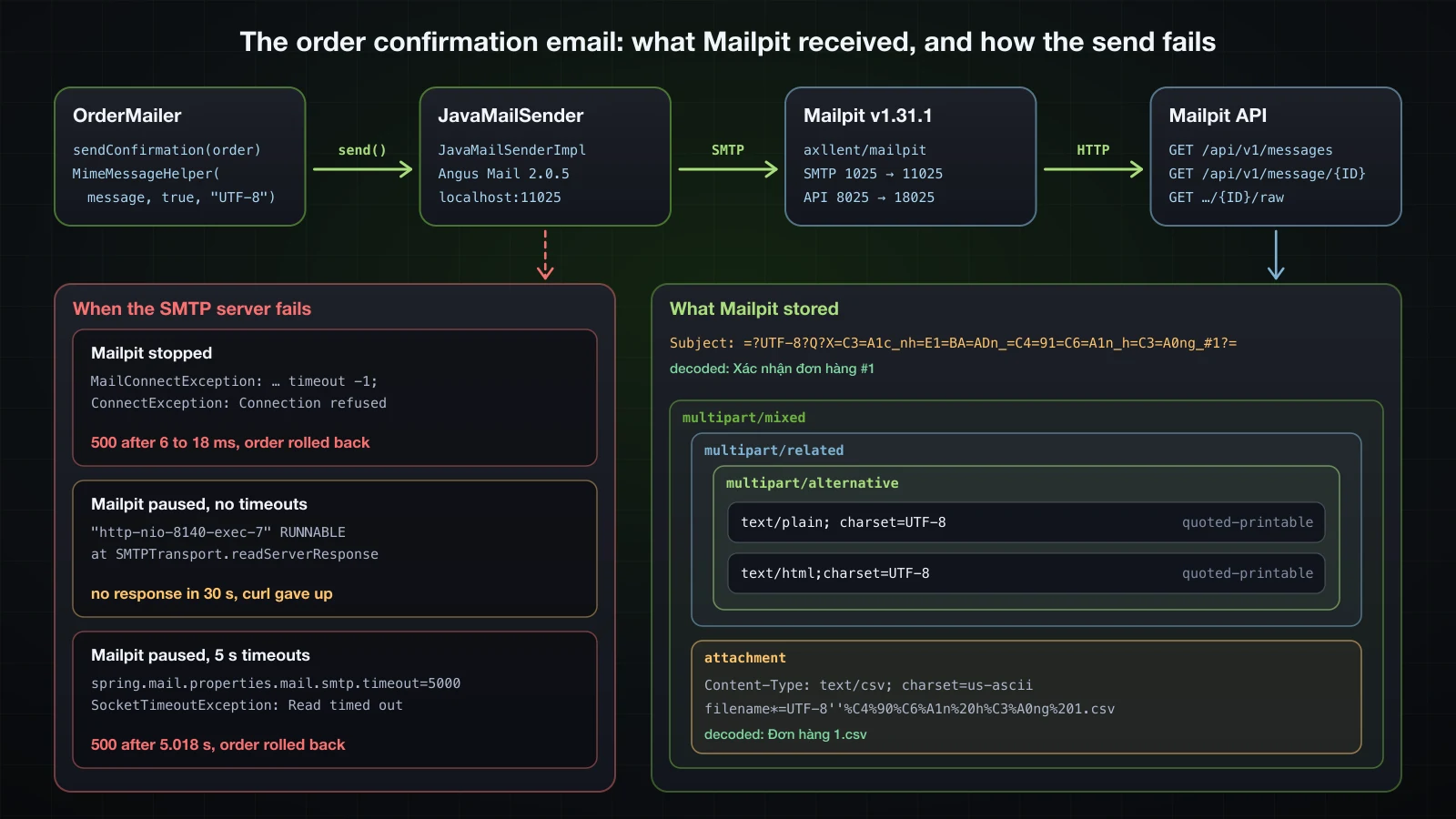
docker run -d --name mailpit -p 11025:1025 -p 18025:8025 axllent/mailpit:v1.31.1SMTP is on port 11025 and the UI and API on 18025 of the host. spring-boot-starter-mail creates a JavaMailSender bean only once spring.mail.host is set, and host and port have no default in the 4.1.1 metadata. Without the host, startup failed with Parameter 0 of constructor in com.example.demo.order.OrderMailer required a bean of type 'org.springframework.mail.javamail.JavaMailSender' that could not be found.
spring.mail.host=localhost
spring.mail.port=11025spring:
mail:
host: localhost
port: 11025spring.mail.default-encoding defaults to UTF-8 and spring.mail.protocol to smtp.
A plain-text email with SimpleMailMessage
The low-stock report to the operations team needs nothing but text. The @Scheduled line is explained in the scheduling section; for this test the cron expression was set to */30 * * * * *, every 30 seconds:
@Component
public class LowStockJob {
private static final Logger log = LoggerFactory.getLogger(LowStockJob.class);
private final ProductRepository products;
private final JavaMailSender mailSender;
public LowStockJob(ProductRepository products, JavaMailSender mailSender) {
this.products = products;
this.mailSender = mailSender;
}
@Scheduled(cron = "${app.jobs.low-stock.cron}", zone = "Asia/Ho_Chi_Minh")
public void reportLowStock() {
List<Product> lowStock = products.findByStockLessThanOrderBySku(5);
log.info("Low-stock check: {} product(s) below 5", lowStock.size());
if (lowStock.isEmpty()) {
return;
}
SimpleMailMessage message = new SimpleMailMessage();
message.setFrom("catalogue@example.com");
message.setTo("ops@example.com");
message.setSubject("Low stock: " + lowStock.size() + " product(s)");
message.setText(lowStock.stream()
.map(p -> p.getSku() + " " + p.getName() + ": " + p.getStock() + " left")
.collect(Collectors.joining("\n")));
mailSender.send(message);
}
}Mailpit's API lists the messages and returns each one's source:
curl -s http://localhost:18025/api/v1/messages
curl -s http://localhost:18025/api/v1/message/4kbQLSc06KEf7nNWVykDGR/rawReturn-Path: <catalogue@example.com>
Received: from localhost (unknown [192.168.65.1])
by d7e2d646a04e (Mailpit) with SMTP
for <ops@example.com>; Wed, 16 Sep 2026 08:59:00 +0000 (UTC)
Date: Wed, 16 Sep 2026 15:59:00 +0700 (ICT)
From: catalogue@example.com
To: ops@example.com
Message-ID: <380803817.1.1789549140036@localhost>
Subject: Low stock: 2 product(s)
MIME-Version: 1.0
Content-Type: text/plain; charset=UTF-8
Content-Transfer-Encoding: 7bit
HS-003 Gaming headset: 4 left
MS-002 Wireless mouse: 3 leftMailpit added Return-Path and Received; the rest is what Angus Mail sent. SimpleMailMessage is a single text/plain part, and with ASCII content it needed no encoding at all.
HTML, a plain-text alternative and an attachment with MimeMessageHelper
The order confirmation to the customer is in Vietnamese, has an HTML version and a CSV attachment. That needs a MIME message, built with MimeMessageHelper:
@Service
public class OrderMailer {
private static final Logger log = LoggerFactory.getLogger(OrderMailer.class);
private final JavaMailSender mailSender;
public OrderMailer(JavaMailSender mailSender) {
this.mailSender = mailSender;
}
public void sendConfirmation(OrderConfirmation order) {
log.info("Sending confirmation for order {}", order.orderId());
mailSender.send(message -> {
MimeMessageHelper helper = new MimeMessageHelper(message, true, "UTF-8");
helper.setFrom("shop@example.com");
helper.setTo(order.customerEmail());
helper.setSubject("Xác nhận đơn hàng #" + order.orderId());
helper.setText(plainText(order), html(order));
String csv = "order,product,quantity,total\n" + order.orderId() + "," + order.productName()
+ "," + order.quantity() + "," + order.total() + "\n";
helper.addAttachment("Đơn hàng " + order.orderId() + ".csv",
new ByteArrayResource(csv.getBytes(StandardCharsets.UTF_8)), "text/csv");
});
log.info("Confirmation for order {} sent", order.orderId());
}
private static String plainText(OrderConfirmation order) {
return "Cảm ơn bạn đã đặt hàng.\nĐơn hàng #%d: %d x %s\nTổng cộng: %s USD\n"
.formatted(order.orderId(), order.quantity(), order.productName(), order.total());
}
private static String html(OrderConfirmation order) {
return "<h1>Cảm ơn bạn đã đặt hàng</h1><p>Đơn hàng <b>#%d</b>: %d x %s</p><p>Tổng cộng: <b>%s USD</b></p>"
.formatted(order.orderId(), order.quantity(), HtmlUtils.htmlEscape(order.productName()), order.total());
}
}send(message -> { … })takes aMimeMessagePreparator.MimeMessageHelperthrows the checkedMessagingException, and inside the preparator Spring converts it into its own uncheckedMailExceptionhierarchy.new MimeMessageHelper(message, true, "UTF-8"):trueasks for a multipart message, required for an attachment;"UTF-8"is the encoding of subject and text.setText(plain, html)sends both versions; the client shows the one it can.HtmlUtils.htmlEscapekeeps a product name from injecting markup into the HTML.
The mailer receives an OrderConfirmation record, not the Order entity, which matters once it runs on another thread. OrderService.place saves the order and calls it:
@Transactional
public OrderResponse place(PlaceOrderRequest request) {
Product product = products.findById(request.productId())
.orElseThrow(() -> new ProductNotFoundException(request.productId()));
product.removeStock(request.quantity());
BigDecimal total = product.getPrice().multiply(BigDecimal.valueOf(request.quantity()));
Order order = orders.save(new Order(request.customerEmail(), product, request.quantity(), total));
mailer.sendConfirmation(new OrderConfirmation(order.getId(), order.getCustomerEmail(),
product.getName(), order.getQuantity(), total));
return OrderResponse.from(order);
}The order is reduced to one product and a customer email, and OrderController maps POST /api/orders to it with a 201 and a Location header. After POST /api/orders with {"customerEmail":"lan@example.com","productId":1,"quantity":2}, the source Mailpit stored, without its Return-Path and Received lines:
Date: Wed, 16 Sep 2026 15:59:28 +0700 (ICT)
From: shop@example.com
To: lan@example.com
Message-ID: <1610773479.5.1789549168187@localhost>
Subject: =?UTF-8?Q?X=C3=A1c_nh=E1=BA=ADn_=C4=91=C6=A1n_h=C3=A0ng_#1?=
MIME-Version: 1.0
Content-Type: multipart/mixed;
boundary="----=_Part_2_394136627.1789549168128"
------=_Part_2_394136627.1789549168128
Content-Type: multipart/related;
boundary="----=_Part_3_1015054981.1789549168129"
------=_Part_3_1015054981.1789549168129
Content-Type: multipart/alternative;
boundary="----=_Part_4_1919655689.1789549168136"
------=_Part_4_1919655689.1789549168136
Content-Type: text/plain; charset=UTF-8
Content-Transfer-Encoding: quoted-printable
C=E1=BA=A3m =C6=A1n b=E1=BA=A1n =C4=91=C3=A3 =C4=91=E1=BA=B7t h=C3=A0ng.
=C4=90=C6=A1n h=C3=A0ng #1: 2 x Mechanical keyboard
T=E1=BB=95ng c=E1=BB=99ng: 179.80 USD
------=_Part_4_1919655689.1789549168136
Content-Type: text/html;charset=UTF-8
Content-Transfer-Encoding: quoted-printable
<h1>C=E1=BA=A3m =C6=A1n b=E1=BA=A1n =C4=91=C3=A3 =C4=91=E1=BA=B7t h=C3=A0ng=
</h1><p>=C4=90=C6=A1n h=C3=A0ng <b>#1</b>: 2 x Mechanical keyboard</p><p>T=
=E1=BB=95ng c=E1=BB=99ng: <b>179.80 USD</b></p>
------=_Part_4_1919655689.1789549168136--
------=_Part_3_1015054981.1789549168129--
------=_Part_2_394136627.1789549168128
Content-Type: text/csv; charset=us-ascii;
name*=UTF-8''%C4%90%C6%A1n%20h%C3%A0ng%201.csv
Content-Transfer-Encoding: 7bit
Content-Disposition: attachment;
filename*=UTF-8''%C4%90%C6%A1n%20h%C3%A0ng%201.csv
order,product,quantity,total
1,Mechanical keyboard,2,179.80
------=_Part_2_394136627.1789549168128--Subjectis an RFC 2047 encoded word:=?UTF-8?Q?…?=, the UTF-8 bytes in quoted-printable, with_for spaces.- The structure is
multipart/mixedholding amultipart/related(the place for inline images) holding amultipart/alternativewithtext/plainandtext/html, and next to it the attachment.MimeMessageHelper's multipart mode builds this nesting. - Both text parts are
quoted-printable, because Vietnamese is not 7-bit ASCII. - The attachment name uses the RFC 2231
filename*=UTF-8''…form, the email counterpart of what the download header used. The CSV itself was ASCII, so Angus Mail labelled itcharset=us-asciiand7bit.
GET /api/v1/message/{ID} returned the decoded view: "Subject": "Xác nhận đơn hàng #1", the plain text and HTML, and "Attachments": [{"PartID": "2", "FileName": "Đơn hàng 1.csv", "ContentType": "text/csv", "Size": 62, …}].
When the SMTP server is down or does not answer
mailSender.send is a network call inside the request's transaction. With the Mailpit container stopped (docker stop mailpit):
{"detail":"An unexpected error occurred.","instance":"/api/orders","status":500,"title":"Internal Server Error"}15:59:46.219 ERROR [io-8140-exec-10] c.e.demo.common.GlobalExceptionHandler : Unhandled exception on POST /api/orders
org.springframework.mail.MailSendException: Mail server connection failed. Failed messages: org.eclipse.angus.mail.util.MailConnectException: Couldn't connect to host, port: localhost, 11025; timeout -1;
nested exception is:
java.net.ConnectException: Connection refused; message exceptions (1) are:
Failed message 1: org.eclipse.angus.mail.util.MailConnectException: Couldn't connect to host, port: localhost, 11025; timeout -1;
nested exception is:
java.net.ConnectException: Connection refusedA refused connection fails fast: five such requests took 6 to 18 ms at a load average of 4.0. MailSendException is a RuntimeException, so @Transactional rolled the order back. Product 1's stock was still 6 after three such failed orders, so the customer got a 500 for an order that could have succeeded without its email.
A server that accepts the connection and never answers is worse. docker pause mailpit freezes the container while its port stays open:
curl -s --max-time 30 -H "Content-Type: application/json" \
-d '{"customerEmail":"lan@example.com","productId":2,"quantity":1}' http://localhost:8140/api/orderscurl gave up after 30.0 seconds with exit code 28 and no response, at a load average of about 11. The timeout -1 in the message above is the reason: Spring Boot sets no SMTP timeouts, and JavaMail's default is to wait forever. jstack showed where the request thread was:
"http-nio-8140-exec-7" #46 [37635] daemon prio=5 os_prio=31 cpu=91.80ms elapsed=139.42s tid=0x0000000813d21c00 nid=37635 runnable [0x0000000172e3b000]
java.lang.Thread.State: RUNNABLE
…
at org.eclipse.angus.mail.smtp.SMTPTransport.readServerResponse(SMTPTransport.java:2500)
at org.eclipse.angus.mail.smtp.SMTPTransport.openServer(SMTPTransport.java:2205)
at org.eclipse.angus.mail.smtp.SMTPTransport.protocolConnect(SMTPTransport.java:729)
…
at org.springframework.mail.javamail.JavaMailSenderImpl.connectTransport(JavaMailSenderImpl.java:467)
at org.springframework.mail.javamail.JavaMailSenderImpl.doSend(JavaMailSenderImpl.java:386)
…
at com.example.demo.order.OrderMailer.sendConfirmation(OrderMailer.java:26)It was waiting for the SMTP greeting. The low-stock job, due at 16:00:30 while Mailpit was paused, was stuck in the same frame on the scheduling-1 thread for 17 seconds. After docker unpause mailpit, 39 seconds after the request, the log said Confirmation for order 7 sent: the order committed although its client had long given up, and the low-stock mail arrived five milliseconds before it. Set timeouts, in milliseconds, through spring.mail.properties, which passes keys straight to the JavaMail session:
spring.mail.host=localhost
spring.mail.port=11025
spring.mail.properties.mail.smtp.connectiontimeout=5000
spring.mail.properties.mail.smtp.timeout=5000
spring.mail.properties.mail.smtp.writetimeout=5000 spring:
mail:
host: localhost
port: 11025
properties:
mail.smtp.connectiontimeout: 5000
mail.smtp.timeout: 5000
mail.smtp.writetimeout: 5000connectiontimeout limits the TCP connect, timeout each read, writetimeout each write. With Mailpit paused again, load average 4.0, two orders each answered 500 after 5.018 s:
org.springframework.mail.MailSendException: Mail server connection failed. Failed messages: jakarta.mail.MessagingException: Exception reading response;
nested exception is:
java.net.SocketTimeoutException: Read timed out; message exceptions (1) are:The timeout bounds the damage, but every order still waits for SMTP and still fails with it:
| Mailpit | Response | Time | Load average |
|---|---|---|---|
| running | 201 | 10.9 to 24.3 ms over 5 requests | 4.2 |
| stopped | 500, order rolled back | 6.2 to 18.2 ms over 5 requests | 4.0 |
| paused, no timeouts | none | curl gave up after 30.0 s | about 11 |
| paused, 5 s timeouts | 500, order rolled back | 5.018 s, twice | 4.0 |
That is the case for @Async, at the end of this article.
SMTP providers, templates and testing
- A real SMTP provider takes
spring.mail.host,port587,username, apasswordfrom an environment variable rather than the file,spring.mail.properties.mail.smtp.auth=trueandspring.mail.properties.mail.smtp.starttls.enable=true; for port 465 setspring.mail.ssl.enabled=true. Gmail, for example, requires an app password or OAuth2 rather than the account password. None of this was run here. - Templates: formatted strings do not scale past one paragraph; render the HTML with Thymeleaf's
TemplateEnginefrom article 24 and pass the result tosetText. Not shown here. - Testing: in 4.1.1
spring-boot-starter-mail-testonly combinesspring-boot-starter-mailwithspring-boot-starter-test; it contains no fake SMTP server. MockJavaMailSenderwith@MockitoBeanin unit and slice tests, and send to Mailpit when you need to see the real message, never to a real inbox.
Scheduling jobs with @Scheduled
@EnableScheduling, fixedRate, fixedDelay and cron
@Scheduled methods run only after scheduling is enabled once, in any configuration class:
@Configuration
@EnableScheduling
public class TaskConfig {
}The three ways to say when, in a class of test jobs active under a schedule-lab profile:
@Component
@Profile("schedule-lab")
public class ScheduleLab {
private static final Logger log = LoggerFactory.getLogger(ScheduleLab.class);
@Scheduled(fixedRate = 5, timeUnit = TimeUnit.SECONDS)
public void publishStats() {
log.info("publishStats (fixedRate 5 s)");
}
@Scheduled(fixedDelay = 5000, initialDelay = 2000)
public void cleanUpOrphanImages() {
log.info("cleanUpOrphanImages (fixedDelay 5 s, initialDelay 2 s)");
}
@Scheduled(cron = "*/10 * * * * *", zone = "Asia/Ho_Chi_Minh")
public void everyTenSeconds() {
log.info("everyTenSeconds (cron */10)");
}
}The first 17 seconds, load average 7.1; the ErrorLab job of a later section ran in the same application and is left out of this excerpt:
16:07:24.219 INFO [ scheduling-1] com.example.demo.lab.ScheduleLab : publishStats (fixedRate 5 s)
16:07:24.224 INFO [ main] com.example.demo.DemoApplication : Started DemoApplication in 2.08 seconds (process running for 2.382)
16:07:26.222 INFO [ scheduling-1] com.example.demo.lab.ScheduleLab : cleanUpOrphanImages (fixedDelay 5 s, initialDelay 2 s)
16:07:29.219 INFO [ scheduling-1] com.example.demo.lab.ScheduleLab : publishStats (fixedRate 5 s)
16:07:30.006 INFO [ scheduling-1] com.example.demo.lab.ScheduleLab : everyTenSeconds (cron */10)
16:07:31.222 INFO [ scheduling-1] com.example.demo.lab.ScheduleLab : cleanUpOrphanImages (fixedDelay 5 s, initialDelay 2 s)
16:07:34.222 INFO [ scheduling-1] com.example.demo.lab.ScheduleLab : publishStats (fixedRate 5 s)
16:07:36.223 INFO [ scheduling-1] com.example.demo.lab.ScheduleLab : cleanUpOrphanImages (fixedDelay 5 s, initialDelay 2 s)
16:07:39.220 INFO [ scheduling-1] com.example.demo.lab.ScheduleLab : publishStats (fixedRate 5 s)
16:07:40.004 INFO [ scheduling-1] com.example.demo.lab.ScheduleLab : everyTenSeconds (cron */10)
16:07:41.228 INFO [ scheduling-1] com.example.demo.lab.ScheduleLab : cleanUpOrphanImages (fixedDelay 5 s, initialDelay 2 s)| Attribute | Meaning | In the log |
|---|---|---|
fixedRate | start every period, counted from the previous start | first run at startup, before Started DemoApplication, then every 5 s |
fixedDelay | wait the period after the previous run ends | every 5 s after the previous run |
initialDelay | wait before the first run | cleanUpOrphanImages first ran 2 s after startup |
timeUnit | unit of the numbers, milliseconds by default | fixedRate = 5, timeUnit = SECONDS |
cron | calendar schedule | on :30 and :40, whatever the startup time |
zone | time zone the cron expression is read in | the server's zone if absent |
Spring's cron has six fields, seconds first: second minute hour day-of-month month day-of-week. 0 0 7 * * * is 07:00:00 every day. A five-field Unix expression fails at startup: --app.jobs.low-stock.cron="0 7 * * *" stopped the application with Encountered invalid @Scheduled method 'reportLowStock': Cron expression must consist of 6 fields (found 5 in "0 7 * * *"). The low-stock job reads its expression from a property placeholder, so each environment can set its own:
app.jobs.low-stock.cron=0 0 7 * * *With zone = "Asia/Ho_Chi_Minh", that is 7 a.m. in Vietnam even on a server running in UTC. Every run in the log above was on scheduling-1.
One scheduler thread: a slow job delays the others
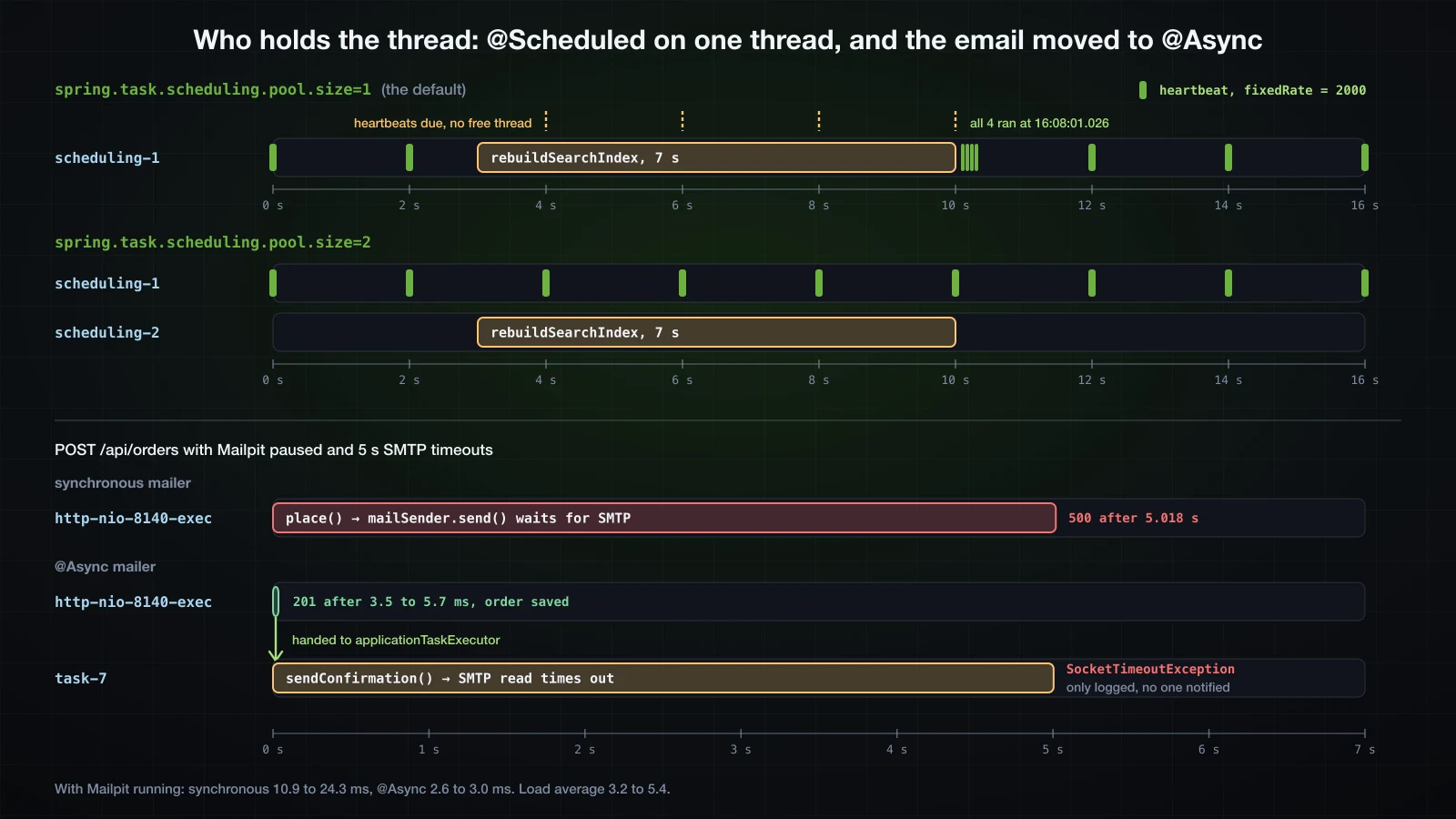
spring.task.scheduling.pool.size defaults to 1: Spring Boot's taskScheduler is a ThreadPoolTaskScheduler with one thread, and every @Scheduled method in the application shares it. A heartbeat every 2 seconds and a search index rebuild that takes 7:
@Component
@Profile("slow-lab")
public class SlowLab {
private static final Logger log = LoggerFactory.getLogger(SlowLab.class);
@Scheduled(fixedRate = 2000)
public void heartbeat() {
log.info("heartbeat");
}
@Scheduled(fixedDelay = 60000, initialDelay = 3000)
public void rebuildSearchIndex() throws InterruptedException {
log.info("rebuildSearchIndex started");
Thread.sleep(7000);
log.info("rebuildSearchIndex finished");
}
}Load average 5.4:
16:07:51.025 INFO [ scheduling-1] com.example.demo.lab.SlowLab : heartbeat
16:07:53.028 INFO [ scheduling-1] com.example.demo.lab.SlowLab : heartbeat
16:07:54.025 INFO [ scheduling-1] com.example.demo.lab.SlowLab : rebuildSearchIndex started
16:08:01.026 INFO [ scheduling-1] com.example.demo.lab.SlowLab : rebuildSearchIndex finished
16:08:01.026 INFO [ scheduling-1] com.example.demo.lab.SlowLab : heartbeat
16:08:01.026 INFO [ scheduling-1] com.example.demo.lab.SlowLab : heartbeat
16:08:01.026 INFO [ scheduling-1] com.example.demo.lab.SlowLab : heartbeat
16:08:01.026 INFO [ scheduling-1] com.example.demo.lab.SlowLab : heartbeat
16:08:03.024 INFO [ scheduling-1] com.example.demo.lab.SlowLab : heartbeatThe heartbeats due at :55, :57, :59 and :01 had no thread. They ran when the index rebuild released scheduling-1, all four in the same millisecond, and then the heartbeat returned to its 2-second rhythm. A heartbeat that monitoring watches for would have looked dead for 8 seconds; the SMTP section showed the same thread stuck for 17 seconds in a real mail call. One more thread:
spring.task.scheduling.pool.size=2spring:
task:
scheduling:
pool:
size: 216:08:14.071 INFO [ scheduling-1] com.example.demo.lab.SlowLab : heartbeat
16:08:15.069 INFO [ scheduling-2] com.example.demo.lab.SlowLab : rebuildSearchIndex started
16:08:16.071 INFO [ scheduling-1] com.example.demo.lab.SlowLab : heartbeat
16:08:18.072 INFO [ scheduling-1] com.example.demo.lab.SlowLab : heartbeat
16:08:20.071 INFO [ scheduling-1] com.example.demo.lab.SlowLab : heartbeat
16:08:22.072 INFO [ scheduling-1] com.example.demo.lab.SlowLab : heartbeat
16:08:22.074 INFO [ scheduling-2] com.example.demo.lab.SlowLab : rebuildSearchIndex finished
16:08:24.073 INFO [ scheduling-1] com.example.demo.lab.SlowLab : heartbeatLoad average 4.9. The rebuild took scheduling-2, and the heartbeat kept its 2-second rate on scheduling-1. Size the pool for the jobs that can run at the same time, and keep long work, such as a slow SMTP call, out of scheduled methods or behind a timeout.
What fixedRate does when a run takes longer than the rate
A job with fixedRate = 1000 whose work takes 2.5 seconds, with two scheduler threads available:
@Component
@Profile("overrun-lab")
public class OverrunLab {
private static final Logger log = LoggerFactory.getLogger(OverrunLab.class);
private int run;
@Scheduled(fixedRate = 1000)
public void syncPrices() throws InterruptedException {
int current = ++run;
log.info("syncPrices run {} started", current);
Thread.sleep(2500);
log.info("syncPrices run {} finished", current);
}
}Load average 4.8:
16:08:32.343 INFO [ scheduling-1] com.example.demo.lab.OverrunLab : syncPrices run 1 started
16:08:34.848 INFO [ scheduling-1] com.example.demo.lab.OverrunLab : syncPrices run 1 finished
16:08:34.849 INFO [ scheduling-2] com.example.demo.lab.OverrunLab : syncPrices run 2 started
16:08:37.352 INFO [ scheduling-2] com.example.demo.lab.OverrunLab : syncPrices run 2 finished
16:08:37.353 INFO [ scheduling-2] com.example.demo.lab.OverrunLab : syncPrices run 3 started
16:08:39.857 INFO [ scheduling-2] com.example.demo.lab.OverrunLab : syncPrices run 3 finished
16:08:39.858 INFO [ scheduling-2] com.example.demo.lab.OverrunLab : syncPrices run 4 startedThe runs did not overlap, even with a free thread: each started one millisecond after the previous one finished. Instead of every second, the job ran every 2.5 seconds, back to back, and a scheduler thread was always busy with it. ThreadPoolTaskScheduler uses the JDK's ScheduledThreadPoolExecutor, which never runs the same periodic task twice at once. A job that must not stack up like this belongs on fixedDelay.
An exception in a scheduled method
@Component
@Profile("error-lab")
public class ErrorLab {
private static final Logger log = LoggerFactory.getLogger(ErrorLab.class);
private int run;
@Scheduled(fixedRate = 3000)
public void importSupplierFeed() {
run++;
log.info("importSupplierFeed run {}", run);
if (run == 2) {
throw new IllegalStateException("Supplier feed returned 503");
}
}
}16:07:24.219 INFO [ scheduling-1] com.example.demo.lab.ErrorLab : importSupplierFeed run 1
16:07:27.219 INFO [ scheduling-1] com.example.demo.lab.ErrorLab : importSupplierFeed run 2
16:07:27.219 ERROR [ scheduling-1] o.s.s.s.TaskUtils$LoggingErrorHandler : Unexpected error occurred in scheduled task
java.lang.IllegalStateException: Supplier feed returned 503
at com.example.demo.lab.ErrorLab.importSupplierFeed(ErrorLab.java:22) ~[!/:0.0.1-SNAPSHOT]
at java.base/jdk.internal.reflect.DirectMethodHandleAccessor.invoke(DirectMethodHandleAccessor.java:103) ~[na:na]
at java.base/java.lang.reflect.Method.invoke(Method.java:580) ~[na:na]
at org.springframework.scheduling.support.ScheduledMethodRunnable.runInternal(ScheduledMethodRunnable.java:128) ~[spring-context-7.0.9.jar!/:7.0.9]
16:07:30.219 INFO [ scheduling-1] com.example.demo.lab.ErrorLab : importSupplierFeed run 3
16:07:33.217 INFO [ scheduling-1] com.example.demo.lab.ErrorLab : importSupplierFeed run 4Spring's TaskUtils$LoggingErrorHandler logged the exception at ERROR with its stack trace, and the next run came on schedule. The same handler logged the MailSendException of the low-stock job while Mailpit was stopped. Nothing retries the failed run and nothing alerts anyone beyond that log line; a job that must not silently miss work needs its own handling.
Several instances and method signatures
- Every running instance runs every job. The scheduler lives inside the JVM, so two copies of the application behind a load balancer send the low-stock email twice. Locking a job to one instance, with ShedLock or Quartz, is Advanced material.
- A
@Scheduledmethod takes no arguments. A methodreportFor(String sku)stopped the application at startup withCould not create recurring task for @Scheduled method 'reportFor': Only no-arg methods may be annotated with @Scheduled.
Running work in the background with @Async
@EnableAsync and Boot's applicationTaskExecutor
@Async on a public method of a bean makes the call return at once while the method body runs on an executor thread. Like scheduling, it is off until enabled:
@Configuration
@EnableScheduling
@EnableAsync
public class TaskConfig {
}The executor comes from Spring Boot. A runner printed what the 4.1.1 context held:
>>> applicationTaskExecutor: org.springframework.scheduling.concurrent.ThreadPoolTaskExecutor, aliases [bootstrapExecutor], TaskExecutor beans [applicationTaskExecutor, taskScheduler]
>>> core=8 max=2147483647 queueCapacity=2147483647 keepAlive=60s prefix=task- queue=LinkedBlockingQueueapplicationTaskExecutoris aThreadPoolTaskExecutorwith 8 core threads (spring.task.execution.pool.core-size), a maximum and queue capacity ofInteger.MAX_VALUE, aLinkedBlockingQueue, 60 s keep-alive, and threads namedtask-1,task-2… A thread pool only grows past its core size when the queue is full, and this queue never is: in practice it has 8 threads, and extra work waits in an unbounded queue.spring.task.execution.pool.queue-capacityandmax-sizechange that.- How
@Asyncfinds it: the context has twoTaskExecutorbeans, becausetaskScheduleris one too, and no bean namedtaskExecutor. Spring Boot 4.1.1 registers anAsyncConfigurerwhosegetAsyncExecutor()returns theapplicationTaskExecutorbean. ThebootstrapExecutoralias is for Spring's background bean initialization, not for@Async.
A void method and a CompletableFuture method
@Service
public class CatalogueExporter {
private static final Logger log = LoggerFactory.getLogger(CatalogueExporter.class);
private final ProductRepository products;
public CatalogueExporter(ProductRepository products) {
this.products = products;
}
@Async
public void exportCatalogue() {
log.info("Exporting {} products", products.count());
}
@Async
public CompletableFuture<BigDecimal> stockValue() {
BigDecimal value = products.findAll().stream()
.map(p -> p.getPrice().multiply(BigDecimal.valueOf(p.getStock())))
.reduce(BigDecimal.ZERO, BigDecimal::add);
log.info("Stock value computed");
return CompletableFuture.completedFuture(value);
}
}A CommandLineRunner under an async-lab profile called both on the main thread:
log.info("calling exportCatalogue()");
exporter.exportCatalogue();
log.info("exportCatalogue() returned");
CompletableFuture<BigDecimal> value = exporter.stockValue();
log.info("stockValue() returned {}", value);
log.info("stock value = {}", value.join());16:10:05.031 INFO [ main] com.example.demo.lab.AsyncLab : calling exportCatalogue()
16:10:05.031 INFO [ main] com.example.demo.lab.AsyncLab : exportCatalogue() returned
16:10:05.032 INFO [ main] com.example.demo.lab.AsyncLab : stockValue() returned java.util.concurrent.CompletableFuture@758e6acd[Not completed]
16:10:05.091 INFO [ task-2] c.e.demo.product.CatalogueExporter : Stock value computed
16:10:05.091 INFO [ main] com.example.demo.lab.AsyncLab : stock value = 1152.30
16:10:05.146 INFO [ task-1] c.e.demo.product.CatalogueExporter : Exporting 2 productsexportCatalogue() returned in the same millisecond, and its log line came from task-1 115 ms later, after task-2 had already finished the second call: once the call has returned, the caller controls neither when nor in what order the work runs. stockValue() returned a CompletableFuture that was Not completed; join() waited for task-2 and gave the value. The CompletableFuture.completedFuture(value) inside the method is only a container: the proxy returns its own future to the caller and completes it with that value.
Self-invocation runs on the caller's thread
@Async, like @Transactional in article 30, is implemented by a proxy around the bean, so it only applies to calls that come through the proxy. A method of the same class that calls exportCatalogue():
public void nightlyExport() {
log.info("nightlyExport calls exportCatalogue()");
exportCatalogue();
}16:10:05.397 INFO [ main] c.e.demo.product.CatalogueExporter : nightlyExport calls exportCatalogue()
16:10:05.401 INFO [ main] c.e.demo.product.CatalogueExporter : Exporting 2 productsExporting 2 products ran on main: exportCatalogue() was called on this, the plain object, and ran synchronously with no warning. The fixes are the ones article 30 gave for @Transactional; the usual one is to put the @Async method in another bean, which is why OrderMailer is a separate class from OrderService. A private method can only be called from inside its own class, so @Async on it never takes effect either.
Exceptions from @Async methods
A void method has nowhere to return an exception, and one that returns a future has one:
@Async
public void exportToFtp() {
log.info("Uploading the export to FTP");
throw new IllegalStateException("FTP server refused the upload");
}
@Async
public CompletableFuture<BigDecimal> stockValueFromWarehouse() {
log.info("Asking the warehouse for the stock value");
throw new IllegalStateException("Warehouse API timed out");
} exporter.exportToFtp();
Thread.sleep(300);
BigDecimal fallback = exporter.stockValueFromWarehouse()
.exceptionally(ex -> {
log.warn("exceptionally received {}", ex.toString());
return BigDecimal.ZERO;
})
.join();
log.info("fallback = {}", fallback);
try {
exporter.stockValueFromWarehouse().join();
} catch (CompletionException ex) {
log.warn("join() threw {}", ex.toString());
}16:10:05.707 INFO [ task-3] c.e.demo.product.CatalogueExporter : Uploading the export to FTP
16:10:05.709 ERROR [ task-3] .a.i.SimpleAsyncUncaughtExceptionHandler : Unexpected exception occurred invoking async method: public void com.example.demo.product.CatalogueExporter.exportToFtp()
java.lang.IllegalStateException: FTP server refused the upload
at com.example.demo.product.CatalogueExporter.exportToFtp(CatalogueExporter.java:44) ~[!/:0.0.1-SNAPSHOT]
16:10:06.010 INFO [ task-4] c.e.demo.product.CatalogueExporter : Asking the warehouse for the stock value
16:10:06.011 WARN [ main] com.example.demo.lab.AsyncLab : exceptionally received java.util.concurrent.CompletionException: java.lang.IllegalStateException: Warehouse API timed out
16:10:06.011 INFO [ main] com.example.demo.lab.AsyncLab : fallback = 0
16:10:06.011 INFO [ task-5] c.e.demo.product.CatalogueExporter : Asking the warehouse for the stock value
16:10:06.012 WARN [ main] com.example.demo.lab.AsyncLab : join() threw java.util.concurrent.CompletionException: java.lang.IllegalStateException: Warehouse API timed out| Return type | Where the exception went |
|---|---|
void | logged at ERROR by SimpleAsyncUncaughtExceptionHandler on the task- thread; the caller never learns of it |
CompletableFuture<T> | into the future, wrapped in CompletionException: exceptionally receives it, join() throws it |
A custom AsyncUncaughtExceptionHandler, through your own AsyncConfigurer, can count or alert on the void failures; propagating a SecurityContext or a transaction into async code is Advanced material.
Virtual threads
With spring.threads.virtual.enabled=true (default false) the same runner and jobs logged applicationTaskExecutor: org.springframework.core.task.SimpleAsyncTaskExecutor and a SimpleAsyncTaskScheduler. Async work still ran on threads named task-1, task-2…, request handling moved to tomcat-handler-0 (logged as omcat-handler-0), and scheduled runs got a new virtual thread each time, scheduling-3, scheduling-4, scheduling-6 for fixedRate, while the fixedDelay job stayed on scheduling-2. The pool size properties then no longer apply, as their metadata says.
Sending the order confirmation asynchronously
OrderMailer is already a separate bean, so one annotation moves the email off the request thread:
@Async
public void sendConfirmation(OrderConfirmation order) {
log.info("Sending confirmation for order {}", order.orderId());Before, the send ran on the request thread; now it runs on the executor:
15:59:28.119 INFO [nio-8140-exec-4] com.example.demo.order.OrderMailer : Sending confirmation for order 1
16:10:45.549 INFO [ task-7] com.example.demo.order.OrderMailer : Sending confirmation for order 9POST /api/orders timed with curl -w "%{time_total}", after three warm-up requests, with the 5-second SMTP timeouts configured:
| Mailer | Mailpit | Response | Time | Load average |
|---|---|---|---|---|
| synchronous | running | 201 | 10.9 to 24.3 ms (5 requests) | 4.2 |
| synchronous | paused | 500, order rolled back | 5.018 s (2 requests) | 4.0 |
@Async | running | 201 | 2.6 to 3.0 ms (5 requests) | 3.2 |
@Async | paused | 201, order saved | 3.5 to 5.7 ms (3 requests) | 3.2 |
With @Async, the response no longer depends on the mail server. The failure has not gone away; it moved to the log, 5 seconds later, on the executor thread:
16:10:45.549 INFO [ task-7] com.example.demo.order.OrderMailer : Sending confirmation for order 9
16:10:50.553 ERROR [ task-7] .a.i.SimpleAsyncUncaughtExceptionHandler : Unexpected exception occurred invoking async method: public void com.example.demo.order.OrderMailer.sendConfirmation(com.example.demo.order.OrderConfirmation)
org.springframework.mail.MailSendException: Mail server connection failed. Failed messages: jakarta.mail.MessagingException: Exception reading response;
nested exception is:
java.net.SocketTimeoutException: Read timed out; message exceptions (1) are:The three orders were saved, and their customers will never receive a confirmation unless someone reads that line. There is a second gap: the email task is submitted inside place's transaction, so nothing stops it from being sent before the commit, or for an order whose commit then fails. Sending only after a successful commit and retrying until the mail is delivered is what @TransactionalEventListener and the transactional outbox pattern solve, in the Advanced course. The timeouts stay important too: without them each paused send would hold one of the eight task- threads forever, and the rest would queue behind them.
The configuration this article ended with:
app.storage.location=uploads/images
app.storage.allowed-content-types=image/png,image/jpeg
spring.servlet.multipart.max-file-size=2MB
spring.servlet.multipart.max-request-size=3MB
spring.mail.host=localhost
spring.mail.port=11025
spring.mail.properties.mail.smtp.connectiontimeout=5000
spring.mail.properties.mail.smtp.timeout=5000
spring.mail.properties.mail.smtp.writetimeout=5000
spring.task.scheduling.pool.size=2
app.jobs.low-stock.cron=0 0 7 * * *app:
storage:
location: uploads/images
allowed-content-types: image/png,image/jpeg
jobs:
low-stock:
cron: "0 0 7 * * *"
spring:
  servlet:
    multipart:
      max-file-size: 2MB
      max-request-size: 3MB
mail:
host: localhost
port: 11025
properties:
mail.smtp.connectiontimeout: 5000
mail.smtp.timeout: 5000
mail.smtp.writetimeout: 5000
task:
scheduling:
pool:
size: 2Run with the YAML file in place of the properties file, Environment.getProperty returned the same eleven values.
FAQ
How do I upload a file together with JSON data in Spring Boot?
Use two parts in one multipart/form-data request and read them with @RequestPart("product") @Valid CreateProductRequest request and @RequestPart("image") MultipartFile image. The JSON part must carry Content-Type: application/json, with curl -F 'product={…};type=application/json' and in the browser a Blob with that type. Without it, Spring MVC 7.0.9 answered 415 with Content-Type 'application/octet-stream' is not supported.
Is MultipartFile.getOriginalFilename() safe to use as a file name?
No. It is exactly the filename the client put in the part header. filename=../../evil.txt was written two directories above the upload directory, and an absolute name was written to that absolute path. Store under a generated name, keep the original only as a label, and pass every path through root.resolve(name).normalize() followed by Path.startsWith(root); a string comparison accepts uploads-old.
Why does Spring Boot return 413 with an empty body for a large upload?
Tomcat rejects the part while parsing the multipart request, and DefaultHandlerExceptionResolver calls sendError(413). The error dispatch to /error parses the same multipart body again, fails again, and ends before BasicErrorController writes anything. A @RestControllerAdvice extending ResponseEntityExceptionHandler returns a ProblemDetail instead; override handleMaxUploadSizeExceededException to name the configured limits.
How do I send a download file name with Vietnamese characters?
Build the header with ContentDisposition.attachment().filename(name, StandardCharsets.UTF_8). Spring Framework 7.0.9 wrote filename="Ban phim co.png"; filename*=UTF-8''B%C3%A0n%20ph%C3%ADm%20c%C6%A1.png. Chrome saved the file as Bàn phím cơ.png from filename*; curl -OJ saved Ban phim co.png from filename, and Đ and đ became _ in that fallback.
Why does my @Scheduled job run late?
Because every @Scheduled method shares one thread by default (spring.task.scheduling.pool.size=1). While a 7-second job ran, four 2-second heartbeats waited and then ran in the same millisecond. A blocked SMTP call held the same thread for 17 seconds. Raise the pool size and bound slow calls with timeouts. A fixedRate job slower than its rate does not overlap: the next run starts as soon as the previous one ends.
Why is my @Async method not running asynchronously?
Check two things. @EnableAsync must be present. The call must come from another bean: a call from the same class goes to this, not the proxy, and ran on the caller's main thread; that also rules out private methods. When it works, the log shows it on a task-N thread of Spring Boot's applicationTaskExecutor.
Does JavaMailSender time out if the SMTP server hangs?
Not by default. The exception message shows timeout -1, and against a paused Mailpit the request did not return within 30 seconds. Set spring.mail.properties.mail.smtp.connectiontimeout, timeout and writetimeout in milliseconds; with 5000 each, the send failed after 5.018 s with SocketTimeoutException: Read timed out.
Conclusion
Each of these tasks is a few lines of Spring Boot and one decision the few lines do not make for you. An upload's name, type and content come from the client, so the file is stored under a generated name behind a normalize() and Path.startsWith check, and the size limits get a handler, since without one the client receives an empty 413. A download returns a Resource with filename* for the real name, and Spring MVC answers range requests on its own. JavaMailSender builds correct MIME messages for Vietnamese text and attachments, but waits forever for a silent server unless you set timeouts. @Scheduled jobs share one thread until you give them more, and @Async moves slow work to applicationTaskExecutor only for calls that pass through the proxy, turning a failed email from a 500 into a line in the log.
Article 41 closes the build side of the course: packaging and running the application, building the executable JAR, running it with a profile, and writing a simple Dockerfile.
![[Spring Boot Basics] Logging in Spring Boot: SLF4J, Logback, Log Levels and Log Files](/images/blog/sb-logging-thumbnail.en.webp)
![[Spring Boot Basics] JPA Auditing in Spring Boot: @CreatedDate, @LastModifiedDate and @CreatedBy](/images/blog/sb-auditing-thumbnail.en.webp)
![[Spring Boot Basics] Unit Testing in Spring Boot: JUnit 6, AssertJ and Mockito for the Service Layer](/images/blog/sb-unit-testing-thumbnail.en.webp)
![[Spring Boot Basics] JPA Entity Relationships in Spring Boot: @OneToOne, @OneToMany, @ManyToOne, @ManyToMany, Cascade and FetchType](/images/blog/sb-jpa-relationships-thumbnail.en.webp)