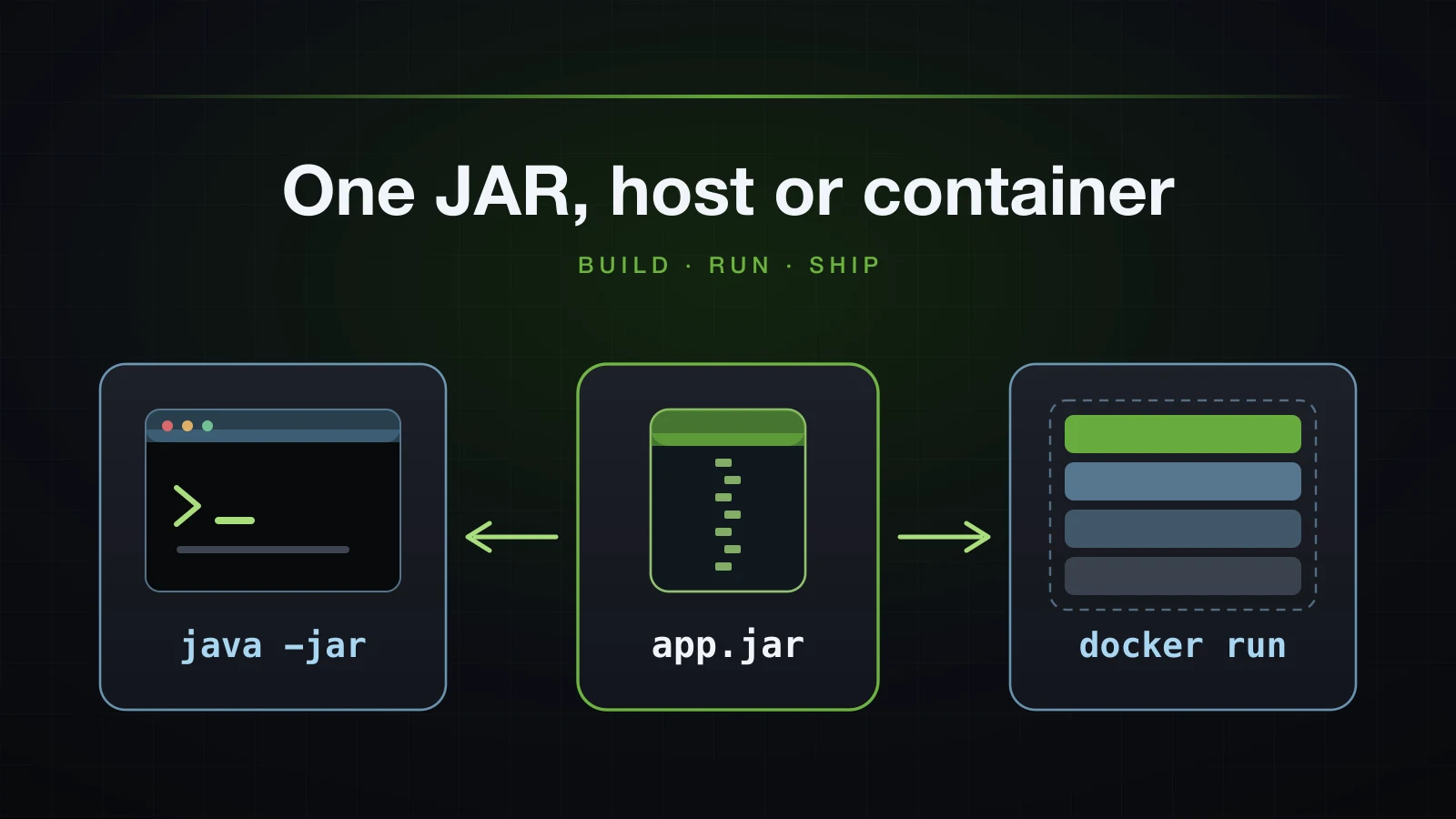
Every application in this course so far has been started by Gradle or by an IDE. A deployed application is started from an artifact instead: one file that a server or a container runs without Gradle, without the source code and without your editor. For Spring Boot that artifact is the executable JAR, and this article follows it from ./gradlew bootJar to a container talking to PostgreSQL.
Three things decide whether that goes smoothly: what the build puts into the JAR, how configuration reaches the JAR from outside — the profile, the database URL, the password — and how the container starts and stops the JVM. Advice about the third is where copied Dockerfiles most often go wrong, so the signal handling, the heap sizes and the image sizes below were measured rather than repeated.
The examples use Spring Boot 4.1.1 and Java 21, with Docker, Docker Compose and PostgreSQL 18. The application uses host port 8141 and PostgreSQL host port 5441 instead of the defaults, so those are the ports in the commands. Long paths are shortened to /…/.
The application being packaged
The project was generated by Spring Initializr with seven dependencies:
curl -s "https://start.spring.io/starter.zip?type=gradle-project&language=java&bootVersion=4.1.1&javaVersion=21&groupId=com.example&artifactId=demo&name=demo&packageName=com.example.demo&dependencies=web,validation,data-jpa,h2,postgresql,flyway,actuator" -o demo.zipOn top of it sits a cut-down product catalogue: a Product entity mapped to the products table with an IDENTITY key, a unique sku and a numeric(10,2) price, a JpaRepository, two DTO records and a controller. It is just enough application to have something worth packaging:
src/main
├── java/com/example/demo
│   ├── DemoApplication.java
│   └── product
│       ├── Product.java
│       ├── ProductController.java
│       ├── ProductRepository.java
│       ├── ProductRequest.java
│       └── ProductResponse.java
└── resources
    ├── application.properties
    ├── application-postgres.properties
    └── db/migration
└── V1__create_products.sql@RestController
@RequestMapping("/api/products")
class ProductController {
private final ProductRepository repository;
ProductController(ProductRepository repository) {
this.repository = repository;
}
@GetMapping
List<ProductResponse> findAll() {
return repository.findAll(Sort.by("id")).stream().map(ProductResponse::from).toList();
}
@GetMapping("/{id}")
ResponseEntity<ProductResponse> findById(@PathVariable Long id) {
return ResponseEntity.of(repository.findById(id).map(ProductResponse::from));
}
@PostMapping
ResponseEntity<ProductResponse> create(@Valid @RequestBody ProductRequest request) {
Product saved = repository.save(new Product(request.name(), request.sku(), request.price()));
var location = ServletUriComponentsBuilder.fromCurrentRequest()
.path("/{id}").buildAndExpand(saved.getId()).toUri();
return ResponseEntity.created(location).body(ProductResponse.from(saved));
}
}CREATE TABLE products (
id BIGINT GENERATED BY DEFAULT AS IDENTITY PRIMARY KEY,
name VARCHAR(120) NOT NULL,
sku VARCHAR(40) NOT NULL,
price NUMERIC(10, 2) NOT NULL,
CONSTRAINT uk_products_sku UNIQUE (sku)
);spring.application.name=demo
spring.jpa.open-in-view=falsespring.datasource.url=jdbc:postgresql://localhost:5441/shop
spring.datasource.username=shop
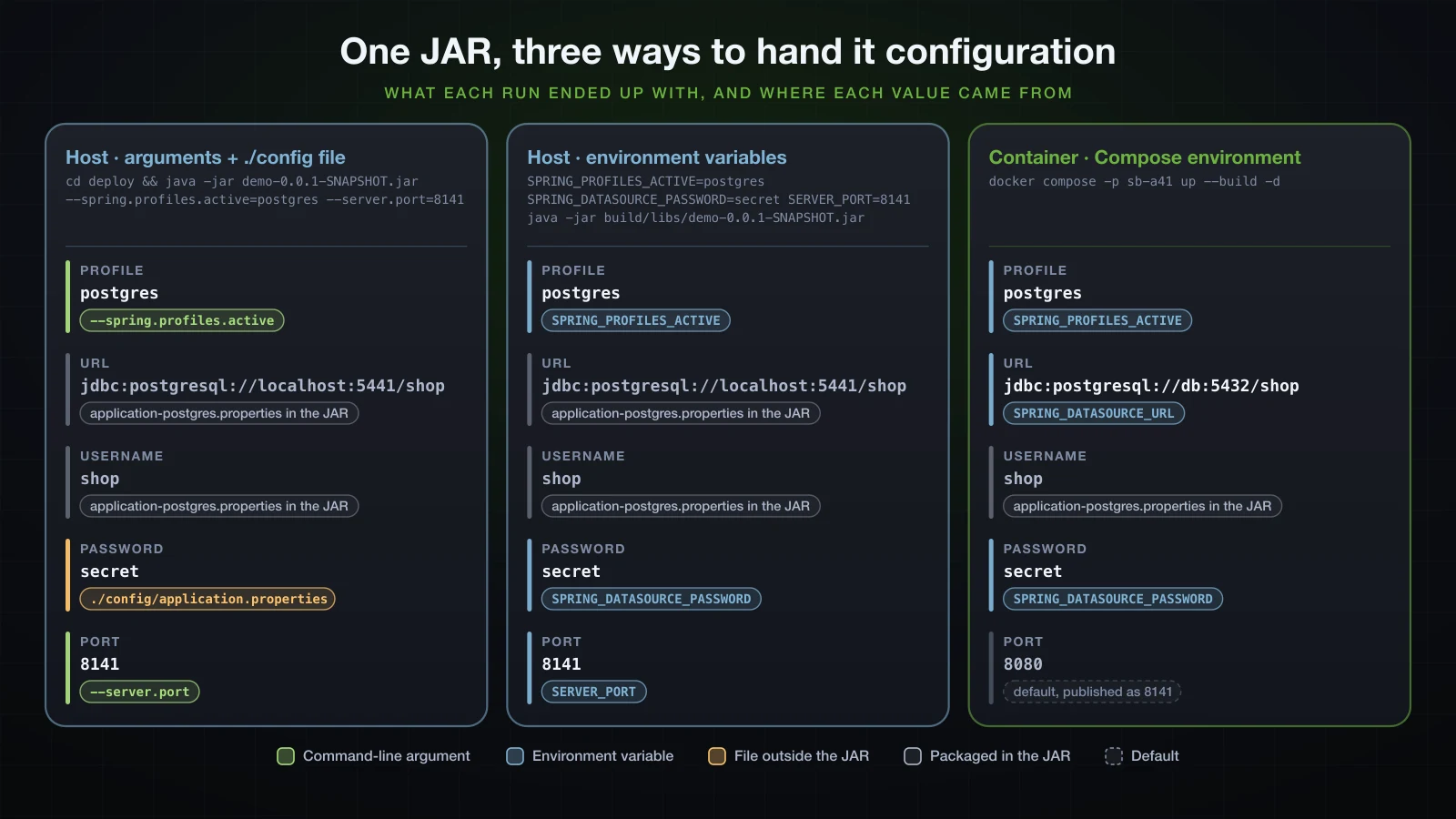
spring.jpa.hibernate.ddl-auto=validateWith no profile there is no datasource URL, so Boot starts an in-memory H2 database and Flyway migrates it: the development setup. The postgres profile points at PostgreSQL and lets Hibernate validate the schema that Flyway created. It has a username and no password. The password has to reach the application from outside the JAR, and how it gets there is the thread that runs through the rest of this article.
./gradlew build vs ./gradlew bootJar
build is the task most people run. --console=plain makes Gradle print the name of every task it executes:
./gradlew clean build --console=plain
ls -l build/libs> Task :clean
> Task :compileJava
> Task :processResources
> Task :classes
> Task :resolveMainClassName
> Task :bootJar
> Task :jar
> Task :assemble
> Task :compileTestJava
> Task :processTestResources NO-SOURCE
> Task :testClasses
> Task :test
> Task :check
> Task :build
-rw-r--r--@ 1 you wheel 7749 Sep 16 15:22 demo-0.0.1-SNAPSHOT-plain.jar
-rw-r--r--@ 1 you wheel 58557202 Sep 16 15:22 demo-0.0.1-SNAPSHOT.jarbuild runs assemble, which runs both archive tasks, and then check, which runs the tests. bootJar runs only the tasks the executable JAR needs, and it skips the tests:
./gradlew clean bootJar --console=plain> Task :clean
> Task :compileJava
> Task :processResources
> Task :classes
> Task :resolveMainClassName
> Task :bootJarIt leaves only demo-0.0.1-SNAPSHOT.jar in build/libs. Use build when you want the tests to gate the artifact, and bootJar when the tests already ran somewhere else.
What the -plain.jar is and how to turn it off
demo-0.0.1-SNAPSHOT-plain.jar is what the ordinary jar task of Gradle's java plugin produces: 7,749 bytes of your own classes and resources, with no dependencies and no Main-Class, so java -jar cannot run it. It only matters when another project consumes this one as a library; for an application it is a file someone will deploy by mistake. Disable the task:
tasks.named('test') {
	useJUnitPlatform()
}

tasks.named('jar') {
	enabled = false
}
./gradlew build now prints > Task :jar SKIPPED and leaves one file. The Dockerfile later in this article depends on that.
Maven reaches the same state differently, so this is one of the few places where the build tool matters. The command that builds only the executable JAR:
./gradlew bootJar./mvnw package -DskipTestsWhat each leaves behind, from the same source code:
build/libs/
└── demo-0.0.1-SNAPSHOT.jar                58,557,202 bytes, executable
target/
├── demo-0.0.1-SNAPSHOT.jar 58,559,651 bytes, executable
└── demo-0.0.1-SNAPSHOT.jar.original 9,054 bytes, plainIn Maven 3.9.16 the jar plugin writes the plain jar first, and spring-boot-maven-plugin then repackages it in place and renames the original out of the way:
[INFO] --- jar:3.5.1:jar (default-jar) @ demo ---
[INFO] --- spring-boot:4.1.1:repackage (repackage) @ demo ---
[INFO] Replacing main artifact /…/demo/target/demo-0.0.1-SNAPSHOT.jar with repackaged archive, adding nested dependencies in BOOT-INF/.
How to change the name of the Spring Boot JAR
Gradle builds the file name from rootProject.name in settings.gradle and version in build.gradle. Changing version = '0.0.1-SNAPSHOT' to version = '1.0.0' produced build/libs/demo-1.0.0.jar, whose manifest said Implementation-Version: 1.0.0. To choose the whole name:
tasks.named('bootJar') {
	archiveFileName = 'app.jar'
}<build>
<finalName>app</finalName>
<plugins>
<plugin>
<groupId>org.springframework.boot</groupId>
<artifactId>spring-boot-maven-plugin</artifactId>
</plugin>
</plugins>
</build>They produced build/libs/app.jar, and target/app.jar next to target/app.jar.original. The rest of this article keeps the default name, because a version in the file name is often the quickest way to tell what is running on a server; the Dockerfile renames the file inside the image anyway.
What is inside a Spring Boot executable JAR?
A JAR is a zip file, so any zip tool can list it:
unzip -l build/libs/demo-0.0.1-SNAPSHOT.jarTrimmed to one or two entries of each kind:
Archive:  build/libs/demo-0.0.1-SNAPSHOT.jar
  Length      Date    Time    Name
---------  ---------- -----   ----
      424  02-01-1980 00:00   META-INF/MANIFEST.MF
      855  02-01-1980 00:00   org/springframework/boot/loader/launch/JarLauncher.class
     8388  02-01-1980 00:00   org/springframework/boot/loader/launch/LaunchedClassLoader.class
      733  02-01-1980 00:00   BOOT-INF/classes/com/example/demo/DemoApplication.class
     4658  02-01-1980 00:00   BOOT-INF/classes/com/example/demo/product/ProductController.class
       59  02-01-1980 00:00   BOOT-INF/classes/application.properties
      131  02-01-1980 00:00   BOOT-INF/classes/application-postgres.properties
      239  02-01-1980 00:00   BOOT-INF/classes/db/migration/V1__create_products.sql
 15279748  02-01-1980 00:00   BOOT-INF/lib/hibernate-core-7.4.5.Final.jar
  3623633  02-01-1980 00:00   BOOT-INF/lib/tomcat-embed-core-11.0.24.jar
  1220948  02-01-1980 00:00   BOOT-INF/lib/postgresql-42.7.13.jar
   172312  02-01-1980 00:00   BOOT-INF/lib/HikariCP-7.0.2.jar
     3725  02-01-1980 00:00   BOOT-INF/classpath.idx
      212  02-01-1980 00:00   BOOT-INF/layers.idx
---------                     -------
 58751978                     226 files
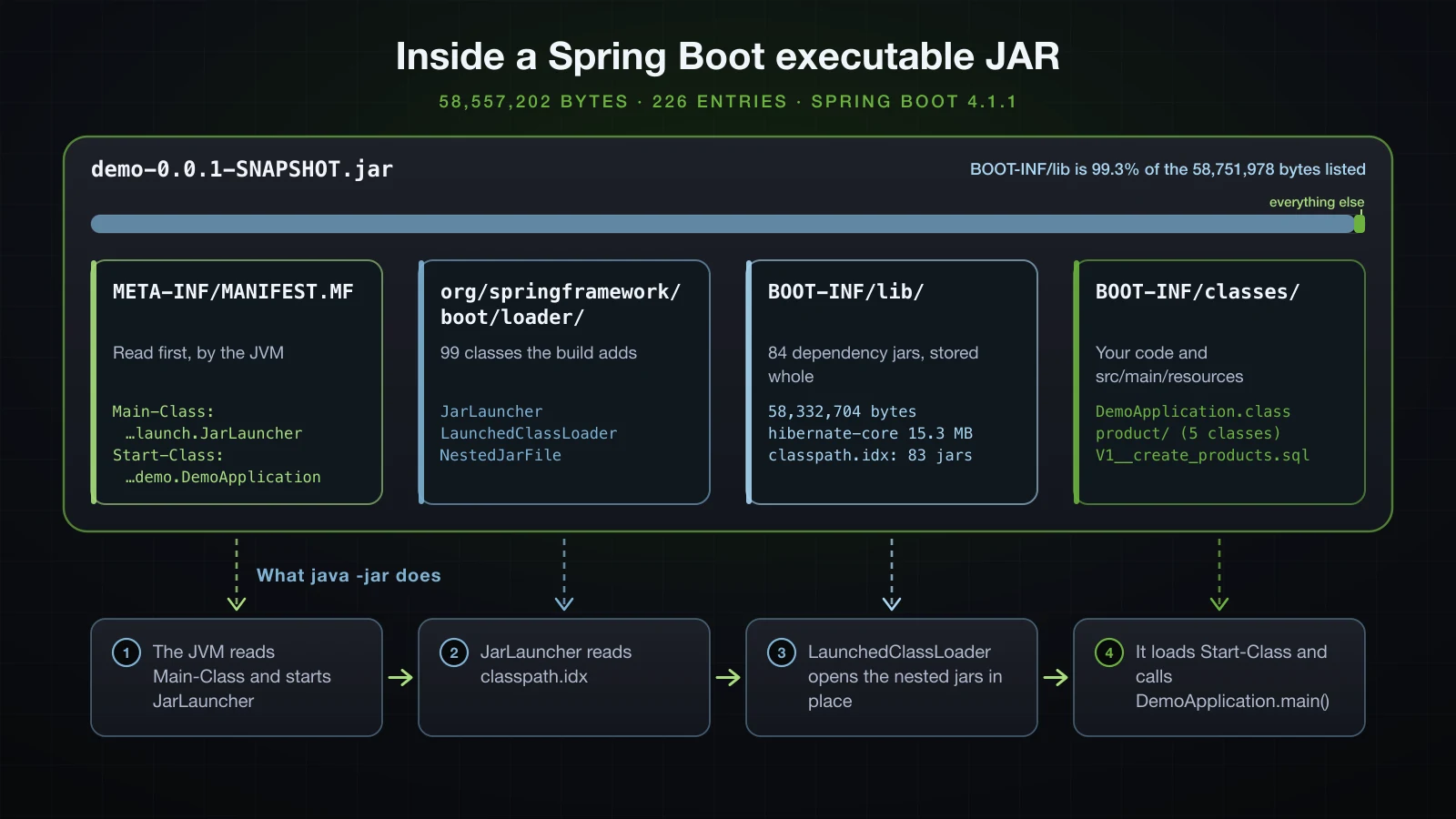
Every date is 02-01-1980 00:00 because Boot's Gradle plugin writes reproducible archives: two builds of the same code gave the same 58,557,202 bytes with the same SHA-256 checksum. Grouped, the 226 entries form this tree:
demo-0.0.1-SNAPSHOT.jar                       58,557,202 bytes, 226 entries
├── META-INF/
│   └── MANIFEST.MF                           Main-Class and Start-Class
├── org/springframework/boot/loader/          99 classes copied in by the build
│   ├── launch/JarLauncher.class              the Main-Class
│   ├── launch/LaunchedClassLoader.class
│   └── jar/NestedJarFile.class               reads a jar stored inside the jar
└── BOOT-INF/
    ├── classes/                              your code and src/main/resources
    │   ├── com/example/demo/…                6 classes
    │   ├── application.properties
    │   ├── application-postgres.properties
    │   └── db/migration/V1__create_products.sql
    ├── lib/                                  84 dependency jars, 58,332,704 bytes
    │   ├── hibernate-core-7.4.5.Final.jar
    │   ├── tomcat-embed-core-11.0.24.jar
    │   └── …
    ├── classpath.idx                         83 jars in classpath order
    └── layers.idx                            layer groups for container images
Nearly all of the file is other people's code: the 84 dependency jars account for 58,332,704 of the 58,751,978 bytes in the listing, and the six classes and three resource files of the application for a few kilobytes.
The manifest ties the layout together:
unzip -p build/libs/demo-0.0.1-SNAPSHOT.jar META-INF/MANIFEST.MFManifest-Version: 1.0
Main-Class: org.springframework.boot.loader.launch.JarLauncher
Start-Class: com.example.demo.DemoApplication
Spring-Boot-Version: 4.1.1
Spring-Boot-Classes: BOOT-INF/classes/
Spring-Boot-Lib: BOOT-INF/lib/
Spring-Boot-Classpath-Index: BOOT-INF/classpath.idx
Spring-Boot-Layers-Index: BOOT-INF/layers.idx
Build-Jdk-Spec: 21
Implementation-Title: demo
Implementation-Version: 0.0.1-SNAPSHOT| Attribute | What it is for |
|---|---|
Main-Class | The class the JVM starts: Spring Boot's JarLauncher, not your class |
Start-Class | Your @SpringBootApplication class, which the launcher calls once the class loader is ready |
Spring-Boot-Classes | Where the launcher finds your compiled classes and resources |
Spring-Boot-Lib | Where it finds the dependency jars |
Spring-Boot-Classpath-Index | classpath.idx: the jars in classpath order — 83 of the 84, all except spring-boot-jarmode-tools-4.1.1.jar, which is a tool rather than a dependency |
Spring-Boot-Layers-Index | layers.idx: groups entries into dependencies, spring-boot-loader, snapshot-dependencies and application for layered images, an Advanced-course topic |
Build-Jdk-Spec, Implementation-* | The Java version recorded by the build, the project name and the version |
That layout is also why the JAR cannot be treated as an ordinary classpath entry:
java -cp build/libs/demo-0.0.1-SNAPSHOT.jar com.example.demo.DemoApplicationError: Could not find or load main class com.example.demo.DemoApplication
Caused by: java.lang.ClassNotFoundException: com.example.demo.DemoApplicationThe JDK's class loader looks for com/example/demo/DemoApplication.class at the root of the archive, while the build put it under BOOT-INF/classes, and it never opens a jar stored inside another jar, so none of the 84 dependencies would be visible either. JarLauncher exists to read exactly this layout: it builds a LaunchedClassLoader over BOOT-INF/classes and the nested jars that classpath.idx lists, and only then loads Start-Class and calls its main method.
Running the JAR with java -jar
java -jar build/libs/demo-0.0.1-SNAPSHOT.jar --server.port=8141The lines of the startup log that answer the questions you have at this point:
2026-09-16T15:15:41.661+07:00  INFO 55211 --- [demo] [           main] com.example.demo.DemoApplication         : Starting DemoApplication v0.0.1-SNAPSHOT using Java 21.0.6 with PID 55211 (/…/demo/build/libs/demo-0.0.1-SNAPSHOT.jar started by you in /…/demo)
2026-09-16T15:15:41.662+07:00  INFO 55211 --- [demo] [           main] com.example.demo.DemoApplication         : No active profile set, falling back to 1 default profile: "default"
2026-09-16T15:15:43.337+07:00  INFO 55211 --- [demo] [           main] o.s.boot.tomcat.TomcatWebServer          : Tomcat started on port 8141 (http) with context path '/'
2026-09-16T15:15:43.340+07:00  INFO 55211 --- [demo] [           main] com.example.demo.DemoApplication         : Started DemoApplication in 1.843 seconds (process running for 2.049)
Starting …names the application version, the Java runtime that is actually running it (21.0.6: whateverjavais on thePATH, not the toolchain Gradle compiled with), the PID, the JAR, the user and the working directory. The last two matter later in this article.No active profile setmeans the H2 setup. Further down, Flyway printedSuccessfully applied 1 migration to schema "PUBLIC".Tomcat started on port 8141confirms the port the server really bound to.Started DemoApplication in 1.843 secondsis the best of three runs at a load average of about 4, so treat it as indicative.
A product round trip and the health endpoint:
curl -s -i -H 'Content-Type: application/json' -d '{"name":"Mechanical keyboard","sku":"KB-01","price":89.90}' http://localhost:8141/api/productsHTTP/1.1 201
Location: http://localhost:8141/api/products/1
Content-Type: application/json
Transfer-Encoding: chunked
Date: Wed, 16 Sep 2026 08:04:20 GMT
{"id":1,"name":"Mechanical keyboard","sku":"KB-01","price":89.90}curl -s http://localhost:8141/actuator/health{"groups":["liveness","readiness"],"status":"UP"}/actuator/health is the one Actuator endpoint exposed over HTTP by default; the groups array lists the liveness and readiness groups that Boot 4.1.1 also enables by default. The Compose file at the end of this article uses this endpoint as the container's health check.
Running the postgres profile against PostgreSQL 18
PostgreSQL runs in a container, published on host port 5441:
docker run -d --name sb-a41-pg -e POSTGRES_USER=shop -e POSTGRES_PASSWORD=secret -e POSTGRES_DB=shop -p 5441:5432 postgres:18Activating the profile and nothing else shows why the password has to come from somewhere:
java -jar build/libs/demo-0.0.1-SNAPSHOT.jar --spring.profiles.active=postgres --server.port=81412026-09-16T15:19:05.789+07:00 ERROR 58594 --- [demo] [ main] o.s.boot.SpringApplication : Application run failed
...
Caused by: org.postgresql.util.PSQLException: The server requested SCRAM-based authentication, but no password was provided.The process exited with status 1. The profile itself can be activated in three ways, and all three printed the same The following 1 profile is active: "postgres" on this JAR:
| Where the profile comes from | Command |
|---|---|
| Command-line argument | java -jar demo-0.0.1-SNAPSHOT.jar --spring.profiles.active=postgres |
| Environment variable | SPRING_PROFILES_ACTIVE=postgres java -jar demo-0.0.1-SNAPSHOT.jar |
| JVM system property | java -Dspring.profiles.active=postgres -jar demo-0.0.1-SNAPSHOT.jar |
Article 13 measured how these rank against each other when more than one is set — the argument wins, then the system property, then the environment variable — and showed that -Dspring.profiles.active placed after the JAR name is silently ignored. None of that changes for a real application.
Overriding a property with an environment variable
Environment variables can set any property, not only the profile. This run takes the profile, the password and the port from the environment:
SPRING_PROFILES_ACTIVE=postgres SPRING_DATASOURCE_PASSWORD=secret SERVER_PORT=8141 java -jar build/libs/demo-0.0.1-SNAPSHOT.jar2026-09-16T15:19:06.435+07:00 INFO 58623 --- [demo] [ main] com.example.demo.DemoApplication : The following 1 profile is active: "postgres"
2026-09-16T15:19:07.252+07:00 INFO 58623 --- [demo] [ main] com.zaxxer.hikari.HikariDataSource : HikariPool-1 - Starting...
2026-09-16T15:19:07.336+07:00 INFO 58623 --- [demo] [ main] com.zaxxer.hikari.pool.HikariPool : HikariPool-1 - Added connection org.postgresql.jdbc.PgConnection@34aa8b61
2026-09-16T15:19:07.337+07:00 INFO 58623 --- [demo] [ main] com.zaxxer.hikari.HikariDataSource : HikariPool-1 - Start completed.
2026-09-16T15:19:07.347+07:00 INFO 58623 --- [demo] [ main] org.flywaydb.core.FlywayExecutor : Database: jdbc:postgresql://localhost:5441/shop (PostgreSQL 18.6)
2026-09-16T15:19:07.380+07:00 INFO 58623 --- [demo] [ main] o.f.core.internal.command.DbValidate : Successfully validated 1 migration (execution time 00:00.009s)
2026-09-16T15:19:07.437+07:00 INFO 58623 --- [demo] [ main] o.f.core.internal.command.DbMigrate : Current version of schema "public": << Empty Schema >>
2026-09-16T15:19:07.441+07:00 INFO 58623 --- [demo] [ main] o.f.core.internal.command.DbMigrate : Migrating schema "public" to version "1 - create products"
2026-09-16T15:19:07.456+07:00 INFO 58623 --- [demo] [ main] o.f.core.internal.command.DbMigrate : Successfully applied 1 migration to schema "public", now at version v1 (execution time 00:00.006s)
2026-09-16T15:19:08.562+07:00 INFO 58623 --- [demo] [ main] o.s.boot.tomcat.TomcatWebServer : Tomcat started on port 8141 (http) with context path '/'PgConnection in the Hikari line means PostgreSQL accepted the login, and Flyway created products in the empty database. The mapping from property to variable is mechanical: upper-case the name, turn dots into underscores and drop dashes, so spring.datasource.password becomes SPRING_DATASOURCE_PASSWORD and server.port becomes SERVER_PORT. The URL and the username still came from application-postgres.properties inside the JAR. This is the form every container platform uses, so the Docker sections below reuse it unchanged.
A config file outside the JAR for the password
On a server without a container, a file next to the application is the other usual home for a secret. Boot reads config/application.properties in the working directory and ranks it above every file packaged in the JAR:
deploy/
├── demo-0.0.1-SNAPSHOT.jar
└── config/
└── application.properties spring.datasource.password=secretcd deploy && java -jar demo-0.0.1-SNAPSHOT.jar --spring.profiles.active=postgres --server.port=81412026-09-16T15:19:19.297+07:00 INFO 58883 --- [demo] [ main] com.example.demo.DemoApplication : Starting DemoApplication v0.0.1-SNAPSHOT using Java 21.0.6 with PID 58883 (/…/deploy/demo-0.0.1-SNAPSHOT.jar started by you in /…/deploy)
2026-09-16T15:19:19.299+07:00 INFO 58883 --- [demo] [ main] com.example.demo.DemoApplication : The following 1 profile is active: "postgres"
2026-09-16T15:19:20.293+07:00 INFO 58883 --- [demo] [ main] org.flywaydb.core.FlywayExecutor : Database: jdbc:postgresql://localhost:5441/shop (PostgreSQL 18.6)
2026-09-16T15:19:20.347+07:00 INFO 58883 --- [demo] [ main] o.f.core.internal.command.DbMigrate : Current version of schema "public": 1
2026-09-16T15:19:20.348+07:00 INFO 58883 --- [demo] [ main] o.f.core.internal.command.DbMigrate : Schema "public" is up to date. No migration necessary.The external file supplied the one key the JAR lacks, and Flyway found the schema already at version 1. The words in /…/deploy on the first line are the directory Boot searched: article 13 showed that the same JAR started from a different directory never sees the file. The file belongs on the server, not in the repository.
Stopping the application: graceful shutdown and exit codes
Ctrl+C in the terminal sends SIGINT; kill <pid> sends SIGTERM. Both run the JVM's shutdown hooks, and Spring Boot's hook closes the application in order. kill 58883 on the run above printed:
2026-09-16T15:19:21.877+07:00  INFO 58883 --- [demo] [ionShutdownHook] o.s.boot.tomcat.GracefulShutdown         : Commencing graceful shutdown. Waiting for active requests to complete
2026-09-16T15:19:21.881+07:00  INFO 58883 --- [demo] [tomcat-shutdown] o.s.boot.tomcat.GracefulShutdown         : Graceful shutdown complete
2026-09-16T15:19:21.883+07:00  INFO 58883 --- [demo] [ionShutdownHook] j.LocalContainerEntityManagerFactoryBean : Closing JPA EntityManagerFactory for persistence unit 'default'
2026-09-16T15:19:21.885+07:00  INFO 58883 --- [demo] [ionShutdownHook] com.zaxxer.hikari.HikariDataSource       : HikariPool-1 - Shutdown initiated...
2026-09-16T15:19:21.886+07:00  INFO 58883 --- [demo] [ionShutdownHook] com.zaxxer.hikari.HikariDataSource       : HikariPool-1 - Shutdown completed.
The web server stops taking new requests and waits for the active ones, then the EntityManagerFactory and the connection pool close. Graceful shutdown is not something you have to switch on: the property metadata in spring-boot-web-server-4.1.1.jar gives server.shutdown the default graceful, and spring.lifecycle.timeout-per-shutdown-phase defaults to 30s, the longest Boot waits for requests in flight.
| How it stopped | Exit status |
|---|---|
kill <pid> (SIGTERM) | 143 |
Ctrl+C (SIGINT) | 130 |
| Startup failure, such as the missing password | 1 |
143 and 130 are 128 plus the signal number, the JVM's way of reporting that a signal ended it. A process supervisor that treats anything but 0 as a crash needs to know that 143 is a normal stop.
JVM options go before -jar
Everything after the JAR name is passed to main, including options meant for the JVM. With -Xmx256m in both positions, jcmd read the command line and the flags of the running JVM, whose PID the Starting line prints:
java -jar build/libs/demo-0.0.1-SNAPSHOT.jar --server.port=8141 -Xmx256mjcmd 70676 VM.command_line | grep -E 'jvm_args|java_command'
jcmd 70676 VM.flags | tr ' ' '\n' | grep '^-XX:MaxHeapSize'java_command: build/libs/demo-0.0.1-SNAPSHOT.jar --server.port=8141 -Xmx256m
-XX:MaxHeapSize=4294967296The same two jcmd commands against the JVM started with the option in front:
java -Xmx256m -jar build/libs/demo-0.0.1-SNAPSHOT.jar --server.port=8141jvm_args: -Xmx256m
java_command: build/libs/demo-0.0.1-SNAPSHOT.jar --server.port=8141
-XX:MaxHeapSize=268435456After the JAR, -Xmx256m was just a string in args, no JVM argument was recorded, and the heap limit stayed at the default 4 GiB, a quarter of this machine's 16 GB; before -jar it became a 256 MiB limit. Keeping the process alive after you log out, restarting it on failure and starting it at boot is the job of a service manager such as systemd, which the Advanced course covers. The rest of this article hands that job to a container runtime.
A simple Dockerfile for a Spring Boot JAR
The base image only needs a Java runtime. eclipse-temurin is the Eclipse Adoptium build of OpenJDK, and its 21-jre tag carries the runtime without the compiler:
docker run --rm eclipse-temurin:21-jre sh -c 'cat /etc/os-release | head -4; java -version'PRETTY_NAME="Ubuntu 26.04.1 LTS"
NAME="Ubuntu"
VERSION_ID="26.04"
VERSION="26.04.1 LTS (Resolute Raccoon)"
openjdk version "21.0.12" 2026-07-21 LTS
OpenJDK Runtime Environment Temurin-21.0.12+8 (build 21.0.12+8-LTS)
OpenJDK 64-Bit Server VM Temurin-21.0.12+8 (build 21.0.12+8-LTS, mixed mode, sharing)21-jre is a moving tag: when this was written it pointed at Temurin 21.0.12 on Ubuntu 26.04. Pin a more specific tag or a digest when you need the same base every time. The first Dockerfile copies a JAR built on the host:
FROM eclipse-temurin:21-jre
WORKDIR /app
COPY build/libs/*.jar app.jar
EXPOSE 8080
ENTRYPOINT ["java", "-jar", "/app/app.jar"]
COPY build/libs/*.jar app.jargives the JAR a fixed name inside the image, whatever the version in its file name.EXPOSE 8080documents the port. It publishes nothing;-pdoes.ENTRYPOINT [...]is the exec form, a JSON array. The next section shows what changes without it.
A .dockerignore keeps the rest of the project out of reach of COPY:
.git
.gradle
.idea
build/*
!build/libs/
The last two lines exclude everything under build except build/libs. BuildKit only sends the paths a COPY names, so for this Dockerfile the build context was 58.57 MB with and without the file. It starts to matter as soon as a COPY takes a whole directory: a COPY . . would otherwise put .git, the local .gradle directory and every build output into the image.
docker build -t sb-a41-demo:1 .Trimmed to the steps:
#4 [1/3] FROM docker.io/library/eclipse-temurin:21-jre@sha256:f5e749f83c8a6d0b14b729ad35eebb9a96493b38178d2ddd5429e5a0733b6ee5
#5 [internal] load build context
#5 transferring context: 58.57MB 0.3s done
#7 [3/3] COPY build/libs/*.jar app.jar
#7 DONE 0.1s
#8 naming to docker.io/library/sb-a41-demo:1 donedocker images sb-a41-demo
docker images eclipse-temurinIMAGE ID DISK USAGE CONTENT SIZE EXTRA
sb-a41-demo:1 b9d8beb897de 585MB 166MB
IMAGE ID DISK USAGE CONTENT SIZE EXTRA
eclipse-temurin:21-jdk 56a062b5a795 750MB 227MB
eclipse-temurin:21-jre f5e749f83c8a 479MB 118MB Docker 29 prints two sizes. CONTENT SIZE is the compressed image content, close to what a pull downloads — the layers of the arm64 21-jre image add up to 112,962,074 bytes. DISK USAGE also counts the unpacked layers on this machine; du -sh / inside the JRE image reported 344M. The JAR added 48 MB of compressed content to the base.
docker run -d --name sb-a41-app -p 8141:8080 sb-a41-demo:1
curl -s -i http://localhost:8141/api/products/1
After creating the keyboard with the same POST as on the host:
HTTP/1.1 200
Content-Type: application/json
Transfer-Encoding: chunked
Date: Wed, 16 Sep 2026 08:08:41 GMT

{"id":1,"name":"Mechanical keyboard","sku":"KB-01","price":89.90}
-p 8141:8080 maps host port 8141 to the container's 8080, where Tomcat listens because nothing overrides server.port inside the container. The startup log shows two differences from the host run: Starting DemoApplication v0.0.1-SNAPSHOT using Java 21.0.12 with PID 1 (/app/app.jar started by root in /app), and timestamps in UTC, because the image has no time zone configured.
COPY build/libs/*.jar with the plain JAR still enabled
Before the jar task was disabled, build/libs held two files and the wildcard matched both. The build did not fail. /app/app.jar was the executable JAR, but only by luck: BuildKit copied each match to the same destination in turn, and a test with two files named demo-a.jar and demo-z.jar confirmed that the last name in sort order wins. demo-0.0.1-SNAPSHOT.jar sorts after demo-0.0.1-SNAPSHOT-plain.jar because . comes after -. Any other naming could put the plain jar in the image without an error at build time. With the plain jar disabled the wildcard matches exactly one file. With Maven the line is COPY target/*.jar app.jar, and demo-0.0.1-SNAPSHOT.jar.original does not match *.jar.
Exec form vs shell form ENTRYPOINT: does docker stop reach the JVM?
The shell form looks like the same instruction without the brackets:
FROM eclipse-temurin:21-jre
WORKDIR /app
COPY build/libs/*.jar app.jar
EXPOSE 8080
ENTRYPOINT ["java", "-jar", "/app/app.jar"]
ENTRYPOINT java -jar /app/app.jar
Docker stores it as ["/bin/sh","-c","java -jar /app/app.jar"], and that changes which process is PID 1. The shell-form image was built as sb-a41-demo:shell and run as sb-a41-shell with the same docker run options as sb-a41-app. The same ps in each, exec form first:
docker exec sb-a41-app ps -o pid,ppid,user,args
docker exec sb-a41-shell ps -o pid,ppid,user,args PID PPID USER COMMAND
1 0 root java -jar /app/app.jar
58 0 root ps -o pid,ppid,user,args PID PPID USER COMMAND
1 0 root /bin/sh -c java -jar /app/app.jar
7 1 root java -jar /app/app.jar
59 0 root ps -o pid,ppid,user,argsdocker stop sends SIGTERM to PID 1, waits 10 seconds, then sends SIGKILL. Each container was started, left until Started DemoApplication appeared, and stopped:
time docker stop sb-a41-appsb-a41-app
docker stop sb-a41-app 0.01s user 0.00s system 6% cpu 0.176 totaltime docker stop sb-a41-shellsb-a41-shell
docker stop sb-a41-shell 0.01s user 0.01s system 0% cpu 10.235 total| Exec form | Shell form | |
|---|---|---|
| PID 1 | java | /bin/sh (dash 0.5.12), with java as PID 7 |
docker stop took | 0.176 s | 10.235 s |
| Shutdown log | Commencing graceful shutdown… through HikariPool-1 - Shutdown completed. | nothing after Started DemoApplication |
| Exit code | 143 (SIGTERM) | 137 (SIGKILL) |
The times are the best of three runs at a load average of about 5. In the shell form the SIGTERM went to dash, which neither handles it nor passes it on, and a PID 1 process without a handler for a signal is not terminated by it. The JVM never learned it was being stopped: no graceful shutdown, no connection pool closed, and every stop costs the full 10 seconds before SIGKILL. Whether the shell stays in between depends on the shell: started with bash -c "java -jar /app/app.jar" in the same image, bash replaced itself and java was PID 1, while dash did not. Do not build on that difference; use the exec form. If you really need a shell, for variable expansion for example, ENTRYPOINT exec java -jar /app/app.jar made java PID 1 again, and docker stop returned in a fraction of a second with exit code 143.
Running the container as a non-root user
The Starting line said started by root. Nothing in this application needs root, and a process that is compromised as root inside a container has more to work with. The Temurin image is Ubuntu, so groupadd and useradd are in /usr/sbin:
FROM eclipse-temurin:21-jre
RUN groupadd --system spring && useradd --system --gid spring --no-create-home spring
WORKDIR /app
COPY build/libs/*.jar app.jar
USER spring
EXPOSE 8080
ENTRYPOINT ["java", "-jar", "/app/app.jar"]
--system picks an id below 1000, which matters on this base: Ubuntu images already contain a user ubuntu with uid 1000. USER comes after COPY, so the JAR stays owned by root and the application can read it but not replace it. Built as sb-a41-demo:2 and started the same way:
docker exec sb-a41-app id
docker exec sb-a41-app ps -o pid,user,args
docker exec sb-a41-app ls -l /app
docker exec sb-a41-app sh -c 'touch /app/x 2>&1; echo rc=$?'uid=999(spring) gid=999(spring) groups=999(spring)
PID USER COMMAND
1 spring java -jar /app/app.jar
64 spring ps -o pid,user,args
total 57192
-rw-r--r-- 1 root root 58557202 Sep 16 08:14 app.jar
touch: cannot touch '/app/x': Permission denied
rc=1The log line changed to (/app/app.jar started by spring in /app), and /actuator/health still answered {"groups":["liveness","readiness"],"status":"UP"}. The application writes nothing under /app: Tomcat created its working directories, /tmp/tomcat.8080.… and /tmp/tomcat-docbase.8080.…, owned by spring in /tmp, which any user can write to.
Multi-stage Dockerfile: building the JAR inside Docker
The single-stage image depends on a JAR someone built on their machine with whatever JDK they had. A multi-stage build compiles inside Docker with a pinned JDK and ships only the result:
FROM eclipse-temurin:21-jdk AS build
WORKDIR /workspace
COPY gradlew settings.gradle build.gradle ./
COPY gradle gradle
RUN ./gradlew dependencies --no-daemon > /dev/null
COPY src src
RUN ./gradlew bootJar -x test --no-daemon

FROM eclipse-temurin:21-jre
RUN groupadd --system spring && useradd --system --gid spring --no-create-home spring
WORKDIR /app
COPY build/libs/*.jar app.jar
COPY --from=build /workspace/build/libs/*.jar app.jar
USER spring
EXPOSE 8080
ENTRYPOINT ["java", "-jar", "/app/app.jar"]- The
buildstage starts from the JDK image. Only the stage after it becomes the image; the JDK, Gradle and the sources are left behind. - The order of the
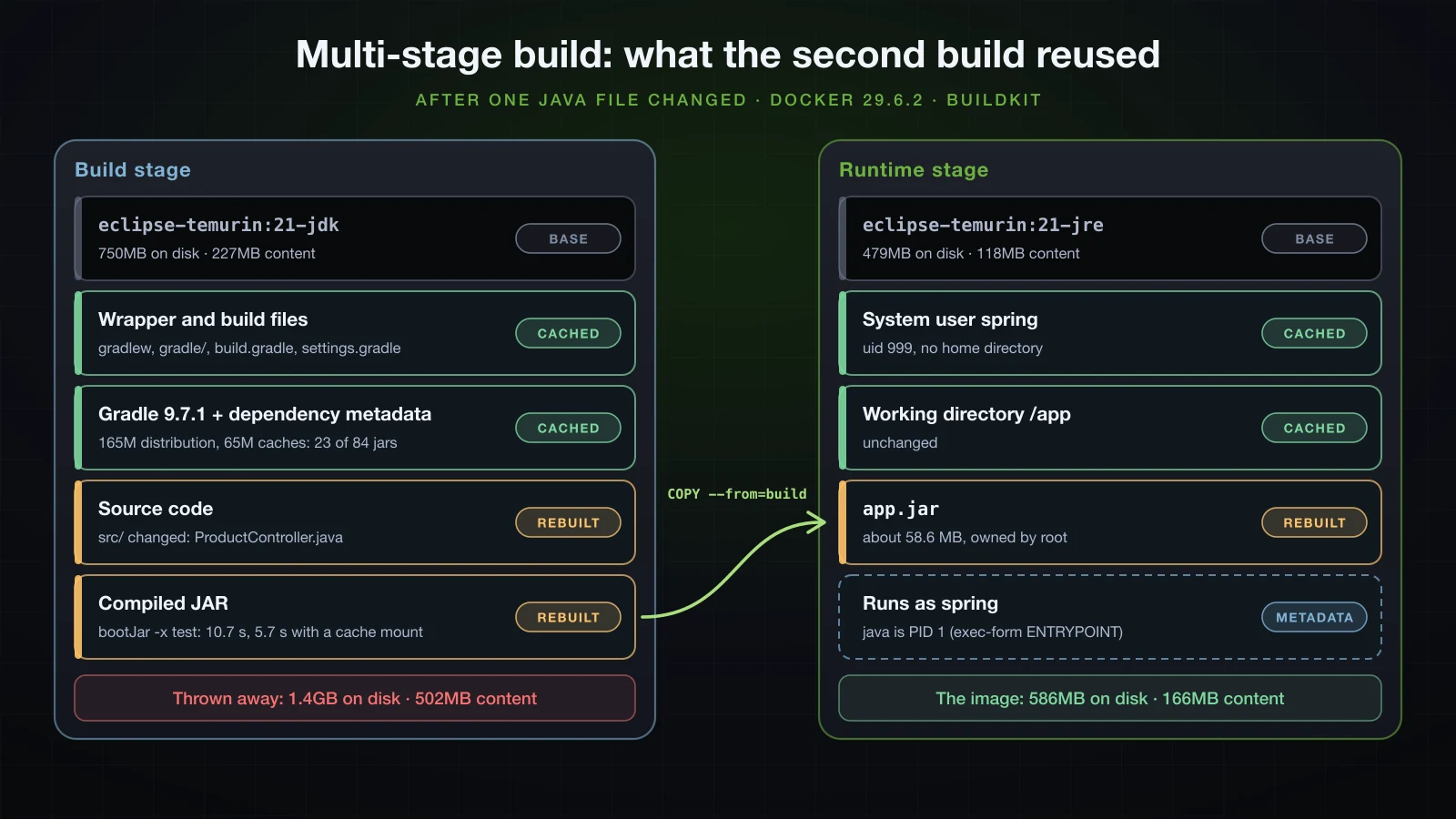
COPYlines is the point. Docker reuses a layer until something it depends on changes. The wrapper and the build files change rarely, so./gradlew dependencies— which downloads the Gradle 9.7.1 distribution and resolves the dependency graph — stays cached until they do.srcchanges on every commit, so it is copied last. -x testskips the tests. They belong to CI or to./gradlew buildon the host, before an image is built, not to everydocker build.--no-daemonstops Gradle from leaving a daemon behind; it still forked a single-use one, and said so.
The first build, from an empty cache:
docker build --progress=plain -t sb-a41-demo:3 .#11 [build 5/7] RUN ./gradlew dependencies --no-daemon > /dev/null
#11 DONE 32.2s
#12 [build 6/7] COPY src src
#12 DONE 0.0s
#13 [build 7/7] RUN ./gradlew bootJar -x test --no-daemon
#13 DONE 10.8sThen ProductController changed — findAll now sorts by id, which is one import and one edited line — and the same command ran again. Trimmed:
#8 [build 2/7] WORKDIR /workspace
#8 CACHED
#9 [build 3/7] COPY gradlew settings.gradle build.gradle ./
#9 CACHED
#10 [build 4/7] COPY gradle gradle
#10 CACHED
#11 [build 5/7] RUN ./gradlew dependencies --no-daemon > /dev/null
#11 CACHED
#12 [build 6/7] COPY src src
#12 DONE 0.0s
#13 [build 7/7] RUN ./gradlew bootJar -x test --no-daemon
#13 9.171 > Task :compileJava
#13 10.52 > Task :bootJar
#13 10.52 BUILD SUCCESSFUL in 10s
#13 DONE 10.7s
#14 [stage-1 2/4] RUN groupadd --system spring && useradd --system --gid spring --no-create-home spring
#14 CACHED
#15 [stage-1 3/4] WORKDIR /app
#15 CACHED
#16 [stage-1 4/4] COPY --from=build /workspace/build/libs/*.jar app.jar
#16 DONE 0.1s
Everything up to the dependency step came from the cache, including the 32 seconds of downloads. From COPY src src on, the build ran again, and in the runtime stage only the layer holding the new JAR was rebuilt.
What the dependency layer does not cache
bootJar still took 10.7 seconds, and nine of them passed before compileJava printed anything. Building only the first five lines of the Dockerfile as a separate image showed what the cached layer contains:
head -5 Dockerfile > Dockerfile.deps
docker build -q -f Dockerfile.deps -t sb-a41-deps:1 .
docker run --rm --entrypoint sh sb-a41-deps:1 -c 'du -sh /root/.gradle/wrapper /root/.gradle/caches; find /root/.gradle/caches/modules-2/files-2.1 -name "*.jar" | wc -l; find /root/.gradle/caches/modules-2/files-2.1 -name "*.pom" | wc -l'165M /root/.gradle/wrapper
65M /root/.gradle/caches
23
285The Gradle distribution and 285 POM files, but only 23 jars — the application needs 84. ./gradlew dependencies resolves the dependency graph from metadata and does not download the artifacts, so every source change downloaded the dependency jars again. A BuildKit cache mount keeps Gradle's cache between builds without putting it in a layer:
COPY src src
RUN ./gradlew bootJar -x test --no-daemon
RUN --mount=type=cache,target=/root/.gradle/caches ./gradlew bootJar -x test --no-daemon
The first build with the mount filled it and took 29.1 seconds for that step; after the next two small edits, each adding a @Size constraint to ProductRequest, the step took 5.7 and 5.9 seconds, against 10.7 without the mount. The numbers were taken at load averages between 3 and 8.5 and are indicative. The mount lives in the builder, not in the image, so docker builder prune or a fresh CI runner starts it empty again. This is the version the Compose file below builds.
The images, from docker images:
| Image | DISK USAGE | CONTENT SIZE |
|---|---|---|
eclipse-temurin:21-jdk | 750MB | 227MB |
eclipse-temurin:21-jre | 479MB | 118MB |
sb-a41-demo:3, the multi-stage image | 586MB | 166MB |
The build stage on its own (--target build) | 1.4GB | 502MB |
The final image is the JRE base plus the JAR and one user: the same 166 MB of content as the single-stage image. Shipping the build stage instead would mean 502 MB of compressed content, including a JDK, a Gradle distribution and a dependency cache that nothing at runtime uses.
How much heap does a Spring Boot container get?
The JVM sizes its default maximum heap from the memory it can see, and inside a container that is the container's limit. -XX:+PrintFlagsFinal shows the result without starting the application:
docker run --rm --entrypoint java sb-a41-demo:2 -XX:+PrintFlagsFinal -version 2>&1 | grep -E 'Picked up| MaxHeapSize | MaxRAMPercentage '
docker run --rm --memory=512m --entrypoint java sb-a41-demo:2 -XX:+PrintFlagsFinal -version 2>&1 | grep -E 'Picked up| MaxHeapSize | MaxRAMPercentage '
docker run --rm --memory=512m -e JAVA_TOOL_OPTIONS=-XX:MaxRAMPercentage=75 --entrypoint java sb-a41-demo:2 -XX:+PrintFlagsFinal -version 2>&1 | grep -E 'Picked up| MaxHeapSize | MaxRAMPercentage ' size_t MaxHeapSize = 2082471936 {product} {ergonomic}
double MaxRAMPercentage = 25.000000 {product} {default}
size_t MaxHeapSize = 134217728 {product} {ergonomic}
double MaxRAMPercentage = 25.000000 {product} {default}
Picked up JAVA_TOOL_OPTIONS: -XX:MaxRAMPercentage=75
size_t MaxHeapSize = 402653184 {product} {ergonomic}
double MaxRAMPercentage = 75.000000 {product} {environment}docker run options | Max heap |
|---|---|
| no limit (Docker Desktop VM with 7.75 GiB) | 2,082,471,936 bytes, about 1.94 GiB |
--memory=512m | 134,217,728 bytes = 128 MiB |
--memory=512m -e JAVA_TOOL_OPTIONS=-XX:MaxRAMPercentage=75 | 402,653,184 bytes = 384 MiB |
Java 21 reads the cgroup v2 limit — java -XshowSettings:system -version in the same container printed Memory Limit: 512.00M — and gives the heap 25% of it by default. A quarter is a conservative choice for a container that runs nothing but the JVM. JAVA_TOOL_OPTIONS is read by the JVM itself, so it works with the exec-form ENTRYPOINT without a shell to expand variables, and the Picked up line confirms it arrived. It is not worth going to 100%: both variants of the application used about 288 MiB of the 512 MiB limit right after startup in docker stats, and the JVM needs memory outside the heap for classes, compiled code and threads. With that little memory the JVM also chose a different garbage collector; tuning either belongs to the Advanced course.
Running the Spring Boot container with PostgreSQL
Two containers on a user-defined network
Containers on the same user-defined network reach each other by container name:
docker network create sb-a41-net
docker run -d --name sb-a41-db --network sb-a41-net -e POSTGRES_USER=shop -e POSTGRES_PASSWORD=secret -e POSTGRES_DB=shop postgres:18
docker run -d --name sb-a41-app --network sb-a41-net -p 8141:8080 -e SPRING_PROFILES_ACTIVE=postgres -e SPRING_DATASOURCE_URL=jdbc:postgresql://sb-a41-db:5432/shop -e SPRING_DATASOURCE_PASSWORD=secret sb-a41-demo:3
The database needs no -p because only the application talks to it, over the network. The JDBC URL names the container, sb-a41-db, and the port inside it, 5432:
2026-09-16T08:16:54.847Z  INFO 1 --- [demo] [           main] com.example.demo.DemoApplication         : The following 1 profile is active: "postgres"
2026-09-16T08:16:55.836Z  INFO 1 --- [demo] [           main] com.zaxxer.hikari.pool.HikariPool        : HikariPool-1 - Added connection org.postgresql.jdbc.PgConnection@112c2930
2026-09-16T08:16:55.847Z  INFO 1 --- [demo] [           main] org.flywaydb.core.FlywayExecutor         : Database: jdbc:postgresql://sb-a41-db:5432/shop (PostgreSQL 18.6)
2026-09-16T08:16:55.923Z  INFO 1 --- [demo] [           main] o.f.core.internal.command.DbMigrate      : Successfully applied 1 migration to schema "public", now at version v1 (execution time 00:00.004s)
2026-09-16T08:16:56.926Z  INFO 1 --- [demo] [           main] o.s.boot.tomcat.TomcatWebServer          : Tomcat started on port 8080 (http) with context path '/'
A POST through port 8141 created a product, and PostgreSQL has the row:
docker exec sb-a41-db psql -U shop -d shop -c 'select id, name, sku, price from products' id | name | sku | price
----+----------------+-------+-------
1 | Wireless mouse | MS-01 | 24.50
(1 row)Leave out SPRING_DATASOURCE_URL and the application uses the URL from the JAR, localhost:5441. Inside a container localhost is the container itself, so the start fails:
Caused by: org.postgresql.util.PSQLException: Connection to localhost:5441 refused. Check that the hostname and port are correct and that the postmaster is accepting TCP/IP connections.
Caused by: java.net.ConnectException: Connection refused
The same stack with Docker Compose
Three docker run commands with a dozen flags are hard to repeat exactly. Compose writes them down:
services:
  db:
    image: postgres:18
    environment:
      POSTGRES_DB: shop
      POSTGRES_USER: shop
      POSTGRES_PASSWORD: secret
    volumes:
      - db-data:/var/lib/postgresql
    healthcheck:
      test: ["CMD", "pg_isready", "-h", "localhost", "-U", "shop", "-d", "shop"]
      interval: 2s
      timeout: 3s
      retries: 15

  app:
    build: .
    depends_on:
      db:
        condition: service_healthy
    environment:
      SPRING_PROFILES_ACTIVE: postgres
      SPRING_DATASOURCE_URL: jdbc:postgresql://db:5432/shop
      SPRING_DATASOURCE_PASSWORD: secret
    ports:
      - "8141:8080"
    healthcheck:
      test: ["CMD", "curl", "-fsS", "http://localhost:8080/actuator/health"]
      interval: 5s
      timeout: 3s
      retries: 12
      start_period: 10s

volumes:
  db-data:
build: .builds the multi-stageDockerfilein the same directory.db-data:/var/lib/postgresqlis the mount point forpostgres:18, whose image declaresVOLUME /var/lib/postgresqland keeps the data in/var/lib/postgresql/18/docker. A volume at the older path/var/lib/postgresql/datamade the container exit at once withError: in 18+, these Docker images are configured to store database data in a format which is compatible with "pg_ctlcluster".pg_isready -h localhostchecks over TCP. On first start the image's entrypoint runs a temporary server that listens only on the Unix socket while it creates the database; polling both forms during that start, the socket form reportedaccepting connectionswhile the TCP form still saidno response, and the server then restarted.condition: service_healthyholds back the application until that check passes. Without a condition,depends_ononly waits for the container to start.- The application's health check calls
/actuator/healthwithcurl, which the Temurin image includes, sodocker compose pscan report the application as healthy rather than merely running. - The service name
dbis the host name in the JDBC URL, as the container name was on the plain network.
docker compose -p sb-a41 up --build -d-p sets the project name, which otherwise defaults to the directory name and prefixes everything Compose creates. After the BuildKit steps of the image build, the output was:
 Image sb-a41-app Built
 Network sb-a41_default Creating
 Network sb-a41_default Created
 Volume sb-a41_db-data Creating
 Volume sb-a41_db-data Created
 Container sb-a41-db-1 Creating
 Container sb-a41-db-1 Created
 Container sb-a41-app-1 Creating
 Container sb-a41-app-1 Created
 Container sb-a41-db-1 Starting
 Container sb-a41-db-1 Started
 Container sb-a41-db-1 Waiting
 Container sb-a41-db-1 Healthy
 Container sb-a41-app-1 Starting
 Container sb-a41-app-1 Started
Waiting and Healthy are condition: service_healthy at work: the application container started only after the database's health check passed.
docker compose -p sb-a41 psNAME IMAGE COMMAND SERVICE CREATED STATUS PORTS
sb-a41-app-1 sb-a41-app "java -jar /app/app.…" app 11 seconds ago Up 8 seconds (healthy) 0.0.0.0:8141->8080/tcp, [::]:8141->8080/tcp
sb-a41-db-1 postgres:18 "docker-entrypoint.s…" db 11 seconds ago Up 10 seconds (healthy) 5432/tcpdocker compose -p sb-a41 logs appThe lines that show the profile, the connection and the migration:
app-1  | 2026-09-16T08:17:58.749Z  INFO 1 --- [demo] [           main] com.example.demo.DemoApplication         : The following 1 profile is active: "postgres"
app-1  | 2026-09-16T08:17:59.739Z  INFO 1 --- [demo] [           main] org.flywaydb.core.FlywayExecutor         : Database: jdbc:postgresql://db:5432/shop (PostgreSQL 18.6)
app-1  | 2026-09-16T08:17:59.808Z  INFO 1 --- [demo] [           main] o.f.core.internal.command.DbMigrate      : Successfully applied 1 migration to schema "public", now at version v1 (execution time 00:00.006s)
app-1  | 2026-09-16T08:18:00.803Z  INFO 1 --- [demo] [           main] o.s.boot.tomcat.TomcatWebServer          : Tomcat started on port 8080 (http) with context path '/'
A round trip through the stack:
curl -s -i -H 'Content-Type: application/json' -d '{"name":"USB-C hub","sku":"HUB-07","price":39.00}' http://localhost:8141/api/productsHTTP/1.1 201
Location: http://localhost:8141/api/products/1
Content-Type: application/json
Transfer-Encoding: chunked
Date: Wed, 16 Sep 2026 08:18:06 GMT
{"id":1,"name":"USB-C hub","sku":"HUB-07","price":39.00}Now remove both containers and the network, and create them again:
docker compose -p sb-a41 down
docker volume ls --filter name=sb-a41
docker compose -p sb-a41 up -d Container sb-a41-app-1 Stopping
Container sb-a41-app-1 Stopped
Container sb-a41-app-1 Removing
Container sb-a41-app-1 Removed
Container sb-a41-db-1 Stopping
Container sb-a41-db-1 Stopped
Container sb-a41-db-1 Removing
Container sb-a41-db-1 Removed
Network sb-a41_default Removing
Network sb-a41_default Removed
DRIVER VOLUME NAME
local sb-a41_db-datadown removed the containers and the network but not the named volume. After up, the application log said Current version of schema "public": 1 and Schema "public" is up to date. No migration necessary., and the product was still there:
curl -s http://localhost:8141/api/products[{"id":1,"name":"USB-C hub","sku":"HUB-07","price":39.00}]docker compose down -v removes the volume too, and the data with it. The password written into compose.yaml is fine for a stack on your own machine and nowhere else: anything in that file ends up in version control, so real deployments inject it from the platform's secret store.
Beyond a simple Dockerfile
Each of these builds on what this article did, and each belongs to the Advanced course:
- Layered JARs (
java -Djarmode=tools -jar app.jar extract --layers --launcher) split the dependencies into their own image layers, so a code change does not rewrite 58 MB. - Cloud Native Buildpacks (
./gradlew bootBuildImage) build an image with no Dockerfile at all. - Spring Boot's Docker Compose support (
spring-boot-docker-compose) startscompose.yamlservices when the application starts in development. - GraalVM native images compile the application ahead of time into a native executable.
- Kubernetes, systemd services, CI/CD pipelines, JVM and garbage collector tuning, and a reverse proxy with TLS in front of the application.
FAQ
Should I run ./gradlew build or ./gradlew bootJar?
build compiles, runs the tests and writes both the executable and the plain JAR; bootJar only compiles and writes the executable JAR. Use build on CI so failing tests stop the artifact, and bootJar inside a Docker build or anywhere the tests have already run. Disable the jar task in an application so build stops producing the -plain.jar.
Why does docker stop take 10 seconds on my Spring Boot container?
Almost always a shell-form ENTRYPOINT, or a script that starts java without exec. /bin/sh becomes PID 1, receives the SIGTERM and does nothing with it, and Docker sends SIGKILL after its 10-second timeout — measured here as 10.235 s with exit code 137 and no shutdown log. The exec form, ENTRYPOINT ["java", "-jar", "/app/app.jar"], stopped in 0.176 s with a graceful shutdown and exit code 143.
Why can my Spring Boot container not connect to PostgreSQL on localhost?
Because inside a container localhost is that container. Put both containers on one user-defined network, or in one Compose file, and use the other container's name or service name as the host: jdbc:postgresql://db:5432/shop. The port is the one PostgreSQL listens on inside its container, 5432, not a published host port.
Should the base image be the JDK or the JRE?
The JRE for the image you run. The application needs a runtime, not a compiler. eclipse-temurin:21-jre is 118 MB of content against 227 MB for 21-jdk, and a multi-stage build uses the JDK only in the stage that gets thrown away.
How do I pass -Xmx or other JVM options to a Spring Boot container?
Set JAVA_TOOL_OPTIONS, for example -e JAVA_TOOL_OPTIONS=-XX:MaxRAMPercentage=75 or an environment: entry in Compose. The JVM reads the variable itself, so it works with an exec-form ENTRYPOINT, and it prints Picked up JAVA_TOOL_OPTIONS at startup. A percentage follows the container's memory limit; under --memory=512m the default 25% gave a 128 MiB heap and 75% gave 384 MiB.
Can I keep the database password in application-postgres.properties?
Not if the file is in src/main/resources: everything there is copied into the JAR, and anyone with the JAR or the repository can read it. Keep the profile file to non-secret settings and supply the password at runtime, through SPRING_DATASOURCE_PASSWORD, a config/application.properties next to the application on the server, or a secret store in production.
Conclusion
./gradlew bootJar produces one 58.6 MB file whose manifest starts JarLauncher, which builds a class loader over BOOT-INF/classes and 84 nested JARs before calling your main. That same file runs with the H2 default, with the postgres profile against PostgreSQL 18, and inside a container, while everything that differs between those runs — the profile, the URL, the password, the port — arrives from outside through arguments, environment variables or a file in the working directory. Stopped with SIGTERM, it shuts down gracefully by default and exits with 143.
In Docker, three details decide whether the container behaves: an exec-form ENTRYPOINT, so docker stop reaches the JVM in a fraction of a second instead of killing it after 10; a non-root user; and a heap sized for the container, which by default gets only 25% of its memory limit. A multi-stage build keeps the JDK and Gradle out of the 166 MB image, although its dependency layer caches the Gradle distribution rather than the dependency jars unless a cache mount keeps them. Compose ties the application to PostgreSQL with a health check, the service name as the host name and a named volume that survives down.
The next article is the capstone project of the basic course: a complete REST API for order management that brings together JPA, validation, JWT, tests, API documentation and Docker, reusing this Dockerfile and compose.yaml.
![[Spring Boot Basics] Logging in Spring Boot: SLF4J, Logback, Log Levels and Log Files](/images/blog/sb-logging-thumbnail.en.webp)
![[Spring Boot Basics] Pagination and Sorting in Spring Boot: Pageable, Sort and Paged API Responses](/images/blog/sb-pagination-thumbnail.en.webp)
![[Spring Boot Basics] Productivity Tools in Spring Boot: DevTools, Lombok and Actuator Basics](/images/blog/sb-productivity-tools-thumbnail.en.webp)
![[Spring Boot Basics] Global Exception Handling in Spring Boot: @RestControllerAdvice, @ExceptionHandler and ProblemDetail](/images/blog/sb-exception-handling-thumbnail.en.webp)