Bài 5 đến bài 8 của khóa này tối ưu một database duy nhất: fetch plan, transaction, locking và dynamic query. Bài này cho application nhiều hơn một database. Phần đầu là hai database độc lập, orders và audit, mỗi database có entity, connection pool, migration và transaction manager riêng. Phần sau là một PostgreSQL primary kèm streaming replica, trong đó transaction read-only đi sang replica, còn mọi thứ khác đi vào primary.
Phần lớn tutorial về nhiều datasource được viết cho Spring Boot 2, và nhiều chi tiết trong đó không còn đúng, nên bài này cho thấy Boot 4 thực sự làm gì. Bài dùng Spring Boot 4.1.1, Java 21 và PostgreSQL 18, app web chạy ở port 8210. Các con số thời gian lấy từ một lần chạy, kèm load average 1 phút tại thời điểm đo, chỉ để tham khảo.
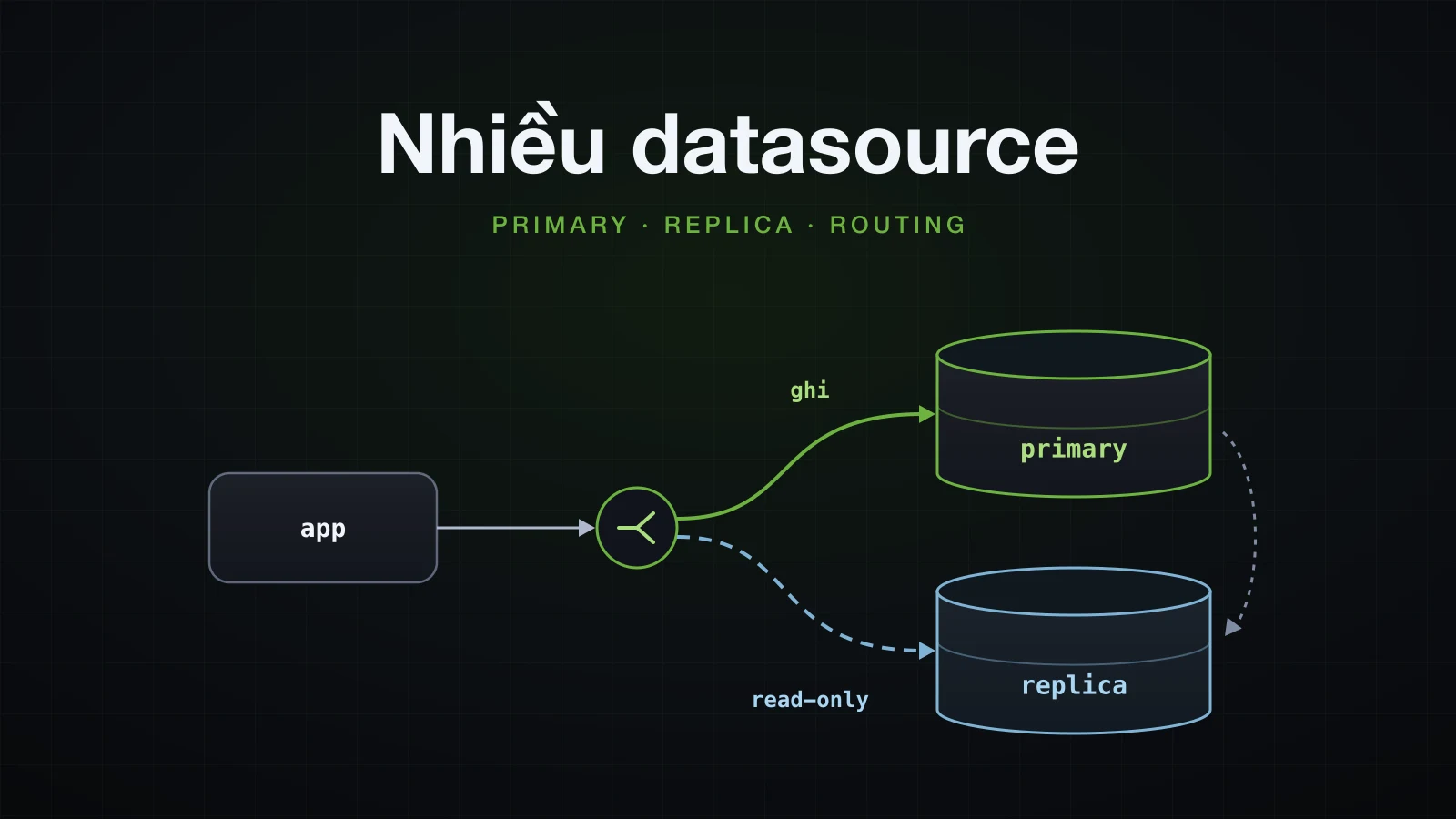
Nửa đầu nối hai database không liên quan nhau và cho thấy thứ gì hỏng ở từng bước; nửa sau thêm replica và routing lệnh đọc sang đó.
Lab: hai database PostgreSQL
Order nằm ở một PostgreSQL server; audit trail nằm ở server thứ hai, độc lập. Cả hai container cùng vào một user-defined network, replica sẽ vào sau:
docker network create sba-a10-net
docker run -d --name sba-a10-pg-primary --network sba-a10-net --memory 512m -p 5510:5432 -e POSTGRES_USER=orders -e POSTGRES_PASSWORD=orders -e POSTGRES_DB=orders postgres:18 -c log_statement=all
docker run -d --name sba-a10-pg-audit --network sba-a10-net --memory 512m -p 5530:5432 -e POSTGRES_USER=audit -e POSTGRES_PASSWORD=audit -e POSTGRES_DB=audit postgres:18 -c log_statement=all
log_statement=all bắt mỗi server ghi log mọi statement nó chạy; các phần sau đọc log này để biết server nào đã làm gì.
Project tạo từ Initializr với các dependency web, JPA, PostgreSQL, Flyway, validation và Actuator:
curl -s "https://start.spring.io/starter.zip?type=gradle-project&language=java&bootVersion=4.1.1&javaVersion=21&groupId=com.example&artifactId=demo&name=demo&packageName=com.example.demo&dependencies=web,data-jpa,postgresql,flyway,validation,actuator" -o demo.zipMỗi database có feature package riêng và thư mục migration riêng:
src/main/java/com/example/demo
├── DemoApplication.java
├── audit
│   ├── AuditEvent.java
│   ├── AuditEventRepository.java
│   └── AuditService.java
├── config
│   ├── AuditDataConfig.java
│   └── OrdersDataConfig.java
├── lab
│   └── ...
└── order
    ├── Order.java
    ├── OrderRepository.java
    ├── OrderService.java
    ├── Product.java
    └── ProductRepository.java
src/main/resources/db/migration
├── audit
│   └── V1__create_audit_events.sql
└── orders
└── V1__create_orders.sqlcreate table products (
id bigint generated by default as identity primary key,
name varchar(100) not null,
stock integer not null check (stock >= 0)
);
create table orders (
id bigint generated by default as identity primary key,
product_id bigint not null references products (id),
quantity integer not null,
created_at timestamptz not null
);
insert into products (name, stock) values ('Keyboard', 10), ('Mouse', 2);create table audit_events (
id bigint generated by default as identity primary key,
action varchar(50) not null,
detail varchar(200) not null,
created_at timestamptz not null
);Order (id, productId, quantity, createdAt) và AuditEvent (id, action, detail, createdAt) là entity bình thường, id kiểu IDENTITY, không khai báo tên cột, nên createdAt chỉ thành created_at dưới database khi naming strategy của Boot được áp dụng. Product có một method quan trọng về sau:
    // the check (stock >= 0) constraint in V1__create_orders.sql guards against overselling
    public void reserve(int quantity) {
        this.stock -= quantity;
    }
Một ApplicationRunner nhỏ trong package lab chạy từng thí nghiệm theo argument --lab=… rồi in ra products, orders và audit events; phần code này không đưa vào bài.
Spring Boot lùi lại những gì khi bạn khai báo hai DataSource
Với một spring.datasource.url, Boot dựng sẵn DataSource, EntityManagerFactory của JPA, transaction manager, Flyway, JdbcTemplate và JdbcClient. Bước đầu tiên người ta hay làm để có database thứ hai là khai báo hai bean DataSource và để Boot lo phần còn lại.
Hai bean DataSource không có @Primary
@Configuration(proxyBeanMethods = false)
class OrdersDataConfig {

    @Bean
    @ConfigurationProperties("app.datasource.orders")
    DataSourceProperties ordersDataSourceProperties() {
        return new DataSourceProperties();
    }

    @Bean
    @ConfigurationProperties("app.datasource.orders.hikari")
    HikariDataSource ordersDataSource(@Qualifier("ordersDataSourceProperties") DataSourceProperties properties) {
        return properties.initializeDataSourceBuilder().type(HikariDataSource.class).build();
    }
}
AuditDataConfig giống hệt, chỉ đổi mọi tên thành audit. Phần sau giải thích hai @ConfigurationProperties. Chạy với --debug, application dừng ở bean đầu tiên cần một JPA repository:
java -Xmx512m -jar build/libs/demo-0.0.1-SNAPSHOT.jar --spring.main.web-application-type=none --debug***************************
APPLICATION FAILED TO START
***************************
Description:
Parameter 0 of constructor in com.example.demo.audit.AuditService required a bean named 'entityManagerFactory' that could not be found.
Action:
Consider defining a bean named 'entityManagerFactory' in your configuration.Conditions report cho biết lý do. Mọi auto-configuration cần cái DataSource duy nhất đều được chặn bằng @ConditionalOnSingleCandidate, và hai ứng viên mà không có primary thì không phải một ứng viên:
   HibernateJpaConfiguration:
      Did not match:
         - @ConditionalOnSingleCandidate (types: javax.sql.DataSource; SearchStrategy: all) found multiple beans 'ordersDataSource', 'auditDataSource' (OnBeanCondition)

   JdbcTemplateAutoConfiguration:
      Did not match:
         - @ConditionalOnSingleCandidate (types: javax.sql.DataSource; SearchStrategy: all) found multiple beans 'ordersDataSource', 'auditDataSource' (OnBeanCondition)

   DataSourceTransactionManagerAutoConfiguration.JdbcTransactionManagerConfiguration:
      Did not match:
         - @ConditionalOnSingleCandidate (types: javax.sql.DataSource; SearchStrategy: all) found multiple beans 'ordersDataSource', 'auditDataSource' (OnBeanCondition)
Vậy là không có JPA, không có JdbcTemplate (nên cũng không có JdbcClient, vốn được dựng trên NamedParameterJdbcTemplate duy nhất) và không có transaction manager. DataSource có pool của chính Boot cũng lùi lại (@ConditionalOnMissingBean (types: javax.sql.DataSource,javax.sql.XADataSource) found beans of type 'javax.sql.DataSource' auditDataSource, ordersDataSource). Điều kiện của Flyway chỉ cần có một bean DataSource bất kỳ nên vẫn match, nhưng context đã hỏng trước khi Flyway kịp chạy.
@Primary trên một trong hai
Đánh dấu @Primary cho các bean của orders thì các điều kiện kia có được ứng viên duy nhất:
    @Bean
    @Primary
    @ConfigurationProperties("app.datasource.orders")
    DataSourceProperties ordersDataSourceProperties() {
        return new DataSourceProperties();
    }

    @Bean
    @Primary
    @ConfigurationProperties("app.datasource.orders.hikari")
    HikariDataSource ordersDataSource(@Qualifier("ordersDataSourceProperties") DataSourceProperties properties) {
Application đi xa hơn và hỏng theo kiểu khác. Flyway của Boot ở đây cần spring.flyway.locations=classpath:db/migration/orders: để mặc định classpath:db/migration thì nó quét cả hai thư mục và dừng với FlywayException: Found more than one migration with version 1. Khi đã đặt location:
com.zaxxer.hikari.HikariDataSource: orders - Starting...
com.zaxxer.hikari.HikariDataSource: orders - Start completed.
org.flywaydb.core.FlywayExecutor: Database: jdbc:postgresql://localhost:5510/orders (PostgreSQL 18.6)
o.f.core.internal.command.DbMigrate: Migrating schema "public" to version "1 - create orders"
o.f.core.internal.command.DbMigrate: Successfully applied 1 migration to schema "public", now at version v1 (execution time 00:00.009s)
org.hibernate.orm.jpa: HHH008540: Processing PersistenceUnitInfo [name: default]
j.LocalContainerEntityManagerFactoryBean: Failed to initialize JPA EntityManagerFactory: Unable to build Hibernate SessionFactory  [persistence unit: default] ; nested exception is org.hibernate.tool.schema.spi.SchemaManagementException: Schema validation: missing table [audit_events]
(Các dòng log ở đây và bên dưới đã bỏ cột timestamp, level, pid và thread.) Mọi điều kiện giờ đều ghi found a single primary bean 'ordersDataSource' from beans 'ordersDataSource', 'auditDataSource', và Boot dựng mỗi thứ một bản cho primary: một lần chạy Flyway, trên orders, và một persistence unit tên default quét mọi entity dưới com.example.demo, gặp AuditEvent và validate nó với database orders. Pool của audit còn chưa từng được khởi động. @Primary đơn thuần chỉ biến DataSource thứ hai thành một bean nằm không; phần nối JPA cho từng database phải tự viết.
Bind từng DataSource: DataSourceProperties và bẫy cấu hình pool
Cấu hình của cả hai database nằm dưới một prefix do bạn đặt:
spring.application.name=demo
spring.jpa.open-in-view=false
spring.jpa.hibernate.ddl-auto=validate

app.datasource.orders.url=jdbc:postgresql://localhost:5510/orders
app.datasource.orders.username=orders
app.datasource.orders.password=orders
app.datasource.orders.hikari.pool-name=orders
app.datasource.orders.hikari.maximum-pool-size=5

app.datasource.audit.url=jdbc:postgresql://localhost:5530/audit
app.datasource.audit.username=audit
app.datasource.audit.password=audit
app.datasource.audit.hikari.pool-name=audit
app.datasource.audit.hikari.maximum-pool-size=3spring:
application:
name: demo
jpa:
open-in-view: false
hibernate:
ddl-auto: validate
app:
datasource:
orders:
url: jdbc:postgresql://localhost:5510/orders
username: orders
password: orders
hikari:
pool-name: orders
maximum-pool-size: 5
audit:
url: jdbc:postgresql://localhost:5530/audit
username: audit
password: audit
hikari:
pool-name: audit
maximum-pool-size: 3Mỗi database có hai bean đọc chúng. DataSourceProperties là class đứng sau spring.datasource.* (trong Boot 4 là org.springframework.boot.jdbc.autoconfigure.DataSourceProperties): khi bind với app.datasource.audit, nó nhận url, username, password và driver, rồi initializeDataSourceBuilder() chuyển chúng cho một DataSourceBuilder. .type(HikariDataSource.class) làm bean trở thành HikariDataSource cụ thể, nhờ đó @ConfigurationProperties thứ hai, đặt trên chính bean DataSource, bind được các setter của HikariCP từ app.datasource.audit.hikari:
    @Bean
    @ConfigurationProperties("app.datasource.audit")
    DataSourceProperties auditDataSourceProperties() {
        return new DataSourceProperties();
    }

    @Bean
    @ConfigurationProperties("app.datasource.audit.hikari")
    HikariDataSource auditDataSource(@Qualifier("auditDataSourceProperties") DataSourceProperties properties) {
        return properties.initializeDataSourceBuilder().type(HikariDataSource.class).build();
    }
HikariCP in cấu hình thực tế của nó ở mức DEBUG khi pool khởi động, đây là cách kiểm tra cái gì đã được bind:
java -Xmx512m -jar build/libs/demo-0.0.1-SNAPSHOT.jar --spring.main.web-application-type=none --logging.level.com.zaxxer.hikari.HikariConfig=DEBUGcom.zaxxer.hikari.HikariConfig: audit - configuration:
com.zaxxer.hikari.HikariConfig: jdbcUrl.........................jdbc:postgresql://localhost:5530/audit
com.zaxxer.hikari.HikariConfig: maximumPoolSize.................3
com.zaxxer.hikari.HikariConfig: minimumIdle.....................3
com.zaxxer.hikari.HikariConfig: poolName........................"audit"Cấu hình pool đặt cạnh URL bị bỏ qua trong im lặng
Sai lầm hay gặp là đặt cấu hình pool cạnh URL, vì trông chúng giống cấu hình kết nối:
app.datasource.audit.hikari.pool-name=audit
app.datasource.audit.hikari.maximum-pool-size=3
app.datasource.audit.pool-name=audit
app.datasource.audit.maximum-pool-size=3 audit:
url: jdbc:postgresql://localhost:5530/audit
username: audit
password: audit
hikari:
pool-name: audit
maximum-pool-size: 3
pool-name: audit
maximum-pool-size: 3Application khởi động không một cảnh báo, và pool không nhận setting nào:
com.zaxxer.hikari.HikariConfig: HikariPool-1 - configuration:
com.zaxxer.hikari.HikariConfig: jdbcUrl.........................jdbc:postgresql://localhost:5530/audit
com.zaxxer.hikari.HikariConfig: maximumPoolSize.................10
com.zaxxer.hikari.HikariConfig: minimumIdle.....................10
com.zaxxer.hikari.HikariConfig: poolName........................"HikariPool-1"
com.zaxxer.hikari.HikariDataSource: HikariPool-1 - Start completed.
app.datasource.audit được bind vào DataSourceProperties, class này không có setting nào của pool, và key lạ thì bị bỏ qua. Giá trị mặc định im lặng y như vậy cũng xuất hiện khi key nằm dưới .hikari nhưng bean DataSource thiếu @ConfigurationProperties("app.datasource.audit.hikari"). Pattern phổ biến còn lại bind thẳng kết quả của DataSourceBuilder, và mọi key dịch lên một cấp:
    @Bean
    @ConfigurationProperties("app.datasource.audit")
    HikariDataSource auditDataSource() {
        return DataSourceBuilder.create().type(HikariDataSource.class).build();
    }
Với properties ở trên, url không có gì để bind vào, vì HikariDataSource gọi nó là jdbcUrl, và startup hỏng khi Flyway xin connection đầu tiên:
com.zaxxer.hikari.HikariConfig: HikariPool-1 - dataSource or dataSourceClassName or jdbcUrl is required.Tất cả các biến thể, đọc từ bản dump của HikariCP:
| Cấu hình pool nằm dưới | Bean DataSource | poolName / maximumPoolSize |
|---|---|---|
app.datasource.audit.hikari.* | DataSourceProperties + @ConfigurationProperties("…audit.hikari") | "audit" / 3 |
app.datasource.audit.* | DataSourceProperties + @ConfigurationProperties("…audit.hikari") | "HikariPool-1" / 10, bị bỏ qua không cảnh báo |
app.datasource.audit.hikari.* | DataSourceProperties, không có @ConfigurationProperties trên pool | "HikariPool-1" / 10, bị bỏ qua không cảnh báo |
app.datasource.audit.*, URL là jdbc-url | DataSourceBuilder.create() + @ConfigurationProperties("…audit") | "audit" / 3 |
app.datasource.audit.hikari.*, URL là url | DataSourceBuilder.create() + @ConfigurationProperties("…audit") | startup hỏng: jdbcUrl is required |
Pattern nào cũng chạy được; điều kiện là setting phải nằm đúng chỗ pattern đó bind, và bản dump DEBUG của HikariCP là nơi kiểm tra chúng đã được bind hay chưa.
Hai EntityManagerFactory và hai transaction manager
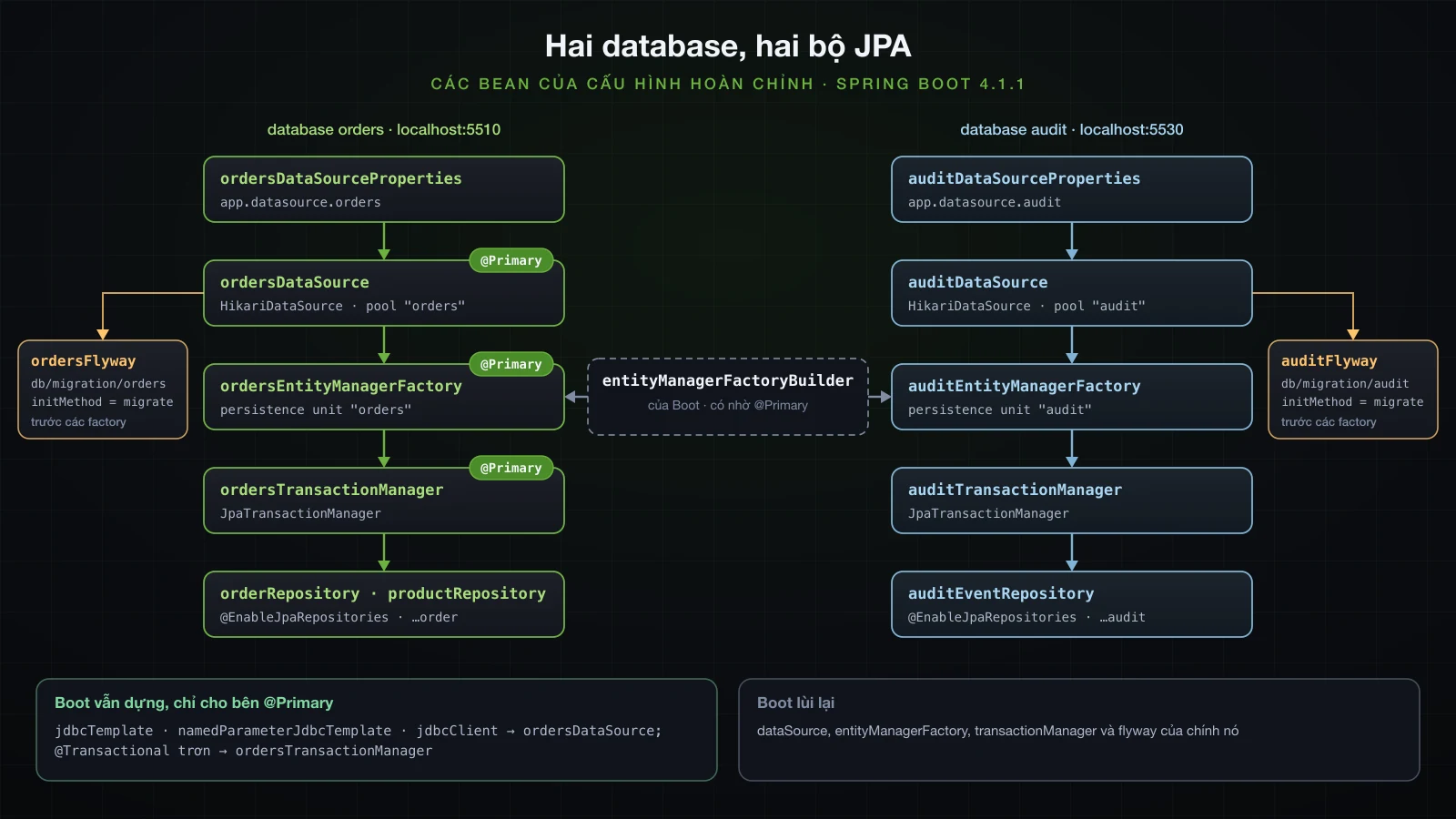
Mỗi database có một LocalContainerEntityManagerFactoryBean, một JpaTransactionManager và một @EnableJpaRepositories gắn các repository của một package với hai bean đó. Phía orders là @Primary từ đầu đến cuối:
@Configuration(proxyBeanMethods = false)
@EnableJpaRepositories(
        basePackageClasses = Order.class,
        entityManagerFactoryRef = "ordersEntityManagerFactory",
        transactionManagerRef = "ordersTransactionManager")
class OrdersDataConfig {

    @Bean
    @Primary
    @ConfigurationProperties("app.datasource.orders")
    DataSourceProperties ordersDataSourceProperties() {
        return new DataSourceProperties();
    }

    @Bean
    @Primary
    @ConfigurationProperties("app.datasource.orders.hikari")
    HikariDataSource ordersDataSource(@Qualifier("ordersDataSourceProperties") DataSourceProperties properties) {
        return properties.initializeDataSourceBuilder().type(HikariDataSource.class).build();
    }

    @Bean
    @Primary
    LocalContainerEntityManagerFactoryBean ordersEntityManagerFactory(EntityManagerFactoryBuilder builder,
            @Qualifier("ordersDataSource") DataSource dataSource) {
        return builder.dataSource(dataSource).packages(Order.class).persistenceUnit("orders").build();
    }

    @Bean
    @Primary
    JpaTransactionManager ordersTransactionManager(
            @Qualifier("ordersEntityManagerFactory") EntityManagerFactory entityManagerFactory) {
        return new JpaTransactionManager(entityManagerFactory);
    }
}@Configuration(proxyBeanMethods = false)
@EnableJpaRepositories(
basePackageClasses = AuditEvent.class,
entityManagerFactoryRef = "auditEntityManagerFactory",
transactionManagerRef = "auditTransactionManager")
class AuditDataConfig {
@Bean
@ConfigurationProperties("app.datasource.audit")
DataSourceProperties auditDataSourceProperties() {
return new DataSourceProperties();
}
@Bean
@ConfigurationProperties("app.datasource.audit.hikari")
HikariDataSource auditDataSource(@Qualifier("auditDataSourceProperties") DataSourceProperties properties) {
return properties.initializeDataSourceBuilder().type(HikariDataSource.class).build();
}
@Bean
LocalContainerEntityManagerFactoryBean auditEntityManagerFactory(EntityManagerFactoryBuilder builder,
@Qualifier("auditDataSource") DataSource dataSource) {
return builder.dataSource(dataSource).packages(AuditEvent.class).persistenceUnit("audit").build();
}
@Bean
JpaTransactionManager auditTransactionManager(
@Qualifier("auditEntityManagerFactory") EntityManagerFactory entityManagerFactory) {
return new JpaTransactionManager(entityManagerFactory);
}
}packages(…)quyết định mỗi factory quản lý entity nào.Order.classđại diện cho packagecom.example.demo.order, nênAuditEventkhông còn bị quét vào unit của orders.@EnableJpaRepositoriesxuất hiện hai lần, mỗi package một lần.entityManagerFactoryRefcho mỗi repository entity manager của nó;transactionManagerReflà transaction manager mà các method@Transactionalcủa chính repository (save,findById, …) dùng. Khi có annotation này,DataJpaRepositoriesAutoConfigurationcủa Boot lùi lại.@Primarytrên factory và transaction manager của orders biến chúng thành mặc định ở mọi chỗ inject bean kiểu đó mà không có qualifier, kể cả@Transactionaltrơn.- Qualifier gọi tên từng dependency, nên không chỗ nào dựa vào việc bean nào tình cờ là primary.
EntityManagerFactoryBuilder còn là bean trong Spring Boot 4.1.1 không?
Còn. Nó chuyển sang org.springframework.boot.jpa.EntityManagerFactoryBuilder, và conditions report cho thấy nó đến từ đâu:
   HibernateJpaConfiguration matched:
      - @ConditionalOnSingleCandidate (types: javax.sql.DataSource; SearchStrategy: all) found a single primary bean 'ordersDataSource' from beans 'ordersDataSource', 'auditDataSource' (OnBeanCondition)

   JpaBaseConfiguration#entityManagerFactoryBuilder matched:
      - @ConditionalOnMissingBean (types: org.springframework.boot.jpa.EntityManagerFactoryBuilder; SearchStrategy: all) did not find any beans (OnBeanCondition)
Nó tồn tại vì HibernateJpaConfiguration match trên DataSource @Primary; không có primary, như lần chạy đầu tiên, thì cũng không có builder. Constructor của nó nhận một Function<DataSource, Map<String, ?>> cho JPA properties, nên mỗi factory dựng từ builder đều nhận spring.jpa.* tính riêng cho DataSource của nó: unit audit có validate schema (ddl-auto=validate; lỗi thiếu bảng ở phần sau chính là lần validate đó) và map createdAt thành created_at.
Các ví dụ thời Boot 2 thường tự dựng factory bằng tay:
    @Bean
    LocalContainerEntityManagerFactoryBean auditEntityManagerFactory(@Qualifier("auditDataSource") DataSource dataSource) {
        LocalContainerEntityManagerFactoryBean factory = new LocalContainerEntityManagerFactoryBean();
        factory.setDataSource(dataSource);
        factory.setPackagesToScan(AuditEvent.class.getPackageName());
        factory.setJpaVendorAdapter(new HibernateJpaVendorAdapter());
        factory.setPersistenceUnitName("audit");
        return factory;
    }
Factory đó không biết gì về spring.jpa.*. Application khởi động mà không validate gì cả, và lệnh ghi audit đầu tiên hỏng:
org.hibernate.SQL: insert into audit_events (action,createdAt,detail) values (?,?,?)
org.hibernate.orm.jdbc.error: HHH000247: ErrorCode: 0, SQLState: 42703
org.hibernate.orm.jdbc.error: ERROR: column "createdat" of relation "audit_events" does not exist
Naming mặc định của Hibernate giữ nguyên createdAt, và PostgreSQL chuyển tên không có dấu nháy thành createdat. Hãy dùng builder, hoặc tự truyền đúng các properties đó.
Chọn transaction manager bằng @Transactional
Service làm việc với database audit gọi tên transaction manager của nó:
@Service
public class AuditService {

    private final AuditEventRepository events;

    AuditService(AuditEventRepository events) {
        this.events = events;
    }

    @Transactional(transactionManager = "auditTransactionManager")
    public AuditEvent record(String action, String detail) {
        return events.save(new AuditEvent(action, detail));
    }
}
@Transactional("auditTransactionManager") là một, vì value là alias của transactionManager. Order service dùng annotation trơn, được resolve thành transaction manager @Primary, và gọi audit service ở giữa:
    @Transactional // the @Primary manager: ordersTransactionManager
    public Order place(Long productId, int quantity) {
        Product product = products.findById(productId).orElseThrow();
        product.reserve(quantity);
        Order order = orders.save(new Order(productId, quantity));
        audit.record("ORDER_PLACED", "order " + order.getId() + ": " + quantity + " x " + product.getName());
        return order;
    }
Với logging.level.org.springframework.orm.jpa.JpaTransactionManager=DEBUG, place(1L, 1) ghi log hai transaction (cắt còn các dòng transaction và SQL), và qualifier hiện trong definition của transaction thứ hai:
o.s.orm.jpa.JpaTransactionManager: Creating new transaction with name [com.example.demo.order.OrderService.place]: PROPAGATION_REQUIRED,ISOLATION_DEFAULT
org.hibernate.SQL: select p1_0.id,p1_0.name,p1_0.stock from products p1_0 where p1_0.id=?
org.hibernate.SQL: insert into orders (created_at,product_id,quantity) values (?,?,?)
o.s.orm.jpa.JpaTransactionManager: Creating new transaction with name [com.example.demo.audit.AuditService.record]: PROPAGATION_REQUIRED,ISOLATION_DEFAULT; 'auditTransactionManager'
org.hibernate.SQL: insert into audit_events (action,created_at,detail) values (?,?,?)
o.s.orm.jpa.JpaTransactionManager: Committing JPA transaction on EntityManager [SessionImpl(1742006519<open>)]
o.s.orm.jpa.JpaTransactionManager: Resuming suspended transaction after completion of inner transaction
o.s.orm.jpa.JpaTransactionManager: Committing JPA transaction on EntityManager [SessionImpl(1978836564<open>)]
org.hibernate.SQL: update products set name=?,stock=? where id=?
Lời gọi audit là PROPAGATION_REQUIRED, vậy mà nó không tham gia transaction nào: transaction đang chạy thuộc transaction manager của orders, transaction manager của audit không thấy transaction nào của mình nên tạo mới và commit trước. Kết quả: orders: [1:p1x1] ở database này và audit_events: [1:order 1: 1 x Keyboard] ở database kia.
Flyway cho database thứ hai
Boot chỉ migrate database primary
Cấu hình tới lúc này, với spring.flyway.locations=classpath:db/migration/orders, hỏng trên database audit còn trống:
org.flywaydb.core.FlywayExecutor: Database: jdbc:postgresql://localhost:5510/orders (PostgreSQL 18.6)
o.f.core.internal.command.DbMigrate: Schema "public" is up to date. No migration necessary.
org.hibernate.orm.jpa: HHH008540: Processing PersistenceUnitInfo [name: audit]
j.LocalContainerEntityManagerFactoryBean: Failed to initialize JPA EntityManagerFactory: Unable to build Hibernate SessionFactory  [persistence unit: audit] ; nested exception is org.hibernate.tool.schema.spi.SchemaManagementException: Schema validation: missing table [audit_events]
FlywayAutoConfiguration của Boot dựng một Flyway cho DataSource primary; migration của audit chưa từng chạy.
Tự khai báo một bean Flyway là tắt Flyway của Boot
Cách sửa hiển nhiên là thêm một bean Flyway cho database audit, với initMethod = "migrate" vì Flyway tự dựng không làm gì cho tới khi có ai gọi migrate():
    @Bean(initMethod = "migrate")
    Flyway auditFlyway(@Qualifier("auditDataSource") DataSource dataSource) {
        return Flyway.configure()
                .dataSource(dataSource)
                .locations("classpath:db/migration/audit")
                .load();
    }
Schema audit được tạo, nhưng database orders không còn được đụng tới: startup này không có dòng Database: jdbc:postgresql://localhost:5510/orders, và conditions report nói lý do:
org.flywaydb.core.FlywayExecutor: Database: jdbc:postgresql://localhost:5530/audit (PostgreSQL 18.6)
o.f.core.internal.command.DbMigrate: Current version of schema "public": << Empty Schema >>
o.f.core.internal.command.DbMigrate: Migrating schema "public" to version "1 - create audit events"
o.f.core.internal.command.DbMigrate: Successfully applied 1 migration to schema "public", now at version v1 (execution time 00:00.008s)
org.hibernate.orm.jpa: HHH008540: Processing PersistenceUnitInfo [name: audit]
j.LocalContainerEntityManagerFactoryBean: Initialized JPA EntityManagerFactory for persistence unit 'audit'
org.hibernate.orm.jpa: HHH008540: Processing PersistenceUnitInfo [name: orders]
j.LocalContainerEntityManagerFactoryBean: Initialized JPA EntityManagerFactory for persistence unit 'orders' FlywayAutoConfiguration.FlywayConfiguration:
Did not match:
- @ConditionalOnMissingBean (types: org.flywaydb.core.Flyway; SearchStrategy: all) found beans of type 'org.flywaydb.core.Flyway' auditFlyway (OnBeanCondition)Nó khởi động được chỉ vì một lần chạy trước đã migrate orders; một migration mới cho orders sẽ bị bỏ qua mà không một lời báo.
Mỗi database một bean Flyway
Vậy cả hai database đều có bean Flyway, và spring.flyway.* không còn áp dụng cho bên nào (nó cấu hình cái bean mà Boot không còn tạo nữa):
    @Bean(initMethod = "migrate")
    Flyway ordersFlyway(@Qualifier("ordersDataSource") DataSource dataSource) {
        return Flyway.configure()
                .dataSource(dataSource)
                .locations("classpath:db/migration/orders")
                .load();
    }
Boot vẫn sắp thứ tự startup: spring-boot-flyway đăng ký một FlywayDatabaseInitializerDetector coi mọi bean Flyway là database initializer, và spring-boot-jpa khai báo các initializer là dependency của mọi entity manager factory. Một lần chạy hỏng ở chỗ khác trong lab này gọi thẳng tên dependency đó: Failed to initialize dependency 'auditFlyway' of LoadTimeWeaverAware bean 'auditEntityManagerFactory'. Cả hai migration chạy xong trước khi persistence unit nào được dựng:
com.zaxxer.hikari.HikariDataSource: audit - Start completed.
org.flywaydb.core.FlywayExecutor: Database: jdbc:postgresql://localhost:5530/audit (PostgreSQL 18.6)
o.f.core.internal.command.DbMigrate: Schema "public" is up to date. No migration necessary.
com.zaxxer.hikari.HikariDataSource: orders - Start completed.
org.flywaydb.core.FlywayExecutor: Database: jdbc:postgresql://localhost:5510/orders (PostgreSQL 18.6)
o.f.core.internal.command.DbMigrate: Schema "public" is up to date. No migration necessary.
org.hibernate.orm.jpa: HHH008540: Processing PersistenceUnitInfo [name: audit]
j.LocalContainerEntityManagerFactoryBean: Initialized JPA EntityManagerFactory for persistence unit 'audit'
org.hibernate.orm.jpa: HHH008540: Processing PersistenceUnitInfo [name: orders]
j.LocalContainerEntityManagerFactoryBean: Initialized JPA EntityManagerFactory for persistence unit 'orders'
Mỗi database giữ bảng history riêng:
docker exec sba-a10-pg-primary psql -U orders -d orders -c 'select installed_rank, version, description, script, installed_by, success from flyway_schema_history order by installed_rank'
docker exec sba-a10-pg-audit psql -U audit -d audit -c 'select installed_rank, version, description, script, installed_by, success from flyway_schema_history order by installed_rank' installed_rank | version | description | script | installed_by | success
----------------+---------+---------------+-----------------------+--------------+---------
1 | 1 | create orders | V1__create_orders.sql | orders | t
(1 row)
installed_rank | version | description | script | installed_by | success
----------------+---------+---------------------+-----------------------------+--------------+---------
1 | 1 | create audit events | V1__create_audit_events.sql | audit | t
(1 row)Giữ hai thư mục migration tách biệt: cả hai file đều là V1, ổn trong hai history khác nhau, nhưng chính là lỗi Found more than one migration with version 1 khi một location quét cả hai thư mục.
Conditions report nói gì về cấu hình hoàn chỉnh
Trích từ report --debug của cấu hình hoàn chỉnh:
| Auto-configuration | Kết quả | Lý do trong report |
|---|---|---|
DataSourceAutoConfiguration.PooledDataSourceConfiguration | lùi lại | tìm thấy bean DataSource auditDataSource, ordersDataSource |
JpaBaseConfiguration#entityManagerFactory | lùi lại | tìm thấy auditEntityManagerFactory, ordersEntityManagerFactory |
JpaBaseConfiguration#transactionManager và JdbcTransactionManagerConfiguration#transactionManager | lùi lại | tìm thấy bean TransactionManager auditTransactionManager, ordersTransactionManager |
FlywayAutoConfiguration.FlywayConfiguration | lùi lại | tìm thấy bean Flyway auditFlyway, ordersFlyway |
DataJpaRepositoriesAutoConfiguration | lùi lại | tìm thấy các JpaRepositoryFactoryBean do @EnableJpaRepositories đăng ký |
HibernateJpaConfiguration, JpaBaseConfiguration#entityManagerFactoryBuilder | áp dụng | single primary bean ordersDataSource |
JdbcTemplateAutoConfiguration, JdbcClientAutoConfiguration | áp dụng, chỉ cho ordersDataSource | single primary bean ordersDataSource |
Dòng cuối rất dễ bỏ sót: JdbcTemplate và JdbcClient inject được là nói chuyện với database orders. SQL chạy trên database audit cần bản riêng, dựng trên auditDataSource.
Gọi repository dưới transaction manager sai
Sai lầm mà database thứ hai mời gọi là một method service dùng @Transactional trơn nhưng lại gọi repository của database kia. Ba phiên bản của nó, trong một lab bean giữ AuditEventRepository events, đều chạy dưới transaction manager của orders:
    @Transactional // resolves to the @Primary ordersTransactionManager
    public void saveThenFail() {
        events.save(new AuditEvent("LAB", "saved, then the method throws"));
        throw new IllegalStateException("roll the transaction back");
    }

    @Transactional
    public void changeDetail(Long id) {
        AuditEvent event = events.findById(id).orElseThrow();
        event.setDetail("changed through dirty checking");
    }

    @Transactional
    public int bulkUpdate(Long id) {
        return events.updateDetail(id, "changed through a bulk update");
    }
updateDetail là một @Modifying @Query("update AuditEvent e set e.detail = :detail where e.id = :id") trên AuditEventRepository. Log của hai phiên bản đầu, cắt còn các dòng transaction và SQL:
o.s.orm.jpa.JpaTransactionManager: Creating new transaction with name [com.example.demo.lab.WrongManagerLab.saveThenFail]: PROPAGATION_REQUIRED,ISOLATION_DEFAULT
o.s.orm.jpa.JpaTransactionManager: Creating new transaction with name [org.springframework.data.jpa.repository.support.SimpleJpaRepository.save]: PROPAGATION_REQUIRED,ISOLATION_DEFAULT
org.hibernate.SQL: insert into audit_events (action,created_at,detail) values (?,?,?)
o.s.orm.jpa.JpaTransactionManager: Committing JPA transaction on EntityManager [SessionImpl(127405746<open>)]
o.s.orm.jpa.JpaTransactionManager: Resuming suspended transaction after completion of inner transaction
o.s.orm.jpa.JpaTransactionManager: Initiating transaction rollback
o.s.orm.jpa.JpaTransactionManager: Rolling back JPA transaction on EntityManager [SessionImpl(1978836564<open>)]
Lab: threw java.lang.IllegalStateException: roll the transaction back
Lab: audit_events: [1:order 1: 1 x Keyboard, 2:order 2: 5 x Mouse, 3:saved, then the method throws]o.s.orm.jpa.JpaTransactionManager: Creating new transaction with name [com.example.demo.lab.WrongManagerLab.changeDetail]: PROPAGATION_REQUIRED,ISOLATION_DEFAULT
o.s.orm.jpa.JpaTransactionManager: Creating new transaction with name [org.springframework.data.jpa.repository.support.SimpleJpaRepository.findById]: PROPAGATION_REQUIRED,ISOLATION_DEFAULT,readOnly
org.hibernate.SQL: select ae1_0.id,ae1_0.action,ae1_0.created_at,ae1_0.detail from audit_events ae1_0 where ae1_0.id=?
o.s.orm.jpa.JpaTransactionManager: Committing JPA transaction on EntityManager [SessionImpl(1799435216<open>)]
o.s.orm.jpa.JpaTransactionManager: Resuming suspended transaction after completion of inner transaction
o.s.orm.jpa.JpaTransactionManager: Committing JPA transaction on EntityManager [SessionImpl(36717498<open>)]
Lab: returned null| Dưới transaction manager của orders | Chuyện gì xảy ra | Cùng code với transactionManager = "auditTransactionManager" |
|---|---|---|
save rồi throw | repository tự mở transaction audit riêng và commit dòng đó; rollback của method không chạm tới nó (dòng 3 vẫn còn) | lệnh insert bị rollback cùng method |
findById rồi gọi setter | findById chạy trong transaction audit read-only riêng; entity trả về đã detached, không có UPDATE nào được gửi, thay đổi mất trong im lặng | update audit_events set action=?,created_at=?,detail=? where id=? lúc commit |
query @Modifying | InvalidDataAccessApiUsageException: No active transaction for update or delete query, gây ra bởi jakarta.persistence.TransactionRequiredException | update audit_events ae1_0 set detail=? where ae1_0.id=?, trả về 1 |
Các repository được tạo với transactionManagerRef = "auditTransactionManager", nên các method @Transactional của chúng đi tìm một transaction audit, không thấy khi chỉ có transaction manager của orders đang mở transaction, và tự mở transaction mới. Method query @Modifying tự khai báo thì không có transaction riêng, nên nó hỏng. Không trường hợp nào báo là dùng sai transaction manager: một cái commit sớm, một cái mất thay đổi, một cái throw thứ trông như thiếu annotation.
Ghi vào hai database trong một method không atomic
place() ở trên ghi vào cả hai database trong một method, và log đã cho thấy vì sao đó không phải một transaction: transaction audit commit trước, transaction orders commit sau. Đặt năm con chuột khi kho chỉ còn hai làm lần commit thứ hai hỏng. Việc kiểm tra tồn kho nằm ở database, và Hibernate gửi UPDATE của product lúc commit (cắt như trên, kèm output của lab ở cuối):
o.s.orm.jpa.JpaTransactionManager: Creating new transaction with name [com.example.demo.order.OrderService.place]: PROPAGATION_REQUIRED,ISOLATION_DEFAULT
org.hibernate.SQL: select p1_0.id,p1_0.name,p1_0.stock from products p1_0 where p1_0.id=?
org.hibernate.SQL: insert into orders (created_at,product_id,quantity) values (?,?,?)
o.s.orm.jpa.JpaTransactionManager: Creating new transaction with name [com.example.demo.audit.AuditService.record]: PROPAGATION_REQUIRED,ISOLATION_DEFAULT; 'auditTransactionManager'
org.hibernate.SQL: insert into audit_events (action,created_at,detail) values (?,?,?)
o.s.orm.jpa.JpaTransactionManager: Committing JPA transaction on EntityManager [SessionImpl(1638402542<open>)]
o.s.orm.jpa.JpaTransactionManager: Resuming suspended transaction after completion of inner transaction
o.s.orm.jpa.JpaTransactionManager: Committing JPA transaction on EntityManager [SessionImpl(869804211<open>)]
org.hibernate.SQL: update products set name=?,stock=? where id=?
org.hibernate.orm.jdbc.error: HHH000247: ErrorCode: 0, SQLState: 23514
org.hibernate.orm.jdbc.error: ERROR: new row for relation "products" violates check constraint "products_stock_check"
  Detail: Failing row contains (2, Mouse, -3).
o.s.orm.jpa.JpaTransactionManager: Initiating transaction rollback after commit exception
Lab: threw org.springframework.dao.DataIntegrityViolationException: could not execute statement [ERROR: new row for relation "products" violates check constraint "products_stock_check"
Lab: orders: [1:p1x1]
Lab: audit_events: [1:order 1: 1 x Keyboard, 2:order 2: 5 x Mouse]
Statement log của chính hai server (docker logs sba-a10-pg-primary và docker logs sba-a10-pg-audit), gộp theo thời gian, bỏ ngày và thêm tên server vào mỗi dòng, cho thấy thứ tự sự việc:
07:34:12.151 orders [524] LOG:  statement: BEGIN
07:34:12.153 orders [524] LOG:  execute <unnamed>: insert into orders (created_at,product_id,quantity) values ($1,$2,$3)
07:34:12.154 audit  [379] LOG:  statement: BEGIN
07:34:12.155 audit  [379] LOG:  execute <unnamed>: insert into audit_events (action,created_at,detail) values ($1,$2,$3)
07:34:12.155 audit  [379] DETAIL:  Parameters: $1 = 'ORDER_PLACED', $2 = '2026-09-18 14:34:12.155539+07', $3 = 'order 2: 5 x Mouse'
07:34:12.155 audit  [379] LOG:  execute S_1: COMMIT
07:34:12.156 orders [524] LOG:  execute <unnamed>: update products set name=$1,stock=$2 where id=$3
07:34:12.156 orders [524] ERROR:  new row for relation "products" violates check constraint "products_stock_check"
07:34:12.156 orders [524] DETAIL:  Failing row contains (2, Mouse, -3).
07:34:12.162 orders [524] LOG:  execute S_3: ROLLBACK
Database audit giờ ghi nhận order 2: 5 x Mouse cho một order không tồn tại. Kiểu hỏng ngược lại thì vô hại trong trường hợp này: với action của audit dài hơn varchar(50), lệnh insert audit hỏng với SQLSTATE 22001, exception đi ngược qua transaction của place(), và lệnh insert order cũng bị rollback (orders vẫn là [1:p1x1]). Gặp kiểu nào chỉ tùy vào commit nào diễn ra sau cùng.
Muốn hai lần commit thành một thì cần two-phase commit: DataSource hỗ trợ XA (driver PostgreSQL có sẵn org.postgresql.xa.PGXADataSource), một JTA transaction manager, và max_prepared_transactions lớn hơn 0 trên mọi server (trên postgres:18 nó là 0). Spring Boot 4.1.1 chỉ tự cấu hình JTA từ JNDI, bên trong application server; BOM của nó không quản lý JTA transaction manager độc lập nào, nên đó là thư viện bên thứ ba phải tự nối, và nằm ngoài phạm vi bài này. Không có nó thì hãy quyết định lệnh ghi nào được phép mất, cho nó chạy sau cùng, hoặc dời nó ra sau lần commit đầu, như listener AFTER_COMMIT ở bài 4 của khóa này.
PostgreSQL 18 primary với streaming replica trong Docker
Nửa sau routing lệnh đọc sang một replica của database orders. Streaming replication cần một role có thuộc tính REPLICATION và một dòng pg_hba.conf cho phép role đó kết nối từ host khác: file của image chỉ cho replicate từ 127.0.0.1 và ::1, còn dòng bao tất cả host all all all scram-sha-256 không áp dụng cho kết nối replication:
docker exec sba-a10-pg-primary psql -U orders -d orders -c "create role replicator with replication login password 'replicator'"
docker exec sba-a10-pg-primary bash -c 'echo "host replication replicator all scram-sha-256" >> "$PGDATA/pg_hba.conf"'
docker exec sba-a10-pg-primary psql -U orders -d orders -c "select pg_reload_conf()"
Replica khởi đầu từ bản sao thư mục dữ liệu của primary, do pg_basebackup chép qua mạng:
docker run -d --name sba-a10-pg-replica --network sba-a10-net --memory 512m -p 5520:5432 -e PGPASSWORD=replicator --user postgres postgres:18 bash -c '{ [ -s "$PGDATA/PG_VERSION" ] || pg_basebackup -h sba-a10-pg-primary -U replicator -D "$PGDATA" -R -X stream --checkpoint=fast; } && exec docker-entrypoint.sh postgres -c log_statement=all'-h sba-a10-pg-primarychạy được vì cả hai container ở trongsba-a10-net, nơi tên container được resolve.-X streamchép cả WAL được ghi trong lúc backup;-Rghistandby.signalvàprimary_conninfovàopostgresql.auto.conf, biến server mới thành standby của primary.--checkpoint=fast: backup bắt đầu bằng một checkpoint trên primary, mặc định được dàn trải. Lần thử đầu không có cờ này vẫn ở trạng tháibackupsau vài giây.[ -s "$PGDATA/PG_VERSION" ] ||bỏ qua bước chép khi thư mục dữ liệu đã có, nêndocker restartvàdocker startđưa đúng replica đó trở lại thay vì hỏng vì thư mục không trống (đã thử cả hai).
Log của replica, và pg_stat_replication trên primary:
LOG:  entering standby mode
LOG:  consistent recovery state reached at 0/6000120
LOG:  database system is ready to accept read-only connections
LOG: started streaming WAL from primary at 0/7000000 on timeline 1docker exec sba-a10-pg-primary psql -U orders -d orders -c "select application_name, client_addr, state, sync_state from pg_stat_replication" application_name | client_addr | state | sync_state
------------------+-------------+-----------+------------
walreceiver | 172.21.0.4 | streaming | async
(1 row)pg_is_in_recovery() trả về f trên primary và t trên replica, nên nó là phép thử "server nào trả lời" trong phần còn lại của bài. inet_server_port() không giúp được ở đây: cả hai container đều listen trên 5432 bên trong network, và cả hai đều trả về 5432.
Định tuyến read sang replica bằng AbstractRoutingDataSource
Replica có cấu hình pool riêng, còn pool của primary được đặt tên rõ hơn:
app.datasource.orders.hikari.pool-name=orders
app.datasource.orders.hikari.pool-name=orders-primary
app.datasource.orders.hikari.maximum-pool-size=5

app.datasource.orders-replica.url=jdbc:postgresql://localhost:5520/orders
app.datasource.orders-replica.username=orders
app.datasource.orders-replica.password=orders
app.datasource.orders-replica.hikari.pool-name=orders-replica
app.datasource.orders-replica.hikari.maximum-pool-size=10 app:
datasource:
orders:
url: jdbc:postgresql://localhost:5510/orders
username: orders
password: orders
hikari:
pool-name: orders
pool-name: orders-primary
maximum-pool-size: 5
orders-replica:
url: jdbc:postgresql://localhost:5520/orders
username: orders
password: orders
hikari:
pool-name: orders-replica
maximum-pool-size: 10AbstractRoutingDataSource là một DataSource hỏi determineCurrentLookupKey() nên dùng đích nào mỗi lần có yêu cầu connection. Key hiển nhiên nhất là cờ read-only của Spring transaction hiện tại:
class ReadWriteRoutingDataSource extends AbstractRoutingDataSource {

    enum Route { PRIMARY, REPLICA }

    private static final Logger log = LoggerFactory.getLogger(ReadWriteRoutingDataSource.class);

    @Override
    protected Object determineCurrentLookupKey() {
        boolean readOnly = TransactionSynchronizationManager.isCurrentTransactionReadOnly();
        Route route = readOnly ? Route.REPLICA : Route.PRIMARY;
        log.debug("route={} readOnly={} txActive={}", route, readOnly,
                TransactionSynchronizationManager.isActualTransactionActive());
        return route;
    }
}
DataSource của orders trở thành router đứng trên hai pool. Flyway phải migrate chính primary, nên nó nhận pool chứ không nhận router:
    @Bean
    @ConfigurationProperties("app.datasource.orders")
    DataSourceProperties ordersPrimaryProperties() {
        return new DataSourceProperties();
    }

    @Bean
    @ConfigurationProperties("app.datasource.orders.hikari")
    HikariDataSource ordersPrimaryPool(@Qualifier("ordersPrimaryProperties") DataSourceProperties properties) {
        return properties.initializeDataSourceBuilder().type(HikariDataSource.class).build();
    }

    @Bean
    @ConfigurationProperties("app.datasource.orders-replica")
    DataSourceProperties ordersReplicaProperties() {
        return new DataSourceProperties();
    }

    @Bean
    @ConfigurationProperties("app.datasource.orders-replica.hikari")
    HikariDataSource ordersReplicaPool(@Qualifier("ordersReplicaProperties") DataSourceProperties properties) {
        return properties.initializeDataSourceBuilder().type(HikariDataSource.class).build();
    }

    @Bean
    @Primary
    DataSource ordersDataSource(@Qualifier("ordersPrimaryPool") DataSource primary,
            @Qualifier("ordersReplicaPool") DataSource replica) {
        ReadWriteRoutingDataSource router = new ReadWriteRoutingDataSource();
        router.setTargetDataSources(Map.of(Route.PRIMARY, primary, Route.REPLICA, replica));
        router.setDefaultTargetDataSource(primary);
        router.afterPropertiesSet();
        return router;
    }

    @Bean(initMethod = "migrate")
    Flyway ordersFlyway(@Qualifier("ordersPrimaryPool") DataSource dataSource) {
        return Flyway.configure()
                .dataSource(dataSource)
                .locations("classpath:db/migration/orders")
                .load();
    }
Entity manager factory và transaction manager giữ nguyên và nhận ordersDataSource, giờ là router. Chỉ DataSource, factory và transaction manager cần @Primary; các bean properties được inject theo qualifier và khởi động bình thường khi không có nó.
Mọi transaction vẫn đi vào primary
Một lab component thăm dò từng kiểu lời gọi bằng select case when pg_is_in_recovery() then 'replica' else 'primary' end qua JdbcClient được inject. Bên trong JPA transaction, JpaTransactionManager chia sẻ connection của nó cho DataSource đó, nên câu thăm dò chạy trên cùng connection với các entity query:
    // asks the server that runs the current connection
    public String server() {
        return jdbc.sql("select case when pg_is_in_recovery() then 'replica' else 'primary' end")
                .query(String.class).single();
    }

    @Transactional(readOnly = true)
    public String readOnly() {
        orders.findById(1L);
        return server();
    }

    @Transactional
    public String readWriteCallingReadOnly() {
        return inner.readOnly(); // @Transactional(readOnly = true) on another bean
    }
Các method còn lại theo cùng mẫu; inner là bean thứ hai, nên mỗi lời gọi đều đi qua transaction proxy của nó. Với logging.level.com.example.demo.config=DEBUG, transaction read-only và quyết định của router cho nó:
o.s.orm.jpa.JpaTransactionManager: Creating new transaction with name [com.example.demo.lab.WhereLab.readOnly]: PROPAGATION_REQUIRED,ISOLATION_DEFAULT,readOnly
c.e.d.config.ReadWriteRoutingDataSource: route=PRIMARY readOnly=false txActive=false
Lab: @Transactional(readOnly = true) ....... primary
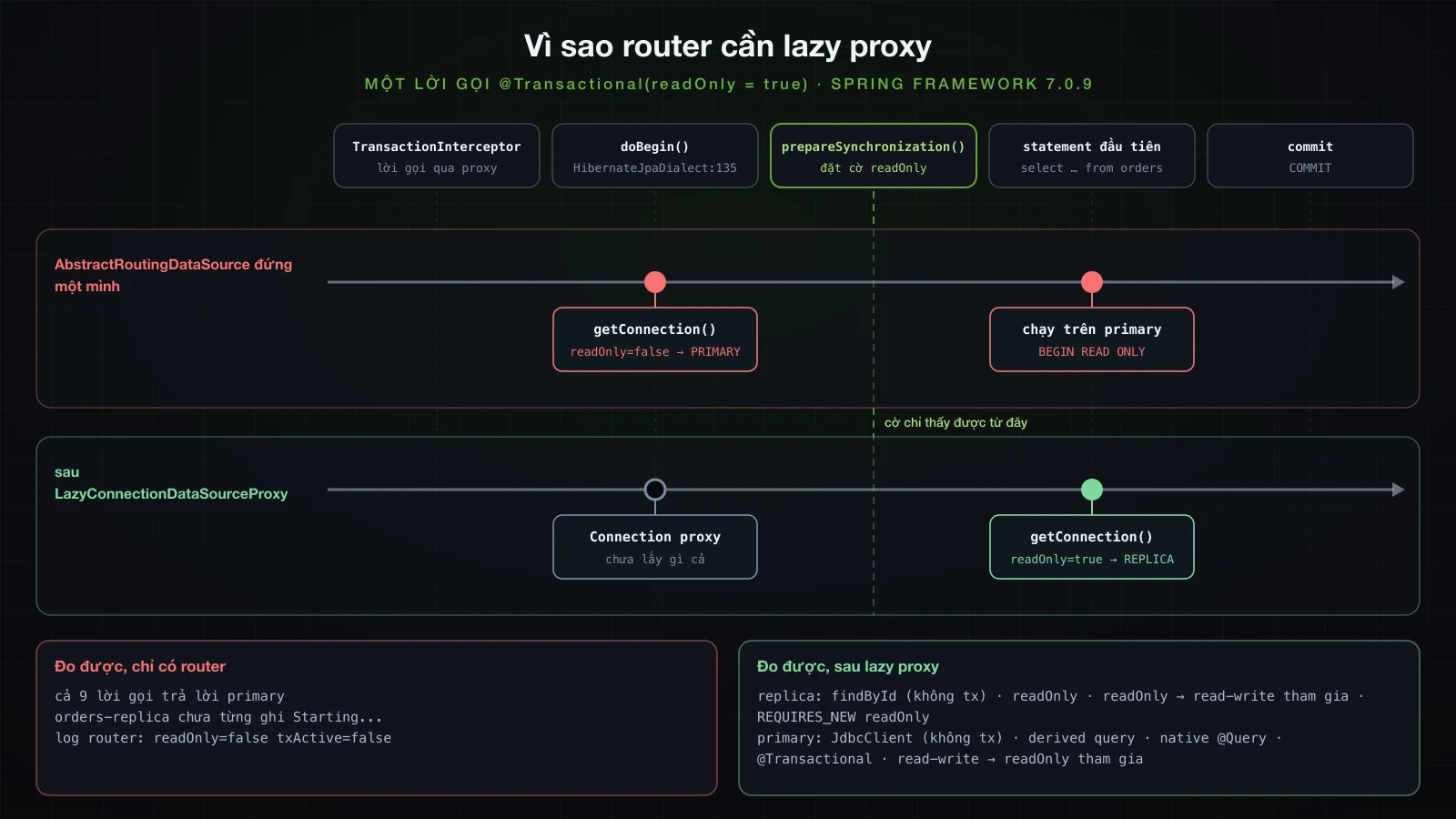
Cả chín phép thử đều trả lời primary, và pool orders-replica chưa từng ghi Starting...: không ai xin nó connection nào. Vào lúc router được hỏi, transaction thậm chí còn chưa active (txActive=false).
Connection được lấy trước khi cờ read-only được đặt
Một stack trace lấy bên trong determineCurrentLookupKey() trong lời gọi đó, đã bỏ phần hậu tố jar và vài frame của Hibernate, cho thấy ai đã hỏi:
at com.example.demo.config.ReadWriteRoutingDataSource.determineCurrentLookupKey(ReadWriteRoutingDataSource.java:22)
at org.springframework.jdbc.datasource.lookup.AbstractRoutingDataSource.determineTargetDataSource(AbstractRoutingDataSource.java:252)
at org.springframework.jdbc.datasource.lookup.AbstractRoutingDataSource.getConnection(AbstractRoutingDataSource.java:209)
at org.hibernate.engine.jdbc.connections.internal.DataSourceConnectionProvider.getConnection(DataSourceConnectionProvider.java:149)
at org.hibernate.resource.jdbc.internal.LogicalConnectionManagedImpl.getPhysicalConnection(LogicalConnectionManagedImpl.java:126)
at org.springframework.orm.jpa.vendor.HibernateJpaDialect.beginTransaction(HibernateJpaDialect.java:135)
at org.springframework.orm.jpa.JpaTransactionManager.doBegin(JpaTransactionManager.java:411)
at org.springframework.transaction.support.AbstractPlatformTransactionManager.startTransaction(AbstractPlatformTransactionManager.java:532)
Dòng 135 của HibernateJpaDialect.beginTransaction lấy physical connection chính vì transaction là read-only: nó cần connection để gọi setReadOnly(true). Việc đó xảy ra bên trong doBegin. Trong startTransaction của spring-tx 7.0.9, doBegin(transaction, definition) chạy trước prepareSynchronization(status, definition), và chỉ ở đó TransactionSynchronizationManager.setCurrentTransactionReadOnly(definition.isReadOnly()) mới chạy. Router bị hỏi trước khi cái cờ nó đọc tồn tại. Statement log của primary cho thấy nửa còn lại: các transaction đó chạy trên primary dưới dạng BEGIN READ ONLY.
LazyConnectionDataSourceProxy lấy connection ở statement đầu tiên
LazyConnectionDataSourceProxy trả về một Connection proxy và chỉ lấy connection thật khi statement đầu tiên được tạo. setReadOnly, setAutoCommit và isolation level được ghi lại trên proxy rồi áp vào connection thật khi nó được lấy. Bọc router lại là toàn bộ cách sửa:
        router.afterPropertiesSet();
        return router;
        return new LazyConnectionDataSourceProxy(router);
Cùng lời gọi read-only lúc này:
o.s.orm.jpa.JpaTransactionManager: Creating new transaction with name [com.example.demo.lab.WhereLab.readOnly]: PROPAGATION_REQUIRED,ISOLATION_DEFAULT,readOnly
c.e.d.config.ReadWriteRoutingDataSource: route=REPLICA readOnly=true txActive=true
Lab: @Transactional(readOnly = true) ....... replica
Transaction read-only đầu tiên của lần chạy, một lệnh findById, cũng khởi động pool của replica, theo nhu cầu:
o.s.orm.jpa.JpaTransactionManager: Creating new transaction with name [org.springframework.data.jpa.repository.support.SimpleJpaRepository.findById]: PROPAGATION_REQUIRED,ISOLATION_DEFAULT,readOnly
c.e.d.config.ReadWriteRoutingDataSource: route=REPLICA readOnly=true txActive=true
com.zaxxer.hikari.HikariDataSource: orders-replica - Starting...
com.zaxxer.hikari.HikariDataSource: orders-replica - Start completed.
DataSource read-only có sẵn trong Spring Framework 7
Từ Spring Framework 6.1.2, LazyConnectionDataSourceProxy tự làm được việc routing này. setReadOnlyDataSource(DataSource) có trong 7.0.9, và Javadoc của nó ghi: "If available, a Connection from such a read-only DataSource will be lazily obtained within a Spring-managed transaction that has been marked as read-only." Router tự viết không còn cần nữa:
    @Bean
    @Primary
    DataSource ordersDataSource(@Qualifier("ordersPrimaryPool") DataSource primary,
            @Qualifier("ordersReplicaPool") DataSource replica) {
        ReadWriteRoutingDataSource router = new ReadWriteRoutingDataSource();
        router.setTargetDataSources(Map.of(Route.PRIMARY, primary, Route.REPLICA, replica));
        router.setDefaultTargetDataSource(primary);
        router.afterPropertiesSet();
        return new LazyConnectionDataSourceProxy(router);
        LazyConnectionDataSourceProxy proxy = new LazyConnectionDataSourceProxy(primary);
        proxy.setReadOnlyDataSource(replica);
        return proxy;
    }
Cả chín phép thử cho đúng các câu trả lời như lazy router. Nó không quyết định dựa trên cờ synchronization mà dựa trên Connection.setReadOnly(true), thứ transaction manager gọi cho transaction read-only; với Spring transaction, hiệu quả là như nhau. Có một khác biệt lộ ra trong statement log của replica:
LOG:  statement: BEGIN
LOG:  execute <unnamed>: select o1_0.id,o1_0.created_at,o1_0.product_id,o1_0.quantity from orders o1_0 where o1_0.id=$1
LOG:  execute S_1: COMMIT
Một BEGIN trơn, trong khi connection của lazy router bắt đầu bằng BEGIN READ ONLY. Javadoc nói đúng như vậy: "The Connection#setReadOnly flag will be left untouched, expecting it to be pre-configured as a default on the read-only DataSource". Trên hot standby mọi transaction vốn đã read-only (ở đó transaction_read_only là on với mọi session), nhưng đặt nó trên pool giữ cho connection nói đúng sự thật và cho PostgreSQL thêm gợi ý:
app.datasource.orders-replica.hikari.maximum-pool-size=10
app.datasource.orders-replica.hikari.read-only=true orders-replica:
hikari:
maximum-pool-size: 10
read-only: trueSau đó, mọi transaction trên replica đều bắt đầu bằng BEGIN READ ONLY.
Từng kiểu lời gọi đi về đâu
Chín phép thử, với router đứng một mình và với một trong hai biến thể lazy (lazy router và proxy có sẵn cho câu trả lời giống hệt nhau). Với findById và derived query, vốn không tự chạy phép thử được, log của router và statement log của các server cho biết server:
| Lời gọi | AbstractRoutingDataSource đứng một mình | sau LazyConnectionDataSourceProxy |
|---|---|---|
JdbcClient, không có transaction | primary | primary |
findById, không có transaction | primary | replica: SimpleJpaRepository mở transaction readOnly |
findByProductId (derived query), không có transaction | primary | primary: không transaction, auto-commit |
@Query(nativeQuery = true) trả về pg_is_in_recovery(), không có transaction | primary | primary |
@Transactional | primary | primary |
@Transactional(readOnly = true) | primary | replica |
method read-write gọi method readOnly = true (tham gia) | primary | primary |
method readOnly = true gọi method read-write (tham gia) | primary | replica |
method read-write gọi REQUIRES_NEW, readOnly = true | primary | replica: transaction mới, connection mới |
Có ba dòng đáng nhớ. Các method CRUD của repository gọi ngoài transaction đi sang replica, vì SimpleJpaRepository được đánh @Transactional(readOnly = true), còn các query method bạn tự khai báo trên interface chạy không có transaction và đi vào primary. Transaction tham gia dùng connection mà transaction bên ngoài đã có, nên cờ readOnly bên trong không đổi được gì, như bài 6 đã cho thấy với chính cái cờ này. Còn chiều ngược lại, method read-only bên ngoài gọi method read-write, đẩy lệnh ghi đó sang replica.
Một lệnh ghi bị định tuyến sang replica
Dòng cuối đó, viết thành code: một method read-only gọi method lưu order.
    @Transactional(readOnly = true)
    public Long readOnlyCallingPlace() {
        return inner.placeOrder(); // @Transactional, orders.save(new Order(1L, 1))
}org.hibernate.orm.jdbc.error: HHH000247: ErrorCode: 0, SQLState: 25006
org.hibernate.orm.jdbc.error: ERROR: cannot execute INSERT in a read-only transaction
Lab: threw org.springframework.orm.jpa.JpaSystemException: could not execute statement [ERROR: cannot execute INSERT in a read-only transaction] [insert into orders (created_at,product_id,quantity) values (?,?,?)]
Lab: caused by org.hibernate.exception.GenericJDBCException
Lab: caused by org.postgresql.util.PSQLException SQLState=25006Cùng lệnh insert đó qua JdbcClient trong một transaction read-only:
Lab: threw org.springframework.jdbc.UncategorizedSQLException: PreparedStatementCallback; uncategorized SQLException for SQL [insert into products (name, stock) values ('Monitor', 1)]; SQL state [25006]; error code [0]; ERROR: cannot execute INSERT in a read-only transaction
Lab:   caused by org.postgresql.util.PSQLException SQLState=25006
Không cái nào là subclass cụ thể của DataAccessException: JPA báo JpaSystemException, JDBC báo UncategorizedSQLException; SQLSTATE 25006 (read_only_sql_transaction) mới là thứ nhận diện nó. Message không cho biết server nào đã từ chối. Replica từ chối lệnh ghi ở mọi session, và primary từ chối nó bên trong BEGIN READ ONLY, với cùng một câu:
docker exec sba-a10-pg-replica psql -U orders -d orders -v VERBOSITY=verbose -c "insert into products (name, stock) values ('Monitor', 1)"
docker exec sba-a10-pg-primary psql -U orders -d orders -v VERBOSITY=verbose -c "begin read only" -c "insert into products (name, stock) values ('Monitor', 1)" -c "rollback"ERROR: 25006: cannot execute INSERT in a read-only transaction
LOCATION: PreventCommandIfReadOnly, utility.c:407
BEGIN
ERROR: 25006: cannot execute INSERT in a read-only transaction
LOCATION: PreventCommandIfReadOnly, utility.c:407
ROLLBACKStatement log của replica mới là nơi nó lộ ra: BEGIN READ ONLY, lệnh insert và dòng ERROR đều thuộc backend của replica.
Replication lag và read-your-writes
Tái hiện replication lag
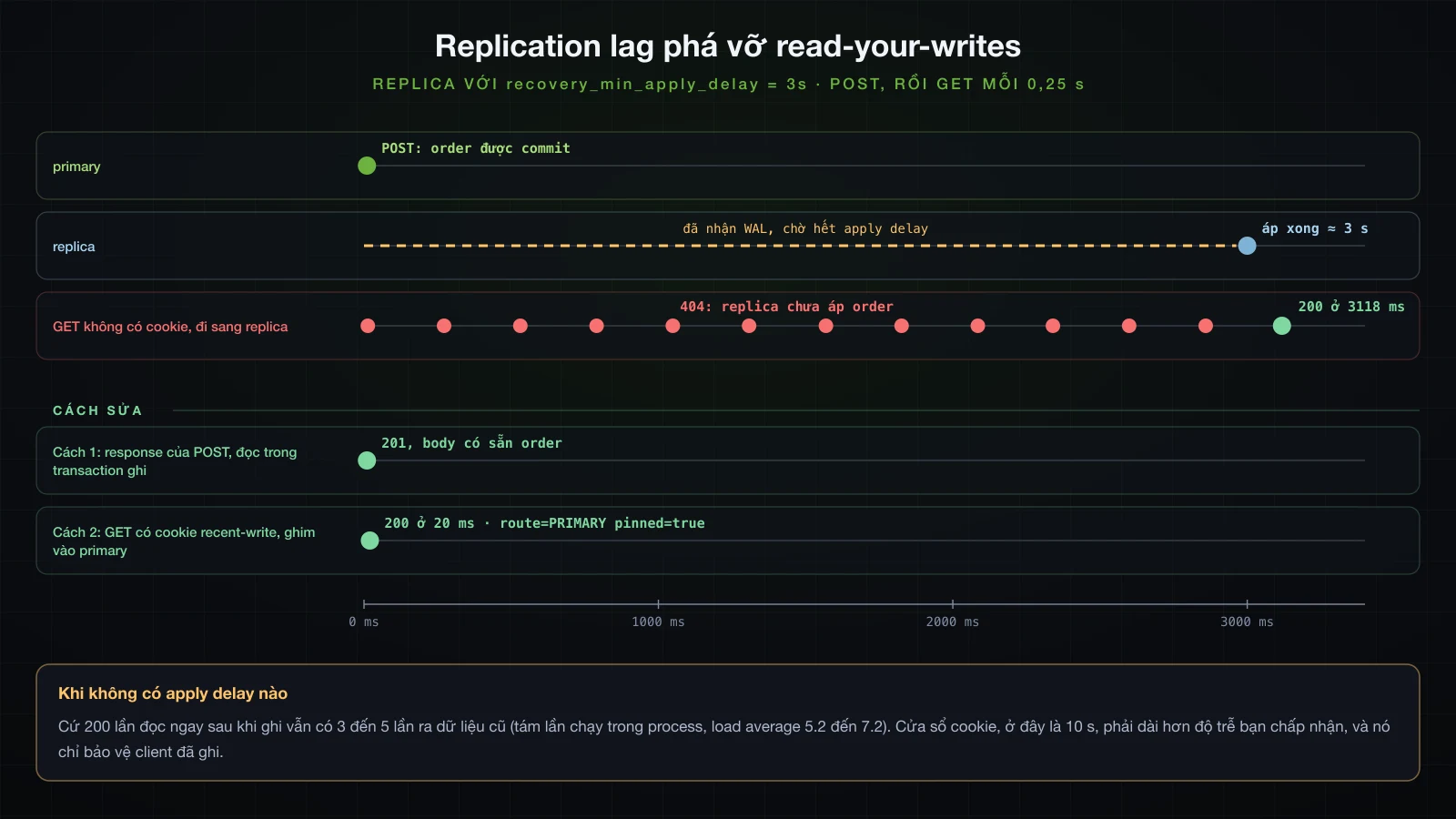
Streaming replication là bất đồng bộ: primary commit, rồi replica mới nhận và áp WAL. Trên một máy duy nhất, khoảng trễ đó quá nhỏ để thấy theo ý muốn, nên replica được bảo chờ ba giây trước khi áp mỗi transaction:
docker exec sba-a10-pg-replica psql -U orders -d orders -c "alter system set recovery_min_apply_delay = '3s'" -c "select pg_reload_conf()"show recovery_min_apply_delay sau đó trả về 3s. Setting này reload được và ALTER SYSTEM chạy được trên standby.
Ghi xong, đọc ra dữ liệu cũ
OrderQueries là phía đọc, @Transactional(readOnly = true) ở mức class:
@Service
@Transactional(readOnly = true)
public class OrderQueries {

    private final OrderRepository orders;

    OrderQueries(OrderRepository orders) {
        this.orders = orders;
    }

    public Optional<OrderResponse> find(Long id) {
        return orders.findById(id).map(OrderResponse::from);
    }
}
Trong cùng process, một lệnh ghi và ngay sau đó là lệnh đọc đúng dòng đó:
            Long id = orderService.place(1L, 1).getId();            // commits on the primary
boolean found = orderQueries.find(id).isPresent(); // read-only: the replicaLab: order 402 placed; read-only read right after: emptyQua HTTP, GET /api/orders/{id} trả 404 qua một ResponseStatusException khi find rỗng. Script dưới đây POST một order rồi hỏi lại nó mỗi 0,25 s:
#!/bin/bash
# POST an order, then GET it every 0.25 s until it answers 200; pass -b to send the POST's cookies back
jar=$(mktemp)
id=$(curl -s -c "$jar" -X POST localhost:8210/api/orders \
  -H 'Content-Type: application/json' -d '{"productId":1,"quantity":1}' | jq .id)
for i in $(seq 1 40); do
  code=$(curl -s -o /dev/null -w '%{http_code}' ${1:+-b "$jar"} localhost:8210/api/orders/$id)
  echo "GET #$i -> $code"
  [ "$code" = 200 ] && break
  sleep 0.25
done
rm -f "$jar"./stale.shGET #1 -> 404
GET #2 -> 404
GET #3 -> 404
GET #4 -> 404
GET #5 -> 404
GET #6 -> 404
GET #7 -> 404
GET #8 -> 404
GET #9 -> 404
GET #10 -> 404
GET #11 -> 404
GET #12 -> 200Mười một lần 404 cách nhau khoảng một phần tư giây, rồi 200: xấp xỉ ba giây apply delay (load average 3.37; một lần chạy sau đó ra mười hai lần). Client vừa được báo order đã tồn tại, rồi lại được báo là không có.
Apply delay chỉ làm cửa sổ đó lộ ra. Với recovery_min_apply_delay trả về 0, lab trong process chạy mỗi lần 200 cặp ghi-rồi-đọc: qua tám lần chạy như vậy, cứ 200 lần đọc thì có từ 3 đến 5 lần ra dữ liệu cũ (load average 5.2 đến 7.2). Replication bất đồng bộ thu hẹp cửa sổ; nó không đóng cửa sổ đó lại.
Cách 1: đọc ngay trong transaction ghi
Cách sửa đơn giản nhất là đừng đọc lại dòng mới qua phía đọc. place() trả về entity nó vừa lưu bên trong transaction read-write trên primary, và controller dựng response từ đó:
    @PostMapping
    ResponseEntity<OrderResponse> place(@Valid @RequestBody PlaceOrderRequest request) {
        OrderResponse order = OrderResponse.from(orderService.place(request.productId(), request.quantity()));
        return ResponseEntity.created(URI.create("/api/orders/" + order.id())).body(order);
    }
Trong lần chạy ở phần tiếp theo, POST trả 201 với {"id":408,…} trong body trong khi replica còn chưa áp order đó. Cách này bao được mọi thứ chính lệnh ghi trả về được. Nếu response cần nhiều hơn, hãy query ngay bên trong place(): bảng ở trên đặt lệnh đọc trong transaction read-write vào primary. Nó không giúp gì cho client gửi một GET riêng ngay sau đó: trong cùng lần chạy, GET đó cho order 408 vẫn trả 404.
Cách 2: ghim client vào primary sau khi ghi
Với các request tiếp theo, application phải nhớ rằng client này vừa ghi. Proxy có sẵn chỉ quyết định theo cờ read-only, nên phần này quay về router của cách sửa lazy (new LazyConnectionDataSourceProxy(router)) và cho nó thêm một đầu vào. Một filter coi mọi request không phải GET là lệnh ghi, đặt một cookie sống lâu hơn độ trễ bạn chấp nhận, và ghim request hiện tại vào primary khi cookie còn đó:
public final class ReadYourWrites {

    private static final ThreadLocal<Boolean> PINNED = new ThreadLocal<>();

    private ReadYourWrites() {
    }

    public static boolean pinnedToPrimary() {
        return Boolean.TRUE.equals(PINNED.get());
    }

    static void pin(boolean pinned) {
        PINNED.set(pinned);
    }

    static void clear() {
        PINNED.remove();
    }
}@Component
class ReadYourWritesFilter extends OncePerRequestFilter {
static final String COOKIE = "recent-write";
static final Duration WINDOW = Duration.ofSeconds(10); // longer than the replication lag you accept
@Override
protected void doFilterInternal(HttpServletRequest request, HttpServletResponse response, FilterChain chain)
throws ServletException, IOException {
boolean write = !"GET".equals(request.getMethod()) && !"HEAD".equals(request.getMethod());
if (write) {
ResponseCookie cookie = ResponseCookie.from(COOKIE, "1").path("/").maxAge(WINDOW).httpOnly(true).build();
response.addHeader(HttpHeaders.SET_COOKIE, cookie.toString());
}
ReadYourWrites.pin(write || WebUtils.getCookie(request, COOKIE) != null);
try {
chain.doFilter(request, response);
}
finally {
ReadYourWrites.clear();
}
}
} @Override
protected Object determineCurrentLookupKey() {
boolean readOnly = TransactionSynchronizationManager.isCurrentTransactionReadOnly();
Route route = readOnly ? Route.REPLICA : Route.PRIMARY;
log.debug("route={} readOnly={} txActive={}", route, readOnly,
TransactionSynchronizationManager.isActualTransactionActive());
boolean pinned = ReadYourWrites.pinnedToPrimary();
Route route = readOnly && !pinned ? Route.REPLICA : Route.PRIMARY;
log.debug("route={} readOnly={} pinned={}", route, readOnly, pinned);
return route;
}Giờ POST mang theo cookie, và GET gửi cookie đó ngược lại sẽ đọc từ primary. Vẫn với delay 3 s trên replica, một script POST một order, rồi hỏi nó một lần không có cookie và một lần có cookie:
#!/bin/bash
# POST with a cookie jar, then GET without and with the cookie, all inside the replica's apply delay
jar=$(mktemp)
curl -s -i -c "$jar" -X POST localhost:8210/api/orders -H 'Content-Type: application/json' -d '{"productId":1,"quantity":1}' | tee /tmp/sba-a10-post.txt
echo
id=$(tail -1 /tmp/sba-a10-post.txt | jq .id)
curl -s -i localhost:8210/api/orders/$id
echo
curl -s -i -b "$jar" localhost:8210/api/orders/$id
echo
rm -f "$jar" /tmp/sba-a10-post.txt
Ba response, header đã cắt còn những cái quan trọng, và quyết định của router cho từng request:
HTTP/1.1 201
Set-Cookie: recent-write=1; Path=/; Max-Age=10; Expires=Fri, 18 Sep 2026 07:42:33 GMT; HttpOnly
Location: /api/orders/408

HTTP/1.1 404
Content-Type: application/problem+json

{"detail":"Order 408 not found","instance":"/api/orders/408","status":404,"title":"Not Found"}

HTTP/1.1 200
Content-Type: application/json

{"id":408,"productId":1,"quantity":1,"createdAt":"2026-09-18T07:42:23.216731Z"}c.e.d.config.ReadWriteRoutingDataSource: route=PRIMARY readOnly=false pinned=true
c.e.d.config.ReadWriteRoutingDataSource: route=REPLICA readOnly=true pinned=false
c.e.d.config.ReadWriteRoutingDataSource: route=PRIMARY readOnly=true pinned=trueCòn ./stale.sh -b, gửi cookie ngược lại, nhận GET #1 -> 200. Cách sửa này có giới hạn cần nói rõ: nó chỉ bảo vệ client đã ghi, các client khác vẫn đọc trạng thái cũ hơn của replica; độ trễ dài hơn cửa sổ sẽ đưa lệnh đọc cũ quay lại; và mỗi lệnh đọc bị ghim là thêm tải cho primary.
Hai pool, mỗi đích một pool
Mỗi đích có HikariCP pool riêng, có tên trong log. Pool của primary và audit khởi động cùng application; pool của replica chỉ khởi động khi transaction read-only đầu tiên được routing tới nó, ở lần chạy này là một giây sau startup (giữ lại cột thời gian):
14:35:18.352 com.zaxxer.hikari.HikariDataSource: audit - Start completed.
14:35:18.481 com.zaxxer.hikari.HikariDataSource: orders-primary - Start completed.
14:35:19.741 com.example.demo.DemoApplication: Started DemoApplication in 2.397 seconds (process running for 2.626)
14:35:20.373 com.zaxxer.hikari.HikariDataSource: orders-replica - Start completed.
Vì vậy URL replica sai không phải lỗi startup: application khởi động và lệnh đọc đầu tiên mới hỏng. Khi mỗi pool đã lấp đầy tới minimumIdle, mặc định bằng maximum-pool-size, mỗi server giữ phần của riêng nó từ một instance này:
docker exec sba-a10-pg-replica psql -U orders -d orders -Atc "select count(*) from pg_stat_activity where backend_type = 'client backend' and application_name = 'PostgreSQL JDBC Driver'"| Server | Pool | Số connection đang giữ | max_connections |
|---|---|---|---|
sba-a10-pg-primary | orders-primary | 5 | 100 |
sba-a10-pg-replica | orders-replica | 10 | 100 |
sba-a10-pg-audit | audit | 3 | 100 |
Hãy định cỡ mỗi pool theo lưu lượng server của nó nhận: primary nhận mọi lệnh ghi, mọi lệnh đọc trong transaction read-write, mọi query không có transaction và, với cách 2, các lệnh đọc bị ghim; replica nhận các transaction read-only. Nhân với số instance rồi so với max_connections của từng server, tách riêng từng cái. Tinh chỉnh chính các con số là bài 38 của khóa này.
Khi replica bị down
Với application đang chạy và docker stop sba-a10-pg-replica (load average 6.10):
GET #1 500 30.044361s
GET #2 500 30.026831s
POST 201 0.033839s
GET after restart 200 1.976674sorg.hibernate.orm.jdbc.error: orders-replica - Connection is not available, request timed out after 30001ms (total=0, active=0, idle=0, waiting=0)Các request read-only chờ hết 30 s connectionTimeout của HikariCP rồi hỏng với DataAccessResourceFailureException: Could not prepare statement; lazy proxy chỉ xin connection ở statement đầu tiên, nên mới có câu chữ đó. Ở một lần chạy lại, lệnh đọc đầu tiên sau khi stop hỏng ngay sau 0,013 s, trên một connection trong pool mà server đã đóng, còn lệnh kế tiếp thì chờ đủ 30 s. Lệnh ghi không bị ảnh hưởng. Không có gì tự quay về primary: routing không phải failover, và fallback là code bạn tự viết, với timeout ngắn hơn 30 s rất nhiều. Sau docker start sba-a10-pg-replica, lệnh đọc đầu tiên thành công trở lại sau 1,98 s.
Một datasource, hai datasource hay replica có routing
Một DataSource | Hai DataSource độc lập | Primary + replica, có routing | |
|---|---|---|---|
| Được gì | mọi thứ tự cấu hình | database, schema, pool và migration riêng cho từng vùng nghiệp vụ | chuyển lệnh đọc khỏi primary |
| Cấu hình bạn phải giữ | không có | mỗi database: properties, DataSource, factory, transaction manager, Flyway, @EnableJpaRepositories | hai pool cộng LazyConnectionDataSourceProxy (với read-only DataSource hoặc router tự viết) |
| Transaction | một transaction manager | mỗi database một cái; method ghi cả hai là hai lần commit | một transaction manager; cờ read-only chọn server |
| Kiểu hỏng gặp trong bài | không có cái nào trong số này | sai transaction manager: commit sớm, mất thay đổi hoặc TransactionRequiredException; dòng audit cho order đã bị rollback; cấu hình pool bị bỏ qua trong im lặng; database thứ hai không được migrate | router thiếu lazy proxy đẩy mọi thứ vào primary; đọc ra dữ liệu cũ (3 đến 5 trong 200 khi không có delay nào); read-write bên trong read-only hỏng với 25006; replica down nghĩa là timeout 30 s, không có failover |
| Chọn khi | một database phục vụ cả application | dữ liệu thật sự nằm ở hai nơi | primary bị nghẽn vì lệnh đọc và lệnh đọc chịu được độ trễ, hoặc ghim được |
FAQ
Cấu hình hai datasource trong Spring Boot 4 như thế nào?
Với mỗi database, khai báo một DataSourceProperties và một HikariDataSource bind bằng @ConfigurationProperties, một LocalContainerEntityManagerFactoryBean dựng bằng EntityManagerFactoryBuilder được inject, một JpaTransactionManager, và một @EnableJpaRepositories có entityManagerFactoryRef và transactionManagerRef. Đánh dấu một bộ là @Primary: không có DataSource primary thì Spring Boot 4.1.1 không tạo EntityManagerFactoryBuilder, JdbcTemplate hay transaction manager nào cả.
Vì sao cấu hình HikariCP bị bỏ qua khi có nhiều datasource?
Vì chúng nằm ở cấp không có gì bind tới. Với pattern DataSourceProperties, cấu hình pool phải nằm dưới …hikari và bean DataSource cần @ConfigurationProperties("….hikari") của riêng nó; đặt cạnh url thì chúng bị bỏ qua không cảnh báo, và pool chạy với 10 connection và tên HikariPool-1. Kiểm tra bằng logging.level.com.zaxxer.hikari.HikariConfig=DEBUG.
Vì sao Spring Boot chỉ chạy Flyway trên một database?
FlywayAutoConfiguration dựng một Flyway cho DataSource primary, và lùi lại hoàn toàn ngay khi có bất kỳ bean Flyway nào. Khai báo mỗi database một bean Flyway với @Bean(initMethod = "migrate"); Boot vẫn bắt các entity manager factory chờ chúng.
Vì sao @Transactional(readOnly = true) vẫn đi vào primary khi dùng AbstractRoutingDataSource?
Vì JpaTransactionManager lấy connection bên trong doBegin, còn cờ read-only chỉ được đưa vào TransactionSynchronizationManager sau đó, trong prepareSynchronization. Bọc router bằng LazyConnectionDataSourceProxy, hoặc dùng LazyConnectionDataSourceProxy#setReadOnlyDataSource (từ Spring Framework 6.1.2) và bỏ router đi.
Method ghi vào hai database trong một @Transactional có atomic không?
Không. Mỗi database có local transaction riêng, và transaction bên trong commit trước. Trong lab, một dòng audit đã được commit cho một order mà lần commit của chính nó sau đó vi phạm constraint CHECK và bị rollback. Atomic trên cả hai cần XA và một JTA transaction manager, thứ Spring Boot 4.1.1 chỉ tự cấu hình từ JNDI.
Làm sao tránh đọc dữ liệu cũ từ read replica của PostgreSQL?
Đừng đọc lại một dòng qua đường read-only ngay sau khi ghi nó: trả nó về từ chính transaction ghi. Với các request theo sau, ghim client vào primary trong một cửa sổ dài hơn độ trễ bạn chấp nhận, ví dụ bằng một cookie đặt khi ghi và một router kiểm tra cookie đó. Không có delay nhân tạo nào, cứ 200 lần đọc ngay sau khi ghi vẫn có 3 đến 5 lần ra dữ liệu cũ.
Kết luận
Một bean DataSource thứ hai tắt phần lớn những gì Boot làm cho trường hợp một database: không có @Primary thì không có JPA, JdbcTemplate hay transaction manager nào, có nó thì mọi thứ chỉ được dựng cho primary, Flyway cũng vậy. Khi đó mỗi database cần factory riêng từ EntityManagerFactoryBuilder, transaction manager riêng được gọi tên trong @Transactional, bean Flyway riêng, và cấu hình pool đặt đúng chỗ mà pattern bind của nó chờ. Repository chạy dưới transaction manager của database kia sẽ commit sớm, mất thay đổi hoặc throw, và method ghi vào cả hai database là hai lần commit, lần đầu có thể sống sót dù lần sau hỏng.
Routing lệnh đọc sang replica chỉ chạy khi connection được lấy sau lúc transaction đã công bố cờ read-only: LazyConnectionDataSourceProxy làm việc đó, và trong Spring Framework 7 nó tự routing với setReadOnlyDataSource. Lệnh đọc CRUD của repository đi sang replica, query method tự viết ngoài transaction thì không, và một method read-only bên ngoài biến lệnh ghi bên trong thành SQLSTATE 25006. Replication lag làm lệnh đọc ra dữ liệu cũ ngay cả khi không cấu hình delay; trả dữ liệu về từ lệnh ghi sửa được response của chính lệnh ghi, còn ghim client vào primary sau khi ghi sửa được cả các lệnh đọc tiếp theo của client đó, điều cách thứ nhất không làm được.
Bài tiếp theo rời khỏi relational database: NoSQL với Spring Data MongoDB và Spring Data Redis.
![[Advanced Spring Boot] OAuth2 và OpenID Connect trong Spring Boot: OAuth2 Login và resource server với JWT](/images/blog/sba-oauth2-oidc-thumbnail.vi.webp)
![[Advanced Spring Boot] Locking và concurrency trong Spring Boot: optimistic @Version, pessimistic lock và race condition](/images/blog/sba-locking-thumbnail.vi.webp)
![[Advanced Spring Boot] NoSQL với Spring Data: MongoDB và Redis](/images/blog/sba-nosql-thumbnail.vi.webp)
![[Advanced Spring Boot] Caching trong Spring Boot: cache abstraction, Caffeine, Redis và chiến lược invalidation](/images/blog/sba-caching-thumbnail.vi.webp)