Articles 5 to 8 of this course tuned one database: fetch plans, transactions, locking and dynamic queries. This one gives the application more than one. First two independent databases, an orders database and an audit database, each with its own entities, pool, migrations and transaction manager. Then a PostgreSQL primary with a streaming replica, where read-only transactions go to the replica and everything else goes to the primary.
Most multiple-datasource tutorials were written for Spring Boot 2, and several of their details no longer hold, so this article shows what Boot 4 actually does. It uses Spring Boot 4.1.1, Java 21 and PostgreSQL 18, with the web app on port 8210. Timings come from single runs, each given with the 1-minute load average at the time, and are only indicative.
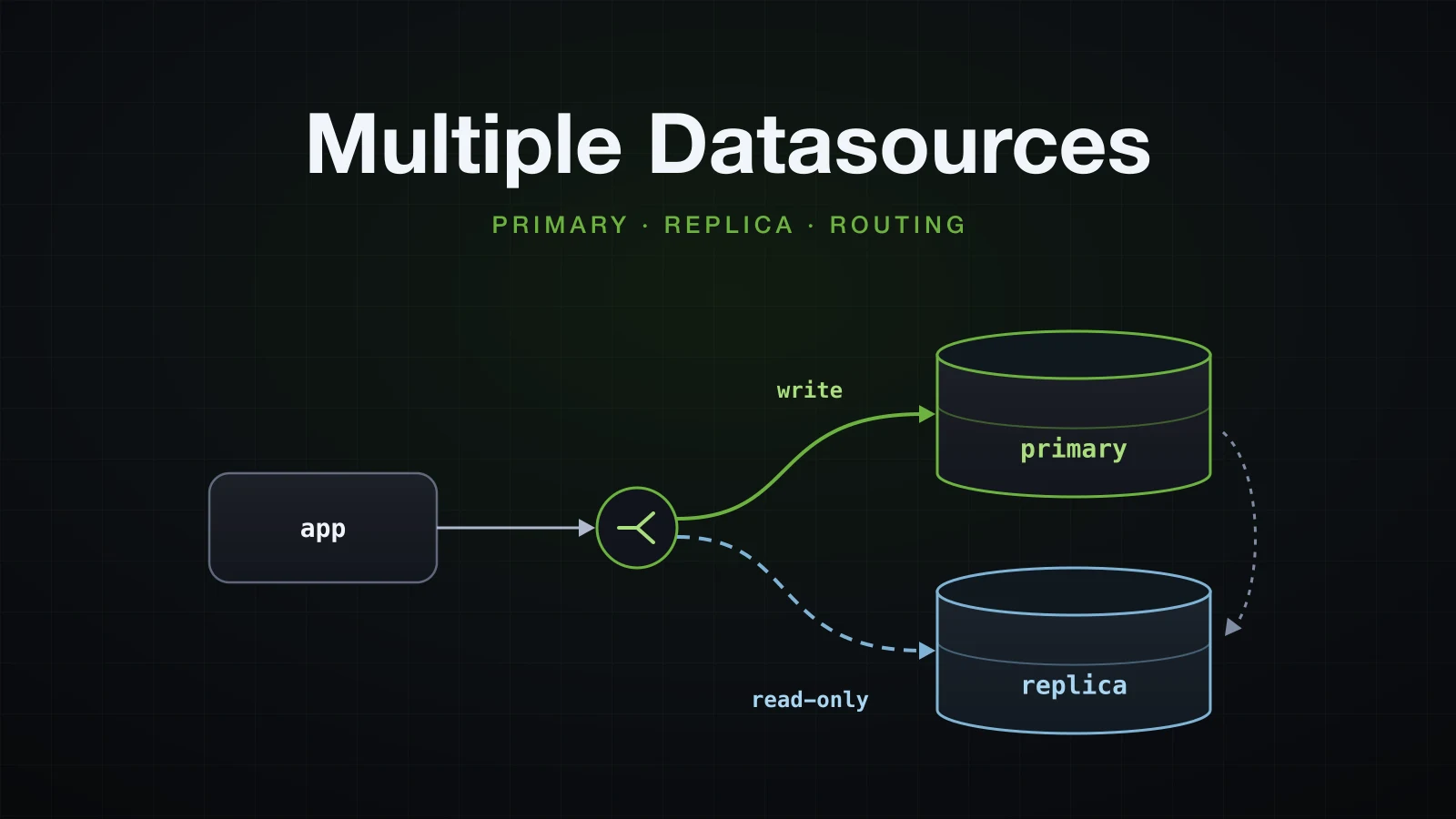
The first half wires two unrelated databases and shows what breaks at each step; the second half adds a replica and routes reads to it.
The lab: two PostgreSQL databases
The orders live in one PostgreSQL server; an audit trail goes to a second, independent server. Both containers join a user-defined network, which the replica joins later:
docker network create sba-a10-net
docker run -d --name sba-a10-pg-primary --network sba-a10-net --memory 512m -p 5510:5432 -e POSTGRES_USER=orders -e POSTGRES_PASSWORD=orders -e POSTGRES_DB=orders postgres:18 -c log_statement=all
docker run -d --name sba-a10-pg-audit --network sba-a10-net --memory 512m -p 5530:5432 -e POSTGRES_USER=audit -e POSTGRES_PASSWORD=audit -e POSTGRES_DB=audit postgres:18 -c log_statement=all
log_statement=all makes each server log every statement it runs; the later sections read those logs to show which server did what.
The project comes from Initializr with the web, JPA, PostgreSQL, Flyway, validation and Actuator dependencies:
curl -s "https://start.spring.io/starter.zip?type=gradle-project&language=java&bootVersion=4.1.1&javaVersion=21&groupId=com.example&artifactId=demo&name=demo&packageName=com.example.demo&dependencies=web,data-jpa,postgresql,flyway,validation,actuator" -o demo.zipEach database gets its own feature package and its own migration folder:
src/main/java/com/example/demo
├── DemoApplication.java
├── audit
│   ├── AuditEvent.java
│   ├── AuditEventRepository.java
│   └── AuditService.java
├── config
│   ├── AuditDataConfig.java
│   └── OrdersDataConfig.java
├── lab
│   └── ...
└── order
    ├── Order.java
    ├── OrderRepository.java
    ├── OrderService.java
    ├── Product.java
    └── ProductRepository.java
src/main/resources/db/migration
├── audit
│   └── V1__create_audit_events.sql
└── orders
└── V1__create_orders.sqlcreate table products (
id bigint generated by default as identity primary key,
name varchar(100) not null,
stock integer not null check (stock >= 0)
);
create table orders (
id bigint generated by default as identity primary key,
product_id bigint not null references products (id),
quantity integer not null,
created_at timestamptz not null
);
insert into products (name, stock) values ('Keyboard', 10), ('Mouse', 2);create table audit_events (
id bigint generated by default as identity primary key,
action varchar(50) not null,
detail varchar(200) not null,
created_at timestamptz not null
);Order (id, productId, quantity, createdAt) and AuditEvent (id, action, detail, createdAt) are ordinary entities with IDENTITY ids and no explicit column names, so createdAt reaches the database as created_at only if Boot's naming strategy is applied. Product has one method that matters later:
    // the check (stock >= 0) constraint in V1__create_orders.sql guards against overselling
    public void reserve(int quantity) {
        this.stock -= quantity;
    }
A small ApplicationRunner in the lab package runs one experiment per --lab=… argument and then prints the products, orders and audit events; it is not shown.
What Spring Boot backs off from when you declare two DataSources
With one spring.datasource.url, Boot builds the DataSource, the JPA EntityManagerFactory, a transaction manager, Flyway, JdbcTemplate and JdbcClient for you. The usual first step towards a second database is to declare two DataSource beans and let Boot carry on.
Two DataSource beans without @Primary
@Configuration(proxyBeanMethods = false)
class OrdersDataConfig {

    @Bean
    @ConfigurationProperties("app.datasource.orders")
    DataSourceProperties ordersDataSourceProperties() {
        return new DataSourceProperties();
    }

    @Bean
    @ConfigurationProperties("app.datasource.orders.hikari")
    HikariDataSource ordersDataSource(@Qualifier("ordersDataSourceProperties") DataSourceProperties properties) {
        return properties.initializeDataSourceBuilder().type(HikariDataSource.class).build();
    }
}
AuditDataConfig is the same with audit in every name. The next section explains the two @ConfigurationProperties. Started with --debug, the application stops at the first bean that needs a JPA repository:
java -Xmx512m -jar build/libs/demo-0.0.1-SNAPSHOT.jar --spring.main.web-application-type=none --debug***************************
APPLICATION FAILED TO START
***************************
Description:
Parameter 0 of constructor in com.example.demo.audit.AuditService required a bean named 'entityManagerFactory' that could not be found.
Action:
Consider defining a bean named 'entityManagerFactory' in your configuration.The conditions report says why. Every auto-configuration that needs the DataSource is guarded by @ConditionalOnSingleCandidate, and two candidates with no primary is not a single candidate:
   HibernateJpaConfiguration:
      Did not match:
         - @ConditionalOnSingleCandidate (types: javax.sql.DataSource; SearchStrategy: all) found multiple beans 'ordersDataSource', 'auditDataSource' (OnBeanCondition)

   JdbcTemplateAutoConfiguration:
      Did not match:
         - @ConditionalOnSingleCandidate (types: javax.sql.DataSource; SearchStrategy: all) found multiple beans 'ordersDataSource', 'auditDataSource' (OnBeanCondition)

   DataSourceTransactionManagerAutoConfiguration.JdbcTransactionManagerConfiguration:
      Did not match:
         - @ConditionalOnSingleCandidate (types: javax.sql.DataSource; SearchStrategy: all) found multiple beans 'ordersDataSource', 'auditDataSource' (OnBeanCondition)
So there is no JPA, no JdbcTemplate (and therefore no JdbcClient, which is built on the single NamedParameterJdbcTemplate) and no transaction manager. Boot's own pooled DataSource backed off too (@ConditionalOnMissingBean (types: javax.sql.DataSource,javax.sql.XADataSource) found beans of type 'javax.sql.DataSource' auditDataSource, ordersDataSource). Flyway's condition only asks for some DataSource bean and matched, but the context failed before it ran.
@Primary on one of them
Marking the orders beans @Primary gives those conditions their single candidate:
    @Bean
    @Primary
    @ConfigurationProperties("app.datasource.orders")
    DataSourceProperties ordersDataSourceProperties() {
        return new DataSourceProperties();
    }

    @Bean
    @Primary
    @ConfigurationProperties("app.datasource.orders.hikari")
    HikariDataSource ordersDataSource(@Qualifier("ordersDataSourceProperties") DataSourceProperties properties) {
The application gets further and fails differently. Boot's Flyway needs spring.flyway.locations=classpath:db/migration/orders here: left at the default classpath:db/migration, it scans both folders and stops with FlywayException: Found more than one migration with version 1. With the location set:
com.zaxxer.hikari.HikariDataSource: orders - Starting...
com.zaxxer.hikari.HikariDataSource: orders - Start completed.
org.flywaydb.core.FlywayExecutor: Database: jdbc:postgresql://localhost:5510/orders (PostgreSQL 18.6)
o.f.core.internal.command.DbMigrate: Migrating schema "public" to version "1 - create orders"
o.f.core.internal.command.DbMigrate: Successfully applied 1 migration to schema "public", now at version v1 (execution time 00:00.009s)
org.hibernate.orm.jpa: HHH008540: Processing PersistenceUnitInfo [name: default]
j.LocalContainerEntityManagerFactoryBean: Failed to initialize JPA EntityManagerFactory: Unable to build Hibernate SessionFactory  [persistence unit: default] ; nested exception is org.hibernate.tool.schema.spi.SchemaManagementException: Schema validation: missing table [audit_events]
(Log lines here and below are shown without the timestamp, level, pid and thread columns.) Every conditional now reads found a single primary bean 'ordersDataSource' from beans 'ordersDataSource', 'auditDataSource', and Boot built one of everything for the primary: one Flyway run, on orders, and one persistence unit, default, which scanned every entity under com.example.demo, found AuditEvent and validated it against the orders database. The audit pool was never even started. @Primary alone makes the second DataSource an idle bean; the JPA wiring for each database has to be written by hand.
Binding each DataSource: DataSourceProperties and the pool-settings trap
The settings for both databases live under a prefix of your own:
spring.application.name=demo
spring.jpa.open-in-view=false
spring.jpa.hibernate.ddl-auto=validate

app.datasource.orders.url=jdbc:postgresql://localhost:5510/orders
app.datasource.orders.username=orders
app.datasource.orders.password=orders
app.datasource.orders.hikari.pool-name=orders
app.datasource.orders.hikari.maximum-pool-size=5

app.datasource.audit.url=jdbc:postgresql://localhost:5530/audit
app.datasource.audit.username=audit
app.datasource.audit.password=audit
app.datasource.audit.hikari.pool-name=audit
app.datasource.audit.hikari.maximum-pool-size=3spring:
application:
name: demo
jpa:
open-in-view: false
hibernate:
ddl-auto: validate
app:
datasource:
orders:
url: jdbc:postgresql://localhost:5510/orders
username: orders
password: orders
hikari:
pool-name: orders
maximum-pool-size: 5
audit:
url: jdbc:postgresql://localhost:5530/audit
username: audit
password: audit
hikari:
pool-name: audit
maximum-pool-size: 3Two beans per database read them. DataSourceProperties is the class behind spring.datasource.* (org.springframework.boot.jdbc.autoconfigure.DataSourceProperties in Boot 4): bound to app.datasource.audit, it takes url, username, password and the driver, and initializeDataSourceBuilder() hands them to a DataSourceBuilder. .type(HikariDataSource.class) makes the bean a concrete HikariDataSource, so the second @ConfigurationProperties, on the DataSource bean itself, can bind HikariCP's own setters from app.datasource.audit.hikari:
    @Bean
    @ConfigurationProperties("app.datasource.audit")
    DataSourceProperties auditDataSourceProperties() {
        return new DataSourceProperties();
    }

    @Bean
    @ConfigurationProperties("app.datasource.audit.hikari")
    HikariDataSource auditDataSource(@Qualifier("auditDataSourceProperties") DataSourceProperties properties) {
        return properties.initializeDataSourceBuilder().type(HikariDataSource.class).build();
    }
HikariCP prints its effective configuration at DEBUG when a pool starts, which is the way to check what was bound:
java -Xmx512m -jar build/libs/demo-0.0.1-SNAPSHOT.jar --spring.main.web-application-type=none --logging.level.com.zaxxer.hikari.HikariConfig=DEBUGcom.zaxxer.hikari.HikariConfig: audit - configuration:
com.zaxxer.hikari.HikariConfig: jdbcUrl.........................jdbc:postgresql://localhost:5530/audit
com.zaxxer.hikari.HikariConfig: maximumPoolSize.................3
com.zaxxer.hikari.HikariConfig: minimumIdle.....................3
com.zaxxer.hikari.HikariConfig: poolName........................"audit"Pool settings next to the URL are silently ignored
The mistake is to put the pool settings where the URL is, since they look like connection settings:
app.datasource.audit.hikari.pool-name=audit
app.datasource.audit.hikari.maximum-pool-size=3
app.datasource.audit.pool-name=audit
app.datasource.audit.maximum-pool-size=3 audit:
url: jdbc:postgresql://localhost:5530/audit
username: audit
password: audit
hikari:
pool-name: audit
maximum-pool-size: 3
pool-name: audit
maximum-pool-size: 3The application starts without a warning, and the pool has neither setting:
com.zaxxer.hikari.HikariConfig: HikariPool-1 - configuration:
com.zaxxer.hikari.HikariConfig: jdbcUrl.........................jdbc:postgresql://localhost:5530/audit
com.zaxxer.hikari.HikariConfig: maximumPoolSize.................10
com.zaxxer.hikari.HikariConfig: minimumIdle.....................10
com.zaxxer.hikari.HikariConfig: poolName........................"HikariPool-1"
com.zaxxer.hikari.HikariDataSource: HikariPool-1 - Start completed.
app.datasource.audit is bound to DataSourceProperties, which has no pool settings, and unknown keys are ignored. The same silent default appeared with the keys under .hikari but without the @ConfigurationProperties("app.datasource.audit.hikari") on the DataSource bean. The other common pattern binds a DataSourceBuilder result directly, and moves every key one level:
    @Bean
    @ConfigurationProperties("app.datasource.audit")
    HikariDataSource auditDataSource() {
        return DataSourceBuilder.create().type(HikariDataSource.class).build();
    }
With the properties above, url has nothing to bind to, because HikariDataSource calls it jdbcUrl, and the startup fails when Flyway asks for the first connection:
com.zaxxer.hikari.HikariConfig: HikariPool-1 - dataSource or dataSourceClassName or jdbcUrl is required.Every variant, from the HikariCP dump:
| Pool settings under | DataSource bean | poolName / maximumPoolSize |
|---|---|---|
app.datasource.audit.hikari.* | DataSourceProperties + @ConfigurationProperties("…audit.hikari") | "audit" / 3 |
app.datasource.audit.* | DataSourceProperties + @ConfigurationProperties("…audit.hikari") | "HikariPool-1" / 10, ignored without a warning |
app.datasource.audit.hikari.* | DataSourceProperties, no @ConfigurationProperties on the pool | "HikariPool-1" / 10, ignored without a warning |
app.datasource.audit.*, URL as jdbc-url | DataSourceBuilder.create() + @ConfigurationProperties("…audit") | "audit" / 3 |
app.datasource.audit.hikari.*, URL as url | DataSourceBuilder.create() + @ConfigurationProperties("…audit") | startup fails: jdbcUrl is required |
Either pattern works; the settings must sit where that pattern binds them, and the HikariCP DEBUG dump is where to check that they did.
Two EntityManagerFactories and two transaction managers
Each database gets a LocalContainerEntityManagerFactoryBean, a JpaTransactionManager and an @EnableJpaRepositories that ties the repositories of one package to both. The orders side is @Primary throughout:
@Configuration(proxyBeanMethods = false)
@EnableJpaRepositories(
        basePackageClasses = Order.class,
        entityManagerFactoryRef = "ordersEntityManagerFactory",
        transactionManagerRef = "ordersTransactionManager")
class OrdersDataConfig {

    @Bean
    @Primary
    @ConfigurationProperties("app.datasource.orders")
    DataSourceProperties ordersDataSourceProperties() {
        return new DataSourceProperties();
    }

    @Bean
    @Primary
    @ConfigurationProperties("app.datasource.orders.hikari")
    HikariDataSource ordersDataSource(@Qualifier("ordersDataSourceProperties") DataSourceProperties properties) {
        return properties.initializeDataSourceBuilder().type(HikariDataSource.class).build();
    }

    @Bean
    @Primary
    LocalContainerEntityManagerFactoryBean ordersEntityManagerFactory(EntityManagerFactoryBuilder builder,
            @Qualifier("ordersDataSource") DataSource dataSource) {
        return builder.dataSource(dataSource).packages(Order.class).persistenceUnit("orders").build();
    }

    @Bean
    @Primary
    JpaTransactionManager ordersTransactionManager(
            @Qualifier("ordersEntityManagerFactory") EntityManagerFactory entityManagerFactory) {
        return new JpaTransactionManager(entityManagerFactory);
    }
}@Configuration(proxyBeanMethods = false)
@EnableJpaRepositories(
basePackageClasses = AuditEvent.class,
entityManagerFactoryRef = "auditEntityManagerFactory",
transactionManagerRef = "auditTransactionManager")
class AuditDataConfig {
@Bean
@ConfigurationProperties("app.datasource.audit")
DataSourceProperties auditDataSourceProperties() {
return new DataSourceProperties();
}
@Bean
@ConfigurationProperties("app.datasource.audit.hikari")
HikariDataSource auditDataSource(@Qualifier("auditDataSourceProperties") DataSourceProperties properties) {
return properties.initializeDataSourceBuilder().type(HikariDataSource.class).build();
}
@Bean
LocalContainerEntityManagerFactoryBean auditEntityManagerFactory(EntityManagerFactoryBuilder builder,
@Qualifier("auditDataSource") DataSource dataSource) {
return builder.dataSource(dataSource).packages(AuditEvent.class).persistenceUnit("audit").build();
}
@Bean
JpaTransactionManager auditTransactionManager(
@Qualifier("auditEntityManagerFactory") EntityManagerFactory entityManagerFactory) {
return new JpaTransactionManager(entityManagerFactory);
}
}packages(…)decides which entities each factory manages.Order.classstands for the packagecom.example.demo.order, soAuditEventis no longer scanned into the orders unit.@EnableJpaRepositoriesappears twice, one per package.entityManagerFactoryRefgives each repository itsEntityManager;transactionManagerRefis the manager its own@Transactionalmethods (save,findById, …) use. With it present, Boot'sDataJpaRepositoriesAutoConfigurationbacks off.@Primaryon the orders factory and transaction manager makes them the default wherever a bean of that type is injected without a qualifier, including a plain@Transactional.- Qualifiers name each dependency, so nothing depends on which bean happens to be primary.
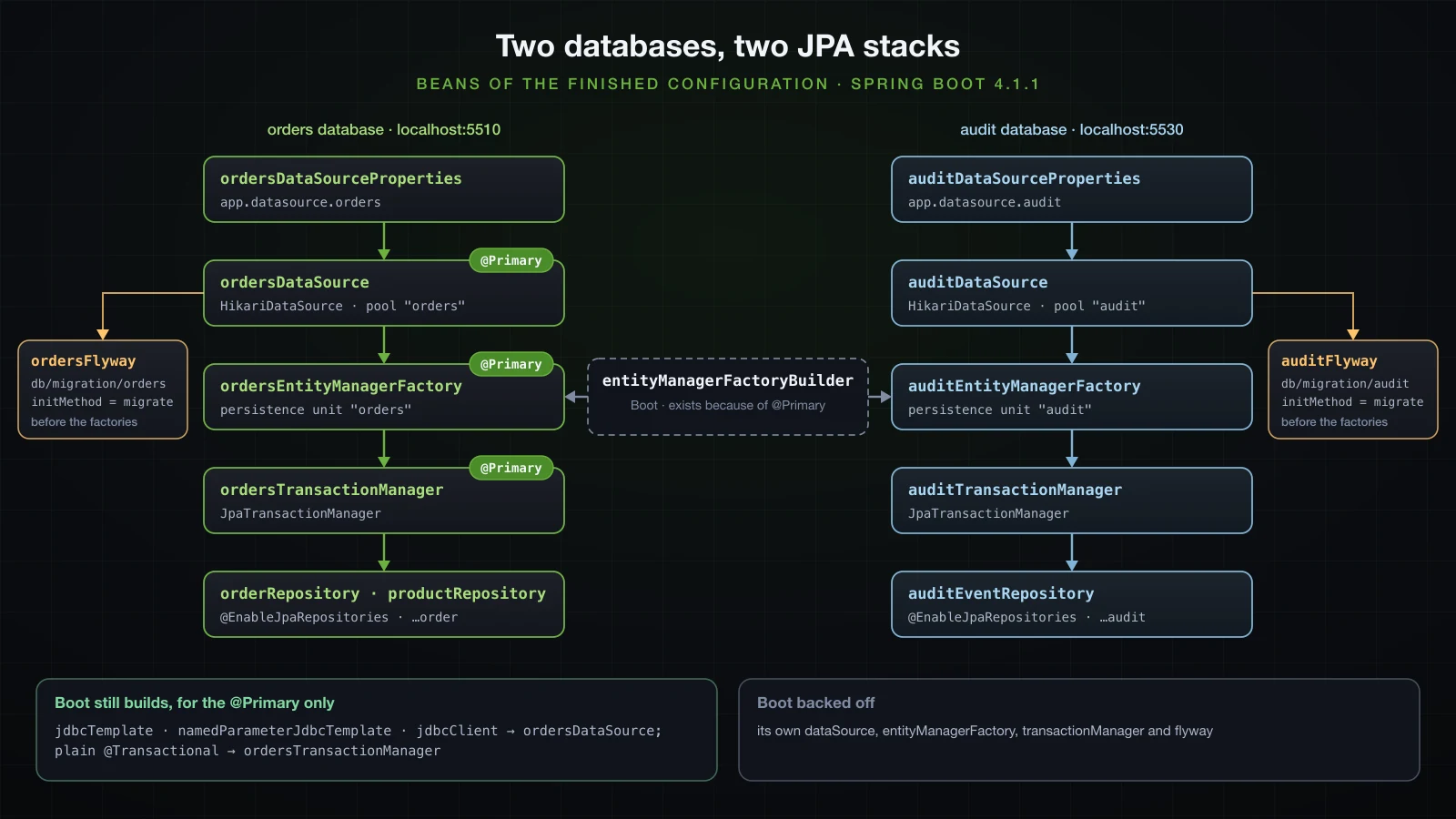
Is EntityManagerFactoryBuilder still a bean in Spring Boot 4.1.1?
Yes. It moved to org.springframework.boot.jpa.EntityManagerFactoryBuilder, and the conditions report shows where it comes from:
   HibernateJpaConfiguration matched:
      - @ConditionalOnSingleCandidate (types: javax.sql.DataSource; SearchStrategy: all) found a single primary bean 'ordersDataSource' from beans 'ordersDataSource', 'auditDataSource' (OnBeanCondition)

   JpaBaseConfiguration#entityManagerFactoryBuilder matched:
      - @ConditionalOnMissingBean (types: org.springframework.boot.jpa.EntityManagerFactoryBuilder; SearchStrategy: all) did not find any beans (OnBeanCondition)
It exists because HibernateJpaConfiguration matched on the @Primary DataSource; without a primary, as in the first run, there is no builder either. Its constructor takes a Function<DataSource, Map<String, ?>> for the JPA properties, so every factory built from it gets spring.jpa.* computed for its own DataSource: the audit unit validated its schema (ddl-auto=validate, the missing-table failure in the next section is that validation) and mapped createdAt to created_at.
Boot 2-era examples often build the factory by hand instead:
    @Bean
    LocalContainerEntityManagerFactoryBean auditEntityManagerFactory(@Qualifier("auditDataSource") DataSource dataSource) {
        LocalContainerEntityManagerFactoryBean factory = new LocalContainerEntityManagerFactoryBean();
        factory.setDataSource(dataSource);
        factory.setPackagesToScan(AuditEvent.class.getPackageName());
        factory.setJpaVendorAdapter(new HibernateJpaVendorAdapter());
        factory.setPersistenceUnitName("audit");
        return factory;
    }
That factory knows nothing of spring.jpa.*. The application started without validating anything, and the first audit write failed:
org.hibernate.SQL: insert into audit_events (action,createdAt,detail) values (?,?,?)
org.hibernate.orm.jdbc.error: HHH000247: ErrorCode: 0, SQLState: 42703
org.hibernate.orm.jdbc.error: ERROR: column "createdat" of relation "audit_events" does not exist
Hibernate's default naming kept createdAt, and PostgreSQL folded the unquoted name to createdat. Use the builder, or pass the same properties yourself.
Choosing the transaction manager with @Transactional
A service that works on the audit database names its manager:
@Service
public class AuditService {

    private final AuditEventRepository events;

    AuditService(AuditEventRepository events) {
        this.events = events;
    }

    @Transactional(transactionManager = "auditTransactionManager")
    public AuditEvent record(String action, String detail) {
        return events.save(new AuditEvent(action, detail));
    }
}
@Transactional("auditTransactionManager") is the same thing, since value is an alias for transactionManager. The order service uses the plain annotation, which resolves to the @Primary manager, and calls the audit service in the middle:
    @Transactional // the @Primary manager: ordersTransactionManager
    public Order place(Long productId, int quantity) {
        Product product = products.findById(productId).orElseThrow();
        product.reserve(quantity);
        Order order = orders.save(new Order(productId, quantity));
        audit.record("ORDER_PLACED", "order " + order.getId() + ": " + quantity + " x " + product.getName());
        return order;
    }
With logging.level.org.springframework.orm.jpa.JpaTransactionManager=DEBUG, place(1L, 1) logs two transactions (trimmed to the transaction lines and SQL), and the qualifier appears in the definition of the second:
o.s.orm.jpa.JpaTransactionManager: Creating new transaction with name [com.example.demo.order.OrderService.place]: PROPAGATION_REQUIRED,ISOLATION_DEFAULT
org.hibernate.SQL: select p1_0.id,p1_0.name,p1_0.stock from products p1_0 where p1_0.id=?
org.hibernate.SQL: insert into orders (created_at,product_id,quantity) values (?,?,?)
o.s.orm.jpa.JpaTransactionManager: Creating new transaction with name [com.example.demo.audit.AuditService.record]: PROPAGATION_REQUIRED,ISOLATION_DEFAULT; 'auditTransactionManager'
org.hibernate.SQL: insert into audit_events (action,created_at,detail) values (?,?,?)
o.s.orm.jpa.JpaTransactionManager: Committing JPA transaction on EntityManager [SessionImpl(1742006519<open>)]
o.s.orm.jpa.JpaTransactionManager: Resuming suspended transaction after completion of inner transaction
o.s.orm.jpa.JpaTransactionManager: Committing JPA transaction on EntityManager [SessionImpl(1978836564<open>)]
org.hibernate.SQL: update products set name=?,stock=? where id=?
The audit call is PROPAGATION_REQUIRED, yet it did not join anything: the transaction in progress belongs to the orders manager, and the audit manager found no transaction of its own, so it created one and committed it first. The result: orders: [1:p1x1] in one database and audit_events: [1:order 1: 1 x Keyboard] in the other.
Flyway for the second database
Boot migrated only the primary
The configuration so far, with spring.flyway.locations=classpath:db/migration/orders, fails on an empty audit database:
org.flywaydb.core.FlywayExecutor: Database: jdbc:postgresql://localhost:5510/orders (PostgreSQL 18.6)
o.f.core.internal.command.DbMigrate: Schema "public" is up to date. No migration necessary.
org.hibernate.orm.jpa: HHH008540: Processing PersistenceUnitInfo [name: audit]
j.LocalContainerEntityManagerFactoryBean: Failed to initialize JPA EntityManagerFactory: Unable to build Hibernate SessionFactory  [persistence unit: audit] ; nested exception is org.hibernate.tool.schema.spi.SchemaManagementException: Schema validation: missing table [audit_events]
Boot's FlywayAutoConfiguration builds one Flyway for the primary DataSource; the audit migrations were never run.
A Flyway bean of your own switches Boot's off
The obvious fix is one more Flyway bean for the audit database, with initMethod = "migrate" because a hand-made Flyway does nothing until something calls migrate():
    @Bean(initMethod = "migrate")
    Flyway auditFlyway(@Qualifier("auditDataSource") DataSource dataSource) {
        return Flyway.configure()
                .dataSource(dataSource)
                .locations("classpath:db/migration/audit")
                .load();
    }
The audit schema was created, but the orders database was no longer looked at: there is no Database: jdbc:postgresql://localhost:5510/orders line in this startup, and the conditions report says why:
org.flywaydb.core.FlywayExecutor: Database: jdbc:postgresql://localhost:5530/audit (PostgreSQL 18.6)
o.f.core.internal.command.DbMigrate: Current version of schema "public": << Empty Schema >>
o.f.core.internal.command.DbMigrate: Migrating schema "public" to version "1 - create audit events"
o.f.core.internal.command.DbMigrate: Successfully applied 1 migration to schema "public", now at version v1 (execution time 00:00.008s)
org.hibernate.orm.jpa: HHH008540: Processing PersistenceUnitInfo [name: audit]
j.LocalContainerEntityManagerFactoryBean: Initialized JPA EntityManagerFactory for persistence unit 'audit'
org.hibernate.orm.jpa: HHH008540: Processing PersistenceUnitInfo [name: orders]
j.LocalContainerEntityManagerFactoryBean: Initialized JPA EntityManagerFactory for persistence unit 'orders' FlywayAutoConfiguration.FlywayConfiguration:
Did not match:
- @ConditionalOnMissingBean (types: org.flywaydb.core.Flyway; SearchStrategy: all) found beans of type 'org.flywaydb.core.Flyway' auditFlyway (OnBeanCondition)It started only because an earlier run had already migrated orders; a new orders migration would have been skipped without a word.
One Flyway bean per database
So both databases get a Flyway bean, and spring.flyway.* no longer applies to either (it configured the bean Boot no longer creates):
    @Bean(initMethod = "migrate")
    Flyway ordersFlyway(@Qualifier("ordersDataSource") DataSource dataSource) {
        return Flyway.configure()
                .dataSource(dataSource)
                .locations("classpath:db/migration/orders")
                .load();
    }
Boot still orders the startup: spring-boot-flyway registers a FlywayDatabaseInitializerDetector that treats any Flyway bean as a database initializer, and spring-boot-jpa makes entity manager factories depend on initializers. A failed run elsewhere in this lab named the dependency outright: Failed to initialize dependency 'auditFlyway' of LoadTimeWeaverAware bean 'auditEntityManagerFactory'. Both migrations ran before either persistence unit was built:
com.zaxxer.hikari.HikariDataSource: audit - Start completed.
org.flywaydb.core.FlywayExecutor: Database: jdbc:postgresql://localhost:5530/audit (PostgreSQL 18.6)
o.f.core.internal.command.DbMigrate: Schema "public" is up to date. No migration necessary.
com.zaxxer.hikari.HikariDataSource: orders - Start completed.
org.flywaydb.core.FlywayExecutor: Database: jdbc:postgresql://localhost:5510/orders (PostgreSQL 18.6)
o.f.core.internal.command.DbMigrate: Schema "public" is up to date. No migration necessary.
org.hibernate.orm.jpa: HHH008540: Processing PersistenceUnitInfo [name: audit]
j.LocalContainerEntityManagerFactoryBean: Initialized JPA EntityManagerFactory for persistence unit 'audit'
org.hibernate.orm.jpa: HHH008540: Processing PersistenceUnitInfo [name: orders]
j.LocalContainerEntityManagerFactoryBean: Initialized JPA EntityManagerFactory for persistence unit 'orders'
Each database keeps its own history table:
docker exec sba-a10-pg-primary psql -U orders -d orders -c 'select installed_rank, version, description, script, installed_by, success from flyway_schema_history order by installed_rank'
docker exec sba-a10-pg-audit psql -U audit -d audit -c 'select installed_rank, version, description, script, installed_by, success from flyway_schema_history order by installed_rank' installed_rank | version | description | script | installed_by | success
----------------+---------+---------------+-----------------------+--------------+---------
1 | 1 | create orders | V1__create_orders.sql | orders | t
(1 row)
installed_rank | version | description | script | installed_by | success
----------------+---------+---------------------+-----------------------------+--------------+---------
1 | 1 | create audit events | V1__create_audit_events.sql | audit | t
(1 row)Keep the two migration folders apart: both files are V1, which is fine in two histories and is the Found more than one migration with version 1 failure in one location that scans both folders.
What the conditions report says about the finished configuration
From the --debug report of the complete configuration:
| Auto-configuration | Outcome | Reason in the report |
|---|---|---|
DataSourceAutoConfiguration.PooledDataSourceConfiguration | backed off | found DataSource beans auditDataSource, ordersDataSource |
JpaBaseConfiguration#entityManagerFactory | backed off | found auditEntityManagerFactory, ordersEntityManagerFactory |
JpaBaseConfiguration#transactionManager and JdbcTransactionManagerConfiguration#transactionManager | backed off | found TransactionManager beans auditTransactionManager, ordersTransactionManager |
FlywayAutoConfiguration.FlywayConfiguration | backed off | found Flyway beans auditFlyway, ordersFlyway |
DataJpaRepositoriesAutoConfiguration | backed off | found the JpaRepositoryFactoryBeans registered by @EnableJpaRepositories |
HibernateJpaConfiguration, JpaBaseConfiguration#entityManagerFactoryBuilder | applied | single primary bean ordersDataSource |
JdbcTemplateAutoConfiguration, JdbcClientAutoConfiguration | applied, to ordersDataSource only | single primary bean ordersDataSource |
The last row is easy to miss: the injectable JdbcTemplate and JdbcClient talk to the orders database. SQL against the audit database needs its own, built on auditDataSource.
Calling a repository under the wrong transaction manager
The mistake a second database invites is a service method with a plain @Transactional that uses a repository of the other database. Three versions of it, in a lab bean that holds AuditEventRepository events, each under the orders manager:
    @Transactional // resolves to the @Primary ordersTransactionManager
    public void saveThenFail() {
        events.save(new AuditEvent("LAB", "saved, then the method throws"));
        throw new IllegalStateException("roll the transaction back");
    }

    @Transactional
    public void changeDetail(Long id) {
        AuditEvent event = events.findById(id).orElseThrow();
        event.setDetail("changed through dirty checking");
    }

    @Transactional
    public int bulkUpdate(Long id) {
        return events.updateDetail(id, "changed through a bulk update");
    }
updateDetail is a @Modifying @Query("update AuditEvent e set e.detail = :detail where e.id = :id") on AuditEventRepository. The logs for the first two, trimmed to the transaction lines and SQL:
o.s.orm.jpa.JpaTransactionManager: Creating new transaction with name [com.example.demo.lab.WrongManagerLab.saveThenFail]: PROPAGATION_REQUIRED,ISOLATION_DEFAULT
o.s.orm.jpa.JpaTransactionManager: Creating new transaction with name [org.springframework.data.jpa.repository.support.SimpleJpaRepository.save]: PROPAGATION_REQUIRED,ISOLATION_DEFAULT
org.hibernate.SQL: insert into audit_events (action,created_at,detail) values (?,?,?)
o.s.orm.jpa.JpaTransactionManager: Committing JPA transaction on EntityManager [SessionImpl(127405746<open>)]
o.s.orm.jpa.JpaTransactionManager: Resuming suspended transaction after completion of inner transaction
o.s.orm.jpa.JpaTransactionManager: Initiating transaction rollback
o.s.orm.jpa.JpaTransactionManager: Rolling back JPA transaction on EntityManager [SessionImpl(1978836564<open>)]
Lab: threw java.lang.IllegalStateException: roll the transaction back
Lab: audit_events: [1:order 1: 1 x Keyboard, 2:order 2: 5 x Mouse, 3:saved, then the method throws]o.s.orm.jpa.JpaTransactionManager: Creating new transaction with name [com.example.demo.lab.WrongManagerLab.changeDetail]: PROPAGATION_REQUIRED,ISOLATION_DEFAULT
o.s.orm.jpa.JpaTransactionManager: Creating new transaction with name [org.springframework.data.jpa.repository.support.SimpleJpaRepository.findById]: PROPAGATION_REQUIRED,ISOLATION_DEFAULT,readOnly
org.hibernate.SQL: select ae1_0.id,ae1_0.action,ae1_0.created_at,ae1_0.detail from audit_events ae1_0 where ae1_0.id=?
o.s.orm.jpa.JpaTransactionManager: Committing JPA transaction on EntityManager [SessionImpl(1799435216<open>)]
o.s.orm.jpa.JpaTransactionManager: Resuming suspended transaction after completion of inner transaction
o.s.orm.jpa.JpaTransactionManager: Committing JPA transaction on EntityManager [SessionImpl(36717498<open>)]
Lab: returned null| Under the orders manager | What happened | Same code with transactionManager = "auditTransactionManager" |
|---|---|---|
save, then throw | the repository opened its own audit transaction and committed the row; the rollback of the method did not reach it (row 3 stayed) | the insert was rolled back with the method |
findById, then a setter | findById ran in its own read-only audit transaction; the entity came back detached, no UPDATE was sent, the change was lost silently | update audit_events set action=?,created_at=?,detail=? where id=? at commit |
@Modifying query | InvalidDataAccessApiUsageException: No active transaction for update or delete query, caused by jakarta.persistence.TransactionRequiredException | update audit_events ae1_0 set detail=? where ae1_0.id=?, returned 1 |
The repositories were created with transactionManagerRef = "auditTransactionManager", so their own @Transactional methods look for an audit transaction, do not find one while only the orders manager has one open, and start their own. A declared @Modifying query method has no transaction of its own, so it fails instead. None of the three is reported as a wrong manager: one commits early, one loses the change, one throws something that looks like a missing annotation.
Writing to both databases in one method is not atomic
place() above writes to both databases inside one method, and the log showed why that is not one transaction: the audit transaction commits first, the orders transaction after. Ordering five mice when two are in stock makes the second commit fail. The stock check lives in the database, and Hibernate sends the UPDATE of the product at commit (trimmed as before, with the lab's output at the end):
o.s.orm.jpa.JpaTransactionManager: Creating new transaction with name [com.example.demo.order.OrderService.place]: PROPAGATION_REQUIRED,ISOLATION_DEFAULT
org.hibernate.SQL: select p1_0.id,p1_0.name,p1_0.stock from products p1_0 where p1_0.id=?
org.hibernate.SQL: insert into orders (created_at,product_id,quantity) values (?,?,?)
o.s.orm.jpa.JpaTransactionManager: Creating new transaction with name [com.example.demo.audit.AuditService.record]: PROPAGATION_REQUIRED,ISOLATION_DEFAULT; 'auditTransactionManager'
org.hibernate.SQL: insert into audit_events (action,created_at,detail) values (?,?,?)
o.s.orm.jpa.JpaTransactionManager: Committing JPA transaction on EntityManager [SessionImpl(1638402542<open>)]
o.s.orm.jpa.JpaTransactionManager: Resuming suspended transaction after completion of inner transaction
o.s.orm.jpa.JpaTransactionManager: Committing JPA transaction on EntityManager [SessionImpl(869804211<open>)]
org.hibernate.SQL: update products set name=?,stock=? where id=?
org.hibernate.orm.jdbc.error: HHH000247: ErrorCode: 0, SQLState: 23514
org.hibernate.orm.jdbc.error: ERROR: new row for relation "products" violates check constraint "products_stock_check"
  Detail: Failing row contains (2, Mouse, -3).
o.s.orm.jpa.JpaTransactionManager: Initiating transaction rollback after commit exception
Lab: threw org.springframework.dao.DataIntegrityViolationException: could not execute statement [ERROR: new row for relation "products" violates check constraint "products_stock_check"
Lab: orders: [1:p1x1]
Lab: audit_events: [1:order 1: 1 x Keyboard, 2:order 2: 5 x Mouse]
The two servers' own statement logs (docker logs sba-a10-pg-primary and docker logs sba-a10-pg-audit), merged by time, with the date dropped and the server's name added to each line, show the order of events:
07:34:12.151 orders [524] LOG:  statement: BEGIN
07:34:12.153 orders [524] LOG:  execute <unnamed>: insert into orders (created_at,product_id,quantity) values ($1,$2,$3)
07:34:12.154 audit  [379] LOG:  statement: BEGIN
07:34:12.155 audit  [379] LOG:  execute <unnamed>: insert into audit_events (action,created_at,detail) values ($1,$2,$3)
07:34:12.155 audit  [379] DETAIL:  Parameters: $1 = 'ORDER_PLACED', $2 = '2026-09-18 14:34:12.155539+07', $3 = 'order 2: 5 x Mouse'
07:34:12.155 audit  [379] LOG:  execute S_1: COMMIT
07:34:12.156 orders [524] LOG:  execute <unnamed>: update products set name=$1,stock=$2 where id=$3
07:34:12.156 orders [524] ERROR:  new row for relation "products" violates check constraint "products_stock_check"
07:34:12.156 orders [524] DETAIL:  Failing row contains (2, Mouse, -3).
07:34:12.162 orders [524] LOG:  execute S_3: ROLLBACK
The audit database now records order 2: 5 x Mouse for an order that does not exist. The opposite failure is the harmless one here: with an audit action longer than its varchar(50), the audit insert failed with SQLSTATE 22001, the exception propagated through place()'s transaction, and the order insert was rolled back as well (orders stayed [1:p1x1]). Which of the two you get depends only on which commit happens last.
Making the two commits one takes two-phase commit: XA-capable DataSources (the PostgreSQL driver ships org.postgresql.xa.PGXADataSource), a JTA transaction manager, and max_prepared_transactions above zero on every server (it is 0 on postgres:18). Spring Boot 4.1.1 only auto-configures JTA from JNDI, inside an application server; its BOM manages no standalone JTA transaction manager, so that is a third-party library wired by hand, and out of scope here. Without it, decide which write may be lost, do that one last, or move it after the first commit, as the AFTER_COMMIT listener in article 4 of this course does.
A PostgreSQL 18 primary with a streaming replica in Docker
The second half routes reads to a replica of the orders database. Streaming replication needs a role with the REPLICATION attribute and a pg_hba.conf line that lets it connect from another host: the image's file allows replication only from 127.0.0.1 and ::1, and its catch-all host all all all scram-sha-256 does not cover replication connections:
docker exec sba-a10-pg-primary psql -U orders -d orders -c "create role replicator with replication login password 'replicator'"
docker exec sba-a10-pg-primary bash -c 'echo "host replication replicator all scram-sha-256" >> "$PGDATA/pg_hba.conf"'
docker exec sba-a10-pg-primary psql -U orders -d orders -c "select pg_reload_conf()"
The replica starts from a copy of the primary's data directory, taken over the network by pg_basebackup:
docker run -d --name sba-a10-pg-replica --network sba-a10-net --memory 512m -p 5520:5432 -e PGPASSWORD=replicator --user postgres postgres:18 bash -c '{ [ -s "$PGDATA/PG_VERSION" ] || pg_basebackup -h sba-a10-pg-primary -U replicator -D "$PGDATA" -R -X stream --checkpoint=fast; } && exec docker-entrypoint.sh postgres -c log_statement=all'-h sba-a10-pg-primaryworks because both containers are onsba-a10-net, where container names resolve.-X streamcopies the WAL written during the backup;-Rwritesstandby.signaland aprimary_conninfointopostgresql.auto.conf, which makes the new server a standby of the primary.--checkpoint=fast: the backup starts with a checkpoint on the primary, spread out by default. A first attempt without it was still in statebackupafter several seconds.[ -s "$PGDATA/PG_VERSION" ] ||skips the copy when the data directory already exists, sodocker restartanddocker startbring the same replica back instead of failing on a non-empty directory (both were tried).
The replica's log, and pg_stat_replication on the primary:
LOG:  entering standby mode
LOG:  consistent recovery state reached at 0/6000120
LOG:  database system is ready to accept read-only connections
LOG: started streaming WAL from primary at 0/7000000 on timeline 1docker exec sba-a10-pg-primary psql -U orders -d orders -c "select application_name, client_addr, state, sync_state from pg_stat_replication" application_name | client_addr | state | sync_state
------------------+-------------+-----------+------------
walreceiver | 172.21.0.4 | streaming | async
(1 row)pg_is_in_recovery() returns f on the primary and t on the replica, which makes it the probe for "which server answered" in the rest of the article. inet_server_port() does not help here: both containers listen on 5432 inside the network, and both answered 5432.
Routing reads to the replica with AbstractRoutingDataSource
The replica gets its own pool settings, and the primary's pool a clearer name:
app.datasource.orders.hikari.pool-name=orders
app.datasource.orders.hikari.pool-name=orders-primary
app.datasource.orders.hikari.maximum-pool-size=5

app.datasource.orders-replica.url=jdbc:postgresql://localhost:5520/orders
app.datasource.orders-replica.username=orders
app.datasource.orders-replica.password=orders
app.datasource.orders-replica.hikari.pool-name=orders-replica
app.datasource.orders-replica.hikari.maximum-pool-size=10 app:
datasource:
orders:
url: jdbc:postgresql://localhost:5510/orders
username: orders
password: orders
hikari:
pool-name: orders
pool-name: orders-primary
maximum-pool-size: 5
orders-replica:
url: jdbc:postgresql://localhost:5520/orders
username: orders
password: orders
hikari:
pool-name: orders-replica
maximum-pool-size: 10AbstractRoutingDataSource is a DataSource that asks determineCurrentLookupKey() which target to use each time a connection is requested. The obvious key is the read-only flag of the current Spring transaction:
class ReadWriteRoutingDataSource extends AbstractRoutingDataSource {

    enum Route { PRIMARY, REPLICA }

    private static final Logger log = LoggerFactory.getLogger(ReadWriteRoutingDataSource.class);

    @Override
    protected Object determineCurrentLookupKey() {
        boolean readOnly = TransactionSynchronizationManager.isCurrentTransactionReadOnly();
        Route route = readOnly ? Route.REPLICA : Route.PRIMARY;
        log.debug("route={} readOnly={} txActive={}", route, readOnly,
                TransactionSynchronizationManager.isActualTransactionActive());
        return route;
    }
}
The orders DataSource becomes the router over two pools. Flyway must migrate the primary itself, so it gets the pool, not the router:
    @Bean
    @ConfigurationProperties("app.datasource.orders")
    DataSourceProperties ordersPrimaryProperties() {
        return new DataSourceProperties();
    }

    @Bean
    @ConfigurationProperties("app.datasource.orders.hikari")
    HikariDataSource ordersPrimaryPool(@Qualifier("ordersPrimaryProperties") DataSourceProperties properties) {
        return properties.initializeDataSourceBuilder().type(HikariDataSource.class).build();
    }

    @Bean
    @ConfigurationProperties("app.datasource.orders-replica")
    DataSourceProperties ordersReplicaProperties() {
        return new DataSourceProperties();
    }

    @Bean
    @ConfigurationProperties("app.datasource.orders-replica.hikari")
    HikariDataSource ordersReplicaPool(@Qualifier("ordersReplicaProperties") DataSourceProperties properties) {
        return properties.initializeDataSourceBuilder().type(HikariDataSource.class).build();
    }

    @Bean
    @Primary
    DataSource ordersDataSource(@Qualifier("ordersPrimaryPool") DataSource primary,
            @Qualifier("ordersReplicaPool") DataSource replica) {
        ReadWriteRoutingDataSource router = new ReadWriteRoutingDataSource();
        router.setTargetDataSources(Map.of(Route.PRIMARY, primary, Route.REPLICA, replica));
        router.setDefaultTargetDataSource(primary);
        router.afterPropertiesSet();
        return router;
    }

    @Bean(initMethod = "migrate")
    Flyway ordersFlyway(@Qualifier("ordersPrimaryPool") DataSource dataSource) {
        return Flyway.configure()
                .dataSource(dataSource)
                .locations("classpath:db/migration/orders")
                .load();
    }
The entity manager factory and transaction manager stay as they were and receive ordersDataSource, now the router. Only the DataSource, the factory and the transaction manager need @Primary; the properties beans are injected by qualifier and started without it.
Every transaction still went to the primary
A lab component probes each kind of call with select case when pg_is_in_recovery() then 'replica' else 'primary' end through the injected JdbcClient. Inside a JPA transaction, JpaTransactionManager exposes its connection to that DataSource, so the probe runs on the same connection as the entity queries:
    // asks the server that runs the current connection
    public String server() {
        return jdbc.sql("select case when pg_is_in_recovery() then 'replica' else 'primary' end")
                .query(String.class).single();
    }

    @Transactional(readOnly = true)
    public String readOnly() {
        orders.findById(1L);
        return server();
    }

    @Transactional
    public String readWriteCallingReadOnly() {
        return inner.readOnly(); // @Transactional(readOnly = true) on another bean
    }
The rest follow the same pattern; inner is a second bean, so each call goes through its transaction proxy. With logging.level.com.example.demo.config=DEBUG, the read-only transaction and the router's decision for it:
o.s.orm.jpa.JpaTransactionManager: Creating new transaction with name [com.example.demo.lab.WhereLab.readOnly]: PROPAGATION_REQUIRED,ISOLATION_DEFAULT,readOnly
c.e.d.config.ReadWriteRoutingDataSource: route=PRIMARY readOnly=false txActive=false
Lab: @Transactional(readOnly = true) ....... primary
All nine probes answered primary, and the orders-replica pool never logged Starting...: nothing ever asked it for a connection. At the moment the router was asked, the transaction was not even active yet (txActive=false).
The connection is fetched before the read-only flag is set
A stack trace taken inside determineCurrentLookupKey() during that call, with the jar suffixes and a few Hibernate frames removed, shows who asked:
at com.example.demo.config.ReadWriteRoutingDataSource.determineCurrentLookupKey(ReadWriteRoutingDataSource.java:22)
at org.springframework.jdbc.datasource.lookup.AbstractRoutingDataSource.determineTargetDataSource(AbstractRoutingDataSource.java:252)
at org.springframework.jdbc.datasource.lookup.AbstractRoutingDataSource.getConnection(AbstractRoutingDataSource.java:209)
at org.hibernate.engine.jdbc.connections.internal.DataSourceConnectionProvider.getConnection(DataSourceConnectionProvider.java:149)
at org.hibernate.resource.jdbc.internal.LogicalConnectionManagedImpl.getPhysicalConnection(LogicalConnectionManagedImpl.java:126)
at org.springframework.orm.jpa.vendor.HibernateJpaDialect.beginTransaction(HibernateJpaDialect.java:135)
at org.springframework.orm.jpa.JpaTransactionManager.doBegin(JpaTransactionManager.java:411)
at org.springframework.transaction.support.AbstractPlatformTransactionManager.startTransaction(AbstractPlatformTransactionManager.java:532)
HibernateJpaDialect.beginTransaction line 135 takes the physical connection precisely because the transaction is read-only: it needs it to call setReadOnly(true). That happens inside doBegin. In startTransaction of spring-tx 7.0.9, doBegin(transaction, definition) is followed by prepareSynchronization(status, definition), and only there does TransactionSynchronizationManager.setCurrentTransactionReadOnly(definition.isReadOnly()) run. The router is asked before the flag it reads exists. The primary's statement log shows the other half: those transactions ran on the primary as BEGIN READ ONLY.
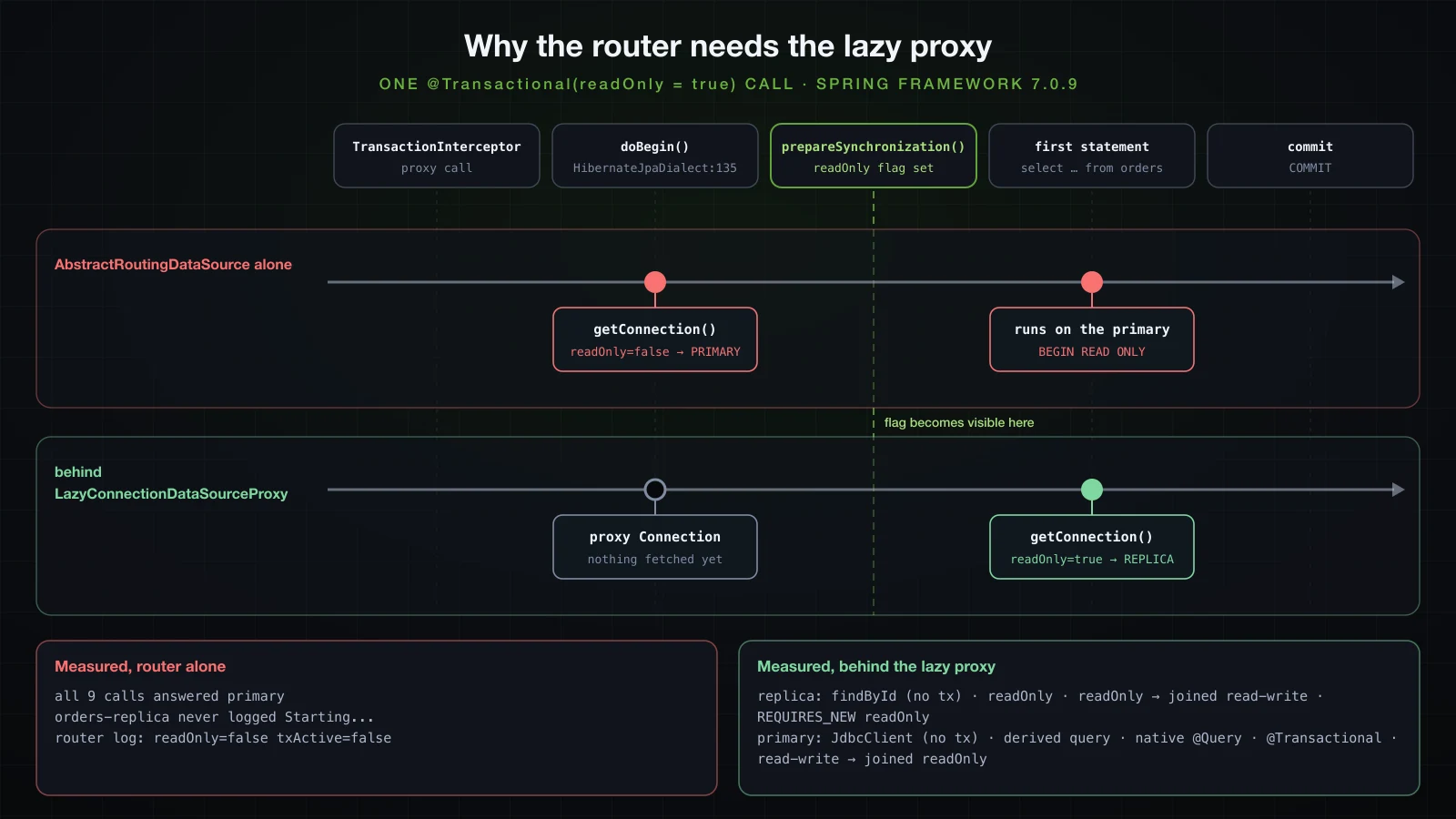
LazyConnectionDataSourceProxy fetches at the first statement
LazyConnectionDataSourceProxy hands out a proxy Connection and fetches the real one when the first statement is created. setReadOnly, setAutoCommit and the isolation level are recorded on the proxy and applied to the real connection once it is fetched. Wrapping the router is the whole fix:
        router.afterPropertiesSet();
        return router;
        return new LazyConnectionDataSourceProxy(router);
The same read-only call now:
o.s.orm.jpa.JpaTransactionManager: Creating new transaction with name [com.example.demo.lab.WhereLab.readOnly]: PROPAGATION_REQUIRED,ISOLATION_DEFAULT,readOnly
c.e.d.config.ReadWriteRoutingDataSource: route=REPLICA readOnly=true txActive=true
Lab: @Transactional(readOnly = true) ....... replica
The first read-only transaction of the run, a findById, also started the replica pool, on demand:
o.s.orm.jpa.JpaTransactionManager: Creating new transaction with name [org.springframework.data.jpa.repository.support.SimpleJpaRepository.findById]: PROPAGATION_REQUIRED,ISOLATION_DEFAULT,readOnly
c.e.d.config.ReadWriteRoutingDataSource: route=REPLICA readOnly=true txActive=true
com.zaxxer.hikari.HikariDataSource: orders-replica - Starting...
com.zaxxer.hikari.HikariDataSource: orders-replica - Start completed.
The built-in read-only DataSource in Spring Framework 7
Since Spring Framework 6.1.2, LazyConnectionDataSourceProxy can do this routing itself. setReadOnlyDataSource(DataSource) is in 7.0.9, and its Javadoc reads: "If available, a Connection from such a read-only DataSource will be lazily obtained within a Spring-managed transaction that has been marked as read-only." The custom router goes away:
    @Bean
    @Primary
    DataSource ordersDataSource(@Qualifier("ordersPrimaryPool") DataSource primary,
            @Qualifier("ordersReplicaPool") DataSource replica) {
        ReadWriteRoutingDataSource router = new ReadWriteRoutingDataSource();
        router.setTargetDataSources(Map.of(Route.PRIMARY, primary, Route.REPLICA, replica));
        router.setDefaultTargetDataSource(primary);
        router.afterPropertiesSet();
        return new LazyConnectionDataSourceProxy(router);
        LazyConnectionDataSourceProxy proxy = new LazyConnectionDataSourceProxy(primary);
        proxy.setReadOnlyDataSource(replica);
        return proxy;
    }
All nine probes gave the same answers as the lazy router. It does not decide on the synchronization flag but on Connection.setReadOnly(true), which the transaction manager calls for a read-only transaction; the effect for Spring transactions is the same. One difference showed up in the replica's statement log:
LOG:  statement: BEGIN
LOG:  execute <unnamed>: select o1_0.id,o1_0.created_at,o1_0.product_id,o1_0.quantity from orders o1_0 where o1_0.id=$1
LOG:  execute S_1: COMMIT
A plain BEGIN, where the lazy router's connections had started BEGIN READ ONLY. The Javadoc says so: "The Connection#setReadOnly flag will be left untouched, expecting it to be pre-configured as a default on the read-only DataSource". On a hot standby every transaction is read-only anyway (transaction_read_only is on there for every session), but setting it on the pool keeps the connection honest and gives PostgreSQL the hint:
app.datasource.orders-replica.hikari.maximum-pool-size=10
app.datasource.orders-replica.hikari.read-only=true orders-replica:
hikari:
maximum-pool-size: 10
read-only: trueAfter that, every transaction on the replica began with BEGIN READ ONLY.
Where each kind of call ends up
The nine probes, with the router alone and with either lazy variant (the lazy router and the built-in proxy gave identical answers). For findById and the derived query, which cannot run the probe themselves, the router's log and the servers' statement logs show the server:
| Call | AbstractRoutingDataSource alone | behind LazyConnectionDataSourceProxy |
|---|---|---|
JdbcClient, no transaction | primary | primary |
findById, no transaction | primary | replica: SimpleJpaRepository opens a readOnly transaction |
findByProductId (derived query), no transaction | primary | primary: no transaction, auto-commit |
@Query(nativeQuery = true) returning pg_is_in_recovery(), no transaction | primary | primary |
@Transactional | primary | primary |
@Transactional(readOnly = true) | primary | replica |
read-write method calling a readOnly = true method (joined) | primary | primary |
readOnly = true method calling a read-write method (joined) | primary | replica |
read-write method calling REQUIRES_NEW, readOnly = true | primary | replica: a new transaction, a new connection |
Three rows are worth remembering. Repository CRUD methods called outside a transaction go to the replica, because SimpleJpaRepository is annotated @Transactional(readOnly = true), while your own query methods declared on the interface run without a transaction and go to the primary. A joined transaction uses the connection the outer one already has, so the inner readOnly flag changes nothing, as article 6 showed for the flag itself. And the reverse, a read-only outer method calling a read-write one, puts that write on the replica.
A write routed to the replica
That last row, as code: a read-only method calls one that saves an order.
    @Transactional(readOnly = true)
    public Long readOnlyCallingPlace() {
        return inner.placeOrder(); // @Transactional, orders.save(new Order(1L, 1))
}org.hibernate.orm.jdbc.error: HHH000247: ErrorCode: 0, SQLState: 25006
org.hibernate.orm.jdbc.error: ERROR: cannot execute INSERT in a read-only transaction
Lab: threw org.springframework.orm.jpa.JpaSystemException: could not execute statement [ERROR: cannot execute INSERT in a read-only transaction] [insert into orders (created_at,product_id,quantity) values (?,?,?)]
Lab: caused by org.hibernate.exception.GenericJDBCException
Lab: caused by org.postgresql.util.PSQLException SQLState=25006The same insert through JdbcClient in a read-only transaction:
Lab: threw org.springframework.jdbc.UncategorizedSQLException: PreparedStatementCallback; uncategorized SQLException for SQL [insert into products (name, stock) values ('Monitor', 1)]; SQL state [25006]; error code [0]; ERROR: cannot execute INSERT in a read-only transaction
Lab:   caused by org.postgresql.util.PSQLException SQLState=25006
Neither is a specific DataAccessException subclass: JPA reports JpaSystemException, JDBC UncategorizedSQLException; the SQLSTATE 25006 (read_only_sql_transaction) is what identifies it. The message does not tell you which server refused. The replica refuses the write in any session, and the primary refuses it inside BEGIN READ ONLY, with the same text:
docker exec sba-a10-pg-replica psql -U orders -d orders -v VERBOSITY=verbose -c "insert into products (name, stock) values ('Monitor', 1)"
docker exec sba-a10-pg-primary psql -U orders -d orders -v VERBOSITY=verbose -c "begin read only" -c "insert into products (name, stock) values ('Monitor', 1)" -c "rollback"ERROR: 25006: cannot execute INSERT in a read-only transaction
LOCATION: PreventCommandIfReadOnly, utility.c:407
BEGIN
ERROR: 25006: cannot execute INSERT in a read-only transaction
LOCATION: PreventCommandIfReadOnly, utility.c:407
ROLLBACKThe replica's statement log is where it shows: BEGIN READ ONLY, the insert, and the ERROR line all under the replica's backend.
Replication lag and read-your-writes
Making replication lag reproducible
Streaming replication is asynchronous: the primary commits, then the replica receives and applies the WAL. On a single machine that gap is too small to see on demand, so the replica is told to wait three seconds before applying each transaction:
docker exec sba-a10-pg-replica psql -U orders -d orders -c "alter system set recovery_min_apply_delay = '3s'" -c "select pg_reload_conf()"show recovery_min_apply_delay then answered 3s. The setting is reloadable and ALTER SYSTEM works on the standby.
A write, then a stale read
OrderQueries is the read side, @Transactional(readOnly = true) at class level:
@Service
@Transactional(readOnly = true)
public class OrderQueries {

    private final OrderRepository orders;

    OrderQueries(OrderRepository orders) {
        this.orders = orders;
    }

    public Optional<OrderResponse> find(Long id) {
        return orders.findById(id).map(OrderResponse::from);
    }
}
In-process, a write followed at once by a read of the same row:
            Long id = orderService.place(1L, 1).getId();            // commits on the primary
boolean found = orderQueries.find(id).isPresent(); // read-only: the replicaLab: order 402 placed; read-only read right after: emptyOver HTTP, with GET /api/orders/{id} answering 404 through a ResponseStatusException when find is empty. The script posts an order and polls it every 0.25 s:
#!/bin/bash
# POST an order, then GET it every 0.25 s until it answers 200; pass -b to send the POST's cookies back
jar=$(mktemp)
id=$(curl -s -c "$jar" -X POST localhost:8210/api/orders \
  -H 'Content-Type: application/json' -d '{"productId":1,"quantity":1}' | jq .id)
for i in $(seq 1 40); do
  code=$(curl -s -o /dev/null -w '%{http_code}' ${1:+-b "$jar"} localhost:8210/api/orders/$id)
  echo "GET #$i -> $code"
  [ "$code" = 200 ] && break
  sleep 0.25
done
rm -f "$jar"./stale.shGET #1 -> 404
GET #2 -> 404
GET #3 -> 404
GET #4 -> 404
GET #5 -> 404
GET #6 -> 404
GET #7 -> 404
GET #8 -> 404
GET #9 -> 404
GET #10 -> 404
GET #11 -> 404
GET #12 -> 200Eleven 404s about a quarter of a second apart, then 200: roughly the three seconds of apply delay (load average 3.37; a later run got twelve). The client was told the order exists and then told it does not.
The delay only makes the window visible. With recovery_min_apply_delay back at 0, the in-process lab ran 200 write-then-read pairs at a time: across eight such runs, between 3 and 5 of every 200 reads were stale (load average 5.2 to 7.2). Asynchronous replication narrows the window; it does not close it.
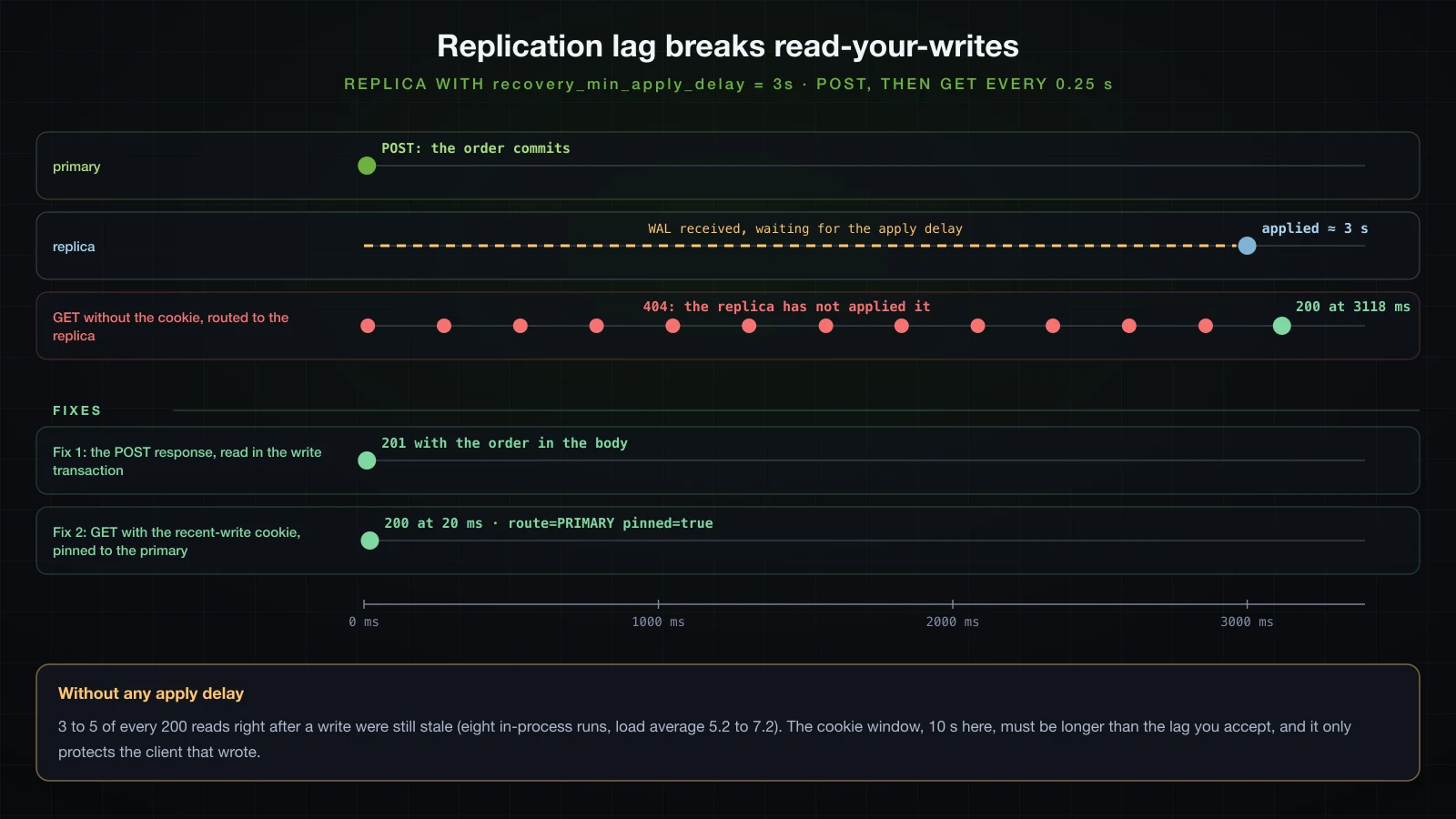
Fix 1: read inside the writing transaction
The simplest fix is not to read the new row back through the read side at all. place() returns the entity it saved inside its read-write transaction on the primary, and the controller builds the response from it:
    @PostMapping
    ResponseEntity<OrderResponse> place(@Valid @RequestBody PlaceOrderRequest request) {
        OrderResponse order = OrderResponse.from(orderService.place(request.productId(), request.quantity()));
        return ResponseEntity.created(URI.create("/api/orders/" + order.id())).body(order);
    }
In the run in the next section, the POST answered 201 with {"id":408,…} in its body while the replica had not applied the order yet. That covers whatever the write itself can return. If the response needs more, query it inside place(): the table above puts a read in a read-write transaction on the primary. It does not help a client that sends a separate GET a moment later: in the same run, that GET for order 408 still answered 404.
Fix 2: pin a client to the primary after a write
For the next requests, the application has to remember that this client has just written. The built-in proxy decides on the read-only flag alone, so this goes back to the router from the lazy fix (new LazyConnectionDataSourceProxy(router)) with a second input. A filter marks every non-GET request as a write, sets a cookie that lasts longer than the lag you accept, and pins the current request to the primary while the cookie is present:
public final class ReadYourWrites {

    private static final ThreadLocal<Boolean> PINNED = new ThreadLocal<>();

    private ReadYourWrites() {
    }

    public static boolean pinnedToPrimary() {
        return Boolean.TRUE.equals(PINNED.get());
    }

    static void pin(boolean pinned) {
        PINNED.set(pinned);
    }

    static void clear() {
        PINNED.remove();
    }
}@Component
class ReadYourWritesFilter extends OncePerRequestFilter {
static final String COOKIE = "recent-write";
static final Duration WINDOW = Duration.ofSeconds(10); // longer than the replication lag you accept
@Override
protected void doFilterInternal(HttpServletRequest request, HttpServletResponse response, FilterChain chain)
throws ServletException, IOException {
boolean write = !"GET".equals(request.getMethod()) && !"HEAD".equals(request.getMethod());
if (write) {
ResponseCookie cookie = ResponseCookie.from(COOKIE, "1").path("/").maxAge(WINDOW).httpOnly(true).build();
response.addHeader(HttpHeaders.SET_COOKIE, cookie.toString());
}
ReadYourWrites.pin(write || WebUtils.getCookie(request, COOKIE) != null);
try {
chain.doFilter(request, response);
}
finally {
ReadYourWrites.clear();
}
}
} @Override
protected Object determineCurrentLookupKey() {
boolean readOnly = TransactionSynchronizationManager.isCurrentTransactionReadOnly();
Route route = readOnly ? Route.REPLICA : Route.PRIMARY;
log.debug("route={} readOnly={} txActive={}", route, readOnly,
TransactionSynchronizationManager.isActualTransactionActive());
boolean pinned = ReadYourWrites.pinnedToPrimary();
Route route = readOnly && !pinned ? Route.REPLICA : Route.PRIMARY;
log.debug("route={} readOnly={} pinned={}", route, readOnly, pinned);
return route;
}The POST now carries the cookie, and a GET that sends it back reads from the primary. Still with the 3 s delay on the replica, a script posts an order, then asks for it once without the cookie and once with it:
#!/bin/bash
# POST with a cookie jar, then GET without and with the cookie, all inside the replica's apply delay
jar=$(mktemp)
curl -s -i -c "$jar" -X POST localhost:8210/api/orders -H 'Content-Type: application/json' -d '{"productId":1,"quantity":1}' | tee /tmp/sba-a10-post.txt
echo
id=$(tail -1 /tmp/sba-a10-post.txt | jq .id)
curl -s -i localhost:8210/api/orders/$id
echo
curl -s -i -b "$jar" localhost:8210/api/orders/$id
echo
rm -f "$jar" /tmp/sba-a10-post.txt
The three responses, with the headers trimmed to the ones that matter, and the router's decision for each request:
HTTP/1.1 201
Set-Cookie: recent-write=1; Path=/; Max-Age=10; Expires=Fri, 18 Sep 2026 07:42:33 GMT; HttpOnly
Location: /api/orders/408

HTTP/1.1 404
Content-Type: application/problem+json

{"detail":"Order 408 not found","instance":"/api/orders/408","status":404,"title":"Not Found"}

HTTP/1.1 200
Content-Type: application/json

{"id":408,"productId":1,"quantity":1,"createdAt":"2026-09-18T07:42:23.216731Z"}c.e.d.config.ReadWriteRoutingDataSource: route=PRIMARY readOnly=false pinned=true
c.e.d.config.ReadWriteRoutingDataSource: route=REPLICA readOnly=true pinned=false
c.e.d.config.ReadWriteRoutingDataSource: route=PRIMARY readOnly=true pinned=trueAnd ./stale.sh -b, which sends the cookie back, got GET #1 -> 200. The fix has limits worth stating: it only protects the client that wrote, other clients still read the replica's older state; a lag longer than the window brings the stale reads back; and every pinned read is load on the primary.
Two pools, one per target
Each target has its own HikariCP pool, named in the log. The primary and audit pools started with the application; the replica pool started only when the first read-only transaction was routed to it, here a second after startup (the time column is kept):
14:35:18.352 com.zaxxer.hikari.HikariDataSource: audit - Start completed.
14:35:18.481 com.zaxxer.hikari.HikariDataSource: orders-primary - Start completed.
14:35:19.741 com.example.demo.DemoApplication: Started DemoApplication in 2.397 seconds (process running for 2.626)
14:35:20.373 com.zaxxer.hikari.HikariDataSource: orders-replica - Start completed.
A wrong replica URL is therefore not a startup failure: the application starts and the first read fails. Once each pool has filled to its minimumIdle, which defaults to maximum-pool-size, each server holds its own share of this one instance:
docker exec sba-a10-pg-replica psql -U orders -d orders -Atc "select count(*) from pg_stat_activity where backend_type = 'client backend' and application_name = 'PostgreSQL JDBC Driver'"| Server | Pool | Connections held | max_connections |
|---|---|---|---|
sba-a10-pg-primary | orders-primary | 5 | 100 |
sba-a10-pg-replica | orders-replica | 10 | 100 |
sba-a10-pg-audit | audit | 3 | 100 |
Size each pool for the traffic its server gets: the primary takes every write, every read inside a read-write transaction, every non-transactional query and, with fix 2, the pinned reads; the replica takes the read-only transactions. Multiply by the number of instances and compare with each server's max_connections, separately. Tuning the numbers themselves is article 38 of this course.
When the replica is down
With the application running and docker stop sba-a10-pg-replica (load average 6.10):
GET #1 500 30.044361s
GET #2 500 30.026831s
POST 201 0.033839s
GET after restart 200 1.976674sorg.hibernate.orm.jdbc.error: orders-replica - Connection is not available, request timed out after 30001ms (total=0, active=0, idle=0, waiting=0)Read-only requests waited HikariCP's 30 s connectionTimeout and failed with DataAccessResourceFailureException: Could not prepare statement; the lazy proxy only asks for the connection at the first statement, hence the wording. In a repeat run the first read after the stop failed in 0.013 s instead, on a pooled connection the stopped server had already closed, and the next one waited the 30 s. Writes were unaffected. Nothing fell back to the primary: routing is not failover, and a fallback is code you write, with a timeout much shorter than 30 s. After docker start sba-a10-pg-replica, the first read succeeded again in 1.98 s.
Single datasource vs two datasources vs a routed replica
One DataSource | Two independent DataSources | Primary + replica, routed | |
|---|---|---|---|
| What it gives | everything auto-configured | separate databases, schemas, pools and migrations per bounded area | reads moved off the primary |
| Configuration you own | none | per database: properties, DataSource, factory, transaction manager, Flyway, @EnableJpaRepositories | two pools plus LazyConnectionDataSourceProxy (with a read-only DataSource or your own router) |
| Transactions | one manager | one per database; a method writing to both is two commits | one manager; the read-only flag picks the server |
| Failure modes seen here | none of these | wrong manager: early commit, lost change or TransactionRequiredException; audit row for an order that was rolled back; pool settings silently ignored; second database not migrated | router without the lazy proxy sends everything to the primary; stale reads (3 to 5 of 200 without any delay); read-write inside read-only fails with 25006; replica down means 30 s timeouts, no failover |
| Choose it when | one database serves the application | the data really lives in two places | the primary is read-bound and the reads tolerate lag, or can be pinned |
FAQ
How do I configure two datasources in Spring Boot 4?
Declare, per database, a DataSourceProperties and a HikariDataSource bound with @ConfigurationProperties, a LocalContainerEntityManagerFactoryBean built with the injected EntityManagerFactoryBuilder, a JpaTransactionManager, and an @EnableJpaRepositories with entityManagerFactoryRef and transactionManagerRef. Mark one set @Primary: without a primary DataSource, Boot 4.1.1 creates no EntityManagerFactoryBuilder, JdbcTemplate or transaction manager at all.
Why are my HikariCP settings ignored with multiple datasources?
Because they sit at a level nothing binds. With the DataSourceProperties pattern, pool settings must be under …hikari and the DataSource bean needs its own @ConfigurationProperties("….hikari"); next to url they are ignored without a warning, and the pool runs with 10 connections and the name HikariPool-1. Check with logging.level.com.zaxxer.hikari.HikariConfig=DEBUG.
Why does Spring Boot run Flyway on only one of my databases?
FlywayAutoConfiguration builds one Flyway for the primary DataSource, and backs off completely as soon as any Flyway bean exists. Define one Flyway bean per database with @Bean(initMethod = "migrate"); Boot still makes the entity manager factories wait for them.
Why does @Transactional(readOnly = true) still go to the primary with AbstractRoutingDataSource?
Because JpaTransactionManager fetches the connection inside doBegin, and the read-only flag is published to TransactionSynchronizationManager only afterwards, in prepareSynchronization. Wrap the router in LazyConnectionDataSourceProxy, or use LazyConnectionDataSourceProxy#setReadOnlyDataSource (Spring Framework 6.1.2 and later) and drop the router.
Is a method that writes to two databases in one @Transactional atomic?
No. Each database has its own local transaction, and the inner one commits first. In the lab, an audit row was committed for an order whose own commit then failed a CHECK constraint and rolled back. Atomicity across both needs XA and a JTA transaction manager, which Spring Boot 4.1.1 auto-configures only from JNDI.
How do I avoid stale reads from a PostgreSQL read replica?
Do not read a row back through the read-only path right after writing it: return it from the writing transaction. For the requests that follow, pin the client to the primary for a window longer than the lag you accept, for example with a cookie set on writes and a router that checks it. Without any artificial delay, 3 to 5 of every 200 immediate reads were still stale.
Conclusion
A second DataSource bean switches off most of what Boot does for one: without @Primary there is no JPA, JdbcTemplate or transaction manager at all, and with it everything is built for the primary only, Flyway included. Each database then needs its own factory from EntityManagerFactoryBuilder, its own transaction manager named in @Transactional, its own Flyway bean, and pool settings where its binding pattern expects them. A repository used under the other database's manager commits early, loses changes or throws, and a method that writes to both databases is two commits, the first of which can survive the second's failure.
Routing reads to a replica works only when the connection is fetched after the transaction has published its read-only flag: LazyConnectionDataSourceProxy does that, and in Spring Framework 7 it routes by itself with setReadOnlyDataSource. Repository CRUD reads go to the replica, your own query methods outside a transaction do not, and a read-only outer method turns an inner write into SQLSTATE 25006. Replication lag made reads stale even without a configured delay; returning data from the write fixed the write's own response, and pinning a client to the primary after a write also fixed its next reads, which the first fix could not.
The next article leaves relational databases: NoSQL with Spring Data MongoDB and Spring Data Redis.
![[Advanced Spring Boot] Locking and Concurrency in Spring Boot: Optimistic @Version, Pessimistic Locks and Race Conditions](/images/blog/sba-locking-thumbnail.en.webp)
![[Advanced Spring Boot] OAuth2 and OpenID Connect in Spring Boot: OAuth2 Login and a JWT Resource Server](/images/blog/sba-oauth2-oidc-thumbnail.en.webp)
![[Advanced Spring Boot] NoSQL with Spring Data: MongoDB and Redis](/images/blog/sba-nosql-thumbnail.en.webp)
![[Advanced Spring Boot] Multi-Tenancy and Soft Delete with Spring Boot and Hibernate](/images/blog/sba-multi-tenancy-thumbnail.en.webp)