Basics 26 and 27 stored the catalogue in PostgreSQL through Spring Data JPA: an @Entity, a JpaRepository, derived query methods and @Query. Spring Data offers the same repository model for stores that are not relational, and two of them turn up in most Spring Boot codebases: MongoDB, which stores JSON-like documents, and Redis, an in-memory key-value store whose values are data structures. The interfaces look familiar. What gets stored, which writes are atomic, which fields are indexed and what a transaction means are all different, and the differences only show when you look at what reaches the server.
This article builds both into the same catalogue application and shows the commands each call sends. The examples use Spring Boot 4.1.1 and Java 21 with MongoDB 8 and Redis 8, and the application runs on port 8211. Timings come with the one-minute load average next to each: indicative, not a benchmark.
The first half is MongoDB, from mapping a document to transactions and schema drift; the second half is Redis used as a data store, not as a cache, which is article 9's subject.
The project: one Spring Boot application, MongoDB and Redis
The application is a product catalogue again. Products live in MongoDB, with category-specific attributes and embedded reviews; view counters, a best-seller list, carts, one-time codes and stock reservations live in Redis. Initializr generated it with both Spring Data starters:
curl -s "https://start.spring.io/starter.zip?type=gradle-project&language=java&bootVersion=4.1.1&javaVersion=21&groupId=com.example&artifactId=demo&name=demo&packageName=com.example.demo&dependencies=web,data-mongodb,data-redis,validation,actuator" -o demo.zipdependencies {
implementation 'org.springframework.boot:spring-boot-starter-actuator'
implementation 'org.springframework.boot:spring-boot-starter-data-mongodb'
implementation 'org.springframework.boot:spring-boot-starter-data-redis'
implementation 'org.springframework.boot:spring-boot-starter-validation'
implementation 'org.springframework.boot:spring-boot-starter-webmvc'
testImplementation 'org.springframework.boot:spring-boot-starter-actuator-test'
testImplementation 'org.springframework.boot:spring-boot-starter-data-mongodb-test'
testImplementation 'org.springframework.boot:spring-boot-starter-data-redis-test'
testImplementation 'org.springframework.boot:spring-boot-starter-validation-test'
testImplementation 'org.springframework.boot:spring-boot-starter-webmvc-test'
testRuntimeOnly 'org.junit.platform:junit-platform-launcher'
}spring-boot-starter-data-mongodb or spring-boot-starter-mongodb?
The Boot 4.1.1 BOM has both, and ./gradlew dependencies shows how they nest:
+--- org.springframework.boot:spring-boot-starter-data-mongodb -> 4.1.1
|    +--- org.springframework.boot:spring-boot-starter-mongodb:4.1.1
|    |    +--- org.springframework.boot:spring-boot-starter:4.1.1 (*)
|    |    +--- org.springframework.boot:spring-boot-mongodb:4.1.1
|    |    \--- org.mongodb:mongodb-driver-sync:5.8.1
|    \--- org.springframework.boot:spring-boot-data-mongodb:4.1.1
|         ...
|         \--- org.springframework.data:spring-data-mongodb:5.1.1
spring-boot-starter-mongodb is the driver alone: mongodb-driver-sync plus Boot's MongoClient auto-configuration, for code that talks to the driver API directly. spring-boot-starter-data-mongodb adds Spring Data MongoDB on top: MongoTemplate, the mapping layer and repositories, which is what this article uses. The split also moved the connection properties: spring.mongodb.uri, spring.mongodb.host and friends belong to the driver module in 4.1.1, and the old spring.data.mongodb.uri names are listed in its metadata as deprecated, with the new ones as replacements. Settings that only Spring Data reads, such as spring.data.mongodb.auto-index-creation, keep the spring.data prefix. Redis did not split: its properties stay under spring.data.redis.
With two Spring Data modules on the classpath, repository scanning switches to strict mode and assigns each repository by its entity's annotation (@Document for MongoDB, @RedisHash for Redis) or its base interface:
Multiple Spring Data modules found, entering strict repository configuration mode
Bootstrapping Spring Data MongoDB repositories in DEFAULT mode.
Spring Data MongoDB - Could not safely identify store assignment for repository candidate interface com.example.demo.reservation.ReservationRepository; If you want this repository to be a MongoDB repository, consider annotating your entities with one of these annotations: org.springframework.data.mongodb.core.mapping.Document (preferred), or consider extending one of the following types with your repository: org.springframework.data.mongodb.repository.MongoRepository
Finished Spring Data repository scanning in 60 ms. Found 3 MongoDB repository interfaces.
Multiple Spring Data modules found, entering strict repository configuration mode
Bootstrapping Spring Data Redis repositories in DEFAULT mode.
Finished Spring Data repository scanning in 3 ms. Found 1 Redis repository interface.
The Redis module printed the same kind of line for each of the three MongoDB repositories, trimmed here. They are harmless INFO lines: each module reports the repositories it leaves to the other.
Running MongoDB 8 as a single-node replica set, and Redis 8
MongoDB transactions need a replica set, so the container starts as a one-member set from the beginning; a single member is enough for development:
docker run -d --name sba-a11-mongo --memory 1g -p 27111:27017 mongo:8 --replSet rs0 --wiredTigerCacheSizeGB 0.25docker exec sba-a11-mongo mongosh --quiet --eval 'rs.initiate({_id: "rs0", members: [{_id: 0, host: "localhost:27017"}]})'docker run -d --name sba-a11-redis --memory 512m -p 6311:6379 redis:8rs.initiate answered { ok: 1, … }; db.version() reports 8.3.11, mongosh --version 2.11.1, and redis-cli INFO server shows redis_version:8.10.1. The configuration:
spring.application.name=demo
server.port=8211

spring.mongodb.uri=mongodb://localhost:27111/catalog?directConnection=true
spring.data.redis.host=localhost
spring.data.redis.port=6311

logging.level.org.springframework.data.mongodb.core.MongoTemplate=DEBUGspring:
application:
name: demo
mongodb:
uri: mongodb://localhost:27111/catalog?directConnection=true
data:
redis:
host: localhost
port: 6311
server:
port: 8211
logging:
level:
org.springframework.data.mongodb.core.MongoTemplate: DEBUGThe replica set member advertises itself as localhost:27017, the port inside the container. directConnection=true tells the driver to use the address in the URI and not to switch to the advertised one. The switch is real: with ?replicaSet=rs0 in the URI instead, the driver discovered the set, dropped port 27111 and gave up after the selection timeout:
org.springframework.dao.DataAccessResourceFailureException: Timed out while waiting for a server that matches WritableServerSelector. Client view of cluster state is {type=REPLICA_SET, servers=[{address=localhost:27017, type=UNKNOWN, state=CONNECTING, exception={com.mongodb.MongoSocketOpenException: Exception opening socket}, caused by {java.net.ConnectException: Connection refused}}]Without either option the 5.8.1 driver already connects directly when the URI names one host (mode=SINGLE in its startup log), so directConnection=true mostly documents the intent. The MongoTemplate DEBUG level logs every query MongoTemplate builds; for the exact command sent over the wire, the runs below also passed --logging.level.org.mongodb.driver.protocol.command=DEBUG, the driver's command log.
Each experiment is an ApplicationRunner in a lab profile, started from the jar with a name:
java -Xmx512m -jar build/libs/demo-0.0.1-SNAPSHOT.jar --spring.profiles.active=lab --lab=queries --spring.main.web-application-type=noneWhen does a document model fit better than tables?
A catalogue that sells keyboards, monitors and headphones has attributes that depend on the category: a keyboard has a layout and a switch type, a monitor a panel and a resolution, headphones a battery life. In PostgreSQL that is a choice between a wide table full of nulls, an attribute table with one row per name and value, or a jsonb column. In MongoDB it is simply part of the document, together with the reviews, which are always read with their product and never on their own:
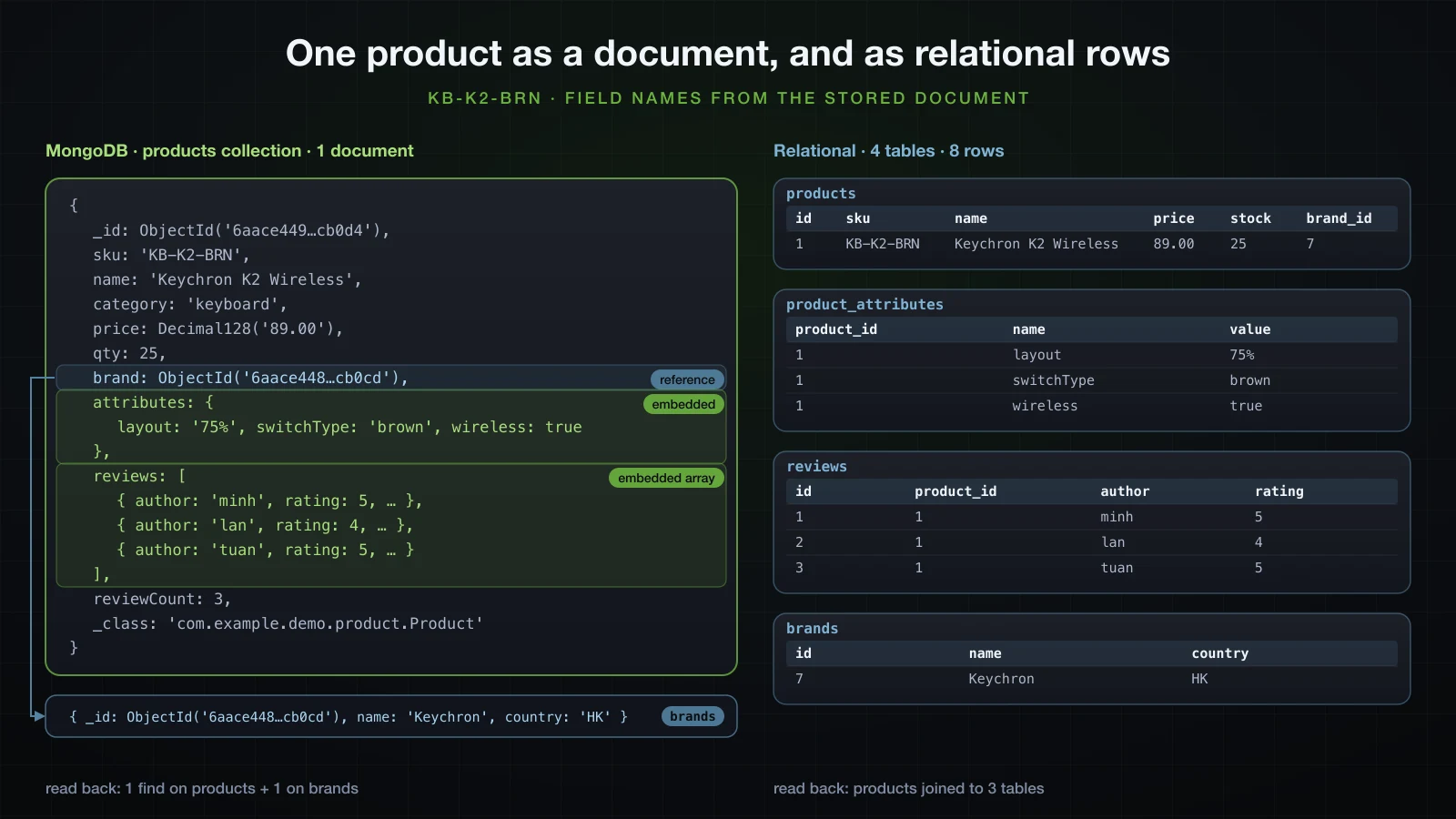
That is the shape documents are good at: an aggregate that is read and written as a unit, whose parts have no life outside it, with fields that vary from one document to the next. One read returns the product page, one write updates it atomically.
Documents fit badly where the data is a graph rather than a tree. Orders reference products and customers, stock is shared between orders, reports join everything, and several documents must change together. MongoDB can do all of it, with references, $lookup and multi-document transactions, but each of those gives back what the document model was chosen for. The brand in this article is the small version of that problem: many products share one brand, so it is referenced, not embedded, and the section after next measures what that costs.
Mapping a product: @Document, @Id, @Field and the _class field
The embedded review is a record; Spring Data MongoDB builds records through their canonical constructor:
package com.example.demo.product;

import java.time.Instant;

public record Review(String author, int rating, String comment, Instant createdAt) {
}
The brand is a document of its own, in its own collection:
package com.example.demo.brand;

import org.springframework.data.annotation.Id;
import org.springframework.data.mongodb.core.mapping.Document;

@Document("brands")
public record Brand(@Id String id, String name, String country) {
}
The product:
package com.example.demo.product;

import java.math.BigDecimal;
import java.util.ArrayList;
import java.util.LinkedHashMap;
import java.util.List;
import java.util.Map;

import org.springframework.data.annotation.Id;
import org.springframework.data.mongodb.core.index.CompoundIndex;
import org.springframework.data.mongodb.core.index.Indexed;
import org.springframework.data.mongodb.core.mapping.Document;
import org.springframework.data.mongodb.core.mapping.DocumentReference;
import org.springframework.data.mongodb.core.mapping.Field;

import com.example.demo.brand.Brand;

@Document("products")
@CompoundIndex(name = "category_price", def = "{ 'category': 1, 'price': 1 }")
public class Product {

    @Id
    private String id;

    @Indexed(unique = true)
    private String sku;

    private String name;

    private String description;

    private String category;

    private BigDecimal price;

    @Field("qty")
    private int stock;

    @DocumentReference
    private Brand brand;

    private Map<String, Object> attributes = new LinkedHashMap<>();

    private List<Review> reviews = new ArrayList<>();

    private int reviewCount;

    protected Product() {
    }

    public Product(String sku, String name, String category, BigDecimal price, int stock, Brand brand) {
        this.sku = sku;
        this.name = name;
        this.category = category;
        this.price = price;
        this.stock = stock;
        this.brand = brand;
    }

    public void addReview(Review review) {
        reviews.add(review);
        reviewCount++;
    }

    // getters for every field; setters for description, price and stock
}
@Document("products") names the collection; a bare @Document derives the name from the class, uncapitalized (a probe record StockAlert mapped to stockAlert). @Field("qty") stores stock under another name, and every query that names stock in Java is translated to qty. @Indexed and @CompoundIndex declare indexes, which Boot does not create by default (see the index section). There is no schema to create: the collection appears with its first insert. The seed runner saves seven brands and eight products, starting with this one:
Product k2 = new Product("KB-K2-BRN", "Keychron K2 Wireless", "keyboard", new BigDecimal("89.00"), 25, keychron);
attributes(k2, "layout", "75%", "switchType", "brown", "wireless", true);
k2.setDescription("Compact wireless mechanical keyboard");
k2.addReview(review("minh", 5, "Great switches"));
k2.addReview(review("lan", 4, "Battery could be better"));
k2.addReview(review("tuan", 5, "Perfect for Mac"));
mongosh shows what was stored:
docker exec sba-a11-mongo mongosh catalog --quiet --eval 'printjson(db.products.findOne({sku: "KB-K2-BRN"}))'{
_id: ObjectId('6aace449f1341b7637fcb0d4'),
sku: 'KB-K2-BRN',
name: 'Keychron K2 Wireless',
description: 'Compact wireless mechanical keyboard',
category: 'keyboard',
price: Decimal128('89.00'),
qty: 25,
brand: ObjectId('6aace448f1341b7637fcb0cd'),
attributes: {
layout: '75%',
switchType: 'brown',
wireless: true
},
reviews: [
{
author: 'minh',
rating: 5,
comment: 'Great switches',
createdAt: ISODate('2026-09-18T07:00:00.000Z')
},
{
author: 'lan',
rating: 4,
comment: 'Battery could be better',
createdAt: ISODate('2026-09-18T07:00:00.000Z')
},
{ … }
],
reviewCount: 3,
_class: 'com.example.demo.product.Product'
}Four details. BigDecimal became Decimal128, an exact decimal type, with no annotation; a probe document holding only a BigDecimal stored {"$numberDecimal": "89.00"} as well, so on this stack the default is exact. The stock field is qty. The brand is just its ObjectId. And there is a _class field that no Java property asked for.
String id or ObjectId: what is stored?
Product.id is a String, yet _id is an ObjectId. Spring Data converts a String id to ObjectId whenever the value is a valid 24-character hex string, and generates one when the id is null. A probe saved three documents in a probes collection with a String id, left null, set to a SKU and set to 24 hex characters, and read them back through the driver:
{"_id": {"$oid": "6aace4692b01124767e79b4c"}, "note": "id left null", "_class": "com.example.demo.lab.MappingProbeLab$IdProbe"}
{"_id": "sku-KB-K2-BRN", "note": "id set to a plain string", "_class": "com.example.demo.lab.MappingProbeLab$IdProbe"}
{"_id": {"$oid": "6aace4692b01124767e79b4d"}, "note": "id set to 24 hex characters", "_class": "com.example.demo.lab.MappingProbeLab$IdProbe"}
The generated id came back to Java as the string 6aace4692b01124767e79b4c. So a String id is convenient in Java and in JSON responses while the database keeps the 12-byte ObjectId, which also carries its creation second. The trap is data written by something else. A brand inserted through the driver with the string "6aace469aaaaaaaaaaaaaaaa" as its _id was not found by BrandRepository.findById("6aace469aaaaaaaaaaaaaaaa"), which answered Optional.empty: the 24 hex characters were converted to an ObjectId before the query, and a string never equals an ObjectId. A record mapped to the same collection with @MongoId(FieldType.STRING) String id found it. When ids come from outside, fix the stored type with @MongoId(FieldType.STRING) or @MongoId(FieldType.OBJECT_ID).
What is the _class field for?
_class records the Java type that wrote the document, so that the type can be rebuilt when the declared type is not enough. For a Product read as a Product it is redundant, which is why the embedded reviews have none: their runtime type equals the declared one. It matters for polymorphism. The probe stored a List<Discount>, where Discount is a sealed interface with two record implementations, one of them annotated @TypeAlias("fixed"):
{"_id": "promo", "discounts": [{"percent": 10, "_class": "com.example.demo.lab.MappingProbeLab$PercentOff"}, {"amount": {"$numberDecimal": "5.00"}, "_class": "fixed"}], "_class": "com.example.demo.lab.MappingProbeLab$Promo"}With _class removed from the first discount ($unset on discounts.0._class), reading the document failed:
org.springframework.data.mapping.model.MappingInstantiationException: Failed to instantiate com.example.demo.lab.MappingProbeLab$Discount using constructor NO_CONSTRUCTOR with arguments That is the reason not to strip _class blindly, and the reason to prefer @TypeAlias for anything polymorphic: a fully qualified class name in the data breaks the day the class is renamed or moved to another package.
Embedded or referenced: the queries each one sends
Reviews are embedded, so reading a product returns them in the same reply. The brand is referenced with @DocumentReference, which stores the brand's id and loads the brand when the product is read. With the driver's command log on, productRepository.findAll() over the eight products sent this (the lsid, $clusterTime and $readPreference fields are trimmed from each command):
{"find": "products", "filter": {}, "$db": "catalog"}
{"find": "brands", "filter": {"_id": {"$oid": "6aace448f1341b7637fcb0cd"}}, "limit": 1, "singleBatch": true, "$db": "catalog"}
{"find": "brands", "filter": {"_id": {"$oid": "6aace448f1341b7637fcb0cd"}}, "limit": 1, "singleBatch": true, "$db": "catalog"}
{"find": "brands", "filter": {"_id": {"$oid": "6aace448f1341b7637fcb0ce"}}, "limit": 1, "singleBatch": true, "$db": "catalog"}
{"find": "brands", "filter": {"_id": {"$oid": "6aace448f1341b7637fcb0cf"}}, "limit": 1, "singleBatch": true, "$db": "catalog"}
{"find": "brands", "filter": {"_id": {"$oid": "6aace448f1341b7637fcb0d0"}}, "limit": 1, "singleBatch": true, "$db": "catalog"}
{"find": "brands", "filter": {"_id": {"$oid": "6aace448f1341b7637fcb0d1"}}, "limit": 1, "singleBatch": true, "$db": "catalog"}
{"find": "brands", "filter": {"_id": {"$oid": "6aace449f1341b7637fcb0d2"}}, "limit": 1, "singleBatch": true, "$db": "catalog"}
{"find": "brands", "filter": {"_id": {"$oid": "6aace449f1341b7637fcb0d3"}}, "limit": 1, "singleBatch": true, "$db": "catalog"}
Nine round trips for eight products: one per product, with no de-duplication (both Keychron keyboards fetched brand …cd). This is the N+1 problem from JPA in a new shape, and it multiplies with every query that returns products.
The alternative is a manual reference: read the raw id and load all brands with one $in. A record projection can read the stored brand field as an ObjectId:
package com.example.demo.product;

import java.math.BigDecimal;

import org.bson.types.ObjectId;
import org.springframework.data.mongodb.core.mapping.Field;

public record ProductListItem(String id, String name, BigDecimal price, @Field("brand") ObjectId brandId) {
}List<ProductListItem> items = products.findAllBy(ProductListItem.class);
Set<String> brandIds = items.stream().map(i -> i.brandId().toHexString()).collect(Collectors.toSet());
Map<String, Brand> byId = brands.findAllById(brandIds).stream()
.collect(Collectors.toMap(Brand::id, Function.identity()));{"find": "products", "filter": {}, "projection": {"price": 1, "brand": 1, "name": 1, "_id": 1}, "$db": "catalog"}
{"find": "brands", "filter": {"_id": {"$in": [{"$oid": "6aace449f1341b7637fcb0d3"}, {"$oid": "6aace449f1341b7637fcb0d2"}, {"$oid": "6aace448f1341b7637fcb0d0"}, {"$oid": "6aace448f1341b7637fcb0d1"}, {"$oid": "6aace448f1341b7637fcb0ce"}, {"$oid": "6aace448f1341b7637fcb0cd"}, {"$oid": "6aace448f1341b7637fcb0cf"}]}}, "$db": "catalog"}Two round trips, whatever the number of products, and the projection only reads four fields. The rule is the same as with JPA: embed what belongs to the parent and stays bounded, and reference what is shared, then load references in bulk where lists are read. Reviews are embedded here because a product has a handful; reviews that grow without limit belong in a collection of their own, since a document is capped at 16 MB (the maxDocumentSize=16777216 the driver logs at startup) and every read of the product would carry all of them.
MongoRepository: derived queries and @Query, with the commands they send
The repository extends MongoRepository instead of JpaRepository; the method naming rules from Basics 27 are the same:
package com.example.demo.product;

import java.math.BigDecimal;
import java.util.List;
import java.util.Optional;

import org.springframework.data.domain.Sort;
import org.springframework.data.mongodb.repository.MongoRepository;
import org.springframework.data.mongodb.repository.Query;

public interface ProductRepository extends MongoRepository<Product, String> {

    Optional<Product> findBySku(String sku);

    List<Product> findByCategoryAndPriceLessThan(String category, BigDecimal maxPrice, Sort sort);

    List<Product> findByNameContainingIgnoreCase(String text);

    List<Product> findByStockLessThan(int threshold);

    List<Product> findByReviewsRatingGreaterThanEqual(int rating);

    List<Product> findByDescriptionContaining(String text);

    @Query("{ 'category': ?0, 'attributes.switchType': ?1 }")
    List<Product> findKeyboardsBySwitch(String category, String switchType);

    @Query(value = "{ 'reviewCount': { '$gte': ?0 } }", fields = "{ 'sku': 1, 'name': 1, 'reviewCount': 1 }")
    List<Product> findWellReviewed(int minReviews);

    <T> List<T> findByCategory(String category, Class<T> type);

    <T> List<T> findAllBy(Class<T> type);
}
What each method produced, with the filter copied from the MongoTemplate DEBUG line:
| Method call | Filter sent | Result |
|---|---|---|
findBySku("KB-K2-BRN") | { "sku" : "KB-K2-BRN"}, limit: 2 | the K2 |
findByCategoryAndPriceLessThan("headphones", 350, Sort.by("price")) | { "category" : "headphones", "price" : { "$lt" : { "$numberDecimal" : "350"}}}, sort { "price" : 1} | HP-MOMENTUM4 299.95, HP-WH1000XM5 329.00 |
findByNameContainingIgnoreCase("keychron") | { "name" : { "$regularExpression" : { "pattern" : ".*keychron.*", "options" : "i"}}} | both Keychron keyboards |
findByStockLessThan(5) | { "qty" : { "$lt" : 5}} | KB-G915-TKL 4, MN-27GP850 0, HP-QC-ULTRA 3 |
findByReviewsRatingGreaterThanEqual(5) | { "reviews.rating" : { "$gte" : 5}} | 5 products with at least one 5-star review |
findKeyboardsBySwitch("keyboard", "brown") | { "category" : "keyboard", "attributes.switchType" : "brown"} | KB-K2-BRN, KB-G915-TKL |
findWellReviewed(3) | { "reviewCount" : { "$gte" : 3}}, projection {sku=1, name=1, reviewCount=1} | 3 partial products |
findByCategory("monitor", ProductListItem.class) | { "category" : "monitor"}, projection {price=1, brand=1, name=1, _id=1} | 2 ProductListItem records |
Four things in that table are MongoDB-specific. stock became qty, from @Field. A property path through an embedded array, ReviewsRating, becomes the dotted path reviews.rating, which matches a document when any element matches. Containing becomes an unanchored regular expression, .*keychron.* with the i option, which has to be tested against every value. And the Optional method asks for two documents: a second match is how Spring Data notices that the result is not unique. With a second KB-K8-RED inserted by hand (and no unique index yet), findBySku("KB-K8-RED") failed with:
org.springframework.dao.IncorrectResultSizeDataAccessException: Query { "$java" : Query: { "sku" : "KB-K8-RED"}, Fields: {}, Sort: {} } returned non unique resultThe driver's command log shows the same query as the command that went over the wire, followed by the brand lookup from @DocumentReference (trimmed as before):
Command "find" started on database "catalog" using a connection with driver-generated ID 3 and server-generated ID 26 to localhost:27111. The request ID is 5 and the operation ID is 5. Command: {"find": "products", "filter": {"sku": "KB-K2-BRN"}, "limit": 2, "$db": "catalog", …}
Command "find" started on database "catalog" … Command: {"find": "brands", "filter": {"_id": {"$oid": "6aace448f1341b7637fcb0cd"}}, "limit": 1, "singleBatch": true, "$db": "catalog", …}
Two traps showed up in the projection rows. findWellReviewed returns Product entities built from three fields: they printed price=null, stock=0, reviews=0, and saving one back would write those values over the real ones, so never pass a partially loaded entity to save. And although the projection left brand out, Spring Data MongoDB 5.1.1 still sent one {"find": "brands", "filter": {"_id": {}}, "limit": 1, …} per product, three round trips that matched nothing. The record projection ProductListItem had neither problem: it is not an entity anyone can save, and it sent no brand lookups at all.
MongoTemplate with Query and Criteria
Derived methods stop being readable after three conditions, and a search screen builds its conditions at runtime. MongoTemplate takes a Query built from Criteria, the MongoDB counterpart of the JPA Criteria API from article 8, with far less ceremony:
Query query = new Query(Criteria.where("category").is("headphones")
        .and("attributes.anc").is(true)
        .and("price").lte(new BigDecimal("350")))
        .with(Sort.by(Sort.Direction.DESC, "reviewCount"))
        .limit(5);
mongo.find(query, ProductListItem.class, "products").forEach(System.out::println);

Query attention = new Query(new Criteria().orOperator(
        Criteria.where("reviews").elemMatch(Criteria.where("rating").lte(2)),
        Criteria.where("stock").is(0)));
mongo.find(attention, Product.class).forEach(p -> System.out.println(p.getSku()));

System.out.println(mongo.count(new Query(Criteria.where("attributes.wireless").is(true)), Product.class));{"find": "products", "filter": {"category": "headphones", "attributes.anc": true, "price": {"$lte": {"$numberDecimal": "350"}}}, "sort": {"reviewCount": -1}, "limit": 5, "$db": "catalog"}
ProductListItem[id=6aace449f1341b7637fcb0d9, name=Sony WH-1000XM5, price=329.00, brandId=6aace448f1341b7637fcb0d1]
ProductListItem[id=6aace449f1341b7637fcb0db, name=Sennheiser Momentum 4, price=299.95, brandId=6aace449f1341b7637fcb0d3]
{"find": "products", "filter": {"$or": [{"reviews": {"$elemMatch": {"rating": {"$lte": 2}}}}, {"qty": 0}]}, "$db": "catalog"}
MN-27GP850
{"aggregate": "products", "pipeline": [{"$match": {"attributes.wireless": true}}, {"$group": {"_id": 1, "n": {"$sum": 1}}}], "cursor": {}, "$db": "catalog"}
3Criteria.where("stock") went out as qty: the query ran against Product.class, whose mapping supplies the stored name. elemMatch means "one array element satisfies all of these conditions", which dotted paths do not. In mongosh, {"reviews.rating": 5, "reviews.author": "lan"} counted 1 product, the K2, where minh gave 5 stars and lan gave 4; {reviews: {$elemMatch: {rating: 5, author: "lan"}}} counted 0. count is not a count command but an aggregation with $match and $group, which is how the driver's countDocuments works.
Atomic updates vs load-modify-save under concurrency
Adding a review is the natural first version: load the product, add to the list, save.
public void addReview(String sku, Review review) {
    Product product = products.findBySku(sku).orElseThrow(() -> new ProductNotFoundException(sku));
    product.addReview(review);
    products.save(product);
    UpdateResult result = mongo.updateFirst(
            Query.query(Criteria.where("sku").is(sku)),
            new Update().push("reviews", review).inc("reviewCount", 1),
            Product.class);
    if (result.getMatchedCount() == 0) {
        throw new ProductNotFoundException(sku);
    }
}
The two versions send very different writes. MongoDB's profiler (db.setProfilingLevel(2)) recorded one call of each; printing the filter, the upsert flag and the top-level keys of the update from db.system.profile gave:
{ q: { _id: ObjectId('6aace449f1341b7637fcb0db') }, upsert: true,
  uKeys: [ '_id', 'sku', 'name', 'category', 'price', 'qty', 'brand', 'attributes', 'reviews', 'reviewCount', '_class' ],
  nModified: 1, docsExamined: 1 }
{ q: { sku: 'HP-MOMENTUM4' }, upsert: false,
  uKeys: [ '$push', '$inc' ],
  nModified: 1, docsExamined: 8 }
save of an entity that has an id replaces the whole document with the copy held in memory. (docsExamined: 8 is a full scan of the eight products: no index on sku exists yet.) updateFirst sends only the change, $push to append to the array and $inc to add to the counter, and MongoDB applies both to the current document atomically: a single-document update is always atomic, whatever else runs at the same time. The difference shows under concurrency. A small harness releases N threads at once with a CountDownLatch and counts the exceptions:
public static Map<String, Integer> run(int threads, IntConsumer task) throws InterruptedException {
    CountDownLatch start = new CountDownLatch(1);
    CountDownLatch done = new CountDownLatch(threads);
    Map<String, Integer> errors = new ConcurrentHashMap<>();
    try (ExecutorService pool = Executors.newFixedThreadPool(threads)) {
        for (int i = 0; i < threads; i++) {
            int n = i;
            pool.submit(() -> {
                try {
                    start.await();
                    task.accept(n);
                } catch (Exception e) {
                    errors.merge(e.getClass().getSimpleName(), 1, Integer::sum);
                } finally {
                    done.countDown();
                }
            });
        }
        start.countDown();
        done.await();
    }
    return errors;
}
Fifty threads each added one review to HP-MOMENTUM4, starting from zero reviews, three rounds per strategy:
load-modify-save   round 1: 50 calls, reviews stored=1, reviewCount=1, errors={}
load-modify-save   round 2: 50 calls, reviews stored=5, reviewCount=5, errors={}
load-modify-save   round 3: 50 calls, reviews stored=5, reviewCount=5, errors={}
atomic $push/$inc  round 1: 50 calls, reviews stored=50, reviewCount=50, errors={}
atomic $push/$inc  round 2: 50 calls, reviews stored=50, reviewCount=50, errors={}
atomic $push/$inc  round 3: 50 calls, reviews stored=50, reviewCount=50, errors={}
Load-modify-save kept 1 to 5 of the 50 reviews and reported no error: each thread read the product with zero or a few reviews, added its own and replaced the document, erasing everything written since its read. The atomic update kept all 50 every time. Whenever a change can be expressed as an operator on the current document ($inc, $push, $pull, $addToSet, $set of one field, $min/$max), send the operator.
@Version: optimistic locking in MongoDB
When the change cannot be expressed that way, typically a form that edits several fields a person has looked at, @Version turns the silent loss into an error, as it does in JPA:
    private int reviewCount;

    @Version
    private Long version;
Adding it to a collection that already has documents has a trap of its own. The first save after the change failed:
org.springframework.dao.DuplicateKeyException: Write operation error on MongoDB server localhost:27111. Write error: WriteError{code=11000, message='E11000 duplicate key error collection: catalog.products index: _id_ dup key: { _id: ObjectId('6aace449f1341b7637fcb0db') }', details={}}.The loaded document had no version field, so the property was null, and a versioned entity with a null version is new: save sent an insert (Inserting Document containing fields: [_id, sku, …, version, _class]) for an _id that already existed. Existing documents need the field first; db.products.updateMany({version: {$exists: false}}, {$set: {version: NumberLong(0)}}) answered matchedCount: 8, modifiedCount: 8 (with a deprecation warning from mongosh; NumberLong("0") avoids it). After that, two copies of the same monitor loaded at version 0, one saved after the other:
both loaded version 0
Calling update using query: { "_id" : { "$oid" : "6aace449f1341b7637fcb0d7"}, "version" : 0} and update: { "sku" : "MN-U2723QE", …, "price" : { "$numberDecimal" : "549.00"}, …, "version" : 1, … } in collection: products
alice saved, version now 1
Calling update using query: { "_id" : { "$oid" : "6aace449f1341b7637fcb0d7"}, "version" : 0} and update: { "sku" : "MN-U2723QE", …, "price" : { "$numberDecimal" : "579.00"}, "qty" : 17, …, "version" : 1, … } in collection: products
OptimisticLockingFailureException: Cannot save entity 6aace449f1341b7637fcb0d7 with version 1 to collection products; Has it been modified meanwhile
The second save would have put the old price back; its filter on version: 0 matched nothing and Spring Data raised OptimisticLockingFailureException, which a controller maps to 409 exactly as in article 7. The same 50-thread race with @Version in place:
load-modify-save   round 1: 50 calls, reviews stored=1, reviewCount=1, errors={OptimisticLockingFailureException=49}
load-modify-save   round 2: 50 calls, reviews stored=5, reviewCount=5, errors={OptimisticLockingFailureException=45}
load-modify-save   round 3: 50 calls, reviews stored=5, reviewCount=5, errors={OptimisticLockingFailureException=45}
atomic $push/$inc  round 1: 50 calls, reviews stored=50, reviewCount=50, errors={}
atomic $push/$inc  round 2: 50 calls, reviews stored=50, reviewCount=50, errors={}
atomic $push/$inc  round 3: 50 calls, reviews stored=50, reviewCount=50, errors={}
The stored counts did not improve, but every lost write is now an exception that can be retried or reported. The atomic update was unaffected, because MongoTemplate adds the version increment to it by itself: the logged update was { "$push" : { "reviews" : … }, "$inc" : { "reviewCount" : 1, "version" : 1}}, so a concurrent save of a stale copy still fails.
Indexes: does Spring Boot create @Indexed indexes?
No. After the first start, with @Indexed(unique = true) on sku and a @CompoundIndex on the class, the collection had only the index every collection has:
[ { v: 2, key: { _id: 1 }, name: '_id_' } ]spring.data.mongodb.auto-index-creation has no default in Boot 4.1.1's metadata, and the mapping context reports isAutoIndexCreation() as false. Set to true, Spring Data analyses every mapped class at startup and creates what the annotations declare:
[
  { v: 2, key: { _id: 1 }, name: '_id_' },
  { v: 2, key: { category: 1, price: 1 }, name: 'category_price' },
  { v: 2, key: { sku: 1 }, name: 'sku', unique: true }
]
The unique index is named after the property, sku, not sku_1 as the shell would name it. Leaving auto-creation off is a sensible default. Building an index on a large collection at application startup holds up the start (on the 300,000 documents below, startup went from 1.7 s to 2.5 s), and every instance of the application does it. A unique index that meets existing duplicates stops the application: with a second KB-K8-RED inserted by hand, the start failed while creating the mongoTemplate bean:
Caused by: org.springframework.dao.DuplicateKeyException: Write failed with error code 11000 and error message 'Index build failed: fd68fcdd-dcc0-496f-b9ee-1c09dd96876d: Collection catalog.products ( 376762f5-674e-44c9-8243-c915b2577c77 ) :: caused by :: E11000 duplicate key error collection: catalog.products index: sku dup key: { sku: "KB-K8-RED" }'The alternatives are to turn it on in development only, to create indexes explicitly (mongoTemplate.indexOps(Product.class).createIndex(…)) from a migration step, or to manage them outside the application. Whichever you pick, a @Indexed annotation alone does not make a query fast.
COLLSCAN vs IXSCAN on 300,000 documents
A second runner inserted 300,000 generated products (10 categories, random prices from 5.00 to 999.99, up to three reviews each) in batches of 10,000, in 4.1 s; the collection held 300,008 documents averaging 389 bytes. Two queries, first with no index besides _id, measured with explain("executionStats") in mongosh, best of five runs after a warm-up:
function stages(p) { const out = []; while (p) { out.push(p.stage + (p.indexName ? "(" + p.indexName + ")" : "")); p = p.inputStage; } return out.join(" <- "); }
function run(label, cursorFn) {
  let best = null, ex;
  for (let i = 0; i < 6; i++) {
    ex = cursorFn().explain("executionStats");
    const t = ex.executionStats.executionTimeMillis;
    if (i > 0 && (best === null || t < best)) best = t;   // first run is warm-up
  }
  const s = ex.executionStats;
  print(label + ": plan " + stages(ex.queryPlanner.winningPlan.queryPlan || ex.queryPlanner.winningPlan) +
        " | nReturned " + s.nReturned + " | totalKeysExamined " + s.totalKeysExamined +
        " | totalDocsExamined " + s.totalDocsExamined + " | executionTimeMillis best of 5: " + best);
}
run("sku", () => db.products.find({ sku: "GEN-123456" }));
run("category+price", () => db.products.find({ category: "headphones", price: { $lt: NumberDecimal("20") } }).sort({ price: 1 }));docker cp explain.js sba-a11-mongo:/tmp/explain.jsdocker exec sba-a11-mongo mongosh catalog --quiet /tmp/explain.jssku: plan COLLSCAN | nReturned 1 | totalKeysExamined 0 | totalDocsExamined 300008 | executionTimeMillis best of 5: 58
category+price: plan SORT <- COLLSCAN | nReturned 466 | totalKeysExamined 0 | totalDocsExamined 300008 | executionTimeMillis best of 5: 63Load average 4.56. Every document was read to return one, and the second query then sorted in memory. The same two queries after a start with auto-index-creation=true:
sku: plan EXPRESS_IXSCAN(sku) | nReturned 1 | totalKeysExamined 1 | totalDocsExamined 1 | executionTimeMillis best of 5: 0
category+price: plan FETCH <- IXSCAN(category_price) | nReturned 466 | totalKeysExamined 466 | totalDocsExamined 466 | executionTimeMillis best of 5: 0
Load average 7.50. One key and one document for the SKU (EXPRESS_IXSCAN is MongoDB 8's fast path for an equality match on a unique index), and exactly the 466 matching keys for the range, already in price order, so the SORT stage disappeared: within one category the compound index is sorted by its second field, price, the field the query sorts on. Timed from the application with MongoTemplate.find into ProductListItem, 100 calls after 20 warm-up calls:
| Query | No index | With index |
|---|---|---|
sku = GEN-123456 (1 row) | 56.33 ms per query (load 6.50) | 0.62 ms (load 5.90) |
| headphones under 20, by price (466 rows) | 69.78 ms (load 6.50) | 4.94 ms (load 5.90) |
The remaining 4.94 ms is mostly reading and mapping 466 documents. explain is the tool to reach for whenever a query is slow: COLLSCAN with totalDocsExamined far above nReturned is the signature of a missing index.
An aggregation pipeline: average rating per category
Questions about many documents at once, such as the average rating per category, are aggregation pipelines: a list of stages, each transforming the stream of documents from the previous one. Aggregation.newAggregation builds it from typed stages:
public List<CategoryRating> ratingsByCategory() {
    Aggregation pipeline = Aggregation.newAggregation(
            Aggregation.match(Criteria.where("stock").gt(0)),
            Aggregation.unwind("reviews"),
            Aggregation.group("category")
                    .avg("reviews.rating").as("averageRating")
                    .count().as("reviews"),
            Aggregation.sort(Sort.by(Sort.Order.desc("averageRating"), Sort.Order.asc("_id"))),
            Aggregation.project("averageRating", "reviews").and("category").previousOperation());
    return mongo.aggregate(pipeline, Product.class, CategoryRating.class).getMappedResults();
}package com.example.demo.product;
public record CategoryRating(String category, double averageRating, int reviews) {
}MongoTemplate logs the pipeline it sends:
[
  { "$match": { "qty": { "$gt": 0 } } },
  { "$unwind": "$reviews" },
  { "$group": { "_id": "$category", "averageRating": { "$avg": "$reviews.rating" }, "reviews": { "$sum": 1 } } },
  { "$sort": { "averageRating": -1, "_id": 1 } },
  { "$project": { "averageRating": 1, "reviews": 1, "_id": 0, "category": "$_id" } }
]CategoryRating[category=monitor, averageRating=4.666666666666667, reviews=3]
CategoryRating[category=headphones, averageRating=4.333333333333333, reviews=6]
CategoryRating[category=keyboard, averageRating=4.333333333333333, reviews=6]Running the pipeline cut after each stage with a $count appended shows how many documents flow between stages:
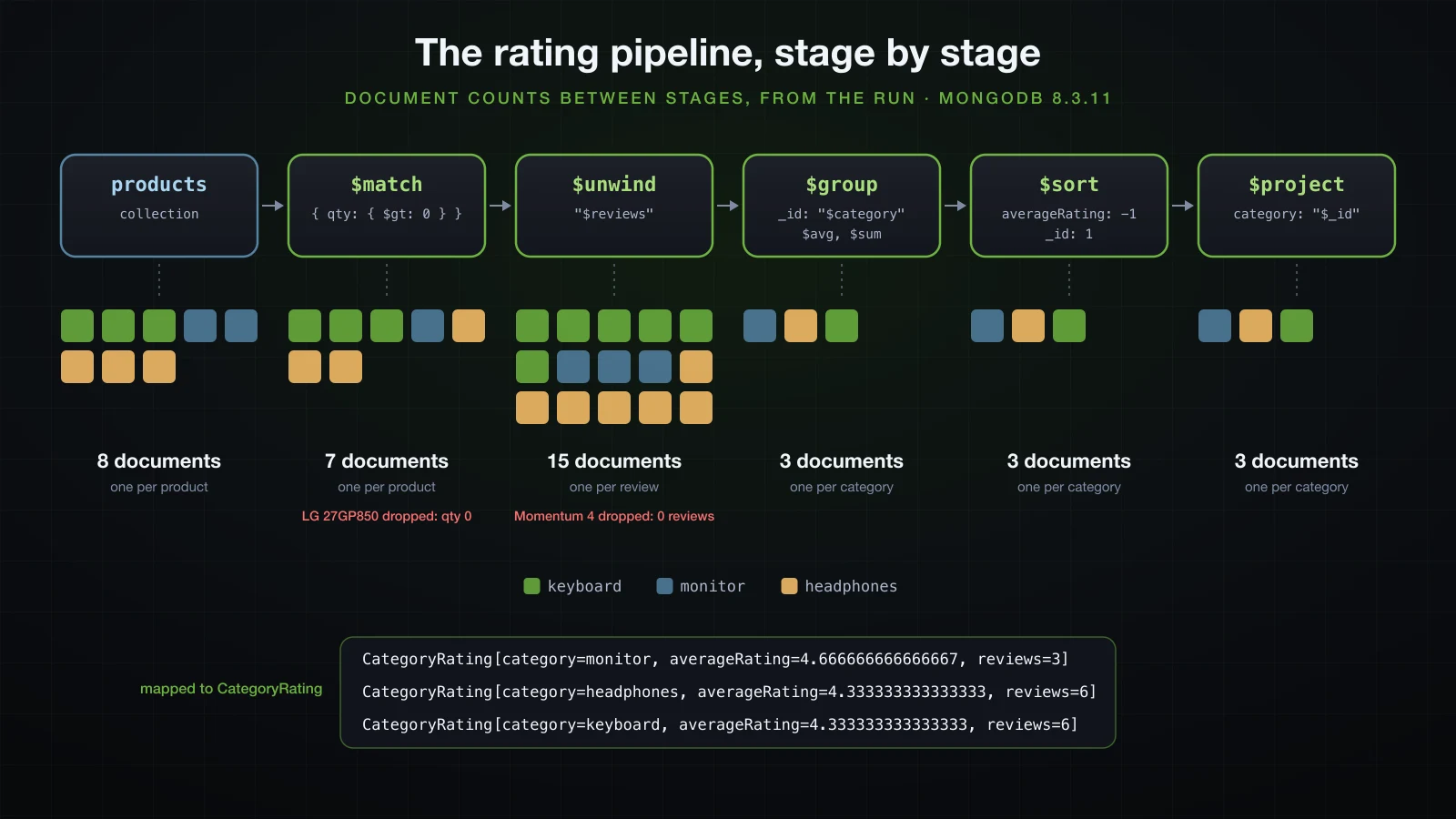
$match comes first so that it can use an index and so that less data flows through the rest; the out-of-stock LG monitor, with its 2-star review, is gone before the average is taken. $unwind turns each product into one document per review, which is why 7 products become 15 documents, and silently drops products with no reviews: the Sennheiser headphones never reach $group. {$unwind: {path: "$reviews", preserveNullAndEmptyArrays: true}} keeps such a product as one document without a review; in mongosh it produced one document more than the plain $unwind. $group computes the average in the database, so 15 reviews never travel to the application. Headphones and keyboards tie at 26 / 6 = 4.33, so the pipeline sorts by _id second; without a tiebreak, the order of equal values is not guaranteed.
MongoDB transactions need a replica set
A single-document update is atomic without a transaction. Placing an order touches two documents in two collections: insert the order, then take the stock, and if the stock is short, the order must not remain.
package com.example.demo.order;

import java.time.Instant;

import org.springframework.data.mongodb.core.MongoTemplate;
import org.springframework.data.mongodb.core.query.Criteria;
import org.springframework.data.mongodb.core.query.Query;
import org.springframework.data.mongodb.core.query.Update;
import org.springframework.stereotype.Service;
import org.springframework.transaction.annotation.Transactional;

import com.example.demo.product.Product;
import com.mongodb.client.result.UpdateResult;

@Service
public class OrderService {

    private final OrderRepository orders;
    private final MongoTemplate mongo;

    public OrderService(OrderRepository orders, MongoTemplate mongo) {
        this.orders = orders;
        this.mongo = mongo;
    }

    @Transactional
    public Order place(String sku, int quantity) {
        Order order = orders.insert(new Order(null, sku, quantity, Instant.now()));
        UpdateResult stock = mongo.updateFirst(
                Query.query(Criteria.where("sku").is(sku).and("stock").gte(quantity)),
                new Update().inc("stock", -quantity),
                Product.class);
        if (stock.getModifiedCount() == 0) {
            throw new InsufficientStockException(sku, quantity);
        }
        return order;
    }
}
Order is a record in the orders collection. The conditional update takes the stock only if enough is left, the atomic check from article 7 in MongoDB form.
@Transactional without a MongoTransactionManager does nothing
The test orders one MN-27GP850, whose stock is 0:
transaction managers: []
OrderService is a proxy: false
stock of MN-27GP850 before: 0
Inserting Document containing fields: [sku, quantity, placedAt, _class] in collection: orders
Calling update using query: { "sku" : "MN-27GP850", "qty" : { "$gte" : 1}} and update: { "$inc" : { "qty" : -1, "version" : 1}} in collection: products
com.example.demo.order.InsufficientStockException: Not enough stock of MN-27GP850 for 1
orders after the failed call: 1
Boot 4.1.1 does not auto-configure a transaction manager for MongoDB, and with no TransactionManager bean in the context, OrderService was not even proxied: the annotation was ignored without a warning, and the order for stock that did not exist stayed in the collection. The manager is one bean:
package com.example.demo.config;

import org.springframework.context.annotation.Bean;
import org.springframework.context.annotation.Configuration;
import org.springframework.data.mongodb.MongoDatabaseFactory;
import org.springframework.data.mongodb.MongoTransactionManager;

@Configuration(proxyBeanMethods = false)
public class MongoConfig {

    @Bean
    MongoTransactionManager transactionManager(MongoDatabaseFactory databaseFactory) {
        return new MongoTransactionManager(databaseFactory);
    }
}
The same call, with the manager's DEBUG log and the driver's commands (session fields trimmed):
transaction managers: [transactionManager]
OrderService is a proxy: true
Creating new transaction with name [com.example.demo.order.OrderService.place]: PROPAGATION_REQUIRED,ISOLATION_DEFAULT
{"insert": "orders", "ordered": true, "$db": "catalog", "txnNumber": 1, "startTransaction": true, "autocommit": false, "documents": [{"_id": {"$oid": "6aace62721a2347324ca600d"}, "sku": "MN-27GP850", "quantity": 1, "placedAt": {"$date": "2026-09-18T07:20:07.48Z"}, "_class": "com.example.demo.order.Order"}]}
{"update": "products", "ordered": true, "$db": "catalog", "txnNumber": 1, "autocommit": false, "updates": [{"q": {"sku": "MN-27GP850", "qty": {"$gte": 1}}, "u": {"$inc": {"qty": -1, "version": 1}}}]}
Initiating transaction rollback
{"abortTransaction": 1, "$db": "admin", "txnNumber": 1, "autocommit": false}
com.example.demo.order.InsufficientStockException: Not enough stock of MN-27GP850 for 1
orders after the failed call: 0
The insert opened the transaction (startTransaction: true), both writes carried the same txnNumber on the same session, and the exception became abortTransaction. With one TransactionManager in the context, every @Transactional uses it; an application that also has a JPA or JDBC transaction manager has two, and each @Transactional has to name the one it means.
The error on a standalone server
A standalone mongod, the default docker run mongo:8 without --replSet, cannot run transactions. The same call against one:
org.springframework.data.mongodb.UncategorizedMongoDbException: This MongoDB deployment does not support retryable writes. Please add retryWrites=false to your connection string.
  caused by com.mongodb.MongoClientException: This MongoDB deployment does not support retryable writes. Please add retryWrites=false to your connection string.
The message is misleading. With retryWrites=false added to the URI, the exception reaching the code was word for word the same, and only the driver's command log showed the server's actual answer to the insert:
com.mongodb.MongoCommandException: Command execution failed on MongoDB server with error 20 (IllegalOperation): 'Transaction numbers are only allowed on a replica set member or mongos' on server localhost:27112.Transactions use the same transaction numbers as retryable writes, and the driver rewrites the server's code 20 into the retryable-writes hint in both cases. The fix is the replica set, one member is enough, not the connection string. Beyond that, a MongoDB transaction has limits a relational one does not: it is meant to be short (transactionLifetimeLimitSeconds, the age at which the server aborts one, is 60 on this server), and it costs more than a single-document write, so the design question comes first. If the order and its stock change could live in one document, no transaction would be needed at all.
Schema-less pitfalls: a renamed field
The previous release of the catalogue called the description desc; this release renamed the field to description. MongoDB has no schema to migrate, so the deployment succeeded, and the documents written by the previous release still say desc. Two of them, reproduced with raw Documents:
{"sku": "MS-MX3S", "name": "Logitech MX Master 3S", "desc": "Ergonomic wireless mouse with quiet clicks", "category": "mouse", ...}
{"sku": "SP-FLIP6", "name": "JBL Flip 6", "desc": "Portable wireless speaker, IP67", "category": "speaker", ...}
The search for "wireless" missed them, and loading one showed an empty description:
--- findByDescriptionContaining("wireless")
find using query: { "description" : { "$regularExpression" : { "pattern" : ".*wireless.*", "options" : ""}}} fields: Document{{}} sort: null for class: class com.example.demo.product.Product in collection: products
KB-K2-BRN
--- load a legacy product
SP-FLIP6 description=null
Worse, the entity has no place for a field it does not know. Changing the speaker's price and saving it replaced the whole document, and the old description was gone for good:
{"_id": {"$oid": "6aace69a0cef47a41e37c8a2"}, "sku": "SP-FLIP6", "name": "JBL Flip 6", "category": "speaker", "price": {"$numberDecimal": "119.00"}, "qty": 10, "attributes": {}, "reviews": [], "reviewCount": 0, "version": 1, "_class": "com.example.demo.product.Product"}A rename in a schema-less store is a data migration you have to write. The smallest one that is safe to run on every start is a $rename restricted to the documents that still have the old field:
@Component
@Order(0)
public class RenameDescToDescription implements ApplicationRunner {

    private static final Logger log = LoggerFactory.getLogger(RenameDescToDescription.class);

    private final MongoTemplate mongo;

    public RenameDescToDescription(MongoTemplate mongo) {
        this.mongo = mongo;
    }

    @Override
    public void run(ApplicationArguments args) {
        UpdateResult result = mongo.updateMulti(
                Query.query(Criteria.where("desc").exists(true)),
                new Update().rename("desc", "description"),
                Product.class);
        log.info("Renamed desc to description in {} product(s)", result.getModifiedCount());
    }
}Calling update using query: { "desc" : { "$exists" : true}} and update: { "$rename" : { "desc" : "description"}, "$inc" : { "version" : 1}} in collection: products
Renamed desc to description in 1 product(s)
KB-K2-BRN
MS-MX3SThe mouse is found again; the speaker's description, overwritten before the migration ran, is not coming back. Run at startup, before the old documents were inserted, the same runner had logged Renamed desc to description in 0 product(s): with nothing left to rename it does nothing, which is what makes it safe on every start. MongoTemplate added $inc on version by itself, so a stale copy held somewhere still fails to save. Three rules follow. Rename in Java only with @Field("desc") keeping the stored name, or ship the data migration in the same release. Run migrations before the new code serves traffic, not lazily. And once migrations are more than one idempotent update, move them to a versioned migration tool for MongoDB, such as Mongock, which plays the part Flyway played for SQL in Basics 31.
Redis as a data store: RedisTemplate vs StringRedisTemplate
Redis keeps everything in memory, answers a command in a fraction of a millisecond (0.11 ms per round trip in the pipelining run below, network included), and stores values as typed structures: strings, hashes, lists, sets, sorted sets, streams. Spring Data Redis reaches it through a RedisConnectionFactory and two templates Boot configures: redisTemplate, a RedisTemplate<Object, Object>, and stringRedisTemplate. Using Redis as a cache in front of the database, with @Cacheable, RedisCacheManager and its serialization, is article 9; here Redis holds data of its own. Redis also offers pub/sub and streams, which belong to messaging in Chapter 5.
The default JDK serialization in redis-cli
The two templates differ in their serializers, which the lab printed:
redisTemplate value serializer: JdkSerializationRedisSerializer, key serializer: JdkSerializationRedisSerializer, default: JdkSerializationRedisSerializer
stringRedisTemplate value serializer: StringRedisSerializer
RedisTemplate<Object, Object> turns keys and values into Java serialization bytes. Storing a product summary with it:
package com.example.demo.product;

import java.io.Serializable;
import java.math.BigDecimal;

public record ProductSummary(String sku, String name, BigDecimal price) implements Serializable {
}redisTemplate.opsForValue().set("product:summary:" + summary.sku(), summary);
System.out.println("read back: " + redisTemplate.opsForValue().get("product:summary:" + summary.sku()));
stringRedisTemplate.opsForValue().set("greeting", "hello");
System.out.println("StringRedisTemplate reads it as: " + stringRedisTemplate.opsForValue().get("product:summary:" + summary.sku()));read back: ProductSummary[sku=KB-K2-BRN, name=Keychron K2 Wireless, price=89.00]
StringRedisTemplate reads it as: nullThe StringRedisTemplate did not find the value under the same key, and redis-cli shows why:
docker exec sba-a11-redis redis-cli --no-raw KEYS '*'1) "product:summary:KB-K2-BRN"
2) "greeting"
3) "\xac\xed\x00\x05t\x00\x19product:summary:KB-K2-BRN"The first key belongs to the JSON template of the next section, which the same run used afterwards. The third is this one: the key itself went through Java serialization, \xac\xed\x00\x05 being the stream header and t\x00\x19 a string of 25 characters. The value, read with the escaped key typed into redis-cli, is worse:
"\xac\xed\x00\x05sr\x00'com.example.demo.product.ProductSummary\x00\x00\x00\x00\x00\x00\x00\x00\x02\x00\x03L\x00\x04namet\x00\x12Ljava/lang/String;L\x00\x05pricet\x00\x16Ljava/math/BigDecimal;…"455 bytes, readable only by a JVM that has com.example.demo.product.ProductSummary on its classpath in a compatible version, and a record without implements Serializable failed with SerializationException: Cannot serialize. Nothing else, not redis-cli, not a Python service, not the next refactoring, can use that data.
A JSON serializer for values
A template of its own, with string keys and JSON values through Jackson 3's JacksonJsonRedisSerializer (Spring Data Redis 4.1.1 marks the Jackson 2 Jackson2JsonRedisSerializer as deprecated):
package com.example.demo.config;

import org.springframework.context.annotation.Bean;
import org.springframework.context.annotation.Configuration;
import org.springframework.data.redis.connection.RedisConnectionFactory;
import org.springframework.data.redis.core.RedisTemplate;
import org.springframework.data.redis.serializer.JacksonJsonRedisSerializer;
import org.springframework.data.redis.serializer.RedisSerializer;

import com.example.demo.product.ProductSummary;

@Configuration(proxyBeanMethods = false)
public class RedisConfig {

    @Bean
    RedisTemplate<String, ProductSummary> productSummaryTemplate(RedisConnectionFactory connectionFactory) {
        RedisTemplate<String, ProductSummary> template = new RedisTemplate<>();
        template.setConnectionFactory(connectionFactory);
        template.setKeySerializer(RedisSerializer.string());
        template.setValueSerializer(new JacksonJsonRedisSerializer<>(ProductSummary.class));
        return template;
    }
}@Component
public class ProductSummaryStore {
private final RedisTemplate<Object, Object> redis;
private final RedisTemplate<String, ProductSummary> redis;
public ProductSummaryStore(RedisTemplate<Object, Object> redis) {
public ProductSummaryStore(RedisTemplate<String, ProductSummary> redis) {
this.redis = redis;
}
public void put(ProductSummary summary) {
redis.opsForValue().set("product:summary:" + summary.sku(), summary);
}
public ProductSummary get(String sku) {
return redis.opsForValue().get("product:summary:" + sku);
}
}After store.put(summary), redis-cli --no-raw listed the key with SCAN and read it with GET product:summary:KB-K2-BRN:
"product:summary:KB-K2-BRN"
"{\"sku\":\"KB-K2-BRN\",\"name\":\"Keychron K2 Wireless\",\"price\":89.00}"
A readable key, a 63-byte value any language can parse, and the store read it back as the same record. The generic parameters are what select the bean: the store asks for RedisTemplate<String, ProductSummary> and gets productSummaryTemplate. For plain strings and numbers, which is most of what follows, StringRedisTemplate is already right.
Redis data structures for real use cases
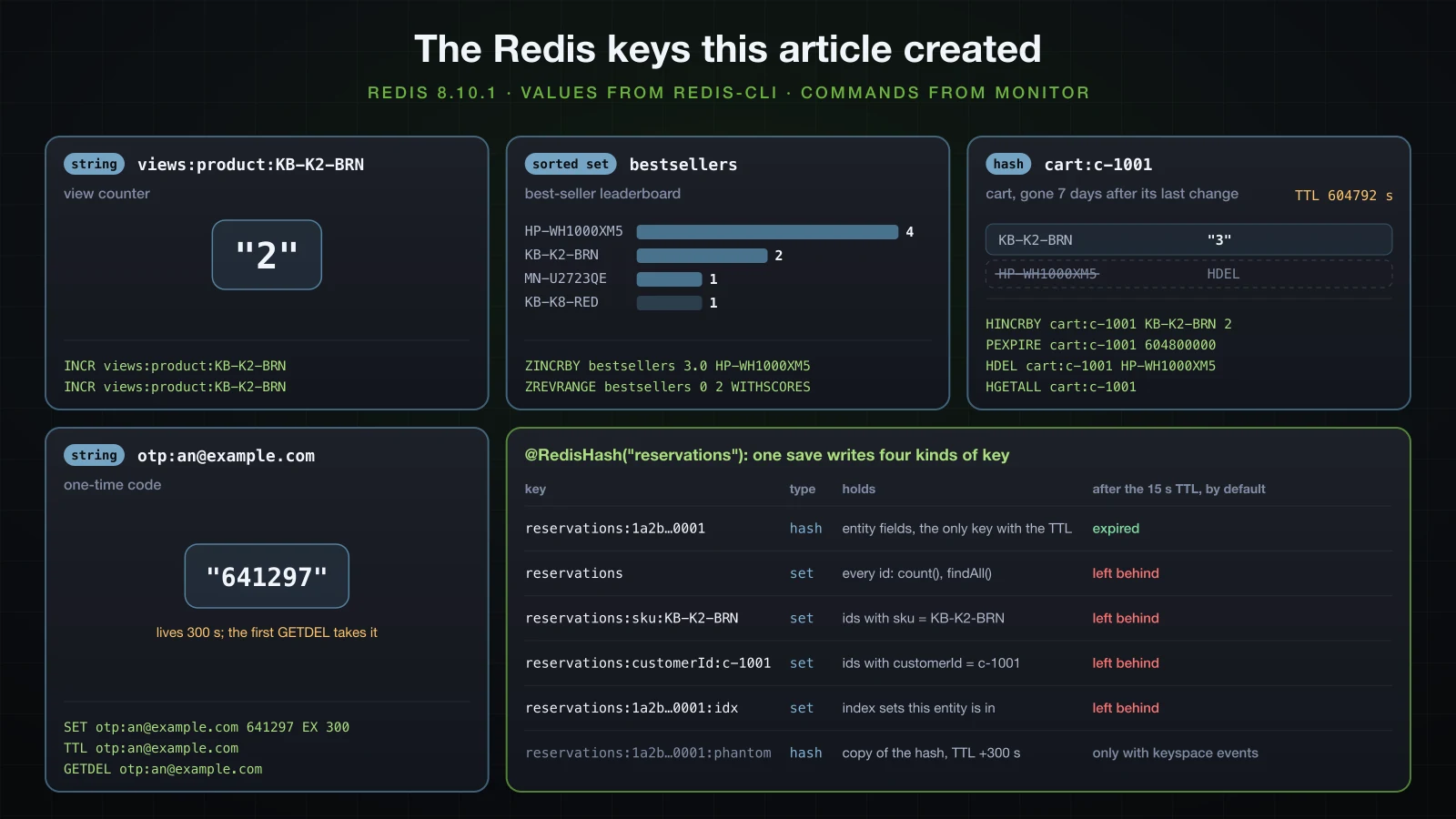
Redis earns its place by what each structure does in one command on the server: counting, ranking, updating one field, expiring. The four components below all use StringRedisTemplate; the commands under each are from MONITOR, which prints every command the server receives. The figure collects every key this article's Redis code created, including those of the @RedisHash repository of the next section but one:
A view counter with INCR
@Component
public class ViewCounter {

    private final StringRedisTemplate redis;

    public ViewCounter(StringRedisTemplate redis) {
        this.redis = redis;
    }

    public long increment(String sku) {
        return redis.opsForValue().increment(key(sku));
    }

    public long count(String sku) {
        String value = redis.opsForValue().get(key(sku));
        return value == null ? 0 : Long.parseLong(value);
    }

    private static String key(String sku) {
        return "views:product:" + sku;
    }
}"INCR" "views:product:KB-K2-BRN"
"INCR" "views:product:KB-K2-BRN"INCR creates the key at 0 if it does not exist, adds one and returns the new value, all inside Redis, which executes commands one at a time. The same race as the reviews, with 20 threads doing 500 increments each, compared INCR with a read-then-write GET and SET:
GET + SET round 1: 10000 increments, counter = 907, 517 ms
GET + SET round 2: 10000 increments, counter = 908, 427 ms
GET + SET round 3: 10000 increments, counter = 897, 271 ms
INCR      round 1: 10000 increments, counter = 10000, 138 ms
INCR      round 2: 10000 increments, counter = 10000, 127 ms
INCR      round 3: 10000 increments, counter = 10000, 114 ms
Load average 5.31 to 5.52. Read-modify-write lost about nine increments in ten, even though Redis itself is single-threaded: the gap is between the application's GET and its SET, not inside Redis. INCR counted all 10,000, in less than half the time because it is one round trip instead of two. The 20 threads shared one connection: CLIENT LIST during a later run showed a single Lettuce client with tot-cmds=90015.
A best-seller leaderboard with a sorted set
A sorted set keeps members ordered by a score. Each sale adds its quantity to the product's score; the top three is one range query:
@Component
public class BestsellerBoard {

    private static final String KEY = "bestsellers";

    private final StringRedisTemplate redis;

    public BestsellerBoard(StringRedisTemplate redis) {
        this.redis = redis;
    }

    public void recordSale(String sku, int quantity) {
        redis.opsForZSet().incrementScore(KEY, sku, quantity);
    }

    public List<Bestseller> top(int n) {
        return redis.opsForZSet().reverseRangeWithScores(KEY, 0, n - 1).stream()
                .map(t -> new Bestseller(t.getValue(), t.getScore().longValue()))
                .toList();
    }
}
Five sales, then the top three:
"ZINCRBY" "bestsellers" "2.0" "KB-K2-BRN"
"ZINCRBY" "bestsellers" "1.0" "HP-WH1000XM5"
"ZINCRBY" "bestsellers" "1.0" "MN-U2723QE"
"ZINCRBY" "bestsellers" "3.0" "HP-WH1000XM5"
"ZINCRBY" "bestsellers" "1.0" "KB-K8-RED"
"ZREVRANGE" "bestsellers" "0" "2" "WITHSCORES"[Bestseller[sku=HP-WH1000XM5, sold=4], Bestseller[sku=KB-K2-BRN, sold=2], Bestseller[sku=MN-U2723QE, sold=1]]Scores are doubles, which is why the quantity goes out as "2.0". The set stays sorted as it is updated, so reading the top three never sorts anything, where an ORDER BY over a sales table has to aggregate and sort on every request. Members with equal scores are ordered by the member bytes, so MN-U2723QE and KB-K8-RED, both at 1, come back in reverse lexicographic order from ZREVRANGE.
A cart as a hash
A hash is a small map under one key, well suited to a cart: one field per SKU, one quantity per field, each field changed on its own:
@Component
public class CartStore {

    private static final Duration IDLE_LIFETIME = Duration.ofDays(7);

    private final StringRedisTemplate redis;
    private final HashOperations<String, String, String> hashes;

    public CartStore(StringRedisTemplate redis) {
        this.redis = redis;
        this.hashes = redis.opsForHash();
    }

    public void add(String customerId, String sku, int quantity) {
        String key = key(customerId);
        hashes.increment(key, sku, quantity);
        redis.expire(key, IDLE_LIFETIME);
    }

    public void remove(String customerId, String sku) {
        hashes.delete(key(customerId), sku);
    }

    public Map<String, Integer> items(String customerId) {
        Map<String, Integer> items = new TreeMap<>();
        hashes.entries(key(customerId)).forEach((sku, qty) -> items.put(sku, Integer.parseInt(qty)));
        return items;
    }

    private static String key(String customerId) {
        return "cart:" + customerId;
    }
}"HINCRBY" "cart:c-1001" "KB-K2-BRN" "1"
"PEXPIRE" "cart:c-1001" "604800000"
"HINCRBY" "cart:c-1001" "HP-WH1000XM5" "1"
"PEXPIRE" "cart:c-1001" "604800000"
"HINCRBY" "cart:c-1001" "KB-K2-BRN" "2"
"PEXPIRE" "cart:c-1001" "604800000"
"HDEL" "cart:c-1001" "HP-WH1000XM5"
"HGETALL" "cart:c-1001"{KB-K2-BRN=3}HINCRBY changes one field atomically, like $inc in MongoDB, so two tabs adding to the same cart cannot overwrite each other. expire(key, Duration) went out as PEXPIRE in milliseconds, not EXPIRE, and every change pushes the deadline back: the cart disappears seven days after its last change. redis-cli TTL cart:c-1001 answered 604792 a few seconds later. The expiry applies to the whole key. Redis 8.10 can also expire single hash fields, should one line of a cart need its own deadline: after HEXPIRE probe:h 60 FIELDS 1 a, HTTL reported 60 seconds for field a and -1 (no expiry) for field b.
A one-time code with a TTL
A login or checkout code must expire and must work once:
@Component
public class OneTimeCodes {

    private static final Duration LIFETIME = Duration.ofMinutes(5);

    private final StringRedisTemplate redis;
    private final SecureRandom random = new SecureRandom();

    public OneTimeCodes(StringRedisTemplate redis) {
        this.redis = redis;
    }

    public String issue(String email) {
        String code = "%06d".formatted(random.nextInt(1_000_000));
        redis.opsForValue().set(key(email), code, LIFETIME);
        return code;
    }

    public long secondsLeft(String email) {
        return redis.getExpire(key(email));
    }

    public boolean verify(String email, String code) {
        String stored = redis.opsForValue().getAndDelete(key(email));
        return code.equals(stored);
    }

    private static String key(String email) {
        return "otp:" + email;
    }
}"SET" "otp:an@example.com" "641297" "EX" "300"
"TTL" "otp:an@example.com"
"GETDEL" "otp:an@example.com"
"GETDEL" "otp:an@example.com"issued 641297, seconds left 300
first verify: true
second verify: falseThe value and its lifetime are one command, SET … EX 300, so there is no moment when the code exists without an expiry, which a SET followed by a separate EXPIRE would allow if the application died in between. GETDEL reads and deletes in one step: two requests racing with the same code cannot both succeed, and the second verify failed. A wrong guess also burns the code, which is a reasonable default for six digits; a real implementation adds a per-email attempt counter, another INCR with an expiry.
Wiring MongoDB and Redis into the REST API
The controllers combine both stores. Reading a product counts a view in Redis; an order is placed in a MongoDB transaction and then recorded on the leaderboard:
@GetMapping("/{sku}")
public ProductResponse get(@PathVariable String sku) {
    Product product = products.get(sku);
    return ProductResponse.from(product, views.increment(sku));
}

@PostMapping("/{sku}/reviews")
@ResponseStatus(HttpStatus.NO_CONTENT)
public void addReview(@PathVariable String sku, @Valid @RequestBody ReviewRequest request) {
    products.addReview(sku, new Review(request.author(), request.rating(), request.comment(), Instant.now()));
}@PostMapping
public ResponseEntity<Order> place(@Valid @RequestBody OrderRequest request) {
Order order = orders.place(request.sku(), request.quantity());
bestsellers.recordSale(order.sku(), order.quantity());
return ResponseEntity.created(URI.create("/api/orders/" + order.id())).body(order);
}Redis is not part of the MongoDB transaction. recordSale runs after place has returned, so after the commit: a failed order never reaches the leaderboard, and if Redis fails after the commit, the order exists and the ranking misses one sale, an acceptable trade for a statistic and the wrong one for money. The error handler follows the series' ProblemDetail advice from Basics 20, with the same 422 body for validation errors, and adds two handlers:
@ExceptionHandler(ProductNotFoundException.class)
ProblemDetail productNotFound(ProductNotFoundException ex) {
    return ProblemDetail.forStatusAndDetail(HttpStatus.NOT_FOUND, ex.getMessage());
}

@ExceptionHandler(InsufficientStockException.class)
ProblemDetail insufficientStock(InsufficientStockException ex) {
    return ProblemDetail.forStatusAndDetail(HttpStatus.CONFLICT, ex.getMessage());
}
After a fresh seed, with the application started with java -Xmx512m -jar build/libs/demo-0.0.1-SNAPSHOT.jar:
curl -s http://localhost:8211/api/products/KB-K8-RED{"sku":"KB-K8-RED","name":"Keychron K8 Pro","category":"keyboard","price":109.00,"stock":12,"brand":"Keychron","attributes":{"layout":"TKL","switchType":"red","wireless":true},"reviews":[{"author":"hoa","rating":4,"comment":"Quiet and smooth","createdAt":"2026-09-18T07:00:00Z"},{"author":"nam","rating":3,"comment":"Keycaps feel cheap","createdAt":"2026-09-18T07:00:00Z"}],"views":1}A second call returned "views":2. An unknown SKU and an invalid review:
HTTP/1.1 404
Content-Type: application/problem+json

{"detail":"No product with SKU NOPE","instance":"/api/products/NOPE","status":404,"title":"Not Found"}

HTTP/1.1 422
Content-Type: application/problem+json

{"detail":"Request has 2 invalid value(s).","instance":"/api/products/KB-K8-RED/reviews","status":422,"title":"Unprocessable Content","errors":[{"field":"author","message":"must not be blank"},{"field":"rating","message":"must be less than or equal to 5"}]}
Two orders of two HP-QC-ULTRA, with three in stock:
curl -s -i -H "Content-Type: application/json" -d '{"sku":"HP-QC-ULTRA","quantity":2}' http://localhost:8211/api/ordersHTTP/1.1 201
Location: /api/orders/6aace8b1953cefdd3aaa828b
Content-Type: application/json
{"id":"6aace8b1953cefdd3aaa828b","sku":"HP-QC-ULTRA","quantity":2,"placedAt":"2026-09-18T07:30:57.759287Z"}
HTTP/1.1 409
Content-Type: application/problem+json
{"detail":"Not enough stock of HP-QC-ULTRA for 2","instance":"/api/orders","status":409,"title":"Conflict"}After one more order for a KB-K2-BRN, GET /api/bestsellers answered [{"sku":"HP-QC-ULTRA","sold":2},{"sku":"KB-K2-BRN","sold":1}], and db.orders.countDocuments() was 2: the rolled-back order left nothing behind, and HP-QC-ULTRA was at qty: 1.
@RedisHash repositories: the keys they create and what TTL leaves behind
Spring Data Redis also has repositories: an entity annotated @RedisHash is stored as a Redis hash and queried through a CrudRepository. A stock reservation that holds items for a checkout, and should disappear on its own, fits:
package com.example.demo.reservation;

import org.springframework.data.annotation.Id;
import org.springframework.data.redis.core.RedisHash;
import org.springframework.data.redis.core.TimeToLive;
import org.springframework.data.redis.core.index.Indexed;

@RedisHash("reservations")
public record Reservation(@Id String id, @Indexed String sku, @Indexed String customerId, int quantity,
        @TimeToLive long ttlSeconds) {
}package com.example.demo.reservation;
import java.util.List;
import org.springframework.data.repository.CrudRepository;
public interface ReservationRepository extends CrudRepository<Reservation, String> {
List<Reservation> findBySku(String sku);
List<Reservation> findByCustomerId(String customerId);
}Three reservations were saved, two of KB-K2-BRN with a 15-second TTL and one of HP-WH1000XM5 for an hour. MONITOR shows what one save sends:
"DEL" "reservations:1a2b3c4d-5e6f-4000-8000-000000000001"
"HMSET" "reservations:1a2b3c4d-5e6f-4000-8000-000000000001" "_class" "com.example.demo.reservation.Reservation" "customerId" "c-1001" "id" "1a2b3c4d-5e6f-4000-8000-000000000001" "quantity" "1" "sku" "KB-K2-BRN" "ttlSeconds" "15"
"SADD" "reservations" "1a2b3c4d-5e6f-4000-8000-000000000001"
"EXPIRE" "reservations:1a2b3c4d-5e6f-4000-8000-000000000001" "15"
"SADD" "reservations:sku:KB-K2-BRN" "1a2b3c4d-5e6f-4000-8000-000000000001"
"SADD" "reservations:1a2b3c4d-5e6f-4000-8000-000000000001:idx" "reservations:sku:KB-K2-BRN"
"SADD" "reservations:customerId:c-1001" "1a2b3c4d-5e6f-4000-8000-000000000001"
"SADD" "reservations:1a2b3c4d-5e6f-4000-8000-000000000001:idx" "reservations:customerId:c-1001"
Eight commands for one entity, none of them in a MULTI. They create four kinds of key, all visible with SCAN right after the saves:
docker exec sba-a11-redis redis-cli --no-raw SCAN 0 MATCH 'reservations*' COUNT 1001) "0"
2) 1) "reservations:sku:HP-WH1000XM5"
2) "reservations:1a2b3c4d-5e6f-4000-8000-000000000001:idx"
3) "reservations:1a2b3c4d-5e6f-4000-8000-000000000002"
4) "reservations:1a2b3c4d-5e6f-4000-8000-000000000003"
5) "reservations:1a2b3c4d-5e6f-4000-8000-000000000002:idx"
6) "reservations:sku:KB-K2-BRN"
7) "reservations"
8) "reservations:1a2b3c4d-5e6f-4000-8000-000000000003:idx"
9) "reservations:customerId:c-1002"
10) "reservations:1a2b3c4d-5e6f-4000-8000-000000000001"
11) "reservations:customerId:c-1001"| Key | Type | Holds |
|---|---|---|
reservations:<id> | hash | the entity's fields, plus _class; the only key with the TTL |
reservations | set | every id, used by count() and findAll() |
reservations:sku:KB-K2-BRN | set | ids with that value of an @Indexed property, one set per value |
reservations:<id>:idx | set | the index sets this entity is in, used to clean them on delete |
A derived query is a set operation followed by one HGETALL per id: findBySku("KB-K2-BRN") sent SINTER reservations:sku:KB-K2-BRN and two HGETALLs. Queries are answered from these sets of ids, so they work by equality on @Indexed properties; a property without @Indexed has no set to read. Sixteen seconds later the two short reservations had expired, and SCAN listed nine keys: the two hashes were gone, everything else stayed. The repository, started fresh, then answered:
count(): 3
findBySku(KB-K2-BRN): []
findAll(): [null, null, Reservation[id=1a2b3c4d-5e6f-4000-8000-000000000003, sku=HP-WH1000XM5, customerId=c-1001, quantity=1, ttlSeconds=3564]]
count() is SCARD reservations and still counted the expired ids; findAll() returned null for each of them; findBySku filtered the missing hashes out but still sent an HGETALL for each. Redis expired the hash and knew nothing about the sets that pointed at it. (ttlSeconds came back as the remaining TTL, read with a TTL command.)
Keyspace events and phantom keys
The cleanup exists, but it is off by default: Boot's auto-configuration registers the repositories with a plain @EnableRedisRepositories, whose enableKeyspaceEvents is OFF. Declaring the annotation yourself replaces Boot's registration, which backs off as soon as a Redis repository factory bean exists:
package com.example.demo.config;

import org.springframework.context.annotation.Configuration;
import org.springframework.data.redis.core.RedisKeyValueAdapter.EnableKeyspaceEvents;
import org.springframework.data.redis.repository.configuration.EnableRedisRepositories;

@Configuration(proxyBeanMethods = false)
@EnableRedisRepositories(basePackages = "com.example.demo.reservation", enableKeyspaceEvents = EnableKeyspaceEvents.ON_STARTUP)
public class RedisRepositoryConfig {
}
At startup the application set notify-keyspace-events (empty before, xE afterwards in CONFIG GET) and subscribed with PSUBSCRIBE "__keyevent@*__:expired". Each save now wrote one more key, a copy of the hash that lives five minutes longer than the original:
"DEL" "reservations:1a2b3c4d-5e6f-4000-8000-000000000001:phantom"
"HMSET" "reservations:1a2b3c4d-5e6f-4000-8000-000000000001:phantom" "_class" "com.example.demo.reservation.Reservation" "customerId" "c-1001" "id" "1a2b3c4d-5e6f-4000-8000-000000000001" "quantity" "1" "sku" "KB-K2-BRN" "ttlSeconds" "15"
"EXPIRE" "reservations:1a2b3c4d-5e6f-4000-8000-000000000001:phantom" "315"
When the original expired, Redis published the event, the application read the phantom copy to learn the entity's index values, and removed it everywhere:
"HGETALL" "reservations:1a2b3c4d-5e6f-4000-8000-000000000001:phantom"
"DEL" "reservations:1a2b3c4d-5e6f-4000-8000-000000000001:phantom"
"SREM" "reservations" "1a2b3c4d-5e6f-4000-8000-000000000001"
"SREM" "reservations:sku:KB-K2-BRN" "1a2b3c4d-5e6f-4000-8000-000000000001"
"SREM" "reservations:customerId:c-1001" "1a2b3c4d-5e6f-4000-8000-000000000001"
"DEL" "reservations:1a2b3c4d-5e6f-4000-8000-000000000001:idx"
After both expiries only the long reservation's six keys were left. The cleanup runs only in a live application: with events enabled but the application stopped before the TTL ran out, the leftovers stayed exactly as before (count(): 3, two nulls), and a later start did not repair them, because a pub/sub event reaches only the clients subscribed at that moment and is not kept for anyone else. For entities whose lifetime matters, the more robust design is often the plain structures from the previous section, where one key with one TTL is the whole entity, or a periodic job that removes dangling ids.
Pipelining: 10,000 writes in one round trip
Each command above is a network round trip, and the application waits for every reply before sending the next command. Pipelining sends many commands without waiting and reads all the replies at the end:
void oneByOne() {
    for (int i = 0; i < N; i++) {
        redis.opsForValue().set("stock:SKU-" + i, Integer.toString(i));
    }
}

void pipelined() {
    List<Object> replies = redis.executePipelined((RedisCallback<Object>) connection -> {
        for (int i = 0; i < N; i++) {
            connection.stringCommands().set(("stock:SKU-" + i).getBytes(UTF_8), Integer.toString(i).getBytes(UTF_8));
        }
        return null;
    });
    if (replies.size() != N) {
        throw new IllegalStateException("expected " + N + " replies, got " + replies.size());
    }
}
With N = 10,000, after one warm-up round:
round 1: 10000 SETs one by one 1209 ms, pipelined 55 ms
round 2: 10000 SETs one by one 1104 ms, pipelined 47 ms
round 3: 10000 SETs one by one 1153 ms, pipelined 46 ms
round 4: 10000 SETs one by one 1130 ms, pipelined 44 ms
round 5: 10000 SETs one by one 1118 ms, pipelined 38 ms
Load average 5.52 before, 4.98 after. About 0.11 ms per command one by one, almost all of it the round trip through Docker's network, against 38 to 55 ms for the whole batch: 20 to 30 times faster. The callback returns null: the replies only exist once the pipeline has been flushed, and executePipelined returns them as a list, one per command, which the check on replies.size() relies on. A pipeline is not a transaction: other clients' commands can run between yours, and one failed command does not stop the others. For a group of commands that must run without anything in between, Redis has MULTI/EXEC (SessionCallback in Spring Data Redis) and Lua scripts.
A first run of this benchmark, with MONITOR clients left connected from the earlier captures, measured 1,626 to 2,452 ms one by one: MONITOR copies every command to each watcher, so disconnect it before measuring anything.
Lettuce, the default Redis client
The starter brings Lettuce, and Boot builds its connection factory from it:
RedisConnectionFactory: org.springframework.data.redis.connection.lettuce.LettuceConnectionFactory
RedisTemplate bean productSummaryTemplate: RedisTemplate
RedisTemplate bean redisTemplate: RedisTemplate
RedisTemplate bean stringRedisTemplate: StringRedisTemplate
At connect time Lettuce sends HELLO 3 (the RESP3 protocol) and identifies itself, which is how CLIENT LIST can name it:
"HELLO" "3"
"CLIENT" "SETINFO" "lib-name" "Lettuce(spring-data-redis_v4.1.1)"
"CLIENT" "SETINFO" "lib-ver" "7.5.2.RELEASE/5728917"id=75 addr=192.168.65.1:40321 … cmd=exists user=default redir=-1 resp=3 lib-name=Lettuce(spring-data-redis_v4.1.1) lib-ver=7.5.2.RELEASE/5728917 …Lettuce is built on Netty and its connections are thread-safe, so by default the whole application shares one connection, as CLIENT LIST during the 20-thread counter race showed. Jedis, managed at 7.4.1 by the Boot 4.1.1 BOM, is the other supported client, and spring.data.redis.client-type chooses between the two; its description in Boot's metadata reads "By default, auto-detected according to the classpath".
PostgreSQL jsonb, MongoDB or Redis: which one?
Before adding MongoDB for flexible attributes, the relational alternative deserves one run. PostgreSQL 18.6, a jsonb column for the attributes, 300,005 rows and a GIN index:
create table products (
    id         bigint generated always as identity primary key,
    sku        varchar(40) not null unique,
    name       varchar(120) not null,
    category   varchar(40) not null,
    price      numeric(10, 2) not null,
    attributes jsonb not null default '{}'
);

insert into products (sku, name, category, price, attributes) values
  ('KB-K2-BRN',    'Keychron K2 Wireless',    'keyboard',   89.00, '{"layout": "75%", "switchType": "brown", "wireless": true}'),
  ('KB-K8-RED',    'Keychron K8 Pro',         'keyboard',  109.00, '{"layout": "TKL", "switchType": "red", "wireless": true}'),
  ('KB-G915-TKL',  'Logitech G915 TKL',       'keyboard',  199.99, '{"layout": "TKL", "switchType": "brown", "wireless": true, "lowProfile": true}'),
  ('MN-U2723QE',   'Dell UltraSharp U2723QE', 'monitor',   579.00, '{"sizeInches": 27, "resolution": "3840x2160", "panel": "IPS Black", "usbC": true}'),
  ('HP-WH1000XM5', 'Sony WH-1000XM5',         'headphones', 329.00, '{"type": "over-ear", "anc": true, "batteryHours": 30}');

insert into products (sku, name, category, price, attributes)
select 'GEN-' || lpad(i::text, 6, '0'), 'Generated ' || i, 'keyboard', 50 + (i % 100),
       jsonb_build_object('layout', 'TKL', 'switchType', (array['red', 'blue', 'black', 'silver'])[1 + i % 4], 'wireless', i % 2 = 0)
from generate_series(1, 300000) as i;

create index products_attributes_gin on products using gin (attributes jsonb_path_ops);
analyze products;

select sku, name, attributes ->> 'layout' as layout
from products
where attributes @> '{"switchType": "brown"}';

explain (analyze, costs off, timing off, summary off)
select sku from products where attributes @> '{"switchType": "brown"}';

select sku, (attributes ->> 'sizeInches')::int as size
from products
where category = 'monitor' and (attributes ->> 'sizeInches')::int >= 27;docker run -d --name sba-a11-pg --memory 256m -e POSTGRES_USER=demo -e POSTGRES_PASSWORD=demo -e POSTGRES_DB=catalog postgres:18docker cp jsonb.sql sba-a11-pg:/tmp/jsonb.sqldocker exec sba-a11-pg psql -U demo -d catalog -f /tmp/jsonb.sqlAfter the CREATE TABLE, INSERT and CREATE INDEX confirmations:
     sku     |         name         | layout
-------------+----------------------+--------
 KB-K2-BRN   | Keychron K2 Wireless | 75%
 KB-G915-TKL | Logitech G915 TKL    | TKL
(2 rows)

                                  QUERY PLAN
-------------------------------------------------------------------------------
 Bitmap Heap Scan on products (actual rows=2.00 loops=1)
   Recheck Cond: (attributes @> '{"switchType": "brown"}'::jsonb)
   Heap Blocks: exact=1
   Buffers: shared hit=3
   ->  Bitmap Index Scan on products_attributes_gin (actual rows=2.00 loops=1)
         Index Cond: (attributes @> '{"switchType": "brown"}'::jsonb)
         Index Searches: 1
         Buffers: shared hit=2
 Planning:
   Buffers: shared hit=1
(10 rows)

    sku     | size
------------+------
 MN-U2723QE |   27
(1 row)
The same attribute query as findKeyboardsBySwitch, answered through the GIN index with three shared buffers touched among 300,005 rows, next to foreign keys, joins and the transactions the rest of the catalogue already uses. The typed comparison on sizeInches needs a cast, which is the price of attributes the schema does not know. For a relational application whose only non-relational need is a bag of attributes, that is usually the answer.
PostgreSQL (with jsonb) | MongoDB | Redis | |
|---|---|---|---|
| Data shape | rows with a fixed schema; jsonb for the parts that vary | documents: nested objects and arrays, varying per document | keys holding strings, hashes, lists, sets, sorted sets, streams |
| Queries | SQL: joins, aggregates, window functions; GIN indexes on jsonb | filters on any path, secondary indexes, aggregation pipelines, $lookup | by key only; @RedisHash adds equality lookups through sets |
| Consistency and transactions | ACID across any number of rows and tables | single-document writes atomic; multi-document transactions on a replica set, short-lived | each command atomic; MULTI/EXEC and Lua scripts, no rollback |
| Durability | write-ahead log, on disk on commit | journal, on disk; replica set for redundancy | in memory; RDB snapshots and optional AOF log |
| Typical use | the system of record: orders, stock, money | aggregates read as a unit: catalogues, profiles, content, events | counters, rankings, sessions, rate limits, short-lived codes, caches |
The combination in this article is a common one: the catalogue in MongoDB or PostgreSQL, the fast-changing numbers and short-lived state in Redis, and each piece of data in exactly one of them.
FAQ
Does Spring Boot create MongoDB indexes from @Indexed automatically?
Not in Boot 4.1.1. spring.data.mongodb.auto-index-creation is off, and after a start with @Indexed(unique = true) on sku the collection had only _id_. With the property set to true, Spring Data created sku (unique) and the @CompoundIndex at startup, which on 300,000 documents added about 0.8 s to the start. Enable it for development, and create production indexes from a migration step.
Why does @Transactional not roll back my MongoDB writes?
Because Boot does not create a MongoTransactionManager. Without any transaction manager bean the service is not proxied and @Transactional is silently ignored: the order inserted before the failed stock update stayed. Declare MongoTransactionManager as a bean, and run MongoDB as a replica set; a standalone server rejects transactions with a message that wrongly suggests retryWrites=false.
Should I use String or ObjectId for the id of a Spring Data MongoDB document?
A String id is usually the most convenient: Spring Data stores it as an ObjectId whenever the value is 24 hex characters or generated, and Java code and JSON see a plain string. Values that are not valid hex, such as a SKU, are stored as strings. When other programs write the same collection, fix the stored type with @MongoId(FieldType.OBJECT_ID) or @MongoId(FieldType.STRING) so that findById looks for the same type they wrote.
What is the _class field in Spring Data MongoDB?
It stores the Java type that wrote the document, so that polymorphic properties can be read back: a List<Discount> whose elements lost their _class failed with MappingInstantiationException. For a property whose runtime type is the declared type, such as the embedded reviews, Spring Data writes no _class. Use @TypeAlias to store a short, stable name instead of the fully qualified class name.
Why are my Redis keys unreadable in redis-cli?
Because Boot's redisTemplate is a RedisTemplate<Object, Object> that serializes keys and values with Java serialization, so product:summary:KB-K2-BRN is stored as \xac\xed\x00\x05t\x00\x19product:summary:KB-K2-BRN and StringRedisTemplate cannot even see it. Use StringRedisTemplate for strings and numbers, and a RedisTemplate<String, T> with RedisSerializer.string() keys and JacksonJsonRedisSerializer values for objects.
Do @RedisHash entities with @TimeToLive clean up their index keys?
Not by default. The hash expires, but the id stays in the entity set and in every @Indexed set, so count() kept counting expired entities and findAll() returned nulls. @EnableRedisRepositories(enableKeyspaceEvents = ON_STARTUP) adds phantom keys and cleans up on the expiry event, but only while an application instance is running when the key expires.
Is Redis durable enough to be the only store for data?
It depends on the persistence configured on the server and on how much loss is acceptable: Redis serves everything from memory and writes to disk through RDB snapshots and the optional append-only file. Counters, rankings, carts and one-time codes tolerate losing the last seconds; orders and payments do not, which is why in this article they stay in MongoDB, and Redis only holds what can be rebuilt or lost.
Conclusion
The repository interfaces are the familiar part of Spring Data MongoDB and Spring Data Redis; the store behind them decides everything else. In MongoDB, a document is the unit of atomicity, so an operator such as $push or $inc on one document is the safe write, and load-modify-save lost up to 49 of 50 reviews without an error until @Version turned the loss into exceptions. Indexes are not created from @Indexed unless you ask, @Transactional does nothing until a MongoTransactionManager bean exists and a replica set runs, and a renamed field is a data migration nobody will write for you. In Redis, the structure is the feature: INCR, ZINCRBY, HINCRBY, SET … EX and GETDEL each do in one atomic command what would otherwise be a race, the default RedisTemplate stores bytes only Java can read, @RedisHash leaves index keys behind when entries expire, and pipelining turned 1.1 s of round trips into about 45 ms.
The next article stays in Chapter 2 and moves back to the relational side, with two patterns that change what every query must include: multi-tenancy, where each customer's data is separated by a tenant id, a schema or a database, and soft delete, where a deleted row is only marked as deleted.
![[Advanced Spring Boot] Dynamic Queries with Spring Data JPA: Specifications, the Criteria API and Querydsl](/images/blog/sba-dynamic-queries-thumbnail.en.webp)
![[Advanced Spring Boot] Multi-Tenancy and Soft Delete with Spring Boot and Hibernate](/images/blog/sba-multi-tenancy-thumbnail.en.webp)
![[Advanced Spring Boot] Your Own Authorization Server: Spring Authorization Server and Keycloak](/images/blog/sba-authorization-server-thumbnail.en.webp)
![[Advanced Spring Boot] Writing Your Own Auto-configuration and Starter](/images/blog/sba-autoconfig-thumbnail.en.webp)