Basics 35 made the catalogue its own token issuer: POST /api/auth/login checked the password, a NimbusJwtEncoder signed a 15-minute RS256 token with a private key from src/main/resources/certs, and the same application verified it with oauth2ResourceServer. That holds for one application with one user table. Once a second application, a mobile client or a partner service needs the same users, each of them needs the password check and the signing key. OAuth2 and OpenID Connect move both into a separate authorization server: applications receive tokens from it and never see a password.
This article connects two Spring Boot applications to Keycloak: a web client that logs users in with OAuth2 Login, and could do the same with Google or GitHub, and an API that accepts Keycloak's JWTs as a resource server. The examples use Spring Boot 4.1.1 and Java 21 with Keycloak 26 in dev mode. The web client runs on port 8213, the API on 9213 and Keycloak on 8313, so those are the ports in the commands and redirects below.
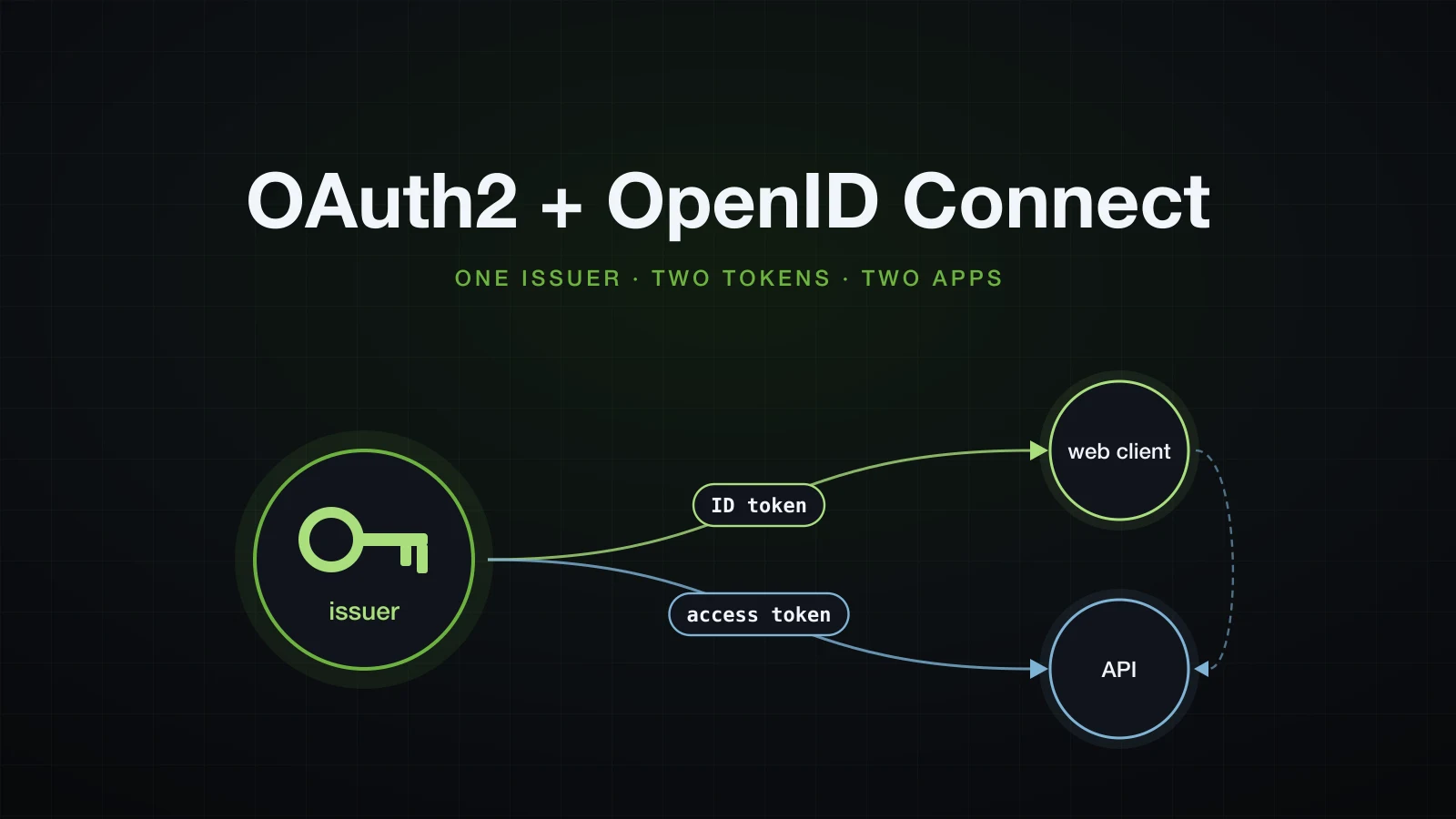
The lab comes first, then the vocabulary mapped onto it. The login is driven through the web client with curl, the API then validates the same tokens, and the last sections connect the two applications.
The lab: Keycloak 26.7.4 and two Spring Boot applications
Two projects and the OAuth2 starters
The web client and the API are separate Initializr projects, generated from the lab root:
curl -s "https://start.spring.io/starter.zip?type=gradle-project&language=java&bootVersion=4.1.1&javaVersion=21&groupId=com.example&artifactId=web&name=web&packageName=com.example.web&dependencies=web,security,oauth2-client" -o web.zip
curl -s "https://start.spring.io/starter.zip?type=gradle-project&language=java&bootVersion=4.1.1&javaVersion=21&groupId=com.example&artifactId=api&name=api&packageName=com.example.api&dependencies=web,security,oauth2-resource-server" -o api.zip
The oauth2-client id writes this line into the web client, next to the security and web starters and a matching -test starter:
implementation 'org.springframework.boot:spring-boot-starter-security-oauth2-client'<dependency>
<groupId>org.springframework.boot</groupId>
<artifactId>spring-boot-starter-security-oauth2-client</artifactId>
</dependency>The API gets spring-boot-starter-security-oauth2-resource-server, the starter Basics 35 used. The Boot 4.1.1 BOM still manages the Boot 3 names, spring-boot-starter-oauth2-client and spring-boot-starter-oauth2-resource-server, and their 4.1.1 POMs declare the same dependencies as the new ones. Their descriptions say what they are:
curl -s https://repo1.maven.org/maven2/org/springframework/boot/spring-boot-starter-oauth2-client/4.1.1/spring-boot-starter-oauth2-client-4.1.1.pom | grep '<description>' <description>Starter for using Spring Security's OAuth2/OpenID Connect client features (deprecated in favor of spring-boot-starter-security-oauth2-client)</description>The client starter brings spring-security-oauth2-client 7.1.1, spring-security-oauth2-jose 7.1.1 and Nimbus oauth2-oidc-sdk 11.38.2. Tutorials built on WebSecurityConfigurerAdapter, on @EnableResourceServer from the retired spring-security-oauth2 project, or on Keycloak's own Spring adapters do not apply: Spring Security 6 removed WebSecurityConfigurerAdapter, and keycloak-spring-security-adapter, whose KeycloakWebSecurityConfigurerAdapter extends it, is deprecated, with 25.0.3 as its last release on Maven Central.
A realm imported from JSON
The realm is a file, so the setup can be recreated at any time. catalogue holds three clients, one realm role and two users:
{
  "realm": "catalogue",
  "enabled": true,
  "roles": {
    "realm": [ { "name": "ADMIN", "description": "Catalogue administrator" } ]
  },
  "users": [
    {
      "id": "0140b1ce-67b1-432d-af8e-f021ea7cea40",
      "username": "alice",
      "enabled": true,
      "email": "alice@example.com",
      "emailVerified": true,
      "firstName": "Alice",
      "lastName": "Liddell",
      "credentials": [ { "type": "password", "value": "Wonderland-2026", "temporary": false } ]
    },
    {
      "id": "dfc3c0df-f01c-43c3-a4a5-a212699bbe09",
      "username": "bob",
      "enabled": true,
      "email": "bob@example.com",
      "emailVerified": true,
      "firstName": "Bob",
      "lastName": "Builder",
      "credentials": [ { "type": "password", "value": "Builder-2026", "temporary": false } ],
      "realmRoles": [ "ADMIN" ]
    }
  ],
  "clients": [
    {
      "clientId": "web-client",
      "secret": "web-client-secret",
      "publicClient": false,
      "standardFlowEnabled": true,
      "directAccessGrantsEnabled": false,
      "redirectUris": [ "http://localhost:8213/login/oauth2/code/keycloak" ],
      "attributes": { "post.logout.redirect.uris": "http://localhost:8213/" },
      "protocolMappers": [
        {
          "name": "catalogue-api audience",
          "protocol": "openid-connect",
          "protocolMapper": "oidc-audience-mapper",
          "config": { "included.custom.audience": "catalogue-api", "access.token.claim": "true" }
        }
      ]
    },
    {
      "clientId": "reporting-service",
      "secret": "reporting-service-secret",
      "publicClient": false,
      "standardFlowEnabled": false,
      "serviceAccountsEnabled": true,
      "protocolMappers": [
        {
          "name": "catalogue-api audience",
          "protocol": "openid-connect",
          "protocolMapper": "oidc-audience-mapper",
          "config": { "included.custom.audience": "catalogue-api", "access.token.claim": "true" }
        }
      ]
    },
    {
      "clientId": "partner-service",
      "secret": "partner-service-secret",
      "publicClient": false,
      "standardFlowEnabled": false,
      "serviceAccountsEnabled": true
    }
  ]
}web-clientis a confidential client: it has a secret, may use the authorization code flow, and Keycloak redirects only to the one callback URL listed.post.logout.redirect.urisis the address Keycloak may send the browser to after a logout.- The audience mapper adds
catalogue-apito theaudclaim of access tokens issued toweb-clientandreporting-service. The API checks for that value later;partner-servicehas no mapper, and its tokens fail that check. reporting-servicehas only a service account: it gets tokens for itself with the client credentials grant, with no user involved.- The user
ids are fixed so that thesubclaim is the same on every import.bobhas the realm roleADMIN;alicehas none. - An imported user gets exactly the realm roles listed. Keycloak's
default-roles-cataloguewas not assigned to alice or bob, so alice's tokens carry norealm_accessclaim at all, while the service accounts Keycloak creates itself do receive the default roles, as a decoded token shows later.
The secrets and passwords are lab values. A second file imports a realm other with its own reporting-service client, used later for a token from another issuer:
{
  "realm": "other",
  "enabled": true,
  "clients": [
    {
      "clientId": "reporting-service",
      "secret": "reporting-service-secret",
      "publicClient": false,
      "standardFlowEnabled": false,
      "serviceAccountsEnabled": true,
      "protocolMappers": [
        {
          "name": "catalogue-api audience",
          "protocol": "openid-connect",
          "protocolMapper": "oidc-audience-mapper",
          "config": { "included.custom.audience": "catalogue-api", "access.token.claim": "true" }
        }
      ]
    }
  ]
}
Starting Keycloak in dev mode
docker run -d --name sba-a13-keycloak --memory 1536m -p 8313:8080 \
  -e KC_BOOTSTRAP_ADMIN_USERNAME=admin -e KC_BOOTSTRAP_ADMIN_PASSWORD=admin \
  -v "$PWD/keycloak:/opt/keycloak/data/import:ro" \
quay.io/keycloak/keycloak:26.7.4 start-dev --import-realm --http-access-log-enabled=truestart-devruns over plain HTTP with an H2 database inside the container, so no separate database is needed.--import-realmreads every file in/opt/keycloak/data/import.--http-access-log-enabled=truelogs every request Keycloak receives; later sections count calls from the applications with it.- The bootstrap admin belongs to the
masterrealm and the admin console, which article 14 uses. Nothing here needs it.
INFO  [org.keycloak.exportimport.dir.DirImportProvider] (main) Importing from directory /opt/keycloak/bin/../data/import
INFO  [org.keycloak.exportimport.util.ImportUtils] (main) Realm 'catalogue' imported
INFO  [org.keycloak.exportimport.util.ImportUtils] (main) Realm 'other' imported
INFO  [org.keycloak.services] (main) KC-SERVICES0032: Import finished successfully
INFO  [io.quarkus] (main) Keycloak 26.7.4 on JVM (powered by Quarkus 3.33.3.2) started in 6.414s. Listening on: http://0.0.0.0:8080
The import runs with the strategy IGNORE_EXISTING: after a docker restart, the log said Realm 'catalogue' already exists. Import skipped. A changed realm file therefore needs a new container (docker rm -f sba-a13-keycloak and the same docker run), which also generates new signing keys.
The discovery document
Every OpenID Provider publishes its endpoints at a fixed path under the issuer:
curl -s http://localhost:8313/realms/catalogue/.well-known/openid-configuration | jq '{issuer, authorization_endpoint, token_endpoint, userinfo_endpoint, end_session_endpoint, jwks_uri, grant_types_supported, code_challenge_methods_supported}'{
"issuer": "http://localhost:8313/realms/catalogue",
"authorization_endpoint": "http://localhost:8313/realms/catalogue/protocol/openid-connect/auth",
"token_endpoint": "http://localhost:8313/realms/catalogue/protocol/openid-connect/token",
"userinfo_endpoint": "http://localhost:8313/realms/catalogue/protocol/openid-connect/userinfo",
"end_session_endpoint": "http://localhost:8313/realms/catalogue/protocol/openid-connect/logout",
"jwks_uri": "http://localhost:8313/realms/catalogue/protocol/openid-connect/certs",
"grant_types_supported": [
"authorization_code",
"client_credentials",
"implicit",
"password",
"refresh_token",
"urn:ietf:params:oauth:grant-type:device_code",
"urn:ietf:params:oauth:grant-type:jwt-bearer",
"urn:ietf:params:oauth:grant-type:token-exchange",
"urn:ietf:params:oauth:grant-type:uma-ticket",
"urn:openid:params:grant-type:ciba"
],
"code_challenge_methods_supported": [
"plain",
"S256"
]
}The full document has 56 members. Both applications need only one property, the issuer URL; Spring Security reads the rest from here. The jwks_uri returned two public keys: one with "use": "sig" and "alg": "RS256" that signs the tokens, and one with "use": "enc" and "alg": "RSA-OAEP" for encryption, which no token here uses.
OAuth2 and OpenID Connect terms, mapped to the lab
| Role in the spec | In this lab | What it holds |
|---|---|---|
| Resource owner | the users alice and bob | a password that only Keycloak checks |
| Client | the web client on 8213, registered as web-client; the service identity reporting-service | a client secret, and a session per logged-in user |
| Authorization server, called OpenID Provider in OIDC | Keycloak, realm catalogue, issuer http://localhost:8313/realms/catalogue | users, clients, roles and the signing keys |
| Resource server | the API on 9213 | the issuer URL and the audience it expects, nothing about users |
- The authorization code grant is how a user logs in to the client. The browser carries only a one-time code; the client exchanges it for tokens over a direct back-channel call, authenticated with its secret.
- PKCE (Proof Key for Code Exchange, RFC 7636) binds that code to a random verifier that only the client knows, so a code taken from a URL is useless on its own.
- OpenID Connect is a layer on top of OAuth2. Asking for the scope
openidadds an ID token, a JWT for the client that says who logged in, plus the userinfo endpoint, discovery and logout. - The access token is for the API. It says which client acts, for which user and with which scopes, and the client forwards it without reading it.
- The client credentials grant gives a client a token for itself, without a user.
OAuth2 Login against Keycloak
Registering Keycloak with issuer-uri
spring.application.name=web
server.port=8213
logging.pattern.console=%logger{0}: %msg%n

spring.security.oauth2.client.registration.keycloak.client-id=web-client
spring.security.oauth2.client.registration.keycloak.client-secret=web-client-secret
spring.security.oauth2.client.registration.keycloak.scope=openid,profile,email
spring.security.oauth2.client.provider.keycloak.issuer-uri=http://localhost:8313/realms/cataloguespring:
application:
name: web
security:
oauth2:
client:
registration:
keycloak:
client-id: web-client
client-secret: web-client-secret
scope: openid,profile,email
provider:
keycloak:
issuer-uri: http://localhost:8313/realms/catalogue
server:
port: 8213
logging:
pattern:
console: '%logger{0}: %msg%n'keycloakis the registration id. It appears in the two paths Spring Security serves:/oauth2/authorization/keycloakstarts a login, and/login/oauth2/code/keycloakreceives the code, from the default redirect URI template{baseUrl}/{action}/oauth2/code/{registrationId}.client-idandclient-secretare the values from the realm file.scopemust containopenidfor an OpenID Connect login with an ID token.issuer-urireplaces the four endpoint URLs, which Spring Security takes from the discovery document.
The chain is the same SecurityFilterChain as in Basics 33, with oauth2Login in place of a form login:
package com.example.web.security;

import org.springframework.context.annotation.Bean;
import org.springframework.context.annotation.Configuration;
import org.springframework.security.config.Customizer;
import org.springframework.security.config.annotation.web.builders.HttpSecurity;
import org.springframework.security.web.SecurityFilterChain;

@Configuration
public class SecurityConfig {

    @Bean
    SecurityFilterChain securityFilterChain(HttpSecurity http) {
        http
                .authorizeHttpRequests(auth -> auth
                        .requestMatchers("/").permitAll()
                        .requestMatchers("/admin/**").hasRole("ADMIN")
                        .anyRequest().authenticated())
                .oauth2Login(Customizer.withDefaults());
        return http.build();
    }
}
A controller shows what the application knows about the user after the login:
package com.example.web.account;

import org.springframework.security.core.Authentication;
import org.springframework.security.core.GrantedAuthority;
import org.springframework.security.core.annotation.AuthenticationPrincipal;
import org.springframework.security.oauth2.core.oidc.user.OidcUser;
import org.springframework.web.bind.annotation.GetMapping;
import org.springframework.web.bind.annotation.RestController;

@RestController
public class AccountController {

    @GetMapping("/")
    public String home() {
        return "Catalogue web client";
    }

    @GetMapping("/me")
    public AccountResponse me(@AuthenticationPrincipal OidcUser user, Authentication authentication) {
        return new AccountResponse(
                user.getClass().getSimpleName(),
                authentication.getName(),
                user.getClaims(),
                authentication.getAuthorities().stream().map(GrantedAuthority::getAuthority).toList());
    }

    @GetMapping("/admin")
    public String admin(Authentication authentication) {
        return "Admin area for " + authentication.getName();
    }
}package com.example.web.account;
import java.util.List;
import java.util.Map;
public record AccountResponse(String principal, String name, Map<String, Object> claims, List<String> authorities) {
}With DefaultSecurityFilterChain at DEBUG, the startup log listed the filters oauth2Login adds:
DefaultSecurityFilterChain: Will secure any request with filters: DisableEncodeUrlFilter, WebAsyncManagerIntegrationFilter, SecurityContextHolderFilter, HeaderWriterFilter, CsrfFilter, LogoutFilter, OAuth2AuthorizationRequestRedirectFilter, OAuth2LoginAuthenticationFilter, DefaultResourcesFilter, DefaultLoginPageGeneratingFilter, DefaultLogoutPageGeneratingFilter, RequestCacheAwareFilter, SecurityContextHolderAwareRequestFilter, AnonymousAuthenticationFilter, ExceptionTranslationFilter, AuthorizationFilterOAuth2AuthorizationRequestRedirectFilter answers /oauth2/authorization/{registrationId} with the redirect to Keycloak, and OAuth2LoginAuthenticationFilter handles the callback. The session and CsrfFilter stay: this is a browser application.
What issuer-uri does at startup
Keycloak's access log during the web client's startup contained one request:
"GET /realms/catalogue/.well-known/openid-configuration HTTP/1.1" 200 6628Spring Boot resolves the issuer while it builds the InMemoryClientRegistrationRepository, once per registration: after a second registration was added later, the startup made two such requests. It does not fetch the keys. The call is eager, so the application depends on Keycloak to start. With the container stopped, java -jar exited with status 1; the end of the cause chain:
Caused by: java.lang.IllegalArgumentException: Unable to resolve Configuration with the provided Issuer of "http://localhost:8313/realms/catalogue"
Caused by: org.springframework.web.client.ResourceAccessException: I/O error on GET request for "http://localhost:8313/realms/catalogue/.well-known/openid-configuration": Connection refused
Caused by: java.net.ConnectException: Connection refused
The outermost exception was an UnsatisfiedDependencyException for the bean securityFilterChain, through a bean named OAuth2AuthorizedClientManager that Spring Security registers for the client. In Docker Compose or Kubernetes, start the web client after Keycloak is healthy, or give the provider its endpoints explicitly (authorization-uri, token-uri, jwk-set-uri, user-info-uri) instead of issuer-uri.
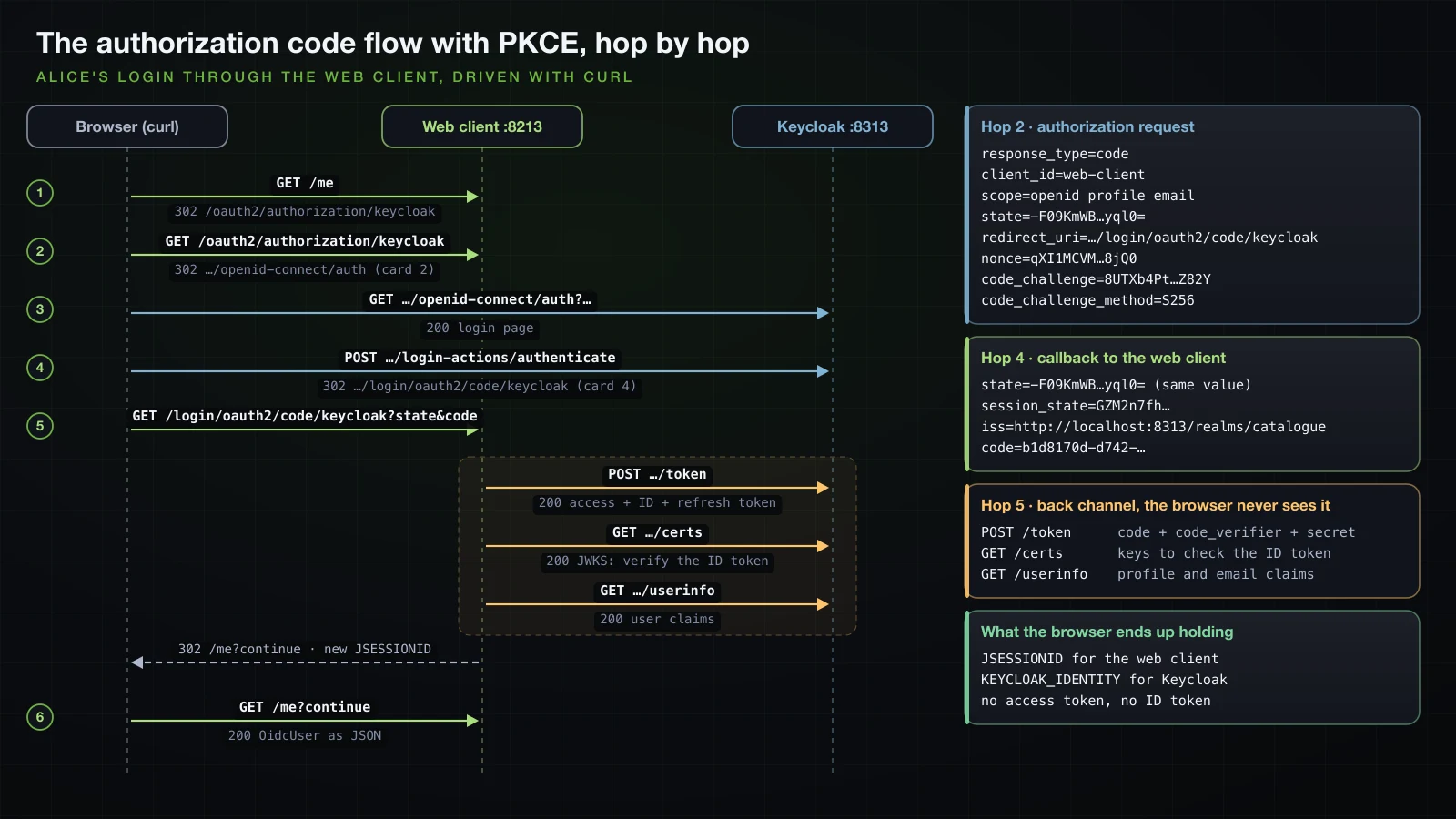
The login, hop by hop with curl
A browser follows redirects without showing them. This script plays the browser with a cookie jar and stops at every hop, saving each response:
#!/bin/zsh
# usage: flow.sh <username> <password> <dir>
# The OAuth2 login of the web client, driven with curl one hop at a time; every response is saved.
USER_NAME=$1; PASSWORD=$2; DIR=$3
mkdir -p $DIR; JAR=$DIR/jar; rm -f $JAR
loc() { grep -i '^Location:' $1 | sed 's/^Location: //I' | tr -d '\r'; }
curl -s -i -c $JAR -b $JAR http://localhost:8213/me > $DIR/1-me.txt
curl -s -i -c $JAR -b $JAR "$(loc $DIR/1-me.txt)" > $DIR/2-authorization.txt
curl -s -i -c $JAR -b $JAR "$(loc $DIR/2-authorization.txt)" > $DIR/3-keycloak-login-page.txt
ACTION=$(grep -o 'action="[^"]*"' $DIR/3-keycloak-login-page.txt | head -1 | sed 's/action="//; s/"$//; s/&/\&/g')
curl -s -i -c $JAR -b $JAR --data-urlencode "username=$USER_NAME" --data-urlencode "password=$PASSWORD" \
--data-urlencode credentialId= "$ACTION" > $DIR/4-keycloak-login-post.txt
curl -s -i -c $JAR -b $JAR "$(loc $DIR/4-keycloak-login-post.txt)" > $DIR/5-callback.txt
curl -s -i -c $JAR -b $JAR "$(loc $DIR/5-callback.txt)" > $DIR/6-me.txt
for f in $DIR/[1-6]-*.txt; do echo "$(basename $f): $(head -1 $f | tr -d '\r') $(loc $f | cut -c1-120)"; done./flow.sh alice Wonderland-2026 out/flowThe responses below are alice's, with the security headers that Basics 33 shows in full left out. Hop 1, the protected page:
HTTP/1.1 302
Set-Cookie: JSESSIONID=98FDE59B4FF470163378DA265D1D9CDF; Path=/; HttpOnly
Location: http://localhost:8213/oauth2/authorization/keycloak
ExceptionTranslationFilter saved the request for /me in the new session and sent the browser to the login entry point. With a single registration that uses the authorization code grant, that is the registration's authorization path, not a login page.
Hop 2, the authorization request:
HTTP/1.1 302
Location: http://localhost:8313/realms/catalogue/protocol/openid-connect/auth?response_type=code&client_id=web-client&scope=openid%20profile%20email&state=-F09KmWBnUjvu5nRLnx0OECqanJf95azinS4-aRyql0%3D&redirect_uri=http://localhost:8213/login/oauth2/code/keycloak&nonce=qXI1MCVMcR2tIqxkQqKGqelhbfv6ieuZhwMLPEx8jQ0&code_challenge=8UTXb4PtdQDFCF9k8YRjo1TkYa_TIBq34Xgcb2aZ82Y&code_challenge_method=S256| Parameter | Value | Purpose |
|---|---|---|
response_type | code | ask for an authorization code |
client_id | web-client | which client is asking |
scope | openid profile email | openid turns the request into an OpenID Connect login |
state | -F09KmWB…yql0= | random value, stored in the session, compared on the callback against cross-site request forgery |
redirect_uri | http://localhost:8213/login/oauth2/code/keycloak | must equal a URI registered for the client |
nonce | qXI1MCVM…8jQ0 | random value that must come back inside the ID token, against token replay |
code_challenge | 8UTXb4Pt…Z82Y | SHA-256 of a random code_verifier, Base64URL-encoded |
code_challenge_method | S256 | how the challenge was derived |
OAuth2AuthorizationRequestRedirectFilter stored the whole request, including the code_verifier, in the HTTP session; nothing secret left the server.
Hop 3, Keycloak's login page, 200 OK with <title>Sign in to catalogue. It set AUTH_SESSION_ID, KC_AUTH_SESSION_HASH and KC_RESTART, all with Path=/realms/catalogue/, and its form posts to:
http://localhost:8313/realms/catalogue/login-actions/authenticate?session_code=0pbpKaQoaj15n8Vo-x0VKkUFMiWP2qcvcxQdGN2yVjY&execution=d3cc8a17-39aa-4282-b845-7ce18fae3084&client_id=web-client&tab_id=2QxW60S8ymE&client_data=eyJydSI6Imh0dHA6Ly9sb2NhbGhvc3Q6ODIxMy9sb2dpbi9vYXV0aDIvY29kZS9rZXljbG9hayIsInJ0IjoiY29kZSIsInN0IjoiLUYwOUttV0JuVWp2dTVuUkxueDBPRUNxYW5KZjk1YXppblM0LWFSeXFsMD0ifQThe password goes to Keycloak's own page, never to the web client.
Hop 4, the form post with username, password and an empty credentialId:
HTTP/1.1 302 Found
Set-Cookie: KEYCLOAK_IDENTITY=eyJhbGciOiJIUzUxMiIsInR5cCIgOiAiSldUIiwia2lkIiA6ICI2NmM4YjlmZC0wZTliLTQxZWQtOGZjMy03MjllYWZiMzY3MDYifQ…;Version=1;Path=/realms/catalogue/;Secure;HttpOnly;SameSite=None
Set-Cookie: KEYCLOAK_SESSION=9WKq1MeUcea8kHBNYkf1-ZMaZLwSjOlwTHYN5jTpP6t5u3-BqWzqwqzV7v2tISM9;Version=1;Path=/realms/catalogue/;Max-Age=36000;Secure;SameSite=None
Location: http://localhost:8213/login/oauth2/code/keycloak?state=-F09KmWBnUjvu5nRLnx0OECqanJf95azinS4-aRyql0%3D&session_state=GZM2n7fhTBuMOXZ38iSLEVWW&iss=http%3A%2F%2Flocalhost%3A8313%2Frealms%2Fcatalogue&code=b1d8170d-d742-9150-c542-f4df81d6c986.GZM2n7fhTBuMOXZ38iSLEVWW.09c03f81-03c2-48d1-8478-b40f62afe290
The callback carries the same state, the code, Keycloak's session_state and iss, the issuer as defined by RFC 9207 so a client talking to several providers can tell which one answered. The two cookies are Keycloak's single sign-on session for the realm.
Hop 5, the callback on the web client:
HTTP/1.1 302
Set-Cookie: JSESSIONID=DBD16E3F828AA2D5C590FD0D9FABF48C; Path=/; HttpOnly
Location: http://localhost:8213/me?continue
Before answering, the web client made three calls to Keycloak itself. Keycloak's access log for that second:
"POST /realms/catalogue/protocol/openid-connect/token HTTP/2" 200 -
"GET /realms/catalogue/protocol/openid-connect/certs HTTP/1.1" 200 2933
"GET /realms/catalogue/protocol/openid-connect/userinfo HTTP/1.1" 200 193
POST …/tokenexchanged the code, thecode_verifierand the client secret for an access token, an ID token and a refresh token.GET …/certsfetched the public keys to verify the ID token's signature, before itsiss,aud,expandnoncewere checked.GET …/userinfoloaded the user's claims with the access token. In 7.1.1,OidcUserRequestUtils.shouldRetrieveUserInfoasks only whether the provider has a userinfo endpoint and the grant isauthorization_code; Spring Security 6.5'sOidcUserServicestill held anaccessibleScopesset ofprofile,email,addressandphonefor that decision.
The session id changed from 98FDE59B… to DBD16E3F…: session fixation protection, as after any login. The redirect goes back to the saved request, /me, with the continue marker of the request cache.
Hop 6, GET /me?continue, answered 200 with the JSON that the section on the OidcUser takes apart.
Is PKCE on for a confidential client?
Yes. web-client authenticates with a secret, and Spring Security 7.1.1 still sent code_challenge and code_challenge_method=S256 without being configured to, for Google and GitHub as well, as a later section shows. The verifier protects the code even from someone who also knows the secret. To see it, the first four hops of a login ran without the fifth, and the code from the Location header was sent to the token endpoint directly, with the client's secret and without a verifier:
curl -s -i -u web-client:web-client-secret -d grant_type=authorization_code -d "code=$CODE" \
  -d redirect_uri=http://localhost:8213/login/oauth2/code/keycloak \
http://localhost:8313/realms/catalogue/protocol/openid-connect/tokenHTTP/1.1 400 Bad Request
{"error":"invalid_grant","error_description":"PKCE code verifier not specified"}Keycloak logged type="CODE_TO_TOKEN_ERROR" with error="code_verifier_missing". It also counted the attempt as a use of the code: when the browser then delivered the same code to the web client, Keycloak logged Code '3c1ac8dd-a3cf-351e-a1e6-4da78fbc1880' already used, and the web client answered 302 to /login?error. A code intercepted on its way back is worthless, and the attempt costs the real user this login.
The browser never holds a token
After the login, curl's cookie jar held these cookies, by name and path:
| Cookie | Path | Set by |
|---|---|---|
JSESSIONID | / | the web client, HttpOnly |
AUTH_SESSION_ID, KC_AUTH_SESSION_HASH | /realms/catalogue/ | Keycloak |
KEYCLOAK_IDENTITY, KEYCLOAK_SESSION | /realms/catalogue/ | Keycloak |
The tokens themselves stay in the web client's session. For one of bob's logins, the signatures of the access token and the ID token, taken from the web client's log, were searched for in all six saved responses and the cookie jar: 0 matches each. KEYCLOAK_IDENTITY looks like a JWT, but its header is {"alg":"HS512","typ" : "JWT",…} and its payload says "typ":"Serialized-ID": an HMAC-signed session cookie that only Keycloak can verify, valid for 36,000 seconds, the ten-hour single sign-on session. It is sent only to Keycloak's paths, and it is what lets Keycloak recognise the user again, which matters for logout.
ID token vs access token: the two JWTs Keycloak issued
To look inside, a lab-only controller in the web client writes both tokens to the server log. It returns nothing to the browser, and it does not belong in a real application:
package com.example.web.lab;

import org.slf4j.Logger;
import org.slf4j.LoggerFactory;
import org.springframework.http.ResponseEntity;
import org.springframework.security.core.annotation.AuthenticationPrincipal;
import org.springframework.security.oauth2.client.OAuth2AuthorizedClient;
import org.springframework.security.oauth2.client.annotation.RegisteredOAuth2AuthorizedClient;
import org.springframework.security.oauth2.core.oidc.user.OidcUser;
import org.springframework.web.bind.annotation.GetMapping;
import org.springframework.web.bind.annotation.RestController;

// Lab only: writes the tokens to the server log so they can be decoded; never ship this.
@RestController
public class TokenLogController {

    private static final Logger log = LoggerFactory.getLogger(TokenLogController.class);

    @GetMapping("/lab/tokens")
    public ResponseEntity<Void> logTokens(@AuthenticationPrincipal OidcUser user,
                                          @RegisteredOAuth2AuthorizedClient("keycloak") OAuth2AuthorizedClient client) {
        log.info("id_token={}", user.getIdToken().getTokenValue());
        log.info("access_token={}", client.getAccessToken().getTokenValue());
        log.info("access_token scopes={} expiresAt={} refresh_token={}", client.getAccessToken().getScopes(),
                client.getAccessToken().getExpiresAt(), client.getRefreshToken() != null);
        return ResponseEntity.noContent().build();
    }
}
@RegisteredOAuth2AuthorizedClient("keycloak") resolves the OAuth2AuthorizedClient that the login stored: the access token, its scopes and expiry, and the refresh token. For bob, the third line read access_token scopes=[openid, profile, email] expiresAt=2026-09-18T07:20:40.092071Z refresh_token=true. Refresh tokens and their rotation are article 15's subject. The two tokens, decoded with the b64url_decode function of Basics 35:
grep '^TokenLogController: id_token=' web.log | tail -1 | sed 's/.*id_token=//' > id.jwt
grep '^TokenLogController: access_token=' web.log | tail -1 | sed 's/.*access_token=//' > access.jwt
cut -d. -f2 < id.jwt | b64url_decode | jq .
cut -d. -f2 < access.jwt | b64url_decode | jq .{
"exp": 1789716040,
"iat": 1789715740,
"auth_time": 1789715740,
"jti": "fb265f05-d6dd-ef7e-7532-b84527f66e25",
"iss": "http://localhost:8313/realms/catalogue",
"aud": "web-client",
"sub": "dfc3c0df-f01c-43c3-a4a5-a212699bbe09",
"typ": "ID",
"azp": "web-client",
"nonce": "-yGkh_CcVGywOUJz5RsmkyQfCtKGKgzpWvjseQRKpcY",
"sid": "2iMZty-p32L9z9UcttfQX67X",
"at_hash": "wfQkTQ1piUYK3urueWKUEA",
"acr": "1",
"email_verified": true,
"name": "Bob Builder",
"preferred_username": "bob",
"given_name": "Bob",
"family_name": "Builder",
"email": "bob@example.com"
}{
"exp": 1789716040,
"iat": 1789715740,
"auth_time": 1789715740,
"jti": "onrtac:1d07b246-2e7d-a7d6-7f5b-ce6996036943",
"iss": "http://localhost:8313/realms/catalogue",
"aud": "catalogue-api",
"sub": "dfc3c0df-f01c-43c3-a4a5-a212699bbe09",
"typ": "Bearer",
"azp": "web-client",
"sid": "2iMZty-p32L9z9UcttfQX67X",
"acr": "1",
"allowed-origins": [
"http://localhost:8213"
],
"realm_access": {
"roles": [
"ADMIN"
]
},
"scope": "openid email profile",
"email_verified": true,
"name": "Bob Builder",
"preferred_username": "bob",
"given_name": "Bob",
"family_name": "Builder",
"email": "bob@example.com"
}Both headers were {"alg":"RS256","typ" : "JWT","kid" : "RI3cgatLapwIZsckaiZMdOZE4ah68oWi9i5vaMTyiNk"}: the same realm key signs both.
| Claim | ID token | Access token |
|---|---|---|
typ | ID | Bearer |
aud | web-client: meant for the client | catalogue-api: meant for the API, added by the audience mapper |
azp | web-client | web-client: the client that obtained it |
nonce | the value from hop 2 | absent |
at_hash | wfQkTQ1piUYK3urueWKUEA | absent |
scope | absent | openid email profile |
realm_access | absent | {"roles":["ADMIN"]} |
allowed-origins | absent | ["http://localhost:8213"], for CORS |
| lifetime | 300 s | 300 s, Keycloak's default |
| read by | the web client, once, at login | the API, on every request |
at_hash binds the ID token to the access token issued with it: it is the Base64URL of the left half of the SHA-256 of the access token's text.
printf '%s' "$(cat access.jwt)" | openssl dgst -sha256 -binary | head -c 16 | b64urlwfQkTQ1piUYK3urueWKUEAThe important row is realm_access: bob's role is in the access token only. Alice's tokens had no realm_access at all, since the import gave her no realm role.
The OidcUser principal and its authorities
Alice's GET /me, before any change to the configuration above:
{"principal":"DefaultOidcUser","name":"0140b1ce-67b1-432d-af8e-f021ea7cea40","claims":{"at_hash":"rMSmeXcXb14YU7G0bbxvZA","sub":"0140b1ce-67b1-432d-af8e-f021ea7cea40","email_verified":true,"iss":"http://localhost:8313/realms/catalogue","typ":"ID","preferred_username":"alice","given_name":"Alice","nonce":"ahg0n9AdRAuB9PzVmKdYHsHmr_YGuEwCKw8CJSvGAXA","sid":"jH_TrllUcP-XTZ5tYMb0K6go","aud":["web-client"],"acr":"1","azp":"web-client","auth_time":"2026-09-18T07:12:24Z","name":"Alice Liddell","exp":"2026-09-18T07:17:30Z","family_name":"Liddell","iat":"2026-09-18T07:12:30Z","email":"alice@example.com","jti":"5192ca65-4557-5820-f76b-4f22cc457480"},"authorities":["OIDC_USER","SCOPE_email","SCOPE_openid","SCOPE_profile"]}- The principal is a
DefaultOidcUser, and its claims are the ID token's claims merged with the userinfo response, converted:expandiatareInstants,audis a list. - The authorities are
OIDC_USERplus oneSCOPE_authority per granted scope. There is noFACTOR_authority: theFACTOR_PASSWORDof Basics 33 and theFACTOR_BEARERof Basics 35 have no equivalent in an OAuth2 login in 7.1.1. - The name is the
subclaim, a UUID. That is the default when the provider comes fromissuer-uri, and it is whatauthentication.getName(), the logs and anycreatedBycolumn would show.
Using preferred_username as the name
spring.security.oauth2.client.provider.keycloak.issuer-uri=http://localhost:8313/realms/catalogue
spring.security.oauth2.client.provider.keycloak.user-name-attribute=preferred_username provider:
keycloak:
issuer-uri: http://localhost:8313/realms/catalogue
user-name-attribute: preferred_usernameAfter a restart, /me returned "name":"alice" with the same claims. The sub stays the stable key to store; a username can change in Keycloak.
Mapping Keycloak realm roles to ROLE_ authorities
Bob has the realm role ADMIN, and /admin requires hasRole("ADMIN"):
curl -s -i -b out/flow-bob/jar http://localhost:8213/adminHTTP/1.1 403
Content-Type: application/json
{"timestamp":"2026-09-18T07:15:40.195Z","status":403,"error":"Forbidden","path":"/admin"}Bob's authorities were ["SCOPE_openid","SCOPE_email","OIDC_USER","SCOPE_profile"]: Spring Security knows nothing about Keycloak's realm_access claim. A GrantedAuthoritiesMapper bean rewrites the authorities once at login, and oauth2Login picks it up without further configuration:
import java.util.Collection;
import java.util.HashSet;
import java.util.Map;
import java.util.Set;

import org.springframework.security.core.GrantedAuthority;
import org.springframework.security.core.authority.SimpleGrantedAuthority;
import org.springframework.security.core.authority.mapping.GrantedAuthoritiesMapper;
import org.springframework.security.oauth2.core.oidc.user.OidcUserAuthority;

    @Bean
    GrantedAuthoritiesMapper keycloakRealmRolesMapper() {
        return authorities -> {
            Set<GrantedAuthority> mapped = new HashSet<>(authorities);
            for (GrantedAuthority authority : authorities) {
                if (authority instanceof OidcUserAuthority oidc
                        && oidc.getIdToken().getClaim("realm_access") instanceof Map<?, ?> realmAccess
                        && realmAccess.get("roles") instanceof Collection<?> roles) {
                    roles.forEach(role -> mapped.add(new SimpleGrantedAuthority("ROLE_" + role)));
                }
            }
            return mapped;
        };
} OidcUserAuthorityis theOIDC_USERauthority; it carries the ID token and the userinfo claims, which is where a mapper finds data about the user.- The pattern-matching
instanceofskips the mapping when a claim is missing or has an unexpected shape, as it is for alice. - The result keeps the original authorities and adds
ROLE_ADMINfor bob.
After a restart and a new login, bob still got the same 403. The mapper reads the ID token, and the decoded tokens above show where the roles are: in the access token. The access token is addressed to the API; the client should treat it as an opaque string and not build its own authorization on it. The fix belongs in Keycloak: a protocol mapper that also writes the realm roles into the ID token issued to web-client.
      "protocolMappers": [
        {
          "name": "catalogue-api audience",
          "protocol": "openid-connect",
          "protocolMapper": "oidc-audience-mapper",
          "config": { "included.custom.audience": "catalogue-api", "access.token.claim": "true" }
        },
        {
          "name": "realm roles in ID token",
          "protocol": "openid-connect",
          "protocolMapper": "oidc-usermodel-realm-role-mapper",
          "config": { "claim.name": "realm_access.roles", "multivalued": "true", "id.token.claim": "true", "access.token.claim": "false" }
        }
      ]
claim.name with a dot creates the nested structure realm_access.roles. access.token.claim is false because the realm's default roles scope already writes the same claim into access tokens. Since the import skips existing realms, the container was recreated with the same docker run. Bob's next login and his /admin, status line and body:
./flow.sh bob Builder-2026 out/flow-bob
tail -1 out/flow-bob/6-me.txt | jq -c '{name, authorities, realm: .claims.realm_access}'
curl -s -i -b out/flow-bob/jar http://localhost:8213/admin{"name":"bob","authorities":["SCOPE_openid","SCOPE_email","ROLE_ADMIN","SCOPE_profile","OIDC_USER"],"realm":{"roles":["ADMIN"]}}
HTTP/1.1 200
Admin area for bobAlice's ID token has no realm_access, and her /admin stayed 403. The same mapper could read the claim from oidc.getUserInfo() when a provider puts roles into the userinfo response instead.
Logging out: the web client and Keycloak
What a plain /logout leaves behind
With oauth2Login, Spring Security still generates a logout page at GET /logout whose form posts _csrf to /logout. Bob logged out that way:
CSRF=$(curl -s -b jar -c jar http://localhost:8213/logout | grep -o 'name="_csrf" type="hidden" value="[^"]*"' | sed 's/.*value="//; s/"$//')
curl -s -i -b jar -c jar -d "_csrf=$CSRF" http://localhost:8213/logoutHTTP/1.1 302
Location: http://localhost:8213/login?logoutThe web client's session was gone, and the next GET /me started a login. Following it with the same cookie jar, one hop at a time:
2-me.txt: HTTP/1.1 302  -> http://localhost:8213/oauth2/authorization/keycloak
3-authz.txt: HTTP/1.1 302  -> http://localhost:8313/realms/catalogue/protocol/openid-connect/auth?response_type=code&client_id=web-client&scope=openid%20profile%20email&state=pA-Vk
4-keycloak.txt: HTTP/1.1 302 Found -> http://localhost:8213/login/oauth2/code/keycloak?state=pA-Vkm3pZgxHJWVvDSZ9XBvfdcbbPD_7j0XyFWXstjA%3D&session_state=FAO9KxHtxRhvyFYj_6HgCEg6&iss=http%
5-callback.txt: HTTP/1.1 302  -> http://localhost:8213/me?continue
6-me.txt: HTTP/1.1 200  ->
Keycloak answered the authorization request with a 302 and a code straight away, no login form, because KEYCLOAK_IDENTITY was still valid. The new ID token had "auth_time":"2026-09-18T07:16:28Z", the time of the original password entry, and "iat":"2026-09-18T07:16:49Z". On a shared computer, "Log out" followed by any visit logs the same user back in.
RP-initiated logout with OidcClientInitiatedLogoutSuccessHandler
OpenID Connect RP-Initiated Logout sends the browser to the provider's end_session_endpoint after the local logout. Spring Security ships the success handler for it:
import org.springframework.security.oauth2.client.oidc.web.logout.OidcClientInitiatedLogoutSuccessHandler;
import org.springframework.security.oauth2.client.registration.ClientRegistrationRepository;

    @Bean
    SecurityFilterChain securityFilterChain(HttpSecurity http) {
    SecurityFilterChain securityFilterChain(HttpSecurity http, ClientRegistrationRepository clientRegistrations) {
        OidcClientInitiatedLogoutSuccessHandler logoutSuccessHandler =
                new OidcClientInitiatedLogoutSuccessHandler(clientRegistrations);
        logoutSuccessHandler.setPostLogoutRedirectUri("{baseUrl}/");
        http
                .authorizeHttpRequests(auth -> auth
                        .requestMatchers("/").permitAll()
                        .requestMatchers("/admin/**").hasRole("ADMIN")
                        .anyRequest().authenticated())
                .oauth2Login(Customizer.withDefaults());
                .oauth2Login(Customizer.withDefaults())
                .logout(logout -> logout.logoutSuccessHandler(logoutSuccessHandler));
        return http.build();
    }
The same POST /logout now answered:
HTTP/1.1 302
Location: http://localhost:8313/realms/catalogue/protocol/openid-connect/logout?id_token_hint=eyJhbGciOiJSUzI1NiIsInR5cCIgOiAiSldUIiwia2lkIiA6ICJDQmg2elcyczUyY3hoMDFPRHRKZE4wbjlFem9WNk9CT2tqd2dITmJRWS13In0.eyJleHAiOjE3ODk3MTY0MTUs…&post_logout_redirect_uri=http://localhost:8213/end_session_endpointcame from the discovery document thatissuer-uriloaded at startup.id_token_hintis bob's whole ID token, 1,189 characters in the URL. It tells Keycloak which session to end and which client asks.post_logout_redirect_uriis{baseUrl}/expanded, and Keycloak accepts it only because the realm file lists it inpost.logout.redirect.uris.
Following that redirect:
HTTP/1.1 302 Found
Set-Cookie: KEYCLOAK_IDENTITY=;Version=1;Path=/realms/catalogue/;Max-Age=0
Set-Cookie: KEYCLOAK_SESSION=;Version=1;Path=/realms/catalogue/;Max-Age=0
Location: http://localhost:8213/
Keycloak ended the SSO session, deleted its cookies and sent the browser home; with a valid id_token_hint it asked for no confirmation. The next GET /me went through hops 1 and 2 again and hop 3 answered 200 OK with Sign in to catalogue: the password was needed again. Logging out does not revoke the access token already issued; the section on the resource server shows that a token stays valid until exp, and revocation is article 15's topic.
Google and GitHub with CommonOAuth2Provider
For well-known providers, Spring Security holds the endpoints in the enum CommonOAuth2Provider, in spring-security-config 7.1.1, with the constants GOOGLE, GITHUB, FACEBOOK, X and OKTA. Spring Boot applies it when the registration id matches, so a registration needs only its credentials. The lab ran the web client with a social profile holding dummy values:
spring.security.oauth2.client.registration.google.client-id=dummy-google-client-id
spring.security.oauth2.client.registration.google.client-secret=dummy-google-client-secret
spring.security.oauth2.client.registration.github.client-id=dummy-github-client-id
spring.security.oauth2.client.registration.github.client-secret=dummy-github-client-secretspring:
security:
oauth2:
client:
registration:
google:
client-id: dummy-google-client-id
client-secret: dummy-google-client-secret
github:
client-id: dummy-github-client-id
client-secret: dummy-github-client-secretjava -Xmx512m -jar web/build/libs/web-0.0.1-SNAPSHOT.jar --spring.profiles.active=social
curl -s -i http://localhost:8213/oauth2/authorization/google | grep '^Location'
curl -s -i http://localhost:8213/oauth2/authorization/github | grep '^Location'Location: https://accounts.google.com/o/oauth2/v2/auth?response_type=code&client_id=dummy-google-client-id&scope=openid%20profile%20email&state=reuQhz7YOnfSlCy8ysVJJ7dxoiGL9CyQNljLvTCfIik%3D&redirect_uri=http://localhost:8213/login/oauth2/code/google&nonce=fvHIJ4LuMDE9bTrfEQlOSWVxMHv0hQzpvUJietyb2RY&code_challenge=Ygcew9i2RgcMx5F-ziz-OPw0EZ9mwOJYrB3p9Utxmt0&code_challenge_method=S256
Location: https://github.com/login/oauth/authorize?response_type=code&client_id=dummy-github-client-id&scope=read:user&state=Wa9JNTf9jcIPPqEtJoNmLDMkZah0WkMyDx2rOUSqEng%3D&redirect_uri=http://localhost:8213/login/oauth2/code/github&code_challenge=Z8QK2pMK6WqrnxmJE5jPHtbF9rs90M3hnl4_PUdBP3o&code_challenge_method=S256The generated /login page now listed three links, GitHub, Google and, for the Keycloak registration, its issuer URL as the name. The two redirects differ where it matters:
| GitHub | ||
|---|---|---|
| Authorization endpoint | https://accounts.google.com/o/oauth2/v2/auth | https://github.com/login/oauth/authorize |
| Default scopes | openid profile email | read:user |
nonce in the request | yes | no |
| Token endpoint | https://www.googleapis.com/oauth2/v4/token | https://github.com/login/oauth/access_token |
| User info | https://www.googleapis.com/oauth2/v3/userinfo | https://api.github.com/user |
issuer-uri, JWK set | https://accounts.google.com, https://www.googleapis.com/oauth2/v3/certs | none |
| Name attribute | sub | id |
| Principal after login | OidcUser, authority OIDC_USER | OAuth2User, authority OAUTH2_USER |
The values are the string constants in the bytecode of CommonOAuth2Provider$1 and $2, and the authority names are the constants of OidcUserAuthority and OAuth2UserAuthority. GitHub is plain OAuth2, not OpenID Connect: without the openid scope there is no ID token and no nonce, and the user is whatever https://api.github.com/user returns for the access token, loaded by DefaultOAuth2UserService. Code that serves both kinds of provider takes OAuth2User, which OidcUser extends.
A full Google or GitHub login was not run for this article: it needs a real application registered with each provider. With the dummy ids, Google redirected to its error page with an authError that decodes to invalid_client and The OAuth client was not found., and GitHub redirected to its sign-in page. To run it for real: in the Google Cloud console, create an OAuth client of type "Web application" under APIs & Services, Credentials, with the authorized redirect URI http://localhost:8213/login/oauth2/code/google; on GitHub, create an OAuth App under Settings, Developer settings, with the authorization callback URL http://localhost:8213/login/oauth2/code/github; then put each client id and secret in the properties above, from environment variables rather than the file.
A resource server that trusts Keycloak's tokens
issuer-uri on the API
The API replaces Basics 35's public-key-location with the issuer:
spring.application.name=api
server.port=9213
logging.pattern.console=%logger{0}: %msg%n

spring.security.oauth2.resourceserver.jwt.issuer-uri=http://localhost:8313/realms/cataloguespring:
application:
name: api
security:
oauth2:
resourceserver:
jwt:
issuer-uri: http://localhost:8313/realms/catalogue
server:
port: 9213
logging:
pattern:
console: '%logger{0}: %msg%n'The chain is Basics 35's API chain, stateless and without CSRF protection, with its ProblemDetailSecurityHandler copied unchanged: it delegates to BearerTokenAuthenticationEntryPoint with the realm name catalogue, then writes a ProblemDetail body.
package com.example.api.common;

import org.springframework.context.annotation.Bean;
import org.springframework.context.annotation.Configuration;
import org.springframework.security.config.Customizer;
import org.springframework.security.config.annotation.method.configuration.EnableMethodSecurity;
import org.springframework.security.config.annotation.web.builders.HttpSecurity;
import org.springframework.security.config.http.SessionCreationPolicy;
import org.springframework.security.web.SecurityFilterChain;

@Configuration
@EnableMethodSecurity
public class SecurityConfig {

    @Bean
    SecurityFilterChain apiSecurityFilterChain(HttpSecurity http, ProblemDetailSecurityHandler problemHandler) {
        http
                .authorizeHttpRequests(auth -> auth.anyRequest().authenticated())
                .oauth2ResourceServer(oauth2 -> oauth2
                        .jwt(Customizer.withDefaults())
                        .authenticationEntryPoint(problemHandler))
                .exceptionHandling(exceptions -> exceptions
                        .authenticationEntryPoint(problemHandler)
                        .accessDeniedHandler(problemHandler))
                .csrf(csrf -> csrf.disable())
                .sessionManagement(session -> session.sessionCreationPolicy(SessionCreationPolicy.STATELESS));
        return http.build();
    }
}
Two endpoints: one reports what the API saw in the token, the other is for administrators only.
package com.example.api.account;

import org.springframework.security.core.Authentication;
import org.springframework.security.core.GrantedAuthority;
import org.springframework.security.core.annotation.AuthenticationPrincipal;
import org.springframework.security.oauth2.jwt.Jwt;
import org.springframework.web.bind.annotation.GetMapping;
import org.springframework.web.bind.annotation.RestController;

@RestController
public class CallerController {

    @GetMapping("/api/me")
    public CallerResponse me(@AuthenticationPrincipal Jwt jwt, Authentication authentication) {
        return new CallerResponse(
                jwt.getSubject(),
                jwt.getClaimAsString("preferred_username"),
                jwt.getClaimAsString("azp"),
                jwt.getAudience(),
                authentication.getAuthorities().stream().map(GrantedAuthority::getAuthority).toList());
    }
}package com.example.api.account;
import java.util.List;
public record CallerResponse(String subject, String username, String clientId, List<String> audience,
List<String> authorities) {
}package com.example.api.report;
import org.springframework.security.access.prepost.PreAuthorize;
import org.springframework.web.bind.annotation.GetMapping;
import org.springframework.web.bind.annotation.RestController;
@RestController
public class ReportController {
@GetMapping("/api/reports/stock")
@PreAuthorize("hasRole('ADMIN')")
public StockReport stock() {
return new StockReport(3, 128);
}
}StockReport is a record with int products and int unitsInStock. With --debug, the conditions report showed JwtDecoderConfiguration#jwtDecoderByIssuerUri matched and the public-key decoder of Basics 35 not matched.
When the API fetches Keycloak's keys
Keycloak's access log answered the question, request by request:
| Moment | Requests the API sent to Keycloak |
|---|---|
| API startup | none |
| first request with a token | GET …/.well-known/openid-configuration, then GET …/certs |
| second request, same key | none |
a token whose kid is not in the cached key set | GET …/certs once more |
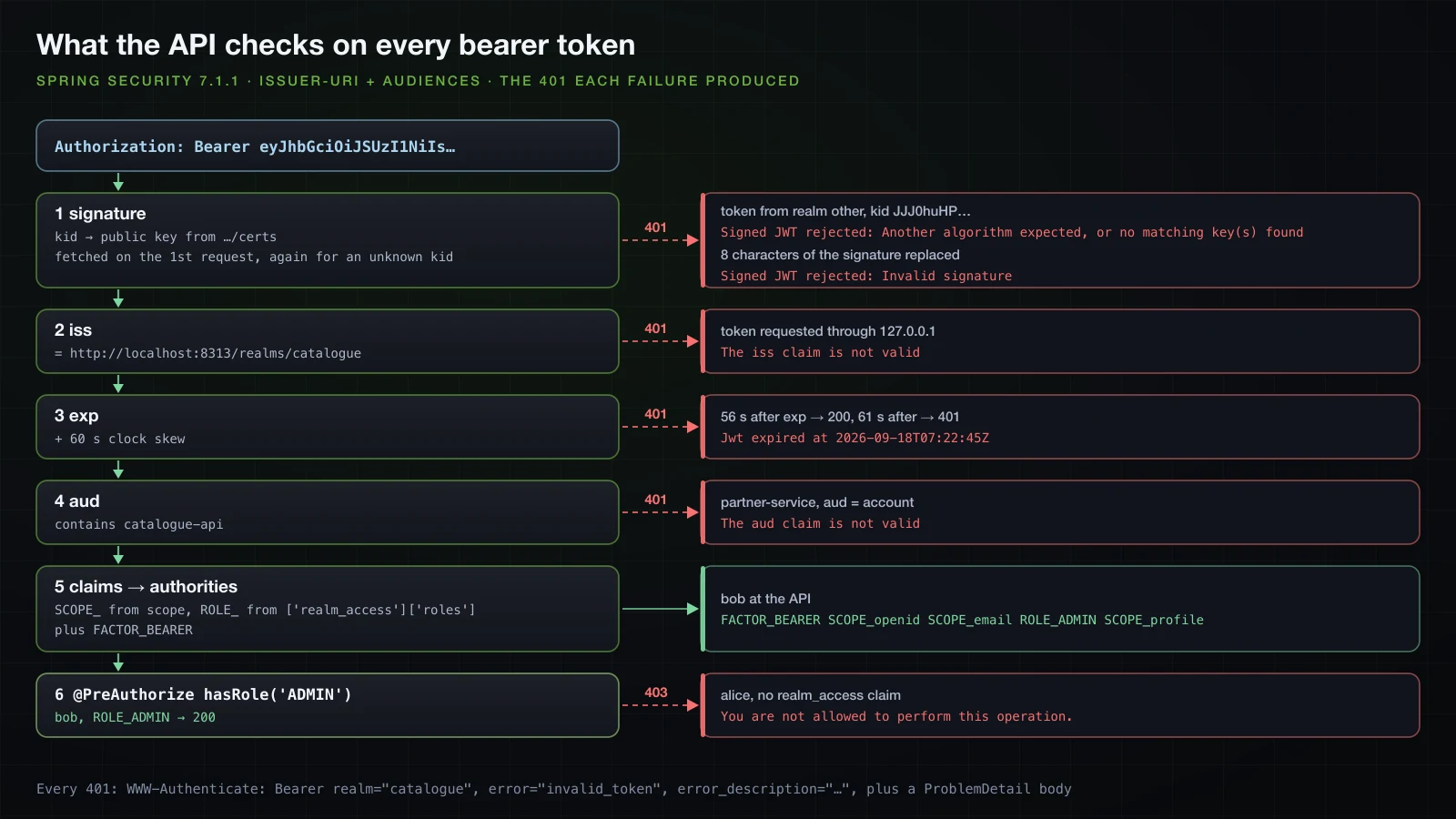
Boot wraps the issuer decoder in a SupplierJwtDecoder: discovery runs on the first request that needs it, and the key set is cached and fetched again for an unknown kid, which is how Keycloak's key rotation reaches the API without a restart. The lazy start has a price. With the Keycloak container stopped, the API started normally, and the first request with a perfectly valid token answered:
HTTP/1.1 401
WWW-Authenticate: Bearer realm="catalogue", resource_metadata="http://localhost:9213/.well-known/oauth-protected-resource"
Content-Type: application/problem+json

{"detail":"Valid credentials are required to access this resource.","instance":"/error","status":401,"title":"Unauthorized"}
The log shows what happened: JwtDecoderInitializationException: Failed to lazily resolve the supplied JwtDecoder instance, caused by Connection refused on the discovery URL. The exception escaped the filter as a server error, Tomcat forwarded it to /error, and the anonymous ERROR dispatch hit anyRequest().authenticated(): the trap Basics 33 described, now turning an outage into a 401 with "instance":"/error" and no error in the challenge. Once Keycloak was back, the same request answered 200: the supplier retries until it succeeds. Permitting /error, or alerting on that exception, keeps the outage visible.
A service token with the client credentials grant
curl -s -u reporting-service:reporting-service-secret -d grant_type=client_credentials \
http://localhost:8313/realms/catalogue/protocol/openid-connect/token{
"access_token": "eyJhbGciOiJSUzI1NiIsInR5…",
"expires_in": 300,
"refresh_expires_in": 0,
"token_type": "Bearer",
"not-before-policy": 0,
"scope": "email profile"
}No refresh token: a client can always ask again with its secret. The access token, decoded:
{
  "exp": 1789716165,
  "iat": 1789715865,
  "jti": "trrtcc:5e62dd0b-b784-c9de-1e32-0096b4cab67f",
  "iss": "http://localhost:8313/realms/catalogue",
  "aud": [
    "catalogue-api",
    "account"
  ],
  "sub": "d9c52585-38d7-422f-9499-f10825b14634",
  "typ": "Bearer",
  "azp": "reporting-service",
  "acr": "1",
  "realm_access": {
    "roles": [
      "offline_access",
      "uma_authorization",
      "default-roles-catalogue"
    ]
  },
  "resource_access": {
    "account": {
      "roles": [
        "manage-account",
        "manage-account-links",
        "view-profile"
      ]
    }
  },
  "scope": "email profile",
  "email_verified": false,
  "clientHost": "192.168.65.1",
  "preferred_username": "service-account-reporting-service",
  "clientAddress": "192.168.65.1",
  "client_id": "reporting-service"
}
The sub is the service account user Keycloak created for the client, named service-account-reporting-service. That user received the realm's default roles, and the account client roles put account into aud next to catalogue-api. GET /api/me with it:
{"subject":"d9c52585-38d7-422f-9499-f10825b14634","username":"service-account-reporting-service","clientId":"reporting-service","audience":["catalogue-api","account"],"authorities":["SCOPE_email","FACTOR_BEARER","SCOPE_profile"]}A user token from the login
Bob's access token, taken from the web client's log with the lab controller, on the same endpoint:
{"subject":"dfc3c0df-f01c-43c3-a4a5-a212699bbe09","username":"bob","clientId":"web-client","audience":["catalogue-api"],"authorities":["SCOPE_openid","SCOPE_email","FACTOR_BEARER","SCOPE_profile"]}The API cannot tell how the token was obtained except from its claims: a user's token has the user as sub and the client as azp, a service token has the service account as sub.
Rejected tokens and their WWW-Authenticate headers
Three tokens that must fail, each obtained from the running Keycloak:
curl -s -u reporting-service:reporting-service-secret -d grant_type=client_credentials http://localhost:8313/realms/other/protocol/openid-connect/token | jq -r .access_token > other-realm.jwt
curl -s -u reporting-service:reporting-service-secret -d grant_type=client_credentials http://127.0.0.1:8313/realms/catalogue/protocol/openid-connect/token | jq -r .access_token > ip-issuer.jwt
SIG=$(cut -d. -f3 < service.jwt)
printf '%s' "$(cut -d. -f1,2 < service.jwt).$(printf '%s' "$SIG" | cut -c1-20)AAAAAAAA$(printf '%s' "$SIG" | cut -c29-)" > tampered.jwt
for f in other-realm ip-issuer tampered; do curl -s -i -H "Authorization: Bearer $(cat $f.jwt)" http://localhost:9213/api/me | grep -E '^HTTP|^WWW-Authenticate'; doneHTTP/1.1 401
WWW-Authenticate: Bearer realm="catalogue", error="invalid_token", error_description="An error occurred while attempting to decode the Jwt: Signed JWT rejected: Another algorithm expected, or no matching key(s) found", error_uri="https://tools.ietf.org/html/rfc6750#section-3.1", resource_metadata="http://localhost:9213/.well-known/oauth-protected-resource"
HTTP/1.1 401
WWW-Authenticate: Bearer realm="catalogue", error="invalid_token", error_description="An error occurred while attempting to decode the Jwt: The iss claim is not valid", error_uri="https://tools.ietf.org/html/rfc6750#section-3.1", resource_metadata="http://localhost:9213/.well-known/oauth-protected-resource"
HTTP/1.1 401
WWW-Authenticate: Bearer realm="catalogue", error="invalid_token", error_description="An error occurred while attempting to decode the Jwt: Signed JWT rejected: Invalid signature", error_uri="https://tools.ietf.org/html/rfc6750#section-3.1", resource_metadata="http://localhost:9213/.well-known/oauth-protected-resource"Each response also carried the ProblemDetail body of Basics 35.
- The token from realm
other("iss":"http://localhost:8313/realms/other") failed before any claim was read. Its header namedkidJJJ0huHP…, which is not in thecataloguekey set; the decoder fetched…/certsagain, as the table above shows, and found no key to verify with. Every realm has its own keys. - The token requested through
127.0.0.1was signed by the right key, but Keycloak derives the issuer from the host a request arrives on, so it carried"iss":"http://127.0.0.1:8313/realms/catalogue". The signature was valid and theJwtIssuerValidatorthatissuer-uriadds rejected it. This is the classic container mistake: an application that fetches tokens fromhttp://keycloak:8080receives tokens that an API configured withhttp://localhost:8313refuses. Configure one public hostname for Keycloak, thehostnameoption in production. - The tampered signature, eight characters replaced, failed Nimbus's RSA verification.
Requiring the audience
So far the API accepted any token its issuer signed, including one issued to partner-service, a client with no business calling it:
{"subject":"77af2979-8d30-4510-a224-f1620dfb4b1c","username":"service-account-partner-service","clientId":"partner-service","audience":["account"],"authorities":["SCOPE_email","FACTOR_BEARER","SCOPE_profile"]}The aud claim says who a token is for. Spring Boot's property for the check is spring.security.oauth2.resourceserver.jwt.audiences, a list, present in the 4.1.1 configuration metadata:
spring.security.oauth2.resourceserver.jwt.issuer-uri=http://localhost:8313/realms/catalogue
spring.security.oauth2.resourceserver.jwt.audiences=catalogue-api resourceserver:
jwt:
issuer-uri: http://localhost:8313/realms/catalogue
audiences: catalogue-apiAfter a restart, the partner token got:
HTTP/1.1 401
WWW-Authenticate: Bearer realm="catalogue", error="invalid_token", error_description="An error occurred while attempting to decode the Jwt: The aud claim is not valid", error_uri="https://tools.ietf.org/html/rfc6750#section-3.1", resource_metadata="http://localhost:9213/.well-known/oauth-protected-resource"
The service token (["catalogue-api","account"]) and bob's token (catalogue-api) still answered 200: one matching value is enough. On Keycloak's side, the value comes from the oidc-audience-mapper in the realm file; without it, Keycloak's access tokens carry account at most, and turning the property on would lock every client out.
An expired token and the 60-second skew
The service token above expired at 07:22:45 UTC. A loop sent it every five seconds around that time:
#!/bin/zsh
# Sends the same client-credentials token every 5 s from just before its exp to 75 s after it.
TOKEN=$(cat out/svc.jwt)
EXP=$(cut -d. -f2 <<< "$TOKEN" | tr '_-' '/+' | awk '{ while (length($0) % 4) $0 = $0 "="; print }' | base64 -d | jq .exp)
echo "exp = $(date -u -r $EXP +%H:%M:%S)"
while (( $(date +%s) < EXP - 5 )); do sleep 1; done
while (( $(date +%s) <= EXP + 75 )); do
  echo "$(date -u +%H:%M:%S) now-exp=$(( $(date +%s) - EXP ))s -> $(curl -s -o /dev/null -w '%{http_code}' -H "Authorization: Bearer $TOKEN" http://localhost:9213/api/me)"
  sleep 5
done
curl -s -i -H "Authorization: Bearer $TOKEN" http://localhost:9213/api/me | grep -E "^HTTP|^WWW-Authenticate|^Date"exp = 07:22:45
07:22:40 now-exp=-5s -> 200
07:22:45 now-exp=0s -> 200
07:22:50 now-exp=5s -> 200
07:22:56 now-exp=11s -> 200
07:23:01 now-exp=16s -> 200
07:23:06 now-exp=21s -> 200
07:23:11 now-exp=26s -> 200
07:23:16 now-exp=31s -> 200
07:23:21 now-exp=36s -> 200
07:23:26 now-exp=41s -> 200
07:23:31 now-exp=46s -> 200
07:23:36 now-exp=51s -> 200
07:23:41 now-exp=56s -> 200
07:23:46 now-exp=61s -> 401
07:23:51 now-exp=66s -> 401
07:23:56 now-exp=71s -> 401
HTTP/1.1 401
WWW-Authenticate: Bearer realm="catalogue", error="invalid_token", error_description="An error occurred while attempting to decode the Jwt: Jwt expired at 2026-09-18T07:22:45Z", error_uri="https://tools.ietf.org/html/rfc6750#section-3.1", resource_metadata="http://localhost:9213/.well-known/oauth-protected-resource"
Date: Fri, 18 Sep 2026 07:24:01 GMTThe issuer decoder keeps the default JwtTimestampValidator with its 60-second clock skew that Basics 35 measured: the token worked 56 seconds after exp and failed from 61 seconds. With a separate authorization server, whose clock is not the API's, that allowance is what it is for.
Mapping realm_access.roles for @PreAuthorize
Bob's token has "realm_access":{"roles":["ADMIN"]}, and /api/reports/stock requires hasRole('ADMIN'):
HTTP/1.1 403
Content-Type: application/problem+json

{"detail":"You are not allowed to perform this operation.","instance":"/api/reports/stock","status":403,"title":"Forbidden"}
Basics 35 mapped a top-level roles claim with two properties. The same properties pointed at the nested claim, passed on the command line:
java -Xmx512m -jar api/build/libs/api-0.0.1-SNAPSHOT.jar \
  --spring.security.oauth2.resourceserver.jwt.authorities-claim-name=realm_access.roles \
  --spring.security.oauth2.resourceserver.jwt.authority-prefix=ROLE_ \
  --logging.level.org.springframework.security.oauth2.server.resource.authentication=TRACE
Bob's authorities became ["FACTOR_BEARER"], and the report stayed 403. The TRACE log said why:
JwtGrantedAuthoritiesConverter: Returning no authorities since could not find any claims that might contain scopesJwtGrantedAuthoritiesConverter looks up the claim name as one key of the claims map, and no claim is called realm_access.roles. With authorities-claim-name=realm_access it found the claim, a JSON object rather than a list or a string, and returned nothing either. The SCOPE_ authorities disappeared as well, because the converter now reads only the configured claim.
Spring Boot 4.1 added a property for nested claims, spring.security.oauth2.resourceserver.jwt.authorities-claim-expressions; it is absent from the 4.0.0 metadata. Each entry is a SpEL expression evaluated against the claims map, handled by Spring Security's ExpressionJwtGrantedAuthoritiesConverter:
java -Xmx512m -jar api/build/libs/api-0.0.1-SNAPSHOT.jar \
  "--spring.security.oauth2.resourceserver.jwt.authorities-claim-expressions=['realm_access']['roles']" \
--spring.security.oauth2.resourceserver.jwt.authority-prefix=ROLE_| Expression | Bob's authorities | /api/reports/stock |
|---|---|---|
['realm_access']['roles'] | FACTOR_BEARER, ROLE_ADMIN | 200 {"products":3,"unitsInStock":128} |
[realm_access][roles] | FACTOR_BEARER, ROLE_ADMIN | 200 |
realm_access.roles | FACTOR_BEARER | 403 |
The last form fails silently: the root object is a Map, and at TRACE the converter logged EL1008E: Property or field 'realm_access' cannot be found on object of type 'java.util.Collections$UnmodifiableMap'. The property is mutually exclusive with authorities-claim-name, and the SCOPE_ authorities are gone again. To keep them and add the roles, one converter bean combines the two:
import org.springframework.expression.spel.standard.SpelExpressionParser;
import org.springframework.security.oauth2.server.resource.authentication.DelegatingJwtGrantedAuthoritiesConverter;
import org.springframework.security.oauth2.server.resource.authentication.ExpressionJwtGrantedAuthoritiesConverter;
import org.springframework.security.oauth2.server.resource.authentication.JwtAuthenticationConverter;
import org.springframework.security.oauth2.server.resource.authentication.JwtGrantedAuthoritiesConverter;

    @Bean
    JwtAuthenticationConverter jwtAuthenticationConverter() {
        ExpressionJwtGrantedAuthoritiesConverter realmRoles = new ExpressionJwtGrantedAuthoritiesConverter(
                new SpelExpressionParser().parseExpression("['realm_access']['roles']"));
        realmRoles.setAuthorityPrefix("ROLE_");
        JwtAuthenticationConverter converter = new JwtAuthenticationConverter();
        converter.setJwtGrantedAuthoritiesConverter(
                new DelegatingJwtGrantedAuthoritiesConverter(new JwtGrantedAuthoritiesConverter(), realmRoles));
        return converter;
    }
oauth2.jwt(Customizer.withDefaults()) uses the JwtAuthenticationConverter bean, and Boot's own converter backs off when one exists. The same three callers after a restart:
| Token | Authorities at the API | /api/reports/stock |
|---|---|---|
| bob | FACTOR_BEARER, SCOPE_openid, SCOPE_email, ROLE_ADMIN, SCOPE_profile | 200 |
alice, no realm_access claim | SCOPE_openid, SCOPE_email, FACTOR_BEARER, SCOPE_profile | 403 |
reporting-service | ROLE_offline_access, SCOPE_email, ROLE_uma_authorization, FACTOR_BEARER, ROLE_default-roles-catalogue, SCOPE_profile | 403 |
Alice's token without the claim produced no error, only no roles. The service account shows the cost of mapping every realm role: Keycloak's default roles arrive as ROLE_offline_access and friends, harmless as long as no rule uses those names. Permission-based rules instead of roles are article 15's topic.
The web client calling the API
Relaying the user's access token with OAuth2ClientHttpRequestInterceptor
OAuth2ClientHttpRequestInterceptor, in org.springframework.security.oauth2.client.web.client of spring-security-oauth2-client 7.1.1, adds Authorization: Bearer to every request of a RestClient, taking the token from an OAuth2AuthorizedClientManager. The web client has no RestClient.Builder bean, since its starters do not include spring-boot-starter-restclient, so it uses RestClient.builder():
package com.example.web.catalogue;

import org.springframework.beans.factory.annotation.Value;
import org.springframework.context.annotation.Bean;
import org.springframework.context.annotation.Configuration;
import org.springframework.security.oauth2.client.OAuth2AuthorizedClientManager;
import org.springframework.security.oauth2.client.web.client.OAuth2ClientHttpRequestInterceptor;
import org.springframework.web.client.RestClient;

@Configuration
public class CatalogueApiConfig {

    @Bean
    RestClient catalogueApi(OAuth2AuthorizedClientManager authorizedClientManager,
                            @Value("${catalogue-api.base-url}") String baseUrl) {
        OAuth2ClientHttpRequestInterceptor interceptor = new OAuth2ClientHttpRequestInterceptor(authorizedClientManager);
        interceptor.setClientRegistrationIdResolver(request -> "keycloak");
        return RestClient.builder()
                .baseUrl(baseUrl)
                .requestInterceptor(interceptor)
                .build();
    }
}package com.example.web.catalogue;
import org.springframework.beans.factory.annotation.Qualifier;
import org.springframework.web.bind.annotation.GetMapping;
import org.springframework.web.bind.annotation.RestController;
import org.springframework.web.client.RestClient;
@RestController
public class CatalogueController {
private final RestClient catalogueApi;
public CatalogueController(@Qualifier("catalogueApi") RestClient catalogueApi) {
this.catalogueApi = catalogueApi;
}
@GetMapping("/catalogue/caller")
public ApiCaller caller() {
return catalogueApi.get().uri("/api/me").retrieve().body(ApiCaller.class);
}
}- The
OAuth2AuthorizedClientManageris the bean Spring Security registers for the client, the one named in the startup failure earlier. It finds the logged-in user's authorized client, and refreshes the access token with the refresh token when it is about to expire. setClientRegistrationIdResolverfixes the registration; the default resolver reads it from a request attribute set per call.- The principal comes from the
SecurityContextHolderby default, so each request carries the token of the user whose request is being served. ApiCalleris a record with the same five components as the API'sCallerResponse, andcatalogue-api.base-url=http://localhost:9213goes intoapplication.properties.
Bob's GET /catalogue/caller returned what the API saw:
{"subject":"dfc3c0df-f01c-43c3-a4a5-a212699bbe09","username":"bob","clientId":"web-client","audience":["catalogue-api"],"authorities":["SCOPE_openid","SCOPE_email","FACTOR_BEARER","ROLE_ADMIN","SCOPE_profile"]}The API received bob's identity and roles, and the browser still never had the token.
Service-to-service with client credentials
For calls the application makes on its own behalf, the web client gets a second registration, using the same provider:
spring.security.oauth2.client.registration.reporting.provider=keycloak
spring.security.oauth2.client.registration.reporting.client-id=reporting-service
spring.security.oauth2.client.registration.reporting.client-secret=reporting-service-secret
spring.security.oauth2.client.registration.reporting.authorization-grant-type=client_credentials

catalogue-api.base-url=http://localhost:9213spring:
security:
oauth2:
client:
registration:
reporting:
provider: keycloak
client-id: reporting-service
client-secret: reporting-service-secret
authorization-grant-type: client_credentials
catalogue-api:
base-url: http://localhost:9213A client_credentials registration does not appear on the login page. Its RestClient uses a different manager:
package com.example.web.reporting;

import static org.springframework.security.oauth2.client.web.client.RequestAttributePrincipalResolver.principal;

import org.springframework.beans.factory.annotation.Value;
import org.springframework.context.annotation.Bean;
import org.springframework.context.annotation.Configuration;
import org.springframework.security.oauth2.client.AuthorizedClientServiceOAuth2AuthorizedClientManager;
import org.springframework.security.oauth2.client.OAuth2AuthorizedClientService;
import org.springframework.security.oauth2.client.registration.ClientRegistrationRepository;
import org.springframework.security.oauth2.client.web.client.OAuth2ClientHttpRequestInterceptor;
import org.springframework.security.oauth2.client.web.client.RequestAttributePrincipalResolver;
import org.springframework.web.client.RestClient;

@Configuration
public class ReportingApiConfig {

    @Bean
    RestClient reportingApi(ClientRegistrationRepository clientRegistrations,
                            OAuth2AuthorizedClientService authorizedClientService,
                            @Value("${catalogue-api.base-url}") String baseUrl) {
        AuthorizedClientServiceOAuth2AuthorizedClientManager manager =
                new AuthorizedClientServiceOAuth2AuthorizedClientManager(clientRegistrations, authorizedClientService);
        OAuth2ClientHttpRequestInterceptor interceptor = new OAuth2ClientHttpRequestInterceptor(manager);
        interceptor.setClientRegistrationIdResolver(request -> "reporting");
        interceptor.setPrincipalResolver(new RequestAttributePrincipalResolver());
        return RestClient.builder()
                .baseUrl(baseUrl)
                .defaultRequest(request -> request.attributes(principal("reporting-service")))
                .requestInterceptor(interceptor)
                .build();
    }
}AuthorizedClientServiceOAuth2AuthorizedClientManagerworks outside an HTTP request, from a scheduled job as well as from a controller, and stores tokens in theOAuth2AuthorizedClientServicethat Boot configures, an in-memory one. Its default provider, read from its static initialiser, handlesclient_credentialsonly.- The principal is fixed to the name
reporting-servicethrough a request attribute. The service stores tokens per registration and principal name; the fixed name makes the token belong to the application instead of to whichever user triggered the call.
A controller at GET /reports/caller calls /api/me through this client, like CatalogueController. To see how often each client asks Keycloak for a token, a script counts the POST …/token lines in Keycloak's access log around each batch of calls:
#!/bin/zsh
# Counts POSTs to Keycloak's token endpoint (from its HTTP access log) around each batch of calls.
tokens() { docker logs sba-a13-keycloak 2>&1 | grep -c 'POST /realms/catalogue/protocol/openid-connect/token'; }
step() { local label=$1; shift; local before=$(tokens); local out=$("$@" | tail -1); sleep 1; echo "$label: $out| $(( $(tokens) - before )) token request(s)"; }
five() { for i in 1 2 3 4 5; do curl -s -o /dev/null -w '%{http_code} ' -b $1 -c $1 http://localhost:8213$2; done; }
step "log in as bob" ./flow.sh bob Builder-2026 out/count-bob
step "bob: 5 x /catalogue/caller (user token relay)" five out/count-bob/jar /catalogue/caller
step "bob: 5 x /reports/caller (client credentials)" five out/count-bob/jar /reports/caller
step "log in as alice" ./flow.sh alice Wonderland-2026 out/count-alice
step "alice: 5 x /reports/caller (client credentials)" five out/count-alice/jar /reports/caller
On a freshly started web client:
log in as bob: 6-me.txt: HTTP/1.1 200  | 1 token request(s)
bob: 5 x /catalogue/caller (user token relay): 200 200 200 200 200 | 0 token request(s)
bob: 5 x /reports/caller (client credentials): 200 200 200 200 200 | 1 token request(s)
log in as alice: 6-me.txt: HTTP/1.1 200  | 1 token request(s)
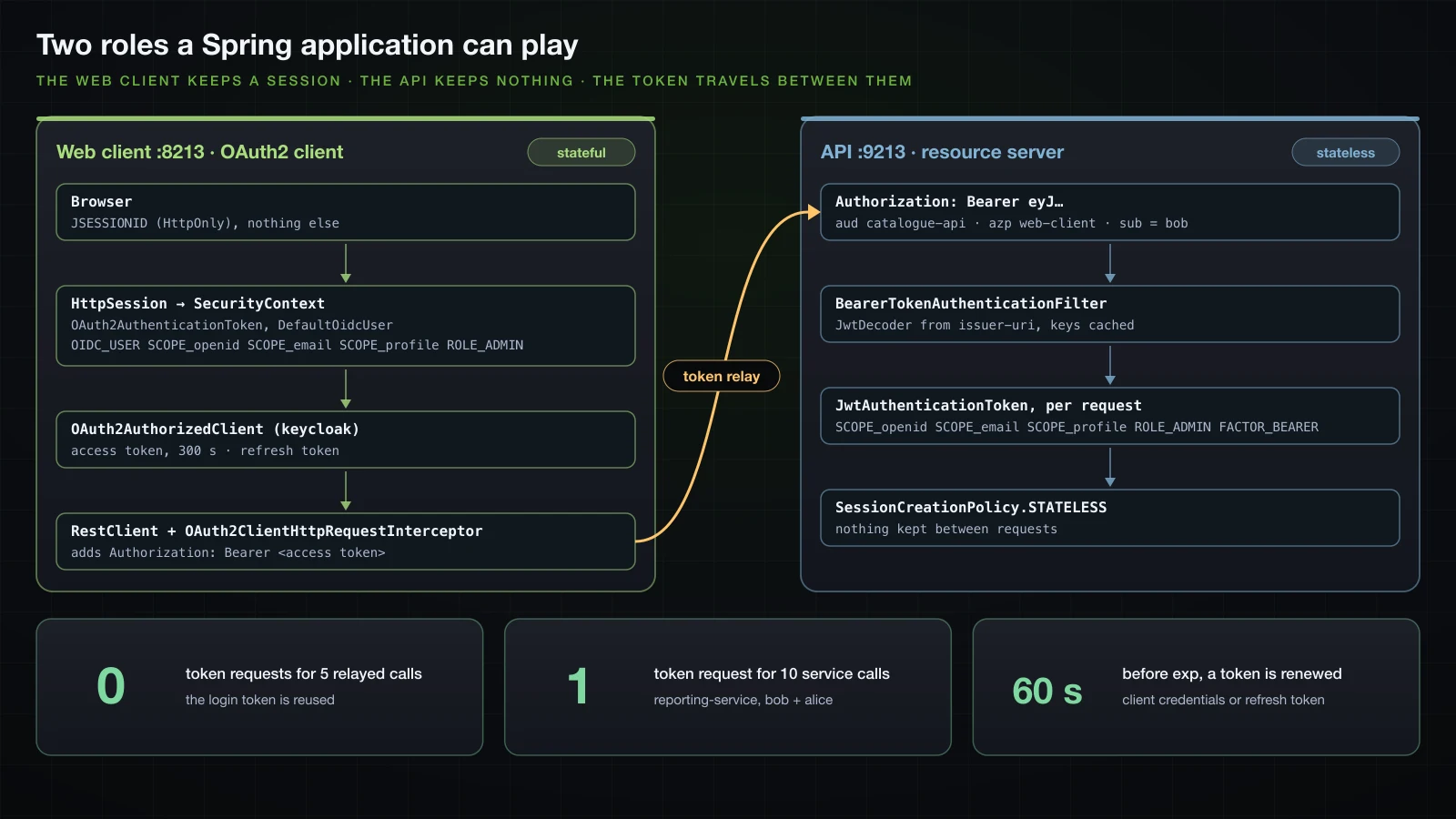
alice: 5 x /reports/caller (client credentials): 200 200 200 200 200 | 0 token request(s)- The relay made no token request: it reused the access token from bob's login.
- The service token was requested once for ten calls from two users' sessions.
GET /reports/callerreturned"username":"service-account-reporting-service"and"clientId":"reporting-service"whichever user asked.
The same script against a build without the two principal lines, where the principal comes from the SecurityContextHolder, printed 1 token request(s) for alice's batch as well: every user got a service token of their own, which in production means one token request per user session instead of one per application.
Reuse lasts until the token is about to expire. The access tokens of bob's login and of the service expired at 07:29:40 and 07:29:42; one call through each client at 07:28:31 and 07:28:32 made no token request, while at 07:28:52 and 07:28:53 each made one. ClientCredentialsOAuth2AuthorizedClientProvider and RefreshTokenOAuth2AuthorizedClientProvider both have a 60-second clockSkew in their bytecode and renew a token that close to exp; for bob's login, the only provider that can renew without the browser is the refresh-token one. Refresh tokens, their rotation and revocation are the subject of article 15.
Why keep the tokens in the web client instead of the browser?
The web client in this article is a backend for frontend: the browser holds an HttpOnly session cookie, the tokens live in the server's session, and only the server calls the API. A single-page application that runs the OAuth2 flow itself has to keep the access token, and often a refresh token, where JavaScript can read it, so one cross-site scripting bug hands both to an attacker, who can then call the API from anywhere until the tokens expire. It must also be a public client without a secret, relying on PKCE alone. With a backend for frontend, an attacker who runs script in the page can still send requests through the victim's browser while the page is open, but cannot carry the tokens away. The price is state on the server and CSRF protection for the session, which the web client's chain keeps on, as Basics 36 explained for session-based chains.
What an external issuer changes compared with self-issued JWTs
The token of Basics 35 was signed and checked by the same application with a key pair in its resources, and served only that application. With Keycloak as issuer, the password check and the private key leave the applications: the API holds only a URL, and new keys reach it through the JWKS without a redeployment, as the unknown-kid refetch showed. One login serves several clients through single sign-on, and one logout at the provider ends that single sign-on session. Tokens say which client acts (azp) and for whom (aud), so a partner's token can be refused. Services get tokens of their own through client credentials. And the same code works with Google or GitHub instead of a user table. What Basics 35 could do and Keycloak also does is sign JWTs; everything around the signature is what an authorization server adds.
FAQ
Does Spring Security 7 use PKCE for confidential clients?
Yes. With Spring Security 7.1.1, the authorization request of a confidential client with a secret contained code_challenge and code_challenge_method=S256 without any configuration, for Keycloak, Google and GitHub alike. Keycloak then refused a code sent without the verifier with invalid_grant and PKCE code verifier not specified, even with the correct client secret.
Why is the name of my OAuth2 login user a UUID?
Because Spring Security uses the sub claim as the name when the provider is configured through issuer-uri, and Keycloak's sub is the user's id. Set spring.security.oauth2.client.provider.keycloak.user-name-attribute=preferred_username: authentication.getName() then returned alice instead of 0140b1ce-67b1-432d-af8e-f021ea7cea40. Keep storing the sub as the key, since a username can change.
Why are Keycloak roles missing from the OidcUser authorities?
Because the OidcUser is built from the ID token and the userinfo response, and Keycloak puts realm_access.roles only into the access token by default. A GrantedAuthoritiesMapper that reads the ID token found nothing and bob stayed at 403; after a realm-role protocol mapper with id.token.claim set to true was added to web-client, the same mapper produced ROLE_ADMIN and /admin answered 200.
How do I map Keycloak realm_access roles in a Spring Boot resource server?
With authorities-claim-name=realm_access.roles, the authorities contained only FACTOR_BEARER: the property names a top-level claim. Spring Boot 4.1 accepts spring.security.oauth2.resourceserver.jwt.authorities-claim-expressions=['realm_access']['roles'] with authority-prefix=ROLE_, which produced ROLE_ADMIN, while the dotted form realm_access.roles failed silently. To keep the SCOPE_ authorities as well, declare a JwtAuthenticationConverter that combines JwtGrantedAuthoritiesConverter and ExpressionJwtGrantedAuthoritiesConverter.
Does a resource server with issuer-uri need the authorization server at startup?
No, unlike the OAuth2 client. The API started with Keycloak stopped and sent Keycloak nothing at startup; discovery and the key set were fetched on the first request carrying a token. That first request failed while Keycloak was down, and the ERROR dispatch turned it into a 401 with "instance":"/error". The web client, in contrast, resolves issuer-uri while starting and exited with Unable to resolve Configuration with the provided Issuer.
Why does logging out of the Spring application not log me out of Keycloak?
Because /logout ends only the application's session; Keycloak's SSO cookie KEYCLOAK_IDENTITY stays valid, and the next login redirect came straight back with a code and the original auth_time. OidcClientInitiatedLogoutSuccessHandler redirects to the provider's end_session_endpoint with id_token_hint and post_logout_redirect_uri, which must be registered for the client in Keycloak; after that, Keycloak showed its login form again.
Can I still use the Keycloak Spring Boot adapter?
No. keycloak-spring-boot-starter and keycloak-spring-security-adapter are deprecated, their last release on Maven Central is 25.0.3, and KeycloakWebSecurityConfigurerAdapter extends WebSecurityConfigurerAdapter, which Spring Security 6 removed. Keycloak is a standard OpenID Provider, and Spring Security's own client and resource server support worked against it with the properties shown here.
Conclusion
Keycloak now owns the passwords and the keys. The web client logs users in with the authorization code flow, PKCE included by default, keeps the tokens in its session, maps Keycloak's realm roles once the realm puts them into the ID token, and logs out of Keycloak too through end_session_endpoint. The API trusts one issuer URL: it fetches the discovery document and the keys lazily, checks signature, iss, exp with 60 seconds of skew and, once configured, aud, and maps realm_access.roles with the expression converter that Spring Boot 4.1 exposes as a property. Between the two, OAuth2ClientHttpRequestInterceptor relays the user's token, and a client-credentials token serves the application's own calls, fetched once and renewed shortly before it expires.
The lab used Keycloak as a black box configured by one imported file. The next article, still in Chapter 3, looks at the other side: integrating Keycloak or Spring Authorization Server, and building your own authorization server.
![[Advanced Spring Boot] Multiple Datasources in Spring Boot: Two Databases and Read/Write Replica Routing](/images/blog/sba-multiple-datasources-thumbnail.en.webp)
![[Advanced Spring Boot] Locking and Concurrency in Spring Boot: Optimistic @Version, Pessimistic Locks and Race Conditions](/images/blog/sba-locking-thumbnail.en.webp)
![[Advanced Spring Boot] Multi-Tenancy and Soft Delete with Spring Boot and Hibernate](/images/blog/sba-multi-tenancy-thumbnail.en.webp)
![[Advanced Spring Boot] NoSQL with Spring Data: MongoDB and Redis](/images/blog/sba-nosql-thumbnail.en.webp)