A class is a type you define yourself. It states two things and nothing more: what state each object of that type carries, and what that object can do. An object is one concrete instance built from that class — its own block of memory on the heap, holding its own copy of every field.
That relationship is the whole of this article. One class, any number of objects; the values belong to the object, the code belongs to the class. The compiler errors and runtime messages shown are the ones Java 21 prints.
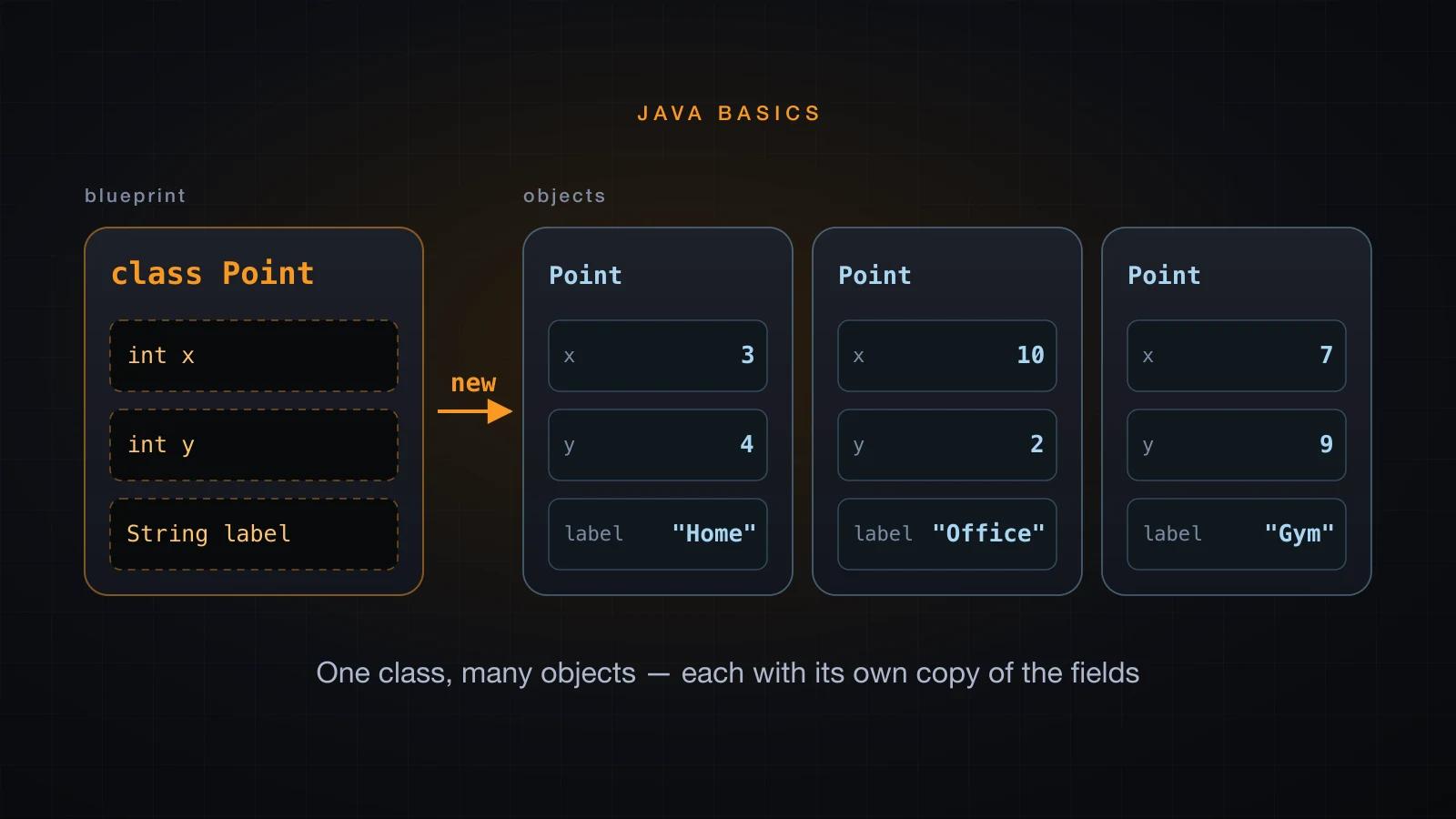
Scope: every object here is built with the implicit default constructor and every field is left plain, so that the one idea in the title gets the whole article.
What a class and an object actually are
A class is a type definition. It does not hold data and it does not run. It is the description javac compiles and the JVM loads, and it answers two questions: what does one of these hold, and what can one of these do.
An object is one instance built from that description. It lives on the heap, it owns a copy of every field the class declares, and it owns none of the method code — that exists once, in the class.
| Class | Object | |
|---|---|---|
| What it is | a type definition, written once | one instance built from it |
| How many | one, loaded once by the JVM | as many as you call new |
| Holds | field declarations | field values |
| Method code | one copy, shared | none of its own |
| Where it lives | class metadata inside the JVM | the heap |
| Written as | class Point { ... } | new Point() |
None of that is a metaphor you have to take on trust. Using the Point class written in the next section, getClass() hands back the class an object was built from, and two objects of the same class hand back the same one:
Point home = new Point();
Point office = new Point();

System.out.println("home.getClass()   = " + home.getClass());
System.out.println("office.getClass() = " + office.getClass());
System.out.println("same class object -> " + (home.getClass() == office.getClass()));
System.out.println("same instance     -> " + (home == office));
System.out.println("declared fields   = " + Point.class.getDeclaredFields().length);
System.out.println("declared methods = " + Point.class.getDeclaredMethods().length);home.getClass() = class Point
office.getClass() = class Point
same class object -> true
same instance -> false
declared fields = 3
declared methods = 2Two distinct objects, one shared class. The class knows it declares three fields and two methods; neither object carries a private copy of either fact.
Writing your first class
A class body holds fields — the state — and methods — the behaviour. Both are called members. Here is the class this whole article runs on, with three fields and two methods:
class Point {
    int x;
    int y;
    String label;

    void describe() {
        System.out.println(label + " is at (" + x + ", " + y + ")");
    }

    double distanceFromOrigin() {
        return Math.sqrt(x * x + y * y);
    }
}
Three things to notice. The fields are declared exactly like local variables but sit directly in the class body, not inside a method. The methods have no static, which makes them instance methods — they belong to an object and read that object's fields by name. And the fields carry no public or private; that leaves them package-private, which is fine for a single-file example and is exactly what article 26 replaces with getters and setters.
Now build objects from it and give each one different values:
public class PointDemo {
    public static void main(String[] args) {
        Point home = new Point();
        home.x = 3;
        home.y = 4;
        home.label = "Home";

        Point office = new Point();
        office.x = 10;
        office.y = 2;
        office.label = "Office";

        Point gym = new Point();
        gym.x = 7;
        gym.y = 9;
        gym.label = "Gym";

        home.describe();
        office.describe();
        gym.describe();

        System.out.println("home is " + home.distanceFromOrigin() + " from the origin");
        System.out.println("gym is " + gym.distanceFromOrigin() + " from the origin");
    }
}Home is at (3, 4)
Office is at (10, 2)
Gym is at (7, 9)
home is 5.0 from the origin
gym is 11.40175425099138 from the originThree objects, three sets of values, one describe() body. home.x and office.x are different pieces of memory; the code inside describe() exists once and is reached by all three calls.
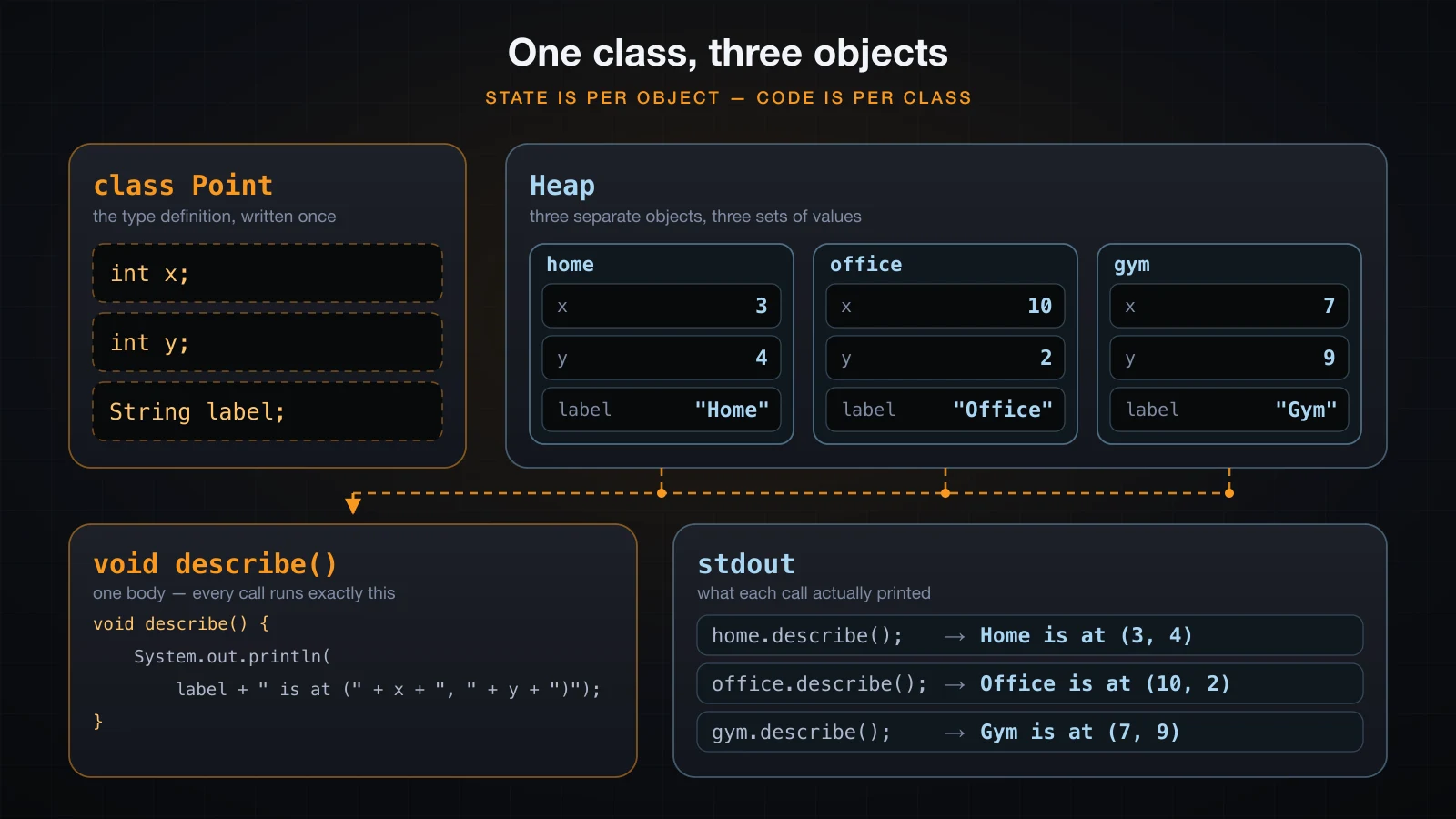
The dot operator does the whole job: home.x reads a field of one object, home.describe() calls a method on that object. Nothing in describe() mentions home, office or gym — it says label, x and y, and those names resolve to whichever object the call was made on.
Creating objects with new
new Point() is one expression that does several things in a fixed order, and knowing the order explains most of the surprises in this article.
What new does, in order
- Allocate. The JVM reserves heap space for one
Point, big enough for its three field slots. - Zero-initialise. Every slot is written with the default value for its type — before any of your code runs.
- Run the constructor.
Pointdeclares no constructor, sojavacsupplies an implicit no-argument one and that runs, doing nothing. - Return a reference. The
newexpression evaluates to a reference to the object, never to the object itself. - Assign. That reference is copied into the variable on the left, which is a slot in the current stack frame.
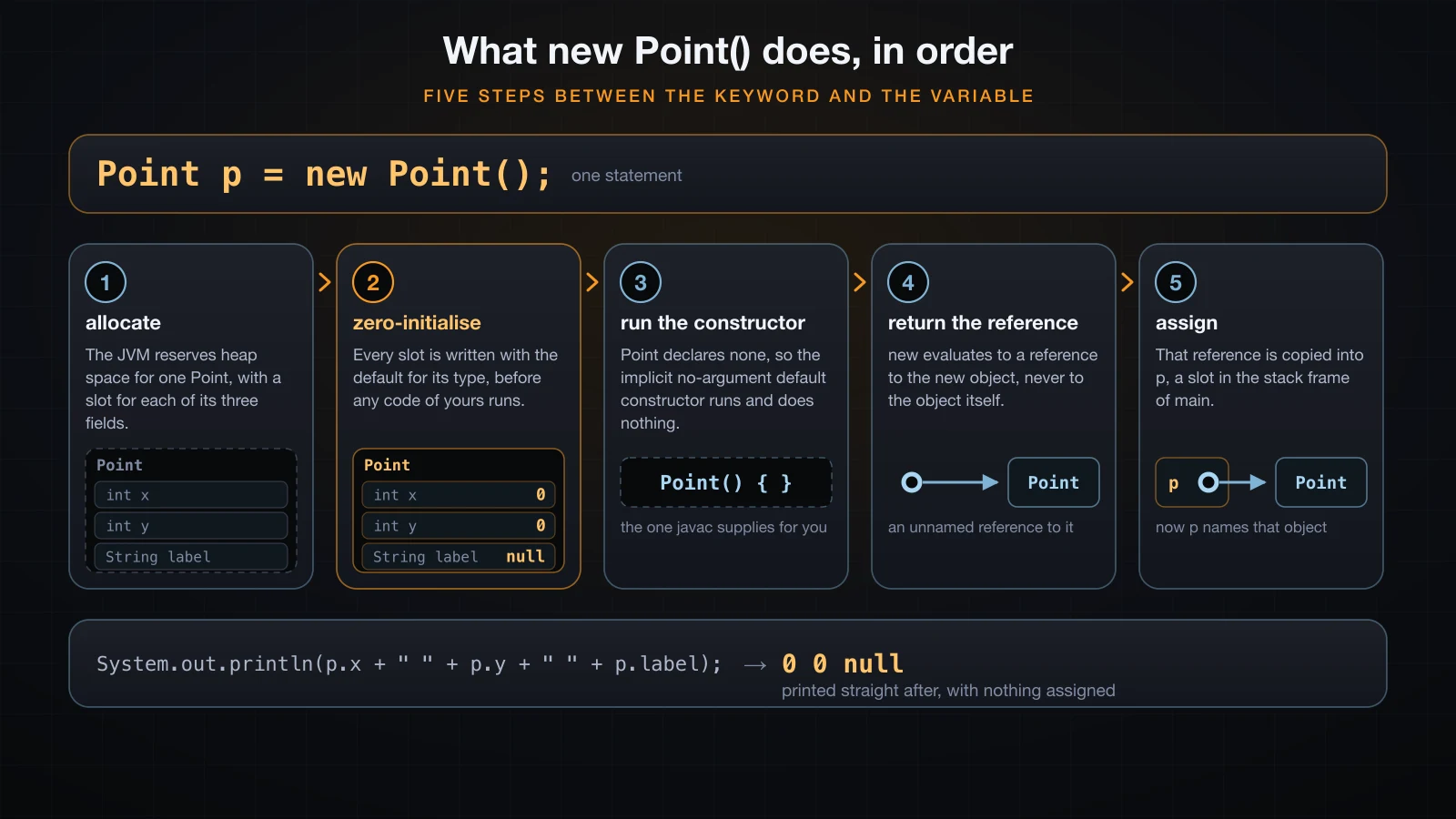
Step 3 is the one this article deliberately leaves thin. Writing your own constructor, giving it parameters, and overloading it are article 24's whole subject; until then every object starts life with the values step 2 put there.
Fields start at their zero value, and you can print it
Step 2 is a language guarantee, not an accident, and it is easy to see. Declare a class of fields, create one object, and read the fields before writing anything:
class Reading {
    int count;
    long id;
    double celsius;
    boolean valid;
    char grade;
    String sensor;
    int[] samples;
}

public class ZeroInit {
    public static void main(String[] args) {
        Reading r = new Reading();
        System.out.println("int     count   = " + r.count);
        System.out.println("long    id      = " + r.id);
        System.out.println("double  celsius = " + r.celsius);
        System.out.println("boolean valid   = " + r.valid);
        System.out.println("char    grade   = code " + (int) r.grade);
        System.out.println("String  sensor  = " + r.sensor);
        System.out.println("int[]   samples = " + r.samples);
    }
}int count = 0
long id = 0
double celsius = 0.0
boolean valid = false
char grade = code 0
String sensor = null
int[] samples = nullNumeric fields start at zero, boolean at false, char at code point 0, and every reference type — including arrays — at null. Article 6 showed the same defaults; the new information here is when they are written, which is inside new, between the allocation and the constructor.
Local variables still get none of this. Inside a method, int n; followed by a read is a compile error, and no amount of object creation changes that.
A reference variable does not hold the object
Point home = new Point(); does not put a Point into home. It puts a reference into home, and the object sits elsewhere on the heap. This is article 6's lesson again, now on a class you wrote, and it is worth two minutes because every remaining trap in this article comes from it.
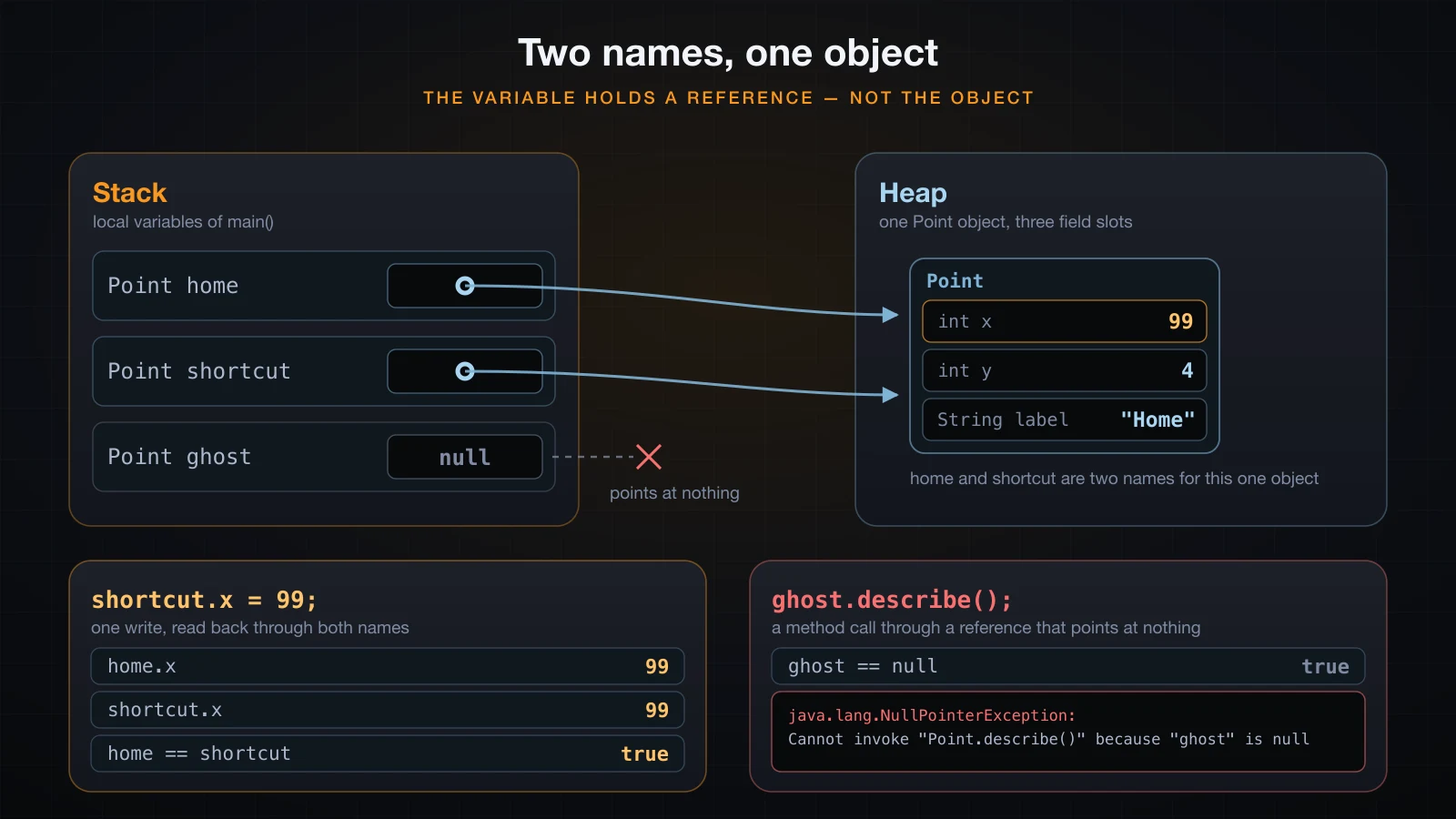
Two names, one object
Assigning one reference variable to another copies the reference, not the object. Both names then reach the same object, and a write through either is visible through both:
Point home = new Point();
home.x = 3;
home.y = 4;
home.label = "Home";

Point shortcut = home;

Point copyLooking = new Point();
copyLooking.x = 3;
copyLooking.y = 4;
copyLooking.label = "Home";

shortcut.x = 99;

System.out.println("home.x        = " + home.x);
System.out.println("shortcut.x    = " + shortcut.x);
System.out.println("copyLooking.x = " + copyLooking.x);
System.out.println();
System.out.println("home == shortcut    -> " + (home == shortcut));
System.out.println("home == copyLooking -> " + (home == copyLooking));home.x = 99
shortcut.x = 99
copyLooking.x = 3
home == shortcut -> true
home == copyLooking -> falseOne write, shortcut.x = 99, changed what home.x reads. copyLooking was built with new and started with the same three values, and it did not move — it is a different object that merely looked identical.
That is also what == means for objects: identity, not equality of contents. home == shortcut is true because both variables hold the same reference. home == copyLooking is false even at the instant their fields matched, because they are two objects.
null, and the NullPointerException it really produces
null is a legal value for any reference variable and means the variable names no object. Reading it is fine; dereferencing it is not:
Point ghost = null;
System.out.println("ghost = " + ghost);
System.out.println("ghost == null -> " + (ghost == null));
ghost.describe();ghost = null
ghost == null -> true
Exception in thread "main" java.lang.NullPointerException: Cannot invoke "Point.describe()" because "ghost" is null
at NullRef.main(NullRef.java:16)Note the first line. Printing a null reference does not throw, because string concatenation goes through String.valueOf, which turns null into the four characters null. Only the method call throws.
The message is a helpful NullPointerException, on by default since Java 15: it names the method that could not be invoked and the exact expression that was null. One detail that catches people compiling by hand — the name of a local variable comes from the class file's debug information. javac -g NullRef.java gives because "ghost" is null as above, while a plain javac NullRef.java gives this instead:
Exception in thread "main" java.lang.NullPointerException: Cannot invoke "Point.describe()" because "<local1>" is null
	at NullRef.main(NullRef.java:16)
Fields are named either way. An IDE compiles with debug information on, so in practice you get the real name.
Instance methods run on the object you call them on
This is where object orientation stops being vocabulary. describe() has one body, compiled once, and it reads label, x and y with no qualifier at all. Which object those names refer to is decided at the call site, by whatever is on the left of the dot:
home.describe();     // Home is at (3, 4)
office.describe();   // Office is at (10, 2)
gym.describe();      // Gym is at (7, 9)
The object to the left of the dot is called the receiver. Every instance method has one, and every unqualified field name inside the method body resolves against it. Change the receiver and the same instructions produce a different answer, which is exactly why a class with fields is more useful than a pile of static helper methods that have to be handed every value.
Article 19 introduced the other half of this: static methods have no receiver, which is why they cannot touch instance fields and why calling describe() from static main with nothing on the left does not compile. That error is in the mistakes section below.
toString(): what your object prints
Pass an object to println and Java calls toString() on it. If your class does not define one, the version inherited from Object runs and prints the class name, an @, and a hexadecimal number:
Point home = new Point();
home.x = 3; home.y = 4; home.label = "Home";

Point office = new Point();
office.x = 10; office.y = 2; office.label = "Office";

System.out.println(home);
System.out.println(office);
System.out.println("as text: " + home);Point@15db9742
Point@6d06d69c
as text: Point@15db9742Two facts about that hex number. It is Integer.toHexString(hashCode()), and it is not the object's memory address — the JVM is free to compute it however it likes. Running the same program with a different identity-hash algorithm makes that obvious:
$ java -XX:+UnlockExperimentalVMOptions -XX:hashCode=2 ToStringDemo
Point@1
Point@1
as text: Point@1
The useful fix is to write your own toString(). Mark it @Override so the compiler checks that you really are replacing an inherited method rather than inventing a new one:
class Point {
    int x;
    int y;
    String label;

    @Override
    public String toString() {
        return "Point[" + label + " (" + x + ", " + y + ")]";
    }
}Point[Home (3, 4)]
as text: Point[Home (3, 4)]
a null reference: nullThe last line is the same program printing a null Point. Overriding toString() does not change that: String.valueOf checks for null first and never calls your method. What @Override means, and what overriding is in general, is article 28's subject; here it is one annotation that buys a compile-time spelling check.
equals and == on objects
== on two reference variables asks whether they hold the same reference. It never looks at fields. equals is a method, so it can look at fields — but the version every class inherits from Object does not. It is defined as identity, so out of the box equals and == answer the same question:
Point a = new Point();
a.x = 3; a.y = 4; a.label = "Home";

Point b = new Point();
b.x = 3; b.y = 4; b.label = "Home";

Point c = a;

System.out.println("a == b       -> " + (a == b));
System.out.println("a.equals(b)  -> " + a.equals(b));
System.out.println("a == c       -> " + (a == c));
System.out.println("a.equals(c) -> " + a.equals(c));a == b -> false
a.equals(b) -> false
a == c -> true
a.equals(c) -> truea and b have identical fields and are still not equal, because nothing in Point ever said what equality means for a point. Classes such as String and Integer behave differently only because they override equals themselves.
⚠️ Overriding
equalscorrectly is harder than it looks: it has a contract to satisfy, andhashCodehas to be overridden with it or every hash-based collection misbehaves. That belongs to the advanced course, not here. Until then, either compare the fields you care about explicitly, or use arecord.
One class per file, or several classes in one file
A .java file may declare as many classes as you like. Compiling one file produces one .class file per class:
class Point {
    int x;
    int y;
    String label;

    void describe() {
        System.out.println(label + " is at (" + x + ", " + y + ")");
    }
}

class Leg {
    Point from;
    Point to;

    double length() {
        int dx = to.x - from.x;
        int dy = to.y - from.y;
        return Math.sqrt(dx * dx + dy * dy);
    }
}

public class Route {
    public static void main(String[] args) {
        Point home = new Point();
        home.x = 0; home.y = 0; home.label = "Home";

        Point office = new Point();
        office.x = 3; office.y = 4; office.label = "Office";

        Leg commute = new Leg();
        commute.from = home;
        commute.to = office;

        home.describe();
        office.describe();
        System.out.println("leg length = " + commute.length());
    }
}$ javac Route.java
$ ls *.class
Leg.class
Point.class
Route.class
$ java Route
Home is at (0, 0)
Office is at (3, 4)
leg length = 5.0Three classes in one file, three class files. Leg also shows that a field can be a reference to another object of your own class — commute.to.x is a perfectly ordinary chain of field reads.
The public class has to match the file name
Article 4's rule applies to every class in the file, not just the one with main. At most one class per file may be public, and its name must equal the file name. Marking Point public inside TwoPublic.java fails before anything runs:
public class Point { int x; int y; }

public class TwoPublic {
    public static void main(String[] args) {
        System.out.println(new Point().x);
    }
}TwoPublic.java:1: error: class Point is public, should be declared in a file named Point.java
public class Point { int x; int y; }
^
1 errorReal projects put one class per file and mark it public, which is why the rule is rarely felt. Splitting the example above into Point.java and App.java works with no extra ceremony, because javac compiles a referenced source file it finds beside the one you named:
$ ls
App.java  Point.java

$ javac App.java
$ ls *.class
App.class
Point.class
Objects inside an array
An array of a class type is an array of references, so its slots start at null and stay there until you put an object in each one. Creating the array creates no Point objects at all:
Point[] route = new Point[3];
System.out.println("route.length   = " + route.length);
System.out.println("route[0]       = " + route[0]);

route[0] = new Point();
route[0].x = 0; route[0].y = 0; route[0].label = "Home";

route[1] = new Point();
route[1].x = 3; route[1].y = 4; route[1].label = "Office";

for (Point p : route) {
    if (p == null) {
        System.out.println("(empty slot)");
    } else {
        p.describe();
    }
}route.length = 3
route[0] = null
Home is at (0, 0)
Office is at (3, 4)
(empty slot)new Point[3] ran the array allocation once and new Point() twice, so the third slot is still the null the array was born with. Iterating an array of objects without a null check is how the NullPointerException above reaches production. Arrays themselves are article 15's subject; the only new fact here is that the element type being a class changes nothing except what a slot holds.
What belongs in a class
A class earns its place when a group of values always travel together and some behaviour only makes sense on that group. x, y and label are a point; passing three loose variables through five methods and hoping they stay in sync is the version of that program without a class.
Three questions that settle most beginner designs:
| Question | Rule of thumb |
|---|---|
| Which fields? | Only the state the object needs to answer questions about itself. Anything derivable from other fields, such as a distance, should be a method rather than a field that can go stale. |
| Which methods? | Behaviour that reads or changes this object's own state. A method that ignores every field is a signal it belongs elsewhere. |
| One class or two? | If half the fields are always used together and the other half never touch them, that is two classes. Leg above holds two Point references rather than four loose coordinates. |
Naming follows the conventions the rest of Java uses, and reviewers do enforce them: PascalCase singular nouns for classes (Point, Invoice, HttpRequest, never Points or PointManager for a plain value), camelCase nouns for fields, and camelCase verbs for methods (describe, length, distanceFromOrigin). A class named after what an object is almost always ages better than one named after what your code currently does to it.
Common mistakes and the errors they produce
Calling an instance method from static main with no object. Article 19's error, met again for the first real reason:
public class NoObject {
    int x = 3;

    void describe() {
        System.out.println("x is " + x);
    }

    public static void main(String[] args) {
        describe();
    }
}NoObject.java:9: error: non-static method describe() cannot be referenced from a static context
describe();
^
1 errordescribe() reads x, which belongs to an object, and main is running without one. Create an object and call through it: new NoObject().describe();.
Declaring a reference and forgetting new. The declaration creates a variable, not an object, and the compiler refuses to read it:
Point p;
p.x = 3;ForgotNew.java:6: error: variable p might not have been initialized
p.x = 3;
^
1 errorDropping the new keyword. Without it, Point(...) is parsed as a call to a method named Point:
Point p = Point();MissingNew.java:5: error: cannot find symbol
Point p = Point();
^
symbol: method Point()
location: class MissingNew
1 errorPassing arguments to a constructor that does not exist. The implicit default constructor takes no arguments, so this fails until article 24 shows you how to write one:
Point p = new Point(3, 4);CtorArgs.java:5: error: constructor Point in class Point cannot be applied to given types;
Point p = new Point(3, 4);
^
required: no arguments
found: int,int
reason: actual and formal argument lists differ in length
1 errorComparing objects with ==. This one compiles, runs, and quietly answers the wrong question — see the equals section above, where two Point objects with identical fields compare false.
Using an object field before assigning it. A reference field starts at null, and reading through it fails at run time rather than compile time, because the compiler has no way to know you forgot:
Leg commute = new Leg();
System.out.println("commute.from = " + commute.from);
System.out.println(commute.from.x);commute.from = null
Exception in thread "main" java.lang.NullPointerException: Cannot read field "x" because "commute.from" is null
at FieldNull.main(FieldNull.java:12)new Leg() created a Leg and nothing else. Its from and to fields hold the null step 2 of new put there, and creating the Point objects to fill them is a separate job. Article 24's constructors exist largely so this cannot be forgotten.
FAQ
What is the difference between a class and an object in Java?
A class is a type definition: a description of what state an object of that type holds and what it can do. An object is one instance built from that description with new, living on the heap with its own copy of every field. One class can produce any number of objects, and each of them has independent field values while they all share one copy of the method code.
Can one Java file contain more than one class?
Yes. javac writes one .class file per class, so compiling a file with three classes produces three class files. The restriction is that at most one of them may be public, and if one is, the file name must match it exactly. Production code puts one public class per file anyway, which keeps the rule invisible.
Why does printing my object show something like Point@15db9742?
Because your class does not override toString(), so the version inherited from Object runs. It prints the class name, @, and the identity hash code in hexadecimal. That number is not a memory address and is not stable across JVMs. Add a toString() of your own and println will use it.
Why are two objects with the same field values not equal?
Because == compares references, and the equals method inherited from Object is defined as identity, so both ask whether it is the same object rather than whether the contents match. Two objects built with two new calls are never the same object. To compare contents you either check the fields you care about explicitly or override equals — which also requires overriding hashCode and is not a beginner exercise.
Do I have to write a constructor?
No. If a class declares none, the compiler supplies an implicit no-argument default constructor, which is what every example in this article used. You need your own constructor when an object should be impossible to create in a half-filled state, which is precisely the problem the Leg example ran into.
What is the default value of a field I never assign?
Zero for the numeric types, false for boolean, code point 0 for char, and null for every reference type including arrays. new writes those defaults before any constructor runs, so a field is never uninitialised garbage. Local variables are the opposite: they have no default and the compiler rejects any program that might read one before writing it.
Conclusion
A class describes a type; an object is one instance of it with its own field values and no code of its own. new allocates, zero-fills the fields, runs a constructor and hands back a reference — and it is that reference, not the object, that your variable holds. Everything else in this article follows from those two sentences: aliasing, == comparing identity, null and the message it produces, and instance methods reading whichever object sits to the left of the dot.
What is deliberately missing is control over how an object is born. Right now a Point arrives full of zeros and you patch it up field by field, which is exactly how commute.from ended up null.
Next in this series: fields, methods and constructors in Java — instance fields in depth, writing constructors, constructor overloading, and initialising an object completely at the moment it is created.
![[Java Basics] ArrayList and LinkedList in Java: Working with Collections](/images/blog/collections-thumbnail.en.webp)
![[Java Basics] Variables and Data Types in Java: Primitive vs Reference](/images/blog/java-variables-thumbnail.en.webp)
![[Java Basics] Inheritance in Java: extends and super](/images/blog/inheritance-thumbnail.en.webp)
![[Java Basics] Custom Exceptions in Java: Writing Your Own Exception Types](/images/blog/custom-exceptions-thumbnail.en.webp)