A variable in Java is a named box with a fixed type. The type is decided at compile time, enforced by javac, and it settles two separate questions: which values the box may hold, and where the value physically lives while the program runs.
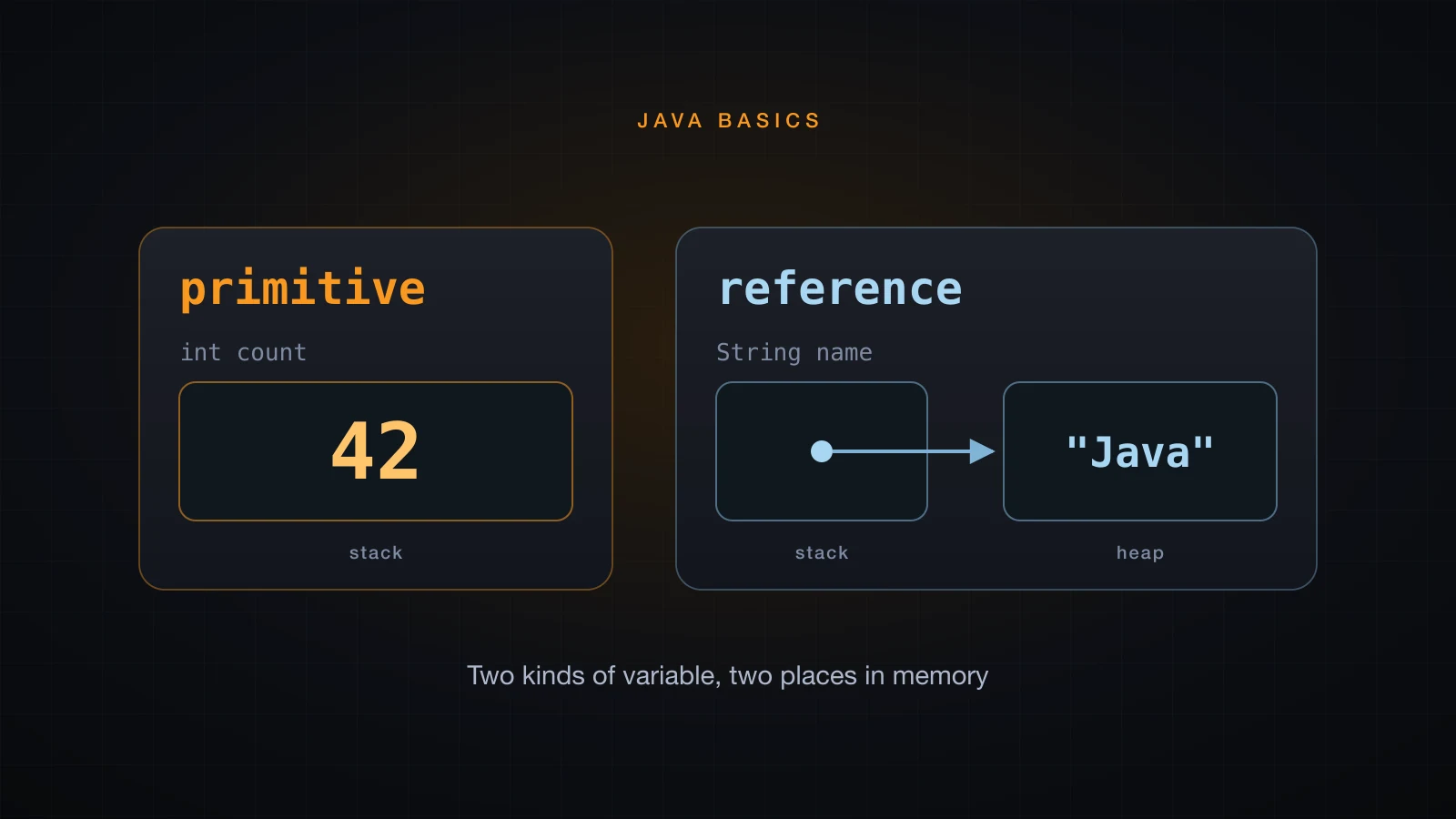
Java has exactly two families of type. Eight primitive types store a value directly inside the variable. Everything else is a reference type: the variable stores the address of an object that lives on the heap. Most beginner bugs in this area come from not knowing which family a variable belongs to.
The examples use Java 21.
Declaring and initializing a variable
The declaration is type name = value;. The type comes first, and it is not optional.
public class VariableDemo {
    public static void main(String[] args) {
        int itemCount = 3;
        double unitPrice = 19.99;
        boolean inStock = true;
        char grade = 'A';
        String productName = "USB-C cable";

        System.out.println(productName + " x" + itemCount);
        System.out.println("unit price: " + unitPrice);
        System.out.println("in stock: " + inStock + ", grade: " + grade);
    }
}USB-C cable x3
unit price: 19.99
in stock: true, grade: AJava is statically typed: the compiler knows the type of every expression before the program runs, and refuses anything that does not fit. Putting a String into an int is not a runtime surprise, it is a build failure.
int age = "twenty";TypeErr.java:3: error: incompatible types: String cannot be converted to int
int age = "twenty";
^
1 errorThat check is what makes a large Java refactor survivable. Converting between compatible types is of course possible — widening, narrowing and explicit casts have their own rules, and a later article covers them — but nothing converts implicitly if information could be lost.
Identifier rules: a name may contain letters, digits, _ and $, must not start with a digit, and must not be a reserved keyword. Both int 2fast and int class fail at parse time.
Naming conventions: camelCase for variables and methods, PascalCase for classes, UPPER_SNAKE_CASE for constants. Nothing enforces this, but every Java codebase and every reviewer expects it.
The 8 primitive types in Java
The eight primitives are fixed by the language specification, so the ranges below are identical on every JVM on every platform. That portability is deliberate: unlike C, Java does not let the hardware decide how wide an int is.
| Type | Bits | Range | Default |
|---|---|---|---|
byte | 8 | -128 to 127 | 0 |
short | 16 | -32768 to 32767 | 0 |
int | 32 | -2147483648 to 2147483647 | 0 |
long | 64 | -9223372036854775808 to 9223372036854775807 | 0L |
float | 32 | 1.4E-45 to 3.4028235E38, positive and negative | 0.0f |
double | 64 | 4.9E-324 to 1.7976931348623157E308, positive and negative | 0.0d |
char | 16 | 0 to 65535, unsigned | '\u0000' |
boolean | not specified | true or false | false |
There is no need to memorise those numbers. Every limit is a constant you can print:
public class Limits {
    public static void main(String[] args) {
        System.out.println("byte    " + Byte.SIZE + " bits  " + Byte.MIN_VALUE + " .. " + Byte.MAX_VALUE);
        System.out.println("short   " + Short.SIZE + " bits  " + Short.MIN_VALUE + " .. " + Short.MAX_VALUE);
        System.out.println("int     " + Integer.SIZE + " bits  " + Integer.MIN_VALUE + " .. " + Integer.MAX_VALUE);
        System.out.println("long    " + Long.SIZE + " bits  " + Long.MIN_VALUE + " .. " + Long.MAX_VALUE);
        System.out.println("float   " + Float.SIZE + " bits  " + Float.MIN_VALUE + " .. " + Float.MAX_VALUE);
        System.out.println("double  " + Double.SIZE + " bits  " + Double.MIN_VALUE + " .. " + Double.MAX_VALUE);
        System.out.println("char    " + Character.SIZE + " bits  " + (int) Character.MIN_VALUE + " .. " + (int) Character.MAX_VALUE);
    }
}byte 8 bits -128 .. 127
short 16 bits -32768 .. 32767
int 32 bits -2147483648 .. 2147483647
long 64 bits -9223372036854775808 .. 9223372036854775807
float 32 bits 1.4E-45 .. 3.4028235E38
double 64 bits 4.9E-324 .. 1.7976931348623157E308
char 16 bits 0 .. 65535Two details that printout makes obvious.
MIN_VALUE means something different for the floating point types. Integer.MIN_VALUE is the most negative int, but Double.MIN_VALUE is 4.9E-324, the smallest positive non-zero value. The most negative double is -Double.MAX_VALUE:
Double.MIN_VALUE  = 4.9E-324
-Double.MAX_VALUE = -1.7976931348623157E308
boolean has no size in the specification. There is no Boolean.SIZE constant to print, and asking for one does not compile:
BoolSize.java:3: error: cannot find symbol
        System.out.println(Boolean.SIZE);
                                  ^
  symbol:   variable SIZE
  location: class Boolean
1 error
The JLS defines boolean by its two values only and leaves the representation to the JVM implementation, so "a boolean is one bit" is folklore rather than a rule.
Literals: how you write a value in source code
Integer literals and the octal trap
The same int can be written in four bases. Three of them are useful and one is a trap.
int dec = 42;
int hex = 0xFF;
int bin = 0b1010_1010;
int oct = 012;dec = 42
0xFF = 255
0b1010_1010 = 170
012 = 10⚠️ A leading zero means octal, not "a decimal number that happens to start with a zero".
012is 10, not 12. This bites anyone who zero-pads for alignment, or pastes a zero-padded month, zip code or account number straight into source.
Digit separators, the L suffix and the f suffix
Underscores are allowed between digits and are erased by the compiler, so 1_000_000 is exactly 1000000. They work in every base, which is what makes 0b1010_1010 readable.
An integer literal is an int unless you append L. That is a property of the literal itself, not of the variable you assign it to, so a wider target type does not rescue it:
long big = 10000000000;TooLarge.java:3: error: integer number too large
long big = 10000000000;
^
1 error10000000000 is parsed as an int before anything looks at the left-hand side, and it does not fit in 32 bits. Write 10_000_000_000L and it compiles and prints 10000000000.
Floating point literals go the other way: a decimal literal is a double unless you append f. Assigning a double to a float would lose precision, so the compiler refuses:
float f = 3.14;LossyFloat.java:3: error: incompatible types: possible lossy conversion from double to float
float f = 3.14;
^
1 errorWrite 3.14f. The suffixes are case-insensitive, but use uppercase L: a lowercase 10l is almost indistinguishable from 101.
char literals and unicode escapes
A char literal is a single character in single quotes. Double quotes make a String, which is a different type entirely.
char a = 'A';
char e = 'ế';
char tab = '\t';
System.out.println("a = " + a + " (" + (int) a + ")");
System.out.println("e = " + e + " (" + (int) e + ")");
System.out.println("tab code = " + (int) tab);
System.out.println("char + char = " + ('A' + 'B'));a = A (65)
e = ế (7871)
tab code = 9
char + char = 131A char is an unsigned 16-bit number, so 'A' + 'B' is arithmetic on 65 and 66 and yields the int 131. Unicode escapes are literals too: 'A' prints A and 'ế' prints ế. Escape sequences such as '\n' and '\t' are single characters, code 10 and 9.
Choosing a type in practice
Use int and double by default
The reason is in the representation, not in the addition:
Do not micro-optimize a declaration. byte and short save nothing on a local variable — the JVM widens them to a 32-bit stack slot anyway — and they cost readability plus a cast on almost every assignment. They earn their place in large arrays and binary protocols, not in ordinary code.
| Situation | Type |
|---|---|
| Counters, sizes, loop indexes, ordinary whole numbers | int |
| Database ids, epoch timestamps, byte counts above 2 GB | long |
| Ordinary fractional numbers, measurements, scientific values | double |
| Money, prices, tax, anything a user will audit | BigDecimal |
| A flag | boolean |
| Large arrays of small values, raw binary data | byte, short |
long for timestamps is not a style preference. A millisecond timestamp passed Integer.MAX_VALUE in January 1970 and never came back:
long now = System.currentTimeMillis();
System.out.println("currentTimeMillis fits in int? " + (now <= Integer.MAX_VALUE));
System.out.println("value has " + String.valueOf(now).length() + " digits");currentTimeMillis fits in int? false
value has 13 digitsNever use float or double for money
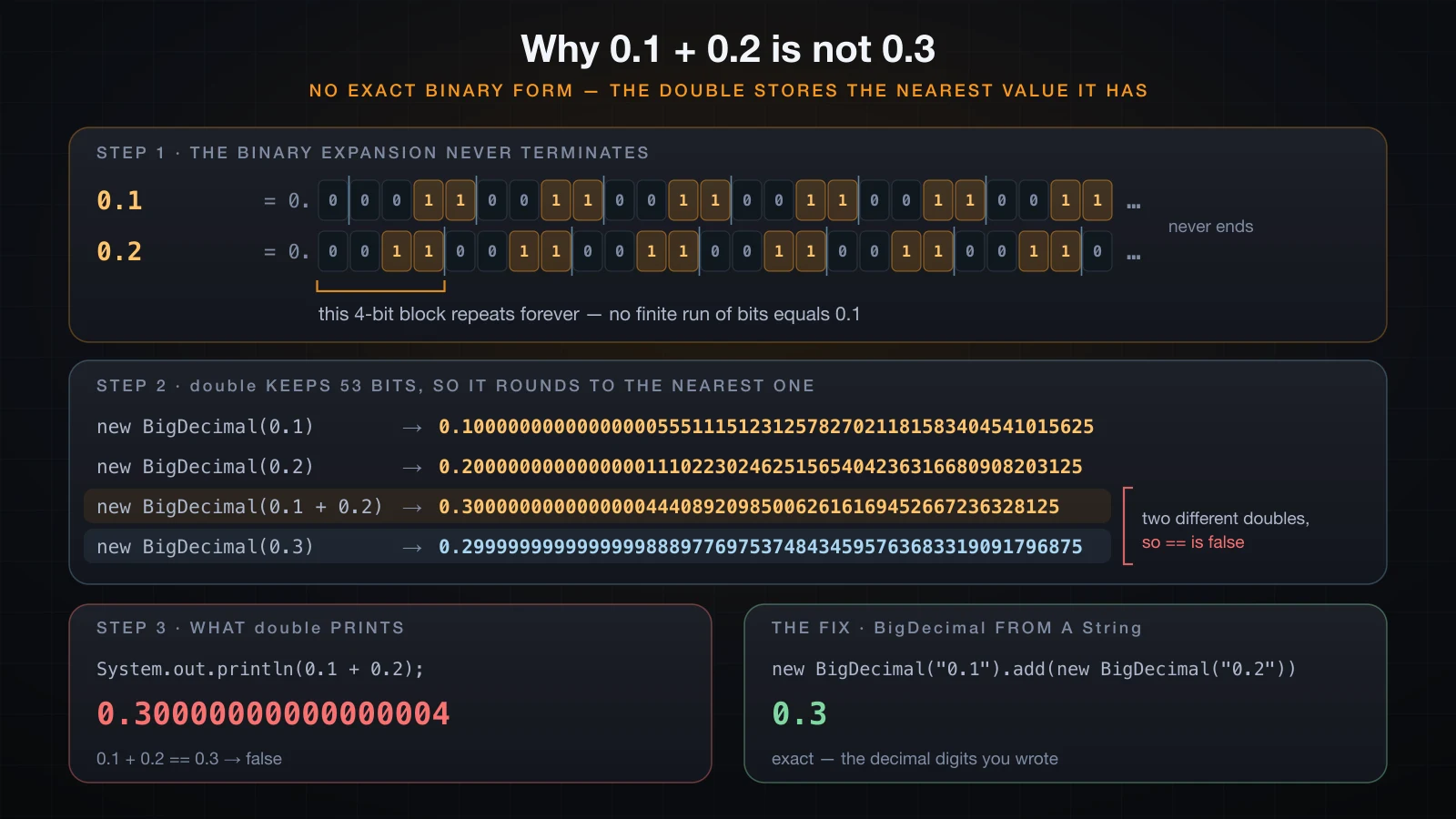
float and double are binary floating point. Values such as 0.1 and 0.42 have no exact binary representation, so what gets stored is slightly off, and the error surfaces the moment you add or subtract.
System.out.println(0.1 + 0.2);
System.out.println(1.03 - 0.42);
System.out.println(0.1 + 0.2 == 0.3);0.30000000000000004
0.6100000000000001
falseThis is not a Java bug. It is IEEE 754, and every language using hardware floating point behaves the same way. You can see exactly what got stored by handing the double to BigDecimal:
System.out.println(new BigDecimal(0.1));0.1000000000000000055511151231257827021181583404541015625The fix for money is BigDecimal built from a String. new BigDecimal(0.1) copies the broken binary value in; new BigDecimal("0.1") stores the decimal digits you actually wrote.
import java.math.BigDecimal;
import java.math.RoundingMode;

public class Cart {
    public static void main(String[] args) {
        double dTotal = 0.1 * 3;
        System.out.println("double : " + dTotal);

        BigDecimal total = new BigDecimal("0.10").multiply(new BigDecimal("3"));
        System.out.println("BigDecimal: " + total);

        BigDecimal subtotal = new BigDecimal("19.99").multiply(new BigDecimal("3"));
        BigDecimal tax = subtotal.multiply(new BigDecimal("0.08"))
                                 .setScale(2, RoundingMode.HALF_UP);
        System.out.println("subtotal = " + subtotal + ", tax = " + tax);
    }
}double : 0.30000000000000004
BigDecimal: 0.30
subtotal = 59.97, tax = 4.80The other accepted approach is to store money as a long count of the smallest unit — cents, or VND — and format it only for display. Either works. double does not.
Integer overflow: what happens when a value does not fit
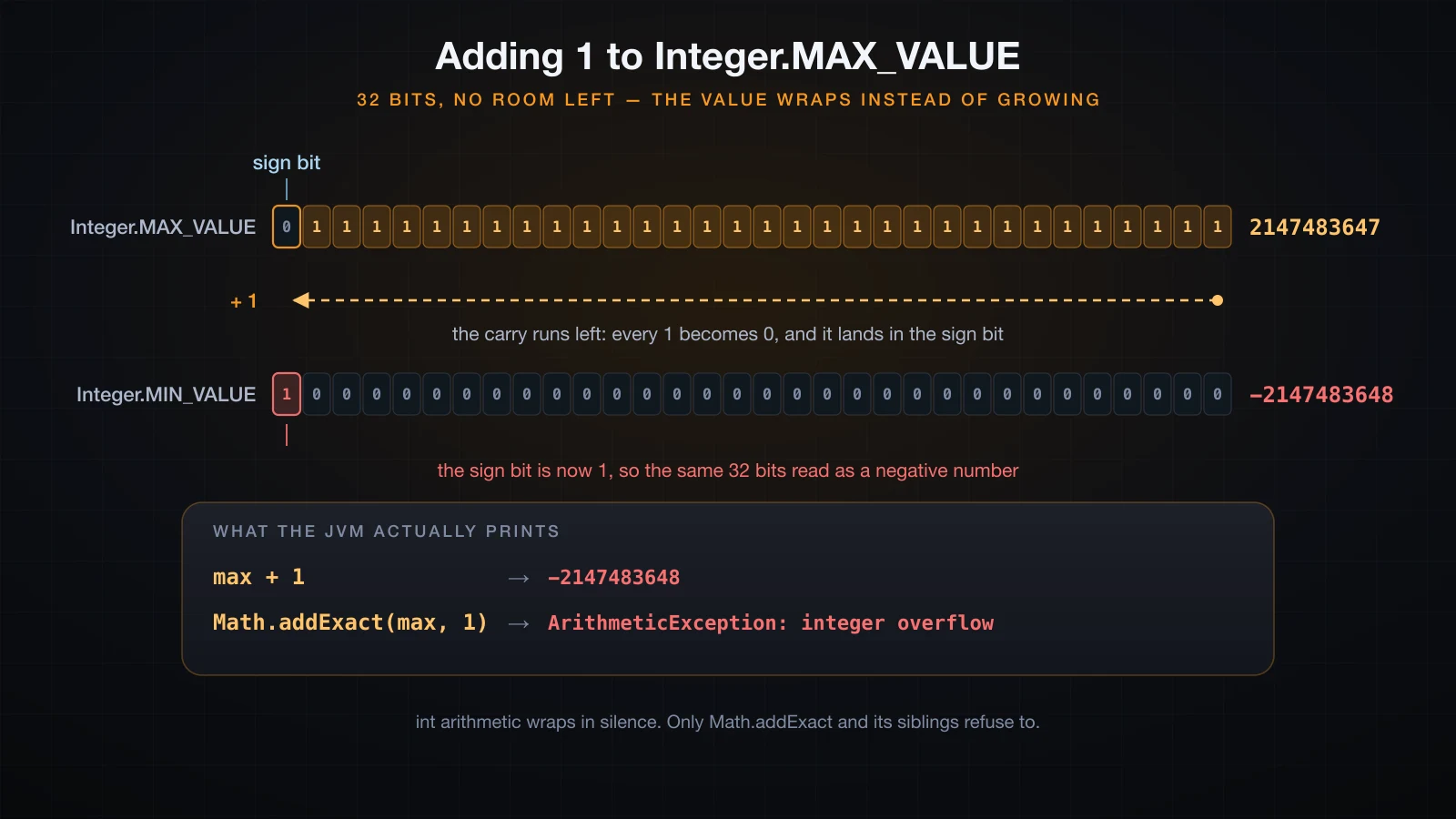
An int has 32 bits and no more. When a result needs a 33rd bit, Java neither throws nor promotes. It keeps the low 32 bits and carries on with a wrong answer.
int max = Integer.MAX_VALUE;
System.out.println("Integer.MAX_VALUE     = " + max);
System.out.println("Integer.MAX_VALUE + 1 = " + (max + 1));
System.out.println("Integer.MIN_VALUE = " + Integer.MIN_VALUE);Integer.MAX_VALUE = 2147483647
Integer.MAX_VALUE + 1 = -2147483648
Integer.MIN_VALUE = -2147483648The bits explain it. Integer.MAX_VALUE is a zero sign bit followed by 31 ones. Adding 1 turns every one of those ones into a zero and carries into the sign bit, which is now set — and in two's complement a set sign bit means negative.
The version that actually ships to production is a multiplication in which every factor looks harmless:
int msPerDay = 24 * 60 * 60 * 1000;
System.out.println("ms per day  = " + msPerDay);
int msPerYear = 365 * 24 * 60 * 60 * 1000;
System.out.println("ms per year (int)  = " + msPerYear);
long msPerYearL = 365L * 24 * 60 * 60 * 1000;
System.out.println("ms per year (long) = " + msPerYearL);ms per day = 86400000
ms per year (int) = 1471228928
ms per year (long) = 31536000000Note where the L goes. 365L * 24 * ... promotes the whole chain to long arithmetic. Writing long msPerYear = 365 * 24 * 60 * 60 * 1000; compiles cleanly and is still wrong, because the multiplication happens in int and only the already-broken result gets widened.
When silence is unacceptable, Math.addExact, Math.multiplyExact and their siblings throw instead of wrapping:
System.out.println(Math.addExact(max, 1));Exception in thread "main" java.lang.ArithmeticException: integer overflow
at java.base/java.lang.Math.addExact(Math.java:911)
at Overflow.main(Overflow.java:16)Reference types: String, arrays and every class
Everything that is not one of the eight primitives is a reference type: String, arrays, every class in the JDK, and every class you write. A reference variable does not contain the object. It contains a reference to an object that lives on the heap.
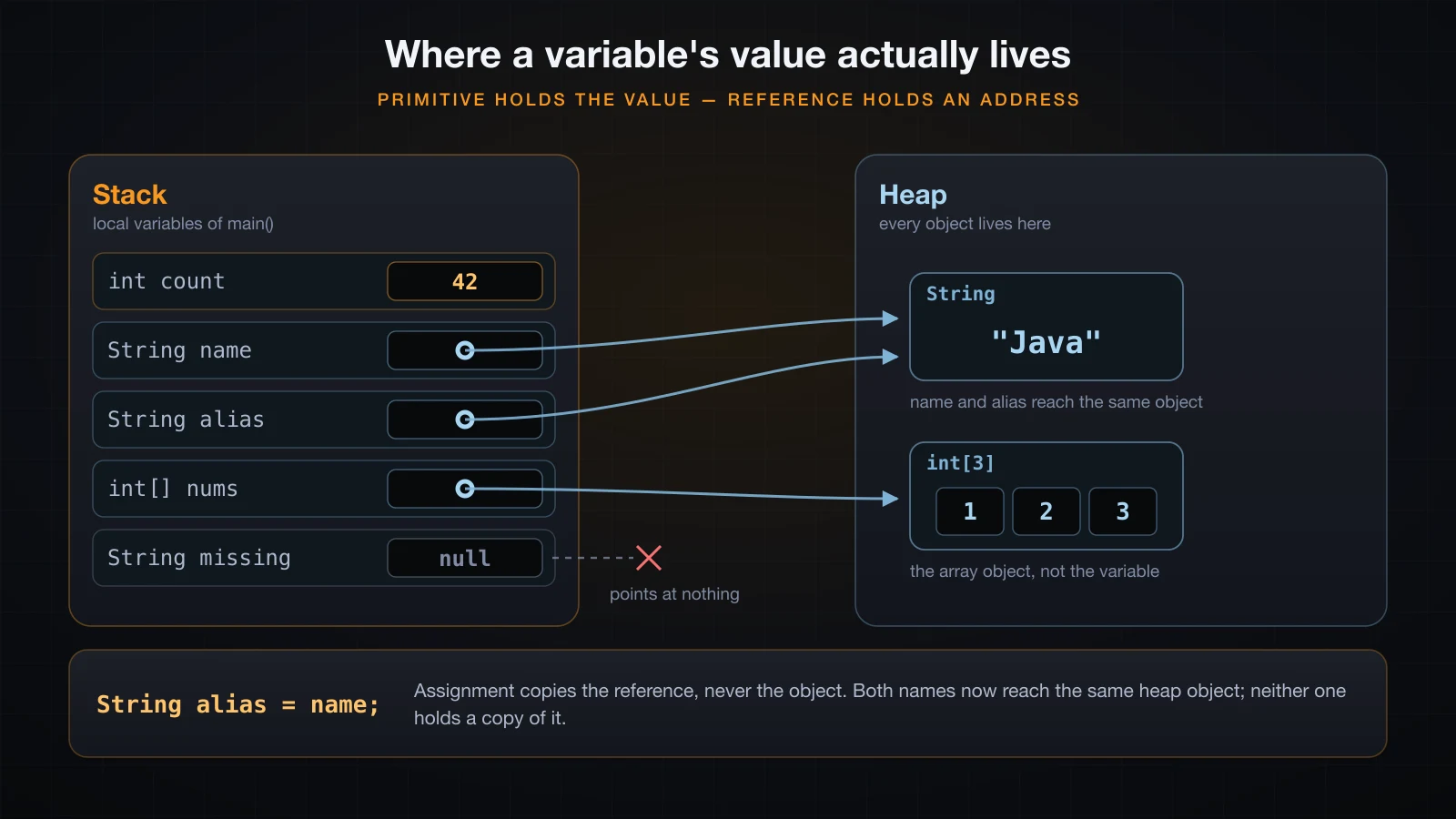
For a local variable, the variable itself lives in the current method's stack frame and is discarded when the method returns. A primitive local holds its value right there in the frame. A reference local holds an address, and the object it names sits somewhere else entirely on the heap, outliving the frame if anything still points at it.
That distinction is what decides the behaviour of =.
int count = 42;
int copy = count;
copy = 99;
System.out.println("count = " + count + ", copy = " + copy);

List<String> a = new ArrayList<>();
a.add("Java");
List<String> b = a;
b.add("21");
System.out.println("a = " + a);
System.out.println("b = " + b);
System.out.println("a == b -> " + (a == b));

b = new ArrayList<>();
b.add("other");
System.out.println("after b = new: a = " + a + ", b = " + b);count = 42, copy = 99
a = [Java, 21]
b = [Java, 21]
a == b -> true
after b = new: a = [Java, 21], b = [other]Assigning a primitive copies the value, so changing copy leaves count alone. Assigning a reference copies the reference, so a and b become two names for one object and a change through either is visible through both. Reassigning b re-points b and does nothing to the object or to a. Arrays behave the same way, because an array is an object:
int[] nums = {1, 2, 3};
int[] alias = nums;
alias[0] = 100;
System.out.println("nums[0] = " + nums[0]);nums[0] = 100A reference can also point at nothing. null is a legal value for every reference type and for no primitive. Dereferencing it — calling a method or reading a field through it — throws:
String name = null;
System.out.println(name.length());Exception in thread "main" java.lang.NullPointerException: Cannot invoke "String.length()" because "name" is null
at Npe.main(Npe.java:4)Since Java 14, and on by default from Java 15 onward, that is a helpful NullPointerException: it names the method that could not be invoked and the exact expression that was null, which is far more than the bare NullPointerException older tutorials show. One caveat worth knowing, because it confuses people who compile by hand: the name of a local variable comes from the debug information in the class file. A plain javac Npe.java produces because "<local1>" is null; javac -g Npe.java produces the name, as above. Fields are always named — a static field prints as because "Npe2.name" is null with no flags at all.
Default values: fields yes, local variables no
A field declared without an initializer is given the default value for its type. That is a language guarantee, not luck.
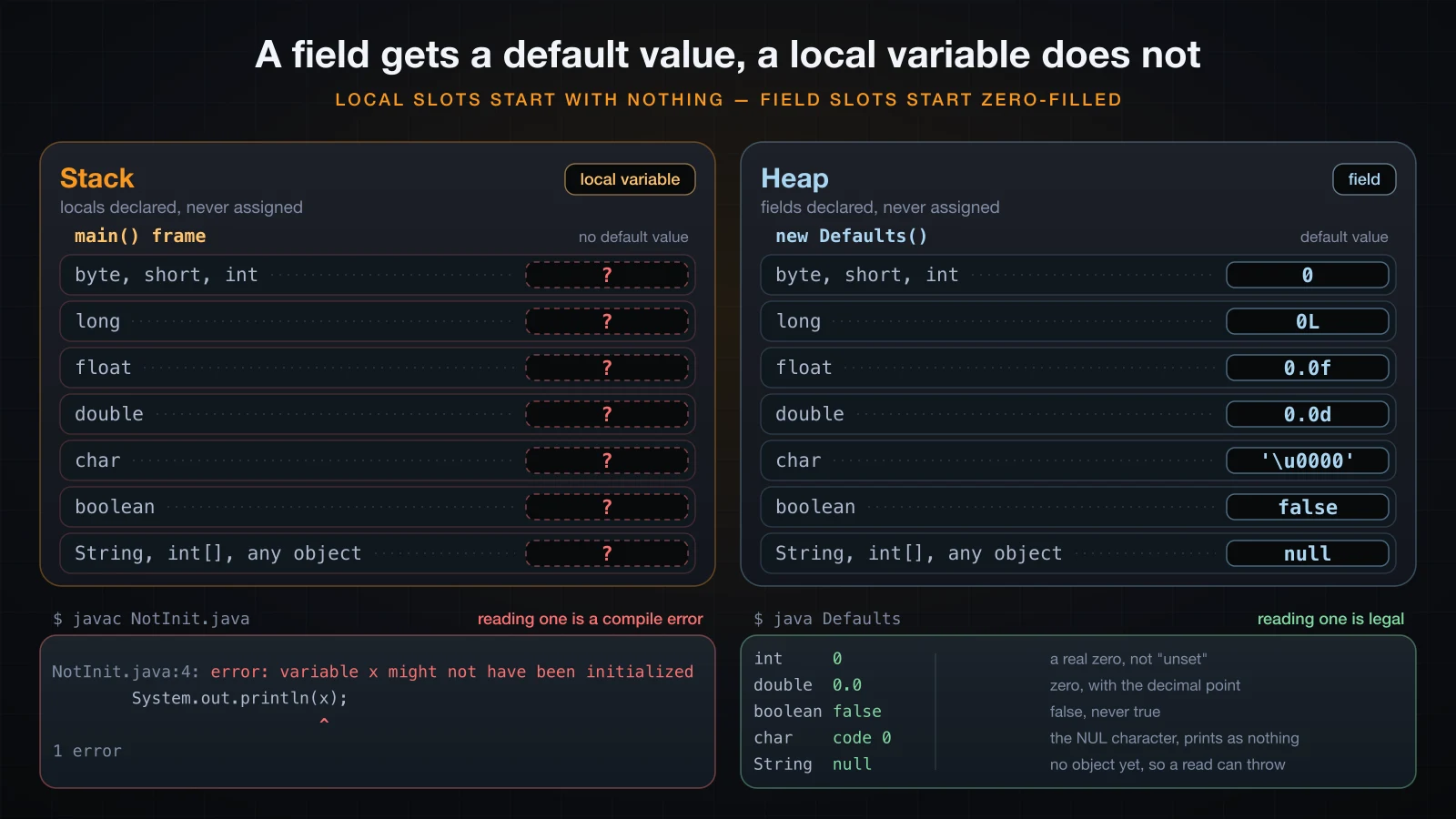
The declaration is the same on both sides — only what happens when you read it differs.
public class Defaults2 {
    static int count;
    static double rate;
    static boolean active;
    static char grade;
    static String name;
    static int[] scores;

    public static void main(String[] args) {
        System.out.println("int     " + count);
        System.out.println("double  " + rate);
        System.out.println("boolean " + active);
        System.out.println("char    code " + (int) grade);
        System.out.println("String  " + name);
        System.out.println("int[]   " + scores);
    }
}int 0
double 0.0
boolean false
char code 0
String null
int[] nullNumeric fields default to zero, boolean to false, char to code point 0, and every reference type — including arrays — to null.
Local variables get none of this. The compiler applies definite assignment instead: it proves that every local is written before it is read, and rejects the program otherwise.
int x;
System.out.println(x);NotInit.java:4: error: variable x might not have been initialized
System.out.println(x);
^
1 errorThis is a feature, not an inconsistency. A field silently defaulting to 0 can hide a bug for months; a local that refuses to default turns the same bug into a build failure.
var: local variable type inference in Java 10 and later
Java 10 added var. It is not dynamic typing, and it is not JavaScript's var: the compiler infers one fixed type from the initializer, and that type is settled for the life of the variable.
var count = 42;                       // int
var name = "Java";                    // String
var rate = 0.075;                     // double
var items = new ArrayList<String>();  // ArrayList<String>
for (var s : items) System.out.println(s);   // String
Because the type comes from the initializer, var only works where there is one. All four of these fail to compile:
var x = null;VarNull.java:3: error: cannot infer type for local variable x
var x = null;
^
(variable initializer is 'null')
1 errorvar x;
x = 5;VarNoInit.java:3: error: cannot infer type for local variable x
var x;
^
(cannot use 'var' on variable without initializer)
1 errorpublic class VarField {
var count = 10;
}VarField.java:2: error: 'var' is not allowed here
var count = 10;
^
1 errorstatic void show(var x) { }VarParam.java:2: error: 'var' is not allowed here
static void show(var x) {
^
1 errorSo: local variables, for loop variables and try-with-resources resources only. No fields, no method parameters, no return types, no null.
Style: use var when the right-hand side already names the type, as in var scanner = new Scanner(System.in);, and write the type out when it does not, because var result = process(input); tells the reader nothing. Readability at the point of use beats saving characters.
final variables and constants
final means the variable is assigned exactly once. Reassigning it is a compile error, which is the whole point — it lets the reader stop tracking the value.
final int limit = 10;
limit = 20;FinalBad.java:4: error: cannot assign a value to final variable limit
limit = 20;
^
1 errorA named constant is static final with an UPPER_SNAKE_CASE name, declared once and referenced everywhere:
static final double TAX_RATE = 0.08;
static final int MAX_RETRIES = 3;
The two-second version of the caveat: final freezes the variable, not the object. A final reference can never point at a different object, and the object it points at can still change all it likes.
final List<String> names = new ArrayList<>();
names.add("Hoang");
names.add("Lan");
System.out.println(names);[Hoang, Lan]Adding to a final list compiles and runs. Only names = new ArrayList<>(); would fail, with the same cannot assign a value to final variable error as above. If you need the contents frozen too, that is a property of the type — a record, an unmodifiable collection, a class with no setters — not of the keyword.
Wrapper classes and autoboxing
Every primitive has a wrapper class: int and Integer, long and Long, double and Double, boolean and Boolean, char and Character, and so on. Wrappers are reference types, so they can be null and they can go into collections, which primitives cannot. Autoboxing converts between the two automatically, so both Integer boxed = 42; and int raw = boxed; compile.
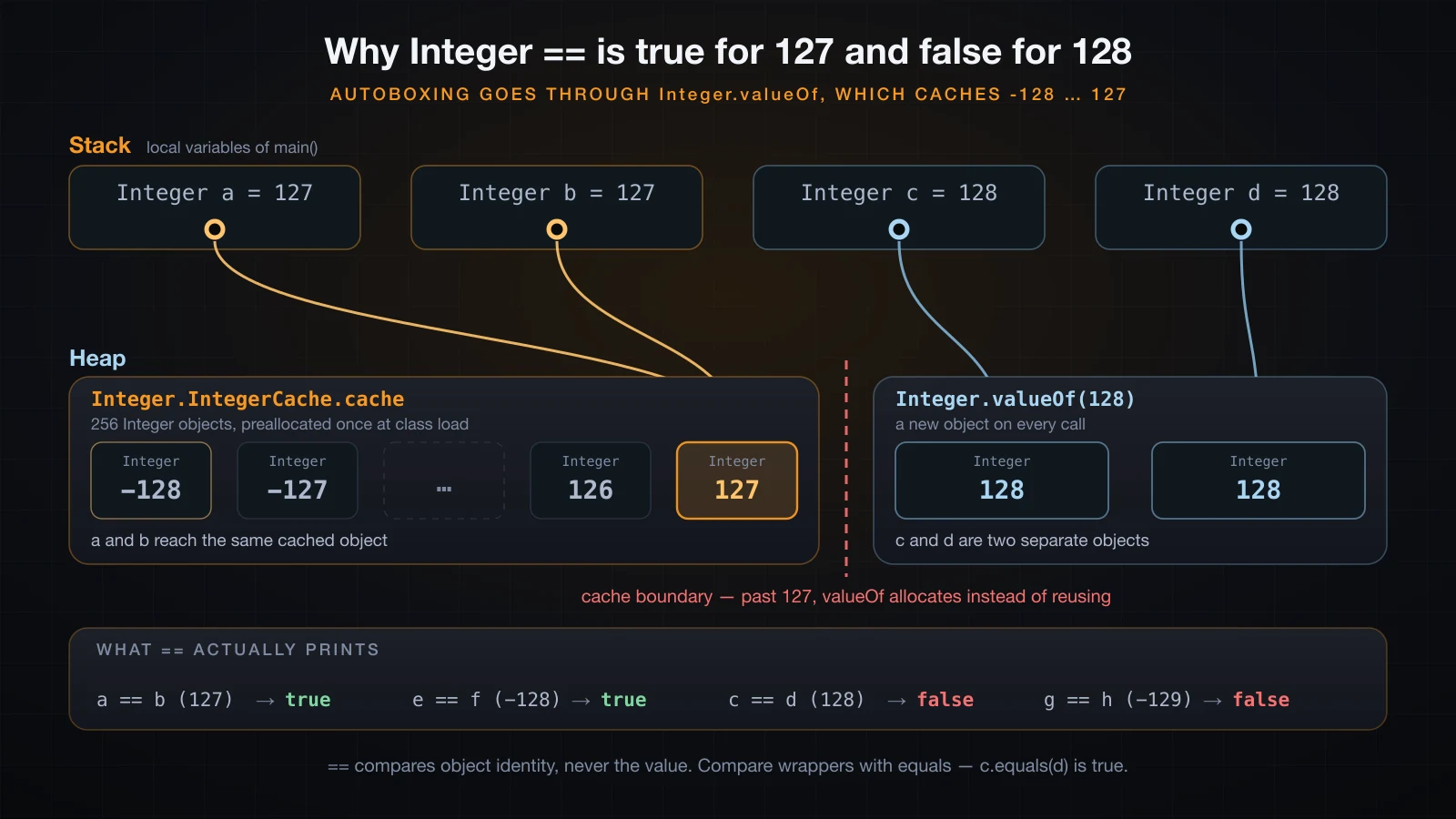
The cache is what makes the same comparison flip:
Two methods that look interchangeable are not. Integer.parseInt("42") returns the primitive int; Integer.valueOf("42") returns an Integer object. Use parseInt when you want a number, and valueOf only when you genuinely need the object.
Now the trap. Because Integer is an object, == compares references rather than values — and the JDK caches small boxed values, so the answer depends on the number:
Integer a = 127, b = 127;
Integer c = 128, d = 128;
System.out.println("a == b  (127) -> " + (a == b));
System.out.println("c == d  (128) -> " + (c == d));
System.out.println("c.equals(d) -> " + c.equals(d));a == b (127) -> true
c == d (128) -> false
c.equals(d) -> trueAutoboxing goes through Integer.valueOf, which returns a cached object for every value in the range -128 to 127. Two boxes of 127 are literally the same object, so == is true. Two boxes of 128 are two distinct objects, so == is false. Nothing about the values changed. The rule that follows is absolute: compare wrappers with equals.
The other wrapper trap is unboxing a null, which turns an innocent-looking assignment into an NPE:
Integer boxed = null;
int raw = boxed;Exception in thread "main" java.lang.NullPointerException: Cannot invoke "java.lang.Integer.intValue()" because "boxed" is null
at UnboxNull.main(UnboxNull.java:4)The message names the real operation: unboxing is a hidden boxed.intValue() call, and calling a method on null throws. This is why a database column that allows NULL should be read into an Integer and checked, never into an int.
Variable scope in one paragraph
A variable exists only inside the block that declares it — the braces around it — and ceases to exist at the closing brace, which is why a loop counter declared in for (int i = 0; ...) is gone after the loop. Using the name afterwards is not a runtime error but a compile error, cannot find symbol, because at that point in the program the name simply does not exist.
FAQ
Is String a primitive type in Java?
No. There are exactly eight primitive types and String is not one of them. String is a class in java.lang, so a String variable holds a reference to an object on the heap and can be null. It gets special treatment in the language — a literal syntax and the + operator — which is why it is so often mistaken for a primitive.
What is the difference between int and Integer?
int is a primitive: it holds a 32-bit value directly, can never be null, and cannot go into a List. Integer is a class wrapping that value: it is a heap object, it can be null, and it works with generics and collections. Use int unless you specifically need nullability or a collection, and compare Integer values with equals rather than ==.
Why does 0.1 + 0.2 not equal 0.3 in Java?
Because double is binary floating point and 0.1 has no exact representation in base 2, exactly as one third has none in base 10. The stored value is slightly off, so the sum prints as 0.30000000000000004. This is IEEE 754 behaviour, identical in C, Python and JavaScript. Use BigDecimal built from a String, or an integer count of cents, whenever the result must be exact.
Should I use var everywhere?
No. var pays off when the right-hand side already states the type and hurts when it hides it. var users = new ArrayList<User>(); is clear; var x = load(); sends the reader to the IDE to find out what x is. var also cannot be used for fields, method parameters or return types, so it never removes the need to write types in an API.
Does final make an object immutable?
No. final prevents the variable from being reassigned and says nothing about the object. A final List can still have elements added, removed and replaced; only the binding between the name and that particular object is frozen. For immutable data use a record, an unmodifiable collection, or a class with no setters.
What is the default value of a local variable in Java?
There is none. Fields are default-initialized to 0, false, code point 0 or null, but local variables are not initialized at all, and the compiler rejects any program that might read one before writing it, with variable x might not have been initialized. Always assign a local before you use it.
Conclusion
Two rules carry most of this article. First, a primitive variable holds a value and a reference variable holds an address — that single distinction explains what = copies, why == on wrappers surprises you, and what null actually is. Second, every type has hard limits, so int wraps in silence, double cannot represent 0.1, and both are your problem rather than the JVM's.
The rest is habit: int and double by default, long for ids and timestamps, BigDecimal for money, equals for wrappers, final for anything that should not move, and var only where it makes the line easier to read.
Next in this series: operators in Java — arithmetic, comparison, logical and assignment operators plus the ternary operator, including integer division, the remainder of a negative number, short-circuit evaluation, and the difference between =, == and equals.
![[Java Basics] ArrayList and LinkedList in Java: Working with Collections](/images/blog/collections-thumbnail.en.webp)
![[Java Basics] Variable Scope in Java: Local, Field and Static](/images/blog/variable-scope-thumbnail.en.webp)
![[Java Basics] Classes and Objects in Java: The Foundation of OOP](/images/blog/classes-and-objects-thumbnail.en.webp)
![[Java Basics] Inheritance in Java: extends and super](/images/blog/inheritance-thumbnail.en.webp)