Java is a two-step language. javac turns source text into a .class file of bytecode; java starts a JVM that loads that bytecode and executes it. Almost every problem a beginner hits in the first week is a problem with those two steps rather than with the language: the wrong argument passed to java, a classpath that does not contain what you assume it contains, a stale .class file being run instead of the code you just edited.
This article walks the whole path on Java 21, from the text you type to the native instructions HotSpot eventually emits.
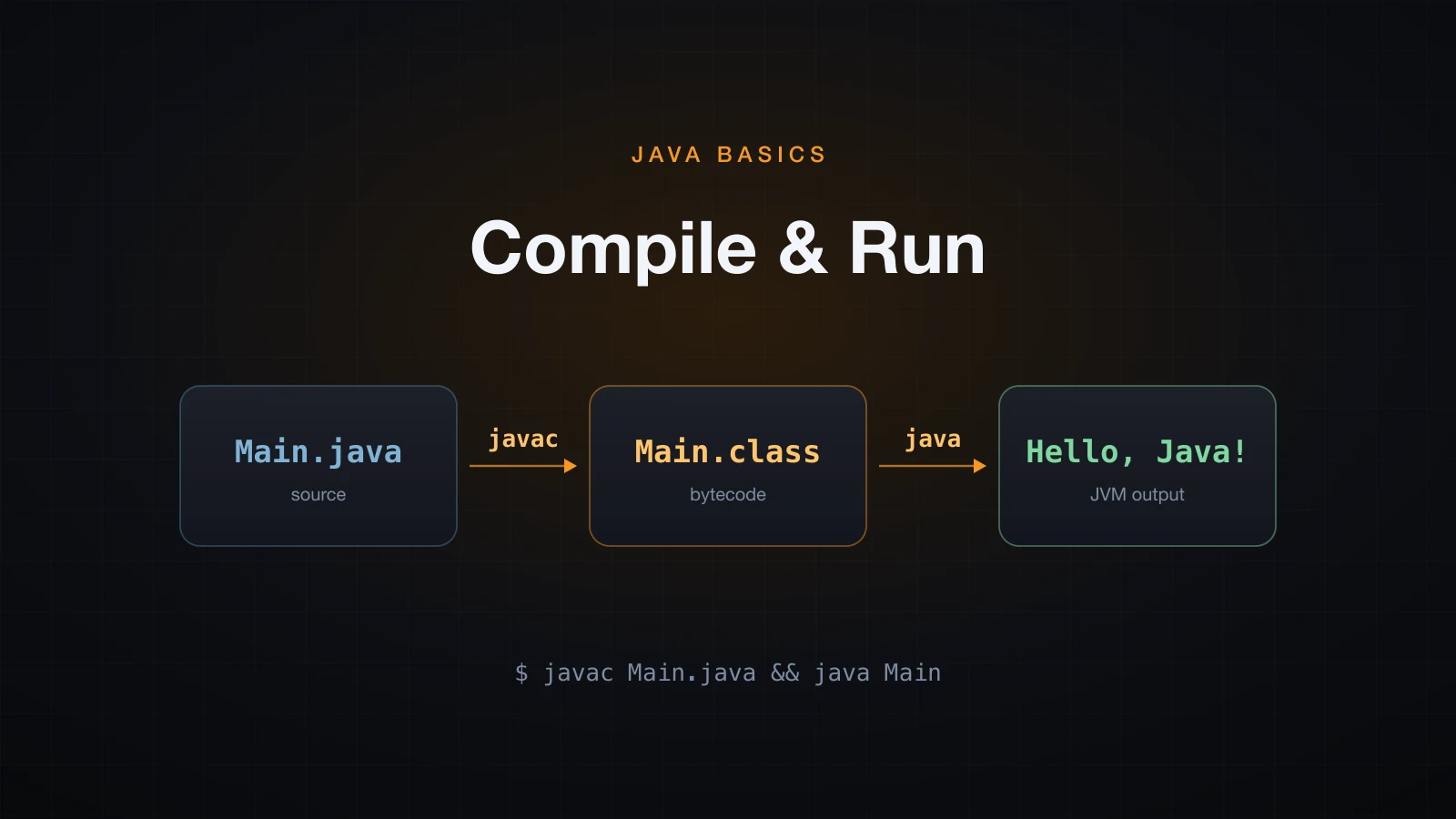
We start with the two commands, then open the artifact between them, then follow it into the JVM.
The two-step model: javac compiles, java runs
Put this in a file called Main.java:
public class Main {
    public static void main(String[] args) {
        System.out.println("Hello, Java!");
    }
}
Compile it, then run it:
javac Main.java
java MainHello, Java!javac produced a new file next to the source:
Main.class    414 bytes
Main.java     117 bytes
The asymmetry between the two commands is the single most common first-week mistake. javac takes a file name. java takes a class name. Nothing else. So this fails:
java Main.classError: Could not find or load main class Main.class
Caused by: java.lang.ClassNotFoundException: Main.classThe launcher did not see a file. It saw the class name Main.class, read it as a class called class inside a package called Main, and went looking for Main/class.class. There is no such file, so you get ClassNotFoundException. Drop the extension and it works.
You can prove that is really where it looked. Copy the class file to Main/class.class and run the same broken command again — this time the launcher finds a file at that path and rejects it for a different reason:
Error: Could not find or load main class Main.class
Caused by: java.lang.NoClassDefFoundError: Main/class (wrong name: Main)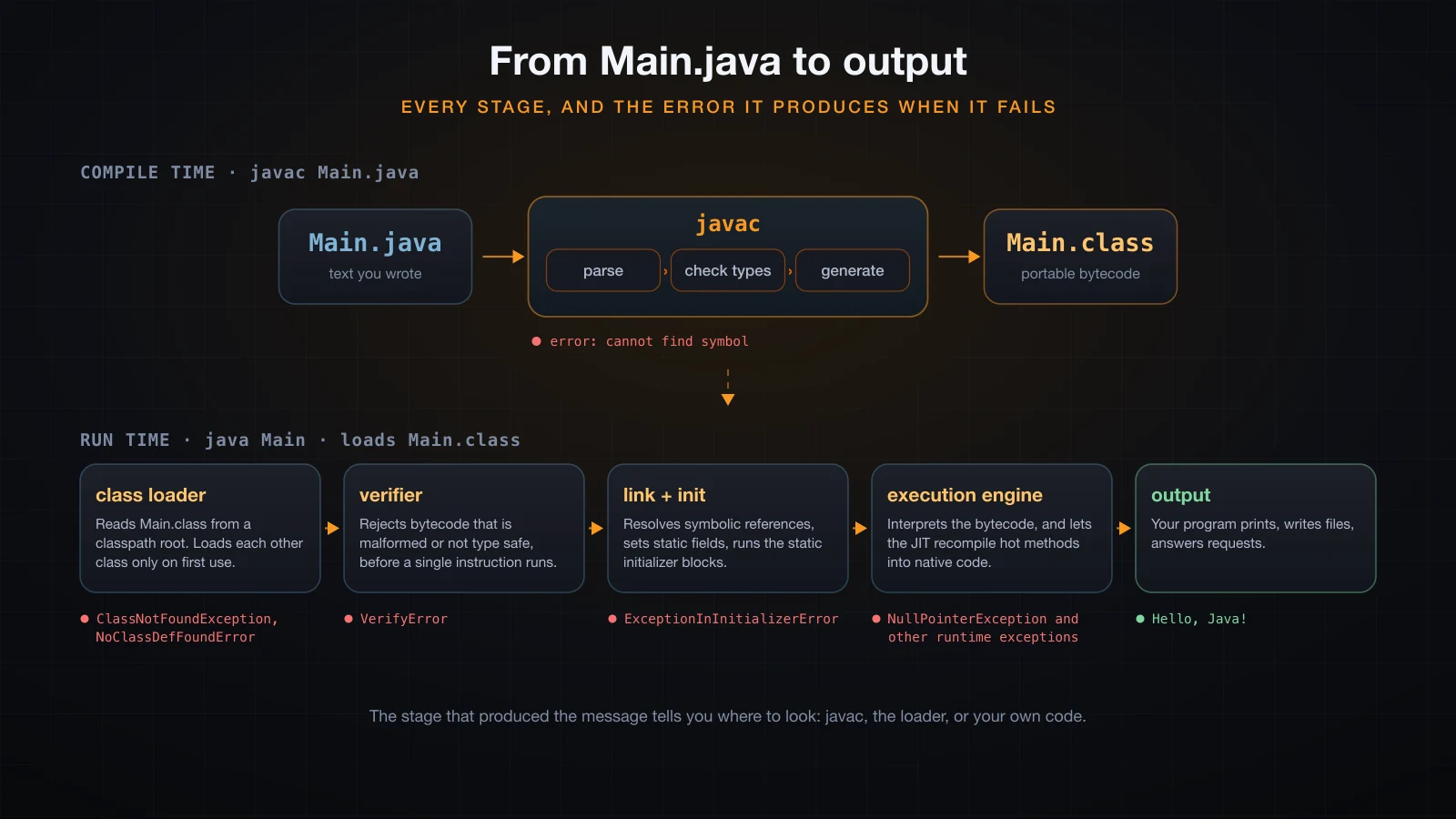
The diagram above is the map for the rest of the article. Read it as a single left-to-right pipeline with a handover in the middle: everything on the top row happens before your program exists, everything on the bottom row happens while it runs. The red label under each stage is the error that stage produces when it fails — which is how you work backwards from a message to a cause.
What is actually inside a .class file?
A .class file is not machine code and it is not text. It is a small, strictly specified binary format: a header, a constant pool, and one bytecode array per method.
The header: cafebabe and the class file version
xxd Main.class | head -4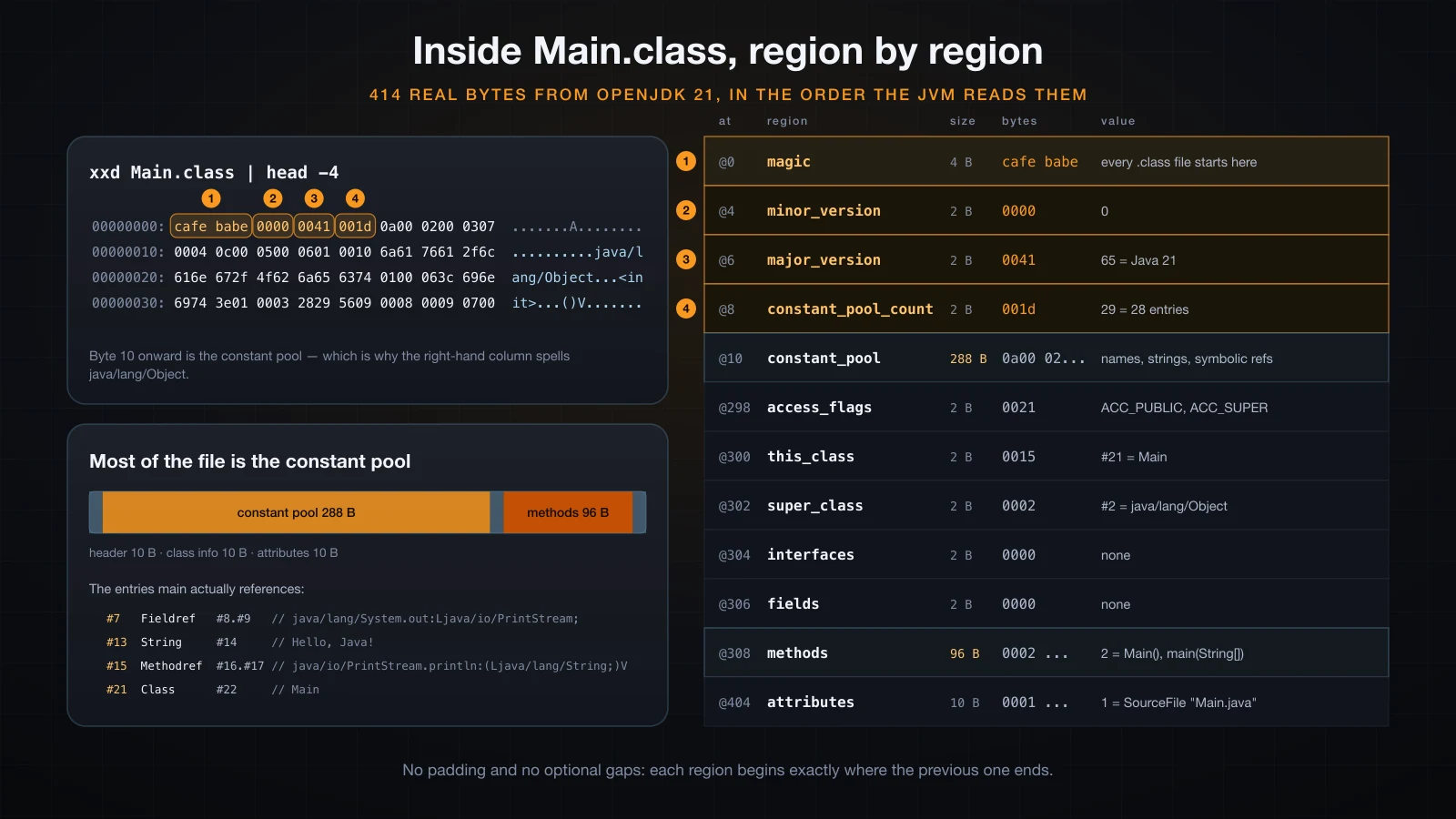
Those bytes are the first three regions of a strictly ordered format:
00000000: cafe babe 0000 0041 001d 0a00 0200 0307  .......A........
00000010: 0004 0c00 0500 0601 0010 6a61 7661 2f6c  ..........java/l
00000020: 616e 672f 4f62 6a65 6374 0100 063c 696e  ang/Object...<in
00000030: 6974 3e01 0003 2829 5609 0008 0009 0700  it>...()V.......
The first four bytes are the magic number 0xCAFEBABE. Every valid class file starts with them, and a file that does not is rejected before anything else is read. The next two bytes are the minor version (0000), and the two after that are the major version: 0041 is 65 decimal.
That number identifies the Java release the file was built for. The rule is major version = Java release + 44:
| Java release | Major version |
|---|---|
| 8 | 52 |
| 11 | 55 |
| 17 | 61 |
| 21 | 65 |
javap -v prints the same thing without the hex:
javap -v Mainpublic class Main
minor version: 0
major version: 65
flags: (0x0021) ACC_PUBLIC, ACC_SUPERA JVM refuses any class file stamped with a version it does not know, and it refuses it at load time, before a single instruction runs. Compile with JDK 21 and hand the result to a Java 17 JVM:
javac Main.java
"$JAVA17_HOME/bin/java" MainError: LinkageError occurred while loading main class Main
java.lang.UnsupportedClassVersionError: Main has been compiled by a more recent version of the Java Runtime (class file version 65.0), this version of the Java Runtime only recognizes class file versions up to 61.065.0 is the class file the JDK 21 compiler produced; 61.0 is the newest the Java 17 JVM accepts. This is the message you get when you compile with a new JDK and run on an old JRE. It is always a version mismatch, never a code problem — and it goes one way only: a Java 17 class file runs on a Java 21 JVM without complaint.
The bytecode: reading javap -c
javap -c disassembles the bytecode. For the whole of Main:
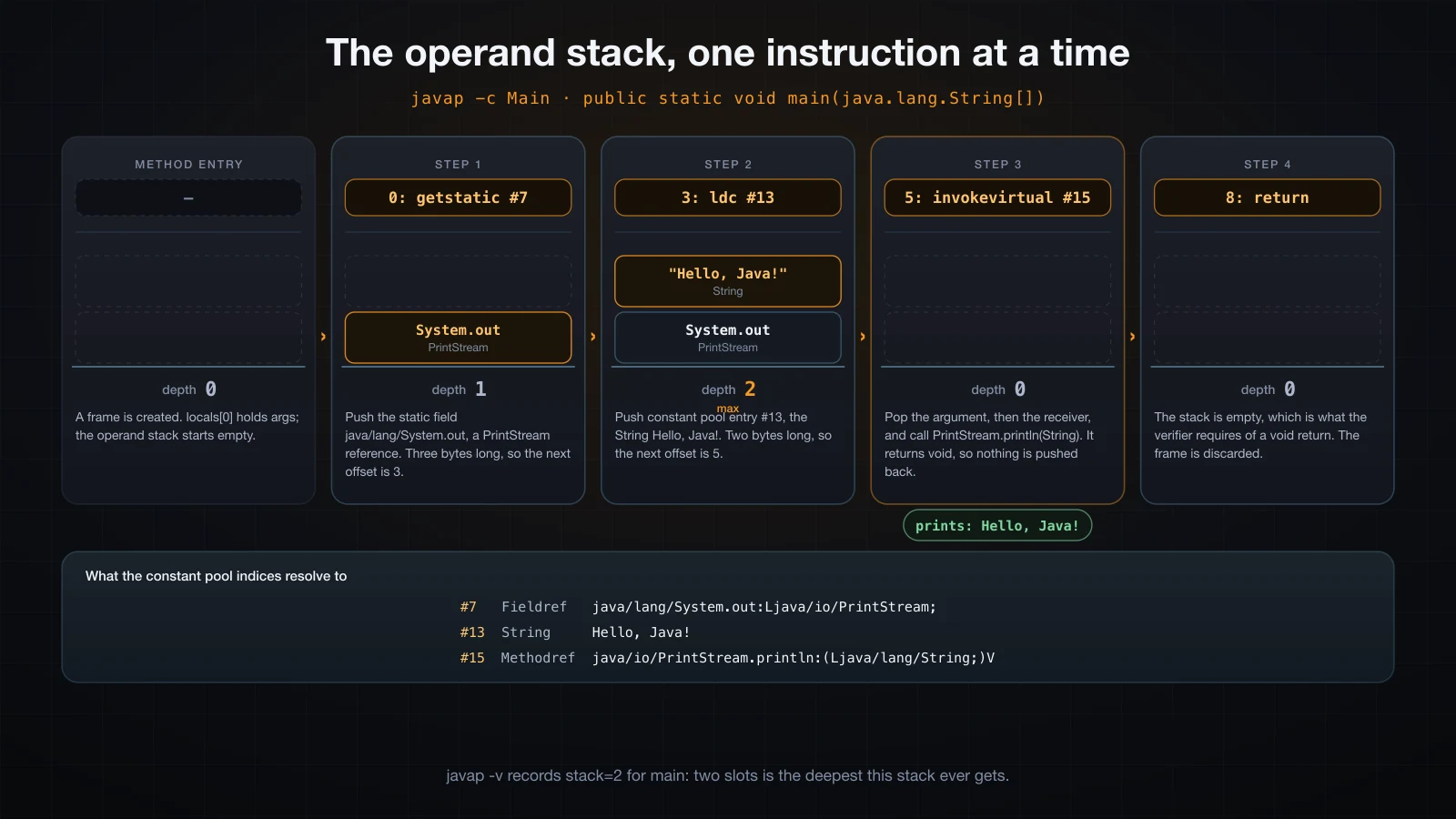
Follow the operand stack and the four instructions stop being cryptic:
javap -c MainCompiled from "Main.java"
public class Main {
public Main();
Code:
0: aload_0
1: invokespecial #1 // Method java/lang/Object."<init>":()V
4: return
public static void main(java.lang.String[]);
Code:
0: getstatic #7 // Field java/lang/System.out:Ljava/io/PrintStream;
3: ldc #13 // String Hello, Java!
5: invokevirtual #15 // Method java/io/PrintStream.println:(Ljava/lang/String;)V
8: return
}Two things to notice before the instructions themselves. First, there is a constructor, public Main(), that you never wrote — javac inserts a default one. Second, the numbers on the left (0, 3, 5, 8) are byte offsets inside the method, not line numbers, which is why they are not consecutive: getstatic is three bytes long, ldc is two.
The JVM is a stack machine. It has no registers you can address; instructions push operands onto an operand stack and pop them off. That makes main easy to read top to bottom:
| Instruction | What it does |
|---|---|
getstatic #7 | Push the value of a static field onto the stack. Here that field is System.out, a PrintStream |
ldc #13 | Load a constant from the constant pool and push it. Here the string Hello, Java! |
invokevirtual #15 | Pop the argument and the receiver, then call the instance method PrintStream.println(String) |
return | Leave the method with no return value |
The #7, #13 and #15 are indices into the constant pool, the table of names, strings and references at the top of the file. That is why the byte dump above contains readable text like java/lang/Object and java/io/PrintStream — the pool stores symbolic references by name, and the JVM resolves them to real memory addresses at run time. aload_0 in the constructor pushes local variable 0, which is this, and invokespecial calls the superclass constructor.
Bytecode is worth looking at once, early, precisely so it stops being a mystery word. It is short, it is documented, and javap -c will answer questions about what the compiler really generated that no amount of reading the source will.
The javac flags that matter
You will meet four flags long before you meet a build tool.
-d: where the .class files go
By default javac writes each .class next to its source, which mixes generated files into your source tree. -d sends them somewhere else and creates the directory:
javac -d out Main.java./Main.java
./out/Main.classjava -cp out MainHello, Java!Keeping compiled output in out/ (or build/, or target/) is the convention every build tool follows, and it means you can delete the whole directory to force a clean rebuild.
--release: which Java version the bytecode targets
--release N compiles against the API of release N and stamps the class file for release N:
javac --release 17 -d out17 Main.java
javap -v -cp out17 Mainpublic class Main
minor version: 0
major version: 61Major version 61 is Java 17, so that class file will run on a Java 17 JVM as well as on this Java 21 one — bytecode runs forwards, never backwards.
The important part of --release is that it checks the API too, which the older -source/-target pair does not. Compile a file that calls String.repeat (added in Java 11) and Stream.toList (added in Java 16) against release 8:
javac --release 8 -d out8 New.javawarning: [options] source value 8 is obsolete and will be removed in a future release
warning: [options] target value 8 is obsolete and will be removed in a future release
New.java:3: error: cannot find symbol
System.out.println("abc".repeat(2));
^
symbol: method repeat(int)
location: class String
New.java:4: error: cannot find symbol
var s = java.util.stream.Stream.of(1, 2, 3).toList();
^
symbol: class var
location: class NewIt fails at compile time, which is what you want. With -source 8 -target 8 it would have compiled cleanly and then thrown NoSuchMethodError on the old JVM.
-Xlint:all: turn the warnings on
javac is quiet by default. It will tell you something is wrong and then decline to say what:
javac Lint.javaNote: Lint.java uses unchecked or unsafe operations.
Note: Recompile with -Xlint:unchecked for details.-Xlint:all turns on every warning category:
javac -Xlint:all Lint.javaLint.java:6: warning: [rawtypes] found raw type: List
List raw = new ArrayList();
^
missing type arguments for generic class List<E>
Lint.java:7: warning: [unchecked] unchecked call to add(E) as a member of the raw type List
raw.add("x");
^
3 warningsThat output is abbreviated here; javac also prints a second [rawtypes] warning and the type-variable explanations. Note the category name in brackets — [rawtypes], [unchecked]. You can enable them individually (-Xlint:unchecked) or suppress one (-Xlint:all,-serial). Turn this on from day one; the warnings it surfaces are real bugs often enough to be worth the noise.
-cp at compile time as well as run time
javac needs to find the types you import, and it uses the same classpath mechanism the launcher does. Without it:
javac -d out App.javaApp.java:1: error: package com.lib does not exist
import com.lib.Util;
^With it:
javac -cp libs/util.jar -d out App.java
java -cp out:libs/util.jar AppCLASSPATH!Compiling against a library does not put that library on the run-time classpath. You have to pass it twice, to both commands.
| Flag | Applies to | Purpose |
|---|---|---|
-d <dir> | javac | Write class files under this directory |
-cp / -classpath / --class-path | javac and java | Where to look for classes that are not in the JDK |
--release <N> | javac | Compile against release N API and target release N bytecode |
-Xlint:all | javac | Enable all warning categories |
-sourcepath <dir> | javac | Where to look for source files of types you did not list |
-jar <file> | java | Run the main class named in a jar manifest |
Packages and the directory mapping
A package is not a namespace you declare in isolation — it is a directory path the tools genuinely walk. A file that starts with package com.example; must live at com/example/ under a source root, and its class file must live at com/example/ under a classpath root.
package com.example;

public class Main {
    public static void main(String[] args) {
        System.out.println(new Greeter().greet("Java"));
    }
}javac -d out src/com/example/Main.java src/com/example/Greeter.java./out/com/example/Greeter.class
./out/com/example/Main.classjavac recreated the package structure under out/ for you; you never create those directories by hand. Now run it with the fully qualified name — the package plus the class name, joined by dots:
java -cp out com.example.MainHello, Java!Get the name wrong and the launcher tells you exactly what it could not find:
java -cp out MainError: Could not find or load main class Main
Caused by: java.lang.ClassNotFoundException: MainForget the classpath and you get the same shape of error with the full name in it:
java com.example.MainError: Could not find or load main class com.example.Main
Caused by: java.lang.ClassNotFoundException: com.example.MainOne more thing about listing source files. javac does not automatically compile a dependency it finds in a sibling directory. Compiling only Main.java fails, because Greeter is not on any source path:
javac -d out2 src/com/example/Main.javasrc/com/example/Main.java:5: error: cannot find symbol
System.out.println(new Greeter().greet("Java"));
^
symbol: class GreeterEither list every file, or point -sourcepath at the source root and let javac find and compile what it needs:
javac -d out3 $(find src -name "*.java")
javac -sourcepath src -d out4 src/com/example/Main.java
Both produce Greeter.class and Main.class under the output directory.
What is the classpath?
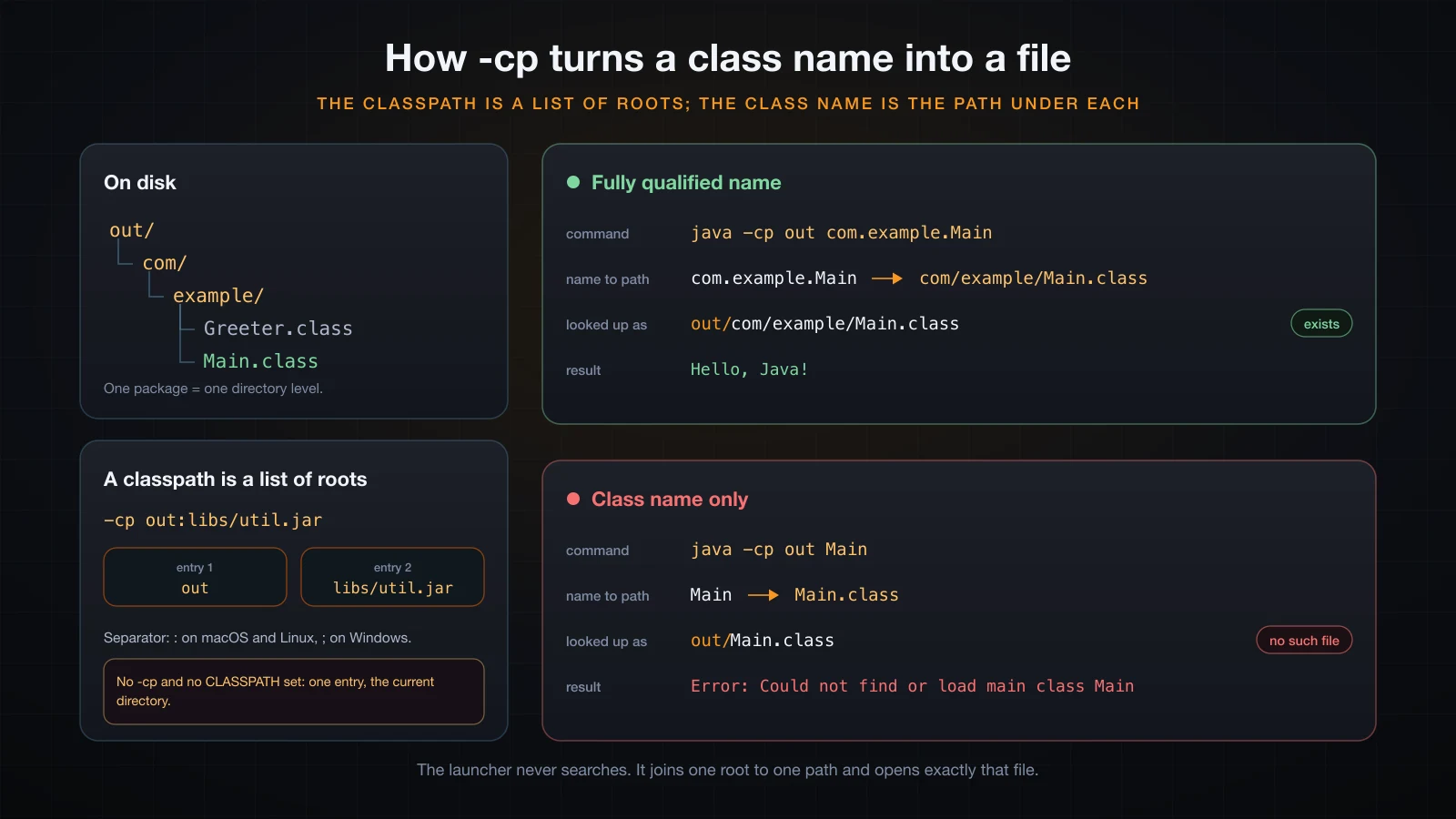
The classpath is an ordered list of roots: directories and jar files. When the JVM needs the class com.example.Main, it replaces every dot with a slash, appends .class, and looks for that relative path under each root in order, stopping at the first hit.
com.example.Main -> com/example/Main.classIt is a mechanical join, not a search. The launcher never scans your disk looking for a class of that name; if the file is not at the exact computed path under one of the roots, it does not exist as far as the JVM is concerned. Both halves have to line up: the package declaration in the source, and the directory you point -cp at.
Multiple entries are separated by : on macOS and Linux, and by ; on Windows:
java -cp out:libs/util.jar AppA * at the end of an entry expands to every jar in that directory. It is expanded by the JVM, not by the shell, so quote it:
java -cp "out:libs/*" AppThe wildcard picks up jars only — not class files, and not subdirectories. It also does not recurse.
The default classpath, and the trap of setting CLASSPATH
If you pass no -cp and the CLASSPATH environment variable is unset, the classpath is the current directory. That is why javac Main.java && java Main works with no flags at all:
env -u CLASSPATH java MainHello, Java!Now set CLASSPATH to anything, and that implicit current directory disappears:
CLASSPATH=/some/other/dir java MainError: Could not find or load main class Main
Caused by: java.lang.ClassNotFoundException: MainMain.class did not move. The default . entry was replaced, not extended. This is a genuinely nasty trap because the variable is often set once in a shell profile and forgotten, and everything then breaks in a directory where it used to work. Two ways out — pass -cp explicitly, which overrides the variable, or put . in the variable yourself:
CLASSPATH=/some/other/dir java -cp . Main
CLASSPATH=.:/some/other/dir java Main
Both print Hello, Java!. Prefer -cp on the command line; an environment variable that silently changes how every JVM on the machine resolves classes is not worth the keystrokes it saves.
⚠️
java -jar app.jarignores-cpentirely. A jar launched this way takes its classpath from the manifest, so adding-cp libs/util.jarnext to-jarchanges nothing and the missing class still blows up at run time.
NoClassDefFoundError vs ClassNotFoundException
These two look interchangeable and are not. Compile a program whose Main uses Greeter, then delete Greeter.class and run it:
java -cp out-broken com.example.MainException in thread "main" java.lang.NoClassDefFoundError: com/example/Greeter
at com.example.Main.main(Main.java:5)
Caused by: java.lang.ClassNotFoundException: com.example.Greeter
at java.base/jdk.internal.loader.BuiltinClassLoader.loadClass(BuiltinClassLoader.java:641)Now ask for a class by name at run time, through reflection:
Class.forName("com.example.Missing");Exception in thread "main" java.lang.ClassNotFoundException: com.example.Missing
at java.base/java.lang.Class.forName(Class.java:412)
at Reflect.main(Reflect.java:3)NoClassDefFoundError | ClassNotFoundException | |
|---|---|---|
| Kind | Error | Checked Exception |
| Raised when | The JVM resolves a reference the compiler recorded, and the class is missing now | Code asks for a class by name string, and it is missing |
| Typical cause | The class was there at compile time but not on the run-time classpath | A wrong or misspelled name, or a plugin jar not shipped |
| Note the format | Slashes: com/example/Greeter | Dots: com.example.Greeter |
The first stack trace shows the relationship: the loader threw ClassNotFoundException, and the resolution machinery wrapped it in NoClassDefFoundError. If you see the error form, look at your run-time classpath. If you see the exception form on its own, look at the name string being passed.
Running a single source file: java Main.java
Since Java 11 (JEP 330) the launcher accepts a .java file directly. It compiles the file in memory and runs it, writing no .class anywhere:
java App.javaRun straight from source: 42App.javaThe directory still contains one file. That is the whole appeal: for learning, for a scratch experiment, or for a script with a #!/usr/bin/java --source 21 line, there is no build artifact to manage.
It also demonstrates something worth internalising. Edit Main.java without recompiling, then run both ways:
java Main          # runs the .class from the last javac
java Main.java # compiles the current source, in memoryHello, Java!
Hello from the EDITED sourcejava Main runs bytecode, and bytecode only changes when you run javac. If a change you just made does not seem to take effect, you are running a stale class file — that is nearly always the answer.
There are two limits. Source-file mode is for a single file: on Java 21, splitting the same program across App.java and Util.java fails, because only the named file is compiled.
java App.javaApp.java:3: error: cannot find symbol
System.out.println("two files: " + Util.twice(21));
^
1 error
error: compilation failedJava 22 lifted this with JEP 458, which compiles the other files in the same directory on demand. And the second limit is the real one: source-file mode recompiles on every start, produces nothing you can ship, and has no way to express dependencies. It is a learning and scripting tool, not a build.
jshell: a REPL for one expression
When the question is "what does this expression evaluate to", neither command is the right tool. jshell is a REPL that has shipped with the JDK since Java 9, and it accepts expressions and statements without a class or a main around them:
jshell> int x = 21
x ==> 21

jshell> x * 2
$2 ==> 42

jshell> "Java".length()
$3 ==> 4

jshell> String.join("-", "a", "b", "c")
$4 ==> "a-b-c"
A declaration echoes the value it was given; a bare expression is assigned to a generated name ($2, $3) so you can refer to it on the next line. Semicolons are optional. /exit quits, /list shows what you have typed so far, and /help intro prints the tour.
This is the fastest way to answer a question about the standard library. It is not a place to build anything — there is no file, and nothing survives the session.
Packaging: building a runnable jar
A jar is a zip file with a manifest. --main-class writes the manifest entry that makes it runnable:
jar --create --file app.jar --main-class com.example.Main -C out .
jar --list --file app.jarMETA-INF/
META-INF/MANIFEST.MF
com/
com/example/
com/example/Greeter.class
com/example/Main.class-C out . means "change into out and add everything from there", which is what keeps the package directories at the root of the archive rather than nested under out/. Then:
java -jar app.jarHello, Java!The manifest is plain text and you can read it out of the archive:
Manifest-Version: 1.0
Created-By: 21.0.6 (Homebrew)
Main-Class: com.example.Main
Main-Class is what -jar reads. Without it, the launcher has nothing to run:
java -jar nomain.jarno main manifest attribute, in nomain.jarA jar without a Main-Class is still perfectly usable as a library — put it on the classpath and name the class yourself:
java -cp app.jar com.example.MainHello, Java!Real projects do not run javac and jar by hand; Maven or Gradle drives exactly these commands for you, along with dependency resolution and a test phase. Everything above is what those tools are doing underneath.
How the JVM runs your bytecode
java Main starts a process, creates a JVM inside it, and asks that JVM for the class Main. What follows happens in a fixed order.
1. Loading: three loaders, and it is lazy
Class loading is delegated up a chain of three built-in loaders:
System.out.println("String   -> " + String.class.getClassLoader());
System.out.println("SQLData  -> " + java.sql.SQLData.class.getClassLoader());
System.out.println("Loaders  -> " + Loaders.class.getClassLoader());
System.out.println("parent -> " + Loaders.class.getClassLoader().getParent());String -> null
SQLData -> jdk.internal.loader.ClassLoaders$PlatformClassLoader@2503dbd3
Loaders -> jdk.internal.loader.ClassLoaders$AppClassLoader@2c854dc5
parent -> jdk.internal.loader.ClassLoaders$PlatformClassLoader@2503dbd3The bootstrap loader handles the core of java.base and is written in native code, which is why String.class.getClassLoader() returns null rather than an object. The platform loader handles the rest of the JDK modules. The application loader handles your classpath, and its parent is the platform loader. A request goes to the parent first, so nothing you put on the classpath can shadow java.lang.String.
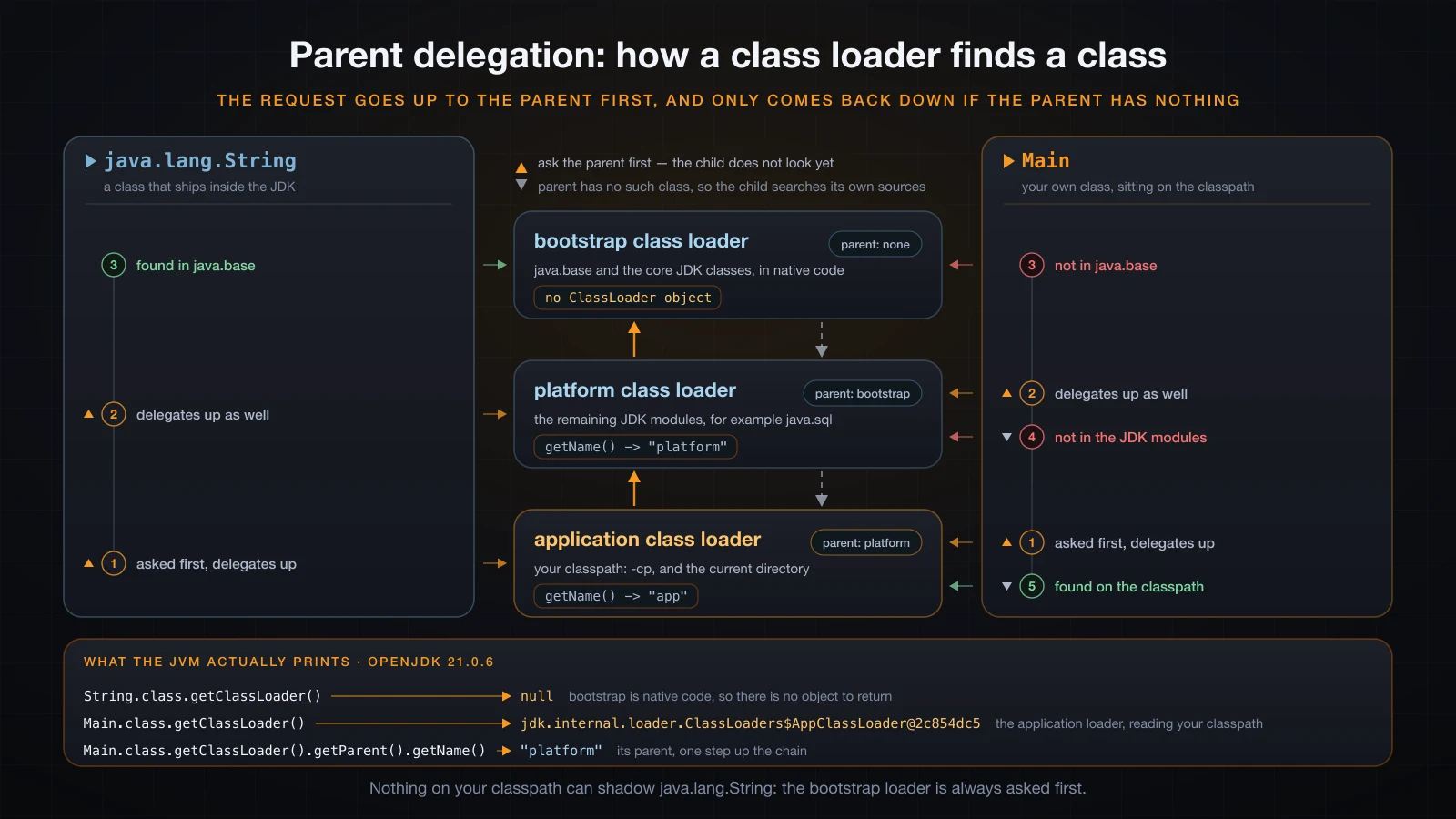
Both lookups start at the application loader; java.lang.String is answered on the way up, while Main is only found after the request has travelled to the top of the chain and come back down.
Loading is lazy: a class is loaded and initialized the first time it is actually used, not when the program starts. This program declares two classes with static initializers and only touches one:
class Alpha {
    static { System.out.println("Alpha initialized"); }
    static String hello() { return "Alpha.hello()"; }
}

class Beta {
    static { System.out.println("Beta initialized"); }
    static String hello() { return "Beta.hello()"; }
}

public class Lazy {
    public static void main(String[] args) {
        System.out.println("main started");
        System.out.println(Alpha.hello());
        System.out.println("Beta is never used");
    }
}main started
Alpha initialized
Alpha.hello()
Beta is never usedBeta initialized never prints, even though Beta.class sits on disk right next to Alpha.class. Notice also that Alpha initialized appears after main started — the class was not touched until the call. -verbose:class confirms it at the loader level:
java -verbose:class Lazy 2>&1 | grep -E "] (Alpha|Beta|Lazy) "[0.017s][info][class,load] Lazy source: file:/private/tmp/lazydemo/
[0.017s][info][class,load] Alpha source: file:/private/tmp/lazydemo/There is no line for Beta at all. That same run loads 448 classes in total, almost all of them from java.base — which is where JVM startup time goes.
2. Verification
Before any bytecode from a loaded class runs, the verifier checks it: that the operand stack never underflows or overflows, that types match what each instruction expects, that jumps land inside the method, that local variable slots are initialized before use. This is why a JVM can safely execute a class file it did not compile.
Corrupt one byte of a valid class file — change the final return of a void method into ireturn, which returns an int — and it never gets a chance to misbehave:
Error: Unable to initialize main class Main
Caused by: java.lang.VerifyError: Operand stack underflow
Exception Details:
  Location:
    Main.main([Ljava/lang/String;)V @8: ireturn
  Reason:
    Attempt to pop empty stack.
VerifyError in the wild almost always means a build problem: a corrupted artifact, a bytecode-rewriting agent or framework misbehaving, or classes from mismatched versions of the same library.
3. Linking and initialization
Linking resolves the symbolic references from the constant pool — java/io/PrintStream.println becomes a real method — and prepares static fields with their default values (0, false, null). Resolution is itself lazy in HotSpot, which is why a missing dependency surfaces at the moment of first use rather than at startup.
Initialization then runs the class's static field initializers and static blocks, in source order, exactly once per class. If that code throws, the JVM wraps it in ExceptionInInitializerError and marks the class permanently unusable for the rest of the process.
4. Execution: interpreter first, JIT second
The execution engine starts by interpreting the bytecode one instruction at a time. Interpreting is portable and starts instantly, but it is slow. Force the JVM to interpret only, with -Xint, and the cost is easy to see — a loop of 20 million iterations, six rounds of one run each way:
| Round | java Warmup | java -Xint Warmup |
|---|---|---|
| 1 | 13 ms | 99 ms |
| 2 | 11 ms | 96 ms |
| 3 | 10 ms | 95 ms |
| 4 | 10 ms | 88 ms |
| 5 | 10 ms | 90 ms |
| 6 | 9 ms | 90 ms |
Roughly nine times slower on this machine for the same loop. The numbers are indicative rather than a benchmark.
So HotSpot watches which methods and loops run often and hands the hot ones to a JIT compiler, which turns their bytecode into native machine code for the actual CPU. There are two JIT compilers working as tiers: C1 compiles quickly and produces decent code; C2 compiles slowly and produces very good code, using profile data C1 collected. -XX:+PrintCompilation shows a method being promoted from tier 3 (C1 with profiling) to tier 4 (C2):
20    6 %     3       Warmup2::work @ 4 (25 bytes)
20    7       3       Warmup2::work (25 bytes)
20    8 %     4       Warmup2::work @ 4 (25 bytes)
21    6 %     3       Warmup2::work @ 4 (25 bytes)   made not entrant
21    9       4       Warmup2::work (25 bytes)
22    7       3       Warmup2::work (25 bytes)   made not entrant
The number after the timestamp is a compilation id, % marks an on-stack replacement of a running loop, and the next column is the tier. made not entrant is the tier 3 version being retired once tier 4 is ready.
This is why a long-running Java process gets faster after it starts, and why the first request to a freshly deployed service is the slow one. Timing the same block of work eight times in a row shows the warm-up directly (indicative numbers from one run; five repeats gave the same shape):
round 1: 1958 us
round 2: 507 us
round 3: 507 us
round 4: 521 us
round 5: 506 us
round 6: 501 us
round 7: 508 us
round 8: 501 us
It also has a practical consequence for measurement: a benchmark that does not warm up is measuring the interpreter, not your code.
Runtime data areas: heap, stacks, metaspace
The JVM divides its memory into regions with different lifetimes. The heap holds every object and array, is shared by all threads, and is what the garbage collector manages; its size is set by -Xms and -Xmx, and by default HotSpot picks a maximum of a quarter of physical RAM. Each thread gets its own stack of frames, one frame per method call, holding that call's local variables and operand stack — this is the memory that runs out as StackOverflowError, and it is not garbage collected but popped on return. Metaspace holds class metadata: the loaded class structures, method bytecode and the runtime constant pool. It lives in native memory, grows on demand, and is the region that fills up when an application loads classes without bound. You can read the defaults your machine chose:
java -XX:+PrintFlagsFinal -version size_t InitialHeapSize = 268435456 {product} {ergonomic}
size_t MaxHeapSize = 4294967296 {product} {ergonomic}
size_t MaxMetaspaceSize = 18446744073709551615 {product} {default}
intx ThreadStackSize = 2048 {pd product} {default}That is a 256 MB initial heap and a 4 GB maximum on a 16 GB machine, a 2 MB stack per thread, and a metaspace maximum left effectively unbounded.
Which command should I use?
| Situation | Command | Why |
|---|---|---|
| One file, learning or a quick test | java Main.java | No build artifact; recompiles from source every run. Single file only before Java 22 |
| Trying one expression | jshell | No class, no main, immediate result |
| A project of several files | javac -d out $(find src -name "*.java") then java -cp out com.example.Main | Compile once, run many times; output separated from source |
| Using a library | javac -cp libs/util.jar -d out ... then java -cp "out:libs/*" ... | The library has to be on both classpaths |
| Handing it to someone else | jar --create --file app.jar --main-class com.example.Main -C out . then java -jar app.jar | One file, self-describing entry point |
| Anything real and ongoing | Maven or Gradle | Drives all of the above, plus dependencies and tests |
Troubleshooting: real error messages
| Message | What happened | Fix |
|---|---|---|
error: cannot find symbol | javac could not resolve a name | Typo, missing import, or a missing -cp entry |
error: class Other is public, should be declared in a file named Other.java | Public class name does not match the file name | Rename one of them so they match |
Could not find or load main class Main.class | You passed a file name to java | Drop the extension: java Main |
Could not find or load main class Main (packaged code) | You used the short name instead of the fully qualified one | java -cp out com.example.Main |
Could not find or load main class com.example.Main | The class is not under any classpath root at com/example/Main.class | Point -cp at the output root, check the package declaration |
Main method not found in class NoMain | The class exists but has no public static void main(String[]) | Run the class that has main |
NoClassDefFoundError: com/example/Greeter | Present at compile time, missing at run time | Add the jar or directory to the run-time -cp |
ClassNotFoundException: com.example.Missing | A name string was looked up and did not resolve | Check the spelling and that the artifact is shipped |
UnsupportedClassVersionError ... class file version 65.0 | Compiled by a newer JDK than the JVM running it | Run a newer JVM, or compile with --release |
VerifyError | The bytecode is malformed | Rebuild from clean; suspect a bytecode-rewriting agent or a corrupt jar |
no main manifest attribute, in app.jar | The jar has no Main-Class | Rebuild with --main-class, or use java -cp app.jar <class> |
| Your change had no effect | java ran a stale .class | Recompile, or run java Main.java |
FAQ
Do I have to recompile every time I change the code?
Yes, if you run with java Main. The launcher reads the .class file and knows nothing about your source. Edit Main.java without recompiling and java Main will happily print the old output, as shown above. An IDE hides this by compiling on save, and java Main.java avoids it by compiling on every run.
Why does java Main.java work without javac at all?
Source-file mode, added in Java 11 by JEP 330. The launcher notices the .java extension, compiles the file into memory, and runs the first top-level class it finds. Nothing is written to disk. It is convenient for learning and unsuitable for a project, because it recompiles on every start and produces no artifact.
Is Java compiled or interpreted?
Both, in sequence. javac compiles source to bytecode ahead of time. The JVM then interprets that bytecode, and JIT-compiles the parts that run often into native code while the program runs. "Compiled to bytecode, then JIT-compiled at run time" is the accurate description.
Where does -cp go in the command?
Before the class name, because everything after the class name is passed to your program as args. java -cp out com.example.Main is correct; java com.example.Main -cp out hands -cp and out to main as arguments and uses the default classpath. Also remember -cp is ignored entirely when you use -jar.
What is the difference between java -cp app.jar Main and java -jar app.jar?
-cp app.jar Main puts the jar on the classpath and runs the class you name; you can add more entries to the classpath. -jar app.jar runs the class named by Main-Class in the manifest and replaces the classpath with that jar alone.
Do professional projects really type javac?
No. Maven and Gradle generate and run these commands, resolve dependencies, and produce the jar. Knowing what they generate is what lets you read their failures, which are almost always classpath failures wearing a different hat.
Conclusion
The pipeline is short and completely inspectable. javac turns a file into a class file whose version, constant pool and bytecode you can read with xxd and javap. java turns a class name into a path, resolves it against classpath roots, then loads, verifies, links, initializes and executes — interpreting first and JIT-compiling what gets hot. Every error message in this article names the stage that produced it, which is the fastest debugging tool you have.
Article 6 moves from the pipeline into the language itself: variables and data types, the eight primitive types and how they differ from reference types, and what that difference means for assignment, comparison and memory.
![[Java Basics] Hello World in Java: The Anatomy of a .java File](/images/blog/hello-world-in-java-thumbnail.en.webp)
![[Java Basics] Methods in Java: Declaring and Calling Them](/images/blog/methods-in-java-thumbnail.en.webp)
![[Java Basics] Exception Handling in Java: try, catch, finally, throw and throws](/images/blog/exception-handling-thumbnail.en.webp)
![[Java Basics] Variable Scope in Java: Local, Field and Static](/images/blog/variable-scope-thumbnail.en.webp)