The Java Hello World program is five lines long and every one of them is load-bearing. Most tutorials print it, say "don't worry about this for now", and move on — which is why so many beginners spend weeks unsure why main needs static, or why the compiler suddenly refuses a file after they rename a class.
This article is the opposite. It takes the smallest complete Java program apart token by token, and the error messages quoted below are the ones the Java 21 compiler prints.
Everything here is about the source file itself — what each keyword means and what the compiler rejects. How javac and java actually turn that file into a running process is the next article's job.
The smallest complete Java program
Put this in a file called HelloWorld.java:
public class HelloWorld {
    public static void main(String[] args) {
        System.out.println("Hello, World!");
    }
}
Compile and run it:
javac HelloWorld.java && java HelloWorldHello, World!Five lines, and none of them is decoration. Remove public from main and the program still compiles but refuses to start. Remove static and the same thing happens for a different reason. Rename the file and the compiler stops you before you get that far. The rest of this article is why.
The parts of a .java file, in order
A .java file has a fixed order: an optional package declaration, then any import statements, then the type declarations. Here is the same program with every optional part present:
package com.example.hello;

import java.time.LocalDate;

public class HelloWorld {
    public static void main(String[] args) {
        System.out.println("Hello, World!");
        System.out.println(LocalDate.now());
    }
}Hello, World!
2026-09-04The second line is whatever date you run it on. Here is the whole file, annotated:
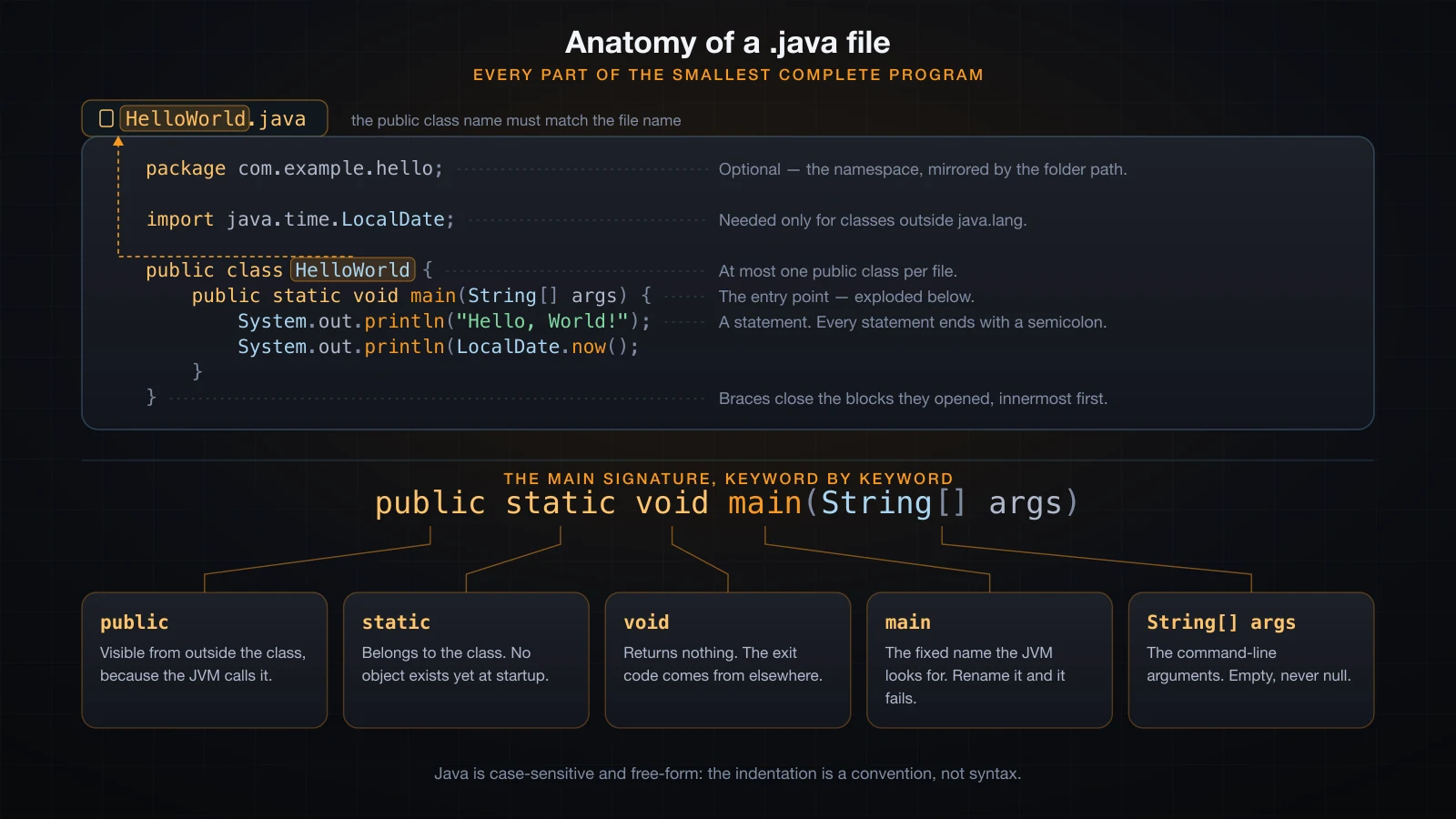
| Element | Required | What it does |
|---|---|---|
package | No | Names the namespace the class belongs to. At most one, and it must come first. |
import | No | Lets you write a type's short name instead of its fully qualified name. |
| Class declaration | Yes | Every top-level piece of Java code lives inside a class, interface, enum or record. |
main method | Only to run it | The entry point the JVM looks for. A library class needs none. |
| Statements | Yes | The actual work, inside the method body. |
The package declaration
package com.example.hello; says this class belongs to the namespace com.example.hello. Three rules follow from that:
- There is at most one
packageline, and it must be the first thing in the file other than comments and whitespace. A licence header comment above it is fine. - The directory structure has to mirror the package, so
com.example.hello.HelloWorldlives atcom/example/hello/HelloWorld.java. - Package names are lowercase, dot-separated, and conventionally a reversed domain you control —
com.example.hello,org.apache.commons.lang3. That convention exists to keep two libraries from colliding on the same name.
Put the import above the package and the compiler does not give you a helpful "wrong order" message — it simply stops recognising the file as Java:
import java.util.List;
package com.example;BadOrder.java:2: error: class, interface, enum, or record expected
package com.example;
^
1 errorOmit the package line entirely and the class lands in the default package. That is fine for a throwaway file and for every example in this article, but real projects always declare a package.
The import statements
An import does not copy code into your file. It is purely a naming shortcut: it tells the compiler that when you write LocalDate, you mean java.time.LocalDate. You can always skip the import and write the full name instead:
public class FullyQualified {
    public static void main(String[] args) {
        java.util.List<String> names = java.util.List.of("a", "b");
        System.out.println(names);
    }
}[a, b]So why does Hello World need no import at all? Because everything in the package java.lang is imported implicitly into every source file — String, System, Math, Integer, Object, Exception, Thread and the rest of the language core:
public class LangDemo {
    public static void main(String[] args) {
        String s = "no import needed";
        System.out.println(s + " " + Math.max(2, 7) + " " + Integer.parseInt("42"));
    }
}no import needed 7 42Anything outside java.lang needs the import. Forget it and you get the single most common beginner error message in Java:
NoImport.java:3: error: cannot find symbol
        List<String> names = List.of("a", "b");
        ^
  symbol:   class List
  location: class NoImport
A wildcard import — import java.util.*; — brings in every type in that package, but not sub-packages: java.util.* does not give you java.util.concurrent.ExecutorService. Most codebases prefer explicit imports because they document exactly where each name comes from.
The class declaration
public class HelloWorld { is four separate things: an access modifier (public), the keyword class, the name HelloWorld, and an opening brace that starts the class body. The matching } at the bottom ends it.
Java has no free-floating functions and no top-level statements. Every method, every field and every constant belongs to some type. That is why even a one-line program needs a class around it.
Why the file name must match the public class name
If a top-level class is declared public, its name and the file name must be identical, including case. Break the rule deliberately — put public class HelloWorld inside a file named Program.java — and javac refuses:
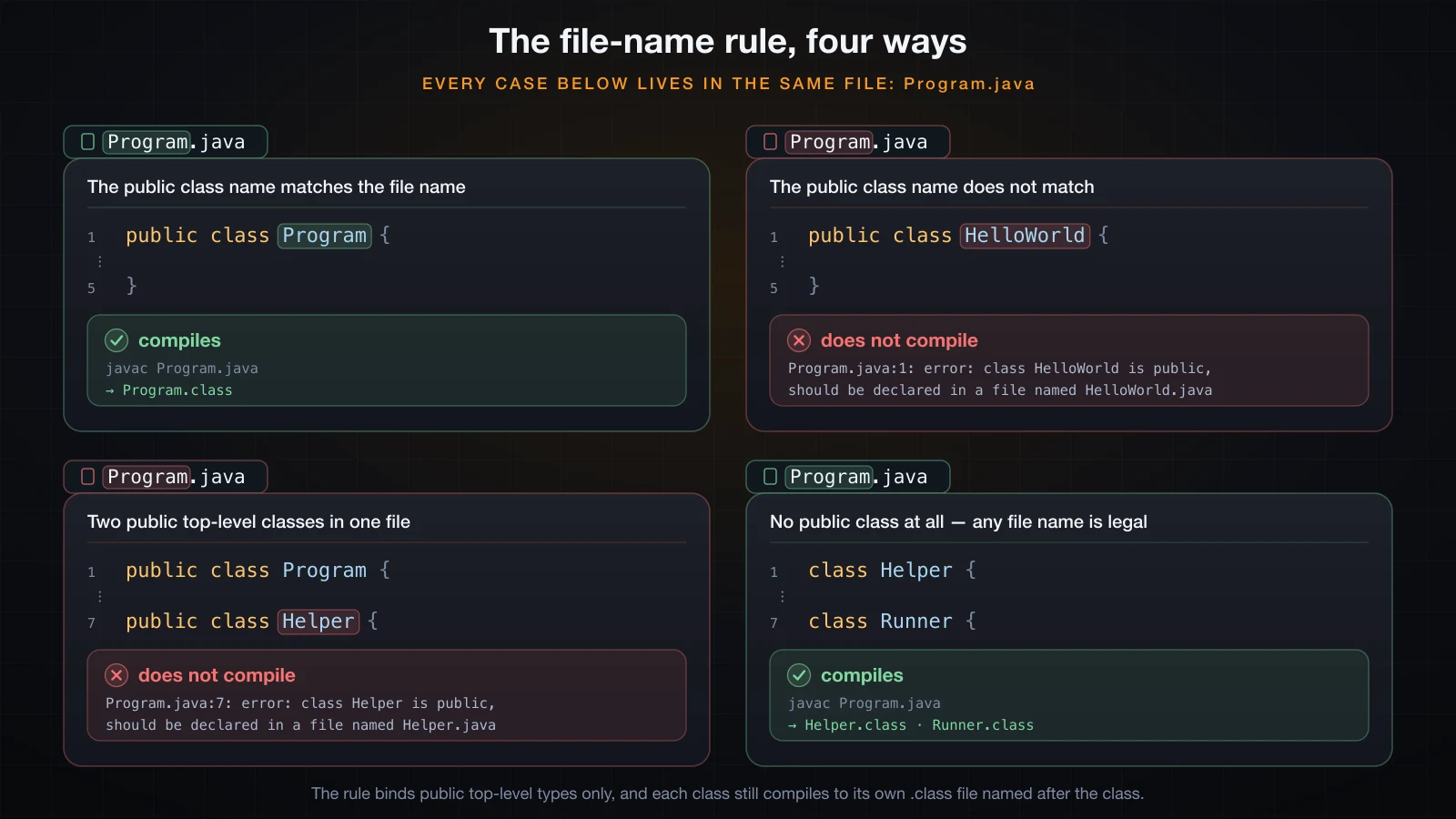
The same file name against four different class declarations:
Program.java:1: error: class HelloWorld is public, should be declared in a file named HelloWorld.java
public class HelloWorld {
       ^
1 error
Two consequences follow immediately.
A file can contain at most one public top-level class. Two of them would each demand to own the file name:
public class TwoPublic {
    public static void main(String[] args) {
        System.out.println("hi");
    }
}

public class Helper {
}TwoPublic.java:7: error: class Helper is public, should be declared in a file named Helper.java
public class Helper {
^
1 errorA non-public class can live in a file of any name. The rule only applies to public types, so this compiles even though neither class matches the file name Anything.java:
class Helper {
    static String greet() {
        return "from Helper";
    }
}

class Runner {
    public static void main(String[] args) {
        System.out.println(Helper.greet());
    }
}javac Anything.java # produces Helper.class and Runner.class
java Runnerfrom HelperNote what that also proves: each class becomes its own .class file named after the class, not after the source file, and a class does not have to be public to hold a runnable main.
public static void main(String[] args), keyword by keyword
This signature is not a magic incantation; every word is an ordinary Java modifier that happens to be required here for a concrete reason.
public
public means visible from anywhere. The JVM's launcher is code outside your class and outside your package, so it needs main to be visible from outside to call it at all. Make it private and the launcher cannot see it — and reports the method as missing rather than as hidden:
Error: Main method not found in class Wrong5, please define the main method as:
   public static void main(String[] args)
or a JavaFX application class must extend javafx.application.Application
static
static means the method belongs to the class itself, not to an instance of it. This is the one that actually matters conceptually: at the moment your program starts, no object of your class exists yet, and the JVM has no way to know how to construct one — your class might have no no-argument constructor, or its constructor might need a database connection.
So the launcher calls the method on the class directly, and that requires static. Drop it and the JVM tells you precisely that:
Error: Main method is not static in class Wrong2, please define the main method as:
   public static void main(String[] args)
void
void means the method returns nothing. It is tempting to think main should return an exit code the way C's main returns an int, but Java does not work that way — a Java process reports its exit status through System.exit(int), which can be called from anywhere, not just from main:
public class Exit {
    public static void main(String[] args) {
        System.out.println("about to exit");
        System.exit(3);
    }
}
Running that and asking the shell for $? gives 3. Declaring main with any other return type compiles fine but fails at launch:
Error: Main method must return a value of type void in class Wrong3, please
define the main method as:
   public static void main(String[] args)
main
The name is fixed. The launcher looks for a method literally called main — lowercase — and nothing else. Java is case-sensitive, so Main is a different method entirely, and the JVM reports the class as having no entry point:
Error: Main method not found in class Wrong1, please define the main method as:
   public static void main(String[] args)
or a JavaFX application class must extend javafx.application.Application
main is not a reserved word, by the way. It is an ordinary method name that the launcher happens to look for, which is why you can call it yourself like any other static method.
String[] args
args is an array of the command-line arguments, in order, with the program name not included — unlike C, where argv[0] is the executable.
public class Greet {
    public static void main(String[] args) {
        System.out.println("args.length = " + args.length);
        for (int i = 0; i < args.length; i++) {
            System.out.println("args[" + i + "] = " + args[i]);
        }
    }
}java Greet Alice 42 "hello there"args.length = 3
args[0] = Alice
args[1] = 42
args[2] = hello thereThree details worth internalising:
- Everything is a
String.42arrives as the two-character string"42", not as a number. Converting it is your job —Integer.parseInt(args[1]). - Quoting is the shell's business, not Java's.
"hello there"arrives as one argument because the shell grouped it, not because Java did. - With no arguments,
argsis an empty array, nevernull. Running the same class with no arguments printsargs.length = 0, and touchingargs[0]throws rather than NPEs:
Exception in thread "main" java.lang.ArrayIndexOutOfBoundsException: Index 0 out of bounds for length 0
	at Tool.main(App.java:10)
Two spellings are also legal. String... args (varargs) is accepted by the launcher and lets you call main conveniently from your own code:
public class VarargsMain {
    public static void main(String... args) {
        System.out.println("varargs main ran, args.length = " + args.length);
    }
}varargs main ran, args.length = 2And String args[], with the brackets after the name, is legal C-style syntax that Java inherited. It compiles and runs, but nobody writes it that way any more. The parameter name itself is free — main(String[] arguments) works identically.
What happens when the signature is wrong
The pattern is worth noticing: every one of these mistakes compiles cleanly and fails only when you try to run it. javac has no idea you intended that method to be an entry point.
| What you wrote | Result |
|---|---|
public static void Main(String[] args) | Main method not found |
public void main(String[] args) | Main method is not static |
public static int main(String[] args) | Main method must return a value of type void |
private static void main(String[] args) | Main method not found |
public static void main() | Main method not found |
public static void main(String... args) | Works |
Statements, blocks, case and whitespace
A statement ends with a semicolon. System.out.println("Hello, World!"); is one statement. The semicolon is a terminator, not a separator, so the last statement in a block needs one too. A stray extra ; is a legal empty statement and does nothing.
Braces group statements into a block. A class body, a method body, a loop body — all blocks. They nest, and each } closes the innermost open {. Forget one and the compiler runs off the end of the file looking for it:
E6.java:4: error: reached end of file while parsing
}
 ^
1 error
Java is case-sensitive, everywhere. String is a class and string is nothing; System is a class and system looks like a package name to the compiler. One typo produces two quite different errors:
public class E3 {
    public static void main(string[] args) {
        system.out.println("Hello");
    }
}E3.java:2: error: cannot find symbol
public static void main(string[] args) {
^
symbol: class string
location: class E3
E3.java:3: error: package system does not exist
system.out.println("Hello");
^
2 errorsWhitespace is free-form. Java does not care about line breaks or indentation the way Python does. The entire program on one line compiles and runs:
public class OneLine{public static void main(String[] args){System.out.println("Still valid Java.");}}Still valid Java.Which is exactly why formatting is a convention rather than syntax, and why the convention is enforced socially instead: four spaces per level, opening brace on the same line, one statement per line. Every Java codebase you will ever join follows some version of it, and every IDE will reformat to it on save.
Printing to the console
What System, out and println actually are
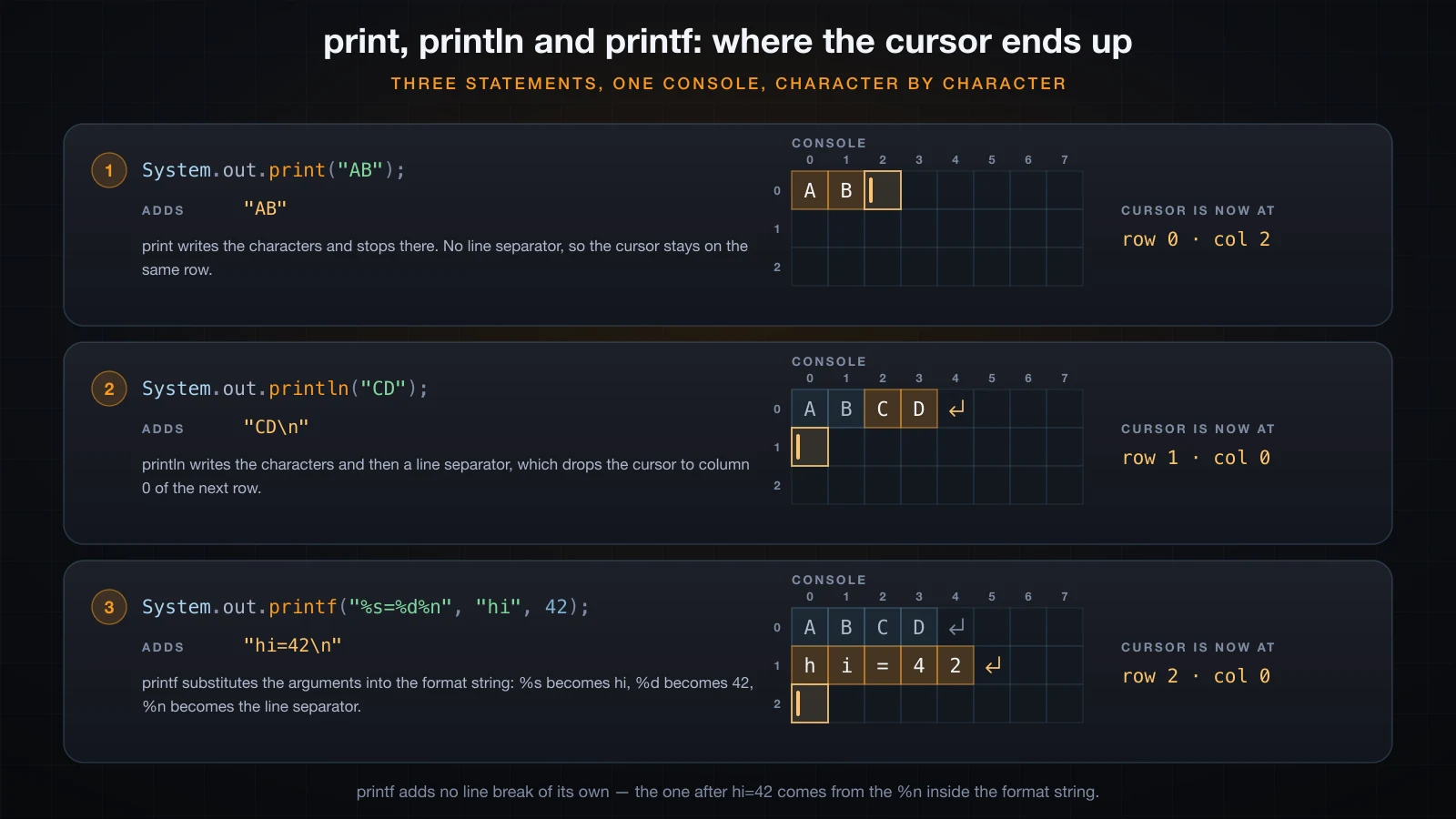
The difference is entirely about what each one appends, and therefore where the cursor ends up:
System.out.println("...") is your first look at a chain that runs through the whole language: a class, a field on it, and a method on the value of that field.
| Token | What it is |
|---|---|
System | A final class in java.lang, so no import is needed. |
out | A public static final field on System, of type java.io.PrintStream. |
println | An instance method on PrintStream that prints its argument and a line separator. |
You can pull the field out and prove it:
import java.io.PrintStream;

public class Chain {
    public static void main(String[] args) {
        PrintStream out = System.out;
        out.println("System is a class, out is a static field, println is a method.");
        System.out.println(System.out.getClass().getName());
    }
}System is a class, out is a static field, println is a method.
java.io.PrintStreamprint is the same method without the trailing newline, and println() with no arguments prints an empty line:
System.out.print("A");
System.out.print("B");
System.out.println("C");
System.out.println("next line");ABC
next lineprintf and format specifiers
printf takes a format string and the values to substitute into it. It is the right tool whenever you would otherwise build a string with a pile of + concatenation:
System.out.printf("%s scored %d points (%.2f%% accuracy)%n", "Alice", 42, 91.5);
System.out.printf("%-10s|%5d|%n", "left", 7);
System.out.printf("%08.3f%n", 3.14159);Alice scored 42 points (91.50% accuracy)
left | 7|
0003.142| Specifier | Meaning |
|---|---|
%s | Any object, via its toString() |
%d | Integer types |
%f | Floating point; %.2f fixes two decimal places |
%n | Platform line separator |
%% | A literal percent sign |
%-10s | Left-aligned in a field 10 characters wide |
%5d | Right-aligned in a field 5 characters wide |
Note that printf does not add a newline of its own. Use %n rather than \n: %n emits the platform's line separator, while \n is always a single line-feed character.
System.err
System.err is a second PrintStream, pointing at standard error rather than standard output. Diagnostics and error messages belong there, so that a user can redirect one stream without losing the other:
System.out.println("this is normal output");
System.err.println("this went to standard error");java Printing 2>/dev/null # keeps stdout, discards stderr
java Printing 1>/dev/null # keeps stderr, discards stdoutEscape sequences and text blocks
Inside a string literal, a backslash starts an escape sequence. You need them because a string literal cannot span a line break and cannot contain an unescaped quote.
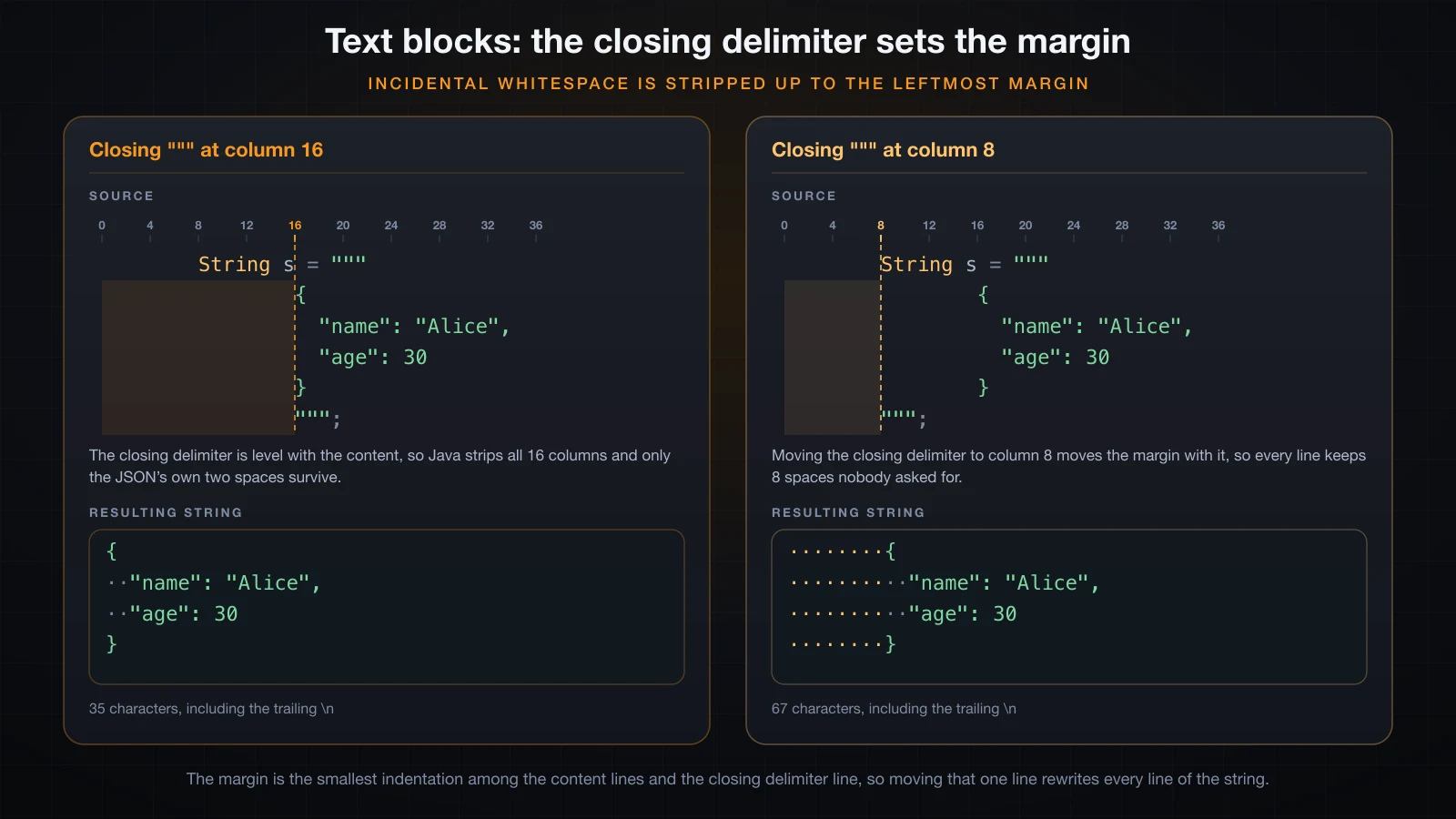
Moving the closing delimiter rewrites every line of the string:
| Escape | Produces |
|---|---|
\n | Line feed |
\t | Tab |
\" | A double quote |
\\ | A single backslash |
\' | A single quote (only needed in char literals) |
\uXXXX | The character with that hex code point |
System.out.println("Line one\nLine two");
System.out.println("Name:\tAlice");
System.out.println("She said \"hello\".");
System.out.println("Windows path: C:\\Users\\alice");
System.out.println("Unicode: \u00e0 \u0111");Line one
Line two
Name: Alice
She said "hello".
Windows path: C:\Users\alice
Unicode: à đSince Java 15, multi-line output is better written as a text block: three double quotes, a line break, then the content. Quotes inside need no escaping, and the common leading whitespace is stripped automatically based on the closing delimiter's indentation:
public class TextBlockDemo {
    public static void main(String[] args) {
        String json = """
                {
                  "name": "Alice",
                  "age": 30
                }""";
        System.out.println(json);
    }
}{
"name": "Alice",
"age": 30
}Comments and Javadoc
Java has three comment forms, and the third is not just a comment:
// a line comment: everything to the end of the line

/*
   a block comment,
   spanning several lines
*/

/**
 * A Javadoc comment. Documents the declaration that follows it.
 *
 * @param name the name to greet
 * @return the greeting line
 */
public static String greet(String name) {
    return "Hello, " + name + "!";
}
The compiler ignores all three. But the JDK ships a javadoc tool that reads the /** */ form and generates a browsable HTML API reference from it — running it on the class above produces Greeter.html, index.html, a search index and the rest of the familiar layout you see on the official Java API pages. That is why the tag syntax (@param, @return, @throws, @author) is worth learning early: those tags become structured sections in the generated page.
⚠️ Block comments do not nest. A
/*inside a/* ... */does not open a second comment, so commenting out a region that already contains a block comment ends the comment early and breaks the file. Line comments are safer for that.
Naming conventions and identifier rules
Java's rules about names are permissive; its conventions are near-universal and treated as binding by every team.
| Kind | Convention | Example |
|---|---|---|
| Class, interface, enum, record | PascalCase | HelloWorld, LocalDate |
| Method | camelCase, usually a verb | println, parseInt, greet |
| Variable, parameter, field | camelCase, a noun | args, userName, count |
Constant (static final) | UPPER_SNAKE_CASE | MAX_VALUE, DEFAULT_TIMEOUT |
| Package | all lowercase, dotted | com.example.hello |
The actual identifier rules are: an identifier starts with a letter, _ or $, and continues with letters, digits, _ or $. "Letter" means any Unicode letter, so this compiles and prints 10:
int count = 1;
int _count = 2;
int $price = 3;
int giáTrị = 4;
System.out.println(count + _count + $price + giáTrị);
Legal is not the same as advisable. $ is reserved by convention for compiler-generated names, and non-ASCII identifiers cause trouble the moment someone opens the file with a different encoding. Stick to ASCII, and to the table above.
Reserved words cannot be identifiers at all. Using one derails the parser completely — a single int class = 5; produces five errors:
Bad.java:3: error: not a statement
        int class = 5;
        ^
Bad.java:3: error: ';' expected
        int class = 5;
           ^
Bad.java:3: error: <identifier> expected
        int class = 5;
                 ^
A lone underscore used to be a legal name and is not any more. In Java 21 it is reserved for the unnamed-variable feature, and using it as an ordinary variable name gives:
Under.java:3: error: unnamed variables are a preview feature and are disabled by default.
        int _ = 5;
            ^
  (use --enable-preview to enable unnamed variables)
The compile errors you will hit on day one
Five errors account for most of a beginner's first week.
1. Missing semicolon. The caret points past the end of the line, because that is where the semicolon should have been:
E1.java:3: error: ';' expected
        System.out.println("Hello, World!")
                                           ^
1 error
2. Unclosed string literal. The caret points at the opening quote, since the compiler followed the literal to the end of the line without finding its partner:
E2.java:3: error: unclosed string literal
        System.out.println("Hello, World!);
                           ^
1 error
3. Wrong case on a method name. Println instead of println — note that the message names the receiver's type, which is a useful hint that out is a PrintStream:
E4.java:3: error: cannot find symbol
        System.out.Println("Hello");
                  ^
  symbol:   method Println(String)
  location: variable out of type PrintStream
1 error
4. Wrong case on a keyword. Public is not public, so the parser never even reaches the class:
E7.java:1: error: class, interface, enum, or record expected
Public class E7 {
^
1 error
5. Using a local variable before assigning it. Java refuses to read a local variable that has not definitely been given a value — this is a compile error, not a runtime surprise:
int count;
System.out.println(count);E5.java:4: error: variable count might not have been initialized
System.out.println(count);
^
1 errorRead javac output from the top down: the first error is usually the real one, and the rest are often the parser flailing after it.
Java 21 and later: instance main methods without the ceremony
Java has been shortening the entry-point ritual. JEP 445, delivered as a preview feature in Java 21, allows a source file with no class declaration at all and an instance main method — no public, no static, no parameters:
void main() {
    System.out.println("Hello from an implicitly declared class");
}
Java 21 called these "unnamed classes"; JEP 463 (Java 22) renamed them implicitly declared classes, JEP 477 (Java 23) added automatic imports for common utilities, and the feature was finalised by JEP 512 in Java 25. Under Java 21 it is preview-only, so the compiler refuses it by default:
Hello.java:1: error: unnamed classes are a preview feature and are disabled by default.
void main() {
^
  (use --enable-preview to enable unnamed classes)
1 error
Both the compiler and the launcher need the flag, and the compiler warns you every time:
javac --enable-preview --release 21 Hello.javaNote: Hello.java uses preview features of Java SE 21.
Note: Recompile with -Xlint:preview for details.java --enable-preview HelloHello from an implicitly declared classForget the flag at run time and the class file is rejected outright, because preview class files are marked with a minor version of 65535:
Error: LinkageError occurred while loading main class Hello
	java.lang.UnsupportedClassVersionError: Preview features are not enabled for Hello (class file version 65.65535). Try running with '--enable-preview'
This is not the form to learn first. It exists to shorten the first hour of a beginner's life, but every real Java codebase, every tutorial, every Stack Overflow answer and every job interview uses the classic public static void main(String[] args) inside a named class. Learn that one, and treat the short form as a convenience for scratch files once you already understand what it is hiding.
FAQ
Does the class holding main have to be public?
No. A package-private class runs perfectly well, as the Runner example above showed. public is required for the class to be usable from other packages, not for it to be launchable.
Can one file contain more than one main method?
Yes — one per class. The JVM runs the main of the class you name on the command line, and you can call another class's main yourself like any static method:
public class App {
    public static void main(String[] args) {
        System.out.println("App.main");
        Tool.main(new String[]{"called by hand"});
    }
}

class Tool {
    public static void main(String[] args) {
        System.out.println("Tool.main, args[0] = " + args[0]);
    }
}App.main
Tool.main, args[0] = called by handDoes main have to be the first method in the class?
No. Method order inside a class body is irrelevant to the compiler, and a method can call another that is declared below it. Order it however reads best.
Why is my output not appearing in the right order when I mix System.out and System.err?
They are two independent streams with independent buffering, so a terminal can interleave them unexpectedly. If ordering matters, write everything to one stream.
Do I need a semicolon after the closing brace of a class?
No. } ends the class body on its own. A ; after it is a legal empty declaration that the compiler ignores — harmless, but nobody writes it.
What is the difference between \n and %n?
\n is always the single line-feed character U+000A. %n, valid only in a printf format string, emits the platform's line separator — which is a carriage return plus a line feed on Windows. Prefer %n in printf, and prefer println over embedding \n at the end of a string.
Conclusion
Every token in Hello World earns its place: package names the namespace, import shortens type names for everything outside java.lang, the public class name is bound to the file name, and public static void main(String[] args) is the exact shape the launcher searches for — public so it can be reached, static because no object exists yet, void because exit codes come from System.exit, main because the name is hard-coded, and String[] args because the command line arrives as strings.
You have now compiled and run that file several times with javac HelloWorld.java && java HelloWorld without any explanation of what those two commands actually do. That is the next article: how javac, java and the JVM turn a .java file into a running program — the .class file and its bytecode, what the classpath is for, and why "compile once, run anywhere" is a claim about that pipeline rather than about the language.
![[Java Basics] Loops in Java: for, while and do-while](/images/blog/loops-in-java-thumbnail.en.webp)
![[Java Basics] Methods in Java: Declaring and Calling Them](/images/blog/methods-in-java-thumbnail.en.webp)
![[Java Basics] Polymorphism in Java: Overriding vs Overloading](/images/blog/polymorphism-thumbnail.en.webp)
![[Java Basics] Inheritance in Java: extends and super](/images/blog/inheritance-thumbnail.en.webp)