Every program in this series so far has run from the first statement to the last, once. A loop is
the statement that breaks that rule: it repeats a block until a condition stops being true. Java
has three of them — for, while and do-while — plus the enhanced for for walking a
collection of values.
Any of the three can express any loop, so the interesting question is not which one is possible
but which one makes the intent obvious and which one hides a bug. This article takes the for
header apart and proves its execution order by printing from inside each part, then reproduces
every classic loop mistake: the off-by-one, the stray semicolon, the loop variable that vanishes,
and the three ways to write a loop that never ends. The examples use Java 21.
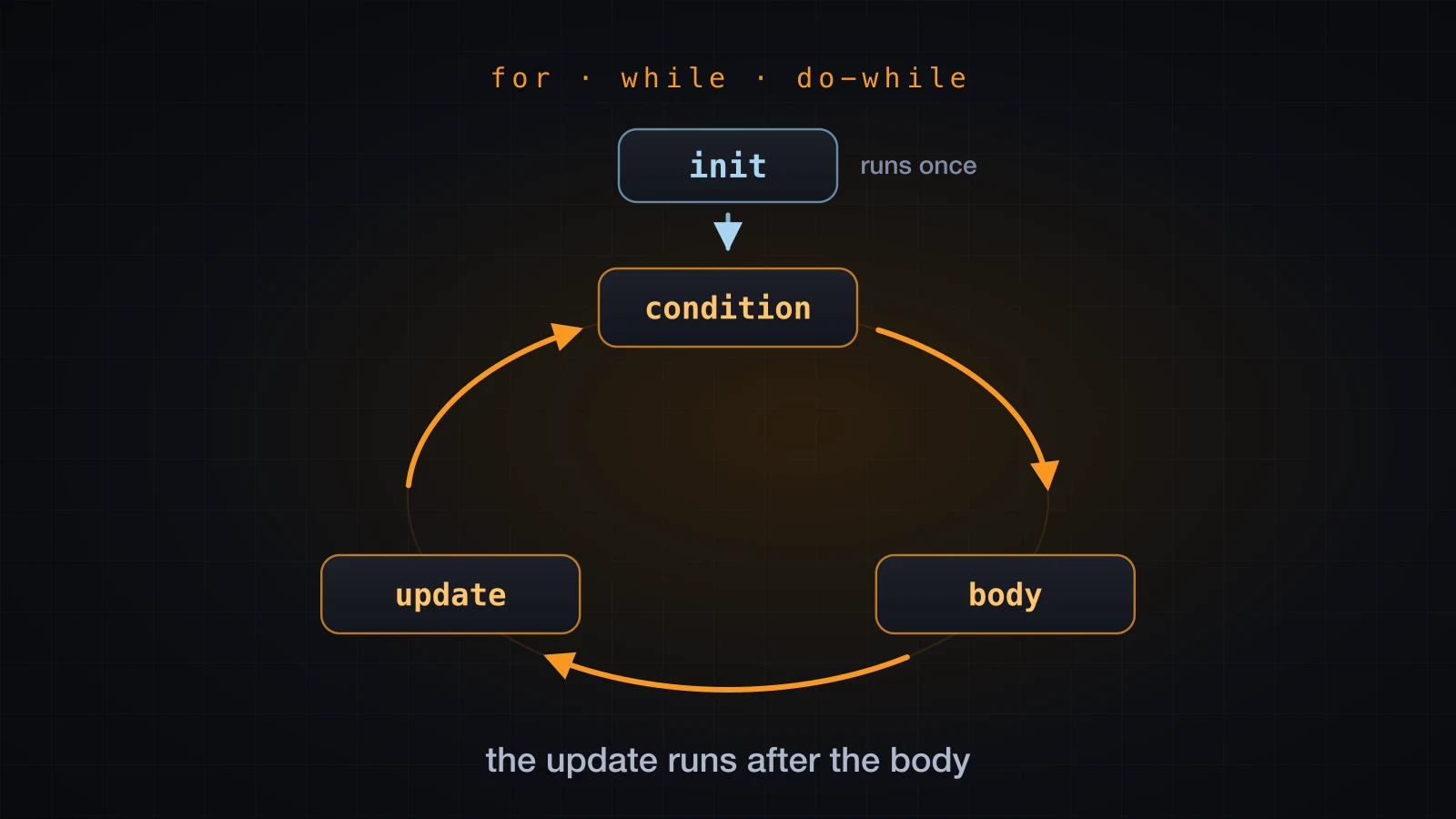
Start with for, because its header packs three separate jobs onto one line.
The for loop, part by part
for (int i = 1; i <= 5; i++) {
    System.out.println("line " + i);
}line 1
line 2
line 3
line 4
line 5The header holds three statements separated by two semicolons:
| Part | In the example | Runs |
|---|---|---|
| initialization | int i = 1 | once, before the loop starts |
| condition | i <= 5 | before every iteration, including the first |
| update | i++ | after every iteration of the body |
The body is the block in braces. It is the fourth part, and the one the other three exist to serve.
Nothing about the header is limited to counting up by one. The update is an ordinary statement, so it can subtract, multiply, or do anything else:
int sum = 0;
for (int i = 1; i <= 100; i++) {
    sum += i;
}
System.out.println("sum 1..100 = " + sum);

for (int i = 5; i >= 1; i--) {
    System.out.print(i + " ");
}
System.out.println();

for (int i = 0; i < 10; i += 3) {
    System.out.print(i + " ");
}
System.out.println();sum 1..100 = 5050
5 4 3 2 1
0 3 6 9 The exact order the parts run in
Most descriptions of for stop at the table above, which leaves the one detail that actually
matters unstated: the update runs after the body, and the condition is re-tested before every
iteration including the first. Rather than assert it, print from inside each part. Each part of
the header is a method call here, so each one announces itself:
public class ForOrder {
    static int init() {
        System.out.println("init");
        return 0;
    }

    static boolean condition(int i) {
        System.out.println("  condition: i < 3 -> " + (i < 3));
        return i < 3;
    }

    static void body(int i) {
        System.out.println("    body: i = " + i);
    }

    static int update(int i) {
        System.out.println("  update: i becomes " + (i + 1));
        return i + 1;
    }

    public static void main(String[] args) {
        for (int i = init(); condition(i); i = update(i)) {
            body(i);
        }
        System.out.println("loop finished");
    }
}init
condition: i < 3 -> true
body: i = 0
update: i becomes 1
condition: i < 3 -> true
body: i = 1
update: i becomes 2
condition: i < 3 -> true
body: i = 2
update: i becomes 3
condition: i < 3 -> false
loop finished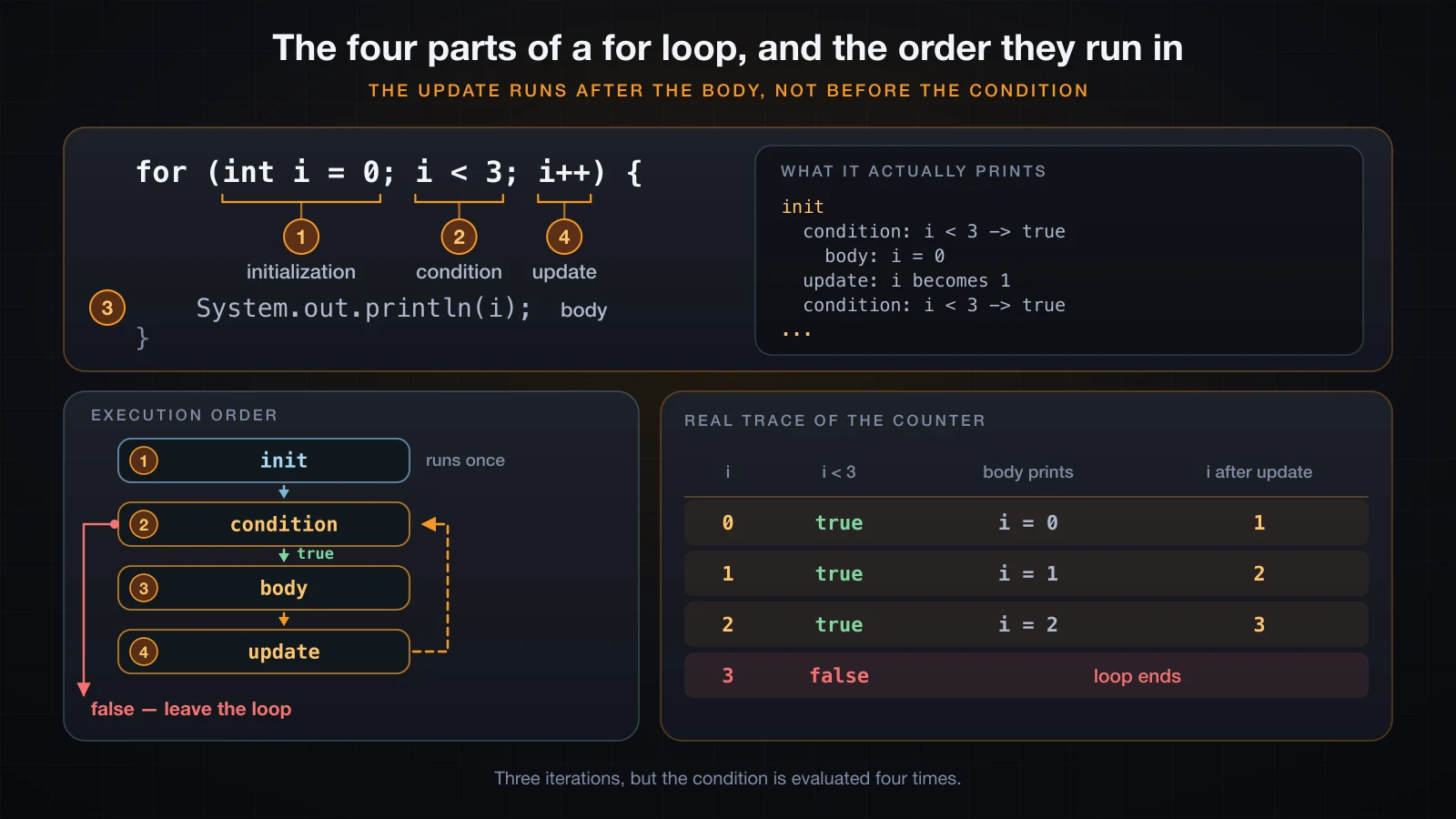
Four things fall out of that transcript:
initprinted exactly once, at the top, before the first condition check.- The order inside the loop is condition, body, update — never body, condition, update. An update that you expect to happen "at the start of the next round" happens at the end of this one.
- The condition was evaluated four times for three iterations. The last evaluation is the one that ends the loop, and the counter has already been updated to 3 when it happens.
- The body never saw
i = 3. By the time the counter reaches the boundary value the loop is over.
That last point is why for (int i = 0; i < n; i++) runs exactly n times with i taking the
values 0 through n - 1, and it is the whole basis of the off-by-one section further down.
All three header parts are optional
The two semicolons are mandatory. Everything between them is not. Leave all three out and you get the canonical infinite loop:
public class Forever {
    public static void main(String[] args) {
        int tick = 0;
        for (;;) {
            System.out.println("tick " + tick);
            tick++;
        }
    }
}tick 0
tick 1
tick 2
tick 3
tick 4Those are the first five lines. The process was killed after two seconds, by which point it had
printed well over a million of them — how many depends on the machine and on where the output
goes, so it is not a property of the loop. An empty condition is treated as true, so the loop has nothing that can stop it.
for (;;) and while (true) compile to the same thing, and javac treats both as definitely
infinite — a statement written after either one is rejected:
while (true) {
    System.out.println("x");
}
System.out.println("after");Unreachable.java:6: error: unreachable statement
System.out.println("after");
^
1 errorfor (;;) gives the identical message. Leaving individual parts out works too; the counter simply
lives somewhere else:
int i = 0;
for (; i < 3; ) {
    System.out.println("i = " + i);
    i++;
}i = 0
i = 1
i = 2In the other direction, the initialization and the update each accept a comma-separated list, so a loop can drive two counters at once:
for (int i = 0, j = 10; i < j; i++, j--) {
    System.out.println("i=" + i + " j=" + j);
}i=0 j=10
i=1 j=9
i=2 j=8
i=3 j=7
i=4 j=6Two restrictions on that comma. The type is written once and applies to every variable in the
list, so int i = 0, long j = 10 does not compile. And the comma in a for header is not the
general-purpose comma operator that C has — Java allows it only in these two slots, and only for
declarations in the initializer and for statement expressions in the update.
Where the loop counter lives
int i = 0 inside the header declares i in a scope that covers the header and the body, and
nothing else. After the closing brace the name is gone:
public class ScopeError {
    public static void main(String[] args) {
        for (int i = 0; i < 3; i++) {
            System.out.println("i = " + i);
        }
        System.out.println("after the loop, i = " + i);
    }
}ScopeError.java:6: error: cannot find symbol
System.out.println("after the loop, i = " + i);
^
symbol: variable i
location: class ScopeError
1 errorIf you need the counter afterwards — to report where a search stopped, for instance — declare it before the loop and only assign it in the header:
int i;
for (i = 0; i < 3; i++) {
    System.out.println("i = " + i);
}
System.out.println("after the loop, i = " + i);i = 0
i = 1
i = 2
after the loop, i = 3Note the value: 3, not 2. The counter is left holding the first value that failed the
condition. Declaring inside the header is the default for a reason — it keeps a throwaway name out
of the enclosing scope, and the compiler stops you from reading it by accident.
while: check first, and maybe never run
while is a for with the initialization and the update taken out of the header and put back
where ordinary statements live:
int i = 1;
while (i <= 3) {
    System.out.println("line " + i);
    i++;
}line 1
line 2
line 3Structurally identical to for (int i = 1; i <= 3; i++), and worse for this particular job: the
three pieces that belong together are now spread across three places, and forgetting the i++
costs you an infinite loop rather than a compile error.
while earns its place when there is no counter at all — when the number of iterations is
whatever the data turns out to require:
int n = 90210;
int digits = 0;
while (n > 0) {
    n = n / 10;
    digits++;
}
System.out.println("digits = " + digits);digits = 5Nothing here knows in advance that the answer is five. The condition tests the state the body
produced, which is exactly what while is shaped for. And because the condition is checked before
the first pass, a while loop can run zero times — while (n > 0) over n = 0 does nothing
at all, which is usually what you want.
do-while: run first, check after
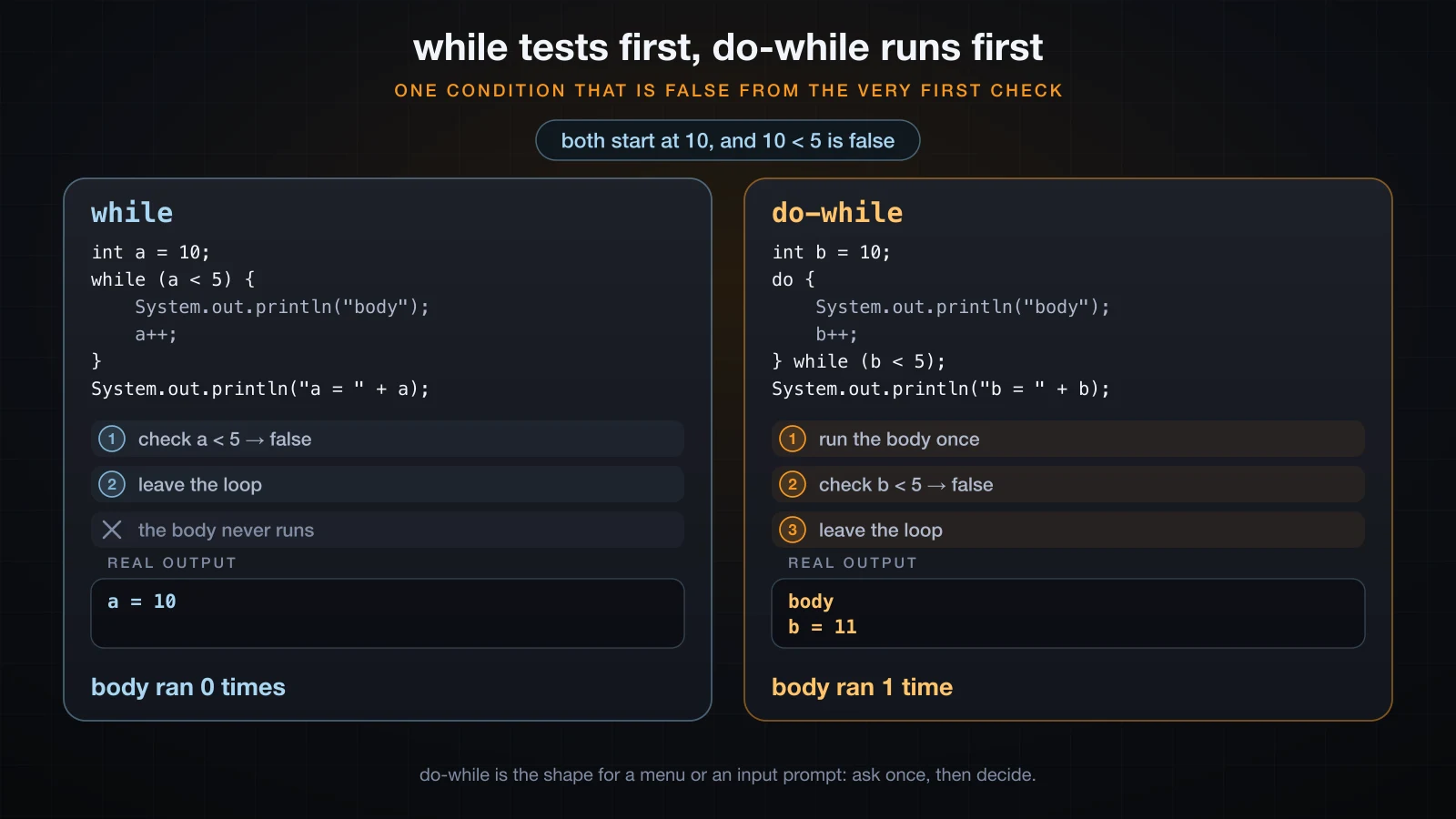
do-while moves the condition to the bottom, so the body always runs at least once:
int a = 10;
while (a < 5) {
    System.out.println("body");
    a++;
}
System.out.println("a = " + a);

int b = 10;
do {
    System.out.println("body");
    b++;
} while (b < 5);
System.out.println("b = " + b);a = 10
body
b = 11Same condition, same starting value, and 10 < 5 is false from the very first check. The while
loop printed nothing and left a at 10. The do-while loop printed body once and left b at
11, because it did not consult the condition until the body had already run.
The trailing semicolon after while (b < 5) is part of the statement, not a typo. Leaving it off
is a syntax error:
do {
    System.out.println(n);
    n++;
} while (n < 3)
System.out.println("done");DoNoSemi.java:7: error: ';' expected
} while (n < 3)
^
1 errorThe shape do-while exists for is "ask, then decide whether to ask again" — a menu, or a prompt
that has to be shown before there is anything to validate:
import java.util.Scanner;

public class AgePrompt {
    public static void main(String[] args) {
        Scanner sc = new Scanner(System.in);
        int age;
        do {
            System.out.print("Age (1-129): ");
            age = Integer.parseInt(sc.nextLine().trim());
        } while (age < 1 || age > 129);
        System.out.println("accepted: " + age);
    }
}printf '0\n200\n25\n' | java AgePromptAge (1-129): Age (1-129): Age (1-129): accepted: 25Written with while, that program has to either duplicate the prompt above the loop or start with
a sentinel value that is deliberately invalid. do-while says what it means.
Which loop should you use?
| Situation | Loop | Why |
|---|---|---|
| A known number of repetitions | for | counter, bound and step sit together in the header |
Walking every element of an array or an Iterable | enhanced for | no index to get wrong |
| An unknown number of repetitions that may be zero | while | the condition is checked before the first pass |
| Something that must happen at least once — a menu, an input prompt, a retry | do-while | the body runs before the condition is consulted |
Read that table as a decision, not a ranking: reach for for when a counter exists, the enhanced
for when you are walking a collection of values, while when the end condition depends on the
data, and do-while when the first pass has to happen before there is anything to test.
The enhanced for loop (for-each)
When the loop exists only to visit each element of an array, the counter is bookkeeping. The
enhanced for removes it:
int[] scores = {70, 85, 90};

for (int s : scores) {
    System.out.println("  value " + s);
} value 70
value 85
value 90Read for (int s : scores) as "for each int s in scores". The type before the variable is
the element type, and the expression after the colon is the thing being walked. There is no
counter to initialize, no bound to compare against, and therefore no off-by-one to make.
What you give up is the index. It does not exist inside the loop, and asking for it is a compile error rather than a surprise at run time:
int[] scores = {70, 85, 90};
for (int s : scores) {
    System.out.println(i + ": " + s);
}ForEachNoIndex.java:5: error: cannot find symbol
System.out.println(i + ": " + s);
^
symbol: variable i
location: class ForEachNoIndex
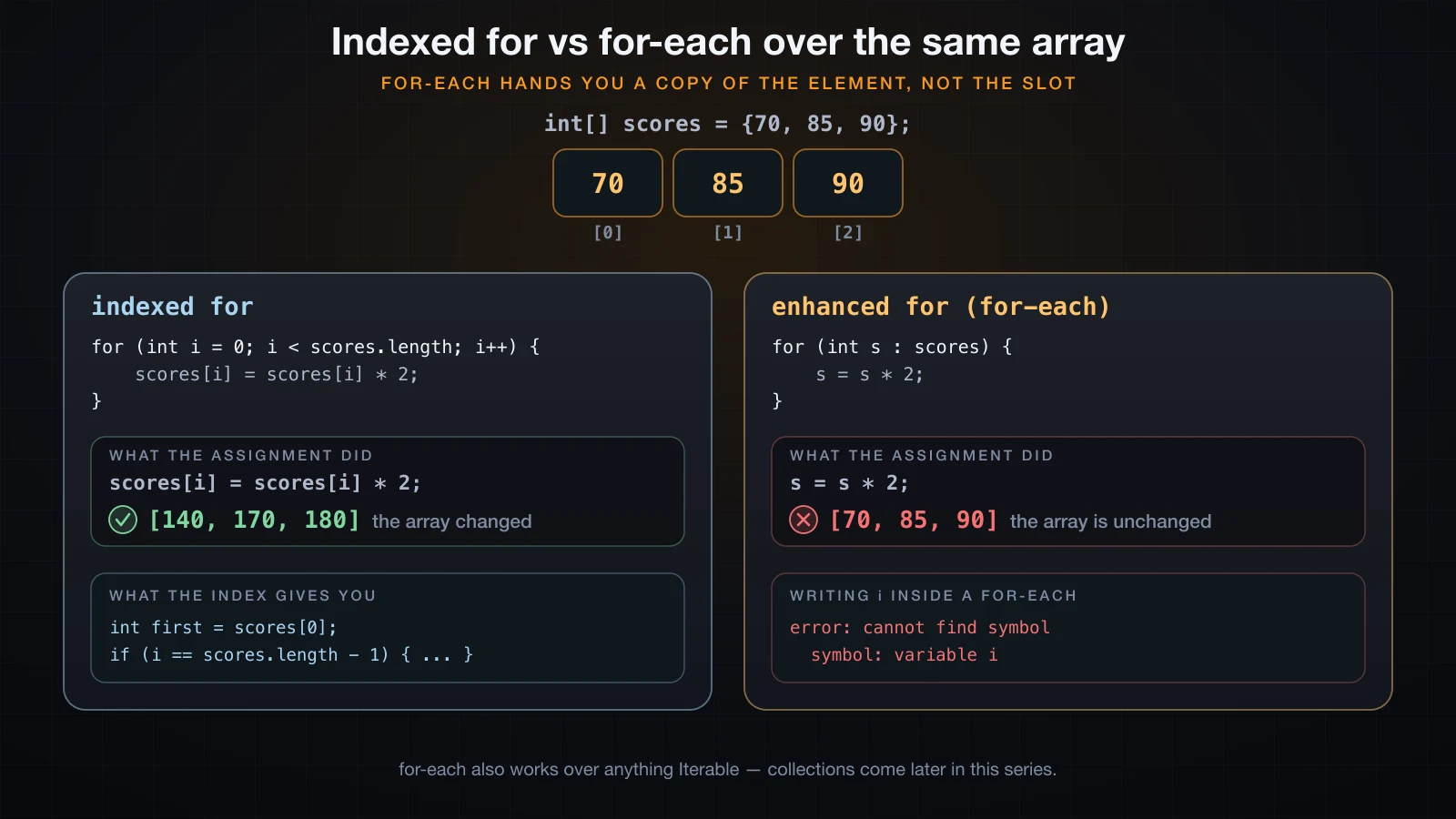
1 errorThe second limit is the one that catches people. s is a copy of the element, not the array
slot. Assigning to it changes the copy and nothing else:
int[] scores = {70, 85, 90};

for (int s : scores) {
    s = s * 2;
}
System.out.println("after 's = s * 2' in a for-each: " + Arrays.toString(scores));

for (int i = 0; i < scores.length; i++) {
    scores[i] = scores[i] * 2;
}
System.out.println("after 'scores[i] = scores[i] * 2': " + Arrays.toString(scores));after 's = s * 2' in a for-each: [70, 85, 90]
after 'scores[i] = scores[i] * 2': [140, 170, 180]The first loop ran three times and accomplished nothing. The second wrote through the index and
doubled every element. So: for-each to read, indexed for to write.
For an array of objects the rule is the same but reads differently, because what gets copied is the reference. Calling a method on the loop variable reaches the same object the array holds; assigning a new object to the variable does not:
StringBuilder[] names = { new StringBuilder("An"), new StringBuilder("Binh") };

for (StringBuilder sb : names) {
    sb.append("!");
}
System.out.println("after append: " + Arrays.toString(names));

for (StringBuilder sb : names) {
    sb = new StringBuilder("replaced");
}
System.out.println("after assignment: " + Arrays.toString(names));after append: [An!, Binh!]
after assignment: [An!, Binh!]The enhanced for is not limited to arrays. It accepts anything that implements
java.lang.Iterable, which is every collection in java.util — a later article in this series
introduces those properly. What it does not accept is a String:
for (char c : "abc") {
    System.out.println(c);
}StringForEach.java:3: error: for-each not applicable to expression type
for (char c : "abc") {
^
required: array or java.lang.Iterable
found: String
1 errorThe message names the rule exactly: array or Iterable, and String is neither. Loop over
"abc".toCharArray() if you need the characters.
Off-by-one: < or <= against length
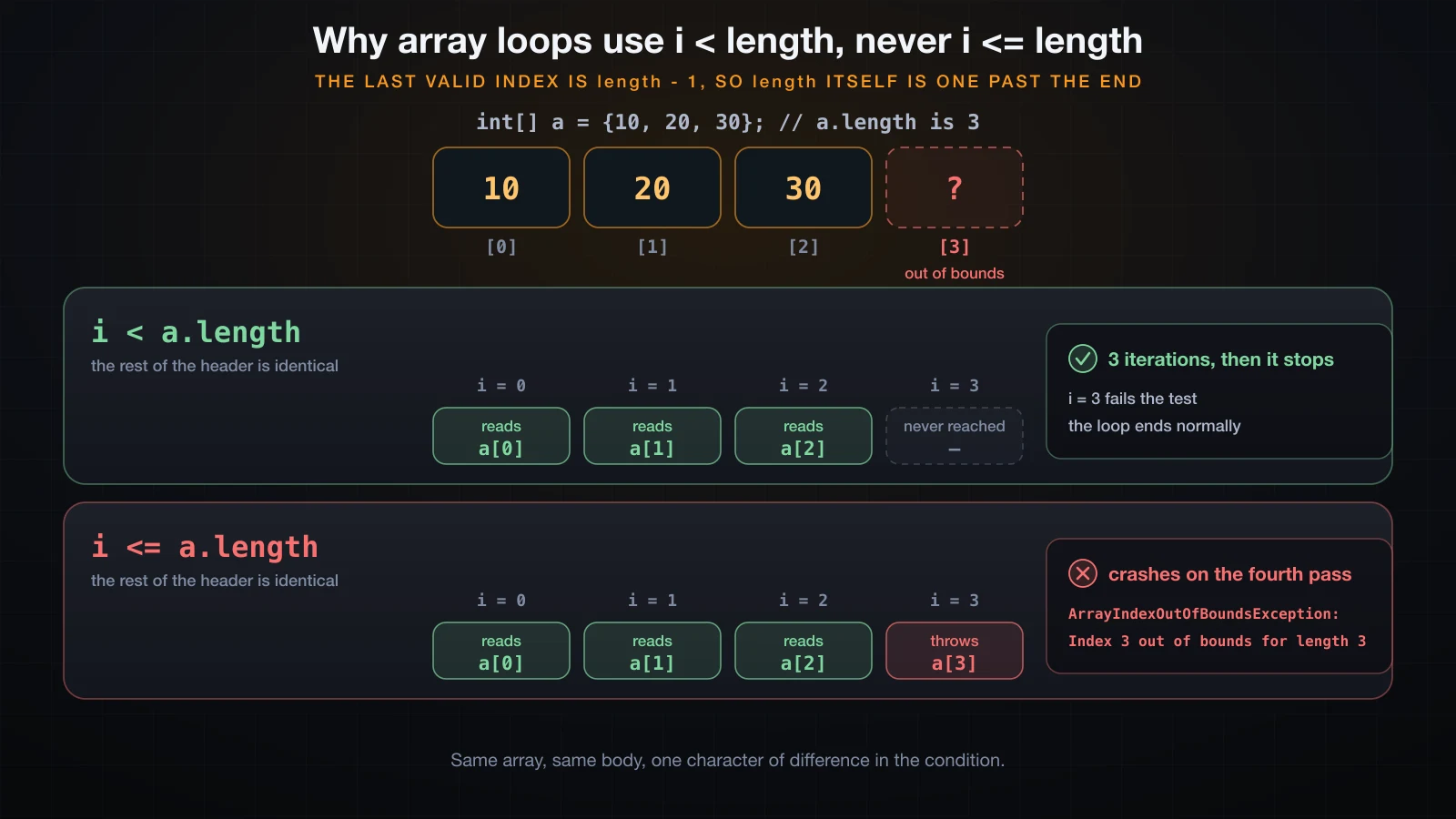
Array indices run from 0 to length - 1. length itself is one past the last element, so a
loop written with <= steps outside the array on its final pass:
int[] a = {10, 20, 30};

System.out.println("i < a.length");
for (int i = 0; i < a.length; i++) {
    System.out.println("  a[" + i + "] = " + a[i]);
}

System.out.println("i <= a.length");
for (int i = 0; i <= a.length; i++) {
    System.out.println("  a[" + i + "] = " + a[i]);
}i < a.length
a[0] = 10
a[1] = 20
a[2] = 30
i <= a.length
a[0] = 10
a[1] = 20
a[2] = 30
Exception in thread "main" java.lang.ArrayIndexOutOfBoundsException: Index 3 out of bounds for length 3
at OffByOne.main(OffByOne.java:12)The two loops are indistinguishable for the first three passes. The fourth pass is where they
part, and the exception message spells the problem out: Index 3 out of bounds for length 3. It
names both the index that was asked for and the length that made it invalid, which is enough to
find the bug without opening a debugger.
This is why i < array.length is written the way it is everywhere in Java, and why deviating from
the idiom is worth a second look:
i < lengthvisits every element exactly once.i <= lengththrows on the last pass.i < length - 1silently skips the last element, which is worse — nothing crashes, the result is just wrong.- Starting at
1instead of0silently skips the first.
The two silent variants are the reason to prefer the enhanced for whenever you only need to read
each element: a loop with no index cannot get its index wrong.
Infinite loops, and the three ways you get one
A loop ends when its condition becomes false. Anything that prevents that gives you a loop that runs until you kill the process.
The condition never changes
The most common cause is a body that forgets to touch what the condition tests:
int n = 3;
while (n > 0) {
    System.out.println("n is still " + n);
    // forgot n--;
}
System.out.println("done");n is still 3
n is still 3
n is still 3
n is still 3Four lines out of the million-plus the process had printed when it was killed two seconds later;
the count depends on the machine and the output sink, the non-termination does not. for resists this specific
mistake because the update sits in the header where its absence is visible; while does not,
which is the main argument for using for whenever a counter exists.
The update goes the wrong way
The second cause is an update that moves the counter away from the bound instead of towards it. This one is interesting because in Java it is not always infinite:
long iterations = 0;
int i;
for (i = 10; i > 0; i++) {
    iterations++;
}
System.out.println("the loop ended after " + iterations + " iterations");
System.out.println("i is now " + i);the loop ended after 2147483638 iterations
i is now -2147483648The loop did stop, after 2,147,483,638 passes. i climbed to
Integer.MAX_VALUE, and the next i++ wrapped it to Integer.MIN_VALUE — the silent int
overflow that article 6 established — which is not greater than zero, so the condition finally
went false. A loop that terminates by overflowing its counter is not a working loop; it is a bug
that happens to have an end.
Floating-point accumulation never lands exactly
The third cause surprises people who have done nothing obviously wrong. A double counter and an
== test look reasonable and are not:
double x = 0.0;
int guard = 0;
while (x != 1.0 && guard < 12) {
    x += 0.1;
    guard++;
    System.out.printf("step %2d  x = %.17f  x == 1.0 ? %b%n", guard, x, x == 1.0);
}
System.out.println("guard stopped the loop at step " + guard);step 1 x = 0.10000000000000000 x == 1.0 ? false
step 2 x = 0.20000000000000000 x == 1.0 ? false
step 3 x = 0.30000000000000004 x == 1.0 ? false
step 4 x = 0.40000000000000000 x == 1.0 ? false
step 5 x = 0.50000000000000000 x == 1.0 ? false
step 6 x = 0.60000000000000000 x == 1.0 ? false
step 7 x = 0.70000000000000000 x == 1.0 ? false
step 8 x = 0.79999999999999990 x == 1.0 ? false
step 9 x = 0.89999999999999990 x == 1.0 ? false
step 10 x = 0.99999999999999990 x == 1.0 ? false
step 11 x = 1.09999999999999990 x == 1.0 ? false
step 12 x = 1.20000000000000000 x == 1.0 ? falseStep 10 is where the loop should have ended. x is 0.99999999999999990, which is not 1.0, so
the test fails and step 11 sails past the target. Without the guard < 12 half of the condition,
this loop never ends. 0.1 has no exact representation in binary floating point, and ten
inexact additions do not sum to an exact 1.0.
⚠️ Never drive a loop with
==or!=on adoubleor afloat. Count with anintand derive the floating-point value inside the body —double x = i / 10.0;— or compare with<and accept a tolerance.
The stray semicolon
A semicolon on its own is a legal Java statement that does nothing. Put one directly after a loop header and it becomes the entire body, while the block you meant to loop over runs once, after the loop has finished. Sometimes the compiler catches it by accident:
int sum = 0;
for (int i = 1; i <= 3; i++);
    sum += i;
System.out.println("sum = " + sum);StraySemicolon.java:5: error: cannot find symbol
sum += i;
^
symbol: variable i
location: class StraySemicolon
1 errorThe sum += i; line is outside the loop, so the header-scoped i is not in scope there. That
diagnosis is correct but it points at the symptom, not the cause. Declare the counter outside the
header and the same bug compiles cleanly:
int sum = 0;
int i;
for (i = 1; i <= 3; i++);
    sum += i;
System.out.println("i   = " + i);
System.out.println("sum = " + sum);i = 4
sum = 4The intended answer is 6. The loop ran three times doing nothing, left i at 4, and then
sum += i ran exactly once. The indentation says one thing and the semicolon says another;
Java listens to the semicolon. Even javac -Xlint:all compiles that file without a warning.
On a while the same typo does not merely give a wrong answer, it hangs:
int n = 0;
while (n < 3);
{
    System.out.println("n = " + n);
    n++;
}
System.out.println("done");
That compiles cleanly, and running it produces zero bytes of output and never returns. The empty
statement is the body, so n is never incremented and n < 3 is true forever. The block below it
is now an ordinary block that the program never reaches. If a program of yours hangs with no
output at all, a stray semicolon after a while header is worth checking first.
Loop variable scope and shadowing
The counter declared in a for header is scoped to the loop, which means two adjacent loops can
both use i without interfering. The same rule cuts the other way: you cannot reuse a name that a
surrounding local variable already holds, because Java does not let one local shadow another:
int i = 99;
for (int i = 0; i < 2; i++) {
    System.out.println(i);
}Redeclare.java:4: error: variable i is already defined in method main(String[])
for (int i = 0; i < 2; i++) {
^
1 errorA field is a different matter — a local variable is allowed to shadow one, and inside the loop the local wins:
public class Shadow {
    static int i = 99;

    public static void main(String[] args) {
        for (int i = 0; i < 2; i++) {
            System.out.println("inside the loop, i = " + i);
        }
        System.out.println("the field i is still " + i);
    }
}inside the loop, i = 0
inside the loop, i = 1
the field i is still 99That compiles, runs, and is a reliable way to confuse a reader. Give the loop counter a name the enclosing class does not already use.
Reading until a sentinel
The pattern that ties while to real input: read one value before the loop, then read the next
one at the bottom of the body, so the condition always has something to test.
import java.util.Scanner;

public class Sentinel {
    public static void main(String[] args) {
        Scanner sc = new Scanner(System.in);
        int total = 0;
        int count = 0;

        System.out.print("score (or 'done'): ");
        String line = sc.nextLine().trim();

        while (!line.equals("done")) {
            total += Integer.parseInt(line);
            count++;
            System.out.print("score (or 'done'): ");
            line = sc.nextLine().trim();
        }

        System.out.println();
        System.out.println("read " + count + " scores, total " + total);
    }
}printf '7\n8\n9\ndone\n' | java Sentinelscore (or 'done'): score (or 'done'): score (or 'done'): score (or 'done'):
read 3 scores, total 24The typed values do not appear because the input came from a pipe rather than a keyboard. What you
see is the program's own output: four prompts — one for each of the three scores plus the one that
received done — and the totals.
Two reads of the same variable, one before the loop and one at the end of the body, is the price of keeping the sentinel check in the condition where it belongs. The alternative shape, reading once in the middle of the loop and leaving early when the sentinel arrives, needs a statement this article has not covered yet.
FAQ
Why does my loop run one time too many?
Almost always a <= where < belongs. for (int i = 0; i <= n; i++) runs n + 1 times, and
against an array it throws ArrayIndexOutOfBoundsException on the last pass. Count the iterations
of for (int i = a; i < b; i++) as b - a and the arithmetic stops being guesswork.
Can I change the loop counter inside the body?
You can, and the update in the header still runs on top of your change:
for (int i = 0; i < 5; i++) {
    System.out.println("i = " + i);
    i++;
}i = 0
i = 2
i = 4The body's i++ and the header's i++ both fire, so the counter advances by two per iteration.
It is legal and it is a reliable way to make a loop unreadable. If the step is really two, write
i += 2 in the header where a reader will see it.
Is for faster than while?
No — the two are not merely equivalent, they compile to identical bytecode. These two methods sum the same numbers:
static int f() { int s = 0; for (int i = 0; i < 10; i++) { s += i; } return s; }
static int w() { int s = 0; int i = 0; while (i < 10) { s += i; i++; } return s; }javac Shapes.java && javap -c Shapes static int f();
Code:
0: iconst_0
1: istore_0
2: iconst_0
3: istore_1
4: iload_1
5: bipush 10
7: if_icmpge 20
10: iload_0
11: iload_1
12: iadd
13: istore_0
14: iinc 1, 1
17: goto 4
20: iload_0
21: ireturnw() disassembles to exactly those instructions, offset for offset. do-while is the one that
differs: with the test at the bottom it needs a single conditional jump per iteration instead of a
compare-and-jump plus an unconditional goto, which is not a reason to choose it. The structural
cost of a loop is the number of times its body runs, not which keyword introduced it — a loop over
n elements does n units of work however you spell it.
Why can I not use the counter after the loop?
Because for (int i = ...) declares i in a scope that ends at the closing brace, so the name is
undefined afterwards — javac reports cannot find symbol. Declare the variable before the loop
and assign it in the header instead. It will hold the first value that failed the condition, which
is one past the last value the body saw.
Can I write a for-each over a String?
Not directly. The enhanced for accepts an array or something that implements Iterable, and a
String is neither, so for (char c : "abc") fails with for-each not applicable to expression type. Use for (char c : "abc".toCharArray()), or an indexed loop with charAt(i) when you also
need the position.
Conclusion
A loop is four parts — initialization, condition, body, update — and for, while and do-while
differ only in where those parts are written and when the condition gets checked. for gathers all
three header parts in one place, which is why it is the right choice whenever a counter exists.
while checks first and may run zero times. do-while runs first and always runs at least once.
The enhanced for throws away the index, and with it the entire family of off-by-one bugs, at the
cost of not being able to write back into the array.
Every loop in this article ran its body from top to bottom, every time. The next article adds the
statements that change that: nested loops, and break and continue for leaving a loop early or
skipping the rest of one pass.
![[Java Basics] Variable Scope in Java: Local, Field and Static](/images/blog/variable-scope-thumbnail.en.webp)
![[Java Basics] Methods in Java: Declaring and Calling Them](/images/blog/methods-in-java-thumbnail.en.webp)
![[Java Basics] Recursion in Java: How It Works and When to Use It](/images/blog/recursion-in-java-thumbnail.en.webp)
![[Java Basics] Arrays in Java: Declaring, Initializing and Traversing](/images/blog/arrays-in-java-thumbnail.en.webp)