A method is a named block of code you can call by that name. That single idea is where a Java program stops being a list of statements and starts having a shape: behaviour gets a name, the name can be tested, and the same code stops being pasted three times.
This article covers declaring a method, calling it, what static changes at the call site, what return actually does, and what the JVM's call stack is doing while all of that happens. The compiler errors and runtime messages shown are the ones Java 21 prints.
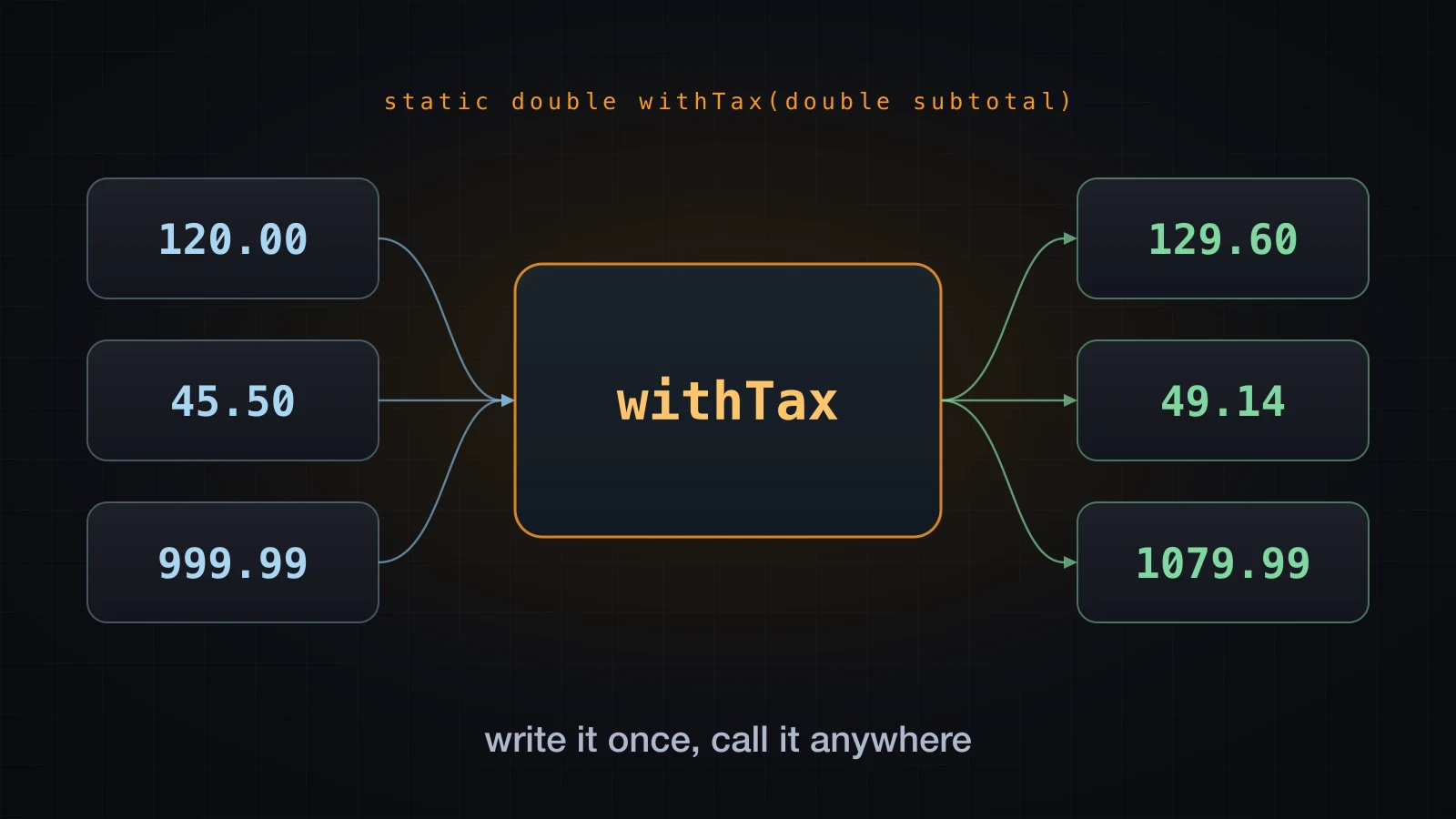
Parameters get their syntax here and nothing more. How an argument is really passed, what the difference between a parameter and an argument is, and what happens when two methods share a name are all the next article's job.
Why methods exist
Here is a program with no methods of its own, computing tax on three orders:
public class Duplicated {
    public static void main(String[] args) {
        double subtotal1 = 120.0;
        double tax1 = subtotal1 * 0.08;
        double total1 = subtotal1 + tax1;
        System.out.printf("Order 1: subtotal %.2f, tax %.2f, total %.2f%n", subtotal1, tax1, total1);

        double subtotal2 = 45.5;
        double tax2 = subtotal2 * 0.08;
        double total2 = subtotal2 + tax2;
        System.out.printf("Order 2: subtotal %.2f, tax %.2f, total %.2f%n", subtotal2, tax2, total2);

        double subtotal3 = 999.99;
        double tax3 = subtotal3 * 0.08;
        double total3 = subtotal3 + tax3;
        System.out.printf("Order 3: subtotal %.2f, tax %.2f, total %.2f%n", subtotal3, tax3, total3);
    }
}Order 1: subtotal 120.00, tax 9.60, total 129.60
Order 2: subtotal 45.50, tax 3.64, total 49.14
Order 3: subtotal 999.99, tax 80.00, total 1079.99The same four lines appear three times with the digits changed. Pull them into a method and the duplication disappears:
public class Refactored {
    public static void main(String[] args) {
        printOrder(1, 120.0);
        printOrder(2, 45.5);
        printOrder(3, 999.99);
    }

    static void printOrder(int number, double subtotal) {
        double tax = subtotal * 0.08;
        double total = subtotal + tax;
        System.out.printf("Order %d: subtotal %.2f, tax %.2f, total %.2f%n", number, subtotal, tax, total);
    }
}
The output is byte-for-byte the same. That is not a claim to take on trust — capture both and compare:
java Duplicated > d.txt && java Refactored > r.txt && diff d.txt r.txt && echo IDENTICALIDENTICALNothing about the program's behaviour changed. What changed is everything around it:
| Before | After |
|---|---|
| The tax rate appears three times | It appears once |
| Fixing a bug means fixing it three times | Fix it once |
| The logic has no name | The logic is called printOrder |
| You cannot test the calculation on its own | You can call printOrder from a test |
| A fourth order means twelve more lines | A fourth order means one more line |
That last row is why methods exist. Reuse is the obvious benefit; naming is the deeper one. printOrder(3, 999.99) says what happens. The four lines it replaced only say how.
The anatomy of a method declaration
A declaration has a fixed shape: modifiers, a return type, a name, a parenthesised parameter list, and a body in braces.
public class Anatomy {
    public static double toFahrenheit(double celsius) {
        double fahrenheit = celsius * 9 / 5 + 32;
        return fahrenheit;
    }

    public static void main(String[] args) {
        System.out.println(toFahrenheit(100));
    }
}212.0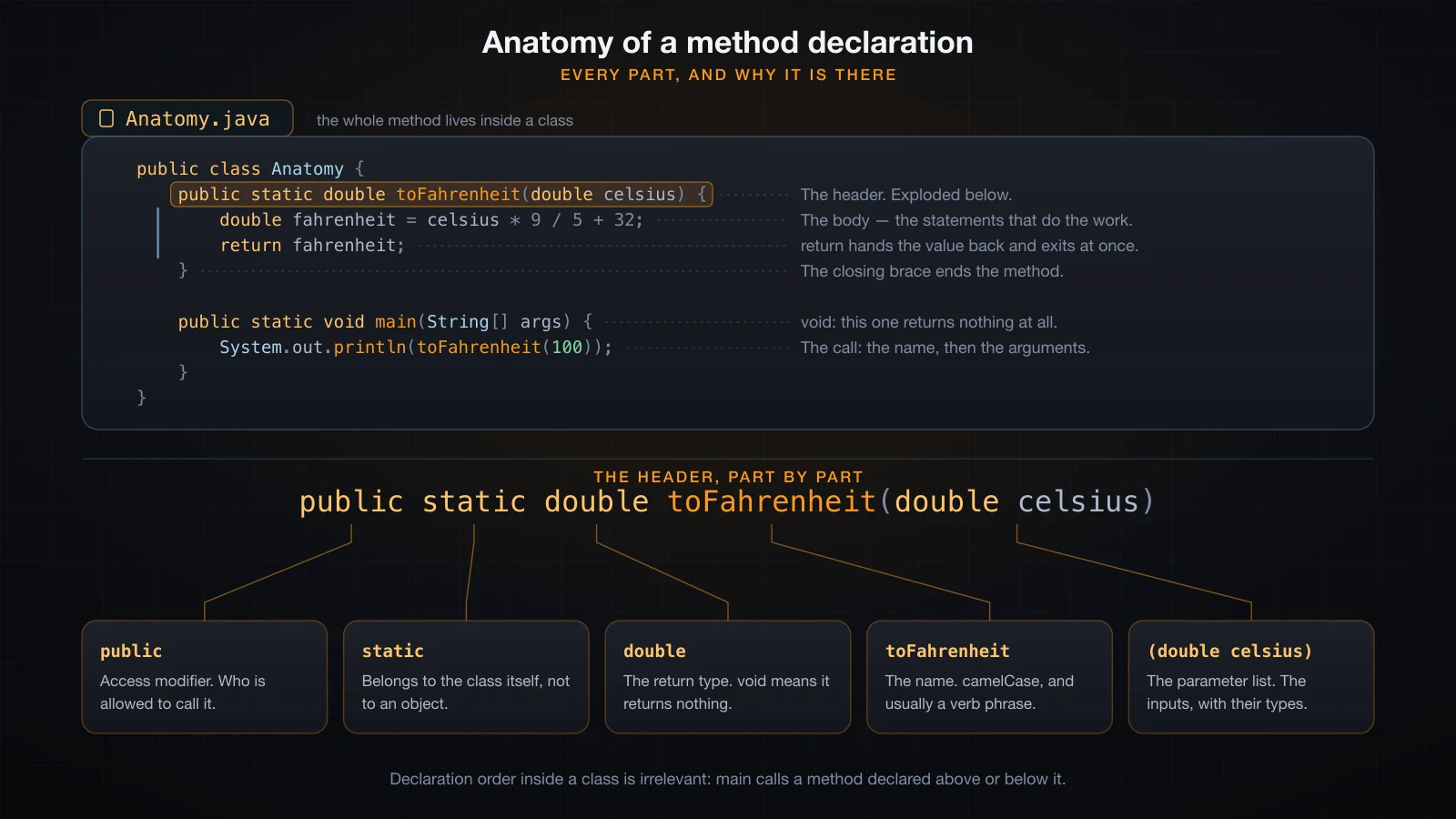
You have already met four of these words. In article 4, public static void main(String[] args) was taken apart keyword by keyword, and the reason each one is required there is a fact about the JVM launcher: it must be able to see main, it must be able to call it before any object exists, and it must find that exact name. Here the same words appear on an ordinary method, where they are just modifiers with ordinary meanings and no launcher involved.
| Part | In the example | What it does |
|---|---|---|
| Access modifier | public | Who may call this method. Optional; omit it and the method is visible inside its own package only. |
static | static | The method belongs to the class rather than to an object. Optional. |
| Return type | double | The type of the value the method hands back. Required — there is no default. |
| Name | toFahrenheit | How you call it. camelCase, conventionally a verb phrase. |
| Parameter list | (double celsius) | The inputs, each with a type and a name. May be empty: (). |
| Body | { ... } | The statements that run when the method is called. |
Two of those are worth pinning down now. The return type is not optional — leave it out and the compiler does not guess:
public class NoReturnType {
    greet(String name) {
        System.out.println("Hi " + name);
    }

    public static void main(String[] args) {
        System.out.println("x");
    }
}NoReturnType.java:2: error: invalid method declaration; return type required
greet(String name) {
^
1 errorAnd the parameter list may be empty, but the parentheses may not be. describe() with nothing between the brackets is a perfectly ordinary declaration.
void: the return type that returns nothing
void is a return type like any other, except that it stands for "no value at all". A void method is called for what it does — printing, writing a file, mutating something — not for what it hands back.
The practical consequence is that a call to a void method is not an expression and cannot appear where a value is expected:
public class VoidExpr {
    static void log(String msg) {
        System.out.println(msg);
    }

    public static void main(String[] args) {
        String s = log("hi");
        System.out.println(s);
    }
}VoidExpr.java:7: error: incompatible types: void cannot be converted to String
String s = log("hi");
^
1 errorprintOrder above is void: it prints and returns nothing. toFahrenheit returns a double, so System.out.println(toFahrenheit(100)) works.
How to call a method
A call is the method's name, then the arguments in parentheses, then a semicolon if the call is a statement on its own. Where you can call it from depends on where it lives:
public class CallOrder {
    public static void main(String[] args) {
        System.out.println("main starts");
        greet("Hoang");
        System.out.println("sum = " + add(2, 3));
    }

    static void greet(String name) {
        System.out.println("Hello, " + name);
        System.out.println(shout("welcome"));
    }

    static String shout(String text) {
        return text.toUpperCase() + "!";
    }

    static int add(int a, int b) {
        return a + b;
    }
}main starts
Hello, Hoang
WELCOME!
sum = 5Three things are happening there. main calls greet, which proves a method can be called from main. greet calls shout, which proves a method can call another method — nothing about main is special in that respect. And add(2, 3) is used inside an expression: because add returns an int, the call stands wherever an int would.
A static method in another class is called through the class name:
class MathUtils {
    static int square(int n) {
        return n * n;
    }
}

public class UseUtils {
    public static void main(String[] args) {
        System.out.println(MathUtils.square(7));
    }
}49Inside the same class you may write the class name too — UseUtils.something() — but nobody does; the bare name is understood.
Declaration order inside a class does not matter
main in CallOrder calls greet, which is declared below it, and greet calls shout, which is declared below that. It compiles and runs exactly as shown. This is not a special case: a class body is not read top to bottom the way statements inside a method body are. The compiler collects every member of the class before it checks any body, so every method can see every other method regardless of order.
That is a real difference from languages where a name must be declared before use, and it means method order is purely a readability decision. The common convention is to put main first and its helpers below, in roughly the order they are called.
static methods versus instance methods
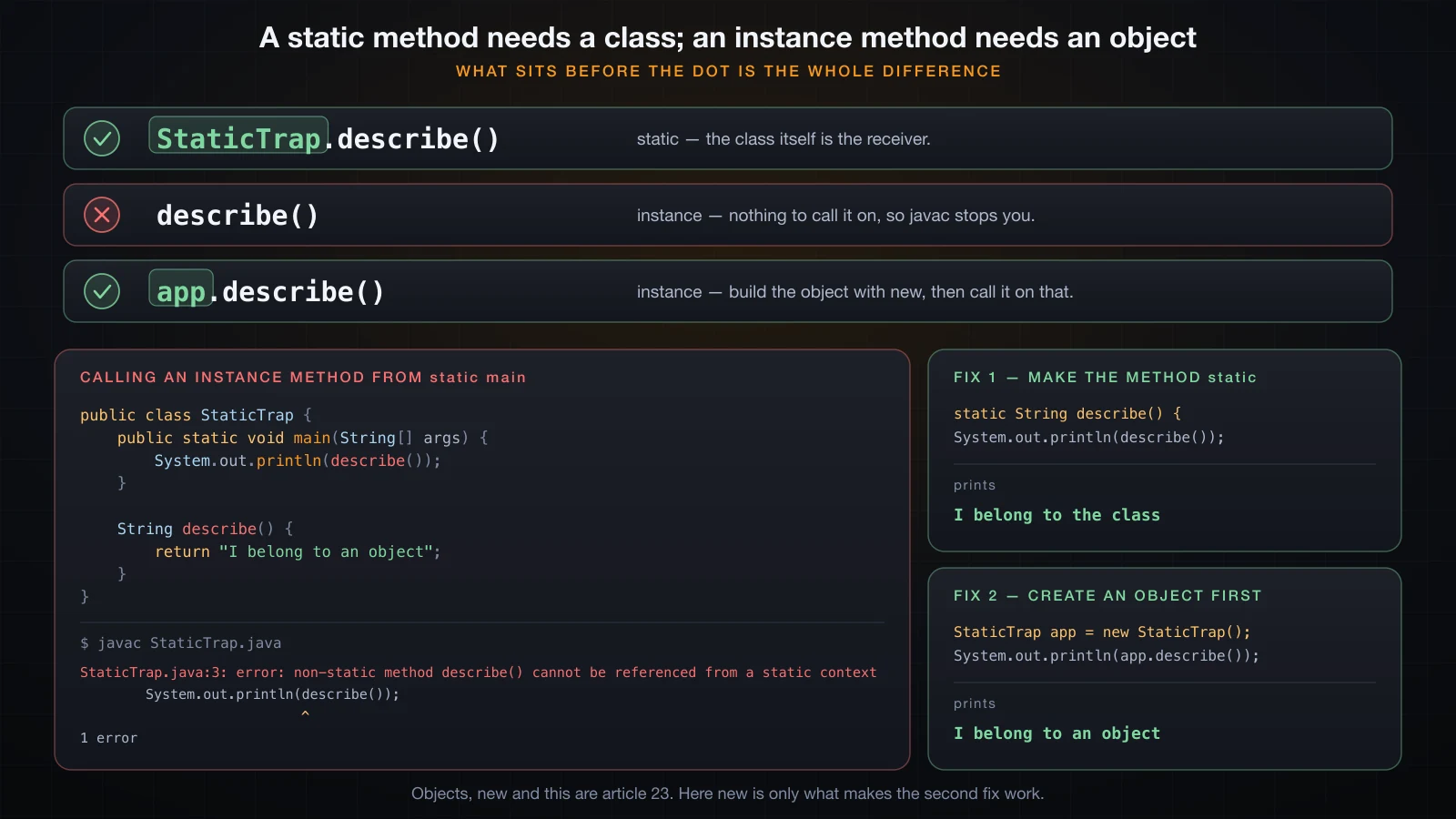
Drop static from a declaration and the method becomes an instance method: it belongs to an object, not to the class. A static method belongs to the class itself, and is called as ClassName.method().
That distinction has exactly one consequence you need today, and it is the thing that stops most beginners the first time they add a second method. main is static, so it runs without any object of the class existing. From inside it, there is nothing for an instance method to be called on:
public class StaticTrap {
    public static void main(String[] args) {
        System.out.println(describe());
    }

    String describe() {
        return "I belong to an object";
    }
}
The error every beginner hits
StaticTrap.java:3: error: non-static method describe() cannot be referenced from a static context
        System.out.println(describe());
                           ^
1 error
Read the message literally, because it is precise. describe() is non-static, so calling it requires an object. main is a static context, so no object is in scope. The compiler is not confused about anything; it is telling you a receiver is missing.
Two ways to fix it
Make the method static too. If the method does not need any per-object data — and a method that only formats or calculates usually does not — this is the right fix:
public class StaticTrap {
    public static void main(String[] args) {
        System.out.println(describe());
    }

    static String describe() {
        return "I belong to the class";
    }
}I belong to the classOr create an object and call the method on it. new StaticTrap() builds one, and the call goes through that reference:
public class StaticTrap {
    public static void main(String[] args) {
        StaticTrap app = new StaticTrap();
        System.out.println(app.describe());
    }

    String describe() {
        return "I belong to an object";
    }
}I belong to an objectBoth compile and both run. Which one is right depends on whether the method needs state that belongs to a particular object — and objects, new, fields and this are article 23's subject, covered properly there. Until then, mark your helper methods static and the question does not arise.
The reverse direction, incidentally, is always allowed: an instance method can call a static method freely, because a class is always available.
The return statement
return does two things at once: it hands a value back to the caller, and it ends the method immediately. The second half is easy to forget.
static int add(int a, int b) {
    return a + b;
}
The type of the returned expression must be assignable to the declared return type. return a + b; in a method declared int is fine; returning a String from it is not.
Early return: the guard clause
Because return exits at once, you can deal with the awkward cases first and leave the main path unindented. That style is called a guard clause:
public class Guard {
    static String classify(int score) {
        if (score < 0) {
            return "invalid";
        }
        if (score > 100) {
            return "invalid";
        }
        if (score >= 80) {
            return "excellent";
        }
        if (score >= 50) {
            return "pass";
        }
        return "fail";
    }

    static void report(String name, int score) {
        if (name == null || name.isBlank()) {
            System.out.println("skipped: no name");
            return;
        }
        System.out.println(name + " -> " + classify(score));
    }

    public static void main(String[] args) {
        report("Hoang", 91);
        report("Lan", 64);
        report("Minh", 12);
        report("", 100);
        System.out.println(classify(-5));
    }
}Hoang -> excellent
Lan -> pass
Minh -> fail
skipped: no name
invalidclassify has five return statements and no else anywhere. Once one of them runs, the rest of the method never does — that is what makes the flat sequence of ifs correct rather than sloppy.
A bare return in a void method
report in the same program shows the other form: return; with no value. In a void method that is legal and means "stop here". It is the standard way to bail out of a method early:
static void report(String name, int score) {
    if (name == null || name.isBlank()) {
        System.out.println("skipped: no name");
        return;
    }
    System.out.println(name + " -> " + classify(score));
}
The empty call report("", 100) prints skipped: no name and nothing else — the last line never runs. A void method with no return at all simply returns when it reaches its closing brace, which is why most void methods do not need one.
missing return statement
A method with a non-void return type must return a value on every path out of it. The compiler checks this, and it checks it structurally rather than by reasoning about your logic:
public class MissingReturn {
    static String grade(int score) {
        if (score >= 50) {
            return "pass";
        }
    }

    public static void main(String[] args) {
        System.out.println(grade(60));
    }
}MissingReturn.java:6: error: missing return statement
}
^
1 errorThe caret points at the closing brace of grade, which is the honest place: that is the exit the compiler found with no return on it. Note that the call is grade(60), which would have taken the branch that does return — irrelevant. javac does not run your program; it only checks that a path exists.
unreachable statement
The mirror image: code placed after a return in the same block can never run, and Java refuses to compile it rather than silently ignoring it.
public class Unreachable {
    static int twice(int n) {
        return n * 2;
        System.out.println("never runs");
    }

    public static void main(String[] args) {
        System.out.println(twice(21));
    }
}Unreachable.java:4: error: unreachable statement
System.out.println("never runs");
^
1 errorThis is a genuinely useful error. It usually means you moved a return up while debugging and left the old tail behind.
The call stack: one frame per call
When a method is called, the JVM pushes a stack frame for it. That frame holds the call's own local variables and parameters, plus the place to jump back to. When the method returns, its frame is popped and the caller resumes with the returned value in hand.
Three levels make the shape visible:
public class CallStack {
    public static void main(String[] args) {
        System.out.println("main: start");
        int result = level1(10);
        System.out.println("main: got " + result);
    }

    static int level1(int n) {
        System.out.println("  level1: n = " + n);
        int r = level2(n + 5);
        System.out.println("  level1: returning " + r);
        return r;
    }

    static int level2(int n) {
        System.out.println("    level2: n = " + n);
        int r = level3(n * 2);
        System.out.println("    level2: returning " + r);
        return r;
    }

    static int level3(int n) {
        System.out.println("      level3: n = " + n + ", returning " + (n + 1));
        return n + 1;
    }
}main: start
level1: n = 10
level2: n = 15
level3: n = 30, returning 31
level2: returning 31
level1: returning 31
main: got 31Read the indentation as depth. The trace goes in three levels deep and comes back out through the same three, in reverse, and the caller does nothing at all while the callee runs.
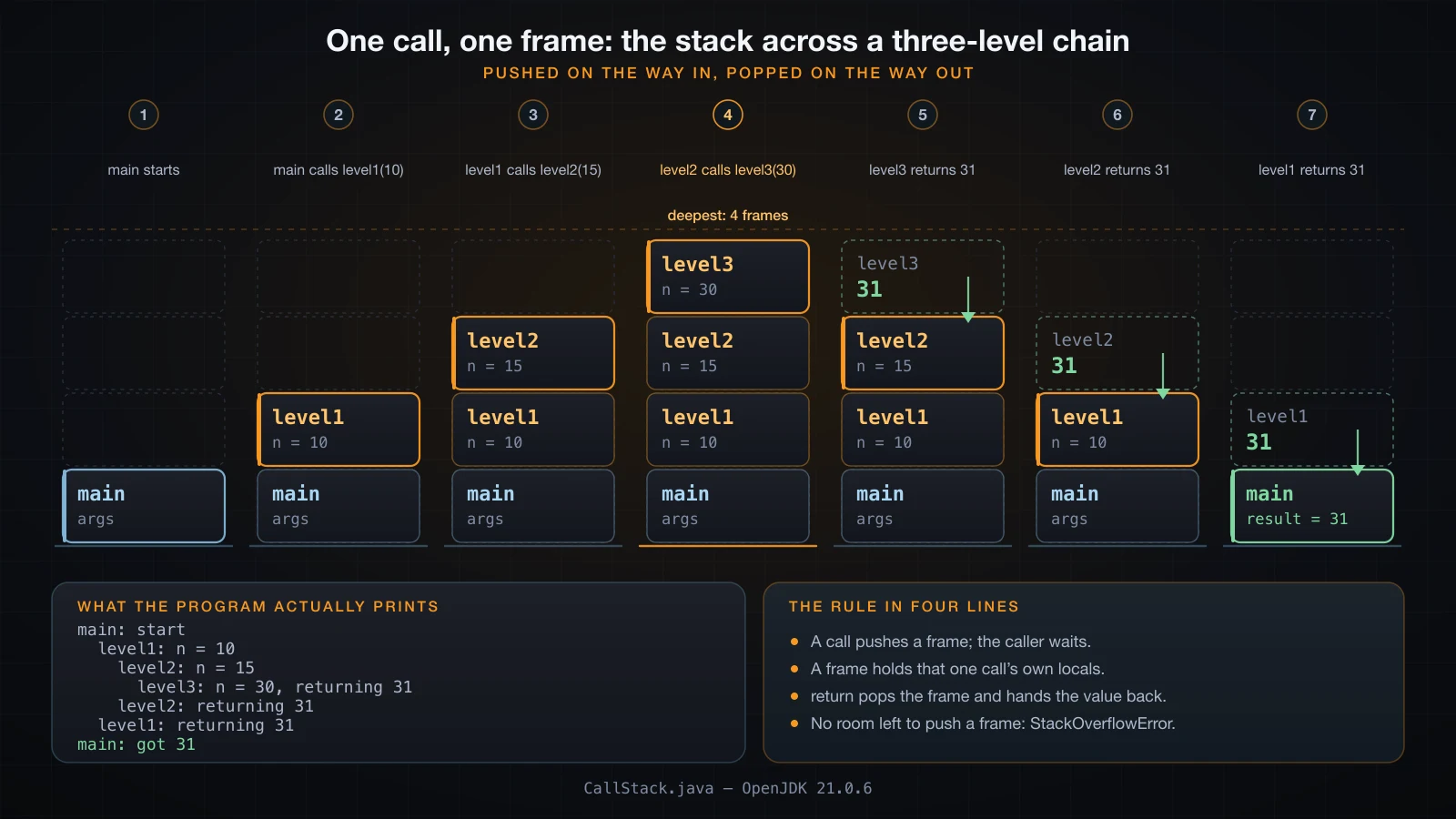
Notice that all three methods use a parameter called n and a local called r, and they never collide. Each call has its own frame, so each has its own copy:
public class Frames {
    public static void main(String[] args) {
        int n = 1;
        System.out.println("main before: n = " + n);
        inner();
        System.out.println("main after:  n = " + n);
    }

    static void inner() {
        int n = 99;
        System.out.println("inner:       n = " + n);
    }
}main before: n = 1
inner: n = 99
main after: n = 1inner assigning to its n has no effect on main's n. They are two different variables that happen to share a spelling, living in two different frames. The general rules about which names are visible where are article 21's subject.
StackOverflowError: the stack has a limit
Each frame takes memory, and the thread's stack has a fixed size. A method that calls itself with no way to stop will exhaust it:
public class Overflow {
    static int depth = 0;

    static void dig() {
        depth++;
        dig();
    }

    public static void main(String[] args) {
        try {
            dig();
        } catch (StackOverflowError e) {
            System.out.println("depth reached: " + depth);
            throw e;
        }
    }
}
Running it prints the counter, then the first lines of the trace:
depth reached: 45922
Exception in thread "main" java.lang.StackOverflowError
	at Overflow.dig(Overflow.java:6)
	at Overflow.dig(Overflow.java:6)
	at Overflow.dig(Overflow.java:6)
	at Overflow.dig(Overflow.java:6)
	at Overflow.dig(Overflow.java:6)
Two details in that output are worth having. The depth is machine-dependent, not a language constant — repeated runs on the same machine gave 45922, 46051 and 46161, and running with a smaller stack, java -Xss256k Overflow, reached only 1479. And the trace is truncated: the JVM prints at most 1024 frames by default, controlled by -XX:MaxJavaStackTraceDepth, so what you see is the top of a stack tens of thousands of frames deep.
Also note that StackOverflowError is an Error, not an Exception. Catching it, as above, is fine for a demonstration and a bad idea in real code.
⚠️ A method calling itself is recursion, and used properly it is a normal technique with a base case that stops it. That is article 22's subject. It appears here only because unbounded recursion is the cheapest way to see the call stack actually run out.
How to read a stack trace
A stack trace is the call stack printed out, innermost frame first. Once you can read one, most runtime failures stop being mysterious. You can print one on demand, without throwing anything, with Thread.dumpStack():
public class Trace {
    public static void main(String[] args) {
        System.out.println("main: calling outer()");
        outer();
        System.out.println("main: back, still alive");
    }

    static void outer() {
        inner();
    }

    static void inner() {
        Thread.dumpStack();
    }
}main: calling outer()
java.lang.Exception: Stack trace
at java.base/java.lang.Thread.dumpStack(Thread.java:2210)
at Trace.inner(Trace.java:13)
at Trace.outer(Trace.java:9)
at Trace.main(Trace.java:4)
main: back, still aliveRead it bottom to top and it is the call chain: main at line 4 called outer, outer at line 9 called inner, inner at line 13 called dumpStack. Read it top to bottom and it is "where I am now, and how I got here". The java.base/ prefix marks a frame from a JDK module rather than from your own code. The program keeps running afterwards, which is the point of dumpStack — it prints and returns.
The same structure appears when something actually fails, which is when you will really need it:
public class Boom {
    public static void main(String[] args) {
        System.out.println("main: start");
        loadUser(3);
    }

    static void loadUser(int id) {
        String name = lookupName(id);
        System.out.println("user " + id + " is " + name.toUpperCase());
    }

    static String lookupName(int id) {
        if (id == 3) {
            return null;
        }
        return "user" + id;
    }
}main: start
Exception in thread "main" java.lang.NullPointerException: Cannot invoke "String.toUpperCase()" because "<local1>" is null
at Boom.loadUser(Boom.java:9)
at Boom.main(Boom.java:4)Four things to take from that trace:
- The top frame is where it blew up, not where the bug is. Line 9 is
name.toUpperCase(); the actual mistake islookupNamereturningnullon line 14. - The frames below tell you how you got there.
Boom.main(Boom.java:4)is the call that started it. lookupNameis not in the trace at all — it had already returned successfully and its frame was popped before the failure. A stack trace shows the stack at the moment of the throw, not a history of every call made.- Helpful NullPointerException messages name the expression, which is a Java 14 feature and on by default since Java 15.
That last point has a wrinkle worth knowing. The message above says "<local1>" because the class was compiled without local-variable names in the class file. Compile with javac -g and the same run names the variable:
javac -g Boom.java && java BoomException in thread "main" java.lang.NullPointerException: Cannot invoke "String.toUpperCase()" because "name" is null
at Boom.loadUser(Boom.java:9)
at Boom.main(Boom.java:4)Most build tools pass -g already, which is why traces from a Maven or Gradle project name variables and traces from a bare javac sometimes do not.
Naming and sizing a method
The rules here are conventions, not syntax, but they are followed nearly universally in Java and reviewers will hold you to them.
Name it after what it does, as a verb phrase. calculateTax, findUserById, isValid, toFahrenheit. A method is an action, so its name should read like one. Nouns are for variables and classes.
| Kind of method | Convention | Examples |
|---|---|---|
| Does something | verb phrase | printOrder, saveDocument, sendEmail |
| Returns a value | verb phrase describing the value | calculateTotal, findUser, parsePrice |
Returns a boolean | is, has, can prefix | isValid, hasPermission, canRetry |
| Reads a field | get prefix | getName, getSize |
| Writes a field | set prefix | setName, setSize |
| Converts | to prefix | toString, toFahrenheit |
One job per method. If you need "and" to describe what a method does, it is probably two methods. The clearest signal is that the name gets vague: handleData, process, doStuff are all names for methods that do too much.
public class Design {
    public static void main(String[] args) {
        String[] raw = {"12.50", "abc", "-3", "100"};
        double total = 0;
        for (String s : raw) {
            if (!isValidPrice(s)) {
                System.out.println("rejected: " + s);
                continue;
            }
            total += parsePrice(s);
        }
        System.out.println(formatMoney(total));
    }

    static boolean isValidPrice(String text) {
        try {
            return Double.parseDouble(text) >= 0;
        } catch (NumberFormatException e) {
            return false;
        }
    }

    static double parsePrice(String text) {
        return Double.parseDouble(text);
    }

    static String formatMoney(double amount) {
        return String.format("$%.2f", amount);
    }
}rejected: abc
rejected: -3
$112.50Validation, parsing and formatting are three separate concerns, so they are three methods. Each one can be understood, tested and changed on its own, and main reads as a description of the process rather than an implementation of it.
Keep them short. There is no legal limit, but a method you cannot see all of at once is hard to reason about; roughly a screen is the usual working ceiling, and most good methods are far shorter than that. Long methods are almost always several methods that have not been separated yet.
A good boundary is one you can name precisely and describe without mentioning the caller. isValidPrice(String) passes: it takes text, it answers a yes-or-no question, and it does not care who is asking. A method called handleThirdLoopIteration fails on every count.
Documenting a method with Javadoc
Article 4 introduced the three comment forms and noted that /** ... */ is more than a comment. On a method it is where the parameters and the return value get described, using @param and @return:
/** Small geometry helpers. */
public class Geometry {

    /**
     * Computes the area of a rectangle.
     *
     * @param width  the width, in metres
     * @param height the height, in metres
     * @return the area in square metres
     */
    public static double rectangleArea(double width, double height) {
        return width * height;
    }

    public static void main(String[] args) {
        System.out.println(rectangleArea(3, 4));
    }
}
The compiler ignores it, but the JDK's javadoc tool turns it into HTML:
javadoc -d doc Geometry.javaOpen doc/Geometry.html and the tags have become structured sections:
rectangleArea
public static double rectangleArea(double width, double height)
Computes the area of a rectangle.
Parameters:
  width - the width, in metres
  height - the height, in metres
Returns:
  the area in square metres
javadoc also tells you what you left undocumented, which is a decent nudge:
Geometry.java:15: warning: no comment
    public static void main(String[] args) {
^| Tag | Used for |
|---|---|
@param name | One per parameter, in declaration order |
@return | What the method hands back. Omit on a void method |
@throws | An exception the caller should expect |
@deprecated | Why it should not be used, and what to use instead |
The first sentence is the summary line that shows up in listings and IDE tooltips, so make it a real sentence. And document why and what, not how — the body already says how.
Common mistakes and the errors they produce
Calling a method without parentheses. The parentheses are what make it a call. Without them the compiler looks for a variable of that name:
public class NoParens {
    static int total() {
        return 42;
    }

    public static void main(String[] args) {
        System.out.println(total);
    }
}NoParens.java:7: error: cannot find symbol
System.out.println(total);
^
symbol: variable total
location: class NoParens
1 errorThe giveaway is symbol: variable when you were thinking about a method.
Declaring a method inside another method. Java has no nested methods. The parser gives up in an unhelpful-looking cascade:
public class Nested {
    public static void main(String[] args) {
        static void helper() {
            System.out.println("nope");
        }
        helper();
    }
}Nested.java:3: error: illegal start of expression
static void helper() {
^
Nested.java:6: error: invalid method declaration; return type required
helper();
^
Nested.java:8: error: class, interface, enum, or record expected
}
^
3 errorsThree errors from one mistake, and only the first one is real. Fix the first error and recompile before reading the rest — that advice applies to every javac cascade.
The wrong number of arguments. The compiler names the required and found lists, and says exactly what differs:
public class ArgCount {
    static int add(int a, int b) {
        return a + b;
    }

    public static void main(String[] args) {
        System.out.println(add(1, 2, 3));
    }
}ArgCount.java:7: error: method add in class ArgCount cannot be applied to given types;
System.out.println(add(1, 2, 3));
^
required: int,int
found: int,int,int
reason: actual and formal argument lists differ in length
1 errorIgnoring a returned value. This one is not an error at all, which is what makes it dangerous. String.trim() returns a new string and does not modify the original, so calling it and dropping the result is legal and useless:
public class IgnoreResult {
    public static void main(String[] args) {
        String s = "  hello  ";
        s.trim();
        System.out.println("[" + s + "]");

        s = s.trim();
        System.out.println("[" + s + "]");
    }
}[ hello ]
[hello]javac says nothing about the first call. Whenever a method returns a value, ask what you are doing with it.
Forgetting that main is static. Covered above, but it belongs on this list because it is the single most common way a beginner's second method fails to compile: non-static method ... cannot be referenced from a static context.
FAQ
Can a method call itself?
Yes. A method calling itself is recursion, and it is legal and normal — a factorial or a directory walk is usually written that way. It needs a base case that stops the calls, or the stack runs out as Overflow above showed. Recursion as a technique is article 22.
What is the difference between a method and a function?
In Java, nothing that matters day to day: a method is Java's function, and the word "method" is used because every one of them belongs to a class or an interface. There are no free-floating functions in Java the way there are in C or JavaScript. People from other languages often say "function" and mean the same thing.
Can two methods in one class share a name?
Yes, provided their parameter lists differ. That is method overloading, and it is why System.out.println accepts a String, an int and a double. It is the next article's subject, along with what happens when the compiler has to choose between two candidates.
Why does calling my method seem to do nothing?
Almost always one of two things. Either the method returns a value and you are throwing it away — s.trim(); on its own line changes nothing — or the method takes a parameter and you expected assigning to that parameter to change the caller's variable. The second one is about how arguments are passed, and it is the first thing the next article deals with.
How long should a method be?
Short enough to hold in your head. There is no compiler limit, and any hard number is arbitrary, but the practical test is whether you can read the whole method without scrolling and say in one sentence what it does. If you cannot, split it — and let the names of the pieces do the explaining.
Can I declare a method inside another method?
No. Methods are members of a class, so they may only appear directly in a class, interface, enum or record body. Trying it produces the illegal start of expression cascade shown above. What Java does allow inside a method is a local class or a lambda, which look superficially similar and are a much later topic.
Conclusion
A method is a named, callable block: modifiers, a return type, a name, a parameter list, a body. static decides whether it hangs off the class or off an object, and calling an instance method from static main without an object is the error you will meet first. return hands a value back and exits immediately, which is what makes guard clauses work and what makes missing return statement and unreachable statement show up. Underneath, every call pushes a frame that holds its own locals and is popped on return — visible in a stack trace, and audible as StackOverflowError when the frames stop fitting.
What this article deliberately kept to syntax is the parameter list. The next article takes it apart properly: the difference between a parameter and an argument, why Java is pass-by-value and what that really means for objects, varargs, and method overloading — how one name can have several signatures and how the compiler picks between them.
![[Java Basics] Arrays in Java: Declaring, Initializing and Traversing](/images/blog/arrays-in-java-thumbnail.en.webp)
![[Java Basics] Loops in Java: for, while and do-while](/images/blog/loops-in-java-thumbnail.en.webp)
![[Java Basics] Inheritance in Java: extends and super](/images/blog/inheritance-thumbnail.en.webp)
![[Java Basics] Custom Exceptions in Java: Writing Your Own Exception Types](/images/blog/custom-exceptions-thumbnail.en.webp)