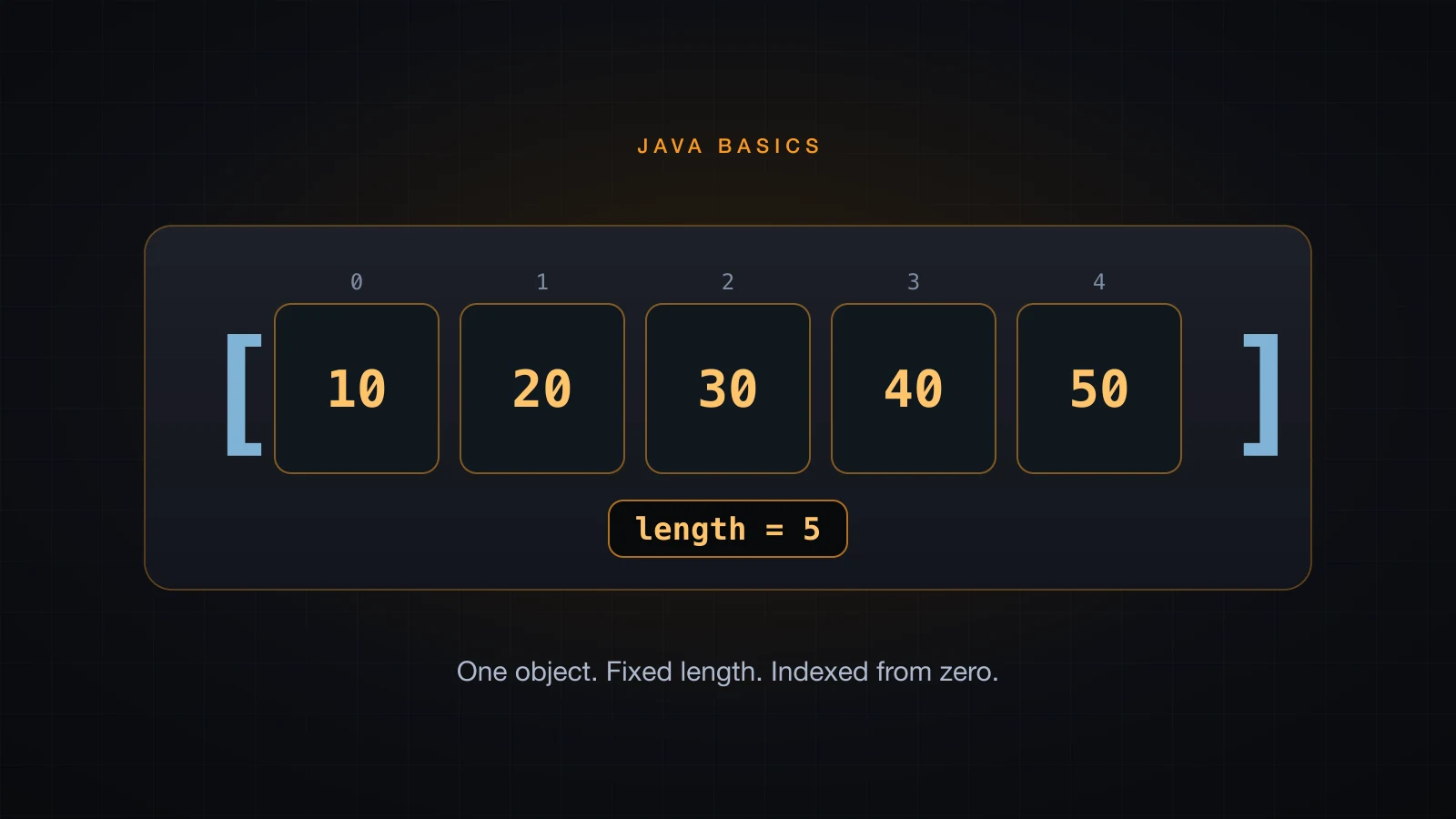
An array in Java is a fixed-length, homogeneous object: every slot holds the same type, and the number of slots is decided the moment the object is created. Nothing after that can change it. That single sentence explains most of what follows, and it is the reason ArrayList exists later in this series.
Arrays are also the first place where the reference model from earlier in the series stops being theory. An array variable does not contain the elements, it contains the address of a heap object that does — so int[] b = a; gives you two names for one array rather than two arrays.
The examples use Java 21.
What an array is in Java
An array is an object. It lives on the heap like any other object, and the variable you declare holds a reference to it. What makes it special is the shape of that object: a length field that can never be written, followed by length slots of one fixed type, laid out contiguously and reachable by index.
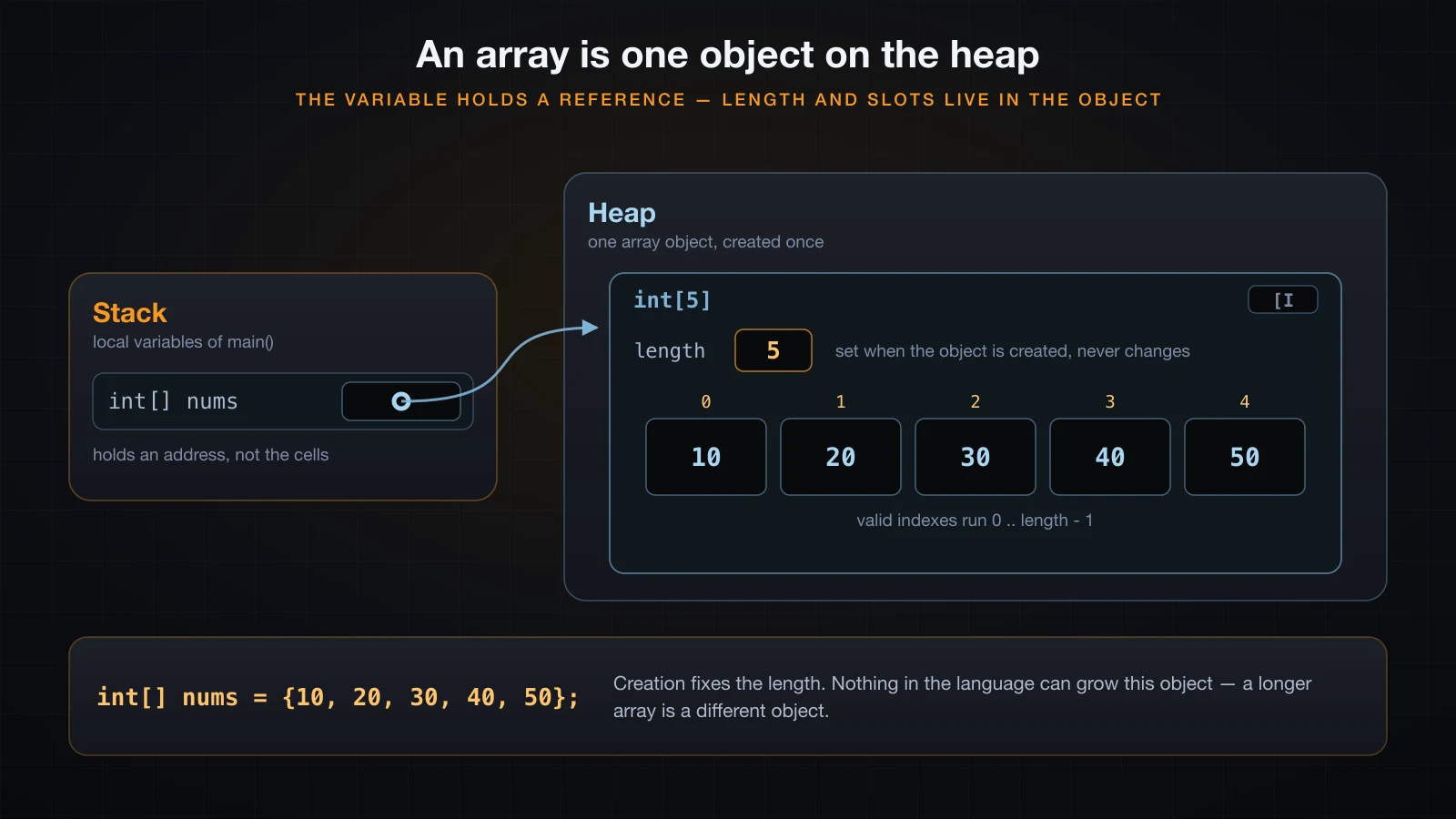
Three consequences follow immediately, and they are worth stating before any syntax:
| Property | What it means |
|---|---|
| Fixed length | The length is chosen at creation and never changes. Adding an element is impossible. |
| Homogeneous | An int[] holds int and nothing else. The compiler enforces it. |
| Reference type | The variable holds an address. Assigning it copies the address, not the elements. |
The length being final is not a style guideline, it is enforced by javac:
int[] a = new int[3];
a.length = 5;LengthAssign.java:4: error: cannot assign a value to final variable length
a.length = 5;
^
1 errorDeclaring and creating an array in Java
A declaration names a variable of an array type. Creation is a separate act that allocates the object. The two usually appear on one line, but they are not the same thing.
![new int[5] zero-filled, the brace initializer, and an object array whose slots are null](/images/blog/java-array-declaration-forms.en.webp)
There are three ways to create the object, and all three appear in real code. The fourth line uses the C-style declaration syntax, which a section below argues against:
public class ArrayBasics {
    public static void main(String[] args) {
        int[] a = new int[5];
        int[] b = {1, 2, 3};
        int[] c = new int[]{10, 20, 30};
        int d[] = {7, 8};

        System.out.println("a.length = " + a.length);
        System.out.println("b.length = " + b.length);
        System.out.println("c.length = " + c.length);
        System.out.println("d.length = " + d.length);
        System.out.println("a[0] = " + a[0] + ", b[0] = " + b[0] + ", c[2] = " + c[2] + ", d[1] = " + d[1]);
    }
}a.length = 5
b.length = 3
c.length = 3
d.length = 2
a[0] = 0, b[0] = 1, c[2] = 30, d[1] = 8new int[5] asks for five slots and lets the JVM fill them with the default value. The brace initializer {1, 2, 3} supplies the values and derives the length from how many you wrote — you never state 3 anywhere.
The length in new int[n] does not have to be a constant. Any int expression works, which is how arrays get sized from user input or a file:
int n = 3 + 2;
int[] a = new int[n];
A negative length compiles fine and fails at runtime instead:
Exception in thread "main" java.lang.NegativeArraySizeException: -1
	at NegSize.main(NegSize.java:4)
Where the anonymous form is required
The bare {1, 2, 3} shorthand is only legal in a declaration. Use it anywhere else and the parser gives up before it even reaches type checking:
int[] a;
a = {1, 2, 3};ReassignInit.java:4: error: illegal start of expression
a = {1, 2, 3};
^
ReassignInit.java:4: error: not a statement
a = {1, 2, 3};
^
ReassignInit.java:4: error: ';' expected
a = {1, 2, 3};
^
3 errorsnew int[]{1, 2, 3} — the anonymous array — is the form that works everywhere: in an assignment after the declaration, as a method argument, and as a return value.
public class Anonymous {
    static int sum(int[] xs) {
        int total = 0;
        for (int x : xs) total += x;
        return total;
    }

    public static void main(String[] args) {
        int[] a;
        a = new int[]{1, 2, 3};
        System.out.println("reassigned: " + a.length);
        System.out.println("sum = " + sum(new int[]{4, 5, 6}));
    }
}reassigned: 3
sum = 15Why int[] a reads better than int a[]
int a[] is legal Java, inherited from C. It compiles, it works, and you should still not write it, because the brackets belong to the type rather than to the variable. Put them on the variable and a multi-variable declaration stops meaning what it looks like:
int[] a, b;          // both are int[]
int c[], d;          // c is int[], d is a plain int
The second line declares one array and one int. Nothing warns you; the mistake only surfaces when you try to use d:
CStyleBad.java:4: error: incompatible types: int[] cannot be converted to int
        d = new int[2];
            ^
1 error
Write the type first. int[] a says "a is an array of int", which is what you meant.
Default values in a new array
new always produces a fully initialized object. Every slot gets the default value for the element type — the same defaults fields get, which the article on variables and data types covered. Unlike a local variable, an array slot is never "not yet assigned".
public class Defaults {
    public static void main(String[] args) {
        int[] ints = new int[3];
        double[] doubles = new double[3];
        boolean[] flags = new boolean[3];
        char[] chars = new char[3];
        String[] names = new String[3];

        System.out.println("int[]     " + ints[0]);
        System.out.println("double[]  " + doubles[0]);
        System.out.println("boolean[] " + flags[0]);
        System.out.println("char[]    code " + (int) chars[0]);
        System.out.println("String[]  " + names[0]);
    }
}int[] 0
double[] 0.0
boolean[] false
char[] code 0
String[] null| Element type | Default |
|---|---|
byte, short, int, long | 0 |
float, double | 0.0 |
boolean | false |
char | '\u0000', code point 0 |
| Any reference type | null |
The char default is printed as its code point above on purpose. It is the character '\u0000', which has no visible glyph — printing it directly puts an invisible byte into your terminal rather than showing you anything.
The last row is the one that bites. A String[] is an array of references, and new String[3] allocates three empty reference slots, not three empty strings.
length is a field, not a method
a.length has no parentheses. It is a field on the array object, and it is final. This is inconsistent with String.length() and with List.size(), and it is the single most common syntax mistake beginners make with arrays.
int[] a = new int[5];
System.out.println(a.length());LengthCall.java:4: error: cannot find symbol
System.out.println(a.length());
^
symbol: method length()
location: variable a of type int[]
1 error| Thing | How you ask for its size |
|---|---|
| Array | a.length |
String | s.length() |
List, Set, Map | c.size() |
There is no rule to derive here, only a fact to memorize: arrays use a field, everything else uses a method.
Indexing from 0 to length - 1
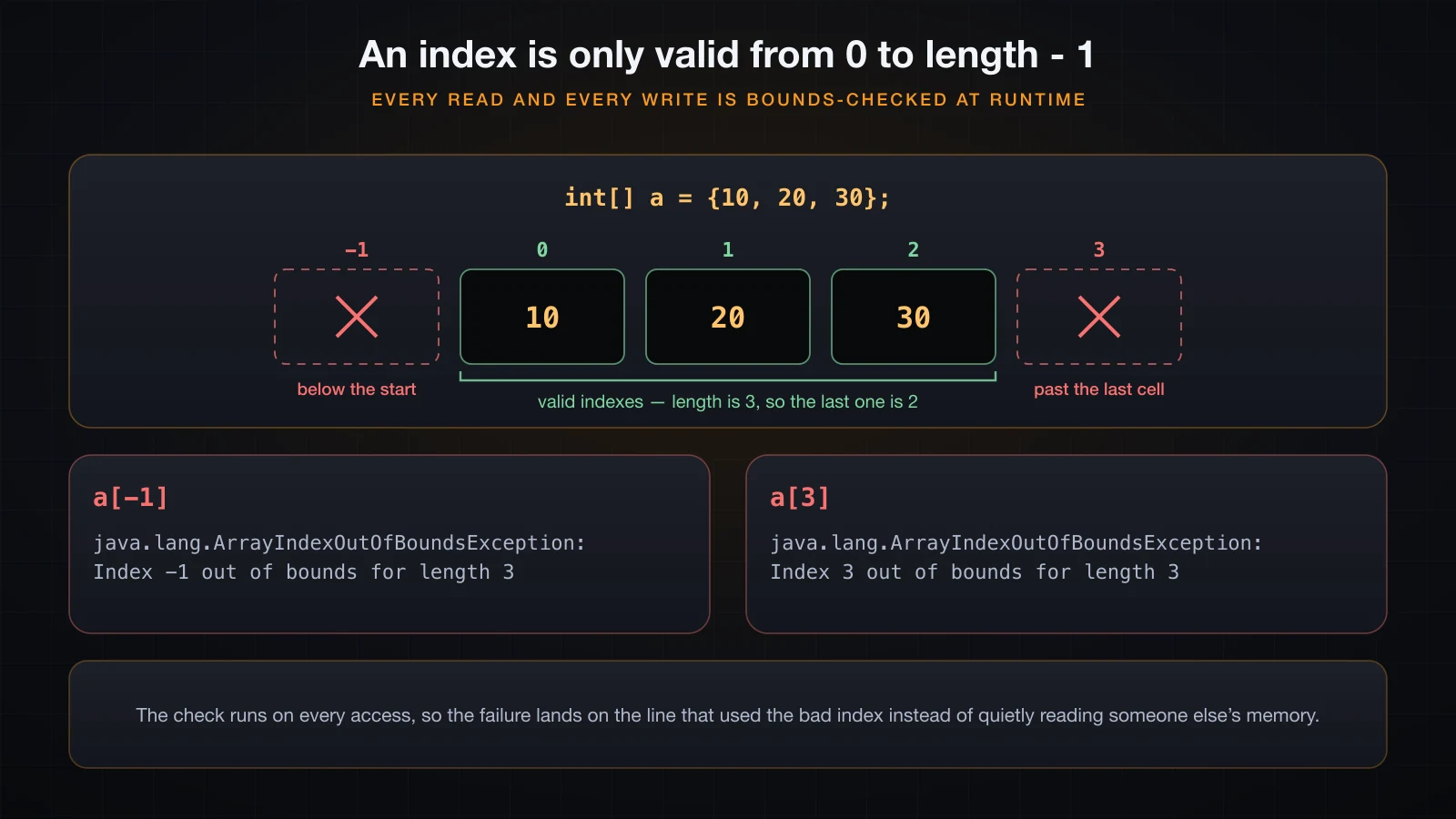
Indexes start at 0, so the last valid index of an array of length n is n - 1, and a[a.length - 1] is the idiom for the last element. Every access — read and write — is bounds-checked by the JVM.
int[] a = {10, 20, 30};
System.out.println("first = " + a[0] + ", last = " + a[a.length - 1]);
System.out.println(a[3]);first = 10, last = 30
Exception in thread "main" java.lang.ArrayIndexOutOfBoundsException: Index 3 out of bounds for length 3
at Bounds.main(Bounds.java:5)A negative index throws the same exception, with the offending value in the message:
Exception in thread "main" java.lang.ArrayIndexOutOfBoundsException: Index -1 out of bounds for length 3
	at BoundsNeg.main(BoundsNeg.java:4)
The message format is worth reading closely: Index <what you asked for> out of bounds for length <what exists>. Both numbers are there, so you rarely need a debugger — off-by-one errors usually announce themselves as Index 3 out of bounds for length 3, which is exactly what i <= a.length produces.
⚠️ The bounds check is not free, but it is not optional either. It is what stops a wrong index from silently reading memory that belongs to something else, which is the class of bug that made C famous.
Traversing an array
Java gives you two loops for this and they are not interchangeable. The loop syntax itself belongs to the article on loops; what matters here is which one to reach for.
The indexed for loop
Use it when you need the position — to print it, to compare neighbours, or to write into the array.
String[] fruits = {"apple", "banana", "cherry"};

for (int i = 0; i < fruits.length; i++) {
    System.out.println(i + " -> " + fruits[i]);
}0 -> apple
1 -> banana
2 -> cherryThe condition is i < fruits.length, never i <= fruits.length. Note also that fruits.length is read on every iteration, which is correct and costs nothing: the length cannot change underneath you.
The enhanced for-each loop
Use it when you only need the values. It reads better and it cannot go out of bounds, because there is no index to get wrong.
for (String fruit : fruits) {
    System.out.println(fruit.toUpperCase());
}APPLE
BANANA
CHERRYThe loop variable is a copy of the slot, not the slot itself. Assigning to it changes nothing:
int[] a = {1, 2, 3};
for (int x : a) {
    x = x * 10;
}
System.out.println("after for-each: " + java.util.Arrays.toString(a));
for (int i = 0; i < a.length; i++) {
    a[i] = a[i] * 10;
}
System.out.println("after indexed : " + java.util.Arrays.toString(a));after for-each: [1, 2, 3]
after indexed : [10, 20, 30]That is the rule in one line: read with for-each, write with an index.
Traversing in reverse
Reversing means starting at length - 1 and stepping down to 0. There is no reverse form of for-each.
for (int i = fruits.length - 1; i >= 0; i--) {
    System.out.println("reverse " + i + " -> " + fruits[i]);
}reverse 2 -> cherry
reverse 1 -> banana
reverse 0 -> appleThe condition is i >= 0, not i > 0 — index 0 is a real element.
Arrays are objects: what [I actually means
Because an array is an object, it has a class, and you can ask for it. The names look like line noise until you know the notation:
int[] ints = new int[3];
double[] doubles = new double[3];
String[] names = new String[3];

System.out.println(ints.getClass().getName());
System.out.println(doubles.getClass().getName());
System.out.println(names.getClass().getName());
System.out.println(ints instanceof Object);
System.out.println(ints.getClass().getSuperclass().getName());[I
[D
[Ljava.lang.String;
true
java.lang.ObjectOne [ means one dimension. The letter after it is the element type: I for int, D for double, J for long, Z for boolean. For a reference element type it is L, the fully qualified class name, and a closing semicolon — hence [Ljava.lang.String;.
You do not write this notation, but you will read it. It shows up in stack traces, in reflection output, and in ClassNotFoundException messages, and knowing that [B means "array of byte" saves a lot of confusion later. The last line of output is the other half of the point: an array's superclass is java.lang.Object, so an array is an Object and can be passed anywhere one is expected.
Copying an array: the reference trap
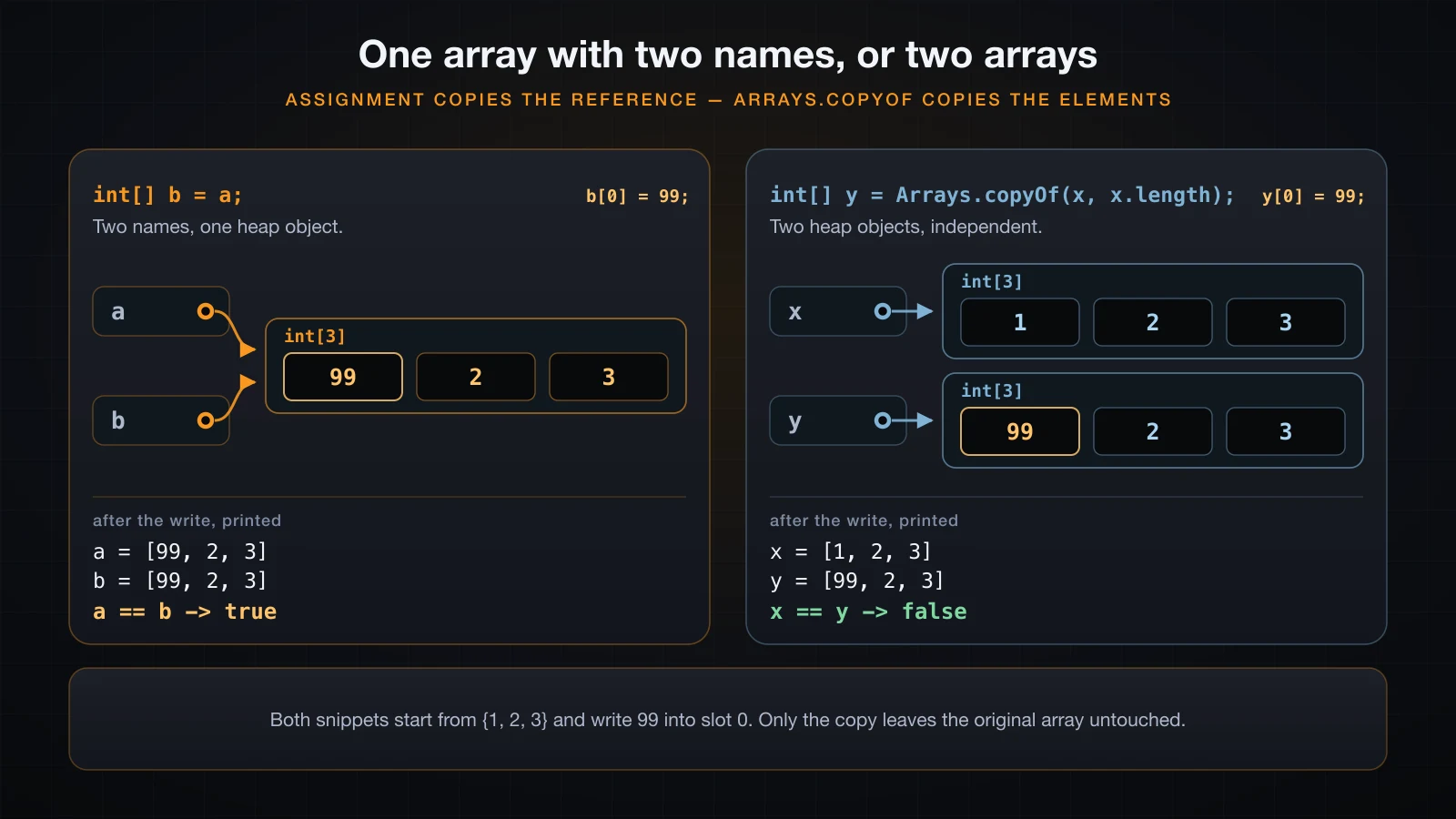
int[] b = a; does not copy anything except an address. Both names then reach the same heap object, so a write through either is visible through both.
import java.util.Arrays;

public class AliasVsCopy {
    public static void main(String[] args) {
        int[] a = {1, 2, 3};
        int[] b = a;                 // copies the reference
        System.out.println("a == b -> " + (a == b));
        b[0] = 99;
        System.out.println("a = " + Arrays.toString(a) + "  b = " + Arrays.toString(b));

        int[] x = {1, 2, 3};
        int[] y = Arrays.copyOf(x, x.length);   // copies the elements
        System.out.println("x == y -> " + (x == y));
        y[0] = 99;
        System.out.println("x = " + Arrays.toString(x) + "  y = " + Arrays.toString(y));
    }
}a == b -> true
a = [99, 2, 3] b = [99, 2, 3]
x == y -> false
x = [1, 2, 3] y = [99, 2, 3]The same thing happens across a method call. Passing an array passes the reference, so the method can modify your array; reassigning the parameter inside the method does nothing at all, because the parameter is a separate variable holding a copy of the address:
static void zeroFirst(int[] xs) { xs[0] = 0; }
static void reassign(int[] xs) { xs = new int[]{9, 9, 9}; }after zeroFirst: [0, 2, 3]
after reassign : [0, 2, 3]Arrays.copyOf, Arrays.copyOfRange, System.arraycopy and clone
Four ways to get a real second array. They differ in what you control, not in what they cost.
import java.util.Arrays;

public class Copies {
    public static void main(String[] args) {
        int[] a = {1, 2, 3, 4, 5};

        int[] same = Arrays.copyOf(a, a.length);
        int[] shorter = Arrays.copyOf(a, 3);
        int[] longer = Arrays.copyOf(a, 7);
        int[] range = Arrays.copyOfRange(a, 1, 4);
        int[] cloned = a.clone();

        int[] target = new int[5];
        System.arraycopy(a, 1, target, 0, 3);

        System.out.println("original    = " + Arrays.toString(a));
        System.out.println("copyOf same = " + Arrays.toString(same));
        System.out.println("copyOf 3    = " + Arrays.toString(shorter));
        System.out.println("copyOf 7    = " + Arrays.toString(longer));
        System.out.println("copyOfRange = " + Arrays.toString(range));
        System.out.println("clone       = " + Arrays.toString(cloned));
        System.out.println("arraycopy   = " + Arrays.toString(target));
        System.out.println("a == cloned -> " + (a == cloned));
    }
}original = [1, 2, 3, 4, 5]
copyOf same = [1, 2, 3, 4, 5]
copyOf 3 = [1, 2, 3]
copyOf 7 = [1, 2, 3, 4, 5, 0, 0]
copyOfRange = [2, 3, 4]
clone = [1, 2, 3, 4, 5]
arraycopy = [2, 3, 4, 0, 0]
a == cloned -> falseThree details that output makes concrete. Arrays.copyOf with a larger length pads with the element type's default, which is why copyOf 7 ends in two zeros. Arrays.copyOfRange(a, 1, 4) takes indexes 1, 2 and 3 — the from is inclusive and the to is exclusive, the same convention as String.substring. And System.arraycopy is the only one that writes into an array you already have, taking source, source position, destination, destination position and count.
clone() on an array of objects is shallow
clone() gives you a new array. It does not give you new elements. For an int[] there is no difference, because the elements are values. For an array of objects, both arrays end up pointing at the same objects:
StringBuilder[] a = { new StringBuilder("Java"), new StringBuilder("21") };
StringBuilder[] b = a.clone();

System.out.println("a == b       -> " + (a == b));
System.out.println("a[0] == b[0] -> " + (a[0] == b[0]));

b[0].append(" SE");
b[1] = new StringBuilder("22");

System.out.println("a = " + Arrays.toString(a));
System.out.println("b = " + Arrays.toString(b));a == b -> false
a[0] == b[0] -> true
a = [Java SE, 21]
b = [Java SE, 22]Replacing slot 1 in b left a alone, because the slot belongs to the array. Mutating the object in slot 0 through b changed what a sees, because the object is shared. Every array copy in the JDK is shallow; a deep copy is something you write yourself.
Comparing arrays: ==, equals and Arrays.equals
Arrays do not override equals. They inherit Object.equals, which is identity — the exact same test as ==. So two of the three obvious ways to compare arrays give you the wrong answer.
int[] a = {1, 2, 3};
int[] b = {1, 2, 3};

System.out.println("a == b            -> " + (a == b));
System.out.println("a.equals(b)       -> " + a.equals(b));
System.out.println("Arrays.equals(a,b)-> " + Arrays.equals(a, b));
System.out.println("a.equals(a) -> " + a.equals(a));a == b -> false
a.equals(b) -> false
Arrays.equals(a,b)-> true
a.equals(a) -> truea.equals(a) returning true is the proof that equals is identity here and not a content comparison. The same holds for object arrays — two String[] with equal contents are still not equals to each other:
a == b             -> false
a.equals(b)        -> false
Arrays.equals(a,b) -> true
Arrays.equals compares length first and then each element, using equals on object elements. For anything other than "is this literally the same array object", it is what you want.
Printing an array
System.out.println(a) calls toString(), and arrays do not override that either. You get Object.toString(): the class name from the previous section, an @, and the identity hash code in hex.
int[] a = {1, 2, 3};
String[] names = {"Hoang", "Lan"};
char[] letters = {'J', 'a', 'v', 'a'};

System.out.println(a);
System.out.println(Arrays.toString(a));
System.out.println(names);
System.out.println(Arrays.toString(names));
System.out.println(letters);[I@2a139a55
[1, 2, 3]
[Ljava.lang.String;@15db9742
[Hoang, Lan]
JavaThe hex suffix is the identity hash code and differs between runs and machines, so [I@2a139a55 will not be your number. It is not an address and it is not useful data — seeing it in a log means someone concatenated an array into a string by accident.
char[] is the one exception, and it is a genuine special case in PrintStream: println(char[]) is an overload that prints the characters. System.out.println(letters) printed Java, while the same call on an int[] prints the type-and-hashcode form.
Arrays.toString(a) is what you actually want. For a one-dimensional array it always works.
Useful methods in java.util.Arrays
One import java.util.Arrays; gives you everything in this table. Sorting and searching get a proper treatment in a later article — the point here is knowing what already exists so you do not hand-write it.
| Method | What it does |
|---|---|
Arrays.toString(a) | Readable [1, 2, 3] form for printing and logging |
Arrays.equals(a, b) | Element-by-element comparison, which == and equals do not do |
Arrays.fill(a, v) | Writes v into every slot; fill(a, from, to, v) fills a range |
Arrays.copyOf(a, n) | New array of length n, truncated or default-padded |
Arrays.copyOfRange(a, from, to) | New array from the half-open range [from, to) |
Arrays.sort(a) | Sorts in place, ascending |
Arrays.binarySearch(a, key) | Index of key, but only valid on an already sorted array |
Arrays.stream(a) | Turns the array into a stream for sum(), max(), average() |
fill and copyOf are the two you will use on day one:
int[] scores = new int[5];
Arrays.fill(scores, 7);
System.out.println("fill      = " + Arrays.toString(scores));

Arrays.fill(scores, 1, 4, 0);
System.out.println("fill 1..4 = " + Arrays.toString(scores));

int[] grown = Arrays.copyOf(scores, 8);
System.out.println("copyOf 8  = " + Arrays.toString(grown));

String[] names = new String[3];
Arrays.fill(names, "n/a");
System.out.println("fill obj  = " + Arrays.toString(names));

int[] nums = {5, 1, 4};
System.out.println("stream sum = " + Arrays.stream(nums).sum());fill = [7, 7, 7, 7, 7]
fill 1..4 = [7, 0, 0, 0, 7]
copyOf 8 = [7, 0, 0, 0, 7, 0, 0, 0]
fill obj = [n/a, n/a, n/a]
stream sum = 10Note the range version: fill(scores, 1, 4, 0) wrote to indexes 1, 2 and 3 and left index 4 alone. Half-open ranges again.
Arrays of objects start out null
This is where the null default stops being trivia. new String[3] creates three reference slots pointing at nothing. Iterating over them and calling a method throws, and Java 21's helpful message names the exact expression that was null:
public class ObjectArray {
    public static void main(String[] args) {
        String[] names = new String[3];
        names[0] = "Hoang";

        for (int i = 0; i < names.length; i++) {
            System.out.println(i + " -> " + names[i]);
        }

        for (int i = 0; i < names.length; i++) {
            System.out.println(names[i].toUpperCase());
        }
    }
}0 -> Hoang
1 -> null
2 -> null
HOANG
Exception in thread "main" java.lang.NullPointerException: Cannot invoke "String.toUpperCase()" because "names[i]" is null
at ObjectArray.main(ObjectArray.java:11)The first loop printed null happily, because string concatenation turns a null reference into the text null. The second loop called a method on it and threw at index 1.
because "names[i]" is null requires the variable names to be in the class file. Compiled with a plain javac, the same run reports the slot positionally instead:
Exception in thread "main" java.lang.NullPointerException: Cannot invoke "String.toUpperCase()" because "<local1>[<local2>]" is null
	at ObjectArray.main(ObjectArray.java:11)
Compile with javac -g — which every IDE and build tool does by default — and you get the readable version. Either way the fix is the same: fill the slots before you read them, or check for null in the loop.
You cannot grow an array
There is no add. The length is final, so growing means allocating a bigger array and copying the old contents into it:
int[] a = {1, 2, 3};
System.out.println("before = " + Arrays.toString(a) + ", length = " + a.length);

a = Arrays.copyOf(a, a.length + 1);
a[a.length - 1] = 4;

System.out.println("after = " + Arrays.toString(a) + ", length = " + a.length);before = [1, 2, 3], length = 3
after = [1, 2, 3, 4], length = 4Read that carefully: the original array was not resized. A new array of length 4 was allocated, the three old values were copied into it, and a was re-pointed at the new object. The old one becomes garbage.
Doing this once is fine. Doing it inside a loop means allocating and copying on every single append, which is why ArrayList exists — it holds an array internally, grows it in large steps, and gives you add and remove. Use an array when the size is known and fixed; use ArrayList when it is not. A later article in this series covers collections properly.
Command-line arguments are an array
String[] args in main has been sitting there since the first program in this series. It is an ordinary String[], holding the arguments passed after the class name — the program name is not included, unlike C.
public class Args {
    public static void main(String[] args) {
        System.out.println("args.length = " + args.length);
        for (int i = 0; i < args.length; i++) {
            System.out.println("args[" + i + "] = " + args[i]);
        }
        if (args.length < 2) {
            System.out.println("usage: java Args <name> <times>");
            return;
        }
        int times = Integer.parseInt(args[1]);
        for (int i = 0; i < times; i++) {
            System.out.println("Hello, " + args[0]);
        }
    }
}
Run with no arguments, args is an empty array — length 0, and never null:
args.length = 0
usage: java Args <name> <times>
Run as java Args Hoang 3:
args.length = 2
args[0] = Hoang
args[1] = 3
Hello, Hoang
Hello, Hoang
Hello, Hoang
Everything arrives as a String, including 3, which is why Integer.parseInt(args[1]) is there. And checking args.length before touching args[1] is not defensive style, it is the difference between a usage message and an ArrayIndexOutOfBoundsException in the user's face.
FAQ
What is the difference between length and length() in Java?
length is a public final field on an array object, written without parentheses: a.length. length() is a method on String: s.length(). Collections use neither and offer size() instead. Calling a.length() on an array does not compile — cannot find symbol: method length() — and this is purely a historical inconsistency in the language, with no rule behind it.
Can I change the size of an array in Java?
No. The length is fixed when the object is created and the length field is final, so a.length = 5 is a compile error. The only way to "grow" an array is to allocate a bigger one with Arrays.copyOf and copy the elements across, which is a new object rather than a resized one. If the size changes at runtime, use ArrayList.
Why does printing an array show something like [I@2a139a55?
Because arrays do not override toString(), so you get Object.toString(): the array's class name, @, and the identity hash code in hexadecimal. [I means "array of int". Use Arrays.toString(a) to print the elements. The exception is char[], which System.out.println prints as text through a dedicated overload.
How do I copy an array in Java?
Use Arrays.copyOf(a, a.length) for a full copy, Arrays.copyOfRange(a, from, to) for a slice, a.clone() for a shorter full copy, or System.arraycopy when you want to write into an array you already have. int[] b = a; is not a copy — it makes b a second name for the same array. All four copies are shallow, so for an array of objects both arrays still point at the same objects.
Why do I get NullPointerException when looping over a String array?
Because new String[n] fills its slots with null, not with empty strings. Reading a slot is fine and even prints as null; calling a method on it throws. Java 21 tells you exactly which expression was null — Cannot invoke "String.toUpperCase()" because "names[i]" is null — provided the class file has debug information, which javac -g and every IDE produce.
Should I use an array or an ArrayList?
Use an array when the number of elements is known and fixed, when you need primitives without boxing, or when an API hands you one. Use ArrayList whenever elements are added or removed, because an array cannot grow and simulating it means a fresh allocation and a full copy per append. ArrayList uses an array internally and amortizes that cost for you.
Conclusion
An array is one object with a length that was decided at creation and can never move. Everything in this article follows from that: length is a final field rather than a method, indexes run 0 to length - 1 and are checked on every access, new fills the slots with defaults so an object array starts full of null, and assignment copies the reference so Arrays.copyOf is what makes a second array.
The habits worth keeping: Arrays.toString to print, Arrays.equals to compare, a[a.length - 1] for the last element, for-each to read and an index to write, and ArrayList the moment the size stops being fixed.
Next in this series: multidimensional and jagged arrays in Java — int[][], what new int[3][4] actually allocates, why a row is itself an array object, and how to build and traverse a jagged array whose rows have different lengths.
![[Java Basics] Methods in Java: Declaring and Calling Them](/images/blog/methods-in-java-thumbnail.en.webp)
![[Java Basics] Loops in Java: for, while and do-while](/images/blog/loops-in-java-thumbnail.en.webp)
![[Java Basics] Operators in Java: Arithmetic, Comparison, Logical, Assignment and Ternary](/images/blog/java-operators-thumbnail.en.webp)
![[Java Basics] Variable Scope in Java: Local, Field and Static](/images/blog/variable-scope-thumbnail.en.webp)