Every Java expression that computes something uses an operator. + adds, == compares, && combines conditions. There are around forty of them and they fall into a handful of groups, each with rules that are consistent once you know them.
The rules that catch people out are not the obvious ones. 7 / 2 is 3, 0.1 + 0.2 == 0.3 is false, i = i++ leaves i unchanged, and b += 5 compiles where b = b + 5 does not. The examples use Java 21.
This article walks the groups in the order you meet them — arithmetic, the two jobs of +, increment and decrement, assignment, comparison, logic, bitwise and the ternary — and ends with the precedence table that ties them together.
What counts as an operator in Java
An operator takes one, two or three operands and produces a value. -x has one operand, a + b has two, and cond ? a : b is the only three-operand operator in the language.
The part worth internalising is that an expression has a type as well as a value, and that type is fixed at compile time. 7 / 2 is an int expression, 7 / 2.0 is a double expression, a == b is a boolean expression. Almost every surprise in this article comes from the type, not from the arithmetic.
| Group | Operators | Result |
|---|---|---|
| Arithmetic | + - * / % | a number |
| Increment / decrement | ++ -- | a number |
| Assignment | = += -= *= /= %= | the value assigned |
| Relational | < > <= >= | boolean |
| Equality | == != | boolean |
| Logical | && || ! | boolean |
| Bitwise and shift | & | ^ ~ << >> >>> | a number, or boolean for & | ^ |
| Conditional (ternary) | ? : | the type of the branches |
| Type comparison | instanceof | boolean |
instanceof is the odd one out: it compares a reference against a type instead of comparing two values. It belongs to the comparison family and a later article on classes and objects covers it properly.
Arithmetic operators: + - * / %
The five arithmetic operators work on every numeric primitive.
public class Arithmetic {
    public static void main(String[] args) {
        int a = 17, b = 5;
        System.out.println("a + b = " + (a + b));
        System.out.println("a - b = " + (a - b));
        System.out.println("a * b = " + (a * b));
        System.out.println("a / b = " + (a / b));
        System.out.println("a % b = " + (a % b));
    }
}a + b = 22
a - b = 12
a * b = 85
a / b = 3
a % b = 2Note that % is officially the remainder operator, not "modulo". The distinction is invisible until a negative number shows up, and then it matters a great deal.
Integer division truncates toward zero
When both operands are integer types, / is integer division: the result is an int (or long) and the fractional part is discarded, not rounded.
System.out.println(7 / 2);
System.out.println(5 / 2.0);
System.out.println(7 / 2.0);
System.out.println((double) 7 / 2);
System.out.println(-7 / 2);3
2.5
3.5
3.5
-37 / 2 is 3 because the whole expression is an int expression — there is nowhere to put the .5. As soon as one operand is a floating point value the whole expression becomes double, which is why 5 / 2.0 is 2.5. Truncation goes toward zero, so -7 / 2 is -3 rather than -4.
⚠️ The classic bug is
int average = total / count;when you wanted a decimal. Nothing warns you — the answer is simply wrong, by up to one whole unit.
What % does with negative operands
Most tutorials state this rule backwards. Java defines % so that (a / b) * b + (a % b) equals a, and because / truncates toward zero, the sign of the remainder follows the left operand — the dividend. The divisor's sign is irrelevant.
System.out.println(7 % 3);
System.out.println(-7 % 3);
System.out.println(7 % -3);
System.out.println(-7 % -3);
System.out.println(5.5 % 2);1
-1
1
-1
1.5| Expression | Result | Sign comes from |
|---|---|---|
7 % 3 | 1 | dividend 7 |
-7 % 3 | -1 | dividend -7 |
7 % -3 | 1 | dividend 7 |
-7 % -3 | -1 | dividend -7 |
If you want the mathematical modulo, which is never negative for a positive divisor, call Math.floorMod instead: Math.floorMod(-7, 3) returns 2. And as the last line shows, % is defined on double too — 5.5 % 2 is 1.5.
Division by zero is not one behaviour
Integer division by zero throws. Floating point division by zero does not — it produces one of the IEEE 754 special values.
System.out.println(1.0 / 0);
System.out.println(-1.0 / 0);
System.out.println(0.0 / 0.0);
double nan = 0.0 / 0.0;
System.out.println("nan == nan  -> " + (nan == nan));
System.out.println("nan != nan  -> " + (nan != nan));
System.out.println("Double.isNaN(nan) -> " + Double.isNaN(nan));
System.out.println(1 / 0);Infinity
-Infinity
NaN
nan == nan -> false
nan != nan -> true
Double.isNaN(nan) -> true
Exception in thread "main" java.lang.ArithmeticException: / by zero
at DivZero.main(DivZero.java:10)Three things to take away. 1 / 0 on integers throws ArithmeticException: / by zero and kills the program. 1.0 / 0 quietly yields Infinity, and 0.0 / 0.0 yields NaN, so a floating point pipeline can carry a broken value a long way before anyone notices.
And NaN is not equal to anything, including itself: nan == nan is false and nan != nan is true. That makes == useless for detecting it — Double.isNaN(x) is the correct check. NaN also loses every relational comparison, so nan < 1, nan > 1 and nan == 1 are all false at once.
The + operator has two jobs
If either operand is a String, + is string concatenation. Otherwise it is numeric addition. + is left-associative, so a chain is evaluated one pair at a time from the left — and the meaning can flip partway through.
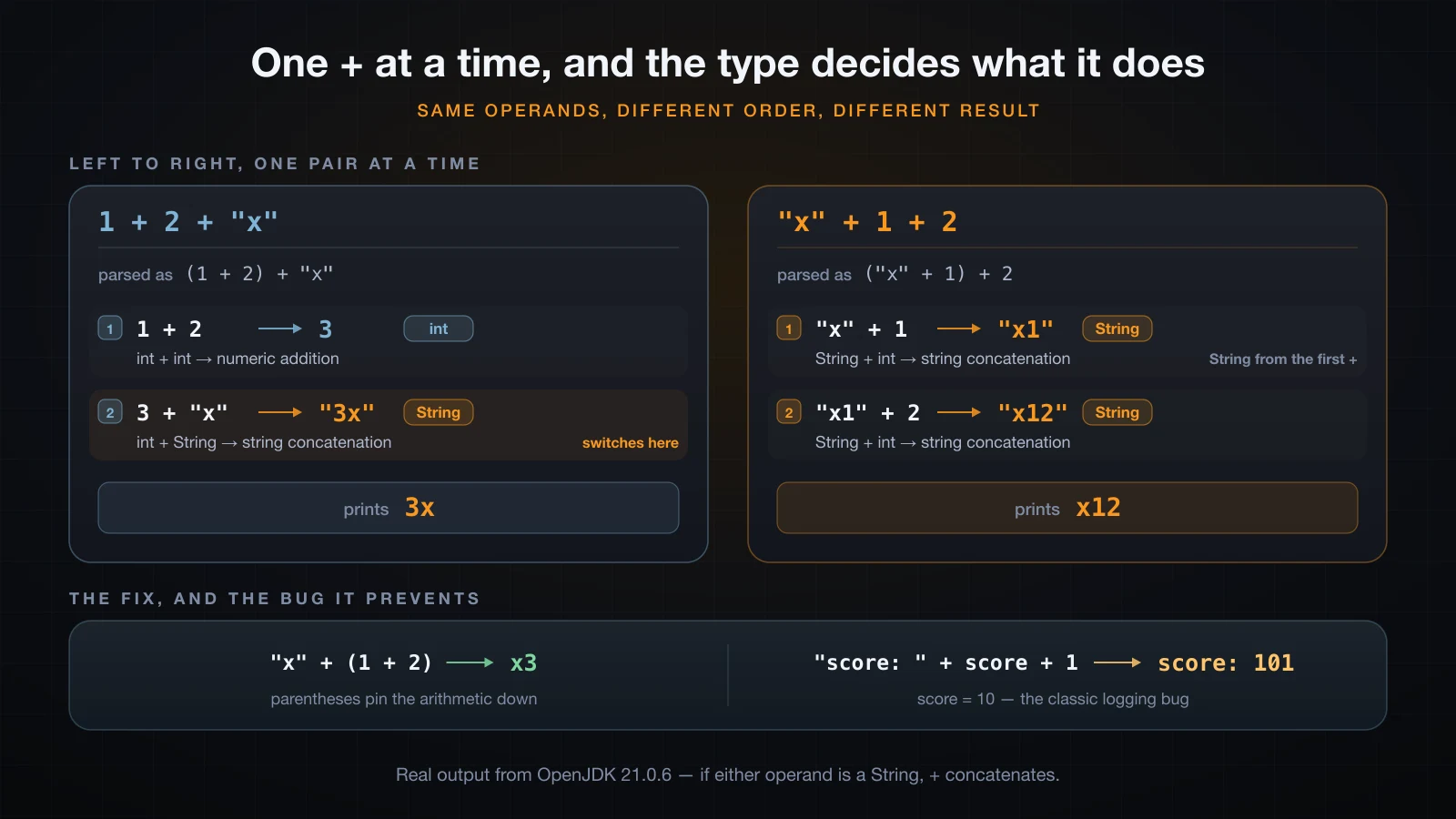
Reduce one operator at a time and the difference becomes obvious:
System.out.println(1 + 2 + "x");
System.out.println("x" + 1 + 2);
System.out.println("x" + (1 + 2));
System.out.println('a' + 1);
System.out.println((char) ('a' + 1));
System.out.println("" + 'a' + 1);
System.out.println('a' + 'b');3x
x12
x3
98
b
a1
195| Expression | Evaluated as | Result |
|---|---|---|
1 + 2 + "x" | (1 + 2) + "x" | 3x |
"x" + 1 + 2 | ("x" + 1) + 2 | x12 |
"x" + (1 + 2) | "x" + 3 | x3 |
In 1 + 2 + "x" the first + sees two int operands and adds them; only the second one meets a String. In "x" + 1 + 2 the first + already produces a String, so the second one concatenates as well. This is the single most common logging bug in Java: "score: " + score + 1 prints score: 101 when score is 10.
'a' + 1 prints 98 because char is promoted to int before the addition, and the result is an int expression. Cast it back with (char) to get b, or start the chain with "" to force the string branch. For the same reason 'a' + 'b' is 195, not ab.
The practical rule: whenever a + chain mixes numbers with text, put parentheses around the arithmetic.
Increment and decrement: ++ and --
++ and -- add or subtract 1 in place. Prefix and postfix change the variable in exactly the same way; they differ only in the value the expression yields.
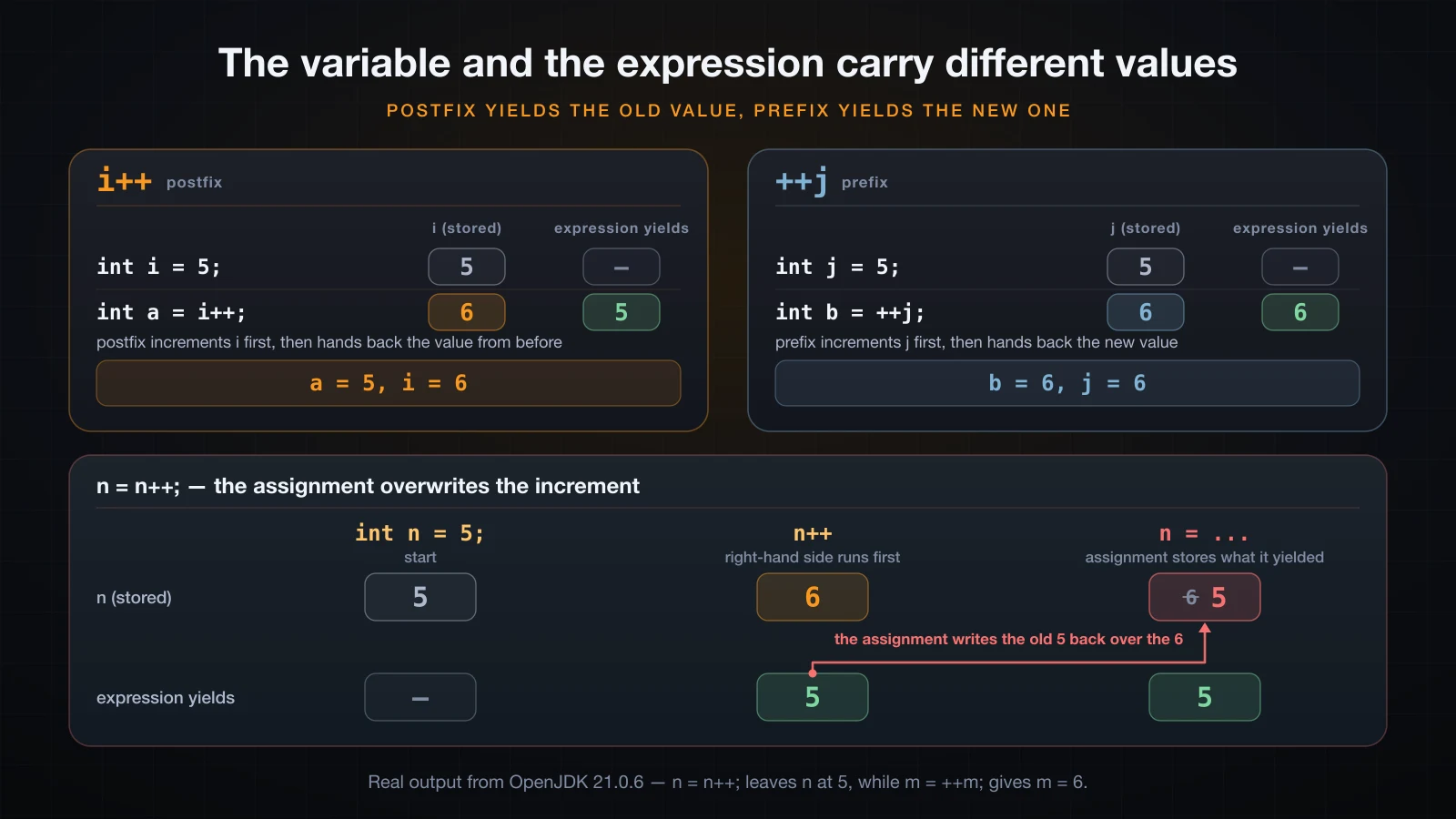
The trap lives in the gap between the stored value and the yielded value:
int i = 5;
System.out.println("i++ yields " + (i++) + ", i is now " + i);
int j = 5;
System.out.println("++j yields " + (++j) + ", j is now " + j);

int k = 5;
int a = k++;
int b = ++k;
System.out.println("k=" + k + " a=" + a + " b=" + b);i++ yields 5, i is now 6
++j yields 6, j is now 6
k=7 a=5 b=7| Form | Value the expression yields | Variable afterwards |
|---|---|---|
i++ (postfix) | the value before the increment | incremented |
++i (prefix) | the value after the increment | incremented |
Tracing the third block: k starts at 5, k++ hands back 5 and leaves k at 6, then ++k raises k to 7 and hands back 7.
Why i = i++ leaves i unchanged
int n = 5;
n = n++;
System.out.println("after n = n++;  n = " + n);

int m = 5;
m = ++m;
System.out.println("after m = ++m;  m = " + m);

int c = 0;
c = c++ + ++c;
System.out.println("c = c++ + ++c; c = " + c);after n = n++; n = 5
after m = ++m; m = 6
c = c++ + ++c; c = 2Read n = n++; in the order Java evaluates it. The right-hand side runs first: n++ yields the old value 5 and, as a side effect, sets n to 6. Then the assignment stores the yielded value — 5 — back into n. The increment really happened, and was then overwritten by the assignment. m = ++m; looks like it works only because prefix yields the new value.
The last line is the same trap doubled: c++ yields 0 and makes c 1, then ++c makes c 2 and yields 2, so the sum is 2 and that is what lands in c. Never mix an increment with an assignment to the same variable — write n++; on a line of its own.
Assignment and compound assignment
= is itself an expression whose value is the value assigned, and it is right-associative, which is why a = b = 0 works. The compound forms fold an operation into the assignment.
int x = 10;
x += 5;  System.out.println("x += 5  -> " + x);
x -= 3;  System.out.println("x -= 3  -> " + x);
x *= 4;  System.out.println("x *= 4  -> " + x);
x /= 6;  System.out.println("x /= 6  -> " + x);
x %= 5; System.out.println("x %= 5 -> " + x);x += 5 -> 15
x -= 3 -> 12
x *= 4 -> 48
x /= 6 -> 8
x %= 5 -> 3x /= 6 on 48 gives 8 and not 8.0, because integer division still applies inside the compound form. += also concatenates when the left side is a String.
The hidden cast inside +=
Here is a pair that looks identical and is not.
byte b = 10;
b += 5;
System.out.println("byte b after b += 5 -> " + b);byte b after b += 5 -> 15byte b = 10;
b = b + 5;CompoundBad.java:4: error: incompatible types: possible lossy conversion from int to byte
b = b + 5;
^
1 errorb + 5 promotes b to int, so the right-hand side is an int expression, and an int will not fit into a byte without an explicit cast. The compound operator has a cast built into its definition: b += 5 means b = (byte) (b + 5).
That convenience hides truncation. The same silent cast lets int i = 5; i += 3.5; compile, giving 8, and lets a byte wrap around:
byte big = 100;
big += 100;
System.out.println(big);-56Article 6 covers why byte wraps at 127. Article 8 covers the widening and narrowing conversion rules in full — here it is simply an operator behaviour worth knowing.
Comparing values: relational and equality operators
< > <= >= == != all produce a boolean.
int a = 7, b = 5;
System.out.println("a == b -> " + (a == b));
System.out.println("a != b -> " + (a != b));
System.out.println("a >  b -> " + (a > b));
System.out.println("a <= b -> " + (a <= b));a == b -> false
a != b -> true
a > b -> true
a <= b -> falseOn primitives this is exactly what it looks like. Two cases are not.
Why 0.1 + 0.2 == 0.3 is false
System.out.println(0.1 + 0.2);
System.out.println(0.1 + 0.2 == 0.3);

double sum = 0.1 + 0.2;
System.out.println(Math.abs(sum - 0.3) < 1e-9);
System.out.println(Math.abs(sum - 0.3));0.30000000000000004
false
true
5.551115123125783E-17double is binary floating point, and 0.1, 0.2 and 0.3 have no exact binary representation. The stored values are very close to what you typed, but the sum of the first two is not bit-identical to the third. == is doing its job perfectly; the operands just are not the numbers on the page.
Compare with a tolerance instead — Math.abs(a - b) < epsilon — choosing an epsilon suited to the magnitudes involved. For money, use BigDecimal or integer cents and avoid double entirely.
== on references compares identity, not content
String a = new String("hi");
String b = new String("hi");
System.out.println("a == b      -> " + (a == b));
System.out.println("a.equals(b) -> " + a.equals(b));a == b -> false
a.equals(b) -> trueFor a reference type, == asks "are these the same object?" while equals asks "do these hold the same content?" Two new String("hi") calls create two distinct objects, so == is false even though the text matches. Article 9 goes deeper into String and the string pool; the working rule for now is == for primitives, equals for objects.
Logical operators and short-circuit evaluation
&&, || and ! combine boolean values. What makes && and || special is that they stop evaluating as soon as the answer is decided.
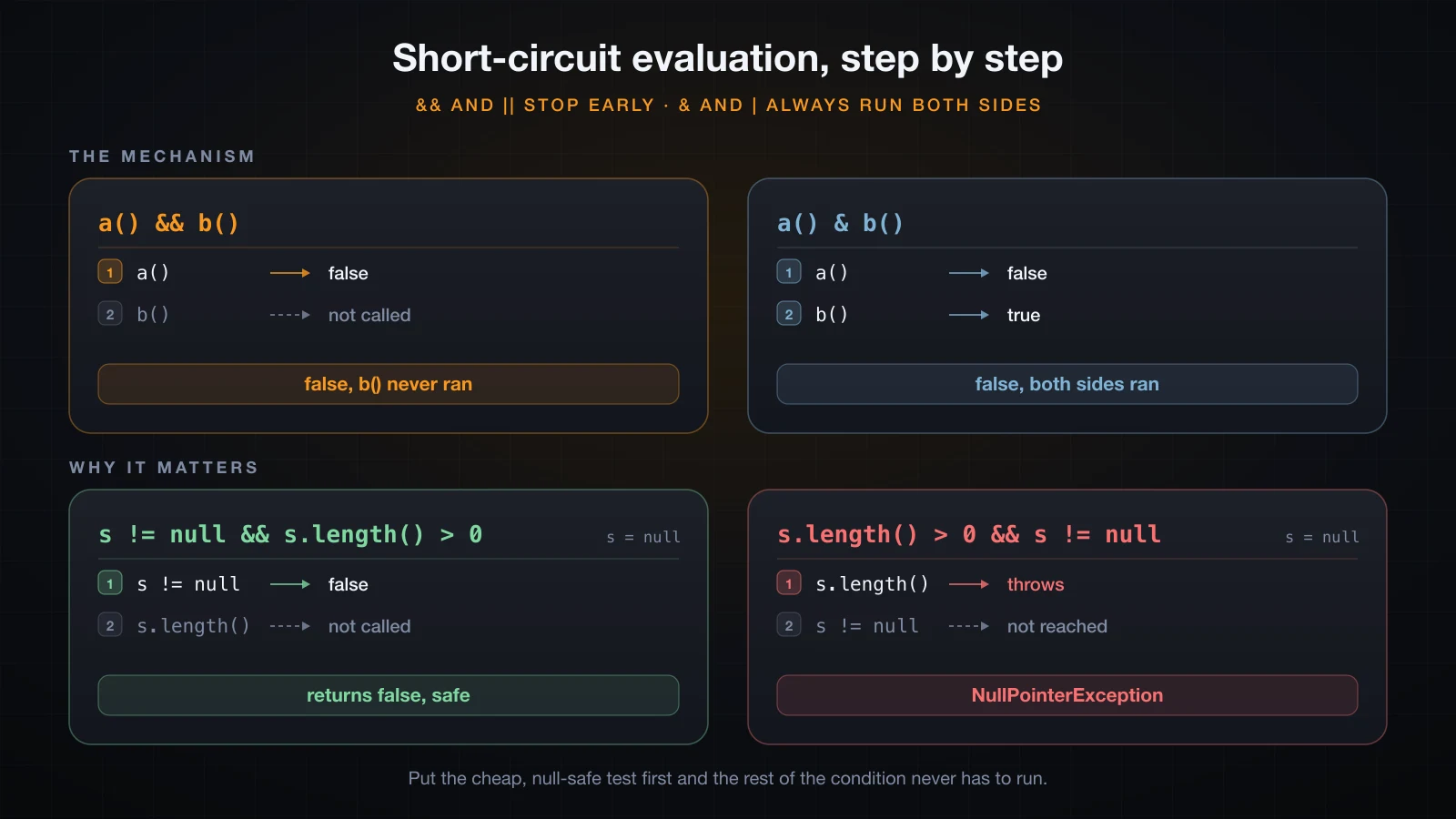
&& versus &, || versus |
The easiest way to see short-circuiting is to make each operand announce itself.
public class ShortCircuit {
    static boolean a() {
        System.out.println("  a() ran");
        return false;
    }

    static boolean b() {
        System.out.println("  b() ran");
        return true;
    }

    public static void main(String[] args) {
        System.out.println("a() && b()");
        System.out.println("  result = " + (a() && b()));

        System.out.println("a() & b()");
        System.out.println("  result = " + (a() & b()));

        System.out.println("b() || a()");
        System.out.println("  result = " + (b() || a()));

        System.out.println("b() | a()");
        System.out.println("  result = " + (b() | a()));
    }
}a() && b()
a() ran
result = false
a() & b()
a() ran
b() ran
result = false
b() || a()
b() ran
result = true
b() | a()
b() ran
a() ran
result = trueb() never printed in the first block. Once a() returned false, the value of a() && b() was already known, so the right-hand side was skipped entirely. The same happens for || once the left side is true.
| Operator | Meaning | Right operand |
|---|---|---|
&& | logical AND | skipped when the left is false |
|| | logical OR | skipped when the left is true |
& | AND, no short-circuit | always evaluated |
| | OR, no short-circuit | always evaluated |
! | NOT | n/a, unary |
& and | work on booleans as well as on integers, and on booleans they evaluate both sides no matter what. Use them only when you actually want both side effects.
The null guard short-circuiting makes possible
This is the everyday reason short-circuiting matters.
static boolean isNotEmpty(String s) {
    return s != null && s.length() > 0;
}false
false
trueCalled with null, "" and "java", that returns false, false, true. The null case is safe precisely because s != null is false, so s.length() is never reached. Swap the order and the guard is gone:
static boolean isNotEmpty(String s) {
    return s.length() > 0 && s != null;
}Exception in thread "main" java.lang.NullPointerException: Cannot invoke "String.length()" because "s" is null
at NullGuardBad.isNotEmpty(NullGuardBad.java:3)
at NullGuardBad.main(NullGuardBad.java:7)Writing s != null & s.length() > 0 with a single & throws the same exception, because & evaluates the right operand even after the left one has said no. Ordering matters, and so does picking the short-circuiting operator.
Compiled with plain javac, that message reads because "<parameter1>" is null instead of because "s" is null — local variable names only reach the class file when you compile with -g, which IDEs and Maven do by default.
Bitwise and shift operators
These work on the individual bits of an integer type. At beginner level you mostly need to recognise them.
int a = 12;   // 1100
int b = 10;   // 1010
System.out.println("a & b  = " + (a & b));
System.out.println("a | b  = " + (a | b));
System.out.println("a ^ b  = " + (a ^ b));
System.out.println("~a     = " + (~a));

System.out.println("5 << 1 = " + (5 << 1));
System.out.println("20 >> 2 = " + (20 >> 2));

int neg = -8;
System.out.println("-8 >> 1  = " + (neg >> 1));
System.out.println("-8 >>> 1 = " + (neg >>> 1));
System.out.println("binary of -8      = " + Integer.toBinaryString(neg));
System.out.println("binary of -8 >> 1 = " + Integer.toBinaryString(neg >> 1));
System.out.println("binary of -8 >>>1 = " + Integer.toBinaryString(neg >>> 1));a & b = 8
a | b = 14
a ^ b = 6
~a = -13
5 << 1 = 10
20 >> 2 = 5
-8 >> 1 = -4
-8 >>> 1 = 2147483644
binary of -8 = 11111111111111111111111111111000
binary of -8 >> 1 = 11111111111111111111111111111100
binary of -8 >>>1 = 1111111111111111111111111111100<< shifts left, which doubles; >> shifts right and copies the sign bit in, which halves and keeps the sign. >>> shifts right and feeds in zeros regardless of sign, which is why -8 >>> 1 is the huge positive 2147483644 — the leading 1 bits were replaced by a 0. Use >> for arithmetic on signed numbers and >>> only when you are treating the value as raw bits.
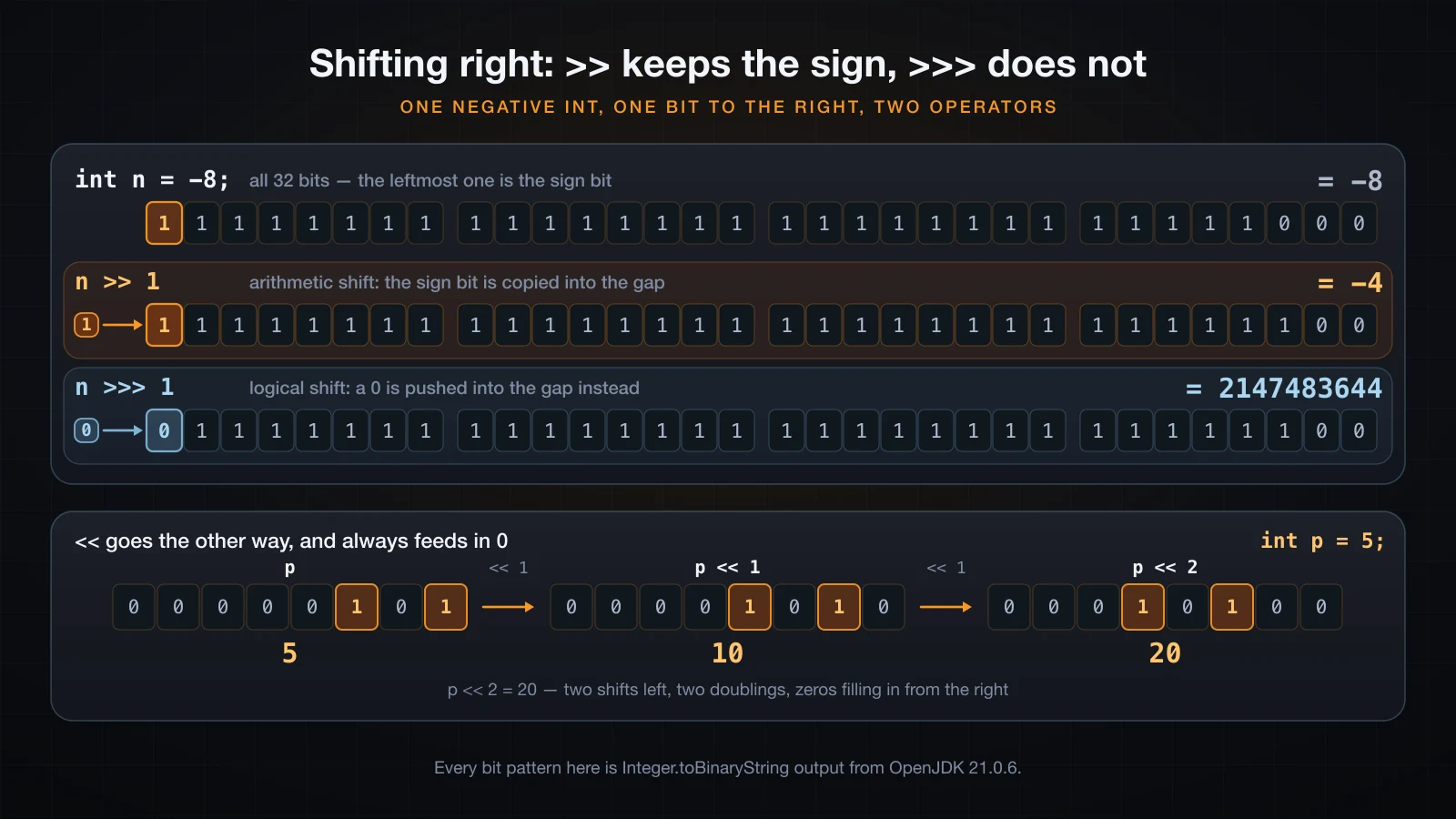
The two result rows differ in exactly one bit: the one that enters on the left.
The honest everyday use case is a set of flags packed into one int:
static final int READ    = 1;   // 0001
static final int WRITE   = 2;   // 0010
static final int EXECUTE = 4;   // 0100

int perms = READ | WRITE;
System.out.println("perms = " + perms);
System.out.println("can read?    " + ((perms & READ) != 0));
System.out.println("can execute? " + ((perms & EXECUTE) != 0));
perms = perms | EXECUTE;
System.out.println("after adding EXECUTE: " + perms + " -> " + Integer.toBinaryString(perms));perms = 3
can read? true
can execute? false
after adding EXECUTE: 7 -> 111| sets a flag, & tests one, ^ toggles one. Outside flag sets, hashing and low-level protocol code, you will rarely reach for these.
The ternary operator ?:
The only three-operand operator: condition ? valueIfTrue : valueIfFalse. Unlike if, it is an expression, so it produces a value you can assign or pass.
int age = 20;
String status = age >= 18 ? "adult" : "minor";
System.out.println(status);

int a = 7, b = 5;
System.out.println("max = " + (a > b ? a : b));

int score = 72;
String grade = score >= 80 ? "A" : score >= 60 ? "B" : "C";
System.out.println("grade = " + grade);adult
max = 7
grade = BThe nested form works because ?: is right-associative — the third line parses as score >= 80 ? "A" : (score >= 60 ? "B" : "C"). One level of nesting is readable; two is where it stops being. Note also that the ternary sits below + in precedence, so it needs parentheses inside a concatenation, as in the max line above.
The autoboxing NPE hiding in a ternary
Integer boxed = null;
boolean flag = false;
Integer result = flag ? 1 : boxed;
System.out.println(result);Exception in thread "main" java.lang.NullPointerException: Cannot invoke "java.lang.Integer.intValue()" because "boxed" is null
at TernaryNpe.main(TernaryNpe.java:5)Nothing here dereferences anything, yet it throws. When one branch is int and the other is Integer, the type of the whole conditional expression is int, so the compiler unboxes whichever branch it takes — and unboxing null calls intValue() on it. Keep both branches the same type and the problem disappears:
Integer result = flag ? Integer.valueOf(1) : boxed;
System.out.println(result);nullOperator precedence and associativity
Precedence decides which operator binds first; associativity decides the order among operators of equal precedence.
| Precedence | Operators | Associativity |
|---|---|---|
| 1 (highest) | expr++ expr-- | left to right |
| 2 | ++expr --expr +expr -expr ~ ! | right to left |
| 3 | cast (type) expr | right to left |
| 4 | * / % | left to right |
| 5 | + - | left to right |
| 6 | << >> >>> | left to right |
| 7 | < > <= >= instanceof | left to right |
| 8 | == != | left to right |
| 9 | & | left to right |
| 10 | ^ | left to right |
| 11 | | | left to right |
| 12 | && | left to right |
| 13 | || | left to right |
| 14 | ? : | right to left |
| 15 (lowest) | = += -= *= /= %= | right to left |
Two rows of that table are where real code goes wrong: the shifts sit below + and -, and the bitwise operators sit below ==.
System.out.println(1 << 2 + 3);
System.out.println((1 << 2) + 3);

System.out.println(true || false && false);
System.out.println((true || false) && false);32
7
true
false1 << 2 + 3 is not (1 << 2) + 3. Addition binds tighter than the shift, so it is 1 << 5, which is 32. And true || false && false is not evaluated left to right: && binds tighter than ||, so it is true || (false && false), which is true — the opposite of what left-to-right reading suggests.
The same rule turns a bit test into a compile error:
int flags = 6, MASK = 2;
if (flags & MASK != 0) {
    System.out.println("set");
}PrecedenceBad.java:4: error: bad operand types for binary operator '&'
if (flags & MASK != 0) {
^
first type: int
second type: boolean
1 error!= binds tighter than &, so the compiler sees flags & (MASK != 0) — an int and a boolean. The fix is (flags & MASK) != 0.
The practical advice is short: do not memorise the table. Memorise that * and / beat + and -, that comparisons beat && and ||, and that everything else gets parentheses. Parentheses cost nothing and they survive the next person reading the code.
FAQ
Does Java have an exponent operator?
No. ^ is bitwise XOR, so 2 ^ 10 evaluates to 8, not 1024. Use Math.pow(2, 10), which returns 1024.0 as a double.
Is ++i faster than i++?
No. As a standalone statement they compile to identical bytecode — javap -c shows a single iinc instruction for both. Choose the form based on the value the expression should yield, not on performance.
When would I use & instead of &&?
When the operands are integers and you mean a bitwise AND, or when you genuinely want both sides evaluated for their side effects. For ordinary boolean conditions, && is what you want, and it is the one that makes null guards safe.
Why is -7 % 3 equal to -1 and not 2?
Because % is a remainder tied to truncating division, so the sign follows the dividend. If you want the mathematical modulo, Math.floorMod(-7, 3) returns 2.
Can I overload operators in Java?
No. Java deliberately has no operator overloading. The one operator with two meanings, + for numbers and for String, is built into the language rather than defined by a class.
Conclusion
Operators are simple to read and easy to get wrong, and nearly every trap in this article traces back to one thing: the type of the expression, decided at compile time. 7 / 2 truncates because it is an int expression. 1 + 2 + "x" differs from "x" + 1 + 2 because the first + produces a different type in each. b += 5 compiles because the compound operator hides a cast. flag ? 1 : boxed throws because mixing int and Integer forces an unboxing.
That makes conversion the natural next subject. Article 8 covers type casting in Java: implicit widening, explicit narrowing, what each one costs you, and when the compiler insists you write the cast yourself.
![[Java Basics] Arrays in Java: Declaring, Initializing and Traversing](/images/blog/arrays-in-java-thumbnail.en.webp)
![[Java Basics] Abstraction in Java: Abstract Classes and Abstract Methods](/images/blog/abstract-classes-thumbnail.en.webp)
![[Java Basics] Methods in Java: Declaring and Calling Them](/images/blog/methods-in-java-thumbnail.en.webp)
![[Java Basics] Encapsulation in Java: Access Modifiers, Getters and Setters](/images/blog/encapsulation-thumbnail.en.webp)