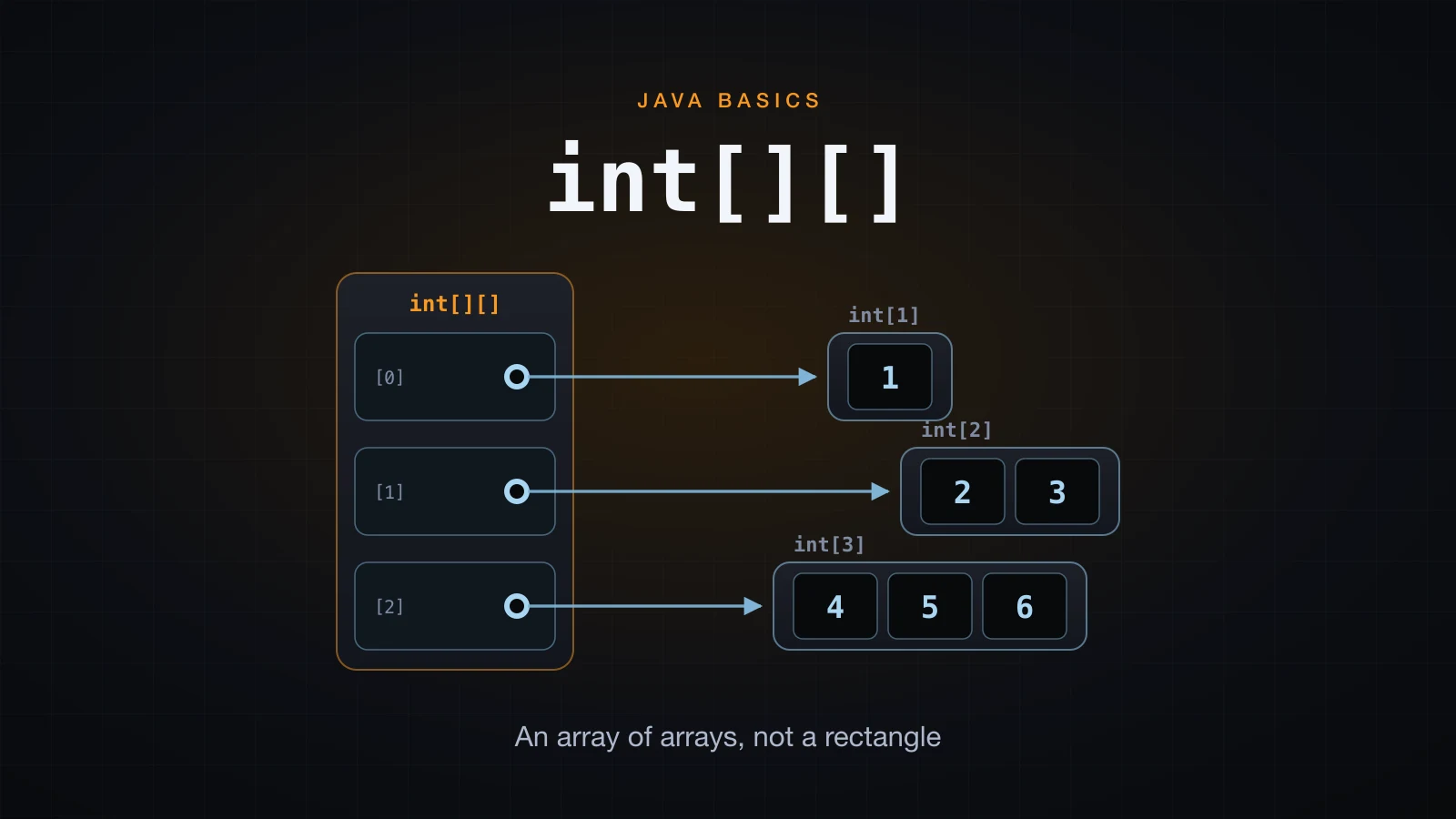
Java has no true two-dimensional array. What int[][] declares is an array whose elements are themselves references to int[] objects — an array of arrays. Every surprising thing about 2D arrays in Java follows from that one fact.
That is why rows can have different lengths, why there is no reliable "column count", why Arrays.toString prints garbage on a grid, and why copying a 2D array the obvious way does not actually copy the data. Learn the structure once and each of those stops being a surprise.
The examples use Java 21.
Java has no true two-dimensional array
In C, int a[3][4] reserves one contiguous block of twelve int slots and computes an address from the two indices. Java does something different: new int[3][4] allocates four objects — one outer array of three references, plus three separate int[4] row objects on the heap.
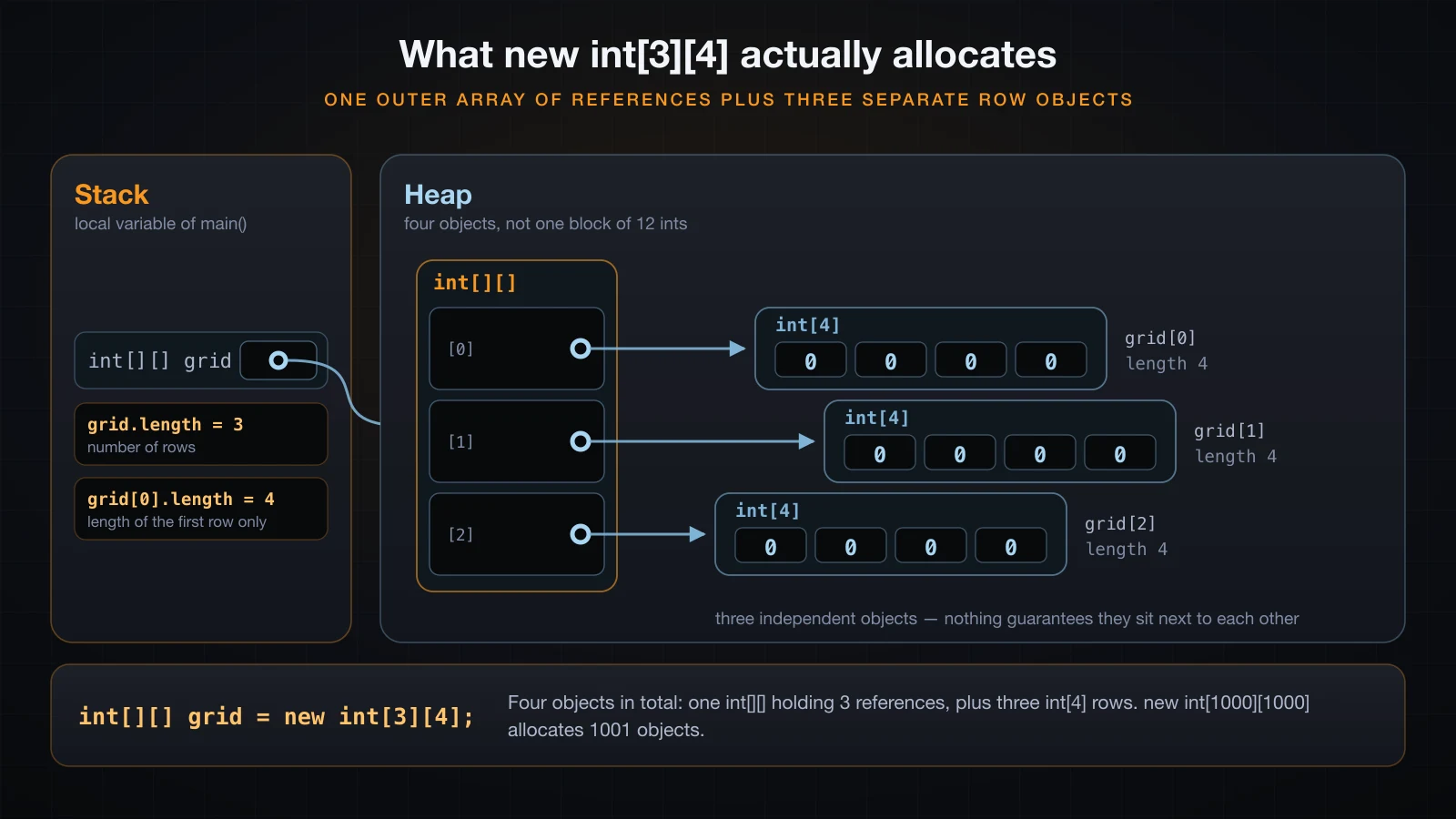
The type names give it away. Print the runtime class of the grid and of one row:
int[][] grid = new int[3][4];
System.out.println(grid.getClass().getName());
System.out.println(grid[0].getClass().getName());[[I
[I[I is "array of int". [[I is "array of array of int". The outer object does not contain any int at all — it contains references. The previous article showed that an array variable holds a reference to a heap object rather than the elements themselves; a 2D array simply applies that rule twice, and everything below is a consequence.
The rows really are independent objects, which you can prove by comparing them with ==:
int[] row = new int[3];
int[][] shared = {row, row, row};
shared[0][0] = 5;
System.out.println("shared = " + java.util.Arrays.deepToString(shared));
System.out.println("shared[0] == shared[1] ? " + (shared[0] == shared[1]));

int[][] proper = new int[3][3];
proper[0][0] = 5;
System.out.println("proper = " + java.util.Arrays.deepToString(proper));
System.out.println("proper[0] == proper[1] ? " + (proper[0] == proper[1]));shared = [[5, 0, 0], [5, 0, 0], [5, 0, 0]]
shared[0] == shared[1] ? true
proper = [[5, 0, 0], [0, 0, 0], [0, 0, 0]]
proper[0] == proper[1] ? falseThe first grid has one row object referenced three times, so a single write appears in all three "rows". new int[3][3] gives three distinct objects, which is why the same write lands once. Nothing here is special-cased for 2D arrays — it is the ordinary reference model.
Declaring and creating a 2D array in Java
There are three ways to get a 2D array, and they allocate different things.
| Form | What it allocates |
|---|---|
new int[3][4] | the outer array and all 3 rows, every element 0 |
{{1, 2}, {3, 4}} | the outer array and one row per nested brace group |
new int[3][] | the outer array only — all 3 row references are null |
The declaration itself carries no sizes. int[][] grid; is a valid declaration; int[3][4] grid; is a parse error, because the brackets in a declaration say "this is an array type", not "this is how big it is":
int[3][4] grid;DeclDim.java:3: error: ']' expected
int[3][4] grid;
^
DeclDim.java:3: error: not a statement
int[3][4] grid;
^
DeclDim.java:3: error: not a statement
int[3][4] grid;
^
3 errorsYou may also leave trailing dimensions out of new, but never a leading one: the sizes you supply have to be a prefix of the dimension list, so new int[3][] is legal while new int[][4] does not even parse:
int[][] grid = new int[][4];MissingDim.java:3: error: ']' expected
int[][] grid = new int[][4];
^
1 errorThe nested initializer only works at the point of declaration, and the number of rows and their contents come from the braces:
int[][] table = {{1, 2}, {3, 4}, {5, 6}};
System.out.println(java.util.Arrays.deepToString(table));[[1, 2], [3, 4], [5, 6]]Both int[][] grid and int grid[][] compile. Use the first; the second is legacy C-style syntax that no modern Java codebase uses.
grid.length is rows, grid[0].length is one row
This is the single most common point of confusion, and it is worth being precise about. grid.length is the length of the outer array, which is the number of rows. grid[0].length is the length of the object stored in slot 0 — the first row, and nothing more.
int[][] grid = new int[3][4];
System.out.println("grid.length    = " + grid.length);
System.out.println("grid[0].length = " + grid[0].length);
System.out.println("grid[2].length = " + grid[2].length);grid.length = 3
grid[0].length = 4
grid[2].length = 4On a grid built by new int[3][4] the rows happen to be equal, so grid[0].length looks like a column count. It is not one. Java stores no such number anywhere, and nothing stops you from replacing a row with one of a different length after the fact:
int[][] grid = new int[3][4];
System.out.println("before : " + Arrays.deepToString(grid));
grid[1] = new int[] {1, 2, 3, 4, 5, 6, 7};
System.out.println("after  : " + Arrays.deepToString(grid));
System.out.println("grid[0].length = " + grid[0].length + ", grid[1].length = " + grid[1].length);before : [[0, 0, 0, 0], [0, 0, 0, 0], [0, 0, 0, 0]]
after : [[0, 0, 0, 0], [1, 2, 3, 4, 5, 6, 7], [0, 0, 0, 0]]
grid[0].length = 4, grid[1].length = 7A row is just a reference slot. Assigning a different int[] into it is an ordinary reference assignment, and the "rectangle" was never enforced by anything. So the rule to internalise is: there is one row count and N row lengths, never a column count.
Jagged arrays: rows of different lengths
An array whose rows have different lengths is called a jagged array. It is not a special feature — it is what you get when you stop making the rows the same size.
![Rows of length 1, 2 and 3 on one outer array, beside a new int[3][] whose rows are still null](/images/blog/java-jagged-array.en.webp)
The explicit way is new int[3][], which allocates the outer array and leaves each row reference null, then assigning each row separately:
import java.util.Arrays;

public class Jagged {
    public static void main(String[] args) {
        int[][] tri = new int[3][];
        tri[0] = new int[1];
        tri[1] = new int[2];
        tri[2] = new int[3];

        int n = 1;
        for (int i = 0; i < tri.length; i++) {
            for (int j = 0; j < tri[i].length; j++) {
                tri[i][j] = n++;
            }
        }

        System.out.println("tri          = " + Arrays.deepToString(tri));
        System.out.println("tri.length   = " + tri.length);
        for (int i = 0; i < tri.length; i++) {
            System.out.println("tri[" + i + "].length = " + tri[i].length);
        }

        int[][] literal = {{1}, {2, 3}, {4, 5, 6}};
        System.out.println("literal      = " + Arrays.deepToString(literal));
    }
}tri = [[1], [2, 3], [4, 5, 6]]
tri.length = 3
tri[0].length = 1
tri[1].length = 2
tri[2].length = 3
literal = [[1], [2, 3], [4, 5, 6]]The nested initializer produces exactly the same shape with no new at all — the brace groups do not have to be the same size.
new int[3][] leaves the rows null
The step people skip is the assignment. new int[3][] gives you three reference slots, and a reference slot with nothing in it is null:
int[][] rows = new int[3][];
System.out.println("rows    = " + Arrays.deepToString(rows));
System.out.println("rows[0] = " + rows[0]);rows = [null, null, null]
rows[0] = nullUsing such a row before assigning it throws, and Java 21 says exactly what went wrong:
public class JaggedNpe {
    public static void main(String[] args) {
        int[][] rows = new int[3][];
        rows[0][0] = 1;
    }
}Exception in thread "main" java.lang.NullPointerException: Cannot store to int array because "rows[0]" is null
at JaggedNpe.main(JaggedNpe.java:4)Reading the length of a missing row gives a different, equally specific message:
Exception in thread "main" java.lang.NullPointerException: Cannot read the array length because "rows[0]" is null
	at JaggedNpe2.main(JaggedNpe2.java:4)
⚠️ The message names
rows[0]only when the class file carries local-variable names. Compiled with a plainjavac, the same program printsbecause "<local1>[0]" is null;javac -grestores the name. IDEs and build tools pass-gby default, so you normally see the readable form.
Note the asymmetry with a rectangular allocation: new int[3][4] fills the rows in for you, so there is no null anywhere. new int[3][] deliberately does not, because it has no idea how long you want each row to be.
Traversing a 2D array
Two loops, outer over rows and inner over the elements of the current row. Row-major order — the whole of row 0, then the whole of row 1, and so on.
![Nested loop visiting order numbered across the cells, with grid[i].length as the inner bound](/images/blog/java-2d-traversal-order.en.webp)
public class Traverse {
    public static void main(String[] args) {
        int[][] grid = {{1, 2, 3}, {4, 5}, {6, 7, 8, 9}};

        System.out.println("-- indexed --");
        for (int i = 0; i < grid.length; i++) {
            for (int j = 0; j < grid[i].length; j++) {
                System.out.print(grid[i][j] + " ");
            }
            System.out.println();
        }

        System.out.println("-- for-each --");
        for (int[] row : grid) {
            for (int v : row) {
                System.out.print(v + " ");
            }
            System.out.println();
        }
    }
}-- indexed --
1 2 3
4 5
6 7 8 9
-- for-each --
1 2 3
4 5
6 7 8 9 Both forms produce the same order. The indexed form gives you i and j, which you need whenever the position matters — transposing, writing into a second array, printing coordinates. The for-each form is shorter and cannot go out of bounds, so prefer it whenever you only need the values. Note the type of the outer loop variable: int[] row, not int, because the elements of a 2D array are arrays.
The load-bearing detail in the indexed version is the inner bound. It is grid[i].length, the length of the row currently being visited — not grid[0].length. On the jagged grid above, the wrong bound compiles fine and dies at the second row:
for (int i = 0; i < grid.length; i++) {
    for (int j = 0; j < grid[0].length; j++) {   // wrong
        System.out.print(grid[i][j] + " ");
    }
}1 2 3 4 5 Exception in thread "main" java.lang.ArrayIndexOutOfBoundsException: Index 2 out of bounds for length 2
at BadBound.main(BadBound.java:6)It printed the whole first row and the first two elements of row 1, then asked for grid[1][2] on a row of length 2. Writing grid[i].length from the start costs nothing on a rectangular grid and is the only version that survives a jagged one, so make it the habit rather than the fix.
Printing a 2D array: Arrays.deepToString
Arrays.toString calls String.valueOf on each element. On a 2D array each element is an int[] object, so what you get is the default Object.toString of each row — type descriptor, @, identity hash:
import java.util.Arrays;

public class PrintGrid {
    public static void main(String[] args) {
        int[][] grid = {{1, 2}, {3, 4}};
        System.out.println("println      : " + grid);
        System.out.println("toString     : " + Arrays.toString(grid));
        System.out.println("deepToString : " + Arrays.deepToString(grid));
    }
}println : [[I@2a139a55
toString : [[I@14ae5a5, [I@7f31245a]
deepToString : [[1, 2], [3, 4]]Arrays.deepToString recurses into every nested array and is the answer for anything more than one dimension. It works on any depth and on reference element types too:
int[][][] cube = {{{1, 2}, {3, 4}}, {{5, 6}, {7, 8}}};
System.out.println(Arrays.deepToString(cube));

String[][] names = {{"Hoang", "Lan"}, {"Minh"}};
System.out.println(Arrays.deepToString(names));[[[1, 2], [3, 4]], [[5, 6], [7, 8]]]
[[Hoang, Lan], [Minh]]The hex digits after @ are an identity hash and differ on every run, which is another reason not to put them in front of a user. If you are debugging a grid, Arrays.deepToString is the one-line fix.
Arrays.equals vs Arrays.deepEquals
The same split applies to comparison. Arrays.equals compares elements with equals, and for rows that means Object.equals — reference identity. Two structurally identical grids are therefore not equal by that method:
int[][] a = {{1, 2}, {3, 4}};
int[][] b = {{1, 2}, {3, 4}};

System.out.println("a == b                 : " + (a == b));
System.out.println("a.equals(b)            : " + a.equals(b));
System.out.println("Arrays.equals(a, b)    : " + Arrays.equals(a, b));
System.out.println("Arrays.deepEquals(a, b): " + Arrays.deepEquals(a, b));a == b : false
a.equals(b) : false
Arrays.equals(a, b) : false
Arrays.deepEquals(a, b): trueArrays.equals returned false because it compared a[0] with b[0] as objects, and those are two different int[] objects with the same contents. Arrays.deepEquals recurses and compares the numbers. The same pairing exists for hashing:
System.out.println("hashCode     : " + (Arrays.hashCode(a) == Arrays.hashCode(b)));
System.out.println("deepHashCode : " + (Arrays.deepHashCode(a) == Arrays.deepHashCode(b)));hashCode : false
deepHashCode : true| Depth | Compare | Hash | |
|---|---|---|---|
| 1D array | Arrays.toString | Arrays.equals | Arrays.hashCode |
| 2D or deeper | Arrays.deepToString | Arrays.deepEquals | Arrays.deepHashCode |
Copying a 2D array: shallow vs deep
Arrays.copyOf copies the elements of the array you hand it. On a 2D array those elements are row references, so the copy gets a fresh outer array pointing at the very same rows. Writing through the copy is visible in the original:
import java.util.Arrays;

public class CopyGrid {
    public static void main(String[] args) {
        int[][] original = {{1, 2}, {3, 4}};

        int[][] shallow = Arrays.copyOf(original, original.length);
        shallow[0][0] = 99;

        System.out.println("original : " + Arrays.deepToString(original));
        System.out.println("shallow  : " + Arrays.deepToString(shallow));
        System.out.println("same outer array? " + (original == shallow));
        System.out.println("same row 0?       " + (original[0] == shallow[0]));
    }
}original : [[99, 2], [3, 4]]
shallow : [[99, 2], [3, 4]]
same outer array? false
same row 0? trueRead the last two lines together: the outer arrays are genuinely different objects, and row 0 is one object shared by both. That is exactly what "shallow" means. original.clone() and System.arraycopy behave identically, so none of the one-liners give you an independent grid.
A deep copy has to allocate a new row for every row:
int[][] source = {{1, 2}, {3, 4}};
int[][] deep = new int[source.length][];
for (int i = 0; i < source.length; i++) {
    deep[i] = Arrays.copyOf(source[i], source[i].length);
}
deep[0][0] = 99;

System.out.println("source : " + Arrays.deepToString(source));
System.out.println("deep   : " + Arrays.deepToString(deep));
System.out.println("same row 0? " + (source[0] == deep[0]));source : [[1, 2], [3, 4]]
deep : [[99, 2], [3, 4]]
same row 0? falseNote that the destination is declared new int[source.length][] — outer array only, because each row is about to be replaced by a copy anyway. Allocating new int[rows][cols] first would work too, but it would create rows that are immediately thrown away, and it would silently break on a jagged source. Copying source[i].length per row is what makes the loop shape-preserving.
Three dimensions and beyond
The rule applies recursively. int[][][] is an array of int[][], each of which is an array of int[]:
int[][][] cube = new int[2][3][4];
cube[1][2][3] = 42;

System.out.println("cube.length       = " + cube.length);
System.out.println("cube[0].length    = " + cube[0].length);
System.out.println("cube[0][0].length = " + cube[0][0].length);
System.out.println("cube[0] type      = " + cube[0].getClass().getName());
System.out.println("cube[0][0] type   = " + cube[0][0].getClass().getName());
System.out.println("cube[1][2][3]     = " + cube[1][2][3]);

int[][][] partial = new int[2][3][];
System.out.println("partial[0][0] = " + partial[0][0]);cube.length = 2
cube[0].length = 3
cube[0][0].length = 4
cube[0] type = [[I
cube[0][0] type = [I
cube[1][2][3] = 42
partial[0][0] = nullEvery rule from the 2D case transfers unchanged: trailing dimensions can be omitted and leave null behind, sub-arrays at any level may have different lengths, and Arrays.deepToString still prints the whole thing.
Three dimensions do have honest uses — a stack of images, a grid over time, a small voxel volume. Past that, index soup sets in: stock[warehouse][product][month][variant] compiles, but nobody reading it knows which index is which, and nothing stops you swapping two of them. A class with named fields, or a Map keyed by a small record, carries the meaning that a fourth pair of brackets throws away.
A worked example: a small matrix
Fill a 3x4 matrix, print it aligned, sum each row, and transpose it into a new array. Everything here is the plain nested loop; the point is the shape handling, not the algorithm.
public class Matrix {
    public static void main(String[] args) {
        int[][] m = new int[3][4];

        for (int i = 0; i < m.length; i++) {
            for (int j = 0; j < m[i].length; j++) {
                m[i][j] = (i + 1) * (j + 1) * 7;
            }
        }

        System.out.println("matrix " + m.length + "x" + m[0].length);
        print(m);

        System.out.println("row sums");
        for (int i = 0; i < m.length; i++) {
            int sum = 0;
            for (int j = 0; j < m[i].length; j++) {
                sum += m[i][j];
            }
            System.out.printf("  row %d -> %d%n", i, sum);
        }

        int[][] t = transpose(m);
        System.out.println("transposed " + t.length + "x" + t[0].length);
        print(t);
    }

    static int[][] transpose(int[][] src) {
        int[][] out = new int[src[0].length][src.length];
        for (int i = 0; i < src.length; i++) {
            for (int j = 0; j < src[i].length; j++) {
                out[j][i] = src[i][j];
            }
        }
        return out;
    }

    static void print(int[][] m) {
        for (int[] row : m) {
            for (int v : row) {
                System.out.printf("%5d", v);
            }
            System.out.println();
        }
    }
}matrix 3x4
7 14 21 28
14 28 42 56
21 42 63 84
row sums
row 0 -> 70
row 1 -> 140
row 2 -> 210
transposed 4x3
7 14 21
14 28 42
21 42 63
28 56 84Three details worth naming. printf("%5d", v) right-aligns every number in a five-character field, which is what makes the columns line up — plain string concatenation cannot, because the width of a number varies with its value. The transpose allocates new int[src[0].length][src.length], dimensions deliberately swapped, and writes out[j][i] = src[i][j]. And transpose reads src[0].length as the new row count, which means it assumes a rectangular input: on a jagged array it would either lose elements or throw. Assumptions like that are fine as long as they are deliberate.
Memory shape: Java rows are not one contiguous block
In C, a int[3][4] is twelve int values laid out end to end, and a[i][j] is one address computation. In Java the twelve values live in three separate heap objects, each with its own header and its own length field, reached through the outer array of references.
Nothing in the specification says those three row objects are next to each other in memory. They are allocated as three independent objects, and a moving garbage collector may relocate each of them independently over the life of the program, so their relative positions are not stable either.
The practical consequence is one line long: within a row the elements are contiguous and scan well, but crossing from one row to the next is an extra indirection through the outer array to an address that may be anywhere on the heap. Code that walks a large grid element by element in row-major order therefore has weaker cache locality than the equivalent C array, and code that walks it column-major is worse again. When that actually matters, the standard fix is a single flat int[rows * cols] indexed as data[i * cols + j], which restores the contiguous layout at the cost of doing the index arithmetic yourself. For the ordinary grid in ordinary code, it does not matter and the readable form wins.
The second consequence is allocation count. new int[1000][1000] creates 1001 objects — one outer array of references and one thousand rows — not a single million-element block. Every one of those rows carries the per-object overhead that any Java object carries.
Common mistakes with 2D arrays in Java
Assuming the shape is rectangular. Nothing enforces it. A method that takes an int[][] can be handed a jagged array, or one with a null row, by any caller. If your algorithm needs a rectangle, check for it at the top of the method rather than discovering it through an exception three loops in.
Using grid[0].length as the bound for every row. It works right up until it does not, and the failure is an ArrayIndexOutOfBoundsException in the middle of processing rather than a compile error. Use grid[i].length.
Swapping the row and column indices. grid[i][j] and grid[j][i] both compile and both look plausible, so the compiler cannot help. On a square grid you get quiet wrong answers; on a non-square one you usually get a bounds error whose numbers do not match the loop you were reading:
int[][] m = new int[2][5];
System.out.println(m[4][1]);Exception in thread "main" java.lang.ArrayIndexOutOfBoundsException: Index 4 out of bounds for length 2
at SwapIndex.main(SwapIndex.java:4)"Index 4 out of bounds for length 2" is the outer array complaining. The number 5 appears nowhere in the message, because the second index was never reached. Read the length in that message as the row count and the mistake becomes obvious.
new int[3][] followed by immediate use. The rows are null until you assign them. This is the one that produces a NullPointerException from code that contains no visible null.
Assigning the wrong type into a row. A row slot holds an int[], not an int, and the compiler says so plainly:
int[][] grid = new int[2][];
grid[0] = 5;RowType.java:4: error: incompatible types: int cannot be converted to int[]
grid[0] = 5;
^
1 errorReading grid[0].length on a grid with no rows. A zero-row array is legal, and grid[0] on it throws before .length is ever evaluated. Check grid.length > 0 first when the row count is not under your control.
FAQ
Does Java support two-dimensional arrays?
Not in the C sense of one contiguous rectangular block. Java supports arrays of arrays, and int[][] is the syntax for one. For rectangular data it behaves the way you expect a 2D array to behave, but the underlying structure is an outer array of references to independent row objects, and that shows up whenever you copy, compare, print, or give the rows different lengths.
How do I get the number of columns in a Java 2D array?
There is no column count. grid[0].length gives the length of the first row, which is the closest thing available and is correct only when every row happens to be the same length. Inside a loop always use grid[i].length, the length of the row you are currently visiting, and check grid.length > 0 before touching grid[0] at all.
Why does printing a 2D array show something like [[I@2a139a55?
Because arrays do not override toString, so you get the default Object.toString: the JVM type descriptor, @, and an identity hash in hex. [[I means "array of array of int". Use Arrays.deepToString(grid) to print the values; Arrays.toString(grid) is not enough, because it only unwraps one level and prints each row as [I@....
Can rows in a Java 2D array have different lengths?
Yes, and that is called a jagged array. Create the outer array alone with new int[3][] and assign each row separately, or write a nested initializer with different-sized brace groups such as {{1}, {2, 3}, {4, 5, 6}}. Even a grid created as new int[3][4] can have one of its rows replaced by an array of a different length, because a row slot is just a reference.
How do I copy a 2D array in Java properly?
Loop and copy each row. Arrays.copyOf, clone() and System.arraycopy all copy the row references, so the copy shares its rows with the original and writes through one are visible through the other. The deep version is int[][] deep = new int[src.length][]; followed by deep[i] = Arrays.copyOf(src[i], src[i].length); for every i, which also preserves a jagged shape.
Is a 2D array in Java stored in contiguous memory?
No. Each row is a separate heap object with its own header and length, and nothing guarantees that two rows are adjacent — a moving garbage collector may relocate them independently. Elements within one row are contiguous, so a row scans well, but crossing rows is an indirection through the outer array. If a benchmark shows that mattering, flatten to a single int[rows * cols] and index it as data[i * cols + j].
Conclusion
One fact carries this whole article: int[][] is an array of references to int[] objects, not a rectangle. From it follow the row count that is not a column count, the rows that may differ in length, the null rows left by new int[3][], the shallow copy that shares its rows, and the reason Arrays.toString prints addresses while Arrays.deepToString prints values.
The habits worth keeping are short. Bound the inner loop with grid[i].length. Print and compare with the deep variants. Copy row by row when you need independence. Reach for a class instead of a fourth dimension.
Next in this series: basic array algorithms — finding the maximum and minimum, searching for a value, and sorting an array.
![[Java Basics] Fields, Methods and Constructors in Java](/images/blog/constructors-thumbnail.en.webp)
![[Java Basics] The this, static and final Keywords in Java](/images/blog/this-static-final-thumbnail.en.webp)
![[Java Basics] Nested Loops, break and continue in Java](/images/blog/nested-loops-thumbnail.en.webp)
![[Java Basics] Read and Write Text Files in Java](/images/blog/file-io-thumbnail.en.webp)