Almost every array algorithm you will write is the same shape: one loop over the indices, and one or two variables carrying state between iterations. Finding the largest value, summing, counting, searching and sorting are all that pattern with different state.
The bugs are not in the loop. They are in the initial value of the state, in the arithmetic that overflows, and in the assumption a library method quietly makes about your data. This article walks the standard algorithms and demonstrates each of those failures with the program's output.
The examples use Java 21. Cost is measured as the number of comparisons and swaps, counted by loops that carry a counter, rather than as elapsed time: a counter gives the same number on every machine and a stopwatch does not.
Finding the max and min in an array
The running-max pattern keeps one variable, compares it against each element, and replaces it when the element is bigger. Minimum is the same loop with the comparison flipped.
public class MaxMin {
    public static void main(String[] args) {
        int[] temps = {17, 23, 12, 29, 8, 31, 21};

        int max = temps[0];
        int min = temps[0];
        for (int i = 1; i < temps.length; i++) {
            if (temps[i] > max) max = temps[i];
            if (temps[i] < min) min = temps[i];
        }
        System.out.println("max = " + max);
        System.out.println("min = " + min);
    }
}max = 31
min = 8Two details make this correct. The state is seeded from temps[0], and the loop therefore starts at i = 1 — element 0 has already been consumed. Print the state at each step and the shape is obvious:
init   max=17 best=0
i=1 a[i]=23  UPDATE  max=23 best=1
i=2 a[i]=12  keep    max=23 best=1
i=3 a[i]=29  UPDATE  max=29 best=3
i=4 a[i]=8  keep    max=29 best=3
i=5 a[i]=31  UPDATE  max=31 best=5
i=6 a[i]=21  keep    max=31 best=5
max 31 at index 5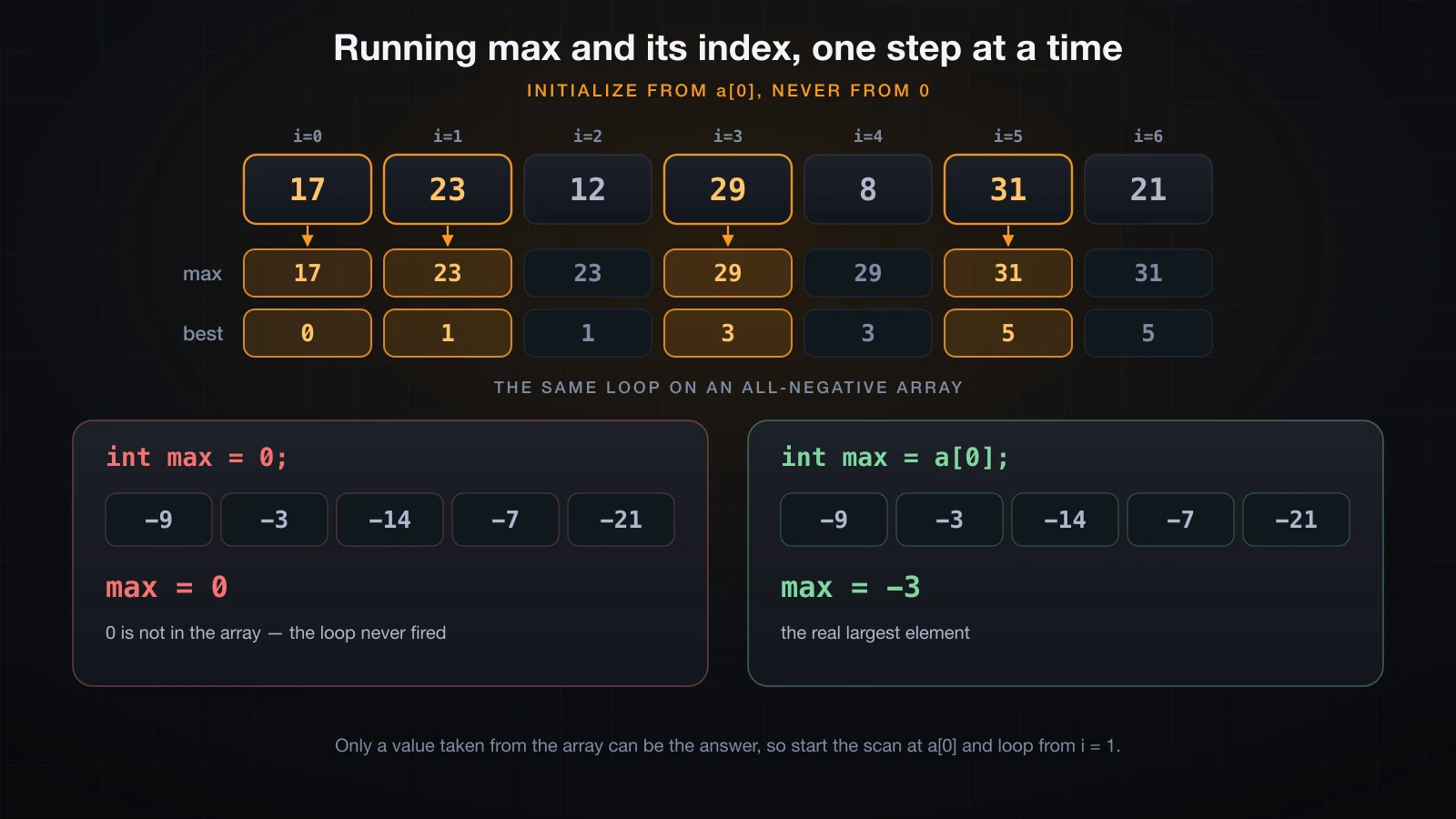
Only three of the six comparisons change anything. That is the normal case: the state is updated rarely and read constantly.
Why initializing max to 0 is a bug
Seeding the state with a literal instead of with array data works right up until every element is below that literal. With int max = 0, the body of the if never runs, and the method returns a number that is not in the array at all.
public class ZeroInit {
    static int maxFromZero(int[] a) {
        int max = 0;
        for (int i = 0; i < a.length; i++) {
            if (a[i] > max) max = a[i];
        }
        return max;
    }

    static int maxFromFirst(int[] a) {
        int max = a[0];
        for (int i = 1; i < a.length; i++) {
            if (a[i] > max) max = a[i];
        }
        return max;
    }

    public static void main(String[] args) {
        int[] losses = {-9, -3, -14, -7, -21};
        System.out.println("max init 0     = " + maxFromZero(losses));
        System.out.println("max init a[0]  = " + maxFromFirst(losses));

        int[] mixed = {4, 9, 2};
        System.out.println("mixed, init 0  = " + maxFromZero(mixed));
        System.out.println("mixed, init a[0] = " + maxFromFirst(mixed));
    }
}max init 0 = 0
max init a[0] = -3
mixed, init 0 = 9
mixed, init a[0] = 9The zero-seeded version is right on the array with positive values and wrong on the all-negative one, which is exactly why this survives testing. Temperatures below freezing, account balances, deltas, altitudes relative to sea level — the moment real data goes negative, the answer becomes 0.
Integer.MIN_VALUE as a seed is a different flavour of the same mistake. It gives the right answer for a non-empty array, but it also returns -2147483648 for an empty one, which is again a value that is not in the array. The only seed that cannot lie is an element of the array itself.
That leaves the empty array to handle explicitly, because a[0] does not exist:
Exception in thread "main" java.lang.ArrayIndexOutOfBoundsException: Index 0 out of bounds for length 0
	at EmptyMax.main(EmptyMax.java:4)
"The maximum of nothing" has no answer, so the method has to say so — by throwing, by returning -1 for an index, or by refusing to accept an empty array.
Returning the index of the max, not just the value
Production code almost never wants the value on its own. It wants to know which element won, so it can look up the matching row, name or timestamp. Track the index and the value comes for free as a[best].
public class MaxIndex {
    static int indexOfMax(int[] a) {
        if (a == null || a.length == 0) return -1;
        int best = 0;
        for (int i = 1; i < a.length; i++) {
            if (a[i] > a[best]) best = i;
        }
        return best;
    }

    public static void main(String[] args) {
        String[] days = {"Mon", "Tue", "Wed", "Thu", "Fri", "Sat", "Sun"};
        int[] temps = {17, 23, 12, 29, 8, 31, 21};

        int at = indexOfMax(temps);
        System.out.println("index  = " + at);
        System.out.println("hottest: " + days[at] + " at " + temps[at]);

        System.out.println("empty  -> " + indexOfMax(new int[0]));

        int[] ties = {7, 9, 9, 3};
        System.out.println("first of two 9s -> index " + indexOfMax(ties));
    }
}index = 5
hottest: Sat at 31
empty -> -1
first of two 9s -> index 1The comparison is > and not >=, so on a tie the earliest index wins. That is a decision, not an accident: swapping to >= makes the last index win instead. Pick one deliberately and write it down, because "which of the two equal maxima did you mean" is a real bug report.
Sum and average: two traps in four lines
int overflow when you add an array up
Summing is the running-state pattern with + instead of a comparison, and it has a failure mode the comparison does not: the accumulator can run out of bits. Four file sizes, none of them close to the int limit, add up to more than an int can hold.
public class SumOverflow {
    public static void main(String[] args) {
        int[] fileSizes = {900_000_000, 800_000_000, 700_000_000, 600_000_000};

        int badSum = 0;
        for (int i = 0; i < fileSizes.length; i++) badSum += fileSizes[i];

        long goodSum = 0;
        for (int i = 0; i < fileSizes.length; i++) goodSum += fileSizes[i];

        System.out.println("int  sum = " + badSum);
        System.out.println("long sum = " + goodSum);
        System.out.println("Integer.MAX_VALUE = " + Integer.MAX_VALUE);
    }
}int sum = -1294967296
long sum = 3000000000
Integer.MAX_VALUE = 2147483647No exception, no warning: int arithmetic wraps around silently, so the total of four positive numbers comes out negative. Declaring the accumulator as long fixes it, because each int element is widened to long before it is added and the addition itself is done in 64 bits.
⚠️
long sum = 0;is the fix.long sum = intSumComputedAlready;is not — widening a value that has already wrapped just stores the wrong answer in a bigger box.
Accumulate in long by default when you are summing an array. The extra four bytes cost nothing on a single variable, and Long.MAX_VALUE is over four billion times larger than Integer.MAX_VALUE.
Integer division truncates the average
The second trap is one line further down. / between two int values is integer division: it discards the fractional part rather than rounding, and it does so before the result is ever assigned to a double.
public class Average {
    public static void main(String[] args) {
        int[] scores = {7, 8, 8, 9, 10};

        int n = scores.length;
        long sum = 0;
        for (int i = 0; i < n; i++) sum += scores[i];

        double wrong = sum / n;
        double right = (double) sum / n;

        System.out.println("sum = " + sum + ", n = " + n);
        System.out.println("sum / n            = " + wrong);
        System.out.println("(double) sum / n   = " + right);
        System.out.printf("rounded to 2dp     = %.2f%n", right);
    }
}sum = 42, n = 5
sum / n = 8.0
(double) sum / n = 8.4
rounded to 2dp = 8.40sum / n is 42 / 5, computed entirely in integer arithmetic as 8, and then widened to 8.0. Declaring the variable double changes nothing, because the division has already happened. The cast has to be on the operand: (double) sum / n promotes the whole expression to floating point and gives 8.4.
An empty array needs a decision here too, and the two spellings fail differently:
(double) sum / n = NaN
Exception in thread "main" java.lang.ArithmeticException: / by zero
	at EmptyAvg.main(EmptyAvg.java:6)
Floating-point division by zero produces NaN; integer division by zero throws. Check n > 0 before you divide.
Counting and filtering: count first, then fill
A Java array has a fixed length, so "keep the elements matching a condition" cannot grow a result as it goes. The standard idiom runs the condition twice: once to count, once to copy.
import java.util.Arrays;

public class Filter {
    public static void main(String[] args) {
        int[] scores = {45, 82, 67, 91, 38, 74, 55, 88};
        int pass = 60;

        int count = 0;
        for (int i = 0; i < scores.length; i++) {
            if (scores[i] >= pass) count++;
        }

        int[] passed = new int[count];
        int k = 0;
        for (int i = 0; i < scores.length; i++) {
            if (scores[i] >= pass) passed[k++] = scores[i];
        }

        System.out.println("count  = " + count);
        System.out.println("passed = " + Arrays.toString(passed));
        System.out.println("length = " + passed.length);
    }
}count = 5
passed = [82, 67, 91, 74, 88]
length = 5The result array has exactly the right length, so nothing downstream has to know how many slots are real. That matters because an oversized int[] is not empty at the end — it is full of zeros, which are indistinguishable from data:
int[] buffer = new int[scores.length];
int k = 0;
for (int i = 0; i < scores.length; i++) {
    if (scores[i] >= 60) buffer[k++] = scores[i];
}
int[] passed = Arrays.copyOf(buffer, k);buffer = [82, 67, 91, 74, 88, 0, 0, 0]
passed = [82, 67, 91, 74, 88]The one-pass variant is the better trade when the condition is expensive: fill an oversized buffer, then trim it to k. k is doing double duty in both versions — it is the write cursor while the loop runs and the final count when it stops.
The separate counter k is essential. Writing passed[i] instead of passed[k++] leaves holes wherever the condition was false, and blows up as soon as the result is smaller than the input.
Reversing an array in place
Reversing needs two indices walking toward each other, swapping as they go, and stopping when they meet.
static void reverse(int[] a) {
    int i = 0, j = a.length - 1;
    while (i < j) {
        int tmp = a[i];
        a[i] = a[j];
        a[j] = tmp;
        i++;
        j--;
    }
}start [1, 2, 3, 4, 5]
swap 0 <-> 4 [5, 2, 3, 4, 1]
swap 1 <-> 3 [5, 4, 3, 2, 1]
stop: i=2 j=2Five elements need two swaps, not five. The middle element of an odd-length array is already where it belongs, and i < j stops the loop the moment the two indices meet.
The obvious-looking alternative is a plain for loop over every index, and it does not work:
static void reverseWrong(int[] a) {
    int n = a.length;
    for (int i = 0; i < n; i++) {
        int tmp = a[i];
        a[i] = a[n - 1 - i];
        a[n - 1 - i] = tmp;
    }
}start [1, 2, 3, 4, 5]
two indices [5, 4, 3, 2, 1]
full loop [1, 2, 3, 4, 5]
full loop, even n [1, 2, 3, 4, 5, 6]The full loop swaps every pair twice. When i reaches the second half, n - 1 - i points back into the first half, and the pair that was already swapped gets swapped back. The array is returned to its original order, for both odd and even lengths — a bug that is easy to stare past, because the code looks symmetric and the output looks like nothing happened.
The loop bound is what fixes it: for (int i = 0; i < n / 2; i++) visits each pair once, and is exactly equivalent to the two-index version.
Linear search: return the index or -1
Linear search walks the array and stops at the first match. It works on any array, in any order.
public class LinearSearch {
    static long probes;

    static int indexOf(int[] a, int target) {
        for (int i = 0; i < a.length; i++) {
            probes++;
            if (a[i] == target) return i;
        }
        return -1;
    }

    public static void main(String[] args) {
        int[] ids = {104, 217, 355, 402, 519, 663, 771};

        probes = 0;
        System.out.println("find 402 -> index " + indexOf(ids, 402) + ", probes " + probes);
        probes = 0;
        System.out.println("find 104 -> index " + indexOf(ids, 104) + ", probes " + probes);
        probes = 0;
        System.out.println("find 500 -> index " + indexOf(ids, 500) + ", probes " + probes);
    }
}find 402 -> index 3, probes 4
find 104 -> index 0, probes 1
find 500 -> index -1, probes 7The probes counter is the instrumentation used throughout this article: one probe is one array element read and compared against the target.
The counts say everything about the cost. A hit at index i costs i + 1 probes, so the best case is 1 and the worst case is n. Averaged over all seven elements of this array the total is 28 probes, exactly 4.0 per search — the familiar (n + 1) / 2. A miss always costs the full n, because the loop can only conclude "not present" after looking at everything.
Returning -1 for "not found" is the Java convention, and it is not arbitrary: every valid index is 0 or greater, so -1 cannot collide with a real answer. String.indexOf, List.indexOf and Arrays.binarySearch all use a negative return for the same reason. Test the result with if (at >= 0) rather than if (at != -1) — that habit keeps working with Arrays.binarySearch, whose miss value is not always -1.
Binary search on a sorted array
Binary search throws away half of the remaining range on every probe. The price is a precondition: the array must already be sorted.
static int binarySearch(int[] a, int target) {
    int low = 0;
    int high = a.length - 1;
    while (low <= high) {
        int mid = low + (high - low) / 2;
        probes++;
        if (a[mid] == target) return mid;
        if (a[mid] < target) low = mid + 1;
        else high = mid - 1;
    }
    return -1;
}
Three things carry the loop. low <= high — not < — because a range of one element is still a range worth checking, and dropping the = misses any target that ends up alone. mid + 1 and mid - 1 — not mid — because a[mid] has just been ruled out, and leaving it in the range makes the loop spin forever. And low only ever grows while high only ever shrinks, which is what guarantees termination.
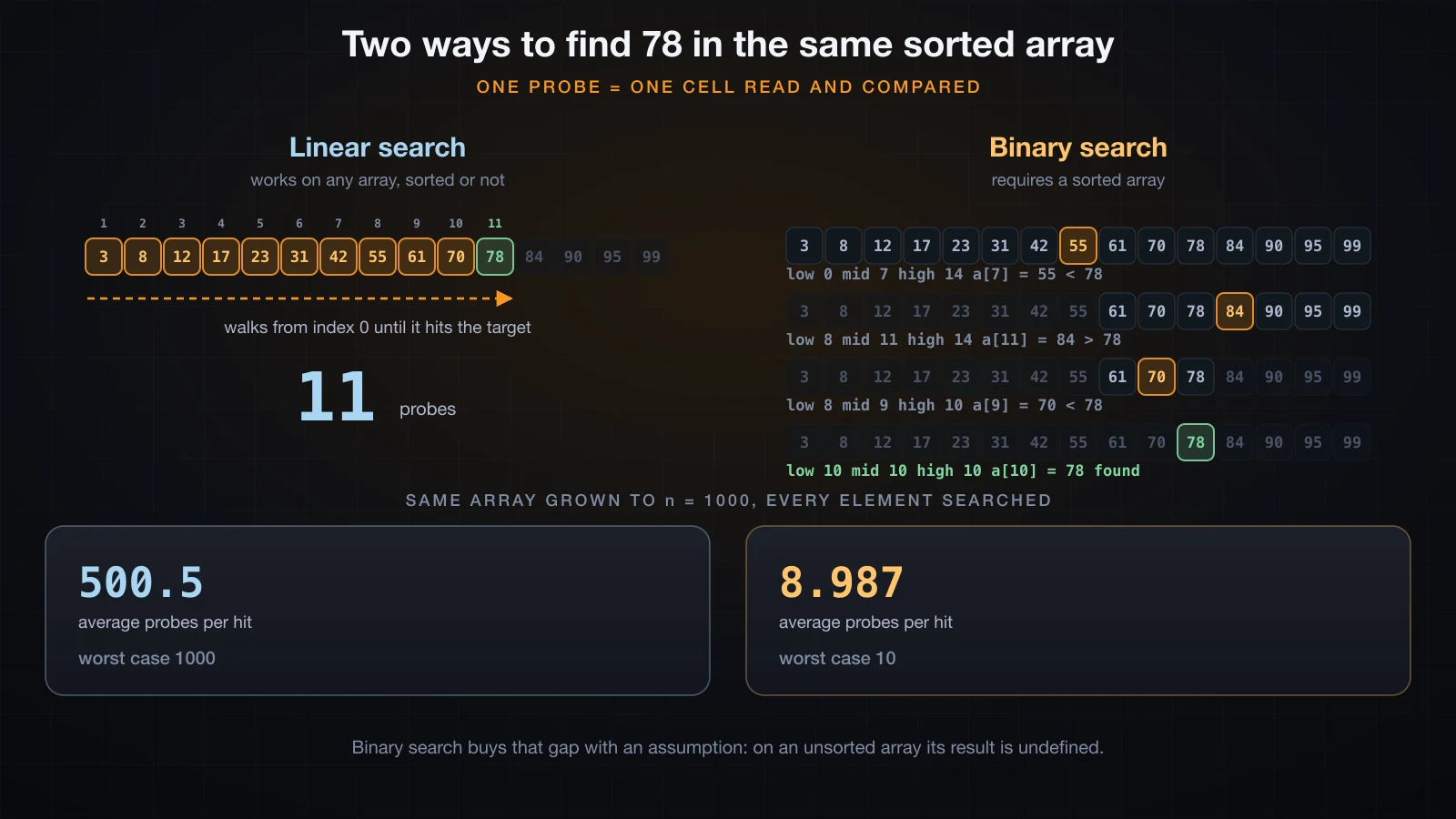
On the 15-element array in the picture, searching for 78 costs linear search 11 probes and binary search 4:
binary:
  step 1: low=0 mid=7 high=14  a[mid]=55
  step 2: low=8 mid=11 high=14  a[mid]=84
  step 3: low=8 mid=9 high=10  a[mid]=70
  step 4: low=10 mid=10 high=10  a[mid]=78
binary -> index 10, probes 4
The gap widens fast. Instrumenting both algorithms on the same sorted array of 1000 elements and searching for every element in turn:
binary  find 1234 -> index 617, probes 10
linear  find 1234 -> index 617, probes 618

all 1000 hits   linear total 500500, avg 500.5, worst 1000
all 1000 hits   binary total 8987, avg 8.987, worst 10

miss 1235   linear 1000, binary 10
About fifty-six times fewer probes on average, and exactly a hundred times fewer in the worst case. Note also that a miss costs binary search the same 10 probes as a hit, while it costs linear search the full 1000 — the asymmetry that makes linear search painful on data you mostly do not find.
The overflow-safe midpoint
int mid = (low + high) / 2; is the version in most textbooks, and it is wrong on large arrays. The addition is done in int arithmetic, so when low + high exceeds Integer.MAX_VALUE it wraps to a negative number and the division produces a negative index.
int low = 1_500_000_000;
int high = 2_000_000_000;

System.out.println("(low + high) / 2       = " + ((low + high) / 2));
System.out.println("low + (high - low) / 2 = " + (low + (high - low) / 2));
System.out.println("low + high             = " + (low + high));
System.out.println("Integer.MAX_VALUE = " + Integer.MAX_VALUE);(low + high) / 2 = -397483648
low + (high - low) / 2 = 1750000000
low + high = -794967296
Integer.MAX_VALUE = 2147483647This is the same silent wrap-around covered earlier in this series under integer overflow: adding 1 to Integer.MAX_VALUE gives Integer.MIN_VALUE, and Java neither throws nor promotes to a wider type. Here the wrapped sum is -794967296, and half of that is a negative midpoint, which becomes an ArrayIndexOutOfBoundsException the moment it is used as an index.
low + (high - low) / 2 computes the same midpoint without ever forming the large sum. high - low is at most the array length, so it cannot overflow, and adding half of it back to low cannot exceed high. This exact bug sat undiscovered in the JDK's own Arrays.binarySearch for nine years, until Joshua Bloch wrote it up in 2006. The fix used an unsigned shift instead of a division, and it is still there in JDK 21: int mid = (low + high) >>> 1;. That works because >>> shifts the wrapped sign bit back down into a positive value, and it is equivalent to / 2 for every non-negative sum.
An int[] needs more than a billion elements before this triggers, so you may never hit it. Write the safe form anyway — it is the same number of characters.
What Arrays.binarySearch returns on a miss
The JDK ships binary search for every primitive array type, so you do not have to write one. Its behaviour on a hit is unsurprising; its behaviour on a miss is the part worth learning.
import java.util.Arrays;

public class ArraysBinary {
    public static void main(String[] args) {
        int[] a = {3, 8, 12, 17, 23, 31, 42, 55, 61, 70, 78, 84, 90, 95, 99};

        System.out.println("find 78 -> " + Arrays.binarySearch(a, 78));

        int r = Arrays.binarySearch(a, 79);
        System.out.println("find 79 -> " + r);
        System.out.println("insertion point = " + (-r - 1));
        System.out.println("would sit before a[" + (-r - 1) + "] = " + a[-r - 1]);

        System.out.println("find 1   -> " + Arrays.binarySearch(a, 1)
                + "  insertion point " + (-Arrays.binarySearch(a, 1) - 1));
        System.out.println("find 200 -> " + Arrays.binarySearch(a, 200)
                + " insertion point " + (-Arrays.binarySearch(a, 200) - 1));
    }
}find 78 -> 10
find 79 -> -12
insertion point = 11
would sit before a[11] = 84
find 1 -> -1 insertion point 0
find 200 -> -16 insertion point 15A miss returns -(insertion point) - 1, where the insertion point is the index the value would occupy if you inserted it and kept the array sorted. Recover it with -r - 1. For 79 that is 11, which is where 79 belongs: after 78 at index 10 and before 84 at index 11.
The - 1 in the formula exists to make every miss negative. Without it, a value that belongs at the front would give an insertion point of 0, which is a perfectly valid index and would be indistinguishable from a hit at index 0. Note the consequence in the output above: Arrays.binarySearch(a, 1) returns -1, and that means "not found, insert at 0" rather than the hand-rolled convention of "not found, no more to say". Always test with r >= 0.
That negative return is genuinely useful. It is how you implement "find the nearest value", "insert while keeping sorted order" or "which bucket does this fall into" without a second scan.
Binary search on an unsorted array is undefined
The javadoc says the result is undefined if the array is not sorted, and "undefined" here does not mean "an exception". It means a confidently wrong answer.
import java.util.Arrays;

public class UnsortedBinary {
    public static void main(String[] args) {
        int[] a = {42, 8, 99, 17, 3, 61, 23};

        System.out.println("array       = " + Arrays.toString(a));
        System.out.println("contains 99 at index 2");
        System.out.println("binarySearch(a, 99) = " + Arrays.binarySearch(a, 99));
        System.out.println("binarySearch(a, 8)  = " + Arrays.binarySearch(a, 8));
        System.out.println("binarySearch(a, 17) = " + Arrays.binarySearch(a, 17));
        System.out.println("binarySearch(a, 3)  = " + Arrays.binarySearch(a, 3));
    }
}array = [42, 8, 99, 17, 3, 61, 23]
contains 99 at index 2
binarySearch(a, 99) = -8
binarySearch(a, 8) = 1
binarySearch(a, 17) = 3
binarySearch(a, 3) = -199 is sitting at index 2 and the method reports -8: not present, insert at the end. Meanwhile 8 and 17 are found correctly, purely by luck of where the probes landed. Nothing failed loudly. That mixture of right and wrong answers is the worst possible failure mode, because it survives a casual test.
Sort first, then search. Both operations are one line:
int[] ids = {771, 104, 519, 217, 663, 355, 402};
Arrays.sort(ids);
System.out.println("sorted " + Arrays.toString(ids));
int r = Arrays.binarySearch(ids, 519);
System.out.println("519 -> " + r + ", found = " + (r >= 0));
int m = Arrays.binarySearch(ids, 500);
System.out.println("500 -> " + m + ", found = " + (m >= 0));sorted [104, 217, 355, 402, 519, 663, 771]
519 -> 4, found = true
500 -> -5, found = falseSorting costs more than a single linear search, so the trade only pays when you search the same array many times. One lookup: scan it. Thousands of lookups: sort once, then binary search.
Bubble sort and the early exit
Bubble sort compares each adjacent pair and swaps them if they are out of order. After one full pass the largest element has been carried to the end, so each subsequent pass can stop one position earlier.
import java.util.Arrays;

public class BubbleSort {
    static void bubbleSort(int[] a) {
        int n = a.length;
        for (int pass = 0; pass < n - 1; pass++) {
            boolean swapped = false;
            for (int i = 0; i < n - 1 - pass; i++) {
                if (a[i] > a[i + 1]) {
                    int t = a[i];
                    a[i] = a[i + 1];
                    a[i + 1] = t;
                    swapped = true;
                }
            }
            if (!swapped) break;
        }
    }

    public static void main(String[] args) {
        int[] a = {5, 1, 4, 2, 8};
        bubbleSort(a);
        System.out.println(Arrays.toString(a));
    }
}[1, 2, 4, 5, 8]Traced swap by swap on that five-element array:
start           [5, 1, 4, 2, 8]
  pass 1 swap (0,1) -> [1, 5, 4, 2, 8]
  pass 1 swap (1,2) -> [1, 4, 5, 2, 8]
  pass 1 swap (2,3) -> [1, 4, 2, 5, 8]
after pass 1   [1, 4, 2, 5, 8]   swapped=true
  pass 2 swap (1,2) -> [1, 2, 4, 5, 8]
after pass 2   [1, 2, 4, 5, 8]   swapped=true
after pass 3   [1, 2, 4, 5, 8]   swapped=false
no swaps in pass 3 -> already sorted, stop
sorted          [1, 2, 4, 5, 8]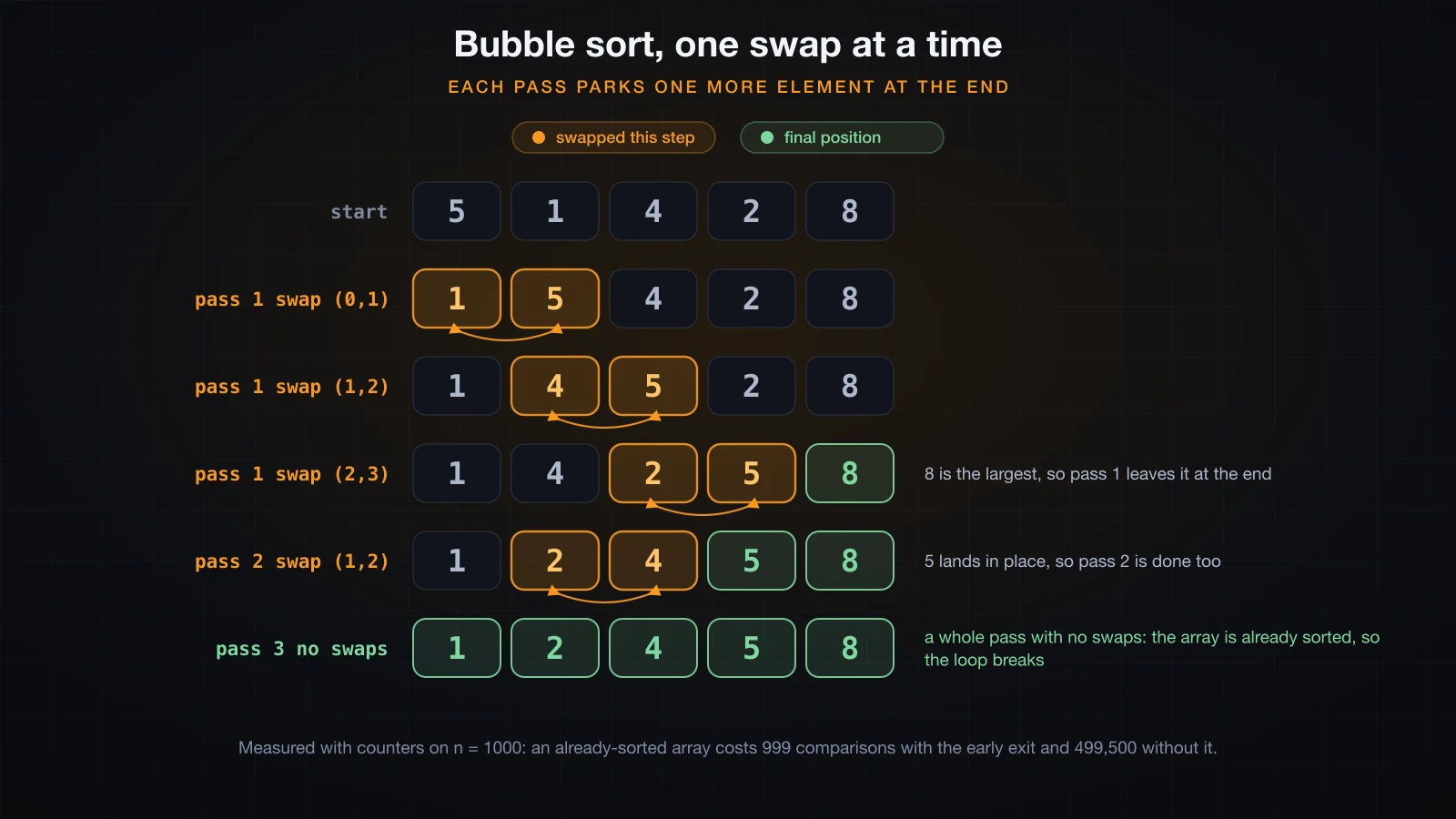
The swapped flag is the early exit. A pass that swaps nothing proves no adjacent pair is out of order, which for a linear order means the whole array is sorted, so the remaining passes are guaranteed to be wasted work. Pass 3 above is that pass.
With counters on both versions, n = 1000, four different input shapes:
| Input | Comparisons with early exit | Comparisons without | Swaps |
|---|---|---|---|
| already sorted | 999 | 499,500 | 0 |
| reverse sorted | 499,500 | 499,500 | 499,500 |
| random shuffle | 497,730 | 499,500 | 249,861 |
| nearly sorted | 381,159 | 499,500 | 4,782 |
The early exit turns an already-sorted array from 499,500 comparisons into 999 — a single confirming pass. On random data it saves almost nothing, because a random array needs nearly every pass anyway. That is the honest summary: the flag costs one boolean and pays off on data that is already close to sorted.
499,500 is not a coincidence. It is n(n-1)/2 with n = 1000, the total number of adjacent-pair comparisons over all n - 1 passes, and it is where the O(n²) label comes from. Ten times the input means a hundred times the comparisons.
Selection sort and insertion sort
The other two textbook sorts are the same complexity class with very different constant behaviour.
Selection sort: fewer swaps, the same comparisons
Selection sort scans the unsorted remainder for the smallest element and swaps it into position — one swap per pass, at most n - 1 in total.
static void selectionSort(int[] a) {
    for (int i = 0; i < a.length - 1; i++) {
        int min = i;
        for (int j = i + 1; j < a.length; j++) {
            if (a[j] < a[min]) min = j;
        }
        if (min != i) {
            int t = a[i]; a[i] = a[min]; a[min] = t;
        }
    }
}selection sort, start [5, 1, 4, 2, 8]
swap a[0] <-> a[1] -> [1, 5, 4, 2, 8]
swap a[1] <-> a[3] -> [1, 2, 4, 5, 8]
sorted [1, 2, 4, 5, 8]Two swaps sort those five elements, against bubble sort's four. But the comparison count never moves: selection sort always performs exactly n(n-1)/2 comparisons, because the inner scan cannot stop early — it has to see every remaining element to know which is smallest. On all four n = 1000 inputs the measured count was 499,500, identical every time, while the swaps ranged from 0 to 991.
That profile makes selection sort interesting in exactly one situation: when moving an element is far more expensive than comparing two, and you want to bound the number of moves.
Insertion sort: fast on nearly-sorted data
Insertion sort takes each element and slides it left past everything larger, like sorting a hand of cards.
static void insertionSort(int[] a) {
    for (int i = 1; i < a.length; i++) {
        int key = a[i];
        int j = i - 1;
        while (j >= 0 && a[j] > key) {
            a[j + 1] = a[j];
            j--;
        }
        a[j + 1] = key;
    }
}insertion sort, start [5, 1, 4, 2, 8]
key 1 placed -> [1, 5, 4, 2, 8]
key 4 placed -> [1, 4, 5, 2, 8]
key 2 placed -> [1, 2, 4, 5, 8]
key 8 placed -> [1, 2, 4, 5, 8]
sorted [1, 2, 4, 5, 8]The while condition is the whole story: a[j] > key stops as soon as the element to the left is already smaller. On data that is close to sorted, that is almost immediately.
Measured on the same four inputs at n = 1000, with "moves" counting each element shifted one position right:
| Algorithm | Sorted | Reversed | Random | Nearly sorted |
|---|---|---|---|---|
| Bubble, comparisons | 999 | 499,500 | 497,730 | 381,159 |
| Selection, comparisons | 499,500 | 499,500 | 499,500 | 499,500 |
| Insertion, comparisons | 999 | 499,500 | 250,858 | 5,781 |
| Bubble, swaps | 0 | 499,500 | 249,861 | 4,782 |
| Selection, swaps | 0 | 500 | 991 | 10 |
| Insertion, moves | 0 | 499,500 | 249,861 | 4,782 |
The nearly-sorted column is the point: a sorted array of 1000 with ten random pairs swapped costs insertion sort 5,781 comparisons against selection sort's 499,500 — about eighty-six times fewer. Insertion sort is O(n²) in the worst case and O(n) in the best, and real data is very often nearly sorted.
Two rows in that table are identical, and not by accident. Bubble sort's swap count and insertion sort's move count are both exactly the number of inversions — pairs of elements that are in the wrong relative order. Both algorithms only ever move an element past one that should follow it, so both must do exactly that much work: 249,861 on the random input, 4,782 on the nearly-sorted one.
Arrays.sort: what you should actually use
Nothing above is what you ship. java.util.Arrays.sort is one line, it is far better tested than anything you will write, and it is not O(n²).
int[] a = {5, 1, 4, 2, 8};
Arrays.sort(a);
System.out.println(Arrays.toString(a));[1, 2, 4, 5, 8]It sorts in place, ascending, and returns void — a common mistake is writing int[] b = Arrays.sort(a);, which does not compile.
SortVoid.java:5: error: incompatible types: void cannot be converted to int[]
        int[] b = Arrays.sort(a);
                             ^
1 error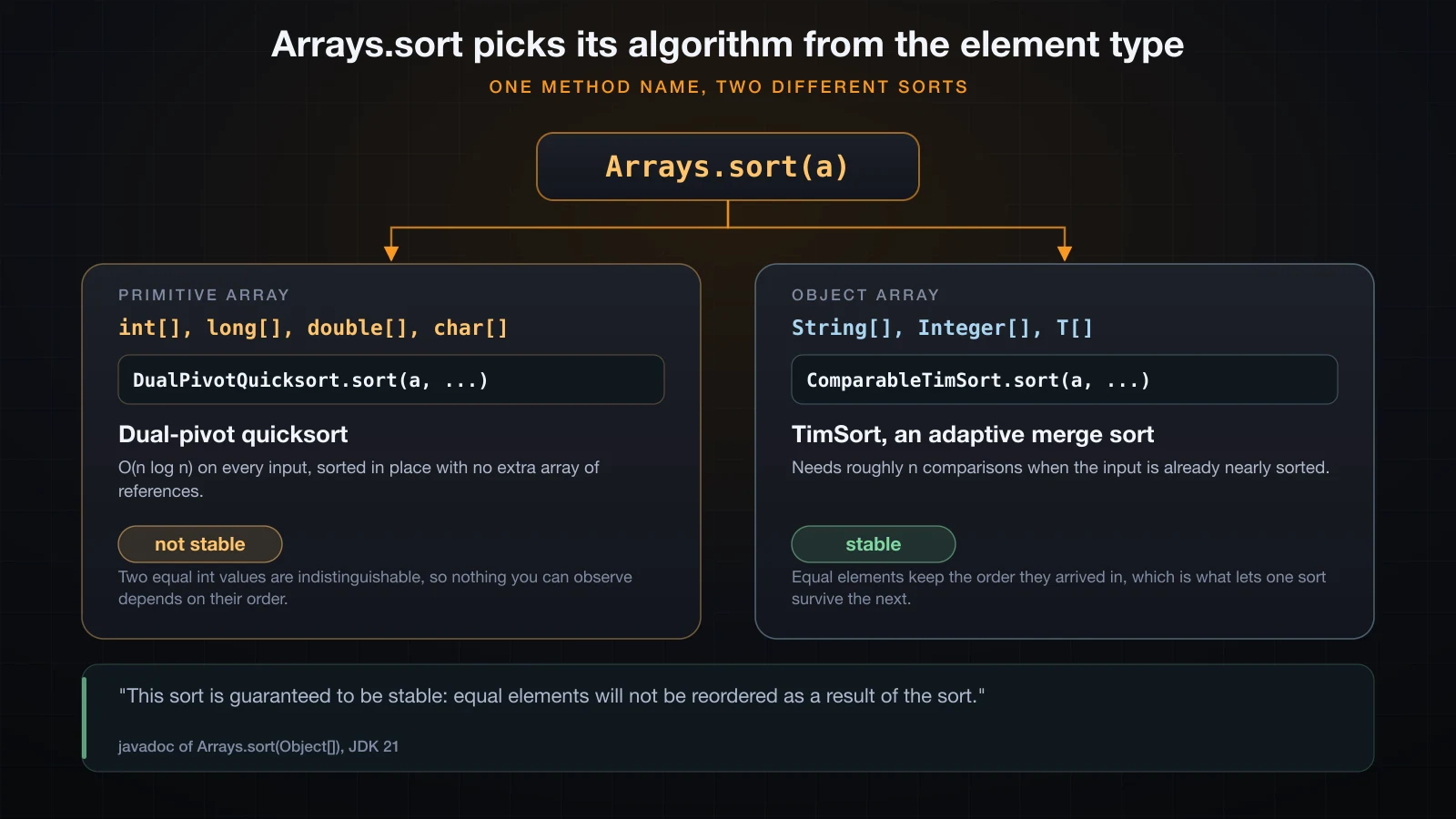
Which algorithm runs depends on the element type, and the JDK 21 source is explicit about both. The primitive overloads call DualPivotQuicksort.sort, and their javadoc says: "The sorting algorithm is a Dual-Pivot Quicksort by Vladimir Yaroslavskiy, Jon Bentley, and Joshua Bloch." The Object[] overload calls ComparableTimSort.sort, and its javadoc says: "This sort is guaranteed to be stable: equal elements will not be reordered as a result of the sort."
Stable means equal elements keep the relative order they were already in. Sorting primitives is not stable, and sorting objects is. That sounds like a trap, and it is not — the reason is worth being precise about.
For an int[], two equal elements are literally the same value. There is no property of 5 that distinguishes it from another 5, so no program can observe whether they were reordered. Instability there is unobservable by construction.
For objects it is observable, because two elements can compare equal on the key being sorted while differing in everything else. That is exactly what stability buys you: sort by one key, then by another, and the first ordering survives inside each group of ties. The Integer cache from earlier in this series makes the effect visible without writing a class of your own — Integer.valueOf(1000) returns a distinct object every call, so two equal Integers can still be told apart with ==:
import java.util.Arrays;

public class Stability {
    public static void main(String[] args) {
        Integer first  = Integer.valueOf(1000);
        Integer second = Integer.valueOf(1000);
        System.out.println("two distinct objects, equal value: first == second -> " + (first == second));

        Integer[] boxed = { second, first, Integer.valueOf(7) };
        System.out.println("before: boxed[0] == second -> " + (boxed[0] == second));
        Arrays.sort(boxed);
        System.out.println("after : " + Arrays.toString(boxed));
        System.out.println("after : boxed[1] == second -> " + (boxed[1] == second));
        System.out.println("after : boxed[2] == first  -> " + (boxed[2] == first));
    }
}two distinct objects, equal value: first == second -> false
before: boxed[0] == second -> true
after : [7, 1000, 1000]
after : boxed[1] == second -> true
after : boxed[2] == first -> truesecond started ahead of first and is still ahead of it afterwards. Two elements that compare equal were not reordered — that is stability, observed. Sorting objects by a key you choose, rather than by their natural order, needs Comparable and Comparator, which belong to the advanced course.
The measured payoff is the reason to use the library at all. Counting the comparisons Arrays.sort actually performs on n = 1000, using the same four inputs and the same seeds as the table above:
| Input | Insertion sort | Arrays.sort (TimSort) |
|---|---|---|
| already sorted | 999 | 999 |
| reverse sorted | 499,500 | 999 |
| random shuffle | 250,858 | 8,688 |
| nearly sorted | 5,781 | 2,084 |
About twenty-nine times fewer comparisons on random data, and exactly five hundred times fewer on a reversed array — TimSort spots the descending run and reverses it in one pass instead of shuffling 499,500 pairs. Those counts were obtained by making the sort compare through a counter; the mechanism for that is Comparable, which a later course covers.
Sorting a range, and sorting a copy
Arrays.sort(a, from, to) sorts a slice. from is inclusive and to is exclusive, the same convention as everywhere else in the JDK.
int[] b = {9, 7, 5, 3, 1, 8, 6};
Arrays.sort(b, 1, 4);
System.out.println(Arrays.toString(b));[9, 3, 5, 7, 1, 8, 6]Indices 1, 2 and 3 — the values 7, 5, 3 — became 3, 5, 7. Index 0 and indices 4 onward were not touched.
Because Arrays.sort mutates its argument, sorting destroys the original order. When you need both, sort a copy:
int[] original = {5, 1, 4, 2, 8};
int[] copy = Arrays.copyOf(original, original.length);
Arrays.sort(copy);
System.out.println("original    " + Arrays.toString(original));
System.out.println("sorted copy " + Arrays.toString(copy));original [5, 1, 4, 2, 8]
sorted copy [1, 2, 4, 5, 8]This matters more than it looks. If the array came in as a method parameter, sorting it in place changes the caller's array, because the parameter holds a reference to the same object.
Complexity at a glance
Big-O describes how the cost grows with n, and the counters above are what that growth looks like at n = 1000.
| Operation | Complexity | Measured at n = 1000 |
|---|---|---|
| Scan for max, min or sum | O(n) | 999 comparisons |
| Linear search, average hit | O(n) | 500.5 probes |
| Linear search, miss | O(n) | 1000 probes |
| Binary search, average hit | O(log n) | 8.987 probes |
| Binary search, worst case | O(log n) | 10 probes |
| Bubble / selection / insertion, random | O(n²) | 250,858 to 499,500 comparisons |
Arrays.sort, random | O(n log n) | 8,688 comparisons |
Read the middle two rows together. log₂(1000) is about 9.97, and binary search measured 8.987 probes on average with a worst case of 10 — the theory and the counter agree. Read the last two rows together and the difference between O(n²) and O(n log n) stops being abstract: 250,858 against 8,688 on identical data.
The other lesson is that constants matter inside a complexity class. Bubble, selection and insertion sort are all O(n²), and on nearly-sorted data insertion sort did 5,781 comparisons while selection sort did 499,500.
Common mistakes with array algorithms
Binary search on an unsorted array. Demonstrated above: Arrays.binarySearch reported -8 for a value sitting at index 2. No exception, just a wrong answer mixed in with right ones.
Initializing max to 0 or min to 0. Works on the test data, fails on the first all-negative array. Seed from a[0] and handle the empty case separately.
Overflow in the midpoint and in the sum. (low + high) / 2 wraps negative on huge arrays; an int accumulator wraps negative on large values. Write low + (high - low) / 2 and long sum = 0.
Modifying an array while iterating over its indices. Deleting an element by shifting the tail left moves the next element into the slot you just finished with, and the loop's i++ steps straight over it:
int[] a = {4, 0, 0, 7, 3};
int n = a.length;

for (int i = 0; i < n; i++) {
    if (a[i] == 0) {
        for (int j = i; j < n - 1; j++) a[j] = a[j + 1];
        n--;
    }
}
System.out.println("result " + Arrays.toString(Arrays.copyOf(a, n)));removed at 1 -> [4, 0, 7, 3, 3] n=4
result [4, 0, 7, 3]Two zeros went in and one came out. After the shift, index 1 holds the second 0, but i has already moved to 2. Compaction with two indices has no such problem, because the read cursor and the write cursor are separate variables:
int[] a = {4, 0, 0, 7, 3};
int k = 0;
for (int i = 0; i < a.length; i++) {
    if (a[i] != 0) a[k++] = a[i];
}
System.out.println("result " + Arrays.toString(Arrays.copyOf(a, k)));result [4, 7, 3]Reversing with a loop over every index. It swaps each pair twice and hands back the original array. Stop at n / 2.
Writing your own sort in production code. Arrays.sort measured 8,688 comparisons where insertion sort measured 250,858, and it has been tested far more than your version has.
FAQ
How do I find the largest value in a Java array?
Seed a variable from a[0], loop from index 1, and replace the variable whenever an element is larger. Never seed it with 0 — on an all-negative array the if never fires and you get 0, a value that is not in the array. Handle the empty array explicitly, since a[0] does not exist there, and consider returning the index instead of the value: a[best] gives you the value back, while the value alone cannot tell you which element won.
Why does my average come out as a whole number?
Because / between two int values is integer division and truncates before any conversion happens. sum / n with sum = 42 and n = 5 is 8, and assigning that to a double only stores 8.0. Cast an operand instead: (double) sum / n gives 8.4. Accumulate the sum in a long while you are at it, so the total cannot silently overflow.
Why does Arrays.binarySearch return a negative number?
A negative return means the value is not present, and the number encodes where it would go: the return value is -(insertion point) - 1, so -r - 1 recovers the insertion point. The - 1 exists so that a value belonging at the front produces -1 rather than 0, which would be indistinguishable from a hit at index 0. Test for presence with r >= 0, never with r != -1.
Which sorting algorithm should I use in Java?
Arrays.sort. It is dual-pivot quicksort for primitive arrays and TimSort for object arrays, both O(n log n), and on a random array of 1000 elements it performed 8,688 comparisons against insertion sort's 250,858. Write bubble, selection or insertion sort to understand what sorting costs, then use the library.
Is bubble sort ever the right choice?
Not in production. Its only genuine strength is that a version with the early-exit flag detects an already-sorted array in one pass — 999 comparisons at n = 1000 — but insertion sort does the same thing and is dramatically better on everything else: 250,858 comparisons against bubble sort's 497,730 on random data, with identical move counts. Bubble sort survives because it is easy to explain, not because it is good.
How do I sort an array without changing the original?
Copy it first, then sort the copy: int[] copy = Arrays.copyOf(original, original.length); Arrays.sort(copy);. Arrays.sort mutates the array it is given and returns void, so there is no non-destructive overload. This matters most when the array arrived as a method parameter — sorting it in place reorders the caller's data, which is rarely what the caller expected.
Conclusion
The algorithms in this article share one skeleton: a loop over indices carrying a little state. What separates working code from code that fails on real data is everything around the loop — seeding the state from the array rather than from a literal, accumulating in a type wide enough to hold the answer, casting before dividing rather than after, and knowing that binary search's speed is bought with a precondition it will not check for you.
The measurements are the other half. Counters, not stopwatches: 500.5 probes against 8.987 for the two searches, 250,858 comparisons against 8,688 for the two sorts. Those numbers are the same on any machine, and they are what O(n), O(log n), O(n²) and O(n log n) actually mean in practice. Write the simple sorts once to see where the numbers come from, then call Arrays.sort.
Next in this series: String, StringBuilder and StringBuffer — why concatenating in a loop is slow, what StringBuilder does differently, where StringBuffer still fits, and how to choose between the three.
![[Java Basics] Variable Scope in Java: Local, Field and Static](/images/blog/variable-scope-thumbnail.en.webp)
![[Java Basics] Conditional Statements in Java: if, else if, else and switch](/images/blog/conditional-statements-in-java-thumbnail.en.webp)
![[Java Basics] Inheritance in Java: extends and super](/images/blog/inheritance-thumbnail.en.webp)
![[Java Basics] Classes and Objects in Java: The Foundation of OOP](/images/blog/classes-and-objects-thumbnail.en.webp)