The short answer fits in one line: use String for text that never changes, StringBuilder for text you assemble piece by piece, and StringBuffer almost never. That is correct nearly all of the time, but the popular justification for it — "+ is slow, always use StringBuilder" — is wrong in the case beginners meet most often, and knowing where the line falls is the difference between a rule you follow and a rule you understand.
So this article earns the answer. It disassembles a concatenation to show what javac actually emits, counts the objects and characters each approach copies, watches StringBuilder's internal array grow and get replaced, and races two threads at one shared buffer to see exactly what synchronized buys and what it costs. The examples use Java 21.
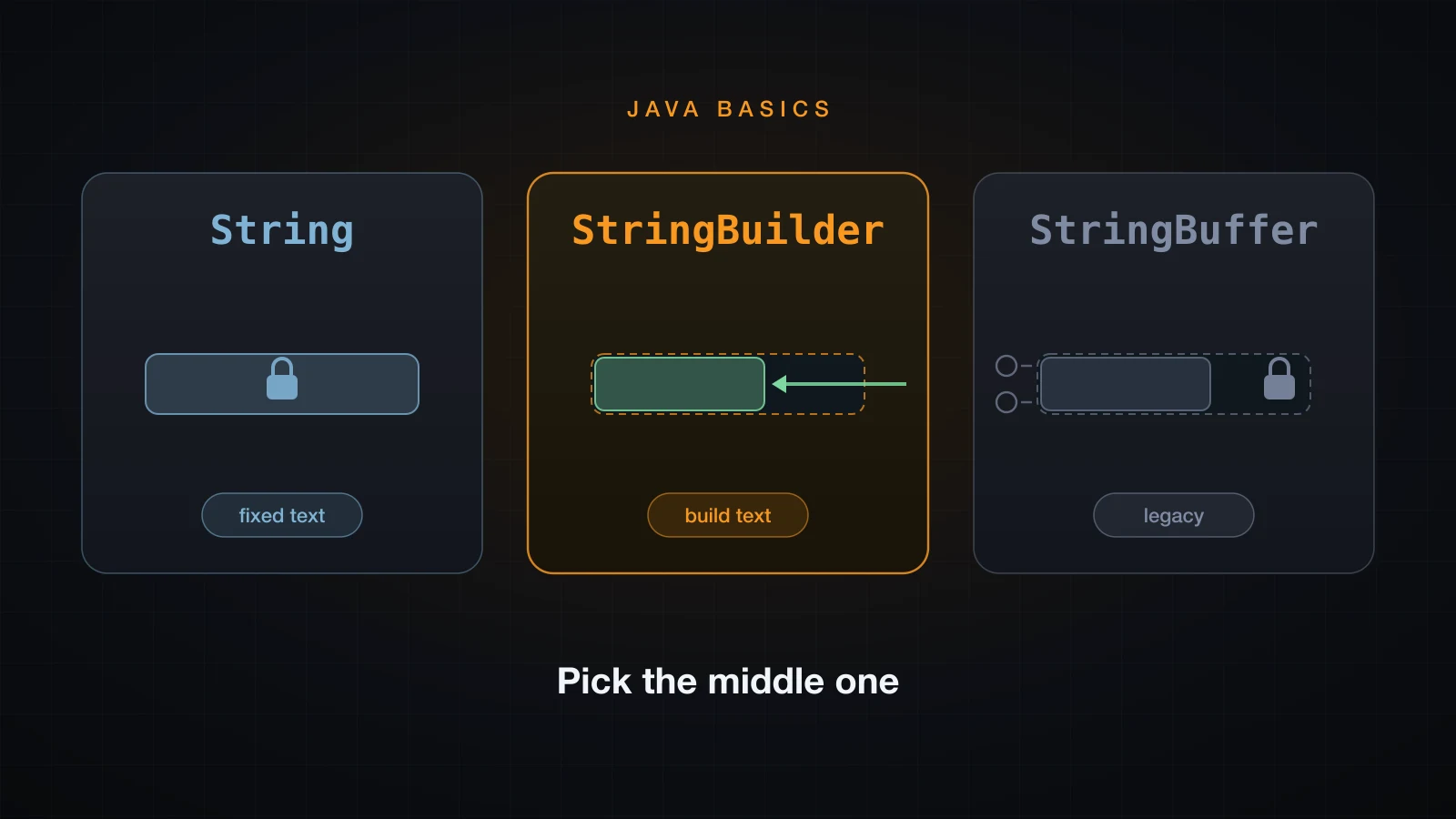
Start with the rule, then take it apart.
The rule in one line
| Text you have | Use |
|---|---|
| Fixed once created — a constant, a map key, a parsed value | String |
| Assembled from several pieces in one expression | + on that one line |
| Assembled piece by piece — a loop, a branch, a growing report | StringBuilder |
| Assembled by several threads into one shared buffer | StringBuffer, and rethink the design |
Three sentences of recap, because a previous article in this series proved all of it: a String object can never change after it is constructed, every method that looks like an edit returns a brand new object and leaves the receiver alone, and the characters live in a private array that nothing ever hands out. String is final, so no subclass can break that promise either. Immutability is not an oversight — it is what makes a String safe to share, safe to cache its hash code, and safe to pool.
The consequence is the entire reason StringBuilder exists. s = s + "x" cannot append in place, because there is no "in place" to append to. It allocates a new object and copies both operands into it. Do that once and the cost is invisible. Do it fifty thousand times in a loop and you have allocated fifty thousand objects and copied 1.25 billion characters to produce a fifty-thousand-character string.
What the compiler does with +
This is the distinction most tutorials get wrong, so read the bytecode rather than the folklore. Two methods, one concatenating five operands in a single expression, the other concatenating inside a loop:
public class Concat {
    static String single(String name, int year, String tag) {
        return "name=" + name + " year=" + year + " tag=" + tag;
    }

    static String loop(String[] parts) {
        String s = "";
        for (int i = 0; i < parts.length; i++) {
            s = s + parts[i];
        }
        return s;
    }
}
Compile it and disassemble with javac Concat.java followed by javap -c Concat.class. The single-expression method comes out as five instructions:
  static java.lang.String single(java.lang.String, int, java.lang.String);
    Code:
       0: aload_0
       1: iload_1
       2: aload_2
       3: invokedynamic #7,  0              // InvokeDynamic #0:makeConcatWithConstants:(Ljava/lang/String;ILjava/lang/String;)Ljava/lang/String;
       8: areturn
Three + operators, five operands, one instruction that does the joining. Since Java 9 the compiler does not expand + into anything; it emits a single invokedynamic and leaves the strategy to the runtime. javap -v shows who is on the other end of it:
BootstrapMethods:
  0: #61 REF_invokeStatic java/lang/invoke/StringConcatFactory.makeConcatWithConstants:(Ljava/lang/invoke/MethodHandles$Lookup;Ljava/lang/String;Ljava/lang/invoke/MethodType;Ljava/lang/String;[Ljava/lang/Object;)Ljava/lang/invoke/CallSite;
    Method arguments:
      #57 name=\u0001 year=\u0001 tag=\u0001
StringConcatFactory receives the recipe name=\u0001 year=\u0001 tag=\u0001, where each \u0001 marks a hole for an argument, and builds a method handle chain that measures every argument, allocates one array of exactly the right size, and fills it. No intermediate String, no oversized buffer, no toString() copy. A one-line + is not slow, and rewriting it as a StringBuilder chain by hand does not make it faster.
Now the same disassembly for the loop:
  static java.lang.String loop(java.lang.String[]);
    Code:
       0: ldc           #11                 // String
       2: astore_1
       3: iconst_0
       4: istore_2
       5: iload_2
       6: aload_0
       7: arraylength
       8: if_icmpge     27
      11: aload_1
      12: aload_0
      13: iload_2
      14: aaload
      15: invokedynamic #13,  0             // InvokeDynamic #1:makeConcatWithConstants:(Ljava/lang/String;Ljava/lang/String;)Ljava/lang/String;
      20: astore_1
      21: iinc          2, 1
      24: goto          5
      27: aload_1
      28: areturn
The goto 5 at offset 24 jumps back to offset 5, so everything between 5 and 24 is the loop body — and the invokedynamic at offset 15 sits inside it. That is the whole story. The optimisation is per expression, and each iteration is a separate expression that knows nothing about the previous one. Every pass allocates a fresh array sized for the accumulated string plus one more character, copies the accumulated string into it, and throws the previous one away. The compiler cannot hoist a buffer out of the loop for you, because the intermediate values are observable: any of them could be assigned, printed or passed to a method.
For contrast, compile the same file with javac --release 8 and disassemble single again:
  static java.lang.String single(java.lang.String, int, java.lang.String);
    Code:
       0: new           #7                  // class java/lang/StringBuilder
       3: dup
       4: invokespecial #9                  // Method java/lang/StringBuilder."<init>":()V
       7: ldc           #10                 // String name=
       9: invokevirtual #12                 // Method java/lang/StringBuilder.append:(Ljava/lang/String;)Ljava/lang/StringBuilder;
      12: aload_0
      13: invokevirtual #12                 // Method java/lang/StringBuilder.append:(Ljava/lang/String;)Ljava/lang/StringBuilder;
      16: ldc           #16                 // String  year=
      18: invokevirtual #12                 // Method java/lang/StringBuilder.append:(Ljava/lang/String;)Ljava/lang/StringBuilder;
      21: iload_1
      22: invokevirtual #18                 // Method java/lang/StringBuilder.append:(I)Ljava/lang/StringBuilder;
      25: ldc           #21                 // String  tag=
      27: invokevirtual #12                 // Method java/lang/StringBuilder.append:(Ljava/lang/String;)Ljava/lang/StringBuilder;
      30: aload_2
      31: invokevirtual #18                 // Method java/lang/StringBuilder.append:(Ljava/lang/String;)Ljava/lang/StringBuilder;
      34: invokevirtual #23                 // Method java/lang/StringBuilder.toString:()Ljava/lang/String;
      37: areturn
Before Java 9, javac did exactly what the folklore says you should do by hand: allocate a StringBuilder, append each piece, call toString(). That is where the advice came from, and on Java 9 and later it is obsolete for the single-expression case — the compiler now emits something strictly better.
Measured over 2,000,000 evaluations of that same five-operand expression, best of eight timed rounds after four warm-ups, the one-liner was slightly faster than the hand-written builder:
one-expression +           22.0 ms
hand-written StringBuilder 22.9 ms
Treat those as indicative — they depend on the machine, the JVM and the heap. What matters is that the ratio is around one, not around eight hundred.
The cost of + in a loop, counted
Timings depend on the machine. Counts do not, so count instead. This program does the same fifty thousand single-character appends three ways and instruments each one — it counts the objects allocated, and it counts every character that gets copied from one array into another:
public class Cost {
    static final int N = 50_000;

    static void withPlus() {
        String s = "";
        long objects = 0, copied = 0;
        for (int i = 0; i < N; i++) {
            copied += s.length() + 1;      // both operands go into the new String
            s = s + "x";
            objects++;
        }
        System.out.println("s = s + \"x\"");
        System.out.println("  new String objects  " + objects);
        System.out.println("  characters copied   " + copied);
    }

    static void withBuilder(int capacity) {
        StringBuilder sb = capacity == 0 ? new StringBuilder() : new StringBuilder(capacity);
        long grows = 0, copied = 0;
        int cap = sb.capacity();
        for (int i = 0; i < N; i++) {
            sb.append('x');
            if (sb.capacity() != cap) {    // the buffer was replaced
                grows++;
                copied += cap;             // the old array is copied into the new one
                cap = sb.capacity();
            }
        }
        System.out.println(capacity == 0 ? "new StringBuilder()" : "new StringBuilder(" + capacity + ")");
        System.out.println("  buffer grows        " + grows);
        System.out.println("  characters copied   " + (copied + N));
    }

    public static void main(String[] args) {
        withPlus();
        withBuilder(0);
        withBuilder(N);
    }
}s = s + "x"
new String objects 50000
characters copied 1250025000
new StringBuilder()
buffer grows 12
characters copied 123686
new StringBuilder(50000)
buffer grows 0
characters copied 50000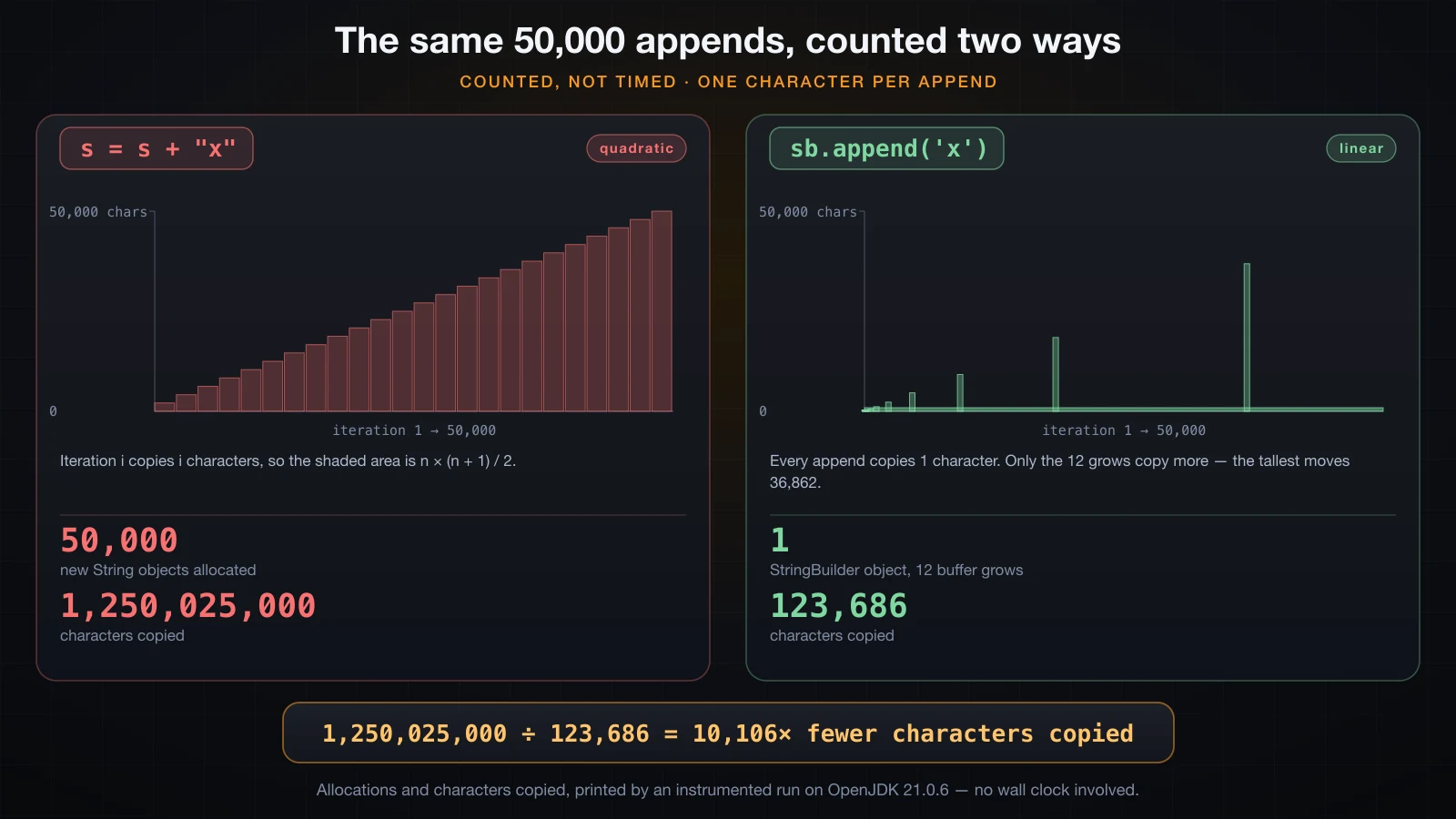
Read those three blocks against each other:
- The
+loop copies 1,250,025,000 characters to build a 50,000-character string. Iteration i copies i characters, so the total isn × (n + 1) / 2— quadratic in the number of iterations. Double the loop count and the work goes up four times. - The default
StringBuildercopies 123,686: fifty thousand for the appends themselves, plus 73,686 moved during the twelve times the buffer was replaced. That is roughly ten thousand times less copying, and it is linear. - Pre-sizing the builder removes the growth entirely: 50,000 characters copied, which is the theoretical floor. You cannot build a fifty-thousand-character string while copying fewer than fifty thousand characters.
The 50,000 discarded String objects matter too. They are short-lived, so the garbage collector handles them cheaply, but allocating them still costs — and the last few are 50,000 characters each, which is well past the size where allocation is free.
StringBuilder: one mutable buffer
StringBuilder is a char buffer with a length, wrapped in an API. It is not a String, it is not related to String by inheritance, and the only way to get a String out of it is toString(). Everything else edits the buffer in place.
public class Builder {
    public static void main(String[] args) {
        StringBuilder sb = new StringBuilder("Hello");
        sb.append(", ").append("Java").append('!').append(21).append(true);
        System.out.println(sb);
        System.out.println("length     " + sb.length());
        System.out.println("charAt(7)  " + sb.charAt(7));
        System.out.println("indexOf    " + sb.indexOf("Java"));

        sb.insert(0, ">> ");
        System.out.println("insert     " + sb);
        sb.replace(0, 3, "");
        System.out.println("replace    " + sb);
        sb.deleteCharAt(sb.length() - 1);
        System.out.println("deleteChar " + sb);
        sb.delete(11, sb.length());
        System.out.println("delete     " + sb);
        sb.setCharAt(0, 'h');
        System.out.println("setCharAt  " + sb);
        sb.setLength(5);
        System.out.println("setLength  " + sb + "   length=" + sb.length());
        System.out.println("reverse    " + new StringBuilder(sb).reverse());

        String out = sb.toString();
        System.out.println("toString   " + out + "   " + out.getClass().getName());

        StringBuilder row = new StringBuilder();
        String csv = row.append("id").append(',').append("name").append(',').append("email").toString();
        System.out.println("chained    " + csv);
        System.out.println("append returns this  " + (row.append("") == row));
    }
}Hello, Java!21true
length 18
charAt(7) J
indexOf 7
insert >> Hello, Java!21true
replace Hello, Java!21true
deleteChar Hello, Java!21tru
delete Hello, Java
setCharAt hello, Java
setLength hello length=5
reverse olleh
toString hello java.lang.String
chained id,name,email
append returns this trueThe API in full, minus the rarely used overloads:
| Method | What it does | Note |
|---|---|---|
append(x) | Adds x at the end | Overloaded for every primitive, char[], Object, CharSequence. A null argument appends the four characters null |
insert(int, x) | Inserts x at that offset | Same overloads; the offset may equal the length |
delete(int, int) | Removes the range [start, end) | end past the length is clamped, not an error |
deleteCharAt(int) | Removes one character | Throws StringIndexOutOfBoundsException if out of range |
replace(int, int, String) | Swaps a range for a string of any length | The replacement need not be the same size |
reverse() | Reverses the buffer in place | Surrogate-aware; see below |
setCharAt(int, char) | Overwrites one character | Returns void, so it does not chain |
charAt(int) | Reads one character | 0-based, like String |
indexOf(String) | First occurrence, or -1 | Literal search, not a regex |
length() | Number of characters currently in the buffer | Not the capacity |
setLength(int) | Truncates, or pads with \u0000 if you grow it | setLength(0) is the cheapest way to reset a builder for reuse |
capacity() | Size of the internal array | Always at least length() |
toString() | Copies the buffer into a new String | The one place a String is created |
The chaining works because append returns this, not a new object — the last line of the run proves it with ==. That is why sb.append("a").append("b") is one buffer being written twice, and not a String-style chain of new objects. setCharAt is the exception: it returns void, so it always ends a chain.
reverse() reverses the buffer in place and is surrogate-aware, so an emoji survives:
System.out.println(new StringBuilder("Java").reverse());

String emoji = "ab👋";              // 'a', 'b', WAVING HAND
String rev = new StringBuilder(emoji).reverse().toString();
System.out.println(rev + "  length=" + rev.length());

System.out.println(new StringBuilder("Ho\u00E0ng").reverse());   // precomposed
System.out.println(new StringBuilder("Hoa\u0300ng").reverse()); // a + U+0300avaJ
👋ba length=4
gnàoH
gǹaoHThe emoji comes back whole because reverse() detects surrogate pairs and keeps them in order. It does not understand combining accents: the last line took the decomposed form of Hoàng — an a followed by a separate U+0300 grave accent — and reversed the code units individually, so the accent detached from the a and landed on the n. Text that arrives decomposed, which is what macOS filesystems produce, needs normalising before you reverse it.
Capacity versus length
length() is how many characters are in the buffer. capacity() is how big the array holding them is. They are almost never equal, and the gap is what makes append cheap.
public class Capacity {
    public static void main(String[] args) {
        StringBuilder sb = new StringBuilder();
        System.out.println("start          len=" + sb.length() + "  cap=" + sb.capacity());
        int cap = sb.capacity();
        for (int i = 1; i <= 80; i++) {
            sb.append('x');
            if (sb.capacity() != cap) {
                System.out.println("append #" + i + "      len=" + sb.length()
                        + "  cap=" + cap + " -> " + sb.capacity());
                cap = sb.capacity();
            }
        }
        System.out.println("end            len=" + sb.length() + "  cap=" + sb.capacity());

        System.out.println();
        System.out.println("new StringBuilder(\"Java\")  cap=" + new StringBuilder("Java").capacity());
        System.out.println("new StringBuilder(100)     cap=" + new StringBuilder(100).capacity());

        StringBuilder big = new StringBuilder();
        big.append("0123456789012345678901234567890123456789");   // 40 chars in one call
        System.out.println("append 40 to an empty one  cap=" + big.capacity());
    }
}start len=0 cap=16
append #17 len=17 cap=16 -> 34
append #35 len=35 cap=34 -> 70
append #71 len=71 cap=70 -> 142
end len=80 cap=142
new StringBuilder("Java") cap=20
new StringBuilder(100) cap=100
append 40 to an empty one cap=40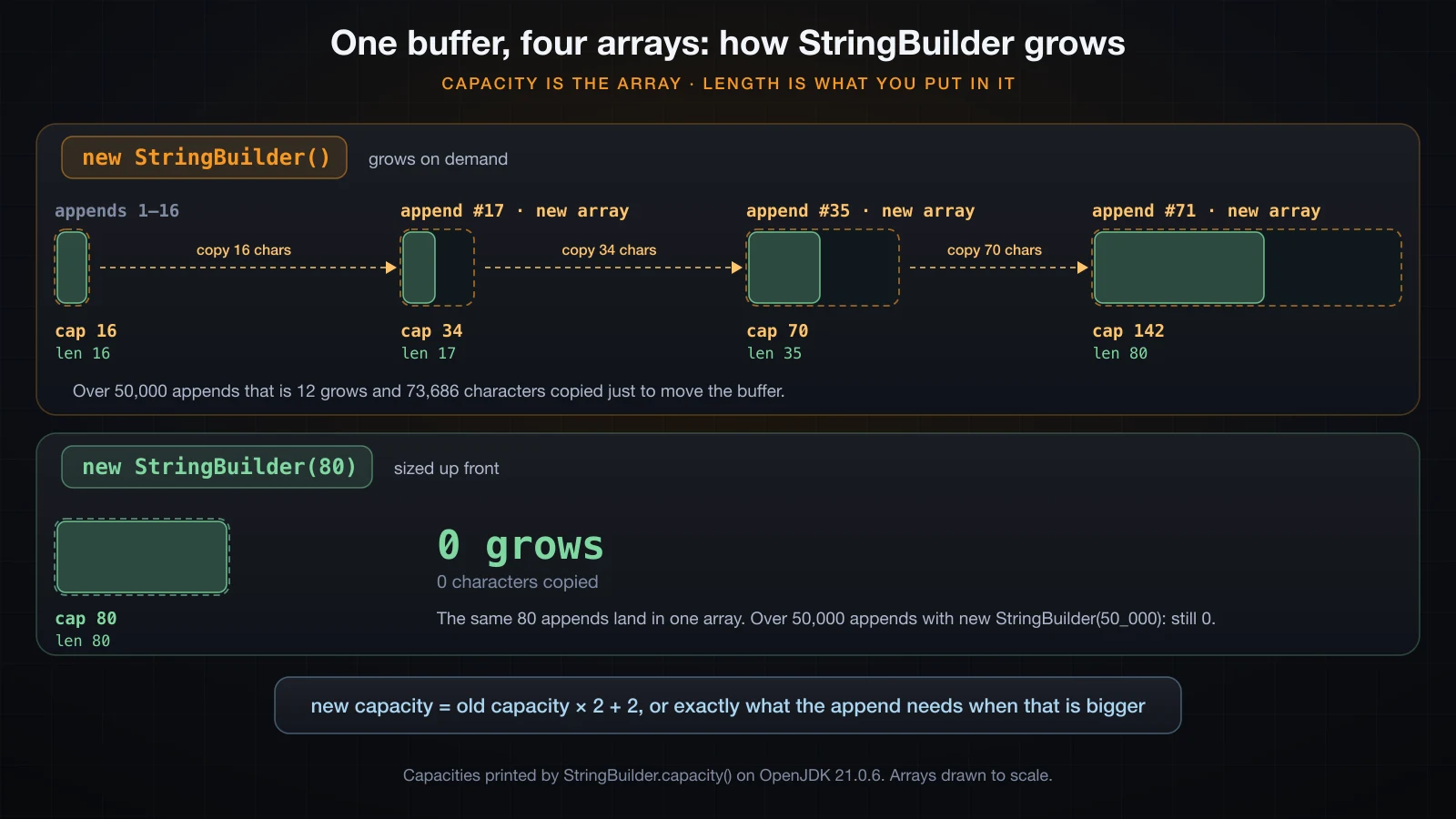
Four rules come straight out of that output:
- The default capacity is 16.
new StringBuilder()allocates room for sixteen characters, so the first sixteen appends touch nothing but the array. new StringBuilder(String)allocates 16 plus the string's length."Java"has four characters and the capacity came back as 20, leaving room to append without an immediate reallocation.- Growth is old capacity times two, plus two. 16 becomes 34, 34 becomes 70, 70 becomes 142. The
+ 2is a historical detail of the JDK implementation, not something to rely on, but the doubling is what makes the total copying linear rather than quadratic. - A single append bigger than the doubling gets exactly what it needs. Appending 40 characters to an empty builder produced capacity 40, not 34, because doubling was not enough.
A "grow" is not a resize — arrays in Java cannot be resized. It allocates a new, larger array and copies the old contents across, then the old array becomes garbage. That is the 73,686 characters the instrumented run attributed to growth, and it is exactly what new StringBuilder(expectedSize) removes:
new StringBuilder()        12 buffer grows, 123,686 characters copied
new StringBuilder(50_000)   0 buffer grows,  50,000 characters copied
Pre-size when you can put a number on the result — a fixed number of fields, a known row count, input.length() * 2. Do not agonise over it when you cannot: twelve reallocations across fifty thousand appends is not a crisis, and an over-generous capacity wastes memory that a right-sized one would not. trimToSize() releases the slack afterwards if a builder is going to live a long time.
StringBuffer: the same API behind a lock
StringBuffer and StringBuilder are siblings — both extend the package-private AbstractStringBuilder, and their public APIs are the same method for method. The single difference is a keyword:
$ javap java.lang.StringBuffer | grep -c synchronized
47
$ javap java.lang.StringBuilder | grep -c synchronized
0

  public synchronized java.lang.StringBuffer append(java.lang.String);
  public synchronized int length();
  public synchronized char charAt(int);
  public synchronized java.lang.String toString();
Forty-seven methods on StringBuffer are synchronized; none on StringBuilder are. Every call to a StringBuffer method acquires the monitor on the buffer object and releases it on the way out.
What does that buy? Look at what one append really does: read the count field, write a character at that index, store count + 1. Three steps on shared state. Two threads running them without a lock can interleave, and then both write at the same index and both store the same new count. Here is that race:
import java.util.concurrent.atomic.AtomicReference;

public class Race {
    static final int PER_THREAD = 100_000;
    static final int EXPECTED = 2 * PER_THREAD;

    static String run(boolean synced) throws InterruptedException {
        StringBuilder sb = new StringBuilder();
        StringBuffer bf = new StringBuffer();
        AtomicReference<Throwable> boom = new AtomicReference<>();
        Runnable task = () -> {
            try {
                for (int i = 0; i < PER_THREAD; i++) {
                    if (synced) bf.append('x'); else sb.append('x');
                }
            } catch (Throwable t) {
                boom.compareAndSet(null, t);
            }
        };
        Thread t1 = new Thread(task), t2 = new Thread(task);
        t1.start(); t2.start();
        t1.join(); t2.join();
        int len = synced ? bf.length() : sb.length();
        String kind = synced ? "StringBuffer " : "StringBuilder";
        String status = boom.get() != null
                ? "threw " + boom.get()
                : (len == EXPECTED ? "OK" : "LOST " + (EXPECTED - len) + " chars");
        return kind + "  expected " + EXPECTED + "  actual " + len + "  " + status;
    }

    public static void main(String[] args) throws Exception {
        for (int r = 1; r <= 6; r++) System.out.println("run " + r + "  " + run(false));
        System.out.println();
        for (int r = 1; r <= 6; r++) System.out.println("run " + r + "  " + run(true));
    }
}run 1 StringBuilder expected 200000 actual 100136 threw java.lang.ArrayIndexOutOfBoundsException: Index 142 out of bounds for length 142
run 2 StringBuilder expected 200000 actual 144020 LOST 55980 chars
run 3 StringBuilder expected 200000 actual 108289 threw java.lang.ArrayIndexOutOfBoundsException
run 4 StringBuilder expected 200000 actual 146016 LOST 53984 chars
run 5 StringBuilder expected 200000 actual 101312 threw java.lang.ArrayIndexOutOfBoundsException
run 6 StringBuilder expected 200000 actual 158977 LOST 41023 chars
run 1 StringBuffer expected 200000 actual 200000 OK
run 2 StringBuffer expected 200000 actual 200000 OK
run 3 StringBuffer expected 200000 actual 200000 OK
run 4 StringBuffer expected 200000 actual 200000 OK
run 5 StringBuffer expected 200000 actual 200000 OK
run 6 StringBuffer expected 200000 actual 200000 OK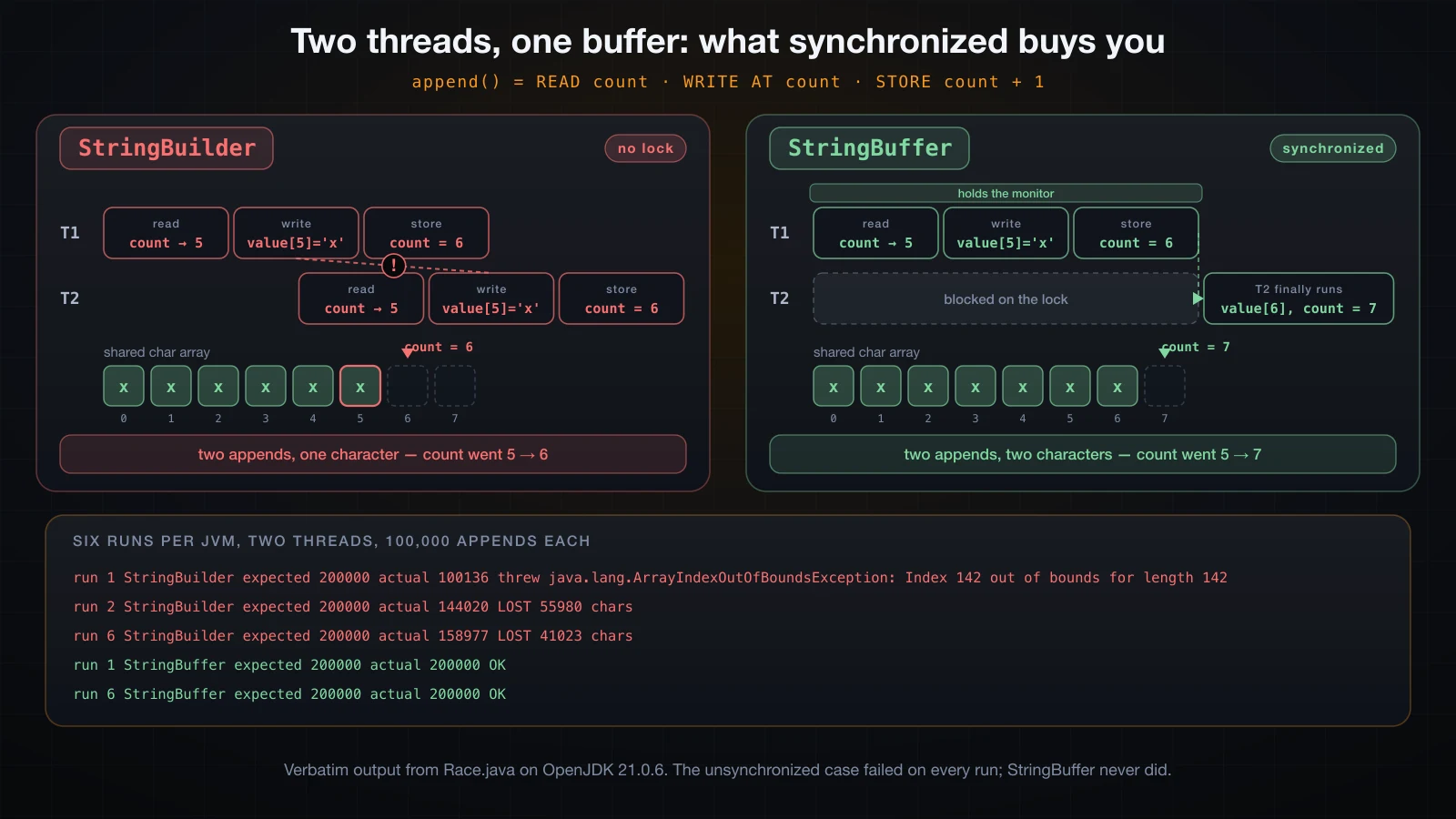
This is not a theoretical hazard that needs coaxing. Every one of the six unsynchronized runs failed, and across four separate JVM launches the failure mode split roughly evenly between two shapes:
- Silent data loss. The length came back short, by tens of thousands of characters. A stale
countmakes one thread overwrite the character another just wrote, and a lost race between two grows throws away a whole array's worth of writes at once — which is why the shortfall is so large. ArrayIndexOutOfBoundsException. One thread read the array reference just before a grow and the length just after it, or two grows raced, and the write landed past the end of a stale array.Index 142 out of bounds for length 142is the growth sequence from the previous section showing up in an error message. Runs 3 and 5 report the same exception with no detail at all: once the JIT has seen a throw at the same site several times it reuses a preallocated, stackless instance, which is the JVM'sOmitStackTraceInFastThrowbehaviour rather than a different failure.
Every StringBuffer run produced exactly 200,000. That is what the lock buys.
What it costs, uncontended, is small but real. Two hundred thousand single-character appends on one thread, best of eight rounds after four warm-ups:
StringBuilder  0.22 ms
StringBuffer   0.26 ms
Around 20% slower on an otherwise idle machine, and measurably worse when the machine is busy — both figures are indicative rather than benchmark results. The shape is what to take away: this is a constant factor on each call, not a change in complexity. Modern JVMs make an uncontended monitor cheap, and StringBuffer also caches its toString() result in a toStringCache field that StringBuilder does not have. So the argument against StringBuffer is not really performance.
The argument is design. Two threads appending into one buffer is almost always a mistake in its own right: the interleaving is nondeterministic, so the output order is meaningless even when no character is lost. StringBuffer prevents corruption; it does not give you a sensible result. What you actually want is one builder per thread, joined at the end, or a proper concurrent structure. StringBuffer shipped in Java 1.0, when there was no unsynchronized option at all; StringBuilder only arrived in Java 5, precisely because paying for a lock nobody needed had turned out to be the common case rather than the rare one.
String vs StringBuilder vs StringBuffer
String | StringBuilder | StringBuffer | |
|---|---|---|---|
| Mutable | No | Yes | Yes |
| Thread-safe | Yes, because it cannot change | No | Yes, every method synchronized |
| Building cost in a loop | Quadratic | Linear | Linear |
| Overhead when single-threaded | — | None | A monitor acquired and released on every call |
| Since | Java 1.0 | Java 5 | Java 1.0 |
equals compares | Characters | Object identity | Object identity |
| Usable as a map key | Yes | No | No |
| Has a literal syntax | Yes | No | No |
| Pooled and interned | Yes | No | No |
| Typical use | Constants, keys, values you pass around | Building text piece by piece | Legacy code, and shared mutable buffers |
The equals row is the one that surprises people. StringBuilder does not override equals or hashCode, so both fall through to Object and compare identity. Two builders holding the same characters are not equal, and a builder is useless as a HashMap key.
Which one should I use?
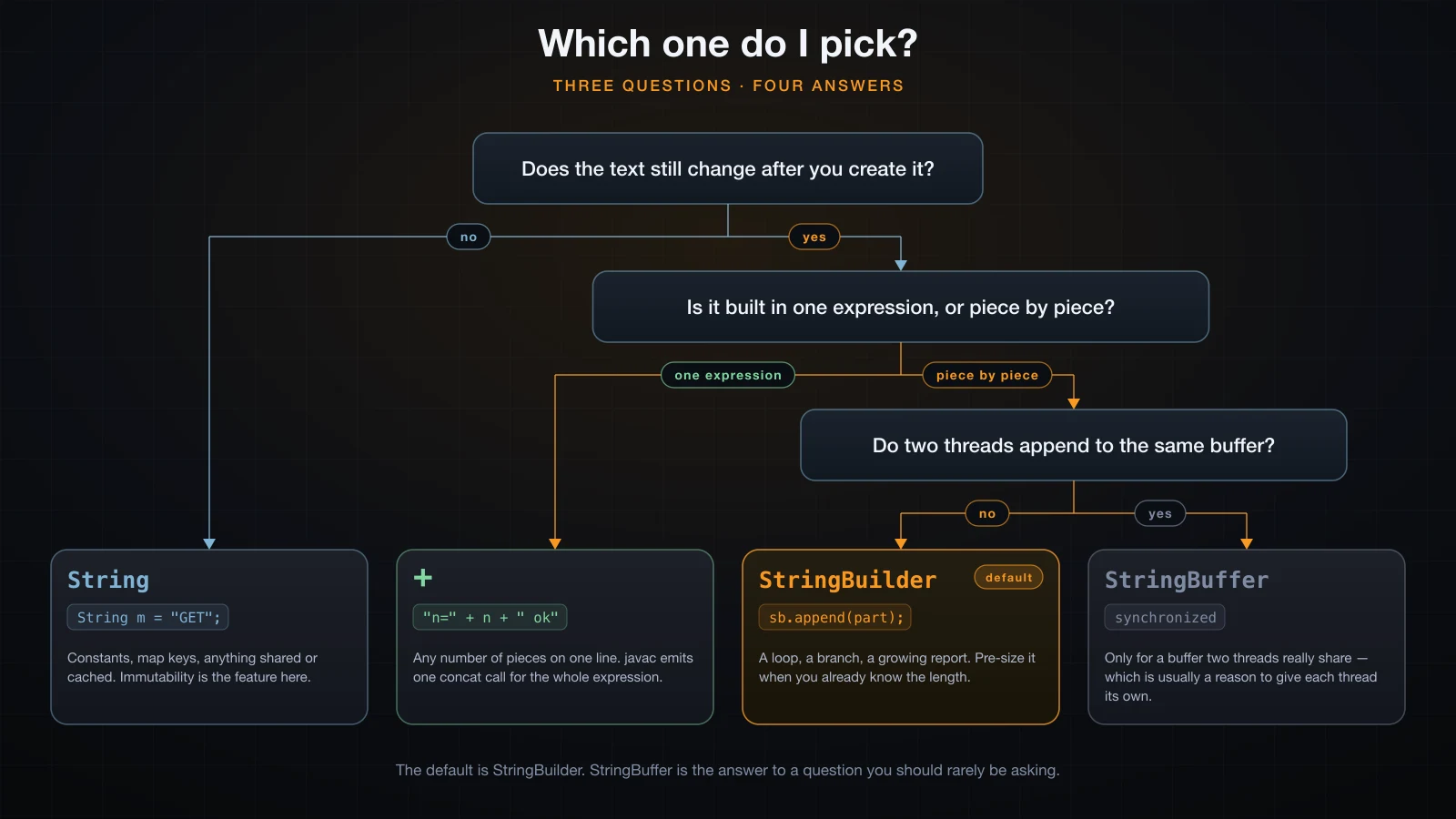
Three questions settle it, and the middle answer is the default: does the text still change after you create it, is it built in one expression or piece by piece, and do two threads genuinely share the buffer.
That first branch deserves more credit than it usually gets. Reaching for StringBuilder when the text is fixed is not a neutral choice — it throws away everything immutability gives you:
import java.util.HashMap;
import java.util.Map;

public class Traps {
    public static void main(String[] args) {
        StringBuilder a = new StringBuilder("abc");
        StringBuilder b = new StringBuilder("abc");
        System.out.println("a.equals(b)            " + a.equals(b));
        System.out.println("a.toString().equals()  " + a.toString().equals(b.toString()));
        System.out.println("a.compareTo(b)         " + a.compareTo(b));

        Map<StringBuilder, Integer> byBuilder = new HashMap<>();
        byBuilder.put(a, 1);
        System.out.println("lookup by an equal key " + byBuilder.get(new StringBuilder("abc")));

        Map<String, Integer> byString = new HashMap<>();
        byString.put("total", 1);
        System.out.println("lookup by a String key " + byString.get(new StringBuilder("total").toString()));

        StringBuilder nulls = new StringBuilder();
        String missing = null;
        System.out.println("append(null)           [" + nulls.append(missing) + "]");

        new StringBuilder("abc").deleteCharAt(5);
    }
}a.equals(b) false
a.toString().equals() true
a.compareTo(b) 0
lookup by an equal key null
lookup by a String key 1
append(null) [null]
Exception in thread "main" java.lang.StringIndexOutOfBoundsException: Index 5 out of bounds for length 3Four things in there. equals on two builders holding "abc" is false; only toString().equals(...) compares characters. compareTo does compare characters — it was added to StringBuilder in Java 11 — which makes the pair inconsistent, so never mix them. A HashMap keyed by StringBuilder cannot find an equal-but-distinct key, while the String-keyed map finds its entry no matter where the string came from. And append(null) appends the four characters null rather than throwing, which is convenient right up until it silently writes null into your output.
So String is the right choice whenever a value is a value: a constant, an enum-like tag, a map key, a cache key, a field on an object that other code reads, anything handed to a method that might keep it. You never need a defensive copy, the hash code is computed once and cached, and no caller can change it behind your back. StringBuilder is a construction tool. Build with it, call toString(), and let the String be the thing you store and share.
When concat, join, format or a text block reads better
StringBuilder is not always the most readable way to put text together, and three String methods plus text blocks cover most of the rest:
import java.util.List;

public class Alt {
    public static void main(String[] args) {
        String a = "log";
        System.out.println("concat empty returns the receiver  " + (a.concat("") == a));
        System.out.println("plus empty returns a new object    " + (a + "" == a));
        System.out.println("concat                             " + a.concat(".txt"));

        System.out.println("join varargs                       " + String.join("/", "usr", "local", "bin"));
        System.out.println("join a List                        " + String.join(", ", List.of("id", "name", "email")));
        System.out.println("join one element                   [" + String.join(", ", List.of("id")) + "]");
        System.out.println("join nothing                       [" + String.join(", ", List.of()) + "]");

        System.out.println("format                             "
                + String.format("%s took %d ms (%.1f%%)", "build", 412, 91.25));

        String sql = """
                SELECT id, name
                FROM users
                WHERE active = %s""".formatted(true);
        System.out.println(sql);
    }
}concat empty returns the receiver true
plus empty returns a new object false
concat log.txt
join varargs usr/local/bin
join a List id, name, email
join one element [id]
join nothing []
format build took 412 ms (91.3%)
SELECT id, name
FROM users
WHERE active = trueString.concatjoins exactly two strings and nothing else. It rejects anullargument, where+would happily write the textnull—"log".concat(null)throwsNullPointerException: Cannot invoke "String.isEmpty()" because "str" is null— and it returns the receiver unchanged when the argument is empty, which the first line of the output proves anda + ""does not. It is a niche method:+is clearer everywhere else.String.joinis what to reach for when you are inserting a separator between a known list of pieces. It handles the last-element case for you, which is the part hand-written loops get wrong, and returns an empty string for an empty list rather than a stray separator. Building"a, b, c"withStringBuilderand anif (i > 0)guard is more code that does less.String.format, and the"...".formatted(args)instance form added in Java 15, wins whenever the shape of the output matters more than the pieces — padding, alignment, a fixed number of decimals. Note it rounded 91.25 to91.3, and that%%produced one literal percent sign.- Text blocks, permanent since Java 15, are the answer for anything multi-line: SQL, JSON, a help message. Combined with
formatted, they beat aStringBuilderchain for readability by a wide margin.
None of these replaces StringBuilder for the case it owns — an accumulator that grows across iterations or branches. They replace it for the cases where it was never the right tool.
Common mistakes
Building a string with + in a loop. The one this article is really about. It is quadratic, it allocates one object per iteration, and it hides behind code that looks perfectly reasonable. The fix is one line: declare a StringBuilder before the loop and append inside it.
Calling toString() inside the loop. A subtler version of the same bug, and one that survives the first fix — you switch to StringBuilder but keep materialising the result each pass:
StringBuilder sb = new StringBuilder();
for (int i = 0; i < N; i++) {
    sb.append('x');
    String snapshot = sb.toString();   // inside the loop
}toString() inside the loop objects=10000 chars copied=50005000
toString() after the loop objects=1 chars copied=10000toString() copies the whole buffer into a fresh String every time it is called, so putting it in the loop restores the quadratic behaviour you just removed. Call it once, after the loop.
Reaching for StringBuffer out of habit. If the builder is a local variable — and it nearly always is — no other thread can see it, and the lock is pure overhead. Use StringBuilder unless you can name the second thread.
Assuming StringBuilder is thread-safe because it is a JDK class. It is documented as not thread-safe, and the run above shows what that means in practice: lost characters and ArrayIndexOutOfBoundsException, on every attempt. If a builder escapes into a field that more than one thread touches, StringBuffer stops the corruption — but the design is already wrong.
Rewriting a readable one-line + as a builder chain "for performance". The bytecode section covered this: since Java 9 the compiler emits one invokedynamic for the whole expression, and the hand-written version measured marginally slower. You made the code longer for nothing.
FAQ
Is StringBuilder faster than + on a single line?
No — measured over two million evaluations of a five-operand expression it was marginally slower, and the bytecode explains why. javac compiles the whole expression to one invokedynamic call into StringConcatFactory, which sizes one array exactly and fills it. A hand-written chain allocates a builder, grows it, then copies it into a String. Use + on one line and StringBuilder across lines.
Should I pre-size every StringBuilder?
Only when you can put a number on the answer. The measured saving over fifty thousand appends was twelve reallocations and 73,686 copied characters, which matters in a hot loop and is invisible anywhere else. Pass a capacity when the size is obvious — a fixed set of fields, a row count, a multiple of an input length — and leave the default alone otherwise. An over-generous capacity trades one problem for another.
Is StringBuffer ever the right answer?
Rarely, and usually for a reason unrelated to your own design: an old API hands you one, or a field is genuinely shared and you cannot restructure the code today. When you own the design, give each thread its own StringBuilder and combine the results, or use a concurrent collection. Bear in mind that StringBuffer guarantees no corruption, not a meaningful ordering — two threads appending under a lock still interleave.
Why does sb.equals(other) return false when both hold the same text?
Because StringBuilder does not override equals, so it inherits identity comparison from Object. Compare sb.toString().equals(other.toString()) instead. compareTo is the inconsistent exception — added in Java 11, it does compare characters — so a builder that compareTo reports as equal will still fail equals, and it can never work as a HashMap key.
Can I reuse one StringBuilder instead of allocating a new one?
Yes: sb.setLength(0) empties it while keeping the array, which is the cheapest reset there is and skips the regrowth on the next pass. It is a real win in a tight loop that builds one string per iteration. Outside a hot loop, a fresh new StringBuilder() per iteration is clearer and the JVM handles short-lived objects well, so do not contort the code for it.
Conclusion
String is immutable, so + always produces a new object — but since Java 9 javac compiles a whole concatenation expression into a single invokedynamic call to StringConcatFactory, which is why one-line concatenation is fine and rewriting it by hand is not an optimisation. Inside a loop each iteration is a separate expression, so the work is redone every pass: fifty thousand + operations allocated fifty thousand objects and copied 1.25 billion characters, against one StringBuilder that copied 123,686. StringBuilder holds a char array that starts at 16 and doubles-plus-two on demand, and pre-sizing it removes the twelve reallocations entirely. StringBuffer is the same buffer with synchronized on forty-seven of its methods; the unsynchronized version really does lose characters and throw ArrayIndexOutOfBoundsException under two threads, but sharing one buffer between threads is a design problem the lock does not solve.
The next article covers methods: the parts of a declaration, how to call one, what static changes about the call, what return and void mean, and what the call stack does while a method runs.
![[Java Basics] Strings in Java: Immutability, the String Pool and the Methods You Actually Use](/images/blog/java-strings-thumbnail.en.webp)
![[Java Basics] Setting Up a Java IDE and Creating Your First Project](/images/blog/java-ide-thumbnail.en.webp)
![[Java Basics] Loops in Java: for, while and do-while](/images/blog/loops-in-java-thumbnail.en.webp)
![[Java Basics] Recursion in Java: How It Works and When to Use It](/images/blog/recursion-in-java-thumbnail.en.webp)