String is the type you will touch in every Java program you write, and it is also the type with the most surprising behaviour for a beginner. It looks like a primitive because it has literal syntax, and comparing two strings with == compiles without a warning even though it is almost never what you want.
This article covers what a String actually is, why it can never be modified, what the string pool does to identity comparison, and the methods worth memorising. The examples use Java 21.
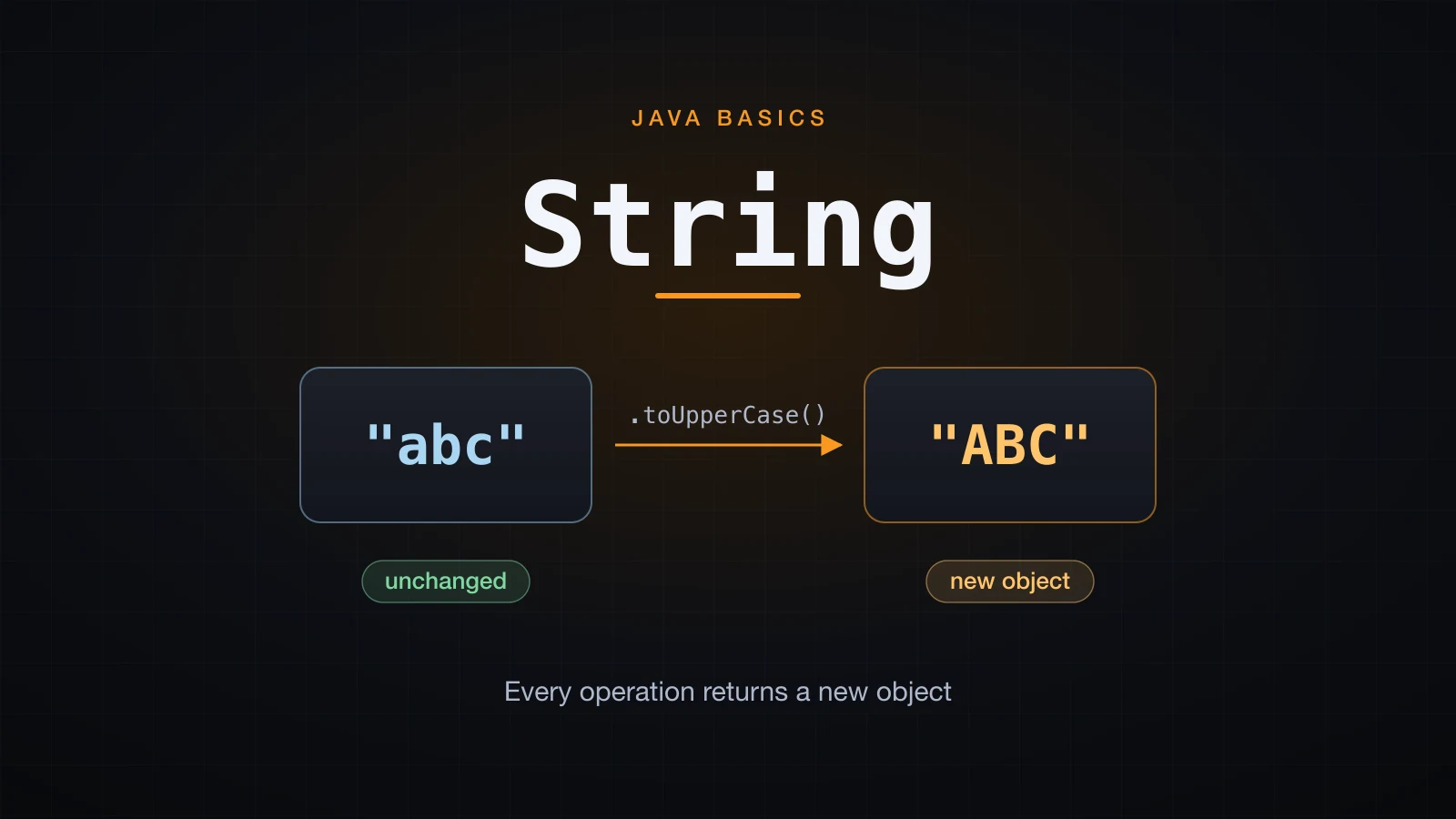
Start with the one fact everything else follows from: String is a class.
String is a class, not a primitive
Java has eight primitive types. String is not one of them. It is a regular class in java.lang, declared final, and a String variable holds a reference to an object on the heap rather than a value.
String literal = "Java";                              // literal syntax
String built   = new String("Java");                  // explicit allocation
String chars   = new String(new char[] {'J','a','v','a'});

System.out.println(literal.getClass().getName());
System.out.println(built.equals(chars));
System.out.println(built == chars);java.lang.String
true
falseTwo things make it feel special even though it is an ordinary class:
- Literal syntax. No other class can be created by writing
"Java". The compiler puts every literal in the class file constant pool and the JVM hands you an object. - Operator support.
+is overloaded forStringand nothing else in Java.
Everything else is normal object behaviour: it can be null, you call methods on it with ., and passing it to a method passes a reference.
Note the difference from char: char is a primitive holding one UTF-16 code unit and uses single quotes; String is a reference type and uses double quotes. 'J' and "J" are different types.
Why is String immutable?
A String object can never change after it is constructed. Every method that looks like it edits the text actually returns a brand new String and leaves the receiver alone.
This is the mistake everyone makes exactly once:
String s = "hello";

s.toUpperCase();                    // the result is thrown away
System.out.println(s);              // hello

String upper = s.toUpperCase();     // keep it
System.out.println(upper);          // HELLO
System.out.println(s); // hellohello
HELLO
helloThe first println prints hello, not HELLO. toUpperCase() did not fail and did not do nothing — it built a new object and returned it, and the return value went straight into the bin. The same trap applies to trim, replace, substring, strip and every other transforming method. If the compiler does not complain, that is because throwing away a return value is legal Java.
Reassigning the variable does not contradict this. s = s + "d" changes which object s points at; the old object is untouched.
String s = "abc";
System.out.println(System.identityHashCode(s));
s = s + "d";
System.out.println(s);
System.out.println(System.identityHashCode(s));705927765
abcd
21685669Two different identity hashes: two different objects. The "abc" object still exists, it just has nothing pointing at it any more.
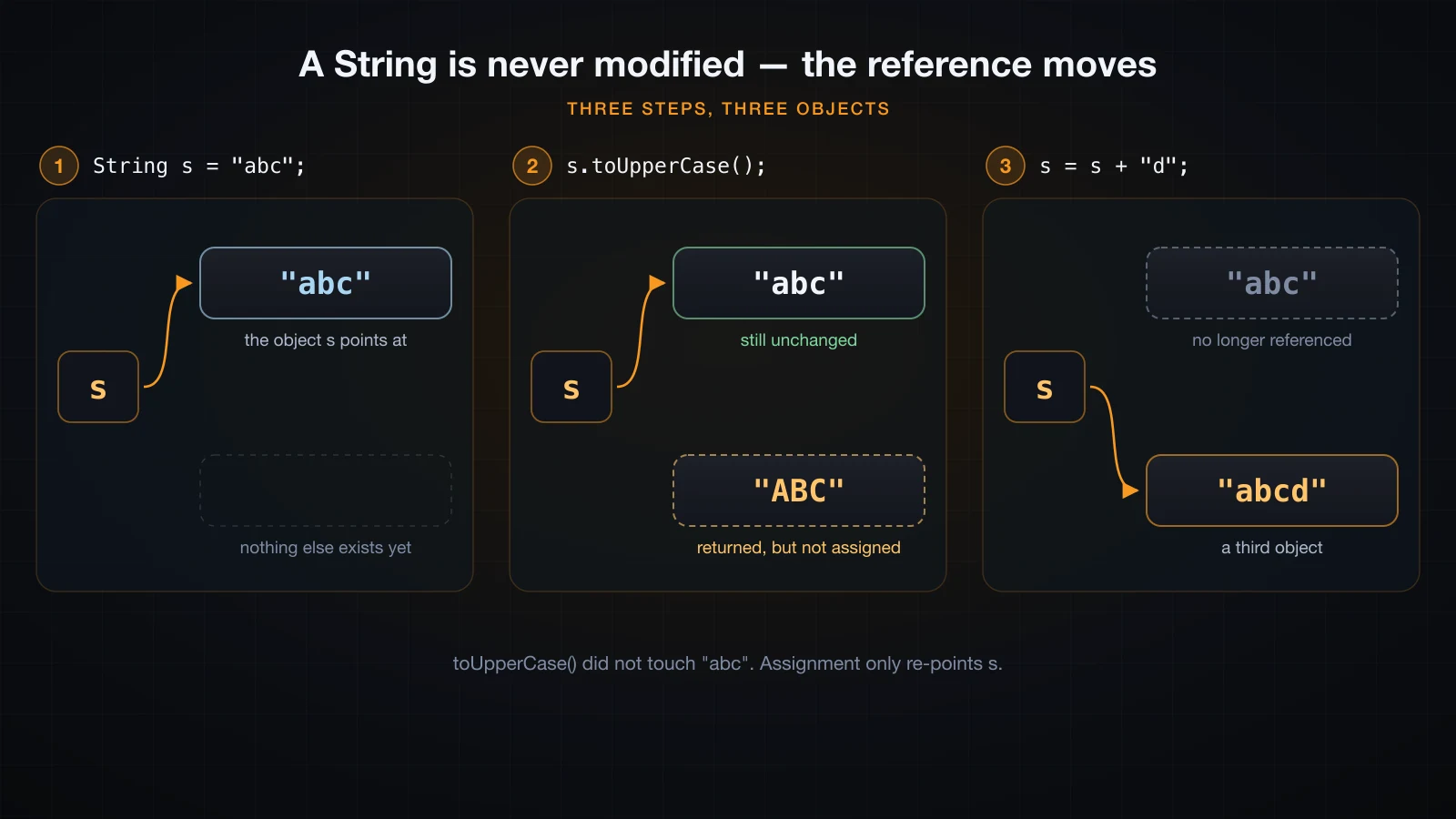
Why was the class designed this way? Three reasons, and they are all consequences of "the value can never change":
- Safe sharing. An immutable object can be handed to any method, cached, or used as a map key with no defensive copy and no risk that a caller mutates it behind your back.
- Cached hash code.
StringcomputeshashCode()once and stores it, which is what makesHashMapwithStringkeys fast. That is only sound if the characters can never change. - Pooling. Identical literals can share a single object, which is the subject of the next section, and sharing is only safe when nobody can modify the shared value.
The string pool and what == really compares
The JVM keeps a pool of String objects — the string pool, held in the heap. Every string literal in your code is interned: the first occurrence puts the object in the pool, and every later literal with the same characters gets the same object back. new String("hi") bypasses that entirely and always allocates a fresh object.
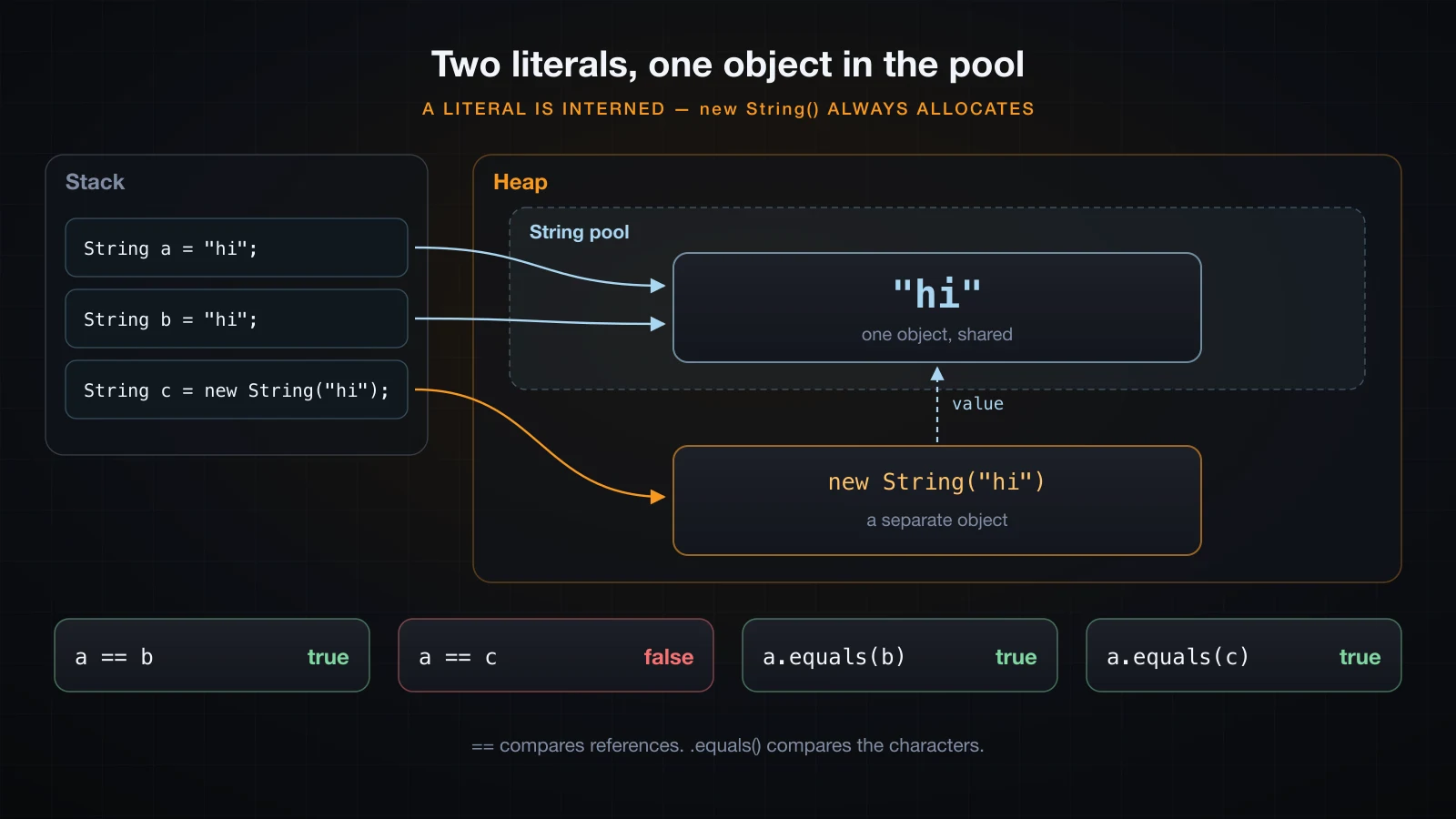
This is the whole story in one program. Run it before you trust any explanation, including this one:
String a = "hi";
String b = "hi";
String c = new String("hi");
String d = new String("hi");
String e = "h" + "i";              // both operands are compile-time constants
String part = "h";                 // an ordinary variable
String f = part + "i";             // built at runtime

System.out.println("a == b            " + (a == b));
System.out.println("c == d            " + (c == d));
System.out.println("a == c            " + (a == c));
System.out.println("a == e            " + (a == e));
System.out.println("a == f            " + (a == f));
System.out.println("a == f.intern()   " + (a == f.intern()));
System.out.println("a.equals(b)       " + a.equals(b));
System.out.println("a.equals(c)       " + a.equals(c));
System.out.println("a.equals(f) " + a.equals(f));a == b true
c == d false
a == c false
a == e true
a == f false
a == f.intern() true
a.equals(b) true
a.equals(c) true
a.equals(f) trueReading the five identity results in order:
| Case | Result | Why |
|---|---|---|
"hi" == "hi" | true | Both literals resolve to the same pooled object |
new String("hi") == new String("hi") | false | Two separate allocations, neither in the pool |
"hi" == new String("hi") | false | Pooled object versus a fresh heap object |
"hi" == "h" + "i" | true | Both operands are constants, so the compiler folds them into the literal "hi" and interns it |
"hi" == part + "i" | false | part is not a constant, so the concatenation happens at runtime and the result is not interned |
The fourth case is worth staring at. "h" + "i" never runs at all — javac evaluates it and writes "hi" into the constant pool. The fifth case looks identical in the source but the value is only known at runtime, so a new object is built and skips the pool. Adding final to part would move it back into the fourth case, because a final local initialised with a literal is a compile-time constant.
intern() is the manual escape hatch: it returns the pooled object with the same characters, adding it to the pool if it is not there yet. That is why a == f.intern() is true.
The trap:
==on two strings you built by concatenating, parsing or reading from input will befalseeven when the text matches, because those strings are not pooled. Code that "works" with==on literals during testing breaks the moment a real value arrives.
== vs .equals(): the rule
The rule is one sentence: == asks whether two references point at the same object; .equals() asks whether two strings contain the same characters. For text comparison you always want .equals().
Around it there are four things worth knowing:
String a = "Java";
String b = "java";
String n = null;

System.out.println(a.equals(b));                 // case matters
System.out.println(a.equalsIgnoreCase(b));

System.out.println("apple".compareTo("banana"));
System.out.println("banana".compareTo("apple"));
System.out.println("apple".compareTo("apple"));
System.out.println("apple".compareTo("apples"));
System.out.println("Java".compareTo("java"));

System.out.println(Objects.equals(n, "Java"));
System.out.println(Objects.equals(n, null));
System.out.println("Java".equals(n));false
true
-1
1
0
-1
-32
false
true
falseequalsIgnoreCaseis the case-insensitive form.compareToreturns anint, not a boolean: negative if the receiver sorts before the argument, zero if they are equal, positive if it sorts after. The magnitude is an implementation detail — at the first differing position it is the difference of the twocharvalues ('J'is 74,'j'is 106, hence-32), and when one string is a prefix of the other it is the difference in length. Compare it against zero, never against-1or1.Objects.equals(x, y)fromjava.utilhandlesnullon both sides and returnstruefor two nulls."literal".equals(x)is the null-safe idiom: putting the literal on the left means the receiver is nevernull.
That last point matters because the other order throws:
String s = null;
System.out.println(s.equals("Java"));Exception in thread "main" java.lang.NullPointerException: Cannot invoke "String.equals(Object)" because "s" is null
at A5.main(A5.java:4)Helpful NullPointerException messages arrived in Java 14 and are on by default from Java 15. The variable name only appears when the class was compiled with -g; without debug information you get a synthetic name such as "<local3>" instead.
The String method reference
In this table, s is "Hello, Java" where the receiver is not written out.
| Method | What it returns | Example |
|---|---|---|
length() | Number of char units, not characters | s.length() gives 11 |
charAt(int) | The char at an index, 0-based | s.charAt(0) gives H |
indexOf(String) | First index of the argument, or -1 | s.indexOf("a") gives 8, s.indexOf("z") gives -1 |
lastIndexOf(String) | Last index of the argument, or -1 | s.lastIndexOf("a") gives 10 |
contains(CharSequence) | true if the argument occurs anywhere | s.contains("Java") gives true |
startsWith(String) | Prefix test | s.startsWith("Hello") gives true |
endsWith(String) | Suffix test | s.endsWith("va") gives true |
substring(int) | From that index to the end | s.substring(7) gives Java |
substring(int, int) | Range [begin, end) — end is exclusive | s.substring(0, 5) gives Hello |
toUpperCase() | A new upper-cased String | s.toUpperCase() gives HELLO, JAVA |
toLowerCase() | A new lower-cased String | s.toLowerCase() gives hello, java |
trim() | Strips characters up to U+0020 from both ends | On an EM SPACE padded string, length stays 4 |
strip() (Java 11+) | Strips Unicode whitespace from both ends | Same string, length becomes 2 |
isEmpty() | true only when the length is 0 | " ".isEmpty() gives false |
isBlank() (Java 11+) | true when empty or all whitespace | " ".isBlank() gives true |
replace(CharSequence, CharSequence) | Literal replacement, no regex | "192.168.0.1".replace(".", "-") gives 192-168-0-1 |
replaceAll(String, String) | Regex replacement | "192.168.0.1".replaceAll(".", "-") gives ----------- |
split(String) | Splits on a regex, trailing empties dropped | "192.168.0.1".split("\\.") gives [192, 168, 0, 1] |
matches(String) | true when the whole string matches a regex | s.matches("[0-9]+") gives false |
concat(String) | Appends one String | s.concat("!") gives Hello, Java! |
repeat(int) (Java 11+) | The string repeated n times | "a".repeat(3) gives aaa |
chars() (Java 8+) | An IntStream of char values | "a1b2c3".chars().filter(Character::isDigit).count() gives 3 |
toCharArray() | A fresh char[] copy | "a,b".toCharArray() gives [a, ,, b] |
compareTo(String) | Ordering as an int | "apple".compareTo("banana") gives -1 |
equalsIgnoreCase(String) | Case-insensitive equality | "Java".equalsIgnoreCase("java") gives true |
String.join(sep, parts) | Joins with a separator | String.join(" - ", "a", "b", "c") gives a - b - c |
String.format(fmt, args) | A formatted String | String.format("%s is %d", "x", 5) gives x is 5 |
Three of those rows hide real traps.
replace is literal, replaceAll is regex. They are not the same method with different scope — both replace every occurrence, but replaceAll treats its first argument as a regular expression, and . in a regex means "any character".
String ip = "192.168.0.1";

System.out.println(ip.replace(".", "-"));       // literal
System.out.println(ip.replaceAll(".", "-"));    // regex: "." matches everything
System.out.println(ip.replaceAll("\\.", "-"));  // escaped regex

System.out.println(Arrays.toString(ip.split("\\.")));
System.out.println(Arrays.toString(ip.split(".")));
System.out.println(ip.split(".").length);

System.out.println(Arrays.toString("a,b,,c,,".split(",")));
System.out.println(Arrays.toString("a,b,,c,,".split(",", -1)));192-168-0-1
-----------
192-168-0-1
[192, 168, 0, 1]
[]
0
[a, b, , c]
[a, b, , c, , ]split takes a regex too, and split(".") returns an empty array. Every character is a separator, so every field is empty, and split drops trailing empty strings — all of them, leaving length 0. You need split("\\."). The last two lines show the other half of that rule: trailing empties disappear unless you pass a negative limit.
trim and strip disagree on Unicode. trim() dates from Java 1.0 and removes anything with a code value at or below U+0020, which was a reasonable definition of whitespace in 1996. strip(), added in Java 11, removes anything Character.isWhitespace accepts.
String em = "\u2003hi\u2003";   // U+2003 EM SPACE at both ends

System.out.println(em.length());
System.out.println(em.trim().length());
System.out.println(em.strip().length());

System.out.println("[" + "  hi  ".trim() + "]");
System.out.println("[" + "  hi  ".strip() + "]");
System.out.println("  ".isEmpty());
System.out.println(" ".isBlank());4
4
2
[hi]
[hi]
false
trueFor ordinary ASCII spaces they behave identically. For text pasted from a browser, a spreadsheet or a PDF they do not. Prefer strip() in new code. The same split runs through the emptiness checks: isEmpty() is a length test, isBlank() is a whitespace test.
substring and charAt: index bounds
Indexes are 0-based, and substring(begin, end) excludes end. An index equal to the length is legal for substring and illegal for charAt.
String s = "Java";
System.out.println(s.substring(4));   // legal: an empty String
System.out.println(s.charAt(4));      // throws
Exception in thread "main" java.lang.StringIndexOutOfBoundsException: Index 4 out of bounds for length 4The blank first line is the empty string that substring(4) returned. The two-argument form reports a range instead of an index:
System.out.println("Java".substring(2, 9));Exception in thread "main" java.lang.StringIndexOutOfBoundsException: Range [2, 9) out of bounds for length 4The half-open notation [2, 9) is telling you the begin index is included and the end index is not. substring(3, 1) produces Range [3, 1) out of bounds for length 4 as well, because begin must not exceed end. indexOf never throws — it returns -1 for "not found", which is why "Java".substring("Java".indexOf("z")) fails with Range [-1, 4) out of bounds for length 4 rather than telling you the search missed.
Escape sequences and text blocks
Inside a normal literal, a backslash starts an escape sequence.
| Escape | Meaning |
|---|---|
\n | Line feed |
\t | Tab |
\" | A double quote |
\\ | A backslash |
\' | A single quote |
\r | Carriage return |
\uXXXX | The code unit with that hex value |
\s (Java 15+) | A space that survives trailing-space stripping |
A literal containing quoted JSON or embedded newlines becomes unreadable fast. Java 15 made text blocks a permanent feature: three double quotes open and close the literal, newlines are real newlines, and quotes need no escaping.
String json = """
        {
          "name": "Java",
          "year": 1995
        }""";
System.out.println(json);
System.out.println("length = " + json.length());
System.out.println("starts with '{': " + json.startsWith("{"));

String block = """
        one
        two
        """;
System.out.println("ends with a newline: " + block.endsWith("\n"));

String joined = """
        the quick \
        brown fox""";
System.out.println("[" + joined + "]");{
"name": "Java",
"year": 1995
}
length = 36
starts with '{': true
ends with a newline: true
[the quick brown fox]Two rules explain that output:
- Incidental whitespace is removed. The compiler finds the smallest indentation across all non-blank lines and the closing delimiter line, then strips that much from every line. That is why the content starts at column 0 even though the source is indented eight spaces, and why the nested lines keep their extra two spaces.
- The closing delimiter position decides the trailing newline. Putting
"""on the same line as the last content, as injson, gives no trailing newline. Putting it on its own line, as inblock, keeps one.
A trailing backslash is a line continuation: joined is a single line because the newline after quick was suppressed. Text blocks are still ordinary String objects — there is no separate type, and all the same methods apply.
Why length() is not the number of characters
A Java String stores UTF-16 code units. length() returns the number of code units, not the number of characters a reader sees. Anything outside the Basic Multilingual Plane — most emoji, for example — occupies two code units called a surrogate pair.
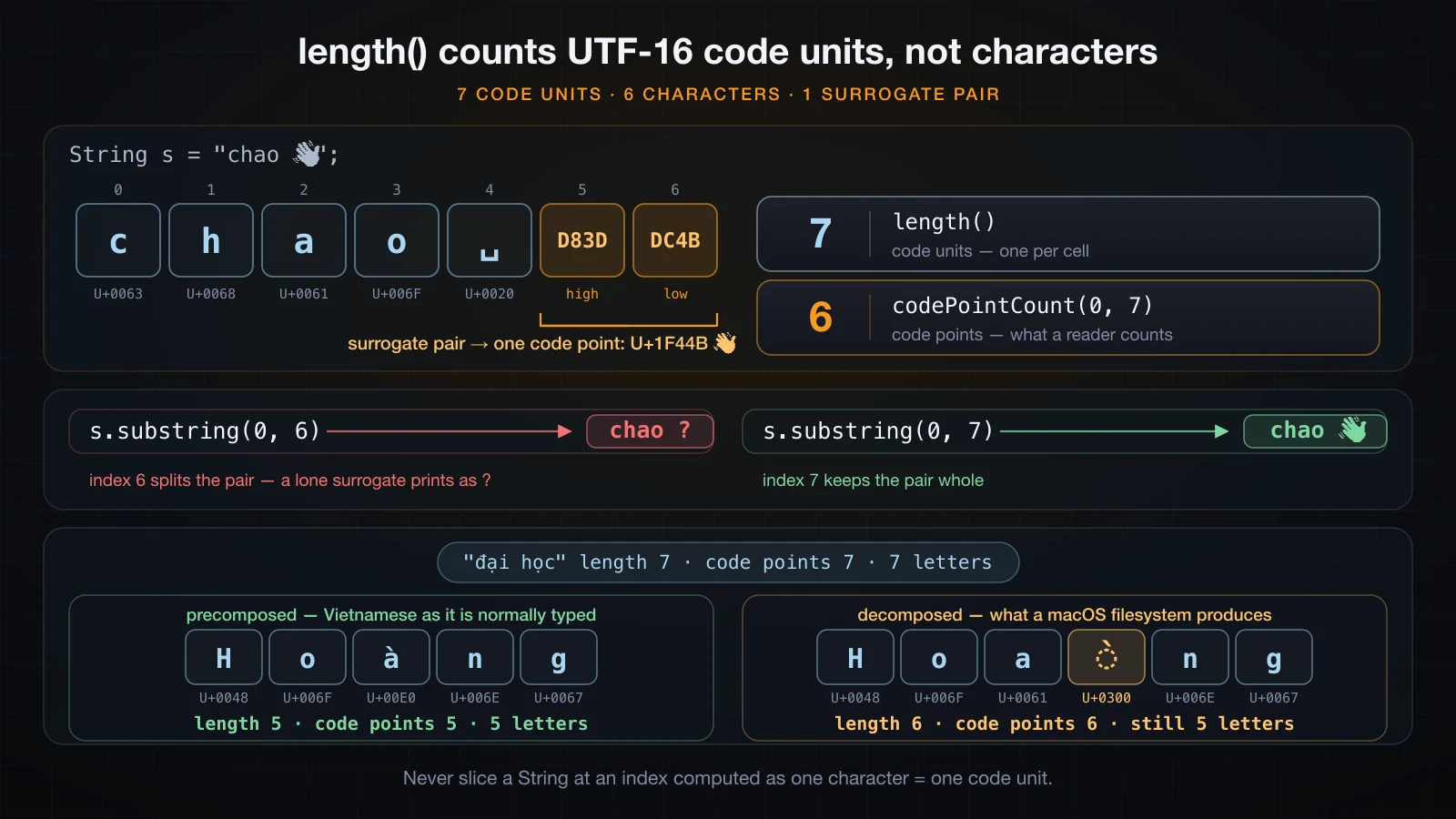
length() counts cells, not characters:
static void show(String s) {
    System.out.println(s + "  length=" + s.length()
            + "  codePointCount=" + s.codePointCount(0, s.length()));
}

public static void main(String[] args) {
    show("Java");
    show("chao 👋");
    show("đại học");
    show("Hoàng");            // one precomposed code point for a-grave
    show("Hoa\u0300ng");      // 'a' plus U+0300, a combining grave accent

    String s = "chao 👋";
    System.out.println(s.substring(0, 6));
    System.out.println(s.substring(0, 7));
}Java length=4 codePointCount=4
chao 👋 length=7 codePointCount=6
đại học length=7 codePointCount=7
Hoàng length=5 codePointCount=5
Hoàng length=6 codePointCount=6
chao ?
chao 👋Three separate results in there:
"chao 👋"shows six characters butlength()reports7, because the emoji is a surrogate pair.codePointCount(0, length())reports the honest6.- Vietnamese text written normally is fine. Every precomposed Vietnamese letter,
đandạincluded, is a single BMP code point, so"đại học"counts7both ways. - Vietnamese text can also arrive decomposed — a base letter plus a separate combining accent, which is what macOS filesystems produce. Then
"Hoa\u0300ng"is five visible letters but six code units and six code points, and neither counter matches what a reader sees.
Cutting through a surrogate pair produces a lone surrogate: substring(0, 6) printed chao ? because half an emoji is not a valid character. substring(0, 7) keeps the pair intact.
The practical rules: use length() for buffer sizes and index arithmetic, use codePointCount when you need to report a count to a user, and never slice a string at an index you computed by assuming one character is one unit.
Why + in a loop is slow
+ on strings does not append in place — it cannot, because String is immutable. Each + builds a whole new object and copies both operands into it. Inside a loop that turns linear work into quadratic work.
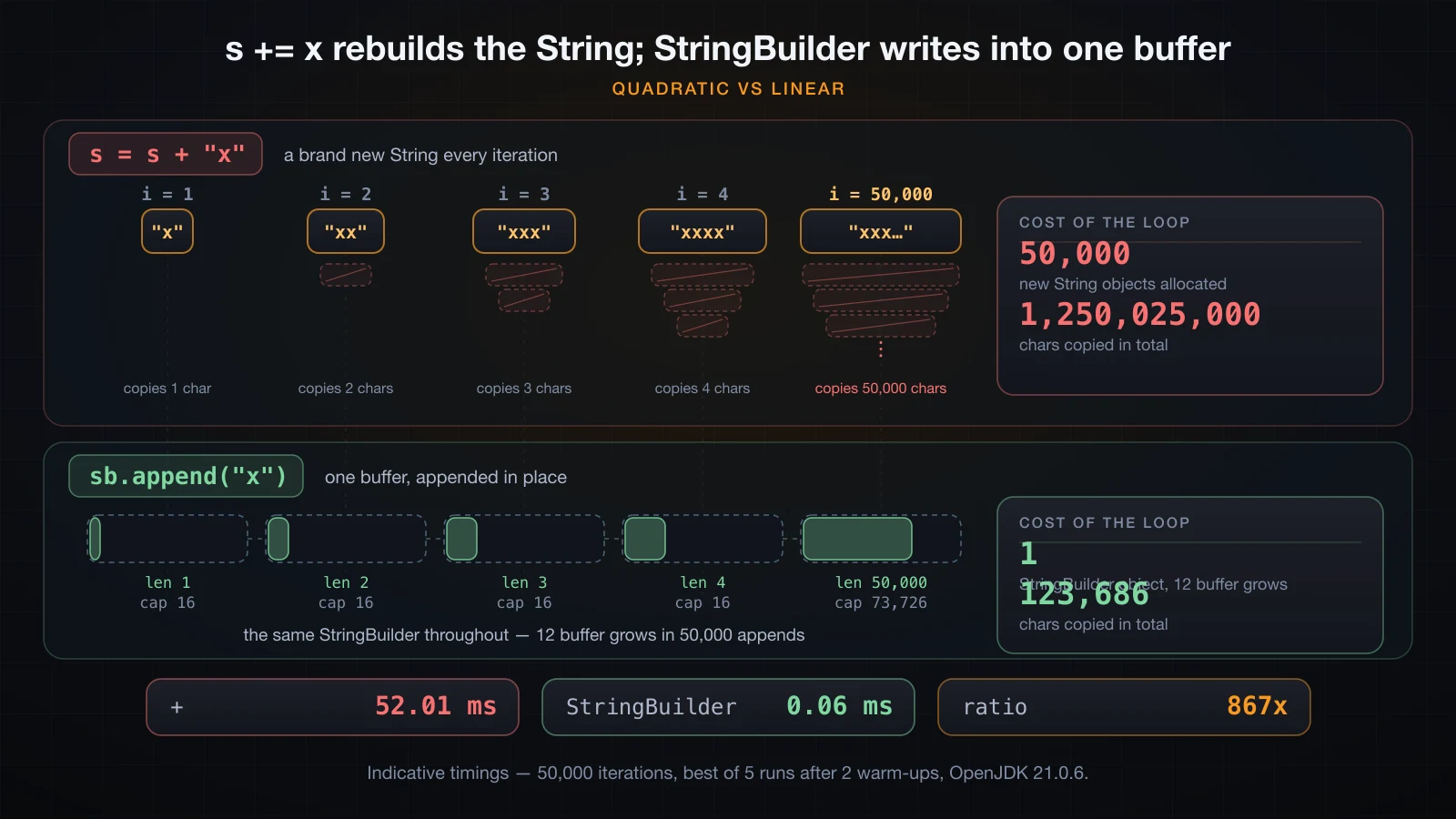
The cost is in the copying, and it grows with every iteration:
javac compiles each + to an invokedynamic call to StringConcatFactory, and in a loop that call sits inside the loop body:
 9: iload_3
10: ldc           #17    // int 50000
12: if_icmpge     28
15: aload_2
16: invokedynamic #18,  0 // InvokeDynamic #0:makeConcatWithConstants
21: astore_2
22: iinc          3, 1
25: goto          9
One new String per iteration, each one longer than the last. StringBuilder keeps a growable buffer and appends into it, producing the final String once.
static final int N = 50_000;

static long withPlus() {
    long t = System.nanoTime();
    String s = "";
    for (int i = 0; i < N; i++) s = s + "x";
    return System.nanoTime() - t;
}

static long withBuilder() {
    long t = System.nanoTime();
    StringBuilder sb = new StringBuilder();
    for (int i = 0; i < N; i++) sb.append("x");
    sb.toString();
    return System.nanoTime() - t;
}
Running both seven times, discarding the first two as warm-up and taking the best:
+                52.01 ms
StringBuilder     0.06 ms
ratio             867x
Across four separate JVM invocations on the same machine + measured between 49 and 58 ms and StringBuilder stayed at 0.06 ms, so the ratio landed between roughly 820x and 960x. Treat these numbers as indicative — they depend on the machine, the JVM and the heap — but the shape does not change: the gap grows with the number of iterations, because one side is quadratic and the other is linear.
StringBuilder is the tool for building a string piece by piece, and sb.append(x) is essentially the whole API you need for that. How it grows its buffer, and how it compares with StringBuffer, is the subject of a later article in this series.
Two things this does not mean. A + between a handful of values on one line is fine — the compiler emits a single concat call for the whole expression, not one per operator. And + outside a loop is fine. It is specifically repeated concatenation into an accumulator variable that is quadratic.
String.format, formatted and printf
String.format builds a formatted string; System.out.printf prints one; "...".formatted(args), added in Java 15, is the instance-method form of String.format with the receiver as the pattern.
System.out.printf("%s was released in %d%n", "Java", 1995);
System.out.printf("pi = %.2f%n", 3.14159);
System.out.printf("[%-10s][%10s]%n", "left", "right");
System.out.printf("%05d  %,d%n", 42, 1234567);
System.out.printf("100%% done%n");

String row = String.format("%-10s %5d %8.2f", "coffee", 3, 4.5);
System.out.println("[" + row + "]");
System.out.println("[" + "%-10s %5d".formatted("tea", 12) + "]");Java was released in 1995
pi = 3.14
[left ][ right]
00042 1,234,567
100% done
[coffee 3 4.50]
[tea 12]The conversions worth memorising:
| Specifier | Meaning |
|---|---|
%s | Any object, via toString(); null prints as null |
%d | An integral value — int, long, short, byte |
%f | A floating-point value; %.2f fixes two decimals |
%n | The platform line separator — prefer it over \n in a format string |
%-10s | Left-aligned in a field 10 wide; without the minus it is right-aligned |
%05d | Zero-padded to width 5 |
%,d | Grouping separators for thousands |
%% | A literal percent sign |
The conversions are checked at runtime, not compile time, so a mismatch is an exception rather than a compiler error:
Exception in thread "main" java.util.IllegalFormatConversionException: d != java.lang.String%d with a String argument compiles cleanly and fails when the line executes. Read that message as "conversion d does not accept java.lang.String".
FAQ
Is .intern() worth calling?
Almost never in application code. new String("pool").intern() == "pool" is true, so it does what it says, but interning costs a pool lookup and the pool is a JVM-wide structure. Use it only when you are holding a very large number of duplicated strings and have measured the memory. It is not a way to make == safe.
Does every + create a new object?
Runtime concatenation does. Several methods, though, return the receiver unchanged when there is nothing to do:
Expression, with a holding "ab" | Identity result |
|---|---|
a + "" | == a is false — a new object |
a.concat("") | == a is true — the receiver came back |
a.substring(0) | == a is true |
"AB".toUpperCase() | == "AB" is true |
So s.trim() on an already-trimmed string, or toUpperCase() on an already-upper-case string, may hand you the same object back. Never rely on that — it is an implementation detail, and it is exactly why == is unreliable.
trim() or strip()?
strip() on Java 11 and later. It uses the modern Unicode definition of whitespace, so it removes the wide spaces and unusual separators that survive trim(). Keep trim() only when you must compile against Java 8. Note that neither one removes a non-breaking space U+00A0, because Character.isWhitespace returns false for it.
How do I check for null or empty safely?
s == null || s.isBlank() covers null, empty and whitespace-only in one expression, and short-circuit evaluation means isBlank() is never called on a null reference. When you are comparing against a known value instead, put the literal first: "yes".equals(input) returns false for a null input rather than throwing.
Why does "" + value convert anything to a String?
Because + with a String operand converts the other operand for you, using String.valueOf, which returns the literal text null for a null reference rather than throwing. "" + null gives null and "" + 7 gives 7. Prefer String.valueOf(x) when the intent is conversion — but be aware that String.valueOf(null) written with a bare literal resolves to the char[] overload and throws NullPointerException: Cannot read the array length because "value" is null. Cast it, as in String.valueOf((Object) null), or use Objects.toString(x, "-") to supply a default.
How do I reverse a String?
There is no reverse() on String, because reversing produces a new object anyway. new StringBuilder(s).reverse().toString() turns Java into avaJ. It is surrogate-aware, so ab👋 reverses to 👋ba with the emoji intact, but it does not understand combining accents — a decomposed Vietnamese word will come back with its accents attached to the wrong letters.
Conclusion
The whole article reduces to four facts. String is a class whose instances can never change, so every method returns a new object and ignoring the return value is a silent bug. Literals are interned into a shared pool, which makes == accidentally work on literals and fail on everything else — use .equals(), or Objects.equals when either side may be null. length() counts UTF-16 code units, so emoji and decomposed Vietnamese text do not count the way a reader would. And + in a loop is quadratic; StringBuilder is what you reach for instead.
The next article covers reading user input with Scanner: constructing one on System.in, the difference between nextInt and nextLine, the newline that gets left in the buffer, and how to validate what a user typed before you parse it.
![[Java Basics] HashMap in Java: put, get, merge and the hashCode/equals Contract](/images/blog/hashmap-thumbnail.en.webp)
![[Java Basics] String vs StringBuilder vs StringBuffer: Which One to Use](/images/blog/stringbuilder-thumbnail.en.webp)
![[Java Basics] Arrays in Java: Declaring, Initializing and Traversing](/images/blog/arrays-in-java-thumbnail.en.webp)
![[Java Basics] Reading Input in Java with Scanner (and the nextLine Trap)](/images/blog/java-scanner-thumbnail.en.webp)