Every program so far in this series has had its data baked into the source. This one takes data
from outside: System.in for input, System.out and System.err for output. In Java the usual
front door for reading System.in is java.util.Scanner.
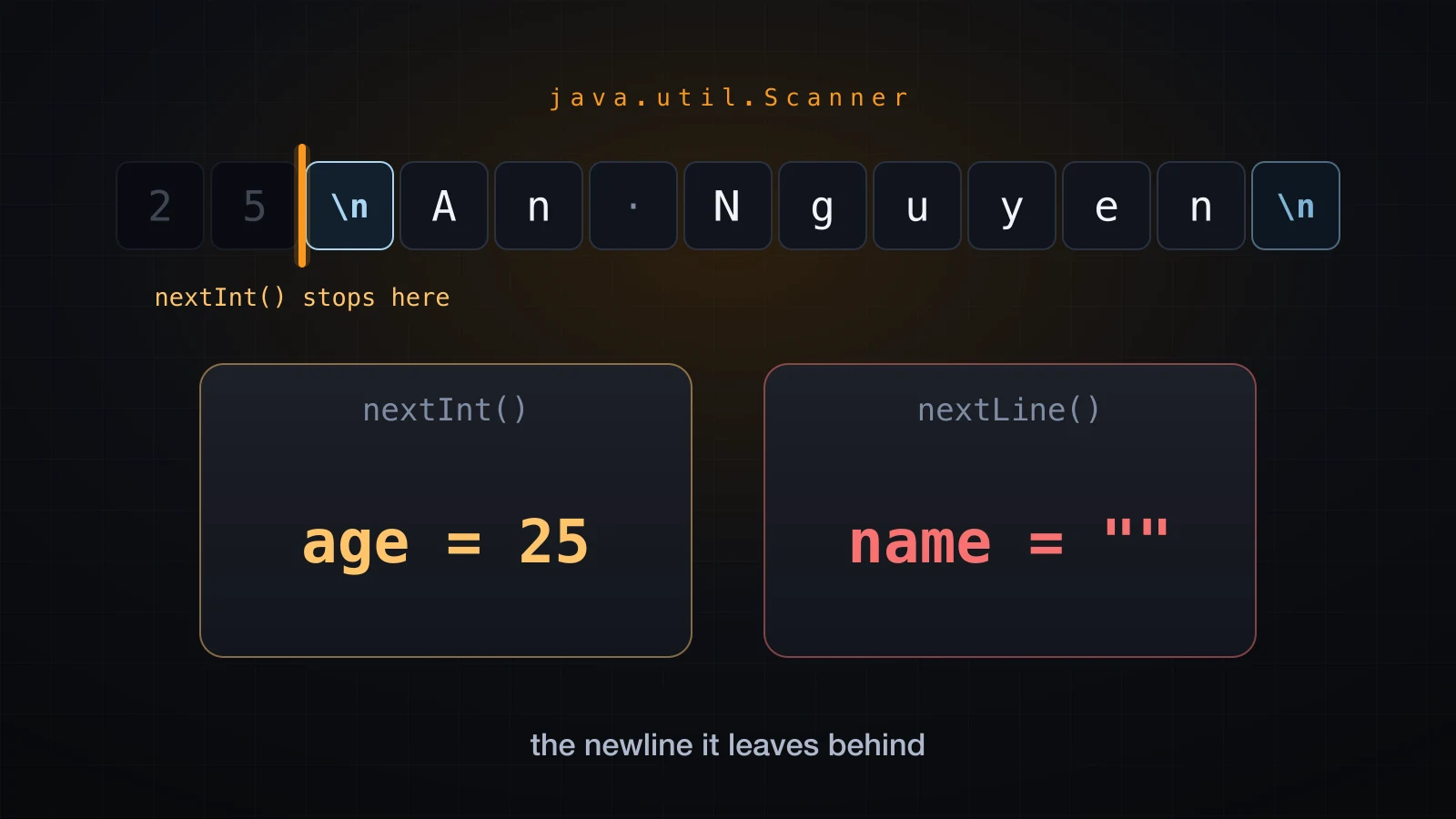
Scanner is easy to start with and full of sharp edges. The most famous of them makes nextLine()
return an empty string for no visible reason, and it costs beginners hours. All of it follows
from one idea about how Scanner sees your input, so that idea is where this article starts. The
examples use Java 21.
Output first, because you need it to see what your input code actually read.
Output: print, println and printf
System.out gives you three ways to write a line:
public class OutputDemo {
    public static void main(String[] args) {
        System.out.print("A");
        System.out.print("B");
        System.out.println("C");
        System.out.println("next line");
        System.out.printf("%s is %d years old%n", "An", 25);
        System.err.println("this went to stderr");
    }
}ABC
next line
An is 25 years old
this went to stderrprintwrites the text and leaves the cursor where it is. This is what you want for a prompt:System.out.print("Age: ")keeps the caret on the same line as the question.printlnwrites the text and ends the line.printfwrites a template with placeholders filled in from the arguments that follow.
The printf format specifiers you will actually use
A specifier is %, optional flags and width, then a conversion letter. Here is the set worth
memorising, each one run on its own:
System.out.printf("%s%n", "An Nguyen");
System.out.printf("%d%n", 42);
System.out.printf("%f%n", 3.14159);
System.out.printf("%.2f%n", 3.14159);
System.out.printf("[%-10s]%n", "left");
System.out.printf("[%5d]%n", 42);
System.out.printf("%,d%n", 1234567);
System.out.printf("%b%n", true);
System.out.printf("100%%%n");An Nguyen
42
3.141590
3.14
[left ]
[ 42]
1,234,567
true
100%| Specifier | Meaning | Output above |
|---|---|---|
%s | any value, via toString() | An Nguyen |
%d | integer types | 42 |
%f | floating point, 6 decimals by default | 3.141590 |
%.2f | floating point, 2 decimals, rounded | 3.14 |
%-10s | string padded to width 10, left aligned | left |
%5d | integer padded to width 5, right aligned | 42 |
%,d | integer with grouping separators | 1,234,567 |
%b | boolean | true |
%% | a literal percent sign | % |
%n | a line separator | ends the line |
The conversion letter must match the argument type. Passing a double to %d is not a
rounding request, it is a crash:
System.out.printf("%d%n", 3.14);Exception in thread "main" java.util.IllegalFormatConversionException: d != java.lang.Double
at java.base/java.util.Formatter$FormatSpecifier.failConversion(Formatter.java:4515)%n or \n?
\n is one character, the line feed, byte 10. %n is a printf directive that expands to the
platform line separator: line feed on Linux and macOS, carriage return plus line feed on Windows.
On this machine they produce identical bytes:
System.out.println("line.separator bytes: "
        + java.util.Arrays.toString(System.lineSeparator().getBytes()));
System.out.printf("A%n");
System.out.printf("B\n");line.separator bytes: [10]
A
Bjava NewlineDemo | tail -2 | od -c0000000 A \n B \n
0000004Use %n inside printf. It is the portable one, and it costs nothing. Note that \n still
works inside printf and %n does not work inside println — println("A%n") prints the
literal characters %n.
System.out and System.err
Both write to the terminal, so on screen they look the same. They are two different streams, and the shell can separate them:
java OutputDemo 2>/dev/null      # stdout only
java OutputDemo 2>&1 1>/dev/null # stderr onlyABC
next line
An is 25 years oldthis went to stderrSend prompts and results to System.out, and error messages to System.err. That way a user
who pipes your program's output into a file still sees the errors on screen.
How Scanner reads input
import java.util.Scanner;

Scanner sc = new Scanner(System.in);
Everything else in this article follows from this one model:
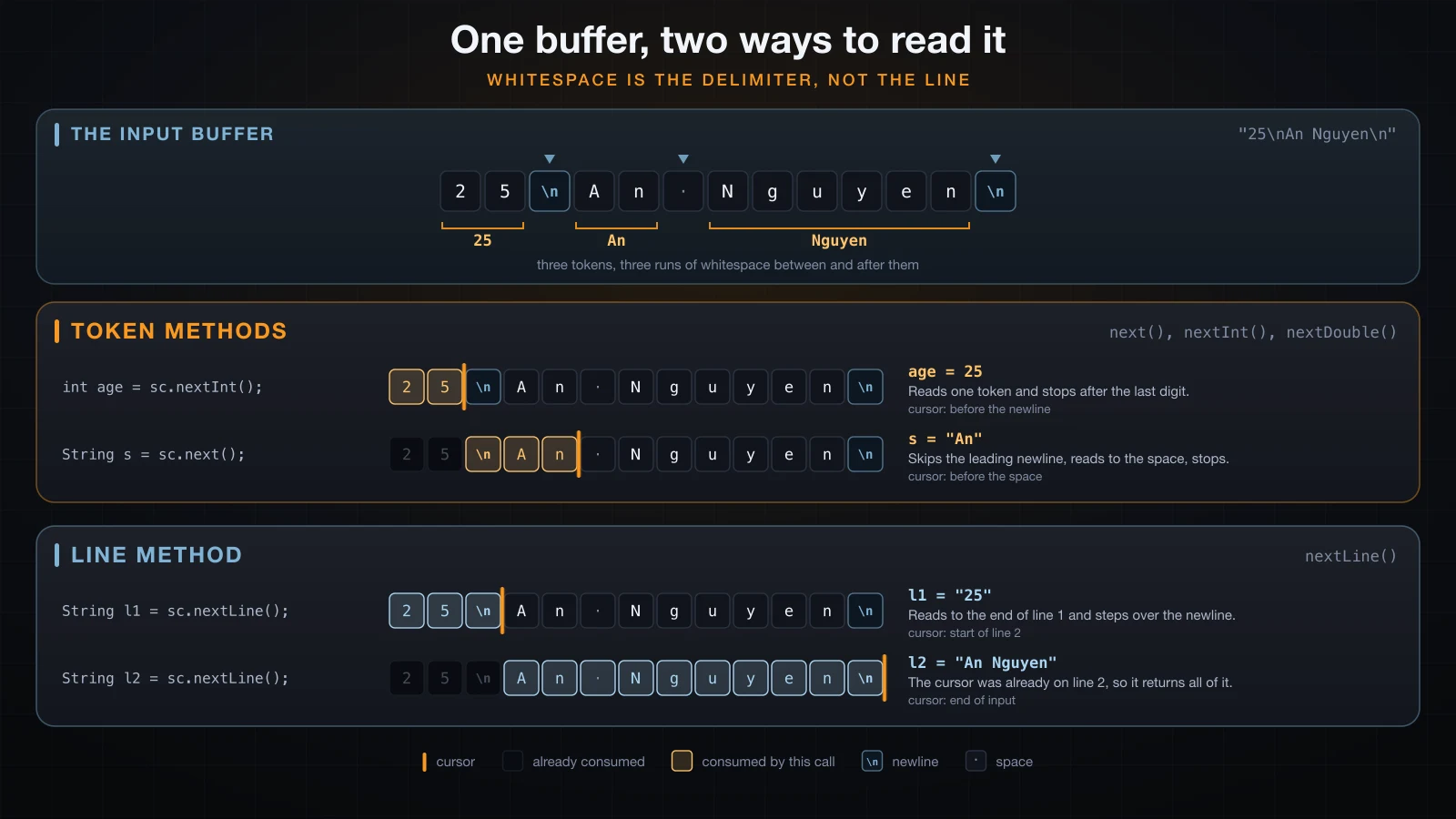
Scanner does not see lines, and it does not see keystrokes. It sees one long stream of characters, and it hands you pieces of that stream in two different ways:
- Token methods —
next(),nextInt(),nextDouble()and friends. A token is a run of characters bounded by the delimiter, which by default is any run of whitespace: spaces, tabs and line breaks all count. These methods skip leading whitespace, read one token, and stop immediately after the last character of that token. - Line methods —
nextLine(). This one ignores tokens entirely. It reads everything from the current position up to the next line break, returns it without the line break, and steps past the break.
Because whitespace is only a separator to the token methods, the same program accepts input laid out in completely different ways:
Scanner sc = new Scanner(System.in);
System.out.print("Three numbers: ");
int a = sc.nextInt();
int b = sc.nextInt();
int c = sc.nextInt();
System.out.printf("a=%d b=%d c=%d sum=%d%n", a, b, c, a + b + c);
Piping 10 20 30 on one line, 10, 20, 30 on three lines, or a mess of tabs and blank lines
all give the same result:
Three numbers: a=10 b=20 c=30 sum=60That is convenient, and it is also the root of every problem in the rest of this article. A token method reads the number and leaves the line break sitting in the stream, because a line break is just a separator to it. A line method then finds that separator and treats it as the whole line.
The Scanner methods, and what each one leaves behind
| Method | Reads | Leaves the cursor |
|---|---|---|
next() | one whitespace-delimited token, as a String | right after the token |
nextInt() | one token, parsed as int | right after the digits |
nextLong() | one token, parsed as long | right after the digits |
nextDouble() | one token, parsed as double | right after the number |
nextBoolean() | one token, true or false, case-insensitive | right after the token |
nextLine() | the rest of the current line, without the break | at the start of the next line |
hasNext() | nothing — reports whether a token exists | unchanged |
hasNextInt() | nothing — reports whether the next token parses as int | unchanged |
hasNextLine() | nothing — reports whether a line remains | unchanged |
The hasNext* family is the important half of that table. Those methods consume nothing; they
look ahead and return a boolean. That is what makes validation possible, and also what makes the
infinite loop further down possible.
Here is a probe that prints the cursor's behaviour step by step. The input is four lines:
25, An Nguyen, Ha Noi Viet Nam, true 9007199254740993.
Scanner sc = new Scanner(System.in);

int n = sc.nextInt();
System.out.println("1. nextInt()   -> " + n);
System.out.println("   hasNextLine() = " + sc.hasNextLine());
System.out.println("2. nextLine()  -> [" + sc.nextLine() + "]   (the leftover newline)");
System.out.println("3. nextLine()  -> [" + sc.nextLine() + "]   (the real name)");
System.out.println("4. next()      -> [" + sc.next() + "]");
System.out.println("5. nextLine()  -> [" + sc.nextLine() + "]   (rest of that line)");
System.out.println("6. nextBoolean -> " + sc.nextBoolean());
System.out.println("7. nextLong    -> " + sc.nextLong());
System.out.println("8. hasNext() = " + sc.hasNext());1. nextInt() -> 25
hasNextLine() = true
2. nextLine() -> [] (the leftover newline)
3. nextLine() -> [An Nguyen] (the real name)
4. next() -> [Ha]
5. nextLine() -> [ Noi Viet Nam] (rest of that line)
6. nextBoolean -> true
7. nextLong -> 9007199254740993
8. hasNext() = falseThree things to take from that transcript. Step 2 returns an empty string, which is the trap.
Step 4 shows next() reading only Ha, not the whole name, because a space ends a token. Step 5
shows the leading space in " Noi Viet Nam" — nextLine() returns the rest of the line exactly,
including the space that separated the tokens.
The nextLine trap
This is the bug. It has cost more beginner hours than anything else in this article.
Reproducing the bug
import java.util.Scanner;

public class Broken {
    public static void main(String[] args) {
        Scanner sc = new Scanner(System.in);

        System.out.print("Age: ");
        int age = sc.nextInt();

        System.out.print("Name: ");
        String name = sc.nextLine();

        System.out.println("age=" + age);
        System.out.println("name=[" + name + "]");
        System.out.println("length=" + name.length());
    }
}
Run it with the two lines 25 and An Nguyen:
printf '25\nAn Nguyen\n' | java BrokenAge: Name: age=25
name=[]
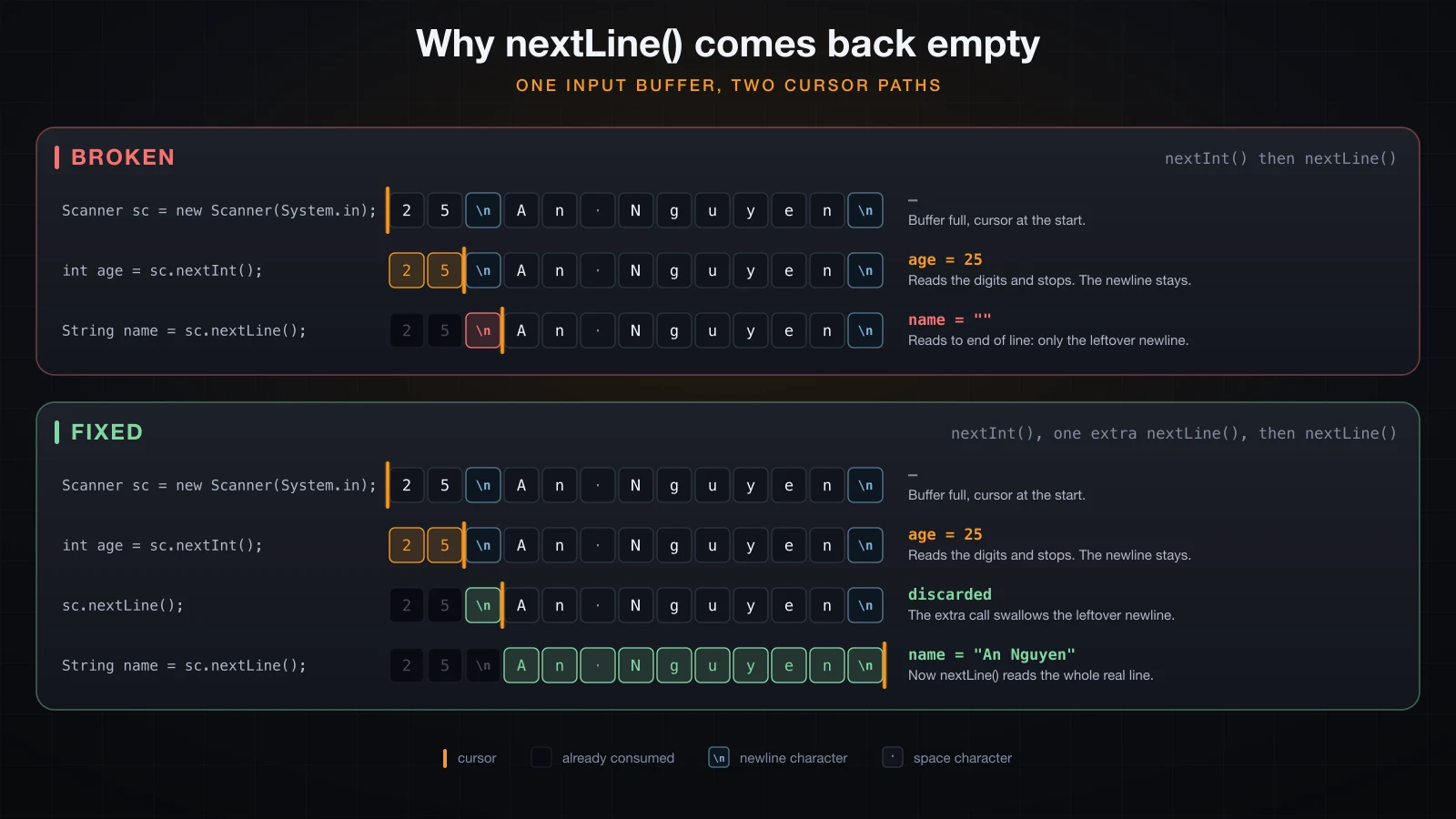
length=0The age is right. The name is an empty string of length 0, and the program never waited for it.
Typed at a real keyboard the effect is the same and looks worse: the Name: prompt flashes past
and the program finishes before you can type.
The reason is exactly the model above. The input stream is 25\nAn Nguyen\n. nextInt() reads
the token 25 and stops after the 5, leaving the cursor before the line break. nextLine()
then does its job faithfully: it reads from the cursor to the end of the current line. Between the
cursor and the end of that line there is nothing at all, so it returns "" and steps over the
break. The name was never even reached.
Note the wording: nextLine() is not broken and it is not skipping anything. It read a line —
the empty remainder of line 1.
Fix 1: consume the rest of the line
Call nextLine() once, throw the result away, and the cursor lands at the start of the real line:
System.out.print("Age: ");
int age = sc.nextInt();
sc.nextLine();                 // consume the rest of the number's line

System.out.print("Name: ");
String name = sc.nextLine();Age: Name: age=25
name=[An Nguyen]It works, and it is what most tutorials show. The cost is that you now have to remember a bare
sc.nextLine(); after every token call that is followed by a line read. Miss one and the bug
comes back, silently.
Fix 2: read lines only, parse the numbers yourself
Never mix the two families. Read every piece of input with nextLine(), then convert:
import java.util.Scanner;

public class FixTwo {
    public static void main(String[] args) {
        Scanner sc = new Scanner(System.in);

        System.out.print("Age: ");
        int age = Integer.parseInt(sc.nextLine().trim());

        System.out.print("Name: ");
        String name = sc.nextLine();

        System.out.println("age=" + age);
        System.out.println("name=[" + name + "]");
    }
}Age: Name: age=25
name=[An Nguyen]The .trim() matters: a user who types a trailing space would otherwise hand
Integer.parseInt the string "25 ", which throws.
Which fix should you use?
Fix 2, for anything that reads from a human. The reasoning:
- One mental model instead of two. Every read consumes exactly one line. There is no cursor state to keep in your head between statements.
- It cannot silently regress. Fix 1 depends on a bare statement whose only purpose is a side effect; deleting it while tidying up reintroduces the bug and nothing complains.
- It reads names with spaces.
sc.next()would returnAnand leaveNguyenbehind. - Better errors. A bad number gives you
NumberFormatExceptionat the exact line you parsed, not anInputMismatchExceptionfrom somewhere inside Scanner.
Fix 1 is still fine for the case Scanner was designed for: whitespace-separated numeric input where you were never going to read a line of free text anyway.
What happens when the input is not a number?
nextInt() does not return an error code. It throws:
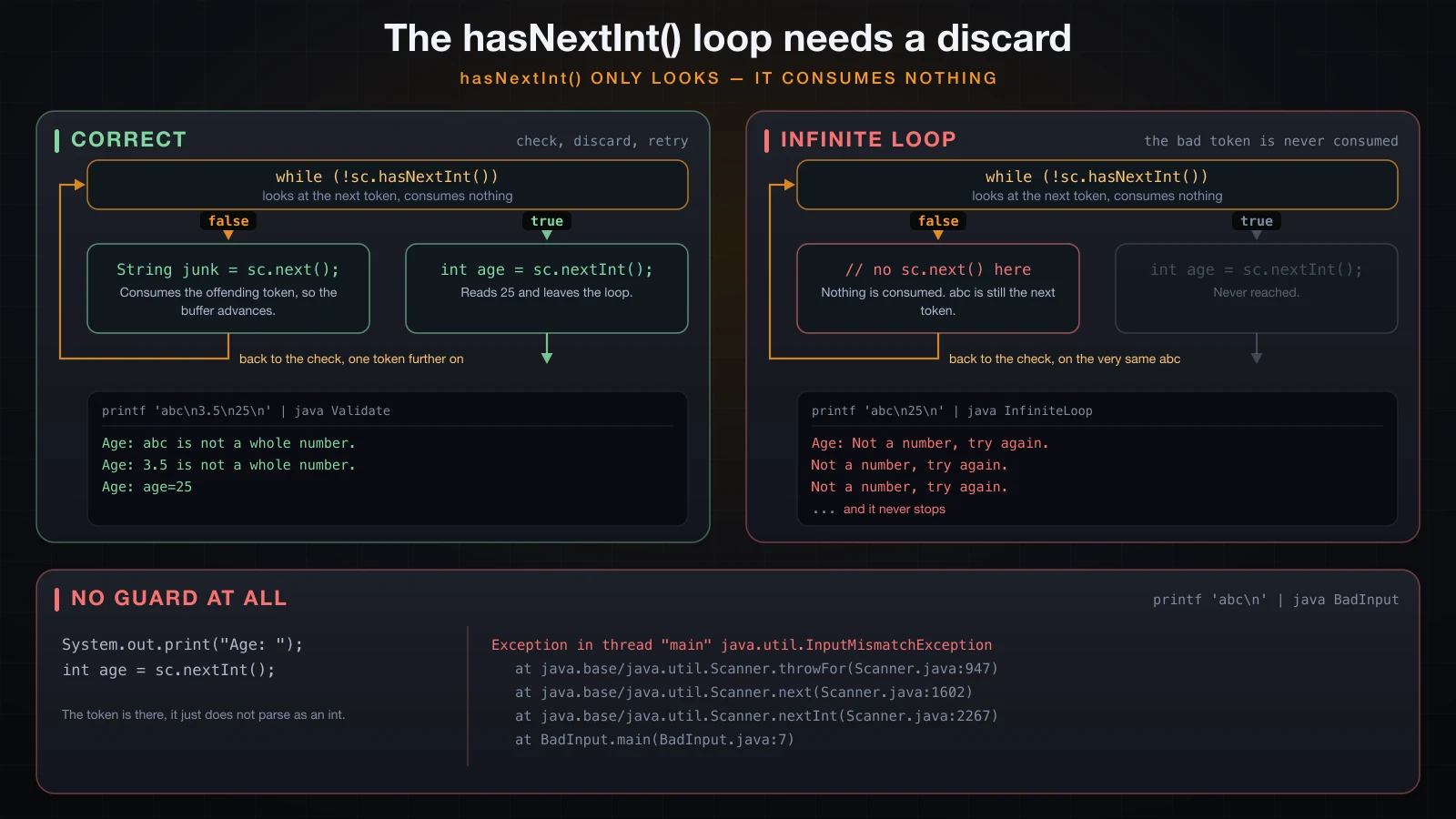
hasNextInt() only looks — forgetting to consume the bad token loops forever:
Scanner sc = new Scanner(System.in);
System.out.print("Age: ");
int age = sc.nextInt();
System.out.println("age=" + age);printf 'abc\n' | java BadInputAge: Exception in thread "main" java.util.InputMismatchException
at java.base/java.util.Scanner.throwFor(Scanner.java:947)
at java.base/java.util.Scanner.next(Scanner.java:1602)
at java.base/java.util.Scanner.nextInt(Scanner.java:2267)
at java.base/java.util.Scanner.nextInt(Scanner.java:2221)
at BadInput.main(BadInput.java:7)java.util.InputMismatchException means "a token is there, but it does not parse as what you
asked for". Feeding 3.5 to nextInt() throws exactly the same thing. The token is still in the
buffer afterwards — the exception was raised before Scanner advanced.
Exceptions are a topic of their own and a later article covers them properly. Here, treat
try/catch and hasNextInt() as the two tools for one job: not letting bad input kill the program.
The validation loop
hasNextInt() reports whether the next token would parse, without consuming it. Loop while it is
false, and discard the bad token with next() before checking again:
import java.util.Scanner;

public class Validate {
    public static void main(String[] args) {
        Scanner sc = new Scanner(System.in);

        System.out.print("Age: ");
        while (!sc.hasNextInt()) {
            String junk = sc.next();      // discard the offending token
            System.out.println(junk + " is not a whole number.");
            System.out.print("Age: ");
        }
        int age = sc.nextInt();

        System.out.println("age=" + age);
    }
}printf 'abc\n3.5\n25\n' | java ValidateAge: abc is not a whole number.
Age: 3.5 is not a whole number.
Age: age=25The infinite loop when you forget to discard
Drop the sc.next() and the loop has nothing to make progress with:
System.out.print("Age: ");
while (!sc.hasNextInt()) {
    System.out.println("Not a number, try again.");
    // BUG: the bad token is still sitting in the buffer
}
System.out.println("age=" + sc.nextInt());printf 'abc\n25\n' | java InfiniteLoopAge: Not a number, try again.
Not a number, try again.
Not a number, try again.
Not a number, try again.
Not a number, try again.That output was truncated after five lines; the program does not stop on its own and has to be
killed. hasNextInt() looks at abc, answers false, and changes nothing. The next iteration
looks at the same abc. If your program ever floods the terminal with a validation message, this
is why: something in the loop has to consume the input that failed the check.
NoSuchElementException: the input ran out
The other exception every beginner meets is what happens when there is no token left at all — you piped a file that ended, or you pressed Ctrl-D (Ctrl-Z then Enter on Windows) at the prompt:
printf '' | java BadInputAge: Exception in thread "main" java.util.NoSuchElementException
at java.base/java.util.Scanner.throwFor(Scanner.java:945)
at java.base/java.util.Scanner.next(Scanner.java:1602)
at java.base/java.util.Scanner.nextInt(Scanner.java:2267)
at java.base/java.util.Scanner.nextInt(Scanner.java:2221)
at BadInput.main(BadInput.java:7)nextLine() at end of input throws the same class with a message: NoSuchElementException: No line found.
The two exceptions look similar and mean opposite things. InputMismatchException: there is
input, it is the wrong shape. NoSuchElementException: there is no input left. Guard against the
second with hasNext() or hasNextLine() before reading, which is the only reliable way to write
a program that survives being run with its input redirected from a file.
The locale trap: is it 3.14 or 3,14?
Input parsing and output formatting are governed separately, so each side needs its own fix.
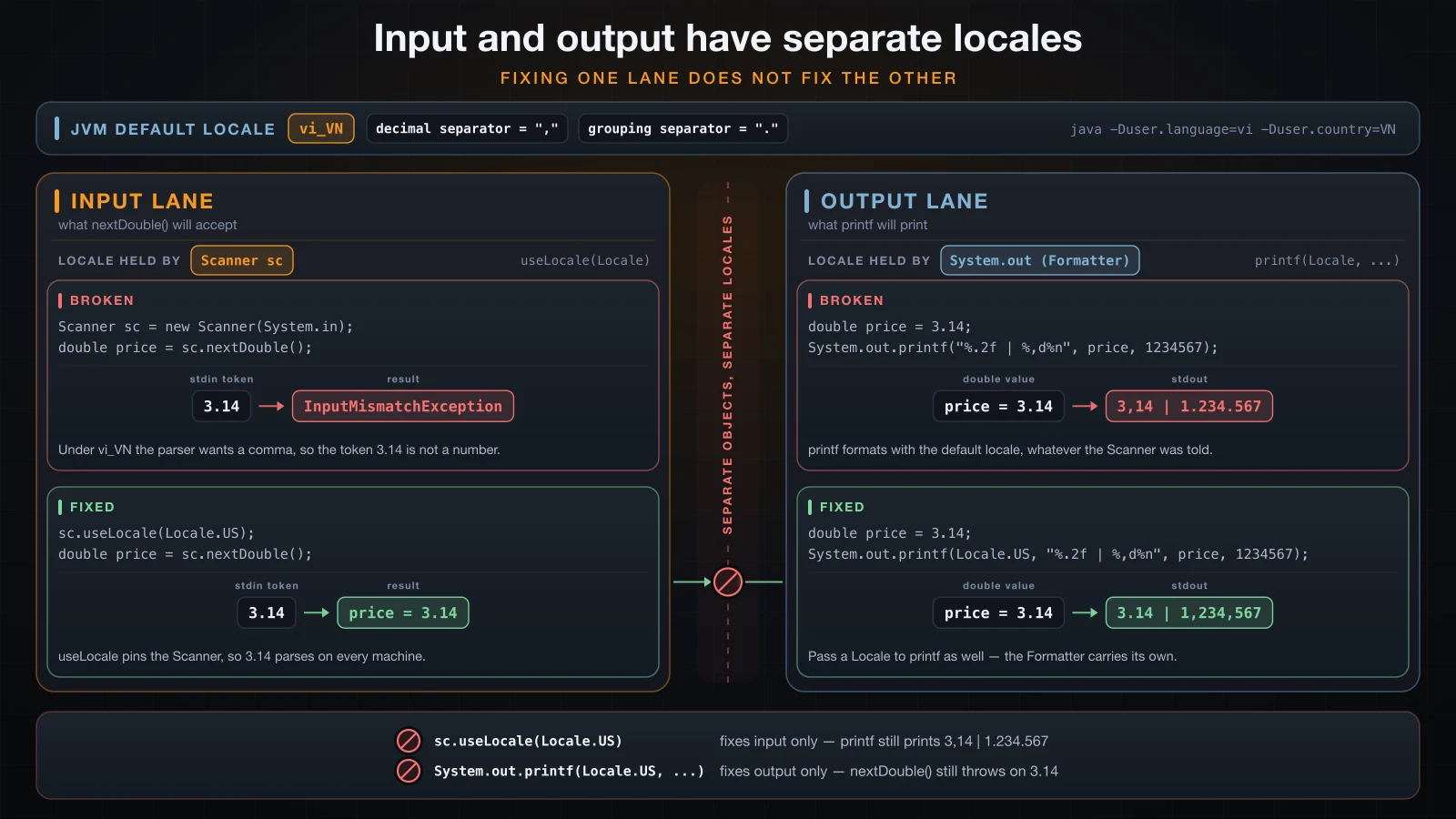
nextDouble() parses using the JVM's default locale, and half the world writes decimals with a
comma. This one is worth knowing precisely, because the same source file behaves differently on
two machines:
Scanner sc = new Scanner(System.in);
System.out.println("default locale: " + Locale.getDefault());
System.out.print("Price: ");
double price = sc.nextDouble();
System.out.println("price=" + price);
Under a German locale, the string 3.14 is not a number:
printf '3.14\n' | java -Duser.language=de -Duser.country=DE LocaleDemodefault locale: de_DE
Price: Exception in thread "main" java.util.InputMismatchException
at java.base/java.util.Scanner.throwFor(Scanner.java:947)
at java.base/java.util.Scanner.next(Scanner.java:1602)
at java.base/java.util.Scanner.nextDouble(Scanner.java:2573)
at LocaleDemo.main(LocaleDemo.java:9)And 3,14 is:
printf '3,14\n' | java -Duser.language=de -Duser.country=DE LocaleDemodefault locale: de_DE
Price: price=3.14The Vietnamese locale behaves the same way — vi_VN also uses the comma as the decimal
separator, so a program that works on a machine set to English fails on a machine set to
Vietnamese and vice versa. Pin the locale on the Scanner and the input format stops depending on
the machine:
Scanner sc = new Scanner(System.in);
sc.useLocale(Locale.US); // "3.14" now parses everywhereprintf '3.14\n' | java -Duser.language=vi -Duser.country=VN LocaleFixdefault locale: vi_VN
Price: price=3,14Read that output carefully, because it shows the half of the problem most articles miss.
Input parsing is now fixed — 3.14 was accepted under vi_VN. But the program printed
3,14, because printf formats with the default locale too, and useLocale only affects the
Scanner. Formatter and Scanner are separate objects with separate locales:
System.out.printf("default : %.2f | %,d%n", 3.14159, 1234567);
System.out.printf(Locale.US, "US : %.2f | %,d%n", 3.14159, 1234567);java -Duser.language=de -Duser.country=DE PrintfLocaledefault locale: de_DE
default : 3,14 | 1.234.567
US : 3.14 | 1,234,567So: scanner.useLocale(Locale.US) for input, and System.out.printf(Locale.US, ...) for output
whenever the exact digits matter. If instead you want the user's own conventions everywhere,
change nothing and let the default locale do its job — the mistake is assuming there is no locale
involved at all.
Reading several values from one line, and useDelimiter
Several tokens on one line need no special handling, because whitespace is already the delimiter.
Anything else does. useDelimiter replaces the whitespace pattern with a regular expression of
your own — here a comma, applied to a Scanner over a single line of text:
Scanner line = new Scanner(System.in);
String csv = line.nextLine();

Scanner fields = new Scanner(csv);
fields.useDelimiter(",");
while (fields.hasNext()) {
    System.out.println("[" + fields.next() + "]");
}
fields.close();printf 'An Nguyen,25,1250000\n' | java DelimiterDemo[An Nguyen]
[25]
[1250000]Note the trick in that code: read the line with nextLine(), then build a second Scanner over
the resulting String. A Scanner can wrap any string, not only System.in, and doing it this way
keeps the line boundary intact.
If you call useDelimiter(",") on the System.in Scanner directly, the line break stops being a
delimiter and becomes an ordinary character inside the last token:
Scanner sc = new Scanner(System.in);
sc.useDelimiter(",");                 // the newline is now just a character
while (sc.hasNext()) {
    String t = sc.next();
    System.out.println("[" + t + "] length=" + t.length());
}printf 'a,b,c\n' | java DelimiterTrap[a] length=1
[b] length=1
[c
] length=2The last token is c plus a line feed, length 2. Make the pattern accept both separators:
sc.useDelimiter("\\s*,\\s*|\\R"); // comma with optional spaces, or a line breakprintf 'a, b ,c\nd,e\n' | java DelimiterFix[a] length=1
[b] length=1
[c] length=1
[d] length=1
[e] length=1\R is the regex escape for any line break, so this handles both Unix and Windows files.
Closing a Scanner closes System.in
Scanner implements Closeable, so try-with-resources works and closes it for you:
try (Scanner sc = new Scanner(System.in)) {
    System.out.print("Name: ");
    String name = sc.nextLine();
    System.out.println("hello " + name);
}
Here is the nuance nobody mentions. Closing a Scanner closes the stream underneath it, and the
stream underneath is System.in — a JVM-wide object. Once it is closed, it stays closed for the
rest of the program:
Scanner first = new Scanner(System.in);
System.out.println("first: " + first.nextLine());
first.close();

Scanner second = new Scanner(System.in);   // System.in is already closed
System.out.println("second: " + second.nextLine());printf 'hello\nworld\n' | java CloseDemofirst: hello
Exception in thread "main" java.util.NoSuchElementException: No line found
at java.base/java.util.Scanner.nextLine(Scanner.java:1660)
at CloseDemo.main(CloseDemo.java:10)The second Scanner is a perfectly valid object reading a dead stream. The same thing happens with
the try-with-resources version — after the block, hasNextLine() on a fresh Scanner returns
false instead of waiting for input.
⚠️ The practical rule: create exactly one Scanner over
System.inper program, and do not close it. The JVM closesSystem.inat exit anyway. If a linter complains about an unclosed resource, close it once at the very end ofmain— never inside a helper method.
The rule is different for a Scanner over a String, or over a file: those own a resource that is
worth closing, and try-with-resources is right for them.
Scanner vs BufferedReader vs System.console()
Scanner | BufferedReader | System.console() | |
|---|---|---|---|
| Construction | new Scanner(System.in) | new BufferedReader(new InputStreamReader(System.in)) | System.console() |
| Parsing | built in: nextInt, nextDouble | none — you call Integer.parseInt | none |
| Reads a line | nextLine() | readLine() | readLine() |
| End of input | throws NoSuchElementException | returns null | returns null |
| Bad number | InputMismatchException (unchecked) | NumberFormatException where you parse | as you parse |
| Checked exceptions | none | readLine() throws IOException | none |
| Locale-dependent | yes, nextDouble and friends | no, you control parsing | no |
| Under an IDE or with piped input | works | works | returns null |
| Throughput | lowest | high | not for bulk input |
| Extras | useDelimiter, hasNextInt | just lines | readPassword() hides typing |
BufferedReader costs three more words to construct and gives you a much simpler model — one
method, one line, null at the end:
import java.io.BufferedReader;
import java.io.IOException;
import java.io.InputStreamReader;

public class ReaderDemo {
    public static void main(String[] args) throws IOException {
        BufferedReader in = new BufferedReader(new InputStreamReader(System.in));

        System.out.print("Age: ");
        int age = Integer.parseInt(in.readLine().trim());

        System.out.print("Name: ");
        String name = in.readLine();

        System.out.println("age=" + age);
        System.out.println("name=[" + name + "]");
    }
}printf '25\nAn Nguyen\n' | java ReaderDemoAge: Name: age=25
name=[An Nguyen]Notice there is no nextLine trap here, because there is only one way to read: whole lines. At end
of input readLine() returns null rather than throwing, so while ((line = in.readLine()) != null) is the standard loop.
System.console() is the odd one out. It gives you readPassword(), which reads without echoing
the characters, but it is only available when the program is attached to a real terminal. Piped
input, redirected input, and most IDE run windows all give you null:
printf 'An\nsecret\n' | java ConsoleDemoSystem.console() = null
no console: input is redirected, or running under an IDESo System.console() is for command-line tools that ask for a password, and never for a program
you want to test with a redirected input file.
On throughput: Scanner is slow, and it matters only when the input is large. Summing one million integers piped from a file, best of five runs after a warm-up, on this machine:
| Approach | Best time |
|---|---|
Scanner.hasNextInt() / nextInt() | 309 ms |
BufferedReader.readLine() + Integer.parseInt | 48 ms |
Roughly six times faster. The numbers are indicative and will differ on your hardware, but the ratio is why competitive programmers do not use Scanner. For a program that reads three values from a person, the difference is a rounding error and Scanner's convenience wins.
A complete example: prompt, validate, print a receipt
Everything above, in one program: line-based reading, validation with a retry, a guard against the input running out, and a locale-pinned formatted output.
import java.util.Locale;
import java.util.Scanner;

public class Receipt {
    public static void main(String[] args) {
        Scanner sc = new Scanner(System.in);

        String name = ask(sc, "Name: ");
        while (name.isEmpty()) {
            System.out.println("Name cannot be empty.");
            name = ask(sc, "Name: ");
        }

        int age;
        while (true) {
            try {
                age = Integer.parseInt(ask(sc, "Age: "));
                if (age > 0 && age < 130) break;
                System.out.println("Age must be between 1 and 129.");
            } catch (NumberFormatException e) {
                System.out.println("Age must be a whole number.");
            }
        }

        double price;
        while (true) {
            try {
                price = Double.parseDouble(ask(sc, "Price: "));
                if (price >= 0) break;
                System.out.println("Price cannot be negative.");
            } catch (NumberFormatException e) {
                System.out.println("Price must be a number, e.g. 12.50");
            }
        }

        System.out.println();
        System.out.printf(Locale.US, "%-12s %3s %12s%n", "CUSTOMER", "AGE", "PRICE");
        System.out.printf(Locale.US, "%-12s %3d %,12.2f%n", name, age, price);
    }

    private static String ask(Scanner sc, String prompt) {
        System.out.print(prompt);
        if (!sc.hasNextLine()) {
            System.out.println();
            System.out.println("Input ended unexpectedly.");
            System.exit(1);
        }
        return sc.nextLine().trim();
    }
}
Run it with input that gets three things wrong before getting them right:
printf 'An Nguyen\ntwenty\n25\nabc\n-5\n1250000.5\n' | java ReceiptName: Age: Age must be a whole number.
Age: Price: Price must be a number, e.g. 12.50
Price: Price cannot be negative.
Price:
CUSTOMER AGE PRICE
An Nguyen 25 1,250,000.50The typed values do not appear in that transcript because the input came from a pipe rather than
a keyboard, so nothing echoes them. What you see is the program's own output: the prompts, the
three rejections, and the final two lines aligned by %-12s %3d %,12.2f.
And when the input runs out halfway, the hasNextLine() guard in ask produces a message
instead of a stack trace:
printf 'An Nguyen\n' | java ReceiptName: Age:
Input ended unexpectedly.FAQ
Why does my program skip the input where I ask for a name?
It did not skip it. A previous nextInt(), nextDouble() or next() left the line break in the
buffer, and your nextLine() read the empty remainder of that earlier line. Either add a bare
sc.nextLine(); after the token call, or read everything with nextLine() and parse the numbers
with Integer.parseInt.
Can I create two Scanner objects over System.in?
You can, and they will fight over the same stream: each buffers ahead, so input read by one
disappears before the other sees it. And if either one is closed, System.in is closed for both.
Create one Scanner and pass it to whatever methods need it.
Why does nextDouble() fail on 3.14 on my machine?
Your JVM's default locale uses a comma as the decimal separator — vi_VN and de_DE both do.
Call sc.useLocale(Locale.US) right after constructing the Scanner if you want 3.14 to parse
regardless of the machine, and remember that printf formats with the default locale unless you
pass Locale.US as its first argument.
How do I keep reading until the user is done?
Loop on a hasNext* method rather than a count: while (sc.hasNextInt()) for numbers, or
while (sc.hasNextLine()) for lines. Both return false at end of input, which is Ctrl-D on
Linux and macOS, Ctrl-Z then Enter on Windows, or simply the end of a redirected file. Reading
past that point is what throws NoSuchElementException.
Is Scanner fast enough for competitive programming?
No. In the measurement above it took 309 ms to sum a million integers where BufferedReader took
48 ms, and problems with large input are usually designed with that gap in mind. Use
BufferedReader with your own parsing for those. For ordinary programs that read a handful of
values from a person, Scanner is the right tool.
Conclusion
Scanner's whole personality comes from one design decision: token methods and line methods read
the same stream in two incompatible ways. Once you can picture the cursor stopping just before
the line break, the empty string, the infinite loop and the NoSuchElementException all stop
being surprises. Read whole lines and parse them yourself, guard with hasNextLine(), pin the
locale when the digits matter, and do not close a Scanner over System.in.
Every program here ran straight through from top to bottom. The next article introduces the point
where a program starts making choices: conditional statements — if, else if, else, and the
switch statement.
![[Java Basics] Recursion in Java: How It Works and When to Use It](/images/blog/recursion-in-java-thumbnail.en.webp)
![[Java Basics] Methods in Java: Declaring and Calling Them](/images/blog/methods-in-java-thumbnail.en.webp)
![[Java Basics] Exception Handling in Java: try, catch, finally, throw and throws](/images/blog/exception-handling-thumbnail.en.webp)
![[Java Basics] HashMap in Java: put, get, merge and the hashCode/equals Contract](/images/blog/hashmap-thumbnail.en.webp)