Every program you have written so far has forgotten everything the moment it exited. A file is the cheapest way to fix that: a name on disk, a sequence of bytes, and two operations. Java gives you two different toolkits for it — the java.io classes that have been there since 1996, and the java.nio.file classes that replaced them for almost every day-to-day task — and this article covers both, because you will read old code that uses the first and you should write new code that uses the second.
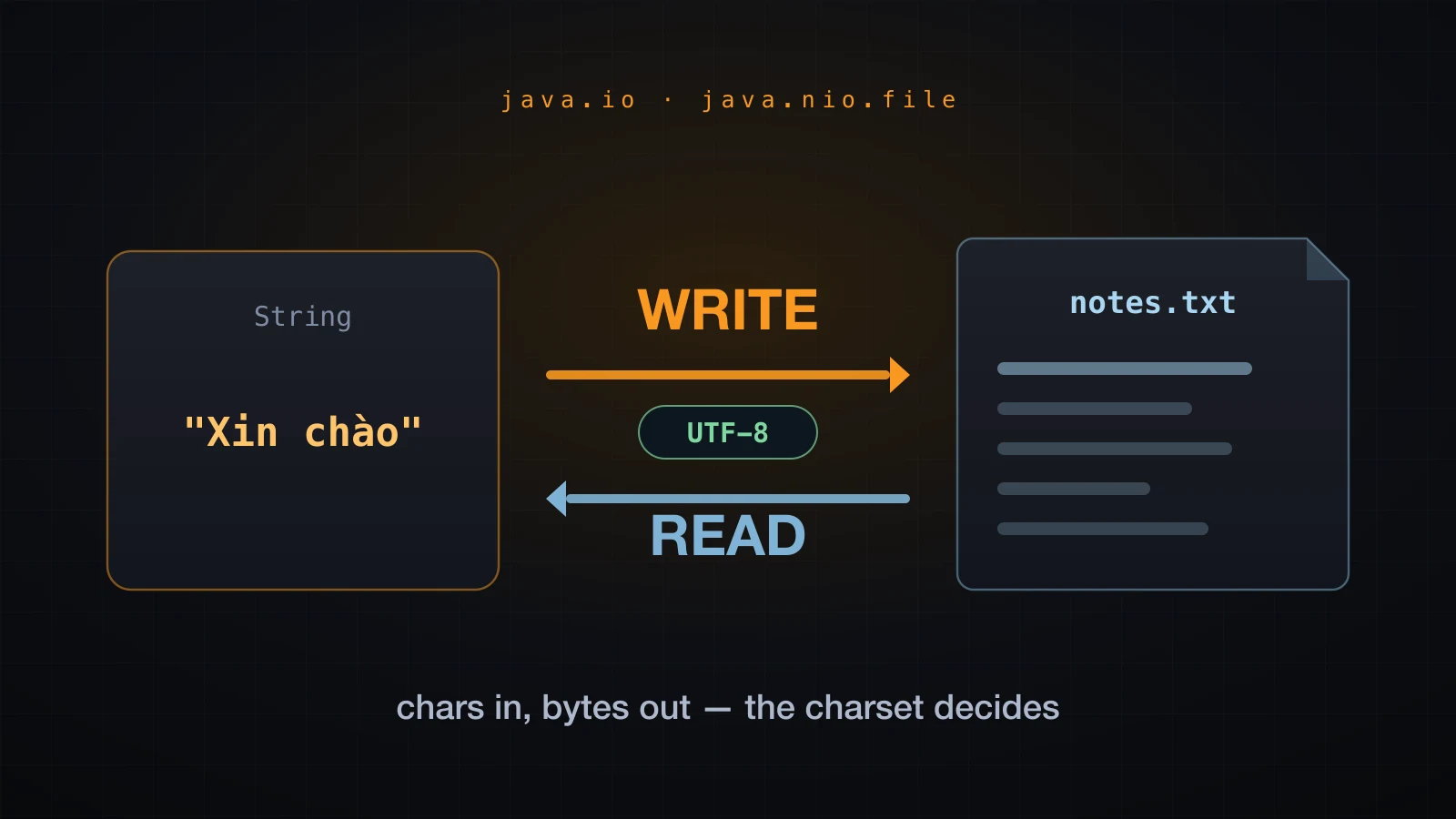
There is one idea underneath all of it that most tutorials skip. A file holds bytes; a String holds characters. Something has to translate between them, that something is a charset, and nothing inside the file records which charset was used. Get it wrong and your text comes back as garbage — silently, on some machines and not others. The examples use Java 21, with Java 17 shown alongside where the default charset makes the two behave differently.
Start with the choice of API, because it decides everything that follows.
Two APIs for the same job
java.io | java.nio.file | |
|---|---|---|
| Names a file with | String or File | Path |
| Opens a reader | new FileReader(name) | Files.newBufferedReader(path) |
| Reads it all | loop over readLine() | Files.readString(path) |
| Writes it all | loop over write() | Files.writeString(path, text) |
| Missing file | FileNotFoundException | NoSuchFileException |
| Bad bytes for the charset | silently replaced | MalformedInputException |
| Arrived in | Java 1.0 / 1.1 | Java 7, with the good parts in Java 8 and 11 |
Both are in the JDK, both work, and they interoperate: Path.of("a.txt").toFile() gives you a File, and file.toPath() goes the other way. The practical rule is that java.nio.file is what you should reach for today, and java.io is what you still need to recognise, because BufferedReader and BufferedWriter remain the right answer for streaming through a file that is too big to hold in memory — and Files hands you those very classes.
Writing a text file
The smallest program that puts text on disk:
import java.io.FileWriter;
import java.io.IOException;

public class WriteNotes {
    public static void main(String[] args) throws IOException {
        try (FileWriter writer = new FileWriter("notes.txt")) {
            writer.write("first line" + System.lineSeparator());
            writer.write("second line" + System.lineSeparator());
        }
        System.out.println("wrote notes.txt");
    }
}
Four things are happening here that are worth naming.
new FileWriter("notes.txt") creates the file if it does not exist and truncates it to zero bytes if it does. There is no confirmation prompt and no "are you sure" — the previous contents are gone the moment the constructor returns.
write takes a String, a char, or a char[]. It does not add a line ending, so you have to. System.lineSeparator() returns whatever the platform uses — a single newline character on macOS and Linux, a carriage return plus a newline on Windows. Writing the escape \n directly is fine too and is what most code does; the separator matters more when you read than when you write.
The try (...) is a try-with-resources statement, and it is the reason the file actually contains anything. It has its own section below.
throws IOException on main is the lazy option, acceptable in a throwaway program. Anything real catches it, and the section on missing files shows what you get.
Overwrite or append
The one-argument constructor truncates. The two-argument one takes a boolean that means append:
try (FileWriter w = new FileWriter("log.txt")) { w.write("run 1" + System.lineSeparator()); }
try (FileWriter w = new FileWriter("log.txt")) { w.write("run 2" + System.lineSeparator()); }
System.out.println("after two overwrites: " + Files.readAllLines(Path.of("log.txt")));

try (FileWriter w = new FileWriter("log.txt", true)) { w.write("run 3" + System.lineSeparator()); }
System.out.println("after one append: " + Files.readAllLines(Path.of("log.txt")));after two overwrites: [run 2]
after one append: [run 2, run 3]Two writes without the flag left one line. The flag is the entire difference between a log file and a file that only ever remembers the last run.
BufferedWriter on top
FileWriter has no method for writing a line ending, and it hands every call straight through to the operating system. Wrapping it fixes both:
try (BufferedWriter out = new BufferedWriter(new FileWriter("notes.txt"))) {
    out.write("first line");
    out.newLine();
    out.write("second line");
    out.newLine();
}
newLine() writes System.lineSeparator() for you. The buffering is the more important half, and the next-but-one section measures exactly what it buys.
Reading a text file
Reading is the mirror image, with one extra class in the stack:
import java.io.BufferedReader;
import java.io.FileReader;
import java.io.IOException;

public class ReadNotes {
    public static void main(String[] args) throws IOException {
        try (BufferedReader reader = new BufferedReader(new FileReader("notes.txt"))) {
            String line;
            int number = 1;
            while ((line = reader.readLine()) != null) {
                System.out.println(number + ": " + line);
                number++;
            }
        }
    }
}1: first line
2: second linereadLine() is the workhorse. It returns the next line without its line terminator, and it returns null — not an empty string — when the file is exhausted. That null is the loop condition, and the assignment-inside-the-condition idiom above is the standard way to write it.
FileReader on its own has no readLine(). It only has read(), which returns one character at a time as an int, and -1 at the end. That is almost never what you want, which is why FileReader is nearly always wrapped in a BufferedReader.
Collecting the lines into a list is a two-line change:
List<String> lines = new ArrayList<>();
try (BufferedReader reader = new BufferedReader(new FileReader("notes.txt"))) {
    String line;
    while ((line = reader.readLine()) != null) {
        lines.add(line);
    }
}
System.out.println(lines);
System.out.println("lines = " + lines.size());[first line, second line]
lines = 2What readLine does at the edges
Five files, written and read back to see exactly where the boundaries fall:
crlf.txt               13 bytes -> [alpha, beta]
no-trailing.txt        7 bytes -> [one, two]
trailing.txt           8 bytes -> [one, two]
blank-line.txt         5 bytes -> [a, , b]
empty.txt              0 bytes -> []
Read that table carefully, because four of the five rows contradict something people assume:
- Windows line endings just work.
crlf.txtholdsalphaandbetaseparated by a carriage return and a newline — 13 bytes for 9 characters of text — and comes back as two clean lines.readLine()treats a newline, a carriage return, or a carriage return followed by a newline as one terminator and strips all of it. - A missing final newline changes nothing.
no-trailing.txtandtrailing.txtdiffer by one byte and produce the same two lines. - A blank line is a real line. It comes back as an empty string, not as nothing.
- An empty file gives an empty list, and
readLine()returnsnullon the very first call.
Why buffering matters
"Use a BufferedReader because it is faster" is true and useless — it does not tell you what changes. The honest answer is that buffering changes how many times the layer underneath is called, so count them instead of timing them. Wrap the real sink in a subclass that increments a field:
class CountingWriter extends Writer {
    private final Writer target;
    int calls = 0;
    long chars = 0;

    CountingWriter(Writer target) { this.target = target; }

    @Override public void write(char[] cbuf, int off, int len) throws IOException {
        calls++;
        chars += len;
        target.write(cbuf, off, len);
    }
    @Override public void flush() throws IOException { target.flush(); }
    @Override public void close() throws IOException { target.close(); }
}
Writer funnels every write overload through write(char[], int, int), so that one counter sees everything. A CountingReader does the same for read(char[], int, int). Fifty thousand lines through each path:
FileWriter alone        calls=50000   chars=538890
BufferedWriter wrapping calls=66      chars=538890
same bytes on disk: true (538890 bytes)
read() char by char     calls=538891  chars=538890
BufferedReader.readLine calls=67      chars=538890  lines=50000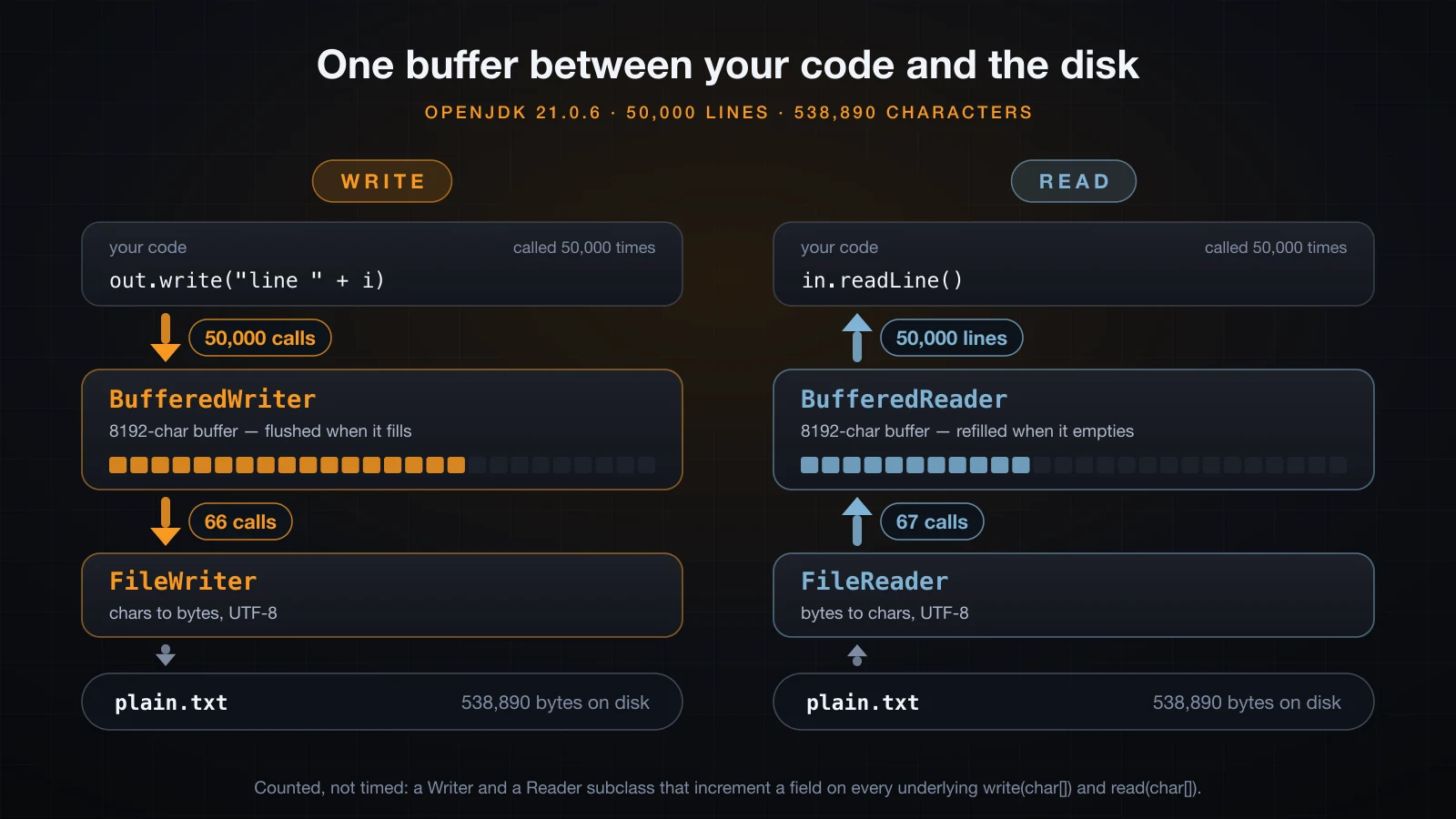
Fifty thousand calls became sixty-six. Both files are byte-for-byte identical at 538,890 bytes; the only thing that changed is how many times the layer below was disturbed. The arithmetic is exact: BufferedWriter's default buffer is 8192 characters, and 65 full buffers of 8192 plus a final partial 6,410 is 66.
The reading side is worse without a buffer, not better. Calling read() in a loop asked the underlying reader 538,891 times — once per character, plus one call that returns -1. Through a BufferedReader the same 50,000 lines took 67 calls. That is a factor of 8,000.
This is why BufferedWriter and BufferedReader exist and why almost every file example wraps. It is also why a buffered writer that is never closed loses your data:
BufferedWriter w = new BufferedWriter(new FileWriter("lost.txt"));
w.write("this line never reaches the disk");
// no close(), no flush()without close(): exists = true, size = 0
with close(): exists = true, size = 32The file was created. The characters are sitting in the buffer, and the buffer is discarded when the program exits. Close the writer — or let try-with-resources do it — and the identical string lands as 32 bytes.
try-with-resources
Every reader and writer holds an operating-system file descriptor, and the operating system has a limited supply. A resource you fail to close is leaked until the process ends. Before Java 7 the only correct way to guarantee the close was a finally block:
static String firstLine(String path) throws IOException {
    BufferedReader reader = null;
    try {
        reader = new BufferedReader(new FileReader(path));
        return reader.readLine();
    } finally {
        if (reader != null) {
            try {
                reader.close();
            } catch (IOException ignored) {
                // swallowed, because close() can throw too
            }
        }
    }
}
Count the ceremony: a null initialisation outside the block, a null check inside finally, and a second try/catch around close() because closing can itself fail — and if it does, that failure would otherwise replace the real one. Two resources means nesting the whole shape twice. Three means three.
Try-with-resources compresses all of it into the header of the try:
static String firstLine(String path) throws IOException {
    try (BufferedReader reader = new BufferedReader(new FileReader(path))) {
        return reader.readLine();
    }
}
Anything that implements AutoCloseable can go there, separated by semicolons. The compiler generates the closes.
Resources close in reverse order
The ordering is not an implementation detail — it is specified, and it is the only order that can be correct, because a resource declared later may depend on one declared earlier. Three resources that announce themselves:
class Noisy implements Closeable {
    private final String name;
    Noisy(String name) { this.name = name; System.out.println("open  " + name); }
    void use() { System.out.println("use   " + name); }
    @Override public void close() { System.out.println("close " + name); }
}

try (Noisy a = new Noisy("a");
     Noisy b = new Noisy("b");
     Noisy c = new Noisy("c")) {
    a.use(); b.use(); c.use();
}open a
open b
open c
use a
use b
use c
close c
close b
close a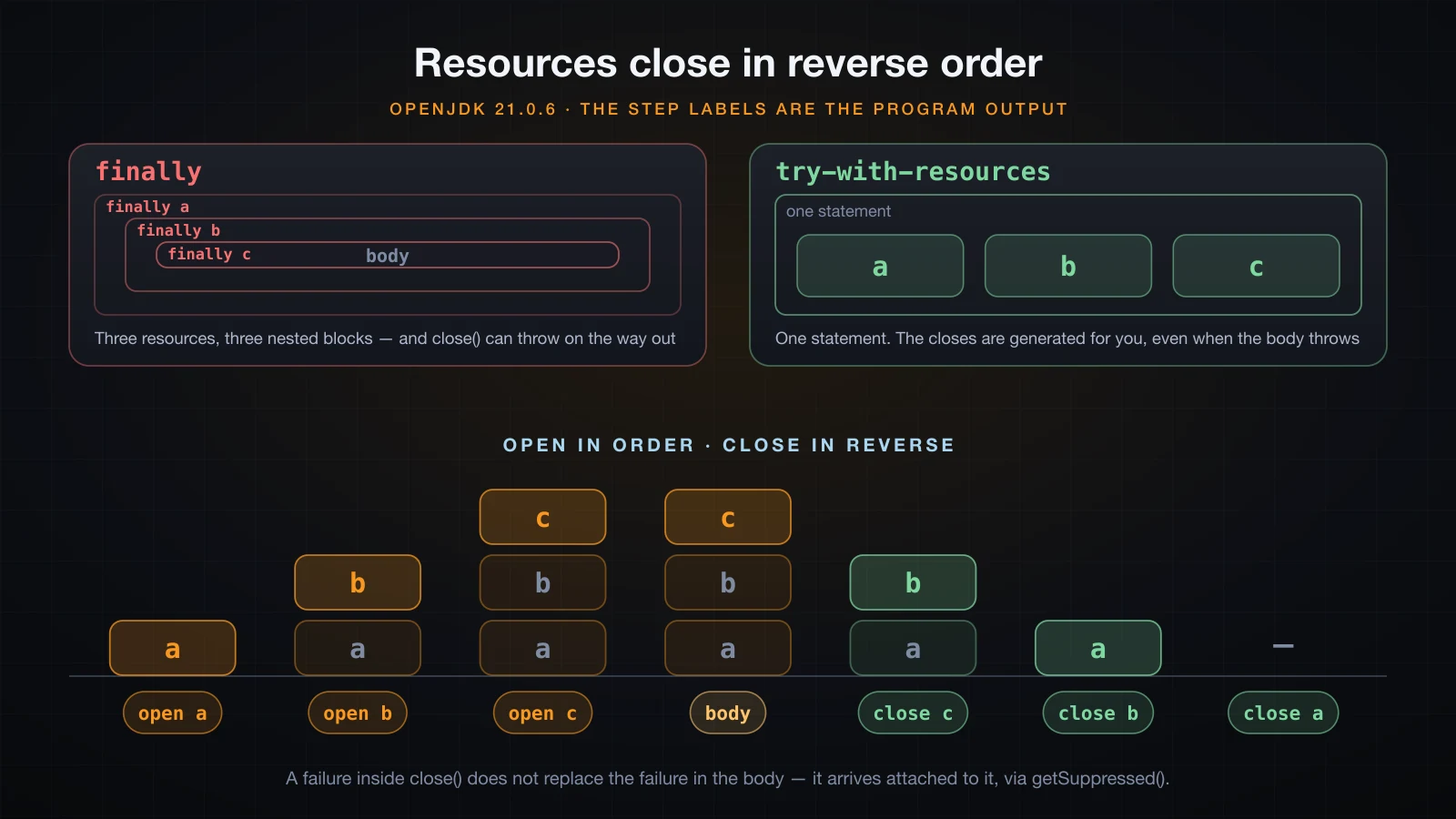
That is exactly why new BufferedReader(new FileReader(path)) needs only the outer object in the header: closing the BufferedReader closes what it wraps, in the right order, without you writing anything.
Now throw from the body:
open  a
open  b
close b
close a
caught boom
Both resources closed before the exception left the block. This is the guarantee: the close happens on the normal path, on the exception path, and on a return from inside the block.
When close itself fails
The case the finally version handled badly. A resource whose body throws and whose close() throws:
try (Exploding e = new Exploding()) {
    e.use();                                   // throws IllegalStateException
} catch (Exception e) {
    System.out.println("caught      " + e);
    for (Throwable s : e.getSuppressed()) {
        System.out.println("suppressed  " + s);
    }
}caught java.lang.IllegalStateException: body failed
suppressed java.io.IOException: close failedThe failure from the body wins, because it is the one that describes what actually went wrong. The failure from close() is not discarded and not allowed to mask the first one — it is attached to it, reachable through getSuppressed(), and printed as a Suppressed: line in the stack trace. The hand-written finally version above had to choose one and throw away the other.
One more convenience, from Java 9: if you already hold the resource in an effectively-final variable, you can name it directly.
BufferedReader r = new BufferedReader(new FileReader("notes.txt"));
try (r) {
    System.out.println(r.readLine());
}
After the block the resource is closed but the variable is still in scope, so touching it fails:
java.io.IOException: Stream closedThe modern API: Path and Files
java.nio.file gives you a proper type for a location and a class full of one-line operations. This is what to write today.
Path file = Path.of("data", "students.txt");
Files.createDirectories(file.getParent());

Files.writeString(file, "An,8.5\nBinh,6.0\nChi,9.25\n", StandardCharsets.UTF_8);
Files.writeString(file, "Dung,7.75\n", StandardCharsets.UTF_8, StandardOpenOption.APPEND);

String whole = Files.readString(file, StandardCharsets.UTF_8);
List<String> lines = Files.readAllLines(file, StandardCharsets.UTF_8);size on disk = 35
readString = An,8.5\nBinh,6.0\nChi,9.25\nDung,7.75\n
readAllLines = [An,8.5, Binh,6.0, Chi,9.25, Dung,7.75]
line count = 4(The newlines in readString are printed as the two-character escape so the single value stays on one line.)
| Call | Gives you | Since | Use when |
|---|---|---|---|
Files.readString(path, cs) | one String | 11 | the file is small and you want all of it |
Files.readAllLines(path, cs) | List<String> | 7 | the file is small and you want the lines |
Files.lines(path, cs) | Stream<String> | 8 | the file is large — lines are read lazily |
Files.writeString(path, s, cs, opts) | writes a String | 11 | you already have the whole text |
Files.write(path, lines, cs, opts) | writes a collection | 7 | you have a List<String> |
Files.newBufferedReader(path, cs) | BufferedReader | 7 | you want to stream and control the loop |
Files.newBufferedWriter(path, cs, opts) | BufferedWriter | 7 | you want to stream out with newLine() |
Files.lines is the one that needs care: it returns a Stream that holds the file open, so it belongs in a try-with-resources like any other resource.
try (Stream<String> s = Files.lines(file, StandardCharsets.UTF_8)) {
    double avg = s.map(l -> l.split(",")[1])
                  .mapToDouble(Double::parseDouble)
                  .average()
                  .orElse(0);
    System.out.println("average = " + avg);
}average = 7.875The choice between readAllLines and lines is about memory, not style. readAllLines builds the whole list before you see a single element; on a gigabyte log file that is a heap you do not have. lines reads one line at a time and lets the rest stay on disk.
The rest of Files covers the questions you would otherwise write five lines for: Files.exists, Files.notExists, Files.isRegularFile, Files.isReadable, Files.size, Files.createDirectories, Files.copy, Files.move, and Files.deleteIfExists, which returns true the first time and false the second.
Relative paths and the working directory
Path.of("data/notes.txt") is a relative path. It is not resolved when you create it — it is resolved against the process's current working directory whenever it is actually used. That directory is captured when the JVM starts, and it is the directory you ran java from, not the directory the .class file lives in.
System.out.println("user.dir       = " + System.getProperty("user.dir"));
Path rel = Path.of("data/notes.txt");
System.out.println("isAbsolute     = " + rel.isAbsolute());
System.out.println("toAbsolutePath = " + rel.toAbsolutePath());
System.out.println("getFileName    = " + rel.getFileName());
System.out.println("getParent      = " + rel.getParent());
System.out.println("resolve        = " + Path.of("/var/app").resolve("conf/app.properties"));
System.out.println("normalize = " + Path.of("data/../data/./notes.txt").normalize());user.dir = /private/tmp/claude-501/fileio35
isAbsolute = false
toAbsolutePath = /private/tmp/claude-501/fileio35/data/notes.txt
getFileName = notes.txt
getParent = data
resolve = /var/app/conf/app.properties
normalize = data/notes.txtRun the identical program from a subdirectory and only one thing changes:
user.dir       = /private/tmp/claude-501/fileio35/sub
toAbsolutePath = /private/tmp/claude-501/fileio35/sub/data/notes.txt
This is the single most common reason a beginner's file "disappears". The program wrote it correctly, to a different directory, because it was launched from somewhere else — an IDE typically uses the project root while a terminal uses wherever you happen to be standing. Print Path.of(name).toAbsolutePath() once and the mystery ends.
⚠️
System.setProperty("user.dir", "/tmp")does not move the working directory. The default filesystem captured the original value at startup, so after setting the property,Path.of("x.txt").toAbsolutePath()still resolved against the old directory in the run above. There is no supported way to change a running JVM's working directory; build an absolutePathinstead.
Absolute paths are portable in the opposite direction: Path.of("/etc/hosts") means the same thing whoever runs it, and nothing about the launch directory can move it. The usual compromise is to take a base directory from configuration and resolve relative names against it.
What happens when the file is not there
Reading a file that does not exist is the failure you will hit most, and the two APIs report it differently. Here are both messages:
new FileReader(missing)         java.io.FileNotFoundException: nope.txt (No such file or directory)
Files.readString(missing)       java.nio.file.NoSuchFileException: nope.txt
Files.readAllLines(missing)     java.nio.file.NoSuchFileException: nope.txt
Files.lines(missing)            java.nio.file.NoSuchFileException: nope.txt
new FileWriter(missing dir)     java.io.FileNotFoundException: no/such/dir/out.txt (No such file or directory)
Files.writeString(missing dir)  java.nio.file.NoSuchFileException: no/such/dir/out.txt
new FileReader(directory)       java.io.FileNotFoundException: adir (Is a directory)
Files.readString(directory)     java.io.IOException: Is a directory
Note the shape of each message. FileNotFoundException carries the path and the operating system's own explanation in parentheses, which is why the same exception type covers "not there", "is a directory" and, as it turns out, "permission denied". NoSuchFileException carries only the path — getMessage() on it returns the filename and nothing else, which surprises people who print e.getMessage() and get a bare config.txt with no clue what went wrong. Print the exception itself, or e.toString(), and the class name supplies the meaning.
The full stack traces, so you can recognise them:
Exception in thread "main" java.io.FileNotFoundException: config.txt (No such file or directory)
	at java.base/java.io.FileInputStream.open0(Native Method)
	at java.base/java.io.FileInputStream.open(FileInputStream.java:213)
	at java.base/java.io.FileInputStream.<init>(FileInputStream.java:152)
	at java.base/java.io.FileInputStream.<init>(FileInputStream.java:106)
	at java.base/java.io.FileReader.<init>(FileReader.java:60)
at Trace.main(Trace.java:4)Exception in thread "main" java.nio.file.NoSuchFileException: config.txt
at java.base/sun.nio.fs.UnixException.translateToIOException(UnixException.java:92)
at java.base/sun.nio.fs.UnixException.rethrowAsIOException(UnixException.java:106)
at java.base/sun.nio.fs.UnixException.rethrowAsIOException(UnixException.java:111)
at java.base/sun.nio.fs.UnixFileSystemProvider.newByteChannel(UnixFileSystemProvider.java:261)
at java.base/java.nio.file.Files.newByteChannel(Files.java:380)
at java.base/java.nio.file.Files.newByteChannel(Files.java:432)
at java.base/java.nio.file.Files.readAllBytes(Files.java:3281)
at java.base/java.nio.file.Files.readString(Files.java:3359)
at java.base/java.nio.file.Files.readString(Files.java:3318)
at Trace2.main(Trace2.java:4)Both classes extend IOException, so one catch (IOException e) covers whichever API you used:
java.io.FileNotFoundException           -> java.io.IOException
java.nio.file.NoSuchFileException       -> java.nio.file.FileSystemException -> java.io.IOException
java.nio.file.AccessDeniedException     -> java.nio.file.FileSystemException -> java.io.IOException
java.nio.charset.MalformedInputException -> java.nio.charset.CharacterCodingException -> java.io.IOException
Permission failures show the naming problem at its worst. Writing into a directory with the write bit removed:
NIO : java.nio.file.AccessDeniedException: data/x.txt
io  : java.io.FileNotFoundException: data/y.txt (Permission denied)
A FileNotFoundException whose message says the file was found and refused. AccessDeniedException says what happened in its name — one more reason to prefer the newer API.
Two habits make all of this manageable. Check first when a missing file is normal — Files.notExists(path) and return an empty list, rather than catching an exception to implement a default. Catch and report when it is not — and put the absolute path in the message, because "could not read config.txt" without a directory is not a bug report.
Character encoding
This is the part that breaks in production and never on your machine. A file is bytes. A String is characters. The charset is the mapping, and nothing in a plain text file records which one was used — no header, no magic number, nothing. The reader has to be told, or it guesses.
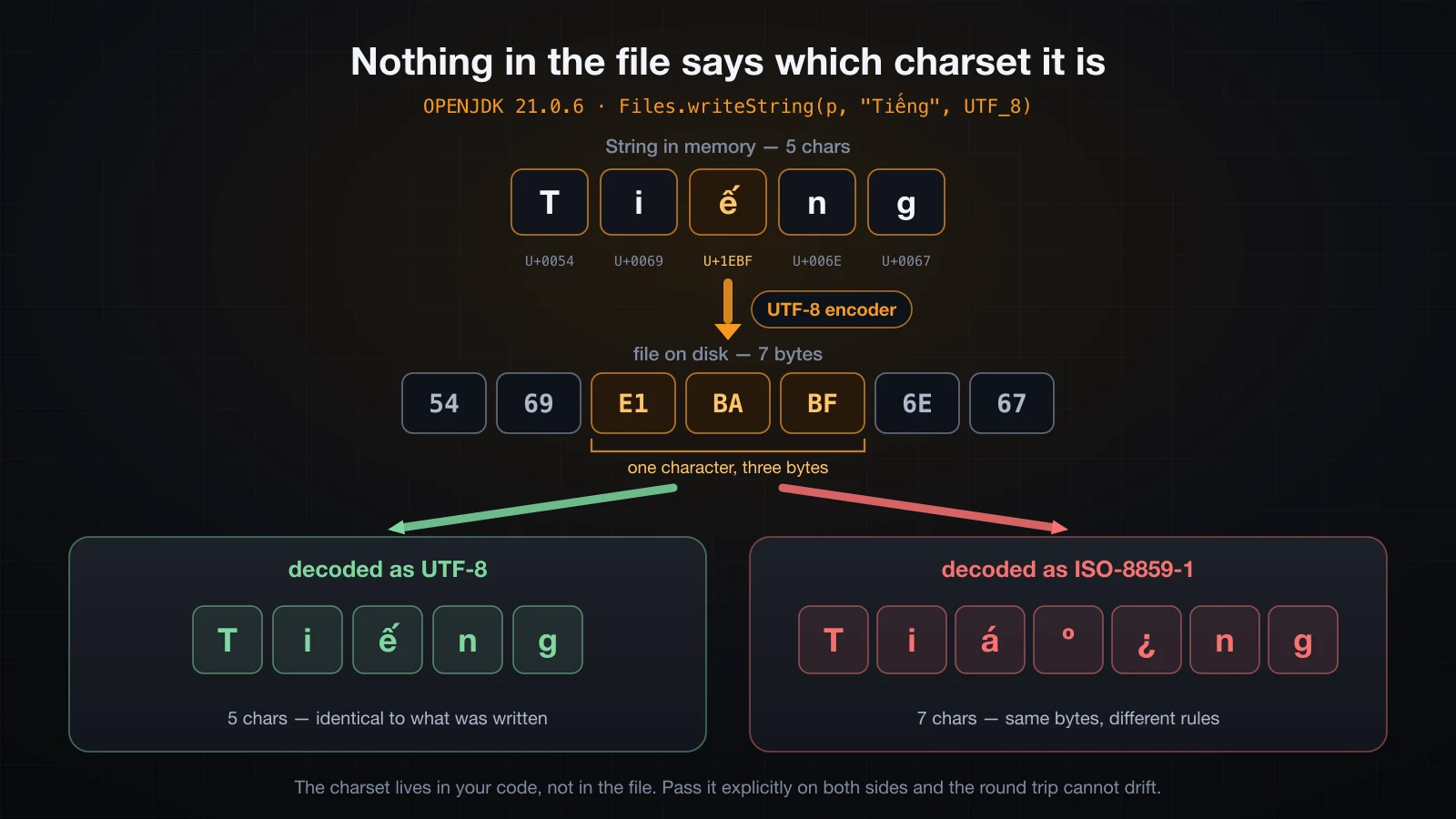
Take the five-character string Tiếng. Encoded as UTF-8 it is seven bytes, because ế (U+1EBF) needs three of them:
chars = 5 : Tiếng
U+0054 U+0069 U+1EBF U+006E U+0067
bytes = 7 : 54 69 E1 BA BF 6E 67
Decode those same seven bytes as ISO-8859-1 — a charset where every byte is exactly one character — and you get seven characters instead of five, each individually valid and collectively meaningless. That is mojibake, and it is not corruption: every byte survived. Only the rules for reading them changed.
What Java actually does on JDK 21
Java 18 shipped JEP 400, which made UTF-8 the default charset for the standard Java APIs on every platform. Before that, FileReader and FileWriter used the platform default, which came from the operating system's locale. Here is what the running JVM reports:
System.out.println("java.version             = " + System.getProperty("java.version"));
System.out.println("Charset.defaultCharset() = " + Charset.defaultCharset());
System.out.println("file.encoding            = " + System.getProperty("file.encoding"));
System.out.println("native.encoding          = " + System.getProperty("native.encoding"));

Path p = Path.of("vn.txt");
Files.writeString(p, "Xin chào, Tiếng Việt", StandardCharsets.UTF_8);
System.out.println("chars written            = " + "Xin chào, Tiếng Việt".length());
System.out.println("bytes on disk            = " + Files.size(p));

try (BufferedReader r = new BufferedReader(new FileReader("vn.txt"))) {
    System.out.println("FileReader (no charset)  = " + r.readLine());
}
System.out.println("Files.readString(UTF_8) = " + Files.readString(p, StandardCharsets.UTF_8));java.version = 21.0.6
Charset.defaultCharset() = UTF-8
file.encoding = UTF-8
native.encoding = UTF-8
chars written = 20
bytes on disk = 25
FileReader (no charset) = Xin chào, Tiếng Việt
Files.readString(UTF_8) = Xin chào, Tiếng ViệtTwenty characters, twenty-five bytes, and a clean round trip through a FileReader that was given no charset at all. native.encoding, added in Java 17, is the separate property that still reports the operating system's locale — the JDK keeps it so code that genuinely needs the platform value can ask for it.
The difference between the two properties only shows up when the locale is not UTF-8. Running the same class under LANG=C:
[JDK 21.0.6, LANG=C]
Charset.defaultCharset() = UTF-8
native.encoding          = US-ASCII
native.encoding follows the locale down to US-ASCII; Charset.defaultCharset() does not budge. That is JEP 400 working.
The same program on Java 17
Now the reason this article insists on the explicit charset. The identical class, compiled with --release 17 and run on JDK 17, writing Xin chào with a plain FileWriter:
[JDK 21.0.6, LANG=C]
java.version = 21.0.6   defaultCharset = UTF-8   native.encoding = US-ASCII
bytes written = 9 : 58 69 6E 20 63 68 C3 A0 6F
read back     = Xin chào

[JDK 17.0.14, LANG=C]
java.version = 17.0.14   defaultCharset = US-ASCII   native.encoding = US-ASCII
bytes written = 8 : 58 69 6E 20 63 68 3F 6F
read back     = Xin ch?o
Eight bytes instead of nine. Byte 3F is a question mark: the à was not mangled on the way back, it was destroyed on the way out. US-ASCII has no representation for it, so the encoder substituted ? and the original character is unrecoverable from that file. No exception was thrown. The program printed nothing unusual. The data is simply gone.
Add the charset — new FileWriter(file, StandardCharsets.UTF_8), available since Java 11 — and the same JDK 17 run writes nine correct bytes and reads back Xin chào. The explicit charset is the habit that survives every JDK version, including the ones you did not choose to deploy on.
Producing the failure on purpose
Write UTF-8, then deliberately read it as ISO-8859-1:
Path p = Path.of("thanks.txt");
Files.writeString(p, "Cảm ơn bạn", StandardCharsets.UTF_8);

try (InputStream in = new FileInputStream("thanks.txt");
     BufferedReader reader = new BufferedReader(
             new InputStreamReader(in, StandardCharsets.ISO_8859_1))) {
    System.out.println("read as ISO-8859-1 = " + reader.readLine());
}
System.out.println("read as UTF-8 = " + Files.readString(p, StandardCharsets.UTF_8));written as UTF-8 = Cảm ơn bạn (15 bytes)
read as ISO-8859-1 = Cảm ơn bạn
read as UTF-8 = Cảm ơn bạnCảm Æ¡n bạn is exactly what the program prints. Ten characters became fifteen — one per byte — and the á, º, £, Æ pattern is the fingerprint of UTF-8 read as a single-byte charset — once you have seen it you will diagnose it on sight. It gets worse with other Vietnamese letters: the ệ in Việt encodes as E1 BB 87, and byte 87 in ISO-8859-1 is an invisible C1 control character, so part of the damage does not even show up on screen.
Failing loudly instead
The two APIs disagree about what to do with bytes that are not valid in the charset you asked for. Write Xin chào as ISO-8859-1, where à is the single byte E0 and not a legal standalone UTF-8 sequence, then read that file back as UTF-8:
Files.readString   java.nio.charset.MalformedInputException: Input length = 3
Files.readAllLines java.nio.charset.MalformedInputException: Input length = 1
FileReader         Xin ch�o
code points        U+0058 U+0069 U+006E U+0020 U+0063 U+0068 U+FFFD U+006F
Files.readString refuses. FileReader accepts it and silently substitutes U+FFFD, the replacement character, which means the corruption travels downstream into your database instead of stopping at the read. If you would rather know, use the Files methods; if you must use a Reader, configure a CharsetDecoder with CodingErrorAction.REPORT.
One last trap worth separating out: the console has its own encoding. On JDK 21 under LANG=C, a program that reads a file perfectly still prints Xin ch?o, because stdout.encoding was US-ASCII — the file was fine and the terminal was not. Check the bytes on disk with hexdump -C before you blame the file.
Putting it together
Everything above, in the shape you would actually write it:
import java.io.BufferedWriter;
import java.io.IOException;
import java.nio.charset.StandardCharsets;
import java.nio.file.Files;
import java.nio.file.Path;
import java.util.ArrayList;
import java.util.List;

public class StudentFile {
    private static final Path FILE = Path.of("data", "students.csv");

    static void save(List<String> rows) throws IOException {
        Files.createDirectories(FILE.getParent());
        try (BufferedWriter out = Files.newBufferedWriter(FILE, StandardCharsets.UTF_8)) {
            for (String row : rows) {
                out.write(row);
                out.newLine();
            }
        }
    }

    static List<String> load() throws IOException {
        if (Files.notExists(FILE)) {
            return new ArrayList<>();
        }
        return Files.readAllLines(FILE, StandardCharsets.UTF_8);
    }

    public static void main(String[] args) {
        try {
            save(List.of("An,8.5", "Bình,6.0", "Chi,9.25"));
            List<String> rows = load();
            System.out.println("loaded " + rows.size() + " rows from " + FILE.toAbsolutePath());
            double total = 0;
            for (String row : rows) {
                String[] parts = row.split(",");
                System.out.printf("%-8s %s%n", parts[0], parts[1]);
                total += Double.parseDouble(parts[1]);
            }
            System.out.printf("average  %.2f%n", total / rows.size());
        } catch (IOException e) {
            System.out.println("could not use " + FILE.toAbsolutePath() + ": " + e);
        }
    }
}loaded 3 rows from /private/tmp/claude-501/fileio35/demo/data/students.csv
An 8.5
Bình 6.0
Chi 9.25
average 7.92Six decisions in thirty lines, all of them from the sections above: an explicit Path constant so the location is stated once, createDirectories so the first run works on a clean checkout, an explicit charset on both sides, newBufferedWriter for the buffered write and newLine() for the separator, notExists returning an empty list because a missing file on first run is normal rather than exceptional, and one catch (IOException) that prints the absolute path.
Remove the write permission from the directory and delete the file, and the catch does its job:
could not use /private/tmp/claude-501/fileio35/demo/data/students.csv: java.nio.file.AccessDeniedException: data/students.csvNotice that the exception's own message says data/students.csv — the relative path — while the line you wrote says where it really was. That is the whole argument for putting toAbsolutePath() in your error messages.
Common mistakes
Forgetting to close a writer. The file is created, the file is empty, and there is no error. Measured above: 0 bytes without close(), 32 bytes with it. Use try-with-resources and it cannot happen.
Assuming a relative path is relative to your source file. It is relative to the process working directory, which is wherever java was launched. The same program run from a subdirectory wrote to a different place in the run above. Print toAbsolutePath() when the file "vanishes".
Reading a file with FileReader.read() in a loop. 538,891 calls to do what a BufferedReader did in 67. Wrap it.
Relying on the default charset. It is UTF-8 on Java 18 and later, and the platform locale before that — the same source file wrote nine bytes on JDK 21 and eight on JDK 17 under LANG=C, destroying a character. Pass StandardCharsets.UTF_8 explicitly on every read and every write.
Treating NoSuchFileException and FileNotFoundException as unrelated. Both extend IOException, so one catch handles both. But NoSuchFileException.getMessage() returns only the path, so logging e.getMessage() alone loses the reason.
Using Files.readAllLines on a large file. It materialises every line before returning. Use Files.lines and keep it in a try-with-resources, because the stream holds the file open.
Catching IOException and printing "file error". The exception already knows the path and the cause. Print it, add the absolute path, and let it say what happened.
Expecting \n to survive as the last line. A file with and without a trailing newline produced the identical list above. If you need to know whether the file ended cleanly, read the bytes.
FAQ
Should I use FileReader or Files.readString?
Files.readString for a small file you want in one piece, and Files.newBufferedReader when you want to loop. Reach for new FileReader(...) only in code that already uses java.io. The Files methods take a charset argument in the same call, report a missing file as NoSuchFileException rather than a FileNotFoundException whose name also covers permission denials, and throw on undecodable bytes instead of quietly substituting U+FFFD.
Do I still need the charset argument on Java 21?
Yes. On Java 18 and later the default is UTF-8 everywhere, so omitting it happens to work — until the code is compiled for or run on Java 17, where the default follows the platform locale. The measured cost of that was a character silently replaced by ? at write time, unrecoverable. It is one extra argument and it removes an entire class of bug.
How big is the buffer, and should I change it?
BufferedReader and BufferedWriter default to 8192 characters, which is why 538,890 characters needed 66 flushes. Both constructors take an explicit size, but changing it is almost never the bottleneck — the win is between "no buffer" and "any buffer", not between 8 KB and 64 KB. Leave it alone unless a profiler tells you otherwise.
What is the difference between flush and close?
flush() pushes whatever is in the buffer to the layer below and leaves the writer usable. close() flushes and then releases the file descriptor, after which any further call throws java.io.IOException: Stream closed. Try-with-resources calls close(), so you rarely call either by hand; flush() earns its place when a long-running process must make partial output visible before it finishes.
Why does my file end up somewhere I did not expect?
Because a relative path resolves against the JVM's working directory, and your IDE and your terminal usually disagree about what that is. Print Path.of(name).toAbsolutePath() to find out where it actually went. Setting the user.dir system property will not move it — the default filesystem captured the value at startup.
How do I read a file that a Windows machine wrote?
Just read it. readLine() and Files.readAllLines both treat a carriage return, a newline, or the pair as one terminator and strip it, so a 13-byte CRLF file came back as two clean lines above. The encoding is the real question: a file saved by a Windows editor may be in windows-1252 or UTF-16 rather than UTF-8, in which case pass that charset explicitly, or convert the file once.
Conclusion
A text file is bytes; a String is characters; a charset is the mapping between them, and it is not stored anywhere in the file. FileWriter truncates unless you pass true for append, readLine() strips whatever line terminator it finds and returns null at the end, and neither class is much use unwrapped: buffering turned 50,000 write calls into 66 and 538,891 read calls into 67, on byte-identical output. Try-with-resources closes every resource in reverse declaration order, on the normal path and the exception path alike, and attaches a failure from close() to the real exception through getSuppressed() instead of losing one of them. For new code use Path and Files — readString, writeString, readAllLines, lines, newBufferedReader — which report a missing file as NoSuchFileException, a permission failure as AccessDeniedException, and undecodable bytes as MalformedInputException rather than silently substituting U+FFFD. And pass the charset explicitly every time: the same code that wrote nine correct bytes on JDK 21 wrote eight and destroyed a character on JDK 17 under a non-UTF-8 locale.
The next article puts all of it to work in a real program: a student manager you drive from the console, holding records in memory, printing a menu, adding and searching and deleting, and saving everything to a file so the data is still there the next time you run it.
![[Java Basics] The this, static and final Keywords in Java](/images/blog/this-static-final-thumbnail.en.webp)
![[Java Basics] Nested Loops, break and continue in Java](/images/blog/nested-loops-thumbnail.en.webp)
![[Java Basics] Fields, Methods and Constructors in Java](/images/blog/constructors-thumbnail.en.webp)
![[Java Basics] Multidimensional and Jagged Arrays in Java](/images/blog/multidimensional-arrays-thumbnail.en.webp)