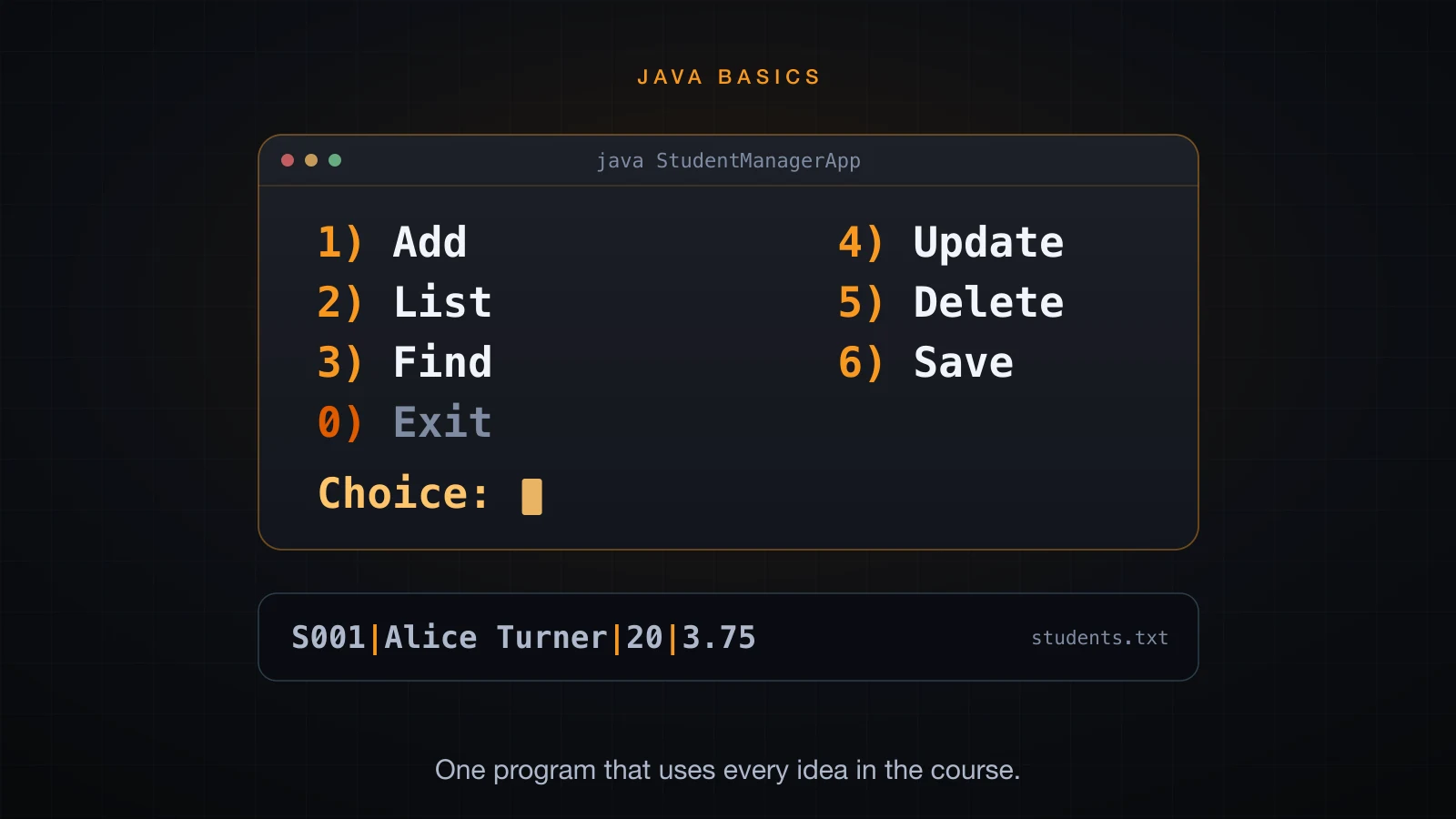
Thirty-five articles have each taught one idea. This one puts them together into a program you can run: a console application that keeps a list of students, validates everything the user types, reports errors without dying, and saves its data to a text file so the next run picks up where the last one left off.
Nothing here is new. Classes, constructors, encapsulation, interfaces, exceptions, ArrayList,
HashMap, Scanner and file I/O have all been covered. What is new is the assembly: which
class owns which decision, where a check belongs, and what happens at the seams. That is the
part a course of isolated examples never shows, and it is the part that makes the difference
between code that works on the happy path and code that survives a user.
What we are building
Here is the finished program running. This is a real terminal session, captured from the program itself — the values after each prompt are what was typed:
=== Student Manager ===
No data in students.txt yet.

1) Add  2) List  3) Find  4) Update  5) Delete  6) Save  0) Exit
Choice: 1
Id: S001
Name: Alice Turner
Age: 20
GPA: 3.75
Added: S001   Alice Turner            20  3.75

1) Add  2) List  3) Find  4) Update  5) Delete  6) Save  0) Exit
Choice: 1
Id: S002
Name: Ben Carter
Age: 22
GPA: 3.10
Added: S002   Ben Carter              22  3.10

1) Add  2) List  3) Find  4) Update  5) Delete  6) Save  0) Exit
Choice: 1
Id: S003
Name: Chloe Adams
Age: 19
GPA: 3.92
Added: S003   Chloe Adams             19  3.92

1) Add  2) List  3) Find  4) Update  5) Delete  6) Save  0) Exit
Choice: 1
Id: S001
Name: Alice T.
Age: 21
GPA: 3.5
Error: student id S001 already exists

1) Add  2) List  3) Find  4) Update  5) Delete  6) Save  0) Exit
Choice: 1
Id: S004
Name: Dan Miller
Age: twenty
GPA: 3.0
Error: age: "twenty" is not a whole number

1) Add  2) List  3) Find  4) Update  5) Delete  6) Save  0) Exit
Choice: 2
ID     NAME                   AGE  GPA
S001   Alice Turner            20  3.75
S002   Ben Carter              22  3.10
S003   Chloe Adams             19  3.92
3 student(s)

1) Add  2) List  3) Find  4) Update  5) Delete  6) Save  0) Exit
Choice: 3
Id: S002
Found: S002   Ben Carter              22  3.10

1) Add  2) List  3) Find  4) Update  5) Delete  6) Save  0) Exit
Choice: 4
Id: S003
Current: S003   Chloe Adams             19  3.92
Name [Chloe Adams]:
Age [19]: 21
GPA [3.92]: 3.95
Updated: S003   Chloe Adams             21  3.95

1) Add  2) List  3) Find  4) Update  5) Delete  6) Save  0) Exit
Choice: 5
Id: S001
Deleted S001

1) Add  2) List  3) Find  4) Update  5) Delete  6) Save  0) Exit
Choice: 2
ID     NAME                   AGE  GPA
S002   Ben Carter              22  3.10
S003   Chloe Adams             21  3.95
2 student(s)

1) Add  2) List  3) Find  4) Update  5) Delete  6) Save  0) Exit
Choice: 6
Saved 2 student(s) to students.txt

1) Add  2) List  3) Find  4) Update  5) Delete  6) Save  0) Exit
Choice: 0
Bye.
Five commands, two bad inputs rejected, one duplicate refused, and a data file on disk at the end. Everything below explains how it is put together.
The design
Four responsibilities, four kinds of class. The rule that decides where code goes is simple: each class should have one reason to change.
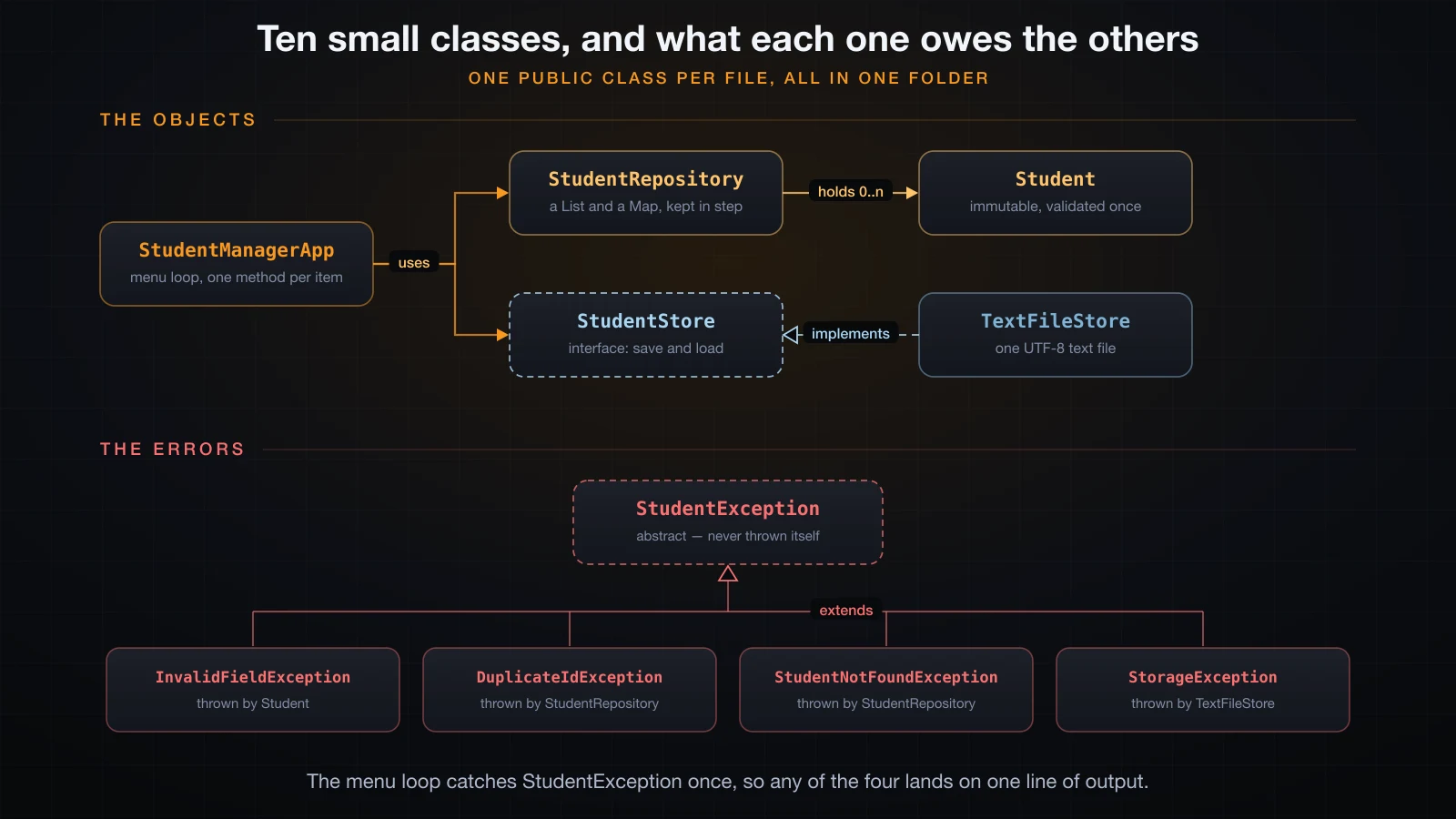
| Class | Responsibility |
|---|---|
Student | one student, and the rules about what a legal student is |
StudentException and its subclasses | the ways this program can fail on purpose |
StudentRepository | the students currently in memory, and lookup by id |
StudentStore / TextFileStore | turning that collection into a file and back |
StudentManagerApp | the menu, the prompts, and nothing else |
The arrows only point one way. Student knows nothing about the repository; the repository
knows nothing about files; nothing except StudentManagerApp knows there is a console. That is
what lets you swap the text file for a database later, or drive the same repository from a web
interface, without touching the domain rules.
Student: the object that cannot be wrong
The most useful decision in the whole program is that a Student validates itself in its
constructor and is immutable afterwards. Every field is final, there are no setters, and the
constructor throws if any value is illegal. The consequence is worth stating plainly: if you
are holding a Student, its values are legal. No other code has to check again.
// Student.java
import java.util.Locale;

/**
 * One student. Immutable: every field is validated once in the constructor,
 * so an object that exists is an object whose values are legal.
 */
public class Student {

    /** The one character a text field may not contain, so a student fits on one line. */
    public static final String SEPARATOR = "|";

    /** The same character as a regular expression: "|" alone means "or" to split(). */
    private static final String SEPARATOR_REGEX = "\\|";

    private static final int MIN_AGE = 16;
    private static final int MAX_AGE = 80;
    private static final double MIN_GPA = 0.0;
    private static final double MAX_GPA = 4.0;

    private final String id;
    private final String name;
    private final int age;
    private final double gpa;

    public Student(String id, String name, int age, double gpa) throws InvalidFieldException {
        this.id = requireText("id", id);
        this.name = requireText("name", name);
        this.age = requireAge(age);
        this.gpa = requireGpa(gpa);
    }
The validation helpers are private static because they are used before the object exists —
they run while the constructor is still computing the values to assign:
    private static String requireText(String field, String value) throws InvalidFieldException {
        if (value == null || value.trim().isEmpty()) {
            throw new InvalidFieldException(field, "must not be empty");
        }
        if (value.contains(SEPARATOR)) {
            throw new InvalidFieldException(field, "must not contain " + SEPARATOR);
        }
        return value.trim();
    }

    private static int requireAge(int value) throws InvalidFieldException {
        if (value < MIN_AGE || value > MAX_AGE) {
            throw new InvalidFieldException("age",
                    value + " is outside " + MIN_AGE + ".." + MAX_AGE);
        }
        return value;
    }

    private static double requireGpa(double value) throws InvalidFieldException {
        if (value < MIN_GPA || value > MAX_GPA) {
            throw new InvalidFieldException("gpa",
                    value + " is outside " + MIN_GPA + ".." + MAX_GPA);
        }
        return value;
    }
Two more static methods handle the two places raw text arrives — the keyboard and the data file. Parsing lives here rather than in the console class so both entry points get the same rules and the same error messages:
    /** Builds a student from four raw strings, so the numbers are parsed in one place. */
    public static Student parse(String id, String name, String age, String gpa)
            throws InvalidFieldException {
        return new Student(id, name, parseAge(age), parseGpa(gpa));
    }

    /** Reads back one line written by toLine(). */
    public static Student fromLine(String line) throws InvalidFieldException {
        String[] parts = line.split(SEPARATOR_REGEX, -1);
        if (parts.length != 4) {
            throw new InvalidFieldException("format",
                    "expected 4 fields separated by " + SEPARATOR + ", found " + parts.length);
        }
        return parse(parts[0], parts[1], parts[2], parts[3]);
    }
Note split(SEPARATOR_REGEX, -1). The second argument keeps trailing empty fields, so a line
ending in an empty GPA is a four-field line with a bad fourth field, not a three-field line. And
the separator needs escaping because "|" alone means alternation to a regular expression —
one of those details that silently does the wrong thing if you miss it.
A small exception hierarchy
Article 32 argued that a custom exception earns its place when a caller would treat it
differently. Here, one common base type is what lets the console layer write a single catch
that covers every deliberate failure, while the individual types still say precisely what went
wrong:
// StudentException.java
/** Base type for every error this application raises on purpose. */
public abstract class StudentException extends Exception {

    protected StudentException(String message) {
        super(message);
    }

    protected StudentException(String message, Throwable cause) {
        super(message, cause);
    }
}// InvalidFieldException.java
/** A field value the rules of the domain refuse to accept. */
public class InvalidFieldException extends StudentException {
public InvalidFieldException(String field, String problem) {
super(field + ": " + problem);
}
}
// DuplicateIdException.java
/** An id that is already taken by another student. */
public class DuplicateIdException extends StudentException {
public DuplicateIdException(String id) {
super("student id " + id + " already exists");
}
}
// StudentNotFoundException.java
/** An id that no student in the repository carries. */
public class StudentNotFoundException extends StudentException {
public StudentNotFoundException(String id) {
super("no student with id " + id);
}
}
// StorageException.java
/** The data file could not be read or written, or it does not parse. */
public class StorageException extends StudentException {
public StorageException(String message, Throwable cause) {
super(message, cause);
}
}StorageException is the only one that takes a cause, because it is the only one that wraps a
lower-level failure — an IOException from the file system, or an InvalidFieldException from a
corrupt line. The others are the root cause.
The base class is abstract for the reason article 29 gave: nobody should ever throw a
StudentException directly, because it would say nothing beyond "something went wrong".
The repository: a list and a map, kept in step
The repository holds the students. It needs two things at once — the order they were added, for listing, and instant lookup by id, for everything else. A list gives the first, a map gives the second, and the class exists to make sure the two never disagree.
public class StudentRepository {

    private final List<Student> students = new ArrayList<>();
    private final Map<String, Student> byId = new HashMap<>();

    public void add(Student student) throws DuplicateIdException {
        String id = student.getId();
        if (byId.containsKey(id)) {
            throw new DuplicateIdException(id);
        }
        students.add(student);
        byId.put(id, student);
    }

    public Student findById(String id) throws StudentNotFoundException {
        Student found = byId.get(id);
        if (found == null) {
            throw new StudentNotFoundException(id);
        }
        return found;
    }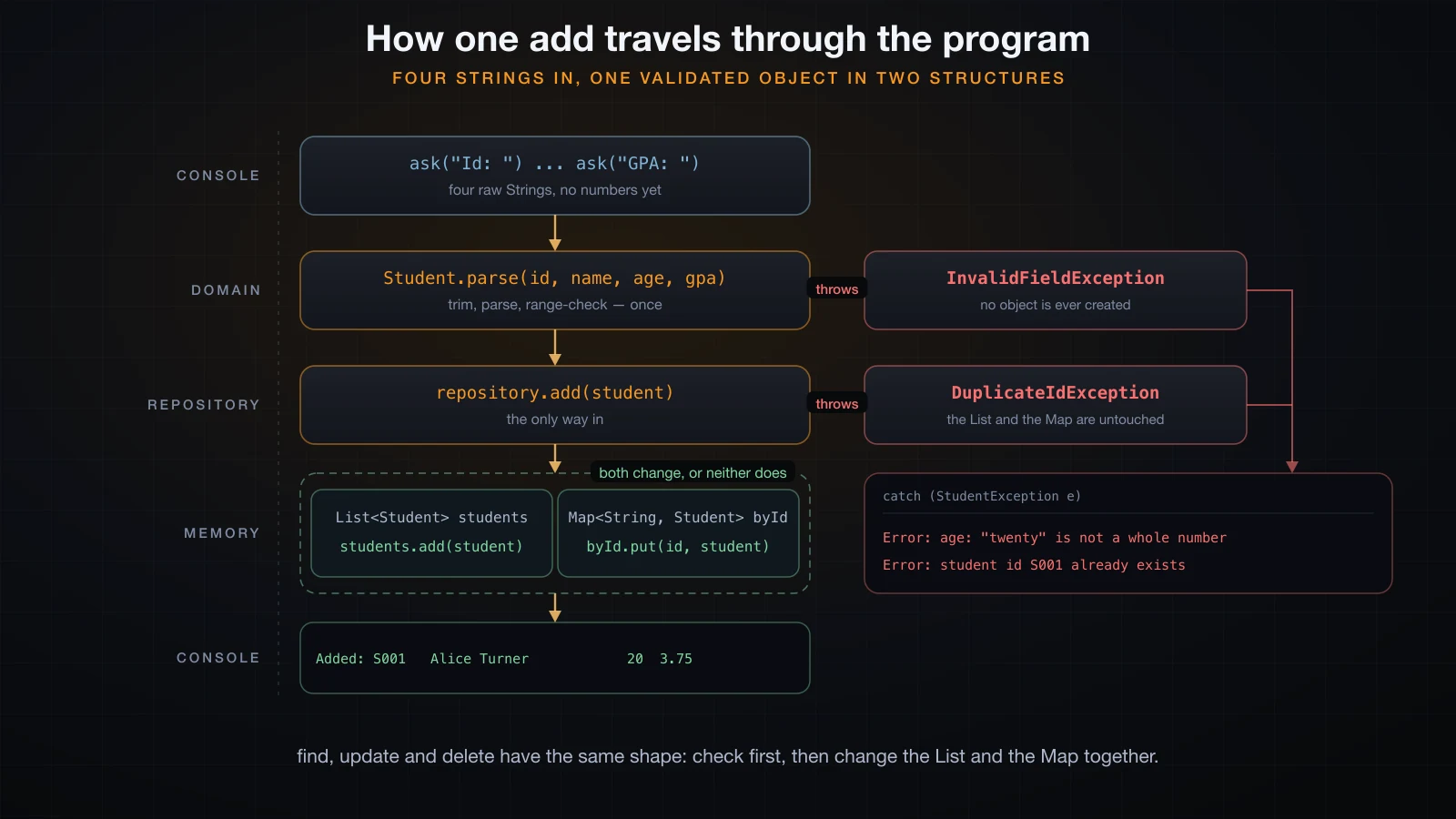
add checks the map, not the list, because containsKey is one step while scanning a list is
not. findAll returns new ArrayList<>(students) — a copy. Article 37 will call the alternative
a leaking getter: hand out the real list and any caller can add a student that never passed
through add, and the map would not know about it.
    public void update(Student updated) throws StudentNotFoundException {
        String id = updated.getId();
        int index = indexOf(id);
        if (index < 0) {
            throw new StudentNotFoundException(id);
        }
        students.set(index, updated);
        byId.put(id, updated);
    }

    public void remove(String id) throws StudentNotFoundException {
        int index = indexOf(id);
        if (index < 0) {
            throw new StudentNotFoundException(id);
        }
        students.remove(index);
        byId.remove(id);
    }

    /** A copy, so a caller cannot add or remove behind the repository's back. */
    public List<Student> findAll() {
        return new ArrayList<>(students);
    }

    private int indexOf(String id) {
        for (int i = 0; i < students.size(); i++) {
            if (students.get(i).getId().equals(id)) {
                return i;
            }
        }
        return -1;
    }
}
update and remove write to both structures. This is the honest cost of keeping two views of
the same data, and it is exactly why they live behind a class instead of being two fields in
main.
Persistence behind an interface
The application should not care that students are stored in a text file. So it does not: it depends on an interface with two methods.
// StudentStore.java
import java.util.List;

/** Where the students live between two runs of the program. */
public interface StudentStore {

    void save(List<Student> students) throws StorageException;

    List<Student> load() throws StorageException;
}
The implementation is where files actually happen — try-with-resources, an explicit charset,
and one student per line:
public class TextFileStore implements StudentStore {

    private final Path path;

    public TextFileStore(String fileName) {
        this.path = Path.of(fileName);
    }

    @Override
    public void save(List<Student> students) throws StorageException {
        try (BufferedWriter out = Files.newBufferedWriter(path, StandardCharsets.UTF_8)) {
            for (Student student : students) {
                out.write(student.toLine());
                out.newLine();
            }
        } catch (IOException e) {
            throw new StorageException("cannot write " + path, e);
        }
    }

    @Override
Reading back is longer because reading is where things go wrong. A line that will not parse is
translated into a StorageException carrying the line number, which is the piece of information
the user actually needs:
    public List<Student> load() throws StorageException {
        List<Student> loaded = new ArrayList<>();
        if (!Files.exists(path)) {
            return loaded;
        }
        try (BufferedReader in = Files.newBufferedReader(path, StandardCharsets.UTF_8)) {
            String line;
            int number = 0;
            while ((line = in.readLine()) != null) {
                number++;
                if (line.trim().isEmpty()) {
                    continue;
                }
                try {
                    loaded.add(Student.fromLine(line));
                } catch (InvalidFieldException e) {
                    throw new StorageException(path + " line " + number + ": " + e.getMessage(), e);
                }
            }
        } catch (IOException e) {
            throw new StorageException("cannot read " + path, e);
        }
        return loaded;
    }
StandardCharsets.UTF_8 is passed explicitly on both sides. Article 35 explained why: the
default became UTF-8 in Java 18, but saying so in the code is what makes it true on every JDK
and every machine.
After a save, the file looks like this:
S002|Ben Carter|22|3.1
S003|Chloe Adams|21|3.95
One detail worth noticing: the GPA typed as 3.10 is stored as 3.1. toLine() concatenates a
double, and 3.10 and 3.1 are the same number — the trailing zero was never data, only
formatting. The listing shows 3.10 because toString() formats with %.2f. Storage keeps
values; presentation adds zeros.
The menu loop
Everything the user sees lives in one class, and each menu item is one small method.
    public void run() {
        System.out.println("=== Student Manager ===");
        loadAtStartup();
        boolean running = true;
        while (running) {
            printMenu();
            String choice = ask("Choice: ");
            if (inputEnded) {
                System.out.println("(input ended)");
                break;
            }
            switch (choice) {
                case "1" -> addStudent();
                case "2" -> listStudents();
                case "3" -> findStudent();
                case "4" -> updateStudent();
                case "5" -> deleteStudent();
                case "6" -> saveToFile();
                case "0" -> running = false;
                default -> System.out.println("Unknown choice: " + choice);
            }
        }
        System.out.println("Bye.");
    }
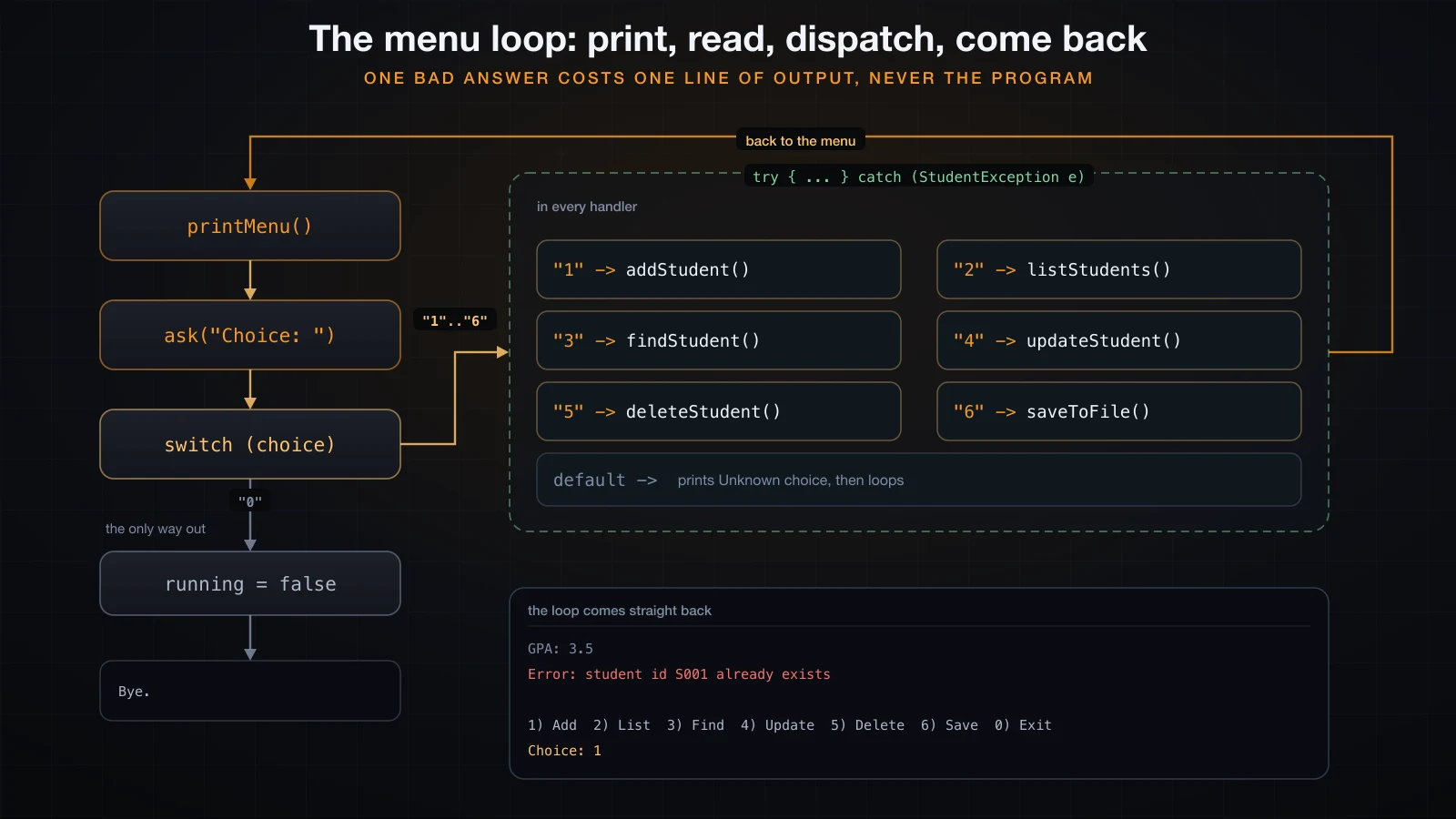
The switch uses arrow labels, so no break is needed and no case can fall through into the
next. default catches typos instead of ignoring them.
Each command follows the same shape: gather input, do the work, catch StudentException, print
the message. One catch in each method, at the level that knows how to talk to the user:
    private void addStudent() {
        try {
            String id = ask("Id: ");
            String name = ask("Name: ");
            String age = ask("Age: ");
            String gpa = ask("GPA: ");
            Student student = Student.parse(id, name, age, gpa);
            repository.add(student);
            System.out.println("Added: " + student);
        } catch (StudentException e) {
            System.out.println("Error: " + e.getMessage());
        }
    }
That is the whole error strategy. A bad value costs the user one line of output and one retry. It never costs them the program, and it never costs them the students they have already entered.
Reading input without tripping over Scanner
Two details in ask are worth more than they look:
    private String ask(String label) {
        System.out.print(label);
        System.out.flush();          // print() does not flush on its own, and hasNextLine()
                                     // blocks, so without this the prompt appears too late
        if (!in.hasNextLine()) {
            inputEnded = true;
            System.out.println();
            return "";
        }
        return in.nextLine().trim();
    }
System.out.flush() is there because print does not flush on its own — only a newline
triggers that. Without the flush, the prompt sits in a buffer while the program blocks waiting
for input, and the user stares at a blank line wondering what is expected.
hasNextLine() is there because input can end. If the user presses Ctrl-D, or you run the
program with its input redirected from a file, nextLine() has nothing to return. Without the
check it throws, and the program dies with a stack trace:
Exception in thread "main" java.util.NoSuchElementException: No line found
	at java.base/java.util.Scanner.nextLine(Scanner.java:1660)
	at StudentManagerApp.ask(StudentManagerApp.java:139)
	at StudentManagerApp.addStudent(StudentManagerApp.java:70)
	at StudentManagerApp.run(StudentManagerApp.java:32)
	at StudentManagerApp.main(StudentManagerApp.java:20)
With the check, the same run ends politely:
=== Student Manager ===
Loaded 2 student(s) from students.txt

1) Add  2) List  3) Find  4) Update  5) Delete  6) Save  0) Exit
Choice: Id: Name:
Age:
GPA:
Error: age: "" is not a whole number

1) Add  2) List  3) Find  4) Update  5) Delete  6) Save  0) Exit
Choice:
(input ended)
Bye.
Notice the whole program is reading through a single Scanner, created once in main inside a
try-with-resources and passed to the constructor. Creating a second Scanner on System.in
is a classic way to lose input, because each one buffers ahead independently.
Running it
Compile everything in one command and run the app:
javac *.java
java StudentManagerApp
The second run proves the file did its job — the students come back without being retyped:
=== Student Manager ===
Loaded 2 student(s) from students.txt

1) Add  2) List  3) Find  4) Update  5) Delete  6) Save  0) Exit
Choice: 2
ID     NAME                   AGE  GPA
S002   Ben Carter              22  3.10
S003   Chloe Adams             21  3.95
2 student(s)

1) Add  2) List  3) Find  4) Update  5) Delete  6) Save  0) Exit
Choice: 3
Id: S003
Found: S003   Chloe Adams             21  3.95

1) Add  2) List  3) Find  4) Update  5) Delete  6) Save  0) Exit
Choice: 0
Bye.
Bad values are refused one at a time, and the program keeps going:
=== Student Manager ===
Loaded 2 student(s) from students.txt

1) Add  2) List  3) Find  4) Update  5) Delete  6) Save  0) Exit
Choice: 1
Id: S004
Name: Le|Minh
Age: 20
GPA: 3.0
Error: name: must not contain |

1) Add  2) List  3) Find  4) Update  5) Delete  6) Save  0) Exit
Choice: 1
Id: S004
Name: Dan Miller
Age: 20
GPA: 4.5
Error: gpa: 4.5 is outside 0.0..4.0

1) Add  2) List  3) Find  4) Update  5) Delete  6) Save  0) Exit
Choice: 0
Bye.
The first of those is the separator rule earning its keep. Without it, a name containing |
would write a line with five fields that could never be read back — the data would be corrupted
at save time and the failure would only appear on the next run.
When the data file is broken
Files get edited by hand, truncated by a full disk, or merged badly. Both cases below are a real run against a file whose third line was damaged:
=== Student Manager ===
Error: students.txt line 3: format: expected 4 fields separated by |, found 3
Starting with an empty list.

1) Add  2) List  3) Find  4) Update  5) Delete  6) Save  0) Exit
Choice: 0
Bye.=== Student Manager ===
Error: students.txt line 3: gpa: "abc" is not a number
Starting with an empty list.
1) Add 2) List 3) Find 4) Update 5) Delete 6) Save 0) Exit
Choice: 0
Bye.The line number comes from the counter in load(), and the rest of the message comes from the
InvalidFieldException that Student.fromLine threw, wrapped as the cause. The program reports
what is wrong and where, then starts empty rather than exiting — a decision, not an accident. If
you would rather refuse to start than risk overwriting a file you could not read, that is one
System.exit(1) away, and for real data it is often the better choice.
Extend it yourself
The program is deliberately small enough to change. Each of these is a genuine exercise, in rough order of difficulty:
- Sort the listing. Add a menu item that lists students by GPA, highest first. The list is already there; you need a comparison and a copy so the stored order is not disturbed.
- Search by name. Add a partial, case-insensitive name search. Think about why this one has
to scan the list while
findByIddoes not. - Save on exit. Ask the user whether to save when they choose
0, and track whether anything actually changed since the last save. - A second store. Write a
CsvStorethat implementsStudentStorewith proper quoting, so a name containing the separator is legal. Nothing outside the store class should change — that is the test of whether the interface was drawn in the right place. - A class of students. Add a
Coursethat holds students and a maximum size, and giveStudenta list of the courses it is enrolled in. This is where you will discover why two objects pointing at each other is harder than it looks.
Common mistakes when assembling a program like this
| Mistake | What goes wrong |
|---|---|
| Validating in the console class | the rule holds only for input typed at the menu, not for data loaded from the file |
Mutable Student with setters | an object can become illegal after construction, so every reader must re-check |
Returning the internal list from findAll | callers can bypass add, and the map silently goes stale |
Catching Exception in the menu | a typo in your own code gets reported as if the user caused it |
One Scanner per method | each one buffers ahead, and input disappears |
| No charset on the file | the data file stops round-tripping the moment a name has an accent |
| Storing formatted text | 3.10 written as text is presentation; 3.1 is the value |
Frequently asked questions
Why is Student immutable when the program has an Update command?
Update builds a new Student from the edited values and replaces the old one in the
repository. That way the new values go through exactly the same constructor validation as a
brand-new student, and a failed edit leaves the original untouched. Mutating in place would
require validating in the setters and would still leave a window where the object is half-updated.
Why an interface for the store when there is only one implementation?
Because it marks the boundary. StudentManagerApp is written against StudentStore, so nothing
in it can accidentally depend on files. Exercise 4 above is the payoff: a second implementation
should require no changes anywhere else. If it does, the interface was not the real boundary.
Should the repository use only a Map?
It could, and lookups would be identical. You would lose the insertion order that the listing
relies on — HashMap gives no ordering guarantee at all, as article 34 showed. Keeping a list
alongside is one way to have both; LinkedHashMap is another, and a good thing to look up once
this program feels comfortable.
Why does the program keep running after a bad line in the data file?
Because a menu-driven tool that refuses to start is useless to someone who needs to fix the file. The message names the line, so the user can open it in an editor. Choose differently when the data matters more than the convenience — a payroll tool should stop.
What this program demonstrates
Every idea in this course appears here, doing real work rather than illustrating itself. Classes
and constructors give Student a shape. Encapsulation and final make it trustworthy. An
interface separates the storage decision from the storage mechanism. A small exception hierarchy
turns failures into information. ArrayList and HashMap hold the data in the two shapes the
program needs. Scanner and file I/O connect it to a keyboard and a disk.
What ties them together is a single habit: decide where each piece of knowledge lives, and let
nothing else duplicate it. The rules about a legal student live in Student. The rule that ids
are unique lives in the repository. The knowledge that data is a |-separated text file lives in
TextFileStore. When a rule changes, exactly one file changes.
The final article closes the course by making that habit explicit: naming, method size, guard
clauses, the traps that javac will not warn you about, and the practices worth carrying into
every program you write from here.
![[Java Basics] Setting Up a Java IDE and Creating Your First Project](/images/blog/java-ide-thumbnail.en.webp)
![[Java Basics] Nested Loops, break and continue in Java](/images/blog/nested-loops-thumbnail.en.webp)
![[Java Basics] Reading Input in Java with Scanner (and the nextLine Trap)](/images/blog/java-scanner-thumbnail.en.webp)
![[Java Basics] Classes and Objects in Java: The Foundation of OOP](/images/blog/classes-and-objects-thumbnail.en.webp)