javac will accept a class named shoppingCart, a method sixty lines long, a number like 0.08 written out in four different places, and a for loop nested five deep. All of it compiles, all of it runs, and none of it produces a single warning. The compiler's job is to reject programs that are not legal Java, and it does that job well. Everything past that point is aimed at people.
That is what "clean code" means, and it is why the advice in this article can feel unfalsifiable compared to the rest of the course. So every guideline below is anchored to something you can check: a real JDK class that follows the convention, a real warning javac prints, or a refactor applied in stages where the program is run after each stage and the output does not change.
The warnings and errors shown are the ones Java 21's javac prints. Nothing here is a performance recommendation, and nothing here was timed.
What clean code means when the compiler does not care
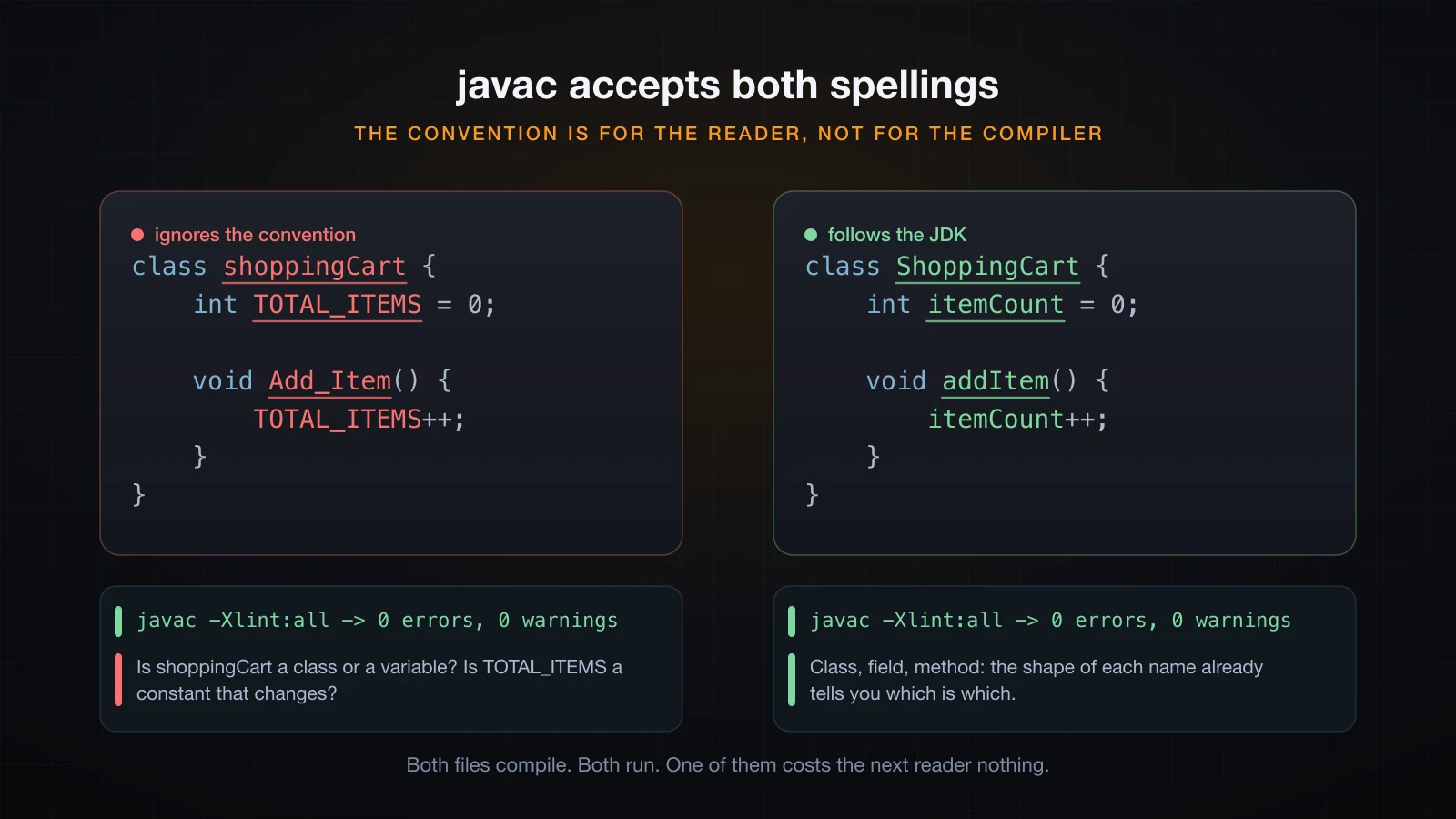
Here is a class that breaks every Java naming convention there is.
class shoppingCart {
    int TOTAL_ITEMS = 0;

    void Add_Item() {
        TOTAL_ITEMS++;
    }

    public static void main(String[] args) {
        shoppingCart c = new shoppingCart();
        c.Add_Item();
        c.Add_Item();
        System.out.println("items = " + c.TOTAL_ITEMS);
    }
}
Compiled with every warning the compiler has, it says nothing at all:
javac -Xlint:all shoppingCart.java
java shoppingCartitems = 2No errors, no warnings, correct output. The conventions are not enforced by anything mechanical, which means following them is a decision you make on purpose, for a reader. Usually that reader is you, three months from now, holding a bug report and no memory of writing this.
Three things are worth wanting from code, and they are all about that reader:
| Property | The question it answers |
|---|---|
| Predictable names | Can I tell what this holds without looking it up? |
| One home per rule | If the tax rate changes, how many places do I edit? |
| Short units | How much do I have to hold in my head to follow one method? |
Nothing in this article is a rule the language enforces. Everything in it is a habit that makes those three answers better.
Java naming conventions, and why the JDK is the reference
The Java naming conventions are not somebody's preference. They are what the standard library has followed from its first release, so every Java programmer already reads code that way — and your code is read against that expectation whether you meant it to be or not.
| Kind | Convention | Real JDK example |
|---|---|---|
| Class, interface, enum | UpperCamelCase, a noun | ArrayList, StringBuilder, Comparable |
| Method | lowerCamelCase, a verb phrase | parseInt, isEmpty, toUpperCase |
| Variable, field | lowerCamelCase, a noun | size, elementData, modCount |
| Constant | UPPER_SNAKE_CASE | Integer.MAX_VALUE, Math.PI |
| Package | all lowercase, dots | java.util, java.lang, java.time |
Those are not invented for the table. Integer.MAX_VALUE really is 2147483647, Math.PI really is 3.141592653589793, and StringBuilder really lives in java.lang — you have been reading names in this shape all course.
What the convention buys, given that javac does not care
The shape of a name carries its category before you read a single character of it. Order is a type. order is a value. ORDER_LIMIT is a constant that will not move. When a codebase keeps that promise, four things become free:
shoppingCartat the top of a file makes you stop and check whether it is a class or a variable.ShoppingCartdoes not.TOTAL_ITEMSthat changes on everyaddis actively lying — the shouting case says "this is fixed" and the code says otherwise.- Your IDE's completion, search and refactoring all lean on the same expectation.
Add_Itemcompiles, but no Java programmer will guess that name when looking for it.addItemis the name they will type.
The naming rule that matters more than the casing is length. A name should be as long as it needs to be to answer the question. int d tells you nothing; int daysSinceLastLogin tells you everything, and you will never type it more than a handful of times. The exception is a loop index in a three-line loop, where i is genuinely clearer than currentIndex because everyone already knows what i means.
Let javac find the problems: -Xlint:all
javac carries a set of checks that go well beyond what the language requires, and you already have them installed. It is quiet by default, but -Xlint:all turns on every warning category it knows. Here is a small class with a real bug in it:
import java.util.ArrayList;
import java.util.List;

public class Warnings {
    static int discountPercent(String tier) {
        int percent;
        switch (tier) {
            case "gold":
                percent = 20;
            case "silver":
                percent = 10;
                break;
            default:
                percent = 0;
        }
        return percent;
    }

    public static void main(String[] args) {
        List cart = new ArrayList();
        cart.add("Book");
        System.out.println("gold   -> " + discountPercent("gold"));
        System.out.println("silver -> " + discountPercent("silver"));
        System.out.println("cart   -> " + cart);
    }
}
Plain javac Warnings.java gives you almost nothing:
Note: Warnings.java uses unchecked or unsafe operations.
Note: Recompile with -Xlint:unchecked for details.
With the flag on, the same file reports four problems:
javac -Xlint:all Warnings.javaWarnings.java:20: warning: [rawtypes] found raw type: List
List cart = new ArrayList();
^
missing type arguments for generic class List<E>
where E is a type-variable:
E extends Object declared in interface List
Warnings.java:20: warning: [rawtypes] found raw type: ArrayList
List cart = new ArrayList();
^
missing type arguments for generic class ArrayList<E>
where E is a type-variable:
E extends Object declared in class ArrayList
Warnings.java:21: warning: [unchecked] unchecked call to add(E) as a member of the raw type List
cart.add("Book");
^
where E is a type-variable:
E extends Object declared in interface List
Warnings.java:10: warning: [fallthrough] possible fall-through into case
case "silver":
^
4 warningsThat last one is not a style note. It is the bug:
gold   -> 10
silver -> 10
cart   -> [Book]
case "gold" sets percent = 20, then falls straight through into case "silver" and overwrites it with 10. A gold customer gets the silver discount, forever, and the only thing in the toolchain that noticed is a warning that is off by default.
Four warnings that catch real beginner mistakes
The categories below are the ones worth knowing early, because each corresponds to a mistake that is easy to make and hard to see. This file has all four:
public class Traps {
    static int counter = 0;

    public static void main(String[] args) {
        int score = 95;
        if (score > 90);
        {
            System.out.println("this always prints");
        }

        int zero = 0;
        System.out.println(10 / 0);

        Traps t = new Traps();
        t.counter = 5;

        int total = 10;
        total += 3.7;
        System.out.println(total + " " + zero);
    }
}Traps.java:6: warning: [empty] empty statement after if
if (score > 90);
^
Traps.java:12: warning: [divzero] division by zero
System.out.println(10 / 0);
^
Traps.java:15: warning: [static] static variable should be qualified by type name, Traps, instead of by an expression
t.counter = 5;
^
Traps.java:18: warning: [lossy-conversions] implicit cast from double to int in compound assignment is possibly lossy
total += 3.7;
^
4 warningsRead them in order. The stray semicolon after if (score > 90) makes the if control nothing, so the block below runs unconditionally — this is the single most common typo in beginner Java and the compiler will tell you about it for free. 10 / 0 is a guaranteed ArithmeticException at runtime that the compiler can already see. t.counter reads like an instance field and is not one. And total += 3.7 silently truncates to 13, because compound assignment hides a cast that plain total = total + 3.7 would refuse to compile.
Two flags are worth putting in your build early:
| Flag | What it does |
|---|---|
-Xlint:all | Turn on every warning category |
-Werror | Treat any warning as a compile error |
Together they turn javac into something that refuses to build a file with a known problem in it:
error: warnings found and -Werror specified
1 error
3 warnings
javac --help-lint prints the full list of categories, so you can turn one off deliberately rather than turning them all off.
What a clean compile does not prove
A build with zero warnings is not a correctness certificate. Here is a program that compiles clean under -Xlint:all and is wrong:
public class Silent {
    public static void main(String[] args) {
        String expected = "admin";
        String typed = new java.util.Scanner("admin").next();

        if (typed == expected) {
            System.out.println("Access granted");
        } else {
            System.out.println("Access denied");
        }
    }
}Access deniedThe two strings are equal. == compares references, so the answer is false, and javac -Xlint:all prints nothing whatsoever. There is a whole section on this below, because it is the most common real bug in beginner Java.
-Xlint:all is also silent about unused local variables, unused private fields and unused private methods — none of those categories exist in javac. Your IDE greys them out; the compiler does not care. So use the warnings as a free extra pair of eyes, not as proof.
Magic numbers: give every literal a name
A magic number is a literal sitting in an expression with nothing to say what it means. Here is a checkout total with six of them:
public class Checkout {
    static double total(double[] prices, int[] quantities, String code, boolean member) {
        double t = 0;
        for (int i = 0; i < prices.length; i++) {
            t += prices[i] * quantities[i];
        }
        if (code != null) {
            if (code.equals("SAVE10")) {
                if (t > 100) {
                    t = t - t * 0.10;
                } else {
                    t = t - 5;
                }
            } else if (code.equals("SAVE20")) {
                if (t > 200) {
                    t = t - t * 0.20;
                }
            }
        }
        if (member) {
            t = t - t * 0.05;
        }
        t = t + t * 0.08;
        if (t < 0) {
            t = 0;
        }
        return Math.round(t * 100) / 100.0;
    }
}
Read t = t + t * 0.08; and try to say what 0.08 is without scrolling. Tax? A service charge? Is it the same 0.08 as the one in the invoice printer three files over? The literal answers none of that, and if the tax rate changes you have to find every copy of it by searching for a number.
The fix is private static final fields with names:
private static final double SAVE10_RATE = 0.10;
private static final double SAVE20_RATE = 0.20;
private static final double SAVE10_FLAT_OFF = 5.0;
private static final double SAVE10_MIN_ORDER = 100.0;
private static final double SAVE20_MIN_ORDER = 200.0;
private static final double MEMBER_RATE = 0.05;
private static final double TAX_RATE = 0.08;
and then t = t + t * TAX_RATE;. Nothing else in the method body changes. Running the same six cases against both versions gives the same six answers:
no code, guest   -> 98.82
SAVE10, guest    -> 93.42
SAVE10, member   -> 88.75
SAVE20, member   -> 93.88
small cart, SAVE10 -> 3.24
empty cart       -> 0.0
That is what makes it a refactor and not a rewrite: the behaviour is byte-for-byte identical, and the only thing that changed is what a reader can see. Note what the naming exposed on the way — SAVE10_FLAT_OFF = 5.0 and SAVE10_RATE = 0.10 are two completely different kinds of discount that the original code hid behind two similar-looking literals.
Two literals do not need names: 0 and 1, when they mean "nothing" and "one step". for (int i = 0; i < n; i++) is fine. if (retries > 3) is not.
Splitting a long method into named pieces
total above is twenty-five lines doing five separate jobs: adding up the cart, applying a coupon, applying a member discount, adding tax, and rounding. None of those jobs has a name, so none of them can be found, tested, or reused, and reading the method means holding all five in your head at once.
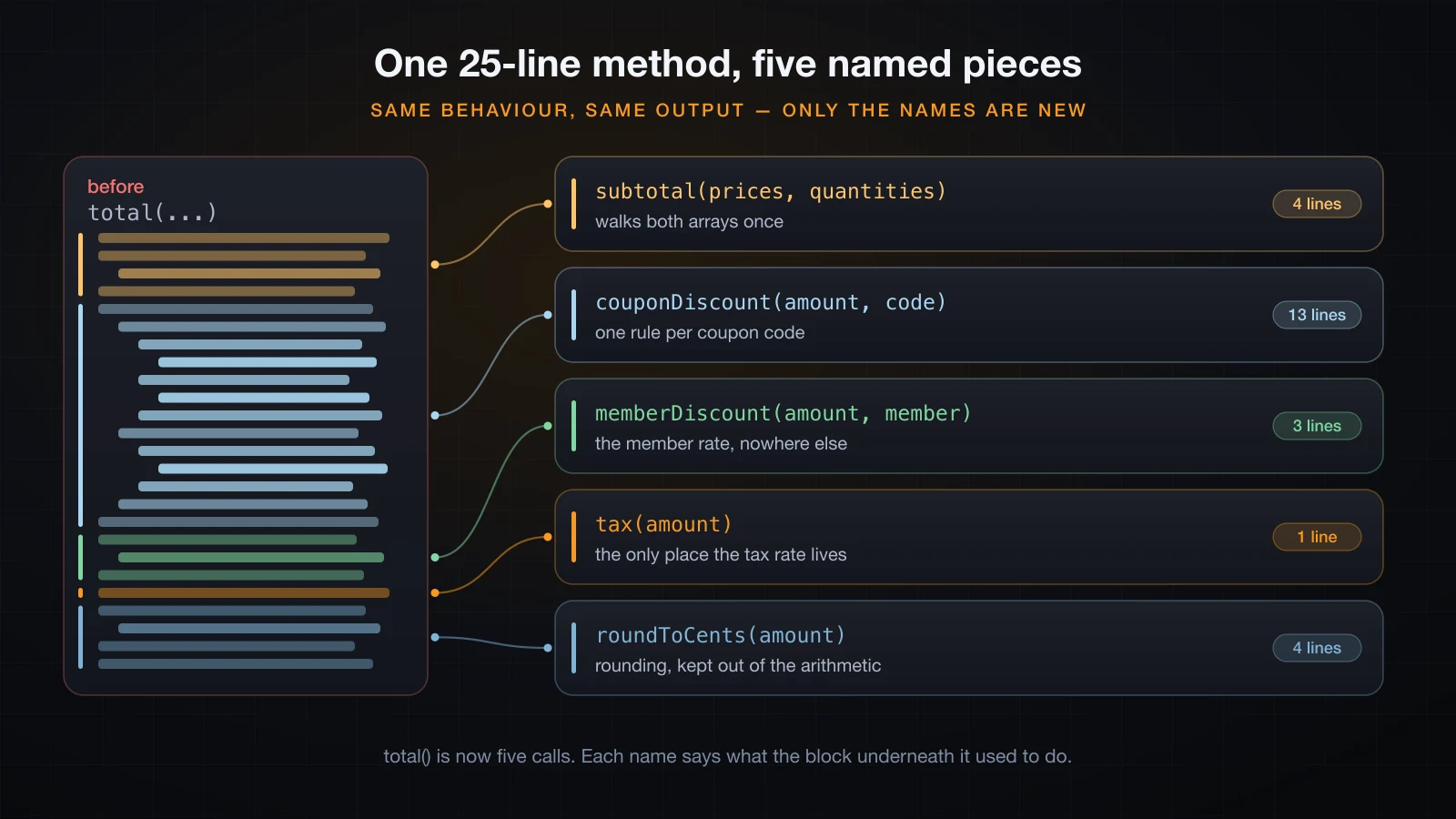
Extraction gives each band a name. The body of total becomes the list of things it does:
static double total(double[] prices, int[] quantities, String code, boolean member) {
    double amount = subtotal(prices, quantities);
    amount -= couponDiscount(amount, code);
    amount -= memberDiscount(amount, member);
    amount += tax(amount);
    return roundToCents(Math.max(amount, 0));
}

private static double subtotal(double[] prices, int[] quantities) {
    double sum = 0;
    for (int i = 0; i < prices.length; i++) {
        sum += prices[i] * quantities[i];
    }
    return sum;
}

private static double couponDiscount(double amount, String code) {
    if (code == null) {
        return 0;
    }
    if (code.equals("SAVE10")) {
        return amount > SAVE10_MIN_ORDER ? amount * SAVE10_RATE : SAVE10_FLAT_OFF;
    }
    if (code.equals("SAVE20") && amount > SAVE20_MIN_ORDER) {
        return amount * SAVE20_RATE;
    }
    return 0;
}

private static double memberDiscount(double amount, boolean member) {
    return member ? amount * MEMBER_RATE : 0;
}

private static double tax(double amount) {
    return amount * TAX_RATE;
}

private static double roundToCents(double amount) {
    return Math.round(amount * 100) / 100.0;
}
Run the same six cases again:
no code, guest   -> 98.82
SAVE10, guest    -> 93.42
SAVE10, member   -> 88.75
SAVE20, member   -> 93.88
small cart, SAVE10 -> 3.24
empty cart       -> 0.0
Identical, for the third time. That is the whole discipline of refactoring: change the shape in a step small enough that you can run the program afterwards and prove nothing moved. If you cannot run it after a step, the step was too big.
What the extraction bought is not shortness. It is that questions now have addresses. "Where is the tax rate?" is tax. "Do members stack with coupons?" is answered by reading five lines of total. And couponDiscount is now a method small enough to call directly with a made-up amount and check by eye.
Refactoring usually makes the file longer
Be honest about the cost. The three versions of Checkout.java are 29, 37 and 50 lines. Naming the constants added eight lines; extracting the methods added thirteen more. Signatures, return statements and blank lines are not free.
Line count is not the metric. The metric is how much you must read to answer one question, and that went from twenty-five lines to about five. A file that is longer but navigable beats one that is shorter and has to be read end to end.
Guard clauses instead of nested ifs
Validation written as nested if statements drifts to the right until the real work sits at the far edge of the screen, and every else is separated from its if by a screenful of code:
static String registerNested(String name, int age, String email) {
    if (name != null) {
        if (!name.isBlank()) {
            if (age >= 18) {
                if (email != null && email.contains("@")) {
                    return "registered: " + name;
                } else {
                    return "bad email";
                }
            } else {
                return "too young";
            }
        } else {
            return "blank name";
        }
    } else {
        return "no name";
    }
}
A guard clause inverts each test and returns immediately. The failures are handled and forgotten one at a time, and what remains at the bottom is the case you actually came for:
static String registerGuarded(String name, int age, String email) {
    if (name == null) {
        return "no name";
    }
    if (name.isBlank()) {
        return "blank name";
    }
    if (age < 18) {
        return "too young";
    }
    if (email == null || !email.contains("@")) {
        return "bad email";
    }
    return "registered: " + name;
}
Six inputs through both versions, printing each result and whether they agree:
no name  |  no name  |  same=true
blank name  |  blank name  |  same=true
too young  |  too young  |  same=true
bad email  |  bad email  |  same=true
bad email  |  bad email  |  same=true
registered: Lan  |  registered: Lan  |  same=true
Same behaviour, and three practical wins. Each rejection reason sits on the same line as the condition that caused it, so you never scroll to match an else to its if. The success path is at one indent level instead of four. And adding a fifth rule is one more block at the top rather than another layer of nesting around everything.
The rule generalises past validation: handle the exceptional case and leave, then write the normal case flat. If a method's deepest indentation is three levels or more, that is usually a guard clause or an extracted method waiting to happen.
== and equals: the bug a clean compile will not catch
You met the Integer cache earlier in this course, in the data types article. It comes back here because it is the one bug that survives every check in this article — clean names, short methods, zero warnings — and still ships.
== on any reference type asks "are these the same object?" equals asks "do these represent the same value?" For boxed numbers the two answers differ at a specific place:
Integer a = 127, b = 127;
Integer c = 128, d = 128;
System.out.println("Integer 127: a == b       -> " + (a == b));
System.out.println("Integer 128: c == d       -> " + (c == d));
System.out.println("Integer 128: c.equals(d) -> " + c.equals(d));Integer 127: a == b -> true
Integer 128: c == d -> false
Integer 128: c.equals(d) -> trueAutoboxing goes through Integer.valueOf, which returns a cached object for small values and a fresh one above the cache. Walking across the boundary shows exactly where it flips:
125 -> x == y is true
126 -> x == y is true
127 -> x == y is true
128 -> x == y is false
129 -> x == y is false
130 -> x == y is false
-128 -> true
-129 -> false
The cache is a JVM implementation detail, not a language rule, and you can prove it by moving the boundary at startup:
java -XX:AutoBoxCacheMax=200 Boundary125 -> x == y is true
126 -> x == y is true
127 -> x == y is true
128 -> x == y is true
129 -> x == y is true
130 -> x == y is trueSame class file, same code, different answer. Any code whose correctness depends on == for boxed values is depending on a JVM flag.
Strings have the same shape of problem, with the compiler making it worse by being helpful:
String s1 = "hello";
String s2 = "hello";
String s3 = "hel" + "lo";
String part = "hel";
String s4 = part + "lo";literal : s1 == s2 -> true
const fold: s1 == s3 -> true
runtime : s1 == s4 -> false
runtime : s1.equals(s4) -> trues3 is folded to the constant "hello" at compile time and interned with the other literals, so == is true. s4 is built at runtime and is a different object, so == is false. This is why the bug is so dangerous: == on strings works perfectly for every literal you type into a test, and fails the first time the string comes from a Scanner, a file or a network response.
⚠️
javac -Xlint:allreports nothing for any of the comparisons in this section. There is no warning to turn on.
The habit is simple and has no exceptions worth learning as a beginner: use equals for objects, == for primitives. == on references is correct in three narrow cases — comparing against null, comparing enum constants, and a deliberate "is this literally the same object" check — and in every one of those you will know that is what you meant.
A getter that hands out your internal state
Encapsulation is not finished when the field is private. A getter that returns the field itself hands the caller a live handle to your internals, and every rule the class enforces goes with it.
class LeakyTeam {
    private final List<String> members = new ArrayList<>();

    void add(String name) {
        if (members.size() >= 3) {
            throw new IllegalStateException("a team holds at most 3 people");
        }
        members.add(name);
    }

    List<String> getMembers() {
        return members;
    }
}
add protects the invariant. getMembers gives it away:
LeakyTeam leaky = new LeakyTeam();
leaky.add("Lan");
leaky.getMembers().add("Minh");
leaky.getMembers().add("Huy");
leaky.getMembers().add("Nam");
leaky.getMembers().add("Trang");leaky size after add() -> 1
leaky size after outside add-> 5
leaky members -> [Lan, Minh, Huy, Nam, Trang]Five members in a team that is documented and coded to hold three. The private final field did nothing, because final protects the reference and not the object it points at, and the caller was handed that object.
The fix is to return a copy:
List<String> getMembers() {
    return new ArrayList<>(members);
}caller's list -> [Lan, Minh, Huy]
team's list -> [Lan]
team size -> 1The caller can do whatever it likes to its copy and the team is untouched. If you would rather the caller find out immediately that it is not allowed to write, Collections.unmodifiableList(members) returns a read-only view instead:
safe getMembers().add()     -> java.lang.UnsupportedOperationException
safe size                   -> 1
The same trap applies to arrays, since getScores() returning int[] scores hands over the array itself, and to any mutable object you store in a field and return whole. The test to apply: after a caller uses this getter, can the object still promise everything its methods claim?
Comments that lie, and the comment that earns its place
A comment is the only part of a file the compiler never checks, so it is the only part that can be wrong forever without anything breaking.
// Returns the price with 10% VAT added.
static double addVat(double price) {
    return price * 1.08;
}comment says 10%, code does -> 108.0The rate changed and the comment did not. Now every reader has to decide which of the two to believe, and the honest answer is neither — you have to go and find out. A comment that restates what the code does is a second copy of the truth that nobody updates.
Most of these comments are a name asking to be written. Instead of explaining 1.08, name it:
private static final double VAT_RATE = 0.08;

static double priceWithVat(double price) {
    return price * (1 + VAT_RATE);
}
That version cannot go stale, because the explanation and the value are the same token.
The comment that does earn its place says why, and specifically records something a reader cannot recover from the code:
int[] unsorted = { 9, 3, 7, 1 };
System.out.println(Arrays.binarySearch(unsorted, 9));-59 is at index 0, and binarySearch reports "not found", because it is only defined on a sorted array. A sort call sitting above a binarySearch looks removable to anyone who does not know that. So:
// binarySearch is undefined on an unsorted array: it can report "not found"
// for an id that is present. Sorting here is what makes the call valid.
Arrays.sort(ids);3That comment carries information the code cannot: a constraint from somewhere else, and a warning about a change that would look safe. Other comments worth writing are the reason a workaround exists, a link to the requirement behind a strange rule, and a deliberate "yes, this really is what I meant" on something that looks like a typo. Everything else is better spent on the name.
Formatting: pick one style and stop arguing
Formatting is the part of clean code with the least payoff per hour of discussion, which is why nearly every team stops discussing it and delegates the whole question to a tool.
The Java house style, the one every example in this course follows and the one you will meet in almost every Java codebase, is short enough to state:
- four spaces of indentation, no tabs
- opening brace on the same line as the declaration, closing brace on its own line
- one statement per line, and braces even around single-statement
ifbodies - a blank line between methods, and between logical groups inside a method
- spaces around binary operators and after commas
Braces around a one-line if are the only item there that beginners routinely skip, and it is the one with a real failure mode: adding a second line to a braceless if later puts that line outside the condition, silently. The compiler will not warn you. The stray-semicolon [empty] warning from earlier is the same class of accident.
Every mainstream Java IDE has a format-on-save action, and build tools have formatter plugins that can reformat a whole project or fail a build on badly formatted files. Turn one on, commit the result once, and never spend another code review on brace placement. The value of consistent formatting is not that any particular style is better; it is that when everything is formatted the same way, an unusual-looking line is a signal rather than noise.
Code smells worth recognising early
A code smell is not a bug. It is a shape that reliably turns out to be hiding one. The useful thing about the four below is that you can spot every one of them without reading the code.
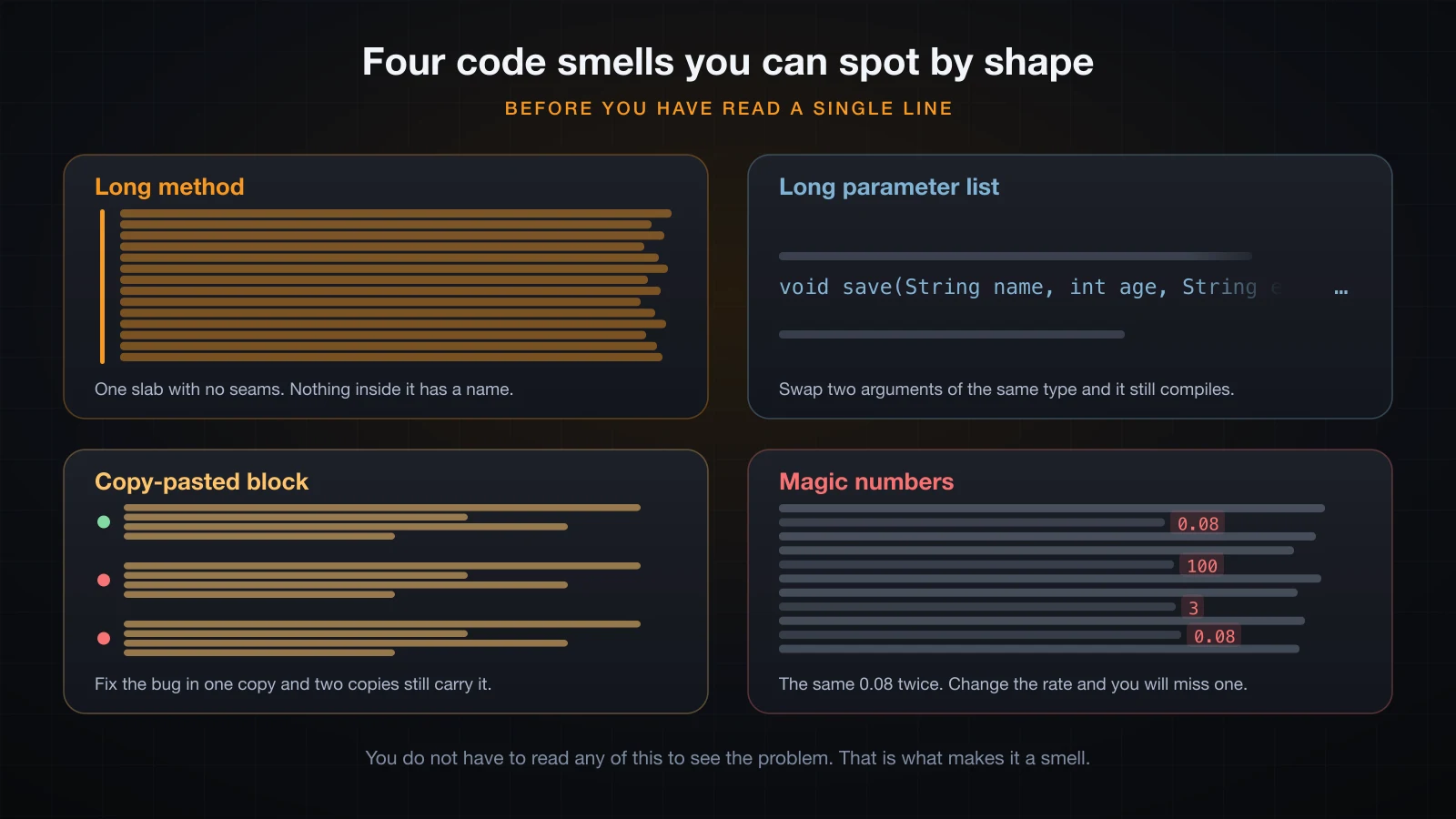
| Smell | The tell | The fix |
|---|---|---|
| Long method | One block of code with no blank lines and no seams | Extract each job into a named method |
| Long parameter list | Five or more parameters, several the same type | Group them into an object, or split the method |
| Copy-pasted block | The same shape appearing two or three times | Extract it once and call it three times |
| Magic numbers | Bare literals in expressions, often repeated | private static final with a name |
| Deep nesting | The code drifts right into an arrow | Guard clauses and extraction |
| A comment explaining a block | "Now we calculate the..." above ten lines | The block is a method; the comment is its name |
The two most expensive are duplication and long parameter lists. Duplication is expensive because a fix has to be found and applied in every copy, and the copies drift apart until they are no longer obviously the same code. A long parameter list is expensive because Java matches arguments by position, not by name: in save(name, age, email, phone, active, role), swapping email and phone compiles cleanly and produces wrong data at runtime.
The last row is the most useful habit in the whole list. Any time you are about to write // now calculate the discount above a block of code, you have already named the method — write discountFor(...) instead and let the name live where a reader will find it.
FAQ
Does clean code make my Java program slower?
Do not decide your style on performance grounds, and do not take a number from an article either. Nothing in this article was timed, deliberately: readability is a decision about people, and the shape of your code is almost never what determines whether a program is fast enough. If a specific piece of code genuinely matters, measure that code with a proper benchmark rather than reasoning from its shape.
How long should a Java method be?
There is no number worth defending. A more useful test: can you name the method accurately without using "and"? calculateTotalAndPrintReceiptAndSaveToFile is three methods that have not been separated yet. If a method fits on a screen and does one nameable thing, its length is fine.
Do I have to follow the naming conventions if my code works?
Nothing enforces them — class shoppingCart compiles and runs, as shown at the top of this article. But every Java programmer and every tool reads names against the JDK's conventions, so ignoring them costs your reader a pause on every identifier. It is free to get right and it is the first thing an interviewer or a reviewer notices.
Should I use -Xlint:all on every project?
Turn it on and read what it says. It catches fall-through in switch, stray semicolons after if, guaranteed division by zero, lossy compound assignments and deprecated APIs — all things that are otherwise found at runtime or not at all. Add -Werror once the existing warnings are cleared, so new ones cannot accumulate. If a category is genuinely noise for your project, disable that one category by name rather than all of them.
When is a comment worth writing?
When it records something a reader cannot get from the code: why a workaround exists, what constraint a call depends on, or which requirement forced an odd rule. A comment that restates what the line does is a duplicate that will go stale. If you are about to write a comment describing what a block does, extract the block into a method and use the comment as its name.
Is == ever the right choice in Java?
Yes, in four places: comparing primitives such as int and char, checking a reference against null, comparing enum constants, and a deliberate identity check where you really do mean "the same object". Everywhere else, including all strings and all boxed types, use equals.
What is the difference between refactoring and rewriting?
A refactor changes the structure without changing the behaviour, in steps small enough that you can run the program after each one and see the same output — exactly as done three times with Checkout above. A rewrite changes behaviour, or changes so much at once that you cannot tell whether it did. Refactoring is safe because it is verifiable; rewriting has to be re-tested from scratch.
Conclusion
Clean code has no compiler behind it, so it comes down to a handful of habits you apply on purpose: name things the way the JDK names them, turn -Xlint:all on and read it, give every meaningful literal a name, keep methods short enough to name accurately, leave early instead of nesting, use equals for objects, never hand out your internal state through a getter, and write comments that say why. None of that is difficult. All of it is the difference between code you can change next month and code you rewrite.
That also closes the Java Basics course. Thirty-six articles ago the question was what Java is and why it needs a JVM; from there this course covered the JDK and the compile-and-run cycle, variables, types and casting, operators, strings, input, conditionals and loops, arrays in one and two dimensions and the algorithms that walk them, methods with their parameters, overloads, scope and recursion, then the object-oriented core — classes and objects, fields and constructors, this, static and final, encapsulation, inheritance, polymorphism, abstract classes and interfaces — then exceptions, collections and maps, file input and output, and finally a console project that put all of it into one working program.
Concretely, you can now read a Java class and predict what it does, write one that models a real problem, choose the right collection for a job, handle failure with exceptions instead of hoping, read and write files, and compile, run and debug the result from a terminal without an IDE holding your hand. That is a real foundation, and it is roughly where a junior Java developer starts. It is not the whole language: everything you have written so far has been small, single-threaded and self-contained.
Next comes the Advanced Java course, which starts by going back over the four OOP principles at a depth this course could not afford, then covers nested, inner and anonymous classes, enums with fields and behaviour of their own, generics and why List<String> needed those angle brackets all along, the SOLID principles, and the design patterns you will meet in every real Java codebase. The habits in this article are what make that material readable when you get there.
![[Java Basics] Read and Write Text Files in Java](/images/blog/file-io-thumbnail.en.webp)
![[Java Basics] Variables and Data Types in Java: Primitive vs Reference](/images/blog/java-variables-thumbnail.en.webp)
![[Java Basics] Encapsulation in Java: Access Modifiers, Getters and Setters](/images/blog/encapsulation-thumbnail.en.webp)
![[Java Basics] Abstraction in Java: Abstract Classes and Abstract Methods](/images/blog/abstract-classes-thumbnail.en.webp)