A loop inside another loop is the first construct in this series whose cost multiplies. The
previous article covered the loop forms themselves — for, while, do-while — and each of
them ran a body some number of times. Put one inside another and the body runs the product of
the two counts, which is where both the useful patterns and the slow programs come from.
The two keywords that cut a loop short, break and continue, are simple on their own and
misleading the moment there are two loops. break leaves one loop, never both. continue skips
the rest of the body, but what it does with the update step depends on which loop form you used.
The examples use Java 21.
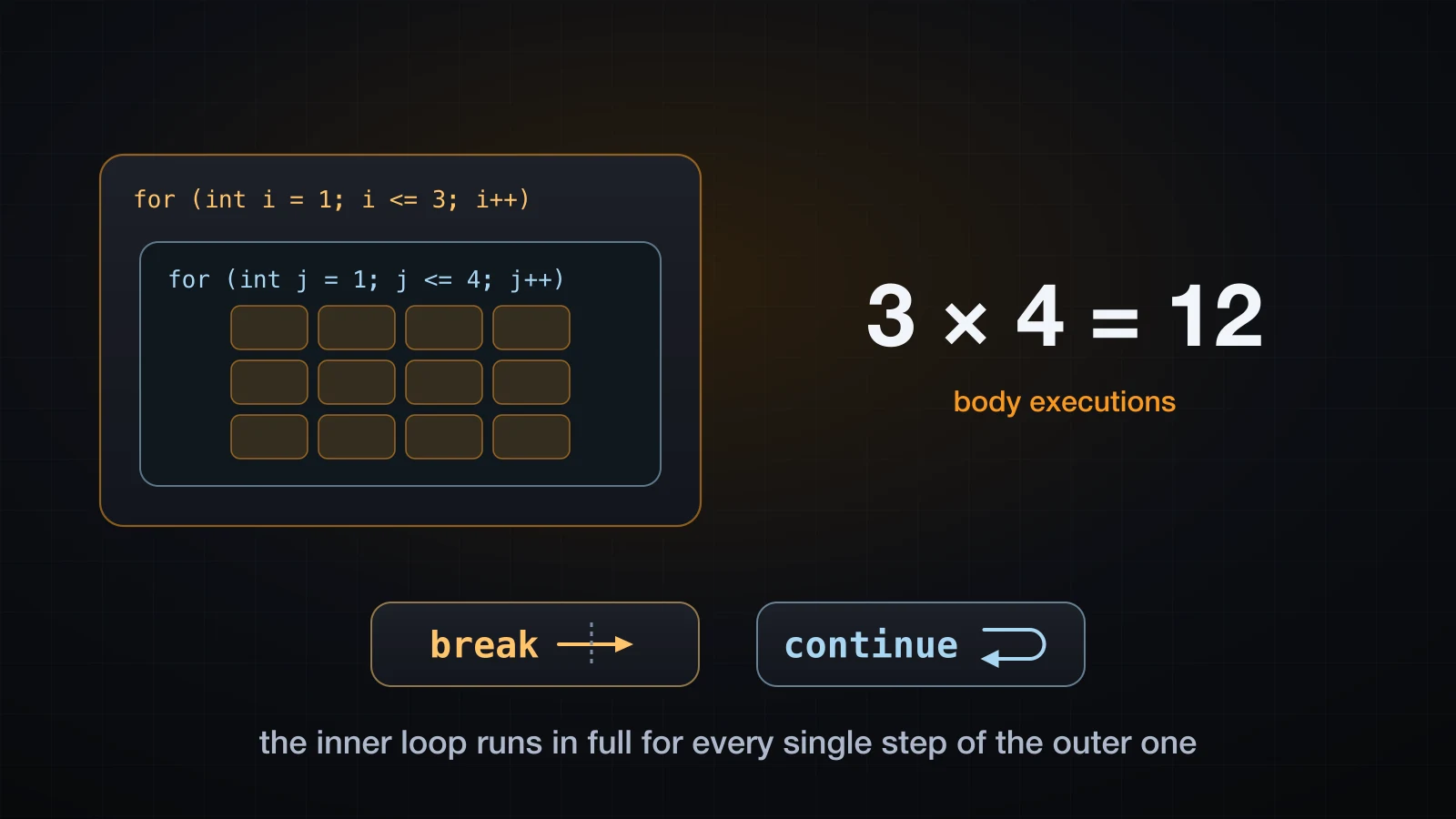
Start with the counting, because everything else in this article is a modification of it.
How a nested loop actually runs
The rule is one sentence: for every single iteration of the outer loop, the inner loop runs from its start condition all the way to its end. Not one step of it — all of it.
public class NestedBasics {
    public static void main(String[] args) {
        int bodyRuns = 0;
        for (int i = 1; i <= 3; i++) {
            System.out.println("outer i=" + i + " starts");
            for (int j = 1; j <= 4; j++) {
                bodyRuns++;
                System.out.println("  (i=" + i + ", j=" + j + ")");
            }
            System.out.println("outer i=" + i + " ends");
        }
        System.out.println("inner body ran " + bodyRuns + " times");
    }
}outer i=1 starts
(i=1, j=1)
(i=1, j=2)
(i=1, j=3)
(i=1, j=4)
outer i=1 ends
outer i=2 starts
(i=2, j=1)
(i=2, j=2)
(i=2, j=3)
(i=2, j=4)
outer i=2 ends
outer i=3 starts
(i=3, j=1)
(i=3, j=2)
(i=3, j=3)
(i=3, j=4)
outer i=3 ends
inner body ran 12 times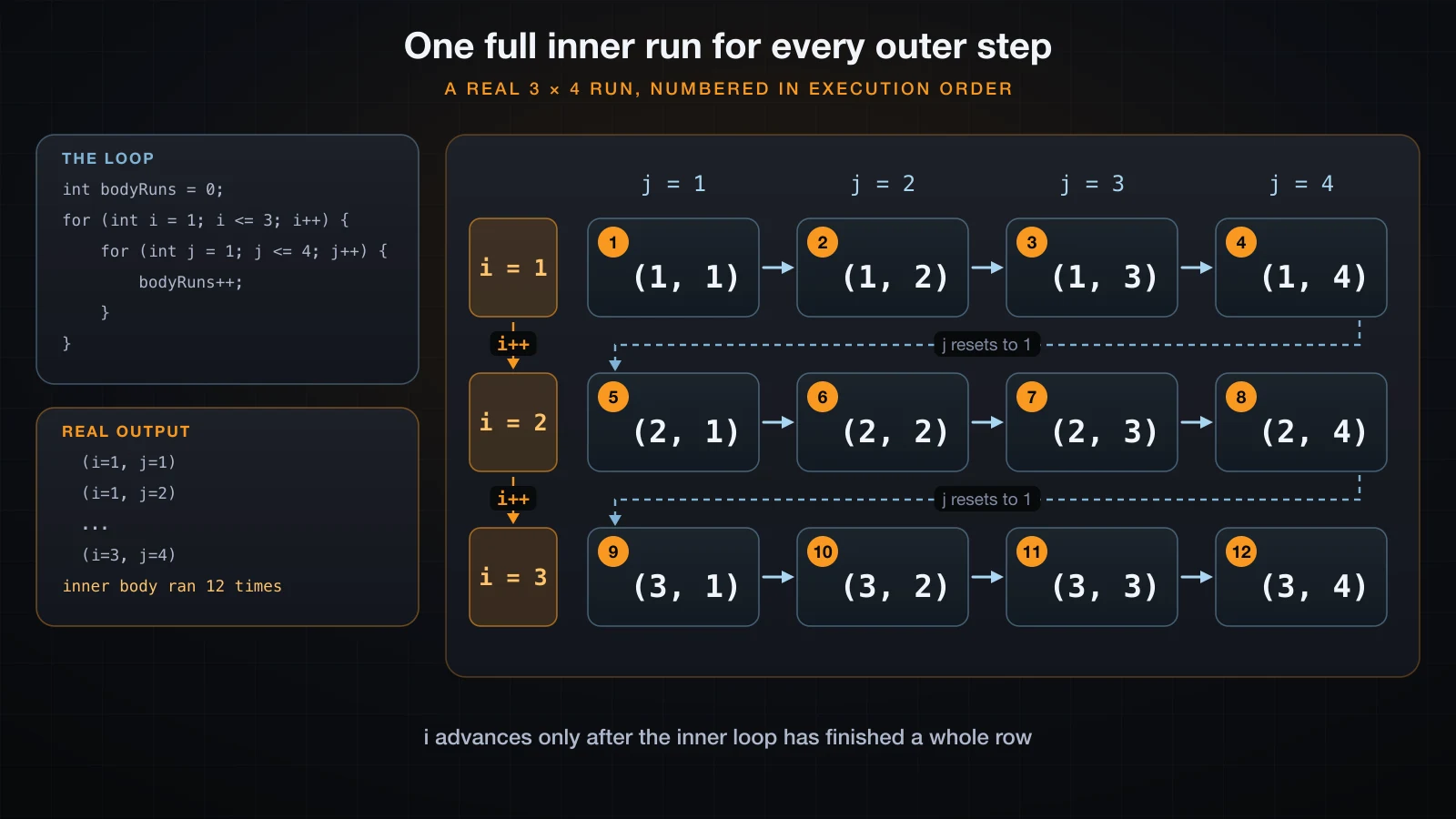
Three things that transcript makes concrete:
- The inner counter restarts every time.
jgoes 1, 2, 3, 4 and then is redeclared from scratch on the next outer pass. It does not carry 4 into the second row. i++runs three times,j++runs twelve. The outer counter only moves afterouter i=1 ends, which is the point where the inner loop's condition finally failed.- The body ran 3 × 4 = 12 times. That multiplication is the whole idea. Outer count times inner count, not outer plus inner.
The cost of nesting, in iteration counts
Two loops over the same n-element collection execute the body n × n times. That is worth seeing as real numbers rather than as a formula, so here is a counter — no timing, just the number of times the innermost statement is reached:
public class NestedCost {
    public static void main(String[] args) {
        int[] sizes = {10, 100, 1000};
        System.out.printf("%6s %12s %14s %18s%n", "n", "one loop", "two nested", "three nested");
        for (int n : sizes) {
            long one = 0, two = 0, three = 0;
            for (int i = 0; i < n; i++) one++;
            for (int i = 0; i < n; i++)
                for (int j = 0; j < n; j++) two++;
            for (int i = 0; i < n; i++)
                for (int j = 0; j < n; j++)
                    for (int k = 0; k < n; k++) three++;
            System.out.printf("%6d %12d %14d %18d%n", n, one, two, three);
        }
    }
} n one loop two nested three nested
10 10 100 1000
100 100 10000 1000000
1000 1000 1000000 1000000000| n | one loop | two nested | three nested |
|---|---|---|---|
| 10 | 10 | 100 | 1,000 |
| 100 | 100 | 10,000 | 1,000,000 |
| 1,000 | 1,000 | 1,000,000 | 1,000,000,000 |
Ten times more data costs ten times more work with one loop, a hundred times more with two, and a thousand times more with three. Nothing about the machine changes that ratio, which is why the count is a better thing to reason about than a stopwatch: the structure of the code decides it.
For a nested loop over a few dozen rows of a table this is irrelevant. For a nested loop over a list that grows with your user count, it is the difference between a page that loads and a page that times out.
Three nested-loop shapes you will write over and over
Almost every nested loop you write in practice is one of three shapes.
A coordinate grid
Outer loop walks the rows, inner loop walks the columns, and the line break belongs to the outer loop:
public class Grid {
    public static void main(String[] args) {
        for (int row = 0; row < 3; row++) {
            for (int col = 0; col < 5; col++) {
                System.out.printf("%8s", "(" + row + "," + col + ")");
            }
            System.out.println();
        }
    }
} (0,0) (0,1) (0,2) (0,3) (0,4)
(1,0) (1,1) (1,2) (1,3) (1,4)
(2,0) (2,1) (2,2) (2,3) (2,4)The System.out.println() with no argument sits in the outer loop body, after the inner loop has
closed. Move it inside the inner loop and you get fifteen lines with one cell each; leave it out
entirely and you get one very long line.
A multiplication table
The same shape, with the two counters used together in the body instead of printed separately:
public class TimesTable {
    public static void main(String[] args) {
        for (int i = 1; i <= 5; i++) {
            for (int j = 1; j <= 5; j++) {
                System.out.printf("%4d", i * j);
            }
            System.out.println();
        }
    }
} 1 2 3 4 5
2 4 6 8 10
3 6 9 12 15
4 8 12 16 20
5 10 15 20 25%4d is doing the column alignment. Padding a string with spaces would work too, but the widths
would drift as soon as a product reached three digits.
Comparing every pair in a list
This is the one with a real trick in it. To compare every pair exactly once, the inner loop
starts at i + 1 rather than at 0:
public class Pairs {
    public static void main(String[] args) {
        String[] names = {"An", "Binh", "Chi", "Dung"};
        int comparisons = 0;
        for (int i = 0; i < names.length; i++) {
            for (int j = i + 1; j < names.length; j++) {
                comparisons++;
                System.out.println(names[i] + " vs " + names[j]);
            }
        }
        System.out.println("comparisons = " + comparisons);
    }
}An vs Binh
An vs Chi
An vs Dung
Binh vs Chi
Binh vs Dung
Chi vs Dung
comparisons = 6Six comparisons for four names. Start the inner loop at 0 instead and the count is sixteen: every pair twice, plus four pointless comparisons of an element with itself.
for (int i = 0; i < names.length; i++) {
    for (int j = 0; j < names.length; j++) {
        comparisons++;
    }
}comparisons = 16j = i + 1 costs n × (n − 1) / 2 instead of n × n. It is still quadratic, but it does half the
work and — more importantly — it never hands your comparison code a pair where both sides are the
same element, which is a bug source all of its own.
break leaves the innermost loop only
break ends the loop it is written in. Inside a nested loop that means the inner one, and the
outer loop keeps going as if nothing happened:
public class BreakInner {
    public static void main(String[] args) {
        for (int i = 1; i <= 3; i++) {
            System.out.println("outer i=" + i);
            for (int j = 1; j <= 4; j++) {
                if (j == 3) {
                    System.out.println("    break at j=3");
                    break;
                }
                System.out.println("    inner j=" + j);
            }
            System.out.println("  after inner loop, i=" + i);
        }
        System.out.println("done");
    }
}outer i=1
inner j=1
inner j=2
break at j=3
after inner loop, i=1
outer i=2
inner j=1
inner j=2
break at j=3
after inner loop, i=2
outer i=3
inner j=1
inner j=2
break at j=3
after inner loop, i=3
doneafter inner loop prints three times, once per outer iteration. The break fired three times
too — once on each pass — and each time it only cancelled the remaining j values. Execution
resumes at the first statement after the inner loop's closing brace, which is still inside the
outer loop body.
This is the single most common misunderstanding about break, and it is why labelled breaks
exist further down.
continue skips the rest of the body
continue does not end the loop. It abandons the current iteration and moves on to the next one:
for (int i = 1; i <= 6; i++) {
    if (i == 4) {
        break;
    }
    System.out.println("i=" + i);
}
System.out.println("after the loop");i=1
i=2
i=3
after the loopfor (int i = 1; i <= 6; i++) {
if (i == 4) {
continue;
}
System.out.println("i=" + i);
}
System.out.println("after the loop");i=1
i=2
i=3
i=5
i=6
after the loopSame loop, same condition, one keyword different. break stopped at 3. continue skipped only
the value 4 and carried on to 5 and 6.
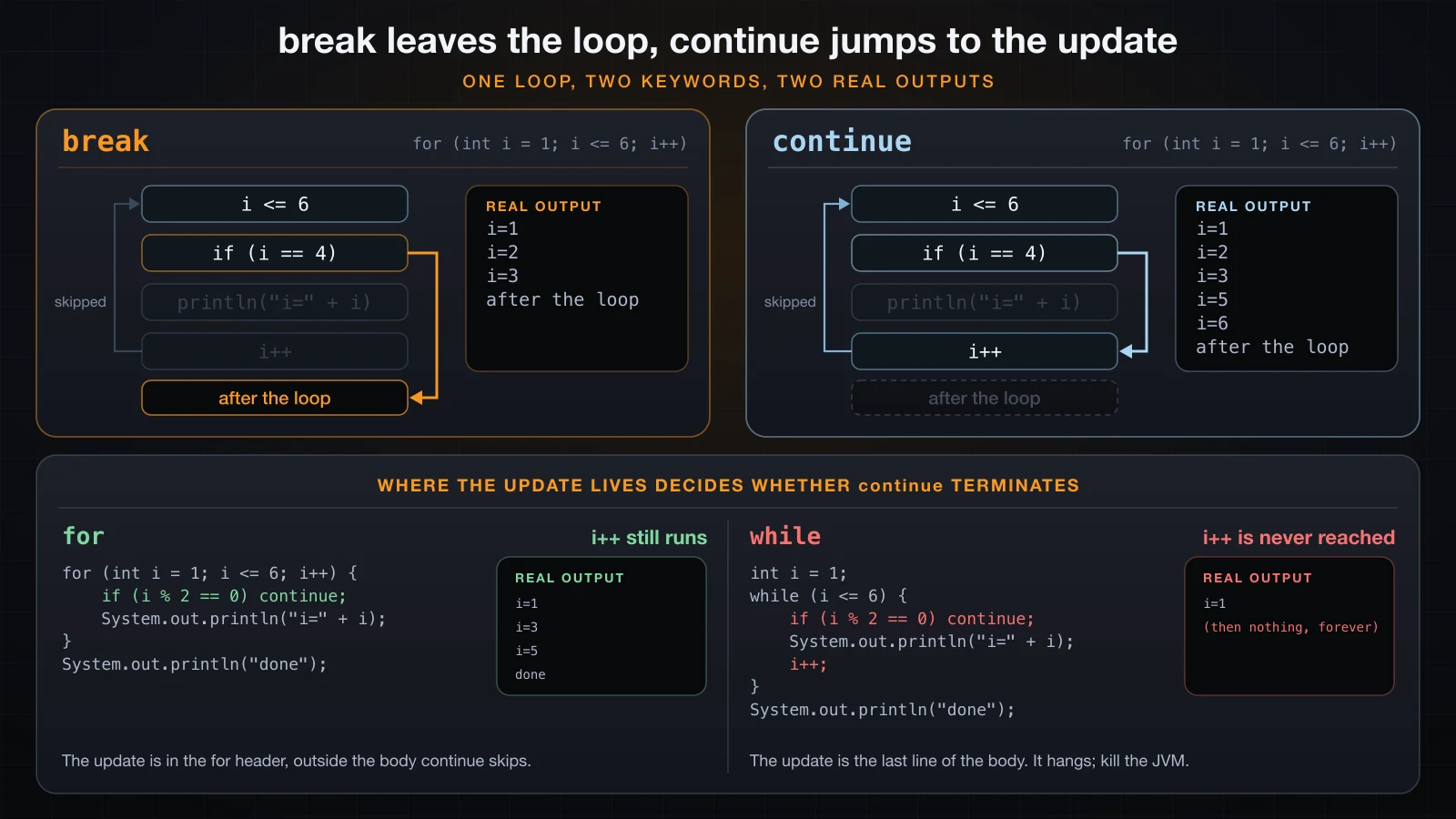
Where continue jumps to is the part that matters, and it is not the same in every loop form.
In a for loop, continue still runs the update
continue in a for loop jumps to the update expression in the loop header, then to the
condition. The update is not part of the body, so skipping the body does not skip it. Proving
that needs an update expression that announces itself:
public class ContinueUpdateProof {
    public static void main(String[] args) {
        for (int i = 1; i <= 4; i = bump(i)) {
            if (i == 2) {
                System.out.println("i=2 -> continue");
                continue;
            }
            System.out.println("body i=" + i);
        }
    }

    private static int bump(int i) {
        System.out.println("    update: " + i + " -> " + (i + 1));
        return i + 1;
    }
}body i=1
update: 1 -> 2
i=2 -> continue
update: 2 -> 3
body i=3
update: 3 -> 4
body i=4
update: 4 -> 5The update: 2 -> 3 line appears immediately after the continue. That is the guarantee that
makes continue safe in a for loop: the counter always moves, so the loop always ends.
In a while loop, continue skips the update
A while loop has no update slot. The increment is just another statement in the body, usually
the last one — so continue jumps straight over it, back to the condition, with the counter
unchanged:
public class ContinueWhileInfinite {
    public static void main(String[] args) {
        int i = 1;
        while (i <= 6) {
            if (i % 2 == 0) continue;
            System.out.println("i=" + i);
            i++;
        }
        System.out.println("done");
    }
}i=1That is the whole output. The program prints i=1, increments to 2, finds 2 even, hits the
continue, jumps back to i <= 6 with i still 2, finds 2 even again, and does that forever.
It has to be killed from outside; it never reaches done.
To see the state it is stuck in, the same loop with a spin counter that forces an exit:
public class ContinueWhileBug {
    public static void main(String[] args) {
        int i = 1;
        int spins = 0;
        while (i <= 6) {
            if (++spins > 10) {          // safety net, only so this can be printed
                System.out.println("stuck: i is still " + i + " after 10 spins");
                break;
            }
            if (i % 2 == 0) {
                continue;                // jumps straight back to the condition
            }
            System.out.println("i=" + i);
            i++;
        }
        System.out.println("done");
    }
}i=1
stuck: i is still 2 after 10 spins
doneTen trips round the loop and i never moved off 2. The fix is to make the update run before any
continue can be reached:
public class ContinueWhileFix {
    public static void main(String[] args) {
        int i = 0;
        while (i < 6) {
            i++;                         // update FIRST, before any continue
            if (i % 2 == 0) {
                continue;
            }
            System.out.println("i=" + i);
        }
        System.out.println("done");
    }
}i=1
i=3
i=5
done| Loop form | Where the update lives | What continue does with it |
|---|---|---|
for | the loop header | runs it, then re-tests the condition |
while | somewhere in the body | skips it if it sits after the continue |
do-while | somewhere in the body | skips it, then tests the condition at the bottom |
The practical rule: in a while loop, either put the update at the very top of the body, or use a
for loop instead. A for loop is precisely a while loop whose update cannot be skipped.
Labelled break and labelled continue
A label is an identifier and a colon placed immediately before a loop. break label and
continue label then act on that loop instead of the innermost one. The same nested loop with
the same condition, three times:
for (int i = 1; i <= 3; i++) {
    for (int j = 1; j <= 3; j++) {
        if (i * j == 4) {
            break;
        }
        System.out.println("i=" + i + " j=" + j);
    }
}
System.out.println("done");i=1 j=1
i=1 j=2
i=1 j=3
i=2 j=1
i=3 j=1
i=3 j=2
i=3 j=3
doneThe plain break fires when i is 2 and j is 2, cancels the rest of that inner run, and the
outer loop continues into i=3. Now with a label:
outer:
for (int i = 1; i <= 3; i++) {
    for (int j = 1; j <= 3; j++) {
        if (i * j == 4) {
            break outer;
        }
        System.out.println("i=" + i + " j=" + j);
    }
}
System.out.println("done");i=1 j=1
i=1 j=2
i=1 j=3
i=2 j=1
done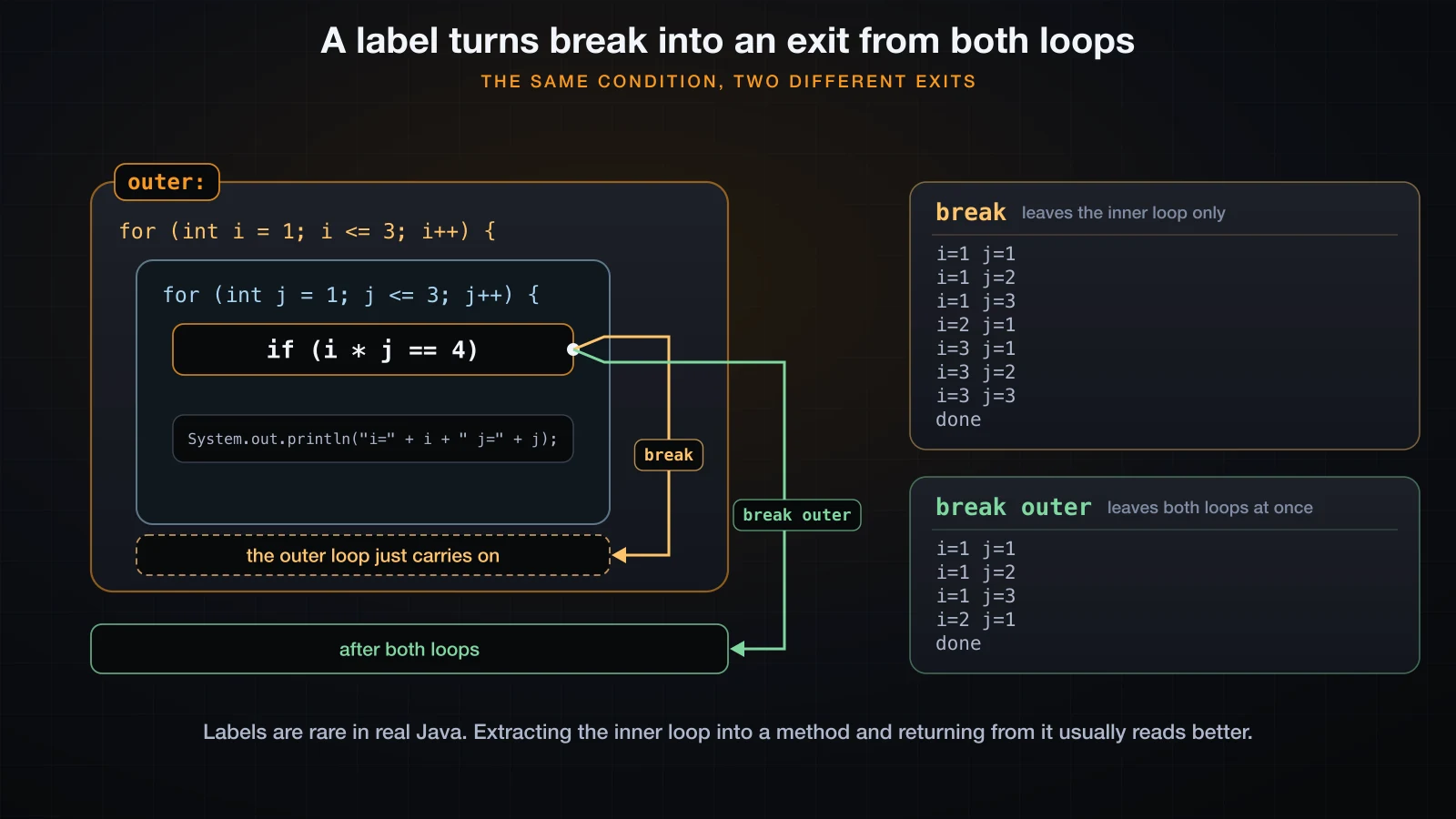
Execution jumps past the closing brace of the labelled loop, straight to the println that
follows it. And continue outer abandons the rest of the current outer iteration and starts the
next one:
outer:
for (int i = 1; i <= 3; i++) {
    for (int j = 1; j <= 3; j++) {
        if (i * j == 4) {
            continue outer;
        }
        System.out.println("i=" + i + " j=" + j);
    }
    System.out.println("  end of row i=" + i);
}
System.out.println("done");i=1 j=1
i=1 j=2
i=1 j=3
end of row i=1
i=2 j=1
i=3 j=1
i=3 j=2
i=3 j=3
end of row i=3
doneNote the missing end of row i=2. continue outer skipped the remainder of the outer loop's
body too, not just the inner loop's — that statement is part of the iteration it abandoned. Like
any continue in a for loop, it still runs the outer update:
outer:
for (int i = 1; i <= 3; i = bump(i)) {
    for (int j = 1; j <= 2; j++) {
        if (j == 2) {
            System.out.println("  continue outer at i=" + i + " j=" + j);
            continue outer;
        }
        System.out.println("body i=" + i + " j=" + j);
    }
    System.out.println("  never reached");
}body i=1 j=1
continue outer at i=1 j=2
outer update: 1 -> 2
body i=2 j=1
continue outer at i=2 j=2
outer update: 2 -> 3
body i=3 j=1
continue outer at i=3 j=2
outer update: 3 -> 4The label has to name a loop that actually encloses the statement, and it has to be spelled correctly. A typo is a compile error, not a runtime surprise:
outer:
for (int i = 1; i <= 3; i++) {
    for (int j = 1; j <= 3; j++) {
        break outter;
    }
}BadLabel.java:6: error: undefined label: outter
break outter;
^
1 errorLabels are rare, and a method with an early return is usually better
Labels are legal, they are occasionally exactly right, and you will go months of real Java without
seeing one. The reason is that a nested loop worth escaping from is usually a piece of logic worth
naming, and once it is its own method, return does the same job with no new syntax:
public class FirstPairMethod {
    public static void main(String[] args) {
        printUntilProductIsFour();
        System.out.println("done");
    }

    private static void printUntilProductIsFour() {
        for (int i = 1; i <= 3; i++) {
            for (int j = 1; j <= 3; j++) {
                if (i * j == 4) {
                    return;              // leaves the method, so both loops
                }
                System.out.println("i=" + i + " j=" + j);
            }
        }
    }
}i=1 j=1
i=1 j=2
i=1 j=3
i=2 j=1
doneIdentical output to the labelled version. The method version also gets a name that says what the loops are for, and it can be tested on its own. Reach for a label when extracting a method would mean passing six local variables in and out; reach for a method the rest of the time.
break inside a switch breaks the switch, not the loop
This one is a genuine trap, because the same keyword means two different things depending on what
encloses it. Inside a switch, break ends the switch. If that switch happens to be inside a
loop, the loop is untouched:
public class SwitchBreakTrap {
    public static void main(String[] args) {
        String[] commands = {"add", "add", "quit", "add"};
        for (String cmd : commands) {
            switch (cmd) {
                case "add":
                    System.out.println("adding");
                    break;
                case "quit":
                    System.out.println("quitting");
                    break;          // this leaves the SWITCH, not the for loop
            }
        }
        System.out.println("loop finished");
    }
}adding
adding
quitting
adding
loop finishedThe program printed quitting and then processed another command. The break did what it always
does in a switch: it prevented fall-through into the next case. It was never going to stop the
loop.
A label is the direct fix, and this is the one place where labels earn their keep, because there
is no other keyword that reaches past the switch:
loop:
for (String cmd : commands) {
    switch (cmd) {
        case "add":
            System.out.println("adding");
            break;
        case "quit":
            System.out.println("quitting");
            break loop;     // this one leaves the for loop
    }
}
System.out.println("loop finished");adding
adding
quitting
loop finishedA flag variable in the loop condition is the alternative, and with arrow-form cases it reads
cleanly because arrow cases do not need break at all:
boolean running = true;
for (int i = 0; i < commands.length && running; i++) {
    switch (commands[i]) {
        case "add" -> System.out.println("adding");
        case "quit" -> {
            System.out.println("quitting");
            running = false;
        }
    }
}
System.out.println("loop finished");adding
adding
quitting
loop finishedThe flag version has one behavioural difference worth knowing: it finishes the current iteration
before stopping, while break loop stops immediately. When the rest of the iteration does
nothing, as here, the outputs are identical.
Searching a 2D structure and stopping at the first hit
The canonical use of a labelled break is scanning a grid for a value and getting out the moment it is found. Every extra probe after the hit is wasted work:
public class SearchLabeled {
    public static void main(String[] args) {
        int[][] grid = {
            {4, 8, 15},
            {16, 23, 42},
            {7, 23, 99}
        };
        int target = 23;
        int foundRow = -1;
        int foundCol = -1;
        int probes = 0;

        search:
        for (int r = 0; r < grid.length; r++) {
            for (int c = 0; c < grid[r].length; c++) {
                probes++;
                if (grid[r][c] == target) {
                    foundRow = r;
                    foundCol = c;
                    break search;
                }
            }
        }

        System.out.println("probes=" + probes);
        System.out.println("found at row=" + foundRow + " col=" + foundCol);
    }
}probes=5
found at row=1 col=1Five probes out of nine, and the second 23 at row 2 was never reached. The flag-variable
version does the same thing with an extra boolean and a condition in the outer loop:
boolean found = false;

for (int r = 0; r < grid.length && !found; r++) {
    for (int c = 0; c < grid[r].length; c++) {
        probes++;
        if (grid[r][c] == target) {
            foundRow = r;
            foundCol = c;
            found = true;
            break;
        }
    }
}probes=5
found at row=1 col=1Same probe count, same answer. The trade is explicit: the labelled version has one jump and no
extra state, the flag version has no unusual syntax but two things to keep in sync — found = true
and the plain break right after it. Forget the break and the inner loop finishes the row
before the outer condition is re-tested.
return is the strongest exit
Both versions above are search code living in the middle of main. Move it into a method and the
exit problem disappears, because return leaves everything at once — every enclosing loop, and
the method:
public class SearchMethod {
    public static void main(String[] args) {
        int[][] grid = {
            {4, 8, 15},
            {16, 23, 42},
            {7, 23, 99}
        };
        int[] hit = find(grid, 23);
        if (hit == null) {
            System.out.println("not found");
        } else {
            System.out.println("found at row=" + hit[0] + " col=" + hit[1]);
        }
        System.out.println("missing 100 -> " + (find(grid, 100) == null ? "not found" : "found"));
    }

    private static int[] find(int[][] grid, int target) {
        for (int r = 0; r < grid.length; r++) {
            for (int c = 0; c < grid[r].length; c++) {
                if (grid[r][c] == target) {
                    return new int[] {r, c};
                }
            }
        }
        return null;
    }
}found at row=1 col=1
missing 100 -> not foundNo label, no flag, no foundRow variable initialised to a sentinel -1 that the caller has to
remember to check. The "not found" case is a single return null at the bottom, reached exactly
when the loops completed without a hit.
| Exit | Leaves | Use it when |
|---|---|---|
break | the innermost enclosing loop or switch | you are done with this loop only |
break label | the labelled loop and everything inside it | you must escape more than one loop in place |
continue | the current iteration | this element is not interesting |
continue label | the current iteration of the labelled loop | this whole outer element is not interesting |
return | the method, and every loop in it | the loops are a search and the method is the search |
How deep is too deep
Two levels are normal. Three are a smell. Four almost always means a method is hiding in there. The measurable symptom is that the body drifts right and the conditions stop being readable together:
public class DeepNesting {
    public static void main(String[] args) {
        String[][] rows = {
            {"An", "", "HN"},
            {"Binh", "b@x.vn", "SG"},
            {"", "c@x.vn", "DN"}
        };
        for (int r = 0; r < rows.length; r++) {
            boolean complete = true;
            for (int c = 0; c < rows[r].length; c++) {
                if (rows[r][c].isEmpty()) {
                    complete = false;
                    break;
                }
            }
            System.out.println("row " + r + " complete=" + complete);
        }
    }
}row 0 complete=false
row 1 complete=true
row 2 complete=falseThat works, and it needs a complete flag purely to carry the inner loop's answer back out to
the outer one. Extract the inner loop and the flag becomes a return value:
public class ExtractedLoop {
    public static void main(String[] args) {
        String[][] rows = {
            {"An", "", "HN"},
            {"Binh", "b@x.vn", "SG"},
            {"", "c@x.vn", "DN"}
        };
        for (int r = 0; r < rows.length; r++) {
            System.out.println("row " + r + " complete=" + isComplete(rows[r]));
        }
    }

    private static boolean isComplete(String[] row) {
        for (String field : row) {
            if (field.isEmpty()) {
                return false;
            }
        }
        return true;
    }
}row 0 complete=false
row 1 complete=true
row 2 complete=falseIdentical output, one nesting level, no mutable flag, and the inner loop now has a name that says
what it decides. This is the same move as the find method above, and it is the answer to almost
every "how do I break out of both loops" question.
Common mistakes
Reusing the outer counter in the inner loop
Declaring the inner counter with the same name as the outer one does not compile, which is the good outcome:
for (int i = 1; i <= 3; i++) {
    for (int i = 1; i <= 3; i++) {
        System.out.println(i);
    }
}ShadowCounter.java:4: error: variable i is already defined in method main(String[])
for (int i = 1; i <= 3; i++) {
^
1 errorThe dangerous version is the one that compiles: dropping the int and reusing the same variable.
Now both loops share one counter, and the outer loop's count is destroyed by the inner one:
int runs = 0;
for (int i = 1; i <= 3; i++) {
    for (i = 1; i <= 3; i++) {     // same i, no new declaration
        runs++;
    }
}
System.out.println("body ran " + runs + " times, expected 9");body ran 3 times, expected 9Three, not nine. The inner loop drives i up to 4, the outer i++ makes it 5, and 5 <= 3 is
false on the first outer pass. Give the two loops different names — i and j, or row and
col — and declare each in its own header.
Declaring the inner counter outside the loops
The other half of the same problem. A counter declared before the outer loop is not reset for each outer iteration, so the inner loop runs once and is exhausted forever:
int j = 1;                          // declared outside, never reset
int runs = 0;
for (int i = 1; i <= 3; i++) {
    for (; j <= 3; j++) {
        runs++;
        System.out.println("i=" + i + " j=" + j);
    }
}
System.out.println("body ran " + runs + " times, expected 9");i=1 j=1
i=1 j=2
i=1 j=3
body ran 3 times, expected 9i=2 and i=3 produced nothing at all, because j was already 4 when they started. Declare the
counter in the for header — for (int j = 1; ...) — and the initialisation runs on every entry
into the loop, which is exactly what you want.
Forgetting that continue skips a while loop's update
Covered in full above, and worth repeating because it is the one that hangs a program rather than
printing a wrong number. If a while loop contains continue, check that the counter is
incremented before it, not after.
An unreachable statement after break
Java rejects code that provably cannot execute. A statement directly after break in the same
block is exactly that:
for (int i = 1; i <= 3; i++) {
    break;
    System.out.println("i=" + i);
}Unreachable.java:5: error: unreachable statement
System.out.println("i=" + i);
^
1 errorThe same happens after continue and after return. It usually means the break ended up
outside the if that was supposed to guard it — the guard is what makes the following statement
reachable again.
FAQ
How do I break out of two loops at once in Java?
Label the outer loop and use break label, or extract the loops into a method and return.
A plain break cannot do it: it always ends the innermost enclosing loop or switch. The method
version is usually the better code, because the thing you wanted to break out of almost always
deserves a name.
Why does my nested loop only run once?
Nearly always because the inner counter is declared outside the loops and never reset, or because
both loops share one variable. Declare each counter inside its own for header, and give them
different names.
Does continue skip the increment?
In a for loop, no — continue jumps to the update expression in the header, runs it, and then
tests the condition. In a while or do-while loop, yes, if the increment is written after the
continue in the body, and that is how continue produces an infinite loop.
Is break inside a switch inside a loop going to stop the loop?
No. It ends the switch only, and the loop takes its next iteration. Use break label on the
loop, or set a flag that the loop condition tests, or return if the whole thing is a method.
Are nested loops always slow?
No — the input size decides. Two nested loops over n items reach the body n² times, which is 100
executions for 10 items and a million for a thousand. Small fixed-size grids are fine forever;
loops whose bounds grow with your data are the ones to look at. Where the pairs are symmetric,
starting the inner loop at i + 1 halves the count for free.
Can I put a label on something that is not a loop?
Yes. Any statement can carry a label, and break label jumps to the end of that statement — a
plain block included. It is legal and it is very unusual; treat break on a labelled block as
something to recognise when reading, not something to write.
Conclusion
Nested loops multiply: the inner body runs the outer count times the inner count, which is 12 for
a 3 × 4 run and a million for two loops over a thousand elements. break ends the innermost
enclosing loop or switch and nothing more. continue abandons the current iteration, running a
for loop's update on the way out and skipping a while loop's, which is the difference between
a loop that finishes and one you have to kill. Labels let break and continue name a loop
further out, and they are the right tool for escaping a switch inside a loop — but a method
with an early return is the answer most of the time.
That completes the control flow half of this series: conditions, loops, and the ways out of them.
The next article is a combined exercise set on conditions and loops — a graded set of problems
that puts if, switch, for, while, nesting, break and continue together, with worked
solutions and the output of each one.
![[Java Basics] Fields, Methods and Constructors in Java](/images/blog/constructors-thumbnail.en.webp)
![[Java Basics] Read and Write Text Files in Java](/images/blog/file-io-thumbnail.en.webp)
![[Java Basics] Method Parameters, Return Values and Overloading in Java](/images/blog/method-overloading-thumbnail.en.webp)
![[Java Basics] The this, static and final Keywords in Java](/images/blog/this-static-final-thumbnail.en.webp)