The last three articles introduced if and switch, the three loop forms, and nested loops with
break and continue. This one adds no new syntax at all. It is sixteen exercises built out of
those, plus the variables, operators, strings and Scanner from earlier in the series.
The solutions use Java 21. Where an exercise has a famous wrong answer, the wrong version is run as well, so you can see how it fails instead of reading a description of it.
Four tiers, hardest last. Each exercise gives you the problem, the exact output to aim for, a hint, the solution, and the mistake that catches most people on that particular problem.
Warm-up: conditions
Five short problems. Every one of them is about getting a condition and the order of its branches right. Write each before reading the solution — the value is in the attempt.
Exercise 1 — Even or odd, negatives included
Problem. Given int n = -7;, print whether it is even or odd, then print -7 % 2 and the
result of comparing it to 1. It must be correct for negative numbers.
Expected output
-7 is odd
-7 % 2 = -1
-7 % 2 == 1 ? false
Hint. In Java the result of % takes the sign of the left operand.
Solution
public class EvenOdd {
    public static void main(String[] args) {
        int n = -7;

        if (n % 2 == 0) {
            System.out.println(n + " is even");
        } else {
            System.out.println(n + " is odd");
        }

        System.out.println("-7 % 2 = " + (-7 % 2));
        System.out.println("-7 % 2 == 1 ? " + (-7 % 2 == 1));
    }
}
The mistake. Writing if (n % 2 == 1) for the odd case. -7 % 2 is -1, not 1, so every
negative odd number is reported as even. Test for == 0 and let else carry the odd case.
Exercise 2 — FizzBuzz
Problem. For i from 1 to 15: print Fizz when i is divisible by 3, Buzz when divisible
by 5, FizzBuzz when divisible by both, and otherwise the number itself.
Expected output
1
2
Fizz
4
Buzz
Fizz
7
8
Fizz
Buzz
11
Fizz
13
14
FizzBuzz
Hint. 15 is divisible by 3, by 5 and by 15, and in an if / else if chain only one branch
gets to run.
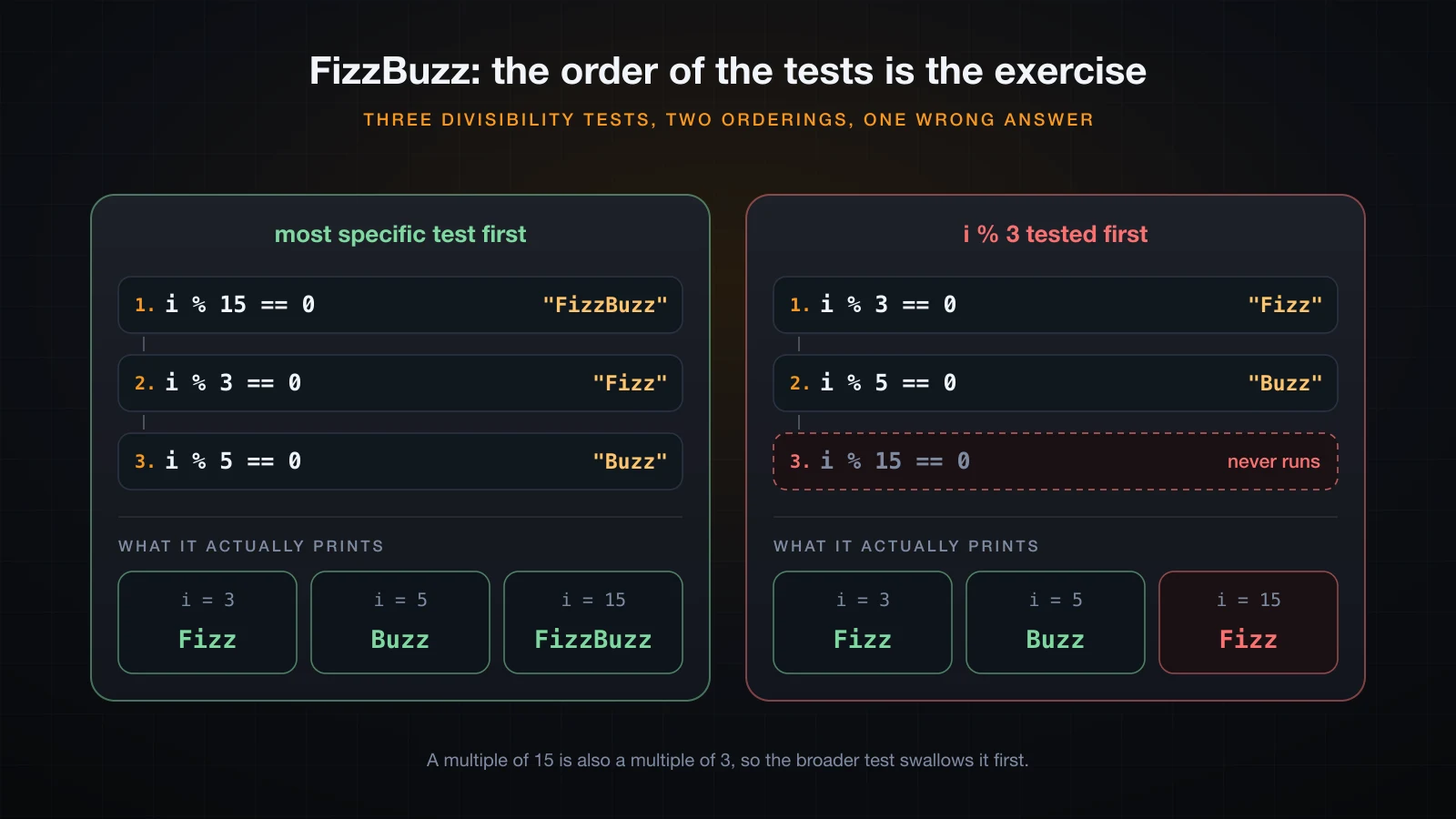
Solution — test the most specific condition first
public class FizzBuzz {
    public static void main(String[] args) {
        for (int i = 1; i <= 15; i++) {
            if (i % 15 == 0) {
                System.out.println("FizzBuzz");
            } else if (i % 3 == 0) {
                System.out.println("Fizz");
            } else if (i % 5 == 0) {
                System.out.println("Buzz");
            } else {
                System.out.println(i);
            }
        }
    }
}
Solution — build the string from two independent tests
public class FizzBuzzBuild {
    public static void main(String[] args) {
        for (int i = 1; i <= 15; i++) {
            String out = "";
            if (i % 3 == 0) out += "Fizz";
            if (i % 5 == 0) out += "Buzz";
            if (out.isEmpty()) out = "" + i;
            System.out.println(out);
        }
    }
}
Both print the same fifteen lines. The second version has no ordering problem to get wrong,
because the two tests are independent if statements rather than a chain, and 15 satisfies both.
The mistake. Putting i % 3 == 0 first. Then 15 matches that branch, prints Fizz, and the
i % 15 == 0 branch below is unreachable for exactly the inputs it was written for:
java FizzBuzzWrong | tail -313
14
FizzExercise 3 — The largest of three numbers
Problem. Given three int values, print the largest. It must handle ties. Use
a = 17, b = 42, c = 42.
Expected output
a=17 b=42 c=42 -> largest = 42Hint. Ties need >=, not >, and the final else has to cover a case rather than being an
afterthought.
Solution
public class Largest {
    public static void main(String[] args) {
        int a = 17, b = 42, c = 42;

        int max;
        if (a >= b && a >= c) {
            max = a;
        } else if (b >= c) {
            max = b;
        } else {
            max = c;
        }

        System.out.printf("a=%d b=%d c=%d -> largest = %d%n", a, b, c, max);
    }
}
The mistake. Writing the chain with > and no final else. With b = 42, c = 42 neither
branch is true, max is never assigned, and the compiler refuses the program:
LargestBad.java:12: error: variable max might not have been initialized
        System.out.println(max);
                           ^
1 error
That error is a favour. The same shape written with an else would have compiled and returned a
stale value instead. (Math.max(a, Math.max(b, c)) does the whole job in one expression, but
the branch structure is the exercise.)
Exercise 4 — A grade classifier
Problem. Turn a score into a letter: 90 and above A, 80 B, 70 C, 60 D, anything below
60 F. Print the grade for the scores 95, 85, 75, 65, 55, 45 and 35.
Expected output
score  95 -> A
score  85 -> B
score  75 -> C
score  65 -> D
score  55 -> F
score  45 -> F
score  35 -> F
Hint. In an else if chain each boundary needs only one comparison, because reaching a branch
already means every branch above it was false. That only holds if you order them from the top
down.
Solution
public class Grade {
    public static void main(String[] args) {
        for (int score = 95; score >= 35; score -= 10) {
            String grade;
            if (score >= 90) {
                grade = "A";
            } else if (score >= 80) {
                grade = "B";
            } else if (score >= 70) {
                grade = "C";
            } else if (score >= 60) {
                grade = "D";
            } else {
                grade = "F";
            }
            System.out.printf("score %3d -> %s%n", score, grade);
        }
    }
}
The mistake. Ordering, the same shape as FizzBuzz. Start the chain at score >= 60 and every
score above 60 is a D, because that test is the first one that is true:
java GradeWrong | head -4score 95 -> D
score 85 -> D
score 75 -> D
score 65 -> DExercise 5 — Leap year
Problem. A year is a leap year when it is divisible by 4, except for years divisible by 100, which are only leap years when they are also divisible by 400. Print the verdict for 1900, 2000, 2023, 2024 and 2100.
Expected output
1900 -> false
2000 -> true
2023 -> false
2024 -> true
2100 -> false
Hint. Three tests, most specific first: 400, then 100, then 4.
Solution
public class LeapYear {
    public static void main(String[] args) {
        report(1900);
        report(2000);
        report(2023);
        report(2024);
        report(2100);
    }

    static boolean isLeap(int year) {
        if (year % 400 == 0) return true;
        if (year % 100 == 0) return false;
        return year % 4 == 0;
    }

    static void report(int year) {
        System.out.printf("%d -> %b%n", year, isLeap(year));
    }
}
The mistake. Stopping at year % 4 == 0. That version is right about 2023 and 2024 and wrong
about every century:
1900 -> true
2000 -> true
2023 -> false
2024 -> true
2100 -> true
1900 and 2100 are not leap years. The rule only shows itself on century years, which is exactly why those are the inputs to test with.
Loops over numbers
Five exercises where the loop is the whole program. Two of them are also the standard
demonstration of an int running out of room.
Exercise 6 — Sum and average of 1..n
Problem. For n = 10, compute the sum of 1 to n with a loop, then print the average three
ways: with plain int division, with a cast to double, and through printf with two decimals.
Expected output
sum     = 55
average = 5
average = 5.5
average = 5.50
Hint. Look hard at the second line before you decide the program is broken.
Solution
public class SumAverage {
    public static void main(String[] args) {
        int n = 10;
        int sum = 0;

        for (int i = 1; i <= n; i++) {
            sum += i;
        }

        System.out.println("sum     = " + sum);
        System.out.println("average = " + (sum / n));           // int / int
        System.out.println("average = " + ((double) sum / n));  // one side promoted
        System.out.printf("average = %.2f%n", (double) sum / n);
    }
}
The mistake. double avg = sum / n;. The division runs first, in int, producing 5; the
widening to double happens afterwards and gives you 5.0. The cast has to be applied to an
operand, before the division: (double) sum / n.
Exercise 7 — Factorial, and where int gives up
Problem. Compute n! for n from 1 to 21 in an int and a long at the same time and print
both columns. Find the first n where the int column is wrong, and the first n where the long
column is wrong.
Expected output
  n            int                   long
  1              1                      1
  2              2                      2
  3              6                      6
  4             24                     24
  5            120                    120
  6            720                    720
  7           5040                   5040
  8          40320                  40320
  9         362880                 362880
 10        3628800                3628800
 11       39916800               39916800
 12      479001600              479001600
 13     1932053504             6227020800
 14     1278945280            87178291200
 15     2004310016          1307674368000
 16     2004189184         20922789888000
 17     -288522240        355687428096000
 18     -898433024       6402373705728000
 19      109641728     121645100408832000
 20    -2102132736    2432902008176640000
 21    -1195114496   -4249290049419214848

Integer.MAX_VALUE = 2147483647
Long.MAX_VALUE    = 9223372036854775807
Hint. Print both columns and look for the first row where they disagree.
Solution
public class Factorial {
    public static void main(String[] args) {
        int intFact = 1;
        long longFact = 1L;

        System.out.printf("%3s %14s %22s%n", "n", "int", "long");
        for (int n = 1; n <= 21; n++) {
            intFact *= n;
            longFact *= n;
            System.out.printf("%3d %14d %22d%n", n, intFact, longFact);
        }

        System.out.println();
        System.out.println("Integer.MAX_VALUE = " + Integer.MAX_VALUE);
        System.out.println("Long.MAX_VALUE    = " + Long.MAX_VALUE);
    }
}
Reading the table: the two columns agree up to 12! = 479001600. At n = 13 the int column reads
1932053504 while the true value is 6227020800, which is larger than Integer.MAX_VALUE
(2147483647). So 12 is the last factorial that fits in an int. Moving to long buys eight
more: 20! = 2432902008176640000 still fits under Long.MAX_VALUE, and 21! comes back as
-4249290049419214848.
The mistake. Expecting an overflow to announce itself. There is no exception and no warning — the arithmetic wraps and the program keeps going with a wrong number.
⚠️ If a factorial, a running product or an accumulating sum ever comes back negative, you have overflowed. That sign flip is the signature, and it is often the only symptom you get.
Exercise 8 — Count the digits, then reverse them
Problem. For n = 90210, print how many digits it has and the value with its digits reversed.
Do it with arithmetic — no String conversion.
Expected output
n        = 90210
digits   = 5
reversed = 1209
Hint. rest % 10 is the last digit and rest /= 10 throws it away. Build the answer as you
go with reversed = reversed * 10 + digit.
Solution
public class Digits {
    public static void main(String[] args) {
        int n = 90210;

        int count = 0;
        int reversed = 0;
        int rest = n;

        do {
            int digit = rest % 10;
            reversed = reversed * 10 + digit;
            count++;
            rest /= 10;
        } while (rest != 0);

        System.out.println("n        = " + n);
        System.out.println("digits   = " + count);
        System.out.println("reversed = " + reversed);
    }
}
The mistake. Two, and both are about edge cases. Using while (rest != 0) instead of
do-while gives the wrong answer for the input 0, because the body never runs at all:
while  loop says 0 has 0 digits
do-while says   0 has 1 digits
The second is expecting 01209. The reverse of 90210 really is 1209 — an int has no leading
zeros to keep. If you need them, you are formatting a String, not reversing a number.
Exercise 9 — Is it prime?
Problem. Write isPrime(int n) with a loop. Print every prime from 2 to 30 on one line, then
the verdict for 1, 2 and 1000003.
Expected output
2 3 5 7 11 13 17 19 23 29
1 prime? false
2 prime? true
1000003 prime? true
Hint. If n has a divisor larger than its square root, it also has the matching partner
divisor below the square root — so a loop that reaches the square root has already seen
everything. Test that with i * i <= n rather than computing a square root.
Solution
public class Prime {
    public static void main(String[] args) {
        for (int n = 2; n <= 30; n++) {
            if (isPrime(n)) {
                System.out.print(n + " ");
            }
        }
        System.out.println();

        System.out.println("1 prime? " + isPrime(1));
        System.out.println("2 prime? " + isPrime(2));
        System.out.println("1000003 prime? " + isPrime(1000003));
    }

    static boolean isPrime(int n) {
        if (n < 2) return false;
        for (int i = 2; i * i <= n; i++) {
            if (n % i == 0) return false;
        }
        return true;
    }
}
The bound is not a micro-optimisation. Counting the iterations each version performs on the prime 1000003:
n = 1000003
i * i <= n  -> 999 iterations
i <= n / 2  -> 500000 iterations
i < n       -> 1000001 iterations
Same answer, about a thousand times fewer iterations.
The mistake. Forgetting the n < 2 guard. For 1, 0 and negatives the loop body never runs, so
the method falls through to return true and declares 1 prime.
There is a subtler one at the top of the int range: i * i itself overflows. At i = 46341
the product no longer fits, wraps negative, and the loop condition stays true when it should have
stopped:
46341 * 46341 as int = -2147479015
(i * i <= n) = true
(i <= n / i) = false
For values near Integer.MAX_VALUE, write the bound as i <= n / i instead.
Exercise 10 — Fibonacci, iteratively
Problem. Print the first 15 Fibonacci numbers starting at 0, on one line, using a single loop and no recursion.
Expected output
0 1 1 2 3 5 8 13 21 34 55 89 144 233 377 Hint. Two variables are enough. Work out the next value before you overwrite either of them.
Solution
public class Fibonacci {
    public static void main(String[] args) {
        int n = 15;
        long a = 0, b = 1;

        for (int i = 1; i <= n; i++) {
            System.out.print(a + " ");
            long next = a + b;
            a = b;
            b = next;
        }
        System.out.println();
    }
}
The mistake. Assigning in the wrong order: a = b; b = a + b; overwrites a first, so the
second line adds b to itself and you print powers of two, not Fibonacci numbers. Compute next
into its own variable first.
int runs out here too, and much earlier than people expect — F(47) is the first term that does
not fit:
F(45) int =  1134903170   long =  1134903170
F(46) int =  1836311903   long =  1836311903
F(47) int = -1323752223   long =  2971215073
F(48) int =   512559680   long =  4807526976
Nested loops and patterns
The outer loop is the row, the inner loop is what goes on that row. Every exercise here is really one question: what does the row index have to be turned into?
Exercise 11 — A right triangle of stars
Problem. Print a left-aligned right triangle of * with 5 rows: one star on the first row,
five on the last.
Expected output
*
**
***
****
*****
Hint. The inner loop's bound is the outer loop's variable.
Solution
public class Triangle {
    public static void main(String[] args) {
        int n = 5;

        for (int row = 1; row <= n; row++) {
            for (int col = 1; col <= row; col++) {
                System.out.print("*");
            }
            System.out.println();
        }
    }
}
The mistake. Calling System.out.println("*") in the inner loop, which puts every star on its
own line. The inner loop uses print; the line break belongs to the outer loop, after the inner
loop finishes.
Exercise 12 — A centred pyramid
Problem. Print a 5-row pyramid centred over a width of 9 columns: row 1 has one star, row 5 has nine, and the middle of every row lines up.
Expected output
    *
   ***
  *****
 *******
*********
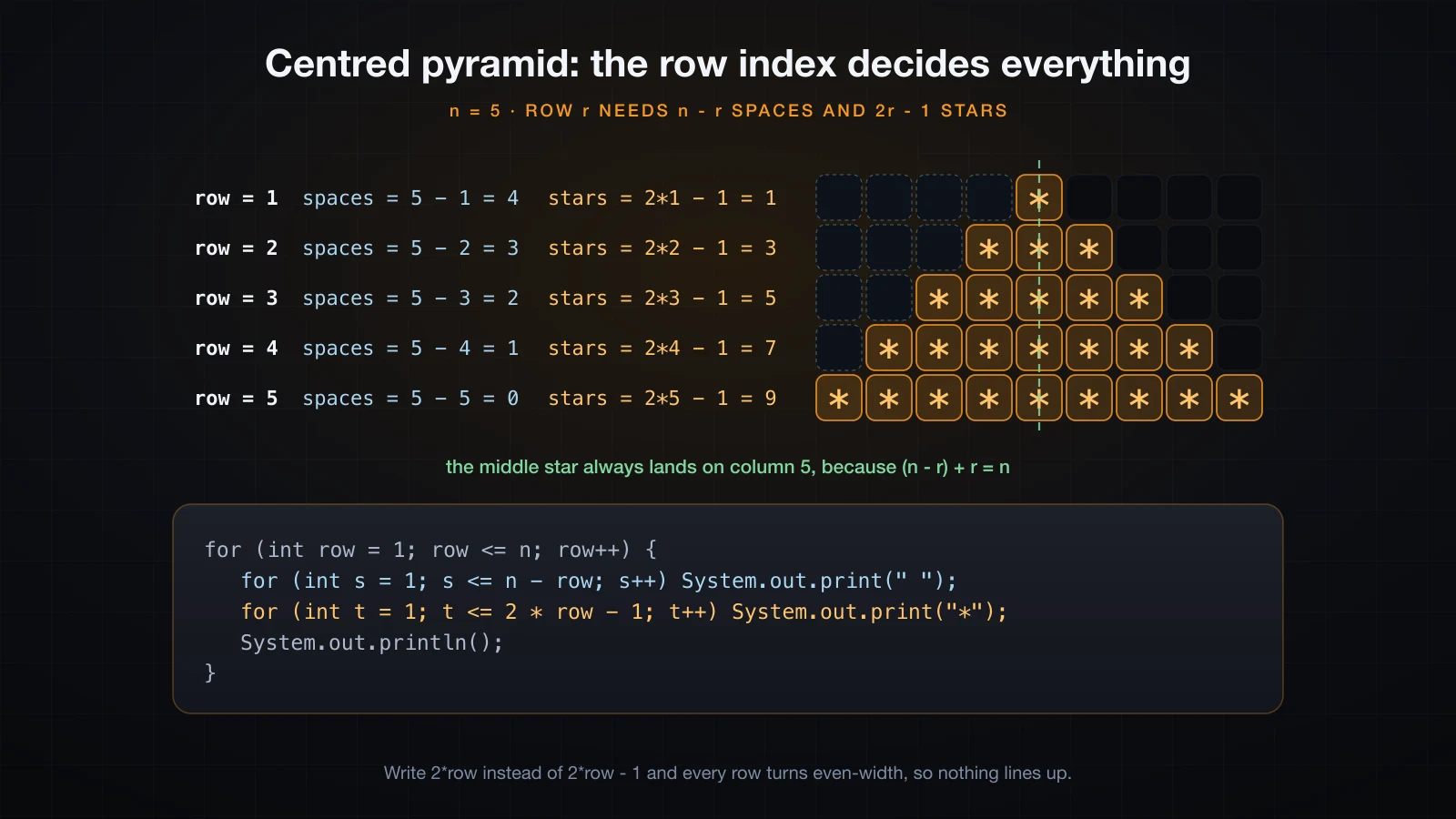
Hint. Each row needs two inner loops, one for the padding and one for the stars. Work out both counts as a function of the row number before writing any code.
Solution
public class Pyramid {
    public static void main(String[] args) {
        int n = 5;

        for (int row = 1; row <= n; row++) {
            for (int s = 1; s <= n - row; s++) {
                System.out.print(" ");
            }
            for (int star = 1; star <= 2 * row - 1; star++) {
                System.out.print("*");
            }
            System.out.println();
        }
    }
}
The arithmetic is the whole exercise, so it is worth printing it out on its own once:
row=1  spaces=4  stars=1  centre column=5
row=2  spaces=3  stars=3  centre column=5
row=3  spaces=2  stars=5  centre column=5
row=4  spaces=1  stars=7  centre column=5
row=5  spaces=0  stars=9  centre column=5
The star count grows by two per row while the padding shrinks by one, which is exactly what keeps the middle star nailed to column 5.
The mistake. Using 2 * row stars instead of 2 * row - 1. Every row is then an even number
of characters wide, there is no middle character to centre, and the shape leans:
    **
   ****
  ******
 ********
**********
The other common one is an off-by-one in the padding: s < n - row gives one space too few on
every row and tilts the pyramid the other way.
Exercise 13 — A multiplication grid with aligned columns
Problem. Print the 9 x 9 multiplication grid with a header row and a header column, in columns that line up.
Expected output
   x   1   2   3   4   5   6   7   8   9
   1   1   2   3   4   5   6   7   8   9
   2   2   4   6   8  10  12  14  16  18
   3   3   6   9  12  15  18  21  24  27
   4   4   8  12  16  20  24  28  32  36
   5   5  10  15  20  25  30  35  40  45
   6   6  12  18  24  30  36  42  48  54
   7   7  14  21  28  35  42  49  56  63
   8   8  16  24  32  40  48  56  64  72
   9   9  18  27  36  45  54  63  72  81
Hint. %4d prints an integer right-aligned in a field four characters wide. %4s does the
same for the x in the corner.
Solution
public class Grid {
    public static void main(String[] args) {
        int n = 9;

        System.out.printf("%4s", "x");
        for (int col = 1; col <= n; col++) {
            System.out.printf("%4d", col);
        }
        System.out.println();

        for (int row = 1; row <= n; row++) {
            System.out.printf("%4d", row);
            for (int col = 1; col <= n; col++) {
                System.out.printf("%4d", row * col);
            }
            System.out.println();
        }
    }
}
The mistake. Trying to align with tabs or with a hand-counted number of spaces —
print(row * col + "\t") looks fine until a column contains both 9 and 81, and then the
alignment depends on the terminal's tab stops. A width in the format specifier is the only
version that is actually aligned.
Exercise 14 — Every pair in a range that hits a target
Problem. For the range 1 to 20, print every pair a + b that equals 24, each pair once, with
a < b. Print the count at the end.
Expected output
4 + 20 = 24
5 + 19 = 24
6 + 18 = 24
7 + 17 = 24
8 + 16 = 24
9 + 15 = 24
10 + 14 = 24
11 + 13 = 24
pairs found: 8
Hint. Start the inner loop at a + 1, not at 1.
Solution
public class Pairs {
    public static void main(String[] args) {
        int n = 20, target = 24;
        int found = 0;

        for (int a = 1; a <= n; a++) {
            for (int b = a + 1; b <= n; b++) {
                if (a + b == target) {
                    System.out.println(a + " + " + b + " = " + target);
                    found++;
                }
            }
        }

        System.out.println("pairs found: " + found);
    }
}
The mistake. Starting the inner loop at 1. Then every pair is found twice, once in each order, and any pair of equal values is found as well:
pairs found: 17Eight pairs became seventeen: eight in each direction, plus 12 + 12. Whenever a nested loop is
enumerating unordered pairs, the inner loop starts one past the outer one.
Reading input in a loop
Two exercises that use Scanner. Both are fed by a pipe below, so what you see is the program's
own output — a pipe does not echo the typed values back the way a keyboard does.
Exercise 15 — A menu that repeats until you quit
Problem. Print a three-option menu, act on the choice, and keep showing the menu until the
user picks quit. An unknown option prints a message and shows the menu again. Use do-while.
Expected output for the input 1, 7, 2, 100, 9, 3:
1) square a number
2) sum 1..n
3) quit
choice: n: 7 squared = 49
1) square a number
2) sum 1..n
3) quit
choice: n: sum 1..100 = 5050
1) square a number
2) sum 1..n
3) quit
choice: no such option
1) square a number
2) sum 1..n
3) quit
choice: bye
Hint. A menu must be shown at least once before there is anything to test, which is exactly
what do-while is for.
Solution
import java.util.Scanner;

public class Menu {
    public static void main(String[] args) {
        Scanner sc = new Scanner(System.in);
        int choice;

        do {
            System.out.println("1) square a number");
            System.out.println("2) sum 1..n");
            System.out.println("3) quit");
            System.out.print("choice: ");
            choice = Integer.parseInt(sc.nextLine().trim());

            if (choice == 1) {
                System.out.print("n: ");
                int n = Integer.parseInt(sc.nextLine().trim());
                System.out.println(n + " squared = " + n * n);
            } else if (choice == 2) {
                System.out.print("n: ");
                int n = Integer.parseInt(sc.nextLine().trim());
                int sum = 0;
                for (int i = 1; i <= n; i++) {
                    sum += i;
                }
                System.out.println("sum 1.." + n + " = " + sum);
            } else if (choice != 3) {
                System.out.println("no such option");
            }
        } while (choice != 3);

        System.out.println("bye");
    }
}
Run it:
printf '1\n7\n2\n100\n9\n3\n' | java MenuThe mistake. Declaring int choice inside the loop body. The while at the bottom of a
do-while sits outside the body's scope, so the variable it tests has to be declared before the
loop:
MenuScope.java:10: error: cannot find symbol
        } while (choice != 3);
                 ^
  symbol:   variable choice
  location: class MenuScope
1 error
Exercise 16 — A validation loop that refuses bad input
Problem. Ask for an age until the input is a whole number between 1 and 120. Reject anything that is not a number, reject numbers outside the range, and re-ask each time.
Expected output for the input abc, -5, 200, 34:
age (1-120): not a whole number: abc
age (1-120): out of range: -5
age (1-120): out of range: 200
age (1-120): accepted age = 34
Hint. hasNextInt() reports whether the next token would parse, and consumes nothing. That
last part is the trap.
Solution
import java.util.Scanner;

public class Validate {
    public static void main(String[] args) {
        Scanner sc = new Scanner(System.in);
        int age;

        while (true) {
            System.out.print("age (1-120): ");
            if (!sc.hasNextInt()) {
                System.out.println("not a whole number: " + sc.next());
                continue;
            }
            age = sc.nextInt();
            if (age >= 1 && age <= 120) {
                break;
            }
            System.out.println("out of range: " + age);
        }

        System.out.println("accepted age = " + age);
    }
}
Run it:
printf 'abc\n-5\n200\n34\n' | java ValidateThe mistake. Testing with hasNextInt() and then not consuming the offending token.
hasNextInt() only looks; the bad token stays where it is, the next test looks at the same token,
and the loop prints its complaint forever. The sc.next() inside the message is what makes
progress — it is not there to be pretty.
How to hand-trace a loop that misbehaves
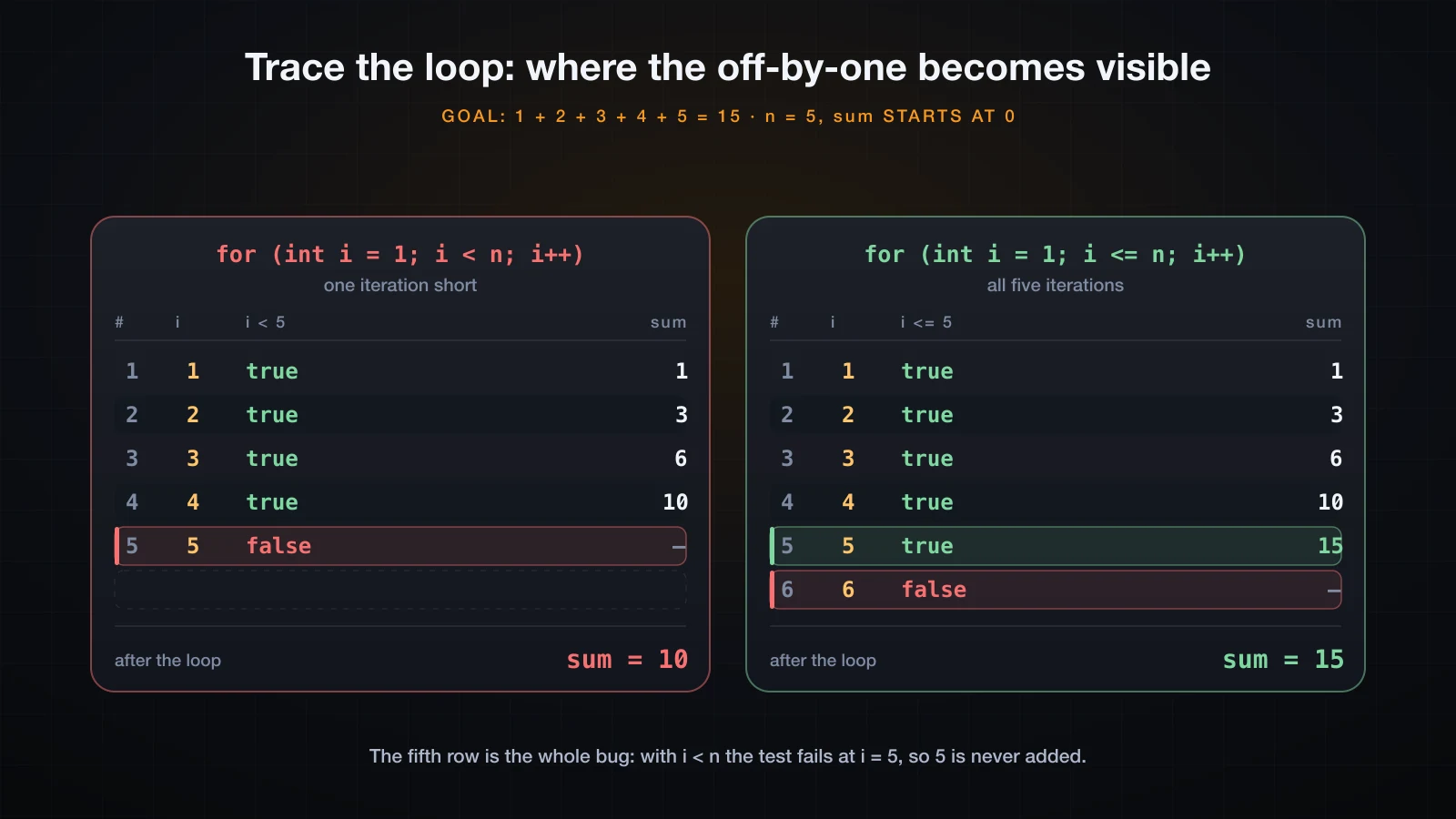
When a loop produces the wrong number, the fastest way out is not to stare at it. It is to build a trace table: one row per iteration, one column per variable, plus a column for the loop's test. Fill it in by hand, and the row where your table stops matching your expectation is the bug.
Here is the loop to trace. It is supposed to sum 1 to 5, which is 15:
int n = 5;
int sum = 0;

for (int i = 1; i < n; i++) {
    sum += i;
}

System.out.println(sum);
Trace it one iteration at a time. Write down i, whether the test passes, and sum after the
body has run:
| step | i | i < 5 | sum after the body |
|---|---|---|---|
| 1 | 1 | true | 1 |
| 2 | 2 | true | 3 |
| 3 | 3 | true | 6 |
| 4 | 4 | true | 10 |
| 5 | 5 | false | — loop exits, sum stays 10 |
The table answers the question on its own. The fifth row never runs, so 5 is never added, and the
loop hands back 10 instead of 15. Change the test to i <= n and the same trace gains one row:
You do not have to do it on paper. Two printf calls turn the program into its own trace table:
for (int i = 1; i < n; i++) {
    System.out.printf("body starts: i=%d sum=%d%n", i, sum);
    sum += i;
    System.out.printf("body ends:   i=%d sum=%d%n", i, sum);
}
System.out.printf("after loop: sum=%d (expected 15)%n", sum);body starts: i=1 sum=0
body ends: i=1 sum=1
body starts: i=2 sum=1
body ends: i=2 sum=3
body starts: i=3 sum=3
body ends: i=3 sum=6
body starts: i=4 sum=6
body ends: i=4 sum=10
after loop: sum=10 (expected 15)Four iterations, not five. With i <= n the same instrumentation prints the missing pair of
lines and the right answer:
body starts: i=5 sum=10
body ends:   i=5 sum=15
after loop:  sum=15 (expected 15)
Two things make this work. Print the loop variable as well as the value you care about, because half of these bugs are in the counter and not in the arithmetic. And print the value before and after the body, so you can see which statement changed it. Delete the two lines when the bug is found.
The mistakes these exercises are built around
Five failures account for most of what goes wrong in a beginner's first hundred loops.
| Mistake | Symptom | Fix |
|---|---|---|
= where == was meant | compile error, or a condition that never fires | compare with ==, assign with = |
int / int for an average | a whole number where a decimal was expected | cast one operand: (double) sum / n |
| off-by-one in a space or star count | the pattern leans, or is one row short | write the counts out per row first |
int overflow in a product | a large positive value turns negative | use long, and know its limit too |
== on a String | comparison is false for equal text | use equals() |
= versus ==. In C this is a classic silent bug; Java catches most of it at compile time,
because an int is not a boolean:
AssignInIf.java:4: error: incompatible types: int cannot be converted to boolean
        if (x = 5) {
              ^
1 error
The version Java does not catch is a boolean variable, where while (done = false) is a
legal assignment whose value is false. It compiles, and the loop simply never runs:
boolean done = false;
int guard = 0;
while (done = false) {          // BUG: assignment, not comparison
    guard++;
    if (guard > 3) break;
}
System.out.println("loop body ran " + guard + " times, done = " + done);loop body ran 0 times, done = falseInteger division. Covered in exercise 6, and it never announces itself either: 55 / 10 is
5, and the missing .5 is gone before any double gets involved.
Off-by-one in a pattern. Exercise 12. The cure is not to guess in the editor; it is to write the row-by-row table of counts and check it against the shape you want.
Overflow. Exercises 7 and 10. 12! is the last factorial in an int and F(46) is the last
Fibonacci number in an int. Both wrap silently.
Comparing strings with ==. == asks whether two references point at the same object, not
whether the text matches. Two string literals do share one object, which is why the mistake seems
to work in a test and then fails on real input:
Scanner sc = new Scanner(System.in);
String answer = sc.nextLine().trim();

System.out.println("answer            = [" + answer + "]");
System.out.println("answer == \"quit\"    -> " + (answer == "quit"));
System.out.println("answer.equals(\"quit\") -> " + answer.equals("quit"));

String literal = "quit";
System.out.println("literal == \"quit\" -> " + (literal == "quit"));printf 'quit\n' | java StringEqualsanswer = [quit]
answer == "quit" -> false
answer.equals("quit") -> true
literal == "quit" -> trueSame four characters, two different answers. A menu loop written with == on the user's input
never terminates.
FAQ
Why does my average come out as a whole number?
Because both operands are int, so Java performs integer division and throws the fractional part
away before anything else happens. Assigning the result to a double is too late. Cast one
operand first: (double) sum / n, or sum / (double) n.
Which loop form should I use?
Use for when the number of iterations is known from a counter — every exercise in the second
and third tiers here. Use while when the loop runs until a condition changes and you might not
enter it at all. Use do-while when the body has to run at least once before there is anything to
test, which in practice means menus and prompts. They are interchangeable in power, so pick the
one that makes the intent obvious.
How do I stop a loop that never ends?
Ctrl-C in the terminal. Then look for the thing the loop was supposed to change and did not: a
counter that is never incremented, a hasNextInt() check whose bad token is never consumed, or a
condition testing a variable that the body does not touch. Adding a trace printf at the top of
the body tells you which in one run.
Do I need printf to line up columns?
For anything wider than one column, yes. %4d reserves a fixed field width regardless of how many
digits the number has, so 9 and 81 land in the same column. Tabs depend on the terminal's tab
stops and space-padding by hand breaks as soon as a value grows a digit.
These solutions use a couple of small helper methods. Is that allowed?
Yes, and isPrime is the natural place for one — a method that answers a question about a value
is easier to read than the same loop inlined. Methods get their own article later in this series;
for now, copy the shape of static boolean isPrime(int n) and do not worry about the mechanics.
Conclusion
Nothing in these sixteen exercises needed syntax beyond if, else if, the three loop forms and
one nested loop. What made them hard was the ordering of conditions, the arithmetic that converts
a row index into a count, the edge case at zero, and the exact boundary of a loop's test. Those
are the parts worth practising, because they do not get easier by reading.
Two habits are worth taking away. Trace the loop before you rewrite it: a table of i and the
accumulator per iteration finds an off-by-one in under a minute. And run the wrong version on
purpose once — seeing Fizz where FizzBuzz belonged teaches the ordering rule better than any
explanation.
Every exercise here worked on one value at a time. The next article introduces the tool for holding many values at once: arrays — declaring them, initializing them, and traversing them with a loop.
![[Java Basics] Read and Write Text Files in Java](/images/blog/file-io-thumbnail.en.webp)
![[Java Basics] Recursion in Java: How It Works and When to Use It](/images/blog/recursion-in-java-thumbnail.en.webp)
![[Java Basics] Inheritance in Java: extends and super](/images/blog/inheritance-thumbnail.en.webp)
![[Java Basics] Variable Scope in Java: Local, Field and Static](/images/blog/variable-scope-thumbnail.en.webp)