This opens Part 5 of the course: input, output and data handling. The previous part left the program running many threads at once; this one is about getting data in and out of it. The starting point is the package that has been in Java since version 1.0 and that every other I/O API in the ecosystem still borrows its shape from: java.io.
You already know how to write a line of text to a file and read it back, and you know that a BufferedReader is faster than an unwrapped one. This article is the layer underneath that. Why there are exactly four abstract stream classes and not one. What a decorator chain actually is, and what changes when you build it in the wrong order. What buffering does, measured as method calls rather than milliseconds. And then the part that is entirely new: turning a live object graph into bytes and back, what those bytes contain byte by byte, and why the people who wrote that mechanism now advise you not to use it.
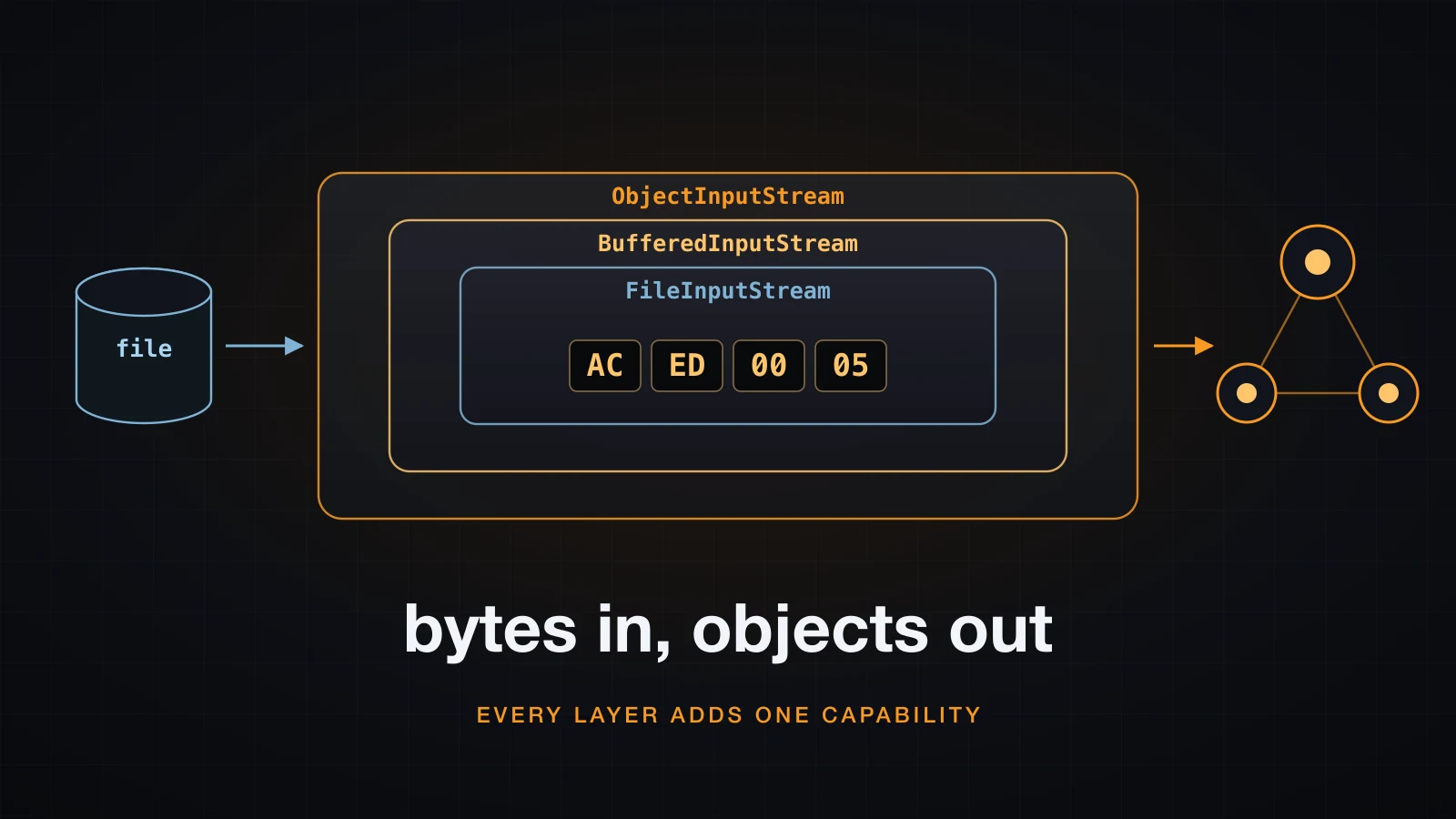
The examples use Java 21. There are no timings in this article on purpose: buffering is a structural change, so it is measured in counted method calls, which describe it exactly, while a millisecond figure describes only the machine it was measured on.
Four abstract roots, and why there are exactly four
java.io exports roughly sixty types. Four of them are abstract classes that everything else extends, and once you can name the two axes that produce them, the other fifty-six stop looking like a list to memorise.
The axes are direction and unit. Direction is in or out. Unit is a byte or a character. Two axes with two values each give four roots, and there is no fifth because there is no third direction and no third unit.
| Root | Direction | Unit | The method every overload funnels into | End of input |
|---|---|---|---|---|
InputStream | in | byte | read(byte[], int, int) | returns -1 |
OutputStream | out | byte | write(byte[], int, int) | not applicable |
Reader | in | char | read(char[], int, int) | returns -1 |
Writer | out | char | write(char[], int, int) | not applicable |
That last column is the practical payoff. Because every convenience overload eventually calls the three-argument array method, subclassing a stream and overriding that one method is enough to see every byte that passes through — which is exactly the trick the buffering section below is built on.
The unit axis is the one that carries real consequences. A file, a socket and a pipe all hold bytes. A String holds characters. Something has to convert, and in java.io that something is a specific pair of classes:
| Bridge | Converts | Constructor argument |
|---|---|---|
InputStreamReader | bytes into chars | an InputStream plus a Charset |
OutputStreamWriter | chars into bytes | an OutputStream plus a Charset |
These two classes are the only place in the whole chain where a charset appears. Not the file class, not the buffer. Ask each object what encoding it is using and only the bridge has an answer:
try (InputStreamReader isr = new InputStreamReader(
        new FileInputStream("vn.txt"), StandardCharsets.ISO_8859_1)) {
    System.out.println("isr.getEncoding() = " + isr.getEncoding());
}
try (InputStreamReader isr = new InputStreamReader(new FileInputStream("vn.txt"))) {
    System.out.println("no charset given  = " + isr.getEncoding());
}
try (OutputStreamWriter osw = new OutputStreamWriter(
        new ByteArrayOutputStream(), StandardCharsets.UTF_16BE)) {
    System.out.println("osw.getEncoding() = " + osw.getEncoding());
}isr.getEncoding() = ISO8859_1
no charset given = UTF8
osw.getEncoding() = UnicodeBigUnmarkedgetEncoding() returns the JDK's historical charset names rather than the canonical ones, which is why UTF-16BE comes back as UnicodeBigUnmarked. That is cosmetic. What matters is that the second call had a charset at all: when you omit it, the bridge silently takes the default, and that default is a property of the JVM rather than of the file.
The consequence of the unit split shows up the moment the text is not ASCII. Two files, the same program, counting what each root sees:
vn.txt   bytes=21  chars=21
vn2.txt  bytes=26  chars=21
vn2.txt holds the same twenty-one characters with Vietnamese diacritics restored. Twenty-six bytes, twenty-one characters. An InputStream reports the first number, a Reader reports the second, and neither of them is wrong — they are counting different things. FileReader and FileWriter are, quite literally, subclasses that pre-wire the bridge for you: since Java 11 they take a Charset argument themselves, and new FileReader(f, UTF_8).getEncoding() returns UTF8.
The decorator chain
A stream class in java.io does exactly one thing, and you get a useful object by stacking several of them. The canonical line for reading a text file is three constructors deep:
BufferedReader in = new BufferedReader(
        new InputStreamReader(
                new FileInputStream(file), StandardCharsets.UTF_8));
That is three objects, not one. Each holds a reference to the next and adds a single capability on top of it.
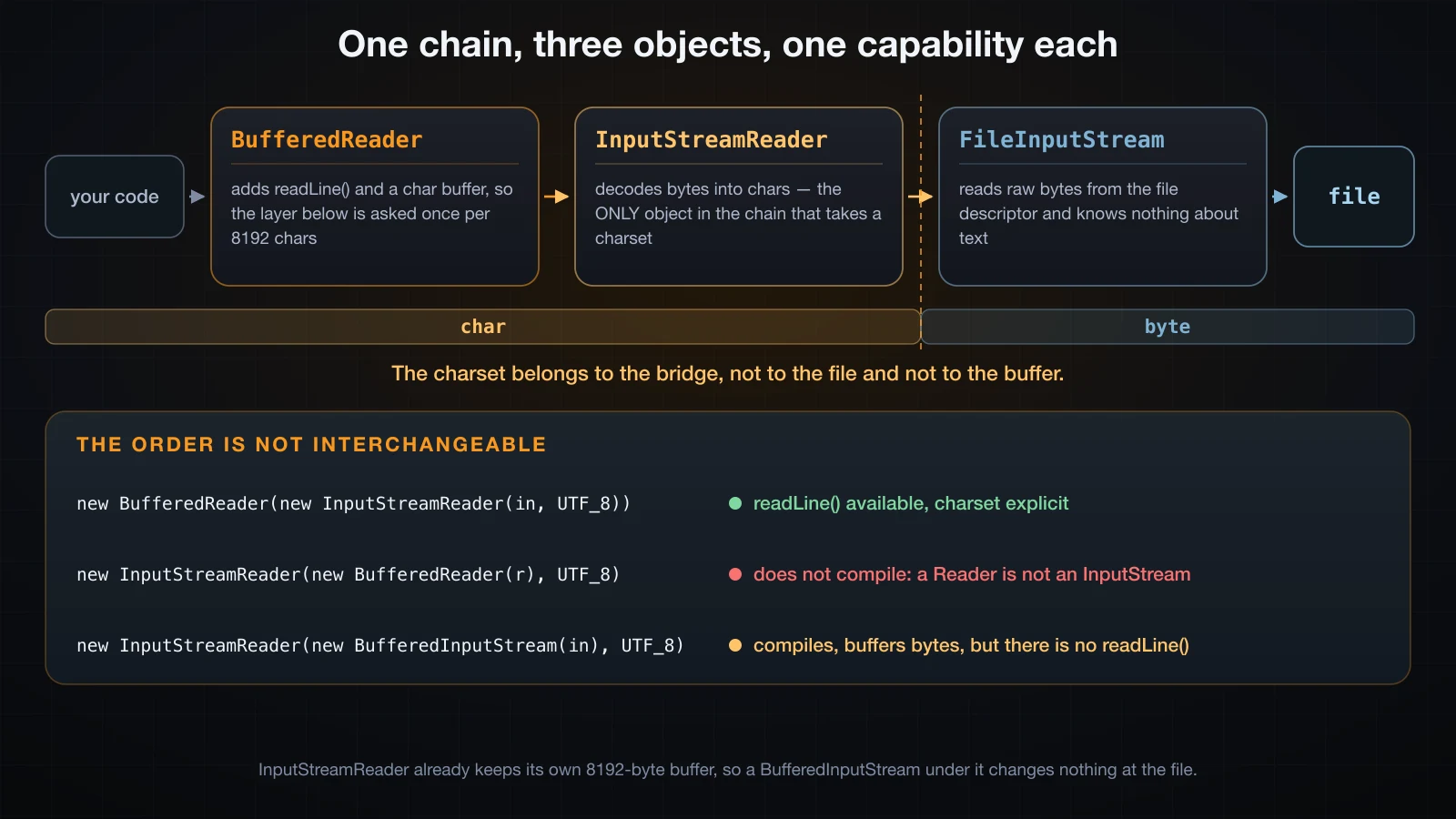
Read the chain from the inside out. FileInputStream knows a file descriptor and nothing else — it produces bytes and has no idea whether they are text. InputStreamReader takes those bytes and decodes them into characters using the charset you handed it. BufferedReader takes those characters, holds a batch of them in an array, and adds readLine().
The pattern has a name — decorator — and the reason it is worth naming is that it composes. BufferedInputStream will buffer anything that is an InputStream, whether that is a file, a socket, an in-memory array or another decorator. There is no BufferedFileInputStream and no BufferedSocketInputStream because there does not need to be.
Every stack you are likely to write is drawn from a short list:
| Layer | Root | Adds |
|---|---|---|
BufferedInputStream / BufferedOutputStream | byte | an internal array, so the layer below is called in blocks |
BufferedReader / BufferedWriter | char | the same, plus readLine() and newLine() |
InputStreamReader / OutputStreamWriter | bridge | charset decoding and encoding |
DataInputStream / DataOutputStream | byte | readInt, writeLong and friends |
ObjectInputStream / ObjectOutputStream | byte | whole object graphs |
PrintWriter | char | println, printf, and swallowed exceptions |
GZIPInputStream / GZIPOutputStream | byte | compression, from java.util.zip |
Closing the outermost object closes the whole chain, in order, because each decorator's close() closes what it wraps. That is why a try-with-resources header only ever needs to name the outer object.
The order is part of the meaning
Because the layers are typed by their root, most wrong orders are caught by the compiler. Wrapping a Reader in a bridge that wants an InputStream:
Reader wrong = new InputStreamReader(
new BufferedReader(new FileReader(f)), StandardCharsets.UTF_8);BadOrder.java:6: error: no suitable constructor found for InputStreamReader(BufferedReader,Charset)
constructor InputStreamReader.InputStreamReader(InputStream,String) is not applicable
(argument mismatch; BufferedReader cannot be converted to InputStream)
constructor InputStreamReader.InputStreamReader(InputStream,Charset) is not applicable
(argument mismatch; BufferedReader cannot be converted to InputStream)And buffering bytes on the wrong side of the bridge:
BadOrder2.java:5: error: incompatible types: InputStreamReader cannot be converted to InputStreamThe dangerous case is the one that compiles. Put the buffer under the bridge instead of over it and the types line up perfectly:
Reader r = new InputStreamReader(
        new BufferedInputStream(new FileInputStream("lines.txt")),
        StandardCharsets.UTF_8);
System.out.println(r.readLine());BadOrder3.java:6: error: cannot find symbol
System.out.println(r.readLine());
^
symbol: method readLine()
location: variable r of type ReaderThere is buffering in that chain, and there is a charset in that chain, and there is still no readLine(), because the capability lives on the decorator you did not put on the outside. The outermost object is the only one whose API you can call. Everything below it is reachable only through the methods the layer above chose to expose.
How buffering actually works
"Wrap it in a BufferedInputStream, it is faster" is true and explains nothing. What a buffer changes is structural: the number of times the layer underneath is asked for data. That is countable, and counting it is more informative than timing it.
Every InputStream funnels its overloads through read(byte[], int, int), and FilterInputStream exists precisely so you can slip a counter in between two layers:
class CountIn extends FilterInputStream {
    int single = 0, array = 0;
    long bytes = 0;

    CountIn(InputStream in) { super(in); }

    @Override public int read() throws IOException {
        single++;
        int b = in.read();
        if (b >= 0) bytes++;
        return b;
    }

    @Override public int read(byte[] b, int off, int len) throws IOException {
        array++;
        int n = in.read(b, off, len);
        if (n > 0) bytes += n;
        return n;
    }
}
Put one of those directly on top of the file and read a 100,000-byte file one byte at a time, with and without a buffer above it:
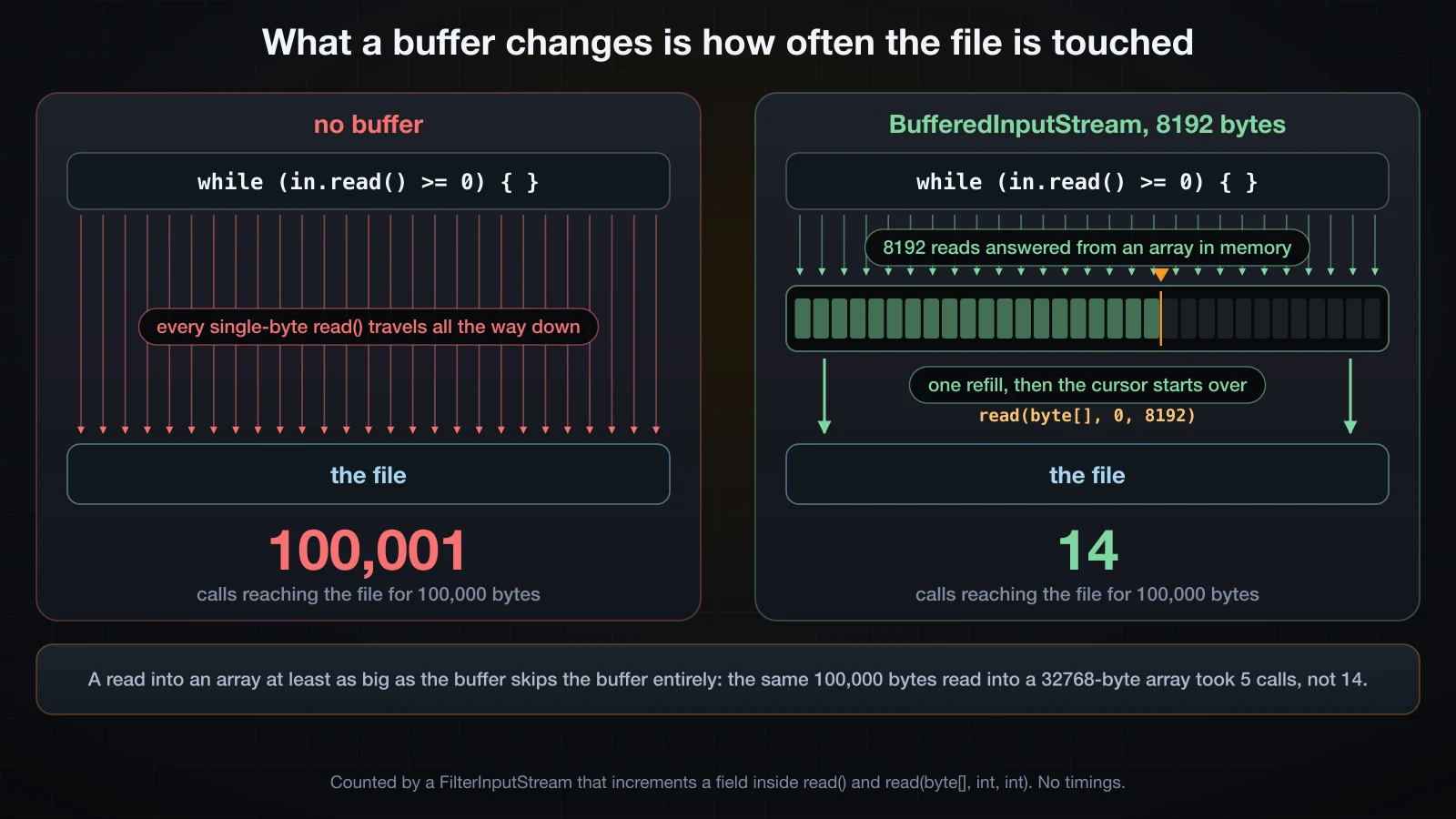
plain FileInputStream          read()=100001   read(byte[],int,int)=0     bytes=100000
BufferedInputStream 512        read()=0        read(byte[],int,int)=197   bytes=100000
BufferedInputStream 8192       read()=0        read(byte[],int,int)=14    bytes=100000
BufferedInputStream 65536      read()=0        read(byte[],int,int)=3     bytes=100000
read(4096) unbuffered          read()=0        read(byte[],int,int)=26    bytes=100000
read(4096) over 8192           read()=0        read(byte[],int,int)=14    bytes=100000
read(32768) over 8192          read()=0        read(byte[],int,int)=5     bytes=100000
Three separate things are visible in that block.
The buffer converts single-byte calls into array calls. Unbuffered, the file saw 100,001 single-byte reads — one per byte plus the one that returns -1. With an 8192-byte buffer it saw zero single-byte reads and fourteen array reads. The single-byte calls did not disappear; your loop still made 100,000 of them. They stopped at the BufferedInputStream, which answered them out of its array.
The arithmetic is exact, not approximate. 100,000 divided by 8192 is 12.2, so twelve full refills plus one partial refill plus one final call that reports end-of-file is fourteen. At 512 bytes: 195 full, one partial, one end-of-file, 197. At 65536: one full, one partial, one end-of-file, three. You can predict the count before you run it.
A large enough array read skips the buffer entirely. Reading into a 32768-byte array through an 8192-byte buffer produced five calls, not fourteen. BufferedInputStream checks whether its buffer is empty, whether the request is at least as large as that buffer, and whether no mark() is outstanding; when all three hold, it reads straight into the caller's array rather than copying through its own. Buffering a stream you already read in large blocks costs you a wasted allocation and buys nothing.
The write side is the mirror image, and it is where the buffer is most visible:
plain FileOutputStream         write(int)=100000   write(byte[],int,int)=0
BufferedOutputStream 8192      write(int)=0        write(byte[],int,int)=13
identical files: true
Thirteen rather than fourteen, because there is no end-of-file call on the way out. identical files: true is the point worth stating plainly: the buffer changes nothing about the bytes, only about the number of calls that carried them.
What the buffer size changes, and when to change it
The measured counts, arranged against the default:
| Buffer | Calls at the file for 100,000 bytes | Relative to none |
|---|---|---|
| none | 100,001 | 1x |
| 512 | 197 | 508x fewer |
| 8192 (the default) | 14 | 7,143x fewer |
| 65536 | 3 | 33,334x fewer |
Read that column as diminishing returns rather than as a tuning guide. Going from no buffer to any buffer removed 99.8% of the calls. Going from 8 KB to 64 KB removed eleven more calls out of the fourteen that were left. The default of 8192 is fine, and the version of this decision that actually matters is "buffered or not", never "8 KB or 64 KB".
The reader side already has a buffer you did not ask for
The same instrumentation on a text file produces a result most java.io tutorials get wrong. A 208,890-byte file of 20,000 lines, read three ways, counting the calls that reach the file:
InputStreamReader.read()            read()=0  read(byte[],int,int)=27  bytes=208890
BufferedReader.readLine()           read()=0  read(byte[],int,int)=27  bytes=208890
InputStreamReader over Buffered     read()=0  read(byte[],int,int)=27  bytes=208890
Twenty-seven calls in all three cases, including the one that reads a character at a time with no BufferedReader anywhere. InputStreamReader keeps its own 8192-byte input array internally, so wrapping a BufferedInputStream underneath an InputStreamReader changes nothing at all at the file — it is a layer that adds an allocation and no behaviour.
So what does BufferedReader buy? Move the counter one level up, between the bridge and the buffer, and count the calls that reach the decoder:
read() char by char        read()=208891   read(char[],int,int)=0     chars=208890
BufferedReader.readLine()  read()=0        read(char[],int,int)=27    chars=208890
BufferedReader size 512    read()=0        read(char[],int,int)=409   chars=208890
208,891 calls into the decoder become 27. That is the actual win, and it is at the decoding layer rather than at the disk — plus readLine(), which Reader does not have at all. The rule that survives all of this: buffer at the top of the chain, where your own call pattern is, not at the bottom.
Writing primitives: DataOutputStream and DataInputStream
A text file makes a number into digits. Sometimes you want the number itself — a fixed-width, machine-readable layout. DataOutputStream writes Java's primitive types into a defined binary form, and DataInputStream reads them back.
try (DataOutputStream out = new DataOutputStream(
        new BufferedOutputStream(Files.newOutputStream(p)))) {
    out.writeInt(1000);
    out.writeLong(1_700_000_000_000L);
    out.writeDouble(9.25);
    out.writeBoolean(true);
    out.writeChar('A');
    out.writeUTF("Hoa");
}
The file that produces, dumped:
size = 28 bytes
0000  00 00 03 E8 00 00 01 8B CF E5 68 00 40 22 80 00  |..........h.@"..|
0010  00 00 00 00 01 00 41 00 03 48 6F 61              |......A..Hoa|
Twenty-eight bytes with no separators, no field names and no padding: 4 for the int, 8 for the long, 8 for the double, 1 for the boolean, 2 for the char, and 5 for the string. Read it left to right and every value is there.
The layout is big-endian, always, on every platform. The most significant byte comes first, which is the opposite of what an x86 or ARM CPU keeps in memory, and it is fixed by the specification rather than by the machine:
writeInt(1000)      = 00 00 03 E8
writeInt(-2)        = FF FF FF FE
writeShort(1000)    = 03 E8
writeUTF("Hoa")     = 00 03 48 6F 61
writeChars("Hoa")   = 00 48 00 6F 00 61
writeBytes("Hoa")   = 48 6F 61
That fixed order is the whole value of the class: a file written by a JVM on an ARM laptop reads identically on an x86 server, and the layout is documented well enough that a C or Go program can parse it.
The three string methods are worth separating, because two of them are traps. writeUTF writes an unsigned two-byte length followed by a modified UTF-8 encoding, so it round-trips through readUTF and is the only one of the three you should normally use. writeChars writes two bytes per character with no length at all, so you have to know how many to read. writeBytes writes the low byte of every character and discards the high byte — for Hoa that happens to be correct ASCII, and for Hòa it would silently mangle the accented letter. Both, side by side: writeUTF encodes ò as the two bytes C3 B2 and reports a length of 4, while writeBytes emits the single byte F2 — the low half of U+00F2, which is not valid UTF-8 on its own and is unrecoverable:
writeUTF("Hòa")     = 00 04 48 C3 B2 61
writeBytes("Hòa")   = 48 F2 61
Reading the fields back in the wrong order
There is nothing in the file that says what the fields are. The reader's sequence of calls is the schema, and if it disagrees with the writer's, nothing detects it:
try (DataInputStream in = new DataInputStream(Files.newInputStream(p))) {
    System.out.println("  long    = " + in.readLong());   // the file has an int here
    System.out.println("  int     = " + in.readInt());    // and a long here
    System.out.println("  double  = " + in.readDouble());
}-- read back in the SAME order --
int = 1000
long = 1700000000000
double = 9.25
-- read back with int and long SWAPPED --
long = 4294967296395
int = -807049216
double = 9.25No exception. No warning. readLong consumed the four bytes of the int plus the first four of the long and reported a perfectly plausible number. Worse than the garbage is the third line: because an int plus a long and a long plus an int are both twelve bytes, the stream re-synchronised by accident and the double came back correct. A corruption that heals itself halfway through is the hardest kind to notice in a log.
The one error you do get is running past the end, and it arrives with no message at all:
java.io.EOFExceptionThe lesson generalises past this class. A DataOutputStream file is only readable by code that already knows its layout, so if the layout ever changes you need a version number as the first field and a reader that branches on it. That is the same problem object serialization tries to solve automatically, and the next section is about the price of that automation.
What is actually inside a serialized object
DataOutputStream writes the values you list. Object serialization writes the object — its fields, the fields of everything it references, and enough description of each class to rebuild them all on the other side. The API is two methods:
try (ObjectOutputStream out = new ObjectOutputStream(Files.newOutputStream(p))) {
    out.writeObject(new Point(3, 4));
}
try (ObjectInputStream in = new ObjectInputStream(Files.newInputStream(p))) {
    Point back = (Point) in.readObject();
}
and one interface:
public class Point implements Serializable {
    int x;
    int y;
}
Serializable is a marker interface: it declares no methods at all. Implementing it is not a promise to do anything, it is a permission — it tells ObjectOutputStream that this class is allowed through. That is also the first hint that something is unusual here, because the mechanism that reads your fields and writes them out is not code you wrote and cannot be found by searching your project for it.
The result for that two-field object is 42 bytes, and they decode completely:
point.ser = 42 bytes
0000  AC ED 00 05 73 72 00 05 50 6F 69 6E 74 86 92 96  |....sr..Point...|
0010  F2 3C 40 61 FE 02 00 02 49 00 01 78 49 00 01 79  |.<@a....I..xI..y|
0020  78 70 00 00 00 03 00 00 00 04                    |xp........|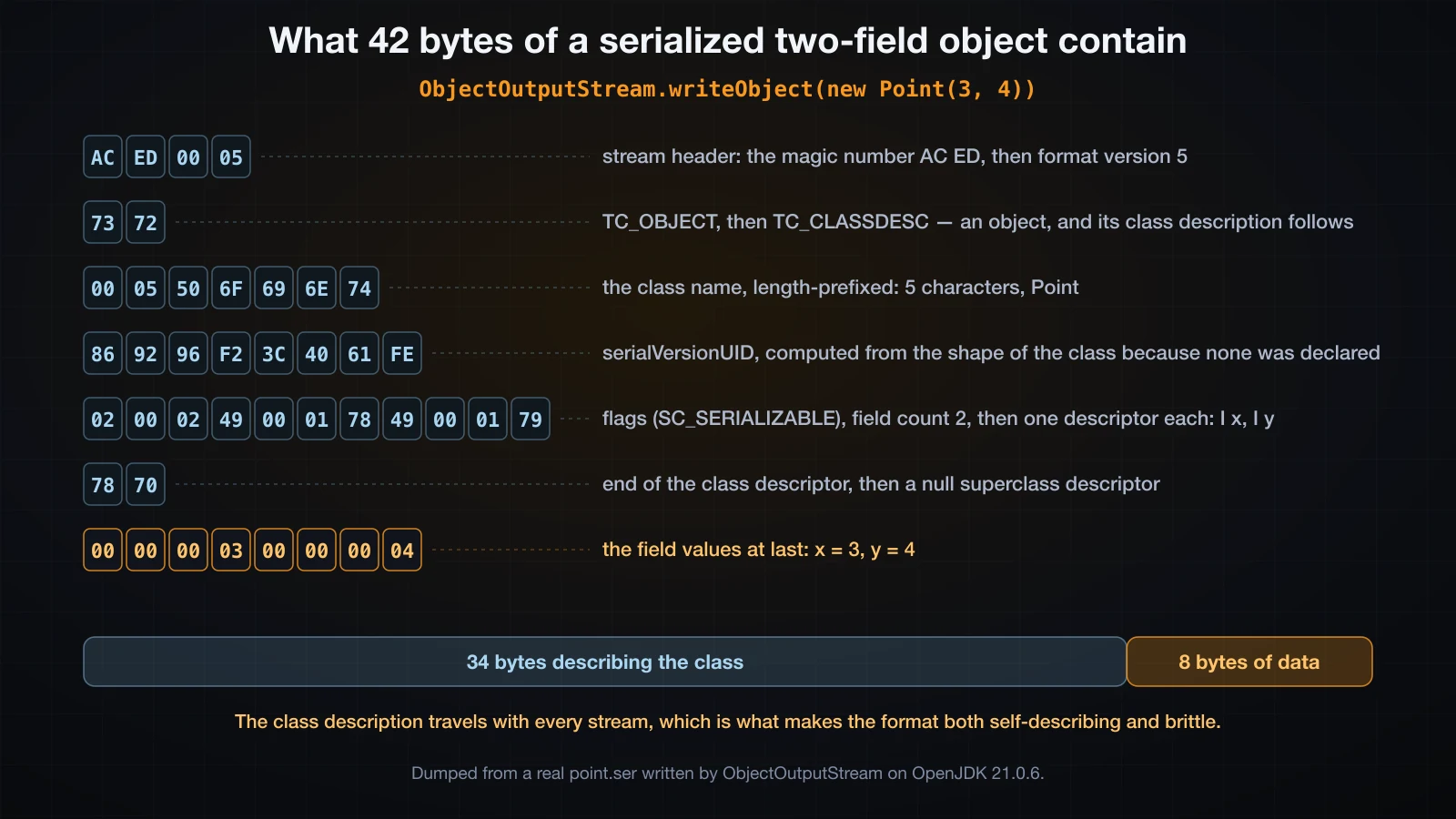
| Bytes | Meaning |
|---|---|
AC ED | STREAM_MAGIC — every Java serialization stream starts here |
00 05 | STREAM_VERSION, which has been 5 since Java 1.2 |
73 | TC_OBJECT — an object follows |
72 | TC_CLASSDESC — and here is the description of its class |
00 05 50 6F 69 6E 74 | the class name, length-prefixed: 5 characters, Point |
86 92 96 F2 3C 40 61 FE | the serialVersionUID |
02 | flags: SC_SERIALIZABLE |
00 02 | field count: 2 |
49 00 01 78 | field 0: type code I for int, name x |
49 00 01 79 | field 1: type code I for int, name y |
78 | TC_ENDBLOCKDATA — end of the class descriptor |
70 | TC_NULL — no superclass descriptor |
00 00 00 03 00 00 00 04 | at last, the values: x = 3, y = 4 |
Two facts fall out of that table immediately. The first is proportion: eight bytes of data required thirty-four bytes of class description. The second is that 86 92 96 F2 3C 40 61 FE is not arbitrary. Ask the JDK what it thinks the class's version identifier is:
default serialVersionUID of Point = -8749765158890348034which in hex is 0x869296F23C4061FE — the same eight bytes. Point never declared a version, so the JVM computed one by hashing the class's name, modifiers, interfaces, fields and method signatures. Hold on to that; it is the cause of the most common serialization failure in production, and it has its own section below.
The magic number is worth memorising in its own right. Any file, any log line, any HTTP body that begins AC ED 00 05 — or rO0AB once it has been base64-encoded — is a Java serialization stream, and knowing that on sight is genuinely useful when you are looking at somebody else's traffic.
transient and static fields
Two modifiers change what gets written, for two completely different reasons.
public class Account implements Serializable {
    private static final long serialVersionUID = 1L;

    static int instances = 0;
    static String bank = "VCB";

    private final String owner;
    private long balance;
    private transient String password;
    private transient int loginCount;
}
Write one, change the statics between the write and the read, and read it back:
creating:
  [constructor ran for Hoa]
  before  Account{owner=Hoa, balance=2500000, password=s3cret, loginCount=7, bank=VCB}
  wrote 81 bytes

deserializing:
  after   Account{owner=Hoa, balance=2500000, password=null, loginCount=0, bank=TECHCOMBANK}
  same object? false
transient means "this field is not part of the object's persistent state". It is not written, and on the way back it is left at the type's default — null for the reference, 0 for the int — not at whatever a field initialiser or constructor would have set. Confirm it from the other side by looking at the file: the eighty-one bytes contain Account, balance, owner and Hoa, and they do not contain s3cret anywhere.
static fields are skipped for a different reason: they belong to the class, not to the object, and there is no object-shaped place to put them. bank came back as TECHCOMBANK because that is what the static happened to hold in the reading JVM at that moment. Nothing was restored; the field was simply never touched.
The two reasons matter because they lead to different habits. Mark a field transient when it is a secret, a cache, a socket, a thread, a Logger — anything derived or unshareable. Do not mark a field transient expecting the constructor to refill it, because it will not run.
The constructor does not run
This is the fact that surprises people most, and it is easy to prove. Give a serializable class a non-serializable parent and put a print statement in every constructor:
public class Base {                       // NOT Serializable
    protected String tag;
    public Base() { tag = "default-from-no-arg-ctor"; System.out.println("  [Base() ran]"); }
    public Base(String tag) { this.tag = tag; System.out.println("  [Base(String) ran]"); }
}

public class Child extends Base implements Serializable {
    private static final long serialVersionUID = 1L;
    int value;
    public Child(int value) {
        super("set-by-child");
        System.out.println("  [Child(int) ran]");
        this.value = value;
    }
}creating:
[Base(String) ran]
[Child(int) ran]
before Child{value=42, tag=set-by-child}
deserializing:
[Base() ran]
after Child{value=42, tag=default-from-no-arg-ctor}The precise rule is in those six lines. No constructor of any serializable class in the hierarchy runs. The JVM allocates the object and writes the fields in directly. What does run is the no-argument constructor of the nearest non-serializable superclass — Base() here — which is why tag came back as default-from-no-arg-ctor rather than set-by-child: tag lives in a class that is not serializable, so its value was never in the stream, and the no-arg constructor supplied it.
If that superclass has no accessible no-arg constructor, the class cannot be deserialized at all — and you find out at read time, not at write time:
wrote 39 bytes
read: java.io.InvalidClassException: Child2; no valid constructor
Thirty-nine bytes were written successfully. The failure is on the other side of the wire, possibly on another machine, possibly in another release.
Records are the exception, and a deliberate one. Since Java 16 a serializable record is rebuilt through its canonical constructor, so its compact-constructor validation still runs:
record Money(String currency, long amount) implements Serializable {
    Money {
        if (amount < 0) throw new IllegalArgumentException("negative amount: " + amount);
    }
}record:
[canonical constructor ran: VND 100]
bytes = 81
[canonical constructor ran: VND 100]
read back = Money[currency=VND, amount=100]The constructor ran twice: once when the record was created, once when it was rebuilt from bytes. For an ordinary class it would have run once.
serialVersionUID, and what a mismatch looks like
Point above had no serialVersionUID, so one was computed from the shape of the class. That computation includes the field list, which means any change to the fields changes the identifier, which means every previously written stream stops loading. Write a Config with two fields, add a third field, recompile, read the old file:
--- write with v1, read with v1 ---
wrote uid = -3752027558011437564
local uid = -3752027558011437564
read = Config{host=db.internal, port=5432}
--- write with v1, read with v2 (field added, no explicit uid) ---
local uid = -2625930104420556901
FAILED: java.io.InvalidClassException: Config; local class incompatible: stream classdesc serialVersionUID = -3752027558011437564, local class serialVersionUID = -2625930104420556901
That message, with both numbers in it, is the single most-searched serialization error there is. The fix is to declare the identifier yourself so that it stops tracking the class shape:
private static final long serialVersionUID = 1L;With that on both versions, the same evolution works, and the result is worth reading carefully:
--- explicit uid 1L on both sides, v4 has two extra fields ---
read = Config{host=db.internal, port=5432, timeout=0, schema=null}

--- and the reverse: v4 wrote, v3 reads (fields removed) ---
read = Config{host=db.internal, port=5432}
The new fields are declared as int timeoutSeconds = 30 and String schema = "public" in the source, and they came back as 0 and null. Field initialisers do not run on deserialization any more than constructors do. A field the stream does not contain gets the type's default, and code that assumed timeoutSeconds could never be zero is now wrong in a way that no exception announces. Reading a newer stream with an older class is the quieter half: the extra fields are simply discarded.
Declaring the identifier is a promise you have to keep, and it does not cover every change. Keep the number and change a field's type:
--- same uid, but port changed int -> long ---
FAILED: java.io.InvalidClassException: Config; incompatible types for field port
The compatible changes are: adding a field, removing a field, adding a class to the hierarchy, changing a method body, changing access modifiers on fields. The incompatible ones are: changing a field's type, changing a field between static and non-static or between transient and non-transient, changing the class's place in the hierarchy, and changing a class between Serializable and Externalizable. serialVersionUID protects you from the accidental version skew, not from the deliberate redesign.
writeObject, readObject and Externalizable
The default field-by-field behaviour can be replaced, and there are two levels of replacement.
The first is a pair of private methods with exact signatures, which ObjectOutputStream finds reflectively. There is no interface to implement and no @Override to protect you from a typo; get the signature wrong and your method is silently never called.
public class Session implements Serializable {
    private static final long serialVersionUID = 1L;
    private final String user;
    private transient Instant createdAt;
    private transient char[] token;

    private void writeObject(ObjectOutputStream out) throws IOException {
        out.defaultWriteObject();                  // the non-transient fields
        out.writeLong(createdAt.toEpochMilli());   // then whatever else we choose
    }

    private void readObject(ObjectInputStream in) throws IOException, ClassNotFoundException {
        in.defaultReadObject();
        this.createdAt = Instant.ofEpochMilli(in.readLong());
        this.token = new char[0];                  // a sane value for a field we did not write
    }
}before Session{user=hoa, createdAt=2026-09-14T08:30:00Z, token.length=3}
[writeObject ran]
bytes 73
[readObject ran]
after Session{user=hoa, createdAt=2026-09-14T08:30:00Z, token.length=0}This is the standard shape: call the default first, then hand-encode the fields the default could not handle. readObject is also where a class that cares about its own invariants would validate them, since the constructor will not.
The second level is Externalizable, which turns the whole thing off and hands you the stream:
public class Ext implements Externalizable {
    private String name;
    private int size;

    public Ext() { System.out.println("  [public no-arg ctor ran]"); }

    @Override public void writeExternal(ObjectOutput out) throws IOException {
        out.writeUTF(name);
        out.writeInt(size);
    }
    @Override public void readExternal(ObjectInput in) throws IOException {
        name = in.readUTF();
        size = in.readInt();
    }
}Externalizable bytes = 39
0000 AC ED 00 05 73 72 00 03 45 78 74 F9 8F 44 99 59 |....sr..Ext..D.Y|
0010 B3 76 7F 0C 00 00 78 70 77 0C 00 06 72 65 70 6F |.v....xpw...repo|
0020 72 74 00 00 03 E8 78 |rt....x|
deserializing:
[public no-arg ctor ran]
Ext{name=report, size=1000}Read the descriptor: 00 00 says zero fields, because the stream no longer describes them — the flags byte 0C marks the class externalizable, and everything after 78 70 is a raw block of whatever writeExternal chose to write. And note the last line: Externalizable does require a public no-argument constructor and does call it, which is the opposite of the Serializable rule and the reason the two are not interchangeable.
Two more hooks are worth knowing because they fix a real bug. Serialization ignores private constructors, so it will happily manufacture a second copy of a singleton:
plain singleton      : false
with readResolve()   : true
enum                 : true
private Object readResolve() runs after the object is rebuilt and lets you substitute the canonical instance for it; writeReplace is its mirror on the writing side. An enum needs neither, because enum constants are serialized by name and resolved through valueOf, which is one of several reasons an enum is the safest way to write a singleton in Java.
Object graphs: shared references and cycles survive
The feature that makes serialization more than a field dump is that it writes a graph, not a tree. Three employees pointing at one department, two of them sharing a manager, and one employee who manages themselves:
Dept eng = new Dept("Engineering");
for (Emp e : List.of(lan, binh, chi)) { e.dept = eng; eng.members.add(e); }
binh.manager = lan;
chi.manager = lan;          // shared reference
lan.manager = lan; // self-cyclebefore:
binh.manager == chi.manager : true
lan.dept == eng : true
lan.manager == lan : true
distinct objects reachable : 5
bytes written : 277
after:
b2.manager == c2.manager : true
b2.manager == l2 : true
l2.dept == back : true
l2.manager == l2 : true
back == eng : false
distinct objects reachable : 5Every == that held before still holds after. The shared manager is still one object, the back-references from employee to department still point at the department that owns them, the self-cycle did not become an infinite loop, and the object count is unchanged at five. Only the last line is false, and that is the point: it is a deep copy, so nothing is identical to the original, but every relationship inside the copy was preserved.
ObjectOutputStream manages that with a handle table. The first time it meets an object it writes the whole thing; every later encounter writes a back-reference to the earlier one. Write the same small object a thousand times and the difference is exactly that:
1 Point           : 42 bytes
1000 times, shared: 5037 bytes
1000 times, reset : 39004 bytes
Which brings the trap. The handle table means the stream remembers what it has already written — including the state it was in at the time:
o.writeObject(p); p.x = 99; o.writeObject(p);
o.reset(); p.x = 55; o.writeObject(p); 1st = Point(1,1)
2nd = Point(1,1) (back-reference: the old state)
3rd = Point(55,1) (after reset(): written afresh)Mutating an object and writing it again on the same stream sends a back-reference to the version you sent first. Any long-lived ObjectOutputStream — a socket, an append-only log — hits this, and reset() is the answer. The same table is also a memory leak by construction: the stream holds a strong reference to every object it has ever written, so a connection that streams objects for hours and never calls reset() will eventually exhaust the heap.
One last failure worth recognising. A Serializable object that references something that is not gets you a runtime exception naming the offender, and the write is already half-done when it happens:
java.io.NotSerializableException: Plain
	java.base/java.io.ObjectOutputStream.writeObject0(ObjectOutputStream.java:1200)
	java.base/java.io.ObjectOutputStream.defaultWriteFields(ObjectOutputStream.java:1585)
	java.base/java.io.ObjectOutputStream.writeSerialData(ObjectOutputStream.java:1542)
	java.base/java.io.ObjectOutputStream.writeOrdinaryObject(ObjectOutputStream.java:1451)
	java.base/java.io.ObjectOutputStream.writeObject0(ObjectOutputStream.java:1194)
	java.base/java.io.ObjectOutputStream.writeObject(ObjectOutputStream.java:358)
The class name in the message is the field's type, not the field's name, and the trace tells you nothing about which field held it. On a large graph that is a genuinely annoying hunt.
Why new code should not use Java serialization
Everything above works, and the mechanism is impressively complete. It is also, by the assessment of the people who maintain it, a mistake that Java has spent two decades containing. That is not a stylistic opinion you can take or leave — it changes what you are allowed to do with a byte stream that came from outside your process.
What actually runs when you deserialize
The problem is not that the format is verbose. It is who decides what happens. Consider a caller that wants a String:
try (ObjectInputStream in = new ObjectInputStream(source)) {
    String s = (String) in.readObject();
}
That cast looks like a type check. It is not, or rather it is one that happens far too late. readObject has to decide what class to instantiate before it can return anything, and it takes that decision from the stream. The stream names a class; the JVM loads it; the object is allocated; its fields are filled in; and if that class has a readObject method, that method runs — all of it before the cast is even reached:
  >> Payload2.readObject ran BEFORE the cast
caught java.lang.ClassCastException: class Payload2 cannot be cast to class java.lang.String (Payload2 is in unnamed module of loader 'app'; java.lang.String is in module java.base of loader 'bootstrap')
Payload2 here is a harmless class that prints a line. The mechanism does not care: it will do the same for any serializable class on your classpath, including classes in third-party libraries you have never called, whose readObject was written for some other purpose entirely. Chaining several of those together into something destructive is a whole research field, the resulting stream is called a gadget chain, and the reason it works is exactly the sequence printed above — the attacker never needs to add a class to your application, only to pick from the ones you already ship.
There is a second, quieter problem. Deserialization writes fields directly, so it can produce objects that no constructor would ever have allowed. Take a class that validates in its constructor, serialize a valid instance, flip eight bytes in the file, and read it back:
Mutable: found the amount at offset 37 of 45
  deserialized: Mutable{amount=-1}
Mutable rejects negative amounts in its constructor and declares the field final. The object that came out of the stream has amount = -1 anyway, with no exception and no constructor call. Every invariant your class enforces is enforced only against code that calls a constructor, and a deserializer does not.
The record version of the same class, with the same eight bytes flipped, behaves the way you would want:
Money (record): found the amount at offset 67 of 81
  [canonical constructor ran: VND -1]
  java.io.InvalidObjectException: negative amount: -1
That is the canonical constructor doing its job, and it is a decent argument for making serializable value types records. It is not a general fix: an ordinary class still needs readObject to re-validate by hand.
Turning on an ObjectInputFilter
Because removing serialization from the JDK is impossible, Java added a way to say no. JEP 290 introduced ObjectInputFilter in Java 9, and JEP 415 added context-specific filter factories in Java 17. A filter is consulted for every class the stream names, before that class is loaded or instantiated.
Per-stream, with a pattern:
ObjectInputFilter f = ObjectInputFilter.Config.createFilter("java.base/*;!*");
try (ObjectInputStream in = new ObjectInputStream(source)) {
    in.setObjectInputFilter(f);
    System.out.println(in.readObject());
}java.io.InvalidClassException: filter status: REJECTEDThe pattern reads right to left: !* rejects everything, and java.base/* re-allows anything from the java.base module. Since Java 17 you can also write the allow-list as a predicate, which is clearer than a string when the list is short:
ObjectInputFilter only = ObjectInputFilter.allowFilter(
c -> c == String.class || c == Integer.class, ObjectInputFilter.Status.REJECTED); String -> hello
Payload -> java.io.InvalidClassException: filter status: REJECTEDFilters also carry numeric limits, which matter because a hostile stream does not need a gadget class to hurt you — a few hundred bytes describing a deeply nested structure is enough to exhaust the heap on expansion. maxdepth, maxrefs, maxbytes and maxarray cover that:
in.setObjectInputFilter(ObjectInputFilter.Config.createFilter("maxdepth=2;java.base/*;!*"));java.io.InvalidClassException: filter status: REJECTEDAnd a filter can be set for the whole JVM without touching any code, which is the realistic option for an application you inherited:
$ java -Djdk.serialFilter='java.base/*;!*' Cast
caught java.io.InvalidClassException: filter status: REJECTED
⚠️ A filter is a containment measure, not a safety guarantee. It narrows the set of classes an attacker can reach; it does not make deserializing untrusted bytes safe. Never call
readObjecton data you did not produce yourself, whatever filter is installed.
The practical position, then. Java serialization is a reasonable tool for a byte stream that never leaves a boundary you control, where both ends are the same build — an in-memory deep copy, a cache your own process wrote, an RMI call inside one deployment. For anything that crosses a process, a version, or a trust boundary, use an explicit format: a schema you wrote, that carries data and not code, that a non-Java reader can parse, and that fails loudly when the shape changes. JSON is the usual answer and a sibling article in this part covers it properly, alongside XML.
The sizes make the same argument from a different direction. The same two-int object:
ObjectOutputStream  : 42 bytes
DataOutputStream    : 8 bytes
hand-written JSON   : 13 bytes
Thirty-four of those forty-two bytes were a description of a class that the other end almost certainly already has.
Common mistakes
Buffering at the bottom of the chain instead of the top. A BufferedInputStream underneath an InputStreamReader is dead weight — the bridge already keeps its own 8192-byte array, and all three reader chains above reached the file exactly 27 times. Put the buffer where your own call pattern is.
Assuming BufferedInputStream always buffers. A read into an array at least as large as the buffer bypasses it entirely: 5 calls instead of 14 for the same 100,000 bytes. If you already read in large blocks, the wrapper only costs you an allocation.
Tuning the buffer size. Going from none to 8192 removed 99.986% of the calls; going from 8192 to 65536 removed eleven more. The decision that matters is buffered or not.
Omitting serialVersionUID. The computed value hashes the class's shape, so adding one field breaks every stream ever written, with local class incompatible: stream classdesc serialVersionUID = ... local class serialVersionUID = .... Declare it the day the class becomes serializable.
Expecting field initialisers to fill in a new field. They do not run. A field added after the stream was written arrives as 0, false or null, no matter what the declaration says — the run above produced timeout=0 from a field declared = 30.
Relying on a constructor to restore a transient field. No constructor of a serializable class runs. Only the no-arg constructor of the nearest non-serializable superclass does, and if there is not one you get InvalidClassException: ...; no valid constructor at read time, long after the write succeeded.
Writing a mutated object twice on the same stream. The second writeObject sends a back-reference and the reader gets the first state. Call reset(), which also releases the handle table that would otherwise pin every object you have written.
Trusting the cast to protect you. (String) in.readObject() runs the stream's chosen readObject first and casts afterwards. Install an ObjectInputFilter, and do not deserialize bytes you did not write.
Reading DataInputStream fields in a different order than they were written. Nothing checks. You get plausible garbage, and if the widths happen to match the stream re-synchronises and hides the damage.
Using writeBytes for text. It writes the low byte of each character and throws the rest away. writeUTF is the one that round-trips.
FAQ
Do I still need BufferedInputStream if I use Files.newInputStream?
Yes, if you read in small pieces. Files.newInputStream returns an unbuffered channel-backed stream, so a single-byte read loop through it reaches the file once per byte exactly as FileInputStream does. If you read into a large array, or you are handing the stream to something that already buffers, such as InputStreamReader or Files.newBufferedReader, then no.
What is the difference between flush and close on an ObjectOutputStream?
flush() pushes buffered bytes down the chain and leaves the stream usable; close() flushes, writes nothing further, and releases the underlying resource. Neither one clears the handle table — that is reset(), which is a third, separate operation and the one people actually need on a long-lived stream.
Can I deserialize an object whose class I no longer have?
No. readObject throws ClassNotFoundException when the class the stream names is not on the classpath, which is a checked exception you must catch alongside IOException. This is one of the sharper edges of the format: the bytes are meaningless without the exact classes that produced them, which is the opposite of what you want from a storage format.
Is serialVersionUID enough to make a class safe to evolve?
It is enough to stop the version-mismatch exception, which is not the same thing. With a fixed identifier you may add and remove fields, but a removed field's value is silently discarded and an added field arrives at the type's default rather than at its initialiser. Changing a field's type still fails, with incompatible types for field .... Treat a serializable class as a published wire format and change it with the same care.
Should I use Externalizable to make the stream smaller?
Rarely. It does produce a smaller stream — 39 bytes against 42 for a comparable object, and the gap widens with the field count — but you take on writing and maintaining both halves of the codec by hand, you must supply a public no-argument constructor, and you get no help at all when the class changes. If the size or the layout genuinely matters, the answer is an explicit format rather than a hand-written variant of a format you are trying to leave.
How do I tell whether a file is a Java serialization stream?
Look at the first four bytes. AC ED 00 05 is STREAM_MAGIC followed by STREAM_VERSION, and base64-encoded it is the prefix rO0AB. If you find that at the start of an HTTP body, a cookie or a message queue payload, some component is deserializing input from outside the process, and that is worth a conversation.
Conclusion
java.io has four abstract roots because there are two directions and two units, and InputStreamReader and OutputStreamWriter are the only classes in the whole package where a charset is chosen — not the file class, not the buffer. Streams compose as decorators, so the outermost object is the only one whose API you can call: BufferedInputStream under an InputStreamReader compiles and buys nothing, while new BufferedReader(new InputStreamReader(in, UTF_8)) gets you readLine() and an explicit encoding. Buffering is a structural change and it is countable: 100,001 calls became 14 at 8192 bytes, 197 at 512, 3 at 65536, and 5 when the read went straight into a 32 KB array — with byte-identical output every time. DataOutputStream writes primitives big-endian in a layout with no field names, so the reader's call sequence is the schema and reading it out of order produces plausible garbage instead of an error.
Object serialization writes a whole graph, preserves shared references and cycles, and costs 34 bytes of class description for 8 bytes of data. Serializable is a marker with no methods; transient and static fields are skipped; no constructor of a serializable class runs, only the no-arg constructor of the nearest non-serializable superclass; field initialisers do not run either, so a newly added field arrives as 0 or null; and serialVersionUID is computed from the class's shape unless you declare it, which is why one added field produces local class incompatible: stream classdesc serialVersionUID = .... And the format decides which class to instantiate from the bytes themselves, running that class's readObject before your cast is ever evaluated — which is why ObjectInputFilter exists, why -Djdk.serialFilter is a real deployment option, and why new code should carry an explicit format instead.
The next article stays with I/O and moves to the API that replaced most of this one: java.nio.file. Path algebra and normalisation, walking a directory tree with Files, reading and setting file attributes, watching a directory for changes with WatchService, and the channel-and-buffer model underneath it all, including memory-mapped files.
![[Advanced Java] ExecutorService and Thread Pools in Java](/images/blog/executorservice-thumbnail.en.webp)
![[Advanced Java] Queue, Deque, Stack and PriorityQueue in Java](/images/blog/queue-deque-thumbnail.en.webp)
![[Advanced Java] Building a REST API with Spring Boot](/images/blog/rest-api-thumbnail.en.webp)
![[Advanced Java] Building a Real Project: a Sales REST API with Spring Boot](/images/blog/sales-api-thumbnail.en.webp)