Most Java code touches files through three or four Files methods and never goes deeper. That is usually correct. But the moment a program has to walk a directory tree, validate a user-supplied filename, read a file's owner, react to a change on disk, or move gigabytes without paying for them in heap, those three methods run out, and what is underneath them turns out to be a much larger and much more precisely specified API than most tutorials admit.
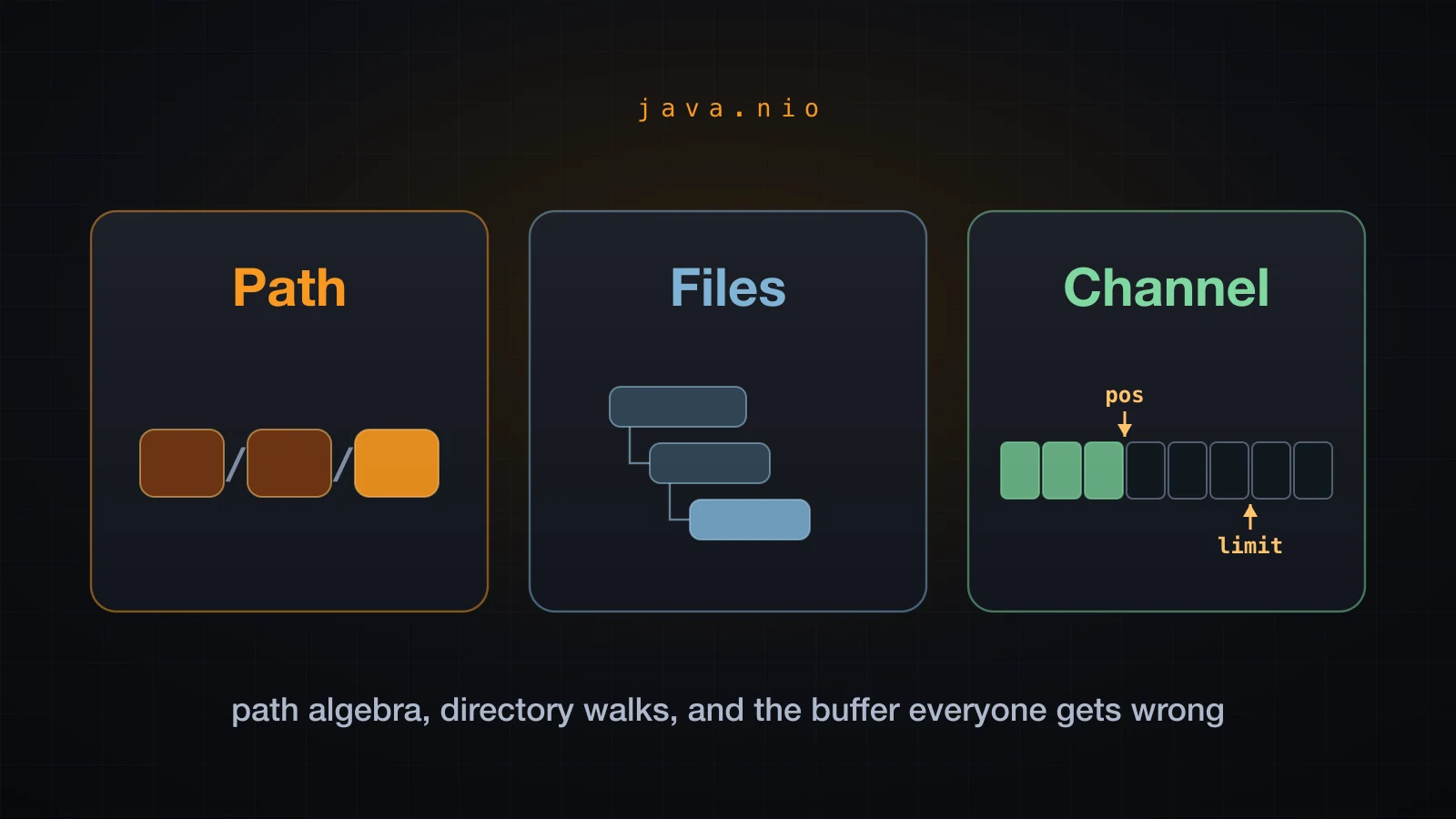
This article is the deep pass over java.nio. It covers the algebra of Path — which operations touch the disk and which are pure string manipulation, and which one silently discards your base directory. It covers the five different ways Files will walk a tree and when each is right. It covers attributes, symbolic links and WatchService. And it covers the layer nobody enjoys the first time: FileChannel, ByteBuffer, and the position/limit/capacity model that everything else in NIO is built on.
The examples use Java 21 and were run on macOS inside a temporary directory, which is where the absolute paths in the output point. Where behaviour depends on the operating system — POSIX attributes, symbolic links, WatchService — the article says so and shows what macOS did.
What NIO adds on top of the file basics
Reading and writing a text file is a solved problem: Files.readString, Files.writeString, Files.readAllLines and Files.lines cover it, and reaching past them for a plain configuration file is a mistake. What follows is the rest of the package, which is what you need as soon as the job stops being "read this one file".
java.nio is really three layers stacked on each other, and it helps to keep them apart:
| Layer | Type | Answers |
|---|---|---|
| Naming | Path | Where is it? What is its parent, its name, its root? Is this path inside that directory? |
| Filesystem operations | Files | Does it exist, how big is it, who owns it, what is in this directory, copy it, move it, delete it, watch it |
| Bytes | FileChannel, ByteBuffer | Move these exact bytes to and from these exact offsets |
The rule of thumb that runs through the whole article: Path never touches the disk except for the two methods that say so in their contract, Files always does, and channels are for when you care about byte offsets. java.nio.channels also contains Selector and SocketChannel for non-blocking network I/O; those are a separate subject and this article stays on files.
Path algebra: the operations people confuse
A Path is not a string and it is not a file. It is a sequence of name elements, optionally preceded by a root, that the default FileSystem knows how to interpret. Take one path apart and every accessor becomes obvious:
Path p = Path.of("/var/app/conf/server/app.properties");

System.out.println(p.getFileName());     // app.properties
System.out.println(p.getParent());       // /var/app/conf/server
System.out.println(p.getRoot());         // /
System.out.println(p.getNameCount());    // 5
System.out.println(p.getName(0));        // var
System.out.println(p.subpath(1, 3));     // app/conf
System.out.println(p.startsWith("/var/app"));                  // true
System.out.println(p.endsWith("server/app.properties")); // truepath /var/app/conf/server/app.properties
getFileName() app.properties
getParent() /var/app/conf/server
getRoot() /
getNameCount() 5
getName(0) var
getName(4) app.properties
subpath(1, 3) app/conf
startsWith("/var/app") true
startsWith("/var/ap") false
endsWith("server/app.properties") true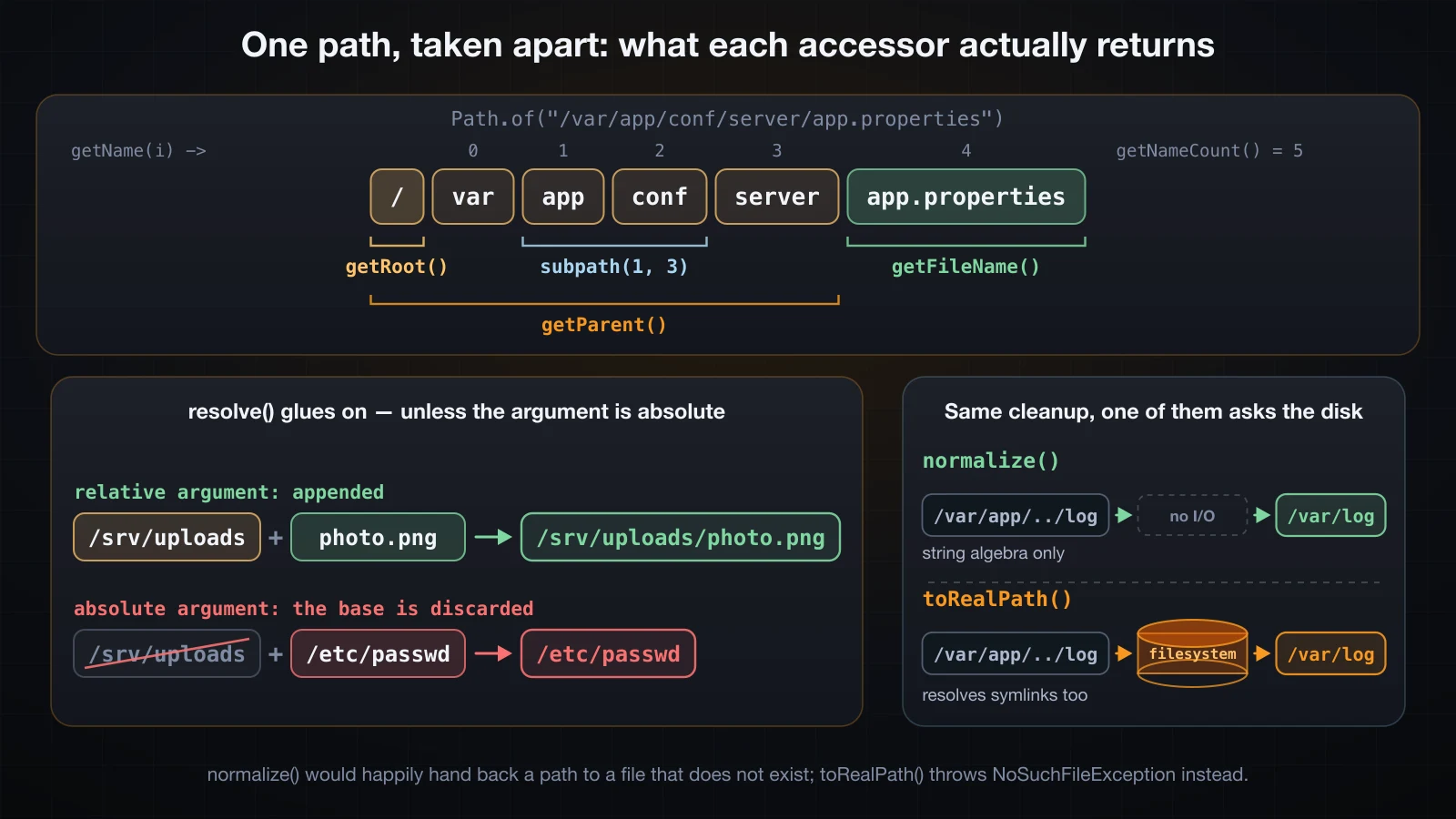
Three details in that output are worth stopping on. getRoot() is not part of getNameCount() — the count is 5 for five name elements, and index 0 is var, not /. subpath(1, 3) uses the same half-open convention as String.substring, so it returns elements 1 and 2 and never carries the root, which is why app/conf comes back relative. And startsWith("/var/ap") is false: Path.startsWith compares whole name elements, not characters. That single fact is the difference between a working security check and a broken one, as the next section shows.
Two more edge cases that surprise people:
Path.of("")                      []
Path.of("").getNameCount()       1
Path.of("file.txt").getParent()  null
Path.of("/").getParent()         null
Path.of("/").getFileName()       null
Path.of("a/b").getRoot()         null
Path.of("a","b","c")             a/b/c
Path.of("a//b///c")              a/b/c
Path.of("a/b/").getNameCount()   2
relativize to itself             []
getParent() returns null rather than Path.of("") for a single-element path, which is the source of an enormous number of NullPointerExceptions in code that writes Files.createDirectories(path.getParent()) without checking. The empty path is a real path with one (empty) name element, and it is what relativize gives you when the two paths are equal.
resolve, and the absolute argument that throws your base away
resolve is the join operator. Given a base and a relative argument it glues them together, exactly as you would expect:
Path.of("/var/app").resolve("logs/app.log")   // /var/app/logs/app.log
Path.of("/var/app").resolve("")               // /var/app
p.resolveSibling("app.properties.bak")        // /var/app/conf/server/app.properties.bak
resolveSibling is getParent().resolve(...), and it is the right call for "same directory, different filename" — a backup file, a temporary file you are about to atomically move into place.
Now the part that is not intuitive. If the argument is absolute, resolve returns the argument and discards the base entirely. No exception, no warning:
photo.png            naive -> /srv/uploads/photo.png
a/../b.png           naive -> /srv/uploads/a/../b.png
../../etc/passwd     naive -> /srv/uploads/../../etc/passwd
/etc/passwd          naive -> /etc/passwd
That last line is a path-traversal vulnerability in four characters. A handler that does UPLOAD_ROOT.resolve(request.getFilename()) and then opens the result will happily read /etc/passwd if the client sends an absolute filename, and will happily escape upward if the client sends ../... This is not a hypothetical: it is the single most common file-handling bug in web code.
The fix is two lines, and it needs normalize and startsWith together:
static final Path ROOT = Path.of("/srv/uploads");

static Path safe(String userInput) {
    Path candidate = ROOT.resolve(userInput).normalize();
    if (!candidate.startsWith(ROOT)) {
        throw new IllegalArgumentException("outside the upload root: " + candidate);
    }
    return candidate;
}photo.png safe -> /srv/uploads/photo.png
a/../b.png safe -> /srv/uploads/b.png
../../etc/passwd safe -> java.lang.IllegalArgumentException: outside the upload root: /etc/passwd
/etc/passwd safe -> java.lang.IllegalArgumentException: outside the upload root: /etc/passwdnormalize() first, so the .. segments are collapsed before the check; startsWith second, on Path and never on String. The difference matters:
/srv/uploads2/x startsWith /srv/uploads = false
"/srv/uploads2/x".startsWith("/srv/uploads") = true
A string comparison accepts /srv/uploads2, a sibling directory that has nothing to do with your upload root. Path.startsWith compares element by element and rejects it. If the files can be symbolic links, harden the check further by comparing toRealPath() values instead — that is the next section.
normalize is string algebra; toRealPath asks the disk
normalize() removes redundant . and .. elements. It does this entirely in memory. It does not stat anything, it does not follow symbolic links, and it does not care whether any of the path exists:
normalize a/../b/./c               b/c
normalize /var/app/../log          /var/log
normalize ../../x                  ../../x
normalize /../../x                 /x
Note the last two. A leading .. on a relative path cannot be resolved without knowing where you are, so normalize leaves it alone. A leading .. on an absolute path is thrown away, because the root has no parent.
toAbsolutePath() is also pure: it prepends the process working directory and nothing else. It specifically does not normalize:
messy                          realdemo/./data/../data/inner/file.txt
normalize()                    realdemo/data/inner/file.txt
toAbsolutePath()               /private/tmp/claude-501/nio24/realdemo/./data/../data/inner/file.txt
toRealPath()                   /private/tmp/claude-501/nio24/realdemo/data/inner/file.txt
toRealPath() is the one method here that does I/O. It makes the path absolute, normalizes it, resolves every symbolic link along the way, and — because it has to look at the filesystem to do that — throws if any component is missing:
normalize() on ghost           realdemo/data/inner/file.txt
toRealPath() on ghost          java.nio.file.NoSuchFileException: realdemo/nope/../data/inner/file.txt
toRealPath() missing           java.nio.file.NoSuchFileException: realdemo/absent.txt
Read those two lines together. The path realdemo/nope/../data/inner/file.txt contains a directory nope that does not exist. normalize() cancels it against the .. and hands back a perfectly usable path. toRealPath() walks the real filesystem, finds nothing called nope, and throws. Both answers are correct for what the method promises; they are just answers to different questions.
With a symbolic link in the path the difference becomes total. Here realdemo/shortcut is a symlink to data/inner:
via symlink                    realdemo/shortcut/file.txt
normalize()                    realdemo/shortcut/file.txt
toRealPath()                   /private/tmp/claude-501/nio24/realdemo/data/inner/file.txt
toRealPath NOFOLLOW            /private/tmp/claude-501/nio24/realdemo/shortcut/file.txt
normalize() cannot see the link at all. toRealPath() resolves it to the real location. toRealPath(LinkOption.NOFOLLOW_LINKS) makes the path absolute and normalized but leaves links intact.
⚠️
Path.equalsis a syntactic comparison.Path.of("/var/app/./conf").equals(Path.of("/var/app/conf"))isfalse, and only becomestrueafternormalize(). Two paths that name the same file are not necessarily equal; that question isFiles.isSameFile(a, b), which does I/O and compares the actual file, and returnedtruefor a relative path against its owntoAbsolutePath()in the run above.
relativize needs two paths of the same kind
relativize is the inverse of resolve: given a and b, it produces the relative path that gets you from a to b, such that a.resolve(a.relativize(b)) equals b.
Path base = Path.of("/var/app");
base.relativize(Path.of("/var/app/conf/server"));   // conf/server
base.relativize(Path.of("/var/log"));               // ../log
base.relativize(Path.of("/etc"));                   // ../../etc
It will happily generate .. segments to climb out of the base, which is worth remembering if you are using the result for anything security-relevant.
The constraint is that both paths must be the same kind — both absolute or both relative. Mix them and you get an IllegalArgumentException, not an IOException:
relativize mixed java.lang.IllegalArgumentException: 'other' is different type of PathThat is OpenJDK 21's own message, typo and all. If either side of a relativize can come from user input or configuration, call toAbsolutePath() on both first.
Walking a directory tree
Files gives you five ways to enumerate a directory, and they differ in depth, in what they include, in how they filter, and in whether they hand you a resource you have to close. The tree used below:
tree
├── pom.xml
├── src
│   └── App.java
└── target
    └── App.class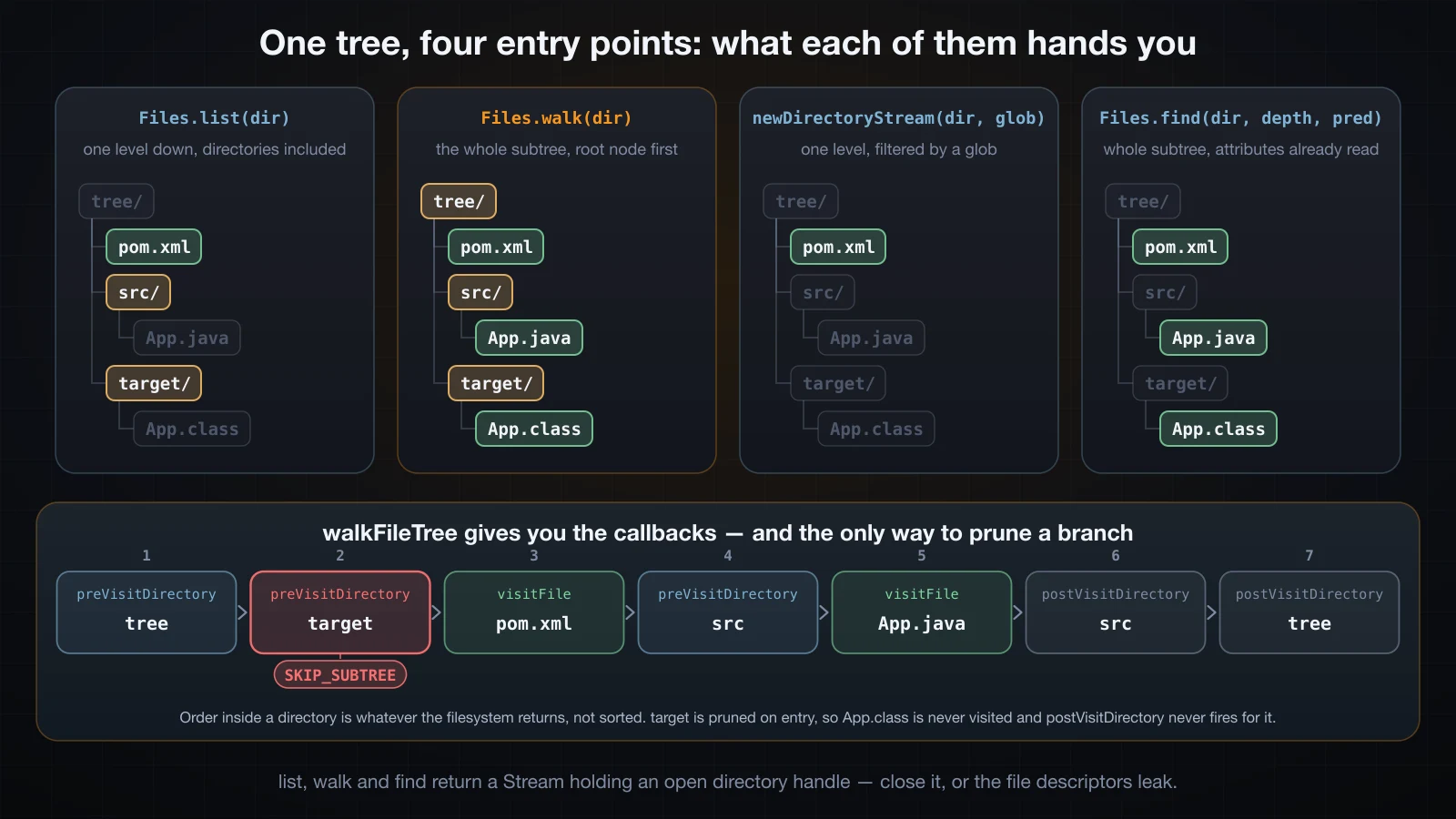
list, walk, find and newDirectoryStream
try (Stream<Path> s = Files.list(root))                 { s.forEach(System.out::println); }
try (Stream<Path> s = Files.walk(root))                 { s.forEach(System.out::println); }
try (Stream<Path> s = Files.walk(root, 1))              { s.forEach(System.out::println); }
try (Stream<Path> s = Files.find(root, Integer.MAX_VALUE,
                                 (p, a) -> a.isRegularFile())) { s.forEach(System.out::println); }
try (DirectoryStream<Path> ds = Files.newDirectoryStream(root, "*.xml")) {
    for (Path p : ds) System.out.println(p);
}Files.list(tree)
tree/target
tree/pom.xml
tree/src
Files.walk(tree)
tree
tree/target
tree/target/App.class
tree/pom.xml
tree/src
tree/src/App.java
Files.walk(tree, 1)
tree
tree/target
tree/pom.xml
tree/src
Files.find(tree, MAX_VALUE, (p, a) -> a.isRegularFile())
tree/target/App.class
tree/pom.xml
tree/src/App.java
Files.newDirectoryStream(tree, "*.xml")
tree/pom.xmlThe differences that matter:
| Call | Depth | Includes the start directory | Filtering | Returns |
|---|---|---|---|---|
Files.list(dir) | one level | no | none | Stream<Path> |
Files.walk(dir) | unlimited | yes | none | Stream<Path> |
Files.walk(dir, maxDepth) | capped | yes | none | Stream<Path> |
Files.find(dir, d, matcher) | capped | yes | a BiPredicate over path and attributes | Stream<Path> |
Files.newDirectoryStream(dir, glob) | one level | no | a glob, applied by the filesystem | DirectoryStream<Path> |
Files.walkFileTree(dir, visitor) | unlimited | yes | your callbacks | nothing, it is a void push API |
Four notes on that table. Nothing here is sorted — the order is whatever the filesystem hands back, which is why target came before pom.xml above. Sort explicitly if you care. walk yields directories as well as files, including the start directory itself, so a "count the files" that forgets filter(Files::isRegularFile) will be off. find is the one that already has the attributes: the BiPredicate receives a BasicFileAttributes that the walk had to read anyway, so filtering on size or modification time costs nothing extra, whereas walk(...).filter(p -> Files.size(p) > n) stats every file a second time and forces you to deal with the checked exception inside a lambda. And newDirectoryStream is the cheapest of all when you only want one level with a glob, because the pattern is applied while the directory is being read.
The glob syntax is not a regex. * matches within one name element, ** crosses element boundaries, ? is one character, and {a,b} is an alternation:
PathMatcher m = FileSystems.getDefault().getPathMatcher("glob:**/*.java");
try (Stream<Path> s = Files.walk(root)) {
    s.filter(m::matches).forEach(System.out::println);
}
One more property of DirectoryStream: it is an Iterable, but only once.
iterator twice: java.lang.IllegalStateException: Iterator already obtainedwalkFileTree, when you need to prune
The Stream methods cannot skip a subtree. Once Files.walk has descended into node_modules or .git, the only thing you can do is filter the results — the directory has already been read. walkFileTree is the version that lets you say no, through four callbacks, all of which SimpleFileVisitor implements with a default of "carry on":
Files.walkFileTree(root, new SimpleFileVisitor<Path>() {
    @Override public FileVisitResult preVisitDirectory(Path dir, BasicFileAttributes a) {
        if (dir.getFileName().toString().equals("target")) {
            return FileVisitResult.SKIP_SUBTREE;
        }
        System.out.println("preVisitDirectory  " + dir);
        return FileVisitResult.CONTINUE;
    }
    @Override public FileVisitResult visitFile(Path f, BasicFileAttributes a) {
        System.out.println("visitFile          " + f + "  (" + a.size() + " bytes)");
        return FileVisitResult.CONTINUE;
    }
    @Override public FileVisitResult postVisitDirectory(Path dir, IOException e) {
        System.out.println("postVisitDirectory " + dir);
        return FileVisitResult.CONTINUE;
    }
});preVisitDirectory tree
preVisitDirectory tree/target -> SKIP_SUBTREE
visitFile tree/pom.xml (11 bytes)
preVisitDirectory tree/src
visitFile tree/src/App.java (13 bytes)
postVisitDirectory tree/src
postVisitDirectory treetarget was entered, pruned, and never left — there is no postVisitDirectory for a subtree you skipped, and App.class was never visited. The four return values are CONTINUE, SKIP_SUBTREE (only meaningful from preVisitDirectory), SKIP_SIBLINGS (finish this entry, skip the rest of the current directory) and TERMINATE (stop the whole walk). The fourth callback, visitFileFailed, receives the IOException for entries that could not be read — a permission-denied directory in the middle of a walk — and SimpleFileVisitor rethrows it by default, which is usually not what a backup tool wants.
postVisitDirectory firing after the children is what makes walkFileTree the natural way to delete a tree, since a directory can only be removed once it is empty.
By default neither walk nor walkFileTree follows symbolic links. Ask them to, and a link that points at its own ancestor is detected rather than looping forever:
no-follow: loop
no-follow: loop/a
no-follow: loop/a/back
follow: loop
follow: loop/a
follow: java.io.UncheckedIOException: java.nio.file.FileSystemLoopException: loop/a/back
Note the wrapping: inside a Stream, the checked FileSystemLoopException arrives as an UncheckedIOException.
The Stream methods hold an open handle
list, walk and find return a Stream that is backed by an open directory handle. The Stream interface extends AutoCloseable precisely for this case, and these three are the reason. Leaving one unclosed leaks a file descriptor, and file descriptors are a per-process resource that runs out:
for (int i = 0; i < 100_000; i++) {
    Stream<Path> s = Files.list(dir);   // never closed
    s.findFirst();
}leaked streams opened: 61436
then: java.nio.file.FileSystemException: .: Too many open files61,436 leaked handles and the process could not open anything else — not a file, not a socket. On this machine sysctl kern.maxfilesperproc reports 61440, so the JVM ran out four descriptors short of the hard per-process cap, and the failure reproduced at exactly the same number on a second run. Nothing recovers this: there is no finalizer on a directory stream, so garbage collection does not clean it up.
The fix is the same as for any resource, and it is why every example above is inside a try header:
try (Stream<Path> s = Files.walk(root)) {
    return s.filter(Files::isRegularFile).count();
}
The compiler will not warn you. Files.walk(dir).forEach(...) compiles cleanly and leaks on every call.
Copying, moving and deleting
Files.copy and Files.move refuse to clobber by default:
copy onto existing: java.nio.file.FileAlreadyExistsException: cm/b.txtStandardCopyOption changes that, and there are only three options worth knowing:
| Option | Effect |
|---|---|
REPLACE_EXISTING | overwrite the target instead of throwing |
COPY_ATTRIBUTES | carry the last-modified time and, where supported, the rest of the basic attributes |
ATOMIC_MOVE | move only: either the rename happens completely or not at all; throws AtomicMoveNotSupportedException across filesystems |
ATOMIC_MOVE is the one that earns its keep. Writing to a temporary file in the same directory and then atomically moving it into place is how you update a file without a reader ever seeing a half-written version — and "in the same directory" matters, because an atomic rename cannot cross a filesystem boundary.
Files.copy on a directory does not copy its contents. It creates an empty directory of that name and stops:
copy of a directory -> children copied? falseThere is no recursive copy in the JDK. You write it with a walk.
Creating directories has the same shape:
createDirectories twice: cm/box/inner
createDirectory existing: java.nio.file.FileAlreadyExistsException: cm/box
createDirectory no parent: java.nio.file.NoSuchFileException: cm/x/y
createDirectories (plural) creates missing parents and returns the path without complaint if everything already exists — that is what you want in almost every case. createDirectory (singular) requires the parent to exist and throws if the directory is already there.
Deleting has the trap that catches everyone. delete throws when the file is missing, deleteIfExists returns a boolean instead — but neither of them will remove a non-empty directory:
delete non-empty dir: java.nio.file.DirectoryNotEmptyException: cm/box
deleteIfExists non-empty: java.nio.file.DirectoryNotEmptyException: cm/box
deleteIfExists absent: false
delete absent: java.nio.file.NoSuchFileException: cm/ghost.txt
deleteIfExists swallows "it was not there"; it does not swallow "it was not empty". To delete a tree you have to visit every entry and remove children before parents. The shortest correct version is a walk consumed in reverse order — because the walk is depth-first with the parent first, reversing it puts every child before its parent:
static void deleteRecursively(Path dir) throws IOException {
    try (Stream<Path> s = Files.walk(dir)) {
        for (Path p : s.sorted(Comparator.reverseOrder()).toList()) {
            Files.delete(p);
        }
    }
}deleting the whole tree with a reverse-ordered walk:
cm exists after: falseThe walkFileTree version does the same thing with visitFile deleting files and postVisitDirectory deleting the directory it has just finished; it is longer but it streams rather than materialising the whole list, which matters on a large tree.
Files.mismatch (Java 12) is a small convenience that saves a lot of hand-written comparison code: it returns the index of the first differing byte, or -1 when the two files are identical.
Files.mismatch = 6
Files.mismatch identical = -1
File attributes, and what is platform-specific
Files.size, Files.getLastModifiedTime, Files.isRegularFile, Files.isDirectory, Files.isReadable and friends each perform their own trip to the filesystem. When you need more than one of them, read them together instead:
BasicFileAttributes b = Files.readAttributes(f, BasicFileAttributes.class);size 14
creationTime 2026-09-10T02:28:06Z
lastModifiedTime 2026-09-10T02:28:06.791635375Z
lastAccessTime 2026-09-10T02:28:06.790053706Z
isRegularFile true
isSymbolicLink false
fileKey (dev=1000012,ino=50907875)One readAttributes call replaces six Files.isX calls, and it is also the only way to get a consistent snapshot: six separate calls can observe six different states of a file that another process is modifying.
fileKey() is the device and inode pair on a Unix filesystem, which is the real identity of a file — two paths with the same fileKey are the same file, even through hard links. It is allowed to return null on filesystems that have no such notion.
BasicFileAttributes is the portable subset. Ask for PosixFileAttributes and you get owner, group and permissions, on any platform that supports the POSIX view:
owner                    hoangth
group                    wheel
permissions              rw-r--r--
permissions set          [OTHERS_READ, GROUP_READ, OWNER_READ, OWNER_WRITE]
supportedFileAttributeViews [owner, basic, posix, user, unix]
That last line is the portability check: FileSystems.getDefault().supportedFileAttributeViews() tells you what the running platform will answer. On this macOS machine it is [owner, basic, posix, user, unix]. Windows offers acl and dos instead of posix, so Files.readAttributes(p, PosixFileAttributes.class) throws UnsupportedOperationException there. Guard it, or stay on BasicFileAttributes.
There is also a string form, which is how you read attributes without naming a class, and how you reach view-specific fields:
Map<String, Object> m = Files.readAttributes(f, "posix:*");posix:* keys [creationTime, fileKey, group, isDirectory, isOther, isRegularFile,
isSymbolicLink, lastAccessTime, lastModifiedTime, owner, permissions, size]Attributes are writable too:
after setLastModified    2020-09-13T12:26:40Z
after chmod              r--r-----
isWritable               false
Symbolic links and NOFOLLOW_LINKS
Almost every Files method follows symbolic links by default, and takes a LinkOption.NOFOLLOW_LINKS to stop. The difference is not cosmetic:
link follow: size        14
link follow: isSymlink   false
link NOFOLLOW: size      10
link NOFOLLOW: isSymlink true
same fileKey?            false
Following the link reports the target: 14 bytes, not a link. Not following it reports the link itself: 10 bytes, which is the length of the stored target path report.txt, and isSymbolicLink is true. Different files, different fileKey.
A broken link makes the asymmetry visible in exists:
exists(broken)            false
exists(broken, NOFOLLOW)  true
notExists(broken)         true
Files.exists returns false for a symlink pointing at nothing, because it follows the link and finds nothing. This is also the reason Files.notExists is not !Files.exists: both can be false at once when the answer is genuinely unknown. Removing the execute bit from a directory and then asking about a file that really is inside it produced exactly that here: exists returned false and notExists also returned false.
Symbolic links are platform-specific in a harder way than attributes: on Windows, Files.createSymbolicLink requires either Developer Mode or elevated privileges and otherwise throws. The behaviour above is what a Unix-family filesystem does; this run was on APFS.
Watching a directory with WatchService
WatchService lets you register a directory and receive events when its entries are created, modified or deleted. The API is deliberately small: register, take a key, drain its events, reset the key.
The trap is take(), which blocks forever. Every tutorial writes while (true) { WatchKey key = ws.take(); ... }, and every such program hangs a test suite and cannot be shut down. Use poll with a timeout and give the loop a deadline:
Path dir = Path.of("watched");
Files.createDirectories(dir);

try (WatchService ws = FileSystems.getDefault().newWatchService()) {
    System.out.println("implementation = " + ws.getClass().getName());
    dir.register(ws, ENTRY_CREATE, ENTRY_MODIFY, ENTRY_DELETE);

    long deadline = System.nanoTime() + TimeUnit.SECONDS.toNanos(12);
    while (System.nanoTime() < deadline) {
        WatchKey key = ws.poll(1, TimeUnit.SECONDS);
        if (key == null) {
            System.out.println("  poll -> null (nothing this second)");
            continue;
        }
        for (WatchEvent<?> ev : key.pollEvents()) {
            System.out.printf("  %-12s count=%d  %s%n",
                    ev.kind().name(), ev.count(), dir.resolve((Path) ev.context()));
        }
        if (!key.reset()) {
            System.out.println("  key invalid");
            break;
        }
    }
}
Four things that are easy to get wrong. ev.context() is a Path relative to the watched directory, not an absolute path — resolve it against the directory yourself. key.reset() is mandatory: without it the key stays in the signalled state and you never get another event, and a false return means the directory is gone. Registration is not recursive — watching a tree means registering every directory and registering new ones as they appear. And the service itself is a resource, so it belongs in a try-with-resources.
Now the honest part. Run it on macOS and print the implementation class:
implementation = sun.nio.fs.PollingWatchServicesun.nio.fs.PollingWatchService does exactly what its name says: it re-scans the registered directory on a timer and compares last-modified timestamps against the previous scan. In OpenJDK 21 the interval is a hardcoded constant, private static final int POLLING_INTERVAL = 2; seconds, in that class. There is no kernel notification involved. On Linux the default implementation is sun.nio.fs.LinuxWatchService, backed by inotify, and on Windows it is backed by ReadDirectoryChangesW; the polling implementation is the fallback for platforms with no such support, and macOS gets it. The JDK says so itself: BsdFileSystem.newWatchService carries the comment // use polling implementation until we implement a BSD/kqueue one.
The consequence is not just latency. Two changes inside one scan window are not two events — the scanner only ever sees the before and after states, so intermediate changes are lost. Creating a file, appending to it, and deleting it shortly afterwards produced this on this machine, twice in a row:
implementation = sun.nio.fs.PollingWatchService
  poll -> null (nothing this second)
  poll -> null (nothing this second)
  poll -> null (nothing this second)
  ENTRY_CREATE count=1  watched3/note.txt
  poll -> null (nothing this second)
  poll -> null (nothing this second)
  poll -> null (nothing this second)
  ENTRY_DELETE count=1  watched3/note.txt
  poll -> null (nothing this second)
  poll -> null (nothing this second)
  poll -> null (nothing this second)
  poll -> null (nothing this second)
watch loop finished on its own
The ENTRY_MODIFY never arrived. The append and the delete both landed between two scans, and from the scanner's point of view the file simply stopped existing. Spread the same three operations far enough apart that each lands in its own scan window and all three events arrive in order. Reproduce it yourself before you rely on any of this: the ENTRY_MODIFY in particular is the least reliable of the three, since on other platforms one logical save by an editor can produce several of them, or none at all if the editor writes a new file and renames it over the old one.
Two more things to plan for. OVERFLOW is a real event kind that arrives when the implementation could not keep up and dropped events; you have to handle it by re-scanning the directory yourself, and you get it whether or not you registered for it. And WatchService is a change-notification API, not a state API — the reliable pattern is to treat every event as "something changed, go and look", never as a description of what the file now contains.
Channels and buffers
Underneath Files.readAllBytes there is a FileChannel, and underneath every channel operation there is a ByteBuffer. This is the layer where you control the exact bytes and the exact offsets, and it is the part of NIO that people find confusing — not because it is complicated, but because a buffer has three cursors that everything else in the API moves for you.
position, limit and capacity
A ByteBuffer is a fixed-size array of bytes plus three integers, and one invariant that never breaks:
0 <= mark <= position <= limit <= capacity- capacity — how many bytes the buffer holds. Set at allocation, never changes.
- limit — the first index you are not allowed to touch. Where the useful data ends.
- position — the index of the next byte a relative
getorputwill use. - mark — a remembered position, set by
mark()and restored byreset().
Every operation you will ever call on a buffer is a specific way of moving position and limit. Print all three after each call and the model stops being mysterious:
ByteBuffer b = ByteBuffer.allocate(16);
show("allocate(16)", b);
b.put("HELLO".getBytes(StandardCharsets.US_ASCII));
show("put(5 bytes)", b);
b.flip();
show("flip()", b);
byte[] two = new byte[2];
b.get(two);
show("get(2 bytes)", b);allocate(16) pos=0 lim=16 cap=16 rem=16
put(5 bytes) pos=5 lim=16 cap=16 rem=11
flip() pos=0 lim=5 cap=16 rem=5
get(2 bytes) pos=2 lim=5 cap=16 rem=3
read so far: HE
mark() pos=2 lim=5 cap=16 rem=3
get(), get() pos=4 lim=5 cap=16 rem=1
reset() pos=2 lim=5 cap=16 rem=3
rewind() pos=0 lim=5 cap=16 rem=5
position(2) pos=2 lim=5 cap=16 rem=3
compact() pos=3 lim=16 cap=16 rem=13
bytes 0..2 now: LLO
clear() pos=0 lim=16 cap=16 rem=16
clear() erased nothing: byte 0 is still L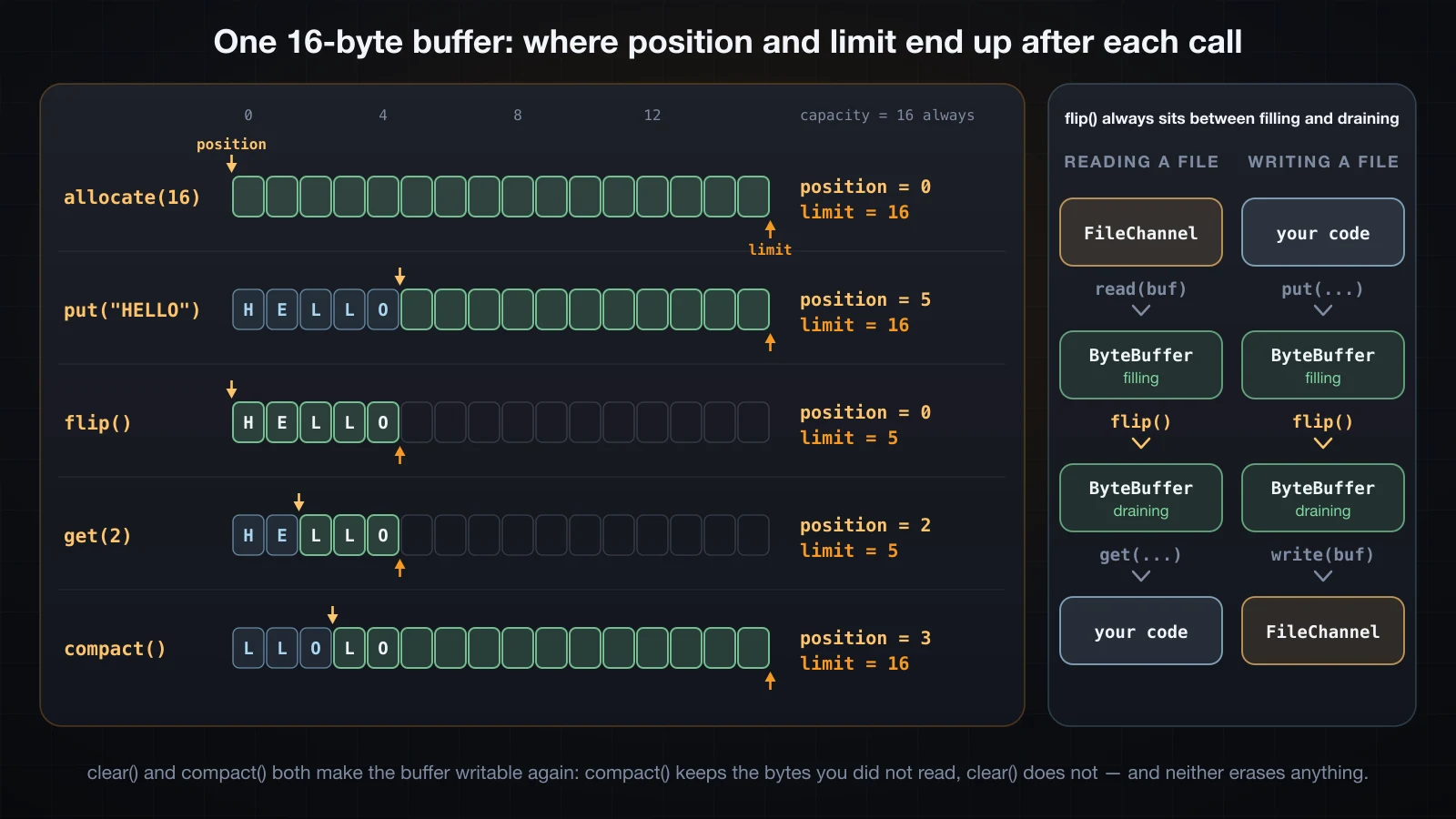
That table is the whole model. Read it as a story: the buffer starts empty and writable with position at 0 and limit at capacity; five bytes go in and position follows them to 5; flip() sets limit to the current position and position back to 0, which turns "I have written 5 bytes" into "there are 5 bytes to read"; each get advances position; compact() moves the unread bytes to the front and puts the buffer back in writing mode with position just after them.
remaining() is simply limit - position, and hasRemaining() is the loop condition you want.
flip, clear, compact, rewind, mark and reset
| Call | position | limit | Data | Use it when |
|---|---|---|---|---|
flip() | 0 | old position | untouched | you finished filling and want to drain |
clear() | 0 | capacity | untouched | you finished draining and want to refill from scratch |
compact() | number of unread bytes | capacity | unread bytes moved to the front | you finished draining part of it and want to refill the rest |
rewind() | 0 | unchanged | untouched | you want to re-read the same range |
mark() / reset() | remembered / restored | unchanged | untouched | you want to look ahead and come back |
The two things that trip people up:
clear() and compact() do not erase anything. clear() moves two integers. The bytes are still in the array, as the trace above shows — byte 0 was still L after clear(). If a buffer holds a password, overwrite it yourself.
compact() leaves stale bytes behind the new position. Dumping the whole backing array through the trace makes it visible:
allocate(16)     [................] pos= 0 lim=16
put(HELLO)       [HELLO...........] pos= 5 lim=16
flip()           [HELLO...........] pos= 0 lim= 5
get(2)           [HELLO...........] pos= 2 lim= 5
compact()        [LLOLO...........] pos= 3 lim=16
clear()          [LLOLO...........] pos= 0 lim=16
After compact() the three unread bytes LLO are at indices 0, 1 and 2 and position is 3 — but indices 3 and 4 still hold the old L and O. They are beyond position, so nothing will ever read them as data; they are simply not zeroed.
Overrunning either boundary throws, and the two exceptions have different names for the two directions:
put past the limit         java.nio.BufferOverflowException
get past the limit         java.nio.BufferUnderflowException
mark is more fragile than it looks. flip(), rewind() and clear() all discard it, and reset() without a valid mark throws:
reset after rewind: java.nio.InvalidMarkException
reset after flip:   java.nio.InvalidMarkException
reset with no mark: java.nio.InvalidMarkException
One last subtlety: the absolute accessors get(int) and put(int, byte) do not move position — that is the point of them — but they are bounds-checked against limit, not capacity. After a flip() that set limit to 5, b.get(5) throws IndexOutOfBoundsException even though the buffer's capacity is 16.
Reading a file through a FileChannel
With the model in hand the channel loop writes itself. read fills the buffer from the channel's current position and returns the number of bytes transferred, or -1 at end of file:
try (FileChannel ch = FileChannel.open(p, StandardOpenOption.READ)) {
    ByteBuffer buf = ByteBuffer.allocate(16);
    int n;
    while ((n = ch.read(buf)) != -1) {
        buf.flip();
        byte[] got = new byte[buf.remaining()];
        buf.get(got);
        System.out.println(new String(got, StandardCharsets.UTF_8));
        buf.clear();
    }
}file size = 45
read #1 returned 16 bytes, pos=16 : The quick brown
read #2 returned 16 bytes, pos=32 : fox jumps over t
read #3 returned 13 bytes, pos=45 : he lazy dog.\n
reads=4 (last one returned -1), bytes=45Three reads of at most 16 bytes plus one that returned -1, and the channel's own position tracked the total. (The trailing newline is printed as the two-character escape so each row stays on one line.) Note that a 16-byte buffer split a multi-byte character straight down the middle if the text had any — a channel moves bytes, and decoding text safely across buffer boundaries needs a CharsetDecoder rather than a new String per chunk.
Forget the flip() and nothing happens at all, silently:
the classic bug: reading without flip()
  read returned 16, pos=16 lim=16
  bytes taken without flip: 0 -> []
The channel filled the buffer and left position at 16, limit at 16, so remaining() is 0 and the byte[] you allocate from it has length zero. No exception. An empty result from a successful read is almost always a missing flip().
FileChannel also has absolute forms, which take an explicit file offset and leave the channel position alone. They are the right tool for random access, and they are safe to call from several threads on the same channel:
ByteBuffer at4 = ByteBuffer.allocate(5);
ch.read(at4, 4);
at4.flip();
ch.write(ByteBuffer.wrap("SLOW ".getBytes(StandardCharsets.UTF_8)), 4); read(buf, 4) = quick
channel position unchanged = 0
after write(buf, 4): The SLOW brown fox jumps over the lazy dog.
size() = 45Files.newByteChannel(path) gives you the same object through a narrower interface — on this JVM it returned a sun.nio.ch.FileChannelImpl — and SeekableByteChannel is the type to accept in your own API when you only need read, write, position and size.
Heap buffers versus direct buffers
ByteBuffer.allocate gives you a buffer backed by a byte[] on the Java heap. ByteBuffer.allocateDirect gives you one outside the heap, in memory the operating system can hand to a read or write syscall directly.
allocate class             java.nio.HeapByteBuffer
allocateDirect class       java.nio.DirectByteBuffer
heap.isDirect()            false
direct.isDirect()          true
heap.hasArray()            true
direct.hasArray()          false
direct.array()             java.lang.UnsupportedOperationException
The usual explanation is "direct buffers avoid a copy", which is true but unverifiable by staring at it. It is directly observable through BufferPoolMXBean, which reports how much off-heap buffer memory the JVM has allocated. Two separate JVM runs, one writing 100 times from a heap buffer and one from a direct buffer of the same size:
--- ByteBuffer.allocate (heap) ---
at startup                  direct pool: count=0 memoryUsed=0
after allocating the buffer direct pool: count=0 memoryUsed=0
after 100 writes            direct pool: count=1 memoryUsed=8192

--- ByteBuffer.allocateDirect ---
at startup                  direct pool: count=0 memoryUsed=0
after allocating the buffer direct pool: count=1 memoryUsed=8192
after 100 writes            direct pool: count=1 memoryUsed=8192
The heap run allocated no direct memory until the first write, and then the JVM allocated an 8192-byte direct buffer of its own — the exact size of the buffer being written. That is sun.nio.ch.IOUtil copying your heap bytes into a temporary direct buffer because the syscall cannot be given a Java array that the garbage collector is allowed to move. It caches that scratch buffer per thread, which is why 100 writes still show only one allocation. The direct run allocated exactly the one buffer you asked for and needed nothing extra.
That is the real trade. A direct buffer costs more to create and is not freed on a schedule you control — it is released when the buffer object is collected, or when the JVM hits -XX:MaxDirectMemorySize and forces the issue. So direct buffers pay off for long-lived buffers reused across many operations, and cost you for short-lived ones. Allocate a few of them once, reuse them, and never allocate one per request.
Two more properties worth knowing: a ByteBuffer is big-endian by default and order(ByteOrder.LITTLE_ENDIAN) changes how the multi-byte accessors interpret the same bytes, and asIntBuffer(), asCharBuffer() and friends give you a typed view over the same memory.
default order  BIG_ENDIAN
big-endian     01 02 03 04
little-endian  04 03 02 01
asIntBuffer capacity       4
asCharBuffer capacity      8
transferTo, and mapping a file into memory
FileChannel.transferTo copies from one channel to another without the bytes ever entering your process's Java memory. Counting calls rather than timing them shows what changes. Copying 8 MB with a 64 KB direct buffer, versus the same 8 MB through transferTo:
source = 8388608 bytes, sha256[0:16] = beb75e9d18c49d72
copy loop      read calls=129  write calls=128  bytes=8388608
transferTo     calls=1               bytes=8388608

copy-loop.bin        8388608 bytes  sha256[0:16]=beb75e9d18c49d72
copy-transfer.bin    8388608 bytes  sha256[0:16]=beb75e9d18c49d72
copy-files.bin       8388608 bytes  sha256[0:16]=beb75e9d18c49d72
128 reads and 128 writes became one call, and all three files hash identically. Write the loop anyway, because transferTo is allowed to transfer fewer bytes than you asked for:
long size = in.size();
long sent = 0;
while (sent < size) {
    long n = in.transferTo(sent, size - sent, out);
    if (n == 0) break;
    sent += n;
}
For a plain file-to-file copy, Files.copy is the answer and it produced a byte-identical result above; transferTo earns its place when one side is a socket, which is how a file server sends a file without reading it.
FileChannel.map goes further and asks the operating system to map a region of the file into the address space. The result is a MappedByteBuffer — a ByteBuffer like any other, except that writing to it writes to the file:
try (FileChannel ch = FileChannel.open(p, StandardOpenOption.READ, StandardOpenOption.WRITE)) {
    MappedByteBuffer m = ch.map(FileChannel.MapMode.READ_WRITE, 0, ch.size());
    m.position(8);
    m.put("done!!!".getBytes(StandardCharsets.US_ASCII));
    m.put(23, (byte) '4').put(24, (byte) '2');
    m.force();
}before: STATUS: pending | rows: 0000 |
mapped class = java.nio.DirectByteBuffer
isDirect = true
capacity = 27
after : STATUS: done!!! | rows: 0420 |No write call anywhere — the bytes were changed in memory and the file changed on disk. force() asks for them to be flushed; without it the write is still visible to other processes through the page cache, but it is not guaranteed to have reached the storage device.
Four properties of mappings that are not obvious:
size before map = 3
size after map(0, 32) = 32, on disk = 32
channel closed; mapping still readable: a
write after close landed on disk: Z
delete while mapped: true
still readable through the mapping: a
Mapping a range larger than the file extends the file — a 3-byte file became 32 bytes. The mapping outlives the channel: closing the FileChannel does not unmap, and reads and writes through the buffer kept working afterwards. There is no unmap(); the mapping is released when the buffer is garbage collected, which is why a mapped file is awkward to delete on Windows even though the delete above succeeded on macOS. And the three map modes behave as their names suggest: READ_ONLY throws java.nio.ReadOnlyBufferException on a put, and PRIVATE gives you a copy-on-write view whose changes are visible in the buffer and never reach the file — verified above, where byte 0 read X through the buffer and S on disk.
Mappings are also limited to Integer.MAX_VALUE bytes each, because ByteBuffer indices are int — asking for one byte more threw java.lang.IllegalArgumentException: Size exceeds Integer.MAX_VALUE. A file larger than 2 GB needs several mappings.
When NIO is the wrong tool
Everything above exists for a reason, and none of those reasons is "reading a config file". Here is a small UTF-8 text file read correctly through a channel:
try (FileChannel ch = FileChannel.open(p, StandardOpenOption.READ)) {
    ByteBuffer bytes = ByteBuffer.allocate((int) ch.size());
    while (bytes.hasRemaining() && ch.read(bytes) != -1) { }
    bytes.flip();
    CharsetDecoder dec = StandardCharsets.UTF_8.newDecoder()
            .onMalformedInput(CodingErrorAction.REPORT);
    return dec.decode(bytes).toString();
}
And the same job:
return Files.readString(p);channel version = Xin chào\nHello\n
readString = Xin chào\nHello\n
identical = trueIdentical results. The channel version is nine lines with three ways to get it wrong — a forgotten flip(), a partial read, a multi-byte character split across a buffer boundary — and it buys nothing, because Files.readString already reads the whole file in one go into a byte[] sized from the file length.
Use the channel and buffer layer when you have an actual reason: random access at known offsets, a file too large to hold in memory, a binary format with a fixed layout, zero-copy transfer to a socket, or a memory-mapped index. Everything else is Files.
Common mistakes
Calling resolve on user input. An absolute argument discards your base directory entirely and .. climbs out of it. Always normalize() and then check startsWith on the Path, never on the String.
Using String.startsWith for a containment check. /srv/uploads2/x passes the string test and fails the Path test. Only the second one is correct.
Expecting normalize() to validate anything. It is pure string algebra. It happily returns a path to a file that does not exist, and it cannot see symbolic links. toRealPath() is the one that checks, and it throws NoSuchFileException when there is nothing there.
Leaving a Files.walk, list or find stream unclosed. A leaked directory handle is never reclaimed; 61,436 of them exhausted the process in the run above. Put every one of them in a try-with-resources.
Calling Files.delete on a directory with anything in it. DirectoryNotEmptyException, and deleteIfExists throws it too. Delete children before parents with a reverse-ordered walk or a walkFileTree.
Assuming Files.copy recurses. It creates an empty directory and stops. There is no recursive copy in the JDK.
Reading from a buffer without flip(). You get zero bytes and no error, because remaining() is 0.
Assuming clear() clears. It moves position and limit. The bytes are still there.
Allocating a direct buffer per operation. They are expensive to create and freed only by the collector. Allocate once, reuse, and keep an eye on -XX:MaxDirectMemorySize.
Treating a WatchService event as a description of the file. Events are coalesced, ENTRY_MODIFY can be lost entirely on the polling implementation, and OVERFLOW means events were dropped. Treat every event as "go and look".
FAQ
What is the difference between normalize and toRealPath in Java?
normalize() removes . and .. elements from the path string and performs no I/O at all, so it works on paths that do not exist and cannot see symbolic links. toRealPath() goes to the filesystem: it makes the path absolute, normalizes it, resolves every symbolic link, and throws java.nio.file.NoSuchFileException if any component is missing. Use normalize() for validation and comparison, toRealPath() when you need the canonical location of a file you know is there.
Why does Path.resolve ignore the base path sometimes?
Because the argument was absolute. resolve is specified to return the argument unchanged when it is already absolute, so Path.of("/srv/uploads").resolve("/etc/passwd") is /etc/passwd. This is by design and it is the root of many path-traversal bugs. If the argument comes from outside your program, resolve it, normalize() it, and then reject anything whose startsWith your root directory is false.
Do I have to close the stream returned by Files.walk?
Yes. Files.walk, Files.list, Files.find and Files.lines all return a Stream that holds an open directory or file handle, and none of them is cleaned up by garbage collection. Leaking them exhausts the process file-descriptor limit — 61,436 leaked directory streams was enough on the machine used here. Use try-with-resources on every one of them.
When should I use walkFileTree instead of Files.walk?
When you need to prune. Files.walk has already read a directory by the time you see its entries, so filtering node_modules out of the result still costs you the descent; preVisitDirectory returning SKIP_SUBTREE avoids it entirely. walkFileTree is also the natural shape for deleting a tree, because postVisitDirectory runs after the children, and it is the only one that lets you handle a per-entry IOException through visitFileFailed instead of aborting the whole walk.
Why is my WatchService not firing events on macOS?
Because the JDK has no native watcher for macOS and falls back to sun.nio.fs.PollingWatchService, which rescans the directory on a timer — a hardcoded two-second interval in OpenJDK 21 — and compares timestamps. Changes are detected on the next scan rather than immediately, and two changes inside one scan window collapse into one event or vanish: in the run above an ENTRY_MODIFY disappeared completely because the file was deleted before the next scan. On Linux the inotify-backed implementation is used instead. Never assume you saw every change; re-scan on every event.
What does flip() actually do to a ByteBuffer?
It sets limit to the current position and then sets position to 0, leaving the bytes untouched. That converts "I have just written N bytes" into "there are N bytes available to read", which is why it goes between every fill and every drain. Its counterparts are clear(), which sets position to 0 and limit to capacity for a fresh fill, and compact(), which moves the unread bytes to the front and puts position just after them so you can top the buffer up without losing them.
Is a direct ByteBuffer always faster than a heap one?
No. A heap buffer handed to a channel is copied into a temporary direct buffer first — visible as an 8192-byte allocation appearing in the direct pool of BufferPoolMXBean on the first write in the measurement above — so a direct buffer avoids that copy. But a direct buffer is more expensive to allocate and is only released when the buffer object is collected, so allocating one per operation is worse than using a heap buffer. Direct buffers win when they are long-lived and reused; anything short-lived should stay on the heap.
Conclusion
Path is algebra, not a filesystem: resolve, resolveSibling, relativize, normalize, subpath and startsWith all run in memory, and only toRealPath — which resolves symbolic links and throws NoSuchFileException on a missing component — actually asks the disk. resolve returns an absolute argument unchanged and drops your base, which is why every path built from user input needs normalize() followed by a startsWith check on the Path rather than the String. Files gives you five ways to walk a tree with different depth, filtering and closing rules; the three Stream-returning ones hold a real file descriptor and leaked 61,436 of them before the process died. Attributes come in one call through readAttributes, symbolic links change every answer unless you pass NOFOLLOW_LINKS, and WatchService on macOS is a two-second poller that coalesced an ENTRY_MODIFY out of existence in the run above. Underneath all of it, a ByteBuffer is three integers with one invariant — mark <= position <= limit <= capacity — and flip, clear and compact are just different ways to move two of them; allocateDirect skips the temporary copy the JVM otherwise makes for you, transferTo did in one call what a copy loop did in 128 reads and 128 writes, and a MappedByteBuffer changed a file on disk without a single write. And for a small text file, none of it: Files.readString produced the identical result in one line.
The next article moves up a level, from bytes on disk to structured data: working with JSON and XML in Java — parsing, generating, mapping to objects, and the libraries that do it.
![[Advanced Java] The Java Stream API: map, filter, reduce and collect](/images/blog/stream-api-thumbnail.en.webp)
![[Advanced Java] Thread Lifecycle, synchronized and Race Conditions](/images/blog/thread-lifecycle-thumbnail.en.webp)
![[Advanced Java] JDBC in Java: Connections, PreparedStatement and Transactions](/images/blog/jdbc-thumbnail.en.webp)
![[Advanced Java] SOLID Principles in Java: Five Rules and When to Break Them](/images/blog/solid-thumbnail.en.webp)