Every ORM, every query builder and every JdbcTemplate in a Java application eventually calls the same handful of interfaces: Connection, PreparedStatement, ResultSet. JDBC is that layer — the API in the java.sql package that ships with the JDK and that every database vendor implements in a driver jar.
Learning it is not optional even if you plan to use JPA. The stack traces you will read, the connection you will leak, the transaction that did not roll back and the query that was concatenated instead of parameterised all live at this level. This article works through the whole surface: opening a connection, closing it correctly, why a placeholder is a security control rather than a performance trick, the cursor semantics of ResultSet, transactions and savepoints, batching, generated keys, and what a SQLException is actually telling you.
The examples use Java 21 and a SQLite database file, reached through the Xerial SQLite JDBC driver. SQLite was chosen because it needs no server, which means you can reproduce every example with a JDK and one downloaded jar. Anything that is specific to SQLite or to that driver is labelled as such; the rest is plain JDBC and behaves the same way against PostgreSQL or MySQL.
What JDBC is: an API of interfaces and a driver that implements them
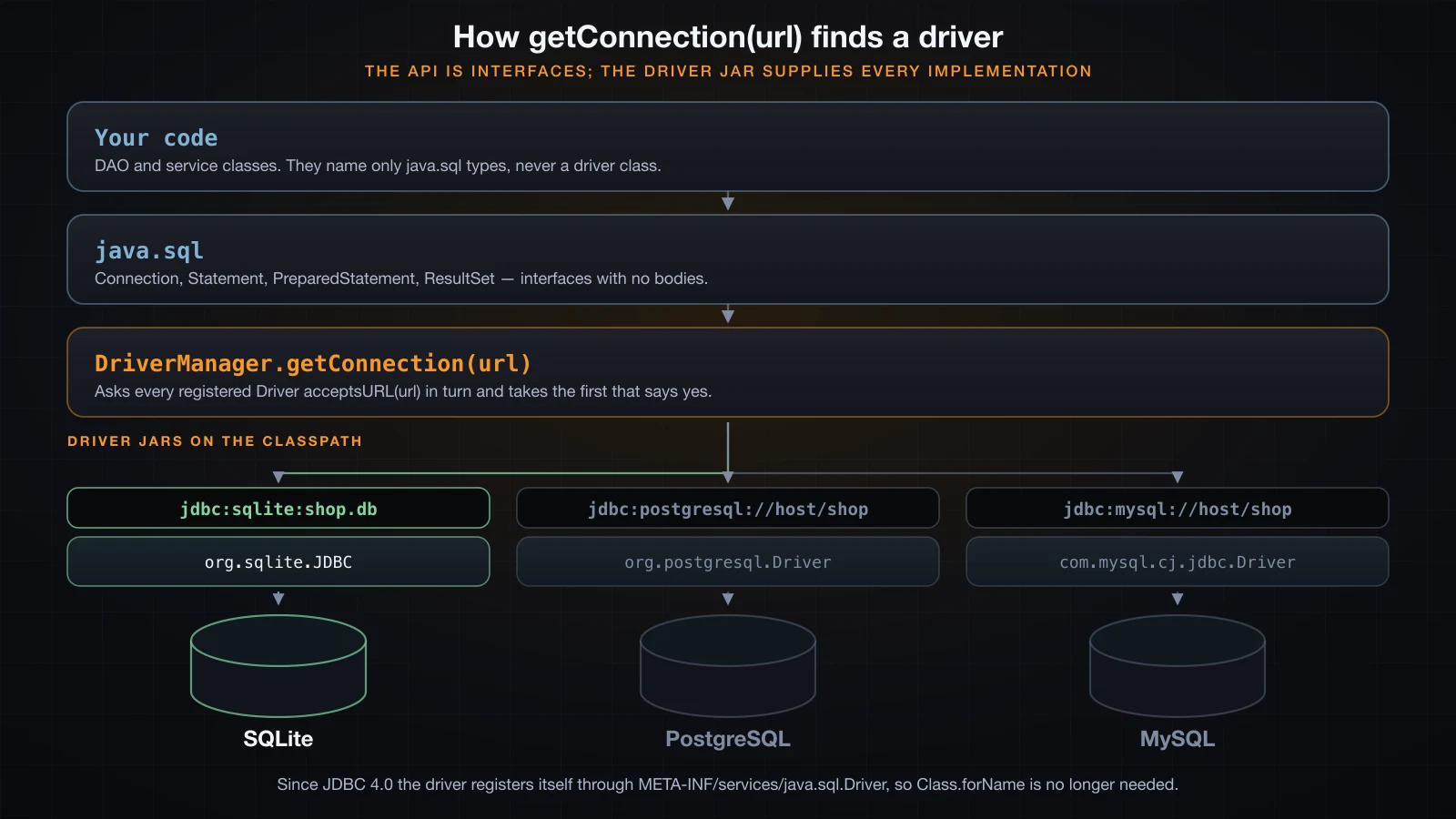
java.sql is part of the JDK — it ships as the module java.sql — and it contains almost no implementation. Connection, Statement, PreparedStatement, ResultSet and DatabaseMetaData are all interfaces. The classes behind them come from a driver jar you put on the classpath, and DriverManager is the piece that decides which driver you get.
The whole setup is one jar:
curl -sSO https://repo1.maven.org/maven2/org/xerial/sqlite-jdbc/3.46.1.3/sqlite-jdbc-3.46.1.3.jar
javac -cp sqlite-jdbc-3.46.1.3.jar Arch.java
java -cp .:sqlite-jdbc-3.46.1.3.jar Arch shop.dbimport java.sql.*;
public class Arch {
public static void main(String[] args) throws Exception {
// No Class.forName anywhere in this file.
System.out.println("registered drivers:");
DriverManager.drivers().forEach(d -> System.out.println(" "
+ d.getClass().getName() + " " + d.getMajorVersion() + "." + d.getMinorVersion()));
try (Connection c = DriverManager.getConnection("jdbc:sqlite:" + args[0])) {
DatabaseMetaData md = c.getMetaData();
System.out.println("product = " + md.getDatabaseProductName() + " " + md.getDatabaseProductVersion());
System.out.println("driver = " + md.getDriverName() + " " + md.getDriverVersion());
System.out.println("jdbc version = " + md.getJDBCMajorVersion() + "." + md.getJDBCMinorVersion());
System.out.println("conn class = " + c.getClass().getName());
}
}
}registered drivers:
org.sqlite.JDBC 3.46
product = SQLite 3.46.1
driver = SQLite JDBC 3.46.1.3
jdbc version = 4.2
conn class = org.sqlite.jdbc4.JDBC4ConnectionTwo things in that output are worth pausing on. conn class is org.sqlite.jdbc4.JDBC4Connection — a class from the driver jar, reached only through the Connection interface, which is why the rest of your code never mentions SQLite. And the driver is registered even though the program never called Class.forName("org.sqlite.JDBC"). That call has been unnecessary since JDBC 4.0: DriverManager uses ServiceLoader to read META-INF/services/java.sql.Driver from every jar on the classpath and registers what it finds. The tutorials that still open with Class.forName are quoting a Java 5 habit. I verified this by removing the call entirely — the output above is from a file that does not contain it.
DriverManager.getConnection(url) then walks the registered drivers and asks each one whether it accepts the URL. The prefix is the whole routing decision:
| Database | URL |
|---|---|
| SQLite, file | jdbc:sqlite:/path/to/shop.db |
| SQLite, in memory | jdbc:sqlite::memory: |
| PostgreSQL | jdbc:postgresql://host:5432/shop |
| MySQL | jdbc:mysql://host:3306/shop |
| SQL Server | jdbc:sqlserver://host:1433;databaseName=shop |
If no registered driver claims the URL you get a very recognisable message. This is what a missing dependency looks like, not a network problem:
java.sql.SQLException: No suitable driver found for jdbc:postgresql://localhost:5432/shop
  SQLState=08001 errorCode=0
Two SQLite-specific notes before moving on. jdbc:sqlite: creates the database file if it does not exist — I ran it against a path that did not exist, File.exists() returned false before and true after, so a typo in the path silently gives you a new empty database rather than an error. And SQLite has no user accounts, so getConnection(url, "anybody", "anything") succeeds and getMetaData().getUserName() returns null. Against PostgreSQL or MySQL both of those would be authentication failures.
One more thing about connections: opening one is expensive, and in a server you never open one per request. That is what a connection pool is for, and it is the subject of the next article — this one deliberately opens connections the naive way so that the lifecycle stays visible.
Connection, Statement and ResultSet are all resources
All three implement AutoCloseable, and all three must be closed. The correct shape is a single try-with-resources with all of them in it, closed in reverse order automatically:
String sql = "SELECT id, owner, balance FROM account WHERE balance > ?";
try (Connection c = DriverManager.getConnection(URL);
     PreparedStatement ps = c.prepareStatement(sql)) {
    ps.setLong(1, 100);
    try (ResultSet rs = ps.executeQuery()) {
        while (rs.next()) {
            System.out.println(rs.getLong("id") + " " + rs.getString("owner") + " " + rs.getLong("balance"));
        }
    }
}
The ResultSet is in a nested block because a PreparedStatement is usually executed more than once; when it is executed exactly once you can put all three in the same resource list.
Now the part that is worth measuring rather than assuming. The JDBC specification says closing a Statement closes its ResultSet, and closing a Connection releases its resources — but drivers differ in how faithfully they report that. Here is what this driver actually does:
// closing only the Connection
Connection c2 = DriverManager.getConnection(URL);
Statement s2 = c2.createStatement();
ResultSet r2 = s2.executeQuery("SELECT id FROM account");
c2.close();
System.out.println("conn=" + c2.isClosed() + " stmt=" + s2.isClosed() + " rs=" + r2.isClosed());

// closing only the Statement
Statement s3 = c3.createStatement();
ResultSet r3 = s3.executeQuery("SELECT id FROM account");
s3.close();
System.out.println("stmt=" + s3.isClosed() + " rs=" + r3.isClosed());=== close order with try-with-resources ===
inside : conn=false stmt=false rs=false
after : conn=true stmt=true rs=true
=== closing only the Connection ===
conn=true stmt=false rs=false
=== closing only the Statement ===
stmt=true rs=trueRead the middle block again. Closing the Connection left the Statement and the ResultSet reporting isClosed() == false on this driver. Closing the Statement, on the other hand, did close its ResultSet. So "I closed the connection, everything else is fine" is a belief about your driver, not a guarantee from the API — and it fails outright in the case that matters most in production, where the connection is long-lived because it came from a pool. There, closing it just returns it to the pool; every statement and result set you left open on it stays open, and they accumulate for as long as that connection lives:
=== statements piling up on one long-lived connection ===
  iteration 0 count=3 stmtClosed=false
  iteration 1 count=3 stmtClosed=false
  iteration 2 count=3 stmtClosed=false
  connection still open: true
Three iterations is harmless. Three million requests against a pooled connection is a cursor leak, and against a server database it is the error ORA-01000 or too many open cursors rather than an out-of-memory. Close every one of the three, always, with try-with-resources.
PreparedStatement versus Statement: the reason is SQL injection
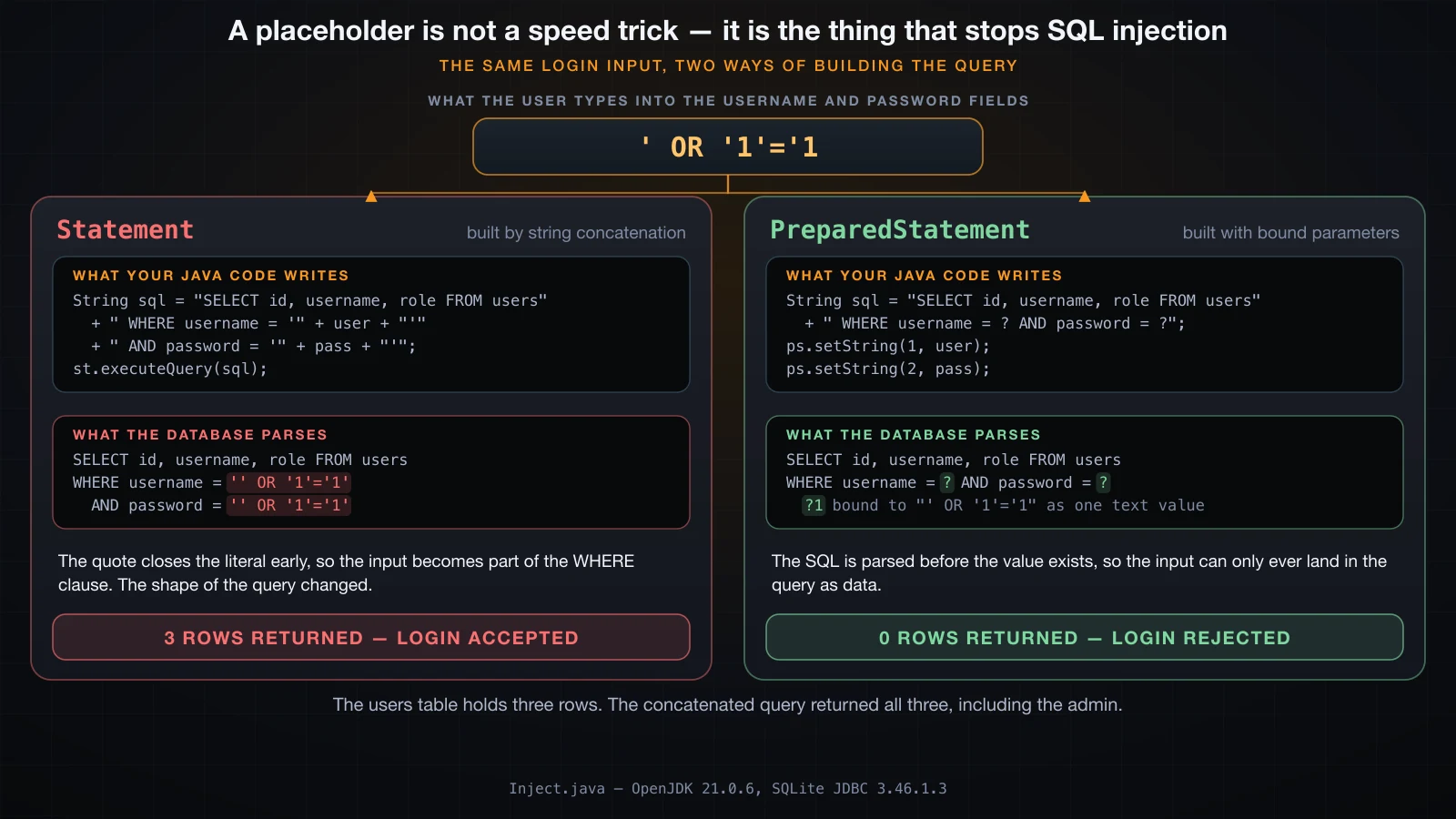
Most tutorials introduce PreparedStatement as the faster option, mention parameter binding as a convenience, and move on. That framing is backwards and it is why concatenated SQL keeps shipping. The reason to use a placeholder is that a concatenated query lets user input change the structure of the SQL, and a bound parameter cannot.
Here is a login check written the way it should never be written. A users table holds three rows — an, binh and admin:
// NEVER DO THIS.
static void concatenated(Connection c, String user, String pass) throws SQLException {
    String sql = "SELECT id, username, role FROM users "
               + "WHERE username = '" + user + "' AND password = '" + pass + "'";
    try (Statement st = c.createStatement(); ResultSet rs = st.executeQuery(sql)) {
        int n = 0;
        while (rs.next()) {
            n++;
            System.out.println("  row      : " + rs.getInt("id") + " "
                             + rs.getString("username") + " " + rs.getString("role"));
        }
        System.out.println("  rows returned = " + n + (n > 0 ? "  -> LOGIN ACCEPTED" : "  -> login rejected"));
    }
}
With honest input it behaves exactly as intended. Now type this into both fields, username and password:
' OR '1'='1[1] Statement + concatenation, honest input:
sql sent : SELECT id, username, role FROM users WHERE username = 'an' AND password = 'x9f2'
row : 1 an user
rows returned = 1 -> LOGIN ACCEPTED
[2] Statement + concatenation, input = ' OR '1'='1
sql sent : SELECT id, username, role FROM users WHERE username = '' OR '1'='1' AND password = '' OR '1'='1'
row : 1 an user
row : 2 binh user
row : 3 admin admin
rows returned = 3 -> LOGIN ACCEPTEDThat is the entire table, administrator included, returned from a login form by someone who typed eleven characters. Nothing was hacked. The leading apostrophe closed the string literal early, everything after it was parsed as SQL rather than data, and the WHERE clause the database saw is not the one in your source file. Your Java code contained a login check; the SQL that ran did not.
Now the same query with placeholders. The only change is that the values are bound instead of concatenated:
static void prepared(Connection c, String user, String pass) throws SQLException {
    String sql = "SELECT id, username, role FROM users WHERE username = ? AND password = ?";
    try (PreparedStatement ps = c.prepareStatement(sql)) {
        ps.setString(1, user);
        ps.setString(2, pass);
        try (ResultSet rs = ps.executeQuery()) {
            int n = 0;
            while (rs.next()) { n++; /* ... */ }
            System.out.println("  rows returned = " + n + (n > 0 ? "  -> LOGIN ACCEPTED" : "  -> login rejected"));
        }
    }
}[3] PreparedStatement, input = ' OR '1'='1
sql sent : SELECT id, username, role FROM users WHERE username = ? AND password = ?
rows returned = 0 -> login rejected
[4] PreparedStatement, honest input:
sql sent : SELECT id, username, role FROM users WHERE username = ? AND password = ?
row : 1 an user
rows returned = 1 -> LOGIN ACCEPTEDZero rows for the attack, one row for the real user. The mechanism is the ordering: prepareStatement sends the SQL to the database and the database parses it before any value exists. By the time setString runs, the statement's shape is already fixed — the placeholder is a slot in a parsed query tree, not a hole in a string. The input ' OR '1'='1 is then compared, as an eleven-character username, against a column that contains no such username. It cannot become an operator, a clause or a second statement, because parsing already happened.
Two habits follow from this, and they are worth stating as rules:
- Never build SQL by concatenating anything that came from outside your program. Not a form field, not a query parameter, not a header, not a filename, not a value you just read out of the database. Escaping by hand is not a substitute; you will get the edge case wrong.
- A placeholder for every value, every time, including values you "know" are safe, such as an integer you already validated. The rule is cheap to follow universally and expensive to apply selectively, because the selective version fails silently the day someone changes the type of a field.
The performance argument is real but secondary: the database can cache the parsed plan and reuse it across executions, so a PreparedStatement executed in a loop re-sends only the parameters. Treat that as a bonus. The reason is the injection.
Typed setters, setNull, and what SQLite does with them
Parameters are set by 1-based index with a typed setter, and the type you choose is what the driver sends:
try (PreparedStatement ps = c.prepareStatement(
        "INSERT INTO typed(s, i, d, b, dt, dec, flag) VALUES (?,?,?,?,?,?,?)")) {
    ps.setString(1, "Xin chào");
    ps.setInt(2, 42);
    ps.setDouble(3, 3.5);
    ps.setBytes(4, new byte[]{1, 2, 3});
    ps.setString(5, LocalDate.of(2026, 9, 17).toString());
    ps.setBigDecimal(6, new BigDecimal("12.345"));
    ps.setBoolean(7, true);
    ps.executeUpdate();
}
A null needs setNull, because setString(1, null) is legal but setInt has no null to pass. setNull takes the SQL type from java.sql.Types so the driver knows what kind of null to send:
ps.setNull(1, Types.VARCHAR);
ps.setNull(2, Types.INTEGER);
ps.setNull(6, Types.DECIMAL);
Reading the row back shows what SQLite actually stored, using its typeof() function:
s=Xin chào(text) i=42(integer) d=3.5(real) dec=12.345(real) flag=true(integer)Note dec=12.345(real). SQLite-specific: SQLite has five storage classes — null, integer, real, text, blob — and no decimal type at all, so setBigDecimal lands in a real and you lose exact decimal arithmetic. Against PostgreSQL the same call writes a true numeric. There is also no boolean: setBoolean(7, true) stored an integer. And SQLite's typing is dynamic, so a column declared INTEGER will happily hold text:
SQLite stored typeof(n) = text
  getString(n) = not a number
  getInt(n)    = 0
A server database rejects that insert. SQLite accepts it and then getInt quietly returns 0. Do not learn your type discipline from SQLite.
A placeholder cannot stand in for a table or column name
This is the limit of the mechanism and it trips everyone once. A placeholder marks the position of a value in a parsed statement. A table name, a column name and the direction of an ORDER BY are part of the statement's structure, and the structure is fixed at parse time — so there is nothing for the driver to substitute.
Attempting it on a table name fails at parse:
try (PreparedStatement ps = c.prepareStatement("SELECT * FROM ? WHERE id = 1")) {
    ps.setString(1, "account");
    ps.executeQuery();
}org.sqlite.SQLiteException: [SQLITE_ERROR] SQL error or missing database (near "?": syntax error)An error is the good case. The dangerous case is a column name, which does not fail — it parses as a value and quietly returns that literal string once per row:
try (PreparedStatement ps = c.prepareStatement("SELECT ? FROM account")) {
    ps.setString(1, "owner");
    // ...
} got: owner
got: owner
got: ownerThree rows, each containing the word owner rather than the owners. ORDER BY ? behaves the same way: it sorts by a constant, which is to say it does nothing, and returns the rows in whatever order the database chose. Both of those are the SQL standard working as designed, not a SQLite quirk.
When you genuinely need a dynamic column or sort direction, the value must never reach the SQL as text. Validate it against a fixed allow-list and let your own code pick the literal:
private static final Set<String> SORTABLE = Set.of("id", "owner", "balance");

static String orderBy(String requested, boolean desc) {
    if (!SORTABLE.contains(requested)) throw new IllegalArgumentException("bad sort column: " + requested);
    return " ORDER BY " + requested + (desc ? " DESC" : " ASC");
}
The concatenation there is safe because the only strings that can reach it are three literals written in your source file. That is the whole difference.
ResultSet is a cursor, not a collection
A ResultSet is not a list of rows you were handed. It is a cursor positioned over rows that the driver — and often the server — is still holding, and it is alive only as long as its Statement is open. That single fact explains most of its API.
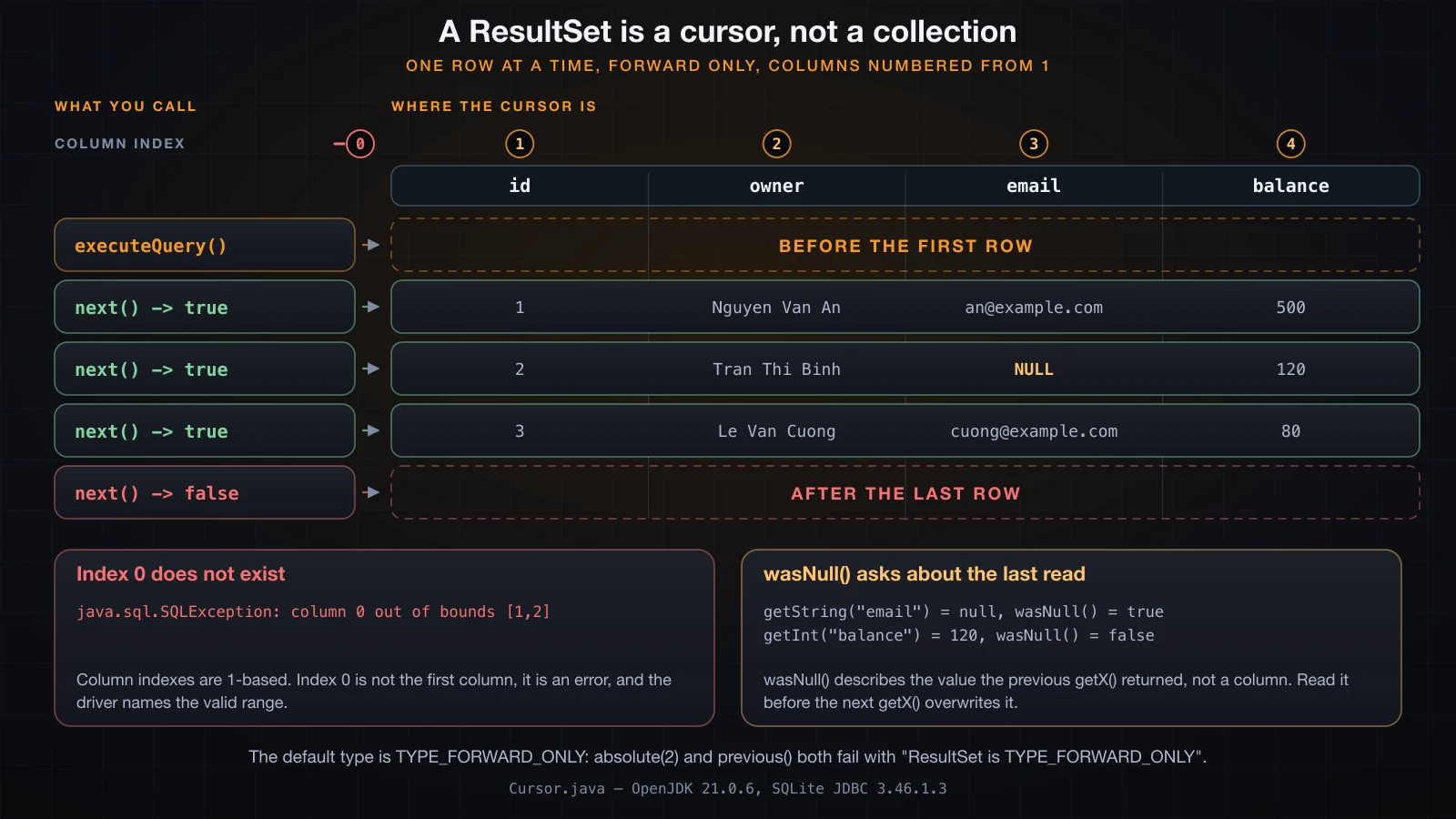
The cursor starts before the first row. next() moves it one row forward and returns whether it landed on a row, which is why the loop is a while and not a do/while:
try (Statement st = c.createStatement();
     ResultSet rs = st.executeQuery("SELECT id, owner, email, balance FROM account ORDER BY id")) {
    while (rs.next()) {
        System.out.printf("id=%d owner=%s balance=%d%n",
                rs.getInt("id"), rs.getString("owner"), rs.getInt("balance"));
    }
    System.out.println("after the loop, next() = " + rs.next());
}rows:
id=1 owner=Nguyen Van An email=an@example.com wasNull=false balance=500 ownerAgain=Nguyen Van An
id=2 owner=Tran Thi Binh email=null wasNull=true balance=120 ownerAgain=Tran Thi Binh
id=3 owner=Le Van Cuong email=cuong@example.com wasNull=false balance=80 ownerAgain=Le Van Cuong
after the loop, next() = falseColumns are numbered from 1, not from 0. Index 0 is not the first column, it is an error, and the message names the valid range:
java.sql.SQLException: column 0 out of bounds [1,2]You get the same shape of message for an index past the end (column 3 out of bounds [1,2]) and a different one for a label that does not exist (no such column: 'name'). Indexes are marginally faster and much easier to break when someone edits the SELECT list; labels are what you should use in application code.
Two portability warnings about reading. The JDBC specification says a getX call before the first next() is an error, and most drivers throw ResultSet is before the first row. Driver-specific: this SQLite driver does not — it returned the first row's value from a cursor that had never been advanced. Similarly, the specification allows a driver to require that columns be read once and in SELECT order, because a streaming driver may not be able to go back; this driver allows re-reading and out-of-order reads, as ownerAgain above shows. Neither of those is portable. Call next() first, read each column once, and you are safe everywhere.
Scrolling is not available by default. The default type is TYPE_FORWARD_ONLY and this driver reports no support for anything else, so both of these throw:
absolute(2) -> ResultSet is TYPE_FORWARD_ONLY
previous()  -> ResultSet is TYPE_FORWARD_ONLY
If you need the rows more than once, copy them into a List of your own record type as you go. Do not pass a ResultSet out of the method that opened it — by the time the caller reads it, the try block has closed the statement underneath it.
wasNull, because a primitive cannot be null
getInt returns int, and int has no null. When the column is SQL NULL, JDBC returns the zero value for the type and sets a flag:
getInt on SQL NULL = 0, wasNull = true
getObject          = null
So 0 from getInt is ambiguous — it means either a stored zero or a NULL — and rs.wasNull() is how you tell them apart. The trap is that wasNull() describes the most recent getX call on this row, not a column. Reading anything else in between destroys the answer:
String email = rs.getString("email");
System.out.println("right : email=" + email + " -> wasNull()=" + rs.wasNull());

String e2 = rs.getString("email");
int bal = rs.getInt("balance");
System.out.println("wrong : email=" + e2 + ", then getInt(balance)=" + bal + " -> wasNull()=" + rs.wasNull());right : email=null -> wasNull()=true
wrong : email=null, then getInt(balance)=120 -> wasNull()=false (asks about balance, not email)Call wasNull() on the line after the getX it belongs to, or avoid it entirely by using getObject("balance", Long.class), which returns a nullable Long and cannot be misread.
Reading columns generically with ResultSetMetaData
When you do not know the shape of the query — a reporting tool, a CSV export, a debug dump — ResultSetMetaData describes it:
ResultSetMetaData md = rs.getMetaData();
for (int i = 1; i <= md.getColumnCount(); i++) {
    System.out.printf("  %d  label=%-8s type=%-8s javaType=%-17s nullable=%d%n",
            i, md.getColumnLabel(i), md.getColumnTypeName(i), md.getColumnClassName(i), md.isNullable(i));
}columns = 4
1 label=id type=INTEGER javaType=java.lang.Integer nullable=1
2 label=owner type=TEXT javaType=java.lang.String nullable=0
3 label=email type=TEXT javaType=java.lang.String nullable=1
4 label=balance type=INTEGER javaType=java.lang.Integer nullable=0getColumnLabel gives the AS alias when there is one and the column name otherwise, which is what you want for headers. isNullable returns one of columnNoNulls (0), columnNullable (1) or columnNullableUnknown (2) — note that it reported 1 for the primary key id, which is a SQLite reporting quirk rather than a claim you should trust.
execute, executeQuery and executeUpdate
Three ways to run a statement, and picking the wrong one produces a confusing failure:
| Method | Use for | Returns |
|---|---|---|
executeQuery | a statement that produces rows | ResultSet |
executeUpdate | INSERT, UPDATE, DELETE, DDL | affected row count, 0 for DDL |
execute | when you do not know which | true if a ResultSet is available |
execute is the general form; you then call getResultSet() or getUpdateCount() depending on what it told you:
execute(SELECT)  -> true, getUpdateCount=-1
  rows = 4
execute(UPDATE)  -> false, getUpdateCount=2, getResultSet=null
executeUpdate(DDL) -> 0
executeUpdate(DROP) -> 0
Note the sentinel: getUpdateCount() returns -1 when the result was a ResultSet, and getResultSet() returns null when it was an update count. For counts that can exceed Integer.MAX_VALUE there is executeLargeUpdate, which returns long and is supported by this driver.
Now the failure worth memorising. Calling executeQuery on an INSERT throws — but the insert still happened:
java.sql.SQLException: query does not return ResultSet
  SQLState=SQLITE_DONE errorCode=101
I checked the table afterwards and the new row was there. The driver sent the statement, the database executed it, and only then did the driver discover it had no result set to hand back. An exception from executeQuery is therefore not proof that nothing was written. That is a real trap in a catch block that decides whether to retry.
Two SQLite-specific observations on the same theme, both of which are the driver being lax where the specification is strict: executeUpdate on a SELECT did not throw here, and executing a PreparedStatement with a parameter left unset did not throw either — the driver bound it as NULL and ran the query. A server driver rejects an unset parameter rather than guessing one. Do not rely on the lenient behaviour; it is not portable, and it hides bugs.
Transactions: setAutoCommit(false), commit and rollback
A JDBC connection starts in auto-commit mode, so every statement is its own transaction:
autoCommit default = trueThat is exactly wrong for anything with more than one step. Here is a transfer between two accounts. It debits one row and credits another, and the destination account does not exist:
static int move(Connection c, int from, int to, int amount) throws SQLException {
    try (PreparedStatement debit = c.prepareStatement(
            "UPDATE account SET balance = balance - ? WHERE id = ? AND balance >= ?")) {
        debit.setInt(1, amount); debit.setInt(2, from); debit.setInt(3, amount);
        int d = debit.executeUpdate();
        if (d == 0) throw new SQLException("insufficient funds on account " + from);
    }
    try (PreparedStatement credit = c.prepareStatement(
            "UPDATE account SET balance = balance + ? WHERE id = ?")) {
        credit.setInt(1, amount); credit.setInt(2, to);
        int u = credit.executeUpdate();
        if (u == 0) throw new SQLException("no such destination account " + to);
    }
    return 2;
}
Run with auto-commit left on, moving 50 from account 3 to an account that is not there:
=== the SAME transfer with autoCommit left on ===
before: Nguyen Van An=500  Tran Thi Binh=120  Le Van Cuong=80
  debit  updated 1 row(s)
  credit updated 0 row(s)
  failed: no such destination account 999
after : Nguyen Van An=500  Tran Thi Binh=120  Le Van Cuong=30
The account went from 80 to 30 and the 50 went nowhere. The debit committed the instant it ran, the credit matched no rows, and there is no undo. Now the identical call inside a transaction:
c.setAutoCommit(false);
try {
    move(c, 3, 999, 50);
    c.commit();
} catch (SQLException e) {
    c.rollback();
    throw e;
} finally {
    c.setAutoCommit(true);
}=== transfer that fails, wrapped in a transaction ===
before: Nguyen Van An=500 Tran Thi Binh=120 Le Van Cuong=80
debit updated 1 row(s)
credit updated 0 row(s)
failed: no such destination account 999
rolled back
after : Nguyen Van An=500 Tran Thi Binh=120 Le Van Cuong=80Same failure, and the balances are byte-for-byte what they were before. The rules that make this work are worth listing, because each one is a bug someone has shipped:
setAutoCommit(false)starts the transaction; there is nobegin()in JDBC.- Nothing is durable until
commit(). An earlyreturnthat skips it silently discards the work. rollback()belongs incatch, not infinally— infinallyit also runs on the success path, aftercommit()has already ended the transaction.- Restore
setAutoCommit(true)infinally, especially when the connection came from a pool. A connection handed back mid-transaction poisons the next user of it. - The transaction lives on the
Connection. Two connections are two transactions; you cannot span them without a distributed transaction manager.
Savepoint: rolling back part of a transaction
A Savepoint is a marker inside an open transaction that you can roll back to without abandoning everything before it:
c.setAutoCommit(false);
ps.setInt(1, 10); ps.setInt(2, 1); ps.executeUpdate();     // +10, keep this
Savepoint sp = c.setSavepoint("after_bonus");
ps.setInt(1, 1000); ps.setInt(2, 1); ps.executeUpdate();   // +1000, undo this
c.rollback(sp);
c.releaseSavepoint(sp);
c.commit(); savepoint name = after_bonus
inside tx, after both updates: Nguyen Van An=1510 Tran Thi Binh=120 Le Van Cuong=80
after rollback(savepoint) : Nguyen Van An=510 Tran Thi Binh=120 Le Van Cuong=80
after commit: Nguyen Van An=510 Tran Thi Binh=120 Le Van Cuong=80The +10 survived, the +1000 did not, and the commit made the surviving half durable. rollback(savepoint) does not end the transaction; only commit() or a plain rollback() does.
Isolation levels, and which ones SQLite actually has
The Connection interface offers five constants. What a database supports is a different question, and DatabaseMetaData will answer it honestly:
isolation default  = 8  (SERIALIZABLE=8, READ_UNCOMMITTED=1)
supportsTransactions = true
  supports NONE = false
  supports READ_UNCOMMITTED = false
  supports READ_COMMITTED = false
  supports REPEATABLE_READ = false
  supports SERIALIZABLE = true
SQLite-specific: it reports exactly one supported level, TRANSACTION_SERIALIZABLE, and that is the default. This is a consequence of its locking model rather than a limitation to work around — a writer takes a database-wide write lock, so transactions do not interleave the way they do on a server.
There is a wrinkle worth knowing, because it is the kind of thing that produces false confidence. setTransactionIsolation accepted levels the metadata had just said were unsupported:
  setTransactionIsolation(NONE) -> Unsupported transaction isolation level: 0. Must be one of TRANSACTION_READ_UNCOMMITTED, TRANSACTION_READ_COMMITTED, TRANSACTION_REPEATABLE_READ, or TRANSACTION_SERIALIZABLE in java.sql.Connection
  setTransactionIsolation(READ_UNCOMMITTED) accepted, now = 1
  setTransactionIsolation(READ_COMMITTED) accepted, now = 2
  setTransactionIsolation(REPEATABLE_READ) accepted, now = 4
  setTransactionIsolation(SERIALIZABLE) accepted, now = 8
TRANSACTION_NONE is rejected; the other three are accepted and stored even though supportsTransactionIsolationLevel returns false for them. SQLite really only has two behaviours — serializable, and a read_uncommitted mode for shared-cache connections — so setting READ_COMMITTED here changes a number and nothing else. Trust supportsTransactionIsolationLevel, not the absence of an exception.
On a server database the levels do differ and the defaults are not the same: PostgreSQL defaults to READ COMMITTED and silently maps READ UNCOMMITTED onto it, MySQL with InnoDB defaults to REPEATABLE READ. If your correctness depends on a level, set it explicitly and verify with getTransactionIsolation() after connecting.
Batching: one executeBatch instead of N executeUpdate
addBatch queues a set of bound parameters; executeBatch sends the whole queue as one unit and returns one count per statement:
c.setAutoCommit(false);
try (PreparedStatement ps = c.prepareStatement("INSERT INTO product(name, price) VALUES (?, ?)")) {
    for (String[] r : rows) {
        ps.setString(1, r[0]);
        ps.setInt(2, Integer.parseInt(r[1]));
        ps.addBatch();
    }
    int[] counts = ps.executeBatch();
    c.commit();
} finally {
    c.setAutoCommit(true);
}counts = [1, 1, 1, 1, 1]
counts.length = 5 (statements sent in the batch = 5)
SUCCESS_NO_INFO=-2 EXECUTE_FAILED=-3The array has one entry per statement added, in order. Each entry is the affected row count, or Statement.SUCCESS_NO_INFO (-2) when the driver succeeded without counting, or Statement.EXECUTE_FAILED (-3) when that one statement failed while the batch continued. Always check the array; a batch that "worked" can still contain a -3.
The benefit is structural, not magical, so state it structurally. Inserting 200 rows one at a time is 200 calls to executeUpdate; the same 200 rows as a batch is one call to executeBatch that returned an array of length 200 summing to 200. Against a server database those 200 calls are 200 network round trips and the batch is one, which is the entire reason batching exists. SQLite-specific: SQLite is an in-process library, not a server, so there is no network round trip to save here at all — what you save on SQLite is the per-statement commit, which is why the batch above is wrapped in an explicit transaction. Do not carry a SQLite batching benchmark across to PostgreSQL, in either direction.
Batch failure handling is where drivers diverge sharply. The specification says a failing batch throws BatchUpdateException, which extends SQLException and carries getUpdateCounts() so you can see how far it got. This driver does not:
=== a batch with one bad row ===
caught org.sqlite.SQLiteException: [SQLITE_CONSTRAINT_UNIQUE] A UNIQUE constraint failed (UNIQUE constraint failed: product.name)
  is it a BatchUpdateException? false
  SQLState=null errorCode=19
  rolled back
A plain SQLiteException, with no update counts attached. So write the catch for SQLException and test instanceof BatchUpdateException before reaching for getUpdateCounts(), rather than assuming it is there. Batch inside a transaction and roll back on failure, and the question of how far it got stops mattering.
Two practical notes. Split very large batches into chunks of a few thousand so the driver's buffer and the database's transaction log stay bounded, and remember that addBatch accumulates on the statement — call clearBatch() if you reuse it after a failure.
getGeneratedKeys: reading the id the database assigned
When the primary key is generated by the database, the value you need does not come back from executeUpdate — that returns the row count. Ask for the keys explicitly at prepare time:
String sql = "INSERT INTO product(name, price) VALUES (?, ?)";
try (PreparedStatement ps = c.prepareStatement(sql, Statement.RETURN_GENERATED_KEYS)) {
    ps.setString(1, "Bàn phím cơ");
    ps.setInt(2, 1290000);
    ps.executeUpdate();
    try (ResultSet keys = ps.getGeneratedKeys()) {
        while (keys.next()) System.out.println("new id = " + keys.getLong(1));
    }
}executeUpdate returned 1
generated-key columns = 1, label = last_insert_rowid()
new id = 1The keys arrive as an ordinary ResultSet, so it needs closing like any other, and you read it with next() first. The column label is driver-specific — here it is last_insert_rowid(), on PostgreSQL you would get the real column name — so read the key by index 1, not by label.
Two things that are not portable. supportsGetGeneratedKeys() returned true here, but some drivers and some column types return nothing at all, so check it rather than assuming. And on this driver the keys came back even without RETURN_GENERATED_KEYS:
no RETURN_GENERATED_KEYS -> keys.next() = trueThat is SQLite convenience, not the contract. Pass the flag. There is also prepareStatement(sql, new String[]{"id"}) when you want to name the columns to return, which is the form PostgreSQL prefers.
Reading a SQLException: getSQLState, getErrorCode and the chain
SQLException carries three pieces of information beyond the message, and knowing which to branch on saves a lot of guessing:
getMessage()— human text from the driver. Never branch on it.getSQLState()— a five-character standard code (23000is an integrity constraint violation,08001is a connection failure). Portable in principle.getErrorCode()— the vendor's own numeric code. Precise, and completely non-portable.
SQLException also implements Iterable<Throwable>, so one loop walks both the getNextException chain and the getCause chain:
static void report(SQLException e) {
    for (Throwable t : e) {
        System.out.println("  " + t.getClass().getName() + ": " + t.getMessage());
        if (t instanceof SQLException s) {
            System.out.println("    SQLState  = " + s.getSQLState());
            System.out.println("    errorCode = " + s.getErrorCode());
        }
    }
}
Here is what a duplicate key actually produced:
duplicate username:
  org.sqlite.SQLiteException: [SQLITE_CONSTRAINT_UNIQUE] A UNIQUE constraint failed (UNIQUE constraint failed: users.username)
    SQLState  = null
    errorCode = 19
  is it SQLIntegrityConstraintViolationException? false
Two disappointments in five lines, and both are honest ones. SQLite-specific: getSQLState() returned null. The standard code you were going to branch on is not there, and DatabaseMetaData.getSQLStateType() returns 2, which is the constant sqlStateSQL99 — so the driver advertises that it speaks the standard states while supplying none for this error. The vendor errorCode of 19 is SQLITE_CONSTRAINT and is reliable, at the cost of hard-coding a SQLite constant. Meanwhile JDBC 4.0 added a family of typed subclasses — SQLIntegrityConstraintViolationException, SQLTimeoutException, SQLTransientConnectionException — that let you catch by meaning instead of by code, and this driver throws none of them.
The practical consequence: catch and translate at the boundary. Wrap the driver's exception in your own domain exception in the DAO, decide there whether it is retryable, and keep the vendor codes in one place instead of scattered through the service layer. That way porting to another database is one file. For reference, PostgreSQL populates SQLState properly (23505 for a unique violation) and MySQL Connector/J throws the typed subclasses, so the portable-looking code you write against them is exactly what SQLite will not give you.
The getNextException chain matters most for batches and for warnings, where one operation produces several problems. Building one by hand shows the shape:
hand-built chain:
  java.sql.SQLException: row 2 rejected
    SQLState  = 23000
    errorCode = 19
  java.sql.SQLException: row 7 rejected
    SQLState  = 23000
    errorCode = 19
A plain catch (SQLException e) { log(e); } prints only the first of those. The for loop above prints all of them, and that is usually where the actual cause is.
What is SQLite-specific here, and what is standard JDBC
Because everything above ran against SQLite, it is worth separating the two explicitly. The left column would look the same against PostgreSQL or MySQL; the right column would not:
| Standard JDBC, portable | SQLite or driver-specific |
|---|---|
DriverManager.getConnection(url) and URL-prefix dispatch | jdbc:sqlite: creates a missing file instead of failing |
Driver auto-registration since JDBC 4.0, no Class.forName | user and password on the URL are accepted and ignored |
try-with-resources over the three objects | closing a Connection leaves isClosed() false on its statements |
PreparedStatement, placeholders, injection safety | dynamic typing: text lands in an INTEGER column |
| A placeholder cannot be a table or column name | setBigDecimal degrades to real; there is no boolean |
1-based column indexes and wasNull() | getX before the first next() is allowed |
setAutoCommit, commit, rollback, Savepoint | only TRANSACTION_SERIALIZABLE is genuinely supported |
addBatch and executeBatch and the count array | no BatchUpdateException; a plain SQLiteException instead |
getGeneratedKeys and RETURN_GENERATED_KEYS | keys returned even without the flag; label is last_insert_rowid() |
getSQLState, getErrorCode, the exception chain | getSQLState() is null; no typed JDBC 4 subclasses |
One more that catches people migrating: SQLite's ALTER TABLE is severely limited. On this database:
  OK   ALTER TABLE alt_t ADD COLUMN c TEXT
  OK   ALTER TABLE alt_t RENAME COLUMN b TO b2
  OK   ALTER TABLE alt_t DROP COLUMN c
  FAIL ALTER TABLE alt_t ALTER COLUMN a TYPE TEXT
         [SQLITE_ERROR] SQL error or missing database (near "ALTER": syntax error)
  FAIL ALTER TABLE alt_t ADD CONSTRAINT chk CHECK (a > 0)
         [SQLITE_ERROR] SQL error or missing database (near "CONSTRAINT": syntax error)
Adding, renaming and dropping a column work; changing a column's type or adding a constraint do not exist, and the standard workaround is to create a new table and copy. Adding a NOT NULL column to a table that already has rows also fails unless you supply a default:
  [SQLITE_ERROR] SQL error or missing database (Cannot add a NOT NULL column with default value NULL)
  with DEFAULT '' -> OK
What JDBC is not
JDBC is the bottom of the stack, and it is deliberately small: it moves SQL strings and parameter values to a database and rows back. It has no idea what an entity is, it will not map a ResultSet to your record, it will not generate SQL, and it will not manage a transaction across two method calls for you. Everything that does those things sits on top of it and calls it underneath. JPA and Hibernate add an object-relational mapping, a persistence context and lazy loading, at the cost of a large model you have to understand well enough to predict the SQL it emits. jOOQ keeps SQL as the programming model but makes it typed and checked against your real schema. Spring's JdbcTemplate removes the boilerplate — the resource handling, the row mapping, the exception translation into an unchecked hierarchy — without hiding the SQL. Spring Data JPA sits above all of that and generates repositories from method names. Every one of them opens a Connection, prepares a statement and iterates a ResultSet exactly as this article does; when one of them misbehaves, the thing you will be reading is a JDBC stack trace, which is the practical reason to know this layer even if you never write it by hand.
FAQ
Do I still need Class.forName to load a JDBC driver?
No. Since JDBC 4.0 a driver jar declares itself in META-INF/services/java.sql.Driver, and DriverManager finds it through ServiceLoader the first time it is used. In the first program of this article, which has no Class.forName anywhere, DriverManager.drivers() listed org.sqlite.JDBC 3.46 and the connection opened normally. The call is harmless if you keep it, but it is noise, and it forces a compile-time or runtime dependency on a vendor class name that your code otherwise never mentions. The only cases where you still need it are exotic: a driver old enough to predate JDBC 4.0, or a classloader arrangement where the service file is not visible.
Is PreparedStatement really faster than Statement?
Sometimes, and it is the wrong reason to use it. The performance argument is that the database parses and plans the SQL once and can reuse that plan for later executions with different parameters, so a statement executed in a loop re-sends only the values. That benefit is real on a server database with a plan cache and roughly zero for a statement executed once. The reason to use PreparedStatement unconditionally is that it makes SQL injection structurally impossible: the statement is parsed before any value exists, so a value can never become part of the query's structure. Above, the same input returned the entire users table through a concatenated Statement and zero rows through a PreparedStatement. Treat any speed gain as a bonus.
Why does my ResultSet throw after I close the Statement?
Because a ResultSet is a cursor over rows the driver is still holding, not a copy you were given. Closing its Statement closes it — that behaviour is required by the specification and this driver honours it, as stmt=true rs=true in the output above shows. The usual way to hit this is returning a ResultSet from a method whose try-with-resources block has already ended, or storing one in a field. Read what you need inside the block and return your own objects: a List of records, a Map, an Optional. If you find yourself wanting to hold a ResultSet open across method boundaries, what you actually want is a Stream built inside the method that owns the resources.
What is the difference between execute, executeQuery and executeUpdate?
executeQuery is for statements that return rows and gives you a ResultSet; executeUpdate is for INSERT, UPDATE, DELETE and DDL and gives you an affected row count (0 for DDL); execute is for when you do not know which and returns a boolean telling you, after which you call getResultSet() or getUpdateCount(). The important trap is that calling the wrong one is not always harmless: executeQuery on an INSERT threw query does not return ResultSet here, and the row was inserted anyway. An exception from executeQuery is not evidence that the statement had no effect, which matters if your catch block decides whether to retry.
How do I make sure a multi-step database operation is all-or-nothing?
Call setAutoCommit(false) on the connection, do all the steps, call commit() on success and rollback() in the catch, then restore setAutoCommit(true) in finally. The demonstration above ran the same failing transfer both ways: with auto-commit on, account 3 lost 50 that arrived nowhere, and inside a transaction the balances came back identical to what they were before. Two details decide whether it actually works: everything must happen on one Connection, because the transaction lives there, and no code path may return before commit(). If part of the work should survive a partial failure, use a Savepoint and rollback(savepoint).
Why is getSQLState null on SQLite, and what should I branch on?
Because this driver does not populate it for most errors — a duplicate key gave SQLState = null with vendor errorCode = 19. SQLState is the standardised five-character code and is the right thing to branch on when it exists (PostgreSQL uses 23505 for a unique violation), while getErrorCode is precise but vendor-specific. Since neither is dependable across databases, the portable answer is to translate at the DAO boundary: catch SQLException, decide there whether it means "duplicate", "deadlock, retry" or "fatal", and throw your own exception. Then the vendor codes live in one class instead of being scattered through the service layer.
Does batching make my inserts faster?
It reduces the number of round trips, which is a structural claim you can count rather than time. Two hundred rows inserted individually is 200 calls to executeUpdate; as a batch it is one call to executeBatch returning an array of 200 counts. Against a server database that is 200 network round trips versus one, and it is usually the largest single win available on a bulk load. Against SQLite there is no network at all — it runs in your process — so what batching saves there is the per-statement commit, which is why you should wrap the batch in an explicit transaction. Whatever the database, check the returned count array for EXECUTE_FAILED (-3) instead of assuming success, and split very large batches into chunks.
Can I use a placeholder for a table name or a sort column?
No. A placeholder marks the position of a value in a statement that has already been parsed, and a table name, column name or sort direction is part of that structure. SELECT * FROM ? failed with a syntax error at the ?. Worse, SELECT ? FROM account did not fail: it returned the literal string owner once per row, and ORDER BY ? silently sorted by a constant. When you need a dynamic identifier, validate the incoming string against a hard-coded allow-list — a Set.of("id", "owner", "balance") in your source — and concatenate only the literal that the allow-list matched. Never concatenate the caller's string itself.
Conclusion
JDBC is a small API with a few sharp edges, and almost all of the pain it causes comes from four of them. Connection, Statement and ResultSet are resources whose lifetimes are nested, and closing only the outermost one leaves the others open — proven above, on a driver that reported stmt=false rs=false after the connection was closed. PreparedStatement is not an optimisation; it is the difference between a login form and a full table dump. A ResultSet is a cursor that starts before the first row, numbers columns from 1, and dies with its statement. And auto-commit means every statement stands alone, which is precisely wrong for any operation that has two steps.
Everything else in this article is detail hanging off those four. Batching is one call instead of N. getGeneratedKeys is how you learn the id the database chose. SQLState and the exception chain are how you find out what went wrong, when the driver bothers to tell you. Running against SQLite made all of it reproducible on a laptop with one downloaded jar, at the price of a handful of behaviours — null SQLState, dynamic typing, one real isolation level, no BatchUpdateException — that are the driver's and not JDBC's, and which are called out as such above so you are not surprised the first time you point the same code at PostgreSQL.
The next article picks up exactly where this one deliberately stopped: opening a Connection per request is far too expensive to do in a real service, and article 27 covers connection pooling with HikariCP — how a pool changes the lifecycle you just learned, how to size it, and how it finds the leaks this article warned you about.
![[Advanced Java] Advanced Enums in Java: Constructors, Constant Bodies, EnumMap and the Enum Singleton](/images/blog/advanced-enums-thumbnail.en.webp)
![[Advanced Java] Java NIO: Path, Files and Channels](/images/blog/nio-thumbnail.en.webp)
![[Advanced Java] CompletableFuture in Java: Async Chains, Composition and Error Handling](/images/blog/completablefuture-thumbnail.en.webp)
![[Advanced Java] Threads in Java: Thread, Runnable and Virtual Threads](/images/blog/threads-thumbnail.en.webp)