A connection pool is a small, boring data structure with an outsized effect on how a service behaves under load: a fixed number of already-open database connections, handed out on request and taken back when you are done. HikariCP is the one almost everyone ends up using, and it is the default in Spring Boot.
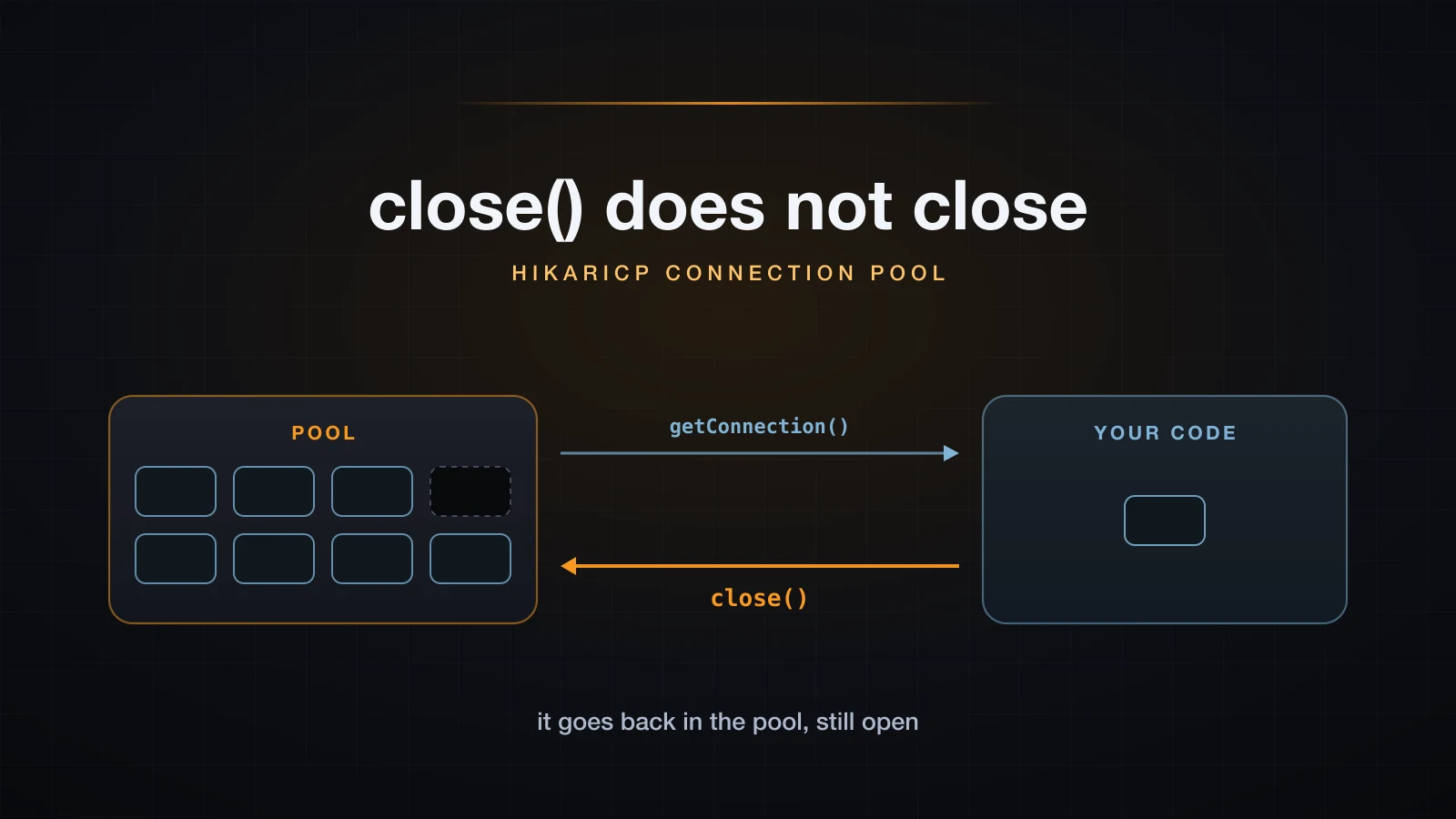
The part that confuses people is not the configuration. It is that close() on a pooled connection does not close anything. It hands the connection back. Everything else in this article — timeouts, leak warnings, sizing — follows from that one fact, so it is where we start.
The examples use Java 21 and HikariCP 5.1.0, with SQLite as the database.
What a connection pool actually is
A pool owns a bounded set of connections that are already open. getConnection() takes one out of the set and marks it in use; close() puts it back. Nothing is created or destroyed on the normal path, which is the entire idea.
The reason that matters is the cost of the thing being reused. Opening a connection to a database server is a TCP connect, usually a TLS handshake, then authentication, then session setup — a multi-round-trip conversation over a network before a single query can run. Doing that once per HTTP request is the difference between a service that scales and one that does not.
⚠️ The examples here run against SQLite, and SQLite is an embedded file database: there is no server, no socket and no handshake.
jdbc:sqlite:/path/to/file.dbopens a file. That means the usual motivation for pooling barely applies to SQLite — there is almost no connection cost to amortise. What SQLite does give you is a real JDBC driver to demonstrate the pool's mechanics on, and those mechanics live in HikariCP, not in the driver, so they are identical against PostgreSQL, MySQL or Oracle. This article therefore publishes no pooled-versus-unpooled speed comparison. A speedup measured on SQLite would be a measurement of nothing, and the benefit argument comes entirely from what a real server connection costs, which was not measured here.
Four jars are enough to follow along; no build tool is required.
curl -sSO https://repo1.maven.org/maven2/com/zaxxer/HikariCP/5.1.0/HikariCP-5.1.0.jar
curl -sSO https://repo1.maven.org/maven2/org/slf4j/slf4j-api/2.0.13/slf4j-api-2.0.13.jar
curl -sSO https://repo1.maven.org/maven2/org/slf4j/slf4j-simple/2.0.13/slf4j-simple-2.0.13.jar
curl -sSO https://repo1.maven.org/maven2/org/xerial/sqlite-jdbc/3.46.1.3/sqlite-jdbc-3.46.1.3.jar

CP="HikariCP-5.1.0.jar:slf4j-api-2.0.13.jar:slf4j-simple-2.0.13.jar:sqlite-jdbc-3.46.1.3.jar"
javac -cp "$CP" -d classes src/PoolBasics.java
java  -cp "classes:$CP" PoolBasics /tmp/demo.db
slf4j-api is not optional: HikariCP will not start without it on the classpath. slf4j-simple is the binding that actually prints the log, and you want it, because HikariCP's most useful diagnostic — the leak warning later in this article — is a log line and nothing else.
close() does not close, and here is the proof
Borrow a connection, remember which object it really is, give it back, borrow again, and compare.
import com.zaxxer.hikari.HikariConfig;
import com.zaxxer.hikari.HikariDataSource;
import java.sql.Connection;
import java.sql.Statement;

public class PoolBasics {
    public static void main(String[] args) throws Exception {
        HikariConfig cfg = new HikariConfig();
        cfg.setJdbcUrl("jdbc:sqlite:" + args[0]);
        cfg.setPoolName("demo-pool");
        cfg.setMaximumPoolSize(1);

        try (HikariDataSource ds = new HikariDataSource(cfg)) {
            Connection a = ds.getConnection();
            Connection realA = a.unwrap(Connection.class);
            System.out.println("handed out  : " + a.getClass().getName());
            System.out.println("underlying  : " + realA.getClass().getName());
            System.out.println("proxy   A id: " + System.identityHashCode(a));
            System.out.println("real    A id: " + System.identityHashCode(realA));

            try (Statement st = a.createStatement()) {
                st.execute("SELECT 1");
            }
            a.close();
            System.out.println("proxy.isClosed() after close(): " + a.isClosed());
            System.out.println("real.isClosed()  after close(): " + realA.isClosed());

            Connection b = ds.getConnection();
            Connection realB = b.unwrap(Connection.class);
            System.out.println("proxy   B id: " + System.identityHashCode(b));
            System.out.println("real    B id: " + System.identityHashCode(realB));
            System.out.println("same proxy object      : " + (a == b));
            System.out.println("same real connection   : " + (realA == realB));
            b.close();
        }
    }
}handed out : com.zaxxer.hikari.pool.HikariProxyConnection
underlying : org.sqlite.jdbc4.JDBC4Connection
proxy A id: 653687670
real A id: 1508395126
proxy.isClosed() after close(): true
real.isClosed() after close(): false
proxy B id: 32017212
real B id: 1508395126
same proxy object : false
same real connection : trueRead the last four lines carefully. The identity numbers change on every run, but the relationships do not:
- What you are handed is not the driver's connection. It is a
HikariProxyConnection, a generated wrapper.unwrap(Connection.class)reaches theorg.sqlite.jdbc4.JDBC4Connectionunderneath. - After
close(), the proxy reportsisClosed() == trueand the real connection reportsfalse. Those two answers are both correct: the handle is dead, the connection is alive. - The second borrow gets a different proxy object wrapping the same underlying connection. That is the pool working.
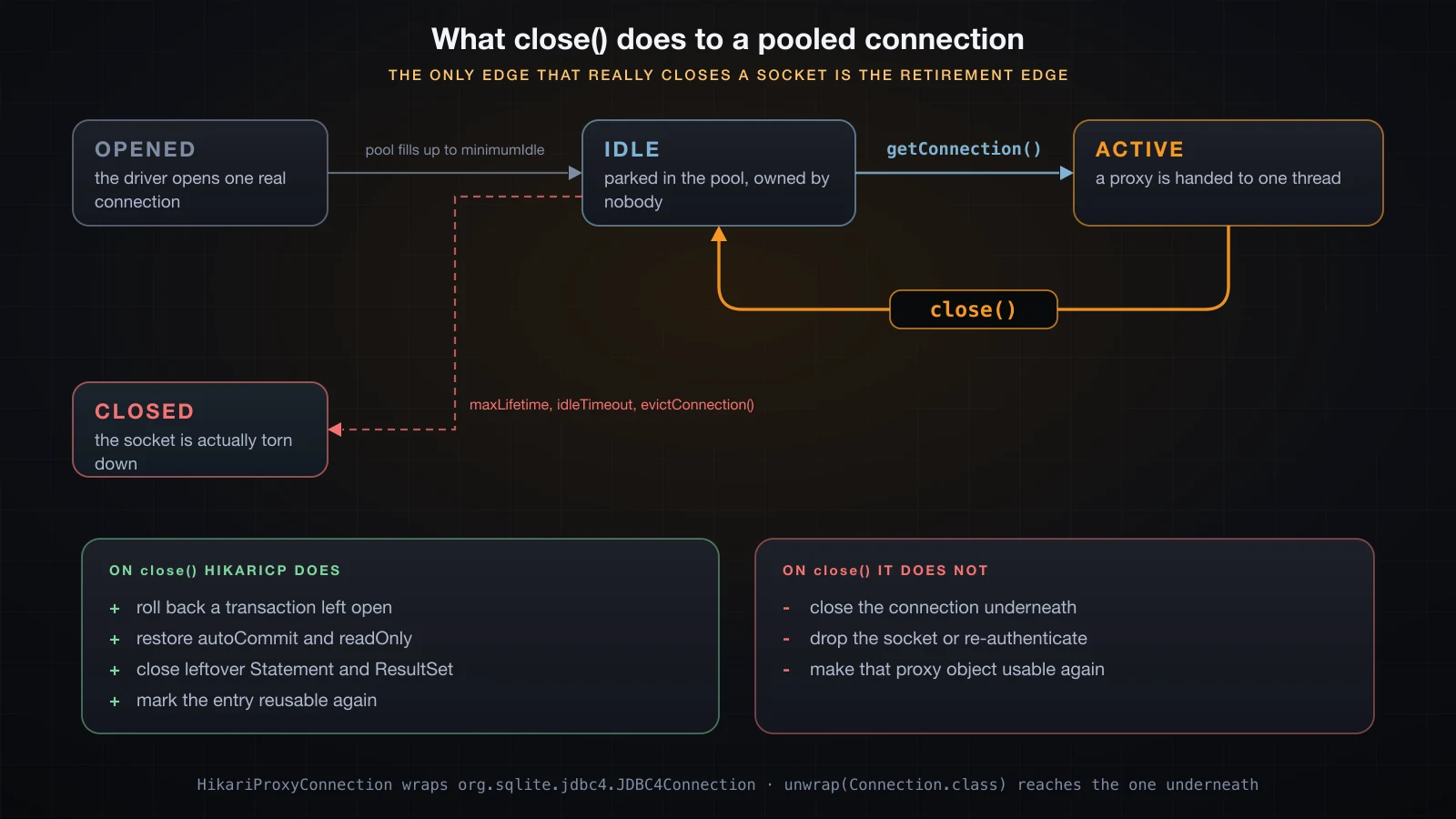
Returning a connection is not a no-op, though. HikariCP resets the borrowed state so the next borrower gets a clean session, and the most consequential part of that reset is the transaction.
try (Connection c = ds.getConnection()) {
    c.setAutoCommit(false);
    try (Statement st = c.createStatement()) {
        st.executeUpdate("INSERT INTO audit (id) VALUES (1)");
    }
    // no commit(), no rollback() -- just close()
}
try (Connection c = ds.getConnection(); Statement st = c.createStatement()) {
    ResultSet rs = st.executeQuery("SELECT COUNT(*) FROM audit");
    rs.next();
    System.out.println("rows after uncommitted insert + close(): " + rs.getInt(1));
    System.out.println("autoCommit on the next borrow          : " + c.getAutoCommit());
}rows after uncommitted insert + close(): 0
autoCommit on the next borrow : trueThe uncommitted insert was rolled back on return, and autoCommit was restored to the pool's configured value before the connection went back into the idle set. Closing a pooled connection with work still uncommitted silently discards that work — which is the correct behaviour, and a very quiet way to lose data if you were expecting a commit on close.
The configuration that matters, and what each knob really does
HikariCP deliberately exposes few options. The project's position is that most pool settings are ways to paper over a bug, and that a pool with fewer dials has fewer wrong configurations. In practice you set nine things, and usually fewer.
| Property | Default | What it actually controls |
|---|---|---|
jdbcUrl | none | The driver and target. jdbc:sqlite:/path/file.db here; a host, port and database name against a server. |
poolName | HikariPool-N | The prefix on every log line and exception from this pool. Set it — it is what tells you which pool timed out at 3am. |
maximumPoolSize | 10 | The hard ceiling on connections. Also the ceiling on how many statements your application can have in flight at the database. |
minimumIdle | equal to maximumPoolSize | How many connections to keep parked when idle. Leaving it equal makes a fixed-size pool, which is the recommended shape. |
connectionTimeout | 30000 ms | How long getConnection() waits for a free connection before throwing. Values below 250 ms are rejected outright. |
idleTimeout | 600000 ms | How long a surplus connection may sit unused before being retired. Only has an effect when minimumIdle is below maximumPoolSize. |
maxLifetime | 1800000 ms | Maximum age of a connection before the pool retires it, whether it is healthy or not. Values below 30000 ms are ignored. |
leakDetectionThreshold | 0 (off) | How long a borrow may last before HikariCP logs a warning with the acquisition stack trace. Minimum 2000 ms. |
autoCommit | true | The autoCommit value every borrow starts with, and the value restored on return. |
This is a pool started with nothing but a jdbcUrl, printing what it resolved:
poolName               = HikariPool-1
maximumPoolSize        = 10
minimumIdle            = 10
connectionTimeout      = 30000
idleTimeout            = 600000
keepaliveTime          = 0
maxLifetime            = 1800000
validationTimeout      = 5000
leakDetectionThreshold = 0
autoCommit             = true
HikariCP also refuses configurations it considers wrong rather than quietly honouring them. Setting connectionTimeout below the floor throws before the pool even starts:
Exception in thread "main" java.lang.IllegalArgumentException: connectionTimeout cannot be less than 250ms
	at com.zaxxer.hikari.HikariConfig.setConnectionTimeout(HikariConfig.java:194)
and a pool configured with maxLifetime = 5000, idleTimeout = 1000 and leakDetectionThreshold = 500 starts, but not with the values you asked for:
WARN com.zaxxer.hikari.HikariConfig - clamp-pool - maxLifetime is less than 30000ms, setting to default 1800000ms.
WARN com.zaxxer.hikari.HikariConfig - clamp-pool - leakDetectionThreshold is less than 2000ms or more than maxLifetime, disabling it.
WARN com.zaxxer.hikari.HikariConfig - clamp-pool - idleTimeout has been set but has no effect because the pool is operating as a fixed size pool.
That third warning is the one worth internalising. Because minimumIdle defaults to maximumPoolSize, the out-of-the-box pool is fixed size, and idleTimeout does nothing at all until you lower minimumIdle. Read your startup log once; it tells you which of your settings the pool actually accepted.
Pool exhaustion and connectionTimeout
This is the behaviour people actually hit in production, and it is worth reproducing deliberately once so you recognise it later. A pool of two, both connections borrowed and not returned, and a third request:
HikariConfig cfg = new HikariConfig();
cfg.setJdbcUrl("jdbc:sqlite:" + db);
cfg.setPoolName("orders-pool");
cfg.setMaximumPoolSize(2);
cfg.setConnectionTimeout(2000);

try (HikariDataSource ds = new HikariDataSource(cfg)) {
    Connection c1 = ds.getConnection();
    Connection c2 = ds.getConnection();
    System.out.println("borrowed 2 of 2, none returned");
    try {
        Connection c3 = ds.getConnection();
        System.out.println("got a third connection: " + c3);
    } catch (SQLException e) {
        System.out.println(e.getClass().getName());
        System.out.println(e.getMessage());
    }
    c1.close();
    c2.close();
}borrowed 2 of 2, none returned
java.sql.SQLTransientConnectionException
orders-pool - Connection is not available, request timed out after 2005ms (total=2, active=2, idle=0, waiting=0)That message is the single most useful string HikariCP produces, and it is worth reading token by token:
orders-poolis thepoolNameyou set. With several pools in one process, this is how you know which database is starving.2005msis the configuredconnectionTimeoutof 2000 ms expiring, plus a few milliseconds of scheduling. It is your setting coming back to you, not a measurement of anything.total=2, active=2, idle=0says the pool is at its ceiling and every connection is out on loan. Nothing is broken; somebody is holding what you need.waiting=0is the count of other threads still queued at the moment the message was built. A large number here means the whole application is backed up behind this pool.
SQLTransientConnectionException extends SQLTransientException, and therefore SQLException; "transient" is a promise about the failure, not about your code: retrying may succeed, because the condition is somebody else's borrow, not a broken statement.
The fix is never a bigger timeout. Return the connections:
--- same work, connections returned ---
borrow 1 ok, underlying=1072601481
borrow 2 ok, underlying=1072601481
borrow 3 ok, underlying=1072601481
borrow 4 ok, underlying=1072601481
borrow 5 ok, underlying=1072601481
Five sequential borrows through a try (Connection c = ds.getConnection()) block complete without touching the ceiling, and — look at the identity — all five got the same physical connection. A pool of two served five borrows using one connection, because a borrow that ends immediately never needs a second.
Leak detection: the log line that finds the bug for you
A connection that is never returned is gone from the pool forever. Enough of them and every getConnection() ends in the timeout above, with a message that tells you the pool is exhausted but not who exhausted it. leakDetectionThreshold answers that second question, and most developers have never seen its output.
Here is a repository method with the classic bug — an early return that skips the close:
static int countRows(HikariDataSource ds) throws Exception {
    Connection c = ds.getConnection();          // borrowed here
    Statement st = c.createStatement();
    ResultSet rs = st.executeQuery("SELECT COUNT(*) FROM orders");
    rs.next();
    return rs.getInt(1);                        // returns without c.close()
}
Run it against a pool with cfg.setLeakDetectionThreshold(2000) and wait. The full output, leak warning included:
[main] INFO com.zaxxer.hikari.HikariDataSource - orders-pool - Starting...
[main] INFO com.zaxxer.hikari.pool.HikariPool - orders-pool - Added connection org.sqlite.jdbc4.JDBC4Connection@6537cf78
[main] INFO com.zaxxer.hikari.HikariDataSource - orders-pool - Start completed.
rows = 3
[orders-pool housekeeper] WARN com.zaxxer.hikari.pool.ProxyLeakTask - Connection leak detection triggered for org.sqlite.jdbc4.JDBC4Connection@6537cf78 on thread main, stack trace follows
java.lang.Exception: Apparent connection leak detected
	at com.zaxxer.hikari.HikariDataSource.getConnection(HikariDataSource.java:99)
	at LeakDemo.countRows(LeakDemo.java:10)
	at LeakDemo.main(LeakDemo.java:29)
active connections still out: 1
LeakDemo.countRows(LeakDemo.java:10) is line 10 — the ds.getConnection() call. HikariCP captured a stack trace at acquisition time and replayed it when the borrow outlived the threshold, so the warning names the exact line that took the connection and the exact thread that still holds it. In a real outage that is the difference between an afternoon of guessing and a one-line fix.
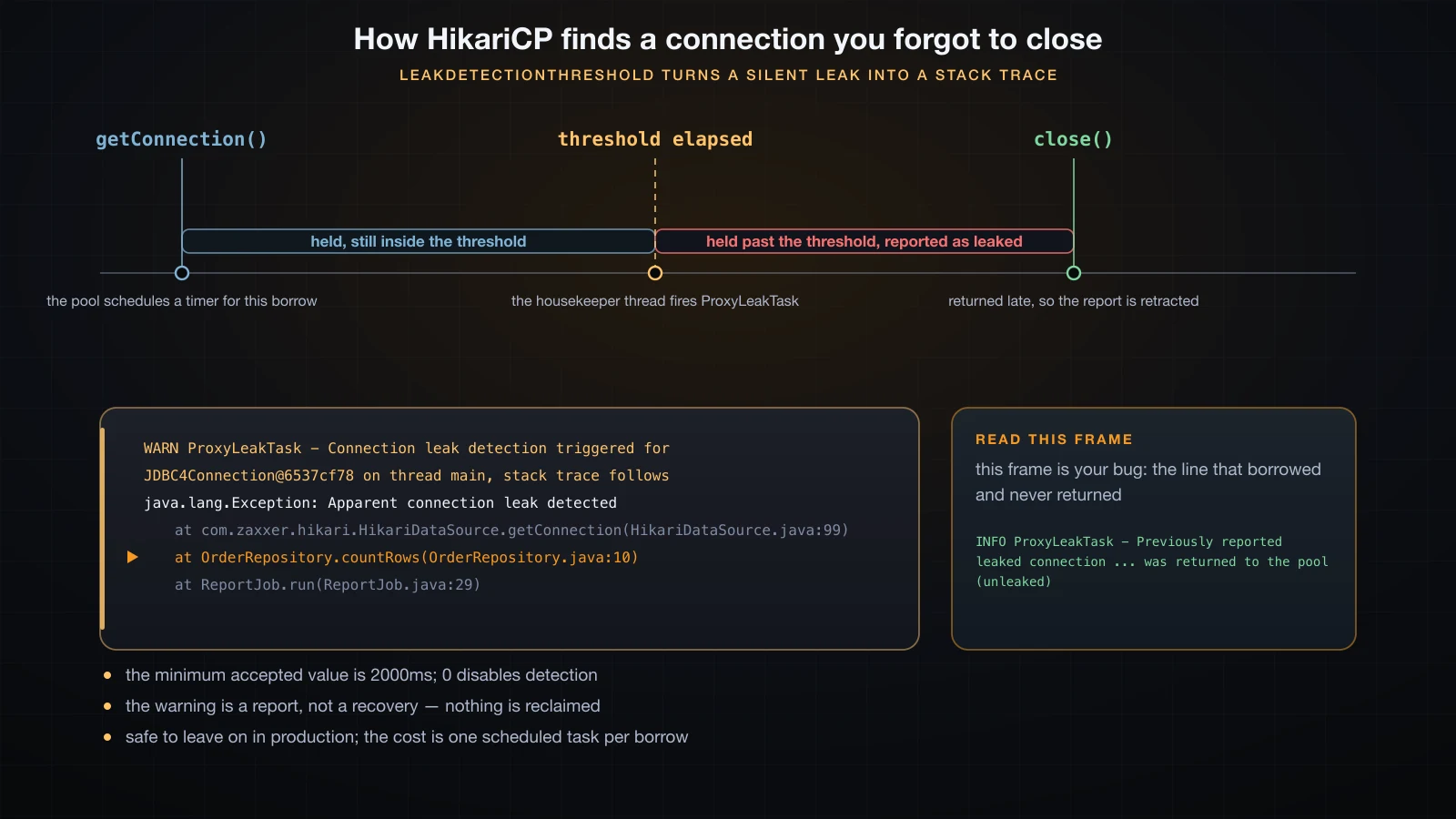
The detector is honest about false alarms. A borrow that is merely slow rather than lost gets retracted when it eventually comes back:
INFO com.zaxxer.hikari.pool.ProxyLeakTask - Previously reported leaked connection org.sqlite.jdbc4.JDBC4Connection@6537cf78 on thread main was returned to the pool (unleaked)Three things to keep in mind. The minimum accepted value is 2000 ms, and anything lower silently disables detection with the warning shown earlier. The warning is a report, not a recovery — HikariCP does not take the connection back, and getActiveConnections() above still says 1. And the cost is one scheduled task per borrow, which is why leaving it enabled in production at a threshold above your slowest legitimate query is a normal thing to do.
Sizing the pool honestly
The instinct is that a bigger pool serves more traffic. It does not, and the reason is structural rather than empirical.
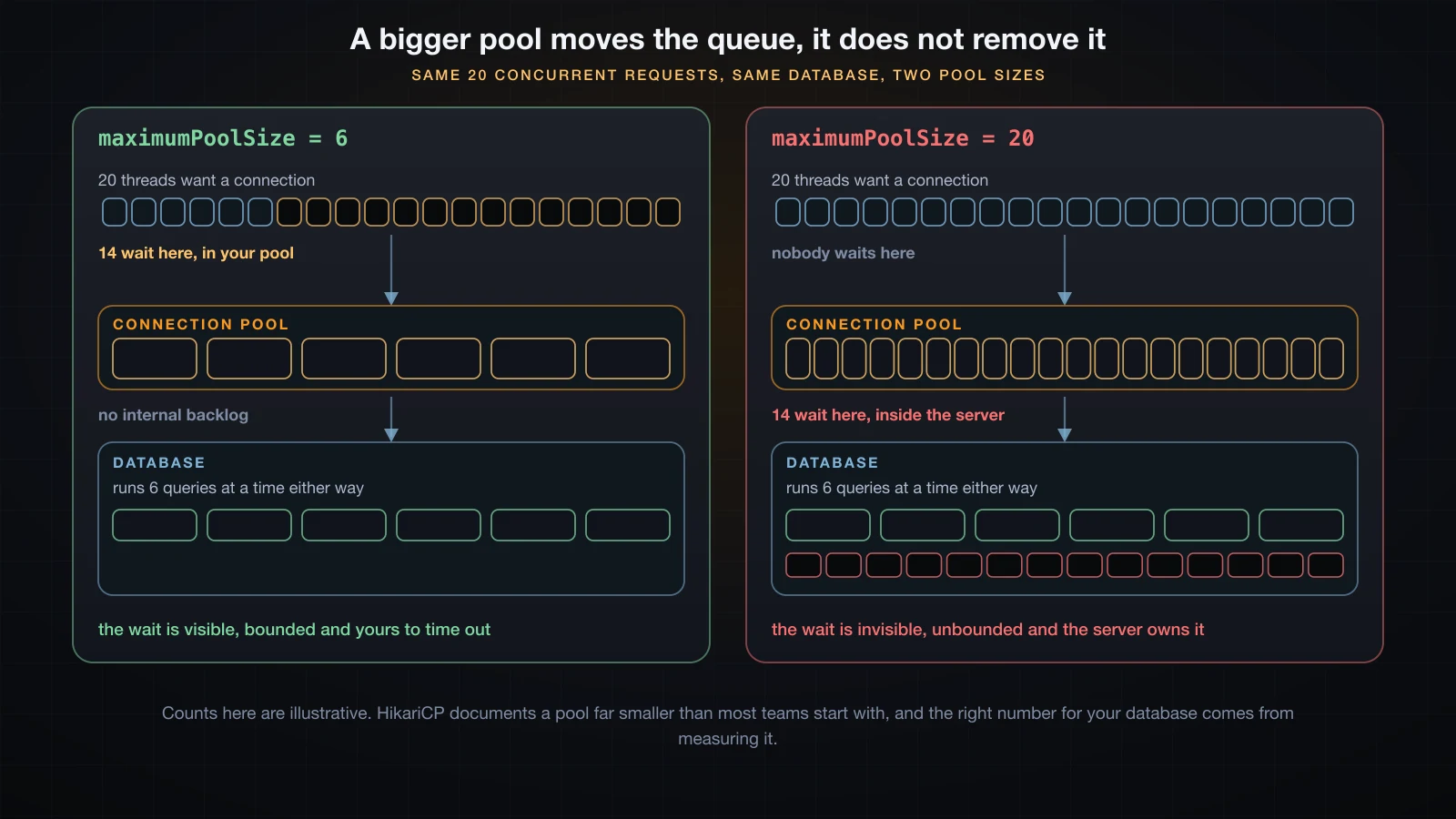
A pool is a queue in front of a database, and the database has its own limited concurrency — a finite number of cores, a finite number of disks, and internal locks that serialise work regardless of how many sessions you open. If your database can usefully execute six statements at once, opening sixty connections does not make it execute sixty. The other fifty-four wait; they simply wait inside the server, in a queue you cannot see, cannot bound and cannot time out, instead of in your pool where connectionTimeout gives you a fast, catchable failure.
That is the whole argument, and it is why HikariCP's own documentation argues for pools far smaller than most teams start with. An oversized pool also costs the database real memory and scheduler pressure per session, so past a point the larger pool is slower, not merely no faster.
What this article deliberately does not give you is a number. The right maximumPoolSize for your system comes from measuring your database, under your query mix, at your concurrency — and that means a proper benchmark: a load generator, a warmed-up steady state, and latency percentiles, not a loop with a timer around it. Nothing on this page was measured that way, because SQLite could not produce an answer that transfers to a database server anyway. Treat the reasoning as portable and the numbers as yours to find.
Three constraints are worth applying before you benchmark anything, though:
maximumPoolSizemultiplied by the number of application instances must stay under the database's own connection limit, with room left for migrations, admin sessions and your monitoring.- A thread pool and a connection pool are two different bounded resources and have to be sized together: request threads that outnumber connections simply queue at
getConnection(), and that queue is where your latency goes. maxLifetimemust be comfortably shorter than any idle or connection cutoff between you and the database — the server's own timeout, a load balancer, a proxy, a NAT table. Whichever side closes first, the pool will hand out a connection that is already dead if it is the slower one.
Watching the pool breathe with HikariPoolMXBean
ds.getHikariPoolMXBean() exposes the pool's live structural counts. These are counts, not timings, which makes them both cheap to sample and safe to reason about.
HikariPoolMXBean mx = ds.getHikariPoolMXBean();
CountDownLatch holding = new CountDownLatch(4);
CountDownLatch release = new CountDownLatch(1);
for (int i = 0; i < 8; i++) {
    workers.submit(() -> {
        try (Connection c = ds.getConnection(); Statement st = c.createStatement()) {
            st.execute("SELECT 1");
            holding.countDown();
            release.await();
        }
        return null;
    });
}
holding.await();
while (mx.getThreadsAwaitingConnection() < 4) Thread.onSpinWait();
sample("8 tasks, pool of 4", mx);
release.countDown();
With maximumPoolSize = 4, minimumIdle = 4 and eight tasks that all hold their connection until released:
at rest                total=1 active=0 idle=1 waiting=0
8 tasks, pool of 4     total=4 active=4 idle=0 waiting=4
after all returned     total=4 active=0 idle=4 waiting=0
The middle line is the pool saturated: four connections out, none idle, four threads parked inside getConnection(). Those four would each have thrown the timeout exception from earlier had the holders not released in time — waiting is the count that turns into SQLTransientConnectionException if it does not drain.
The first line is a detail worth knowing: total=1, not 4. HikariCP starts with a single connection and fills up to minimumIdle on a background thread, so a pool sampled immediately after construction is not yet at size. Alerting on idle == 0 during the first moments of a process start will page you for nothing.
In a real service the useful signals are getThreadsAwaitingConnection() above zero for any sustained period, which means the pool is your bottleneck, and getIdleConnections() pinned at zero, which means you are at the ceiling. The same bean also offers softEvictConnections() to retire the current set gracefully after a credential rotation or a failover.
Common mistakes that cost you a pool
Not closing. Everything else on this list is a variation of it. Use try (Connection c = ds.getConnection()) without exception; a close() at the end of a method body is skipped by every early return and every throw. Turn on leakDetectionThreshold so the mistake reports itself.
Holding a connection across something slow that is not a query. A connection borrowed before an HTTP call, a file upload, a long computation or a Thread.sleep is a connection out of circulation for that whole duration. Borrow immediately before the statement, return immediately after. This is also the failure that turns a healthy pool into an exhausted one under load with no code change at all, when a downstream service gets slow.
A pool per request, or per class, or per method. A HikariDataSource is an application-scoped object. Building one per unit of work gives you the cost of a pool and the benefit of none, and it is loud about it in the log:
INFO com.zaxxer.hikari.HikariDataSource - per-request-pool-0 - Starting...
INFO com.zaxxer.hikari.pool.HikariPool - per-request-pool-0 - Added connection org.sqlite.jdbc4.JDBC4Connection@3c0ecd4b
INFO com.zaxxer.hikari.HikariDataSource - per-request-pool-0 - Start completed.
INFO com.zaxxer.hikari.HikariDataSource - per-request-pool-0 - Shutdown initiated...
INFO com.zaxxer.hikari.HikariDataSource - per-request-pool-0 - Shutdown completed.
If your log shows Starting... more than once per pool per process lifetime, you have this bug.
A pool bigger than the database allows. Every instance of your service multiplies maximumPoolSize. Ten instances at fifty connections each is five hundred sessions asking for room on a server that may be configured for a hundred, and the failure arrives as connection refusals during a deploy, when old and new instances are both running.
maxLifetime longer than someone else's idle cutoff. If the database, a proxy or a load balancer drops idle connections after ten minutes and your maxLifetime is thirty, the pool will confidently hand out sockets that were closed twenty minutes ago. Keep maxLifetime a safe margin below the shortest cutoff on the path.
Using the handle after you returned it. The proxy is dead even though the connection is not, and the message is blunt:
java.sql.SQLException: Connection is closedCalling close() twice, on the other hand, is harmless — the second call is a no-op.
FAQ
Does close() on a HikariCP connection really close the database connection?
No. It returns the connection to the pool. What you hold is a HikariProxyConnection wrapping the driver's real connection; close() marks the proxy dead and puts the underlying connection back into the idle set. Running the check above, the proxy reports isClosed() == true while the real org.sqlite.jdbc4.JDBC4Connection reports false, and the next getConnection() hands back a new proxy around that same underlying object. The only paths that actually close the socket are retirement by maxLifetime or idleTimeout, an explicit evictConnection(), a failed validation, and shutting the pool itself down.
What does "Connection is not available, request timed out after 30000ms" mean?
That every connection in the pool is out on loan and none came back before connectionTimeout expired, so getConnection() threw SQLTransientConnectionException. The parenthesised counts in the message tell you the rest: total is how many connections exist, active how many are borrowed, idle how many are free, and waiting how many other threads were queued behind you. With active equal to total and idle at zero, nothing is broken — somebody is holding what you need. Raising the timeout only delays the error; the two real fixes are finding the borrow that never returns, using leakDetectionThreshold, and shortening the work done while holding a connection.
How large should maximumPoolSize be?
Smaller than you think, and ultimately a measured number rather than a guessed one. A pool is a queue in front of a database that can only execute so much at once; making the pool wider does not make the database wider, it just moves the queueing inside the server where you cannot bound it or time it out. HikariCP's own documentation argues for pools much smaller than most teams start with. Set the ceiling from your database's limits and your instance count, then measure with a real load test at steady state and read latency percentiles, not a stopwatch around a loop. And size it together with your request thread pool — they are two different bounded resources, and the smaller one decides your concurrency.
Is leakDetectionThreshold safe to enable in production?
Yes, and it is one of the highest-value settings HikariCP has. The cost is a single scheduled task per borrow, which is negligible next to a database round trip. Set the threshold above your slowest legitimate query so healthy work does not trip it — a few seconds is typical — and remember two limits: values below 2000 ms silently disable the feature, and the warning does not reclaim anything, so the connection stays out until whoever holds it returns it. If a slow-but-honest borrow is reported and then completes, HikariCP logs an (unleaked) line retracting the report.
Do I actually need a connection pool with SQLite?
Mostly no, and this article does not claim otherwise. SQLite is an embedded file database with no server, no socket and no authentication handshake, so there is essentially no connection setup cost to amortise — the main thing pooling exists to avoid. What a pool still gives you with SQLite is a bound on concurrency and a uniform lifecycle, which can be useful given SQLite's own writer-locking behaviour. The reason to demonstrate on SQLite is that the mechanics shown here — proxying, the return path, timeouts, leak detection, metrics — all live in HikariCP rather than in the driver, so they behave identically against a real server. The payoff argument, unlike the mechanics, does not transfer from SQLite.
Why does maxLifetime need to be shorter than the database's idle timeout?
Because whoever times out first wins, and the pool does not find out. If a server, proxy or load balancer between you and the database drops connections after ten minutes of idleness while your maxLifetime is thirty minutes, the pool keeps entries it believes are healthy and hands out a socket the other end already closed — surfacing as a broken-pipe or connection-reset error on a query that had nothing wrong with it. Set maxLifetime a comfortable margin below the shortest cutoff anywhere on the path. HikariCP also refuses to use a maxLifetime under 30000 ms, resetting it to the 1800000 ms default with a warning at startup.
Can I use one HikariDataSource for two different databases?
No. A pool is bound to exactly one jdbcUrl with one set of credentials, and everything it does — sizing, validation, retirement — assumes every connection in it is interchangeable. Two databases means two HikariDataSource instances, each with its own poolName so the logs and exceptions stay legible, and each sized independently. That also means their limits add up against whatever total connection budget the servers allow, which is easy to forget when a second pool is added months later.
Conclusion
A connection pool is a bounded set of open connections, and HikariCP's entire surface follows from that. close() is the return arrow, not a shutdown — which is why a missing close() removes a connection from circulation permanently, why maximumPoolSize is a ceiling on your real concurrency at the database, and why connectionTimeout is the mechanism that turns a stuck pool into a fast, named exception instead of a hang.
Three settings do most of the work. poolName, so every log line and exception says which database. leakDetectionThreshold, so a lost connection reports its own acquisition stack trace instead of surfacing days later as a mysterious exhaustion. And a maximumPoolSize chosen from what the database can actually run at once, rather than from how much traffic you expect — the pool cannot make the database wider, only decide where the waiting happens. Everything demonstrated here ran on SQLite for its mechanics; the argument for pooling at all comes from what a real server connection costs to open, which is a measurement to take on your own database.
That closes Part 5 of this course. Part 6 turns to testing, starting with unit testing in JUnit 5.
![[Advanced Java] Unit Testing in Java with JUnit 5](/images/blog/junit5-thumbnail.en.webp)
![[Advanced Java] Connecting Spring Boot to a Database with Spring Data JPA](/images/blog/spring-data-jpa-thumbnail.en.webp)
![[Advanced Java] Debugging and Logging in Java with SLF4J, Logback and Log4j 2](/images/blog/logging-thumbnail.en.webp)
![[Advanced Java] Best Practices, Performance and Interview Preparation](/images/blog/interview-prep-thumbnail.en.webp)