Writing raw JDBC teaches you what a database call really costs: a connection, a prepared statement, a cursor you walk row by row, and a hand-written mapping from columns to fields. Spring Data JPA removes almost all of that code. What it does not remove is the SQL — it just stops showing it to you unless you ask.
This article is about asking. The application in it runs with spring.jpa.show-sql turned on, so every statement Hibernate sends is printed. That is the single fastest way to stop treating an ORM as magic, and it is also how you find the one bug this abstraction reliably hides.
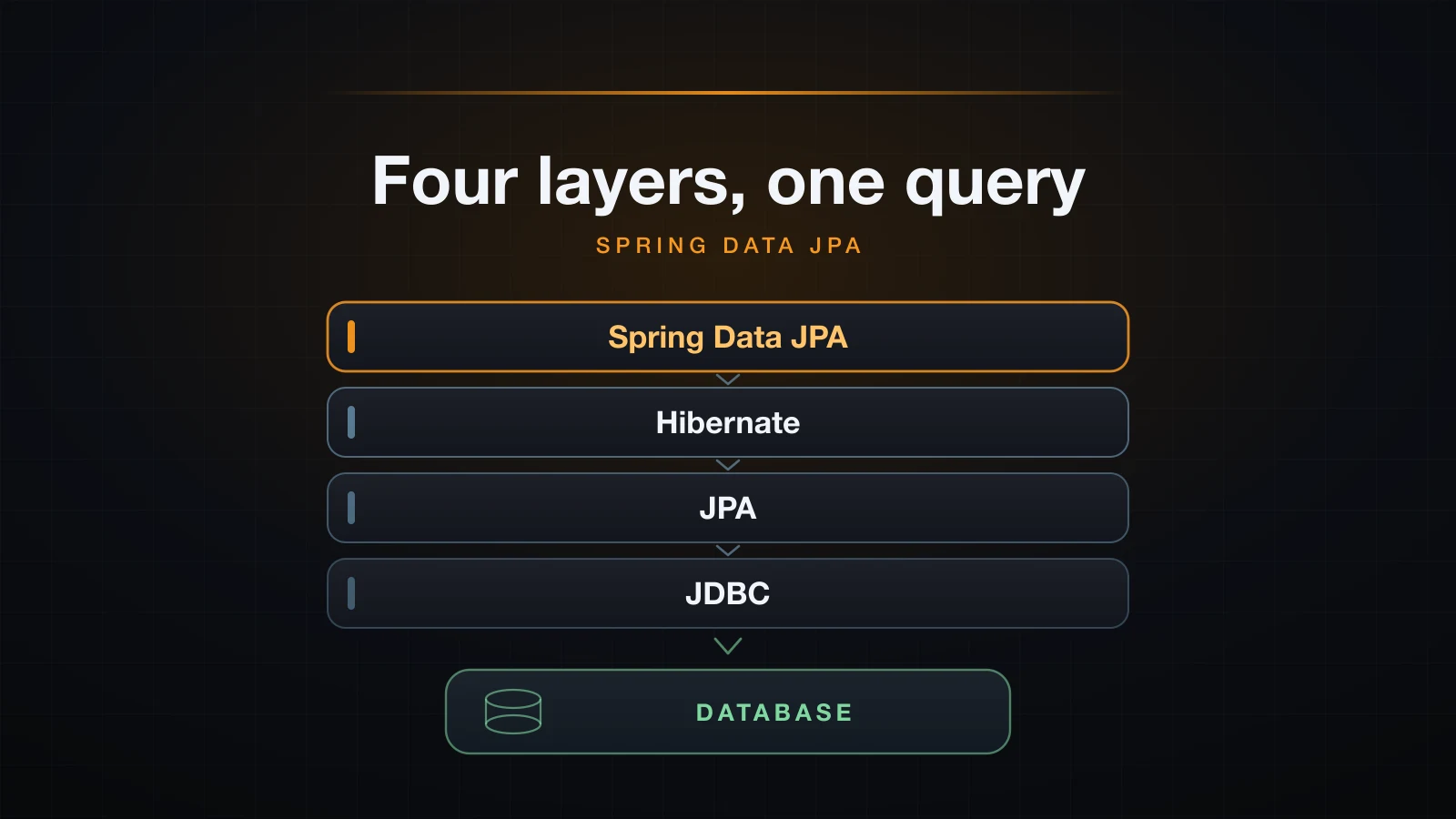
The order below is deliberate: layers, then mapping, then repositories, then the three things that break in production — N+1 selects, lazy loading outside a transaction, and transaction boundaries that are not where you think they are.
The four layers, and which one you are actually calling
Four names get used as if they were interchangeable. They are not, and mixing them up is why error messages feel unattributable.
| Layer | What it is | What it gives you |
|---|---|---|
| JDBC | A JVM API of interfaces plus a vendor driver | Connection, PreparedStatement, ResultSet — you write the SQL and the row mapping |
| JPA | A specification, jakarta.persistence 3.2.0 here | @Entity, @Id, EntityManager, JPQL — annotations and interfaces, no runtime behaviour of its own |
| Hibernate | An implementation of that specification | The code that reads your annotations, generates the SQL, and calls JDBC |
| Spring Data JPA | A repository layer above JPA | Interfaces with no implementation you write, derived queries, paging, @Transactional plumbing |
A call goes down all four. bookRepository.findAll() is a Spring Data proxy, which builds a JPQL query, which Hibernate translates to SQL, which goes out over JDBC on a pooled connection. Boot auto-configures that pool as HikariCP without being asked — the startup log shows HikariPool-1 - Starting... — and connection pooling is a topic of its own, so this article leaves it there.
Here is the same query written both ways, against the same H2 database, in the same running application. First raw JDBC, exactly the shape from the JDBC article:
String sql = "select id, title, isbn, price, published_year from books "
           + "where published_year > ? order by title";
List<Book> found = new ArrayList<>();
try (Connection c = dataSource.getConnection();
     PreparedStatement ps = c.prepareStatement(sql)) {
    ps.setInt(1, 1980);
    try (ResultSet rs = ps.executeQuery()) {
        while (rs.next()) {
            Book b = new Book(rs.getString("title"), rs.getString("isbn"),
                    rs.getBigDecimal("price"), rs.getInt("published_year"));
            found.add(b);
        }
    }
}
And the repository:
List<Book> viaRepo = books.findByPublishedYearGreaterThanOrderByTitleAsc(1980);Both printed the same four rows. Lines starting with [demo] are my own markers, added so the transcripts below are readable:
[demo] JDBC found 4:
[demo]   Guards! Guards!
[demo]   Parable of the Sower
[demo]   Small Gods
[demo]   The Fifth Season
[demo] repository found 4:
[demo]   Guards! Guards!
[demo]   Parable of the Sower
[demo]   Small Gods
[demo]   The Fifth Season
Be honest about what that trade is. You deleted roughly twenty lines and gained a layer that decides, on your behalf, how many statements to send and when to send them. The rest of this article is about seeing those decisions.
The setup: one starter, one driver, and a schema you can watch being built
Two dependencies. The starter pulls in Hibernate, the JPA API, Spring Data JPA, Spring's transaction support and HikariCP; the H2 driver is runtime-only.
<dependency>
    <groupId>org.springframework.boot</groupId>
    <artifactId>spring-boot-starter-data-jpa</artifactId>
</dependency>
<dependency>
    <groupId>com.h2database</groupId>
    <artifactId>h2</artifactId>
    <scope>runtime</scope>
</dependency>
The configuration that matters is small, and two of these lines are what make Hibernate's work visible:
spring.datasource.url=jdbc:h2:mem:bookstore;DB_CLOSE_DELAY=-1
spring.datasource.username=sa
spring.datasource.password=

spring.jpa.hibernate.ddl-auto=create-drop
spring.jpa.show-sql=true
spring.jpa.properties.hibernate.format_sql=true
spring.jpa.properties.hibernate.generate_statistics=true
show-sql prints every statement Hibernate sends, prefixed with Hibernate:. format_sql breaks it across lines so a join is readable. generate_statistics exposes a counter of prepared statements, which is how the N+1 section below counts queries instead of timing them.
Versions used in this article
| Component | Version |
|---|---|
| Java | 21 |
| Spring Boot | 4.1.1 |
| Hibernate ORM | 7.4 |
| Database | H2, in-memory |
Version numbers matter more here than usual: several messages quoted below were reworded in Hibernate 7, and a search for the older wording will land you on advice for a different runtime.
Mapping an entity: @Entity, @Id, @GeneratedValue and @Column
An entity is a plain class with annotations that tell Hibernate which table it belongs to and how each field becomes a column.
@Entity
@Table(name = "books")
public class Book {

    @Id
    @GeneratedValue(strategy = GenerationType.IDENTITY)
    private Long id;

    @Column(nullable = false, length = 200)
    private String title;

    @Column(nullable = false, unique = true, length = 13)
    private String isbn;

    @Column(nullable = false, precision = 8, scale = 2)
    private BigDecimal price;

    private int publishedYear;

    @ManyToOne(fetch = FetchType.LAZY, optional = false)
    @JoinColumn(name = "author_id", nullable = false)
    private Author author;

    protected Book() { }

    public Book(String title, String isbn, BigDecimal price, int publishedYear) {
        this.title = title;
        this.isbn = isbn;
        this.price = price;
        this.publishedYear = publishedYear;
    }
    // getters and setters omitted
}
@Table names the table; without it Hibernate derives one from the class name. @Column carries the constraints — nullable, unique, length, precision/scale — and those go into the generated DDL, not into runtime validation. publishedYear has no annotation at all and still becomes a column, published_year, because Boot's default naming strategy converts camel case to snake case.
The DDL Hibernate generated, verbatim
With ddl-auto=create-drop, Hibernate emits the schema at startup and prints it because show-sql is on. This is the single most demystifying output an ORM produces:
create table authors (
    country varchar(2),
    id bigint generated by default as identity,
    name varchar(120) not null,
    primary key (id)
)

create table books (
    price numeric(8,2) not null,
    published_year integer not null,
    author_id bigint not null,
    id bigint generated by default as identity,
    isbn varchar(13) not null unique,
    title varchar(200) not null,
    primary key (id)
)

alter table if exists books
   add constraint FKfjixh2vym2cvfj3ufxj91jem7
   foreign key (author_id)
   references authors
Every annotation is accounted for. length = 13 became varchar(13), unique = true became not null unique, precision = 8, scale = 2 became numeric(8,2), and @ManyToOne produced both the author_id column and a foreign key with a generated name. Note that generated by default as identity is H2's spelling; PostgreSQL would emit generated by default as identity too, MySQL auto_increment. The dialect decides.
@GeneratedValue: IDENTITY and SEQUENCE behave very differently
IDENTITY asks the database to assign the key. That has a consequence people rarely connect to the annotation: Hibernate cannot know the id until the row exists, so save() must send the INSERT immediately rather than batching it with the rest of the transaction.
SEQUENCE asks a database sequence for the next value first, so the entity has its id before any row is written and the INSERT can wait for the flush. Here is a second entity using it:
@Id
@GeneratedValue(strategy = GenerationType.SEQUENCE, generator = "review_seq")
@SequenceGenerator(name = "review_seq", sequenceName = "review_seq", allocationSize = 50)
private Long id;
Hibernate created the sequence with the allocation size baked in:
create sequence review_seq start with 1 increment by 50And the difference in behaviour is visible in the log. With SEQUENCE, save() fetches an id and returns; the INSERT only appears when something forces a flush:
MARK about to call save()
Hibernate:
    select
        next value
    for
        review_seq
MARK save() returned, id = 1 - no INSERT yet
Hibernate:
    insert
    into
        reviews
        (body, stars, id)
    values
        (?, ?, ?)
MARK flush() returned - the INSERT is above this line
MARK method ending, commit happens after this
With IDENTITY, the same code produces the INSERT before save() even returns. That is not a bug and not something you can configure away — it is what asking the database for the key implies. It also means JDBC batching is unavailable for IDENTITY-keyed inserts, which is the practical reason to prefer SEQUENCE when you are inserting in bulk.
| Strategy | Id known before insert | Insert can be deferred | Batching possible |
|---|---|---|---|
IDENTITY | no | no | no |
SEQUENCE | yes | yes | yes |
TABLE | yes | yes | yes, but it serialises on a row |
AUTO | depends on the dialect | depends | depends |
The no-arg constructor, and the failure when it is missing
JPA requires a no-argument constructor so the provider can instantiate an entity before populating it. protected is enough; private is not.
Delete protected Book() { } and something surprising happens: the application starts fine, the schema is created fine, and the inserts all succeed. The failure comes at the first read:
org.springframework.orm.jpa.JpaSystemException: No default constructor for entity 'com.example.demo.Book'
...
Caused by: org.hibernate.InstantiationException: No default constructor for entity 'com.example.demo.Book'
	at org.hibernate.metamodel.internal.EntityInstantiatorPojoStandard.instantiate(EntityInstantiatorPojoStandard.java:94)
	at org.hibernate.persister.entity.AbstractEntityPersister.instantiate(AbstractEntityPersister.java:4442)
Hibernate wraps its own InstantiationException in Spring's JpaSystemException, so the top of the stack trace mentions Spring and the cause mentions Hibernate. Read to the Caused by: before searching for the message.
Relationships: mappedBy, the owning side, and cascade
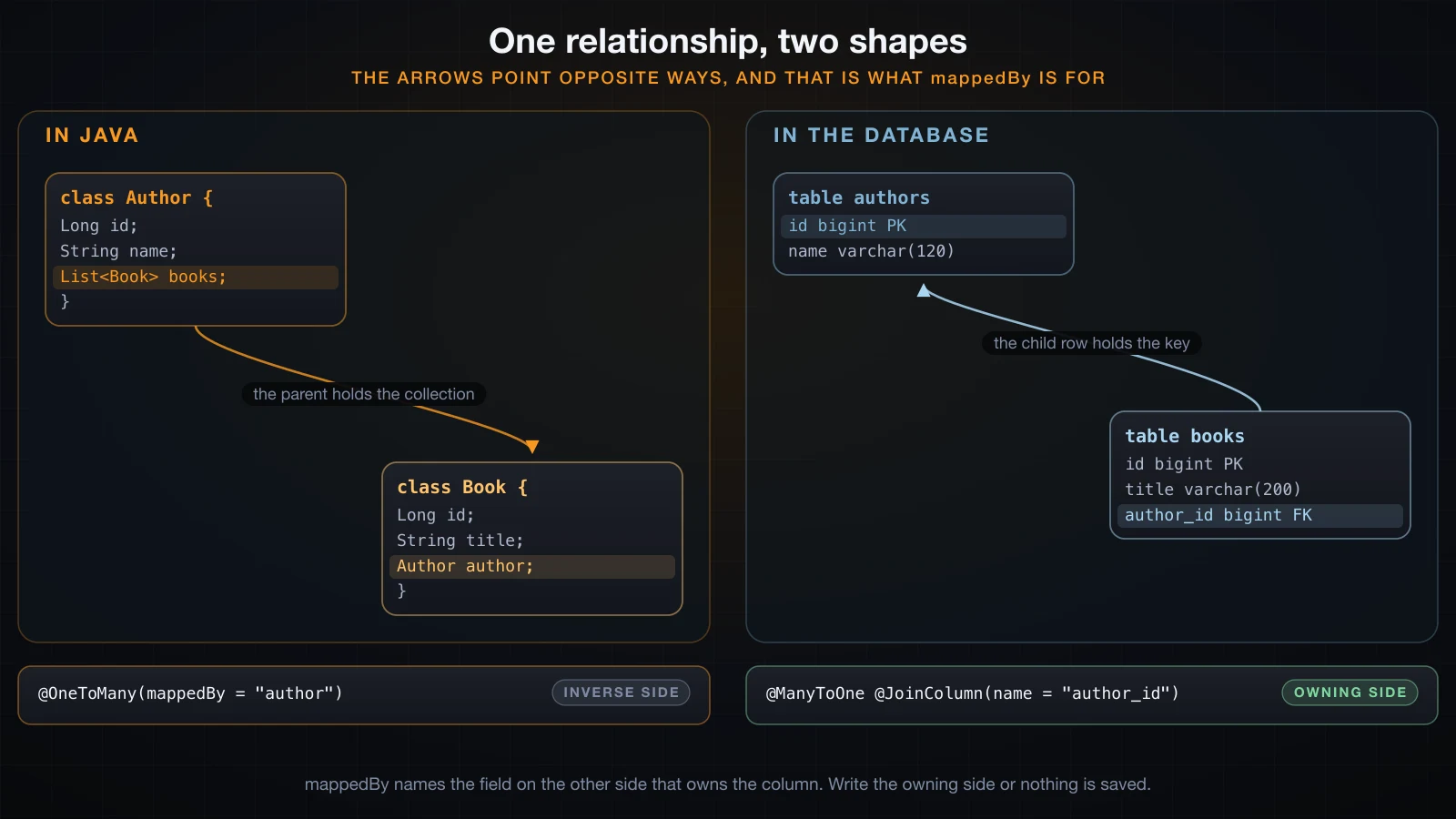
A one-to-many is where the object model and the relational model disagree about direction, and understanding that disagreement is most of the battle.
@Entity
@Table(name = "authors")
public class Author {

    @Id
    @GeneratedValue(strategy = GenerationType.IDENTITY)
    private Long id;

    @Column(nullable = false, length = 120)
    private String name;

    @OneToMany(mappedBy = "author", cascade = CascadeType.ALL, orphanRemoval = true)
    private List<Book> books = new ArrayList<>();

    public void addBook(Book b) {
        books.add(b);
        b.setAuthor(this);
    }
}
In Java, Author holds a list of Book. In the database there is no list — the books row holds author_id. The side that maps the foreign key column is the owning side, here Book.author with its @JoinColumn. mappedBy = "author" marks Author.books as the inverse side: it says "the column already exists over there, on the field called author; do not create a join table for me".
The practical consequence is that Hibernate only writes what the owning side says. Add a Book to author.getBooks() without setting book.setAuthor(author) and the collection looks right in memory and the author_id column stays null — which is exactly why addBook above sets both ends. When I forgot to do that in a first draft, the insert failed with a message worth recognising:
org.springframework.dao.DataIntegrityViolationException: not-null property references a null or transient value for entity com.example.demo.Book.authorcascade = CascadeType.ALL means operations on the parent propagate to the children, so authors.saveAll(...) persisted nine books without a single call to a book repository. orphanRemoval = true means removing a Book from the list deletes its row. Both are conveniences with teeth: CascadeType.ALL includes REMOVE, so deleting an author deletes their books.
Repositories: what JpaRepository gives you for free
You declare an interface. Spring Data builds the implementation at startup and registers it as a bean.
public interface BookRepository extends JpaRepository<Book, Long> {
}
That empty interface already has save, saveAll, findById, findAll, findAll(Sort), findAll(Pageable), count, existsById, delete, deleteById, deleteAll, flush, saveAndFlush and getReferenceById. The two type parameters are the entity and the type of its @Id.
Derived query methods and the naming grammar
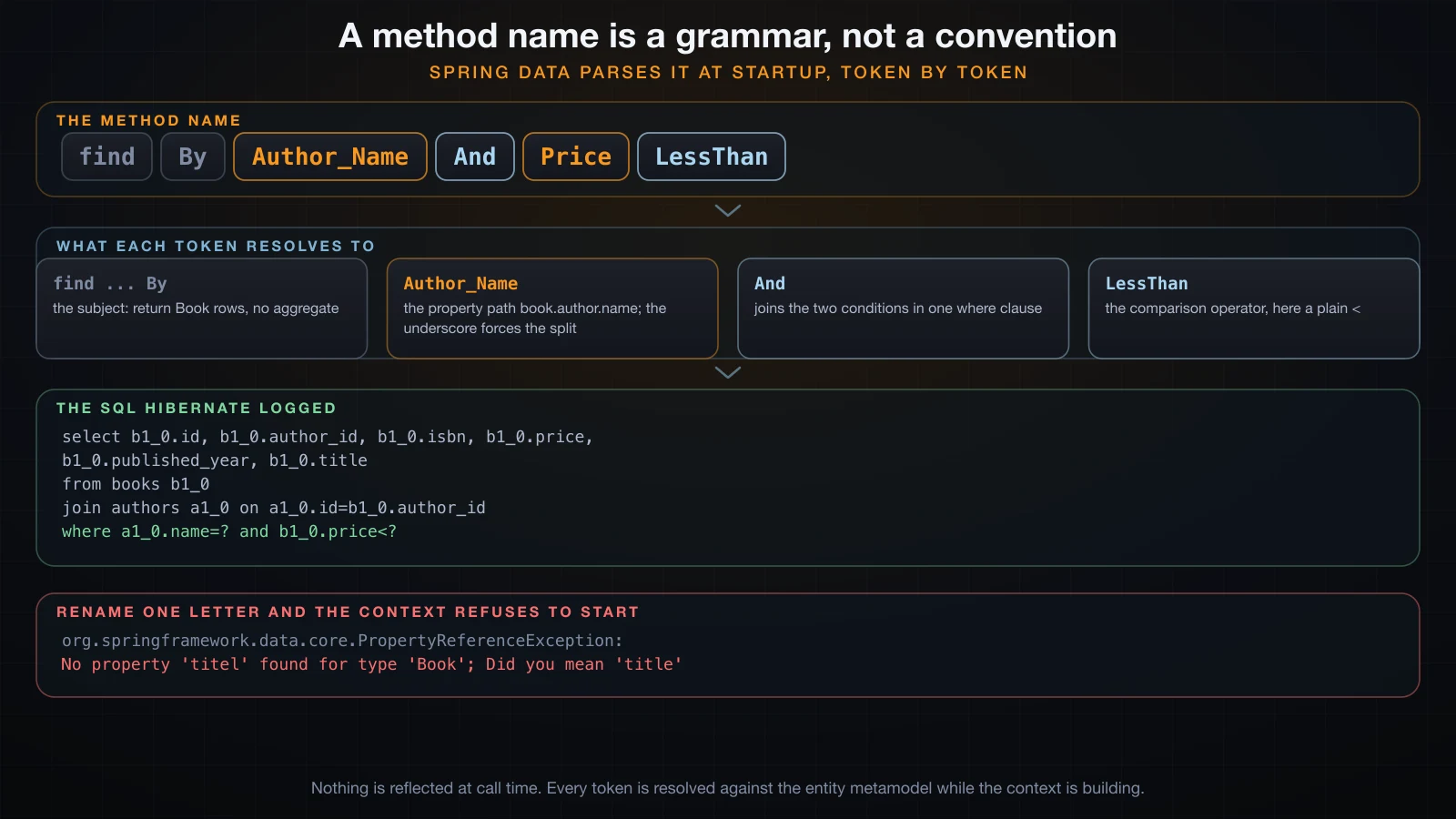
Add a method whose name describes the query and Spring Data writes it for you. The name is not a convention it recognises whole — it is a grammar parsed token by token against the entity's properties.
List<Book> findByTitleContainingIgnoreCase(String fragment);

List<Book> findByPublishedYearGreaterThanOrderByTitleAsc(int year);

List<Book> findByAuthor_NameAndPriceLessThan(String name, BigDecimal max);

long countByPublishedYear(int year);

boolean existsByIsbn(String isbn);
The subject (find, count, exists, delete) decides what comes back; everything after By is the predicate. Property names are matched greedily, and an underscore forces the split when a name is ambiguous — Author_Name is book.author.name, which is why the generated SQL contains a join nobody wrote:
select
    b1_0.id,
    b1_0.author_id,
    b1_0.isbn,
    b1_0.price,
    b1_0.published_year,
    b1_0.title
from
    books b1_0
join
    authors a1_0
        on a1_0.id=b1_0.author_id
where
    a1_0.name=?
    and b1_0.price<?
ContainingIgnoreCase became a like with an escape clause, which is worth seeing because it shows the keyword is not free:
where
    upper(b1_0.title) like upper(?) escape '\'
existsByIsbn did not fetch the row. It selected the id with a limit, which on H2's dialect is spelled fetch first ? rows only:
select
    b1_0.id
from
    books b1_0
where
    b1_0.isbn=?
fetch
    first ? rows only
The common keywords, all of which appeared in real generated SQL above or are documented parts of the same grammar:
| Keyword in the name | SQL it produces |
|---|---|
And, Or | and, or |
Between | between ? and ? |
LessThan, GreaterThan | <, > |
LessThanEqual, GreaterThanEqual | <=, >= |
IsNull, IsNotNull | is null, is not null |
Containing, StartingWith, EndingWith | like with the wildcard placed for you |
IgnoreCase | wraps both sides in upper(...) |
In, NotIn | in (...), not in (...) |
OrderBy...Asc/Desc | order by |
Top3, First10 | a row limit |
A derived method that does not parse, and the error it throws at startup
This is the best thing about the grammar: it is resolved while the context is building, not when the method is called. Rename title to titel in one method:
List<Book> findByTitel(String title);The application does not start:
org.springframework.beans.factory.UnsatisfiedDependencyException: Error creating bean with name 'demoRunner': Unsatisfied dependency expressed through constructor parameter 0: Error creating bean with name 'bookRepository' defined in com.example.demo.BookRepository defined in @EnableJpaRepositories declared on DataJpaRepositoriesRegistrar.EnableJpaRepositoriesConfiguration: No property 'titel' found for type 'Book'; Did you mean 'title'

Caused by: org.springframework.data.repository.query.QueryCreationException: Cannot create query for method [BookRepository.findByTitel(java.lang.String)]; No property 'titel' found for type 'Book'; Did you mean 'title'

Caused by: org.springframework.data.core.PropertyReferenceException: No property 'titel' found for type 'Book'; Did you mean 'title'
It names the method, names the property, and suggests the correction. A typo in a repository method is a startup failure, never a production surprise.
@Query with JPQL and with native SQL
When the name would get silly, write the query. JPQL is typed against entities and fields, not tables and columns:
@Query("select b from Book b where b.price between :lo and :hi order by b.price")
List<Book> inPriceRange(@Param("lo") BigDecimal lo, @Param("hi") BigDecimal hi);select
b1_0.id,
b1_0.author_id,
b1_0.isbn,
b1_0.price,
b1_0.published_year,
b1_0.title
from
books b1_0
where
b1_0.price between ? and ?
order by
b1_0.pricenativeQuery = true sends your string to the database untranslated, so it uses table and column names and it is tied to that database's dialect:
@Query(value = "select count(*) from books where published_year < ?1", nativeQuery = true)
long countOlderThan(int year);select
count(*)
from
books
where
published_year < ?Note the difference in what is portable. The JPQL version would run unchanged on PostgreSQL; the native one names books and published_year directly and would break the moment the naming strategy changed. Reach for native SQL when you need something JPQL cannot express, and know that you have opted out of the abstraction for that method.
Paging and sorting with Pageable
Pass a Pageable and Spring Data adds the limit, the offset and the ordering:
Page<Book> findByPriceGreaterThan(BigDecimal min, Pageable pageable);Page<Book> page = books.findByPriceGreaterThan(new BigDecimal("12.00"),
PageRequest.of(0, 3, Sort.by("price").descending()));That produced two statements — the page of data, then a count so getTotalPages() can be answered:
select
    b1_0.id,
    b1_0.author_id,
    b1_0.isbn,
    b1_0.price,
    b1_0.published_year,
    b1_0.title
from
    books b1_0
where
    b1_0.price>?
order by
    b1_0.price desc
fetch
    first ? rows only

select
    count(b1_0.id)
from
    books b1_0
where
b1_0.price>?[demo] page 0 of 3, total elements 7
[demo] 17.99 The Fifth Season
[demo] 16.20 Parable of the Sower
[demo] 15.95 Wild SeedIf you do not need a total, return Slice instead. I changed one return type and re-ran it: one statement, no count, and hasNext() still worked because Spring Data asks for one row more than the page size.
[demo] slice size 3, hasNext true@Modifying for updates and deletes
A @Query that changes rows needs @Modifying, and it needs a transaction:
@Modifying
@Query("update Book b set b.price = b.price + :delta where b.publishedYear < :year")
int raisePriceForBooksBefore(@Param("delta") BigDecimal delta, @Param("year") int year);update
books b1_0
set
price=(b1_0.price+cast(? as numeric(8, 2)))
where
b1_0.published_year<?MARK @Modifying updated 8 rowsOne statement changed eight rows, which is exactly what you want and exactly what the persistence context does not know about. A bulk update goes straight to the database and bypasses the first-level cache, so an entity already loaded in the same transaction keeps its old value. I loaded a book, ran the update, and read it back in the same transaction:
MARK price before bulk update: 12.99
MARK price after bulk update, same context: 12.99
MARK same instance = true
MARK price after em.clear() and reload: 14.49
The row in the database was 14.49 the whole time; the object in the persistence context stayed stale until the context was cleared. That is what @Modifying(clearAutomatically = true) is for, and it is why a bulk update belongs in its own short transaction rather than in the middle of one that is also reading entities.
The N+1 select problem, counted rather than timed
This is the section that earns the article. It is the most common performance bug in every ORM, and it is invisible unless you look at the log.
The code is the most natural thing you could write: load the authors, then look at each author's books.
@Transactional(readOnly = true)
public int nPlusOne() {
    List<Author> all = authors.findAll();
    int total = 0;
    for (Author a : all) {
        total += a.getBooks().size();
    }
    return total;
}
Four authors, nine books. Here is the log, trimmed only by removing the duplicate select lists of the four identical child queries:
Hibernate:
    select
        a1_0.id,
        a1_0.country,
        a1_0.name
    from
        authors a1_0
MARK findAll() returned 4 authors
Hibernate:
    select
        b1_0.author_id,
        b1_0.id,
        b1_0.isbn,
        b1_0.price,
        b1_0.published_year,
        b1_0.title
    from
        books b1_0
    where
        b1_0.author_id=?
Hibernate:
    ... the same statement, three more times ...
MARK touched every books collection
[demo] N+1: 9 books, JDBC statements prepared = 5
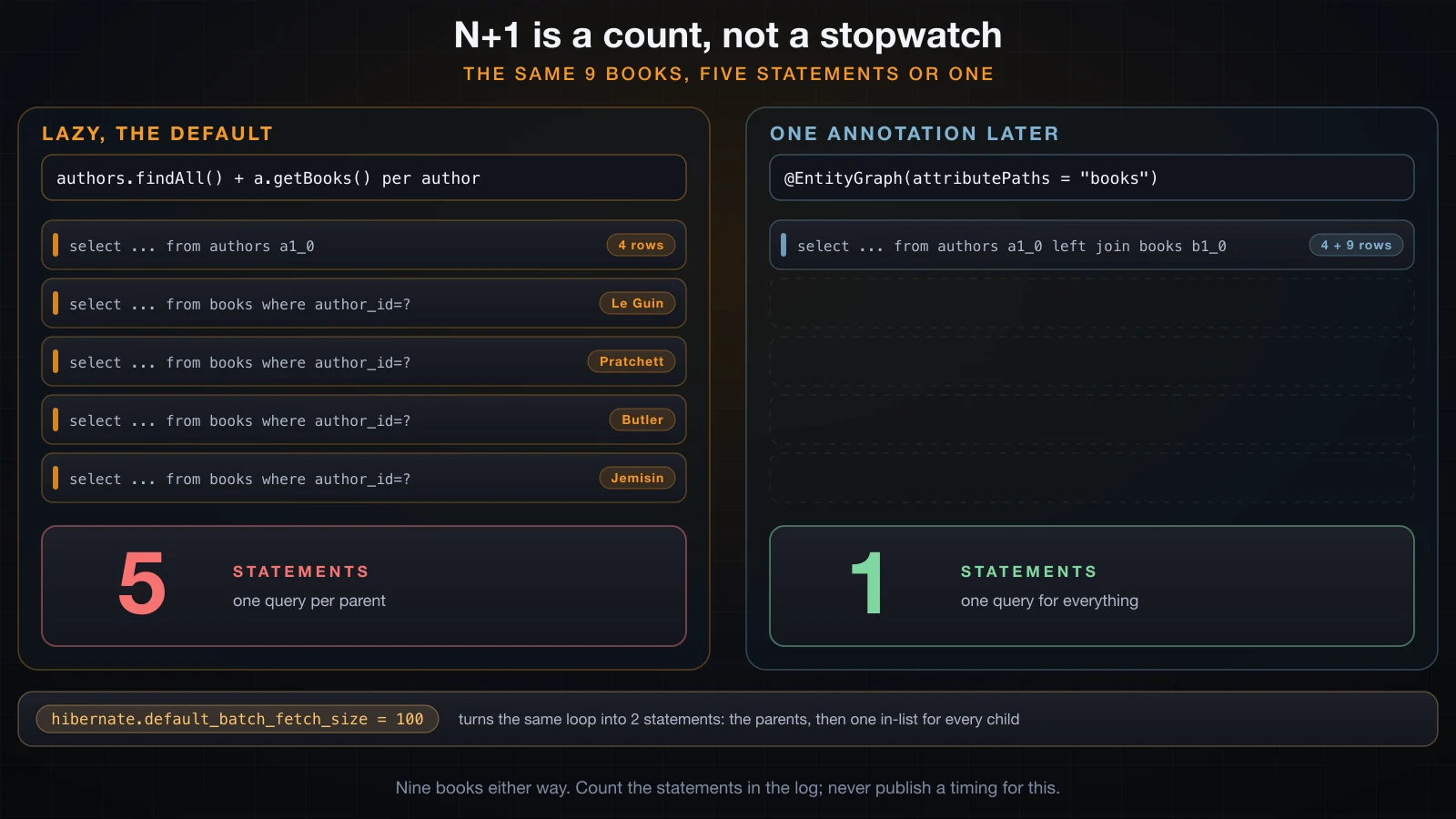
One query for the parents, then one query per parent. That is the N+1: 1 + N statements where N is the number of rows the first query returned. Four authors is 5 statements; four thousand authors is 4001, over the same code, with no error and no warning.
Count statements, never time them. A timing on a laptop against an in-memory database will tell you nothing about the same loop against a database over a network, and it will tell you a comfortable lie about a loop that is fine at four rows and catastrophic at four thousand. The count scales with your data; the millisecond number does not survive the trip to production.
The count above comes from Hibernate's own getStatistics().getPrepareStatementCount() around the method, and I checked it against the number of Hibernate: lines in the log. Both said 5.
Fixing it with @EntityGraph
@EntityGraph tells Spring Data which associations to fetch eagerly for this method only:
@EntityGraph(attributePaths = "books")
@Query("select a from Author a")
List<Author> findAllWithGraph();
The same loop, unchanged:
Hibernate:
    select
        a1_0.id,
        b1_0.author_id,
        b1_0.id,
        b1_0.isbn,
        b1_0.price,
        b1_0.published_year,
        b1_0.title,
        a1_0.country,
        a1_0.name
    from
        authors a1_0
    left join
        books b1_0
            on a1_0.id=b1_0.author_id
MARK findAllWithGraph() returned 4 authors
MARK touched every books collection
[demo] EntityGraph: 9 books, JDBC statements prepared = 1
Five statements became one. Same nine books.
Fixing it with join fetch
The JPQL equivalent, written by hand:
@Query("select distinct a from Author a join fetch a.books")
List<Author> findAllJoinFetch();[demo] join fetch: 9 books, JDBC statements prepared = 1Also one. Two differences are worth knowing.
join fetch here is an inner join, so an author with no books would be missing from the result, while @EntityGraph produced a left join and would keep them.
And a join fetch on a collection does not paginate in the database. I ran the same query with a Pageable asking for two authors, and separately ran it with the distinct keyword removed:
MARK no distinct -> 4 author objects
MARK paged join fetch -> 4 author objects
Two things follow. The page size never reached the SQL — Hibernate read every row and paginated in memory — and on 7.4.5 it printed no warning while doing it, so this failure mode is silent. And distinct turned out to be unnecessary: Hibernate has de-duplicated parent entities in entity queries since version 6, so dropping it still gave four authors rather than nine.
Fixing it with default_batch_fetch_size
The third option changes nothing in the code. It tells Hibernate that when it has to initialise a lazy collection, it should initialise up to N of them at once:
spring.jpa.properties.hibernate.default_batch_fetch_size=100The same nPlusOne() method, untouched:
Hibernate:
    select
        b1_0.author_id,
        b1_0.id,
        b1_0.isbn,
        b1_0.price,
        b1_0.published_year,
        b1_0.title
    from
        books b1_0
    where
        b1_0.author_id in (?, ?, ?, ... 100 placeholders in total ...)
[demo] N+1: 9 books, JDBC statements prepared = 2
Two statements instead of five: the parents, then one in list for all the children. The placeholder list really is padded out to the batch size — I truncated it above; the raw log line has one hundred question marks. This is the cheapest global mitigation, and it is worth setting on any application that has more than a handful of entities, but it does not replace fetching deliberately where you know you need the children.
| Fix | Statements | Scope | Watch out for |
|---|---|---|---|
| nothing | 1 + N | — | scales with row count |
@EntityGraph | 1 | one repository method | the database still returns each parent row once per child |
join fetch | 1 | one query | inner join by default; paging happens in memory, silently |
default_batch_fetch_size | 2 | whole application | still two round trips; padded in lists |
Lazy loading and the detached-entity trap
@ManyToOne defaults to EAGER and @OneToMany defaults to LAZY. A lazy association is not loaded when the entity is; it is loaded the first time you touch it, and it can only be loaded while the persistence context that produced the entity is still open.
Load an author inside a transaction, return it, and touch the collection after the transaction has ended:
public Author loadAuthorDetached(Long id) {
    return authors.findById(id).orElseThrow();  // no @Transactional
}[demo] loaded author outside a transaction: Ursula K. Le Guin
[demo] org.hibernate.LazyInitializationException
[demo] Cannot lazily initialize collection of role 'com.example.demo.Author.books' with key '1' (no session)The proxy version of the same failure is worth recognising too, because it looks different enough to send people searching for the wrong thing. getReferenceById returns a proxy rather than hitting the database, and touching it outside a session gives:
[demo] getReferenceById returned a Book$HibernateProxy
org.hibernate.LazyInitializationException: Could not initialize proxy [com.example.demo.Book#1] - no session
There are four honest fixes, and one that only looks like a fix.
| Approach | What it does | Cost |
|---|---|---|
Fetch it deliberately (@EntityGraph, join fetch) | The data is already there when you leave the transaction | You must decide per query |
| Do the work inside the transactional method | Nothing is detached | The service method has to own the whole use case |
| Map to a DTO inside the transaction | Only what you need leaves the boundary | A mapping layer to write |
FetchType.EAGER on the mapping | Always loaded | Every query for that entity pays for it, forever |
spring.jpa.open-in-view | Keeps the persistence context open for the whole HTTP request | Hides the problem rather than fixing it |
Why returning an entity straight from a controller breaks
This is worth doing rather than describing, because the failure depends on a setting most people do not know is on.
@GetMapping("/authors/{id}")
public Author one(@PathVariable Long id) {
    return authors.findById(id).orElseThrow();
}
With spring.jpa.open-in-view=false, the transaction ends inside the repository and Jackson serialises a detached entity:
WARN ... DefaultHandlerExceptionResolver : Resolved [org.springframework.http.converter.HttpMessageNotWritableException: Could not write JSON: Cannot lazily initialize collection of role 'com.example.demo.Author.books' with key '1' (no session)]{"timestamp":"2026-09-10T08:45:07.609Z","status":500,"error":"Internal Server Error","path":"/authors/1"}Boot's default is true, and it prints this at startup:
WARN ... JpaBaseConfiguration$JpaWebConfiguration : spring.jpa.open-in-view is enabled by default. Therefore, database queries may be performed during view rendering. Explicitly configure spring.jpa.open-in-view to disable this warningWith the default left alone, the request returned HTTP 200 — and the response was garbage, because Author references Book which references Author:
{"name":"Ursula K. Le Guin","country":"US","books":[{"title":"A Wizard of Earthsea","isbn":"9780553383041","price":12.99,"publishedYear":1968,"author":{"name":"Ursula K. Le Guin","country":"US","books":[{"title":"A Wizard of Earthsea", ... }]}}]}It recursed until the serialiser stopped it, 25 KB into a response that had already been committed with a 200 status:
WARN ... DefaultHandlerExceptionResolver : Ignoring exception, response committed already: org.springframework.http.converter.HttpMessageNotWritableException: Could not write JSON: Document nesting depth (501) exceeds the maximum allowed (500, from `StreamWriteConstraints.getMaxNestingDepth()`)So open-in-view did not fix anything — it turned a clean 500 into a truncated 200. That is the real argument against returning entities from a controller: the entity is a persistence structure with a live connection to a session and a cyclic object graph, and a response body is neither of those things. Map to a DTO inside the transactional boundary and the whole class of problem disappears.
Transactions: @Transactional and the three rules that surprise people
@Transactional on a public method makes Spring open a transaction before the method and commit it after, or roll it back if it throws. Spring Data's own methods are already transactional, which is why a bare save() works with no annotation anywhere.
It is proxy-based, so self-invocation starts nothing
Spring implements @Transactional with a proxy around the bean. Calls that arrive from outside go through the proxy; a call from one method of the bean to another does not — it is a plain this.method() on the target object and the proxy never sees it.
public void selfInvocation(Long authorId) {
    System.out.println("MARK outer: transaction active = "
            + TransactionSynchronizationManager.isActualTransactionActive());
    try {
        this.innerTransactional(authorId);   // no proxy in this path
    } catch (IllegalStateException e) {
        System.out.println("MARK caught " + e);
    }
}

@Transactional
public void innerTransactional(Long authorId) {
    System.out.println("MARK inner: transaction active = "
            + TransactionSynchronizationManager.isActualTransactionActive());
    books.save(newBook(authorId, "Self Invoked", "9990000000003", "2.00", 1998));
    throw new IllegalStateException("boom after save");
}
Both paths save a row and then throw. Only one of them rolls back:
MARK outer: transaction active = false
MARK inner: transaction active = false
MARK caught java.lang.IllegalStateException: boom after save
[demo] rows with isbn 9990000000003 (self-invoked): 1

MARK via proxy: transaction active = true
MARK caught java.lang.IllegalStateException: boom after save
[demo] rows with isbn 9990000000006 (via proxy):    0
Read the middle line of the first block: inner: transaction active = false, in a method annotated @Transactional. The annotation was ignored because the call did not cross the proxy. save() then ran in its own tiny transaction and committed, so the row survived the exception. Called through the proxy, the same method rolled back and left nothing.
The fix is not a trick, it is a design correction: the transactional boundary belongs on the method that is called from outside. If you genuinely need one bean method to call another transactionally, put it in a separate bean.
Only runtime exceptions roll back by default
Spring rolls back on RuntimeException and Error. A checked exception commits.
@Transactional
public void checkedException(Long authorId) throws Exception {
    books.save(newBook(authorId, "Checked Exception", "9990000000004", "3.00", 1997));
    throw new Exception("checked, so no rollback");
}

@Transactional(rollbackFor = Exception.class)
public void checkedExceptionWithRollbackFor(Long authorId) throws Exception {
    books.save(newBook(authorId, "Checked With RollbackFor", "9990000000005", "4.00", 1996));
    throw new Exception("checked, but rollbackFor covers it");
}[demo] caught java.lang.Exception: checked, so no rollback
[demo] rows with isbn 9990000000004: 1
[demo] caught java.lang.Exception: checked, but rollbackFor covers it
[demo] rows with isbn 9990000000005: 0Same code, same exception type in the throws clause, opposite outcomes. This rule has nothing to do with JPA — it is a Spring default inherited from EJB — and it silently commits half-finished work if your service throws checked exceptions. Either throw unchecked, or set rollbackFor.
readOnly
@Transactional(readOnly = true) is a hint with two effects: Spring passes it to the JDBC connection where the driver may optimise, and Hibernate sets the flush mode to manual so it does not bother checking loaded entities for changes at the end.
That second effect is observable. The same method that produces an UPDATE under a normal transaction produces nothing under readOnly:
MARK readOnly: loaded, about to setTitle
MARK readOnly: method about to end
[demo] title now = A Wizard of Earthsea
The title was reassigned in memory and never written. Treat readOnly as documentation that the method does not write, not as a guarantee — it will not stop a @Modifying query or a native insert.
The persistence context: first-level cache, dirty checking, flush and commit
The persistence context is the EntityManager's map of managed entities for the current transaction. Three of its behaviours explain most of what looks like magic.
It is a first-level cache. Two findById calls with the same id inside one transaction issue one query, and hand back the same object:
Hibernate:
    select
        b1_0.id,
        b1_0.author_id,
        b1_0.isbn,
        b1_0.price,
        b1_0.published_year,
        b1_0.title
    from
        books b1_0
    where
        b1_0.id=?
MARK first findById done
MARK second findById done
MARK same instance = true
same instance = true is a reference comparison, not equals. Within one transaction, an entity id maps to exactly one object.
Dirty checking: an UPDATE with no save() call
Because the context holds the loaded state, it can compare it with the current state at flush time and write the difference. No save() is involved:
@Transactional
public void dirtyChecking(Long id) {
    Book b = books.findById(id).orElseThrow();
    b.setTitle("Dirty Checked Title");
}MARK loaded, about to setTitle with no save() call
MARK setTitle returned, method about to end
Hibernate:
update
books
set
author_id=?,
isbn=?,
price=?,
published_year=?,
title=?
where
id=?
[demo] title now = Dirty Checked TitleTwo things to notice. The UPDATE fired after the method body finished, at commit. And it set every column, not just title — that is Hibernate's default, and the reason @DynamicUpdate exists for entities where writing every column is expensive or contended.
The flip side is the trap: any setter on a managed entity is a database write. A "harmless" normalisation inside a read path will be persisted.
flush versus commit
flush() sends the pending SQL to the database. commit() ends the transaction and makes it durable. Flushing is not committing — a flushed-but-uncommitted change is still invisible to other connections and still rolls back.
@Transactional
public void flushSequenceEntity() {
    Review r = new Review("Sequence-generated id, so the INSERT can wait", 5);
    reviews.save(r);   // asks the sequence for an id; no INSERT yet
    em.flush();        // the INSERT goes out here
}                      // the commit happens here
That is the method whose log appears in the @GeneratedValue section above. Run the same shape against Book, whose key is IDENTITY, and the INSERT leaves at save() instead — the id strategy decides when, not the flush() call.
Hibernate flushes automatically before a query that might be affected by pending changes, and at commit. You call flush() by hand for two reasons: to make the database assign generated values now, or to make a constraint violation surface at a point in the code where you can still do something about it.
Honest limits
Three things this setup is not, said plainly.
H2 in memory is not PostgreSQL. It is a fine place to learn and a fine place to run fast tests, and it will happily accept SQL that your production database rejects — and reject SQL it accepts. The fetch first ? rows only in the paging output above is what Hibernate's H2Dialect emits; another dialect emits limit. Identifier casing, date and time types, sequence behaviour, isolation-level semantics and the exact text of constraint-violation messages all differ. If production is PostgreSQL, run your tests against PostgreSQL.
ddl-auto: update is a development convenience and a production hazard. It adds columns and tables; it does not rename, does not drop, does not change a type safely, does not order changes against a deployment, and has no concept of rolling back. It will also silently leave your schema in a shape nobody described anywhere. Use create-drop for tests, validate in production so a mismatch fails at startup, and a real migration tool — Flyway or Liquibase — for changes.
An ORM is not a substitute for knowing SQL. Everything in this article that was worth knowing was visible in the SQL log, and nothing in it was discoverable from the Java code alone. The N+1 section is the proof: the Java reads perfectly and the database sees five statements. You still have to read execution plans, still have to know what an index does, and still have to decide when a query is better written by hand. The ORM removes the row-mapping code. It does not remove the database.
FAQ
What is the difference between JPA, Hibernate and Spring Data JPA?
JPA is a specification — annotations and interfaces in jakarta.persistence, with no behaviour. Hibernate is the implementation Spring Boot ships, and it is what actually generates SQL. Spring Data JPA is a layer above JPA that turns repository interfaces into beans. You can use JPA without Spring Data, and Hibernate without JPA, but on Boot you normally get all three.
Why does my query run N+1 times?
Because a lazy collection is initialised the first time you touch it, once per parent entity. Turn on spring.jpa.show-sql, count the Hibernate: lines, and if you see one query per row of a previous result you have found it. Fix it with @EntityGraph, a join fetch query, or hibernate.default_batch_fetch_size.
How do I fix LazyInitializationException?
Load what you need while the transaction is still open — with @EntityGraph or join fetch — or map to a DTO inside the transactional method. Do not fix it by switching the association to EAGER, and do not rely on open-in-view: the first makes every query slower forever, the second keeps a database connection bound to the HTTP request.
Why is my @Transactional method not rolling back?
Two usual causes. Either the method was called from another method of the same bean, so the proxy was bypassed and no transaction was ever started; or it threw a checked exception, which Spring commits by default. Log TransactionSynchronizationManager.isActualTransactionActive() inside the method to tell the two apart.
Do I need to call save() after changing a loaded entity?
No. Inside a transaction, an entity loaded through the persistence context is managed, and dirty checking writes the change at flush time. Calling save() is harmless but redundant. Outside a transaction the entity is detached and nothing is written at all, which is the case where people add save() and conclude it was needed.
What is the difference between IDENTITY and SEQUENCE?
IDENTITY lets the database assign the key, which forces the INSERT to happen immediately and rules out batching. SEQUENCE fetches the id first, so inserts can be deferred to the flush and batched. If you insert in bulk, use SEQUENCE.
Should I return entities from a REST controller?
No. An entity may hold lazy proxies that fail to serialise once the transaction ends, and a bidirectional relationship serialises into an infinite cycle. Both were reproduced above. Map to a DTO inside the transactional boundary.
Is ddl-auto safe to use in production?
validate is — it checks the schema against your mappings and fails startup on a mismatch, which is exactly what you want. update is not: it cannot rename, drop or reorder anything, and it has no migration history. Use Flyway or Liquibase.
Conclusion
Spring Data JPA is four layers deep, and every one of them is doing something you can see. Turn on show-sql, read the DDL it generates, count the statements a loop produces, and the abstraction stops being magic and starts being a tool you can reason about. The three failures worth memorising are the ones this article reproduced rather than described: the N+1 select that scales with your data, the LazyInitializationException that only appears once the transaction ends, and the @Transactional method that quietly does nothing because it was called from inside its own bean.
That closes Part 7. Part 8 puts the whole course to work: building a complete REST API project end to end — entities, repositories, services, controllers, validation, error handling and tests — on the foundation these seven parts have laid.
![[Advanced Java] Connection Pooling in Java with HikariCP](/images/blog/hikaricp-thumbnail.en.webp)
![[Advanced Java] Building a REST API with Spring Boot](/images/blog/rest-api-thumbnail.en.webp)
![[Advanced Java] Building a Real Project: a Sales REST API with Spring Boot](/images/blog/sales-api-thumbnail.en.webp)
![[Advanced Java] Unit Testing in Java with JUnit 5](/images/blog/junit5-thumbnail.en.webp)