Article 3 built a first endpoint with three annotations and one sentence for each: @RestController on the class, @GetMapping("/hello") on a method, @RequestParam on an argument. That was enough to get JSON out of a running application. It is not enough to explain why a @Controller returning the same string answers 404, why a DELETE can land in a method written for GET, or why /api/products/ finds nothing when /api/products works.
This article opens those annotations up: what @RestController adds to @Controller, which Spring MVC components a request passes through before and after your method, how the method is chosen when several mappings match, and which status comes back when none does. The running example is the product catalogue that Chapter 3 builds under /api/products.
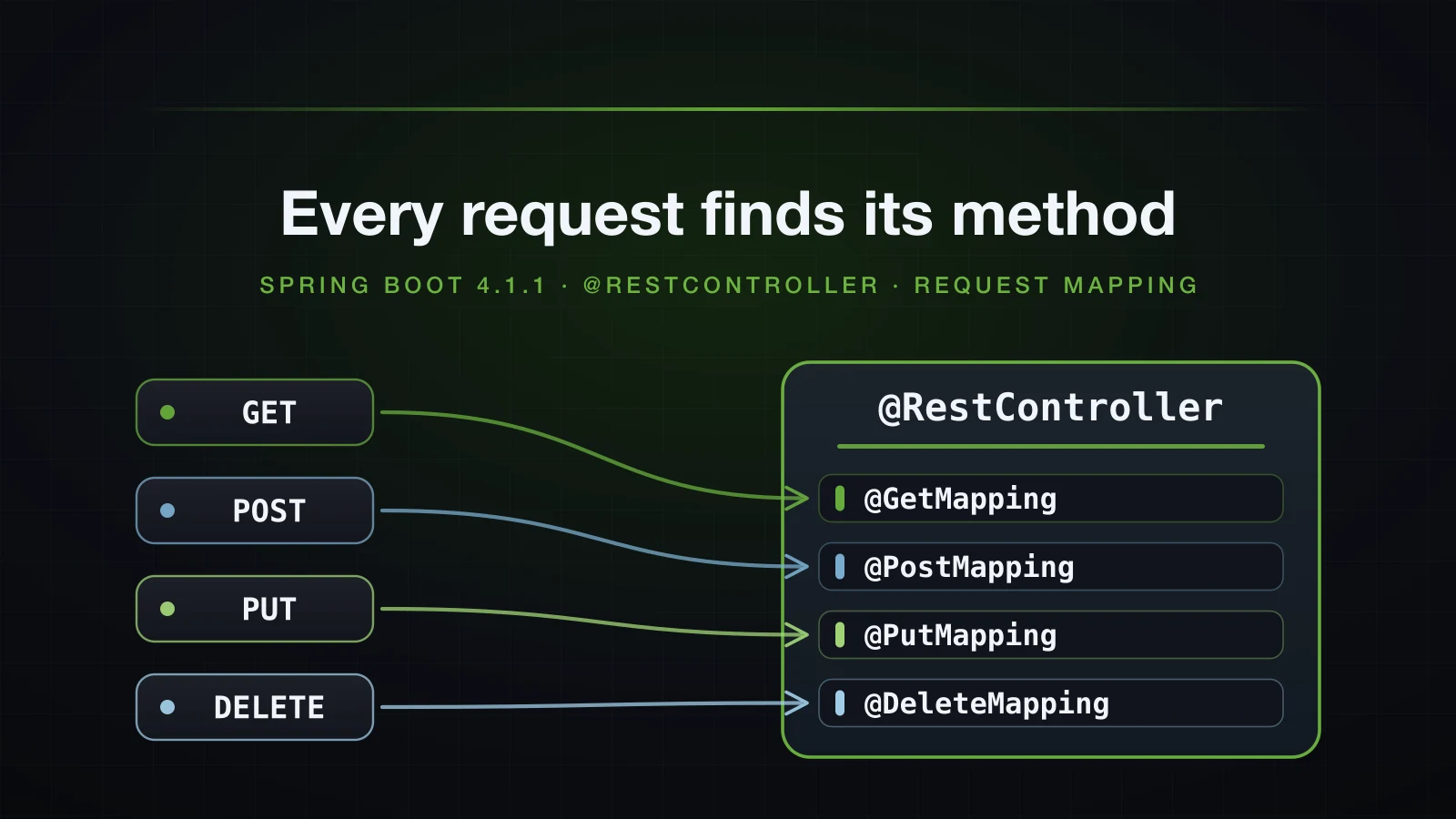
The examples use Spring Boot 4.1.1 and Java 21, on an Initializr project with only the web dependency. The app runs with --server.port=8116 instead of the default 8080, so that is the port in the curl commands and in the nio-8116-exec-N thread names in the logs. Log levels are set the same way, as --logging.level... arguments.
@RestController is @Controller plus @ResponseBody
This is @RestController as it ships in spring-web 7.0.9, without its Javadoc:
@Target(ElementType.TYPE)
@Retention(RetentionPolicy.RUNTIME)
@Documented
@Controller
@ResponseBody
public @interface RestController {

    @AliasFor(annotation = Controller.class)
    String value() default "";
}
The annotation has no behaviour of its own. It stands for two annotations on the same class:
@Controlleris a stereotype, so component scanning registers the class as a bean (article 6). It is also the markerRequestMappingHandlerMappingchecks for when it collects mapped methods at startup: itsisHandlermethod tests the bean class for@Controller.valueis an alias for the bean name.@ResponseBodysays that a method's return value is the response body. Placed on the class, it applies to every method in it.
Taking @ResponseBody away shows what it does. Article 3's HelloController returns "Hello, Spring Boot!" from /hello. Here is the same method in a class annotated with plain @Controller:
package com.example.demo;

import org.springframework.stereotype.Controller;
import org.springframework.web.bind.annotation.GetMapping;

@Controller
public class PageController {

    @GetMapping("/page")
    public String page() {
        return "Hello, Spring Boot!";
    }
}curl -i http://localhost:8116/helloHTTP/1.1 200
Content-Type: text/plain;charset=UTF-8
Content-Length: 19
Hello, Spring Boot!curl -i http://localhost:8116/pageHTTP/1.1 404
Content-Type: application/json
Content-Language: en-VN
Transfer-Encoding: chunked
{"timestamp":"2026-09-12T07:22:01.768Z","status":404,"error":"Not Found","path":"/page"}A mapped path, a method that returns a value, and a 404. At the default INFO level the log offers nothing beyond the three Initializing lines that any first request prints. With logging.level.org.springframework.web=DEBUG the reason is visible:
2026-09-12T14:22:08.020+07:00 DEBUG 41745 --- [demo] [nio-8116-exec-1] o.s.web.servlet.DispatcherServlet        : GET "/page", parameters={}
2026-09-12T14:22:08.023+07:00 DEBUG 41745 --- [demo] [nio-8116-exec-1] s.w.s.m.m.a.RequestMappingHandlerMapping : Mapped to com.example.demo.PageController#page()
2026-09-12T14:22:08.029+07:00 DEBUG 41745 --- [demo] [nio-8116-exec-1] o.s.w.s.v.ContentNegotiatingViewResolver : Selected '*/*' given [*/*]
2026-09-12T14:22:08.029+07:00 DEBUG 41745 --- [demo] [nio-8116-exec-1] o.s.w.servlet.view.InternalResourceView  : View name [Hello, Spring Boot!], model {}
2026-09-12T14:22:08.029+07:00 DEBUG 41745 --- [demo] [nio-8116-exec-1] o.s.w.servlet.view.InternalResourceView  : Forwarding to [Hello, Spring Boot!]
2026-09-12T14:22:08.030+07:00 DEBUG 41745 --- [demo] [nio-8116-exec-1] o.s.web.servlet.DispatcherServlet        : "FORWARD" dispatch for GET "/Hello, Spring Boot!", parameters={}
2026-09-12T14:22:08.031+07:00 DEBUG 41745 --- [demo] [nio-8116-exec-1] o.s.w.s.handler.SimpleUrlHandlerMapping  : Mapped to ResourceHttpRequestHandler [classpath [META-INF/resources/], classpath [resources/], classpath [static/], classpath [public/], ServletContext [/]]
2026-09-12T14:22:08.033+07:00 DEBUG 41745 --- [demo] [nio-8116-exec-1] o.s.w.s.r.ResourceHttpRequestHandler     : Resource not found for path [Hello, Spring Boot!]
2026-09-12T14:22:08.034+07:00 DEBUG 41745 --- [demo] [nio-8116-exec-1] .w.s.m.s.DefaultHandlerExceptionResolver : Resolved [org.springframework.web.servlet.resource.NoResourceFoundException: No static resource Hello, Spring Boot! for request '/Hello, Spring Boot!'.]
2026-09-12T14:22:08.034+07:00 DEBUG 41745 --- [demo] [nio-8116-exec-1] o.s.web.servlet.DispatcherServlet        : Exiting from "FORWARD" dispatch, status 404
2026-09-12T14:22:08.035+07:00 DEBUG 41745 --- [demo] [nio-8116-exec-1] o.s.web.servlet.DispatcherServlet        : Completed 404 NOT_FOUND
The mapping worked: Mapped to com.example.demo.PageController#page(). What went wrong came after it. Without @ResponseBody, a String return value is a view name. Boot's view resolvers looked for a view called Hello, Spring Boot!, and with no template engine on the classpath the one they found is an InternalResourceView, which forwards the request to a URL of that name. The forward went to /Hello, Spring Boot!, the static resource handler had no such file, and its 404 became the response.
When the view name matches the method's own path, the forward would loop, and Spring stops it with a 500 instead:
    @GetMapping("/page")
    public String page() {
        return "Hello, Spring Boot!";
    }

    @GetMapping("/catalogue")
    public String catalogue() {
        return "catalogue";
    }
curl -i http://localhost:8116/catalogue returned HTTP/1.1 500 with "error":"Internal Server Error" in the body, and the log printed this line followed by a stack trace:
2026-09-12T14:22:02.108+07:00 ERROR 41619 --- [demo] [nio-8116-exec-2] o.a.c.c.C.[.[.[/].[dispatcherServlet] : Servlet.service() for servlet [dispatcherServlet] in context with path [] threw exception [Circular view path [catalogue]: would dispatch back to the current handler URL [/catalogue] again. Check your ViewResolver setup! (Hint: This may be the result of an unspecified view, due to default view name generation.)] with root causeAdd @ResponseBody to page(), or change the class annotation to @RestController, and /page returns exactly what /hello returns: 200, text/plain;charset=UTF-8, Content-Length: 19.
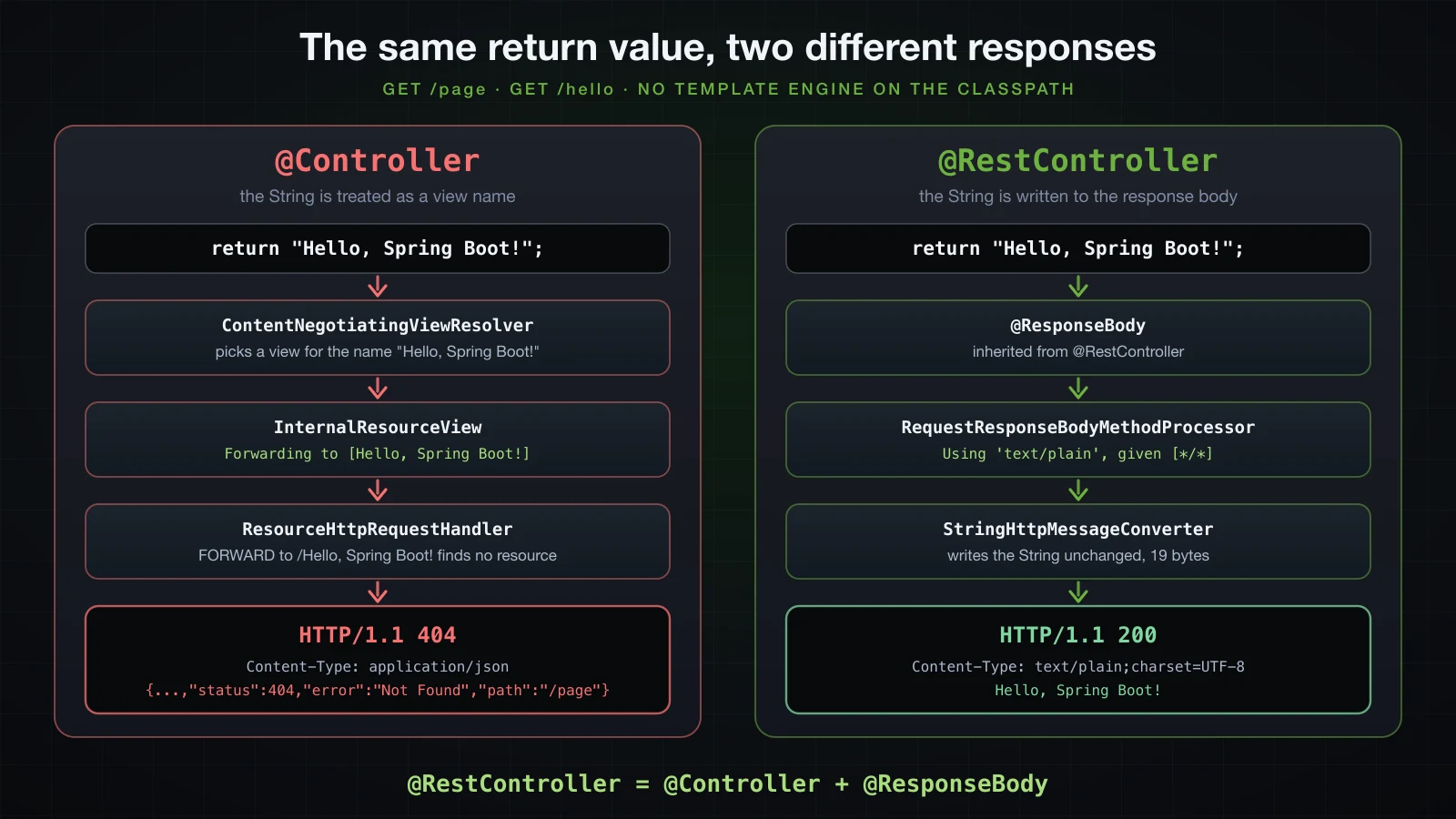
A @Controller that returns view names is the right tool when a template engine renders HTML on the server, which is article 24. For a JSON API, every controller in this chapter is a @RestController.
Class-level @RequestMapping and the HTTP method shortcuts
@RequestMapping is the general annotation. On a class, it sets a path prefix for every method inside. On a method, it adds the rest of the path and, through its method attribute, the HTTP methods it accepts. Its other attributes — params, headers, consumes, produces — narrow the match further and get a section of their own below.
Writing @RequestMapping(path = "/{id}", method = RequestMethod.GET) on every method is noisy, so Spring provides five shortcuts: @GetMapping, @PostMapping, @PutMapping, @PatchMapping and @DeleteMapping. They are composed annotations, and the source makes that literal. @GetMapping in spring-web 7.0.9, without its Javadoc:
@Target(ElementType.METHOD)
@Retention(RetentionPolicy.RUNTIME)
@Documented
@RequestMapping(method = RequestMethod.GET)
public @interface GetMapping {

    @AliasFor(annotation = RequestMapping.class)
    String name() default "";

    @AliasFor(annotation = RequestMapping.class)
    String[] value() default {};

    @AliasFor(annotation = RequestMapping.class)
    String[] path() default {};

    @AliasFor(annotation = RequestMapping.class)
    String[] params() default {};

    @AliasFor(annotation = RequestMapping.class)
    String[] headers() default {};

    @AliasFor(annotation = RequestMapping.class)
    String[] consumes() default {};

    @AliasFor(annotation = RequestMapping.class)
    String[] produces() default {};

    @AliasFor(annotation = RequestMapping.class)
    String version() default "";
}
@RequestMapping(method = RequestMethod.GET) sits on the annotation itself, and every attribute is an @AliasFor that forwards its value to @RequestMapping. @PostMapping, @PutMapping, @PatchMapping and @DeleteMapping have the same eight attributes and differ only in the RequestMethod constant, so none of them has a method attribute to get wrong. version is new in Framework 7 and belongs to API versioning, which the Advanced course covers.
All five shortcuts are declared @Target(ElementType.METHOD): they cannot go on a class. The class-level prefix is always a plain @RequestMapping.
A CRUD controller for /api/products
The catalogue needs a type for its products. A record in a product package under the generated com.example.demo:
package com.example.demo.product;

import java.math.BigDecimal;

public record Product(Long id, String name, BigDecimal price) {
}
And the controller, with six methods: list, read one, create, replace, partially update and delete. The products live in a ConcurrentHashMap inside the controller, with an AtomicLong handing out ids, because there is no database until Chapter 4; article 21 moves this store into a service and a repository.
package com.example.demo.product;

import java.util.Comparator;
import java.util.List;
import java.util.Map;
import java.util.concurrent.ConcurrentHashMap;
import java.util.concurrent.atomic.AtomicLong;

import org.springframework.http.HttpStatus;
import org.springframework.web.bind.annotation.DeleteMapping;
import org.springframework.web.bind.annotation.GetMapping;
import org.springframework.web.bind.annotation.PatchMapping;
import org.springframework.web.bind.annotation.PathVariable;
import org.springframework.web.bind.annotation.PostMapping;
import org.springframework.web.bind.annotation.PutMapping;
import org.springframework.web.bind.annotation.RequestBody;
import org.springframework.web.bind.annotation.RequestMapping;
import org.springframework.web.bind.annotation.ResponseStatus;
import org.springframework.web.bind.annotation.RestController;

@RestController
@RequestMapping("/api/products")
public class ProductController {

    private final Map<Long, Product> products = new ConcurrentHashMap<>();
    private final AtomicLong nextId = new AtomicLong(1);

    @GetMapping
    public List<Product> findAll() {
        return products.values().stream()
                .sorted(Comparator.comparing(Product::id))
                .toList();
    }

    @GetMapping("/{id}")
    public Product findById(@PathVariable Long id) {
        return products.get(id);
    }

    @PostMapping
    @ResponseStatus(HttpStatus.CREATED)
    public Product create(@RequestBody Product product) {
        Long id = nextId.getAndIncrement();
        Product saved = new Product(id, product.name(), product.price());
        products.put(id, saved);
        return saved;
    }

    @PutMapping("/{id}")
    public Product replace(@PathVariable Long id, @RequestBody Product product) {
        return products.computeIfPresent(id,
                (key, current) -> new Product(id, product.name(), product.price()));
    }

    @PatchMapping("/{id}")
    public Product update(@PathVariable Long id, @RequestBody Product changes) {
        return products.computeIfPresent(id, (key, current) -> new Product(id,
                changes.name() != null ? changes.name() : current.name(),
                changes.price() != null ? changes.price() : current.price()));
    }

    @DeleteMapping("/{id}")
    @ResponseStatus(HttpStatus.NO_CONTENT)
    public void delete(@PathVariable Long id) {
        products.remove(id);
    }
}
What each annotation contributes:
@RequestMapping("/api/products")on the class is prepended to every method's path.@GetMappingand@PostMappingwith no path of their own therefore map/api/productsitself.@PathVariable Long idtakes the{id}segment of the path, and@RequestBody Productreads the JSON body into aProduct. Both appear in their simplest form here; their options, type conversion and failure cases are article 17.@ResponseStatus(HttpStatus.CREATED)makes a successfulcreateanswer 201 instead of 200, and@ResponseStatus(HttpStatus.NO_CONTENT)makesdeleteanswer 204.findById,replaceandupdatereturnnullfor an id that does not exist. What anullturns into is shown in the last section.
Create a product:
curl -i -X POST http://localhost:8116/api/products \
  -H "Content-Type: application/json" \
-d '{"name":"Mechanical keyboard","price":89.90}'HTTP/1.1 201
Content-Type: application/json
Content-Length: 51
{"id":1,"name":"Mechanical keyboard","price":89.90}The id came from the AtomicLong, and BigDecimal kept the trailing zero of 89.90. A second POST with {"name":"USB-C hub","price":35.50} returned {"id":2,"name":"USB-C hub","price":35.50}. List them:
curl -i http://localhost:8116/api/productsHTTP/1.1 200
Content-Type: application/json
Content-Length: 95
[{"id":1,"name":"Mechanical keyboard","price":89.90},{"id":2,"name":"USB-C hub","price":35.50}]Read one:
curl -i http://localhost:8116/api/products/1HTTP/1.1 200
Content-Type: application/json
Content-Length: 51
{"id":1,"name":"Mechanical keyboard","price":89.90}Replace the second one:
curl -i -X PUT http://localhost:8116/api/products/2 \
  -H "Content-Type: application/json" \
-d '{"name":"USB-C hub 7-in-1","price":42.00}'HTTP/1.1 200
Content-Type: application/json
Content-Length: 48
{"id":2,"name":"USB-C hub 7-in-1","price":42.00}Change only the price of the first:
curl -i -X PATCH http://localhost:8116/api/products/1 \
  -H "Content-Type: application/json" \
-d '{"price":79.90}'HTTP/1.1 200
Content-Type: application/json
Content-Length: 51
{"id":1,"name":"Mechanical keyboard","price":79.90}The body carried no name, so the Product argument arrived with name set to null and update kept the stored name. Delete the second:
curl -i -X DELETE http://localhost:8116/api/products/2HTTP/1.1 204A 204 carries no body, so the response has no Content-Type and no Content-Length either. Listing again shows one product left:
curl -i http://localhost:8116/api/productsHTTP/1.1 200
Content-Type: application/json
Content-Length: 53
[{"id":1,"name":"Mechanical keyboard","price":79.90}]Which annotation maps which HTTP method
| Annotation | HTTP method | In the catalogue | Status on success |
|---|---|---|---|
@GetMapping | GET | GET /api/products lists, GET /api/products/{id} reads one | 200 |
@PostMapping | POST | POST /api/products creates a product | 201, set by @ResponseStatus(HttpStatus.CREATED) |
@PutMapping | PUT | PUT /api/products/{id} replaces a product | 200 |
@PatchMapping | PATCH | PATCH /api/products/{id} changes some fields | 200 |
@DeleteMapping | DELETE | DELETE /api/products/{id} removes a product | 204, set by @ResponseStatus(HttpStatus.NO_CONTENT) |
@RequestMapping | every method, unless method is set | the /api/products prefix on the class | — |
A @RequestMapping without method matches every HTTP method
The shortcuts are shorter, and they also rule out a mistake that @RequestMapping makes easy. Replace @GetMapping on findAll with a bare @RequestMapping:
    @GetMapping
    @RequestMapping
    public List<Product> findAll() {
The application starts and GET /api/products still works. The TRACE list of mappings at startup, shown in the next section, reveals the change: the line for findAll reads { [/api/products]}: findAll(), with nothing where GET used to be. With three products stored, send a DELETE to the collection:
curl -i -X DELETE http://localhost:8116/api/productsHTTP/1.1 200
Content-Type: application/json
Content-Length: 144
[{"id":1,"name":"Mechanical keyboard","price":89.90},{"id":2,"name":"USB-C hub","price":35.50},{"id":3,"name":"27-inch monitor","price":249.00}]2026-09-12T14:22:14.036+07:00 TRACE 41886 --- [demo] [nio-8116-exec-6] o.s.web.servlet.DispatcherServlet : DELETE "/api/products", parameters={}, headers={masked} in DispatcherServlet 'dispatcherServlet'
2026-09-12T14:22:14.036+07:00 TRACE 41886 --- [demo] [nio-8116-exec-6] s.w.s.m.m.a.RequestMappingHandlerMapping : Mapped to com.example.demo.product.ProductController#findAll()The DELETE went to a method written for reading and got the product list back with a 200. A PUT to the same URL did exactly the same. POST was unaffected, and the TRACE log shows why:
2026-09-12T14:22:14.704+07:00 TRACE 41886 --- [demo] [io-8116-exec-10] s.w.s.m.m.a.RequestMappingHandlerMapping : 2 matching mappings: [{POST [/api/products]}, { [/api/products]}]
2026-09-12T14:22:14.704+07:00 TRACE 41886 --- [demo] [io-8116-exec-10] s.w.s.m.m.a.RequestMappingHandlerMapping : Mapped to com.example.demo.product.ProductController#create(Product)
Two mappings matched the POST. The one that names POST is more specific than the one that names no method, so create won. For DELETE and PUT no mapping on /api/products names the method, and the bare one answered.
⚠️ A method-level
@RequestMappingwithoutmethodis not a shorthand for GET. It accepts every HTTP method that no more specific mapping claims. Use the shortcuts on methods and keep@RequestMappingfor the class prefix.
How a request reaches your method inside Spring MVC
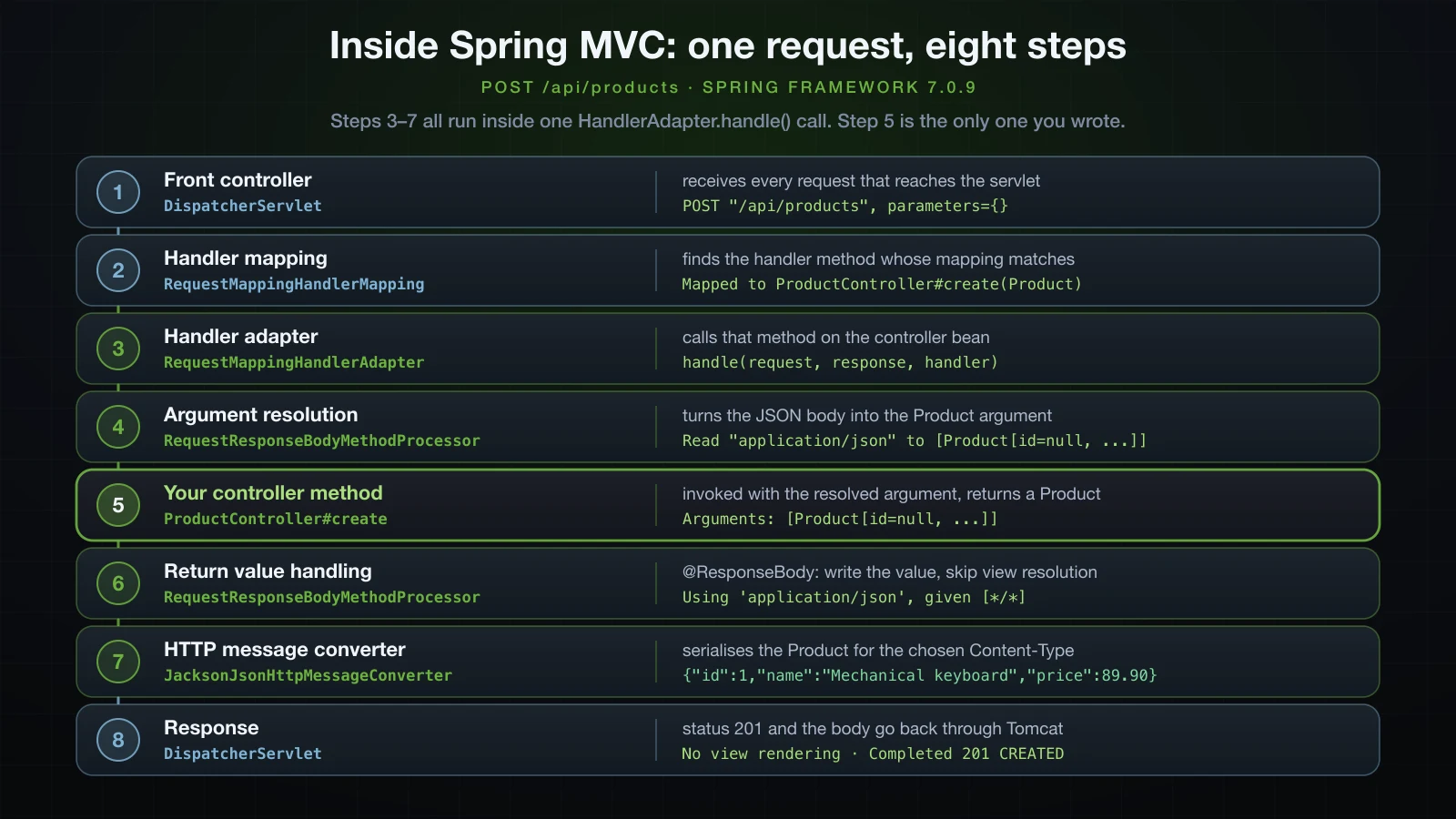
Article 3 followed one request from the outside: curl, the embedded Tomcat, the controller, JSON. Inside, Tomcat hands every request to a single servlet, DispatcherServlet, registered at /; it is Spring MVC's front controller. Between it and your method sits a chain of pluggable components, and the running application shows what Boot configured: six HandlerMapping beans, four HandlerAdapter beans and six HttpMessageConverters on RequestMappingHandlerAdapter.
For POST /api/products:
DispatcherServletreceives the request and asks itsHandlerMappingbeans, in turn, for a handler.RequestMappingHandlerMappinganswers. At startup it collected the mapped methods of every@Controllerbean into a registry; now it matches the request against that registry and returnsProductController#create(Product).DispatcherServletlooks for aHandlerAdapterthat can call that kind of handler —RequestMappingHandlerAdapterfor annotated methods — and calls itshandle(request, response, handler). Steps 3 to 7 all run inside that one call.- Argument resolution. The adapter asks its argument resolvers for each parameter.
@PathVariableis resolved byPathVariableMethodArgumentResolver,@RequestBodybyRequestResponseBodyMethodProcessor, which reads the body through anHttpMessageConverter. - Your method runs with the resolved arguments.
- Return value handling. Return value handlers are consulted in a fixed order, and
RequestResponseBodyMethodProcessorcomes beforeViewNameMethodReturnValueHandler. It takes any method with@ResponseBodyon the method or its class, and chooses a content type from theAcceptheader and the converters able to write the value. Without@ResponseBody, aStringfalls through toViewNameMethodReturnValueHandlerand becomes a view name — the 404 from the first section. HttpMessageConverterwrites the value:JacksonJsonHttpMessageConverter(Jackson 3) for aProduct,StringHttpMessageConverterfor aString.- The adapter returns no
ModelAndView, soDispatcherServletrenders no view, and the response goes back to Tomcat.
With logging.level.org.springframework.web=DEBUG, the POST from the previous section logs one line for most of those steps:
2026-09-12T14:22:08.389+07:00 DEBUG 41745 --- [demo] [nio-8116-exec-2] o.s.web.servlet.DispatcherServlet        : POST "/api/products", parameters={}
2026-09-12T14:22:08.389+07:00 DEBUG 41745 --- [demo] [nio-8116-exec-2] s.w.s.m.m.a.RequestMappingHandlerMapping : Mapped to com.example.demo.product.ProductController#create(Product)
2026-09-12T14:22:08.425+07:00 DEBUG 41745 --- [demo] [nio-8116-exec-2] m.m.a.RequestResponseBodyMethodProcessor : Read "application/json;charset=UTF-8" to [Product[id=null, name=Mechanical keyboard, price=89.90]]
2026-09-12T14:22:08.440+07:00 DEBUG 41745 --- [demo] [nio-8116-exec-2] m.m.a.RequestResponseBodyMethodProcessor : Using 'application/json', given [*/*] and supported [application/json, application/*+json]
2026-09-12T14:22:08.440+07:00 DEBUG 41745 --- [demo] [nio-8116-exec-2] m.m.a.RequestResponseBodyMethodProcessor : Writing [Product[id=1, name=Mechanical keyboard, price=89.90]]
2026-09-12T14:22:08.452+07:00 DEBUG 41745 --- [demo] [nio-8116-exec-2] o.s.web.servlet.DispatcherServlet        : Completed 201 CREATED
Line by line: the request as it arrived (step 1), the method the mapping chose (2), the JSON body read into the @RequestBody argument (4), the content type chosen from Accept: */*, which curl sends by default, and what the JSON converter supports (6), the value being written (7), and the final status (8). At TRACE the same request adds three lines that DEBUG leaves out — the arguments at the moment of invocation (5), a line from RequestMappingHandlerAdapter after the method has returned, and the confirmation that no view was involved (8):
2026-09-12T14:22:10.259+07:00 TRACE 41799 --- [demo] [nio-8116-exec-1] o.s.web.method.HandlerMethod             : Arguments: [Product[id=null, name=Mechanical keyboard, price=89.90]]
2026-09-12T14:22:10.268+07:00 TRACE 41799 --- [demo] [nio-8116-exec-1] s.w.s.m.m.a.RequestMappingHandlerAdapter : Applying default cacheSeconds=-1
2026-09-12T14:22:10.268+07:00 TRACE 41799 --- [demo] [nio-8116-exec-1] o.s.web.servlet.DispatcherServlet        : No view rendering, null ModelAndView returned.
Listing every mapping at startup
RequestMappingHandlerMapping prints its whole registry at startup, one block per controller, when its logger is at TRACE. logging.level.org.springframework.web=TRACE switches that on:
2026-09-12T14:22:10.128+07:00 TRACE 41799 --- [demo] [           main] s.w.s.m.m.a.RequestMappingHandlerMapping :
	c.e.d.HelloController:
	{GET [/greeting]}: greeting(String)
	{GET [/hello]}: hello()
2026-09-12T14:22:10.129+07:00 TRACE 41799 --- [demo] [           main] s.w.s.m.m.a.RequestMappingHandlerMapping :
	c.e.d.PageController:
	{GET [/catalogue]}: catalogue()
	{GET [/page]}: page()
2026-09-12T14:22:10.131+07:00 TRACE 41799 --- [demo] [           main] s.w.s.m.m.a.RequestMappingHandlerMapping :
	c.e.d.p.ProductController:
	{GET [/api/products/{id}]}: findById(Long)
	{PATCH [/api/products/{id}]}: update(Long,Product)
	{PUT [/api/products/{id}]}: replace(Long,Product)
	{DELETE [/api/products/{id}]}: delete(Long)
	{POST [/api/products]}: create(Product)
	{GET [/api/products]}: findAll()
2026-09-12T14:22:10.133+07:00 TRACE 41799 --- [demo] [           main] s.w.s.m.m.a.RequestMappingHandlerMapping :
	o.s.b.w.a.e.BasicErrorController:
	{ [/error], produces [text/html]}: errorHtml(HttpServletRequest,HttpServletResponse)
	{ [/error]}: error(HttpServletRequest)
2026-09-12T14:22:10.134+07:00 DEBUG 41799 --- [demo] [           main] s.w.s.m.m.a.RequestMappingHandlerMapping : 12 mappings in 'requestMappingHandlerMapping'
Each line is one mapping and the method it calls: {GET [/api/products/{id}]} is the HTTP method and the pattern. Boot's own BasicErrorController maps /error with no method at all, the same shape as the bare @RequestMapping from the previous section. The DEBUG line counts them: six product mappings, two in HelloController, two in PageController and two for /error.
TRACE also turns on everything else the web packages log at that level. For just this list, use the separate logger Spring keeps for it, whose name starts with an underscore:
logging.level._org.springframework.web.servlet.HandlerMapping.Mappings=DEBUGThat run printed the same four blocks through _.s.web.servlet.HandlerMapping.Mappings, followed by an empty 'beanNameHandlerMapping' {} and the static resource mappings /webjars/** and /**, and no other DEBUG line. Actuator exposes the same registry over HTTP at /actuator/mappings; Actuator is Chapter 7.
URL path patterns in Spring MVC mappings
A mapping's path is a pattern, parsed by PathPatternParser. That is the default in Boot 4.1.1: spring.mvc.pathmatch.matching-strategy defaults to path-pattern-parser in the configuration metadata, and RequestMappingHandlerMapping.getPatternParser() returned a PathPatternParser in the running application. The syntax:
| Pattern element | Matches | Example |
|---|---|---|
| literal text | exactly that text | /api/products/featured |
{name} | one whole path segment, captured as name | /api/categories/{name} |
{name:regex} | one segment that matches the regex | /api/products/{id:\d+} |
* | any characters inside one segment | /api/images/*.png |
** | zero or more whole segments | /api/docs/** |
{*name} | zero or more segments, captured as name | /api/categories/{*path} |
A throwaway controller shows the wildcards at work:
package com.example.demo;

import org.springframework.web.bind.annotation.GetMapping;
import org.springframework.web.bind.annotation.PathVariable;
import org.springframework.web.bind.annotation.RestController;

@RestController
public class PatternDemoController {

    @GetMapping("/api/images/*.png")
    public String image() {
        return "*.png";
    }

    @GetMapping("/api/docs/**")
    public String docs() {
        return "docs/**";
    }

    @GetMapping("/api/categories/{name}")
    public String category(@PathVariable String name) {
        return "{name} = " + name;
    }

    @GetMapping("/api/categories/{*path}")
    public String categoryPath(@PathVariable String path) {
        return "{*path} = " + path;
    }
}| Request | Status | Body |
|---|---|---|
/api/images/phone.png | 200 | *.png |
/api/images/2026/phone.png | 404 | the default error body |
/api/images/phone.jpg | 404 | the default error body |
/api/docs | 200 | docs/** |
/api/docs/ | 200 | docs/** |
/api/docs/v1/products.html | 200 | docs/** |
/api/categories/phones | 200 | {name} = phones |
/api/categories/electronics/phones | 200 | {*path} = /electronics/phones |
/api/categories/ | 200 | {*path} = / |
/api/categories | 200 | {*path} = followed by an empty value |
* never crosses a /. ** also matches zero segments, which is why /api/docs itself answered. {*path} captures the remaining segments with their leading slash, and an empty string when there are none. /api/categories/phones matched both category patterns and went to {name}; the next subsection explains why.
** and {*path} are only allowed at the start or the end of a pattern. A mapping such as @GetMapping("/api/**/reviews") stops the application at startup:
***************************
APPLICATION FAILED TO START
***************************

Description:

Invalid mapping pattern detected:
/api/**/reviews
     ^
{*...} or ** pattern elements should be placed at the start or end of the pattern

Action:

Fix this pattern in your application or switch to the legacy parser implementation with 'spring.mvc.pathmatch.matching-strategy=ant_path_matcher'.
The start of a pattern is a new place for them. The PathPatternParser in spring-web 6.2.11 rejects /**/reviews with No more pattern data allowed after {*...} or ** pattern element, while the 7.0.9 parser accepts it and matches /api/x/reviews.
Which mapping wins when several match
Add a featured endpoint at the end of ProductController, after the {id} methods:
    @DeleteMapping("/{id}")
    @ResponseStatus(HttpStatus.NO_CONTENT)
    public void delete(@PathVariable Long id) {
        products.remove(id);
    }

    @GetMapping("/featured")
    public List<Product> featured() {
        return products.values().stream()
                .sorted(Comparator.comparing(Product::price).reversed())
                .limit(3)
                .toList();
    }
}
/api/products/featured matches /api/products/{id} as well as /api/products/featured:
curl -i http://localhost:8116/api/products/featuredHTTP/1.1 200
Content-Type: application/json
Content-Length: 144
[{"id":3,"name":"27-inch monitor","price":249.00},{"id":1,"name":"Mechanical keyboard","price":89.90},{"id":2,"name":"USB-C hub","price":35.50}]The literal won, although featured() is declared after findById. When several patterns match, Spring sorts them by specificity and takes the first; declaration order plays no part. Broadly, fewer URI variables and wildcards make a pattern more specific, and ** and {*path} are the least specific of all, which is why /api/categories/phones went to {name} rather than {*path} above.
Specificity cannot separate two different patterns that match equally well. A second controller with /{name} under the same prefix starts cleanly:
package com.example.demo.product;

import org.springframework.web.bind.annotation.GetMapping;
import org.springframework.web.bind.annotation.PathVariable;
import org.springframework.web.bind.annotation.RequestMapping;
import org.springframework.web.bind.annotation.RestController;

@RestController
@RequestMapping("/api/products")
public class ProductLookupController {

    @GetMapping("/{name}")
    public String findByName(@PathVariable String name) {
        return name;
    }
}
/api/products/featured still answered 200, because the literal beats both variables. /api/products/1 matched {id} and {name} with the same specificity, and the request failed with HTTP/1.1 500:
2026-09-12T14:29:26.349+07:00 ERROR 49308 --- [demo] [nio-8116-exec-2] o.a.c.c.C.[.[.[/].[dispatcherServlet] : Servlet.service() for servlet [dispatcherServlet] in context with path [] threw exception [Request processing failed: java.lang.IllegalStateException: Ambiguous handler methods mapped for '/api/products/1': {public com.example.demo.product.Product com.example.demo.product.ProductController.findById(java.lang.Long), public java.lang.String com.example.demo.product.ProductLookupController.findByName(java.lang.String)}] with root causeNothing warned about it at startup; the conflict surfaces only when a request hits both patterns.
Two identical mappings stop the application from starting
Without the lookup controller, suppose a search endpoint is added with the same annotation as findAll:
    @GetMapping
    public List<Product> findAll() {
        return products.values().stream()
                .sorted(Comparator.comparing(Product::id))
                .toList();
    }

    @GetMapping
    public List<Product> search(@RequestParam String name) {
        return products.values().stream()
                .filter(p -> p.name().toLowerCase().contains(name.toLowerCase()))
                .toList();
    }
It compiles. It does not start: RequestMappingHandlerMapping checks for duplicates while it builds the registry, and the run ends with Application run failed and this exception:
org.springframework.beans.factory.BeanCreationException: Error creating bean with name 'requestMappingHandlerMapping' defined in class path resource [org/springframework/boot/webmvc/autoconfigure/WebMvcAutoConfiguration$EnableWebMvcConfiguration.class]: Ambiguous mapping. Cannot map 'productController' method
com.example.demo.product.ProductController#findAll()
to {GET [/api/products]}: There is already 'productController' bean method
com.example.demo.product.ProductController#search(String) mapped.
Same pattern, same HTTP method, no other condition: nothing tells the two apart, so Spring refuses to guess. With @GetMapping(params = "name") on search they are different mappings; the application started, /api/products?name=hub reached search and /api/products reached findAll. params is one of the conditions covered below.
Restricting a path variable to digits
A variable accepts anything in its segment, so /api/products/abc reaches findById too, and converting abc to Long fails with HTTP/1.1 400; article 17 explains that error. A regular expression in the variable stops non-numbers from matching at all:
    @GetMapping("/{id}")
    @GetMapping("/{id:\\d+}")
    public Product findById(@PathVariable Long id) {
        return products.get(id);
    }

    @PutMapping("/{id}")
    @PutMapping("/{id:\\d+}")
    public Product replace(@PathVariable Long id, @RequestBody Product product) {
        // unchanged
    }

    @PatchMapping("/{id}")
    @PatchMapping("/{id:\\d+}")
    public Product update(@PathVariable Long id, @RequestBody Product changes) {
        // unchanged
    }

    @DeleteMapping("/{id}")
    @DeleteMapping("/{id:\\d+}")
    @ResponseStatus(HttpStatus.NO_CONTENT)
    public void delete(@PathVariable Long id) {
        products.remove(id);
}curl -i http://localhost:8116/api/products/abcHTTP/1.1 404
Content-Type: application/json
Transfer-Encoding: chunked
{"timestamp":"2026-09-12T07:22:23.390Z","status":404,"error":"Not Found","path":"/api/products/abc"}No mapping matches now, which is the right answer for a URL that cannot name a product. Java source doubles the backslash; the pattern itself is {id:\d+}. The regex matters again in the conditions and OPTIONS sections.
Trailing slashes and letter case
Article 15 recommends a single form of each URL, without the trailing slash; this is what Spring does with the other form. /api/products/ is a different URL from /api/products:
curl -i http://localhost:8116/api/products/HTTP/1.1 404
Content-Type: application/json
Transfer-Encoding: chunked
{"timestamp":"2026-09-12T07:22:23.729Z","status":404,"error":"Not Found","path":"/api/products/"}/api/products/1/ got the same 404. Tutorials written for older Spring versions often show both forms reaching the same method, usually through setUseTrailingSlashMatch. That option is gone: PathMatchConfigurer in Framework 7.0.9 has no such method, while the 6.2.11 class still had it.
Letter case matters as well, as article 15 showed. /API/products and /api/Products both returned 404, and the application's PathPatternParser reports isCaseSensitive() as true.
If a client you do not control sends a trailing slash, register UrlHandlerFilter.trailingSlashHandler("/api/**").wrapRequest().build() from spring-web as a bean; with it in place, /api/products/ returned the product list. For letter case, a WebMvcConfigurer whose configurePathMatch sets a PathPatternParser with setCaseSensitive(false) made /API/Products answer 200.
Narrowing a mapping with consumes, produces, params and headers
Path and HTTP method are two conditions of a mapping. @RequestMapping and every shortcut accept four more:
| Attribute | Compared with | Example | Status when it is why nothing matches |
|---|---|---|---|
consumes | the request's Content-Type | consumes = MediaType.APPLICATION_JSON_VALUE | 415 |
produces | the request's Accept | produces = "text/csv" | 406 |
params | query parameters | params = "confirm=true", or params = "confirm" for presence only | 400 |
headers | request headers | headers = "X-Import-Source=warehouse" | 404 |
Three changes put them into the catalogue: the write methods accept only JSON, a CSV export sits next to the JSON list, and emptying the whole catalogue requires ?confirm=true.
import org.springframework.http.MediaType;

    @PostMapping
    @PostMapping(consumes = MediaType.APPLICATION_JSON_VALUE)
    @ResponseStatus(HttpStatus.CREATED)
    public Product create(@RequestBody Product product) {
        // unchanged
    }

    @PutMapping("/{id:\\d+}")
    @PutMapping(path = "/{id:\\d+}", consumes = MediaType.APPLICATION_JSON_VALUE)
    public Product replace(@PathVariable Long id, @RequestBody Product product) {
        // unchanged
    }

    @PatchMapping("/{id:\\d+}")
    @PatchMapping(path = "/{id:\\d+}", consumes = MediaType.APPLICATION_JSON_VALUE)
    public Product update(@PathVariable Long id, @RequestBody Product changes) {
        // unchanged
    }

    @GetMapping(path = "/export", produces = "text/csv")
    public String exportCsv() {
        StringBuilder csv = new StringBuilder("id,name,price\n");
        for (Product p : findAll()) {
            csv.append(p.id()).append(',').append(p.name()).append(',').append(p.price()).append('\n');
        }
        return csv.toString();
    }

    @DeleteMapping(params = "confirm=true")
    @ResponseStatus(HttpStatus.NO_CONTENT)
    public void deleteAll() {
        products.clear();
    }
With three products stored, the export works as intended:
curl -i http://localhost:8116/api/products/exportHTTP/1.1 200
Content-Type: text/csv;charset=UTF-8
Content-Length: 85
id,name,price
1,Mechanical keyboard,89.90
2,USB-C hub,35.50
3,27-inch monitor,249.00Now the failures, one condition at a time. A path nobody mapped:
curl -i http://localhost:8116/api/produktsHTTP/1.1 404
Content-Type: application/json
Transfer-Encoding: chunked
{"timestamp":"2026-09-12T07:22:25.072Z","status":404,"error":"Not Found","path":"/api/produkts"}A mapped path with a method none of its mappings accepts:
curl -i -X PUT http://localhost:8116/api/products -H "Content-Type: application/json" -d '{"name":"Desk lamp","price":19.90}'HTTP/1.1 405
Allow: DELETE, GET, POST
Content-Type: application/json
Transfer-Encoding: chunked
{"timestamp":"2026-09-12T07:22:25.409Z","status":405,"error":"Method Not Allowed","path":"/api/products"}An Accept header that produces cannot satisfy:
curl -i http://localhost:8116/api/products/export -H "Accept: application/json"HTTP/1.1 406
Accept: text/csv
Content-Type: application/json
Transfer-Encoding: chunked
{"timestamp":"2026-09-12T07:22:25.747Z","status":406,"error":"Not Acceptable","path":"/api/products/export"}A Content-Type that consumes rejects:
curl -i -X POST http://localhost:8116/api/products -H "Content-Type: text/plain" -d 'Desk lamp'HTTP/1.1 415
Accept: application/json
Content-Type: application/json
Transfer-Encoding: chunked
{"timestamp":"2026-09-12T07:22:26.422Z","status":415,"error":"Unsupported Media Type","path":"/api/products"}A DELETE on the collection without confirm=true:
curl -i -X DELETE http://localhost:8116/api/productsHTTP/1.1 400
Content-Type: application/json
Transfer-Encoding: chunked
Connection: close
{"timestamp":"2026-09-12T07:22:26.763Z","status":400,"error":"Bad Request","path":"/api/products"}The log names the exception behind each of the last four, at WARN, one line per request; the unknown path logged nothing:
2026-09-12T14:22:25.409+07:00  WARN 42012 --- [demo] [nio-8116-exec-6] .w.s.m.s.DefaultHandlerExceptionResolver : Resolved [org.springframework.web.HttpRequestMethodNotSupportedException: Request method 'PUT' is not supported]
2026-09-12T14:22:25.746+07:00  WARN 42012 --- [demo] [nio-8116-exec-8] .w.s.m.s.DefaultHandlerExceptionResolver : Resolved [org.springframework.web.HttpMediaTypeNotAcceptableException: No acceptable representation]
2026-09-12T14:22:26.421+07:00  WARN 42012 --- [demo] [nio-8116-exec-2] .w.s.m.s.DefaultHandlerExceptionResolver : Resolved [org.springframework.web.HttpMediaTypeNotSupportedException: Content-Type 'text/plain' is not supported]
2026-09-12T14:22:26.762+07:00  WARN 42012 --- [demo] [nio-8116-exec-3] .w.s.m.s.DefaultHandlerExceptionResolver : Resolved [org.springframework.web.bind.UnsatisfiedServletRequestParameterException: Parameter conditions "confirm=true" not met for actual request parameters:
Each response also carries a header that tells the client what would have worked: Allow on the 405 lists the methods mapped for the path, Accept: text/csv on the 406 is what produces offers, and Accept: application/json on the 415 is what consumes accepts. The JSON body is Boot's default error format, which article 20 takes apart. A headers condition that is not met has no status of its own: a GET with X-Import-Source: erp sent to a mapping declaring headers = "X-Import-Source=warehouse" returned the same 404 as an unknown path.
Two details in these runs are worth knowing.
consumes rejects before a method is chosen. Before consumes was added, the same text/plain POST also got a 415, but the DEBUG log shows create being selected first and failing afterwards, while reading its argument:
2026-09-12T14:22:08.779+07:00 DEBUG 41745 --- [demo] [nio-8116-exec-4] o.s.web.servlet.DispatcherServlet        : POST "/api/products", parameters={}
2026-09-12T14:22:08.780+07:00 DEBUG 41745 --- [demo] [nio-8116-exec-4] s.w.s.m.m.a.RequestMappingHandlerMapping : Mapped to com.example.demo.product.ProductController#create(Product)
2026-09-12T14:22:08.781+07:00 DEBUG 41745 --- [demo] [nio-8116-exec-4] o.s.web.method.HandlerMethod             : Could not resolve parameter [0] in public com.example.demo.product.Product com.example.demo.product.ProductController.create(com.example.demo.product.Product): Content-Type 'text/plain;charset=UTF-8' is not supported
2026-09-12T14:22:08.784+07:00  WARN 41745 --- [demo] [nio-8116-exec-4] .w.s.m.s.DefaultHandlerExceptionResolver : Resolved [org.springframework.web.HttpMediaTypeNotSupportedException: Content-Type 'text/plain;charset=UTF-8' is not supported]
With consumes, the log goes from the request straight to the WARN line, with no Mapped to in between; the response's Accept header also changed from application/json, application/*+json to application/json:
2026-09-12T14:29:24.166+07:00 DEBUG 48997 --- [demo] [nio-8116-exec-1] o.s.web.servlet.DispatcherServlet        : POST "/api/products", parameters={}
2026-09-12T14:29:24.175+07:00  WARN 48997 --- [demo] [nio-8116-exec-1] .w.s.m.s.DefaultHandlerExceptionResolver : Resolved [org.springframework.web.HttpMediaTypeNotSupportedException: Content-Type 'text/plain' is not supported]
A condition on the mapping means another mapping on the same path can take the request instead, and the precedence rules below apply to it.
Without the regex, the 406 was a 400. In an earlier build where findById still mapped plain /{id}, the same Accept: application/json request to /api/products/export came back as 400: once produces ruled out exportCsv, /{id} still matched the path, and converting export to Long failed:
2026-09-12T14:01:03.070+07:00 WARN 35152 --- [demo] [nio-8116-exec-2] .w.s.m.s.DefaultHandlerExceptionResolver : Resolved [org.springframework.web.method.annotation.MethodArgumentTypeMismatchException: Method parameter 'id': Failed to convert value of type 'java.lang.String' to required type 'java.lang.Long'; For input string: "export"]Which status wins when several conditions fail
A request can fail more than one condition. PATCH /api/products with Content-Type: text/plain uses a method the collection does not map and a content type no write method accepts:
curl -i -X PATCH http://localhost:8116/api/products -H "Content-Type: text/plain" -d 'Desk lamp'HTTP/1.1 405
Allow: DELETE, GET, POST
Content-Type: application/json
Transfer-Encoding: chunked
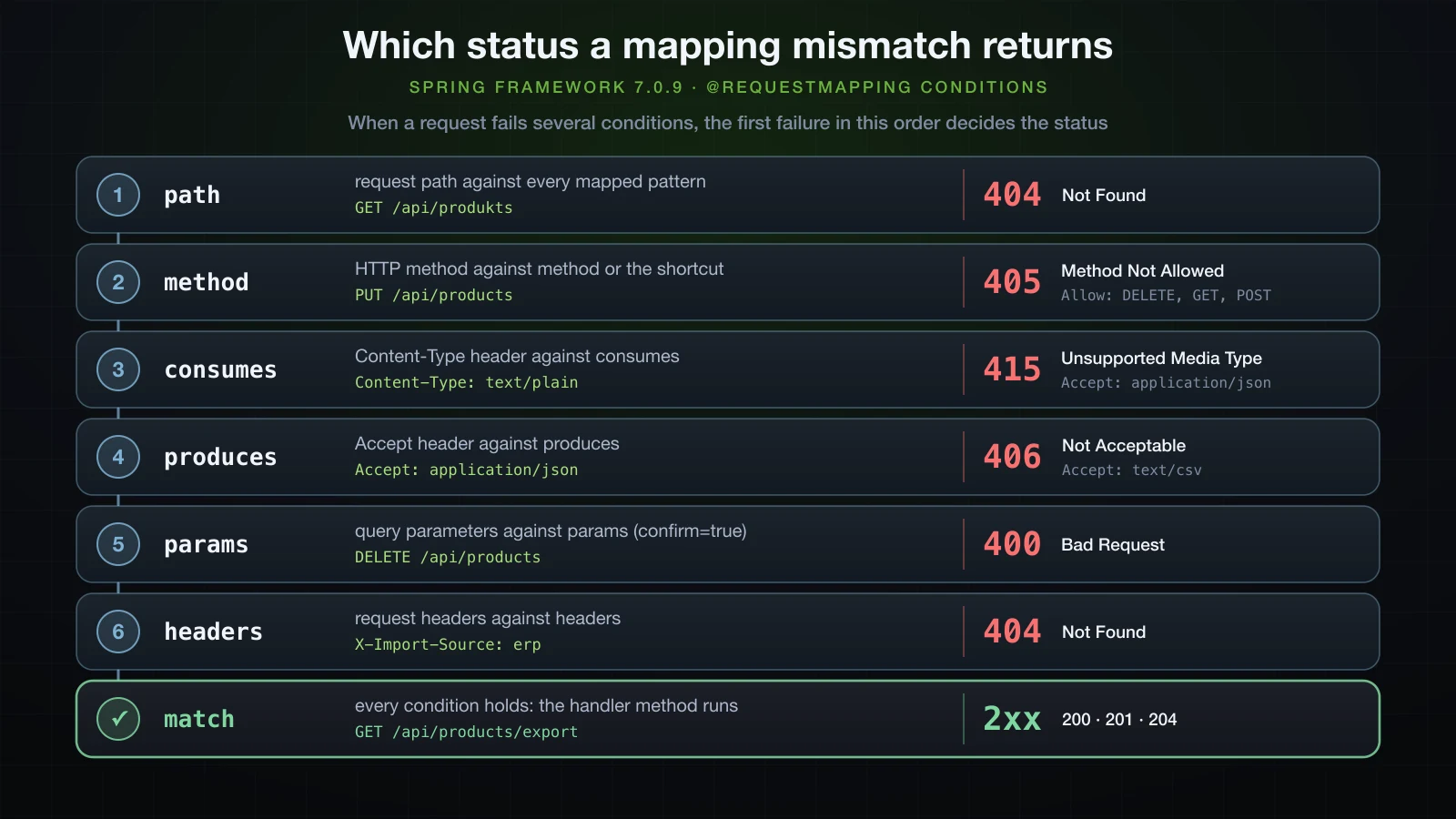
{"timestamp":"2026-09-12T07:22:27.102Z","status":405,"error":"Method Not Allowed","path":"/api/products"}The method won. To see the whole order, one test mapping carried all four conditions — @PostMapping(value = "/all", consumes = "application/json", produces = "text/csv", params = "p=1", headers = "X-H=1") in a controller mapped at /lab — and each request below broke a different set of them:
Request to /lab/all | Conditions it fails | Status |
|---|---|---|
GET with Content-Type: text/plain, Accept: application/json | method, consumes, produces, params, headers | 405 |
POST with Content-Type: text/plain, Accept: application/json | consumes, produces, params, headers | 415 |
POST with a JSON body, Accept: application/json | produces, params, headers | 406 |
POST with a JSON body, Accept: text/csv | params, headers | 400 |
POST ?p=1 with a JSON body, Accept: text/csv | headers | 404 |
POST ?p=1 with a JSON body, Accept: text/csv, X-H: 1 | none | 200 |
The first failing condition in the order method, consumes, produces, params decides the status, and a request that fails only headers ends like a path nobody mapped.
Implicit HEAD and OPTIONS responses
ProductController maps no HEAD and no OPTIONS, and both still get answers. Article 15 captured both on the wire; this is how Spring produces them. /api/products/featured only has a @GetMapping:
curl -I http://localhost:8116/api/products/featuredHTTP/1.1 200
Content-Type: application/json
Content-Length: 144The headers of the GET response, Content-Length: 144 included, and no body. The DEBUG log shows that the HEAD request was mapped to the GET method, which ran and serialised its result; the body was dropped only after that, so a HEAD is cheap on the wire but costs the server as much as the GET it mirrors:
2026-09-12T14:22:33.635+07:00 DEBUG 42283 --- [demo] [nio-8116-exec-7] o.s.web.servlet.DispatcherServlet        : HEAD "/api/products/featured", parameters={}
2026-09-12T14:22:33.635+07:00 DEBUG 42283 --- [demo] [nio-8116-exec-7] s.w.s.m.m.a.RequestMappingHandlerMapping : Mapped to com.example.demo.product.ProductController#featured()
2026-09-12T14:22:33.635+07:00 DEBUG 42283 --- [demo] [nio-8116-exec-7] m.m.a.RequestResponseBodyMethodProcessor : Using 'application/json', given [*/*] and supported [application/json, application/*+json]
2026-09-12T14:22:33.636+07:00 DEBUG 42283 --- [demo] [nio-8116-exec-7] m.m.a.RequestResponseBodyMethodProcessor : Writing [[Product[id=3, name=27-inch monitor, price=249.00], Product[id=1, name=Mechanical keyboard, price=89 (truncated)...]
2026-09-12T14:22:33.637+07:00 DEBUG 42283 --- [demo] [nio-8116-exec-7] o.s.web.servlet.DispatcherServlet        : Completed 200 OK
OPTIONS is answered by Spring itself, without calling any method of yours:
curl -i -X OPTIONS http://localhost:8116/api/products/featuredHTTP/1.1 200
Allow: GET,HEAD,OPTIONS
Accept-Patch:
Content-Length: 02026-09-12T14:22:33.974+07:00 DEBUG 42283 --- [demo] [nio-8116-exec-9] o.s.web.servlet.DispatcherServlet : OPTIONS "/api/products/featured", parameters={}
2026-09-12T14:22:33.975+07:00 DEBUG 42283 --- [demo] [nio-8116-exec-9] s.w.s.m.m.a.RequestMappingHandlerMapping : Mapped to org.springframework.web.servlet.mvc.method.RequestMappingInfoHandlerMapping$HttpOptionsHandler#handle()
2026-09-12T14:22:33.977+07:00 DEBUG 42283 --- [demo] [nio-8116-exec-9] o.s.web.servlet.DispatcherServlet : Completed 200 OKAllow is built from the mappings that match the path, with HEAD added next to GET and OPTIONS added at the end. On a product URL, where the @PatchMapping declares consumes, Accept-Patch is filled in too:
curl -i -X OPTIONS http://localhost:8116/api/products/1HTTP/1.1 200
Allow: DELETE,PUT,GET,HEAD,PATCH,OPTIONS
Accept-Patch: application/json
Content-Length: 0OPTIONS /api/products answered Allow: DELETE,GET,HEAD,POST,OPTIONS. Three details are easy to miss. This Allow has no spaces and includes HEAD and OPTIONS, while the Allow on the 405 earlier read DELETE, GET, POST. It depends on every pattern that matches: before the \d+ regex, OPTIONS /api/products/featured returned Allow: PATCH,GET,HEAD,PUT,DELETE,OPTIONS, because {id} matched featured too. And, as article 15 noted, the order of the methods is not stable.
What each return type becomes in the response
With @ResponseBody in effect, the return type decides which converter writes the body, and the converter decides the Content-Type. One more method gives the catalogue a String endpoint:
    @GetMapping("/summary")
    public String summary() {
        return products.size() + " products";
} curl -i http://localhost:8116/api/products/summaryHTTP/1.1 200
Content-Type: text/plain;charset=UTF-8
Content-Length: 10
3 productscurl -i http://localhost:8116/api/products/summary -H "Accept: application/json"HTTP/1.1 200
Content-Type: application/json
Content-Length: 10
3 products3 products is not JSON, yet it went out labelled as JSON. StringHttpMessageConverter lists */* among the media types it supports, so it accepts whatever the client asks for and writes the string unchanged: Accept: application/xml came back as application/xml;charset=UTF-8 with the same ten bytes. When a client expects JSON, return an object.
Every return type in this article, from real requests:
| Method returns | Request | Status | Content-Type | Body |
|---|---|---|---|---|
String | GET /api/products/summary | 200 | text/plain;charset=UTF-8 | 3 products |
String | the same, with Accept: application/json | 200 | application/json | 3 products |
a Product record | GET /api/products/1 | 200 | application/json | {"id":1,"name":"Mechanical keyboard","price":89.90} |
a Product record | the same, with Accept: application/xml | 406 | none | empty, Content-Length: 0 |
List<Product> | GET /api/products | 200 | application/json | a JSON array |
void with @ResponseStatus(HttpStatus.NO_CONTENT) | DELETE /api/products/3 | 204 | none | none |
void without @ResponseStatus | DELETE /api/products/1 | 200 | none | empty, Content-Length: 0 |
null from a method declared to return Product | GET /api/products/99 | 200 | none | empty, Content-Length: 0 |
The 406 happened after the method ran: no converter on the classpath writes a record as XML, and the response's Accept header listed application/json, application/*+json.
A void method answers 200 with an empty body unless @ResponseStatus says otherwise. Removing it from delete produced the second void row:
    @DeleteMapping("/{id:\\d+}")
    @ResponseStatus(HttpStatus.NO_CONTENT)
    public void delete(@PathVariable Long id) {
        products.remove(id);
}curl -i -X DELETE http://localhost:8116/api/products/1HTTP/1.1 200
Content-Length: 0A null from a method declared to return Product is not an error either. Asking for a product that does not exist:
curl -i http://localhost:8116/api/products/99HTTP/1.1 200
Content-Length: 02026-09-12T14:22:34.661+07:00 DEBUG 42283 --- [demo] [nio-8116-exec-3] o.s.web.servlet.DispatcherServlet : GET "/api/products/99", parameters={}
2026-09-12T14:22:34.661+07:00 DEBUG 42283 --- [demo] [nio-8116-exec-3] s.w.s.m.m.a.RequestMappingHandlerMapping : Mapped to com.example.demo.product.ProductController#findById(Long)
2026-09-12T14:22:34.662+07:00 DEBUG 42283 --- [demo] [nio-8116-exec-3] m.m.a.RequestResponseBodyMethodProcessor : Using 'application/json', given [*/*] and supported [application/json, application/*+json]
2026-09-12T14:22:34.662+07:00 DEBUG 42283 --- [demo] [nio-8116-exec-3] m.m.a.RequestResponseBodyMethodProcessor : Nothing to write: null body
2026-09-12T14:22:34.663+07:00 DEBUG 42283 --- [demo] [nio-8116-exec-3] o.s.web.servlet.DispatcherServlet : Completed 200 OKNothing to write: null body, and a 200 for a product that is not there. A controller that wants to answer 404 in that case returns ResponseEntity, which is the next article.
FAQ
What is the difference between @Controller and @RestController?
@RestController is @Controller plus @ResponseBody, and nothing else. In a @Controller, a String return value is a view name: with no template engine, Spring forwards to a URL of that name, and GET /page ended in a 404, or in a 500 with Circular view path when the name matched the path. In a @RestController, the same String is written to the body as text/plain.
Why does my Spring Boot endpoint return 404 when the mapping looks right?
Check a trailing slash or a different letter case in the URL, since Framework 7.0.9 matches neither; a headers condition the request does not meet; a @Controller method returning a String, where the 404 comes from the forward to a view; and a controller outside the scanned package, from article 3. logging.level.org.springframework.web=DEBUG shows where the request went: Mapped to one of your methods, or Mapped to ResourceHttpRequestHandler followed by No static resource when no controller mapping matched.
Why does Spring return 405 Method Not Allowed?
The path matched at least one mapping, but none of them accepts the request's HTTP method. The Allow header lists the methods mapped for that path — DELETE, GET, POST for /api/products — and the log shows HttpRequestMethodNotSupportedException: Request method 'PUT' is not supported. When the request is also wrong in another way, such as its Content-Type, the 405 still wins.
Does Spring Boot 4 match a URL with a trailing slash?
No. /api/products/ returned 404 while /api/products worked, and PathMatchConfigurer in Framework 7.0.9 has no option to change that. If clients send both forms, register UrlHandlerFilter from spring-web with a trailing slash handler for the affected paths.
Can I put @GetMapping on a class?
No. @GetMapping and the other four shortcuts are declared @Target(ElementType.METHOD). A class-level path prefix is written with @RequestMapping, and the HTTP method belongs on each method.
Conclusion
@RestController is two annotations: @Controller makes the class a handler that RequestMappingHandlerMapping registers, and @ResponseBody turns return values into response bodies instead of view names. Inside Spring MVC, a request goes from DispatcherServlet to RequestMappingHandlerMapping, which picks the method, and to RequestMappingHandlerAdapter, which resolves the arguments, calls the method and passes the result to an HttpMessageConverter. Mappings combine a class-level @RequestMapping prefix with the method shortcuts, and a bare @RequestMapping on a method quietly accepts every HTTP method. When several patterns match, the most specific wins; identical mappings stop the application at startup, and equally specific ones fail at request time. A trailing slash or a different letter case is a different URL. consumes, produces, params and headers narrow a mapping further, and a request that misses gets its status in a fixed order: 405, then 415, 406 and 400, with 404 for the path and for headers. HEAD and OPTIONS need no code, and a void or a null still answers 200.
That last point is where the next article starts: getting data in and out of a controller properly, with @PathVariable, @RequestParam, @RequestBody and @RequestHeader in full, and ResponseEntity for control over the status and headers of each response.
![[Spring Boot Basics] Pagination and Sorting in Spring Boot: Pageable, Sort and Paged API Responses](/images/blog/sb-pagination-thumbnail.en.webp)
![[Spring Boot Basics] Calling External APIs with RestClient in Spring Boot: GET, POST, Error Handling and Timeouts](/images/blog/sb-restclient-thumbnail.en.webp)
![[Spring Boot Basics] JPA Auditing in Spring Boot: @CreatedDate, @LastModifiedDate and @CreatedBy](/images/blog/sb-auditing-thumbnail.en.webp)
![[Spring Boot Basics] API Documentation in Spring Boot with springdoc-openapi and Swagger UI](/images/blog/sb-springdoc-thumbnail.en.webp)