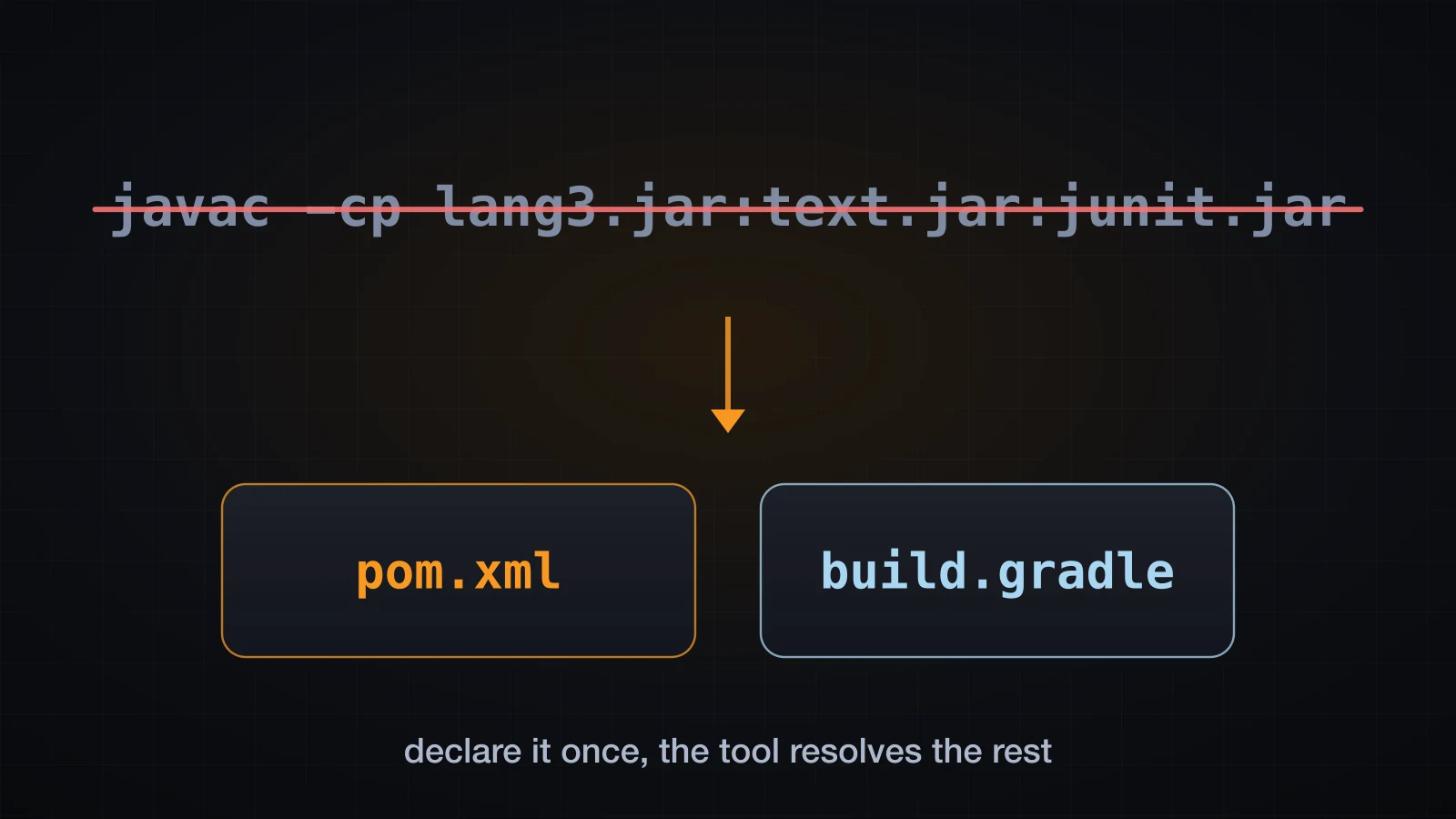
Thirty articles into this course, every example has been compiled the same way: javac with a hand-written -cp, jars downloaded one at a time from a browser, and a java -cp line that grew every time an example needed one more library. That works for a single file. It stops working the moment a library you depend on depends on something else.
A build tool exists to end that. It resolves dependencies and their dependencies, imposes one project layout every Java developer already knows, compiles, runs the tests, and packages the result — from one declaration file, on any machine, in the same way.
The examples use Java 21 with Maven 3.9.9 and Gradle 8.10.2, both building the same source tree. The elapsed-time lines each tool prints (Total time, BUILD SUCCESSFUL in ...) are left out because they vary from machine to machine, and for the same reason this article never compares the two tools by speed.
Why a build tool exists
Take a program that uses two libraries. App.java calls StringUtils from Apache Commons Lang and WordUtils from Apache Commons Text:
package com.example;

import org.apache.commons.lang3.StringUtils;
import org.apache.commons.text.WordUtils;

public class App {

    public static String headline(String raw) {
        String trimmed = StringUtils.normalizeSpace(raw);
        return WordUtils.capitalizeFully(trimmed);
    }

    public static String lang3Version() {
        Package p = StringUtils.class.getPackage();
        return p == null ? "unknown" : String.valueOf(p.getImplementationVersion());
    }

    public static void main(String[] args) {
        System.out.println(headline("  the   build   tool   does  this  for  you "));
        System.out.println("commons-lang3 on the classpath: " + lang3Version());
    }
}
By hand that means: find both jars, discover that Commons Text needs Commons Lang too, pick a version, download them, and keep a -cp string in sync forever. Four problems come out of that, and a build tool answers each one:
| The problem | What the tool does |
|---|---|
| Transitive dependencies | You name Commons Text; the tool fetches what Commons Text needs |
| Repeatable builds | The same declarations resolve to the same jars on every machine |
| A standard layout | Sources, tests and resources live where every tool expects |
| Running tests | The test framework is wired into the build, not launched by hand |
The second one is the one people underrate. javac -cp is only reproducible if everyone types the same string.
The standard project layout
Both tools use the same convention, so a Java project is navigable before you have read a line of its build file:
src/main/java/com/example/App.java
src/main/resources/app.properties
src/test/java/com/example/AppTest.java
src/main/java is compiled to the main output, src/test/java to a separate test output that is never packaged, and src/main/resources is copied verbatim onto the classpath. That last one is why loading a config file works the same in an IDE and inside a jar.
Neither tool requires this layout — both let you override it — but overriding it costs you every reader's intuition and buys you nothing.
Maven: pom.xml and coordinates
Maven's build file is pom.xml, and its central idea is coordinates: every artifact in the world is addressed by groupId, artifactId and version. Your project has coordinates too.
<?xml version="1.0" encoding="UTF-8"?>
<project xmlns="http://maven.apache.org/POM/4.0.0"
         xmlns:xsi="http://www.w3.org/2001/XMLSchema-instance"
         xsi:schemaLocation="http://maven.apache.org/POM/4.0.0 http://maven.apache.org/xsd/maven-4.0.0.xsd">
  <modelVersion>4.0.0</modelVersion>

  <groupId>com.example</groupId>
  <artifactId>build-tools-demo</artifactId>
  <version>1.0.0</version>
  <packaging>jar</packaging>

  <properties>
    <maven.compiler.release>21</maven.compiler.release>
    <project.build.sourceEncoding>UTF-8</project.build.sourceEncoding>
    <junit.version>5.11.3</junit.version>
  </properties>

  <dependencies>
    <dependency>
      <groupId>org.apache.commons</groupId>
      <artifactId>commons-lang3</artifactId>
      <version>3.9</version>
    </dependency>

    <dependency>
      <groupId>org.apache.commons</groupId>
      <artifactId>commons-text</artifactId>
      <version>1.10.0</version>
    </dependency>

    <dependency>
      <groupId>org.junit.jupiter</groupId>
      <artifactId>junit-jupiter</artifactId>
      <version>${junit.version}</version>
      <scope>test</scope>
    </dependency>
  </dependencies>

  <build>
    <plugins>
      <plugin>
        <groupId>org.apache.maven.plugins</groupId>
        <artifactId>maven-compiler-plugin</artifactId>
        <version>3.13.0</version>
      </plugin>
      <plugin>
        <groupId>org.apache.maven.plugins</groupId>
        <artifactId>maven-surefire-plugin</artifactId>
        <version>3.5.2</version>
      </plugin>
    </plugins>
  </build>
</project>
Three parts of that are worth naming.
properties are plain string substitutions, referenced as ${junit.version}. Declaring a version once and using it in several dependencies is the reason they exist. Some property names are also read by plugins: maven.compiler.release is what the compiler plugin uses for --release, and the compile output confirms it took effect:
[INFO] --- compiler:3.13.0:compile (default-compile) @ build-tools-demo ---
[INFO] Compiling 1 source file with javac [debug release 21] to target/classes
The equivalent explicit form configures the plugin directly, and produces the identical [debug release 21] line:
<plugin>
  <groupId>org.apache.maven.plugins</groupId>
  <artifactId>maven-compiler-plugin</artifactId>
  <version>3.13.0</version>
  <configuration>
    <release>21</release>
  </configuration>
</plugin>
project.build.sourceEncoding looks like boilerplate and is not. Remove it and Maven says so on every build:
[WARNING] File encoding has not been set, using platform encoding UTF-8, i.e. build is platform dependent!Finally, pinning plugin versions is not optional discipline — it is the difference between a build that behaves the same next year and one that quietly changes when a plugin releases.
Gradle: build.gradle and the task graph
Gradle's build file is build.gradle in the Groovy DSL, or build.gradle.kts in Kotlin. Everything here uses the Groovy DSL, because it is what you will meet most often in existing Java projects; the Kotlin DSL expresses the same model with better IDE completion.
plugins {
    id 'java'
    id 'application'
}

group = 'com.example'
version = '1.0.0'

java {
    toolchain {
        languageVersion = JavaLanguageVersion.of(21)
    }
}

repositories {
    mavenCentral()
}

dependencies {
    implementation 'org.apache.commons:commons-lang3:3.9'
    implementation 'org.apache.commons:commons-text:1.10.0'

    testImplementation 'org.junit.jupiter:junit-jupiter:5.11.3'
    testRuntimeOnly 'org.junit.platform:junit-platform-launcher'
}

application {
    mainClass = 'com.example.App'
}

test {
    useJUnitPlatform()
}
Four blocks carry the whole file. plugins applies behaviour — java is what creates compileJava, test, jar and the rest; application adds a run task and the start scripts. repositories says where to fetch from, and unlike Maven, Gradle has no built-in default — delete mavenCentral() and the build stops with Cannot resolve external dependency org.apache.commons:commons-lang3:3.9 because no repositories are defined. dependencies uses the same coordinates as Maven, written as one colon-separated string. And java { toolchain { ... } } is Gradle's answer to release: it selects the JDK rather than only the target level.
A project needs settings.gradle alongside it, which names the build:
rootProject.name = 'build-tools-demo'The tasks the java plugin created are not a fixed list you must run in order — they are a graph, and gradle build picks a node from it. That difference has consequences, and it gets its own section below.
Dependency resolution and version conflicts
This is the section that pays for the whole article. Both build files above declare exactly two libraries. Both end up with three jars on the classpath, because Commons Text depends on Commons Lang. That is a transitive dependency, and you can always see the full picture:
mvn dependency:tree[INFO] com.example:build-tools-demo:jar:1.0.0
[INFO] +- org.apache.commons:commons-lang3:jar:3.9:compile
[INFO] +- org.apache.commons:commons-text:jar:1.10.0:compile
[INFO] \- org.junit.jupiter:junit-jupiter:jar:5.11.3:test
[INFO] +- org.junit.jupiter:junit-jupiter-api:jar:5.11.3:test
[INFO] | +- org.opentest4j:opentest4j:jar:1.3.0:test
[INFO] | +- org.junit.platform:junit-platform-commons:jar:1.11.3:test
[INFO] | \- org.apiguardian:apiguardian-api:jar:1.1.2:test
[INFO] +- org.junit.jupiter:junit-jupiter-params:jar:5.11.3:test
[INFO] \- org.junit.jupiter:junit-jupiter-engine:jar:5.11.3:test
[INFO] \- org.junit.platform:junit-platform-engine:jar:1.11.3:testTwo declared dependencies, eleven artifacts. Reproducing that with javac -cp by hand is the thing you are buying your way out of.
Scopes and configurations
Not every dependency belongs on every classpath. JUnit must be there when tests compile and run, and must never ship. Maven calls this a scope; Gradle calls it a configuration.
| Maven scope | Gradle configuration | Available at compile | Available at runtime | Shipped |
|---|---|---|---|---|
compile (default) | implementation | yes | yes | yes |
test | testImplementation | tests only | tests only | no |
provided | compileOnly | yes | no | no |
runtime | runtimeOnly | no | yes | yes |
That table is checkable. Adding compileOnly 'org.jspecify:jspecify:1.0.0' to the Gradle build and asking for three different configurations gives three different answers:
gradle dependencies --configuration compileClasspath
gradle dependencies --configuration runtimeClasspath
gradle dependencies --configuration testRuntimeClasspathcompileClasspath
+--- org.jspecify:jspecify:1.0.0
+--- org.apache.commons:commons-lang3:3.9 -> 3.12.0
\--- org.apache.commons:commons-text:1.10.0
runtimeClasspath
+--- org.apache.commons:commons-lang3:3.9 -> 3.12.0
\--- org.apache.commons:commons-text:1.10.0
testRuntimeClasspath
+--- org.apache.commons:commons-lang3:3.9 -> 3.12.0
+--- org.apache.commons:commons-text:1.10.0
+--- org.junit.jupiter:junit-jupiter:5.11.3
\--- org.junit.platform:junit-platform-launcher -> 1.11.3The annotation library is gone at runtime, and JUnit appears only in the test classpath. Those are separate resolutions, not one list with flags.
When two versions collide
Look again at the arrows in that Gradle output: commons-lang3:3.9 -> 3.12.0. The build file asks for 3.9. Gradle put 3.12.0 on the classpath.
This is a real conflict, and it is easy to build on purpose. Commons Text 1.10.0 depends on Commons Lang 3.12.0. Declare Commons Lang 3.9 directly and the graph now requests two versions of one module: 3.9 at depth 1, 3.12.0 at depth 2.
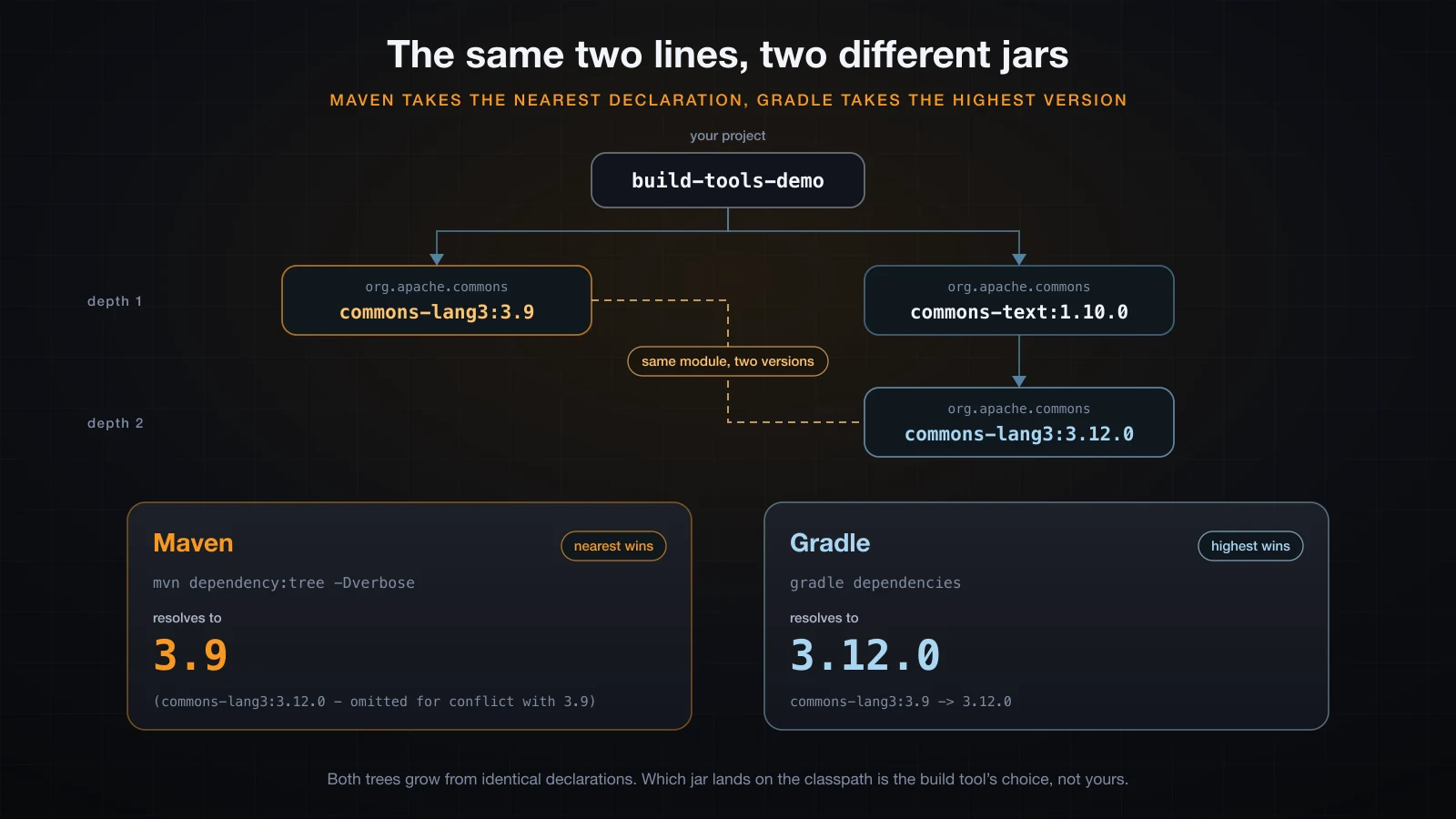
Maven takes the nearest declaration. -Dverbose shows what it discarded:
mvn dependency:tree -Dverbose -Dincludes=org.apache.commons[INFO] com.example:build-tools-demo:jar:1.0.0
[INFO] +- org.apache.commons:commons-lang3:jar:3.9:compile
[INFO] \- org.apache.commons:commons-text:jar:1.10.0:compile
[INFO] \- (org.apache.commons:commons-lang3:jar:3.12.0:compile - omitted for conflict with 3.9)Gradle takes the highest version. Same two declarations, opposite answer:
runtimeClasspath - Runtime classpath of source set 'main'.
+--- org.apache.commons:commons-lang3:3.9 -> 3.12.0
\--- org.apache.commons:commons-text:1.10.0
     \--- org.apache.commons:commons-lang3:3.12.0
Neither tool warns. Neither tool fails. And this is not a difference you have to take on faith — the demo prints the resolved version at runtime by reading Implementation-Version from the jar manifest, and the same test class says something different under each tool:
mvn test     ->  resolved commons-lang3 = 3.9
gradle test  ->  resolved commons-lang3 = 3.12.0
Two build files with identical declarations, two different jars, and a test that observes it. When a project is ported between the tools and something breaks for no visible reason, this is usually why.
⚠️ Maven's rule is nearest, not newest. At equal depth it takes whichever was declared first in the POM, which means reordering two
dependencyblocks can silently change what you ship.
Excluding and pinning
Two knobs, and it is worth knowing exactly what each does.
Exclusion removes a transitive edge. In Maven:
<dependency>
  <groupId>org.apache.commons</groupId>
  <artifactId>commons-text</artifactId>
  <version>1.10.0</version>
  <exclusions>
    <exclusion>
      <groupId>org.apache.commons</groupId>
      <artifactId>commons-lang3</artifactId>
    </exclusion>
  </exclusions>
</dependency>
The tree loses the branch entirely, and if nothing else supplies those classes the build fails at compile time — which is the correct, loud failure:
[ERROR] .../App.java:[3,32] package org.apache.commons.lang3 does not exist
[ERROR] .../App.java:[9,26] cannot find symbol
Pinning keeps the edge and fixes the version. Maven's dependencyManagement sets the version for a module wherever it appears in the graph, at any depth — the usual reason being a patched release you need everywhere:
<dependencyManagement>
  <dependencies>
    <dependency>
      <groupId>org.apache.commons</groupId>
      <artifactId>commons-lang3</artifactId>
      <version>3.14.0</version>
    </dependency>
  </dependencies>
</dependencyManagement>
With Commons Text as the only declared dependency, the tree reports the override in place:
[INFO] com.example:build-tools-demo:jar:1.0.0
[INFO] \- org.apache.commons:commons-text:jar:1.10.0:compile
[INFO]    \- org.apache.commons:commons-lang3:jar:3.14.0:compile (version managed from 3.12.0)
Gradle's equivalent is a strict version, and because Gradle's default is highest-wins it is also the only way to force a version down:
dependencies {
    implementation('org.apache.commons:commons-lang3') {
        version { strictly '3.9' }
    }
    implementation 'org.apache.commons:commons-text:1.10.0'
}runtimeClasspath - Runtime classpath of source set 'main'.
+--- org.apache.commons:commons-lang3:{strictly 3.9} -> 3.9
\--- org.apache.commons:commons-text:1.10.0
\--- org.apache.commons:commons-lang3:3.12.0 -> 3.9The transitive request for 3.12.0 is now downgraded to 3.9 instead of winning. Gradle excludes with a block on the dependency:
implementation('org.apache.commons:commons-text:1.10.0') {
    exclude group: 'org.apache.commons', module: 'commons-lang3'
}
Reach for pinning first. An exclusion says "nobody gets this"; a pin says "everybody gets this one", and the second is almost always what you meant.
The lifecycle and the task graph
The two tools disagree about what a build is, and this is where it shows.
Maven: a phase runs everything before it
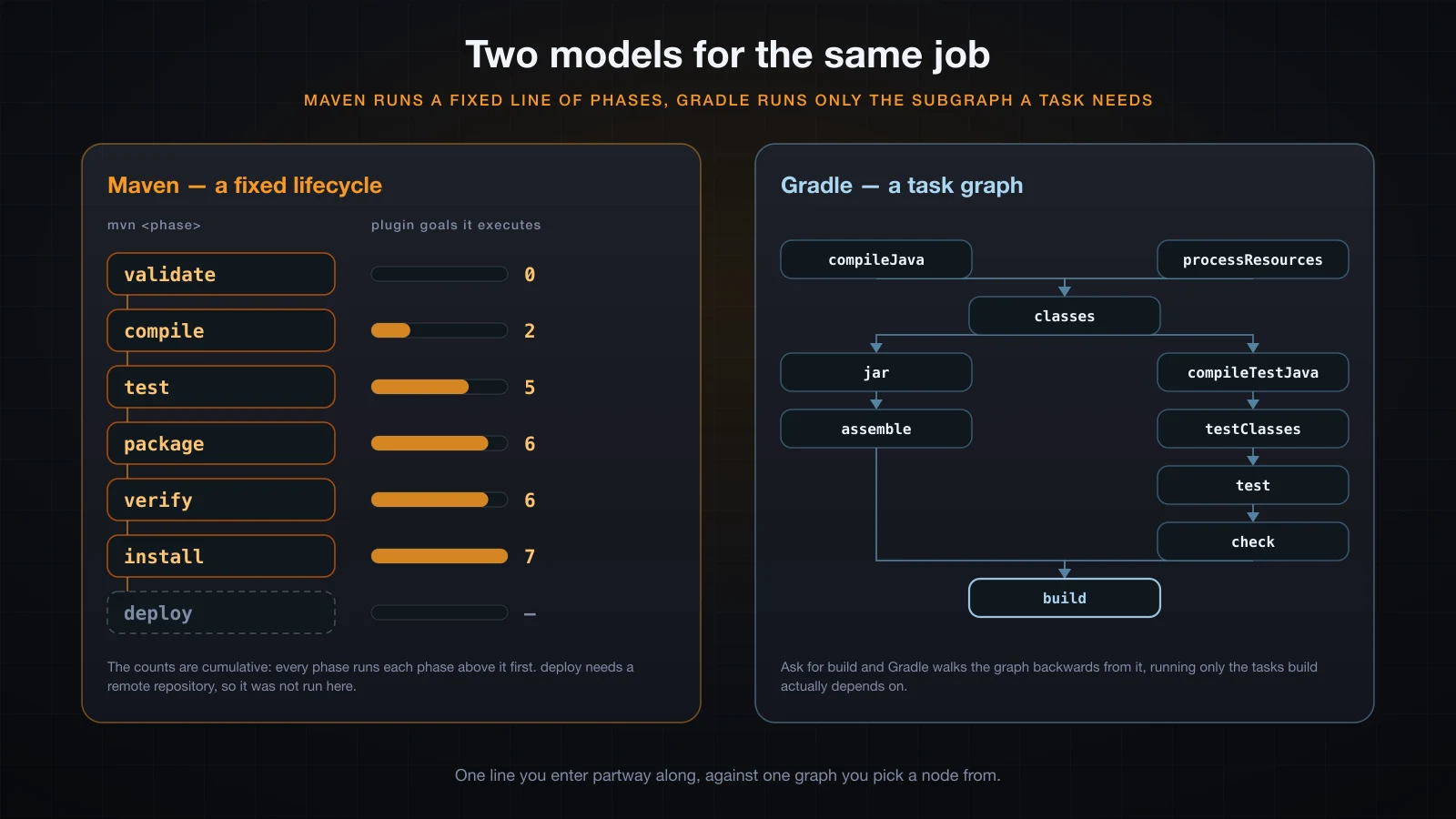
Maven's default lifecycle is a fixed, ordered list of phases: validate, compile, test, package, verify, install, deploy. You never name a plugin goal — you name a phase, and Maven runs that phase and every phase before it.
That is a claim you can measure. Counting the plugin goals each command actually executed on the POM shown earlier — compiler and Surefire only, before any extra plugin is added:
| Command | Plugin goals executed | What ran |
|---|---|---|
mvn validate | 0 | nothing is bound to validate by default |
mvn compile | 2 | resources, compile |
mvn test | 5 | the above, plus testResources, testCompile, test |
mvn package | 6 | the above, plus jar |
mvn verify | 6 | nothing is bound to verify here either |
mvn install | 7 | the above, plus install |
The counts only ever grow. mvn package prints the goals in order, which is the same list read top to bottom:
[INFO] --- resources:3.3.1:resources (default-resources) @ build-tools-demo ---
[INFO] Copying 1 resource from src/main/resources to target/classes
[INFO] --- compiler:3.13.0:compile (default-compile) @ build-tools-demo ---
[INFO] Compiling 1 source file with javac [debug release 21] to target/classes
[INFO] --- resources:3.3.1:testResources (default-testResources) @ build-tools-demo ---
[INFO] --- compiler:3.13.0:testCompile (default-testCompile) @ build-tools-demo ---
[INFO] Compiling 1 source file with javac [debug release 21] to target/test-classes
[INFO] --- surefire:3.5.2:test (default-test) @ build-tools-demo ---
[INFO] --- jar:3.4.1:jar (default-jar) @ build-tools-demo ---
[INFO] Building jar: .../target/build-tools-demo-1.0.0.jar
mvn install adds one goal to that and writes the artifact into the local repository, so another project on the same machine can depend on it by coordinates:
[INFO] --- install:3.1.2:install (default-install) @ build-tools-demo ---
[INFO] Installing .../build-tools-demo-1.0.0.jar to ~/.m2/repository/com/example/build-tools-demo/1.0.0/build-tools-demo-1.0.0.jar
deploy is the only phase not run here: it publishes to a remote repository and needs one configured, which a demo project has no business doing.
Note also that clean is not in that list. It belongs to a separate lifecycle, which is why mvn clean package names two things.
Gradle: only what the task needs
Gradle has no phase line. The java plugin registers tasks, each declaring what it depends on, and asking for one task runs its dependencies first. gradle build --dry-run prints the resolved order without executing anything:
:compileJava SKIPPED
:processResources SKIPPED
:classes SKIPPED
:jar SKIPPED
:startScripts SKIPPED
:distTar SKIPPED
:distZip SKIPPED
:assemble SKIPPED
:compileTestJava SKIPPED
:processTestResources SKIPPED
:testClasses SKIPPED
:test SKIPPED
:check SKIPPED
:build SKIPPEDstartScripts, distTar and distZip are there because the application plugin hangs them off assemble. That is the practical difference: Maven's line is fixed and a plugin binds a goal into it, while Gradle's graph grows a new branch and build picks it up automatically.
The second consequence is incremental work. Gradle tracks each task's inputs and outputs, so a repeat build re-runs nothing. Compare a first gradle build with an immediate second one, unchanged:
> Task :compileJava
> Task :processResources
> Task :classes
> Task :jar
...
> Task :build

8 actionable tasks: 8 executed> Task :compileJava UP-TO-DATE
> Task :processResources UP-TO-DATE
> Task :classes UP-TO-DATE
> Task :jar UP-TO-DATE
> Task :assemble UP-TO-DATE
> Task :compileTestJava UP-TO-DATE
> Task :test UP-TO-DATE
> Task :check UP-TO-DATE
> Task :build UP-TO-DATE
8 actionable tasks: 8 up-to-dateRead the last line, not a clock: 8 executed became 8 up-to-date, and every task carries an UP-TO-DATE marker. Change one source file and only the tasks downstream of it lose that marker. NO-SOURCE appears for a task with nothing to do at all — processTestResources reports it here, because src/test/resources does not exist.
Running tests from the build
An earlier article in this course ran JUnit 5 through the console launcher, assembling the platform jars on a -cp by hand. The build tool's contribution is that all of that wiring disappears into one dependency.
Maven needs the Jupiter dependency at test scope and a current Surefire; Surefire detects the platform on its own:
<dependency>
  <groupId>org.junit.jupiter</groupId>
  <artifactId>junit-jupiter</artifactId>
  <version>5.11.3</version>
  <scope>test</scope>
</dependency>
mvn test compiles the tests and runs them, with the elapsed-time fragment removed from the per-class line:
[INFO] --- surefire:3.5.2:test (default-test) @ build-tools-demo ---
[INFO] Using auto detected provider org.apache.maven.surefire.junitplatform.JUnitPlatformProvider
[INFO] -------------------------------------------------------
[INFO]  T E S T S
[INFO] -------------------------------------------------------
[INFO] Running com.example.AppTest
resolved commons-lang3 = 3.9
[INFO] Tests run: 2, Failures: 0, Errors: 0, Skipped: 0 -- in com.example.AppTest
[INFO] Results:
[INFO] Tests run: 2, Failures: 0, Errors: 0, Skipped: 0
Gradle needs the dependency plus one line telling the test task which engine to use, because the JVM test task still defaults to JUnit 4 style:
dependencies {
    testImplementation 'org.junit.jupiter:junit-jupiter:5.11.3'
    testRuntimeOnly 'org.junit.platform:junit-platform-launcher'
}

test {
    useJUnitPlatform()
    testLogging {
        showStandardStreams = true
    }
}
Forget useJUnitPlatform() and the build still succeeds while running zero tests. Gradle 8.10.2 does notice, but quietly: the default summary says only Deprecated Gradle features were used in this build, and you need --warning-mode all to get the real sentence — There are test sources present but no test was executed. No results XML is written either. Gradle 9.0 turns this into an error; until then it is a green build that tested nothing. With the line in place, gradle build reports:
> Task :test

AppTest > readsSomeLang3Version() STANDARD_OUT
    resolved commons-lang3 = 3.12.0

> Task :check
> Task :build
Both tools write machine-readable results and both keep them under the build output directory:
| Tool | XML results | Human-readable report |
|---|---|---|
| Maven | target/surefire-reports/TEST-com.example.AppTest.xml | target/surefire-reports/com.example.AppTest.txt |
| Gradle | build/test-results/test/TEST-com.example.AppTest.xml | build/reports/tests/test/index.html |
The XML is the same JUnit format CI servers read, which is how a build server turns a failed test into a report without knowing anything about your project.
Building a runnable artifact
mvn package produced a jar. It does not run:
java -jar target/build-tools-demo-1.0.0.jarno main manifest attribute, in target/build-tools-demo-1.0.0.jarA jar is a zip with a manifest, and the default manifest names no entry point:
Manifest-Version: 1.0
Created-By: Maven JAR Plugin 3.4.1
Build-Jdk-Spec: 21
Add one through the jar plugin:
<plugin>
  <groupId>org.apache.maven.plugins</groupId>
  <artifactId>maven-jar-plugin</artifactId>
  <version>3.4.1</version>
  <configuration>
    <archive>
      <manifest>
        <mainClass>com.example.App</mainClass>
      </manifest>
    </archive>
  </configuration>
</plugin>
Now it starts, and immediately fails for the second reason — the jar holds your classes and nothing else:
Exception in thread "main" java.lang.NoClassDefFoundError: org/apache/commons/lang3/StringUtils
	at com.example.App.headline(App.java:9)
	at com.example.App.main(App.java:19)
Caused by: java.lang.ClassNotFoundException: org.apache.commons.lang3.StringUtils
java -jar ignores -cp entirely, so the dependencies have to be inside the archive. That is what a shaded, or "fat", jar is. In Maven, maven-shade-plugin bound to package:
<plugin>
  <groupId>org.apache.maven.plugins</groupId>
  <artifactId>maven-shade-plugin</artifactId>
  <version>3.6.0</version>
  <executions>
    <execution>
      <phase>package</phase>
      <goals>
        <goal>shade</goal>
      </goals>
      <configuration>
        <transformers>
          <transformer implementation="org.apache.maven.plugins.shade.resource.ManifestResourceTransformer">
            <mainClass>com.example.App</mainClass>
          </transformer>
        </transformers>
      </configuration>
    </execution>
  </executions>
</plugin>[INFO] --- shade:3.6.0:shade (default) @ build-tools-demo ---
[INFO] Including org.apache.commons:commons-lang3:jar:3.9 in the shaded jar.
[INFO] Including org.apache.commons:commons-text:jar:1.10.0 in the shaded jar.
[INFO] Replacing original artifact with shaded artifact.Gradle gets there by configuring the built-in jar task, with no extra plugin:
jar {
    manifest {
        attributes 'Main-Class': 'com.example.App'
    }
    duplicatesStrategy = DuplicatesStrategy.EXCLUDE
    from {
        configurations.runtimeClasspath.collect { it.isDirectory() ? it : zipTree(it) }
    }
}
Both worked. Both produced a jar that runs:
The Build Tool Does This For You
commons-lang3 on the classpath: null
That null is honest and instructive. Unpacking every dependency into one archive merges their manifests, so the Implementation-Version the program was reading is gone. A fat jar is convenient, not free — duplicatesStrategy exists for exactly this class of collision, and signed dependencies can break outright. For a library, publish a plain jar and let the consumer's build tool resolve dependencies; reach for a fat jar when you are shipping an application someone runs with java -jar.
Maven or Gradle?
Neither is the answer. They differ on one axis, and every other difference follows from it.
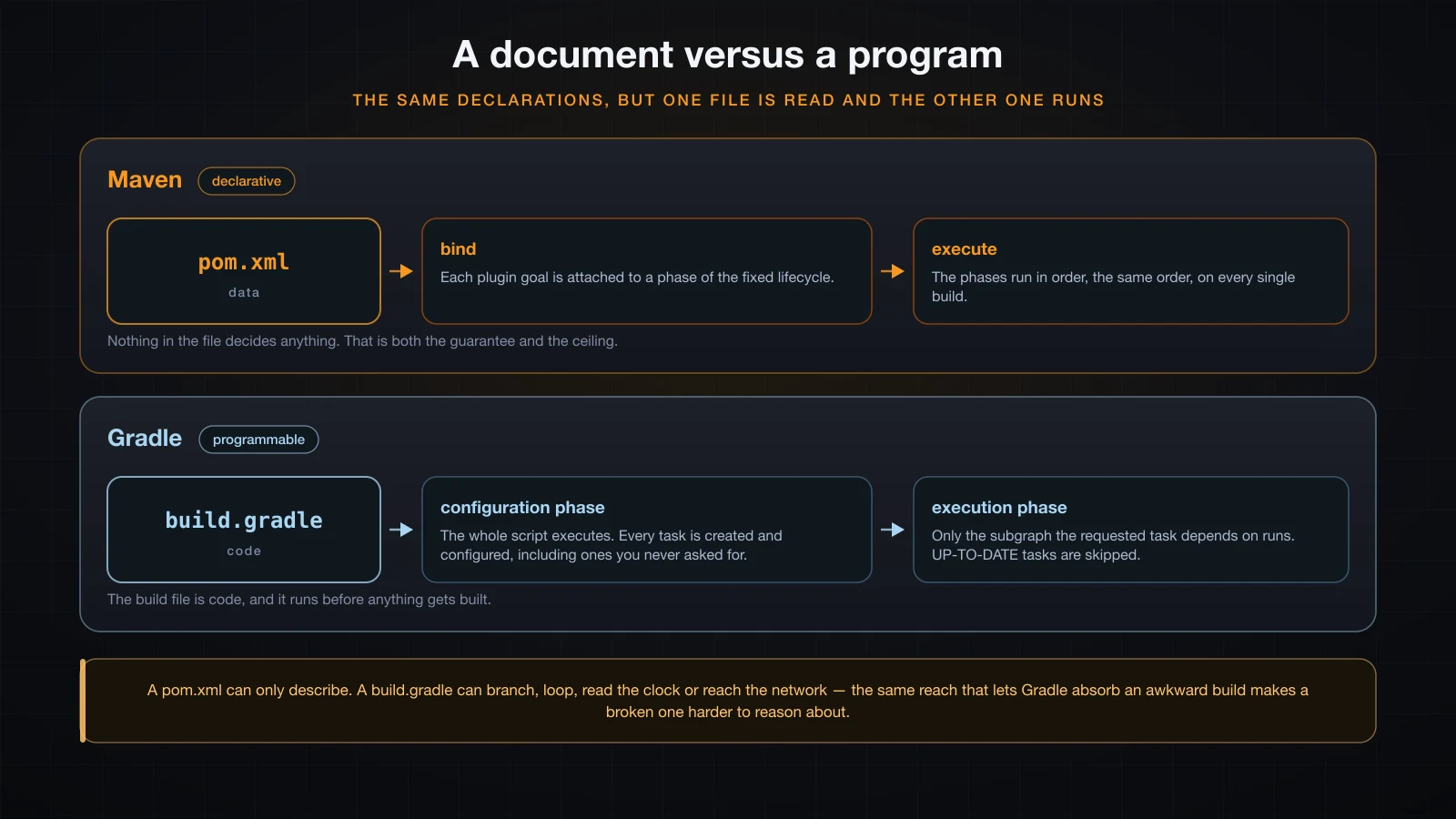
A pom.xml is a document. Maven reads it, binds plugin goals to lifecycle phases, and runs the phases. Nothing in the file can make a decision, which is precisely why any Maven project is legible to anyone who knows Maven.
A build.gradle is a program. Gradle executes the whole script in a configuration phase — creating and configuring every task, including ones you never asked for — and then runs the requested subgraph. That is why the jar block above could call collect and zipTree: it is real code.
| Maven | Gradle | |
|---|---|---|
| Build file | XML document | Groovy or Kotlin program |
| Execution model | fixed lifecycle of phases | task graph |
| Conflict resolution | nearest declaration wins | highest version wins |
| Repositories | Central by default | must be declared |
| Incremental builds | recompiles per module | per-task input/output tracking |
| Extending it | write or configure a plugin | write a plugin, or just write code |
| Failure mode | verbose, predictable | flexible, and harder to trace |
When each is the sensible default
Choose Maven when the project is a conventional Java application or library, when the team is large or rotating, or when the build should be boring on purpose. The ceiling is real but most projects never reach it, and a stranger can read the POM.
Choose Gradle when the build itself has hard requirements — many modules, code generation, custom packaging, Android, or a polyglot repository — or when incremental build behaviour matters because the project is large.
The honest caveat runs the other way too. Gradle's power is that a build file can contain arbitrary logic; its footgun is exactly the same sentence. A build.gradle can branch on the hostname, read the clock, or mutate another task's configuration from six lines away, and when a build then behaves differently on one machine there is no declarative file to read — there is a program to debug. Keep logic out of the build file unless it earns its place there.
The wrapper: mvnw and gradlew
A build that only works if everyone installed the same tool version is not reproducible. Both projects ship a wrapper: a small script, committed to the repository, that downloads and runs the pinned version of the build tool.
mvn wrapper:wrapper -Dmaven=3.9.9
gradle wrapper --gradle-version 8.10.2
Maven writes three files, and the properties file is where the version lives:
mvnw
mvnw.cmd
.mvn/wrapper/maven-wrapper.propertieswrapperVersion=3.3.4
distributionType=only-script
distributionUrl=https://repo.maven.apache.org/maven2/org/apache/maven/apache-maven/3.9.9/apache-maven-3.9.9-bin.zipGradle writes four, including a small jar:
gradlew
gradlew.bat
gradle/wrapper/gradle-wrapper.jar
gradle/wrapper/gradle-wrapper.propertiesdistributionBase=GRADLE_USER_HOME
distributionPath=wrapper/dists
distributionUrl=https\://services.gradle.org/distributions/gradle-8.10.2-bin.zip
networkTimeout=10000
validateDistributionUrl=trueCommit all of them, jar included. From then on the project is built with ./mvnw package or ./gradlew build, and every developer, every CI runner and every future checkout uses the version the repository specifies — no install step, no version drift. Running ./mvnw -v here reported 3.9.9, which is what the properties file pins.
Bumping the tool version becomes a reviewable one-line commit in that properties file, which is exactly what it should be.
FAQ
What is the difference between Maven and Gradle?
Maven builds from an XML document against a fixed lifecycle of phases (validate, compile, test, package, verify, install, deploy), where running a phase runs every phase before it. Gradle executes a Groovy or Kotlin build script to construct a task graph, then runs only the tasks the requested one depends on, skipping those already UP-TO-DATE. Maven trades flexibility for legibility; Gradle trades legibility for reach. They also resolve version conflicts differently, which matters more in practice than the syntax does.
Why did my dependency end up at a version I did not ask for?
Because a transitive dependency asked for a different one and the tool picked a winner. Maven takes the nearest declaration in the graph — your direct dependency beats anything deeper, and at equal depth the first one declared wins. Gradle takes the highest version requested by anyone. The same two declarations gave 3.9 under Maven and 3.12.0 under Gradle in this article. Run mvn dependency:tree -Dverbose or gradle dependencies --configuration runtimeClasspath before assuming.
What is a transitive dependency?
A dependency of a dependency. Declaring Commons Text also brings in Commons Lang, because Commons Text needs it. In the demo project two declared dependencies resolved to eleven artifacts. Both tools fetch them automatically, which is the main reason to use a build tool at all.
What does provided or compileOnly scope mean?
The dependency is on the compile classpath but not the runtime one, and it is never packaged. Use it for something the environment supplies — a servlet API given by the container, or an annotation library whose annotations are not needed after compilation. Adding compileOnly 'org.jspecify:jspecify:1.0.0' puts it in compileClasspath and leaves runtimeClasspath untouched.
Why does java -jar fail with NoClassDefFoundError?
Because a plain jar contains only your classes, and java -jar ignores -cp. The manifest's Class-Path or a fat jar are the two ways out. Bundle the dependencies with maven-shade-plugin, or in Gradle by adding configurations.runtimeClasspath to the jar task. Be aware that merging archives also merges their manifests, so per-dependency manifest attributes are lost.
Should mvnw and gradlew be committed to git?
Yes — scripts, properties file and gradle-wrapper.jar included. The wrapper is what makes the build version-independent of whatever is installed on a machine, so committing it is the whole point. A checkout should build with ./gradlew build and nothing else.
How do I force a specific version of a transitive dependency?
In Maven, declare it in dependencyManagement; the tree then reports (version managed from ...) wherever it applied. In Gradle, use a strict version — version { strictly '3.9' } — which is also the only way to force a version downward, since Gradle otherwise prefers the highest. Prefer pinning over excluding: an exclusion removes the classes entirely and the build fails at compile time if anything still needs them.
Conclusion
That closes Part 6 of this course. The tooling arc it covered — writing tests with JUnit 5, isolating collaborators with Mockito, producing useful logs, and now resolving dependencies and building from one declaration file — is what separates code that runs on your machine from code a team can build, test and ship.
The single idea worth carrying forward: the build tool decides which jars are on your classpath, and its rule for deciding is not the same in both tools. Read the tree before you debug the symptom.
Part 7 begins with layered architecture — Controller, Service and Repository — and how splitting an application along those lines changes where each piece of logic belongs.
![[Advanced Java] ExecutorService and Thread Pools in Java](/images/blog/executorservice-thumbnail.en.webp)
![[Advanced Java] Best Practices, Performance and Interview Preparation](/images/blog/interview-prep-thumbnail.en.webp)
![[Advanced Java] Threads in Java: Thread, Runnable and Virtual Threads](/images/blog/threads-thumbnail.en.webp)
![[Advanced Java] Common Design Patterns in Java: Singleton, Factory, Builder, Observer and Strategy](/images/blog/design-patterns-thumbnail.en.webp)