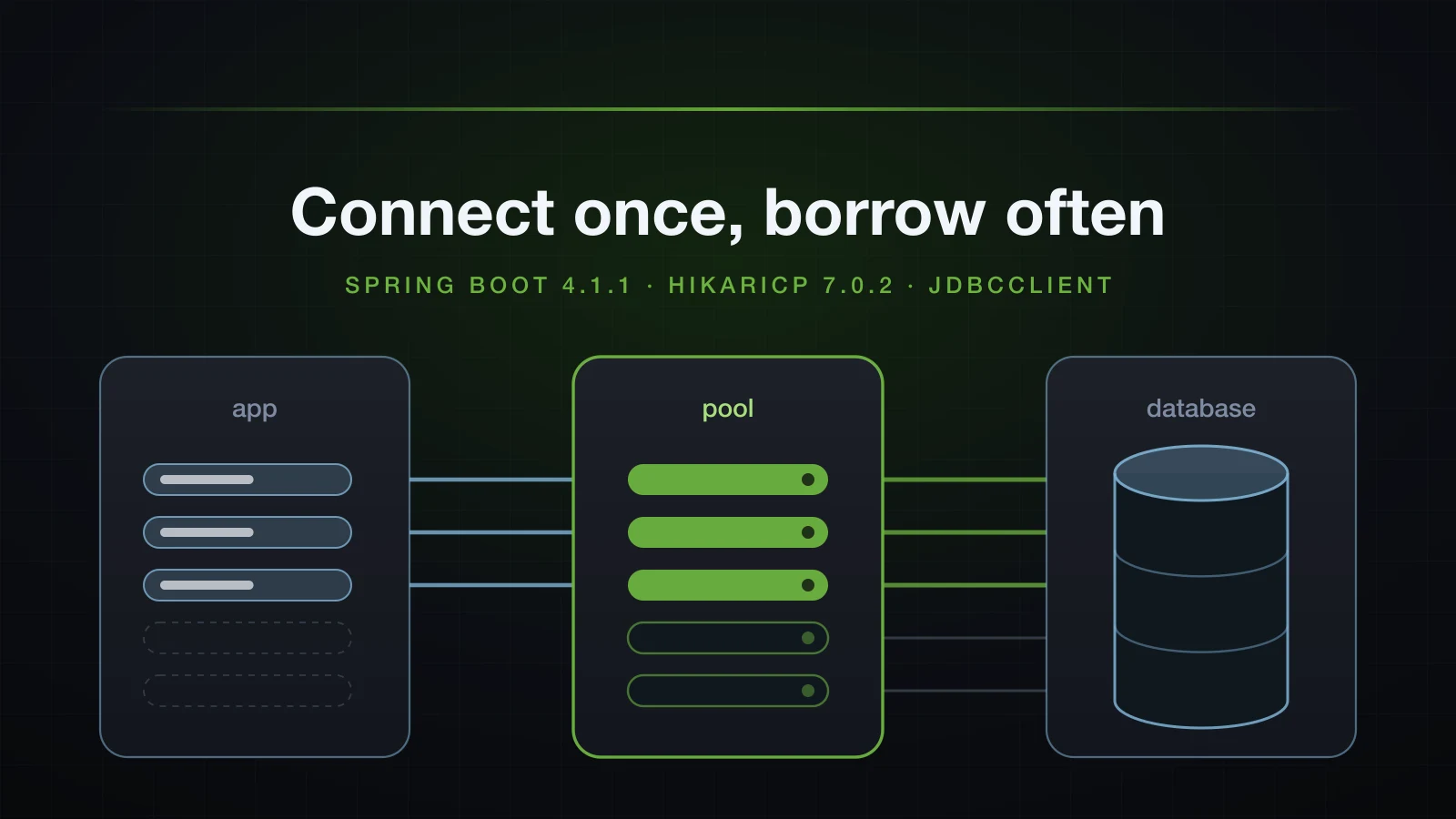
Chapter 3 built the product catalogue as an HTTP API, and every product lived in a ConcurrentHashMap that started empty on each restart. Chapter 4 puts the catalogue on a real database. This article lays the groundwork: where connections come from, which database Spring Boot picks when you configure none, H2 for development and PostgreSQL or MySQL beyond it, the HikariCP pool in between, and JdbcClient for running SQL.
It ends where article 21 pointed: a JdbcProductRepository behind the existing ProductRepository interface, with ProductService untouched, answering curl from PostgreSQL. Along the way it measures the things tutorials tend to repeat from older versions — the H2 console, spring.sql.init.mode, KeyHolder and pool exhaustion — on the versions this series uses.
The examples use Spring Boot 4.1.1 and Java 21, with the embedded H2 database for development, and PostgreSQL 18 and MySQL 8.4 running in Docker. Long jar paths in the logs are shortened to .../.
What is a DataSource, and why use a connection pool?
A JDBC Connection is an open session with the database: a network connection, a login, and on PostgreSQL a server process of its own. DriverManager.getConnection(url, user, password) creates a new one on every call. javax.sql.DataSource is the interface that sits in front of that: one method that matters, getConnection(), and no promise about where the connection comes from. Code asks a DataSource for a connection and calls close() when it is done; whether that opened and closed a physical connection or borrowed one and handed it back is up to the implementation.
Spring Boot's default implementation is HikariCP's HikariDataSource, a connection pool. It keeps connections open, lends one out on getConnection(), and takes it back on close() without closing the socket. The difference is easy to measure. A temporary runner opened a connection and ran SELECT 1 a hundred times each way, against the PostgreSQL container set up later in this article:
private void openNew(int n) throws SQLException {
    for (int i = 0; i < n; i++) {
        try (Connection connection = DriverManager.getConnection(url, username, password);
             Statement statement = connection.createStatement()) {
            statement.executeQuery("SELECT 1").close();
        }
    }
}

private void borrow(int n) throws SQLException {
    for (int i = 0; i < n; i++) {
        try (Connection connection = dataSource.getConnection();
             Statement statement = connection.createStatement()) {
            statement.executeQuery("SELECT 1").close();
        }
    }
}
After twenty warm-up iterations of each, five rounds of 100 printed:
round 1: DriverManager 2.542 ms per connection, pool 0.176 ms per connection
round 2: DriverManager 3.156 ms per connection, pool 0.159 ms per connection
round 3: DriverManager 2.558 ms per connection, pool 0.129 ms per connection
round 4: DriverManager 2.446 ms per connection, pool 0.135 ms per connection
round 5: DriverManager 2.266 ms per connection, pool 0.120 ms per connection
Best of five: 2.27 ms to open a connection and 0.12 ms to borrow one, about 19 times less. The numbers are indicative — one machine, a database in a local container, no network latency in either figure — but the source of the cost is not. The pg_hba.conf in the postgres:18 image ends with host all all all scram-sha-256, so every new connection from outside the container runs a SCRAM password exchange, and PostgreSQL starts a backend process to serve it. A pool pays that once per connection instead of once per query.
A pool has a second job: it caps how many connections the application opens at once, which protects the database. The HikariCP section near the end measures what happens when that cap is reached.
Adding JDBC and H2 to a Spring Boot project
The JDBC starter brings the DataSource auto-configuration, HikariCP and Spring's JDBC module. For development, add H2, a database written in Java that runs inside the application's JVM. The article reuses the web and validation starters from Chapter 3, so the Initializr ids are web, validation, jdbc and h2:
curl -s "https://start.spring.io/starter.zip?type=gradle-project&language=java&bootVersion=4.1.1&javaVersion=21&groupId=com.example&artifactId=demo&name=demo&packageName=com.example.demo&dependencies=web,validation,jdbc,h2" -o demo.zipThe generated build, without the -test starter Initializr adds for each:
dependencies {
	implementation 'org.springframework.boot:spring-boot-h2console'
	implementation 'org.springframework.boot:spring-boot-starter-jdbc'
	implementation 'org.springframework.boot:spring-boot-starter-validation'
	implementation 'org.springframework.boot:spring-boot-starter-webmvc'
	runtimeOnly 'com.h2database:h2'
}<dependency>
<groupId>org.springframework.boot</groupId>
<artifactId>spring-boot-h2console</artifactId>
</dependency>
<dependency>
<groupId>org.springframework.boot</groupId>
<artifactId>spring-boot-starter-jdbc</artifactId>
</dependency>
<dependency>
<groupId>org.springframework.boot</groupId>
<artifactId>spring-boot-starter-validation</artifactId>
</dependency>
<dependency>
<groupId>org.springframework.boot</groupId>
<artifactId>spring-boot-starter-webmvc</artifactId>
</dependency>
<dependency>
<groupId>com.h2database</groupId>
<artifactId>h2</artifactId>
<scope>runtime</scope>
</dependency>Three details in that list. The database is runtimeOnly: application code works with the JDBC interfaces and never imports an H2 class. spring-boot-h2console is not part of H2: in Spring Boot 4 the H2 web console lives in its own module, and Initializr adds it when H2 and web are selected together. And the packaged jar shows what the JDBC starter resolved to: HikariCP-7.0.2.jar, spring-jdbc-7.0.9.jar, spring-tx-7.0.9.jar and spring-boot-jdbc-4.1.1.jar, next to h2-2.4.240.jar.
The finished project, packaged by feature as article 21 decided:
src/main
├── java/com/example/demo
│   ├── DemoApplication.java
│   ├── common
│   │   └── GlobalExceptionHandler.java
│   └── product
│       ├── CreateProductRequest.java
│       ├── DuplicateSkuException.java
│       ├── InsufficientStockException.java
│       ├── JdbcProductRepository.java
│       ├── Product.java
│       ├── ProductController.java
│       ├── ProductMapper.java
│       ├── ProductNotFoundException.java
│       ├── ProductRepository.java
│       ├── ProductResponse.java
│       └── ProductService.java
└── resources
    ├── application.properties
    ├── application-dev.properties
    ├── application-prod.properties
    ├── data.sql
    └── schema.sql
The experiments also use temporary classes in a com.example.demo.lab package; delete it when you are done.
How Spring Boot decides which database you get
No URL: an embedded H2 with a generated name
With the starter and H2 on the classpath and no database settings at all, the application starts:
./gradlew bootJar
java -jar build/libs/demo-0.0.1-SNAPSHOT.jar --server.port=81252026-09-13T16:11:00.288+07:00 INFO 9389 --- [demo] [ main] o.s.boot.tomcat.TomcatWebServer : Tomcat initialized with port 8125 (http)
2026-09-13T16:11:00.296+07:00 INFO 9389 --- [demo] [ main] o.apache.catalina.core.StandardService : Starting service [Tomcat]
2026-09-13T16:11:00.296+07:00 INFO 9389 --- [demo] [ main] o.apache.catalina.core.StandardEngine : Starting Servlet engine: [Apache Tomcat/11.0.24]
2026-09-13T16:11:00.310+07:00 INFO 9389 --- [demo] [ main] b.w.c.s.WebApplicationContextInitializer : Root WebApplicationContext: initialization completed in 377 ms
2026-09-13T16:11:00.502+07:00 INFO 9389 --- [demo] [ main] o.s.boot.tomcat.TomcatWebServer : Tomcat started on port 8125 (http) with context path '/'
2026-09-13T16:11:00.508+07:00 INFO 9389 --- [demo] [ main] com.example.demo.DemoApplication : Started DemoApplication in 0.749 seconds (process running for 0.943)No line mentions a database. Boot did not skip it, though. The experiments in this article are CommandLineRunner classes in the lab package that run only when a --lab=… argument names them, and --spring.main.web-application-type=none makes the process exit when they finish. One of them looks up the DataSource bean:
HikariDataSource ds = (HikariDataSource) context.getBean(DataSource.class);
System.out.println("jdbcUrl         = " + ds.getJdbcUrl());
System.out.println("driverClassName = " + ds.getDriverClassName());
System.out.println("username = " + ds.getUsername());java -jar build/libs/demo-0.0.1-SNAPSHOT.jar --lab=ds --spring.main.web-application-type=nonejdbcUrl = jdbc:h2:mem:ff0b7eac-4eb7-4de3-861e-ca54cee094bf;DB_CLOSE_DELAY=-1;DB_CLOSE_ON_EXIT=FALSE
driverClassName = org.h2.Driver
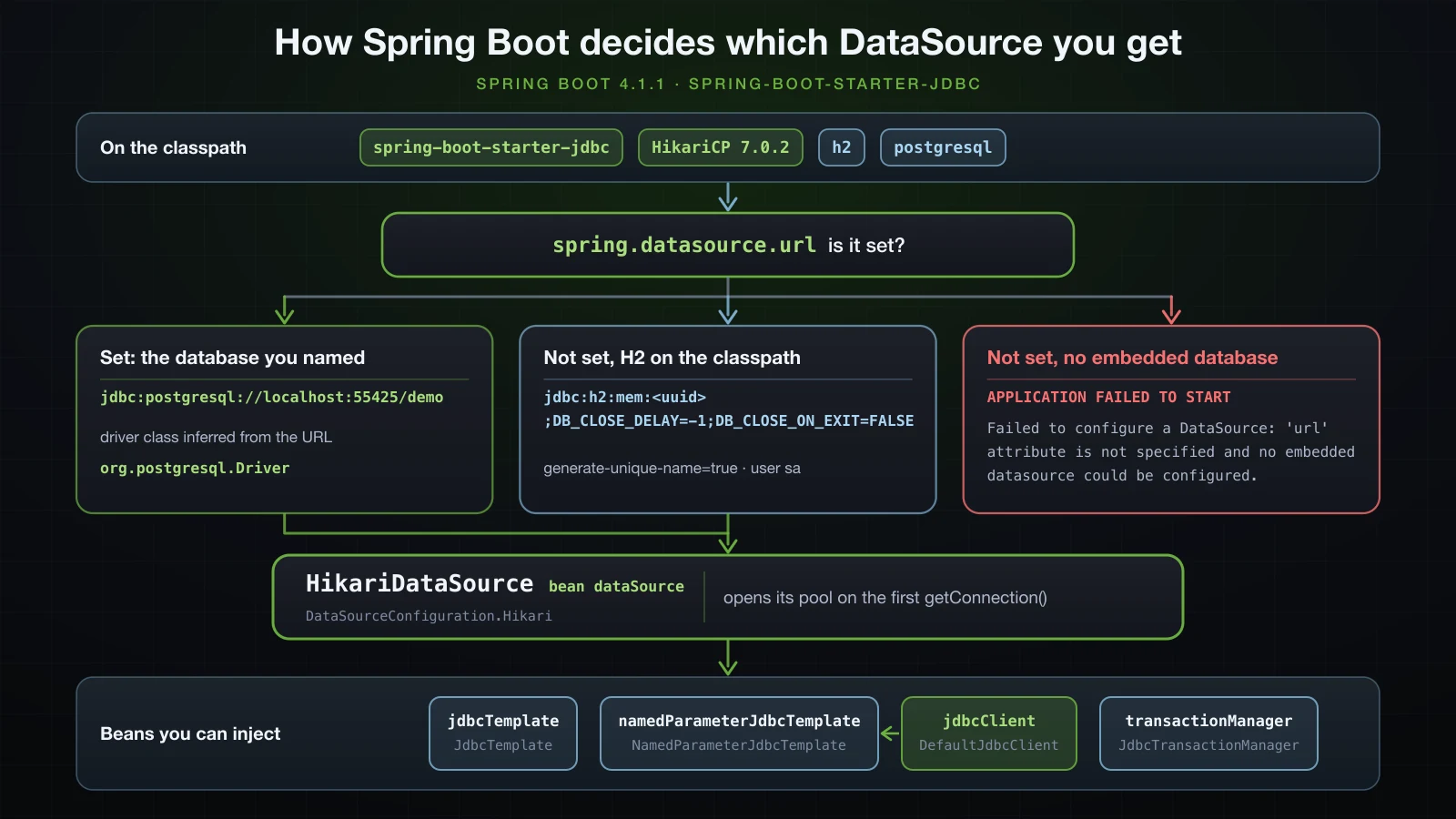
username = saA HikariDataSource was already configured, pointing at an in-memory H2 database named with a random UUID, because spring.datasource.generate-unique-name defaults to true. DB_CLOSE_DELAY=-1 keeps an in-memory H2 database alive when its last connection closes, and sa is H2's default user. Nothing was logged because HikariCP opens its pool lazily, on the first getConnection(), and nothing had asked for a connection yet.
The first thing that does ask for one puts the URL in the log. Enabling the H2 console, covered below, is one such thing: its auto-configuration borrows a connection during startup to report where the database is.
2026-09-13T16:12:05.135+07:00  INFO 9574 --- [demo] [           main] com.zaxxer.hikari.HikariDataSource       : HikariPool-1 - Starting...
2026-09-13T16:12:05.206+07:00  INFO 9574 --- [demo] [           main] com.zaxxer.hikari.pool.HikariPool        : HikariPool-1 - Added connection conn0: url=jdbc:h2:mem:593e4a79-efef-4920-b929-b135e2402251 user=SA
2026-09-13T16:12:05.207+07:00  INFO 9574 --- [demo] [           main] com.zaxxer.hikari.HikariDataSource       : HikariPool-1 - Start completed.
2026-09-13T16:12:05.214+07:00  INFO 9574 --- [demo] [           main] o.s.b.h.a.H2ConsoleAutoConfiguration     : H2 console available at '/h2-console'. Database available at 'jdbc:h2:mem:593e4a79-efef-4920-b929-b135e2402251'
The UUID differs from the previous start: every start gets a new, empty database.
Which auto-configuration made the decision
The --debug condition report from article 10 shows the choice. Run without the web server so that the process exits after startup:
java -jar build/libs/demo-0.0.1-SNAPSHOT.jar --debug --spring.main.web-application-type=noneUnder Positive matches:
   DataSourceConfiguration.Hikari matched:
      - @ConditionalOnClass found required class 'com.zaxxer.hikari.HikariDataSource' (OnClassCondition)
      - @ConditionalOnProperty (spring.datasource.type=com.zaxxer.hikari.HikariDataSource) matched (OnPropertyCondition)
      - @ConditionalOnMissingBean (types: javax.sql.DataSource; SearchStrategy: all) did not find any beans (OnBeanCondition)
Under Negative matches:
   DataSourceAutoConfiguration.EmbeddedDatabaseConfiguration:
      Did not match:
         - EmbeddedDataSource found supported pooled data source (DataSourceAutoConfiguration.EmbeddedDatabaseCondition)
DataSourceAutoConfiguration has two ways to give you an embedded database: a non-pooled embedded DataSource, or a pool pointed at the embedded database's URL. HikariCP is on the classpath through the JDBC starter, so the pooled branch wins, DataSourceConfiguration.Hikari creates the HikariDataSource, and H2 only supplies the URL. The @ConditionalOnMissingBean line is the usual back-off: declare your own DataSource bean and Boot creates none. The same HikariDataSource serves every other case in this article; only its settings change.
Setting spring.datasource.url infers the driver class
Setting a URL replaces the generated one, and the driver class does not have to be set with it:
java -jar build/libs/demo-0.0.1-SNAPSHOT.jar --lab=ds --spring.main.web-application-type=none --spring.datasource.url=jdbc:h2:mem:demojdbcUrl = jdbc:h2:mem:demo
driverClassName = org.h2.Driver
username = saBoot matched the jdbc:h2: prefix to org.h2.Driver. The PostgreSQL and MySQL runs later in this article printed "org.postgresql.Driver" and "com.mysql.cj.jdbc.Driver" in HikariCP's configuration dump, again with no spring.datasource.driver-class-name set. Leave that property out unless you use a driver whose URL Boot does not recognise.
No URL and no embedded database: the startup error
The third branch is the error most people meet first: no URL and no embedded database to fall back on. It was produced here with spring.datasource.embedded-database-connection=none, which stops Boot from using the H2 on the classpath:
java -jar build/libs/demo-0.0.1-SNAPSHOT.jar --spring.main.web-application-type=none --spring.datasource.embedded-database-connection=none***************************
APPLICATION FAILED TO START
***************************
Description:
Failed to configure a DataSource: 'url' attribute is not specified and no embedded datasource could be configured.
Reason: Failed to determine a suitable driver class
Action:
Consider the following:
If you want an embedded database (H2, HSQL or Derby), please put it on the classpath.
If you have database settings to be loaded from a particular profile you may need to activate it (no profiles are currently active).The second suggestion is the usual cause in a real project: the URL is in a profile file, and that profile is not active.
H2 for development
H2 needs no installation and starts empty in milliseconds, which makes it a comfortable database for local development. Two choices decide how far it can be trusted: where it keeps its data, and how closely it imitates the production database.
In-memory or file: does the data survive a restart?
jdbc:h2:mem: keeps everything in the JVM's memory; jdbc:h2:file: writes it to disk. To see the difference, a runner records every start in a table and counts the rows:
package com.example.demo.lab;

import org.slf4j.Logger;
import org.slf4j.LoggerFactory;

import org.springframework.boot.CommandLineRunner;
import org.springframework.boot.autoconfigure.condition.ConditionalOnProperty;
import org.springframework.jdbc.core.simple.JdbcClient;
import org.springframework.stereotype.Component;

@Component
@ConditionalOnProperty(name = "lab", havingValue = "starts")
public class StartCounter implements CommandLineRunner {

    private static final Logger log = LoggerFactory.getLogger(StartCounter.class);

    private final JdbcClient jdbcClient;

    public StartCounter(JdbcClient jdbcClient) {
        this.jdbcClient = jdbcClient;
    }

    @Override
    public void run(String... args) {
        jdbcClient.sql("CREATE TABLE IF NOT EXISTS app_start (started_at TIMESTAMP)").update();
        jdbcClient.sql("INSERT INTO app_start (started_at) VALUES (CURRENT_TIMESTAMP)").update();
        Long starts = jdbcClient.sql("SELECT COUNT(*) FROM app_start").query(Long.class).single();
        log.info("This database has seen {} application start(s)", starts);
    }
}
JdbcClient gets its own section below; here it only runs three statements. The application started twice with an in-memory URL:
java -jar build/libs/demo-0.0.1-SNAPSHOT.jar --server.port=8125 --lab=starts --spring.datasource.url=jdbc:h2:mem:demo2026-09-13T16:16:45.517+07:00 INFO 10738 --- [demo] [ main] com.example.demo.lab.StartCounter : This database has seen 1 application start(s)2026-09-13T16:16:47.350+07:00 INFO 10781 --- [demo] [ main] com.example.demo.lab.StartCounter : This database has seen 1 application start(s)Then twice with a file URL:
java -jar build/libs/demo-0.0.1-SNAPSHOT.jar --server.port=8125 --lab=starts --spring.datasource.url=jdbc:h2:file:./data/demo2026-09-13T16:16:49.435+07:00 INFO 10808 --- [demo] [ main] com.zaxxer.hikari.pool.HikariPool : HikariPool-1 - Added connection conn0: url=jdbc:h2:file:./data/demo user=
2026-09-13T16:16:49.461+07:00 INFO 10808 --- [demo] [ main] com.example.demo.lab.StartCounter : This database has seen 1 application start(s)2026-09-13T16:16:51.072+07:00 INFO 10842 --- [demo] [ main] com.example.demo.lab.StartCounter : This database has seen 2 application start(s)Only file mode reached 2. The database is the file data/demo.mv.db, created relative to the directory the application was started from. Two more differences showed up. The file URL logged user= where the in-memory URL logged user=SA: Boot filled in the sa user for the in-memory URL only. And, as the schema.sql section explains, Boot does not treat a file URL as embedded: started against jdbc:h2:file:./data2/demo with the default settings, the application ran neither schema.sql nor data.sql.
For day-to-day development the in-memory database is the simpler default, because every start begins from the same schema and seed data. File mode suits data you typed in by hand and want to keep; add data/ to .gitignore if you use it.
H2 PostgreSQL compatibility mode and what it does not cover
H2 can imitate other databases with MODE= in the URL. Production in this series is PostgreSQL, so the development URL uses PostgreSQL mode together with the two settings H2's documentation recommends alongside it:
jdbc:h2:mem:demo;MODE=PostgreSQL;DATABASE_TO_LOWER=TRUE;DEFAULT_NULL_ORDERING=HIGHDATABASE_TO_LOWER=TRUE stores unquoted identifiers in lower case, as PostgreSQL does, and DEFAULT_NULL_ORDERING=HIGH sorts NULLs as the highest values, which is where PostgreSQL 18 put them in an ascending ORDER BY. A compatibility mode changes which syntax H2 accepts; it does not turn H2 into PostgreSQL. The same statements, run through JdbcTemplate against H2 in its default mode, H2 with the URL above, and PostgreSQL 18.6:
| Statement | H2 default mode | H2 with the URL above | PostgreSQL 18.6 |
|---|---|---|---|
INSERT … ON CONFLICT DO NOTHING | syntax error | 0 rows, no error | 0 rows, no error |
INSERT … ON CONFLICT (sku) DO NOTHING | syntax error | syntax error | 0 rows, no error |
INSERT … ON CONFLICT (sku) DO UPDATE SET stock = EXCLUDED.stock | syntax error | syntax error | 1 row |
INSERT … RETURNING id | syntax error | syntax error | returns the new id |
SELECT gen_random_uuid() IS NOT NULL | function not found | true | true |
SELECT COUNT(*) FROM "item" on a table created as item | table not found | works | works |
SELECT '5'::int + 1 | 6 | 6 | 6 |
SELECT pg_sleep(1) | function not found | function not found | works |
SELECT generate_series(1, 3) | function not found | function not found | 3 rows |
SELECT DATE '2026-01-31' + INTERVAL '1 month' | error | error | 2026-02-28 00:00:00.0 |
ON CONFLICT DO NOTHING without a column works in both, and data.sql below relies on it. Naming the conflict column, the form PostgreSQL code normally uses, is a syntax error in H2, and so are upserts and RETURNING:
Syntax error in SQL statement "INSERT INTO item (sku, stock) VALUES ('A-1', 5) [*]ON CONFLICT (sku) DO NOTHING"; SQL statement:pg_sleep does not exist either, which is why the pool exhaustion test near the end runs on PostgreSQL. SQL that passes on H2 still has to run against PostgreSQL before it ships; running tests against a real PostgreSQL with Testcontainers belongs to the Advanced course.
The H2 console in Spring Boot 4
H2 includes a web console for browsing tables and running SQL. Boot serves it when spring.h2.console.enabled=true; the property defaults to false, and spring.h2.console.path defaults to /h2-console. In Boot 4 those properties come from the spring-boot-h2console module, and the module is what makes them work. With it on the classpath, as Initializr adds it:
java -jar build/libs/demo-0.0.1-SNAPSHOT.jar --server.port=8125 --spring.h2.console.enabled=trueThe startup log gains the H2 console available at '/h2-console' line shown earlier, and the console answers:
curl -i http://localhost:8125/h2-consoleHTTP/1.1 302
Location: http://localhost:8125/h2-console/
Content-Length: 0
Date: Sun, 13 Sep 2026 09:12:05 GMTcurl -i http://localhost:8125/h2-console/HTTP/1.1 200
Cache-Control: no-cache
Content-Type: text/html
Content-Length: 938
Date: Sun, 13 Sep 2026 09:12:05 GMTWith spring-boot-h2console removed from the build and the same flag set, nothing complained — no warning, no log line — and there was no console. /h2-console answered:
HTTP/1.1 404
Content-Type: application/json
Transfer-Encoding: chunked
and /h2-console/ returned Boot's JSON error body with "status":404. Tutorials written for Boot 3, where the H2 console auto-configuration was part of spring-boot-autoconfigure, only tell you to set the property; on Boot 4 the missing module fails silently.
⚠️ Never enable the H2 console in production. It is a web page that connects to a database and runs whatever SQL is typed into it. Remote access is off by default (
spring.h2.console.settings.web-allow-others=false), but the safe place for the console is a developer's own machine, which is why this series turns it on in thedevprofile only.
Running PostgreSQL and MySQL with Docker
PostgreSQL is this series' real database; MySQL is the common alternative and appears once, in this article. Both run as Docker containers. The host ports here are 55425 and 33325 so that they cannot clash with a database already installed on the machine; with nothing on the default ports, -p 5432:5432 and -p 3306:3306 are the usual choice.
Starting the containers
PostgreSQL 18, with a database, a user and a password created on first start:
docker run -d --name sb-a25-pg -e POSTGRES_USER=demo -e POSTGRES_PASSWORD=secret -e POSTGRES_DB=demo -p 55425:5432 postgres:18docker exec sb-a25-pg psql -U demo -d demo -c "select version();" version
--------------------------------------------------------------------------------------------------------------------------
PostgreSQL 18.6 (Debian 18.6-1.pgdg13+2) on aarch64-unknown-linux-gnu, compiled by gcc (Debian 14.2.0-19) 14.2.0, 64-bit
(1 row)MySQL 8.4, the same way:
docker run -d --name sb-a25-mysql -e MYSQL_ROOT_PASSWORD=rootsecret -e MYSQL_DATABASE=demo -e MYSQL_USER=demo -e MYSQL_PASSWORD=secret -p 33325:3306 mysql:8.4docker exec sb-a25-mysql mysql -udemo -psecret -e "SELECT VERSION();" 2>/dev/nullVERSION()
8.4.11PostgreSQL accepted connections within a second of docker run; MySQL took about five seconds to initialise. Neither command mounts a named volume, so a new container starts with an empty database.
Adding the JDBC driver
Each database needs its driver on the classpath. Boot's dependency management supplies the versions, 42.7.13 for PostgreSQL and 9.7.0 for Connector/J:
dependencies {
	implementation 'org.springframework.boot:spring-boot-h2console'
	implementation 'org.springframework.boot:spring-boot-starter-jdbc'
	implementation 'org.springframework.boot:spring-boot-starter-validation'
	implementation 'org.springframework.boot:spring-boot-starter-webmvc'
	runtimeOnly 'com.h2database:h2'
	runtimeOnly 'com.mysql:mysql-connector-j'
	runtimeOnly 'org.postgresql:postgresql'
}<dependency>
<groupId>com.mysql</groupId>
<artifactId>mysql-connector-j</artifactId>
<scope>runtime</scope>
</dependency>
<dependency>
<groupId>org.postgresql</groupId>
<artifactId>postgresql</artifactId>
<scope>runtime</scope>
</dependency>Connection settings for PostgreSQL and MySQL
Three properties connect the application; the URL format is jdbc:postgresql://host:port/database for one and jdbc:mysql://host:port/database for the other:
spring.application.name=demo
spring.datasource.url=jdbc:postgresql://localhost:55425/demo
spring.datasource.username=demo
spring.datasource.password=secretspring.application.name=demo
spring.datasource.url=jdbc:mysql://localhost:33325/demo
spring.datasource.username=demo
spring.datasource.password=secretStarted against PostgreSQL, the log showed the pool's first connection:
2026-09-13T16:18:06.166+07:00  INFO 11235 --- [demo] [           main] com.zaxxer.hikari.HikariDataSource       : HikariPool-1 - Starting...
2026-09-13T16:18:06.248+07:00  INFO 11235 --- [demo] [           main] com.zaxxer.hikari.pool.HikariPool        : HikariPool-1 - Added connection org.postgresql.jdbc.PgConnection@1756f7cc
2026-09-13T16:18:06.249+07:00  INFO 11235 --- [demo] [           main] com.zaxxer.hikari.HikariDataSource       : HikariPool-1 - Start completed.
And against MySQL:
2026-09-13T16:27:56.305+07:00  INFO 22425 --- [demo] [           main] com.zaxxer.hikari.HikariDataSource       : HikariPool-1 - Starting...
2026-09-13T16:27:56.458+07:00  INFO 22425 --- [demo] [           main] com.zaxxer.hikari.pool.HikariPool        : HikariPool-1 - Added connection com.mysql.cj.jdbc.ConnectionImpl@4dcbae55
2026-09-13T16:27:56.459+07:00  INFO 22425 --- [demo] [           main] com.zaxxer.hikari.HikariDataSource       : HikariPool-1 - Start completed.
Unlike H2's, neither driver's connection prints its URL; HikariPool-1 - Start completed. is the line that says the database accepted the login. These pools opened during startup, on the main thread, because the project already contained the schema.sql file from a later section: with spring.sql.init.mode at its default, Boot borrows a connection to find out whether the database is embedded. With spring.sql.init.mode=never, HikariPool-1 - Starting... appeared only on the first request, on the nio-8125-exec-1 thread.
Dev and prod profiles: H2 locally, PostgreSQL in production
Keeping one database in application.properties means editing the file to switch. Article 13's profiles solve that: H2 in a dev profile, PostgreSQL in a prod profile, and the password from an environment variable instead of a file in Git. The base file keeps only what every environment shares:
spring.application.name=demospring.datasource.url=jdbc:h2:mem:demo;MODE=PostgreSQL;DATABASE_TO_LOWER=TRUE;DEFAULT_NULL_ORDERING=HIGH
spring.h2.console.enabled=truespring.datasource.url=jdbc:postgresql://localhost:55425/demo
spring.datasource.username=demo
spring.datasource.password=${DB_PASSWORD}Each environment picks its profile when it starts the same jar:
java -jar build/libs/demo-0.0.1-SNAPSHOT.jar --server.port=8125 --spring.profiles.active=devDB_PASSWORD=secret java -jar build/libs/demo-0.0.1-SNAPSHOT.jar --server.port=8125 --spring.profiles.active=prod2026-09-13T16:25:15.023+07:00 INFO 20819 --- [demo] [ main] com.example.demo.DemoApplication : The following 1 profile is active: "prod"${DB_PASSWORD} needs care in one respect. Article 11 showed an unresolvable placeholder throwing Could not resolve placeholder. Bound to spring.datasource.password, a missing variable produced no such error: started without DB_PASSWORD, the ds runner printed the placeholder itself as the password.
jdbcUrl = jdbc:postgresql://localhost:55425/demo
username = demo
password = ${DB_PASSWORD}The mistake therefore surfaces as a rejected login at PostgreSQL, FATAL: password authentication failed for user "demo", which the section on connection failures quotes in full.
Creating tables with schema.sql and data.sql
The products table has to exist before anything can query it. Until article 31 replaces this with Flyway migrations, Spring Boot's SQL initialization does the job: at startup it runs schema.sql and then data.sql from the root of the classpath.
CREATE TABLE IF NOT EXISTS products (
id BIGINT GENERATED BY DEFAULT AS IDENTITY PRIMARY KEY,
name VARCHAR(100) NOT NULL,
sku VARCHAR(40) NOT NULL,
price NUMERIC(10, 2) NOT NULL,
stock INT NOT NULL,
category VARCHAR(50) NOT NULL,
CONSTRAINT uk_product_sku UNIQUE (sku)
);INSERT INTO products (name, sku, price, stock, category) VALUES
('Mechanical keyboard', 'KB-01', 89.90, 25, 'keyboards'),
('Wireless mouse', 'MS-01', 24.50, 3, 'mice'),
('USB-C hub', 'HUB-07', 39.00, 10, 'accessories')
ON CONFLICT DO NOTHING;The columns follow the domain record: an id the database generates, a sku kept unique by a named constraint, price as NUMERIC(10, 2) for a BigDecimal, and category as a plain string for now; article 28 turns it into an entity of its own. Both files ran unchanged on H2 in PostgreSQL mode and on PostgreSQL 18, the two databases this series uses.
spring.sql.init.mode: embedded runs on H2, not on PostgreSQL
spring.sql.init.mode takes embedded, the default, always or never. With DEBUG logging for org.springframework.jdbc.datasource.init, the dev profile shows both scripts running:
java -jar build/libs/demo-0.0.1-SNAPSHOT.jar --server.port=8125 --spring.profiles.active=dev --logging.level.org.springframework.jdbc.datasource.init=DEBUG2026-09-13T16:20:00.040+07:00 DEBUG 11584 --- [demo] [ main] o.s.jdbc.datasource.init.ScriptUtils : Executing SQL script from URL [jar:nested:.../demo/build/libs/demo-0.0.1-SNAPSHOT.jar/!BOOT-INF/classes/!/schema.sql]
2026-09-13T16:20:00.045+07:00 DEBUG 11584 --- [demo] [ main] o.s.jdbc.datasource.init.ScriptUtils : Executed SQL script from URL [jar:nested:.../demo/build/libs/demo-0.0.1-SNAPSHOT.jar/!BOOT-INF/classes/!/schema.sql] in 5 ms.
2026-09-13T16:20:00.046+07:00 DEBUG 11584 --- [demo] [ main] o.s.jdbc.datasource.init.ScriptUtils : Executing SQL script from URL [jar:nested:.../demo/build/libs/demo-0.0.1-SNAPSHOT.jar/!BOOT-INF/classes/!/data.sql]
2026-09-13T16:20:00.047+07:00 DEBUG 11584 --- [demo] [ main] o.s.jdbc.datasource.init.ScriptUtils : 3 returned as update count for SQL: INSERT INTO products (name, sku, price, stock, category) VALUES ('Mechanical keyboard', 'KB-01', 89.90, 25, 'keyboards'), ('Wireless mouse', 'MS-01', 24.50, 3, 'mice'), ('USB-C hub', 'HUB-07', 39.00, 10, 'accessories') ON CONFLICT DO NOTHINGThe same logging with the prod profile, against the empty PostgreSQL database:
DB_PASSWORD=secret java -jar build/libs/demo-0.0.1-SNAPSHOT.jar --server.port=8125 --spring.profiles.active=prod --logging.level.org.springframework.jdbc.datasource.init=DEBUGThis time there was no ScriptUtils line at all, and PostgreSQL had no table:
docker exec sb-a25-pg psql -U demo -d demo -c '\dt'Did not find any tables.The pool did open during startup, as the PostgreSQL log lines above showed, because Boot connected to check whether the database is embedded. An in-memory H2 database is; PostgreSQL is not, so embedded skipped both scripts. So did the H2 file URL from earlier. always runs them against any database:
spring.datasource.url=jdbc:postgresql://localhost:55425/demo
spring.datasource.username=demo
spring.datasource.password=${DB_PASSWORD}
spring.sql.init.mode=always After one start with that line:
docker exec sb-a25-pg psql -U demo -d demo -c '\dt' List of tables
Schema | Name | Type | Owner
--------+----------+-------+-------
public | products | table | demo
(1 row)docker exec sb-a25-pg psql -U demo -d demo -c 'SELECT id, sku, stock FROM products ORDER BY id;' id | sku | stock
----+--------+-------
1 | KB-01 | 25
2 | MS-01 | 3
3 | HUB-07 | 10
(3 rows)Scripts that run on every start must be re-runnable
always means every start, so on the second start both files run against a database that already has the table and the rows. IF NOT EXISTS turns the second CREATE TABLE into a warning that the log records and ignores:
2026-09-13T16:19:58.399+07:00 DEBUG 11556 --- [demo] [ main] o.s.jdbc.datasource.init.ScriptUtils : SQLWarning ignored: SQL state '42P07', error code '0', message [relation "products" already exists, skipping]The insert is the problem. Before ON CONFLICT DO NOTHING was added to data.sql, the second start stopped the application:
Caused by: org.springframework.jdbc.datasource.init.ScriptStatementFailedException: Failed to execute SQL script statement #1 of URL [jar:nested:.../demo/build/libs/demo-0.0.1-SNAPSHOT.jar/!BOOT-INF/classes/!/data.sql]: INSERT INTO products (name, sku, price, stock, category) VALUES ('Mechanical keyboard', 'KB-01', 89.90, 25, 'keyboards'), ('Wireless mouse', 'MS-01', 24.50, 3, 'mice'), ('USB-C hub', 'HUB-07', 39.00, 10, 'accessories')
Caused by: org.postgresql.util.PSQLException: ERROR: duplicate key value violates unique constraint "uk_product_sku"
  Detail: Key (sku)=(KB-01) already exists.
With the clause, the second start logged the insert as a no-op and carried on:
2026-09-13T16:19:58.404+07:00 DEBUG 11556 --- [demo] [ main] o.s.jdbc.datasource.init.ScriptUtils : 0 returned as update count for SQL: INSERT INTO products (name, sku, price, stock, category) VALUES ('Mechanical keyboard', 'KB-01', 89.90, 25, 'keyboards'), ('Wireless mouse', 'MS-01', 24.50, 3, 'mice'), ('USB-C hub', 'HUB-07', 39.00, 10, 'accessories') ON CONFLICT DO NOTHINGKeeping track of which scripts have already run is exactly what a migration tool does, and article 31 replaces schema.sql and data.sql with Flyway.
JdbcClient basics
JdbcClient, added in Spring Framework 6.1, is the API this series uses for SQL. The examples map rows into the catalogue's domain record from article 21, which gains a category component in this chapter:
package com.example.demo.product;

import java.math.BigDecimal;

public record Product(Long id, String name, String sku, BigDecimal price, int stock) {
public record Product(Long id, String name, String sku, BigDecimal price, int stock, String category) {

    public Product withId(Long newId) {
        return new Product(newId, name, sku, price, stock);
        return new Product(newId, name, sku, price, stock, category);
    }

    public Product withStock(int newStock) {
        return new Product(id, name, sku, price, newStock);
        return new Product(id, name, sku, price, newStock, category);
    }
}
A JdbcClientLab runner in the lab package ran every example in this section, once with the dev profile on H2 and once with prod on PostgreSQL, where the table was dropped first so that both databases started from the same three rows:
java -jar build/libs/demo-0.0.1-SNAPSHOT.jar --spring.profiles.active=dev --lab=jdbc --spring.main.web-application-type=nonedocker exec sb-a25-pg psql -U demo -d demo -c "DROP TABLE IF EXISTS products;"DB_PASSWORD=secret java -jar build/libs/demo-0.0.1-SNAPSHOT.jar --spring.profiles.active=prod --lab=jdbc --spring.main.web-application-type=noneOutputs are the same on both databases unless shown separately.
Which beans the JDBC starter creates
The ds runner also listed the JDBC beans by type:
for (Class<?> type : List.of(DataSource.class, JdbcTemplate.class, NamedParameterJdbcTemplate.class,
        JdbcClient.class, PlatformTransactionManager.class)) {
    for (String name : context.getBeanNamesForType(type)) {
        System.out.printf("%-28s %-28s %s%n", type.getSimpleName(), name, context.getBean(name).getClass().getName());
    }
}DataSource dataSource com.zaxxer.hikari.HikariDataSource
JdbcTemplate jdbcTemplate org.springframework.jdbc.core.JdbcTemplate
NamedParameterJdbcTemplate namedParameterJdbcTemplate org.springframework.jdbc.core.namedparam.NamedParameterJdbcTemplate
JdbcClient jdbcClient org.springframework.jdbc.core.simple.DefaultJdbcClient
PlatformTransactionManager transactionManager org.springframework.jdbc.support.JdbcTransactionManagerJdbcClientAutoConfiguration builds jdbcClient on top of the single NamedParameterJdbcTemplate; its entry in the --debug report reads:
   JdbcClientAutoConfiguration matched:
      - @ConditionalOnSingleCandidate (types: org.springframework.jdbc.core.namedparam.NamedParameterJdbcTemplate; SearchStrategy: all) found a single bean 'namedParameterJdbcTemplate'; @ConditionalOnMissingBean (types: org.springframework.jdbc.core.simple.JdbcClient; SearchStrategy: all) did not find any beans (OnBeanCondition)
transactionManager is what @Transactional will use in article 30. Inject JdbcClient through a constructor like any other bean.
Querying rows into a record
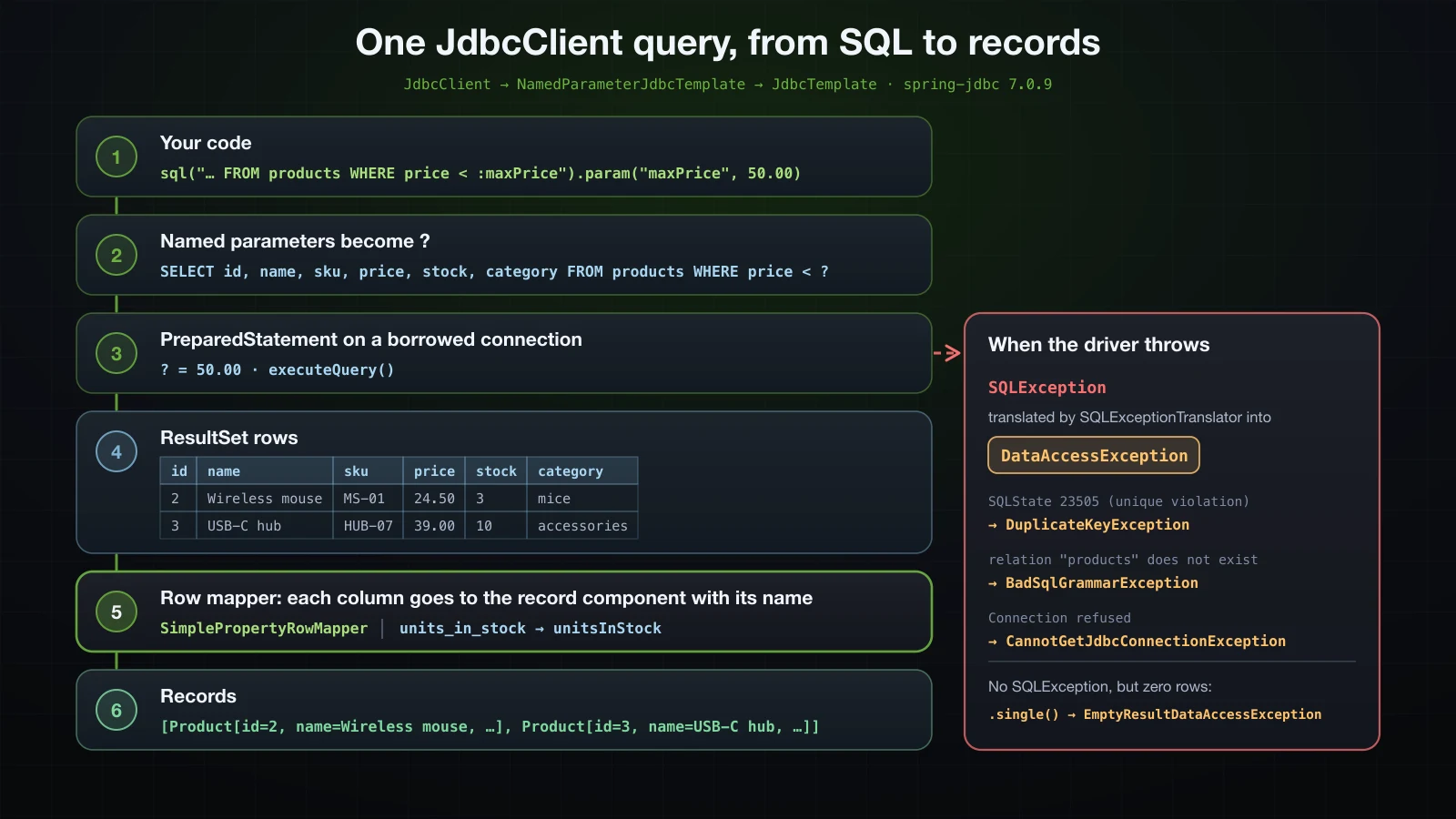
List<Product> cheap = jdbcClient.sql("""
        SELECT id, name, sku, price, stock, category
        FROM products
        WHERE price < :maxPrice
        ORDER BY price
        """)
        .param("maxPrice", new BigDecimal("50.00"))
        .query(Product.class)
        .list();
cheap.forEach(System.out::println);Product[id=2, name=Wireless mouse, sku=MS-01, price=24.50, stock=3, category=mice]
Product[id=3, name=USB-C hub, sku=HUB-07, price=39.00, stock=10, category=accessories]sql() takes the statement, param() binds :maxPrice, query(Product.class) chooses how each row becomes an object, and list() runs it. For a type like Product, DefaultJdbcClient uses SimplePropertyRowMapper, which hands each column to the record component with the same name; for a simple type such as String or Long it uses SingleColumnRowMapper and reads the one column, which is how query(Long.class).single() reads a COUNT(*).
Names do not have to match letter for letter. A snake_case column reaches a camelCase component:
package com.example.demo.lab;

public record StockLevel(String sku, int unitsInStock) {
}StockLevel level = jdbcClient.sql("SELECT sku, stock AS units_in_stock FROM products WHERE sku = :sku")
.param("sku", "MS-01")
.query(StockLevel.class)
.single();
System.out.println(level);StockLevel[sku=MS-01, unitsInStock=3]The other direction does not forgive a gap. Every record component needs a column: selecting only id, name, sku into Product failed on both databases with a message that blames the SQL, although the SQL is valid:
org.springframework.jdbc.BadSqlGrammarException: PreparedStatementCallback; bad SQL grammar [SELECT id, name, sku FROM products WHERE id = ?]The cause names the real problem: Column "price" not found [42122-240] from H2, and The column name price was not found in this ResultSet. from PostgreSQL.
optional() and single()
Optional<Product> found = jdbcClient.sql("SELECT id, name, sku, price, stock, category FROM products WHERE id = :id")
        .param("id", 1L)
        .query(Product.class)
        .optional();
Optional<Product> missing = jdbcClient.sql("SELECT id, name, sku, price, stock, category FROM products WHERE id = :id")
        .param("id", 999L)
        .query(Product.class)
        .optional();
System.out.println("id 1:   " + found);
System.out.println("id 999: " + missing);id 1: Optional[Product[id=1, name=Mechanical keyboard, sku=KB-01, price=89.90, stock=25, category=keyboards]]
id 999: Optional.emptysingle() is for a row that must exist. The same query for id 999 with single() threw:
org.springframework.dao.EmptyResultDataAccessException: Incorrect result size: expected 1, actual 0Use optional() where absence is a normal answer, as in findById; single() where it would be a bug, as in a COUNT(*); and list() for any number of rows.
Named parameters, positional parameters and paramSource
:name placeholders are named parameters. ? placeholders are positional and take param(value) calls in order:
List<String> names = jdbcClient.sql("SELECT name FROM products WHERE price BETWEEN ? AND ? ORDER BY price")
        .param(new BigDecimal("20.00"))
        .param(new BigDecimal("50.00"))
        .query(String.class)
        .list();
System.out.println(names);[Wireless mouse, USB-C hub]Named parameters survive reordering and can appear twice in one statement, so the rest of this article uses them. Either way the driver receives ? placeholders and separate values — the SQL quoted in the duplicate key exception below reads VALUES (?, ?, ?, ?, ?) — so a value is never pasted into the SQL text.
paramSource(object) fills every named parameter from the object's properties, which for a record means its accessor methods. The inserts below use this statement:
private static final String INSERT = """
        INSERT INTO products (name, sku, price, stock, category)
        VALUES (:name, :sku, :price, :stock, :category)
        """;
update() and the affected row count
update() runs INSERT, UPDATE and DELETE statements and returns how many rows changed:
String reserve = "UPDATE products SET stock = stock - :quantity WHERE sku = :sku AND stock >= :quantity";
int first = jdbcClient.sql(reserve).param("quantity", 2).param("sku", "MS-01").update();
int second = jdbcClient.sql(reserve).param("quantity", 2).param("sku", "MS-01").update();
System.out.println("first: " + first + ", second: " + second);first: 1, second: 0The mouse had 3 in stock. The first update took it to 1; the second matched no row, because stock >= 2 no longer held. A 0 is how SQL reports a condition that failed, so check the count instead of assuming the row changed. :quantity appears twice and is bound once.
Each of these statements committed on its own. The connection the runner borrowed reported autoCommit as true, and an UPDATE followed by a failing INSERT kept the update; in a separate H2 run inside a transaction started with a TransactionTemplate, the same check printed false and a thrown exception rolled the update back. Article 30 covers @Transactional.
Generated keys with KeyHolder on H2 and PostgreSQL
The database generates id, and the insert has to hand it back. A KeyHolder receives the generated keys:
Product webcam = new Product(null, "Webcam", "CAM-01", new BigDecimal("59.00"), 8, "video");
KeyHolder keyHolder = new GeneratedKeyHolder();
int inserted = jdbcClient.sql(INSERT)
        .paramSource(webcam)
        .update(keyHolder);
System.out.println("rows inserted: " + inserted);
System.out.println("getKeys(): " + keyHolder.getKeys());
try {
    Number key = keyHolder.getKey();
    System.out.println("getKey(): " + key + " (" + key.getClass().getName() + ")");
}
catch (DataAccessException e) {
    System.out.println(e.getClass().getName() + ": " + e.getMessage());
}
On H2:
rows inserted: 1
getKeys(): {id=4}
getKey(): 4 (java.lang.Long)
On PostgreSQL:
rows inserted: 1
getKeys(): {id=4, name=Webcam, sku=CAM-01, price=59.00, stock=8, category=video}
org.springframework.dao.InvalidDataAccessApiUsageException: The getKey method should only be used when a single key is returned. The current key entry contains multiple keys: [{id=4, name=Webcam, sku=CAM-01, price=59.00, stock=8, category=video}]
update(keyHolder) asks the driver for generated keys without saying which column they are in. H2 returned the identity column. The PostgreSQL driver returned every column of the new row, and getKey() refuses a map with more than one entry, so code that works on H2 throws in production. Name the key column:
Product headset = new Product(null, "Headset", "HS-01", new BigDecimal("45.00"), 12, "audio");
KeyHolder idHolder = new GeneratedKeyHolder();
jdbcClient.sql(INSERT)
        .paramSource(headset)
        .update(idHolder, "id");
System.out.println("getKeys(): " + idHolder.getKeys());
Long id = idHolder.getKeyAs(Long.class);
System.out.println("getKeyAs(Long.class): " + id);
On both databases:
getKeys(): {id=5}
getKeyAs(Long.class): 5
getKeyAs(Long.class) also saves the cast from Number.
A custom RowMapper
When columns and components do not line up by name, or a value needs converting on the way, write the mapping yourself. A RowMapper is a function from the current ResultSet row to an object:
RowMapper<Product> productRowMapper = (rs, rowNum) -> new Product(
        rs.getLong("id"),
        rs.getString("name"),
        rs.getString("sku"),
        rs.getBigDecimal("price"),
        rs.getInt("stock"),
        rs.getString("category"));
jdbcClient.sql("SELECT * FROM products WHERE category = :category")
        .param("category", "mice")
        .query(productRowMapper)
        .list()
.forEach(System.out::println);Product[id=2, name=Wireless mouse, sku=MS-01, price=24.50, stock=1, category=mice]The stock is 1 because the update() example ran earlier in the same runner.
Exception translation: SQLException to DataAccessException
JDBC reports every failure as a checked SQLException carrying a vendor error code and a SQLState. Spring translates it into an unchecked exception from its DataAccessException hierarchy, so code can catch a meaning instead of a vendor code. The lab inserted KB-01 a second time and printed what arrived:
try {
    jdbcClient.sql(INSERT)
            .paramSource(new Product(null, "Compact keyboard", "KB-01", new BigDecimal("59.00"), 5, "keyboards"))
            .update();
}
catch (DataAccessException e) {
    System.out.println(e.getClass().getName() + ": " + e.getMessage());
    for (Class<?> c = e.getClass(); c != RuntimeException.class; c = c.getSuperclass()) {
        System.out.println("  is a " + c.getName());
    }
    Throwable cause = e.getMostSpecificCause();
    System.out.println("  cause: " + cause.getClass().getName());
    if (cause instanceof SQLException sql) {
        System.out.println("  SQLState " + sql.getSQLState() + ", error code " + sql.getErrorCode());
    }
}
On H2:
org.springframework.dao.DuplicateKeyException: PreparedStatementCallback; SQL [INSERT INTO products (name, sku, price, stock, category)
VALUES (?, ?, ?, ?, ?)
]; Unique index or primary key violation: "public.uk_product_sku INDEX public.uk_product_sku_INDEX_E ON public.products(sku NULLS LAST) VALUES ( /* 1 */ 'KB-01' )"; SQL statement:
INSERT INTO products (name, sku, price, stock, category)
VALUES (?, ?, ?, ?, ?) [23505-240]
  is a org.springframework.dao.DuplicateKeyException
  is a org.springframework.dao.DataIntegrityViolationException
  is a org.springframework.dao.NonTransientDataAccessException
  is a org.springframework.dao.DataAccessException
  is a org.springframework.core.NestedRuntimeException
  cause: org.h2.jdbc.JdbcSQLIntegrityConstraintViolationException
  SQLState 23505, error code 23505
On PostgreSQL:
org.springframework.dao.DuplicateKeyException: PreparedStatementCallback; SQL [INSERT INTO products (name, sku, price, stock, category)
VALUES (?, ?, ?, ?, ?)
]; ERROR: duplicate key value violates unique constraint "uk_product_sku"
  Detail: Key (sku)=(KB-01) already exists.
  is a org.springframework.dao.DuplicateKeyException
  is a org.springframework.dao.DataIntegrityViolationException
  is a org.springframework.dao.NonTransientDataAccessException
  is a org.springframework.dao.DataAccessException
  is a org.springframework.core.NestedRuntimeException
  cause: org.postgresql.util.PSQLException
  SQLState 23505, error code 0
Different exception classes, messages and error codes from the two drivers — H2 reports 23505 as its error code, PostgreSQL reports 0 — and the same Spring type: DuplicateKeyException, a subclass of DataIntegrityViolationException. The translator behind jdbcTemplate.getExceptionTranslator() was SQLExceptionSubclassTranslator, and both databases sent SQLState 23505 for the unique violation. Other failures in this article were translated the same way: relation "products" does not exist arrived as BadSqlGrammarException, and a refused connection as CannotGetJdbcConnectionException.
Mapping DuplicateKeyException to 409 Conflict
ProductService.create already checks existsBySku and throws DuplicateSkuException, which the advice maps to 409. The unique constraint closes the gap article 21 left open: two requests can both pass the check before either inserts, and then the database rejects the second. That rejection arrives as DuplicateKeyException, and with no handler for it the client would get a 500. The advice from article 21 gains one method:
package com.example.demo.common;

import java.util.stream.Collectors;

import com.example.demo.product.DuplicateSkuException;
import com.example.demo.product.InsufficientStockException;
import com.example.demo.product.ProductNotFoundException;

import org.springframework.dao.DuplicateKeyException;
import org.springframework.http.HttpStatus;
import org.springframework.http.ProblemDetail;
import org.springframework.web.bind.MethodArgumentNotValidException;
import org.springframework.web.bind.annotation.ExceptionHandler;
import org.springframework.web.bind.annotation.RestControllerAdvice;

@RestControllerAdvice
public class GlobalExceptionHandler {

    @ExceptionHandler(ProductNotFoundException.class)
    public ProblemDetail notFound(RuntimeException e) {
        return ProblemDetail.forStatusAndDetail(HttpStatus.NOT_FOUND, e.getMessage());
    }

    @ExceptionHandler({DuplicateSkuException.class, InsufficientStockException.class})
    public ProblemDetail conflict(RuntimeException e) {
        return ProblemDetail.forStatusAndDetail(HttpStatus.CONFLICT, e.getMessage());
    }

    @ExceptionHandler(DuplicateKeyException.class)
    public ProblemDetail duplicateKey(DuplicateKeyException e) {
        return ProblemDetail.forStatusAndDetail(HttpStatus.CONFLICT, "A row with the same unique value already exists");
    }

    @ExceptionHandler(MethodArgumentNotValidException.class)
    public ProblemDetail invalid(MethodArgumentNotValidException e) {
        String detail = e.getBindingResult().getFieldErrors().stream()
                .map(error -> error.getField() + " " + error.getDefaultMessage())
                .sorted()
                .collect(Collectors.joining(", "));
        return ProblemDetail.forStatusAndDetail(HttpStatus.UNPROCESSABLE_CONTENT, detail);
    }
}
The detail is deliberately generic: the exception message contains the SQL and the constraint name, which a client has no use for. The end of the section on JdbcProductRepository shows the handler at work.
JdbcTemplate vs NamedParameterJdbcTemplate vs JdbcClient
All three beans run SQL through the same DataSource; they differ in how you pass parameters and mappers. The lab ran the same query through each against the same data:
JdbcTemplate | NamedParameterJdbcTemplate | JdbcClient | |
|---|---|---|---|
| Placeholders | positional ? | named :name | either |
| Parameters | varargs after the mapper | a Map or SqlParameterSource | param(…) calls or paramSource(object) |
| The query | jdbcTemplate.query("… WHERE price < ?", new DataClassRowMapper<>(Product.class), new BigDecimal("50.00")) | namedParameterJdbcTemplate.query("… WHERE price < :maxPrice", Map.of("maxPrice", new BigDecimal("50.00")), new DataClassRowMapper<>(Product.class)) | jdbcClient.sql("… WHERE price < :maxPrice").param("maxPrice", new BigDecimal("50.00")).query(Product.class).list() |
| Row mapping | a RowMapper you pass | a RowMapper you pass | chosen by query(Class), or a RowMapper you pass |
| Boot bean | jdbcTemplate | namedParameterJdbcTemplate | jdbcClient |
All three returned the same list: JdbcTemplate 3, NamedParameterJdbcTemplate 3, JdbcClient 3, equal: true. JdbcClient is a fluent facade rather than a new engine: DefaultJdbcClient holds a NamedParameterJdbcOperations and the JdbcOperations behind it and delegates to them. Existing JdbcTemplate code keeps working unchanged next to it. Spring Data JDBC, which builds repositories on this layer, is not covered in this series.
Implementing JdbcProductRepository
Article 21 put storage behind an interface so that a database could replace the in-memory map without touching the service. The interface, unchanged:
package com.example.demo.product;

import java.util.List;
import java.util.Optional;

public interface ProductRepository {

    List<Product> findAll();

    Optional<Product> findById(Long id);

    boolean existsBySku(String sku);

    Product save(Product product);
}
The JDBC implementation uses nothing beyond the calls above:
package com.example.demo.product;

import java.util.List;
import java.util.Optional;

import org.springframework.jdbc.core.simple.JdbcClient;
import org.springframework.jdbc.support.GeneratedKeyHolder;
import org.springframework.jdbc.support.KeyHolder;
import org.springframework.stereotype.Repository;

@Repository
class JdbcProductRepository implements ProductRepository {

    private final JdbcClient jdbcClient;

    JdbcProductRepository(JdbcClient jdbcClient) {
        this.jdbcClient = jdbcClient;
    }

    @Override
    public List<Product> findAll() {
        return jdbcClient.sql("SELECT id, name, sku, price, stock, category FROM products ORDER BY id")
                .query(Product.class)
                .list();
    }

    @Override
    public Optional<Product> findById(Long id) {
        return jdbcClient.sql("SELECT id, name, sku, price, stock, category FROM products WHERE id = :id")
                .param("id", id)
                .query(Product.class)
                .optional();
    }

    @Override
    public boolean existsBySku(String sku) {
        return jdbcClient.sql("SELECT COUNT(*) FROM products WHERE sku = :sku")
                .param("sku", sku)
                .query(Long.class)
                .single() > 0;
    }

    @Override
    public Product save(Product product) {
        if (product.id() == null) {
            KeyHolder keyHolder = new GeneratedKeyHolder();
            jdbcClient.sql("""
                    INSERT INTO products (name, sku, price, stock, category)
                    VALUES (:name, :sku, :price, :stock, :category)
                    """)
                    .paramSource(product)
                    .update(keyHolder, "id");
            return product.withId(keyHolder.getKeyAs(Long.class));
        }
        jdbcClient.sql("""
                UPDATE products
                SET name = :name, sku = :sku, price = :price, stock = :stock, category = :category
                WHERE id = :id
                """)
                .paramSource(product)
                .update();
        return product;
    }
}
The class and its constructor are package-private, following article 21: nothing outside the product feature needs them. save keeps the contract of the in-memory version — insert when id is null and return the product with its new id, update otherwise — and names the id column for the key, so it works on PostgreSQL as well as H2.
InMemoryProductRepository has to go. With both classes annotated @Repository, startup stopped at ProductService:
***************************
APPLICATION FAILED TO START
***************************

Description:

Parameter 0 of constructor in com.example.demo.product.ProductService required a single bean, but 2 were found:
	- inMemoryProductRepository: defined in URL [jar:nested:.../demo/build/libs/demo-0.0.1-SNAPSHOT.jar/!BOOT-INF/classes/!/com/example/demo/product/InMemoryProductRepository.class]
	- jdbcProductRepository: defined in URL [jar:nested:.../demo/build/libs/demo-0.0.1-SNAPSHOT.jar/!BOOT-INF/classes/!/com/example/demo/product/JdbcProductRepository.class]
Delete it, or keep it without @Repository for plain unit tests.
ProductService does not change
package com.example.demo.product;

import java.util.List;

import org.springframework.stereotype.Service;

@Service
public class ProductService {

    private final ProductRepository repository;

    public ProductService(ProductRepository repository) {
        this.repository = repository;
    }

    public List<Product> findAll() {
        return repository.findAll();
    }

    public Product findById(Long id) {
        return repository.findById(id).orElseThrow(() -> new ProductNotFoundException(id));
    }

    public Product create(Product product) {
        if (repository.existsBySku(product.sku())) {
            throw new DuplicateSkuException(product.sku());
        }
        return repository.save(product);
    }

    public Product reserveStock(Long id, int quantity) {
        Product product = findById(id);
        if (product.stock() < quantity) {
            throw new InsufficientStockException(product.sku(), product.stock(), quantity);
        }
        return repository.save(product.withStock(product.stock() - quantity));
    }
}
Not one line differs from article 21. A lab runner on the dev profile called reserveStock twice for the mouse, which exercises the UPDATE branch of save:
before:  Product[id=2, name=Wireless mouse, sku=MS-01, price=24.50, stock=3, category=mice]
reserve: Product[id=2, name=Wireless mouse, sku=MS-01, price=24.50, stock=1, category=mice]
again:   InsufficientStockException: Only 1 of MS-01 in stock, 2 requested
after:   Product[id=2, name=Wireless mouse, sku=MS-01, price=24.50, stock=1, category=mice]
The order feature from article 21 is left out of this article; it calls reserveStock the same way.
The web layer with a category field
The exceptions are article 21's:
package com.example.demo.product;

public class ProductNotFoundException extends RuntimeException {

    public ProductNotFoundException(Long id) {
        super("Product " + id + " not found");
    }
}package com.example.demo.product;
public class DuplicateSkuException extends RuntimeException {
public DuplicateSkuException(String sku) {
super("SKU " + sku + " already exists");
}
}package com.example.demo.product;
public class InsufficientStockException extends RuntimeException {
public InsufficientStockException(String sku, int available, int requested) {
super("Only " + available + " of " + sku + " in stock, " + requested + " requested");
}
}The DTOs and the mapper carry the new category:
package com.example.demo.product;

import java.math.BigDecimal;

import jakarta.validation.constraints.NotBlank;
import jakarta.validation.constraints.NotNull;
import jakarta.validation.constraints.Positive;
import jakarta.validation.constraints.PositiveOrZero;

public record CreateProductRequest(
        @NotBlank String name,
        @NotBlank String sku,
        @NotNull @Positive BigDecimal price,
        @NotNull @PositiveOrZero Integer stock) {
        @NotNull @PositiveOrZero Integer stock,
        @NotBlank String category) {
}package com.example.demo.product;
import java.math.BigDecimal;
public record ProductResponse(Long id, String name, String sku, BigDecimal price, int stock) {
public record ProductResponse(Long id, String name, String sku, BigDecimal price, int stock, String category) {
}package com.example.demo.product;
import org.springframework.stereotype.Component;
@Component
public class ProductMapper {
public Product toProduct(CreateProductRequest request) {
return new Product(null, request.name(), request.sku(), request.price(), request.stock());
return new Product(null, request.name(), request.sku(), request.price(), request.stock(), request.category());
}
public ProductResponse toResponse(Product product) {
return new ProductResponse(product.id(), product.name(), product.sku(), product.price(), product.stock());
return new ProductResponse(product.id(), product.name(), product.sku(), product.price(), product.stock(),
product.category());
}
}The controller is article 21's, unchanged:
package com.example.demo.product;

import java.net.URI;
import java.util.List;

import jakarta.validation.Valid;

import org.springframework.http.ResponseEntity;
import org.springframework.web.bind.annotation.GetMapping;
import org.springframework.web.bind.annotation.PathVariable;
import org.springframework.web.bind.annotation.PostMapping;
import org.springframework.web.bind.annotation.RequestBody;
import org.springframework.web.bind.annotation.RequestMapping;
import org.springframework.web.bind.annotation.RestController;
import org.springframework.web.servlet.support.ServletUriComponentsBuilder;

@RestController
@RequestMapping("/api/products")
public class ProductController {

    private final ProductService service;
    private final ProductMapper mapper;

    public ProductController(ProductService service, ProductMapper mapper) {
        this.service = service;
        this.mapper = mapper;
    }

    @GetMapping
    public List<ProductResponse> findAll() {
        return service.findAll().stream()
                .map(mapper::toResponse)
                .toList();
    }

    @GetMapping("/{id}")
    public ProductResponse findById(@PathVariable Long id) {
        return mapper.toResponse(service.findById(id));
    }

    @PostMapping
    public ResponseEntity<ProductResponse> create(@Valid @RequestBody CreateProductRequest request) {
        Product product = service.create(mapper.toProduct(request));
        URI location = ServletUriComponentsBuilder.fromCurrentRequest()
                .path("/{id}")
                .buildAndExpand(product.id())
                .toUri();
        return ResponseEntity.created(location).body(mapper.toResponse(product));
    }
}
Running the API on PostgreSQL
With the table freshly created and seeded by always:
DB_PASSWORD=secret java -jar build/libs/demo-0.0.1-SNAPSHOT.jar --server.port=8125 --spring.profiles.active=prodcurl -i http://localhost:8125/api/productsHTTP/1.1 200
Content-Type: application/json
Content-Length: 283
Date: Sun, 13 Sep 2026 09:25:15 GMT
[{"id":1,"name":"Mechanical keyboard","sku":"KB-01","price":89.90,"stock":25,"category":"keyboards"},{"id":2,"name":"Wireless mouse","sku":"MS-01","price":24.50,"stock":3,"category":"mice"},{"id":3,"name":"USB-C hub","sku":"HUB-07","price":39.00,"stock":10,"category":"accessories"}]curl -i -H 'Content-Type: application/json' -d '{"name":"Webcam","sku":"CAM-01","price":59.00,"stock":8,"category":"video"}' http://localhost:8125/api/productsHTTP/1.1 201
Location: http://localhost:8125/api/products/4
Content-Type: application/json
Transfer-Encoding: chunked
Date: Sun, 13 Sep 2026 09:25:15 GMT
{"id":4,"name":"Webcam","sku":"CAM-01","price":59.00,"stock":8,"category":"video"}curl -i http://localhost:8125/api/products/4HTTP/1.1 200
Content-Type: application/json
Content-Length: 82
Date: Sun, 13 Sep 2026 09:25:15 GMT
{"id":4,"name":"Webcam","sku":"CAM-01","price":59.00,"stock":8,"category":"video"}curl -i -H 'Content-Type: application/json' -d '{"name":"Compact keyboard","sku":"KB-01","price":59.00,"stock":5,"category":"keyboards"}' http://localhost:8125/api/productsHTTP/1.1 409
Content-Type: application/problem+json
Transfer-Encoding: chunked
Date: Sun, 13 Sep 2026 09:25:15 GMT
{"detail":"SKU KB-01 already exists","instance":"/api/products","status":409,"title":"Conflict"}curl -i http://localhost:8125/api/products/99HTTP/1.1 404
Content-Type: application/problem+json
Transfer-Encoding: chunked
Date: Sun, 13 Sep 2026 09:25:15 GMT
{"detail":"Product 99 not found","instance":"/api/products/99","status":404,"title":"Not Found"}curl -i -H 'Content-Type: application/json' -d '{"name":"","sku":"X-1","price":1.00,"stock":1,"category":"misc"}' http://localhost:8125/api/productsHTTP/1.1 422
Content-Type: application/problem+json
Transfer-Encoding: chunked
Date: Sun, 13 Sep 2026 09:25:15 GMT
{"detail":"name must not be blank","instance":"/api/products","status":422,"title":"Unprocessable Content"}The statuses are Chapter 3's: 201 with a Location for a new product, 409 for a duplicate SKU, 404 for an unknown id, 422 for a body that breaks a rule. The webcam is in PostgreSQL, not in a map:
docker exec sb-a25-pg psql -U demo -d demo -c "SELECT id, name, sku, price, stock, category FROM products ORDER BY id;" id | name | sku | price | stock | category
----+---------------------+--------+-------+-------+-------------
1 | Mechanical keyboard | KB-01 | 89.90 | 25 | keyboards
2 | Wireless mouse | MS-01 | 24.50 | 3 | mice
3 | USB-C hub | HUB-07 | 39.00 | 10 | accessories
4 | Webcam | CAM-01 | 59.00 | 8 | video
(4 rows)Last, the race the constraint exists for. Ten concurrent POSTs of the same new SKU, with id and instance removed from the bodies so that identical answers group together:
seq 1 10 | xargs -P 10 -I{} curl -s -w ' -> %{http_code}\n' -H 'Content-Type: application/json' \
  -d '{"name":"Dock","sku":"DOCK-01","price":129.00,"stock":4,"category":"accessories"}' http://localhost:8125/api/products \
| sed 's/"instance":"[^"]*",//; s/"id":[0-9]*,//' | sort | uniq -c 2 {"detail":"A row with the same unique value already exists","status":409,"title":"Conflict"} -> 409
7 {"detail":"SKU DOCK-01 already exists","status":409,"title":"Conflict"} -> 409
1 {"name":"Dock","sku":"DOCK-01","price":129.00,"stock":4,"category":"accessories"} -> 201One insert won. Seven requests found the new row in existsBySku and got DuplicateSkuException. Two passed the check while the winning insert was still in progress, reached the database, and were stopped by uk_product_sku; the new handler turned that DuplicateKeyException into a 409 instead of a 500. The split depends on timing — two more bursts with other SKUs split 1/7/2 and 1/9/0 — and only the constraint makes the outcome correct every time.
When the database is down or the password is wrong
A JDBC application can start without ever talking to its database, so what fails at startup depends on what touches a connection during startup. In this project that is SQL initialization with spring.sql.init.mode=always. Both failures below were run twice: with the prod profile as configured, and with --spring.sql.init.mode=never added.
Database stopped
docker stop sb-a25-pgDB_PASSWORD=secret java -jar build/libs/demo-0.0.1-SNAPSHOT.jar --server.port=8125 --spring.profiles.active=prodThe application did not start. About a second after HikariPool-1 - Starting..., the exception chain ended in:
Caused by: org.springframework.jdbc.datasource.init.UncategorizedScriptException: Failed to execute database script
Caused by: org.springframework.jdbc.CannotGetJdbcConnectionException: Failed to obtain JDBC Connection
Caused by: org.postgresql.util.PSQLException: Connection to localhost:55425 refused. Check that the hostname and port are correct and that the postmaster is accepting TCP/IP connections.
With --spring.sql.init.mode=never, the same jar logged Started DemoApplication in 0.647 seconds, and the database problem waited for the first request:
curl -s -i -w '\ntime %{time_total}s\n' http://localhost:8125/api/productsHTTP/1.1 500
Content-Type: application/json
Transfer-Encoding: chunked
Date: Sun, 13 Sep 2026 09:27:43 GMT
Connection: close
{"timestamp":"2026-09-13T09:27:43.372Z","status":500,"error":"Internal Server Error","path":"/api/products"}
time 1.118023s2026-09-13T16:27:42.325+07:00 INFO 22311 --- [demo] [nio-8125-exec-1] com.zaxxer.hikari.HikariDataSource : HikariPool-1 - Starting...
2026-09-13T16:27:43.354+07:00 ERROR 22311 --- [demo] [nio-8125-exec-1] o.a.c.c.C.[.[.[/].[dispatcherServlet] : Servlet.service() for servlet [dispatcherServlet] in context with path [] threw exception [Request processing failed: org.springframework.jdbc.CannotGetJdbcConnectionException: Failed to obtain JDBC Connection] with root cause
java.net.ConnectException: Connection refusedA second request logged HikariPool-1 - Starting... again, on nio-8125-exec-2, and failed the same way after 1.01 s: a pool that failed to start is attempted again on the next getConnection(). The stack trace runs through HikariPool.checkFailFast, the startup check that initializationFailTimeout controls.
Wrong password
DB_PASSWORD=wrong java -jar build/libs/demo-0.0.1-SNAPSHOT.jar --server.port=8125 --spring.profiles.active=prodCaused by: org.springframework.jdbc.datasource.init.UncategorizedScriptException: Failed to execute database script
Caused by: org.springframework.jdbc.CannotGetJdbcConnectionException: Failed to obtain JDBC Connection
Caused by: org.postgresql.util.PSQLException: FATAL: password authentication failed for user "demo"The same shape and the same place: startup stopped. With never, startup succeeded, and the first request answered 500 after 1.14 s with the root cause org.postgresql.util.PSQLException: FATAL: password authentication failed for user "demo". Starting without DB_PASSWORD at all ended in exactly this startup failure, since ${DB_PASSWORD} is a wrong password.
| Problem | With spring.sql.init.mode=always | With spring.sql.init.mode=never |
|---|---|---|
| Database stopped | startup fails: Connection to localhost:55425 refused | starts; first request 500, root cause java.net.ConnectException: Connection refused |
| Wrong or missing password | startup fails: FATAL: password authentication failed for user "demo" | starts; first request 500 with the same PSQLException |
Failing at startup is the better outcome for a deployment: the broken instance never takes traffic. Without something that connects at startup, the first user finds the problem. Article 31's Flyway migrations also run at startup, so the application keeps failing fast after schema.sql is gone.
HikariCP connection pool settings
The effective pool configuration and its defaults
HikariCP prints its complete configuration when the pool starts, at DEBUG level:
DB_PASSWORD=secret java -jar build/libs/demo-0.0.1-SNAPSHOT.jar --spring.profiles.active=prod --spring.main.web-application-type=none --logging.level.com.zaxxer.hikari.HikariConfig=DEBUGAn excerpt, with the logger prefix removed from each line and the settings for features this series does not use left out:
HikariPool-1 - configuration:
autoCommit......................true
connectionTimeout...............30000
driverClassName................."org.postgresql.Driver"
idleTimeout.....................600000
initializationFailTimeout.......1
jdbcUrl.........................jdbc:postgresql://localhost:55425/demo
keepaliveTime...................120000
leakDetectionThreshold..........0
maxLifetime.....................1800000
maximumPoolSize.................10
minimumIdle.....................10
password........................<masked>
poolName........................"HikariPool-1"
username........................"demo"
validationTimeout...............5000
The five settings you will meet first:
| HikariCP setting | Spring Boot property | Default on this run | What it controls |
|---|---|---|---|
maximumPoolSize | spring.datasource.hikari.maximum-pool-size | 10 | the most connections the pool opens, busy and idle together |
minimumIdle | spring.datasource.hikari.minimum-idle | 10 | how many idle connections the pool tries to keep ready; equal to the maximum here |
connectionTimeout | spring.datasource.hikari.connection-timeout | 30000 ms | how long getConnection() waits for a free connection before it throws |
idleTimeout | spring.datasource.hikari.idle-timeout | 600000 ms (10 min) | how long a connection above minimumIdle may stay idle before it is closed |
maxLifetime | spring.datasource.hikari.max-lifetime | 1800000 ms (30 min) | the age at which a connection is retired and replaced |
autoCommit true is the pool setting behind the auto-commit behaviour in the JdbcClient section, and initializationFailTimeout 1 is the fail-fast check in the stack traces of the previous section.
spring.datasource.hikari properties take milliseconds
Boot binds spring.datasource.hikari.* directly onto HikariDataSource's setters, and the timeout setters take a long number of milliseconds. The 2s style that article 23 used for spring.http.clients.connect-timeout stopped the startup here:
DB_PASSWORD=secret java -jar build/libs/demo-0.0.1-SNAPSHOT.jar --spring.profiles.active=prod --spring.main.web-application-type=none --spring.datasource.hikari.connection-timeout=2s***************************
APPLICATION FAILED TO START
***************************
Description:
Failed to bind properties under 'spring.datasource.hikari.connection-timeout' to long:
Property: spring.datasource.hikari.connection-timeout
Value: "2s"
Origin: "spring.datasource.hikari.connection-timeout" from property source "commandLineArgs"
Reason: failed to convert java.lang.String to long (caused by java.lang.NumberFormatException: For input string: "2s")
Action:
Update your application's configurationThe property metadata in spring-boot-jdbc-4.1.1.jar lists these timeouts as java.lang.Long. Write 2000.
Pool exhaustion, measured
To watch a pool run out, a temporary endpoint holds a connection for five seconds with PostgreSQL's pg_sleep:
package com.example.demo.lab;

import org.springframework.jdbc.core.simple.JdbcClient;
import org.springframework.web.bind.annotation.GetMapping;
import org.springframework.web.bind.annotation.RestController;

@RestController
public class SlowQueryController {

    private final JdbcClient jdbcClient;

    public SlowQueryController(JdbcClient jdbcClient) {
        this.jdbcClient = jdbcClient;
    }

    @GetMapping("/lab/slow")
    public String slow() {
        long start = System.currentTimeMillis();
        jdbcClient.sql("SELECT pg_sleep(5)").query().listOfRows();
        return "held a connection for " + (System.currentTimeMillis() - start) + " ms\n";
    }
}
The application starts with a pool of two and a two-second wait:
DB_PASSWORD=secret java -jar build/libs/demo-0.0.1-SNAPSHOT.jar --server.port=8125 --spring.profiles.active=prod --spring.datasource.hikari.maximum-pool-size=2 --spring.datasource.hikari.connection-timeout=2000Three requests, started 200 ms apart:
for i in 1 2 3; do
  (curl -s -o "slow-$i.out" -w "request $i: HTTP %{http_code} after %{time_total}s\n" http://localhost:8125/lab/slow) &
  sleep 0.2
done
waitrequest 3: HTTP 500 after 2.028100s
request 1: HTTP 200 after 5.065418s
request 2: HTTP 200 after 5.018442sslow-1.out and slow-2.out held held a connection for 5029 ms and held a connection for 5016 ms. Request 3 finished first because it failed, and the log says why:
2026-09-13T16:25:21.805+07:00 ERROR 21373 --- [demo] [nio-8125-exec-3] o.a.c.c.C.[.[.[/].[dispatcherServlet]    : Servlet.service() for servlet [dispatcherServlet] in context with path [] threw exception [Request processing failed: org.springframework.jdbc.CannotGetJdbcConnectionException: Failed to obtain JDBC Connection] with root cause
java.sql.SQLTransientConnectionException: HikariPool-1 - Connection is not available, request timed out after 2002ms (total=2, active=2, idle=0, waiting=0)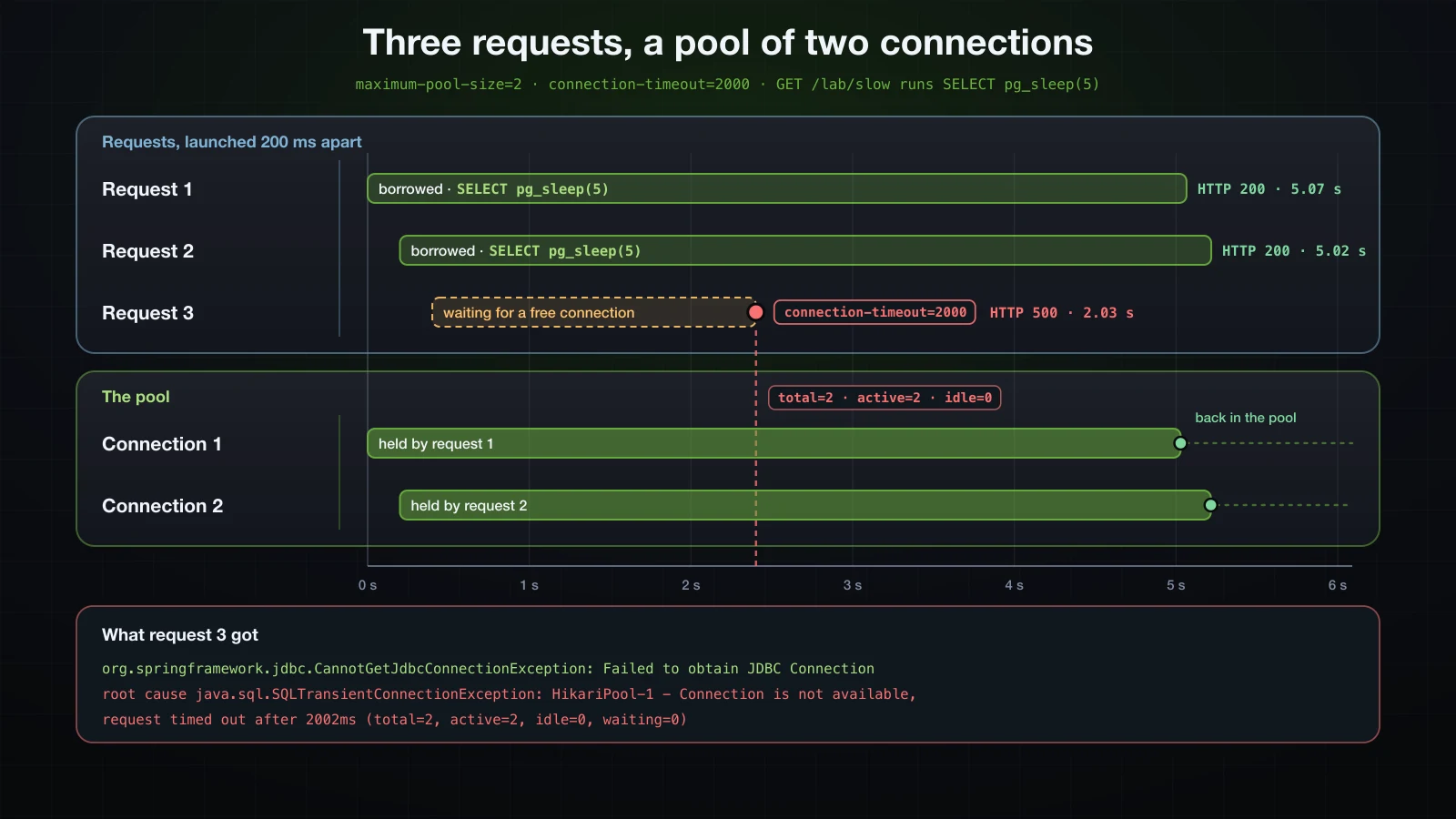
Both connections were busy (total=2, active=2, idle=0), so request 3's getConnection() waited for the full connectionTimeout, 2002 ms by HikariCP's count, and then HikariCP threw SQLTransientConnectionException, which Spring wrapped in CannotGetJdbcConnectionException. With the default connectionTimeout, request 3 would have waited 30 seconds instead of two, holding its Tomcat thread the whole time.
Why a bigger pool is not the fix
The obvious reaction is to raise maximum-pool-size. In this test that only moves the limit: every connection was busy with a five-second query, and once a larger pool is full the next request queues in exactly the same way. Each pooled connection is also a session on the database — a server process on PostgreSQL — shared with every other instance of the application and every other client, so a larger pool per instance multiplies across instances. The fix belongs where the time goes: queries that return quickly, no slow calls made while a connection is held, and a timeout short enough to fail fast. Sizing a pool from measurements is a topic for the Advanced course; until then, keep the defaults and treat Connection is not available, request timed out as a symptom to trace back to the work that held the connections.
H2 vs PostgreSQL vs MySQL in this series
| H2 | PostgreSQL | MySQL | |
|---|---|---|---|
| Role in this series | development database, dev profile | the real database, prod profile | the alternative, shown in this article only |
| Driver artifact | com.h2database:h2 (2.4.240) | org.postgresql:postgresql (42.7.13) | com.mysql:mysql-connector-j (9.7.0) |
| Driver class Boot inferred | org.h2.Driver | org.postgresql.Driver | com.mysql.cj.jdbc.Driver |
| URL format | jdbc:h2:mem:demo or jdbc:h2:file:./data/demo | jdbc:postgresql://localhost:55425/demo | jdbc:mysql://localhost:33325/demo |
| Docker image | none, runs inside the application's JVM | postgres:18 (18.6) | mysql:8.4 (8.4.11) |
FAQ
Why does Spring Boot use H2 when I did not configure a database?
Because H2 is on the classpath and spring.datasource.url is not set. Boot then points its HikariDataSource at jdbc:h2:mem: followed by a random UUID and ;DB_CLOSE_DELAY=-1;DB_CLOSE_ON_EXIT=FALSE, so every start gets a new, empty database. Set spring.datasource.url, usually in a profile, to use a real one.
How do I fix "Failed to configure a DataSource: 'url' attribute is not specified"?
Boot found neither a URL nor an embedded database. Set spring.datasource.url for your database, or add H2 for development. If the URL is in a profile file such as application-prod.properties, that profile has to be active; the error message lists the active profiles.
Why does the H2 console return 404 in Spring Boot 4?
In Boot 4 the console support is the separate spring-boot-h2console module. Without it, spring.h2.console.enabled=true is ignored without any warning and /h2-console answers 404. Add the dependency — Initializr does when you pick H2 with web — and enable the console in a development profile only.
Why does KeyHolder.getKey() throw on PostgreSQL but not on H2?
update(keyHolder) does not say which column holds the key. H2 returns only the identity column; the PostgreSQL driver returns every column of the inserted row, and getKey() throws InvalidDataAccessApiUsageException: The getKey method should only be used when a single key is returned. Name the column with update(keyHolder, "id") and read it with getKeyAs(Long.class).
Why does PostgreSQL say relation "products" does not exist when H2 worked?
schema.sql only ran on H2. spring.sql.init.mode defaults to embedded, which runs the scripts for an in-memory H2 database and skips PostgreSQL, so the repository's first query failed with BadSqlGrammarException and the root cause org.postgresql.util.PSQLException: ERROR: relation "products" does not exist. Set spring.sql.init.mode=always for PostgreSQL, with scripts that can run twice, or move to migrations as article 31 does.
Should I increase maximum-pool-size when I see "Connection is not available, request timed out"?
Not as the first step. The message means every connection stayed busy for the whole connectionTimeout. Find out what held them — in the test above, a five-second query held both — because a bigger pool only moves the point where requests start to queue, and it puts more load on the database.
Conclusion
A DataSource hands out connections, and Spring Boot's is a HikariCP pool: borrowing a connection took 0.12 ms where opening one took 2.27 ms. With no URL and H2 on the classpath, Boot points that pool at an in-memory H2 database with a generated name; with spring.datasource.url set, it uses that database and infers the driver class; with neither, startup fails. H2's in-memory mode starts empty every time, file mode keeps its data, and PostgreSQL mode accepts some PostgreSQL syntax but not ON CONFLICT (sku), RETURNING or pg_sleep. In Boot 4 the H2 console needs spring-boot-h2console, and it belongs on a developer's machine only.
PostgreSQL and MySQL run in Docker, and the dev and prod profiles switch between H2 and PostgreSQL with the password taken from DB_PASSWORD — an unset variable binds as the literal text ${DB_PASSWORD}. spring.sql.init.mode=embedded runs schema.sql and data.sql on in-memory H2 only; always runs them on PostgreSQL at every start, so they must be re-runnable. JdbcClient maps rows into records by column name, optional() and single() say how many rows to expect, update(keyHolder, "id") works on both databases, and a duplicate SKU arrives as DuplicateKeyException from either driver, now a 409. JdbcProductRepository replaced the in-memory store behind the same interface without a change to ProductService. With always, a stopped database or a wrong password stops the startup; with never, the first request finds it. HikariCP's defaults — ten connections, a 30-second wait — are best left alone until measurements say otherwise: two slow queries were enough to make a third request fail after connectionTimeout.
The next article replaces the hand-written SQL with Spring Data JPA and Hibernate: mapping Product as an entity with @Id and @GeneratedValue, and getting CRUD operations from a JpaRepository interface.
![[Spring Boot Basics] Logging in Spring Boot: SLF4J, Logback, Log Levels and Log Files](/images/blog/sb-logging-thumbnail.en.webp)
![[Spring Boot Basics] Setting Up Spring Boot: JDK, IDE, Spring Initializr and Your First Application](/images/blog/sb-setup-thumbnail.en.webp)
![[Spring Boot Basics] Common Tasks in Spring Boot: File Upload and Download, Email, @Scheduled and @Async](/images/blog/sb-common-tasks-thumbnail.en.webp)
![[Spring Boot Basics] JPA Auditing in Spring Boot: @CreatedDate, @LastModifiedDate and @CreatedBy](/images/blog/sb-auditing-thumbnail.en.webp)