
In the previous article, we learned how to save data to the phone's hard drive using AsyncStorage. But that is for long-term storage. What about data that needs immediate feedback on the screen while the user is interacting?
Imagine a very familiar scenario: You are building a shopping app. On the Product Details page, the user clicks the "Add to Cart" button. Immediately, the Cart icon located at the far right corner of the Header (which belongs to a completely different screen) must display the number 1.
How can two completely unrelated screens "wink" and transmit data to each other in a flash? Welcome to the world of Global State Management!
1. The pain of "Prop Drilling"
If you only use useState like in the first lessons, your data only lives inside a single Component. To share that data with another Component, you have to pass it through properties (Props) from parent to child.
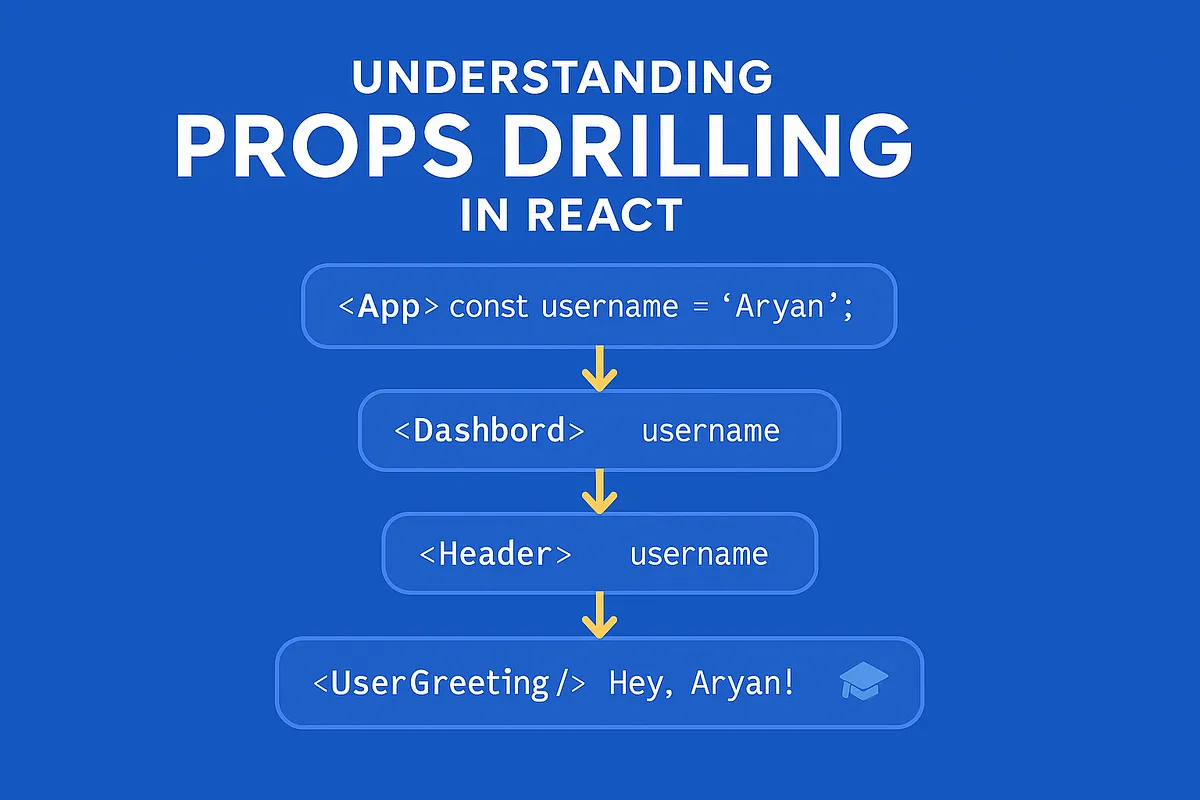
When the application grows, your component tree can be 5-6 levels deep. Having to pass a cartCount variable from App ➔ Home ➔ List ➔ Item ➔ Button just so the great-grandchild at the bottom can use it is called Prop Drilling.
This turns your code into a messy tangle that is extremely hard to maintain. Every time you rename a variable, you have to go and fix it in 6 different files!
2. The solution: The Global State "Cloud"
To end this pain, software engineers created the concept of Global State (also known as a Store).
Imagine the Store as a radio broadcasting station placed in the clouds, independent and higher than all your screens.
- When the "Add to Cart" button is clicked, it sends a signal to the broadcasting station: "Hey, add 1 to the cart!"
- The broadcasting station updates the number.
- The Cart icon on the Header (which is tuning in to the station's frequency) instantly receives the signal and automatically updates the number
1on the screen, no matter where it is located in the app.
Currently, there are two most powerful "broadcasting stations" in the React Native world: Redux Toolkit and Zustand.
3. Redux Toolkit (RTK): The choice for large projects
When mentioning React, everyone knows Redux. Redux used to be hated because it required writing overly long setup code (boilerplate). But the birth of Redux Toolkit (RTK) changed everything. RTK is the current gold standard, making writing Redux 10 times faster and easier.
Core architecture of Redux
To understand Redux, think of how you deposit money at a bank:
- Store (The Vault): Where all the data is kept. You are not allowed to reach in and take or put money yourself.
- Action (The Request Slip): The piece of paper where you write "I want to deposit 50k".
- Dispatch (Submitting the slip): The act of handing the slip to the bank teller.
- Reducer (The Bank Teller): The only person allowed to open the vault (Store), read the slip (Action), and recalculate your money.
How to install and use
Step 1: Installation
npm install @reduxjs/toolkit react-reduxStep 2: Create a Slice (A compartment of the Vault) A Slice is RTK's way of grouping Action and Reducer together neatly.
// cartSlice.js
import { createSlice } from '@reduxjs/toolkit'

export const cartSlice = createSlice({
  name: 'cart', // Name of the vault compartment
  initialState: { count: 0 }, // Initial data
  reducers: {
    // The bank tellers (handler functions)
    addToCart: (state) => {
      state.count += 1 // Add 1 item
    },
    clearCart: (state) => {
      state.count = 0 // Clear the cart
    },
  },
})

export const { addToCart, clearCart } = cartSlice.actions
export default cartSlice.reducer
Step 3: Use in a Component
Any screen can fetch or change data extremely easily using 2 Hooks: useSelector (to read) and useDispatch (to command).
import { Text, TouchableOpacity } from 'react-native'
import { useSelector, useDispatch } from 'react-redux'
import { addToCart } from './cartSlice'

export default function ProductButton() {
  const dispatch = useDispatch() // Call the bank teller

  return (
    <TouchableOpacity onPress={() => dispatch(addToCart())}>
      <Text>Add to Cart</Text>
    </TouchableOpacity>
  )
}
4. Zustand: The rising star (fast, neat, lightweight)
Even though Redux Toolkit is very good, many developers still feel it is a bit "bulky" if the application is not too complex. That's when Zustand (German for "State") stepped onto the stage and instantly became a phenomenon.

Zustand completely eliminates the cumbersome concepts of Action, Reducer, and Provider. It allows you to create a broadcasting station with just a few lines of pure React Hooks code!
Step 1: Installation
npm install zustandStep 2: Create a Store in a flash
// store.js
import { create } from 'zustand'

export const useCartStore = create((set) => ({
  count: 0, // Data
  addToCart: () => set((state) => ({ count: state.count + 1 })), // Handler function
  clearCart: () => set({ count: 0 }),
}))
Step 3: Use directly anywhere
import { Text, TouchableOpacity } from 'react-native'
import { useCartStore } from './store'

export default function Header() {
  // Fetch count data
  const count = useCartStore((state) => state.count)
  return <Text>Cart: {count}</Text>
}

export function ProductButton() {
  // Fetch add to cart function
  const addToCart = useCartStore((state) => state.addToCart)
  return (
    <TouchableOpacity onPress={addToCart}>
      <Text>Add to Cart</Text>
    </TouchableOpacity>
  )
}
Isn't it great? No need to wrap the app in a <Provider>, no need for complicated file splitting. Just call and it runs!
5. The battle of choices: Redux Toolkit or Zustand?
Are you wondering which tool to bring into your project? Here is some practical advice:
| Criteria | Redux Toolkit | Zustand |
|---|---|---|
| Learning Curve | Quite hard (Many concepts) | Extremely easy (Like using useState) |
| Amount of code (Boilerplate) | Medium - High | Very low |
| Debugging tools (DevTools) | Excellent, detailed step-by-step | Good, but not as powerful as Redux |
| Community & Documentation | Massive (Used by all companies) | Growing strongly |
| When to choose? | Large enterprise apps, highly complex logic, large teams. | Small to medium apps, personal projects, need fast/clean code. |
Recommendation for this learning series: If you are studying to apply for jobs at large companies, firmly grasp Redux Toolkit because it appears in 80% of job descriptions. If you are building your own product (Indie hacker) or a startup that needs to launch quickly, choose Zustand.
Conclusion: Global State keeps everything organized
Global State is the key to making your application's data architecture neat and organized. It frees you from the "Prop Drilling" nightmare, allowing all screens to communicate with each other in real-time.
However, there is a secret that few beginners know: Both Redux and Zustand are VERY BAD at managing data fetched from APIs (like handling Loading states, reporting network errors, in-memory caching).
To completely solve the API calling problem, we will need a "miracle" called React Query (TanStack Query). Prepare yourself for the upcoming exciting lessons!